A lot of teams are in the same position right now. The guest WiFi works, staff can connect, and a few awkward devices like printers, tills, smart TVs, tablets, or clinical equipment somehow limp along on the same wireless estate. On paper, nothing looks broken.
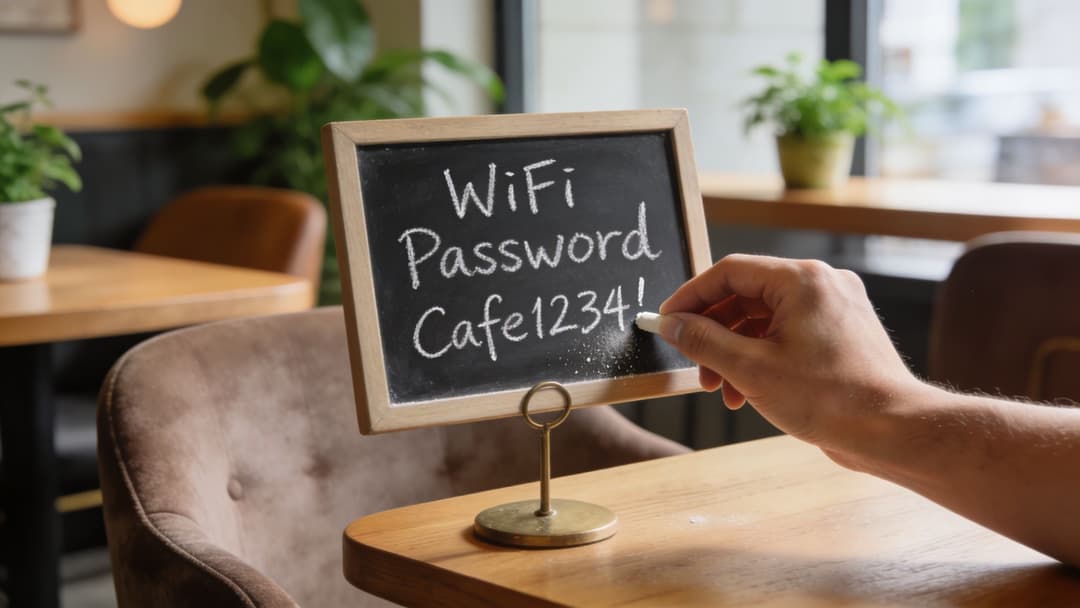
Then the cracks show. Someone leaves and still knows the shared password. A resident in a multi-tenant building plugs in their own router. A hotel access point gets reset after physical tampering. A legacy IoT device can’t use modern authentication, so the network falls back to a weaker model for everyone. What looks like a collection of separate WiFi headaches is usually one underlying problem: the network still trusts passwords more than identities.
Access point security matters because the access point is the doorway between people, devices, and your business systems. If that doorway relies on shared secrets, copied credentials, and one-size-fits-all access, security becomes brittle. If it relies on verified identity, device context, and segmented access, the same wireless network becomes easier to secure and easier to operate.
Rethinking WiFi Your First Line of Defence
A guest checks in, scans the card on reception, and joins the WiFi in seconds. A staff member uses the same wireless estate to reach payroll, email, and internal apps. A printer in the back office connects with an older method because it cannot support newer standards. From the user side, that feels normal. From the network side, it often means one access layer is trying to serve completely different trust decisions with tools built for a shared password.
That is why WiFi deserves a different level of attention. It is not just connectivity. It is the point where people, devices, and policies first meet your business systems. Unlike a wired socket tucked away in a comms room, a wireless signal reaches car parks, corridors, neighbouring offices, and public areas. Your first line of defence is also your most exposed one.
Why wireless changes the risk
An access point works like a front desk with a master key cabinet behind it. The person at the desk needs to know who is asking, what they should be allowed to reach, and whether they should be kept away from other guests and staff. If everyone presents the same password, the desk cannot make a meaningful decision. It can only confirm that someone knows the shared secret.
That creates a technical problem and an operational one.
A password-centric model blurs very different use cases into one bucket. Guests need internet access for a short period. Staff need access tied to their role and single sign-on. Legacy devices may need tightly controlled exceptions. Multi-tenant sites need one physical wireless estate with clean boundaries between organisations. These can look like separate WiFi projects, but they usually point to the same root cause: the network is still trusting passwords instead of identities.
The practical effect shows up quickly:
- Offboarding stays messy: access often depends on changing a shared key, then reconnecting devices one by one.
- User experience becomes inconsistent: staff may have one login for business apps and a different process for WiFi.
- Policy enforcement gets weaker: the network struggles to tell a guest, a clinician, a contractor, and a printer apart.
- Shared environments become harder to control: one estate has to support different organisations, residents, or departments without clear identity boundaries.
Practical rule: if many users and device types enter with the same credential, the network is identifying a password, not a person or device.
In this context, the Purple approach makes the model cleaner. Identity-based access gives the network a better question to ask at the door. Not “do you know the password?” but “who are you, what device are you using, and what should you be allowed to do?” Once WiFi is tied to identity, guest access, staff SSO, legacy device onboarding, and multi-tenant separation stop being awkward exceptions. They become different policy outcomes from the same trust model.
That shift matters to security, but it also matters to day-to-day operations. Helpdesk teams spend less time rotating credentials. Staff get a more consistent sign-in experience. Guests reach the internet without being placed near internal systems. Older devices can be contained without weakening access for everyone else. For a broader look at how that model works in practice, see this guide to secure wireless networking.
Strong access point security starts with a simple idea. Your WiFi should recognise identity, not just possession of a password.
Common Threats Lurking on Your Wireless Network
Most wireless threats become easier to understand once you stop thinking about WiFi as invisible magic and start thinking about it as a public doorway. Anyone within range can try the handle. Good access point security makes sure only the right people enter, and only into the right rooms.

Rogue access points and evil twins
A rogue access point is any unauthorised wireless device broadcasting inside or near your environment. Sometimes it’s malicious. Sometimes it’s just a well-meaning employee plugging in a cheap router to “fix” poor coverage. Either way, it creates a second, unmanaged front door.
An evil twin is worse. That’s a fake network designed to look like your legitimate SSID so users connect to it by mistake. Once they do, an attacker may observe traffic, push them to fake login pages, or disrupt service.
In the UK, rogue access points account for 28% of detected wireless interference incidents in urban enterprise environments, directly causing 15-20% packet loss in WPA2 networks due to unauthorised channel overlap and deauthentication floods, according to Splunk’s access point security overview citing Ofcom monitoring data. For a venue operator, that’s not just a security concern. It’s poor checkout experiences, frozen handheld devices, broken guest sessions, and support teams chasing “WiFi slowness” which is interference and impersonation.
Packet sniffing and exposed traffic
Packet sniffing sounds exotic, but the idea is simple. If traffic isn’t properly protected, someone nearby may be able to observe data moving across the air, much like overhearing a conversation in a crowded lobby. The more your network depends on old security modes or shared credentials, the more room there is for eavesdropping and session abuse.
Readers often get confused. They assume HTTPS alone solves the problem. It helps, but it doesn’t replace sound wireless authentication. WiFi security still determines whether users connect to the right network, whether traffic starts encrypted from the beginning, and whether devices are isolated from one another.
A secure website doesn’t compensate for a weak wireless entry process.
Deauthentication attacks and forced disconnects
A deauthentication attack kicks users off a wireless network by spoofing management frames. On its own, that’s disruptive. Combined with a fake SSID, it becomes a trap. Users get dropped from the legitimate network, reconnect in frustration, and land on the attacker’s network instead.
Three signs that this may be happening:
- Users report random disconnects in one area while the wired network is fine.
- Devices keep rejoining the same SSID but performance remains unstable.
- Support tickets cluster around busy periods when crowded radio space makes cover for interference harder to spot.
For a deeper operational view of secure SSID design, segmentation, and policy choices, Purple’s guide to secure wireless networking is a useful reference.
The Alphabet Soup of WiFi Security Standards Explained
Wireless security terminology turns people off because it arrives as a pile of acronyms. WEP, WPA2, WPA3, PSK, SAE, 802.1X, EAP-TLS. If you decode what each one is trying to fix, the picture becomes much simpler.
From broken locks to stronger doors
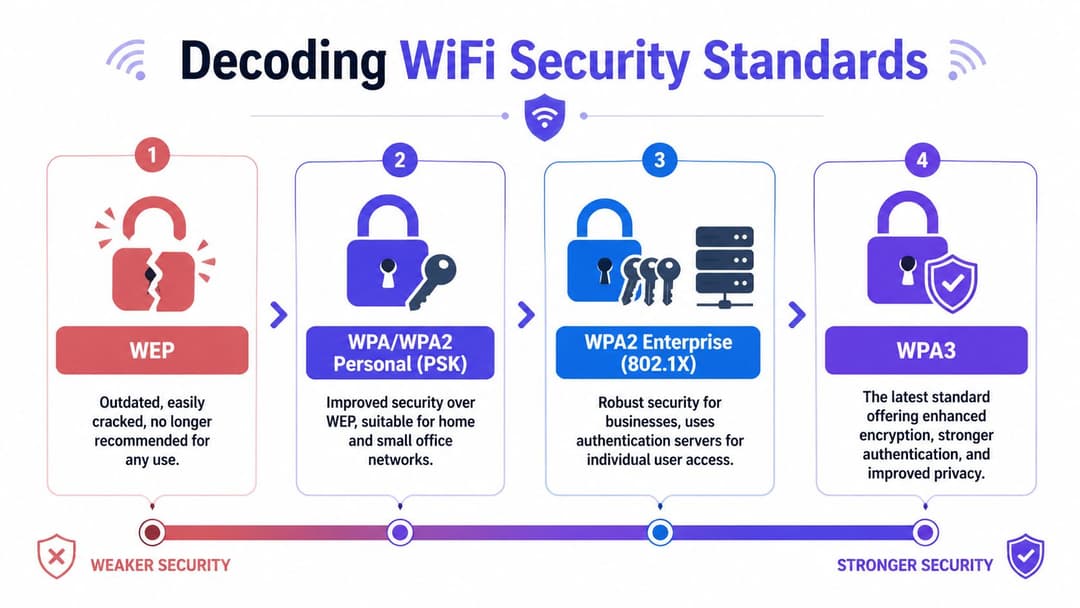
WEP is obsolete. It belongs in the same category as a front door lock everyone knows how to pick. If you still find it on a device, the right answer is replacement or isolation, not accommodation.
WPA improved on WEP, but it’s old enough that you shouldn’t build a modern enterprise design around it.
WPA2 became the long-running standard for many organisations. It’s still common, but there’s an important split inside WPA2:
- WPA2-Personal uses a pre-shared key, often one password for everyone.
- WPA2-Enterprise uses individual authentication, typically through 802.1X.
That distinction matters more than the WPA2 label itself. One model authenticates a secret. The other authenticates a person or device.
Personal versus Enterprise
A lot of buyers think “Enterprise” means expensive kit. In practice, it means a different trust model.
With PSK or pre-shared key, everyone proves access by knowing the same password. If the password leaks, the network has no way to tell whether the person connecting is a current employee, an ex-contractor, or a random device that got the code from a guest.
With 802.1X, every connection is checked individually. Consider the difference between a venue with one code on the side door and a staffed entrance where each person presents ID. The system can allow one user, reject another, place a third into a limited network segment, and log the decision properly.
Here’s the practical comparison.
| Model | Security Level | Authentication Method | Management Complexity | Ideal Use Case |
|---|---|---|---|---|
| WEP | Low | Static shared key | Low to manage, unsafe to run | None. Replace or isolate immediately |
| WPA or WPA2 Personal PSK | Moderate | Shared password | Simple at first, harder over time | Small, low-risk environments and temporary use |
| WPA2 Enterprise 802.1X | High | Per-user or per-device authentication | Higher initial setup, cleaner long term | Staff, regulated environments, business-critical WiFi |
| WPA3 | High to very high | Modern authentication with stronger protections | Depends on mode and device support | New deployments and security-focused refreshes |
What 802.1X actually does
802.1X is often explained as if everyone already runs a lab. The plain-English version is better. It’s a gatekeeper framework that checks credentials before the device gets normal network access. Those credentials might come from a username and password, a certificate, or an identity provider workflow.
That’s why 802.1X fits business environments so well:
- It supports individual accountability rather than group secrets.
- It maps access to identity so staff, guests, and devices don’t all land on the same network footing.
- It makes offboarding cleaner because access can be revoked at the identity layer, not by changing every password everywhere.
For readers comparing deployment options, Purple’s explainer on WPA and WPA2 Enterprise gives a useful operational framing.
Architect’s view: The biggest upgrade in WiFi security isn’t the cipher name. It’s moving from shared trust to per-user and per-device trust.
Why WPA3 matters
WPA3 improves wireless protection in several ways, but one of the most practical is what it does to password guessing attacks in personal mode. It uses SAE, short for Simultaneous Authentication of Equals, instead of the older handshake model used in WPA2-PSK.
That matters because the older model gave attackers more opportunity to capture material and try password guesses offline. WPA3-SAE makes that much harder. In short, it raises the cost of guessing and lowers the usefulness of intercepted handshakes.
Where possible, use WPA3-Enterprise for staff and managed business access. Use WPA3 features thoughtfully for guest and transitional environments. If older devices still force compromises, contain those compromises rather than applying them network-wide.
The hidden trap in standards discussions
Standards alone don’t guarantee access point security. You can buy modern hardware, enable a newer mode, and still end up with weak trust if the organisation keeps using shared credentials, weak onboarding, and broad lateral access.
That’s why standards should be read as tools, not outcomes. WPA3, 802.1X, certificates, and segmentation only pay off when they support a cleaner identity model.
Moving Beyond Passwords with Identity-Based Access
A visitor arrives for a client meeting, a new starter opens a laptop on day one, a contractor needs temporary access for a site survey, and a smart display in reception has to stay online all month. If all four depend on a shared WiFi password, the network is treating very different identities as if they were the same person holding the same key.
That is the primary weakness in many wireless environments. The problem is not only password strength. It is the old model behind it. Password-centric WiFi reduces trust to possession of a reusable secret, even when the business needs to distinguish between guests, staff, unmanaged devices, and tenants sharing the same building.
Identity-based access starts with a better question. Instead of asking, “Do you know the password?”, the network asks, “Who are you, what device are you using, and what should you be allowed to reach?” That change matters operationally. It reduces helpdesk resets, limits accidental over-access, and makes offboarding faster because access can follow identity records rather than waiting for someone to rotate a shared credential.
Guest access should feel easy without being anonymous
Traditional guest WiFi often creates an odd trade-off. Make it simple with a single shared password and you lose accountability. Add clumsy portal steps and the user experience suffers before the guest has even opened a browser.
A better approach ties guest access to a lightweight identity signal rather than a password passed around at reception. Passpoint and OpenRoaming work more like mobile roaming agreements than old public WiFi habits. A known user or trusted device can connect with less friction, and the network can still apply the right boundary from the first connection. Internet access stays separate from internal business systems because the policy follows the identity and context, not a broad SSID-level assumption.
That is the Purple way in practice. Guest onboarding becomes part of the same trust model as the rest of the estate, rather than a special exception with weaker controls.
Staff WiFi should follow the same identity truth as everything else
Staff access often exposes the limits of password-based WiFi most clearly. Shared pre-shared keys spread between teams, linger on unmanaged devices, and stay valid long after a role changes. The result is familiar to any IT team. Manual exceptions pile up, access reviews become guesswork, and wireless policy drifts away from the directory and SSO systems already used for applications.
Identity-backed access fixes that mismatch. If the wireless network can use Entra ID, Okta, or Google Workspace as the source of truth, joiners, movers, and leavers are handled through the same identity lifecycle already used elsewhere. WiFi stops being an isolated island of credentials and starts acting like part of the organisation’s access fabric. Purple’s guide to network access control solutions explains how that policy model works at the network edge.
Users notice the difference. Security that matches familiar sign-in patterns tends to feel more trustworthy than yet another password prompt. As noted earlier, public attitudes towards multi-factor authentication show that visible, well-designed security signals care for user data. The same principle applies on wireless networks.
Legacy and shared environments are identity problems too
Legacy printers, IoT sensors, scanners, and building systems rarely fit neatly into a staff or guest bucket. Multi-tenant sites create another version of the same challenge. One access point estate may serve several organisations, each needing separation, auditability, and different policies.
A password cannot express that detail. Identity can.
For older devices, identity may come from certificates, device profiles, MAC-based policy as a containment measure, or a dedicated onboarding flow that limits what the device can reach. For multi-tenant environments, identity allows policy by tenant, user group, device type, and time window without forcing every organisation onto the same shared trust model. The logic is similar to physical entry systems. A building should not issue one master key to every visitor, cleaner, employee, and supplier. The Wilcox Door Service access control guide shows the same principle in the physical world. Access should match role, location, and duration.
One underlying issue, one cleaner model
Guest friction, awkward SSO gaps, fragile IoT onboarding, and tenant separation often look like separate wireless problems. They are usually symptoms of one design choice. The network still trusts passwords more than identities.
Identity-based access replaces that with per-user, per-device, and per-role decisions. A guest gets internet-only access. A member of staff gets the resources tied to their role. A contractor gets a time-bounded policy. A legacy device gets the narrowest path it needs, not a broad share of the network.
That is why modern access point security is moving in this direction. It is not just a better login method. It is a way to bring guest access, staff SSO, legacy support, and multi-tenant control under one security model that fits how organisations operate.
An Enterprise-Grade Access Point Deployment Checklist
Most access point security failures don’t start with advanced exploitation. They start with ordinary shortcuts. Default credentials stay in place. Firmware lags. Guest and staff traffic mix more than they should. A physically reachable device gets reset or removed. The answer isn’t one magic setting. It’s disciplined deployment.
Start with the basics that break most often
The first checklist item is painfully simple. Change vendor defaults immediately. UK NCSC’s 2025 Wireless Security Assessment reports that default credential vulnerabilities in unpatched access points contribute to 42% of breached guest networks in healthcare and multi-tenant residential sectors, and unchanged vendor PSKs enable 85% faster brute-force access, as summarised in this wireless access security policy resource. If a network still relies on shipped credentials, every advanced control on top of it rests on weak foundations.
Then look at update discipline. Access points are infrastructure, but they’re still software-defined systems with bugs, patch cycles, and security fixes. If you don’t have a routine for firmware review, staged rollout, and rollback planning, the estate will drift into inconsistency.
A practical deployment checklist
- Use WPA3-Enterprise where your device mix supports it: This strengthens authentication and aligns better with per-user access control than shared-password models.
- Separate traffic with VLANs or equivalent policy controls: Guest, staff, operations, and IoT devices should not all sit in one flat broadcast neighbourhood.
- Manage access points centrally: Consistent policy beats perfect intentions. Central management reduces the chance that one site falls behind on settings or updates.
- Enable rogue AP detection: Your wireless estate should actively look for unauthorised radios and suspicious SSIDs, not wait for user complaints.
- Retire or isolate legacy clients: If a device can’t support modern authentication, place it in a tightly controlled segment with limited reach.
- Turn off what you don’t need: Old protocols, weak management methods, and unused SSIDs create unnecessary attack surface.
Don’t ignore physical access
Network teams sometimes talk about wireless security as if it ends at encryption. It doesn’t. If someone can touch the device, they may be able to reset it, steal it, or move it. In public-facing venues, that risk is more common than many operators expect.
Physical access control principles used for doors and restricted areas apply neatly here as well. Guidance on zoning, tamper resistance, and controlled entry in the Wilcox Door Service access control guide offers a useful mental model for thinking about network hardware placement in lobbies, corridors, plant rooms, and shared buildings.
Operational advice: Treat each access point like a small branch office. Secure the credentials, secure the software, and secure the physical box.
Questions to ask during an audit
Use these when reviewing an existing deployment with operations, facilities, and IT in the same room:
- Can we revoke one user or device without changing access for everyone else?
- Do guests, staff, and unmanaged devices have meaningfully different network paths?
- Would we know if someone installed an unauthorised access point today?
- Can a person in a public area reach, reset, or remove an access point without being noticed?
Where one platform can simplify operations
This is the point where many teams discover they don’t need more SSIDs. They need fewer shared secrets and better identity handling. One option is Purple, which supports identity-based authentication for guests and staff, integrates with directory platforms such as Entra ID and Okta, and supports approaches like iPSK for legacy devices while working with major access point vendors. Used properly, that kind of platform helps replace scattered password practices with central policy and clearer lifecycle control.
Solving WiFi Security for Complex Environments
The hardest wireless environments don’t fail because the team hasn’t heard of best practice. They fail because reality is messy. Residents bring consoles and smart speakers. Hospitals run specialist kit with old wireless stacks. Hotels need fast guest onboarding without exposing internal systems. Student housing wants home-like simplicity and enterprise-grade isolation at the same time.
Multi-tenant housing and hospitality
Take a build-to-rent property or large hotel. Each occupant expects private, simple connectivity, but the operator needs central control, support visibility, and risk containment. A single shared PSK across the whole site is easy to distribute and hard to defend. One resident shares it, one guest posts it, and one forgotten smart device keeps using it long after the original user has gone.
A better pattern is per-user, per-room, or per-device trust. That lets the network behave more like separate private spaces layered over one managed estate. The resident experience stays simple, while the operator keeps segmentation and policy in one place.
Healthcare and the legacy device problem
Healthcare environments expose the limits of password-centric design quickly. Clinical workflows often depend on devices that can’t participate neatly in full 802.1X workflows. If the answer is “put them all on the same shared password network”, the exception becomes the rule.
The UK NCSC 2025 Cyber Security Breaches Survey reports that 62% of healthcare providers and 45% of student housing operators still use shared PSKs, while iPSK can cut authentication failures by 35% in multi-tenant trials by securing legacy devices without RADIUS hassles, according to the cited Microsoft community page used in the verified dataset. That’s why iPSK, or individual pre-shared keys, matters. It gives each legacy device its own secret instead of forcing the entire category to share one. If one key is exposed, you revoke one device, not the whole population.
Shared passwords turn one weak device into everyone’s problem. iPSK contains the weakness to the device that actually needs the exception.
Staff SSO in mixed-use venues
Now add staff into the picture. In a hotel, shopping centre, or private hospital, staff move between fixed workstations, handhelds, tablets, and back-office systems. If their wireless access still depends on a memorised local password, every role change creates lag between HR reality and network reality.
With staff SSO tied to the organisation’s identity provider, the wireless estate starts behaving like the rest of the modern application stack. Access follows role. Revocation follows departure. Temporary workers can be granted controlled access without exposing permanent credentials. The network becomes easier to operate because it stops depending on manual clean-up.
A design pattern that works across awkward environments
When environments get complicated, teams often respond by piling on more SSIDs, more exceptions, and more local workarounds. That usually increases fragility.
A cleaner pattern is this:
- Identity for people: Staff and managed users authenticate through the organisation’s identity layer.
- iPSK for awkward devices: Legacy equipment gets unique credentials and limited policy scope.
- Segmentation for everything: Even trusted users don’t all need the same reach.
- Central policy control: Multi-site operators need consistent rules and fast revocation.
This is why guest access, staff SSO, legacy devices, and multi-tenant estates belong in the same conversation. They all test whether your access point security model can distinguish one identity from another without falling back to broad shared trust.
The Future of Secure and Intelligent Wireless Access
Access point security used to be framed as a technical hardening task. Change the password. Update the firmware. Lock down the settings. Those still matter, but they no longer capture the full job.
The stronger view is strategic. Wireless access is now part of customer experience, workforce productivity, tenant satisfaction, and operational resilience. If users connect securely without friction, staff lose less time, support teams handle fewer avoidable tickets, and the business can trust its own network decisions more confidently.
Security that helps operations
The right wireless design reduces complexity instead of adding to it. Identity-based access means offboarding becomes cleaner. Segmentation means one compromised device is less likely to affect unrelated systems. Better physical controls reduce tampering and mystery outages.
That last point deserves more attention than it usually gets. 28% of hospitality venues reported theft or vandalism of network hardware, yet only 12% deploy locking enclosures or raised mounts, according to the UK data cited in this British Hospitality Association summary reference. If an access point in a public venue can be reached, removed, or reset, the security conversation isn’t complete.
Where the market is heading
The direction is clear even if every estate won’t modernise at the same pace. Networks are moving away from reusable passwords and towards verified identity, certificate-backed trust, automated lifecycle control, and cleaner separation between guest, staff, and device classes.
That shift is good for security, but it’s also good for service design. A smooth guest join flow supports the venue experience. Staff SSO reduces friction. Per-device controls make awkward hardware manageable. The network stops being a bundle of exceptions and starts acting like a policy-driven system.
Access point security in 2026 isn’t about making WiFi feel locked down. It’s about making the right connection feel normal, while making the wrong connection hard, visible, and short-lived.
If you’re reviewing how to replace shared-password WiFi with a more secure identity-based model, Purple provides a practical route for guest access, staff SSO, multi-tenant environments, and legacy device support without treating them as separate problems.