WPA and WPA2 Enterprise readiness advisor
Evaluate your wireless authentication security posture, model credential risk exposure from shared pre-shared keys, and plan a seamless migration to 802.1X Cloud RADIUS and certificate authentication.
Multi-site commercial network: 11 - 50 APs, 850 devices, about 12 re-key events a year.
All 850 devices across 11 - 50 APs share an identical static passphrase, re-keyed roughly 12 times a year. When an employee or contractor leaves, keys stay valid on personal devices until the next network-wide re-key.
High. Vulnerable to offline WPA2 4-way handshake captures, dictionary attacks, and insider eavesdropping on broadcast traffic.
Conflicts with PCI DSS 4.0 Requirement 8.2.2 (no shared credentials) wherever the SSID reaches cardholder data, and with ISO 27001 individual accountability controls.
Cloud RADIUS with 802.1X EAP-TLS for managed devices, dynamic iPSK for IoT
- Deploy Cloud RADIUS against Microsoft Entra ID without an on-premises server footprint
- Issue managed device certificates via Microsoft Intune SCEP/PKCS profiles
- Segment unmanaged IoT and guest devices onto dynamic private PSKs with role-based VLAN steering
- Revoke network access the moment an account is deactivated in Microsoft Entra ID
Purple delivers hardware-agnostic 802.1X authentication across Cisco Meraki, HPE Aruba, Ruckus, Juniper Mist, and Ubiquiti UniFi networks.
You probably know the pattern. A member of staff leaves, but they still know the WiFi password. A contractor needs access for a week, so someone texts them the same password everyone else uses. A guest asks for WiFi at reception, and the answer ends up written on a card, a whiteboard, or a register receipt.
That setup feels normal because it’s common. It’s also one of the weakest parts of many business networks.
When people search for wpa wpa2 enterprise, they’re usually trying to solve a practical problem, not pass an exam in wireless security. They want to stop sharing one password with everyone. They want to remove access quickly when someone leaves. They want better control over staff, guests, residents, contractors, and devices without making WiFi harder to use.
The good news is that WPA2 Enterprise solves a very specific class of problems. It replaces the shared password model with individual authentication. That single change affects security, compliance, troubleshooting, guest experience, and day-to-day operations far more than typically anticipated.
The End of the Shared WiFi Password Problem
A shared WiFi password works fine until the business grows.
A small café with five staff can probably survive with one password for a while. A hotel group, shopping center, hospital, or Multi-Family property can’t. Once you have rotating teams, agency workers, multiple sites, guest access, IoT devices, and compliance obligations, the shared password becomes an operational liability.
The issue isn’t only that too many people know it. The issue is that everyone becomes indistinguishable. If ten people use the same key, the network can’t tell who is who in any meaningful way. You lose accountability at the exact point where sensitive systems and customer data may be nearby.
What the shared password breaks
In practice, a shared password creates three recurring problems:
- Security risk: Former staff, suppliers, and visitors may still have access long after they should’ve been removed.
- Admin overhead: Changing the password means touching every connected device, which is painful in busy venues.
- Poor experience: Staff forget it, guests ask for it, and support teams waste time repeating it.
That’s why WPA2 Enterprise matters. It isn’t just “stronger WiFi”. It’s a different operating model.
Instead of one secret for everyone, each user or device proves its own identity. The network can then decide what that identity is allowed to do. A nurse’s laptop can be treated differently from a guest phone. A retailer’s handheld scanner can land on a different segment from a resident’s smart TV. A leaver can be blocked without disrupting everyone else.
Shared-password WiFi is like using one office key for staff, guests, suppliers, and ex-employees. It’s simple right up until you need control.
That’s the starting point for understanding WPA2 Enterprise. It’s less about encryption jargon and more about replacing a blunt instrument with identity-based access.
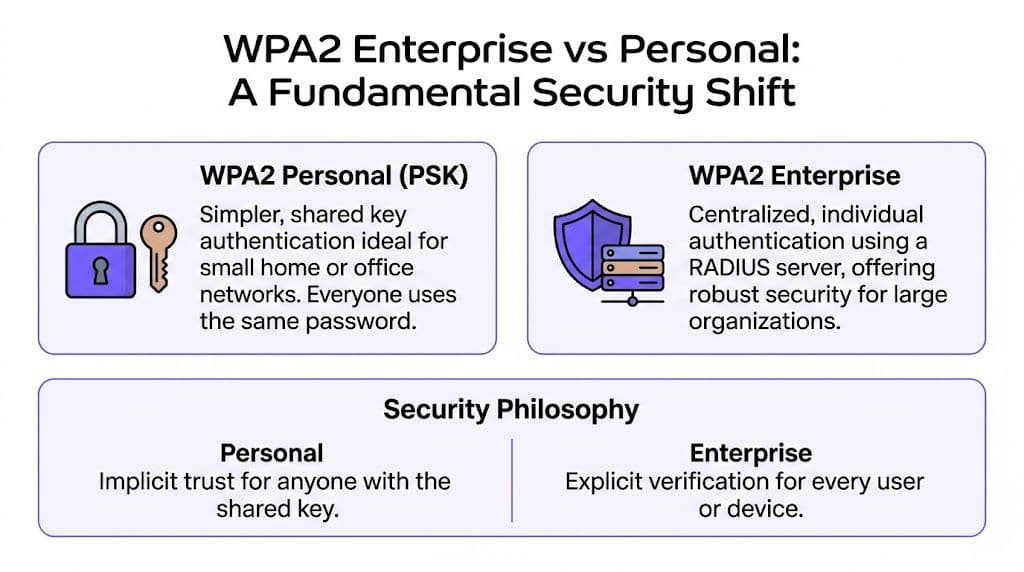
WPA2 Enterprise vs Personal - A Fundamental Security Shift
The cleanest way to understand the difference is this.
WPA2 Personal is a building with one master key copied for everyone.
WPA2 Enterprise is a hotel using individual keycards issued to specific people, with records of who accessed what and the ability to disable one card instantly.
That’s not a cosmetic improvement. It’s a fundamental security shift.
One secret versus many identities
With WPA2 Personal, everyone uses the same pre-shared key. If that key leaks, your only real response is to change it everywhere. That sounds manageable until you remember the number of laptops, handheld devices, tablets, scanners, TVs, kiosks, and personal phones attached to a modern venue.
WPA2 Enterprise changes the question from “Does this device know the password?” to “Who is this user or device, and should it be here?” That lets the network apply policy per identity, not per SSID alone.
The business case is strong. A 2024 UK Cyber Security Breaches Survey summary cited by IronWiFi states that 43% of UK businesses suffered a cyber breach in 2023, with 29% involving unsecured WiFi networks primarily using WPA2 Personal PSK. The same source says organizations using WPA2 Enterprise saw 52% fewer incidents.
Why the security model matters in multi-tenant spaces
This matters most where lots of different people and devices share the same physical airspace.
A hotel has staff devices, payment systems, guest phones, conference attendees, smart locks, signage, and back-office systems. A shopping center has tenant systems, public WiFi, facilities devices, and contractor access. A residential property has staff, residents, visitors, and smart building equipment. In all of those environments, one shared password is too crude.
Here’s the practical difference:
| Feature | WPA2 Personal (PSK) | WPA2 Enterprise (802.1X) |
|---|---|---|
| Authentication | One shared password | Individual credentials per user or device |
| Access removal | Change password for everyone | Revoke one user or device |
| Accountability | Little user-level visibility | Per-user or per-device audit trail |
| Policy control | Broad, network-level only | Identity-based access decisions |
| Best fit | Small, simple setups | Businesses and multi-tenant properties |
The hidden cost of simple
Teams often think WPA2 Personal is easier because there’s no RADIUS server, no certificate discussion, and no onboarding workflow. That’s true on day one. It often stops being true by month six.
Once the network supports different user groups, simple becomes messy. IT ends up using workarounds. Operations teams create informal exceptions. Support staff field repeat access issues. Security teams lack confidence in offboarding.
For businesses comparing options, network access control solutions are worth reviewing alongside wireless security because access control is the actual outcome you’re buying, not just a better encryption setting.
Practical rule: If your WiFi serves more than one population, such as staff and guests, or employees and residents, shared-password design usually becomes the bottleneck before coverage or bandwidth does.
Why this is called enterprise
The word “enterprise” can make this sound like something only a bank or government department would deploy.
That’s outdated thinking. The primary distinction isn’t company size. It’s whether you need individual trust, clean offboarding, and usable auditability. A single hotel, medical practice, co-working site, or retail flagship may need those things just as much as a large corporate campus.
So when someone asks whether they need wpa wpa2 enterprise, the better question is simpler. Do you want WiFi access tied to identity, or tied to a password that spreads beyond your control?
The Authentication Engine How RADIUS EAP and Certificates Work
The mechanics sound intimidating because the names are technical. The logic is straightforward once you map the roles properly.
Think of a private members’ club.
A guest walks to the door and asks to come in. The access point is the doorman. The doorman doesn’t decide who gets access. He checks with the RADIUS server, which is the club manager. The conversation between them uses EAP, which is just the language they use to verify identity. If the club uses certificates, the guest also presents a very strong form of ID.

What each part actually does
The three core pieces have separate jobs.
RADIUS is the decision-maker
RADIUS is the central authentication server. It checks whether a user or device should be allowed onto the network and can also return policy instructions, such as which VLAN to place them on.
That centralization is one reason enterprise adoption has grown. A Portnox overview of WPA2 Enterprise says 65% of US businesses with over 250 employees now deploy WPA2 Enterprise or higher for internal WiFi networks, and it links that growth to the need for 802.1X authentication, per-user revocation, and audit trails through RADIUS. The same source states this approach has helped reduce breach risks by up to 70% in sectors like hospitality.
In plain terms, RADIUS turns WiFi from “password gate” into “policy enforcement point.”
EAP is the conversation format
EAP stands for Extensible Authentication Protocol. It isn’t one single authentication method. It’s the framework that carries the authentication exchange between the device and the backend system.
That’s where many readers get confused. They hear PEAP, EAP-TLS, and TTLS and assume these are completely separate systems. They’re not. They’re different ways of proving identity within the same broader framework.
The access point doesn’t inspect those credentials itself. It passes the conversation through to the RADIUS server and waits for a yes or no.
Certificates are trusted digital ID cards
A digital certificate is like an ID card issued by an authority your systems trust. In certificate-based wireless access, the device can prove who it is without relying on a shared password.
That matters because passwords can be reused, guessed, shared, or phished. Certificates are harder to fake and easier to revoke cleanly on a per-device basis.
If a user leaves the business, you want to disable one identity. You don’t want to rebuild trust for everyone else.
What happens when a device connects
The connection process is easier to follow as a sequence:
- The device joins the SSID and says it wants access.
- The access point asks for identity information using 802.1X.
- The authentication exchange runs through EAP to the RADIUS server.
- The RADIUS server checks the credentials against a directory or certificate trust.
- If approved, the network grants access and can apply role-specific policy.
That role-specific piece is where the business value shows up. The same wireless infrastructure can treat a receptionist laptop, POS terminal, resident device, or guest handset differently without relying on separate shared passwords all over the property.
Why certificates reduce confusion and risk
Many teams hesitate when they hear "certificates" because they assume months of PKI work and brittle device setup. That can happen in traditional environments, but the underlying concept is simpler than the tooling around it.
A certificate answers two important questions at once:
- Is the device or user genuine?
- Is the network it’s talking to genuine?
That second point is easy to overlook. Good certificate-based authentication helps stop users connecting to fake lookalike networks because the client expects the genuine server identity to be presented during authentication.
For a more focused breakdown of the backend role, this explainer on what a RADIUS server does is useful if you’re evaluating architecture options.
Why business managers should care about the plumbing
This isn’t only about cryptography.
RADIUS and certificate-backed 802.1X give the business reliable offboarding, cleaner compliance evidence, less ambiguity during incident response, and better control over mixed environments. In healthcare, hospitality, and retail, those are operational issues as much as technical ones.
A shared password says, “Anyone who knows this secret is probably fine.”
An enterprise setup says, “Prove who you are, then we’ll decide what you can do.”
That is the core engine inside wpa wpa2 enterprise.
Choosing Your Authentication Method - A Practical EAP Guide
Once you’ve decided to move to enterprise WiFi, the next decision is the EAP method. This choice often dictates whether a lot of deployments become elegant or unnecessarily painful.
The short version is simple. EAP-TLS is the strongest option when you can manage certificates well. PEAP-MSCHAPv2 is often the pragmatic choice when you need to work with existing user directories and a broad mix of devices.

EAP-TLS for maximum trust
With EAP-TLS, both sides prove identity using certificates. That gives you strong mutual authentication and removes much of the weakness associated with passwords.
This is usually the best fit for:
- Managed corporate endpoints: Laptops, tablets, and cell phones issued by IT.
- High-trust environments: Healthcare, regulated operations, and sensitive internal networks.
- Zero-trust designs: Where device identity matters as much as user identity.
The trade-off is operational. You need a sound way to issue, renew, and revoke certificates. If your endpoint management is mature, that’s manageable. If it isn’t, EAP-TLS can feel heavier than teams expect.
PEAP for broad compatibility
PEAP-MSCHAPv2 wraps username and password authentication inside a TLS-encrypted tunnel. That makes it easier to integrate with existing identity systems and less disruptive during migration.
A Silicon Labs application note on WPA2 and WPA Enterprise says PEAP-MSCHAPv2 is dominant in US corporate networks and reports a 98% authentication success rate in 10,000-session tests, versus 72% for WPA2-PSK under brute-force attacks. The same source notes that the model supports granular role-based access, with automatic revocation on directory changes ensuring 100% compliance in the cited context.
That makes PEAP attractive where the business needs fast rollout and familiar identity workflows.
A simple decision lens
If you’re choosing between methods, use these questions:
| Situation | Stronger fit |
|---|---|
| Company-issued, managed devices only | EAP-TLS |
| Mixed user base with varied device ownership | PEAP |
| Highest assurance for internal staff WiFi | EAP-TLS |
| Faster migration from shared-password WiFi | PEAP |
| Need to lean on existing directory credentials | PEAP |
The best EAP method isn’t the one with the fanciest acronym. It’s the one your team can operate cleanly at scale.
Where businesses get stuck
Most confusion comes from trying to use one method for every population.
That rarely works neatly in hospitality, retail, and multifamily environments. Staff devices may justify certificate-based access. Guest devices usually need a different experience. Legacy operational devices may need an interim approach. The right design often mixes methods by use case rather than forcing one universal answer.
A practical split might look like this:
- Staff network: EAP-TLS or PEAP, tied to your directory
- Guest access: Separate workflow designed for convenience and isolation
- Legacy kit: Transitional handling while you modernize estate devices
That’s why EAP choice is a business architecture decision, not only a wireless one. You’re choosing how trust is established across very different user groups, with direct consequences for support effort and access control.
Deploying WPA2 Enterprise in the Real World
Most deployments don’t fail because 802.1X is a bad standard. They struggle because the actual environment is messy.
A hotel doesn’t have just employees with managed laptops. It has seasonal staff, guests, conference organizers, payment devices, IPTV, smart locks, signage, back-office systems, and often franchise or tenant boundaries. A shopping center has the same kind of complexity in a different form. Residential sites add residents, visitors, and long-lived consumer devices.
That’s where design discipline matters more than theory.
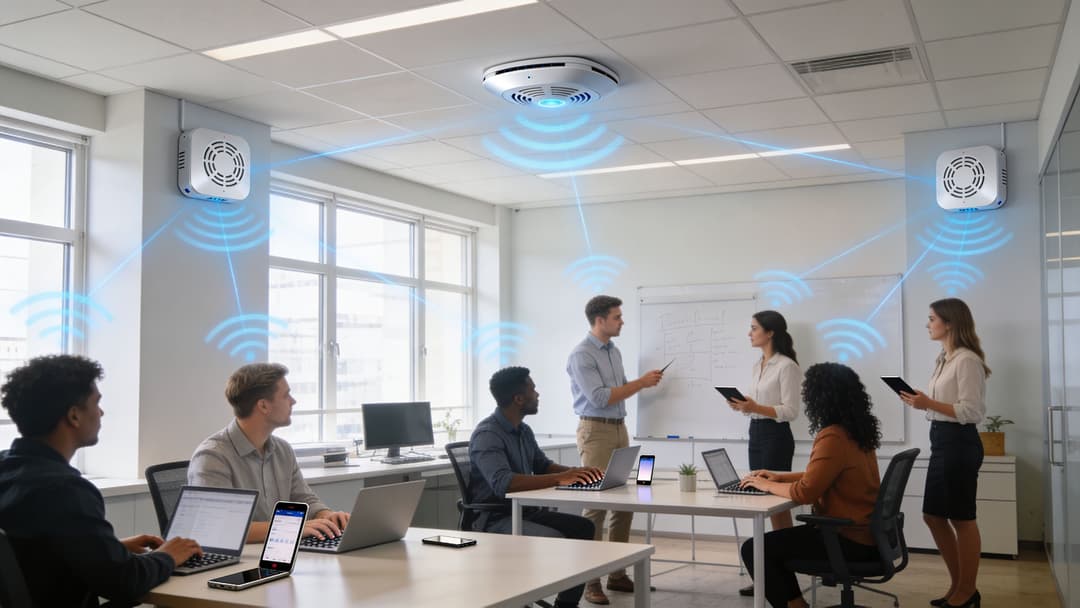
Start with identity groups, not SSIDs
A common mistake is to begin by creating lots of SSIDs for every scenario. That usually makes operations worse.
Start with identity groups instead:
- Staff: Users tied to business directories such as Entra ID or Okta
- Guests or residents: Users who need simple, isolated access
- Operational devices: Printers, scanners, displays, sensors, and specialist hardware
- Temporary users: Contractors, agency workers, event teams
Once those groups are clear, you can decide how each should authenticate and what policy follows successful authentication. The goal isn’t to make WiFi look organized on a diagram. The goal is to make access predictable and controllable.
Directory integration changes the admin burden
This is one of the most practical benefits of enterprise wireless. If WiFi access is tied to your identity platform, offboarding and onboarding become part of the same lifecycle as the rest of user access.
A DrayTek overview of WPA2 Enterprise deployment states that deployments integrating with Entra ID for automatic provisioning report 40% faster onboarding, and that UK NHS trusts reduced onboarding from weeks to hours while using dynamic VLAN assignment after authentication. The same source reports latency under 50ms for the 4-way handshake in high-density venues.
That’s not just a networking win. It reduces admin friction for operations teams and shortens the time between hiring and productive access.
What good deployment looks like
A sound deployment usually includes several layers working together.
Staff access tied to business identity
Staff should authenticate with individual identity, not a venue-wide password. That supports immediate revocation and clearer accountability.
Segmentation after authentication
Don’t stop at “allowed on WiFi”. Use successful authentication to place people and devices in the right segment. Reception, finance, facilities, and guest devices shouldn’t all land in the same place.
A plan for legacy devices
Not every device can handle modern 802.1X methods cleanly. In mixed estates, iPSK or similar transitional approaches can help keep older devices connected while preserving isolation and reducing the blast radius if one device is weak.
Operations-friendly support model
The best technical design still fails if joining the network is too awkward. Build onboarding around the people who will use it, not around ideal lab conditions.
Operational advice: If your access method needs a PDF guide for every user type, the design probably needs simplifying.
Multi-tenant reality changes the architecture
In multi-tenant environments, “secure WiFi” and “useful WiFi” have to coexist.
Retail landlords may want common infrastructure with clear separation between tenants. Hotels need simple guest access without exposing internal systems. Residential operators want connectivity that feels like home but still supports staff access, contractor visits, and building systems. Those goals push you towards identity-led design, policy-driven segmentation, and central management.
Evaluating enterprise WiFi solutions becomes broader than radio hardware alone. Access points matter, but the authentication and policy layer often determines whether the service is manageable over time.
Certificate management without turning it into a project
The phrase “certificate management” scares teams because they imagine standing up a full internal PKI before anything useful can happen.
Sometimes that level of complexity is justified. Often it isn’t. Many businesses now choose cloud-managed approaches specifically to avoid turning secure WiFi into a long infrastructure program. The goal is still strong identity, but with less burden on local IT teams.
That matters most for operators with many sites and lean support teams. They need consistency, fast rollout, and predictable support, not a custom certificate process at every location.
Operationally, the best WPA2 Enterprise deployment is the one your team can onboard, revoke, segment, and troubleshoot without heroics.
The Next Step Migrating to WPA3 and The Role of Passpoint
WPA2 Enterprise isn’t a dead end. It’s the foundation you build on.
That’s important because some teams delay action, thinking they should skip straight to WPA3. In practice, if you haven’t solved identity-based WiFi yet, waiting for the newer label often delays the more important change. The hardest step is moving away from shared secrets and towards per-user or per-device trust.
WPA3 is an evolution, not a reset
For enterprise environments, WPA3 strengthens the security model but doesn’t replace the architecture you’ve just put in place. The same 802.1X thinking still matters. The same directory integration still matters. The same policy logic still matters.
So if your business is choosing where to invest effort, the strategic move is usually to establish the enterprise framework first. Once that exists, moving forward becomes much easier.
Why hospitality and multi-tenant operators shouldn’t wait
This is especially relevant in public and semi-public venues.
A SecureW2 article discussing WPA2 Enterprise deployment challenges says 25% of hotels reported WiFi-related incidents in 2025, and notes that certificate-based authentication adoption lags at 15% in UK hotels versus 35% in the EU. The same source points to growing demand for passwordless approaches with Entra ID integration that can be deployed in weeks, not months.
Even allowing for the complexities of public venues, the direction is obvious. Shared-password WiFi doesn’t age well in environments with constant user turnover and varied device trust.
Passpoint changes the user experience
Passpoint matters because it uses the enterprise authentication backbone to make WiFi access feel almost invisible.
Instead of repeatedly selecting SSIDs, typing passwords, and landing on captive portals, users can authenticate once and reconnect securely and automatically in participating environments. For guests, residents, and repeat visitors, that changes WiFi from a nuisance into a service that simply works.
A strong authentication framework doesn’t only block the wrong users. It removes friction for the right ones.
That’s the part many technical teams understate. Identity-led wireless isn’t just more secure. It creates a better arrival experience, smoother roaming, and fewer support interactions. In sectors where repeat visits matter, that’s commercially important.
A practical migration mindset
If you’re still on shared-password WiFi, the sensible path is usually:
- Move first to enterprise authentication
- Use methods your estate can support today
- Design with future WPA3 and roaming upgrades in mind
That approach avoids the trap of treating migration as a one-time forklift project. It’s better to build a trustworthy identity layer now than to keep living with weak access control while waiting for a perfect future state.
Unlocking Secure and Intelligent Connectivity
The core idea behind wpa wpa2 enterprise is simple. Stop trusting a password. Start trusting identity.
That one change solves more than a security problem. It gives the business cleaner offboarding, better accountability, stronger segmentation, and less day-to-day friction across staff, guests, tenants, residents, and connected devices. In multi-family environments, that’s the difference between a WiFi service that merely exists and one that can be governed properly.
It also changes how leaders should think about wireless infrastructure. WiFi isn’t just coverage plus bandwidth. It’s an access layer where trust is established, policy is enforced, and user experience begins. When each user or device has a distinct identity, the network can become both safer and more useful.
For technical teams, that means fewer blunt compromises. For operational teams, it means smoother onboarding and cleaner revocation. For the wider business, it creates the conditions for better digital journeys, stronger first-party data, and more reliable service across complex estates.
The shared password was always a convenience tool. WPA2 Enterprise is an operating model.
If you’re ready to replace shared passwords with identity-based WiFi for staff, guests, and multi-family environments, Purple offers a practical route to secure, passwordless access with directory integrations, rapid deployment, support for major network vendors, and analytics that turn connectivity into measurable business value.