

WiFi नेटवर्क ट्रैफिक की निगरानी कैसे करें: आईटी टीमों के लिए एक मार्गदर्शिका
यह तकनीकी मार्गदर्शिका एंटरप्राइज WiFi ट्रैफिक की निगरानी के लिए व्यावहारिक रणनीतियाँ प्रदान करती है, जिसमें आर्किटेक्चर, सुरक्षा और परफॉरमेंस पर ध्यान केंद्रित किया गया है। यह हॉस्पिटैलिटी, रिटेल और सार्वजनिक क्षेत्रों में आईटी टीमों को स्केलेबल, सुरक्षित नेटवर्क निगरानी समाधानों को तैनात करने के लिए आवश्यक फ्रेमवर्क से लैस करती है।
🎧 Listen to this Guide
View Transcript
कार्यकारी सारांश
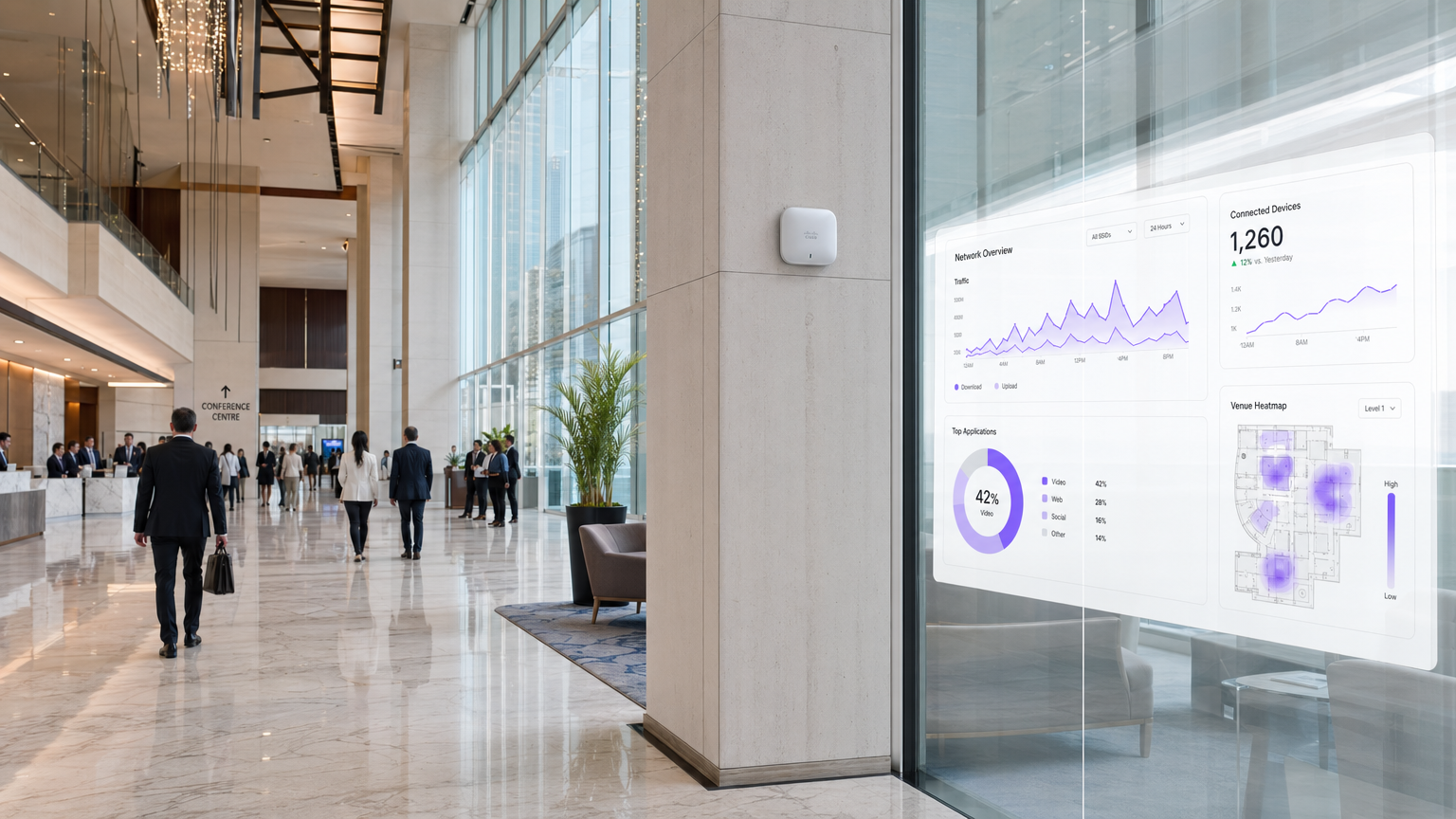
हॉस्पिटैलिटी, रिटेल और ट्रांसपोर्ट स्थानों में नेटवर्क का प्रबंधन करने वाले एंटरप्राइज आईटी लीडर्स के लिए, WiFi अब केवल एक सुविधा नहीं है; यह एक महत्वपूर्ण इन्फ्रास्ट्रक्चर है। इस ट्रैफिक की निगरानी साधारण अपटाइम जांच से कहीं बढ़कर है। एक मजबूत निगरानी आर्किटेक्चर को परफॉरमेंस और सुरक्षा दोनों सुनिश्चित करने के लिए आरएफ वातावरण, प्रमाणीकरण प्रवाह और एप्लिकेशन-लेयर ट्रैफिक में गहरी दृश्यता की आवश्यकता होती है। यह मार्गदर्शिका एंटरप्राइज-ग्रेड WiFi निगरानी को तैनात करने के लिए तकनीकी आवश्यकताओं और आर्किटेक्चरल विचारों को रेखांकित करती है। हम नेटवर्क दृश्यता की पांच महत्वपूर्ण परतों, Purple के Guest WiFi समाधान जैसे पहचान और एनालिटिक्स प्लेटफॉर्म के एकीकरण, और एक सहज उपयोगकर्ता अनुभव प्रदान करते हुए जोखिम को कम करने के लिए आवश्यक रणनीतियों का पता लगाते हैं। इन फ्रेमवर्क को अपनाकर, सीटीओ और नेटवर्क आर्किटेक्ट रिएक्टिव समस्या निवारण से प्रोएक्टिव क्षमता योजना और खतरे का पता लगाने की ओर बढ़ सकते हैं।
तकनीकी गहन विश्लेषण
प्रभावी WiFi ट्रैफिक निगरानी के लिए एक बहु-स्तरीय दृष्टिकोण की आवश्यकता होती है, जो भौतिक एयरस्पेस से लेकर एप्लिकेशन लेयर तक डेटा कैप्चर करता है। डिवाइस की स्थिति के लिए केवल SNMP पोलिंग पर निर्भर रहने से उपयोगकर्ता व्यवहार और नेटवर्क स्वास्थ्य को समझने में महत्वपूर्ण ब्लाइंड स्पॉट रह जाते हैं।
दृश्यता की पांच परतें
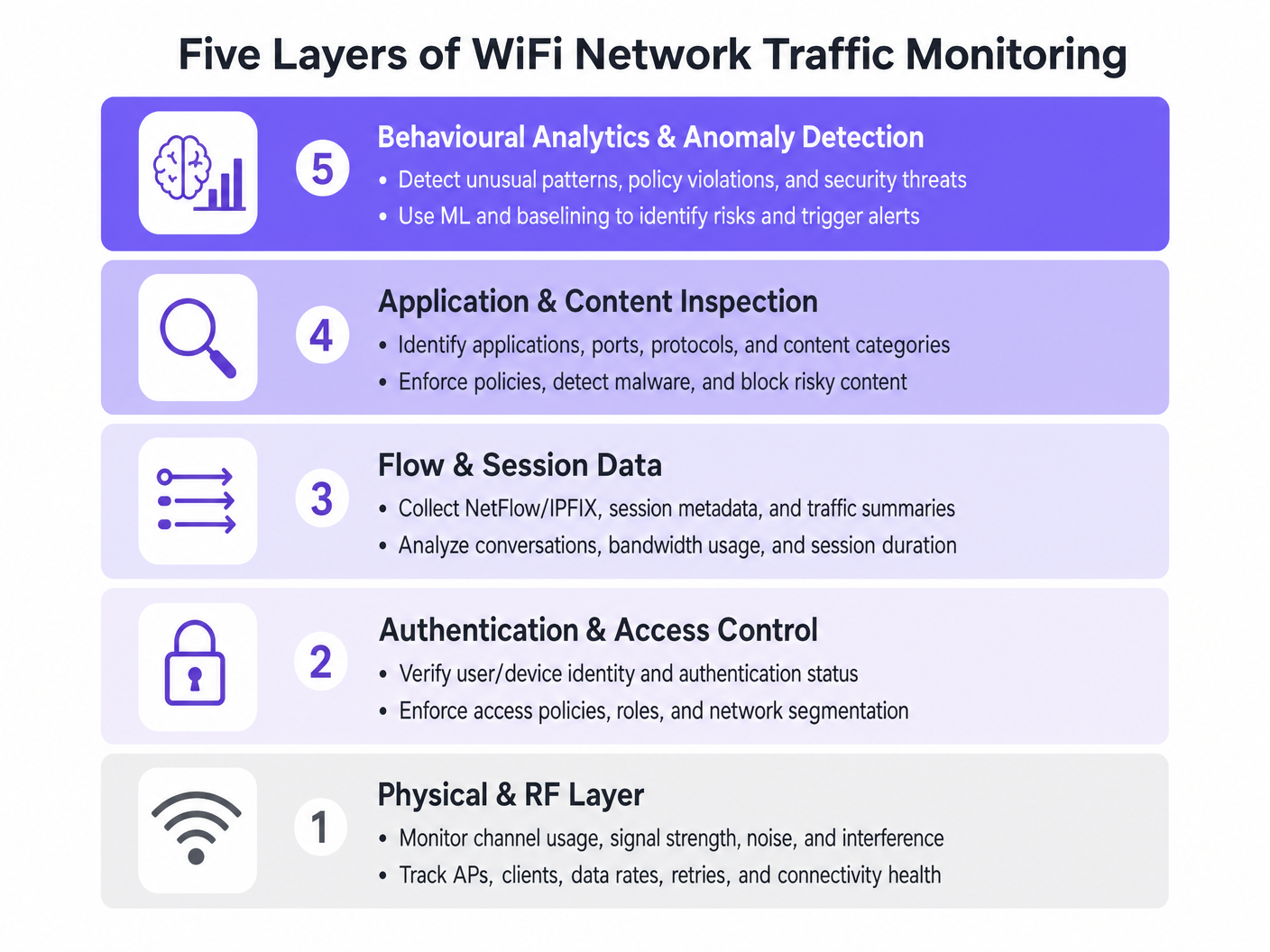
- भौतिक और आरएफ परत: इस मूलभूत परत में चैनल उपयोग, सिग्नल-टू-नॉइज़ अनुपात (एसएनआर), और सह-चैनल हस्तक्षेप की निगरानी शामिल है। उपकरणों को क्लाइंट डेटा दरों और रिट्राई प्रतिशत को ट्रैक करना चाहिए। उच्च रिट्राई दरें अक्सर बैंडविड्थ संतृप्ति होने से बहुत पहले आरएफ समस्याओं का संकेत देती हैं।
- प्रमाणीकरण और एक्सेस कंट्रोल: RADIUS लॉग और 802.1X लेनदेन की निगरानी महत्वपूर्ण है। प्रमाणीकरण विलंबता और विफलता दरों का विश्लेषण करके, टीमें मुद्दों को डायरेक्टरी सेवा या वायरलेस इन्फ्रास्ट्रक्चर तक सीमित कर सकती हैं। यह विशेष रूप से तब प्रासंगिक है जब BYOD WiFi Security: अपने नेटवर्क पर व्यक्तिगत उपकरणों को सुरक्षित रूप से कैसे अनुमति दें को लागू किया जा रहा हो।
- फ्लो और सेशन डेटा: NetFlow, IPFIX, और sFlow जैसे प्रोटोकॉल का उपयोग करने से पूर्ण पैकेट कैप्चर के ओवरहेड के बिना नेटवर्क वार्तालापों के बारे में मेटाडेटा मिलता है। यह डेटा शीर्ष बात करने वालों, बैंडविड्थ खपत के रुझानों और असामान्य ट्रैफिक पैटर्न को प्रकट करता है।
- एप्लिकेशन और कंटेंट इंस्पेक्शन: वायरलेस लैन कंट्रोलर या फ़ायरवॉल स्तर पर डीप पैकेट इंस्पेक्शन (डीपीआई) आईटी टीमों को विशिष्ट एप्लिकेशन की पहचान करने की अनुमति देता है (उदाहरण के लिए, कॉर्पोरेट वीओआईपी और उपभोक्ता वीडियो स्ट्रीमिंग के बीच अंतर करना)। यह दृश्यता क्वालिटी ऑफ सर्विस (क्यूओएस) नीतियों को लागू करने के लिए आवश्यक है।
- व्यवहारिक एनालिटिक्स और विसंगति का पता लगाना: सबसे उन्नत परत सामान्य नेटवर्क व्यवहार को बेसलाइन करने के लिए मशीन लर्निंग का उपयोग करती है। जब कोई डिवाइस अपनी बेसलाइन से विचलित होता है—जैसे कि एक IoT डिवाइस अचानक बड़ी मात्रा में डेटा प्रसारित करता है—तो सिस्टम एक अलर्ट ट्रिगर करता है, जिससे त्वरित घटना प्रतिक्रिया में सुविधा होती है।
आर्किटेक्चरल एकीकरण
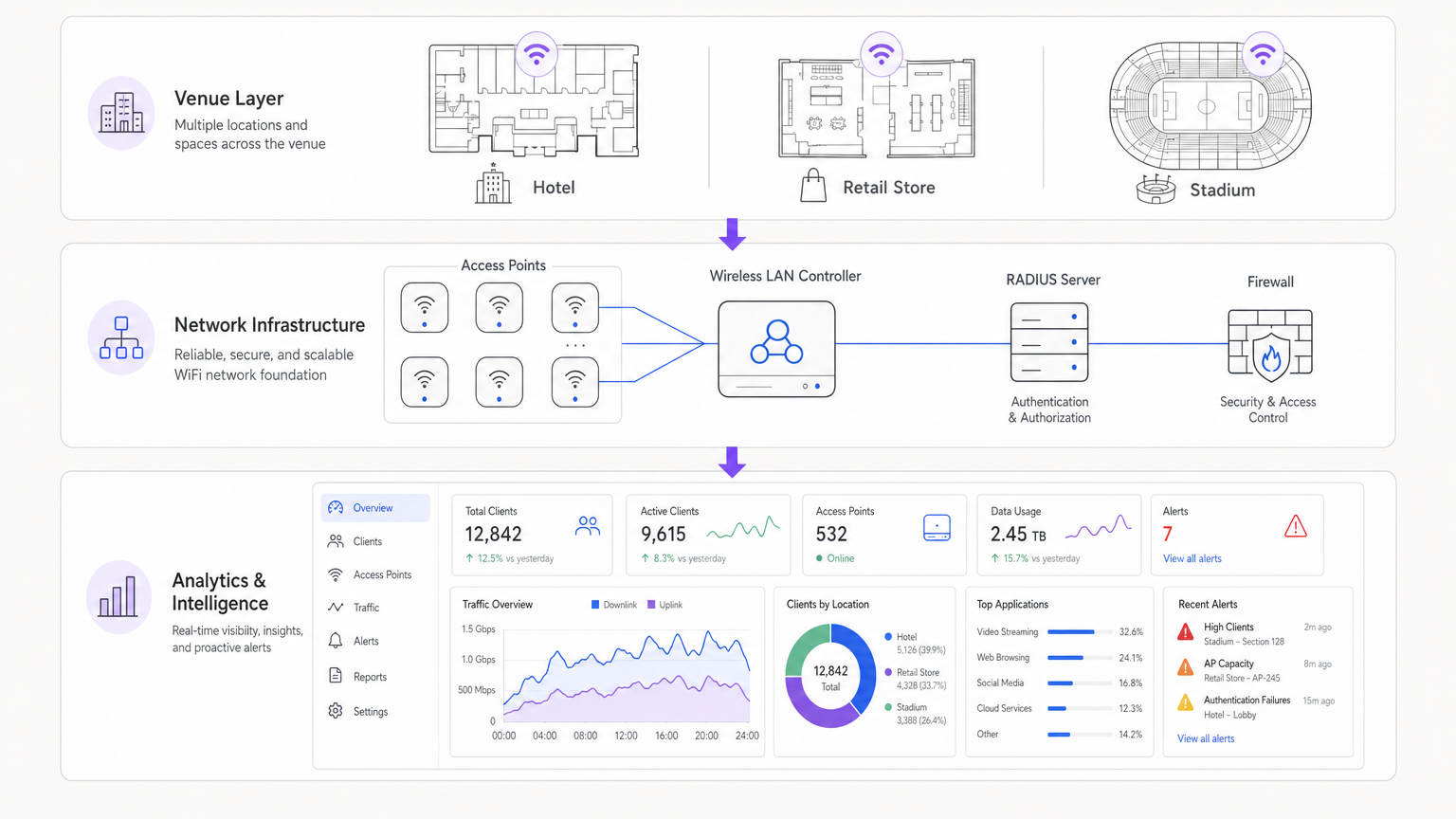
आधुनिक आर्किटेक्चर वितरित एक्सेस पॉइंट से टेलीमेट्री डेटा को केंद्रीकृत करते हैं। चाहे क्लाउड-प्रबंधित समाधान का उपयोग किया जा रहा हो या ऑन-प्रिमाइसेस कंट्रोलर का, लॉग को SIEM (सुरक्षा सूचना और इवेंट प्रबंधन) या समर्पित एनालिटिक्स प्लेटफॉर्म में एकत्रित करना महत्वपूर्ण है। Purple के WiFi Analytics जैसे पहचान प्रदाताओं को एकीकृत करना, उपयोगकर्ता संदर्भ के साथ कच्चे नेटवर्क डेटा को समृद्ध करता है, एक आईपी एड्रेस को एक कार्रवाई योग्य उपयोगकर्ता प्रोफ़ाइल में बदल देता है।
कार्यान्वयन मार्गदर्शिका
एक व्यापक निगरानी समाधान को तैनात करने के लिए नेटवर्क संसाधनों को अभिभूत करने या अलर्ट थकान उत्पन्न करने से बचने के लिए सावधानीपूर्वक योजना की आवश्यकता होती है।
चरण 1: टेलीमेट्री आवश्यकताओं को परिभाषित करें
निर्धारित करें कि आपका इन्फ्रास्ट्रक्चर किन प्रोटोकॉल का समर्थन करता है। कोर स्विच और फ़ायरवॉल पर NetFlow/IPFIX सक्षम करें, और एक्सेस पॉइंट को syslog और आरएफ मेट्रिक्स को एक केंद्रीय कलेक्टर को अग्रेषित करने के लिए कॉन्फ़िगर करें।
चरण 2: नेटवर्क सेगमेंटेशन लागू करें
ट्रैफिक को अलग-अलग VLANs में अलग करें: कॉर्पोरेट, गेस्ट और IoT। प्रत्येक पर अलग-अलग निगरानी प्रोफाइल लागू करें। उदाहरण के लिए, स्वीकार्य उपयोग नीतियों को लागू करने के लिए गेस्ट नेटवर्क पर डीप पैकेट इंस्पेक्शन को भारी रूप से लागू किया जा सकता है, जबकि IoT सेगमेंट के लिए फ्लो डेटा पर्याप्त है।
चरण 3: पहचान एकीकरण कॉन्फ़िगर करें
अपने नेटवर्क निगरानी उपकरणों को अपने प्रमाणीकरण बैकएंड से लिंक करें। अस्पतालों में WiFi: सुरक्षित क्लिनिकल नेटवर्क के लिए एक मार्गदर्शिका जैसे जटिल डिप्लॉयमेंट का प्रबंधन करते समय, एक विशिष्ट उपयोगकर्ता भूमिका (जैसे, चिकित्सक बनाम रोगी) के साथ एक मैक एड्रेस को सहसंबंधित करना त्वरित समस्या निवारण के लिए आवश्यक है।
चरण 4: अलर्टिंग थ्रेशोल्ड को ट्यून करें
स्थिर थ्रेशोल्ड से बचें जो पीक आवर्स के दौरान गलत पॉजिटिव ट्रिगर करते हैं। जहां संभव हो, डायनामिक बेसलाइनिंग लागू करें। महत्वपूर्ण अलर्ट (जैसे, कंट्रोलर ऑफ़लाइन, बड़े पैमाने पर प्रमाणीकरण विफलताएं) से शुरू करें और धीरे-धीरे परफॉरमेंस-आधारित अलर्ट (जैसे, उच्च चैनल उपयोग) पेश करें जैसे-जैसे आप अपने नेटवर्क की बेसलाइन को समझते हैं।
सर्वोत्तम अभ्यास
- पैकेट कैप्चर पर फ्लो डेटा को प्राथमिकता दें: पूर्ण पैकेट कैप्चर संसाधन-गहन है और अक्सर नियमित निगरानी के लिए अनावश्यक होता है। अपनी 90% दृश्यता आवश्यकताओं के लिए NetFlow/IPFIX पर निर्भर रहें।
- रोल-आधारित एक्सेस कंट्रोल (RBAC) लागू करें: सुनिश्चित करें कि केवल अधिकृत कर्मियों को संवेदनशील निगरानी डैशबोर्ड तक पहुंच प्राप्त हो, विशेष रूप से वे जो उपयोगकर्ता पहचान डेटा प्रदर्शित करते हैं।
- DPI सिग्नेचर की नियमित समीक्षा करें: एप्लिकेशन सिग्नेचर बार-बार बदलते रहते हैं। सुनिश्चित करें कि आपके DPI इंजन सटीक ट्रैफिक बनाए रखने के लिए स्वचालित रूप से अपडेट किए जाते हैं।आईसी वर्गीकरण।
- हार्डवेयर पर विचार करें: इंफ्रास्ट्रक्चर का चयन करते समय, जैसा कि Your Guide to a Wireless Access Point Ruckus में बताया गया है, सुनिश्चित करें कि APs में क्लाइंट परफॉरमेंस को कम किए बिना लोकल ट्रैफिक इंस्पेक्शन को संभालने के लिए पर्याप्त प्रोसेसिंग पावर हो।
समस्या निवारण और जोखिम न्यूनीकरण
सामान्य विफलता मोड
- अलर्ट फ़टीग: जब मॉनिटरिंग सिस्टम बहुत अधिक शोर उत्पन्न करते हैं, तो महत्वपूर्ण अलर्ट छूट जाते हैं। न्यूनीकरण: संबंधित घटनाओं को समूहबद्ध करने के लिए अलर्ट कोरिलेशन इंजन लागू करें।
- एन्क्रिप्टेड ट्रैफिक में ब्लाइंड स्पॉट: जैसे-जैसे अधिक ट्रैफिक HTTPS और TLS 1.3 में बदलता है, पेलोड इंस्पेक्शन मुश्किल हो जाता है। न्यूनीकरण: एप्लिकेशन उपयोग का अनुमान लगाने के लिए SNI (सर्वर नेम इंडिकेशन) राउटिंग, DNS क्वेरीज़ और फ्लो मेटाडेटा पर निर्भर रहें।
- संसाधन की कमी: अंडर-प्रोविजन्ड कंट्रोलर पर DPI सक्षम करने से CPU स्पाइक्स और पैकेट ड्रॉप हो सकते हैं। न्यूनीकरण: हार्डवेयर का उचित आकार निर्धारित करें या इंस्पेक्शन को डेडिकेटेड सिक्योरिटी अप्लायंसेज पर ऑफलोड करें।
ROI और व्यावसायिक प्रभाव
मजबूत WiFi मॉनिटरिंग के लिए निवेश पर रिटर्न को जोखिम न्यूनीकरण और परिचालन दक्षता में मापा जाता है। उपयोगकर्ताओं को प्रभावित करने से पहले RF समस्याओं की पहचान और समाधान करके, वेन्यू हेल्पडेस्क टिकट कम करते हैं और राजस्व धाराओं की रक्षा करते हैं। इसके अलावा, Purple जैसे प्लेटफॉर्म के साथ नेटवर्क मॉनिटरिंग को एकीकृत करने से व्यवसायों को मार्केटिंग और परिचालन संबंधी जानकारी के लिए अपने इंफ्रास्ट्रक्चर का लाभ उठाने की अनुमति मिलती है, जिससे IT एक लागत केंद्र से एक रणनीतिक संपत्ति में बदल जाता है। चाहे रिटेल स्टोर में डिप्लॉय कर रहे हों या Your Guide to Enterprise In Car Wi Fi Solutions की खोज कर रहे हों, परफॉरमेंस के लिए विजिबिलिटी महत्वपूर्ण है।
ब्रीफिंग सुनें
Key Terms & Definitions
NetFlow / IPFIX
Network protocols used to collect IP traffic information and monitor network flow. They provide metadata about conversations (source, destination, ports) without capturing the payload.
Essential for identifying top talkers and bandwidth consumption trends without the overhead of full packet capture.
Deep Packet Inspection (DPI)
A form of computer network packet filtering that examines the data part of a packet as it passes an inspection point, searching for protocol non-compliance, viruses, spam, intrusions, or predefined criteria.
Used to identify specific applications (e.g., Netflix vs. Zoom) to enforce granular QoS policies on guest networks.
RADIUS
Remote Authentication Dial-In User Service. A networking protocol that provides centralised Authentication, Authorization, and Accounting (AAA) management.
RADIUS logs are the first place IT teams look when troubleshooting 802.1X authentication failures or latency issues.
Co-Channel Interference (CCI)
Interference caused when two or more access points are operating on the same frequency channel within range of each other, forcing them to share the airtime.
A primary cause of poor WiFi performance in dense deployments like stadiums or conference centres.
Band Steering
A feature in wireless networks that encourages dual-band clients to connect to the less congested 5GHz or 6GHz bands rather than the crowded 2.4GHz band.
Crucial for optimising RF performance and ensuring a better user experience in high-density environments.
VLAN Segmentation
The practice of dividing a physical network into multiple logical networks to isolate traffic for security and performance reasons.
Fundamental for separating secure corporate or POS traffic from untrusted guest WiFi traffic.
Quality of Service (QoS)
Technologies that manage data traffic to reduce packet loss, latency and jitter on the network, prioritising specific types of data.
Used to ensure business-critical applications (like VoIP or POS transactions) perform reliably even when the network is congested.
Alert Fatigue
The phenomenon where IT staff become desensitised to safety alerts because they are exposed to a large number of frequent alarms.
A major risk in network monitoring; mitigated by tuning thresholds and correlating events.
Case Studies
A 200-room hotel is experiencing intermittent connectivity issues during peak evening hours. The basic dashboard shows all APs are online, but guests report slow speeds.
- Check RF Layer: Analyse channel utilisation and co-channel interference on the 2.4GHz and 5GHz bands. High utilisation on 2.4GHz is common; ensure band steering is forcing capable clients to 5GHz.
- Review Flow Data: Identify top talkers. In this scenario, flow data reveals a small number of devices consuming 70% of the bandwidth via peer-to-peer file sharing.
- Apply Policy: Implement an application control policy via the WLAN controller to throttle P2P traffic, immediately freeing up bandwidth for other guests.
A large retail chain needs to ensure its point-of-sale (POS) terminals have priority over guest WiFi traffic during a major sales event.
- Network Segmentation: Ensure POS terminals and guest traffic are on separate VLANs and SSIDs.
- Quality of Service (QoS): Configure QoS policies on the wireless controller and upstream switches to prioritise traffic originating from the POS VLAN.
- Application Inspection: Implement DPI on the guest network to block bandwidth-heavy applications like 4K video streaming during the event.
- Monitoring: Set up specific dashboards to monitor the latency and packet loss specifically for the POS subnet.
Scenario Analysis
Q1. Your network monitoring dashboard alerts you to a sudden, massive spike in bandwidth utilisation on the guest network at a retail location. The traffic is entirely encrypted (HTTPS). How do you determine the nature of the traffic?
💡 Hint:Consider what metadata is available even when the payload is encrypted.
Show Recommended Approach
While the payload is encrypted, you can use flow data (NetFlow/IPFIX) to identify the destination IP addresses and ports. Correlating this with DNS query logs or using Server Name Indication (SNI) data from the firewall will reveal the domain names being accessed, allowing you to determine if the traffic is legitimate (e.g., a large OS update) or unauthorized.
Q2. A stadium deployment is experiencing poor performance during events. The dashboard shows high channel utilisation on the 2.4GHz band, but relatively low utilisation on the 5GHz band. What is the most appropriate configuration change?
💡 Hint:Think about how to balance the load across available frequencies.
Show Recommended Approach
Implement and aggressively tune Band Steering on the wireless LAN controllers. This will force dual-band capable client devices to connect to the less congested 5GHz band, freeing up airtime on the 2.4GHz band for legacy devices that only support 2.4GHz.
Q3. You are deploying a new monitoring solution and want to avoid alert fatigue for the network operations centre (NOC). How should you approach configuring alerts for AP offline events?
💡 Hint:Consider the impact of a single AP failing versus multiple APs.
Show Recommended Approach
Instead of alerting on every single AP that goes offline (which might happen briefly due to PoE resets or minor switch issues), configure the system to alert based on density or critical areas. For example, trigger an alert only if multiple APs in the same zone go offline simultaneously, or if a specifically tagged 'critical' AP (e.g., covering the main lobby) drops.




