

Wie man WiFi-Netzwerkverkehr überwacht: Ein Leitfaden für IT-Teams
Dieser technische Leitfaden bietet umsetzbare Strategien zur Überwachung des WiFi-Verkehrs in Unternehmen, mit Fokus auf Architektur, Sicherheit und Leistung. Er stattet IT-Teams in den Bereichen Gastgewerbe, Einzelhandel und öffentlicher Sektor mit den notwendigen Frameworks aus, um skalierbare, sichere Netzwerküberwachungslösungen bereitzustellen.
🎧 Diesen Leitfaden anhören
Transkript anzeigen
Zusammenfassung für Führungskräfte
Für IT-Führungskräfte in Unternehmen, die Netzwerke in Gastgewerbe , Einzelhandel und Transport verwalten, ist WiFi keine einfache Annehmlichkeit mehr; es ist eine kritische Infrastruktur. Die Überwachung dieses Verkehrs geht weit über einfache Verfügbarkeitsprüfungen hinaus. Eine robuste Überwachungsarchitektur erfordert tiefe Einblicke in die RF-Umgebung, Authentifizierungsabläufe und den Anwendungs-Layer-Verkehr, um sowohl Leistung als auch Sicherheit zu gewährleisten. Dieser Leitfaden beschreibt die technischen Anforderungen und architektonischen Überlegungen für die Bereitstellung einer unternehmensweiten WiFi-Überwachung. Wir untersuchen die fünf kritischen Schichten der Netzwerksichtbarkeit, die Integration von Identitäts- und Analyseplattformen wie der Guest WiFi -Lösung von Purple und die Strategien, die erforderlich sind, um Risiken zu mindern und gleichzeitig ein nahtloses Benutzererlebnis zu bieten. Durch die Übernahme dieser Frameworks können CTOs und Netzwerkarchitekten von der reaktiven Fehlerbehebung zur proaktiven Kapazitätsplanung und Bedrohungserkennung übergehen.
Technischer Einblick
Eine effektive WiFi-Verkehrsüberwachung erfordert einen mehrschichtigen Ansatz, der Daten vom physischen Luftraum bis zur Anwendungsschicht erfasst. Sich ausschließlich auf SNMP-Abfragen für den Gerätestatus zu verlassen, hinterlässt erhebliche blinde Flecken beim Verständnis des Benutzerverhaltens und der Netzwerkgesundheit.
Die fünf Sichtbarkeitsebenen
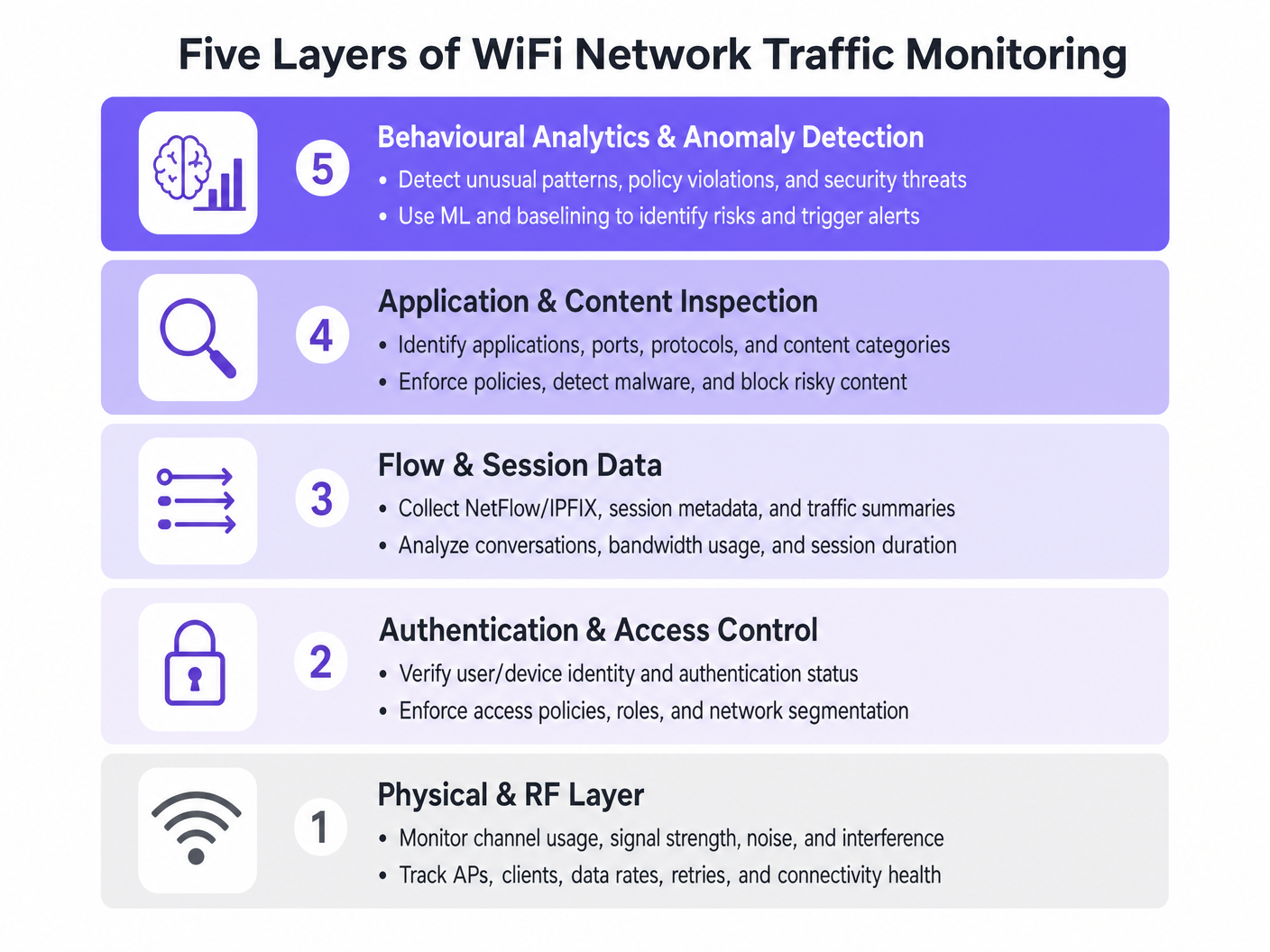
- Physische & HF-Schicht: Diese grundlegende Schicht umfasst die Überwachung der Kanalnutzung, des Signal-Rausch-Verhältnisses (SNR) und der Gleichkanalinterferenz. Tools müssen die Client-Datenraten und Wiederholungsraten verfolgen. Hohe Wiederholungsraten weisen oft auf HF-Probleme hin, lange bevor eine Bandbreitensättigung auftritt.
- Authentifizierung & Zugriffskontrolle: Die Überwachung von RADIUS-Protokollen und 802.1X-Transaktionen ist entscheidend. Durch die Analyse von Authentifizierungslatenz und Fehlerraten können Teams Probleme auf den Verzeichnisdienst oder die drahtlose Infrastruktur eingrenzen. Dies ist besonders relevant bei der Implementierung von BYOD WiFi-Sicherheit: So lassen Sie persönliche Geräte sicher in Ihr Netzwerk .
- Flow- & Sitzungsdaten: Die Verwendung von Protokollen wie NetFlow, IPFIX und sFlow liefert Metadaten über Netzwerkkommunikationen ohne den Overhead einer vollständigen Paketerfassung. Diese Daten zeigen die größten Datenverbraucher, Bandbreitenverbrauchstrends und ungewöhnliche Verkehrsmuster auf.
- Anwendungs- & Inhaltsinspektion: Deep Packet Inspection (DPI) auf der Ebene des Wireless LAN Controllers oder der Firewall ermöglicht es IT-Teams, spezifische Anwendungen zu identifizieren (z. B. Unterscheidung zwischen Unternehmens-VoIP und Verbraucher-Video-Streaming). Diese Sichtbarkeit ist unerlässlich für die Durchsetzung von Quality of Service (QoS)-Richtlinien.
- Verhaltensanalyse & Anomalieerkennung: Die fortschrittlichste Schicht verwendet maschinelles Lernen, um das normale Netzwerkverhalten zu baselinen. Wenn ein Gerät von seiner Baseline abweicht – wie z. B. ein IoT-Gerät, das plötzlich große Datenmengen überträgt – löst das System einen Alarm aus, was eine schnelle Reaktion auf Vorfälle ermöglicht.
Architektonische Integration
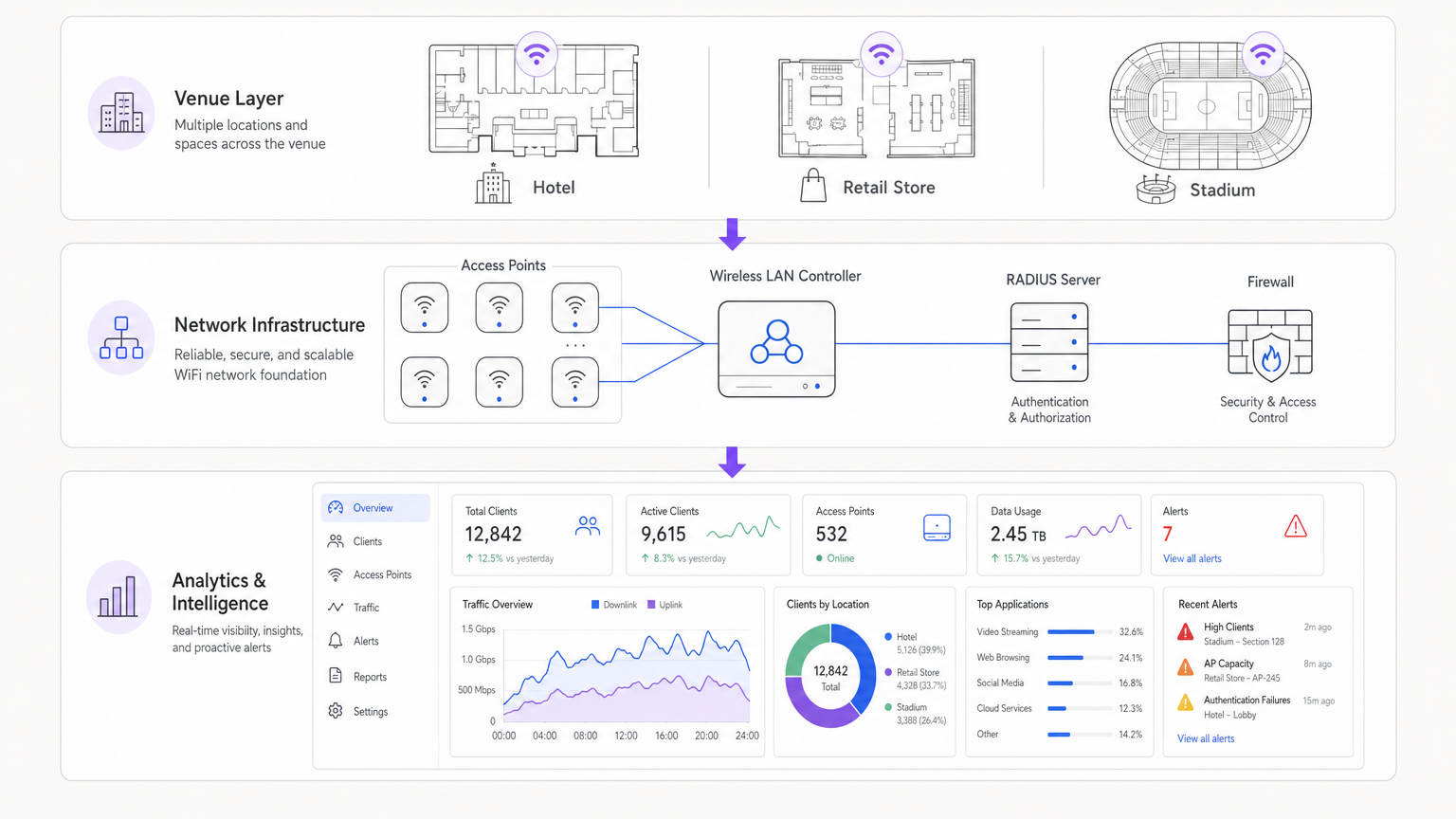
Moderne Architekturen zentralisieren Telemetriedaten von verteilten Access Points. Ob eine Cloud-verwaltete Lösung oder ein On-Premises-Controller verwendet wird, die Aggregation von Protokollen in einem SIEM (Security Information and Event Management) oder einer dedizierten Analyseplattform ist entscheidend. Die Integration von Identitätsanbietern, wie Purple's WiFi Analytics , reichert Rohnetzwerkdaten mit Benutzerkontext an und verwandelt eine IP-Adresse in ein umsetzbares Benutzerprofil.
Implementierungsleitfaden
Die Bereitstellung einer umfassenden Überwachungslösung erfordert eine sorgfältige Planung, um eine Überlastung der Netzwerkressourcen oder eine Alarmmüdigkeit zu vermeiden.
Schritt 1: Telemetrie-Anforderungen definieren
Bestimmen Sie, welche Protokolle Ihre Infrastruktur unterstützt. Aktivieren Sie NetFlow/IPFIX auf Core-Switches und Firewalls und konfigurieren Sie Access Points so, dass sie Syslog- und HF-Metriken an einen zentralen Collector weiterleiten.
Schritt 2: Netzwerksegmentierung implementieren
Isolieren Sie den Verkehr in separate VLANs: Corporate, Guest und IoT. Wenden Sie auf jedes Segment unterschiedliche Überwachungsprofile an. Zum Beispiel könnte Deep Packet Inspection stark auf das Guest-Netzwerk angewendet werden, um Richtlinien zur akzeptablen Nutzung durchzusetzen, während Flow-Daten für das IoT-Segment ausreichen.
Schritt 3: Identitätsintegration konfigurieren
Verknüpfen Sie Ihre Netzwerküberwachungstools mit Ihrem Authentifizierungs-Backend. Bei der Verwaltung komplexer Bereitstellungen wie WiFi in Krankenhäusern: Ein Leitfaden für sichere klinische Netzwerke ist die Korrelation einer MAC-Adresse mit einer spezifischen Benutzerrolle (z. B. Kliniker vs. Patient) für eine schnelle Fehlerbehebung unerlässlich.
Schritt 4: Alarmschwellenwerte anpassen
Vermeiden Sie statische Schwellenwerte, die während Spitzenzeiten Fehlalarme auslösen. Implementieren Sie, wo möglich, dynamisches Baselining. Beginnen Sie mit kritischen Alarmen (z. B. Controller offline, massive Authentifizierungsfehler) und führen Sie schrittweise leistungsbasierte Alarme (z. B. hohe Kanalnutzung) ein, sobald Sie die Baseline Ihres Netzwerks verstehen.
Best Practices
- Flow-Daten gegenüber Paketerfassung priorisieren: Die vollständige Paketerfassung ist ressourcenintensiv und für die routinemäßige Überwachung oft unnötig. Verlassen Sie sich für 90 % Ihrer Sichtbarkeitsanforderungen auf NetFlow/IPFIX.
- Rollenbasierte Zugriffskontrolle (RBAC) durchsetzen: Stellen Sie sicher, dass nur autorisiertes Personal Zugriff auf sensible Überwachungs-Dashboards hat, insbesondere auf solche, die Benutzeridentitätsdaten anzeigen.
- DPI-Signaturen regelmäßig überprüfen: Anwendungssignaturen ändern sich häufig. Stellen Sie sicher, dass Ihre DPI-Engines automatisch aktualisiert werden, um genauen Verkehr zu gewährleisten.ic-Klassifizierung.
- Hardware berücksichtigen: Bei der Auswahl der Infrastruktur, wie in Your Guide to a Wireless Access Point Ruckus beschrieben, stellen Sie sicher, dass die APs über die Rechenleistung verfügen, um die lokale Verkehrsinspektion zu bewältigen, ohne die Client-Leistung zu beeinträchtigen.
Fehlerbehebung & Risikominderung
Häufige Fehlerursachen
- Alarmmüdigkeit: Wenn Überwachungssysteme zu viel Rauschen erzeugen, werden kritische Alarme übersehen. Abhilfe: Implementieren Sie Alarmkorrelations-Engines, um zusammengehörige Ereignisse zu gruppieren.
- Blinde Flecken im verschlüsselten Datenverkehr: Da immer mehr Datenverkehr auf HTTPS und TLS 1.3 umgestellt wird, wird die Nutzlastinspektion schwierig. Abhilfe: Verlassen Sie sich auf SNI (Server Name Indication) Routing, DNS-Abfragen und Fluss-Metadaten, um die Anwendungsnutzung abzuleiten.
- Ressourcenerschöpfung: Das Aktivieren von DPI auf unzureichend ausgestatteten Controllern kann zu CPU-Spitzen und verlorenen Paketen führen. Abhilfe: Dimensionieren Sie die Hardware entsprechend oder lagern Sie die Inspektion auf dedizierte Sicherheits-Appliances aus.
ROI & Geschäftsauswirkungen
Der Return on Investment für eine robuste WiFi-Überwachung wird in Risikoreduzierung und operativer Effizienz gemessen. Durch die Identifizierung und Behebung von RF-Problemen, bevor sie Benutzer beeinträchtigen, reduzieren Veranstaltungsorte Helpdesk-Tickets und schützen Einnahmequellen. Darüber hinaus ermöglicht die Integration der Netzwerküberwachung mit Plattformen wie Purple Unternehmen, ihre Infrastruktur für Marketing- und Betriebsanalysen zu nutzen und die IT von einem Kostenfaktor in einen strategischen Vermögenswert zu verwandeln. Ob in einem Einzelhandelsgeschäft eingesetzt oder Your Guide to Enterprise In Car Wi Fi Solutions erkundet wird, Sichtbarkeit ist der Schlüssel zur Leistung.
Hören Sie das Briefing
Schlüsselbegriffe & Definitionen
NetFlow / IPFIX
Network protocols used to collect IP traffic information and monitor network flow. They provide metadata about conversations (source, destination, ports) without capturing the payload.
Essential for identifying top talkers and bandwidth consumption trends without the overhead of full packet capture.
Deep Packet Inspection (DPI)
A form of computer network packet filtering that examines the data part of a packet as it passes an inspection point, searching for protocol non-compliance, viruses, spam, intrusions, or predefined criteria.
Used to identify specific applications (e.g., Netflix vs. Zoom) to enforce granular QoS policies on guest networks.
RADIUS
Remote Authentication Dial-In User Service. A networking protocol that provides centralised Authentication, Authorization, and Accounting (AAA) management.
RADIUS logs are the first place IT teams look when troubleshooting 802.1X authentication failures or latency issues.
Co-Channel Interference (CCI)
Interference caused when two or more access points are operating on the same frequency channel within range of each other, forcing them to share the airtime.
A primary cause of poor WiFi performance in dense deployments like stadiums or conference centres.
Band Steering
A feature in wireless networks that encourages dual-band clients to connect to the less congested 5GHz or 6GHz bands rather than the crowded 2.4GHz band.
Crucial for optimising RF performance and ensuring a better user experience in high-density environments.
VLAN Segmentation
The practice of dividing a physical network into multiple logical networks to isolate traffic for security and performance reasons.
Fundamental for separating secure corporate or POS traffic from untrusted guest WiFi traffic.
Quality of Service (QoS)
Technologies that manage data traffic to reduce packet loss, latency and jitter on the network, prioritising specific types of data.
Used to ensure business-critical applications (like VoIP or POS transactions) perform reliably even when the network is congested.
Alert Fatigue
The phenomenon where IT staff become desensitised to safety alerts because they are exposed to a large number of frequent alarms.
A major risk in network monitoring; mitigated by tuning thresholds and correlating events.
Fallstudien
A 200-room hotel is experiencing intermittent connectivity issues during peak evening hours. The basic dashboard shows all APs are online, but guests report slow speeds.
- Check RF Layer: Analyse channel utilisation and co-channel interference on the 2.4GHz and 5GHz bands. High utilisation on 2.4GHz is common; ensure band steering is forcing capable clients to 5GHz.
- Review Flow Data: Identify top talkers. In this scenario, flow data reveals a small number of devices consuming 70% of the bandwidth via peer-to-peer file sharing.
- Apply Policy: Implement an application control policy via the WLAN controller to throttle P2P traffic, immediately freeing up bandwidth for other guests.
A large retail chain needs to ensure its point-of-sale (POS) terminals have priority over guest WiFi traffic during a major sales event.
- Network Segmentation: Ensure POS terminals and guest traffic are on separate VLANs and SSIDs.
- Quality of Service (QoS): Configure QoS policies on the wireless controller and upstream switches to prioritise traffic originating from the POS VLAN.
- Application Inspection: Implement DPI on the guest network to block bandwidth-heavy applications like 4K video streaming during the event.
- Monitoring: Set up specific dashboards to monitor the latency and packet loss specifically for the POS subnet.
Szenarioanalyse
Q1. Your network monitoring dashboard alerts you to a sudden, massive spike in bandwidth utilisation on the guest network at a retail location. The traffic is entirely encrypted (HTTPS). How do you determine the nature of the traffic?
💡 Hinweis:Consider what metadata is available even when the payload is encrypted.
Empfohlenen Ansatz anzeigen
While the payload is encrypted, you can use flow data (NetFlow/IPFIX) to identify the destination IP addresses and ports. Correlating this with DNS query logs or using Server Name Indication (SNI) data from the firewall will reveal the domain names being accessed, allowing you to determine if the traffic is legitimate (e.g., a large OS update) or unauthorized.
Q2. A stadium deployment is experiencing poor performance during events. The dashboard shows high channel utilisation on the 2.4GHz band, but relatively low utilisation on the 5GHz band. What is the most appropriate configuration change?
💡 Hinweis:Think about how to balance the load across available frequencies.
Empfohlenen Ansatz anzeigen
Implement and aggressively tune Band Steering on the wireless LAN controllers. This will force dual-band capable client devices to connect to the less congested 5GHz band, freeing up airtime on the 2.4GHz band for legacy devices that only support 2.4GHz.
Q3. You are deploying a new monitoring solution and want to avoid alert fatigue for the network operations centre (NOC). How should you approach configuring alerts for AP offline events?
💡 Hinweis:Consider the impact of a single AP failing versus multiple APs.
Empfohlenen Ansatz anzeigen
Instead of alerting on every single AP that goes offline (which might happen briefly due to PoE resets or minor switch issues), configure the system to alert based on density or critical areas. For example, trigger an alert only if multiple APs in the same zone go offline simultaneously, or if a specifically tagged 'critical' AP (e.g., covering the main lobby) drops.




