

How to Monitor WiFi Network Traffic: A Guide for IT Teams
This technical guide provides actionable strategies for monitoring enterprise WiFi traffic, focusing on architecture, security, and performance. It equips IT teams in hospitality, retail, and public sectors with the frameworks needed to deploy scalable, secure network monitoring solutions.
🎧 Listen to this Guide
View Transcript
Executive Summary
For enterprise IT leaders managing networks across Hospitality , Retail , and Transport venues, WiFi is no longer a best-effort amenity; it is critical infrastructure. Monitoring this traffic goes far beyond simple uptime checks. A robust monitoring architecture requires deep visibility into the RF environment, authentication flows, and application-layer traffic to ensure both performance and security. This guide outlines the technical requirements and architectural considerations for deploying enterprise-grade WiFi monitoring. We explore the five critical layers of network visibility, the integration of identity and analytics platforms like Purple's Guest WiFi solution, and the strategies required to mitigate risk while delivering a seamless user experience. By adopting these frameworks, CTOs and network architects can transition from reactive troubleshooting to proactive capacity planning and threat detection.
Technical Deep-Dive
Effective WiFi traffic monitoring requires a multi-layered approach, capturing data from the physical airspace up to the application layer. Relying solely on SNMP polling for device status leaves significant blind spots in understanding user behaviour and network health.
The Five Layers of Visibility
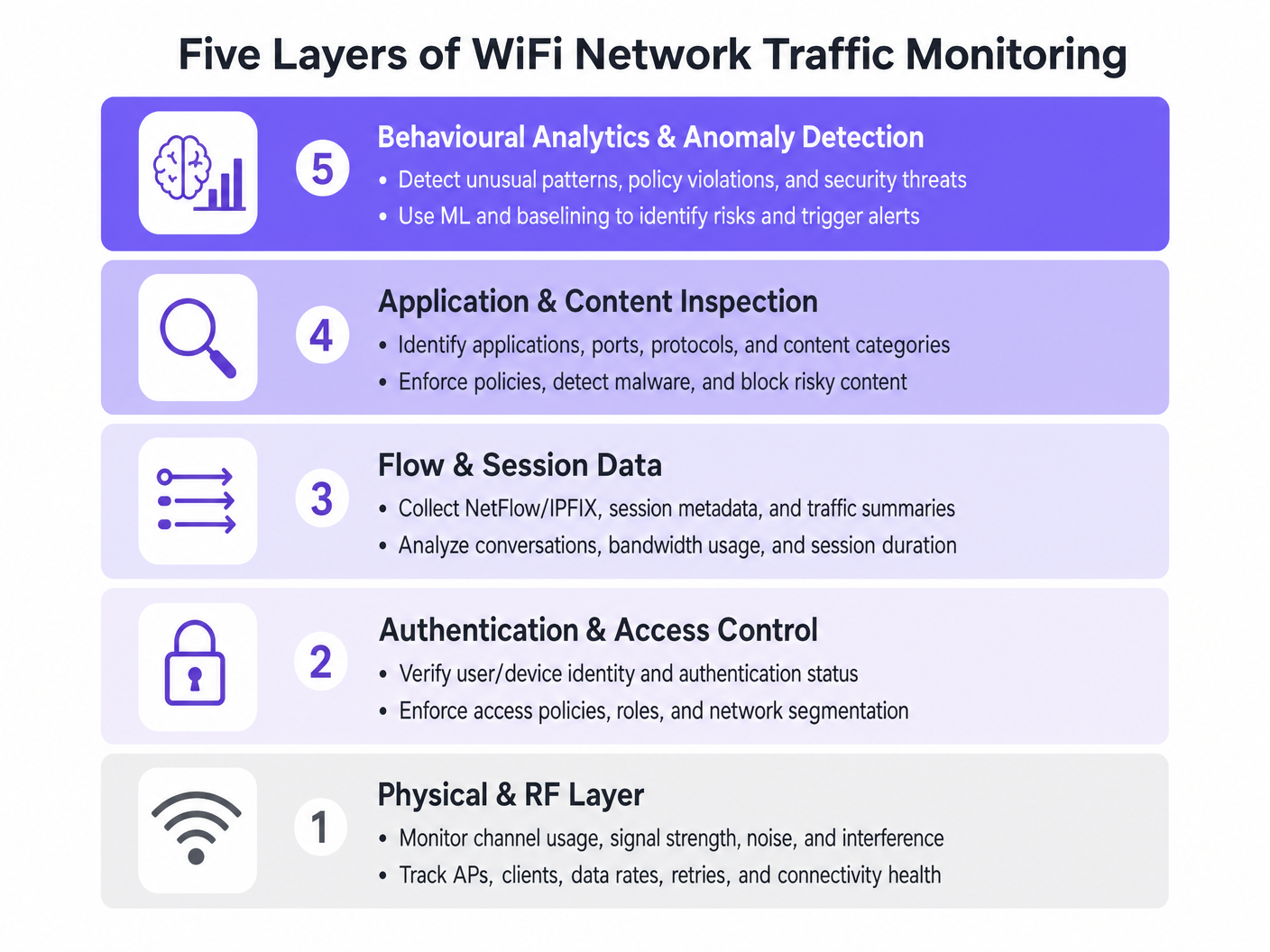
- Physical & RF Layer: This foundational layer involves monitoring channel utilisation, signal-to-noise ratios (SNR), and co-channel interference. Tools must track client data rates and retry percentages. High retry rates often indicate RF issues long before bandwidth saturation occurs.
- Authentication & Access Control: Monitoring RADIUS logs and 802.1X transactions is critical. By analysing authentication latency and failure rates, teams can isolate issues to the directory service or the wireless infrastructure. This is particularly relevant when implementing BYOD WiFi Security: How to Safely Let Personal Devices on Your Network .
- Flow & Session Data: Utilising protocols like NetFlow, IPFIX, and sFlow provides metadata about network conversations without the overhead of full packet capture. This data reveals top talkers, bandwidth consumption trends, and unusual traffic patterns.
- Application & Content Inspection: Deep Packet Inspection (DPI) at the wireless LAN controller or firewall level allows IT teams to identify specific applications (e.g., distinguishing between corporate VoIP and consumer video streaming). This visibility is essential for enforcing Quality of Service (QoS) policies.
- Behavioural Analytics & Anomaly Detection: The most advanced layer uses machine learning to baseline normal network behaviour. When a device deviates from its baseline—such as an IoT device suddenly transmitting large volumes of data—the system triggers an alert, facilitating rapid incident response.
Architectural Integration
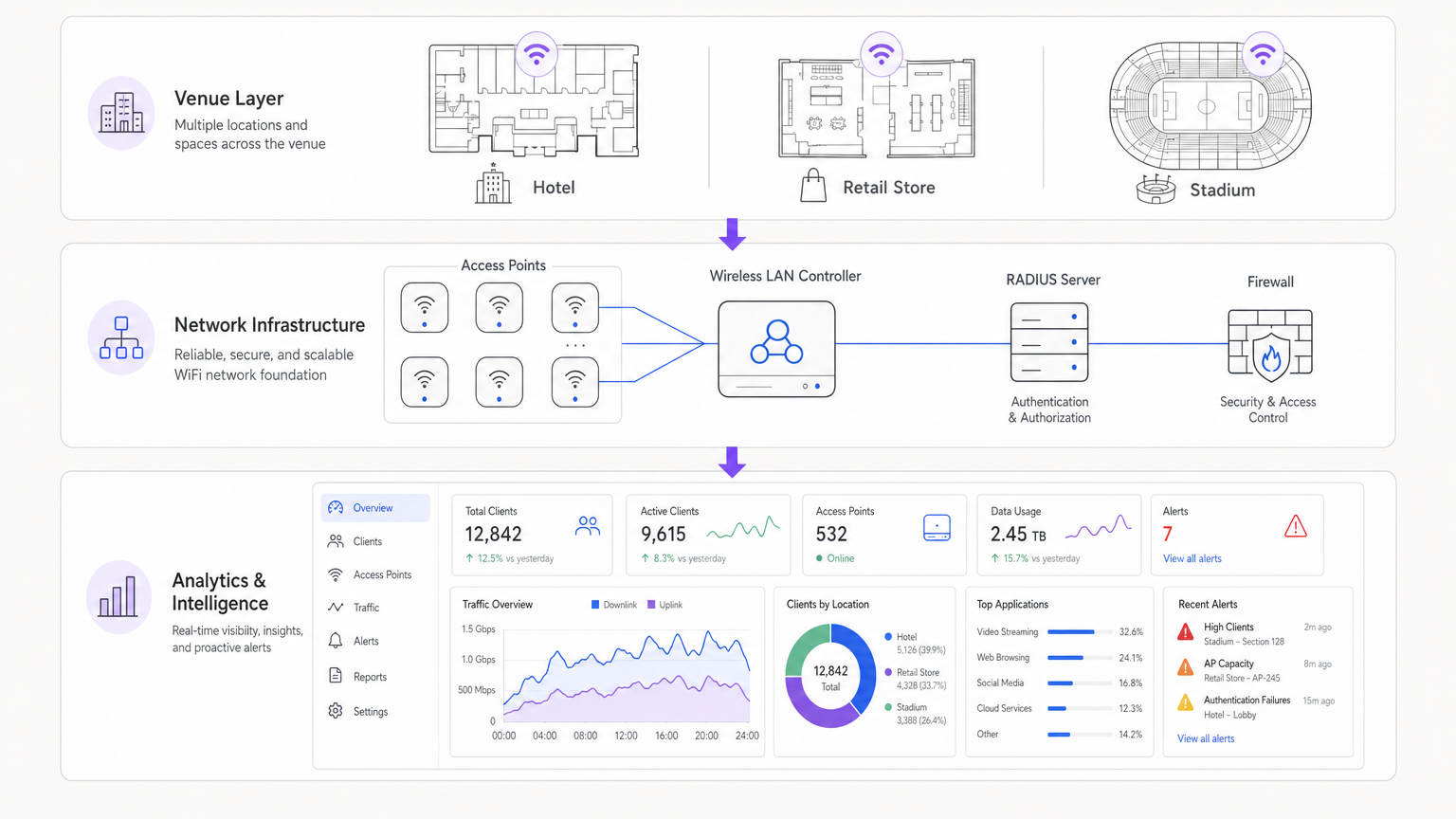
Modern architectures centralise telemetry data from distributed access points. Whether utilising a cloud-managed solution or an on-premises controller, the aggregation of logs into a SIEM (Security Information and Event Management) or dedicated analytics platform is crucial. Integrating identity providers, such as Purple's WiFi Analytics , enriches raw network data with user context, transforming an IP address into an actionable user profile.
Implementation Guide
Deploying a comprehensive monitoring solution requires careful planning to avoid overwhelming network resources or generating alert fatigue.
Step 1: Define Telemetry Requirements
Determine which protocols your infrastructure supports. Enable NetFlow/IPFIX on core switches and firewalls, and configure access points to forward syslog and RF metrics to a central collector.
Step 2: Implement Network Segmentation
Isolate traffic into distinct VLANs: Corporate, Guest, and IoT. Apply different monitoring profiles to each. For example, deep packet inspection might be heavily applied to the Guest network to enforce acceptable use policies, while flow data suffices for the IoT segment.
Step 3: Configure Identity Integration
Link your network monitoring tools with your authentication backend. When managing complex deployments like WiFi in Hospitals: A Guide to Secure Clinical Networks , correlating a MAC address with a specific user role (e.g., clinician vs. patient) is essential for rapid troubleshooting.
Step 4: Tune Alerting Thresholds
Avoid static thresholds that trigger false positives during peak hours. Implement dynamic baselining where possible. Start with critical alerts (e.g., controller offline, mass authentication failures) and gradually introduce performance-based alerts (e.g., high channel utilisation) as you understand your network's baseline.
Best Practices
- Prioritise Flow Data Over Packet Capture: Full packet capture is resource-intensive and often unnecessary for routine monitoring. Rely on NetFlow/IPFIX for 90% of your visibility needs.
- Enforce Role-Based Access Control (RBAC): Ensure that only authorised personnel have access to sensitive monitoring dashboards, particularly those displaying user identity data.
- Regularly Review DPI Signatures: Application signatures change frequently. Ensure your DPI engines are automatically updated to maintain accurate traffic classification.
- Consider the Hardware: When selecting infrastructure, such as outlined in Your Guide to a Wireless Access Point Ruckus , ensure the APs have the processing power to handle local traffic inspection without degrading client performance.
Troubleshooting & Risk Mitigation
Common Failure Modes
- Alert Fatigue: When monitoring systems generate too much noise, critical alerts are missed. Mitigation: Implement alert correlation engines to group related events.
- Blind Spots in Encrypted Traffic: As more traffic shifts to HTTPS and TLS 1.3, payload inspection becomes difficult. Mitigation: Rely on SNI (Server Name Indication) routing, DNS queries, and flow metadata to infer application usage.
- Resource Exhaustion: Enabling DPI on under-provisioned controllers can cause CPU spikes and dropped packets. Mitigation: Size hardware appropriately or offload inspection to dedicated security appliances.
ROI & Business Impact
The return on investment for robust WiFi monitoring is measured in risk reduction and operational efficiency. By identifying and resolving RF issues before they impact users, venues reduce helpdesk tickets and protect revenue streams. Furthermore, integrating network monitoring with platforms like Purple allows businesses to leverage their infrastructure for marketing and operational insights, transforming IT from a cost centre into a strategic asset. Whether deploying in a retail store or exploring Your Guide to Enterprise In Car Wi Fi Solutions , visibility is the key to performance.
Listen to the Briefing
Key Terms & Definitions
NetFlow / IPFIX
Network protocols used to collect IP traffic information and monitor network flow. They provide metadata about conversations (source, destination, ports) without capturing the payload.
Essential for identifying top talkers and bandwidth consumption trends without the overhead of full packet capture.
Deep Packet Inspection (DPI)
A form of computer network packet filtering that examines the data part of a packet as it passes an inspection point, searching for protocol non-compliance, viruses, spam, intrusions, or predefined criteria.
Used to identify specific applications (e.g., Netflix vs. Zoom) to enforce granular QoS policies on guest networks.
RADIUS
Remote Authentication Dial-In User Service. A networking protocol that provides centralised Authentication, Authorization, and Accounting (AAA) management.
RADIUS logs are the first place IT teams look when troubleshooting 802.1X authentication failures or latency issues.
Co-Channel Interference (CCI)
Interference caused when two or more access points are operating on the same frequency channel within range of each other, forcing them to share the airtime.
A primary cause of poor WiFi performance in dense deployments like stadiums or conference centres.
Band Steering
A feature in wireless networks that encourages dual-band clients to connect to the less congested 5GHz or 6GHz bands rather than the crowded 2.4GHz band.
Crucial for optimising RF performance and ensuring a better user experience in high-density environments.
VLAN Segmentation
The practice of dividing a physical network into multiple logical networks to isolate traffic for security and performance reasons.
Fundamental for separating secure corporate or POS traffic from untrusted guest WiFi traffic.
Quality of Service (QoS)
Technologies that manage data traffic to reduce packet loss, latency and jitter on the network, prioritising specific types of data.
Used to ensure business-critical applications (like VoIP or POS transactions) perform reliably even when the network is congested.
Alert Fatigue
The phenomenon where IT staff become desensitised to safety alerts because they are exposed to a large number of frequent alarms.
A major risk in network monitoring; mitigated by tuning thresholds and correlating events.
Case Studies
A 200-room hotel is experiencing intermittent connectivity issues during peak evening hours. The basic dashboard shows all APs are online, but guests report slow speeds.
- Check RF Layer: Analyse channel utilisation and co-channel interference on the 2.4GHz and 5GHz bands. High utilisation on 2.4GHz is common; ensure band steering is forcing capable clients to 5GHz.
- Review Flow Data: Identify top talkers. In this scenario, flow data reveals a small number of devices consuming 70% of the bandwidth via peer-to-peer file sharing.
- Apply Policy: Implement an application control policy via the WLAN controller to throttle P2P traffic, immediately freeing up bandwidth for other guests.
A large retail chain needs to ensure its point-of-sale (POS) terminals have priority over guest WiFi traffic during a major sales event.
- Network Segmentation: Ensure POS terminals and guest traffic are on separate VLANs and SSIDs.
- Quality of Service (QoS): Configure QoS policies on the wireless controller and upstream switches to prioritise traffic originating from the POS VLAN.
- Application Inspection: Implement DPI on the guest network to block bandwidth-heavy applications like 4K video streaming during the event.
- Monitoring: Set up specific dashboards to monitor the latency and packet loss specifically for the POS subnet.
Scenario Analysis
Q1. Your network monitoring dashboard alerts you to a sudden, massive spike in bandwidth utilisation on the guest network at a retail location. The traffic is entirely encrypted (HTTPS). How do you determine the nature of the traffic?
💡 Hint:Consider what metadata is available even when the payload is encrypted.
Show Recommended Approach
While the payload is encrypted, you can use flow data (NetFlow/IPFIX) to identify the destination IP addresses and ports. Correlating this with DNS query logs or using Server Name Indication (SNI) data from the firewall will reveal the domain names being accessed, allowing you to determine if the traffic is legitimate (e.g., a large OS update) or unauthorized.
Q2. A stadium deployment is experiencing poor performance during events. The dashboard shows high channel utilisation on the 2.4GHz band, but relatively low utilisation on the 5GHz band. What is the most appropriate configuration change?
💡 Hint:Think about how to balance the load across available frequencies.
Show Recommended Approach
Implement and aggressively tune Band Steering on the wireless LAN controllers. This will force dual-band capable client devices to connect to the less congested 5GHz band, freeing up airtime on the 2.4GHz band for legacy devices that only support 2.4GHz.
Q3. You are deploying a new monitoring solution and want to avoid alert fatigue for the network operations centre (NOC). How should you approach configuring alerts for AP offline events?
💡 Hint:Consider the impact of a single AP failing versus multiple APs.
Show Recommended Approach
Instead of alerting on every single AP that goes offline (which might happen briefly due to PoE resets or minor switch issues), configure the system to alert based on density or critical areas. For example, trigger an alert only if multiple APs in the same zone go offline simultaneously, or if a specifically tagged 'critical' AP (e.g., covering the main lobby) drops.




