
Cloud RADIUS सह 802.1X प्रमाणीकरण कसे लागू करावे
हे तांत्रिक संपादन मार्गदर्शक वितरित एंटरप्राइझ मालमत्तांमध्ये Cloud RADIUS सह 802.1X प्रमाणीकरण लागू करण्यासाठी एक व्यापक फ्रेमवर्क प्रदान करते. हे ऑन - प्रिमायसेस इन्फ्रास्ट्रक्चरचा ऑपरेशनल ओव्हरहेड न बाळगता नेटवर्क प्रवेश सुरक्षित करण्यासाठी आवश्यक असणारे आर्किटेक्चर, EAP पद्धत निवड, उपयोजन अनुक्रम आणि जोखीम कमी करण्याच्या धोरणांचे तपशील देते.
हे मार्गदर्शक ऐका
पॉडकास्ट ट्रान्सक्रिप्ट पहा
आमच्या मुख्य मालिकेचा भाग: Enterprise WiFi Security Guide →
कार्यकारी सारांश (Executive Summary)
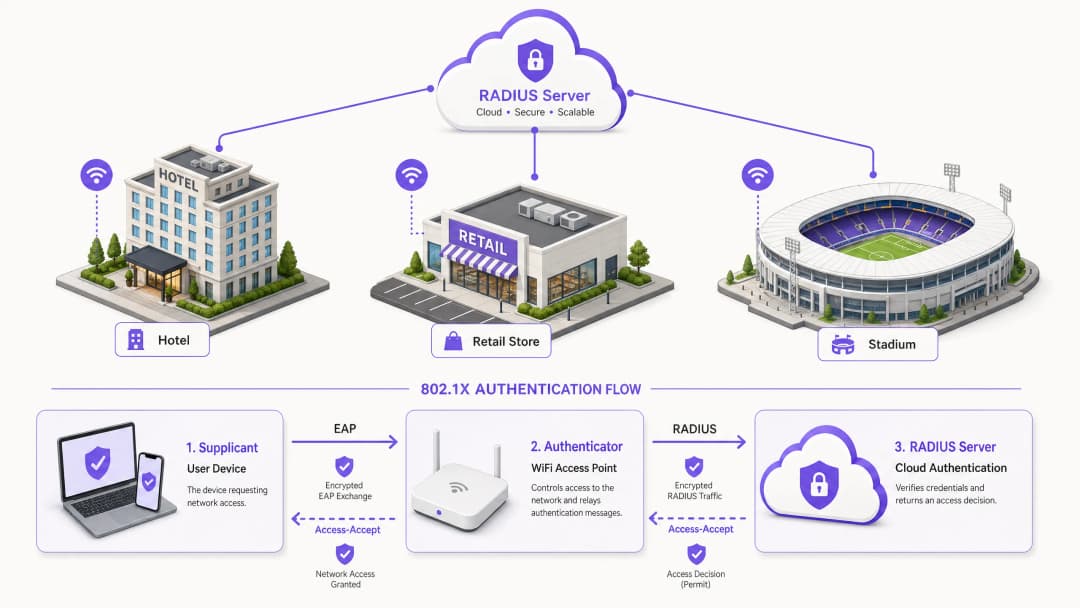
हॉस्पिटॅलिटी, रिटेल आणि सार्वजनिक क्षेत्रातील विखुरलेल्या नेटवर्क मालमत्तेचे व्यवस्थापन करणाऱ्या IT निर्णयकर्त्यांसाठी, नेटवर्क ॲक्सेस सुरक्षित करणे हे आता केवळ एक पसंतीचे ऑपरेशनल काम राहिले नसून एक कठोर अनुपालन बंधन बनले आहे. Pre-Shared Keys (PSKs) वर अवलंबून राहिल्याने अवांछित धोका निर्माण होतो, PCI-DSS सारख्या आधुनिक ऑडिट मानकांचे पालन करण्यात अपयश येते आणि क्रेडेंशियल तडजोड झाल्यास संस्थेला लॅटरल मुव्हमेंटचा धोका निर्माण होतो. IEEE 802.1X पोर्ट-आधारित नेटवर्क ॲक्सेस कंट्रोलवर स्थलांतरित झाल्याने IP कनेक्टिव्हिटी देण्यापूर्वी डिव्हाइसेस प्रमाणित करून हे धोके प्रभावीपणे कमी केले जातात.
ऐतिहासिकदृष्ट्या, लेटन्सी आणि उपलब्धता व्यवस्थापित करण्यासाठी स्थानिक RADIUS इन्फ्रास्ट्रक्चरच्या आवश्यकतेमुळे बहु-साइट मालमत्तांवर 802.1X तैनात करण्यात अडथळे येत होते. Cloud RADIUS आर्किटेक्चरच्या परिपक्वतेने हे चित्र पूर्णपणे बदलले आहे. प्रमाणीकरणाचे निर्णय केंद्रित करून आणि थेट क्लाउड आयडेंटिटी प्रोव्हाइडर्सशी (जसे की Azure AD किंवा Okta) समाकलित करून, संस्था ऑन-प्रिमाइसेस सर्व्हरच्या भांडवली खर्च आणि देखभालीच्या ओझ्याशिवाय सर्व ठिकाणी समान रीतीने मजबूत ॲक्सेस पॉलिसी लागू करू शकतात. हा मार्गदर्शक Cloud RADIUS सह 802.1X प्रमाणीकरण यशस्वीरित्या अंमलात आणण्यासाठी तांत्रिक आर्किटेक्चर, डिप्लॉयमेंट पद्धती आणि ऑपरेशनल सर्वोत्तम पद्धतींची रूपरेषा देतो, ज्यामुळे एंटरप्राइझ Guest WiFi आणि कॉर्पोरेट नेटवर्क दोन्ही सुरक्षित आणि स्केलेबल राहतील याची खात्री होते.
तांत्रिक सखोल विश्लेषण (Technical Deep-Dive)
आधुनिक एंटरप्राइझ वायरलेस सुरक्षेचा पाया IEEE 802.1X मानकांवर बांधला गेला आहे. ॲप्लिकेशन-लेअर प्रमाणीकरणाच्या उलट, 802.1X हे OSI मॉडेलच्या लेअर 2 वर कार्य करते. जेव्हा एखादे डिव्हाइस (सप्लिकंट) ॲक्सेस पॉइंटशी (प्रमाणक) जोडण्याचा प्रयत्न करते, तेव्हा पोर्ट अनधिकृत स्थितीत राहते, ज्यामुळे केवळ Extensible Authentication Protocol (EAP) ट्रॅफिकला परवानगी मिळते. हे ट्रॅफिक RADIUS पॅकेट्समध्ये एन्कॅप्स्युलेट केले जाते आणि प्रमाणीकरण सर्व्हरकडे - Cloud RADIUS इन्स्टन्सकडे पाठवले जाते. केवळ Access-Accept संदेश प्राप्त झाल्यानंतरच प्रमाणक पोर्टला अधिकृत स्थितीत हस्तांतरित करतो आणि नेटवर्क ॲक्सेस मंजूर करतो.
Cloud RADIUS आर्किटेक्चर
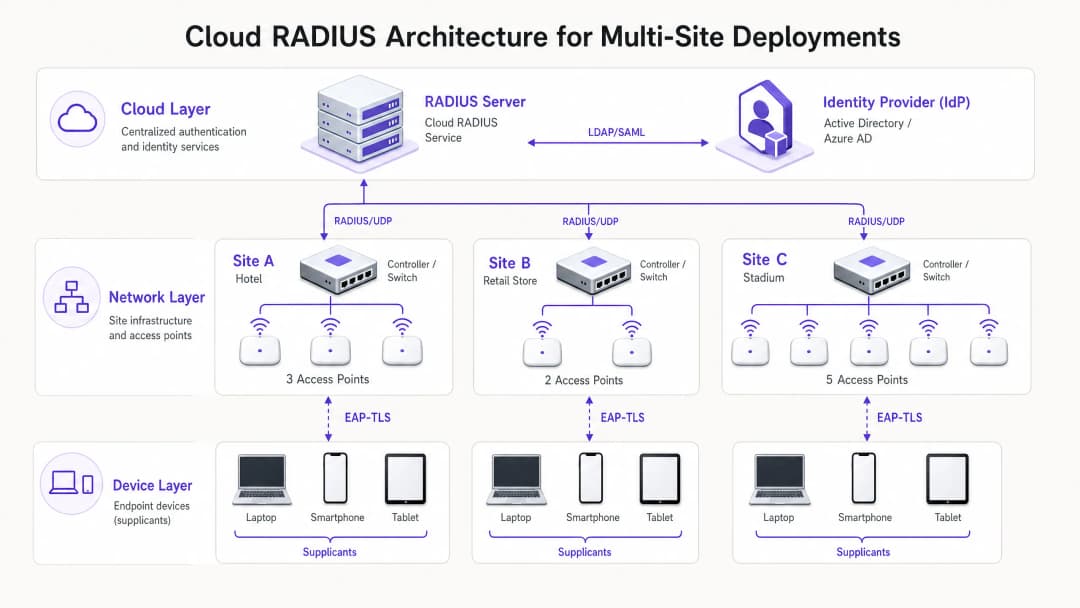
ऑन-प्रिमाइसेस वरून Cloud RADIUS कडे आर्किटेक्चरल बदल केल्यामुळे डिस्ट्रिब्युटेड FreeRADIUS किंवा Microsoft NPS सर्व्हर्सची आवश्यकता नाहीशी होते. क्लाउड मॉडेलमध्ये, ॲक्सेस पॉइंट्स किंवा वायरलेस LAN कंट्रोलर्स इंटरनेटद्वारे थेट जागतिक पातळीवर वितरित केलेल्या RADIUS सेवेशी संवाद साधतात. हा ट्रान्सिट सुरक्षित करण्यासाठी, RadSec (RADIUS over TLS) लागू करणे आवश्यक आहे, जे ऑथेंटिकेशन पेलोड एन्क्रिप्ट करते आणि त्याला इंटरसेप्शनपासून वाचवते. Cloud RADIUS सेवा मध्यस्थ म्हणून काम करते, जी LDAP, SAML किंवा मूळ API इंटिग्रेशन्सद्वारे केंद्रीय आयडेंटिटी प्रोव्हाइडर (IdP) विरुद्ध क्रेडेंशियल्सची पडताळणी करते. हे डायनॅमिक पॉलिसी अंमलबजावणी सक्षम करते, जसे की Azure AD ग्रुप मेंबरशिपवर आधारित VLANs नियुक्त करणे, ज्यामुळे नेटवर्क ॲक्सेस व्यापक कॉर्पोरेट आयडेंटिटी मॅनेजमेंट स्ट्रॅटेजीसह अखंडपणे समाकलित होतो.
EAP पद्धतीची निवड
EAP पद्धतीची निवड डेप्लॉयमेंटची सुरक्षितता आणि ऑपरेशनल गुंतागुंत निर्धारित करते.
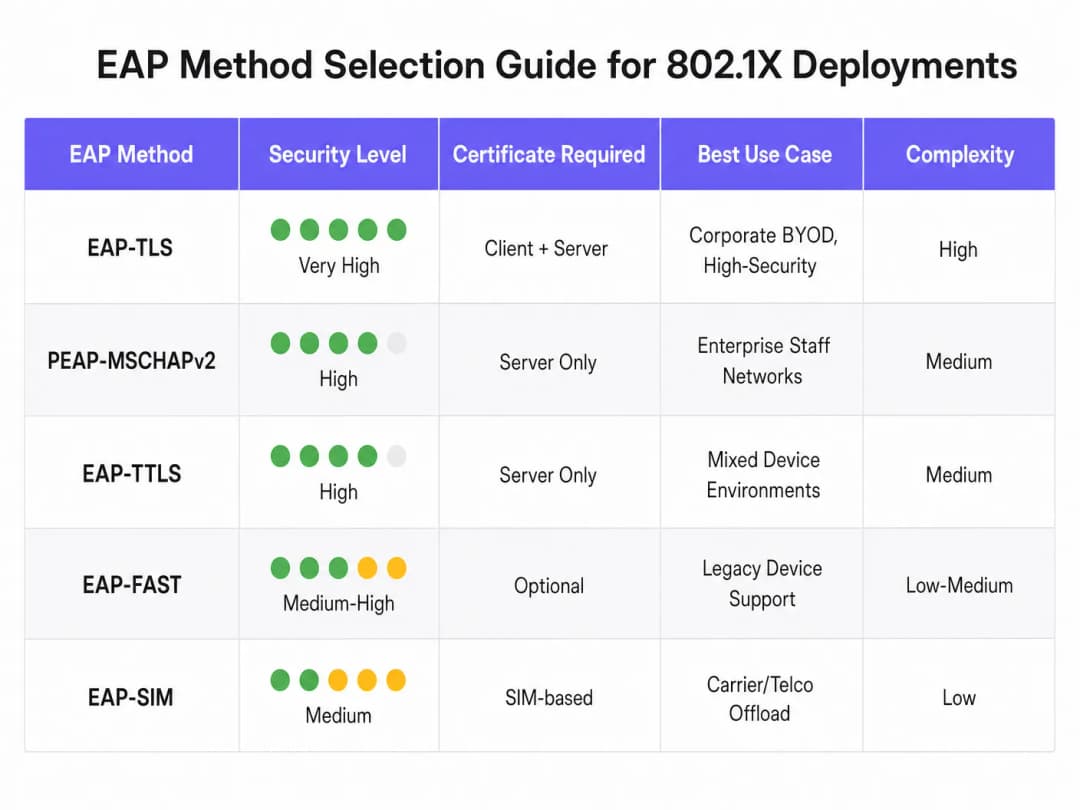
- EAP-TLS (Transport Layer Security): ही सर्वात सुरक्षित पद्धत आहे, ज्यामध्ये म्युच्युअल ऑथेंटिकेशनसाठी सर्व्हर आणि क्लायंट दोघांचेही सर्टिफिकेट्स आवश्यक असतात. यामध्ये कोणत्याही पासवर्डची देवाणघेवाण होत नसल्यामुळे, क्रेडेंशियल चोरीचा धोका नाहीसा होतो. तथापि, क्लायंट सर्टिफिकेट्स वितरीत करण्यासाठी याला Public Key Infrastructure (PKI) आणि Mobile Device Management (MDM) ची आवश्यकता असते. कॉर्पोरेट डिव्हाइसेससाठी याची तीव्र शिफारस केली जाते.
- PEAP-MSCHAPv2 (Protected EAP): Windows मधील मूळ सपोर्ट आणि केवळ सर्व्हर-साइड सर्टिफिकेटवरील त्याच्या अवलंबनामुळे हे मोठ्या प्रमाणावर डेप्लॉय केले जाते. हे TLS सेशनमध्ये क्रेडेंशियल एक्सचेंज टनेल करते. डेप्लॉय करण्यासाठी सोपे असले तरी, क्लायंट-साइड सर्टिफिकेट व्हॅलिडेशन कठोरपणे लागू न केल्यास हे क्रेडेंशियल हार्वेस्टिंग हल्ल्यांसाठी संवेदनशील असते.
- EAP-TTLS: हे PEAP सारखेच आहे परंतु इनर ऑथेंटिकेशन प्रोटोकॉलमध्ये अधिक लवचिकता प्रदान करते, ज्यामुळे ते विविध क्लायंट ऑपरेटिंग सिस्टमचे मिश्रण असलेल्या वातावरणासाठी योग्य बनते.
तुमच्या विशिष्ट सेटअपबद्दल काही प्रश्न आहेत का?
आमची टीम ८०,००० हून अधिक वेन्यूजमधील वेन्यू ऑपरेटर्स, IT मॅनेजर्स आणि नेटवर्क इंजिनिअर्ससोबत काम करते. २० मिनिटांचा कॉल बुक करा आणि तुमच्यासारख्या इतरांनी ही समस्या कशी सोडवली हे आम्ही तुम्हाला दाखवू.
अंमलबजावणी मार्गदर्शक
Cloud RADIUS सह 802.1X डेप्लॉय करण्यासाठी सध्याच्या व्यवसायात अडथळा कमी करण्यासाठी टप्प्याटप्प्याने, पद्धतशीर दृष्टिकोन आवश्यक आहे.
- आयडेंटिटी प्रोव्हाइडर इंटिग्रेशन: Cloud RADIUS सेवा आणि कॉर्पोरेट IdP मधील कनेक्शन स्थापित आणि सत्यापित करा. डिरेक्टरी सिंक्रोनाइझेशन अचूक असल्याची आणि पॉलिसी निर्णयांसाठी आवश्यक युझर ॲट्रिब्युट्स (जसे की ग्रुप मेंबरशिप) उपलब्ध असल्याची खात्री करा.
- सर्टिफिकेट मॅनेजमेंट: PEAP डेप्लॉयमेंटसाठी, विश्वसनीय पब्लिक सर्टिफिकेट ऑथॉरिटी (CA) कडून सर्व्हर सर्टिफिकेट मिळवा. सर्वात महत्त्वाचे म्हणजे, MDM किंवा ग्रुप पॉलिसीद्वारे क्लायंट्सना या CA वर स्पष्टपणे विश्वास ठेवण्यासाठी आणि सर्व्हर सर्टिफिकेटच्या नावाची पडताळणी करण्यासाठी कॉन्फिगर करा. EAP-TLS साठी, अंतर्गत CA इन्फ्रास्ट्रक्चर डेप्लॉय करा आणि व्यवस्थापित डिव्हाइसेसना क्लायंट सर्टिफिकेट जारी करण्यास प्रारंभ करा.
- Network infrastructure configuration: क्लाउड RADIUS एंडपॉइंट्सकडे निर्देशित करण्यासाठी वायरलेस कंट्रोलर्स आणि ऍक्सेस पॉइंट्स कॉन्फिगर करा. जिथे हार्डवेअर विक्रेता सपोर्ट करतो तिथे RadSec लागू करा. मजबूत क्रिप्टोग्राफिकली सुरक्षित स्ट्रिंग्सचा वापर करून RADIUS सामायिक सिक्रेट्स परिभाषित करा, ज्यामुळे सिक्रेट प्रति साइट किंवा कंट्रोलर क्लस्टरसाठी युनिक असेल याची खात्री होईल.
- Policy definition: क्लाउड RADIUS प्लॅटफॉर्ममध्ये ऑथेंटिकेशन पॉलिसी तयार करा. यशस्वी ऑथेंटिकेशन झाल्यावर VLANs डायनॅमिकपणे असाइन करण्यासाठी किंवा ऍक्सेस कंट्रोल लिस्ट्स (ACLs) लागू करण्यासाठी वापरकर्ता गट, डिव्हाइस प्रकार किंवा लोकेशनवर आधारित अटी परिभाषित करा.
- Pilot and phased rollout: सुरुवातीच्या पायलटसाठी वापरकर्ते आणि डिव्हाइसेसचा एक प्रातिनिधिक सबसेट निवडा. लेटन्सी समस्या, सर्टिफिकेट व्हॅलिडेशन अपयश किंवा चुकीचे VLAN असाइनमेंट्स ओळखण्यासाठी ऑथेंटिकेशन लॉग्सचे बारकाईने निरीक्षण करा. यशस्वी पायलट नंतर, एक्झिक्युटिव्ह ऑफिस किंवा संवेदनशील डेटा हाताळणाऱ्या साइट्स सारख्या हाय-रिस्क ठिकाणांना प्राधान्य देऊन टप्प्याटप्प्याने रोलआउट करा.
Best Practices
- Client-side certificate validation सक्तीचे करा: PEAP डिप्लॉयमेंट्स मधील सर्वात सामान्य त्रुटी म्हणजे क्लायंटवर सर्व्हर सर्टिफिकेट व्हॅलिडेशन सक्तीचे न करणे होय. जर क्लायंटला कोणत्याही सादर केलेल्या सर्टिफिकेटवर आंधळा विश्वास ठेवण्याची परवानगी दिली गेली, तर ते रोग ऍक्सेस पॉइंट हल्ल्यांसाठी पूर्णपणे असुरक्षित राहतात.
- MAC Authentication Bypass (MAB) काळजीपूर्वक लागू करा: हेडलेस डिव्हाइसेस जे 802.1X सप्लिकंट चालवू शकत नाहीत (जसे की प्रिंटर आणि IoT सेन्सर्स), त्यांच्यासाठी MAB वापरले जाऊ शकते. तथापि, MAC ॲड्रेसेस सहज स्पूफ केले जाऊ शकतात. MAB डिव्हाइसेस कडक निर्बंध असलेल्या VLANs वर आयसोलेट केलेले असावे, ज्यामध्ये त्यांचे नेटवर्क ऍक्सेस मर्यादित करणारे कठोर फायरवॉल नियम असतील.
- रोमिंगसाठी 802.11r चा फायदा घ्या: ज्या वातावरणात डिव्हाइसेस वारंवार ऍक्सेस पॉइंट्स दरम्यान फिरतात, तिथे पूर्ण 802.1X ऑथेंटिकेशन प्रक्रिया अयोग्य लेटन्सी आणू शकते ज्यामुळे व्हॉईस सारख्या रिअल-टाइम ऍप्लिकेशन्समध्ये व्यत्यय येतो. 802.11r (फास्ट BSS ट्रान्झिशन) लागू केल्याने ऑथेंटिकेशन कीज कॅश करून रोमिंग सुलभ होते.
- ॲनालिटिक्ससह समाकलित करा: जे वेन्यू कॉर्पोरेट 802.1X नेटवर्क आणि पब्लिक ऍक्सेस नेटवर्क दोन्ही चालवतात, त्यांच्यासाठी ऑथेंटिकेशन इन्फ्रास्ट्रक्चरला WiFi Analytics सह समाकलित केल्याने संपूर्ण इस्टेटमधील नेटवर्क वापर आणि डिव्हाइसच्या वर्तनाचा सर्वसमावेशक दृष्टिकोन मिळतो.
Troubleshooting and Risk Mitigation
802.1X वातावरणातील ऑथेंटिकेशनचे अपयश मोठ्या प्रमाणावर कनेक्टिव्हिटी आउटेजचे कारण बनू शकते. एक मजबूत ट्रबलशूटिंग प्रक्रिया आवश्यक आहे.
- Certificate समाप्ती: एक्स्पायर्ड सर्व्हर किंवा क्लायंट सर्टिफिकेटमुळे त्वरित ऑथेंटिकेशन अपयश येईल. सर्टिफिकेट वैधतेच्या कालावधीवर स्वयंचलित मॉनिटरिंग आणि अलर्टिंग लागू करा, जेणेकरून समाप्तीपूर्वी नूतनीकरण चांगल्या प्रकारे हाताळले जाईल.
- लेटन्सी आणि टाइमआउट्स: जर क्लाउड RADIUS सेवा किंवा IdP ला जास्त लेटन्सीचा सामना करावा लागला, तर ऑथेंटिकेटर टाइम आउट होऊ शकतो आणि कनेक्शन ड्रॉप करू शकतो. वायरलेस कंट्रोलर्सवर योग्य टाइमआउट व्हॅल्यूज (साधारणपणे 5 - 10 सेकंद) कॉन्फिगर करा आणि रिडंडन्सी प्रदान करण्यासाठी बॅकअप RADIUS सर्व्हर्स तैनात करा.
- RADIUS shared secret mismatch: ऑथेंटिकेटरवर कॉन्फिगर केलेले सामायिक गुपित (shared secret) RADIUS सर्व्हरवरील गुपिताशी जुळत नसल्यास पॅकेट्स सायलेंटली बाद केले जातील. गुपित व्यवस्थापन मानकीकृत करा आणि शक्य तिथे मॅन्युअल नोंदणी टाळा.
ROI आणि व्यावसायिक प्रभाव (Business Impact)
Cloud RADIUS सह 802.1X कडे जाणे मोजता येण्याजोगा व्यावसायिक फायदा देते. सामायिक पासवर्ड काढून टाकून, हे मुख्यत्वे हल्ल्याची शक्यता लक्षणीयरीत्या कमी करते, ज्यामुळे PCI-DSS (आवश्यकता 1 आणि 8) आणि GDPR डेटा सुरक्षा नियमांचे थेट पालन होते. कार्यात्मकदृष्ट्या, हे केंद्रीय प्रवेश नियंत्रण सक्षम करते, ज्यामुळे IT टीम्स मध्यवर्ती निर्देशिकेतील (central directory) खाते फक्त अक्षम करून जगभरातील प्रत्येक ठिकाणाहून वापरकर्त्याचा प्रवेश त्वरित रद्द करू शकतात. शिवाय, जुने ऑन-प्रिमाइसेस RADIUS सर्व्हर्स वापरातून काढून टाकल्याने, संस्था हार्डवेअर देखभाल खर्च, सॉफ्टवेअर लायसन्स फी आणि वितरित पायाभूत सुविधांचे पॅचिंग आणि व्यवस्थापन करण्याचा प्रशासकीय ताण कमी करतात. Retail आणि Hospitality सारख्या क्षेत्रांमधील संपूर्ण मालमत्तेमधील उपयोजनांसाठी (deployments), ही केंद्रीय सुरक्षा स्थिती सुरक्षित डिजिटल परिवर्तनाची मुख्य चालक आहे.
या विषयावरील आमची सविस्तर माहिती ऐका:
महत्वाच्या व्याख्या
सप्लिकंट (Supplicant)
एंड-युझर डिव्हाइसवर (लॅपटॉप, स्मार्टफोन) असलेला सॉफ्टवेअर क्लायंट जो EAP वापरून नेटवर्क प्रवेशाची बोलणी करतो.
क्रेडेंशियल चोरी रोखण्यासाठी सर्व्हर प्रमाणपत्रांचे प्रमाणीकरण करण्यासाठी सप्लिकंट योग्यरित्या कॉन्फिगर केला गेला आहे (बऱ्याचदा MDM द्वारे) याची आयटी टीमने खात्री करणे आवश्यक आहे.
ऑथेंटिकेटर (Authenticator)
नेटवर्क डिव्हाइस (सामान्यत: WiFi ऍक्सेस पॉइंट किंवा स्विच) जे प्रमाणीकरण स्थितीच्या आधारावर नेटवर्कवर भौतिक किंवा तार्किक प्रवेश नियंत्रित करते.
ऑथेंटिकेटर मध्यस्थाचे काम करतो, सप्लिकंट आणि RADIUS सर्व्हर दरम्यान EAP संदेश प्रसारित करतो.
Cloud RADIUS
एक केंद्रीकृत, क्लाउड-होस्ट केलेली ऑथेंटिकेशन सेवा जी ऑन-प्रिमायसेस सर्व्हरची आवश्यकता नसताना वितरित नेटवर्क इन्फ्रास्ट्रक्चर कडून येणाऱ्या RADIUS विनंत्यांवर प्रक्रिया करते.
हार्डवेअर देखभाल ओव्हरहेडशिवाय एंटरप्राइझ-ग्रेड सुरक्षा लागू करू पाहणाऱ्या मल्टी-साइट संस्थांसाठी आवश्यक.
EAP (Extensible Authentication Protocol)
सप्लीकंट आणि ऑथेंटिकेशन सर्व्हर दरम्यान ऑथेंटिकेशन मेसेज सुरक्षित ठेवण्यासाठी वापरली जाणारी फ्रेमवर्क.
योग्य EAP पद्धत निवडणे (उदा. PEAP विरुद्ध EAP-TLS) वायरलेस नेटवर्कची सुरक्षा पातळी आणि उपयोजन गुंतागुंत ठरवते.
RadSec
एक प्रोटोकॉल जो TLS टनेलद्वारे RADIUS डेटा ट्रान्समिट करतो, ज्यामुळे ट्रान्झिटमधील ऑथेंटिकेशन ट्रॅफिकचे एन्क्रिप्शन सुनिश्चित होते.
Cloud RADIUS वापरताना अत्यंत महत्त्वाचे आहे, कारण हे सार्वजनिक इंटरनेटवरील संवेदनशील क्रेडेंशियलच्या देवाणघेवाणीला अडथळा आणण्यापासून वाचवते.
Dynamic VLAN Assignment
अशी प्रक्रिया जिथे RADIUS सर्व्हर युझरच्या ओळखीवर किंवा ग्रुप सदस्यत्वावर आधारित डिव्हाइसला विशिष्ट व्हर्च्युअल नेटवर्क सेगमेंटवर ठेवण्यासाठी ऑथेंटिकेटरला निर्देश देतो.
IT ला एकच SSID ब्रॉडकास्ट करण्याची अनुमती देते आणि त्याच वेळी ट्रॅफिक सुरक्षितपणे विभागते (उदा. HR स्टाफ आणि IT स्टाफला वेगवेगळ्या सबनेटवर ठेवणे).
Mutual Authentication
एक सुरक्षा प्रक्रिया जिथे क्लायंट सर्व्हरची ओळख पडताळतो आणि सर्व्हर क्लायंटची ओळख पडताळतो (सहसा सर्टिफिकेट्स वापरून).
EAP-TLS चे सर्वात महत्त्वाचे वैशिष्ट्य, जे त्याला मॅन-इन-द-मिडल (man-in-the-middle) हल्ल्यांविरुद्ध अत्यंत प्रतिरोधक बनवते.
MAC Authentication Bypass (MAB)
एक पर्यायी ऑथेंटिकेशन पद्धत जी एखाद्या डिव्हाइसचे MAC ॲड्रेस क्रेडेंशियल म्हणून वापरते जेव्हा ते 802.1X सप्लीकंटला सपोर्ट करू शकत नाही.
प्रिंटर किंवा IoT डिव्हाइसेस सारख्या जुन्या हार्डवेअरसाठी वापरले जाते, परंतु MAC स्पूफिंगच्या सुलभतेमुळे यासाठी कठोर नेटवर्क सेगमेंटेशन आवश्यक आहे.
सोडवलेली उदाहरणे
बॅक-ऑफ-हाउस ऑपरेशन्ससाठी (हाऊसकीपिंग टॅब्लेट्स, पॉइंट-ऑफ-सेल टर्मिनल्स, मॅनेजर लॅपटॉप) जुने PSK नेटवर्क वापरणाऱ्या २०० खोल्यांच्या हॉटेलला आगामी ऑडिटपूर्वी PCI DSS चे पालन साध्य करायचे आहे. त्यांच्याकडे ऑन-साइट आयटी कर्मचारी नाहीत आणि ते स्थानिक सर्व्हर तैनात करू शकत नाहीत.
हॉटेलने थेट त्यांच्या केंद्रीय Azure AD टेनंटशी एकत्रित केलेले Cloud RADIUS सोल्यूशन तैनात केले पाहिजे. मॅनेजर लॅपटॉपसाठी (Windows/macOS), त्यांनी PEAP-MSCHAPv2 लागू केले पाहिजे, ज्यासाठी विश्वसनीय सर्व्हर प्रमाणपत्र ढकलण्यासाठी आणि प्रमाणीकरण लागू करण्यासाठी MDM प्रोफाइलचा वापर करावा. मजबूत सप्लिकंट नसलेल्या पॉइंट-ऑफ-सेल टर्मिनल्ससाठी, त्यांनी MAC Authentication Bypass (MAB) चा वापर करावा परंतु ही उपकरणे काटेकोरपणे एका वेगळ्या VLAN मध्ये नियुक्त करावीत जी केवळ पेमेंट गेटवेसह संवादाची परवानगी देते. या उपयोजनासाठी RadSec सह कनेक्शन सुरक्षित करून, Cloud RADIUS IP पत्त्यांकडे निर्देश करण्यासाठी विद्यमान क्लाउड-व्यवस्थापित ऍक्सेस पॉइंट्स कॉन्फिगर करणे आवश्यक आहे.
एक राष्ट्रीय रिटेल साखळी ५०० स्टोअर्समध्ये इन्व्हेंटरी व्यवस्थापनासाठी कॉर्पोरेट मालकीच्या टॅब्लेट्सचा नवीन संच आणत आहे. त्यांना याची खात्री करायची आहे की टॅब्लेट चोरीला गेल्यास त्याचा वापर नेटवर्कमध्ये प्रवेश करण्यासाठी केला जाऊ नये आणि पासवर्ड संबंधित हेल्पडेस्क तिकिटे पूर्णपणे काढून टाकायची आहेत.
रिटेलरने EAP-TLS लागू करणे आवश्यक आहे. ते एक अंतर्गत प्रमाणपत्र प्राधिकरण (CA) तैनात करतील आणि ते त्यांच्या MDM प्लॅटफॉर्मसह एकत्रित करतील. जेव्हा टॅब्लेट प्रोविझन केला जातो, तेव्हा MDM डिव्हाइसवर एक युनिक क्लायंट प्रमाणपत्र पाठवते. Cloud RADIUS सेवा केवळ वैध क्लायंट प्रमाणपत्राच्या उपस्थितीवर आधारित उपकरणांचे प्रमाणीकरण करण्यासाठी कॉन्फिगर केली जाते. जर एखादा टॅब्लेट चोरीला गेल्याची नोंद झाली, तर आयटी टीम CA मध्ये ते विशिष्ट प्रमाणपत्र सहजपणे रद्द करते. Cloud RADIUS सेवा, प्रमाणपत्र रद्दीकरण सूची (CRL) किंवा OCSP द्वारे तपासणी करून, तात्काळ नेटवर्क प्रवेश नाकारेल.
सराव प्रश्न
Q1. तुमची संस्था सामायिक केलेल्या PSK वरून PEAP-MSCHAPv2 वापरून 802.1X वर स्थलांतरित होत आहे. पायलट टप्प्यादरम्यान, युझर्स रिपोर्ट करतात की ते कनेक्ट करू शकत आहेत, परंतु सिक्युरिटी ऑडिटमध्ये असे दिसून आले आहे की डिव्हाइसेस त्यांच्यासमोर सादर केलेले कोणतेही सर्व्हर सर्टिफिकेट शांतपणे स्वीकारत आहेत. त्वरित धोका काय आहे, आणि याचे निवारण कसे केले पाहिजे?
टीप: हल्लाखोर आपल्या कॉर्पोरेट SSID चे ब्रॉडकास्ट करणारे ॲक्सेस पॉइंट सेट करत असल्यास काय होईल याचा विचार करा.
नमुना उत्तर पहा
त्वरित धोका म्हणजे फसव्या ॲक्सेस पॉइंटद्वारे मॅन-इन-द-मिडल (MitM) हल्ला होणे होय. एखादा हल्लाखोर कॉर्पोरेट SSID ब्रॉडकास्ट करू शकतो, सेल्फ-साइन केलेले सर्टिफिकेट सादर करू शकतो आणि डिव्हाइसेस ऑथेंटिकेट करण्याचा प्रयत्न करत असताना युझर क्रेडेंशियल्स मिळवू शकतो. याचे निवारण करण्यासाठी, IT टीमने सर्व्हर सर्टिफिकेटचे स्पष्टपणे प्रमाणीकरण करण्यासाठी (MDM किंवा ग्रुप पॉलिसीद्वारे) सप्लीकंट प्रोफाइल कॉन्फिगर केले पाहिजेत. यामध्ये RADIUS सर्व्हरचे सर्टिफिकेट जारी करणारे अचूक ट्रस्टेड रूट CA निर्दिष्ट करणे आणि अपेक्षित सर्व्हर होस्टनेम कठोरपणे परिभाषित करणे समाविष्ट आहे.
Q2. एका रिमोट रिटेल ब्रँचचे इंटरनेट कनेक्शन खंडित झाले आहे. स्थानिक ॲक्सेस पॉइंट्स अजूनही सुरू आहेत. सध्या 802.1X नेटवर्कशी कनेक्ट केलेली कर्मचाऱ्यांची डिव्हाइसेस कनेक्टेड राहतील का, आणि नवीन डिव्हाइसेस ऑथेंटिकेट होऊ शकतील का? स्थानिक सर्व्हायव्हॅबिलिटी नोड्स नसलेले मानक Cloud RADIUS आर्किटेक्चर गृहीत धरा.
टीप: ऑथेंटिकेशन रिक्वेस्ट ज्या मार्गाने जाणे आवश्यक आहे त्याचा आणि आधीच ऑथराइज्ड असलेल्या पोर्ट्सच्या स्थितीचा विचार करा.
नमुना उत्तर पहा
जे डिव्हाइसेस आधीच ऑथेंटिकेट आणि कनेक्ट केलेले आहेत ते सहसा त्यांचे सेशन टाइमआउट संपेपर्यंत किंवा ते डिस्कनेक्ट होईपर्यंत कनेक्टेड राहतील, कारण ऑथेंटिकेटर पोर्ट आधीच ऑथराइज्ड स्थितीत आहे. तथापि, कनेक्ट करण्याचा प्रयत्न करणारी नवीन डिव्हाइसेस किंवा पुन्हा ऑथेंटिकेट करण्याचा प्रयत्न करणारी डिव्हाइसेस यशस्वी होणार नाहीत. इंटरनेट कनेक्शन बंद असल्यामुळे, EAP प्रक्रिया पूर्ण करण्यासाठी ॲक्सेस पॉइंट्स Cloud RADIUS सर्व्हरपर्यंत पोहोचू शकत नाहीत. क्लाउड-आधारित ऑथेंटिकेशनवर अवलंबून असताना हे लवचिक WAN लिंक्सचे महत्त्व अधोरेखित करते.
Q3. तुम्हाला वेअरहाऊस मधील जुन्या बारकोड स्कॅनर्सच्या ताफ्यासाठी नेटवर्क ॲक्सेस सुरक्षित करणे आवश्यक आहे. हे स्कॅनर्स 802.1X सप्लीकंट्सना सपोर्ट करत नाहीत आणि फक्त WPA2-Personal (PSK) ला सपोर्ट करतात. तुम्ही हार्डवेअर अपग्रेड करू शकत नाही. तुम्ही तुमच्या 802.1X कॉर्पोरेट डिव्हाइसेससह या डिव्हाइसेसना सुरक्षित नेटवर्क आर्किटेक्चरमध्ये कसे समाकलित कराल?
टीप: तुम्हाला 802.1X ला एक पर्याय हवा आहे जो अजूनही नेटवर्क-लेव्हल आयसोलेशनसह ॲक्सेस कंट्रोल प्रदान करतो.
नमुना उत्तर पहा
बारकोड स्कॅनरसाठी MAC Authentication Bypass (MAB) वापरण्याची शिफारस केली जाते. ॲक्सेस पॉइंट स्कॅनरचा MAC ॲड्रेस आयडेंटिटी म्हणून वापरेल आणि तो RADIUS सर्व्हरकडे पाठवेल. MAC ॲड्रेस सहजपणे स्पूफ केले जाऊ शकत असल्याने, हे कमकुवत ऑथेंटिकेशन प्रदान करते. म्हणूनच, यशस्वी MAB ऑथेंटिकेशनवर विशिष्ट VLAN ॲट्रिब्यूट परत करण्यासाठी RADIUS सर्व्हर कॉन्फिगर केला गेला पाहिजे. हा VLAN फायरवॉल्स किंवा ACLs द्वारे अत्यंत मर्यादित केला गेला पाहिजे, ज्यामुळे स्कॅनर्सना केवळ त्यांना आवश्यक असलेल्या विशिष्ट इन्व्हेंटरी सर्व्हर्सशी कम्युनिकेट करण्याची परवानगी मिळेल आणि इतर सर्व लॅटरल नेटवर्क ॲक्सेस ब्लॉक होईल.
या मालिकेमध्ये पुढे वाचा
हायब्रिड वर्कफोर्ससाठी RADIUS as a Service चे सुरक्षा फायदे
हे तांत्रिक संदर्भ मार्गदर्शक स्पष्ट करते की RADIUS as a Service कशा प्रकारे विखुरलेल्या ठिकाणांवरून हायब्रिड वर्कफोर्ससाठी नेटवर्क प्रवेश सुरक्षित करते. यामध्ये ऑन-प्रिमाइसेस RADIUS इन्फ्रास्ट्रक्चरच्या जागी क्लाउड-व्यवस्थापित ऑथेंटिकेशन सेवा आणण्यासाठी आर्किटेक्चर, सुरक्षा फायदे आणि अंमलबजावणीच्या पायऱ्यांचा समावेश आहे. हॉटेल्स, रिटेल चेन्स, स्टेडियम्स आणि सार्वजनिक क्षेत्रातील संस्थांमधील IT मॅनेजर्स आणि नेटवर्क आर्किटेक्ट्ससाठी, हे मार्गदर्शक या तिमाहीत क्लाउड RADIUS मायग्रेशनचे मूल्यांकन करण्यासाठी आणि त्यावर कारवाई करण्यासाठी आवश्यक पुरावे प्रदान करते.
क्लाउड डिरेक्टरीज (Azure AD आणि Google Workspace) सोबत RADIUS-as-a-Service समाकलित करणे
हे तांत्रिक संदर्भ मार्गदर्शक एंटरप्राइझ WiFi प्रमाणीकरणासाठी क्लाउड डिरेक्टरीज - Microsoft Entra ID आणि Google Workspace - सोबत RADIUS-as-a-Service कसे समाकलित करावे याचे तपशील देते. यामध्ये ऑन-प्रिमाइसेस NPS कडून क्लाउड-नेटिव्ह RADIUS कडे होणारा आर्किटेक्चरल बदल, प्रमाणपत्र-आधारित EAP-TLS प्रमाणीकरणाचे उपयोजन आणि हॉस्पिटॅलिटी, रिटेल आणि सार्वजनिक क्षेत्रातील वातावरणात वायरलेस ॲक्सेस सुरक्षित करण्यासाठीच्या सर्वोत्तम ऑपरेशनल पद्धतींचा समावेश आहे. क्लाउड आयडेंटिटीमध्ये आधीच गुंतवणूक केलेल्या IT व्यवस्थापक आणि नेटवर्क आर्किटेक्ट्ससाठी, हे मार्गदर्शक डिरेक्टरी व्यवस्थापन आणि प्रत्यक्ष नेटवर्क सुरक्षा यामधील अंतर मिटवते.
Cloud RADIUS म्हणजे काय? RADIUS-as-a-Service साठी एक व्यापक मार्गदर्शक
हा व्यापक मार्गदर्शक Cloud RADIUS (RADIUS-as-a-Service) चे तपशीलवार विश्लेषण करतो, ज्यामध्ये त्याचे आर्किटेक्चर, EAP पद्धती आणि अंमलबजावणीच्या धोरणांचा समावेश आहे. हे आयटी (IT) प्रमुखांना ऑन-प्रिमाइसेस सर्व्हरवरून स्केल करण्यायोग्य, सुरक्षित आणि सुसंगत क्लाउड-आधारित ऑथेंटिकेशन मॉडेलवर स्थलांतरित करण्यासाठी कृतीयोग्य मार्गदर्शन प्रदान करते.
तुमच्या विशिष्ट सेटअपबद्दल काही प्रश्न आहेत का?
आमची टीम ८०,००० हून अधिक वेन्यूजमधील वेन्यू ऑपरेटर्स, IT मॅनेजर्स आणि नेटवर्क इंजिनिअर्ससोबत काम करते. २० मिनिटांचा कॉल बुक करा आणि तुमच्यासारख्या इतरांनी ही समस्या कशी सोडवली हे आम्ही तुम्हाला दाखवू.