
स्लो WiFi कसे ठीक करावे तुमचा इंटरनेट प्लॅन अपग्रेड न करता
आयटी व्यवस्थापक आणि नेटवर्क आर्किटेक्ट्ससाठी एंटरप्राइझ WiFi कार्यप्रदर्शन ऑप्टिमाइझ करण्यावर, ISP बँडविड्थ न वाढवता, एक सर्वसमावेशक तांत्रिक संदर्भ मार्गदर्शक. यात RF ट्यूनिंग, क्लायंट घनता व्यवस्थापन, QoS अंमलबजावणी आणि अडथळे शोधण्यासाठी व सोडवण्यासाठी WiFi ॲनालिटिक्सचा कसा उपयोग करावा याचा समावेश आहे.
हे मार्गदर्शक ऐका
पॉडकास्ट ट्रान्सक्रिप्ट पहा
कार्यकारी सारांश
हॉस्पिटॅलिटी , रिटेल , आणि ट्रान्सपोर्ट मधील उच्च-घनतेच्या वातावरणाचे व्यवस्थापन करणाऱ्या CTOs आणि ठिकाण व्यवस्थापन संचालकांसाठी, स्लो WiFi हे ग्राहक अनुभव आणि कार्यात्मक कार्यक्षमतेसाठी एक गंभीर धोका आहे. तात्काळ प्रवृत्ती अनेकदा अंतर्निहित ISP कनेक्शन अपग्रेड करण्याची असते. तथापि, बहुतेक एंटरप्राइझ उपयोजनांमध्ये, इंटरनेट पाईप क्वचितच अडथळा असतो. खराब कार्यक्षमतेचे मूळ कारण सामान्यतः स्थानिक रेडिओ फ्रिक्वेन्सी (RF) वातावरण, कमीतकमी ॲक्सेस पॉइंट (AP) कॉन्फिगरेशन किंवा अपुरे क्लायंट घनता व्यवस्थापन यात असते.
हे मार्गदर्शक स्थानिक नेटवर्कमधील अडथळे शोधण्यासाठी आणि सोडवण्यासाठी एक विक्रेता-तटस्थ, तांत्रिक फ्रेमवर्क प्रदान करते. योग्य चॅनल नियोजन लागू करून, Quality of Service (QoS) धोरणे लागू करून, रोमिंग वर्तन व्यवस्थापित करून आणि WiFi Analytics चा लाभ घेऊन, आयटी टीम्स अतिरिक्त मासिक ISP खर्च न करता थ्रूपुटमध्ये लक्षणीय सुधारणा करू शकतात आणि विलंब कमी करू शकतात. हा दृष्टिकोन केवळ विद्यमान हार्डवेअरचे जीवनचक्र वाढवत नाही तर Guest WiFi सोल्यूशन्स तैनात करताना डेटा संरक्षण मानकांचे पालन देखील सुनिश्चित करतो.
तांत्रिक सखोल विश्लेषण
RF हस्तक्षेप आणि चॅनल ओव्हरलॅप
स्लो WiFi चे सर्वात सामान्य कारण म्हणजे को-चॅनल हस्तक्षेप (CCI). IEEE 802.11 मानक लिसन-बिफोर-टॉक प्रोटोकॉल (CSMA/CA) निर्धारित करते. जेव्हा अनेक APs समान किंवा ओव्हरलॅपिंग चॅनेलवर कार्य करतात, तेव्हा त्यांना प्रसारित करण्यापूर्वी एअरटाइम स्पष्ट होण्याची प्रतीक्षा करावी लागते. ही स्पर्धा एकूण थ्रूपुटमध्ये लक्षणीय घट करते.
2.4 GHz बँडमध्ये, केवळ चॅनेल 1, 6 आणि 11 हे नॉन-ओव्हरलॅपिंग आहेत. डीफॉल्ट ऑटो-चॅनल असाइनमेंट अल्गोरिदमवर अवलंबून राहिल्याने अनेकदा ओव्हरलॅपिंग चॅनल निवडी होतात, विशेषतः घन उपयोजनांमध्ये.
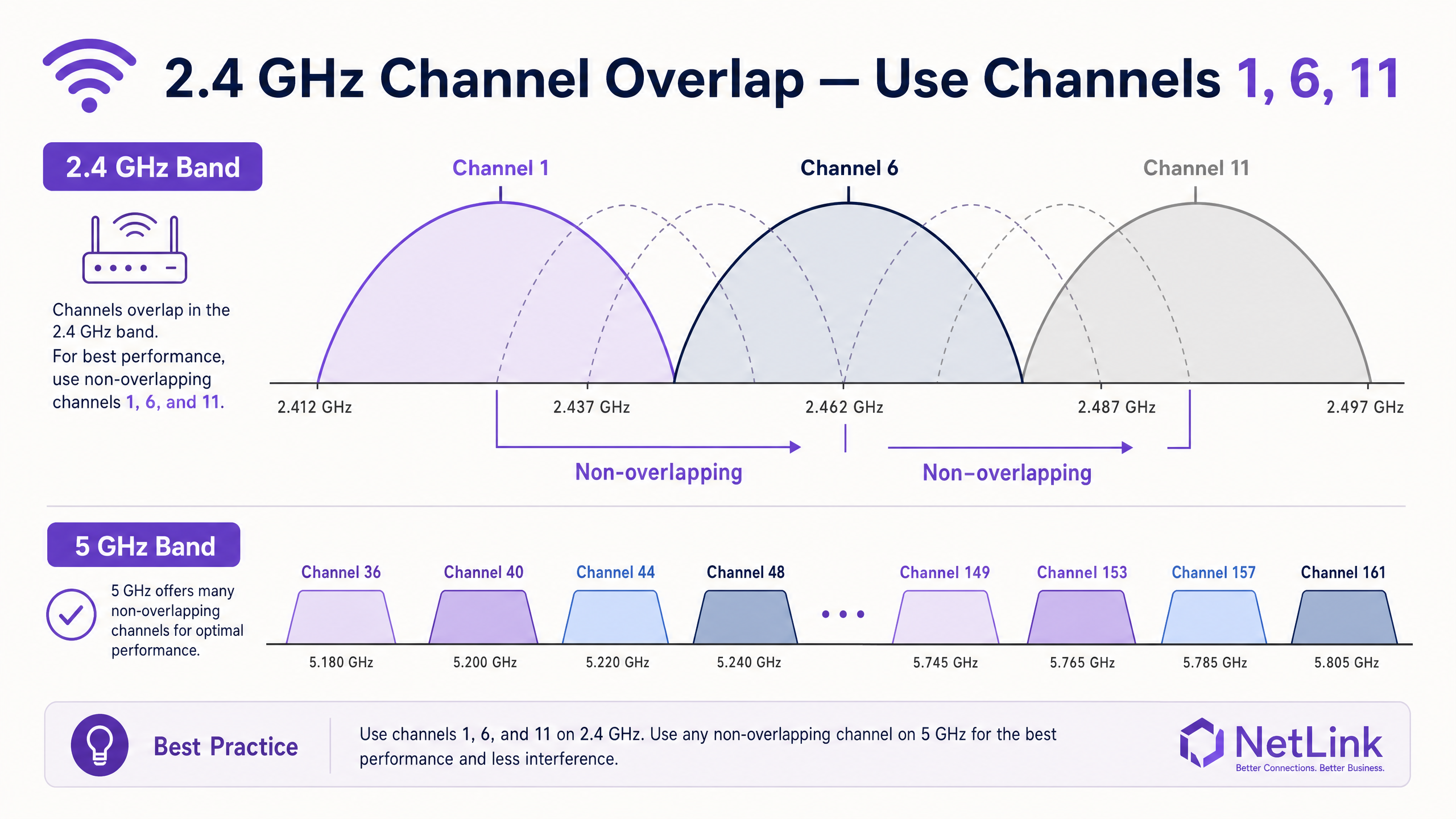
क्लायंट्सना 5 GHz बँडवर स्थलांतरित करणे आवश्यक आहे. 5 GHz स्पेक्ट्रम 24 पर्यंत नॉन-ओव्हरलॅपिंग चॅनेल (यूकेमधील DFS चॅनेलसह) प्रदान करते, ज्यामुळे CCI लक्षणीयरीत्या कमी होते. सक्षम क्लायंट्सना 5 GHz रेडिओवर सक्तीने आणण्यासाठी एंटरप्राइझ कंट्रोलर्सना आक्रमक बँड स्टीयरिंगसह कॉन्फिगर केले पाहिजे.
क्लायंट घनता आणि एअरटाइम फेअरनेस
WiFi हे एक सामायिक माध्यम आहे. 1.2 Gbps एकूण थ्रूपुटसाठी रेट केलेले AP, 100 समवर्ती क्लायंट्सना सेवा देण्यास भाग पाडल्यास संघर्ष करेल. याव्यतिरिक्त, कमी डेटा दरांवर (उदा. 1 Mbps किंवा 2 Mbps) कार्य करणारे जुने क्लायंट, आधुनिक Wi-Fi 6 क्लायंटइतकाच डेटा प्रसारित करण्यासाठी एअरटाइमचा असमान प्रमाणात वापर करतात.
हे सोडवण्यासाठी, प्रशासकांनी जुने डेटा दर अक्षम केले पाहिजेत. किमान अनिवार्य डेटा दर 12 Mbps किंवा 24 Mbps वर सेट करून, जुन्या क्लायंट्सना एकतर उच्च दराने जोडणी करण्यास किंवा डिस्कनेक्ट होण्यास भाग पाडले जाते, ज्यामुळे वेगवान उपकरणांसाठी एअरटाइम मोकळा होतो. एअरटाइम फेअरनेसचे हे तत्त्व कॉन्फरन्स सेंटर्स आणि स्टेडियमसारख्या उच्च-घनतेच्या वातावरणात महत्त्वाचे आहे.
अंमलबजावणी मार्गदर्शक
1. बेसलाइन आणि ऑडिट
बदल लागू करण्यापूर्वी, कार्यप्रदर्शन बेसलाइन स्थापित करा. सध्याच्या RF वातावरणाचे मॅपिंग करण्यासाठी चॅनल ओव्हरलॅप समस्येचे निवारण करण्यासाठी सर्वोत्तम WiFi विश्लेषक साधने वापरा. चॅनल वापर, सिग्नल-टू-नॉइज रेशो (SNR) आणि विद्यमान AP प्लेसमेंटची नोंद करा.
2. RF ट्यूनिंग
- स्टॅटिक चॅनल असाइनमेंट: तुमच्या साइट सर्वेनुसार 2.4 GHz बँडवर नॉन-ओव्हरलॅपिंग चॅनेल (1, 6, 11) मॅन्युअली नियुक्त करा.
- ट्रान्समिट पॉवर कमी करणे: घन उपयोजनांमध्ये, 2.4 GHz रेडिओची ट्रान्समिट (Tx) पॉवर कमी करा. यामुळे प्रत्येक AP ची कव्हरेज सेल लहान होते, ज्यामुळे ओव्हरलॅप आणि CCI कमी होते. 5 GHz सिग्नलच्या उच्च क्षीणतेमुळे 5 GHz रेडिओ सामान्यतः उच्च Tx पॉवरवर कार्य करू शकतात.
- जुने दर अक्षम करा: एकूण सेल कार्यक्षमता सुधारण्यासाठी 802.11b दरांसाठी (1, 2, 5.5, 11 Mbps) समर्थन काढून टाका.
3. ट्रॅफिक प्राधान्यीकरण (QoS)
विलंब-संवेदनशील ॲप्लिकेशन्सचे संरक्षण करण्यासाठी Quality of Service (QoS) लागू करा. QoS शिवाय, एकच वापरकर्ता मोठी फाइल डाउनलोड करत असल्यास संपूर्ण BSSID मधील VoIP कॉल्स किंवा POS व्यवहारांमध्ये व्यत्यय आणू शकतो.
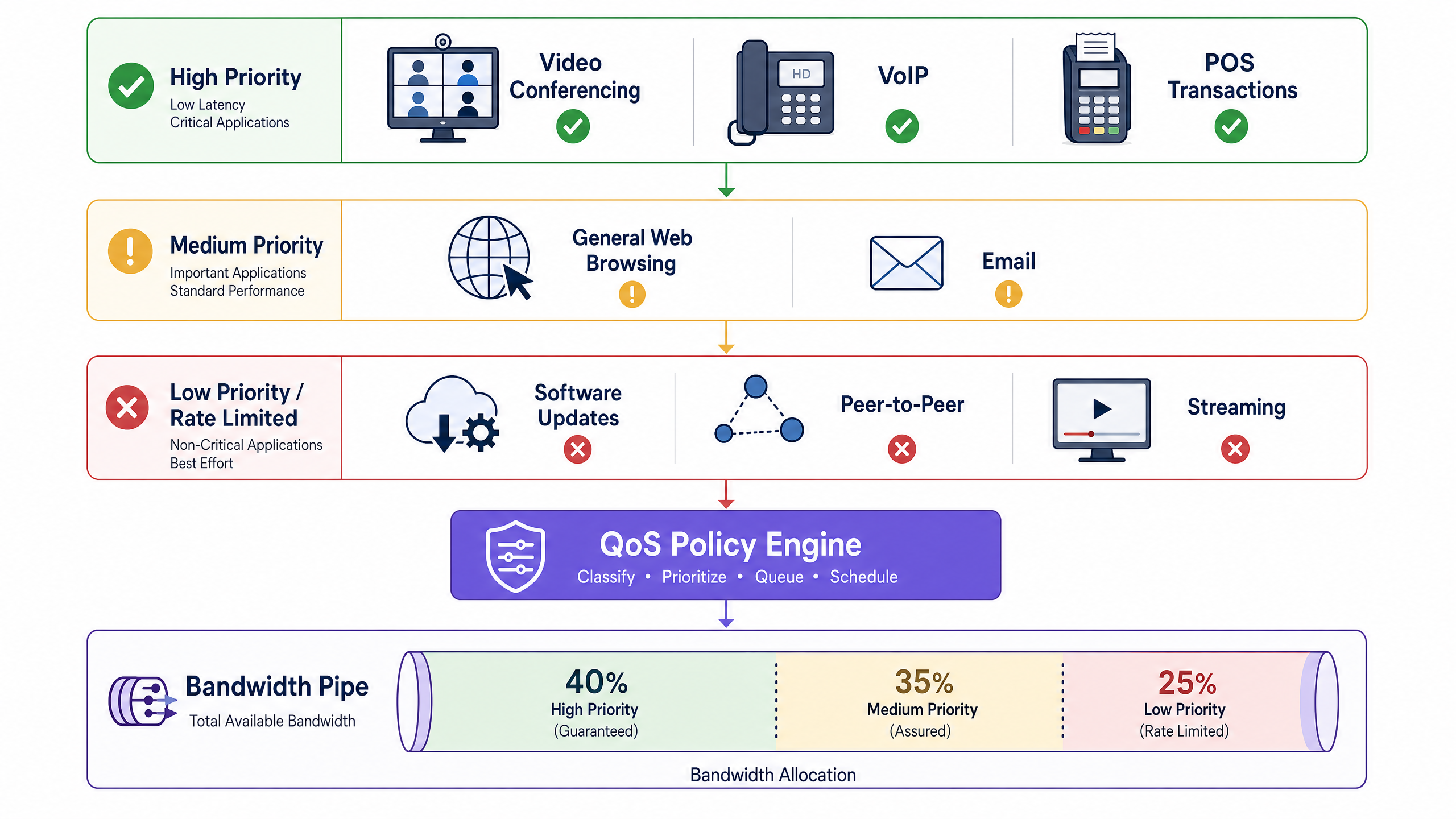
ट्रॅफिकला तीन स्तरांमध्ये वर्गीकृत करण्यासाठी कंट्रोलर स्तरावर DSCP (Differentiated Services Code Point) मार्किंग कॉन्फिगर करा:
- उच्च प्राधान्य (हमी): VoIP, व्हिडिओ कॉन्फरन्सिंग, POS सिस्टीम.
- मध्यम प्राधान्य (सुनिश्चित): सामान्य वेब ब्राउझिंग, ईमेल, कॉर्पोरेट ॲप्लिकेशन्स.
- कमी प्राधान्य (दर मर्यादित): पीअर-टू-पीअर, सॉफ्टवेअर अपडेट्स, मोठ्या मीडिया डाउनलोड्स.
4. रोमिंग ऑप्टिमायझेशन
स्टिकी क्लायंट्स—अशी उपकरणे जी जवळच्या, मजबूत AP कडे रोमिंग करण्याऐवजी कमकुवत AP सिग्नलला चिकटून राहतात—संपूर्ण सेलसाठी कार्यप्रदर्शन कमी करतात. तुमच्या कंट्रोलरवर 802.11 RRM सूट (802.11r, 802.11k, आणि 802.11v) सक्षम करा. हे मानक जलद BSS संक्रमणाची सोय करतात आणि क्लायंट्सना शेजारी अहवाल प्रदान करतात, त्यांना सक्रियपणे रोमिंग करण्यास प्रोत्साहित करतात.
सर्वोत्तम पद्धती
- SSID रॅशनलायझेशन: प्रत्येक ब्रॉडकास्ट SSID मुळे व्यवस्थापन फ्रेम ओव्हरहेड (बीकन्स) होतो. प्रत्येक AP साठी ब्रॉडकास्ट SSIDs ची संख्या जास्तीत जास्त तीन किंवा चार पर्यंत मर्यादित करा. वेगवेगळ्या वापरकर्ता गटांसाठी स्वतंत्र SSIDs तयार करण्याऐवजी ट्रॅफिकला डायनॅमिकली सेगमेंट करण्यासाठी VLAN टॅगिंग वापरा (उदा. 802.1X RADIUS ॲट्रिब्यूट्सद्वारे).
- सुरक्षा आणि अनुपालन: सार्वजनिक नेटवर्क तैनात करताना, PCI DSS आणि GDPR चे पालन सुनिश्चित करा. WPA3-Enterprise मध्ये संक्रमण करणे किंवा सुरक्षित, प्रोफाइल-आधारित प्रमाणीकरण पद्धती वापरणे जसे की How a wi fi assistant Enables Passwordless Access in 2026 वापरकर्त्याचा अनुभव सुधारताना जोखीम कमी करते.
- सतत निरीक्षण: हार्डवेअर-अज्ञेयवादी विश्लेषण स्तर तैनात करा. सत्र कालावधी, क्लायंट घनता आणि स्थानिक विश्लेषणांमध्ये सखोल दृश्यमानता प्रदान करणारे प्लॅटफॉर्म IT संघांना अडथळे सक्रियपणे ओळखण्यास मदत करतात. मोठ्या ठिकाणांसाठी, Purple Launches Offline Maps Mode for Seamless, Secure Navigation to WiFi Hotspots समाकलित केल्याने मौल्यवान स्थान डेटा प्रदान करताना अभ्यागतांचा अनुभव आणखी वाढवता येतो.
समस्यानिवारण आणि जोखीम कमी करणे
- DFS रडार शोध: 5 GHz DFS चॅनेल वापरताना, APs ने रडार सिग्नेचरसाठी ऐकले पाहिजे. रडार आढळल्यास, AP त्वरित चॅनेल बदलेल, ज्यामुळे क्लायंट तात्पुरते डिस्कनेक्ट होतील. विमानतळ किंवा हवामान केंद्रांजवळील वातावरणात, चॅनेल योजनेतून विशिष्ट DFS चॅनेल वगळणे आवश्यक असू शकते.
- PoE बजेटची मर्यादा: आधुनिक Wi-Fi 6 आणि Wi-Fi 6E APs ना अनेकदा PoE+ (802.3at) किंवा PoE++ (802.3bt) आवश्यक असते. जुन्या 802.3af स्विचला जोडल्यास, AP बूट होऊ शकते परंतु अक्षम रेडिओ किंवा कमी Tx पॉवरसह कार्य करू शकते. स्विच PoE बजेट AP आवश्यकतांविरुद्ध नेहमी सत्यापित करा.
- अपलिंक अडथळे: APs ला जोडणारे स्विच पोर्ट पूर्ण गिगाबिट किंवा मल्टी-गिगाबिट वेगाने वाटाघाटी करत असल्याची खात्री करा. 100 Mbps वर पोर्टची वाटाघाटी करणारी सदोष केबल उच्च-क्षमतेच्या AP ला गंभीरपणे कमी करेल.
ROI आणि व्यवसायावर परिणाम
स्थानिक RF वातावरणाचे ऑप्टिमायझेशन त्वरित, मोजता येण्याजोगा ROI देते. अनावश्यक ISP बँडविड्थ अपग्रेड पुढे ढकलून, संस्था OPEX ला धोरणात्मक IT उपक्रमांकडे वळवू शकतात.
शिवाय, एक स्थिर, उच्च-कार्यक्षम नेटवर्क महसूल-निर्माण सेवांसाठी मूलभूत आहे. किरकोळ आणि आदरातिथ्य क्षेत्रात, विश्वसनीय कनेक्टिव्हिटी समृद्ध मीडिया ॲप्लिकेशन्स आणि लक्ष्यित विपणन मोहिमांच्या तैनातीस सक्षम करते. Purple Appoints Iain Fox as VP Growth – Public Sector to Drive Digital Inclusion and Smart City Innovation मध्ये अधोरेखित केल्याप्रमाणे, मजबूत पायाभूत सुविधा प्रगत स्मार्ट सिटी आणि डिजिटल समावेश प्रकल्पांसाठी पूर्वअट आहे. यश केवळ पिंग वेळेनुसार नव्हे, तर वाढलेल्या वापरकर्त्याच्या थांबण्याच्या वेळेनुसार, Captive Portal वरील उच्च रूपांतरण दरांनुसार आणि कमी झालेल्या IT समर्थन तिकिटांनुसार मोजले पाहिजे.
ऑडिओ ब्रीफिंग ऐका
या संकल्पनांमध्ये सखोल माहितीसाठी, आमच्या वरिष्ठ सोल्युशन्स आर्किटेक्टने या 10 मिनिटांच्या तांत्रिक ब्रीफिंगमध्ये निदान फ्रेमवर्क आणि अंमलबजावणीच्या प्राधान्यांची रूपरेषा कशी दिली आहे ते ऐका.
महत्वाच्या व्याख्या
Co-Channel Interference (CCI)
Interference caused when two or more APs operate on the same channel, forcing them to share the available airtime.
When IT teams encounter high latency despite low user counts, CCI from poorly planned channel assignments or neighbouring networks is usually the cause.
Band Steering
A controller feature that encourages or forces dual-band client devices to connect to the less congested 5 GHz or 6 GHz bands rather than the crowded 2.4 GHz band.
Essential for balancing load across the AP's radios and ensuring modern devices get the throughput they expect.
Airtime Fairness
A mechanism that allocates equal transmission time to all clients, rather than equal packet counts, preventing slow legacy devices from dragging down the performance of the entire network.
Critical in mixed-device environments like public venues, where a single old smartphone can otherwise cripple the AP for everyone else.
Dynamic Frequency Selection (DFS)
A requirement for APs operating on certain 5 GHz channels to detect and avoid interfering with military or weather radar systems.
IT managers must be aware of DFS when designing networks near airports; if radar is detected, the AP must immediately vacate the channel, causing temporary client disconnects.
Minimum Mandatory Data Rate
The lowest speed at which an AP will allow a client to connect. Disabling lower rates (1, 2, 5.5 Mbps) forces clients to use faster modulation schemes or roam to a closer AP.
A primary tool for eliminating 'sticky clients' and improving overall cell efficiency.
802.11r (Fast BSS Transition)
An IEEE standard that allows a client device to roam seamlessly between APs without needing to re-authenticate to the RADIUS server every time.
Vital for maintaining active VoIP calls or video streams as a user walks through a large facility.
Quality of Service (QoS)
Network policies that prioritise certain types of traffic (e.g., voice or POS data) over less critical traffic (e.g., guest downloads).
Necessary to ensure business-critical operations remain stable even when the guest network is heavily utilised.
Spatial Streams
Multiple independent data signals transmitted simultaneously over different antennas (e.g., 2x2, 4x4 MIMO) to increase throughput.
When evaluating AP hardware, higher spatial streams indicate greater capacity to handle dense client environments.
सोडवलेली उदाहरणे
A 200-room hotel in a dense urban environment is experiencing severe WiFi complaints during the evening peak (7 PM - 10 PM). The ISP connection is 1 Gbps symmetric, but guest throughput drops below 5 Mbps. The controller shows high channel utilisation on the 2.4 GHz band.
- Conduct an RF survey to identify overlapping APs from neighbouring buildings. 2. Manually assign non-overlapping channels (1, 6, 11) on 2.4 GHz and reduce Tx power by 3-6 dBm to shrink the cell size. 3. Enable aggressive band steering to force 5 GHz-capable devices off the congested 2.4 GHz band. 4. Increase the minimum mandatory data rate to 12 Mbps to prevent sticky legacy clients from consuming excessive airtime. 5. Implement QoS to rate-limit bulk downloads while prioritising streaming and VoIP traffic.
A large retail chain wants to deploy a new POS system over WiFi, but the current network supports 8 different SSIDs (Guest, Staff, IoT, Scanners, Managers, CCTV, HVAC, Vendors). Performance is sluggish even when the store is empty.
Consolidate the SSIDs to a maximum of three: 'Retail-Guest' (Open/Captive Portal), 'Retail-Secure' (802.1X), and 'Retail-IoT' (PSK/MPSK). Use RADIUS attributes via the 802.1X authentication on the 'Retail-Secure' SSID to dynamically assign staff, POS terminals, and managers to their respective VLANs. This drastically reduces the management frame overhead (beacons) that is currently consuming a large percentage of the available airtime.
सराव प्रश्न
Q1. A stadium deployment is experiencing poor throughput in the VIP seating area. The APs are configured to maximum transmit power on both 2.4 GHz and 5 GHz to 'ensure coverage'. What is the likely result of this configuration, and how should it be corrected?
टीप: Consider how clients decide when to roam, and the impact of large coverage cells overlapping.
नमुना उत्तर पहा
Maximum Tx power creates massive overlapping coverage cells, leading to severe Co-Channel Interference (CCI) and 'sticky clients' that refuse to roam to closer APs because they still hear a strong signal from distant APs. The correction is to significantly reduce the Tx power (especially on 2.4 GHz) to create smaller, non-overlapping micro-cells, forcing clients to roam appropriately and increasing aggregate capacity.
Q2. You are auditing a network with 6 SSIDs broadcast across all APs. The client complains that the network feels 'sluggish' even when only a few users are connected. Why is this happening?
टीप: Think about the management frames that APs must broadcast for every active SSID.
नमुना उत्तर पहा
Each SSID must broadcast beacon frames (typically every 100ms) at the lowest mandatory data rate. With 6 SSIDs, the management frame overhead is consuming a massive percentage of the available airtime before any actual user data is transmitted. The solution is to consolidate to 3 or fewer SSIDs and use 802.1X/RADIUS to dynamically assign VLANs.
Q3. A school has upgraded to 1 Gbps fibre, but laptops in a classroom with 30 students are struggling to load web pages. The AP is a modern Wi-Fi 6 model. A packet capture shows several legacy 802.11g devices connected. What is the most immediate fix?
टीप: Consider how legacy devices affect the transmission time for the entire BSSID.
नमुना उत्तर पहा
The legacy 802.11g devices are connecting at very low data rates (e.g., 1 or 2 Mbps) and monopolising the airtime, dragging down performance for the modern Wi-Fi 6 laptops. The immediate fix is to disable legacy data rates by raising the minimum mandatory data rate to 12 Mbps or 24 Mbps, forcing the older devices off the network or requiring them to use faster modulation.