
Ruijie Networks वर Guest WiFi आणि Captive Portals कसे कॉन्फिगर करावे
हे तांत्रिक मार्गदर्शक Ruijie Networks हार्डवेअरवर guest WiFi आणि captive portals च्या कॉन्फिगरेशनचे तपशील देते, ज्यामध्ये नेटिव्ह क्लाउड पोर्टल्स आणि बाह्य RADIUS इंटिग्रेशन्स दोन्हीचा समावेश आहे. हे IT व्यवस्थापक आणि नेटवर्क आर्किटेक्ट्सना VLAN आयसोलेशन, वॉल्ड गार्डन सेटअप आणि विश्लेषण व महसूल वाढवण्यासाठी थर्ड-पार्टी प्लॅटफॉर्म इंटिग्रेशनसाठी कृतीयोग्य पायऱ्या प्रदान करते.
हे मार्गदर्शक ऐका
पॉडकास्ट ट्रान्सक्रिप्ट पहा
कार्यकारी सारांश
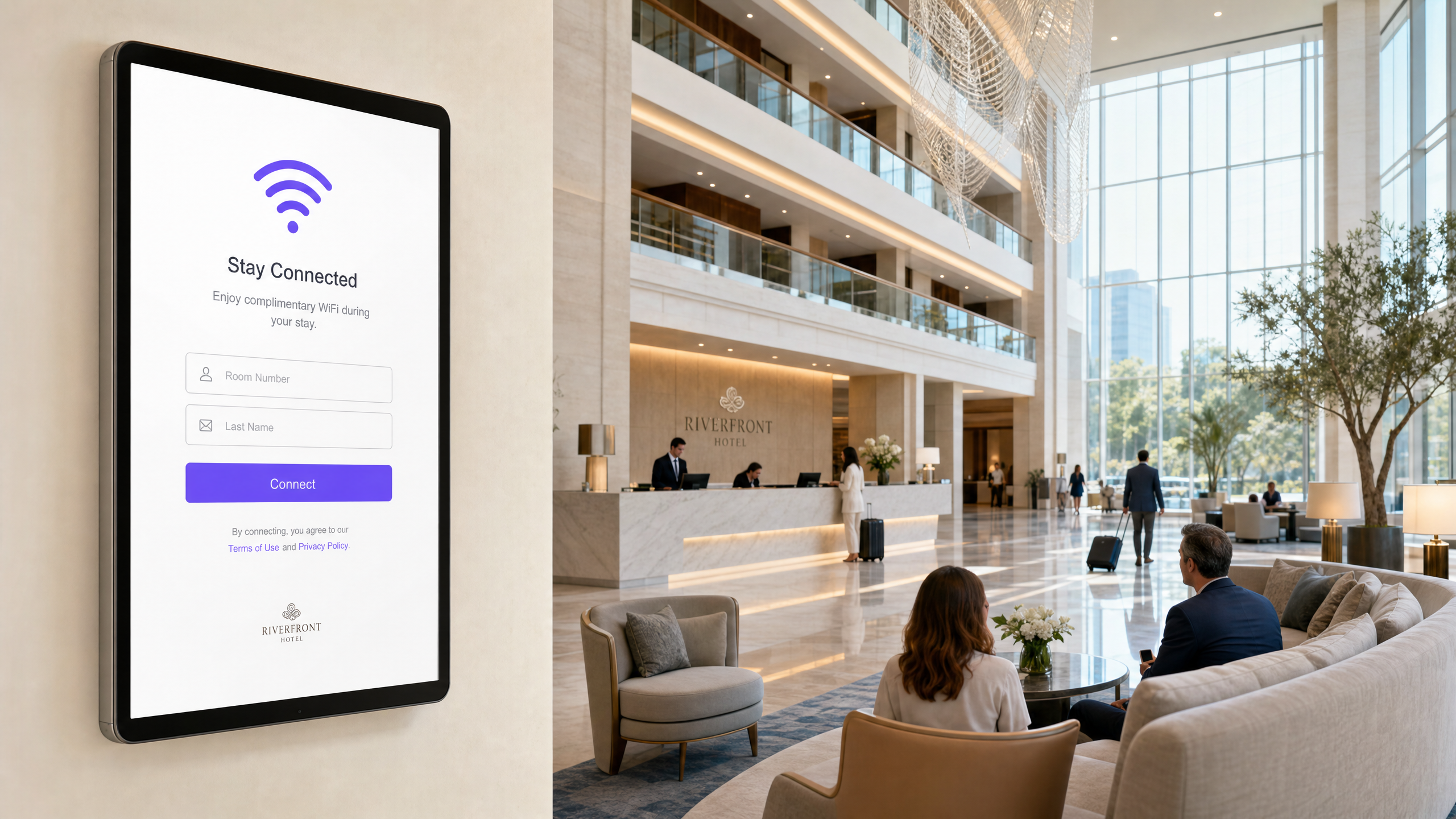
Ruijie Networks हार्डवेअरवर guest WiFi आणि captive portals कॉन्फिगर करण्यासाठी प्लॅटफॉर्मच्या आर्किटेक्चरची, विशेषतः नेटिव्ह क्लाउड पोर्टल्स आणि बाह्य RADIUS इंटिग्रेशन्समधील निवडीची स्पष्ट समज असणे आवश्यक आहे. हे तांत्रिक संदर्भ मार्गदर्शक IT व्यवस्थापक, नेटवर्क आर्किटेक्ट्स आणि व्हेन्यू ऑपरेशन्स डायरेक्टर्सना Ruijie RG-WS कंट्रोलर्स आणि Reyee EG गेटवे वापरून सुरक्षित, आयसोलेटेड आणि स्केलेबल गेस्ट नेटवर्क तैनात करण्यासाठी निश्चित पायऱ्या प्रदान करते. आम्ही मूलभूत NAT फॉरवर्डिंगपासून मजबूत VLAN आयसोलेशनमध्ये संक्रमण, WISPr द्वारे बाह्य captive portals चे कॉन्फिगरेशन आणि फर्स्ट-पार्टी डेटा गोळा करण्यासाठी आणि महसूल वाढवण्यासाठी Purple सारख्या थर्ड-पार्टी प्लॅटफॉर्मचे इंटिग्रेशन कव्हर करतो. तुम्ही एकल हॉटेल व्यवस्थापित करत असाल किंवा मल्टी-साइट रिटेल इस्टेट, हे मार्गदर्शक अनुपालन करणारे आणि उच्च-कार्यक्षमता देणारे वायरलेस नेटवर्क तयार करण्यासाठी आवश्यक असलेल्या व्यावहारिक, व्हेंडर-न्यूट्रल कॉन्फिगरेशन पायऱ्या प्रदान करते.
तांत्रिक सखोल विश्लेषण
Ruijie Networks एक मजबूत, एंटरप्राइझ-ग्रेड वायरलेस आर्किटेक्चर प्रदान करते जे गेस्ट ॲक्सेससाठी एकाधिक डिप्लॉयमेंट मॉडेल्सना सपोर्ट करते. कोणत्याही नेटवर्क आर्किटेक्टसाठी मुख्य निर्णय म्हणजे योग्य ऑथेंटिकेशन फ्लो आणि आयसोलेशन स्ट्रॅटेजी निवडणे.
Captive Portal डिप्लॉयमेंट मॉडेल्स
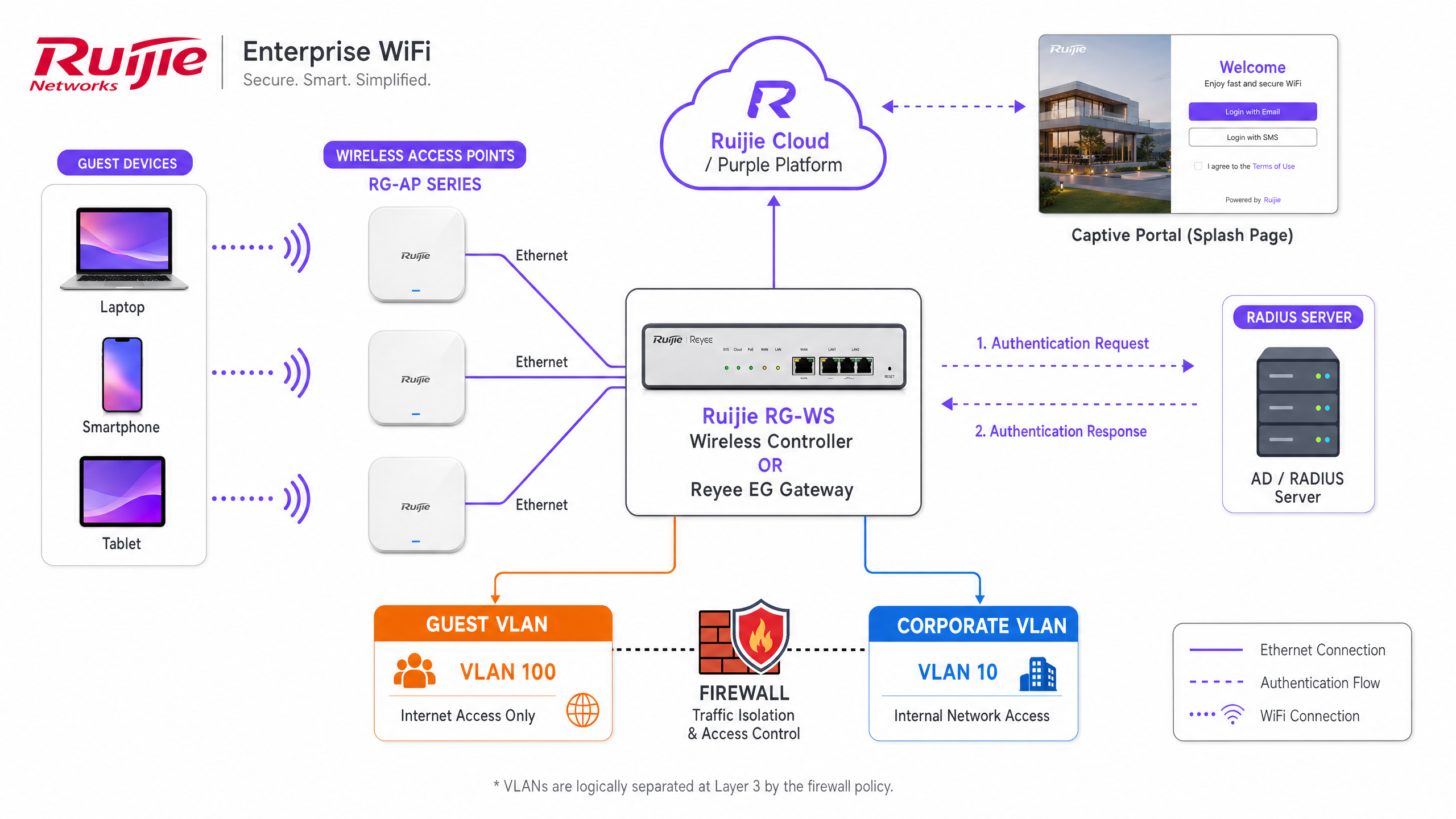
Ruijie तीन वेगवेगळ्या captive portal डिप्लॉयमेंट मॉडेल्सना सपोर्ट करते, जे प्रत्येक वेगवेगळ्या ऑपरेशनल आवश्यकतांसाठी योग्य आहेत:
- नेटिव्ह क्लाउड पोर्टल (Ruijie JaCS): अंगभूत Ruijie Cloud प्लॅटफॉर्म, विशेषतः हॉस्पिटॅलिटीसाठी JaCS इंटरफेस, ड्रॅग-अँड-ड्रॉप पोर्टल बिल्डर प्रदान करतो. हे मॉडेल Device Config अंतर्गत कॉन्फिगर केले जाते, जिथे SSID ऑथेंटिकेशन Captive Portal वर सेट केले जाते. हे वन-क्लिक ॲक्सेस आणि व्हाउचर कोडसह मूलभूत लॉगिन पर्यायांना सपोर्ट करते. हे अशा सिंगल-साइट व्हेन्यूसाठी योग्य आहे ज्यांना सखोल विश्लेषण किंवा बाह्य CRM इंटिग्रेशनची आवश्यकता नसते.
- बाह्य Captive Portal (WISPr/RADIUS): एंटरप्राइझ डिप्लॉयमेंट्स, मल्टी-साइट रिटेल आणि मोठ्या सार्वजनिक ठिकाणांसाठी, बाह्य पोर्टल मॉडेल अनिवार्य आहे. हा दृष्टिकोन गेस्ट ट्रॅफिकला Purple सारख्या थर्ड-पार्टी प्लॅटफॉर्मवर रिडायरेक्ट करण्यासाठी WISPr प्रोटोकॉलचा वापर करतो. ऑथेंटिकेशन PAP एन्क्रिप्शन वापरून बाह्य RADIUS सर्व्हर ग्रुपद्वारे हाताळले जाते. हे मॉडेल प्रगत डेटा कॅप्चर, GDPR अनुपालन व्यवस्थापन आणि विद्यमान मार्केटिंग स्टॅक्ससह अखंड इंटिग्रेशन सक्षम करते.
- स्टँडअलोन AP पोर्टल: ReyeeOS 1.219 किंवा त्यापुढील व्हर्जनवर चालणारे Ruijie Reyee ॲक्सेस पॉइंट्स EG गेटवेची आवश्यकता नसताना स्थानिक पातळीवर captive portal ला सपोर्ट करतात. तात्पुरत्या डिप्लॉयमेंट्ससाठी हा एक फॉलबॅक पर्याय आहे परंतु यात कंट्रोलर-आधारित आर्किटेक्चरच्या मजबूत QoS आणि आयसोलेशन वैशिष्ट्यांचा अभाव आहे.
नेटवर्क आयसोलेशन: NAT विरुद्ध VLAN
कॉर्पोरेट नेटवर्कपासून गेस्ट ट्रॅफिक कसे आयसोलेट करायचे हा सर्वात महत्त्वाचा आर्किटेक्चरल निर्णय आहे. Ruijie गेस्ट SSIDs साठी दोन फॉरवर्डिंग मोड ऑफर करते:
- NAT मोड: गेटवे एका समर्पित पूल (डिफॉल्ट 192.168.23.0/24) मधून IP ॲड्रेस नियुक्त करतो आणि ट्रॅफिक इंटरनेटवर राउट करण्यापूर्वी नेटवर्क ॲड्रेस ट्रान्सलेशन (NAT) करतो. डिप्लॉय करण्यासाठी सोपे असले तरी, ही पद्धत Layer 3 वर गेस्ट ट्रॅफिकवर मर्यादित दृश्यमानता आणि नियंत्रण प्रदान करते.
- VLAN मोड: शिफारस केलेले एंटरप्राइझ मानक. गेस्ट SSID एका समर्पित VLAN (उदा. VLAN 100) वर मॅप केले जाते. Reyee EG गेटवे किंवा RG-WS कंट्रोलर कडक आयसोलेशन लागू करण्यासाठी ॲक्सेस कंट्रोल लिस्ट (ACLs) वापरतात. गेस्ट सबनेटमधून कॉर्पोरेट सबनेटवर IP ट्रॅफिक नाकारण्यासाठी आणि आउटबाउंड इंटरनेट ॲक्सेसला परवानगी देण्यासाठी एक विस्तारित ACL कॉन्फिगर करणे आवश्यक आहे. हा दृष्टिकोन Enterprise WiFi Security: A Complete Guide for 2026 च्या तत्त्वांशी सुसंगत आहे.
वॉल्ड गार्डन कॉन्फिगरेशन
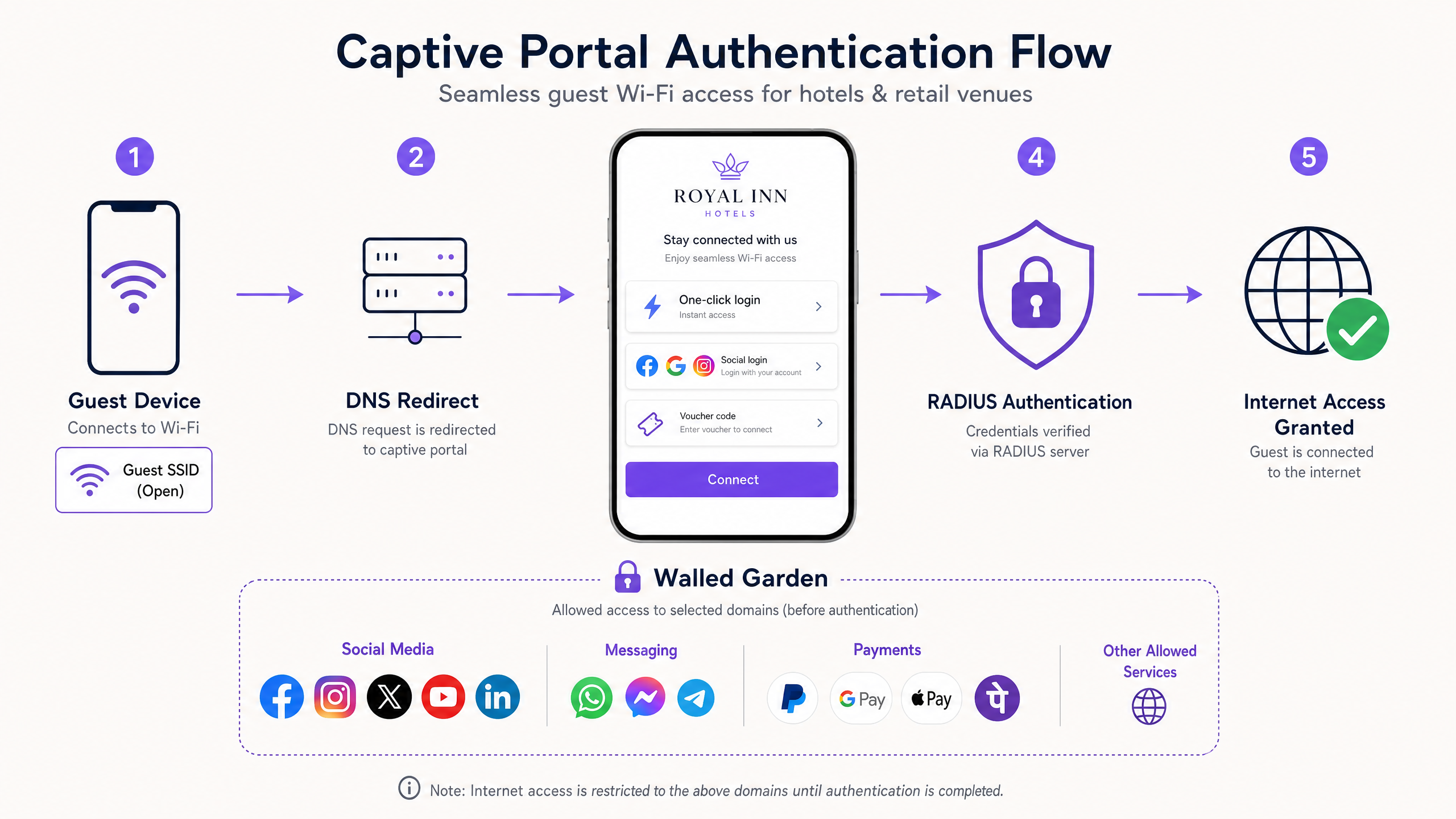
गेस्टने captive portal ऑथेंटिकेशन पूर्ण करण्यापूर्वी, त्यांचे डिव्हाइस मर्यादित स्थितीत कार्य करते. आवश्यक सेवांमध्ये प्रवेश मिळवण्यासाठी वॉल्ड गार्डन किंवा अलाउलिस्ट कॉन्फिगर करणे आवश्यक आहे. तुम्ही बाह्य प्लॅटफॉर्म वापरत असल्यास, तुम्हाला प्लॅटफॉर्मचे डोमेन, IP ॲड्रेस आणि कोणत्याही सोशल लॉगिन प्रदात्यांचे (जसे की Facebook किंवा Google) ऑथेंटिकेशन एंडपॉइंट्स जोडणे आवश्यक आहे. महत्त्वाचे म्हणजे, iOS डिव्हाइसेसनी captive portal मिनी-ब्राउझर योग्यरित्या ट्रिगर करावा यासाठी तुम्ही captive.apple.com समाविष्ट केले पाहिजे.
अंमलबजावणी मार्गदर्शक
Ruijie हार्डवेअरवर बाह्य captive portal तैनात करण्यासाठी SSID, ऑथेंटिकेशन पॉलिसी आणि नेटवर्क आयसोलेशन लेयर्समध्ये अचूक कॉन्फिगरेशन आवश्यक आहे. Ruijie ला Purple सारख्या बाह्य प्लॅटफॉर्मसह इंटिग्रेट करण्यासाठी या पायऱ्या फॉलो करा.
पायरी १: Guest SSID आणि VLAN कॉन्फिगर करा
- Ruijie Cloud किंवा तुमच्या कंट्रोलरच्या स्थानिक eWeb इंटरफेसवर लॉग इन करा.
- Wireless Settings वर जा आणि तुमच्या व्हेन्यूसाठी योग्य नाव असलेले नवीन SSID तयार करा.
- Security Mode 'Open' वर सेट करा. Captive portal ऑथेंटिकेशन मेकॅनिझम म्हणून काम करेल.
- तुमच्या नियुक्त गेस्ट VLAN वर SSID असाइन करा. तुमच्या EG गेटवेवर संबंधित VLAN इंटरफेस DHCP स्कोपसह कॉन्फिगर केला असल्याची खात्री करा.
पायरी २: बाह्य Captive Portal पॉलिसी कॉन्फिगर करा
- Auth & Account सेक्शनवर जा.
- Authentication मेनू अंतर्गत Captive Portal निवडा.
- नवीन पॉलिसी तयार करा आणि Policy Mode 'External' वर सेट करा.
- तुम्ही पायरी १ मध्ये तयार केलेले Guest SSID निवडा.
- तुमच्या ext द्वारे प्रदान केलेले Portal Server URL इनपुट कराबाह्य प्लॅटफॉर्म (उदा. Purple चे portal endpoint).
- तुमच्या प्लॅटफॉर्मद्वारे प्रदान केलेले IP ॲड्रेस, पोर्ट्स (सामान्यतः ऑथेंटिकेशनसाठी 1812 आणि अकाउंटिंगसाठी 1813), आणि शेअर केलेले सिक्रेट्स वापरून RADIUS सर्व्हर ग्रुप कॉन्फिगर करा.
पायरी ३: Walled Garden लागू करा
- Auth & Account विभागात, Allowlist कॉन्फिगरेशन शोधा.
- तुमच्या बाह्य प्लॅटफॉर्मसाठी आवश्यक डोमेन आणि IP ॲड्रेस जोडा.
- तुम्ही वापरू इच्छित असलेल्या कोणत्याही सोशल आयडेंटिटी प्रोव्हाइडर्ससाठी डोमेन जोडा.
- मानक Captive Portal डिटेक्शन डोमेन्सना परवानगी असल्याची खात्री करा.
पायरी ४: ACL आयसोलेशन लागू करा
आयसोलेशन ACL कॉन्फिगर करण्यासाठी तुमच्या Ruijie गेटवे किंवा कंट्रोलरच्या कमांड लाईन इंटरफेसशी कनेक्ट करा. ही पायरी पाहुणे (guests) अंतर्गत संसाधनांपर्यंत पोहोचू शकणार नाहीत याची खात्री करते.
Ruijie(config)# access-list extended 107
Ruijie(config-ext-nacl)# deny ip 192.168.100.0 0.0.0.255 192.168.10.0 0.0.0.255
Ruijie(config-ext-nacl)# permit ip any any
Ruijie(config-ext-nacl)# exit
Ruijie(config)# interface BVI 100
Ruijie(config-if-BVI 100)# access-group 107 in
सर्वोत्तम पद्धती
एक विश्वासार्ह आणि सुरक्षित अतिथी WiFi अनुभव सुनिश्चित करण्यासाठी, या उद्योग-मानक सर्वोत्तम पद्धतींचे पालन करा:
- स्केलसाठी बाह्य ऑथेंटिकेशन वापरा: तुम्ही एकाधिक ठिकाणे व्यवस्थापित करत असल्यास किंवा तपशीलवार Guest WiFi विश्लेषणाची आवश्यकता असल्यास, मूळ पोर्टल बायपास करा आणि बाह्य RADIUS इंटिग्रेशन वापरा. Purple सारखे प्लॅटफॉर्म हार्डवेअर-अज्ञेयवादी व्यवस्थापन प्रदान करतात, ज्यामुळे तुम्हाला Ruijie, Cisco Meraki, HPE Aruba आणि Ruckus हार्डवेअरवर अतिथी अनुभव प्रमाणित करण्याची परवानगी मिळते.
- टायर्ड बँडविड्थ लागू करा: प्रति-वापरकर्ता बँडविड्थ मर्यादा लागू करण्यासाठी Ruijie EG गेटवेवरील QoS वैशिष्ट्ये वापरा. एक विनामूल्य बेसलाईन टियर (उदा. 5 Mbps) ऑफर करा आणि प्रीमियम, हाय-स्पीड टियर ऑफर करण्यासाठी तुमच्या बाह्य पोर्टलद्वारे पेमेंट गेटवेशी इंटिग्रेट करा. हे तुमच्या इन्फ्रास्ट्रक्चरमधून थेट महसूल प्रवाह तयार करते.
- कॉन्फिगरेशन सिंक्रोनाइझ करा: Ruijie JaCS प्लॅटफॉर्म वापरताना, Captive Portal पॉलिसीमध्ये बदल केल्यानंतर तुम्ही स्पष्टपणे Synchronise बटणावर क्लिक केले पाहिजे. असे न केल्यास EG गेटवेला अपडेट केलेले कॉन्फिगरेशन मिळणार नाही, ज्यामुळे विसंगत पोर्टल वर्तन होईल.
- डेटा गोपनीयता नियमांचे पालन करा: तुमच्या Captive Portal मध्ये मार्केटिंग संवादांसाठी स्पष्ट, जाणीवपूर्वक निवडलेले ऑप्ट-इन्स समाविष्ट असल्याची खात्री करा. Purple वापरताना, प्लॅटफॉर्म स्वयंचलितपणे GDPR आणि CCPA अनुपालन हाताळतो, एक सुरक्षित डेटा गोपनीयता स्तर प्रदान करतो. तपशीलवार आवश्यकतांसाठी The Network Administrator’s Guide to GDPR and Guest Data Privacy Compliance पहा.
ट्रबलशूटिंग आणि जोखीम कमी करणे
काळजीपूर्वक कॉन्फिगरेशन करूनही, Captive Portal उपयोजनांमध्ये समस्या येऊ शकतात. येथे सामान्य बिघाड मोड आणि त्यांचे निराकरण कसे करावे ते दिले आहे:
- iOS डिव्हाइसेसवर पोर्टल दाखवण्यास अपयशी ठरतात: ही जवळजवळ नेहमीच walled garden ची समस्या असते. Apple डिव्हाइसेस ते पोर्टलच्या मागे आहेत की नाही हे निर्धारित करण्यासाठी
captive.apple.comतपासतात. जर हा डोमेन ब्लॉक केला असेल, तर डिव्हाइस गृहीत धरते की त्याला पूर्ण इंटरनेट प्रवेश आहे आणि ते captive नेटवर्क असिस्टंट लाँच करण्यात अपयशी ठरते. तुमचे allowlist कॉन्फिगरेशन सत्यापित करा. - अतिथी RADIUS द्वारे ऑथेंटिकेट करू शकत नाहीत: Ruijie गेटवेवरील RADIUS शेअर केलेले सिक्रेट आणि पोर्ट कॉन्फिगरेशन तपासा. गेटवेचा सार्वजनिक IP ॲड्रेस तुमच्या बाह्य प्लॅटफॉर्मवर योग्यरित्या नोंदणीकृत असल्याची खात्री करा. RADIUS पोहोच सत्यापित करण्यासाठी Ruijie डायग्नोस्टिक टूल्स वापरा.
- बँडविड्थ मर्यादांकडे दुर्लक्ष केले जाते: जर तुम्ही बँडविड्थ टियर्स लागू करण्यासाठी बाह्य प्लॅटफॉर्म वापरत असाल, तर तुम्ही Ruijie गेटवेवरील Client Escape वैशिष्ट्य अक्षम केले पाहिजे. Client Escape सक्रिय असल्यास, गेटवे बाह्य प्लॅटफॉर्मच्या QoS सूचनांना बायपास करू शकतो.
- अतिथी ट्रॅफिक कॉर्पोरेट नेटवर्कपर्यंत पोहोचते: तुमच्या ACL कॉन्फिगरेशनचे पुनरावलोकन करा. विस्तारित ॲक्सेस लिस्ट योग्य VLAN किंवा BVI इंटरफेसवर इनबाउंड लागू केल्याची खात्री करा. अतिथी SSID शी डिव्हाइस कनेक्ट करून आणि ज्ञात अंतर्गत IP ॲड्रेसला पिंग करण्याचा प्रयत्न करून आयसोलेशनची चाचणी घ्या.
ROI आणि व्यावसायिक प्रभाव
Ruijie हार्डवेअरवर मजबूत Captive Portal तैनात केल्याने अतिथी WiFi चे रूपांतर बुडीत खर्चातून मोजता येण्याजोग्या व्यावसायिक मालमत्तेत होते. Purple सारख्या बाह्य WiFi Analytics प्लॅटफॉर्मला इंटिग्रेट करून, ठिकाणे लक्षणीय परतावा मिळवू शकतात.
- फर्स्ट-पार्टी डेटा संपादन: Captive Portal प्राथमिक डेटा कॅप्चर पॉइंट म्हणून काम करतो. ईमेल पत्ता किंवा सोशल लॉगिनच्या बदल्यात विनामूल्य WiFi ऑफर करून, ठिकाणे ग्राहक प्रोफाइलचा समृद्ध डेटाबेस तयार करतात. हा डेटा लक्ष्यित विपणन मोहिमांना चालना देतो, ज्यामुळे ग्राहकांचे लाइफटाइम व्हॅल्यू वाढते.
- ऑपरेशनल कार्यक्षमता: Ruijie Cloud आणि Purple द्वारे केंद्रीकृत क्लाउड व्यवस्थापन IT टीम्सचा स्थानिक नेटवर्क समस्यांचे निवारण करण्यासाठी लागणारा वेळ कमी करते. ओव्हरलेचे हार्डवेअर-अज्ञेयवादी स्वरूप म्हणजे तुम्ही तुमचे संपूर्ण विश्लेषण स्टॅक पुन्हा न तयार करता ॲक्सेस पॉइंट्स अपग्रेड किंवा बदलू शकता.
- थेट महसूल निर्मिती: टायर्ड बँडविड्थ मॉडेल लागू केल्याने ठिकाणांना थेट नेटवर्कची कमाई करण्याची परवानगी मिळते. उदाहरणार्थ, AGS विमानतळांनी टायर्ड WiFi धोरण लागू केले आणि गुंतवणुकीवर ८४२% परतावा पाहिला.
- वर्धित अभ्यागत अनुभव: एक अखंड, ब्रँडेड लॉगिन अनुभव ग्राहकांचे समाधान सुधारतो. Hospitality आणि Retail सारख्या क्षेत्रांमध्ये, विश्वासार्ह कनेक्टिव्हिटी ही एक मूलभूत अपेक्षा आहे; ती सुरक्षितपणे प्रदान केल्याने ब्रँडवर विश्वास निर्माण होतो.
महत्वाच्या व्याख्या
Captive Portal
A web page that a user of a public access network is obliged to view and interact with before access is granted.
The primary mechanism for authenticating guests and capturing first-party data on a Ruijie wireless network.
RADIUS
Remote Authentication Dial-In User Service. A networking protocol that provides centralized Authentication, Authorization, and Accounting management.
Used to securely connect Ruijie gateways to external platforms like Purple for guest authentication.
Walled Garden
An allowlist of domains and IP addresses that a guest device can access before completing the captive portal authentication.
Essential for allowing social login providers and captive portal detection mechanisms (like Apple's CNA) to function.
VLAN Isolation
The practice of assigning guest traffic to a separate Virtual Local Area Network and using Access Control Lists to prevent communication with internal corporate networks.
The standard security posture for enterprise guest WiFi deployments on Ruijie hardware.
WISPr
Wireless Internet Service Provider roaming. A protocol that allows users to roam between different wireless providers, often used to handle the redirect to external captive portals.
The underlying mechanism Ruijie uses when the captive portal policy is set to External mode.
Ruijie JaCS
Ruijie's cloud management platform specifically tailored for hospitality and hotel scenarios, offering native captive portal building tools.
Used for managing single-site deployments that do not require external data capture platforms.
Reyee EG Gateway
Ruijie's line of enterprise security routers that handle routing, firewall policies, and captive portal redirection for the wireless network.
The central hardware component where ACLs and RADIUS configurations are applied in a Ruijie deployment.
Client Escape
A feature on Ruijie gateways that, if enabled, can allow clients to bypass certain QoS or portal restrictions.
Must be disabled when using an external platform to enforce tiered bandwidth limits.
सोडवलेली उदाहरणे
A 200-room hotel deploying Ruijie RG-AP access points and an EG gateway needs to provide free guest WiFi while capturing email addresses for their marketing database. They also require strict isolation from their property management system (PMS) network.
The IT team configures a new Open SSID assigned to VLAN 100. On the EG gateway, they configure an extended ACL to deny traffic from VLAN 100 to the PMS VLAN, applying it inbound on the guest interface. They set the captive portal policy to External mode, pointing the Portal Server URL to Purple's platform. They configure the RADIUS server group with Purple's credentials and add Purple's domains to the allowlist. The Purple platform handles the branded splash page and email capture workflow.
A retail chain with 50 locations is rolling out Ruijie hardware. Customers report that when they connect to the guest WiFi on their iPhones, the login screen does not appear automatically, forcing them to open a browser manually.
The network administrator logs into Ruijie Cloud, navigates to Auth & Account, and opens the Allowlist configuration. They add 'captive.apple.com' to the walled garden list and synchronise the configuration to all EG gateways across the estate.
सराव प्रश्न
Q1. You are deploying Ruijie WiFi across a stadium. You need to capture fan data for marketing and enforce a 5 Mbps bandwidth limit per user. Should you use the native Ruijie portal or an external platform, and how do you enforce the bandwidth?
टीप: Consider the scale of the deployment and the data capture requirements.
नमुना उत्तर पहा
You must use an external platform like Purple for the data capture and marketing integration. To enforce the bandwidth, configure the QoS settings on the Ruijie EG gateway for the guest SSID, and ensure the Client Escape feature is disabled so the external platform's policies are respected.
Q2. A client complains that their guest network is insecure because the SSID is set to 'Open'. They ask you to implement a pre-shared key (WPA2-Personal) alongside the captive portal. How do you advise them?
टीप: Consider the user experience and the purpose of the captive portal.
नमुना उत्तर पहा
Advise the client that for public guest networks, adding a pre-shared key introduces unnecessary friction without significantly improving security, as the key must be shared publicly anyway. The captive portal itself serves as the authentication and authorization layer. For true security, WPA3-Enterprise with 802.1X should be used, but this is rarely suitable for public guest access.
Q3. After configuring a new external captive portal policy on Ruijie Cloud and pointing it to Purple, guests are still seeing the default Ruijie login page. What is the most likely cause?
टीप: Think about the configuration deployment process in the Ruijie interface.
नमुना उत्तर पहा
The administrator likely saved the configuration in Ruijie Cloud but failed to click the Synchronise button. The configuration has not been pushed down to the local EG gateway, so it is still serving the default local portal.
या मालिकेमध्ये पुढे वाचा
WeChat WiFi लॉगिन समाकलित करणे: सोशल Captive Portals द्वारे प्रतिबद्धता कॅप्चर करणे
हे मार्गदर्शक एंटरप्राइझ captive portals मध्ये WeChat WiFi प्रमाणीकरण कसे समाकलित करावे याचे तपशील देते, ज्यामध्ये OAuth 2.0 आर्किटेक्चर, RADIUS एकत्रीकरण आणि Cisco Meraki, HPE Aruba आणि Juniper Mist हार्डवेअरवरील टप्प्याटप्प्याने उपयोजन समाविष्ट आहे. हे IT व्यवस्थापक आणि नेटवर्क आर्किटेक्ट्सना WeChat च्या १.३ अब्ज वापरकर्त्यांकडून फर्स्ट-पार्टी डेटा कॅप्चर करण्यासाठी आणि Official Account फॉलो आणि लॉगिन-नंतरच्या रिडायरेक्ट्सद्वारे प्रतिबद्धता वाढवण्यासाठी एक व्यावहारिक फ्रेमवर्क प्रदान करते.
सुरक्षित एंटरप्राइझ WiFi आणि BYOD प्रोव्हिजनिंगसाठी SCEP कसे कॉन्फिगर करावे
ही तांत्रिक मार्गदर्शिका सुरक्षित 802.1X एंटरप्राइझ WiFi ऑथेंटिकेशन आणि BYOD प्रोव्हिजनिंग स्वयंचलित करण्यासाठी सिंपल सर्टिफिकेट एनरोलमेंट प्रोटोकॉल (SCEP) कसे कॉन्फिगर करावे हे स्पष्ट करते. हे नेटवर्क आर्किटेक्ट्स आणि IT व्यवस्थापकांना एक निश्चित डिप्लोयमेंट सिक्वेन्स, हॉस्पिटॅलिटी आणि रिटेलमधील वास्तविक अंमलबजावणीची उदाहरणे आणि एंटरप्राइझ नेटवर्कमधून असुरक्षित प्री-शेअर्ड कीज (PSKs) आणि MAC ऑथेंटिकेशन बायपास (MAB) काढून टाकण्यासाठी जोखीम कमी करण्याच्या रणनीती प्रदान करते.
Captive Portals साठी WeChat OAuth ऑथेंटिकेशन कसे कॉन्फिगर करावे
हे तांत्रिक मार्गदर्शक Captive Portals साठी WeChat OAuth ऑथेंटिकेशन कसे कॉन्फिगर करावे हे स्पष्ट करते. हे चिनी अभ्यागतांकडून सुरक्षितपणे फर्स्ट-पार्टी डेटा गोळा करण्यासाठी आवश्यक असणारे प्लॅटफॉर्म रजिस्ट्रेशन, OAuth 2.0 फ्लो, स्कोप निवड आणि नेटवर्क एन्फोर्समेंट मेकॅनिझम सविस्तरपणे स्पष्ट करते.