
वायफाय सिग्नलची ताकद आणि कव्हरेज कसे मोजावे
हे तांत्रिक संदर्भ मार्गदर्शक नेटवर्क तंत्रज्ञ आणि IT व्यवस्थापकांना RSSI, SNR आणि हीटमॅपिंग साधनांचा वापर करून वायफाय सिग्नलची ताकद आणि कव्हरेज तपासण्यासाठी एक व्यावहारिक, विक्रेता-तटस्थ फ्रेमवर्क प्रदान करते. यात RF प्रसारणाचे भौतिकशास्त्र, चरण-दर-चरण सर्वेक्षण पद्धती आणि आदरातिथ्य व लॉजिस्टिक्स वातावरणातून घेतलेल्या वास्तविक-जगातील उपाययोजनांचा समावेश आहे. कव्हरेज ऑप्टिमाइझ केल्याने हेल्पडेस्कचा खर्च थेट कमी होतो, अनुपालन आवश्यकतांना समर्थन मिळते आणि एंटरप्राइझ ठिकाणांवर ऑपरेशनल इंटेलिजन्स चालवण्यासाठी आवश्यक असलेला टेलिमेट्री डेटा उपलब्ध होतो.
हे मार्गदर्शक ऐका
पॉडकास्ट ट्रान्सक्रिप्ट पहा
कार्यकारी सारांश
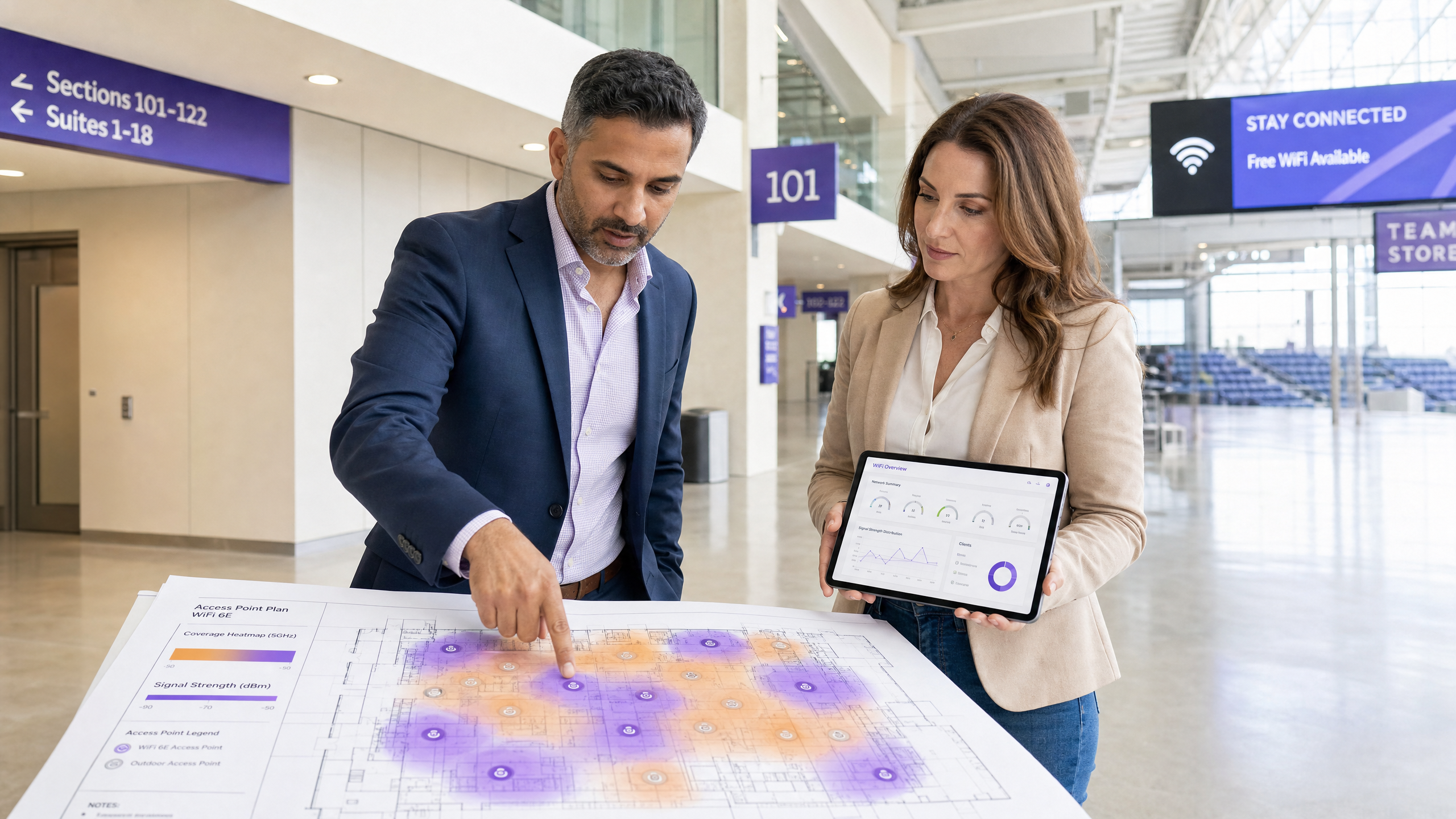
मोठ्या प्रमाणावरच्या ठिकाणांचे व्यवस्थापन करणाऱ्या IT व्यवस्थापकांसाठी आणि नेटवर्क आर्किटेक्टसाठी — मग ते आदरातिथ्य , किरकोळ विक्री , स्टेडियम्स किंवा सार्वजनिक क्षेत्रातील वातावरण असो — सातत्यपूर्ण, उच्च-कार्यक्षमतेचे WiFi प्रदान करणे ही एक मूलभूत ऑपरेशनल आवश्यकता आहे, भेदक घटक नाही. खराब सिग्नलची ताकद आणि कव्हरेजमधील त्रुटी कर्मचाऱ्यांच्या उत्पादकतेवर, ऑपरेशनल कार्यक्षमतेवर आणि अतिथींच्या अनुभवावर थेट परिणाम करतात. हे मार्गदर्शक वायफाय सिग्नलची ताकद मोजण्यासाठी, RSSI (Received Signal Strength Indicator) आणि SNR (Signal-to-Noise Ratio) या महत्त्वपूर्ण मेट्रिक्सचा अर्थ लावण्यासाठी आणि सर्वसमावेशक कव्हरेज ऑडिटसाठी हीटमॅप साधने वापरण्यासाठी एक व्यावहारिक, विक्रेता-तटस्थ फ्रेमवर्क प्रदान करते. तुमच्या टीम्स वायरलेस नेटवर्क कसे मोजतात आणि दुरुस्त करतात हे प्रमाणित करून, तुम्ही धोका कमी करू शकता, PCI DSS आणि IEEE 802.1X सारख्या मानकांशी सुसंगतता सुनिश्चित करू शकता आणि तुमच्या वायरलेस इन्फ्रास्ट्रक्चर गुंतवणुकीवरील परतावा ऑप्टिमाइझ करू शकता. हे मार्गदर्शक खराब RF डिझाइनमुळे उद्भवणाऱ्या अदृश्य कार्यक्षमतेच्या खर्चांना देखील संबोधित करते — हे खर्च कॉर्पोरेट WLANs वर टेलिमेट्री डेटाचा अदृश्य खर्च मध्ये सखोलपणे तपासले आहेत.
तांत्रिक सखोल अभ्यास: RSSI, SNR आणि कव्हरेजचे भौतिकशास्त्र
वायफाय कव्हरेज मोजणे हे डिव्हाइसवरील सिग्नल बार तपासण्यापलीकडे जाते. ते बार सिग्नल गुणवत्तेचे एक अनियंत्रित, उत्पादक-परिभाषित प्रतिनिधित्व आहेत आणि त्यांचा कधीही अभियांत्रिकी आधार म्हणून वापर केला जाऊ नये. प्रभावी कव्हरेज मोजण्यासाठी पद्धतशीरपणे गोळा केलेला आणि परिभाषित कार्यक्षमतेच्या थ्रेशोल्ड्सच्या विरुद्ध अर्थ लावलेला अनुभवजन्य RF डेटा आवश्यक आहे.
RSSI: कव्हरेजची मूलभूत मर्यादा
RSSI हे क्लायंट डिव्हाइसद्वारे प्राप्त झालेल्या RF सिग्नलच्या पॉवर पातळीचे मोजमाप करण्यासाठी मूलभूत मेट्रिक आहे. हे मिलीवॅटच्या (dBm) संदर्भात डेसिबल्समध्ये व्यक्त केले जाते. कारण ते नकारात्मक स्केलवर कार्य करते, शून्याच्या जवळच्या किमती मजबूत सिग्नल दर्शवतात. स्केल लॉगरिदमिक आहे: प्रत्येक 3 dB बदल सिग्नल पॉवरच्या दुप्पट किंवा अर्ध्या होण्याला दर्शवतो, याचा अर्थ -67 dBm आणि -73 dBm मधील फरक वाढीव नाही — तो प्राप्त झालेल्या पॉवरमध्ये चारपट घट आहे.
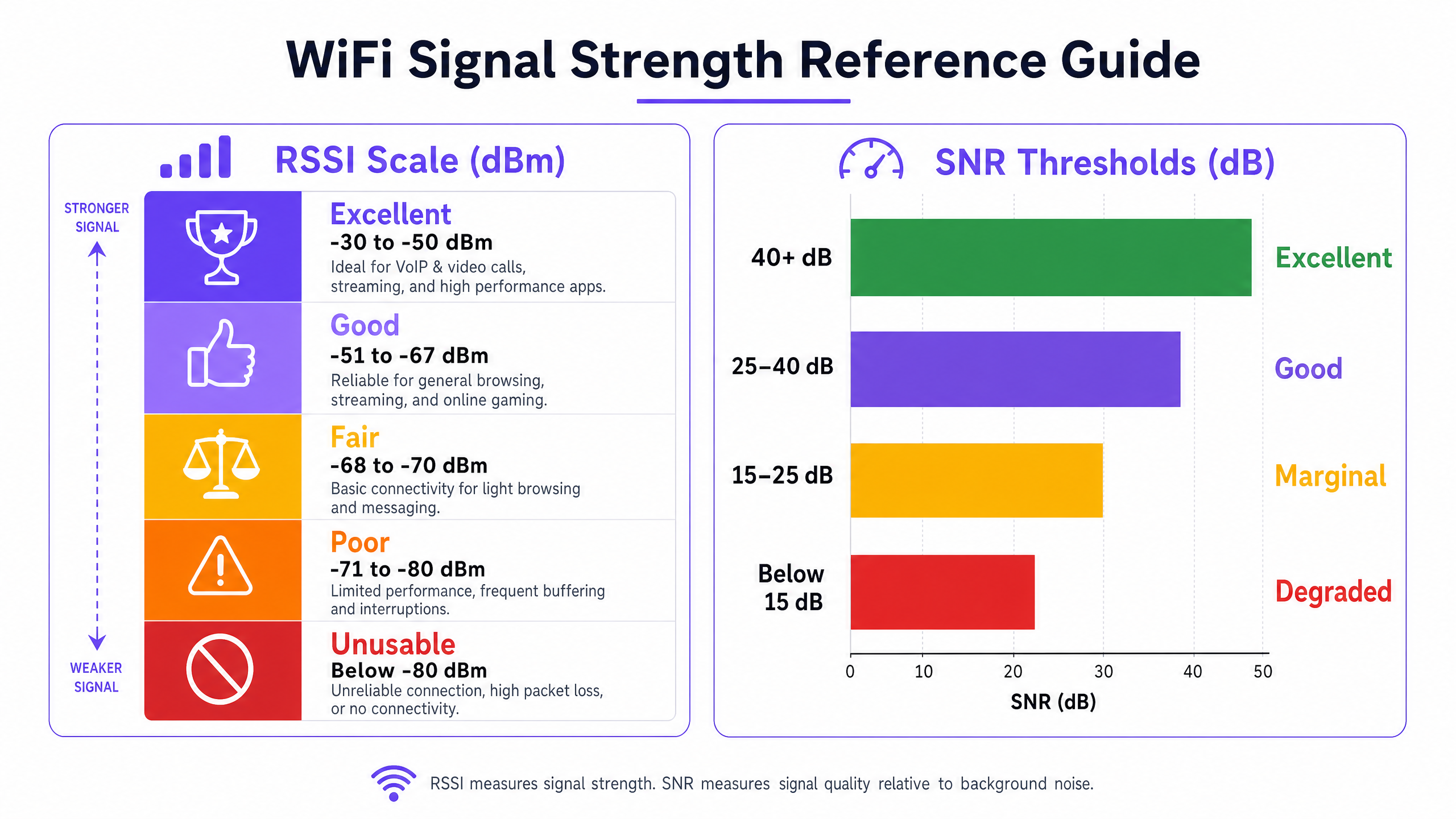
खालील थ्रेशोल्ड्स एंटरप्राइझ डिप्लॉयमेंट्ससाठी व्यावहारिक ऑपरेटिंग श्रेणी दर्शवतात:
| RSSI श्रेणी | वर्गीकरण | योग्य ॲप्लिकेशन्स |
|---|---|---|
| -30 ते -50 dBm | उत्कृष्ट | VoIP, HD व्हिडिओ कॉन्फरन्सिंग, उच्च-थ्रूपुट डेटा |
| -51 ते -67 dBm | चांगले | सर्व मानक एंटरप्राइझ ॲप्लिकेशन्स |
| -68 ते -70 dBm | सामान्य | मूलभूत वेब ब्राउझिंग, ईमेल |
| -71 ते -80 dBm | खराब | अधूनमधून कनेक्टिव्हिटी, उच्च पॅकेट लॉस |
| -80 dBm पेक्षा कमी | अनुपयोगी | कनेक्शन ड्रॉप्स, अनुपयोगी कार्यक्षमता |
-67 dBm थ्रेशोल्ड हे विश्वसनीय एंटरप्राइझ कनेक्टिव्हिटीसाठी उद्योग-मानक किमान आहे. बहुतेक एंटरप्राइझ क्लायंट डिव्हाइसेस सिग्नल या पातळीच्या खाली घसरल्यावर रोमिंग स्कॅन सुरू करण्यासाठी प्रोग्राम केलेले असतात, ज्यामुळे सेल ओव्हरलॅप नियोजनासाठी ते महत्त्वपूर्ण डिझाइन पॅरामीटर बनते.
SNR: गुणवत्तेचा गुणक
चांगल्या नेटवर्क कार्यक्षमतेसाठी मजबूत RSSI ही एक आवश्यक पण अपुरी अट आहे. SNR हे प्राप्त झालेल्या सिग्नलची ताकद आणि पार्श्वभूमीतील RF नॉइज फ्लोअरमधील फरक मोजते, जे डेसिबल्स (dB) मध्ये व्यक्त केले जाते. हे MCS (मॉड्युलेशन आणि कोडिंग स्कीम) निर्धारित करते जे डिव्हाइसेस AP सोबत वाटाघाटी करू शकतात, जे थेट साध्य करण्यायोग्य थ्रूपुट नियंत्रित करते. Wi-Fi 6 (802.11ax) 1024-QAM पर्यंत समर्थन करते, परंतु त्यासाठी अंदाजे 35 dB किंवा त्याहून अधिक SNR आवश्यक आहे. कमी SNR मूल्यांवर, डिव्हाइसेस कमी-ऑर्डर मॉड्युलेशन स्कीम्सवर परत येतात, ज्यामुळे थ्रूपुट नाटकीयरित्या कमी होते.
| SNR श्रेणी | वर्गीकरण | थ्रूपुटवर परिणाम |
|---|---|---|
| > 40 dB | उत्कृष्ट | कमाल डेटा दर (1024-QAM साध्य करण्यायोग्य) |
| 25 – 40 dB | चांगले | विश्वसनीय उच्च-थ्रूपुट ऑपरेशन |
| 15 – 25 dB | सामान्य | कमी डेटा दर, वाढलेले रिट्राईज |
| < 15 dB | खालावलेले | महत्त्वपूर्ण पॅकेट लॉस, कनेक्शन अस्थिरता |
को-चॅनल आणि ॲडजसंट चॅनल इंटरफेरन्स
उच्च-घनतेच्या वातावरणात — एखाद्या मोठ्या कार्यक्रमादरम्यानचे कॉन्फरन्स सेंटर, पीक ट्रेडिंग दिवसांमधील किरकोळ विक्री स्टोअर — इंटरफेरन्स ही नेटवर्क क्षमतेवरील प्राथमिक मर्यादा आहे. को-चॅनल इंटरफेरन्स (CCI) तेव्हा होतो जेव्हा अनेक APs एकमेकांच्या रेंजमध्ये एकाच चॅनलवर प्रसारित करतात. 802.11 CSMA/CA प्रोटोकॉल अंतर्गत, डिव्हाइसेसना प्रसारित करण्यापूर्वी चॅनल स्पष्ट होण्याची प्रतीक्षा करावी लागते, ज्यामुळे स्पर्धा निर्माण होते आणि प्रभावी थ्रूपुट कमी होते. ॲडजसंट चॅनल इंटरफेरन्स (ACI) तेव्हा उद्भवतो जेव्हा APs ओव्हरलॅपिंग चॅनल वापरतात — उदाहरणार्थ, 2.4 GHz बँडमधील चॅनल 1 आणि 2 — ज्यामुळे स्पेक्ट्रल ओव्हरलॅप आणि सिग्नलची गुणवत्ता कमी होते.
2.4 GHz बँड फक्त तीन नॉन-ओव्हरलॅपिंग चॅनल (1, 6 आणि 11) प्रदान करतो, ज्यामुळे तो उच्च-घनतेच्या डिप्लॉयमेंट्ससाठी संरचनात्मकदृष्ट्या अनुपयुक्त ठरतो. 5 GHz बँड 24 पर्यंत नॉन-ओव्हरलॅपिंग 20 MHz चॅनल प्रदान करतो आणि 6 GHz बँड (Wi-Fi 6E/7) आणखी 59 चॅनल जोडतो, ज्यामुळे हे एंटरप्राइझ क्षमता नियोजनासाठी योग्य लक्ष्य बनतात.
अंमलबजावणी मार्गदर्शक: वायफाय कव्हरेज ऑडिट करणे
संरचित कव्हरेज ऑडिट हा कोणत्याही ऑप्टिमायझेशन प्रोग्रामचा आधार आहे. खालील पद्धत विक्रेता-तटस्थ आहे आणि 50 खोल्यांच्या हॉटेलपासून 60,000 आसनी स्टेडियमपर्यंतच्या वातावरणांना लागू आहे.
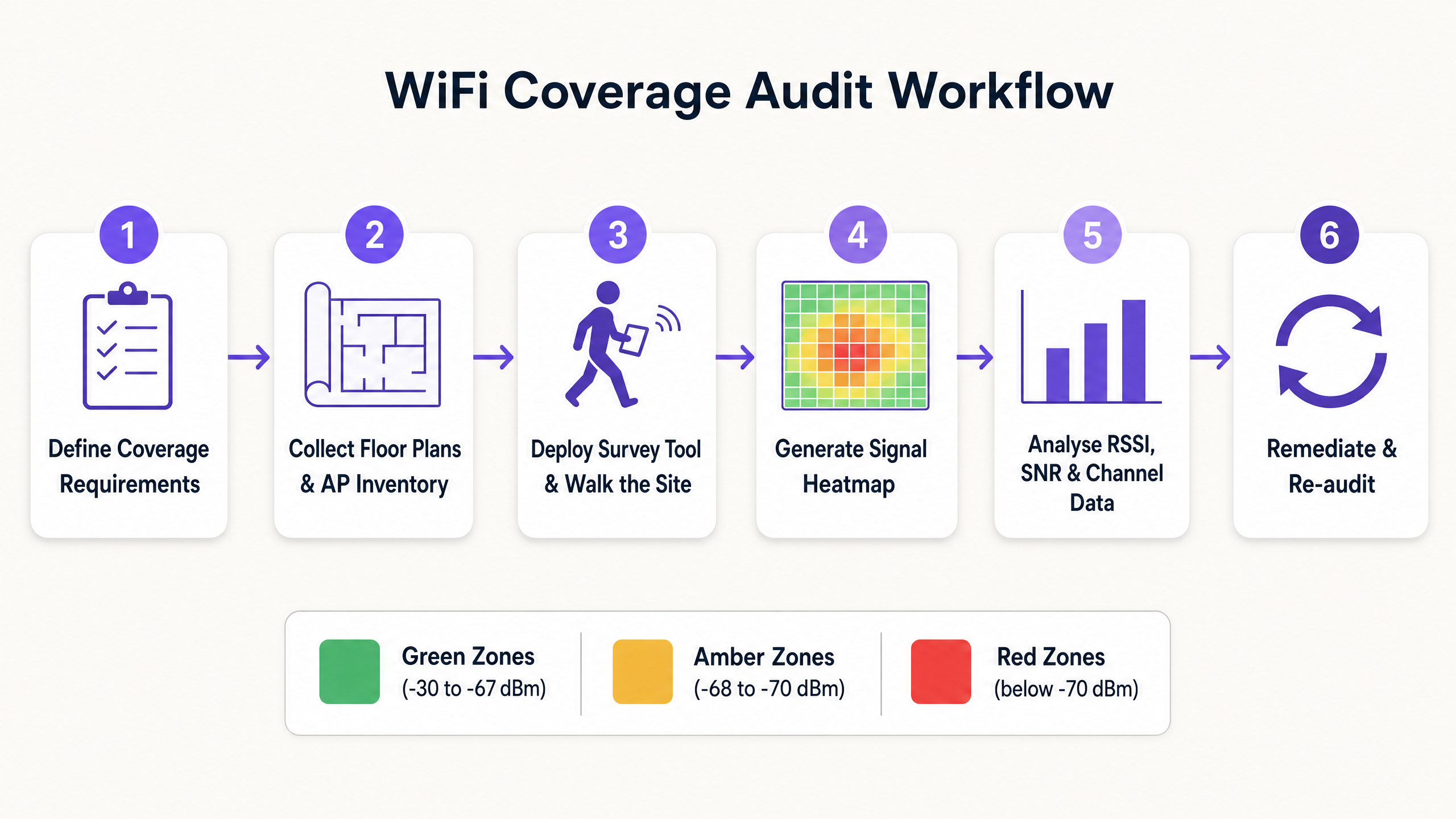
पायरी 1: कव्हरेज आवश्यकता आणि कार्यक्षमतेच्या थ्रेशोल्ड्स परिभाषित करा
कोणतेही सर्वेक्षण करण्यापूर्वी, वातावरणासाठी विशिष्ट आवश्यकतांचे दस्तऐवजीकरण करा. बारकोड स्कॅनर चालवणाऱ्या वेअरहाऊसच्या आवश्यकता रुग्ण निरीक्षण उपकरणांना समर्थन देणाऱ्या क्लिनिकल वातावरणापेक्षा किंवा उच्च-घनतेचे व्हिडिओ कॉन्फरन्सिंग चालवणाऱ्या कॉन्फरन्स सेंटरपेक्षा मूलभूतपणे भिन्न असतात. मिप्रत्येक ॲप्लिकेशन प्रकारासाठी किमान स्वीकार्य RSSI आणि SNR थ्रेशोल्ड्स निश्चित करा आणि कोणत्याही अनुपालन आवश्यकता (उदा. किरकोळ पेमेंट सिस्टमसाठी PCI DSS, किंवा आरोग्यसेवा वातावरणासाठी HIPAA-संबंधित मानके) ओळखा.
पायरी 2: फ्लोअर प्लॅन्स आणि AP इन्व्हेंटरी गोळा करा
सर्व समाविष्ट क्षेत्रांसाठी अचूक, स्केल्ड फ्लोअर प्लॅन्स मिळवा. हे तुमच्या सर्वेक्षण टूलमध्ये इम्पोर्ट करा आणि सध्याची AP इन्व्हेंटरी, ज्यात मॉडेल, फर्मवेअर आवृत्ती, ट्रान्समिट पॉवर सेटिंग्ज आणि चॅनल असाइनमेंट्स यांचा समावेश आहे, ती दस्तऐवजीकरण करा. सर्वेक्षण निष्कर्षांना कॉन्फिगरेशन पॅरामीटर्सशी जोडण्यासाठी ही बेसलाइन आवश्यक आहे.
पायरी 3: योग्य सर्वेक्षण प्रकार निवडा
तीन सर्वेक्षण पद्धती वेगवेगळ्या उद्देशांसाठी वापरल्या जातात:
प्रेडिक्टिव्ह सर्वेक्षण: फ्लोअर प्लॅन्स, भिंतींचे साहित्य आणि AP प्लेसमेंटवर आधारित RF वातावरणाचे अनुकरण करण्यासाठी सॉफ्टवेअर मॉडेलिंग वापरते. ग्रीनफिल्ड डिप्लॉयमेंट्स आणि मोठ्या रीडिझाइन्ससाठी आवश्यक आहे. अचूकता वापरलेल्या बिल्डिंग मटेरियल डेटाबेसच्या गुणवत्तेवर अवलंबून असते.
पॅसिव्ह सर्वेक्षण: सर्वेक्षण करणारे उपकरण वातावरणातील सर्व RF ट्रॅफिक ऐकते, प्रत्येक दृश्यमान AP मधून बीकन फ्रेम्स कॅप्चर करून RSSI, चॅनल युटिलायझेशन आणि रोग डिव्हाइसची उपस्थिती मॅप करते. विद्यमान कव्हरेजचे ऑडिट करण्यासाठी आणि हीटमॅप्स तयार करण्यासाठी ही मानक पद्धत आहे. यासाठी सर्वेक्षण करणाऱ्या उपकरणाला नेटवर्कशी जोडणी करण्याची आवश्यकता नसते.
ॲक्टिव्ह सर्वेक्षण: सर्वेक्षण करणारे उपकरण लक्ष्य नेटवर्कशी जोडणी करते आणि वास्तविक थ्रुपुट, लेटन्सी, जिटर आणि रोमिंग कार्यप्रदर्शन मोजण्यासाठी सक्रियपणे डेटा (सामान्यतः iPerf किंवा ICMP द्वारे) प्रसारित करते. लोडखाली नेटवर्क डिझाइन केल्याप्रमाणे कार्य करते हे प्रमाणित करण्यासाठी ही निश्चित पद्धत आहे.
पायरी 4: वॉक सर्वेक्षण करा
पॅसिव्ह आणि ॲक्टिव्ह सर्वेक्षणांसाठी, तंत्रज्ञ संपूर्ण कव्हरेज क्षेत्रात एका स्थिर गतीने चालतो, सामान्यतः 0.5 ते 1 मीटर प्रति सेकंद, ज्यामुळे सर्वेक्षण टूल प्रति चौरस मीटर पुरेसे डेटा पॉइंट्स कॅप्चर करते. ज्ञात ॲटेन्युएशन स्त्रोत असलेल्या क्षेत्रांवर विशेष लक्ष द्या: काँक्रीटचे खांब, धातूचे शेल्फिंग, लिफ्ट शाफ्ट्स आणि उच्च पाणी असलेले क्षेत्र (उदा. मत्स्यालय, मोठे प्लँटर्स).
पायरी 5: हीटमॅप्स तयार करा आणि त्यांचे विश्लेषण करा
सर्वेक्षणानंतर, किमान खालील हीटमॅप्स तयार करा:
- RSSI हीटमॅप: तुमच्या परिभाषित थ्रेशोल्डच्या तुलनेत डेड झोन आणि कव्हरेजमधील अंतर ओळखतो.
- SNR हीटमॅप: जेथे हस्तक्षेपामुळे सिग्नलची गुणवत्ता कमी होत आहे, ती क्षेत्रे दर्शवतो.
- चॅनल इंटरफेरन्स हीटमॅप: CCI आणि ACI हॉटस्पॉट्स ओळखतो.
- AP कव्हरेज ओव्हरलॅप हीटमॅप: अखंड रोमिंगसाठी सेल ओव्हरलॅप पुरेसा आहे हे प्रमाणित करतो.
हीटमॅप्सचे पुनरावलोकन करताना, कव्हरेज सेलच्या कडा -67 dBm थ्रेशोल्डवर 15–20% ओव्हरलॅप राखतात याची खात्री करा. अपुरा ओव्हरलॅप रोमिंग अयशस्वी होण्यास कारणीभूत ठरतो; उच्च ट्रान्समिट पॉवरवर जास्त ओव्हरलॅपमुळे CCI होतो.
पायरी 6: उपाययोजना करा आणि पुन्हा ऑडिट करा
सर्व निष्कर्ष दस्तऐवजीकरण करा आणि प्रभावानुसार उपाययोजनांना प्राधान्य द्या. सामान्य उपाययोजनांमध्ये AP ट्रान्समिट पॉवर समायोजित करणे, चॅनल असाइनमेंट्स सुधारणे, ॲटेन्युएशनवर मात करण्यासाठी APs स्थलांतरित करणे, कव्हरेजमधील अंतर भरण्यासाठी APs जोडणे आणि सक्षम क्लायंट्सना 5 GHz वर ढकलण्यासाठी बँड स्टीयरिंग लागू करणे यांचा समावेश आहे. उपाययोजनांनंतर, बदलांमुळे अपेक्षित परिणाम साधले गेले आहेत याची पुष्टी करण्यासाठी एक प्रमाणीकरण सर्वेक्षण करा.
एंटरप्राइझ WiFi ऑप्टिमायझेशनसाठी सर्वोत्तम पद्धती
केवळ कव्हरेजसाठी नाही, तर क्षमतेसाठी डिझाइन करा. आधुनिक एंटरप्राइझ वातावरणात, सिग्नल प्रदान करणे हे आव्हान क्वचितच असते; तर शेकडो समवर्ती उपकरणांना सातत्यपूर्ण कार्यक्षमतेसह समर्थन देणे हे असते. उच्च-घनता डिझाइनसाठी कमी ट्रान्समिट पॉवरवर कार्य करणारे अधिक APs आणि अधिक घट्ट चॅनल रियूज पॅटर्न आवश्यक असतात. हे विशेषतः हॉस्पिटॅलिटी ठिकाणांमध्ये आणि वाहतूक केंद्रांमध्ये संबंधित आहे जिथे डिव्हाइसची घनता खूप जास्त असू शकते.
5 GHz आणि 6 GHz वर मानकीकरण करा. 2.4 GHz बँड संरचनात्मकदृष्ट्या गर्दीने भरलेला आहे. बँड स्टीयरिंग किंवा SSID पृथक्करण वापरून सर्व सक्षम कॉर्पोरेट आणि कर्मचारी उपकरणांना 5 GHz किंवा 6 GHz बँड्सवर ढकला. 2.4 GHz बँड उच्च फ्रिक्वेन्सीवर कार्य करू न शकणाऱ्या जुन्या IoT उपकरणांसाठी राखून ठेवा. कॉर्पोरेट WLANs वरील अनमॅनेज्ड डिव्हाइस ट्रॅफिकच्या कार्यक्षमतेच्या प्रभावाच्या सखोल विश्लेषणासाठी, कॉर्पोरेट WLANs वरील टेलीमेट्री डेटाचा अदृश्य खर्च पहा.
मजबूत प्रमाणीकरण लागू करा. कॉर्पोरेट नेटवर्क IEEE 802.1X आणि WPA3-Enterprise सह सुरक्षित असल्याची खात्री करा. अतिथी आणि अभ्यागत प्रवेशासाठी, सुरक्षित कॅप्टिव्ह पोर्टलसह व्यवस्थापित Guest WiFi सोल्यूशन डिप्लॉय करा. 2026 मध्ये wi fi assistant पासवर्डलेस प्रवेश कसा सक्षम करतो यात शोधल्याप्रमाणे, आधुनिक प्रमाणीकरण फ्रेमवर्क सुरक्षा अनुपालन राखताना पासवर्ड व्यवस्थापन ओव्हरहेड दूर करू शकतात.
सतत निरीक्षण स्वीकार करा. पॉइंट-इन-टाइम ऑडिट एका क्षणी RF वातावरण कॅप्चर करते. वायरलेस वातावरण गतिशील असते — नवीन हस्तक्षेप स्त्रोत उदयास येतात, डिव्हाइसची संख्या बदलते आणि भौतिक बदलांमुळे प्रसार नमुने बदलतात. नेटवर्क आरोग्य, क्लायंट कार्यप्रदर्शन आणि कव्हरेज मेट्रिक्सचे सतत निरीक्षण करण्यासाठी WiFi Analytics प्लॅटफॉर्म लागू करा. हे फूटफॉल आणि ड्वेल टाइम डेटा गोळा करण्यास देखील सक्षम करते जे व्यापक ऑपरेशनल इंटेलिजन्स उपक्रमांना समर्थन देते, ज्यात Purple मधील Iain Fox यांच्या नेतृत्वाखालील स्मार्ट सिटी कार्यक्रमांशी संरेखित असलेल्यांचा समावेश आहे.
समस्यानिवारण आणि जोखीम कमी करणे
जेव्हा कव्हरेज किंवा कार्यक्षमतेच्या समस्या उद्भवतात, तेव्हा एक संरचित निदान दृष्टीकोन चुकीचे निदान आणि वाया गेलेले उपाययोजनांचे प्रयत्न टाळतो.
1. व्याप्ती निश्चित करा. ही समस्या एकाच वापरकर्त्याला, परिभाषित क्षेत्राला, की संपूर्ण ठिकाणाला प्रभावित करत आहे? एकाच वापरकर्त्याची समस्या जवळजवळ नेहमीच क्लायंट डिव्हाइसच्या समस्येकडे (ड्रायव्हर, हार्डवेअर किंवा रोमिंग कॉन्फिगरेशन) निर्देश करते. क्षेत्र-विशिष्ट समस्या RF वातावरणाकडे निर्देश करते. ठिकाण-व्यापी समस्या पायाभूत सुविधांकडे (कंट्रोलर, DHCP, DNS, किंवा अपस्ट्रीम कनेक्टिव्हिटी) निर्देश करते.मागील सर्वेक्षणानंतर स्थलांतरित झाले आहेत. कार्यक्षमतेच्या समस्यांचा एक आश्चर्यकारकपणे मोठा भाग वातावरणातील भौतिक बदलांमुळे उद्भवतो.
3. RF वातावरणाचे विश्लेषण करा. नॉन-WiFi हस्तक्षेपाचे स्रोत ओळखण्यासाठी स्पेक्ट्रम विश्लेषक वापरा. 2.4 GHz बँडमध्ये कार्यरत असलेले मायक्रोवेव्ह ओव्हन, वायरलेस CCTV कॅमेरे आणि Bluetooth उपकरणे सामान्य गुन्हेगार आहेत. औद्योगिक वातावरणात, व्हेरिएबल-फ्रिक्वेन्सी ड्राइव्ह्स आणि इतर मोटर नियंत्रण उपकरणे महत्त्वपूर्ण ब्रॉडबँड RF आवाज निर्माण करू शकतात.
4. AP कॉन्फिगरेशनचे पुनरावलोकन करा. ट्रान्समिट पॉवर लेव्हल्स, चॅनल असाइनमेंट्स आणि फर्मवेअर आवृत्त्या तपासा. डायनॅमिक रेडिओ मॅनेजमेंट (DRM) धोरणे योग्यरित्या कार्यरत आहेत आणि कोणत्याही APs ने डीफॉल्ट उच्च-पॉवर सेटिंग्जवर परत स्विच केले नाही याची खात्री करा.
5. क्लायंट क्षमता तपासा. जुनी क्लायंट उपकरणे ज्यांचे वायरलेस ड्राइव्हर्स कालबाह्य झाले आहेत, किंवा आक्रमक पॉवर-सेव्हिंग सेटिंग्ज असलेली उपकरणे, नेटवर्कच्या गुणवत्तेची पर्वा न करता वारंवार कनेक्टिव्हिटी समस्या दर्शवतात. कॉर्पोरेट-व्यवस्थापित उपकरणांसाठी मंजूर क्लायंट हार्डवेअर आणि ड्रायव्हर आवृत्त्यांची नोंदणी ठेवा.
ROI आणि व्यवसायावर परिणाम
नियमित WiFi ऑडिट आणि ऑप्टिमायझेशनमध्ये गुंतवणूक केल्याने अनेक आयामांमध्ये मोजता येण्याजोगे, परिमाणवाचक व्यावसायिक मूल्य मिळते.
कर्मचारी उत्पादकता. डेड झोन आणि हस्तक्षेप दूर केल्याने कर्मचाऱ्यांना गंभीर ऑपरेशनल ॲप्लिकेशन्समध्ये व्यत्ययाशिवाय प्रवेश मिळतो — मग ते retail फ्लोअरवरील इन्व्हेंटरी व्यवस्थापन असो, healthcare सुविधेत रुग्णाच्या रेकॉर्डमध्ये प्रवेश असो, किंवा transport हबमधील ऑपरेशनल समन्वय असो. 200-व्यक्तींच्या ऑपरेशनमध्ये कनेक्टिव्हिटी-संबंधित विलंबांमध्ये दररोज 5 मिनिटांची कपात केल्यास वर्षाला 170 तासांपेक्षा जास्त उत्पादकता परत मिळते.
कमी झालेला सपोर्ट ओव्हरहेड. एक स्थिर, सु-डिझाइन केलेले नेटवर्क लक्षणीयरीत्या कमी हेल्पडेस्क तिकिटे निर्माण करते. मोठ्या संस्थांमध्ये IT सपोर्ट विनंत्यांच्या शीर्ष तीन श्रेणींमध्ये WiFi कनेक्टिव्हिटी समस्या सातत्याने असतात. वारंवार लक्षणांवर उपाय करण्याऐवजी मूळ RF समस्यांचे निराकरण केल्याने सपोर्ट व्हॉल्यूममध्ये शाश्वत घट होते.
अनुपालन आणि जोखीम कमी करणे. PCI DSS (retail पेमेंट वातावरण), GDPR (WiFi वर वैयक्तिक डेटा प्रक्रिया करणारी कोणतीही संस्था), किंवा क्षेत्र-विशिष्ट मानकांच्या अधीन असलेल्या संस्थांसाठी, एक दस्तऐवजीकृत आणि नियमितपणे ऑडिट केलेले वायरलेस नेटवर्क ही अनुपालनाची आवश्यकता आहे. पॅसिव्ह सर्वेक्षण साधनांद्वारे आणि सततच्या देखरेखीद्वारे सक्षम केलेले रोग AP डिटेक्शन, एक विशिष्ट PCI DSS आवश्यकता आहे.
ऑपरेशनल इंटेलिजन्स. एक ऑप्टिमाइझ केलेले नेटवर्क अचूक, उच्च-निष्ठा टेलीमेट्री डेटा प्रदान करते. हा डेटा — डिव्हाइस संख्या, थांबण्याचा वेळ आणि हालचालीचे नमुने समाविष्ट करतो — ठिकाण विश्लेषणाचा आधार आहे. Purple च्या ऑफलाइन नकाशे क्षमतेने दाखवल्याप्रमाणे ( Purple Launches Offline Maps Mode for Seamless, Secure Navigation to WiFi Hotspots ), एक सु-साधनयुक्त वायरलेस नेटवर्क प्रगत स्थान सेवा सक्षम करते जे ऑपरेशनल कार्यक्षमता आणि अभ्यागत अनुभव दोन्ही वाढवते.
महत्वाच्या व्याख्या
RSSI (Received Signal Strength Indicator)
A measurement of the power level of the RF signal received by the client device, expressed in negative decibels relative to a milliwatt (dBm). Values closer to zero indicate a stronger signal.
The primary metric for assessing basic coverage. Used to identify dead zones and validate that signal strength meets the minimum threshold for the target application.
SNR (Signal-to-Noise Ratio)
The difference between the received signal strength (RSSI) and the background RF noise floor, expressed in decibels (dB). Determines the modulation scheme devices can negotiate, directly governing throughput.
Critical for diagnosing performance issues in environments where RSSI appears adequate but throughput is poor. The key metric for identifying interference-related degradation.
Co-Channel Interference (CCI)
Interference caused when multiple APs within range of each other transmit on the same channel, forcing devices to defer transmission under the 802.11 CSMA/CA protocol.
The primary cause of capacity degradation in high-density deployments. Mitigated through careful channel planning, dynamic radio management, and reducing AP transmit power.
Adjacent Channel Interference (ACI)
Interference caused by APs transmitting on spectrally overlapping channels (e.g., channels 1 and 2 in the 2.4 GHz band), causing signal bleed between channels.
Prevented by using only non-overlapping channels: 1, 6, and 11 in the 2.4 GHz band. Not an issue in the 5 GHz or 6 GHz bands when using 20 MHz channel widths.
Attenuation
The loss of RF signal strength as waves pass through physical objects. Attenuation varies significantly by material: glass causes ~2 dB loss, drywall ~3 dB, concrete ~10–15 dB, and metal causes near-total reflection.
Must be factored into predictive surveys and physical AP placement decisions. Particularly significant in warehouses, hospitals, and venues with metal infrastructure.
Passive Survey
A site survey method in which the surveying tool listens to all RF traffic without associating with any network, capturing beacon frames to map RSSI, channel utilisation, and rogue AP presence.
The standard method for auditing existing coverage and generating heatmaps. Does not require network credentials and can detect all visible APs including unauthorised devices.
Active Survey
A site survey method in which the surveying device associates with the target network and actively transmits data to measure real-world throughput, latency, jitter, and roaming performance.
Used to validate actual network performance under simulated load conditions. Essential for applications with strict latency or throughput requirements, such as VoIP or AGV control systems.
Roaming (802.11r / Fast BSS Transition)
The process of a client device transitioning from one AP to another as it moves through a venue. 802.11r (Fast BSS Transition) reduces the authentication overhead during roaming, minimising the transition latency.
Requires careful cell overlap design (15–20% at -67 dBm) to ensure seamless transitions. Critical for voice, video, and real-time control applications. Sticky client behaviour — where devices hold onto a weak signal — is a common roaming failure mode.
सोडवलेली उदाहरणे
A 300-room luxury hotel is experiencing frequent guest and staff complaints about dropped VoIP calls and poor video streaming in the newly renovated West Wing. The IT team has confirmed via the network management system that all APs in the wing are online and reporting normal status.
Step 1: Deploy a technician to conduct a combined passive and active site survey of the West Wing using a professional survey tool. Step 2: Generate an RSSI heatmap — this shows signal strength is generally above -67 dBm throughout the wing, ruling out basic coverage gaps. Step 3: Generate an SNR heatmap — this reveals significant areas where SNR drops below 15 dB, particularly in corridors and meeting rooms. Step 4: Generate a Channel Interference heatmap — this identifies severe Co-Channel Interference (CCI) caused by the newly installed APs operating at maximum transmit power (23 dBm) on the same 5 GHz channels as adjacent APs. Step 5: Remediation — implement a dynamic radio management (DRM) profile to automatically reduce transmit power to 8–12 dBm and assign non-overlapping channels. Disable 2.4 GHz radios on every other AP to reduce CCI on the legacy band. Step 6: Conduct a validation active survey to confirm that SNR has improved above 25 dB across the wing and that roaming performance meets the VoIP threshold.
A large retail distribution centre is deploying a fleet of autonomous guided vehicles (AGVs) that require continuous, low-latency WiFi connectivity. During initial testing, the AGVs frequently disconnect when transitioning between aisles, causing operational disruptions.
Step 1: Document the AGV connectivity requirements — minimum RSSI of -65 dBm, SNR above 25 dB, and roaming latency below 50 ms for the control protocol. Step 2: Conduct an active survey along all planned AGV routes, with the survey tool configured to simulate the AGV client profile. Step 3: Analysis reveals that the existing APs, mounted 15 metres high on the ceiling with omnidirectional antennas, provide adequate signal in empty aisles but the RSSI drops to -78 dBm when aisles are fully stocked with metal shelving and liquid products — materials with high RF attenuation coefficients. Step 4: The channel plan also shows CCI between APs sharing channels in adjacent aisles. Step 5: Remediation — redesign the WLAN using directional patch antennas (e.g., 8 dBi patch) mounted at the ends of aisles at a height of 2 metres, directing RF energy down the corridors. Implement a dedicated SSID for AGVs with 802.11r (Fast BSS Transition) enabled to reduce roaming latency. Step 6: Validate with an active survey along all AGV routes under full inventory load conditions.
सराव प्रश्न
Q1. A hospital IT manager is receiving complaints from nursing staff about dropped calls on their VoIP handsets in a specific ward. A passive survey confirms that RSSI throughout the ward is consistently between -55 dBm and -62 dBm. What is the most likely root cause, and what diagnostic step should be taken next?
टीप: RSSI is well within the acceptable range. Consider what other metric determines whether that signal can support VoIP traffic.
नमुना उत्तर पहा
The issue is almost certainly low SNR rather than a coverage gap. An RSSI of -55 to -62 dBm is excellent, so the signal is not the problem. The next step is to generate an SNR heatmap for the ward. Low SNR in this scenario is likely caused by Co-Channel Interference (CCI) from adjacent APs, or potentially from non-WiFi interference sources such as medical equipment operating in the 2.4 GHz band. A spectrum analysis should also be conducted to identify non-WiFi interference sources.
Q2. You are designing a WLAN for a high-density conference centre that will host events with up to 2,000 concurrent devices. Your predictive survey indicates that 60 APs are required to achieve the necessary capacity. How should you approach the 2.4 GHz radio configuration?
टीप: Consider the number of non-overlapping channels available in the 2.4 GHz band relative to the number of APs.
नमुना उत्तर पहा
The 2.4 GHz radios on the majority of APs should be disabled. With only three non-overlapping channels (1, 6, and 11) available in the 2.4 GHz band, deploying 60 APs all transmitting on 2.4 GHz in a single space would create catastrophic Co-Channel Interference, rendering the band unusable. A common approach is to enable 2.4 GHz on approximately one in four APs to provide basic coverage for legacy devices, while directing all capable clients to the 5 GHz and 6 GHz bands where sufficient non-overlapping channels exist to support the full AP count.
Q3. A retail store manager reports that WiFi performance near the front entrance is poor. A passive survey reveals an RSSI of -77 dBm at the entrance. The nearest AP is located 18 metres away, behind a structural concrete pillar. What is the remediation approach?
टीप: Consider the attenuation characteristics of the physical obstacle and the options available for improving coverage.
नमुना उत्तर पहा
The concrete pillar is causing significant RF attenuation, creating a coverage shadow at the entrance. At -77 dBm, the signal is in the 'poor' range and insufficient for reliable connectivity. The primary remediation option is to install an additional AP near the entrance to provide direct, unobstructed coverage. If cabling to that location is not feasible, the existing AP could be relocated to a position with line-of-sight to the entrance. Increasing the transmit power of the existing AP is unlikely to be effective — the attenuation from a concrete pillar is typically 10–15 dB, and increasing transmit power by that amount would likely cause CCI with other APs in the store.