
How to Optimize Captive Portals for Maximum Network Security and User Conversion
हे मार्गदर्शक एंटरप्राइझ ठिकाणांवर captive portals ऑप्टिमाइझ करण्यासाठी संपूर्ण तांत्रिक ब्ल्यूप्रिंट प्रदान करते, ज्यामध्ये नेटवर्क सेगमेंटेशन आर्किटेक्चर, ऑथेंटिकेशन पद्धतीची निवड, GDPR-सुसंगत संमती डिझाइन आणि कन्व्हर्जन ऑप्टिमायझेशन समाविष्ट आहे. हे हॉटेल्स, रिटेल चेन्स, स्टेडियम्स आणि सार्वजनिक क्षेत्रातील संस्थांमधील IT मॅनेजर्स, नेटवर्क आर्किटेक्ट्स आणि CTOs यांच्यासाठी लिहिले गेले आहे ज्यांना फर्स्ट-पार्टी डेटा कॅप्चरसह नेटवर्क सुरक्षेचा समतोल राखायचा आहे. Purple हे २०२४ मध्ये ४४ कोटी (440 million) लॉगइन्ससह ८०,००0+ पेक्षा जास्त ठिकाणांवर captive portal इन्फ्रास्ट्रक्चर चालवते आणि येथील फ्रेमवर्क तो कार्यात्मक अनुभव दर्शवतात.
हे मार्गदर्शक ऐका
पॉडकास्ट ट्रान्सक्रिप्ट पहा
कार्यकारी सारांश
Captive Portal हे सार्वजनिक WiFi वरील साइन-इन पेज आहे. हा तुमचा सर्वात महत्त्वाचा नेटवर्क सुरक्षा निर्णय देखील आहे आणि जर तुम्ही मार्केटिंग प्रोग्राम चालवत असाल, तर तुमचा सर्वात मौल्यवान डेटा कॅप्चर करण्याचा मार्ग आहे. सुरक्षा आणि कन्व्हर्जन ही दोन उद्दिष्टे एकमेकांच्या विरोधात नाहीत. त्यांच्यासाठी वेगवेगळ्या कॉन्फिगरेशन निर्णयांची आवश्यकता असते आणि या मार्गदर्शकामध्ये दोन्हीचा समावेश आहे.
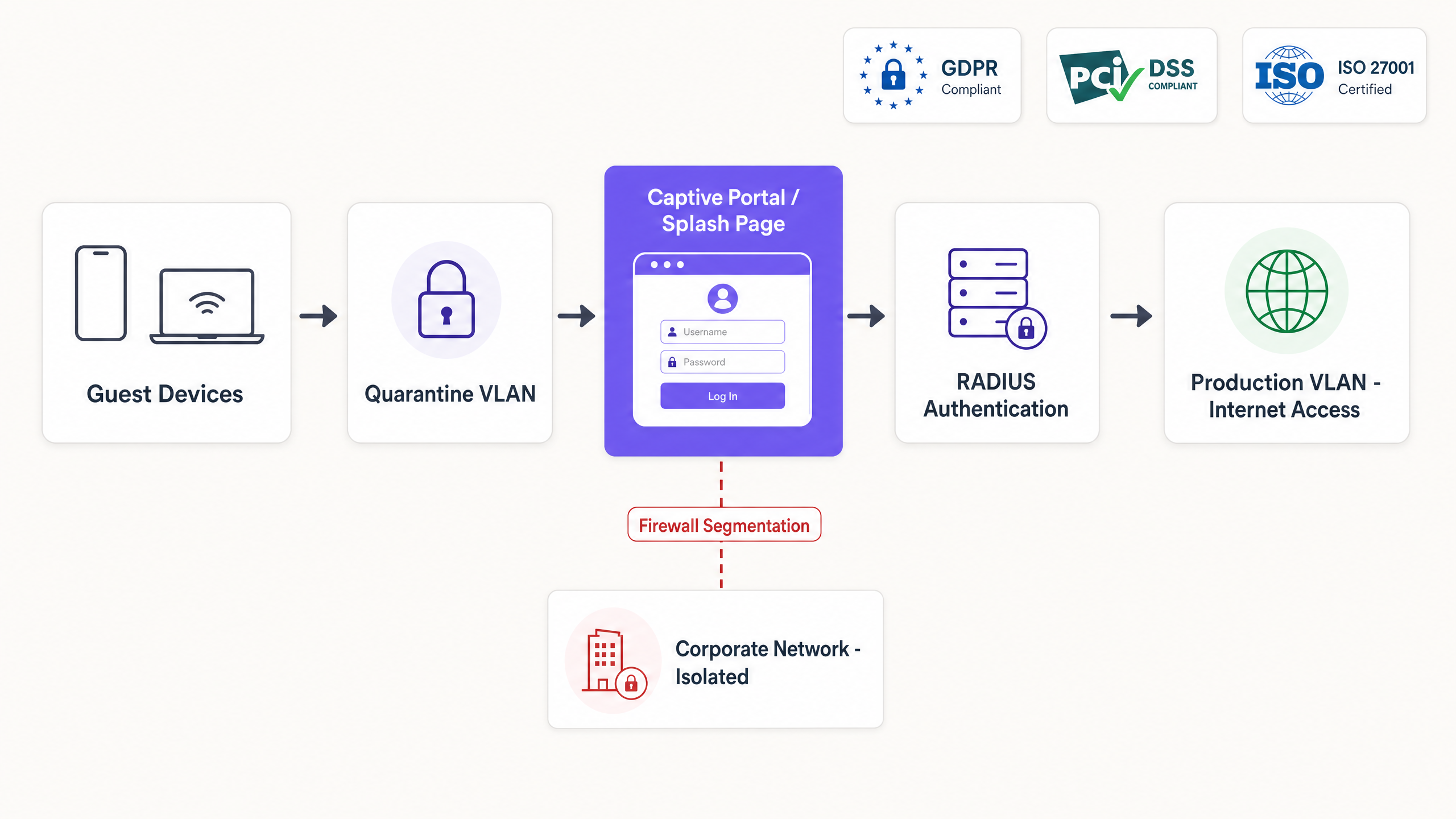
मुख्य आर्किटेक्चर ऑथेंटिकेशन पूर्ण होईपर्यंत प्रत्येक गेस्ट डिव्हाइसला क्वारंटाईन VLAN मध्ये ठेवते. RADIUS सर्व्हर सेशन व्यवस्थापित करतो आणि Change of Authorisation (CoA) मेसेज डिव्हाइसला प्रोडक्शन VLAN मध्ये रिलीज करतो. नेटवर्क सेगमेंटेशन हे सुनिश्चित करते की गेस्ट ट्रॅफिक कधीही कॉर्पोरेट इन्फ्रास्ट्रक्चर किंवा पॉइंट-ऑफ-सेल (POS) सिस्टम्सपर्यंत पोहोचणार नाही. पेमेंट टर्मिनल्स गेस्ट WiFi सह फिजिकल इन्फ्रास्ट्रक्चर शेअर करत असलेल्या कोणत्याही वातावरणात ही PCI DSS ची आवश्यकता आहे.
कन्व्हर्जनच्या बाजूने विचार केल्यास, प्रत्येक अतिरिक्त फॉर्म फील्ड ऑप्ट-इन दर ८ ते १२% ने कमी करते. योग्य ऑथेंटिकेशन पद्धत तुमच्या ठिकाणाच्या प्रकारावर आणि डेटा उद्दिष्टांवर अवलंबून असते. ईमेल कॅप्चर थेट मालकीच्या डेटासह ६५ ते ८०% कन्व्हर्जन प्रदान करते. OAuth 2.0 द्वारे सोशल लॉगिन अडथळे कमी करते परंतु थर्ड-पार्टी अवलंबित्व जोखीम निर्माण करते. SMS OTP सर्वोच्च डेटा गुणवत्ता प्रदान करतो परंतु सर्वात कमी कन्व्हर्जन देतो. मार्केटिंगचे कोणतेही उद्दिष्ट नसलेल्या सार्वजनिक क्षेत्रातील वातावरणासाठी क्लिक-थ्रू हा योग्य पर्याय आहे.
Purple ८०,०००+ पेक्षा जास्त ठिकाणांवर Guest WiFi इन्फ्रास्ट्रक्चर चालवते. या दस्तऐवजातील मार्गदर्शन २०२४ मध्ये प्रक्रियेत आणलेल्या ४४ कोटी (440 million) लॉगइन्सचे प्रतिनिधित्व करते (Purple अंतर्गत डेटा, २०२४).
तांत्रिक सखोल विश्लेषण
Captive Portal प्रत्यक्षात काय करते
डिव्हाइस SSID शी जोडले गेल्यानंतर Captive Portal HTTP आणि HTTPS विनंत्या अडवते. ॲक्सेस पॉईंट डिव्हाइसला क्वारंटाईन VLAN मध्ये ठेवतो, जिथे फायरवॉल केवळ DNS क्वेरी आणि पूर्व-मंजूर ठिकाणांच्या एका लहान संचाला - ज्याला वॉल्ड गार्डन (walled garden) म्हणतात - परवानगी देते. डिव्हाइसची ऑपरेटिंग सिस्टम एका ज्ञात URL ची (उदाहरणार्थ, iOS वर captive.apple.com किंवा Android वर connectivitycheck.gstatic.com) तपासणी करून या प्रतिबंधित स्थितीचा शोध घेते. जेव्हा ही तपासणी अनपेक्षित प्रतिसाद देते, तेव्हा OS आपोआप पोर्टल लाँच करते.
युझर ऑथेंटिकेट करतो. पोर्टल CoA मेसेजद्वारे नेटवर्कच्या RADIUS सर्व्हरला निकालाची माहिती देते. ॲक्सेस कंट्रोलर क्वारंटाईन निर्बंध काढून टाकतो, डिव्हाइसला PRODUCTION VLAN मध्ये हलवतो आणि टाइमस्टॅम्प, MAC ॲड्रेस, ओळख आणि लागू केलेल्या पॉलिसीसह सेशन लॉग करतो. ऑथेंटिकेशन पद्धतीनुसार या संपूर्ण प्रवासाला एक ते दहा सेकंद लागतात.
नेटवर्क सेगमेंटेशन
क्वारंटाईन VLAN पर्यायी नाही. त्याशिवाय, ओपन SSID वरील ऑथेंटिकेट न केलेले डिव्हाइस अंतर्गत नेटवर्कची तपासणी करू शकते, मॅनेजमेंट इंटरफेसमध्ये प्रवेश करू शकते किंवा पॉइंट-ऑफ-सेल सिस्टम्सपर्यंत पोहोचू शकते. PCI DSS च्या कक्षेत येणाऱ्या वातावरणात - म्हणजेच अशा कोणत्याही ठिकाणी जिथे कार्ड पेमेंट टर्मिनल्स गेस्ट WiFi सह फिजिकल इन्फ्रास्ट्रक्चर शेअर करतात - पेमेंट कार्ड इंडस्ट्री डेटा सिक्युरिटी स्टँडर्ड v4.0 नुसार कार्डधारक डेटा वातावरण आणि गेस्ट नेटवर्क दरम्यान पूर्ण नेटवर्क आयसोलेशन आवश्यक आहे.
सेगमेंटेशन ॲक्सेस कंट्रोलर स्तरावर लागू केले जाते. Cisco Meraki वर, हे Group Policies द्वारे कॉन्फिगर केले जाते. HPE Aruba वर, User Roles द्वारे. Ruckus वर, Zone कॉन्फिगरेशनद्वारे. Juniper Mist वर, WLAN पॉलिसीद्वारे. या चारींमध्ये तत्व सारखेच आहे: ऑथेंटिकेट न केलेल्या डिव्हाइसेसना प्रतिबंधित पॉलिसी मिळते; ऑथेंटिकेट केलेल्या डिव्हाइसेसना प्रोडक्शन पॉलिसी मिळते. RADIUS सर्व्हर हे संक्रमण लागू करतो.
अनेक प्रकारच्या युझर्स असलेल्या ठिकाणांसाठी - जसे की पाहुणे (guests), कर्मचारी, कंत्राटदार - स्वतंत्र SSIDs तैनात करा, जे प्रत्येक स्वतःच्या फायरवॉल नियम आणि बँडविड्थ पॉलिसीसह एका वेगळ्या VLAN शी मॅप केलेले असतील. एकाच Captive Portal सह एकाच SSID वरून सर्व प्रकारच्या युझर्सना सेवा देण्याचा प्रयत्न करू नका. पॉलिसी व्यवस्थापनाची गुंतागुंत कोणत्याही वरवरच्या साधेपणापेक्षा जास्त असते.
वायरलेस एज सुरक्षित करणे
Captive Portal लेयर ७ (Layer 7) वर कार्य करते. ते वायरलेस लिंक एनक्रिप्ट करत नाही. ओपन SSID वर, डिव्हाइस आणि ॲक्सेस पॉईंटमधील ट्रॅफिक एनक्रिप्ट केलेले नसते आणि रेडिओレンジमधील कोणत्याही डिव्हाइसला ते दृश्यमान असते.
यावर उपाय म्हणून तीन दृष्टिकोन आहेत:
Captive Portal सह WPA3. WPA3-Personal हे Simultaneous Authentication of Equals (SAE) प्रदान करते, जे WPA2-PSK विरुद्ध संभाव्य ऑफलाइन डिक्शनरी हल्ले काढून टाकते. ऑथेंटिकेशनसाठी Captive Portal अजूनही ट्रिगर होते, परंतु वायरलेस लिंक एनक्रिप्टेड असते. २०२६ मधील नवीन उपयोजनांसाठी (deployments) हा किमान स्वीकार्य मानक आहे.
802.1X सह Passpoint (Hotspot 2.0). Passpoint प्रमाणपत्र-आधारित किंवा क्रेडेंशियल-आधारित ऑथेंटिकेशन प्रदान करण्यासाठी EAP-TLS किंवा PEAP चा वापर करते. Captive Portal सुरुवातीचे ऑनबोर्डिंग आणि संमती कॅप्चर हाताळते. दुसऱ्या भेटीत, Passpoint पोर्टलला पूर्णपणे बायपास करून, प्रोव्हिजन केलेल्या प्रोफाइलचा वापर करून डिव्हाइसला शांतपणे ऑथेंटिकेट करते. हे OpenRoaming द्वारे वापरले जाणारे आर्किटेक्चर आहे, जे करिअर-ग्रेड रोमिंग मानक आहे. EAP पद्धतींबद्दल अधिक तपशीलांसाठी, आमचे EAP Method WiFi: A Guide to Secure Network Access हे मार्गदर्शक पहा.
iPSK (Identity Pre-Shared Key). iPSK पोर्टलद्वारे प्रत्येक युझर किंवा डिव्हाइसला एक युनिक WPA2 किंवा WPA3 पासफ्रेज नियुक्त करते. पासफ्रेज RADIUS सर्व्हरमध्ये स्टोअर केला जातो आणि विशिष्ट VLAN आणि पॉलिसीशी मॅप केला जातो. हे संपूर्ण 802.1X उपयोजनाच्या इन्फ्रास्ट्रक्चर ओव्हरहेडशिवाय, शेअर केलेल्या SSID वर वैयक्तिकृत एन्क्रिप्शन आणि जबाबदारी प्रदान करते. हे बिल्ड-टू-रेंट आणि विद्यार्थ्यांच्या निवासाच्या वातावरणात Multi-Tenant WiFi साठी मानक आर्किटेक्चर आहे.
प्रमाणपत्र-आधारित ऑथेंटिकेशन तपशीलांसाठी, WiFi Certificate Authentication: Secure Network Access पहा.
अंमलबजावणी मार्गदर्शक
पायरी १: वॉल्ड गार्डन (walled garden) निश्चित करा
ऑथेंटिकेशनसाठी आवश्यक असलेल्या प्रत्येक बाह्य अवलंबनाचा नकाशापोर्टल कॉन्फिगर करण्यापूर्वी ion. जर तुम्ही Google सोशल लॉगिन ऑफर करत असाल, तर accounts.google.com आणि संबंधित Google ऑथेंटिकेशन डोमेन्सना व्हाइटलिस्ट करा. जर तुम्ही सशुल्क प्रवेशासाठी Stripe वापरत असाल, तर Stripe चे API एंडपॉइंट्स व्हाइटलिस्ट करा. जर तुम्ही Apple साइन-इन वापरत असाल, तर appleid.apple.com व्हाइटलिस्ट करा.
अचूक वॉल्ड गार्डन (walled garden) न राखणे हे प्रोडक्शनमध्ये Captive Portal रेंडरिंग अयशस्वी होण्याचे मुख्य कारण आहे. तुमच्या विशिष्ट कंट्रोलरसाठी कॉपी-पेस्ट नियम तयार करण्यासाठी वॉल्ड गार्डन व्हॅलिडेटर वापरा. Purple एक विनामूल्य Walled Garden Domain Validator प्रदान करते जे Cisco Meraki, Ubiquiti UniFi, HPE Aruba आणि Catalyst कंट्रोलर्ससाठी वापरण्यास तयार नियम आउटपुट करते.
पायरी २: RADIUS इंटिग्रेशन कॉन्फिगर करा
तुमचे ॲक्सेस कंट्रोलर्स क्लाउड RADIUS प्रदात्यासह इंटिग्रेट करा. अनऑथेंटिकेटेड ट्रॅफिकला पोर्टल URL वर रिडायरेक्ट करण्यासाठी कंट्रोलर्स कॉन्फिगर करा आणि ऑथेंटिकेशन आणि अकाउंटिंगसाठी RADIUS सर्व्हर्स निर्दिष्ट करा. RADIUS शेअर्ड सिक्रेट्स किमान २२ वर्णांचे असावेत, त्यामध्ये अप्पर-लोअर केस आणि विशेष वर्ण असावेत आणि ते दर ९० दिवसांनी बदलले (rotate) जावेत याची खात्री करा.
Cisco Meraki डिप्लॉयमेंट्ससाठी, Wireless > Access Control अंतर्गत RADIUS सर्व्हर कॉन्फिगर करा. HPE Aruba साठी, Security > Authentication Servers अंतर्गत कॉन्फिगर करा. Ruckus साठी, Services > Authentication अंतर्गत कॉन्फिगर करा. Juniper Mist साठी, Network > WLAN अंतर्गत कॉन्फिगर करा.
पायरी ३: ऑथेंटिकेशन पद्धती निवडा
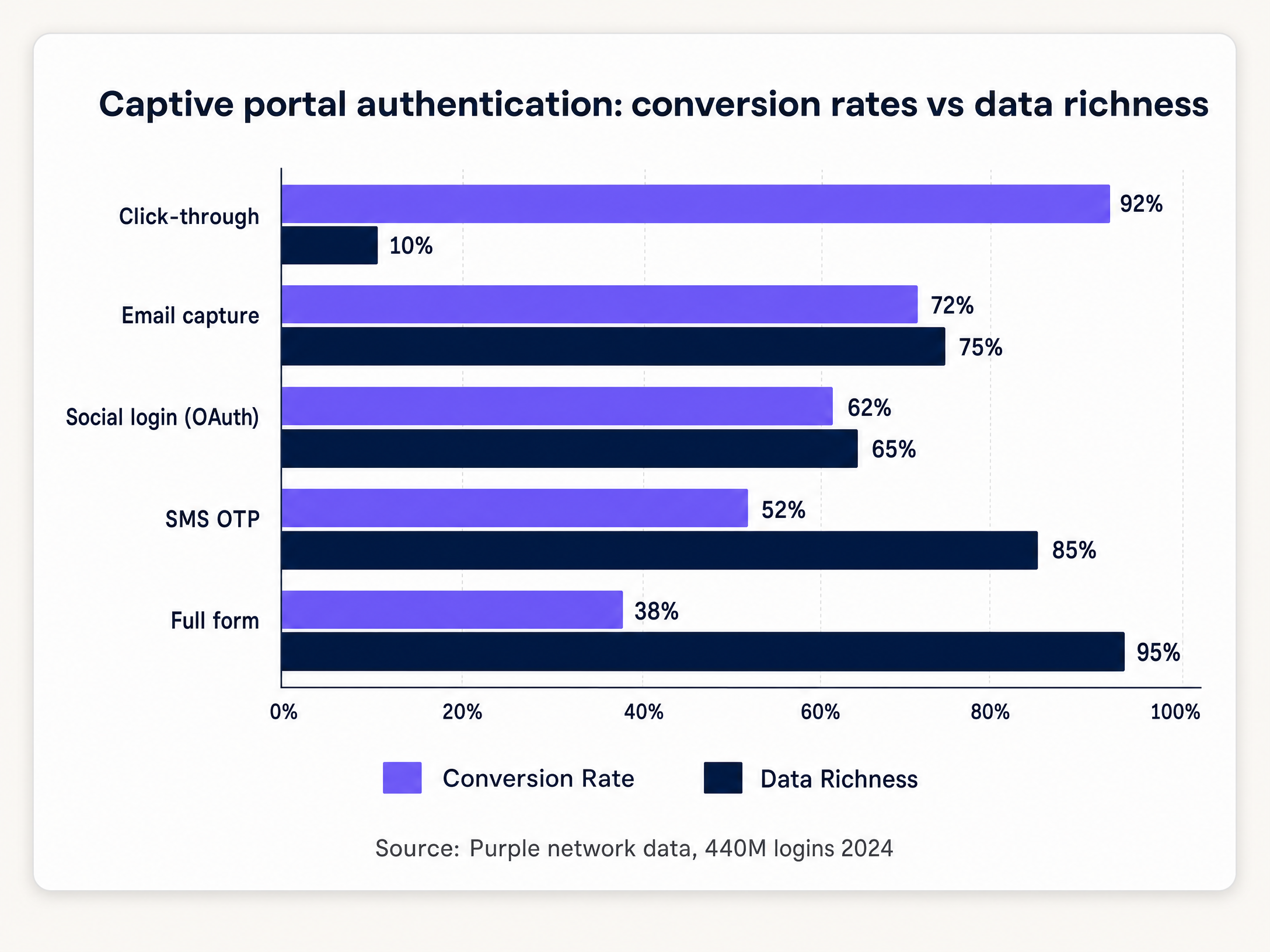
खालील तक्ता ठिकाणाचा प्रकार (venue type) शिफारस केलेल्या ऑथेंटिकेशन पद्धतीशी आणि अपेक्षित कन्व्हर्जन रेंजशी मॅप करतो.
| ठिकाणाचा प्रकार | शिफारस केलेली पद्धत | अपेक्षित कन्व्हर्जन | कॅप्चर केलेला डेटा |
|---|---|---|---|
| हॉटेल आणि हॉस्पिटॅलिटी | ईमेल कॅप्चर + सोशल लॉगिन | ६५-८०% | ईमेल, नाव, पर्यायी डेमोग्राफिक्स |
| रिटेल | ईमेल कॅप्चर | ६८-७५% | ईमेल, नाव |
| स्टेडियम आणि इव्हेंट्स | SMS OTP | ४५-५५% | व्हेरिफाइड मोबाईल नंबर |
| कॉन्फरन्स सेंटर | सोशल लॉगिन + ईमेल | ६०-७०% | ईमेल, व्यावसायिक प्रोफाइल |
| सार्वजनिक क्षेत्र | क्लिक-थ्रू | ९०-९५% | फक्त MAC ॲड्रेस, टाइमस्टॅम्प |
| हेल्थकेअर | क्लिक-थ्रू | ९०-९५% | फक्त MAC ॲड्रेस, टाइमस्टॅम्प |
स्रोत: Purple नेटवर्क डेटा, ४४० दशलक्ष लॉगिन, २०२४.
पायरी ४: संमती फ्लो (consent flow) डिझाइन करा
नेटवर्क ॲक्सेससाठी आवश्यक असलेल्या अटी आणि मार्केटिंग कम्युनिकेशन्ससाठी आवश्यक असलेली संमती वेगळी करा. हे UK GDPR (UK कायद्यात कायम ठेवलेला नियम (EU) 2016/679) अंतर्गत दोन स्वतंत्र कायदेशीर आधार आहेत.
नेटवर्क व्यवस्थापन आणि सुरक्षितता कव्हर करणाऱ्या कलम 6(1)(f) अंतर्गत कायदेशीर हिताच्या (legitimate interest) आधारावर नेटवर्क ॲक्सेस दिला जाऊ शकतो. मार्केटिंग कम्युनिकेशन्ससाठी कलम 6(1)(a) अंतर्गत स्पष्ट संमती आवश्यक आहे. संमती ही स्वेच्छेने दिलेली, विशिष्ट, माहितीपूर्ण आणि स्पष्ट असावी. आधीच टिक केलेले बॉक्स (Pre-ticked boxes) या मानकाची पूर्तता करत नाहीत.
पोर्टलवर दोन स्वतंत्र चेकबॉक्स लागू करा. पहिला, अनिवार्य, सेवा अटी आणि नेटवर्क ॲक्सेस कव्हर करतो. दुसरा, पर्यायी आणि डीफॉल्टनुसार अनटिक केलेला, मार्केटिंग ऑप्ट-इन कव्हर करतो. प्रत्येक सेशनसाठी टाइमस्टॅम्प, IP ॲड्रेस, MAC ॲड्रेस आणि संमतीची स्थिती (consent state) लॉग करा. नियामक चौकशीच्या प्रसंगी हा ऑडिट ट्रेल तुमच्या अनुपालनाचा (compliance) पुरावा आहे.
पायरी ५: RADIUS VSAs द्वारे बँडविड्थ पॉलिसी लागू करा
यशस्वी ऑथेंटिकेशन झाल्यावर व्हेंडर-विशिष्ट ॲट्रिब्युट्स (VSAs) परत करण्यासाठी RADIUS सर्व्हर कॉन्फिगर करा. VSAs ॲक्सेस पॉईंटला वापरकर्त्याच्या प्रोफाइलवर आधारित विशिष्ट बँडविड्थ मर्यादा, कंटेंट फिल्टर्स आणि सेशन टाईमआउट्स लागू करण्याचे निर्देश देतात.
HPE Aruba वर, Aruba-User-Role VSA वापरकर्त्याला पूर्वनिर्धारित पॉलिसीसह एका नामांकित भूमिकेसाठी (role) नियुक्त करतो. Cisco Meraki वर, Group Policy IDs Filter-Id ॲट्रिब्युटद्वारे परत केले जातात. Ruckus वर, Ruckus-User-Groups ॲट्रिब्युट वापरकर्त्याला कॉन्फिगर केलेल्या ग्रुपशी मॅप करतो. ही यंत्रणा वेगवेगळ्या वापरकर्ता स्तरांसाठी स्वतंत्र SSIDs ची आवश्यकता न ठेवता डायनॅमिक पॉलिसी अंमलबजावणी सक्षम करते.
सर्वोत्तम पद्धती
कन्व्हर्जन ऑप्टिमायझेशन
प्रोग्रेसिव्ह प्रोफाइलिंग हे सिंगल-सेशन डेटा कलेक्शनपेक्षा चांगली कामगिरी करते. पहिल्या भेटीत ईमेल पत्ता विचारा. दुसऱ्या भेटीत, जन्मतारीख किंवा पोस्टकोडची विनंती करा. तिसऱ्या भेटीत, मार्केटिंग प्राधान्ये विचारा. हा दृष्टिकोन कालांतराने अधिक समृद्ध प्रोफाइल तयार करत असताना उच्च कन्व्हर्जन दर राखतो.
८५% पेक्षा जास्त Captive Portal परस्परसंवाद (interactions) मोबाईल उपकरणांवर होतात (Purple अंतर्गत डेटा, २०२४). लहान स्क्रीनसाठी डिझाइन करा. बटणे झूम न करता टॅप करण्यासाठी पुरेशी मोठी असावीत. डीफॉल्ट फॉन्ट साईझवर मजकूर वाचनीय असावा. लॉगिन फ्लो तीन किंवा त्यापेक्षा कमी टॅप्समध्ये पूर्ण झाला पाहिजे.
Retail डिप्लॉयमेंट्ससाठी, पोर्टल तुमच्या CRM किंवा लॉयल्टी प्लॅटफॉर्मसह इंटिग्रेट करा. Pizza Express ने दोन वर्षांत त्यांच्या CRM मध्ये ३.७ दशलक्ष पाहुणे जोडण्यासाठी ब्रँडेड Captive Portal चा वापर केला, ज्यामुळे प्रत्येक WiFi कनेक्शनचे रूपांतर एका व्हेरिफाइड मार्केटिंग ऑप्ट-इनमध्ये झाले (Purple ग्राहक डेटा, Pizza Express). हे पोर्टल लॉयल्टी नोंदणी आणि प्रमोशनल री-एंगेजमेंटसाठी प्राथमिक चॅनेल बनले.
बिहेव्हियरल ॲनालिटिक्स इंटिग्रेशन
Captive Portal सेशन ही प्रत्यक्ष-ठिकाणचे ॲनालिटिक्स (physical-venue analytics) आणि डिजिटल मार्केटिंग सिस्टम्समधील जोडणारी की (join key) आहे. प्रत्येक ऑथेंटिकेटेड सेशन टाइमस्टॅम्प, ड्वेल टाईम (dwell time) आणि रिपीट व्हिजिट स्टेटससह एक फूटफॉल इव्हेंट जनरेट करते. WiFi Analytics सह इंटिग्रेट केल्यावर, हा डेटा फूटफॉल ॲट्रिब्युशन, डेमोग्राफिक सेगमेंटेशन आणि मोहीम (campaign) ROI मोजमाप चालवतो.
WiFi नेटवर्कवरील बिहेव्हियरल डेटा ठिकाणाच्या ऑपरेशन्सची माहिती कशी देतो याबद्दल अधिक सखोल माहितीसाठी, Behavioral Analytics: Insights for WiFi Networks पहा.
सिक्युरिटी हार्डनिंग
विश्वासू सर्टिफिकेट ऑथॉरिटीकडून वैध TLS प्रमाणपत्रासह पोर्टल केवळ HTTPS वर चालवा. HTTP पोर्टल्स वापरकर्त्याची क्रेडेंशियल्स इंटरसेप्शनसाठी उघडी पाडतात आणि ब्राउझर सुरक्षा इशारे ट्रिगर करतात ज्यामुळे कन्व्हर्जन कमी होते. किमान ३१५३६००० सेकंदांच्या कमाल वयोमर्यादेसह (max-age) HTTP Strict Transport Security (HSTS) लागू करा.
ऑथेंटिकेशन एंडपॉइंटवर रेट लिमिटिंग लागू करा. रेट लिमिटिंगशिवाय, पोर्टल क्रेडेंशियल स्टफिंग आणि व्हाउचर कोड्सविरुद्ध ब्रूट-फोर्स हल्ल्यांना बळी पडू शकते. ऑथेंटिकेशन मर्याप्रमाणीकरण प्रयत्न प्रति IP ॲड्रेस प्रति मिनिट पाच पर्यंत मर्यादित करा.
पोर्टल ॲप्लिकेशनवर किमान दरवर्षी पेनिट्रेशन टेस्टिंग (penetration testing) करा. Purple कडे ISO 27001 सर्टिफिकेशन आणि Cyber Essentials सर्टिफिकेशन आहे, आणि त्याची नियमितपणे थर्ड-पार्टी पेनिट्रेशन टेस्टिंग केली जाते. आरोग्यसेवा आणि वाहतूक उपयोजनांसाठी (deployments), त्रैमासिक टेस्टिंग हा योग्य मानक आहे.
ट्रबलशूटिंग आणि जोखीम कमी करणे
पोर्टल दिसत नाही
हा सर्वात सामान्य बिघाड प्रकार (failure mode) आहे. डिव्हाइसची OS एका ज्ञात URL वर कॅप्टिव्हिटी प्रोब (captivity probe) पाठवते. जर फायरवॉलने त्या डोमेनला ब्लॉक केले, तर OS कॅप्टिव्ह स्थिती शोधू शकत नाही आणि पोर्टल कधीही स्वयंचलितपणे सुरू होत नाही. रीडायरेक्ट ट्रिगर करण्यासाठी वापरकर्त्याला मॅन्युअली नॉन-HTTPS URL वर जावे लागेल.
प्रथम वॉल्ड गार्डन (walled garden) कॉन्फिगरेशन तपासा. प्रमाणीकरणापूर्वी (pre-authentication) खालील डोमेन्स ॲक्सेस करण्यायोग्य असल्याची खात्री करा: captive.apple.com, www.apple.com, connectivitycheck.gstatic.com, clients3.google.com, आणि msftconnecttest.com. हे अनुक्रमे iOS, Android आणि Windows द्वारे वापरले जाणारे प्रोब URL आहेत.
MAC ॲड्रेस रँडमायझेशन
iOS 14 आणि Android 10 ने डीफॉल्टनुसार प्रति-नेटवर्क MAC ॲड्रेस रँडमायझेशन सुरू केले आहे. परत येणारे डिव्हाइस प्रत्येक कनेक्शनवर नवीन MAC ॲड्रेस सादर करते, ज्यामुळे सेशन सातत्य (session persistence) खंडित होते. पोर्टल वापरकर्त्याला पुन्हा चॅलेंज करते आणि त्यांना पुन्हा लॉग इन करावे लागते.
पहिल्या लॉगिनवर Passpoint प्रोफाइल प्रोव्हिजन करून हे कमी करा. या प्रोफाइलमध्ये एक क्रेडेंशियल असते जे डिव्हाइस पुढील कनेक्शनसाठी वापरते, ज्यामुळे MAC-आधारित ओळख पूर्णपणे बायपास होते. पर्यायी म्हणून, ॲप-आधारित प्रमाणीकरण फ्लो (authentication flow) वापरा जो डिव्हाइसच्या MAC ॲड्रेसऐवजी ॲपमध्ये स्टोअर केलेल्या आयडेंटिटी टोकनवर अवलंबून असतो.
मोठ्या प्रमाणावर DHCP आणि DNS संपणे
मोठ्या ठिकाणी - स्टेडियम, कॉन्फरन्स सेंटर्स, ट्रान्सपोर्ट हब - इव्हेंट किंवा सेशनच्या सुरुवातीला हजारो डिव्हाइसेस एकाच वेळी कनेक्ट होतात. जर DHCP पूल लहान असेल, तर डिव्हाइसेसना IP ॲड्रेस मिळू शकत नाही. जर DNS सर्व्हर क्वेरी व्हॉल्यूम हाताळू शकत नसेल, तर कॅप्टिव्हिटी प्रोब अयशस्वी होतो आणि पोर्टल दिसत नाही.
तुमच्या DHCP पूलचा आकार सरासरीऐवजी पीक कॉनकरंट (peak concurrent) कनेक्शनसाठी निश्चित करा. ६०,००० आसने असलेल्या स्टेडियमसाठी, ४०,००० कॉनकरंट डिव्हाइसेस गृहीत धरा. पत्ते (addresses) वेगाने रिसायकल करण्यासाठी कमी लीज वेळेसह (१५ ते ३० मिनिटे) किमान ५०,००० पत्त्यांचा DHCP पूल वाटप करा. कॉर्पोरेट DNS इन्फ्रास्ट्रक्चरपेक्षा वेगळे, गेस्ट नेटवर्कसाठी एक समर्पित DNS रिझॉल्व्हर तैनात करा.
OAuth प्रदाता API बदल
सोशल लॉगिन प्रदाते त्यांच्या API अटी पूर्वसूचनेशिवाय बदलतात. Facebook ने त्याच्या Graph API द्वारे उपलब्ध डेटा हळूहळू मर्यादित केला आहे. जर सोशल लॉगिन ही तुमची एकमेव प्रमाणीकरण पद्धत असेल आणि प्रदात्याने त्याच्या अटी बदलल्या, तर तुमचे पोर्टल सर्व वापरकर्त्यांसाठी अयशस्वी ठरेल.
सोशल लॉगिनसोबत नेहमी किमान एक नॉन-OAuth पद्धत तैनात करा. ईमेल कॅप्चर हा मानक फॉलबॅक आहे. वाढलेल्या त्रुटी दरांबद्दल (error rates) चेतावणी देण्यासाठी OAuth प्रमाणीकरण एंडपॉइंटवर मॉनिटरिंग कॉन्फिगर करा, जे सहसा API बदलांच्या आधी किंवा त्याच वेळी घडतात.
ROI आणि व्यावसायिक प्रभाव
जर तुम्ही केवळ इन्फ्रास्ट्रक्चर खर्चावरून मोजले, तर Captive Portal हा एक खर्च केंद्र (cost centre) आहे. जर तुम्ही ते कॅप्चर करत असलेल्या डेटाच्या मूल्यावरून आणि ते सक्षम करत असलेल्या मार्केटिंग प्रोग्राम्सवरून मोजले, तर ते महसूल मिळवून देणारी मालमत्ता (revenue asset) आहे.
६५% ऑप्ट-इन दरासह, प्रति स्थान दरमहा १०,००० लॉगिनवर प्रक्रिया करणारी ५००-स्थानांची रिटेल साखळी दरवर्षी ३९ दशलक्ष सत्यापित CRM संपर्क तयार करते. प्रति वर्ष प्रति संपर्क £०.१० च्या पुराणमतवादी ईमेल मार्केटिंग महसूल गुणधर्मावर (revenue attribution), एकाच डेटा कॅप्चर चॅनेलवरून तो £३.९ दशलक्षचा महसूल आहे.
हॉस्पिटॅलिटी ऑपरेटरसाठी, पोर्टल हा पाहुण्यांच्या प्रवासातील पहिला टचपॉइंट आहे. Premier Inn आणि Whitbread लॉयल्टी प्रोग्राम डिझाइनची माहिती मिळवण्यासाठी आणि WiFi प्रतिबद्धता आणि पुन्हा बुकिंग दरांमधील परस्परसंबंध मोजण्यासाठी अतिथी WiFi डेटा वापरतात (Purple ग्राहक डेटा, Whitbread).
ट्रान्सपोर्ट ऑपरेटरसाठी, पोर्टल प्रवाशांच्या प्रवाहाचा डेटा प्रदान करते जो रिटेल प्लेसमेंट, स्टाफिंग निर्णय आणि सवलत कामगिरीची माहिती देतो. Manchester Airports Group (MAG) टर्मिनल झोननुसार प्रवाशांचा थांबण्याचा वेळ (dwell time) मोजण्यासाठी WiFi ॲनालिटिक्स वापरते, WiFi सेशन डेटाचा प्रति प्रवासी रिटेल खर्चाशी परस्परसंबंध जोडते (Purple ग्राहक डेटा, MAG).
तीन मेट्रिक्सवर पोर्टलच्या कामगिरीचे मोजमाप करा: ऑप्ट-इन दर (ईमेल कॅप्चरसाठी ६०% पेक्षा जास्त लक्ष्य), डेटा गुणवत्ता दर (सत्यापन उत्तीर्ण झालेल्या ईमेल पत्त्यांची टक्केवारी, ८०% पेक्षा जास्त लक्ष्य), आणि पुन्हा भेट देण्याचा दर (क्रेडेंशियल पुन्हा न भरता प्रमाणीकरण करणाऱ्या परत येणाऱ्या वापरकर्त्यांची टक्केवारी, ७०% पेक्षा जास्त लक्ष्य).
Purple चे WiFi Analytics प्लॅटफॉर्म स्थान, कालावधी आणि वापरकर्ता गटाद्वारे (user cohort) वर्गीकरणासह, सर्व ठिकाणी रिअल टाइममध्ये हे मेट्रिक्स प्रदान करते.
महत्वाच्या व्याख्या
Captive portal
A web application that intercepts network traffic after a device associates with an SSID, requiring user interaction (authentication, payment, or terms acceptance) before granting internet access.
The primary mechanism for onboarding visitors onto public or guest WiFi networks. Every device that connects passes through it, making it the most consistent data capture surface in a physical venue.
Walled garden
A restricted network environment that allows access only to specific, approved IP addresses or domains prior to authentication.
Required to allow devices to reach the captive portal page, DNS servers, and necessary third-party authentication services before full internet access is granted. Misconfiguration is the leading cause of portal rendering failures.
RADIUS (Remote Authentication Dial-In User Service)
A networking protocol that provides centralised authentication, authorisation, and accounting management for users connecting to a network service.
The standard protocol used by captive portals to communicate with access points and controllers. Every enterprise-grade access point from Cisco Meraki, HPE Aruba, Ruckus, Juniper Mist, and Ubiquiti UniFi supports RADIUS.
Change of Authorisation (CoA)
A RADIUS extension defined in RFC 5176 that allows a server to dynamically modify the authorisation attributes of an active session.
Used by the captive portal to instruct the access controller to move a device from the quarantine VLAN to the production VLAN immediately after successful login, without requiring the device to reconnect.
Passpoint (Hotspot 2.0)
An IEEE 802.11u-based standard that enables mobile devices to automatically discover and connect to WiFi networks securely using 802.1X authentication, without manual portal interaction.
The standard approach for returning-user authentication in enterprise venues. The captive portal handles first-visit onboarding and consent capture; Passpoint handles all subsequent visits silently and securely.
VLAN (Virtual Local Area Network)
A logical subnetwork that groups devices from different physical network segments, enforcing traffic isolation at the data link layer.
Used to segment guest traffic from corporate traffic. Without VLAN segmentation, a guest device on the same physical switch as a point-of-sale terminal can probe or attack it.
iPSK (Identity Pre-Shared Key)
A security method where each user or device is assigned a unique WPA2 or WPA3 passphrase for the same SSID, stored and enforced by the RADIUS server.
Provides individualised encryption and per-user policy enforcement on a shared SSID without the infrastructure overhead of a full 802.1X deployment. Standard architecture for Multi-Tenant WiFi.
MAC address randomisation
A privacy feature in iOS 14+, Android 10+, and Windows 10+ that generates a per-network randomised MAC address to prevent cross-network device tracking.
Breaks MAC-based session persistence on captive portals. A returning device presents a new MAC address, triggering re-authentication. Mitigated by Passpoint profiles or app-based identity tokens.
Vendor-Specific Attribute (VSA)
A RADIUS attribute in the vendor-specific namespace (attribute 26) that carries hardware-vendor-specific policy instructions from the RADIUS server to the access controller.
Used to assign bandwidth limits, VLAN IDs, content filter policies, and session timeouts dynamically based on the authenticated user's profile. Each hardware vendor (Aruba, Meraki, Ruckus) defines its own VSA namespace.
सोडवलेली उदाहरणे
A 200-room hotel using HPE Aruba access points needs tiered WiFi: basic free access for standard guests and high-speed access for loyalty members. How should the captive portal and network be configured?
Deploy a single guest SSID across the property. Configure the captive portal to integrate with the hotel's Property Management System (PMS) via API. Present two authentication options on the portal: 'Log in with Room Number and Name' and 'Log in with Loyalty Credentials'. When a loyalty member authenticates, the portal queries the PMS, verifies the tier, and sends a RADIUS CoA to the Aruba controller. The RADIUS response includes an Aruba-User-Role VSA assigning the user to a high-bandwidth role (for example, 50 Mbps down, 20 Mbps up). Standard guests receive a default rate-limited role (5 Mbps down, 2 Mbps up). Both user types connect to the same SSID and VLAN, but receive different bandwidth policies enforced by the controller.
A national retail chain with 500 locations wants to implement guest WiFi to capture email addresses for marketing. The legal team has flagged GDPR compliance concerns. How should the portal consent flow be designed?
Design a portal with a single email input field. Below the field, implement two distinct checkboxes. Checkbox 1 (mandatory, unticked by default): 'I accept the Terms of Service and Privacy Policy. I understand that my device data will be processed to provide network access.' Checkbox 2 (optional, unticked by default): 'I consent to receive marketing communications, offers, and promotions by email.' Configure the backend to log the timestamp, IP address, MAC address, and the state of both checkboxes for each session. Store this consent audit trail in a GDPR-compliant data store with a retention period aligned to the marketing programme (typically 24 months from last interaction). Integrate the email addresses from Checkbox 2 opt-ins directly into the CRM via API.
सराव प्रश्न
Q1. A stadium IT director reports that during halftime, the captive portal fails to load for thousands of users simultaneously, even though WiFi signal strength is strong across the venue. What is the most likely architectural bottleneck, and what is the remediation?
टीप: Consider the services a device requires before it can even request the portal page. Signal strength is not the constraint.
नमुना उत्तर पहा
The most likely bottleneck is DHCP pool exhaustion or DNS resolver overload. When thousands of devices connect simultaneously, each must obtain an IP address via DHCP and resolve the OS captivity probe URL via DNS before the portal can load. If the DHCP pool is undersized or the DNS server cannot handle the query volume, the process stalls before the user sees anything. Remediation: size the DHCP pool for peak concurrent connections (not average), set a short lease time of 15 to 30 minutes to recycle addresses, and deploy a dedicated DNS resolver for the guest network with sufficient capacity for peak query rates.
Q2. You are deploying a captive portal in a hospital waiting room. The primary goal is providing internet access for patients and visitors. There is no marketing objective. Which authentication method should you choose, and what are the compliance implications?
टीप: Balance friction against the value of the data collected. Consider what happens when you collect personal data you do not need.
नमुना उत्तर पहा
Click-through (terms and conditions only) is the correct choice. It delivers 90 to 95% conversion with minimal friction. Since there is no marketing objective, collecting personal data such as email addresses introduces GDPR compliance obligations (lawful basis, data minimisation, retention policies, subject access rights) without providing any business value. In a healthcare environment, the reputational risk of a data breach involving patient or visitor personal data is particularly significant. Click-through limits data collection to MAC address and timestamp, which is sufficient for network management under legitimate interest.
Q3. A retailer wants to offer Google and Apple social login on their captive portal. Their network uses Cisco Meraki access points. What network configuration is mandatory for social login to function, and what is the fallback risk?
टीप: How does the device reach the identity provider before it has internet access? What happens if the provider changes its terms?
नमुना उत्तर पहा
You must configure the walled garden on the Meraki access controller to whitelist the authentication domains for both providers: accounts.google.com and associated Google OAuth endpoints, and appleid.apple.com and associated Apple authentication endpoints. Without these entries, the quarantine VLAN will block the OAuth request, and social login will fail silently. The fallback risk is provider API change: if Google or Apple modifies its OAuth terms or API endpoints, the authentication flow breaks for all users who rely on that method. Always deploy email capture as a parallel authentication option so users have a non-OAuth fallback.
Q4. A conference centre operator wants to use SMS OTP as the primary authentication method for a three-day event with an expected 8,000 unique logins per day. What cost implications should be modelled before committing to this method?
टीप: SMS OTP has a per-message cost. Calculate the total at scale and consider the conversion rate impact.
नमुना उत्तर पहा
At 8,000 logins per day over three days, you are processing 24,000 SMS messages. At a typical UK carrier rate of 2 to 5 pence per message, the cost is between £480 and £1,200 for the event. If attendees are international, costs increase significantly (up to 10 to 15 pence per message for some markets). Additionally, SMS OTP conversion rates are 45 to 55%, meaning approximately 4,400 to 4,800 of the 8,000 expected logins will complete. The remaining attendees will need an alternative method. Model the per-message cost, factor in the conversion rate, and ensure a fallback method (email capture or click-through) is available for users who do not complete SMS verification.
या मालिकेमध्ये पुढे वाचा
Starlink वर Captive Portal कसे सेट करावे: दुर्गम आणि सागरी ठिकाणांसाठी एक मार्गदर्शिका
ही मार्गदर्शिका मूळ Starlink हार्डवेअरला बायपास कसे करावे आणि एंटरप्राइझ राउटिंग उपकरणांचा वापर करून क्लाउड-व्यवस्थापित captive portal कसे समाकलित करावे याबद्दल तपशीलवार माहिती देते. तुम्ही CGNAT मर्यादांवर मात कशी करावी, VLAN विभाजन कसे लागू करावे, सॅटेलाइट बँडविड्थ मर्यादा कशा व्यवस्थापित कराव्यात आणि नियामक अनुपालन कसे सुनिश्चित करावे हे शिकाल.
Hotel Guest WiFi Management: Integrating PMS, Portals, and Brand Standards
हे तांत्रिक मार्गदर्शक एंटरप्राइझ-ग्रेड हॉटेल WiFi नेटवर्कची रचना कशी करावी याबद्दल तपशीलवार माहिती देते, ज्यामध्ये VLAN विभागणी, स्वयंचलित सत्र व्यवस्थापनासाठी PMS एकत्रीकरण आणि GDPR-सुसंगत डेटा कॅप्चरसाठी Captive Portal ऑप्टिमायझेशन यावर लक्ष केंद्रित केले आहे.
Captive Portal सर्वोत्तम पद्धती: उच्च रूपांतरण आणि अनुपालनासाठी डिझाइन
हे तांत्रिक मार्गदर्शक IT व्यवस्थापक, नेटवर्क आर्किटेक्ट्स आणि वेन्यू ऑपरेशन्स डायरेक्टर्सना नेटवर्क सुरक्षा आणि उच्च युझर रूपांतरण यांचा समतोल राखणारे captive portals तैनात करण्यासाठी एक संपूर्ण ब्ल्यूप्रिंट प्रदान करते. यामध्ये VLAN विभागणी आणि RADIUS प्रमाणीकरणापासून ते GDPR-सुसंगत संमती डिझाइन आणि प्रमाणीकरण पद्धत निवडीपर्यंतच्या संपूर्ण आर्किटेक्चरचा समावेश आहे. २०२४ मधील ८०,०००+ वेन्यू आणि ४४० दशलक्ष लॉगइन्सवरील Purple च्या ऑपरेशनल अनुभवातून घेतलेली, प्रत्येक शिफारस प्रत्यक्ष उपयोजन (deployment) डेटावर आधारित आहे.