
सुरक्षित उच्च शिक्षण BYOD आणि WiFi प्रमाणीकरणासाठी SCEP उपयोजित करणे
हे तांत्रिक मार्गदर्शक नेटवर्क आर्किटेक्ट्स आणि IT व्यवस्थापकांना उच्च शिक्षण WiFi सुरक्षित करण्यासाठी SCEP-आधारित प्रमाणपत्र नोंदणी उपयोजित करण्यासाठी एक वेंडर-न्यूट्रल ब्ल्यूप्रिंट प्रदान करते. हे असुरक्षित पासवर्ड-आधारित प्रमाणीकरणाकडून EAP-TLS कडे होणाऱ्या संक्रमणाचा तपशील देते, ज्यामध्ये स्केलेबल BYOD ऑनबोर्डिंग आणि MDM एकत्रीकरणावर लक्ष केंद्रित केले आहे.
हे मार्गदर्शक ऐका
पॉडकास्ट ट्रान्सक्रिप्ट पहा
आमच्या मुख्य मालिकेचा भाग: Enterprise WiFi Security Guide →
कार्यकारी सारांश
उच्च शिक्षण IT टीम्ससाठी, शैक्षणिक वर्षाची सुरुवात ही एक तातडीची ताण चाचणी (stress test) घेऊन येते. हजारो विद्यार्थी अनेक अनमॅनेज्ड डिव्हाइसेससह कॅम्पसमध्ये येतात आणि झटपट, सुरक्षित कनेक्टिव्हिटीची अपेक्षा करतात. जेव्हा विद्यापीठे PEAP-MSCHAPv2 सारख्या पासवर्ड-आधारित प्रमाणीकरणावर अवलंबून असतात, तेव्हा या गर्दीचा परिणाम साहजिकच मोठ्या प्रमाणावर हेल्पडेस्कच्या रांगा, कॉन्फिगरेशन त्रुटी आणि इव्हिल ट्विन (evil twin) ॲक्सेस पॉइंट्सद्वारे क्रेडेंशियल चोरीच्या गंभीर असुरक्षिततेमध्ये होतो.
या स्केल आणि सुरक्षा आव्हानावरील आर्किटेक्चरल उपाय म्हणजे EAP-TLS वापरून प्रमाणपत्र-आधारित प्रमाणीकरण आहे. हजारो एंडपॉइंट्सवर प्रमाणपत्र उपयोजन व्यवहार्य बनवण्यासाठी, विद्यापीठांनी SCEP (Simple Certificate Enrollment Protocol) लागू करणे आवश्यक आहे. SCEP हे MDM द्वारे व्यवस्थापित डिव्हाइसेस आणि सेल्फ-सर्व्हिस ऑनबोर्डिंग पोर्टलद्वारे अनमॅनेज्ड विद्यार्थी डिव्हाइसेस या दोन्हीवर डिजिटल प्रमाणपत्रांचे वितरण स्वयंचलित करते. हे मार्गदर्शक उच्च शिक्षण वातावरणात SCEP उपयोजित करण्यासाठी तांत्रिक आवश्यकतांचा तपशील देते, पासवर्ड-संबंधित हेल्पडेस्क तिकिटे दूर करण्यासाठी आणि कॅम्पसची सुरक्षा मजबूत करण्यासाठी कृतीयोग्य पावले प्रदान करते.
SCEP प्रमाणपत्र नोंदणीचे आर्किटेक्चर
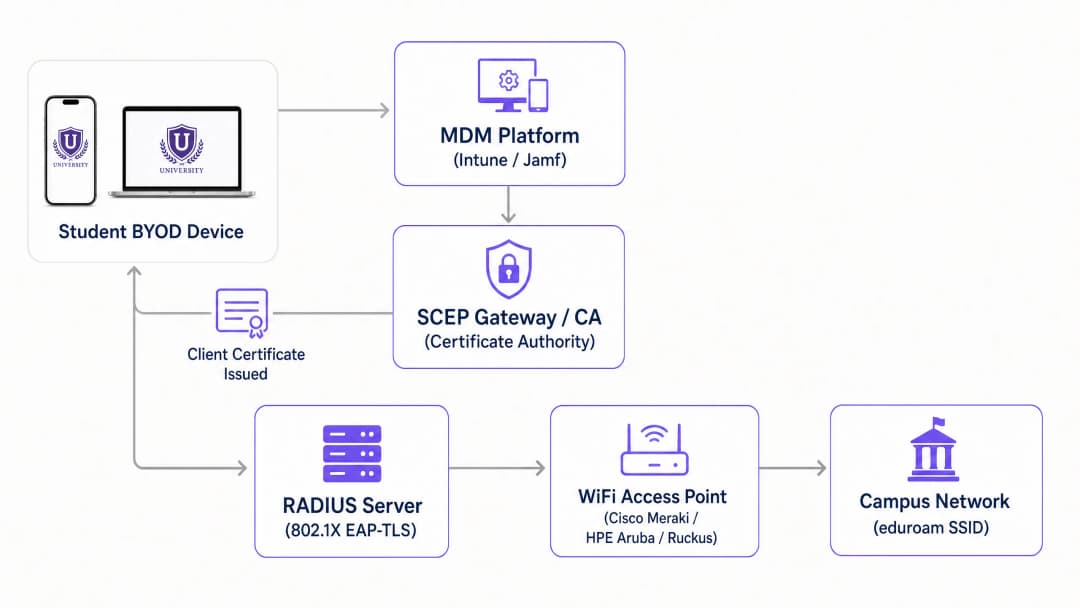
प्रमाणपत्र-आधारित WiFi कडे संक्रमण करण्यासाठी वापरकर्त्याच्या ज्ञानाची (पासवर्ड) पडताळणी करण्याऐवजी डिव्हाइसच्या ओळखीची (प्रमाणपत्र) पडताळणी करणे आवश्यक आहे. SCEP प्रोटोकॉल तुमच्या डिव्हाइस व्यवस्थापन स्तर आणि तुमच्या पब्लिक की इन्फ्रास्ट्रक्चर (PKI) मधील पूल म्हणून काम करतो.
मुख्य इन्फ्रास्ट्रक्चर घटक
प्रॉडक्शन-रेडी SCEP उपयोजनासाठी क्रमाने काम करणाऱ्या सहा एकात्मिक घटकांची आवश्यकता असते:
- आयडेंटिटी प्रोव्हाइडर (IdP): अधिकृत डिरेक्टरी (Microsoft Entra ID, Okta, किंवा Google Workspace) जी प्रमाणपत्र जारी करण्यापूर्वी वापरकर्त्याच्या ओळखीची पडताळणी करते.
- मोबाईल डिव्हाइस मॅनेजमेंट (MDM): Microsoft Intune किंवा Jamf सारखे प्लॅटफॉर्म जे संस्थेच्या मालकीच्या डिव्हाइसेसवर SCEP पेलोड पुश करतात.
- सर्टिफिकेट ऑथॉरिटी (CA): PKI इंजिन जे प्रमाणपत्रांवर स्वाक्षरी करते आणि जारी करते. हे ऑन-प्रिमाइसेस Microsoft ADCS उपयोजन किंवा क्लाउड-नेटिव्ह PKI ओव्हरले असू शकते.
- SCEP गेटवे: HTTP एंडपॉइंट जो डिव्हाइसेसकडून सर्टिफिकेट सायनिंग रिक्वेस्ट्स (CSRs) प्राप्त करतो, चॅलेंज पासवर्डची पडताळणी करतो आणि विनंती CA कडे पाठवतो.
- RADIUS सर्व्हर: प्रमाणीकरण सर्व्हर जो 802.1X EAP-TLS एक्सचेंज दरम्यान नेटवर्क ॲक्सेस पॉलिसीनुसार सादर केलेल्या क्लायंट प्रमाणपत्राचे मूल्यांकन करतो.
- वायरलेस ॲक्सेस नेटवर्क: 802.1X प्रमाणीकरण लागू करण्यासाठी कॉन्फिगर केलेले भौतिक ॲक्सेस पॉइंट्स (Cisco Meraki, HPE Aruba, Ruckus, किंवा Juniper Mist).
SCEP नोंदणी प्रवाह
मॅनेज्ड डिव्हाइसेसवर वापरकर्त्याच्या हस्तक्षेपाशिवाय नोंदणी प्रक्रिया कार्यान्वित होते. MDM प्लॅटफॉर्म SCEP गेटवे URL आणि डायनॅमिकली जनरेट केलेला चॅलेंज पासवर्ड असलेला कॉन्फिगरेशन प्रोफाइल पुश करतो. डिव्हाइस स्थानिक पातळीवर एक प्रायव्हेट की जनरेट करते आणि CSR तयार करते. त्यानंतर ते हा CSR HTTP द्वारे SCEP गेटवेवर पाठवते.
गेटवे विनंती अडवतो आणि डिव्हाइस अधिकृत असल्याची खात्री करण्यासाठी MDM API द्वारे चॅलेंज पासवर्डची पडताळणी करतो. पडताळणी झाल्यावर, गेटवे CSR ला CA कडे पाठवतो. CA प्रमाणपत्रावर स्वाक्षरी करतो आणि गेटवेद्वारे ते डिव्हाइसला परत करतो. प्रायव्हेट की कधीही एंडपॉइंट सोडत नाही, ज्यामुळे क्रिप्टोग्राफिक अखंडता सुनिश्चित होते.
तुमच्या विशिष्ट सेटअपबद्दल काही प्रश्न आहेत का?
आमची टीम ८०,००० हून अधिक वेन्यूजमधील वेन्यू ऑपरेटर्स, IT मॅनेजर्स आणि नेटवर्क इंजिनिअर्ससोबत काम करते. २० मिनिटांचा कॉल बुक करा आणि तुमच्यासारख्या इतरांनी ही समस्या कशी सोडवली हे आम्ही तुम्हाला दाखवू.
अंमलबजावणी मार्गदर्शक: टप्प्याटप्प्याने उपयोजन धोरण
SCEP उपयोजित करण्यासाठी अचूक अनुक्रमाची आवश्यकता असते. प्रोफाइल अवलंबनामुळे (dependencies) ही पावले चुकीच्या क्रमाने अंमलात आणल्यास प्रमाणीकरण अयशस्वी होईल.
पायरी १: डिरेक्टरी सिंक्रोनाइझेशन आणि ग्रुप पॉलिसी
प्रमाणपत्रांना स्पर्श करण्यापूर्वी, तुमचा आयडेंटिटी स्टोअर स्वच्छ असल्याची खात्री करा. Microsoft Entra ID किंवा Active Directory मध्ये विद्यार्थी, कर्मचारी आणि प्राध्यापकांसाठी स्वतंत्र सुरक्षा गट तयार करा. तुमचा RADIUS सर्व्हर या गटांच्या सदस्यत्वांचा वापर (जे प्रमाणपत्रांमध्ये Subject Alternative Names (SAN) म्हणून एम्बेड केलेले असतात) डिव्हाइसेसना योग्य VLANs मध्ये डायनॅमिकली नियुक्त करण्यासाठी करेल.
पायरी २: PKI आणि SCEP गेटवे कॉन्फिगरेशन
तुमची CA श्रेणी स्थापित करा. ऑन-प्रिमाइसेस तयार करत असल्यास, ऑफलाइन Root CA आणि ऑनलाइन Issuing CA उपयोजित करा. इन्फ्रास्ट्रक्चरचा आकार कमी करू इच्छिणाऱ्या उच्च शिक्षण वातावरणासाठी, क्लाउड PKI सोल्यूशन्स ऑपरेशनल सुलभता देतात. तुमच्या CA शी संवाद साधण्यासाठी SCEP गेटवे कॉन्फिगर करा आणि नोंदणी एंडपॉइंट त्या नेटवर्क सेगमेंटसाठी खुला करा जिथे डिव्हाइसेस सुरुवातीला कनेक्ट होतील.
पायरी ३: RADIUS सर्व्हर एकत्रीकरण
तुमच्या RADIUS सर्व्हरच्या विश्वसनीय प्रमाणपत्र स्टोअरमध्ये Issuing CA प्रमाणपत्र आयात करा. प्रमाणीकरण प्रोटोकॉल काटेकोरपणे EAP-TLS वर कॉन्फिगर करा. नेटवर्क पॉलिसी परिभाषित करा ज्या प्रमाणपत्र गुणधर्मांना (जसे की User Principal Name) विशिष्ट VLAN रिटर्न गुणधर्मांशी मॅप करतात, ज्यामुळे कॅम्पसमध्ये मायक्रो-सेगमेंटेशन सक्षम होते.
पायरी ४: MDM प्रोफाइल अनुक्रम
Intune किंवा Jamf द्वारे व्यवस्थापित केलेल्या संस्थेच्या मालकीच्या डिव्हाइसेससाठी, प्रोफाइल उपयोजन क्रम अत्यंत महत्त्वाचा आहे. तुम्ही या अचूक क्रमाने प्रोफाइल उपयोजित करणे आवश्यक आहे:
- ट्रस्टेड सर्टिफिकेट प्रोफाइल: विश्वास स्थापित करण्यासाठी Root CA प्रमाणपत्र वितरित करते.
- SCEP सर्टिफिकेट प्रोफाइल: डिव्हाइसला त्याचे क्लायंट प्रमाणपत्र मिळवण्यासाठी गेटवेकडे निर्देशित करते.
- WiFi प्रोफाइल: मागील पायरीमध्ये मिळवलेल्या प्रमाणपत्राचा स्पष्टपणे संदर्भ देऊन, EAP-TLS सह WPA3-Enterprise वापरण्यासाठी SSID कॉन्फिगर करते.
पायरी ५: BYOD सेल्फ-सर्व्हिस ऑनबोर्डिंग
विद्यार्थी त्यांच्या वैयक्तिक डिव्हाइसेसवर मॅन्युअली प्रमाणपत्रे स्थापित करणार नाहीत. तुम्ही एक स्वयंचलित ऑनबोर्डिंग मार्ग प्रदान करणे आवश्यक आहे. एक ओपन SSID उपयोजित करा जो ट्रॅफिक केवळ कॅप्टिव्ह पोर्टल आणि SCEP गेटवेपुरता मर्यादित ठेवेल. जेव्हा एखादा विद्यार्थी कनेक्ट होतो, तेव्हा पोर्टल त्यांना त्यांच्या विद्यापीठाच्या क्रेडेंशियल्सचा वापर करून सिंगल साइन-ऑन (SSO) द्वारे प्रमाणीकृत करण्यास सांगते. यशस्वी प्रमाणीकरणानंतर, पोर्टल डिव्हाइसवर SCEP पेलोड प्रदान करते. Purple हा ऑनबोर्डिंग प्रवाह थेट कॅप्टिव्ह पोर्टल अनुभवामध्ये समाकलित करते, ज्यामुळे विद्यार्थ्यांना IT हस्तक्षेपाशिवाय दोन मिनिटांपेक्षा कमी वेळात नोंदणी पूर्ण करता येते.
सर्वोत्तम पद्धती आणि जोखीम कमी करणे
EAP-TLS कडे संक्रमण केल्याने क्रेडेंशियल चोरी दूर होते, परंतु नवीन ऑपरेशनल बाबी समोर येतात. नेटवर्क आर्किटेक्ट्सनी स्केल आणि लाइफसायकल इव्हेंट्सचा अंदाज घेणे आवश्यक आहे.
RADIUS क्षमता नियोजन
EAP-TLS प्रमाणपत्र पडताळणीचा कॉम्प्युटेशनल ओव्हरहेड PEAP पासवर्ड तपासणीपेक्षा लक्षणीयरीत्या जास्त आहे. सत्राच्या पहिल्या आठवड्यात, हजारो डिव्हाइसेस एकाच वेळी प्रमाणीकरण करण्याचा प्रयत्न करतील. एकच RADIUS नोड कदाचित त्याची संसाधने संपवून टाकेल आणि विनंत्या नाकारेल, ज्यामुळे मोठ्या प्रमाणावर कनेक्शन अयशस्वी होईल. तुम्ही एकाधिक RADIUS नोड्सवर लोड बॅलेंसिंग लागू केले पाहिजे आणि पीक लेटन्सी सामावून घेण्यासाठी तुमच्या ॲक्सेस पॉइंट्सवरील प्रमाणीकरण टाइमआउट किमान पाच सेकंदांपर्यंत वाढवला पाहिजे.
प्रमाणपत्र लाइफसायकल व्यवस्थापन
विद्यार्थ्यांच्या डिव्हाइसेससाठी प्रमाणपत्रांचा वैधता कालावधी सामान्यतः एक ते दोन वर्षांचा असावा. हा कालावधी शैक्षणिक चक्र कव्हर करतो आणि डिव्हाइस धोक्यात आल्यास जोखीम मर्यादित करतो. महत्त्वाचे म्हणजे, तुम्ही एक मजबूत रिव्होकेशन (रद्द करण्याची) यंत्रणा लागू केली पाहिजे. जेव्हा एखादा विद्यार्थी पदवीधर होतो किंवा डिव्हाइस हरवल्याची तक्रार करतो, तेव्हा प्रमाणपत्र त्वरित रद्द केले जाणे आवश्यक आहे. तुमचे CA सर्टिफिकेट रिव्होकेशन लिस्ट (CRL) प्रकाशित करते किंवा ऑनलाइन सर्टिफिकेट स्टेटस प्रोटोकॉल (OCSP) रिस्पॉन्डर चालवते याची खात्री करा आणि प्रत्येक प्रमाणीकरण प्रयत्नावर रिव्होकेशन स्थिती तपासण्यासाठी तुमचा RADIUS सर्व्हर कॉन्फिगर करा.
हेडलेस IoT डिव्हाइसेस हाताळणे
वसतिगृहातील स्मार्ट टीव्ही, गेमिंग कन्सोल आणि वायरलेस प्रिंटरमध्ये SCEP नोंदणीसाठी आवश्यक असलेले मूळ 802.1X सप्लिकंट्स नसतात. या डिव्हाइसेससाठी, MAC Authentication Bypass (MAB) लागू करा. एक सेल्फ-सर्व्हिस डिव्हाइस नोंदणी पोर्टल प्रदान करा जिथे विद्यार्थी त्यांच्या IoT हार्डवेअरचे MAC पत्ते नोंदवू शकतात. त्यानंतर नेटवर्क ॲक्सेस कंट्रोल (NAC) सिस्टम या नोंदणीकृत पत्त्यांचे प्रमाणीकरण करते आणि त्यांना योग्य विद्यार्थी VLAN मध्ये ठेवते.
तांत्रिक ब्रीफिंग ऐका
आर्किटेक्चर आणि वास्तविक-जगातील उपयोजन परिस्थितींबद्दल सखोल माहितीसाठी, आमचे १० मिनिटांचे तांत्रिक ब्रीफिंग पॉडकास्ट ऐका.
ROI आणि व्यावसायिक प्रभाव
उच्च शिक्षणात SCEP उपयोजनाचा बिझनेस केस दोन स्तंभांवर आधारित आहे: सुरक्षा स्थिती आणि ऑपरेशनल कार्यक्षमता.
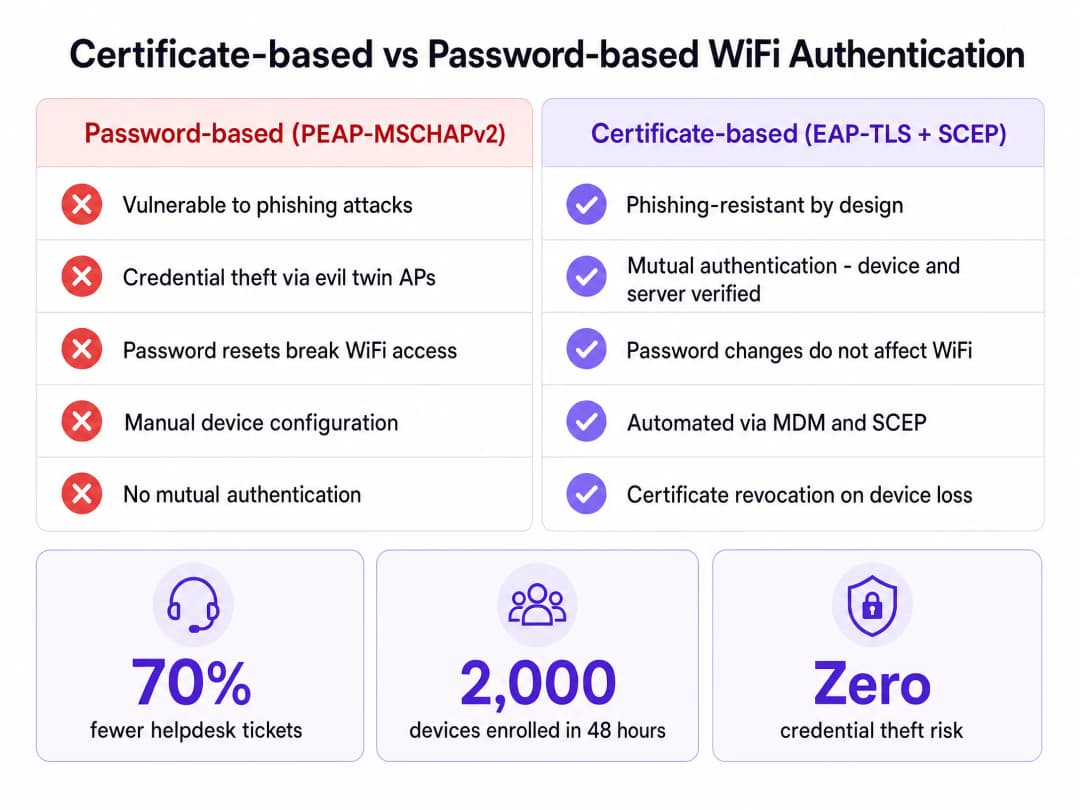
सुरक्षेच्या दृष्टिकोनातून, EAP-TLS परस्पर प्रमाणीकरण प्रदान करते. कोणताही डेटा ट्रान्समिट करण्यापूर्वी डिव्हाइस RADIUS सर्व्हरच्या प्रमाणपत्राची पडताळणी करते, ज्यामुळे इव्हिल ट्विन ॲक्सेस पॉइंट्सद्वारे क्रेडेंशियल्स गोळा करण्याचा धोका पूर्णपणे कमी होतो. हे आर्किटेक्चर झिरो-ट्रस्ट तत्त्वांशी सुसंगत आहे, ज्यामुळे केवळ क्रिप्टोग्राफिकरीत्या पडताळणी केलेली डिव्हाइसेसच कॅम्पस नेटवर्कमध्ये प्रवेश करू शकतात.
ऑपरेशनल दृष्टिकोनातून, WiFi प्रमाणीकरण डिरेक्टरी पासवर्डपासून वेगळे केल्याने त्वरित आर्थिक परतावा मिळतो. जेव्हा एखादे विद्यापीठ ९० दिवसांचे पासवर्ड रीसेट सक्तीचे करते, तेव्हा PEAP वापरणाऱ्या विद्यार्थ्यांना प्रत्येक डिव्हाइसवर त्यांचे क्रेडेंशियल्स अपडेट करावे लागतात. अपरिहार्यपणे, अनेक जण यात अपयशी ठरतात, ज्यामुळे हेल्पडेस्क तिकिटांमध्ये वाढ होते. SCEP आणि EAP-TLS सह, पासवर्ड बदलला तरीही प्रमाणपत्र वैध राहते. स्वयंचलित प्रमाणपत्र ऑनबोर्डिंग उपयोजित करणारी विद्यापीठे पीक कालावधीत WiFi-संबंधित सपोर्ट तिकिटांमध्ये ७०% पर्यंत घट झाल्याची नोंद करतात, ज्यामुळे IT कर्मचाऱ्यांना मूलभूत कनेक्टिव्हिटी ट्रबलशूटिंगऐवजी धोरणात्मक उपक्रमांवर लक्ष केंद्रित करणे शक्य होते.
महत्वाच्या व्याख्या
SCEP (Simple Certificate Enrollment Protocol)
एक प्रोटोकॉल जो मॅन्युअल हस्तक्षेपाशिवाय नेटवर्क डिव्हाइसेसना डिजिटल प्रमाणपत्रांची विनंती आणि जारी करणे स्वयंचलित करतो.
EAP-TLS उपयोजन स्केल करण्यासाठी आवश्यक आहे, कारण हे MDMs आणि ऑनबोर्डिंग पोर्टल्सना हजारो विद्यार्थ्यांच्या डिव्हाइसेसवर अखंडपणे प्रमाणपत्रे प्रदान करण्यास अनुमती देते.
EAP-TLS (Extensible Authentication Protocol - Transport Layer Security)
सर्वात सुरक्षित ८०२.१X प्रमाणीकरण पद्धत, ज्यामध्ये परस्पर प्रमाणीकरणासाठी सर्व्हर-साइड आणि क्लायंट-साइड दोन्ही प्रमाणपत्रांची आवश्यकता असते.
PEAP सारख्या असुरक्षित पासवर्ड-आधारित प्रोटोकॉलची जागा घेते, ज्यामुळे इव्हिल ट्विन ॲक्सेस पॉइंट्सद्वारे क्रेडेंशियल चोरीचा धोका दूर होतो.
MDM (Mobile Device Management)
संस्थेच्या मालकीच्या डिव्हाइसेसचे प्रशासन आणि सुरक्षितता करण्यासाठी वापरले जाणारे Microsoft Intune किंवा Jamf सारखे सॉफ्टवेअर प्लॅटफॉर्म.
मॅनेज्ड डिव्हाइसेसवर SCEP पेलोड आणि WiFi प्रोफाइल बॅकग्राउंडमध्ये पुश करण्यासाठी वापरले जाते, ज्यामुळे उपयोजनापूर्वी ते नेटवर्क ॲक्सेससाठी कॉन्फिगर केले आहेत याची खात्री होते.
CSR (Certificate Signing Request)
क्लायंट डिव्हाइसद्वारे जनरेट केलेला एन्कोड केलेल्या मजकुराचा ब्लॉक ज्यामध्ये पब्लिक की आणि ओळख माहिती असते, जी प्रमाणपत्रासाठी अर्ज करण्यासाठी CA कडे पाठवली जाते.
SCEP वर्कफ्लोमध्ये, डिव्हाइस स्थानिक पातळीवर प्रायव्हेट की जनरेट करते आणि गेटवेला केवळ CSR पाठवते, ज्यामुळे प्रायव्हेट की एंडपॉइंटवर सुरक्षित राहते.
RADIUS (Remote Authentication Dial-In User Service)
नेटवर्किंग प्रोटोकॉल जो केंद्रीकृत प्रमाणीकरण, अधिकृतता आणि अकाउंटिंग व्यवस्थापन प्रदान करतो.
८०२.१X एक्सचेंज दरम्यान डिव्हाइसद्वारे सादर केलेल्या क्लायंट प्रमाणपत्राचे मूल्यांकन करणारा आणि VLAN असाइनमेंट ठरवणारा सर्व्हर.
Evil Twin Attack
एक सुरक्षा हल्ला जिथे हल्लेखोर वापरकर्त्याचे क्रेडेंशियल्स चोरण्यासाठी कायदेशीर नेटवर्कसारख्याच SSID सह एक बनावट ॲक्सेस पॉइंट सेट करतो.
EAP-TLS याला प्रतिबंधित करते कारण कोणताही डेटा ट्रान्समिट करण्यापूर्वी क्लायंट डिव्हाइस RADIUS सर्व्हरच्या प्रमाणपत्राची पडताळणी करते; जर हल्लेखोराकडे विश्वसनीय सर्व्हर प्रमाणपत्र नसेल, तर कनेक्शन खंडित होते.
MAB (MAC Authentication Bypass)
एक फॉलबॅक प्रमाणीकरण पद्धत जी डिव्हाइसचा MAC पत्ता त्याचे क्रेडेंशियल म्हणून वापरते.
वसतिगृहातील हेडलेस IoT डिव्हाइसेस (जसे की गेमिंग कन्सोल) ऑनबोर्ड करण्यासाठी आवश्यक आहे जे ८०२.१X किंवा SCEP ला सपोर्ट करू शकत नाहीत.
CRL (Certificate Revocation List)
सर्टिफिकेट ऑथॉरिटीद्वारे प्रकाशित केलेली यादी ज्यामध्ये त्यांच्या समाप्ती तारखेपूर्वी अवैध ठरवलेल्या प्रमाणपत्रांचे अनुक्रमांक असतात.
नेटवर्क सुरक्षेसाठी अत्यंत महत्त्वाचे; चोरीला गेलेली डिव्हाइसेस किंवा पदवीधर झालेल्या विद्यार्थ्यांना त्वरित प्रवेश नाकारला जाईल याची खात्री करण्यासाठी RADIUS सर्व्हरने CRL तपासणे आवश्यक आहे.
सोडवलेली उदाहरणे
२०,००० विद्यार्थ्यांचे एक विद्यापीठ PEAP-MSCHAPv2 वरून EAP-TLS कडे स्थलांतरित होत आहे. ते ३,००० विद्यापीठाच्या मालकीच्या Windows लॅपटॉपसाठी Microsoft Intune वापरतात, परंतु उर्वरित ४५,००० डिव्हाइसेस विद्यार्थ्यांचे वैयक्तिक BYOD (फोन, टॅब्लेट, वैयक्तिक लॅपटॉप) आहेत. सत्राच्या पहिल्याच दिवशी सर्व डिव्हाइसेस प्रमाणीकृत होऊ शकतील याची खात्री करण्यासाठी त्यांनी प्रमाणपत्र उपयोजनाचे आर्किटेक्चर कसे तयार करावे?
विद्यापीठाने दुहेरी नोंदणी धोरण लागू केले पाहिजे. ३,००० Intune-मॅनेज्ड लॅपटॉपसाठी, IT टीम Intune मध्ये SCEP प्रमाणपत्र प्रोफाइल कॉन्फिगर करते, गेटवे URL आणि चॅलेंज पासवर्ड डिव्हाइसेसवर बॅकग्राउंडमध्ये पुश करते. ४५,००० BYOD डिव्हाइसेससाठी, ते एक ओपन 'Onboarding' SSID उपयोजित करतात जो ट्रॅफिक केवळ सेल्फ-सर्व्हिस कॅप्टिव्ह पोर्टल आणि SCEP गेटवेपुरता मर्यादित ठेवतो. विद्यार्थी Onboarding SSID शी कनेक्ट होतात, Entra ID विरुद्ध SAML SSO द्वारे प्रमाणीकृत होतात आणि SCEP नोंदणी ट्रिगर करणारा कॉन्फिगरेशन पेलोड डाउनलोड करतात. एकदा प्रमाणपत्र स्थापित झाल्यानंतर, डिव्हाइस EAP-TLS वापरून सुरक्षित 'eduroam' SSID शी स्वयंचलितपणे जोडले जाते.
सत्राच्या पहिल्या आठवड्यात, विद्यापीठाच्या हेल्पडेस्कला अहवाल मिळतात की विद्यार्थी त्यांच्या लॅपटॉपसह WiFi शी कनेक्ट होऊ शकतात, परंतु वसतिगृहातील त्यांचे स्मार्ट स्पीकर्स आणि गेमिंग कन्सोल ८०२.१X नेटवर्कशी कनेक्ट होऊ शकत नाहीत. नेटवर्क आर्किटेक्टने याचे निराकरण कसे करावे?
आर्किटेक्टने हेडलेस डिव्हाइसेससाठी MAC Authentication Bypass (MAB) लागू केले पाहिजे. स्मार्ट स्पीकर्स आणि कन्सोलमध्ये ८०२.१X सप्लिकंट्स नसल्यामुळे, ते SCEP पेलोडवर प्रक्रिया करू शकत नाहीत किंवा क्लायंट प्रमाणपत्रे सादर करू शकत नाहीत. विद्यापीठाने एक सेल्फ-सर्व्हिस डिव्हाइस नोंदणी पोर्टल उपयोजित केले पाहिजे जिथे विद्यार्थी त्यांच्या विद्यापीठाच्या क्रेडेंशियल्ससह लॉग इन करतात आणि त्यांच्या IoT डिव्हाइसेसचे MAC पत्ते प्रविष्ट करतात. RADIUS सर्व्हर हे नोंदणीकृत MAC पत्ते MAB द्वारे स्वीकारण्यासाठी आणि त्यांना विद्यार्थ्याच्या विशिष्ट Per-Room VLAN मध्ये नियुक्त करण्यासाठी कॉन्फिगर केलेला असतो.
सराव प्रश्न
Q1. तुमचे विद्यापीठ EAP-TLS उपयोजित करत आहे. तुम्ही SCEP गेटवे आणि MDM प्रोफाइल कॉन्फिगर केले आहेत. तथापि, जेव्हा चाचणी डिव्हाइसेस सुरक्षित SSID शी कनेक्ट करण्याचा प्रयत्न करतात, तेव्हा कनेक्शन कोणतीही त्रुटी न दाखवता अयशस्वी होते. RADIUS लॉग दर्शवतात की क्लायंट प्रमाणपत्र वैध आहे, परंतु डिव्हाइस सर्व्हर नाकारत आहे. सर्वात संभाव्य कॉन्फिगरेशन त्रुटी कोणती आहे?
टीप: परस्पर प्रमाणीकरणाच्या आवश्यकतांचा आणि सर्व्हरवर विश्वास ठेवण्यासाठी डिव्हाइसला कशाची आवश्यकता आहे याचा विचार करा.
नमुना उत्तर पहा
MDM Trusted Certificate प्रोफाइल बहुधा गहाळ किंवा चुकीचे कॉन्फिगर केलेले आहे. EAP-TLS मध्ये, परस्पर प्रमाणीकरणासाठी डिव्हाइसने RADIUS सर्व्हरच्या प्रमाणपत्राची पडताळणी करणे आवश्यक आहे. जर डिव्हाइसच्या विश्वसनीय स्टोअरमध्ये Root CA प्रमाणपत्र स्थापित केलेले नसेल, तर ते सर्व्हरच्या प्रमाणपत्राची पडताळणी करू शकत नाही आणि संभाव्य इव्हिल ट्विन हल्ला रोखण्यासाठी कनेक्शन खंडित करेल.
Q2. एक विद्यार्थी अहवाल देतो की त्याचा लॅपटॉप, जो BYOD पोर्टलद्वारे यशस्वीरित्या नोंदणीकृत झाला होता आणि ज्याच्याकडे वैध क्लायंट प्रमाणपत्र आहे, तो विद्यापीठाचा डिरेक्टरी पासवर्ड बदलल्यानंतर नेटवर्कमध्ये प्रवेश करू शकत नाही. हे कोणते आर्किटेक्चरल दोष दर्शवते?
टीप: EAP-TLS प्रमाणीकरण पूर्णपणे प्रमाणपत्रावर अवलंबून असते, पासवर्डवर नाही.
नमुना उत्तर पहा
हे दर्शवते की नेटवर्क प्रत्यक्षात EAP-TLS वापरत नाही, तर बहुधा PEAP-MSCHAPv2 किंवा इतर पासवर्ड-आधारित प्रोटोकॉलवर परत जात आहे. जर खरे EAP-TLS कॉन्फिगर केले असेल, तर RADIUS सर्व्हर प्रमाणपत्राच्या क्रिप्टोग्राफिक स्वाक्षरीची पडताळणी करतो, ज्यामुळे नेटवर्क प्रवेश डिरेक्टरी पासवर्डपासून पूर्णपणे वेगळा होतो. नेटवर्क आर्किटेक्टने RADIUS सर्व्हरवर कठोर EAP-TLS पॉलिसी लागू केल्या पाहिजेत आणि फॉलबॅक प्रोटोकॉल अक्षम केले पाहिजेत.
Q3. सत्राच्या पहिल्या आठवड्यात, RADIUS सर्व्हरवर उच्च CPU वापर आणि अधूनमधून टाइमआउट त्रुटी येत आहेत, ज्यामुळे मोठ्या प्रमाणावर प्रमाणीकरण अयशस्वी होत आहे. एकूण समवर्ती सत्रांसाठी सर्व्हर पुरेसे सक्षम आहेत. टाइमआउटचे कारण काय आहे?
टीप: सुरुवातीच्या कनेक्शन टप्प्यात पासवर्ड तपासणे आणि प्रमाणपत्र साखळीची पडताळणी करणे यामधील कॉम्प्युटेशनल ओव्हरहेडमधील फरकाचा विचार करा.
नमुना उत्तर पहा
परत येणाऱ्या विद्यार्थ्यांच्या सुरुवातीच्या प्रमाणीकरणाच्या गर्दी दरम्यान EAP-TLS क्रिप्टोग्राफिक हँडशेकच्या प्रचंड कॉम्प्युटेशनल ओव्हरहेडमुळे हे टाइमआउट होत आहेत. आर्किटेक्टने वायरलेस ॲक्सेस पॉइंट्सवरील (उदा. Cisco Meraki किंवा HPE Aruba) RADIUS टाइमआउट मूल्य किमान ५ सेकंदांपर्यंत वाढवले पाहिजे जेणेकरून लेटन्सी सामावून घेता येईल, आणि लोड बॅलेंसिंग सर्व RADIUS नोड्सवर सुरुवातीच्या पूर्ण-प्रमाणीकरण विनंत्या समान रीतीने वितरित करत असल्याची खात्री केली पाहिजे.
या मालिकेमध्ये पुढे वाचा
पाहुण्यांच्या WiFi साठी RADIUS प्रमाणीकरण कॉन्फिगर करण्यासाठी नेटवर्क ॲडमिनिस्ट्रेटरचे मार्गदर्शक
पाहुण्यांच्या WiFi साठी RADIUS प्रमाणीकरण उपयोजित करण्याबाबत नेटवर्क ॲडमिनिस्ट्रेटरसाठी एक सर्वसमावेशक तांत्रिक संदर्भ. यामध्ये आर्किटेक्चर, व्हेंडर-तटस्थ कॉन्फिगरेशन पायऱ्या, सुरक्षा सर्वोत्तम पद्धती आणि सामान्य उपयोजन त्रुटींचे ट्रबलशूटिंग समाविष्ट आहे.
उच्च शिक्षणामध्ये सुरक्षित BYOD आणि 802.1X WiFi साठी SCEP लागू करणे
हा तांत्रिक मार्गदर्शक दर्शवतो की उच्च शिक्षण आयटी टीम SCEP चा वापर करून हजारो BYOD उपकरणांसाठी 802.1X प्रमाणपत्र नोंदणी स्वयंचलित कशी करू शकतात. यामध्ये मॅन्युअल ऑनबोर्डिंगला सुरक्षित, झिरो-टच नेटवर्क ऍक्सेस मॉडेलसह बदलण्यासाठी आर्किटेक्चर, सुरक्षा फायदे आणि प्रत्यक्ष उपयोजन टप्पे समाविष्ट आहेत.
Guest आणि Staff WiFi नेटवर्क्ससाठी RADIUS Authentication कॉन्फिगर करणे
हे तांत्रिक संदर्भ मार्गदर्शक एंटरप्राइझ guest आणि staff WiFi नेटवर्क्ससाठी RADIUS authentication च्या आर्किटेक्चर, कॉन्फिगरेशन आणि डिप्लॉयमेंटची रूपरेषा स्पष्ट करते. हे नेटवर्क आर्किटेक्ट्स आणि IT मॅनेजर्सना सुरक्षित, स्केलेबल वायरलेस ॲक्सेस कंट्रोल सिस्टम्स तयार करण्यासाठी आवश्यक असलेले अचूक प्रोटोकॉल्स, सुरक्षा मानके आणि ट्रबलशूटिंग पद्धती प्रदान करते.
तुमच्या विशिष्ट सेटअपबद्दल काही प्रश्न आहेत का?
आमची टीम ८०,००० हून अधिक वेन्यूजमधील वेन्यू ऑपरेटर्स, IT मॅनेजर्स आणि नेटवर्क इंजिनिअर्ससोबत काम करते. २० मिनिटांचा कॉल बुक करा आणि तुमच्यासारख्या इतरांनी ही समस्या कशी सोडवली हे आम्ही तुम्हाला दाखवू.