

Captive Portal लॉगिन कसे काढायचे (आणि ते कधी करावे)
हे अधिकृत मार्गदर्शक Captive Portal लॉगिन काढून टाकण्यासाठी किंवा बायपास करण्यासाठी तांत्रिक रचना, उपयोग प्रकरणे आणि अंमलबजावणी धोरणे तपासते. ज्येष्ठ IT व्यावसायिकांसाठी डिझाइन केलेले, ते सुरक्षा आणि डेटा संकलन राखताना प्रवेश सुलभ करण्यासाठी MAC authentication bypass, 802.1X, आणि OpenRoaming कधी वापरायचे यावर कृती करण्यायोग्य अंतर्दृष्टी प्रदान करते.
🎧 हे मार्गदर्शक ऐका
ट्रान्सक्रिप्ट पहा
कार्यकारी सारांश
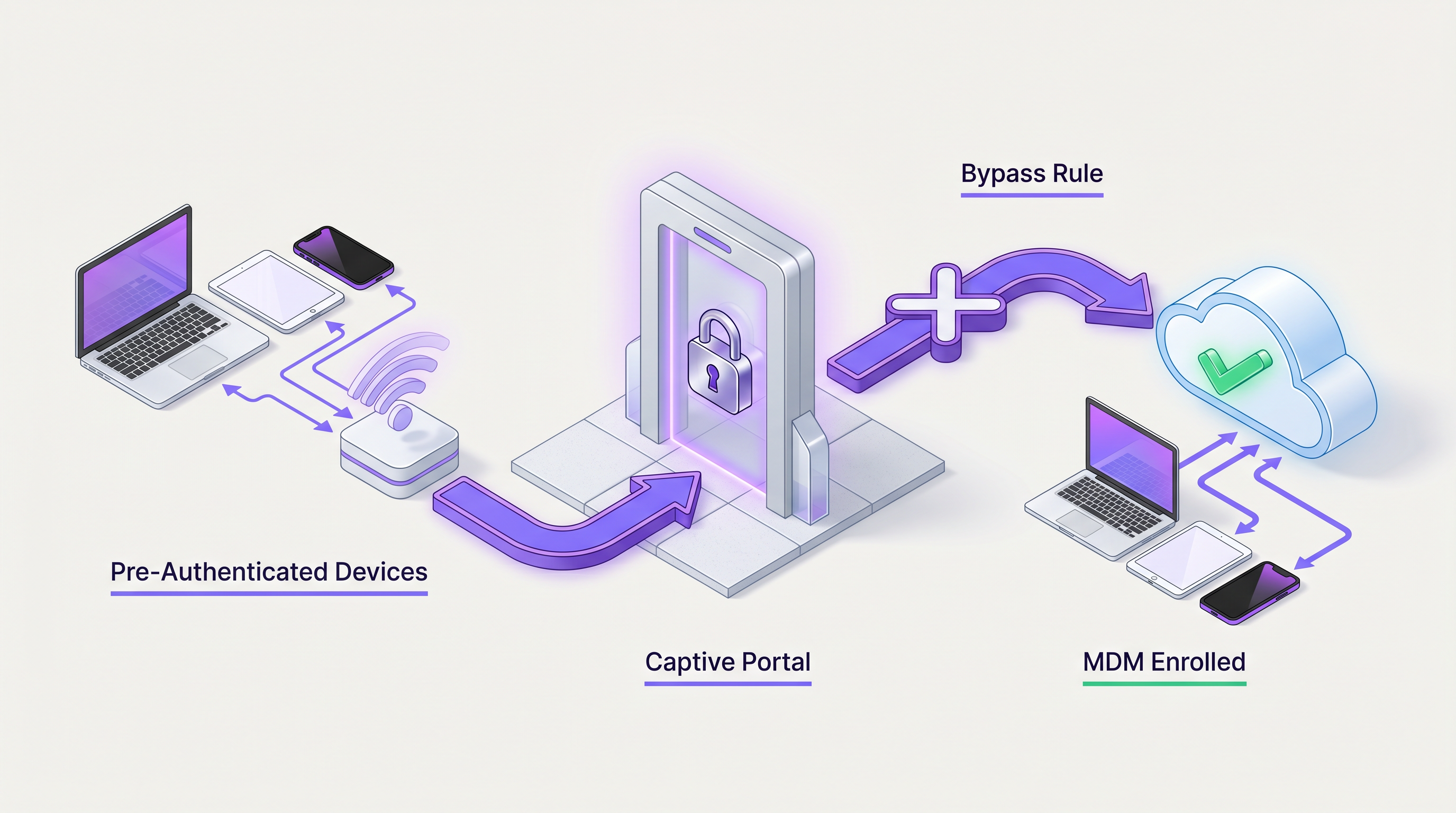
एंटरप्राइझ IT नेते आणि ठिकाण चालकांसाठी, Captive Portal लॉगिन दीर्घकाळापासून एक आवश्यक वाईट गोष्ट राहिली आहे. हे सेवा अटींची स्वीकृती, कायदेशीर अनुपालन आणि फर्स्ट-पार्टी डेटा संकलनासाठी एक महत्त्वपूर्ण तपासणी बिंदू प्रदान करते. तथापि, अखंड कनेक्टिव्हिटीला प्राधान्य देणाऱ्या वातावरणात—जसे की कॉर्पोरेट कॅम्पस, VIP हॉस्पिटॅलिटी झोन आणि मोठ्या प्रमाणात सार्वजनिक ठिकाणे—वापरकर्त्यांना वेब-आधारित प्रमाणीकरण प्रवाहातून जाण्यास भाग पाडल्याने अस्वीकार्य विलंब आणि वापरकर्त्यांची निराशा होऊ शकते.
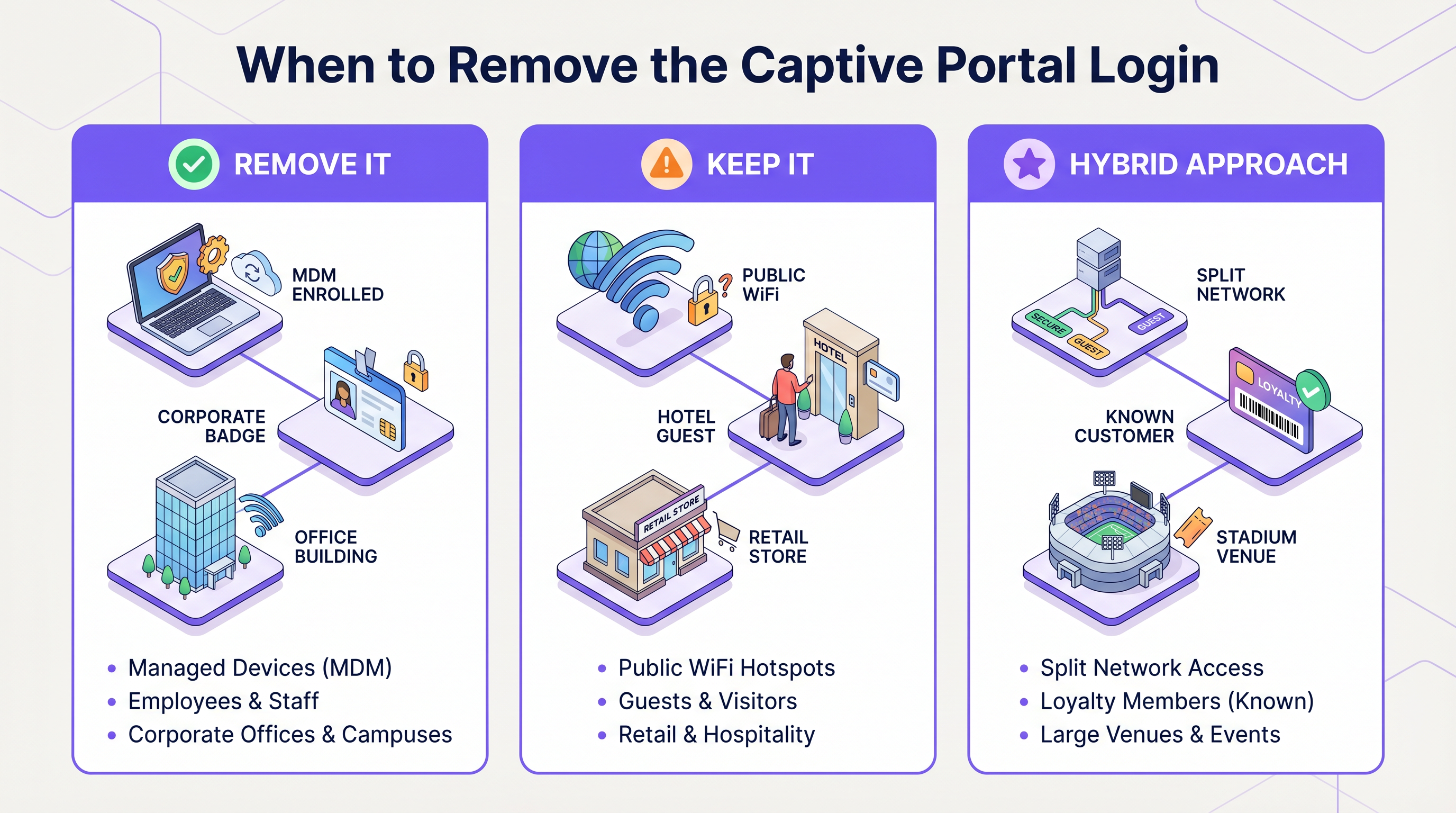
हे मार्गदर्शक विशिष्ट वापरकर्ता समूहांसाठी Captive Portal बायपास करण्यासाठी किंवा पूर्णपणे काढून टाकण्यासाठी तांत्रिक यंत्रणांचे तपशील देते. MAC Authentication Bypass (MAB), IEEE 802.1X, Mobile Device Management (MDM) एकत्रीकरण आणि OpenRoaming सारख्या अखंड प्रमाणीकरण फ्रेमवर्कचा लाभ घेऊन, नेटवर्क आर्किटेक्ट एक संकरित प्रवेश मॉडेल डिझाइन करू शकतात. हा दृष्टिकोन सुनिश्चित करतो की ज्ञात उपकरणे, कॉर्पोरेट एंडपॉइंट्स आणि निष्ठावान ग्राहक त्वरित कनेक्ट होतात, तर अज्ञात अतिथींना प्रारंभिक ऑनबोर्डिंग आणि डेटा कॅप्चरसाठी अजूनही Guest WiFi पोर्टलद्वारे निर्देशित केले जाते. आम्ही उपयोजन आर्किटेक्चर, सुरक्षा परिणाम आणि Purple च्या ओळख प्रदाता क्षमता या प्रगत प्रवेश धोरणांना कसे सुलभ करतात याचा शोध घेऊ.
तांत्रिक सखोल अभ्यास
Captive Portal लॉगिन काढून टाकण्यासाठी प्रमाणीकरण यंत्रणा लेयर 7 (ॲप्लिकेशन/वेब) वरून लेयर 2 (डेटा लिंक) पर्यंत हलवणे किंवा अखंड ओळख फेडरेशनचा लाभ घेणे आवश्यक आहे. आर्किटेक्चरने पोर्टलची आवश्यकता असलेल्या उपकरणांमध्ये आणि ते बायपास करणाऱ्या उपकरणांमध्ये गतिशीलपणे फरक केला पाहिजे.
1. MAC Authentication Bypass (MAB)
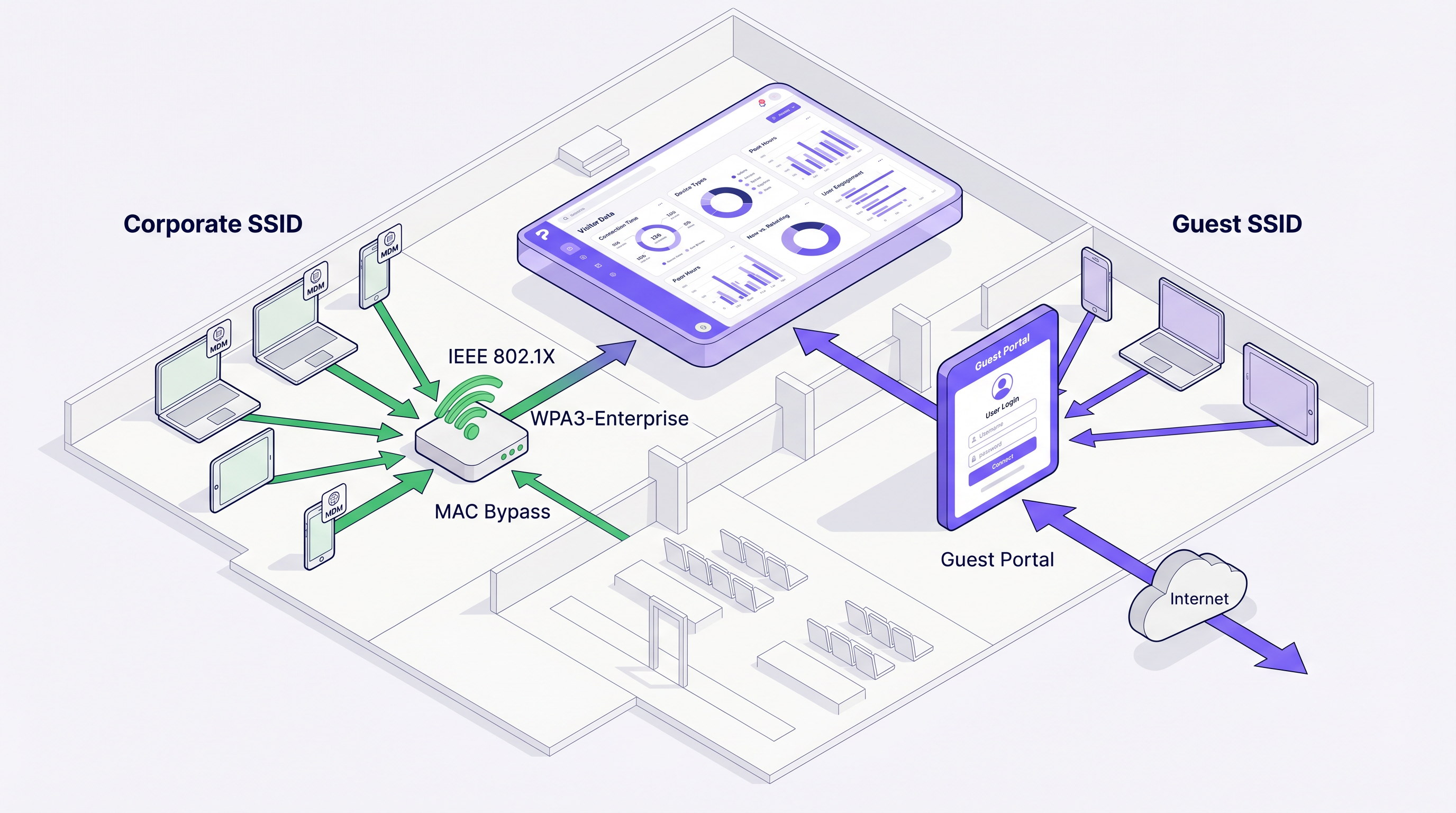
MAB नेटवर्क ॲक्सेस कंट्रोल (NAC) प्रणाली किंवा RADIUS सर्व्हरला त्यांच्या MAC ॲड्रेसवर आधारित उपकरणे प्रमाणित करण्यास अनुमती देते. जेव्हा एखादे उपकरण ॲक्सेस पॉइंटशी संबंधित होते, तेव्हा कंट्रोलर MAC ॲड्रेस असलेली RADIUS ॲक्सेस-रिक्वेस्ट पाठवतो. जर ॲड्रेस अधिकृत डेटाबेसमध्ये (जसे की Purple च्या ज्ञात अभ्यागत डेटाबेसमध्ये) अस्तित्वात असेल, तर RADIUS सर्व्हर ॲक्सेस-ॲक्सेप्ट परत करतो आणि कंट्रोलर HTTP/HTTPS ट्रॅफिकला Captive Portal वर पुनर्निर्देशित न करता उपकरण नेटवर्कवर ठेवतो.
आर्किटेक्चर प्रवाह:
- उपकरण संबंध
- कंट्रोलर अडवतो आणि MAC RADIUS ला पाठवतो
- RADIUS एंडपॉइंट डेटाबेस तपासतो
- VLAN असाइनमेंट किंवा बँडविड्थ थ्रॉटलिंगसाठी पर्यायी Vendor-Specific Attributes (VSAs) सह ॲक्सेस-ॲक्सेप्ट परत केला जातो.
MAC रँडमायझेशनवरील टीप: आधुनिक मोबाइल ऑपरेटिंग सिस्टम (iOS 14+, Android 10+) डीफॉल्टनुसार रँडमाइज्ड MAC ॲड्रेस वापरतात. परत येणाऱ्या अतिथींसाठी MAB विश्वसनीयपणे कार्य करण्यासाठी, ठिकाणाने वापरकर्त्यांना त्या विशिष्ट SSID साठी खाजगी ॲड्रेसिंग अक्षम करण्यास प्रोत्साहित केले पाहिजे, किंवा प्रणालीने प्रोफाइल-आधारित प्रमाणीकरणावर (जसे की Passpoint/Hotspot 2.0) अवलंबून राहिले पाहिजे.
2. IEEE 802.1X आणि WPA3-Enterprise
कॉर्पोरेट उपकरणे किंवा कर्मचारी नेटवर्कसाठी, 802.1X मजबूत पोर्ट-आधारित नेटवर्क ॲक्सेस कंट्रोल प्रदान करते. उपकरणे EAP (Extensible Authentication Protocol) वापरून प्रमाणित होतात, सामान्यतः EAP-TLS (प्रमाणपत्र-आधारित) किंवा PEAP (क्रेडेंशियल-आधारित).
जेव्हा उपकरणे MDM द्वारे नोंदणीकृत केली जातात, तेव्हा प्रमाणपत्रे आपोआप पुश केली जाऊ शकतात. ही उपकरणे सुरक्षित SSID शी कनेक्ट होतात आणि कोणतीही पोर्टल इन्फ्रास्ट्रक्चर पूर्णपणे बायपास करतात. हे कॉर्पोरेट ऑफिस उपयोजन आणि Retail आणि Hospitality मधील बॅक-ऑफ-हाऊस ऑपरेशन्ससाठी मानक आहे.
3. Passpoint (Hotspot 2.0) आणि OpenRoaming
Passpoint WiFi साठी सेल्युलर-सारखे रोमिंग सक्षम करते. स्थापित प्रोफाइल (क्रेडेंशियल किंवा प्रमाणपत्रे) असलेली उपकरणे वापरकर्त्याच्या हस्तक्षेपाशिवाय Passpoint-सक्षम नेटवर्कवर आपोआप प्रमाणित होतात. Wireless Broadband Alliance (WBA) द्वारे एक उपक्रम, OpenRoaming, ओळख प्रदाते आणि नेटवर्क प्रदात्यांना एकत्र करते.
Purple Connect परवान्याअंतर्गत OpenRoaming साठी एक विनामूल्य ओळख प्रदाता म्हणून कार्य करते. जेव्हा एखादा वापरकर्ता Purple पोर्टलद्वारे एकदा प्रमाणित करतो आणि OpenRoaming प्रोफाइल डाउनलोड करतो, तेव्हा त्याचे उपकरण जागतिक स्तरावर कोणत्याही OpenRoaming-सक्षम नेटवर्कशी आपोआप कनेक्ट होईल, Captive Portal पूर्णपणे बायपास करेल आणि तरीही ठिकाणाला RADIUS अकाउंटिंगद्वारे सत्र लॉग करण्याची परवानगी देईल.
अंमलबजावणी मार्गदर्शक
संकरित पोर्टल/बायपास आर्किटेक्चर उपयोजित करण्यासाठी WLAN कंट्रोलर, RADIUS सर्व्हर आणि ओळख व्यवस्थापन प्लॅटफॉर्म यांच्यात समन्वय आवश्यक आहे.
पायरी 1: वापरकर्ता समूह परिभाषित करा
कोणत्या गटांना बायपास आवश्यक आहे ते ओळखा:
- कॉर्पोरेट/कर्मचारी उपकरणे: 802.1X SSID वर मार्गस्थ करा.
- IoT/हेडलेस उपकरणे: समर्पित लपलेल्या SSID किंवा डायनॅमिक VLAN असाइनमेंटवर MAB वापरा.
- निष्ठावान सदस्य/VIPs: अतिथी SSID वर MAC कॅशिंग (MAB) वापरा किंवा Passpoint प्रोफाइल उपयोजित करा.
- मानक अतिथी: मानक Captive Portal द्वारे मार्गस्थ करा.
पायरी 2: MAC कॅशिंग कॉन्फिगर करा (परत येणाऱ्या अभ्यागतांसाठी बायपास)
परत येणाऱ्या अतिथींसाठी Captive Portal लॉगिन काढण्यासाठी:
- बाह्य RADIUS प्रमाणीकरण (उदा. Purple चे RADIUS सर्व्हर) वापरण्यासाठी WLAN कंट्रोलर कॉन्फिगर करा.
- अतिथी SSID वर MAC Authentication Bypass सक्षम करा.
- Purple WiFi Analytics डॅशबोर्डमध्ये, "अखंड लॉगिन" किंवा MAC कॅशिंग कालावधी (उदा. 30 दिवस, 365 दिवस) कॉन्फिगर करा.
- जेव्हा एखादा वापरकर्ता पोर्टलद्वारे प्रमाणित करतो, तेव्हा Purple त्याचा MAC ॲड्रेस संग्रहित करते.
- कॅशिंग विंडोमधील पुढील भेटींवर, कंट्रोलर MAB करतो, Purple ॲक्सेस-ॲक्सेप्ट परत करतो आणि वापरकर्ता त्वरित कनेक्ट होतो.
पायरी 3: MDM एकत्रीकरण लागू करा
व्यवस्थापित उपकरणांसाठी:
- WPA3-Enterprise कॉन्फिगरेशन आणि cl असलेले WiFi प्रोफाइल उपयोजित करण्यासाठी आपले MDM (Intune, Jamf, Workspace ONE) कॉन्फिगर करा.ient प्रमाणपत्र.
- RADIUS सर्व्हर जारी करणाऱ्या सर्टिफिकेट अथॉरिटी (CA) वर विश्वास ठेवण्यासाठी कॉन्फिगर केलेला असल्याची खात्री करा.
- उपकरणे गेस्ट पोर्टलचा सामना न करता शांतपणे कनेक्ट होतील.
सर्वोत्तम पद्धती
तुमच्या प्रमाणीकरण आर्किटेक्चरची रचना करताना, या विक्रेता-तटस्थ सर्वोत्तम पद्धतींचे पालन करा:
- डायनॅमिक VLANs द्वारे ट्रॅफिकचे विभाजन करा: अनेक SSIDs प्रसारित करण्याऐवजी (जे एअरटाइम कार्यक्षमता कमी करते), एकच SSID प्रसारित करा आणि वापरकर्त्यांना त्यांच्या प्रमाणीकरण पद्धतीनुसार वेगवेगळ्या VLANs (उदा. गेस्ट VLAN, स्टाफ VLAN, IoT VLAN) मध्ये नियुक्त करण्यासाठी RADIUS VSAs वापरा. याची सविस्तर माहिती WiFi Onboarding and Captive Portal Best Practices मध्ये दिली आहे.
- MAC रँडमायझेशन व्यवस्थापित करा: MAB वर अवलंबून असल्यास, स्थळाच्या नेटवर्कसाठी MAC रँडमायझेशन कसे अक्षम करावे याबद्दल VIPs किंवा कर्मचाऱ्यांना शिक्षित करा. त्याहूनही चांगले, दीर्घकालीन निष्ठावान वापरकर्त्यांसाठी Passpoint प्रोफाइलकडे संक्रमण करा.
- RADIUS लेटन्सीचे निरीक्षण करा: MAB असोसिएशन प्रक्रियेत लेटन्सी वाढवते. तुमचे RADIUS सर्व्हर भौगोलिकदृष्ट्या जवळ आहेत किंवा प्रमाणीकरण वेळ 500ms च्या आत ठेवण्यासाठी क्लाउड-एज नोड्स वापरतात याची खात्री करा.
- सत्र मर्यादा लागू करा: पोर्टलला बायपास करतानाही, नियमांचे पालन आणि अचूक विश्लेषण ट्रॅकिंग सुनिश्चित करण्यासाठी, RADIUS Session-Timeout ॲट्रिब्यूट्स वापरून वेळोवेळी पुन्हा प्रमाणीकरण सक्तीने करा.
समस्यानिवारण आणि जोखीम कमी करणे
पोर्टल काढून टाकल्याने विशिष्ट अपयश मोड येतात. नेटवर्क प्रशासकांनी खालील गोष्टींवर लक्ष ठेवले पाहिजे:
1. MAC रँडमायझेशनमुळे MAB अपयश लक्षण: पोर्टलला बायपास करणे अपेक्षित असलेले परत येणारे वापरकर्ते पुन्हा लॉग इन करण्यास भाग पाडले जातात. कारण: डिव्हाइसने नेटवर्कसाठी नवीन रँडमाइज्ड MAC ॲड्रेस तयार केला. उपाय: प्रोफाइल-आधारित प्रमाणीकरणाकडे (Passpoint) वळा किंवा सुधारित अनुभवासाठी खाजगी ॲड्रेसिंग कसे अक्षम करावे हे स्पष्ट करणारा Captive Portal संदेश लागू करा.
2. RADIUS टाइमआउट समस्या लक्षण: उपकरणे पूर्णपणे कनेक्ट होण्यात अयशस्वी होतात किंवा पोर्टल दिसण्यापूर्वी दीर्घ विलंब अनुभवतात. कारण: पोर्टल रीडायरेक्टवर परत येण्यापूर्वी कंट्रोलर पोहोचू न शकणाऱ्या RADIUS सर्व्हरकडून MAB प्रतिसादाची वाट पाहत आहे. उपाय: कंट्रोलरवर आक्रमक RADIUS टाइमआउट आणि रिट्राई सेटिंग्ज कॉन्फिगर करा (उदा. 2 सेकंद, 2 रिट्राई) आणि फॉलबॅक यंत्रणा अस्तित्वात असल्याची खात्री करा.
3. जुना सत्र डेटा लक्षण: विश्लेषण दर्शवते की वापरकर्ते एका वेळी अनेक दिवस कनेक्ट केलेले आहेत. कारण: पोर्टलला बायपास केल्याने वापरकर्ते स्पष्ट लॉगिन इव्हेंट ट्रिगर करत नाहीत आणि जर अकाउंटिंग अपडेट्स अयशस्वी झाले, तर सत्रे अनंत दिसतात. उपाय: कंट्रोलरवर इंटरिम-अपडेट अकाउंटिंग सक्षम करा आणि कठोर निष्क्रिय टाइमआउट्स लागू करा.
ROI आणि व्यावसायिक परिणाम
Captive Portal लॉगिन काढून टाकण्याचा निर्णय वापरकर्त्याचा अनुभव आणि डेटा संपादन उद्दिष्टे यांच्यात संतुलन साधला पाहिजे.
Transport हबसारख्या वातावरणासाठी, कनेक्शनमधील अडथळे कमी केल्याने ग्राहक समाधानाचे गुण (CSAT) थेट सुधारतात. OpenRoaming किंवा MAC कॅशिंग लागू करून, स्थळे WiFi कनेक्टिव्हिटीशी संबंधित सपोर्ट तिकिटांमध्ये 40-60% घट पाहू शकतात.
याव्यतिरिक्त, आधुनिक व्यवसायांसाठी SD WAN चे मुख्य फायदे सह बायपास यंत्रणा एकत्रित केल्याने हे सुनिश्चित होते की प्रमाणित कॉर्पोरेट उपकरणांमधून येणाऱ्या ट्रॅफिकला प्राधान्य दिले जाते आणि सुरक्षितपणे रूट केले जाते, तर गेस्ट ट्रॅफिक वेगळे केले जाते आणि बँडविड्थ-मर्यादित केले जाते, ज्यामुळे एकूण नेटवर्क ROI ऑप्टिमाइझ होतो.
Purple च्या मजबूत ओळख व्यवस्थापन आणि विश्लेषणाचा लाभ घेऊन, संस्था Captive Portal लॉगिन काढून टाकल्यावरही अभ्यागतांच्या वर्तनामध्ये सखोल दृश्यमानता राखू शकतात, ज्यामुळे मार्केटिंग संघांना आवश्यक असलेला डेटा मिळत राहतो आणि IT एक घर्षणरहित नेटवर्क अनुभव प्रदान करते.
महत्त्वाच्या संज्ञा आणि व्याख्या
Captive Portal
A web page that a user of a public access network is obliged to view and interact with before access is granted.
The primary mechanism for guest onboarding, data capture, and terms acceptance.
MAC Authentication Bypass (MAB)
A process where a network device uses the client's MAC address as the username and password for RADIUS authentication.
Used to allow headless devices or returning visitors to connect without interacting with a portal.
IEEE 802.1X
An IEEE Standard for port-based Network Access Control, providing an authentication mechanism to devices wishing to attach to a LAN or WLAN.
The standard for secure, portal-less access for corporate and MDM-enrolled devices.
OpenRoaming
A roaming federation service enabling automatic and secure WiFi connections across different networks without captive portals.
Provides cellular-like roaming for WiFi users, with Purple acting as a free identity provider.
Passpoint (Hotspot 2.0)
A Wi-Fi Alliance specification that streamlines network access and roaming, allowing devices to automatically discover and connect to networks.
The underlying technology that enables OpenRoaming and secure profile-based authentication.
RADIUS
Remote Authentication Dial-In User Service, a networking protocol that provides centralized Authentication, Authorization, and Accounting (AAA).
The core protocol used by the WLAN controller to communicate with Purple's identity platform for MAB and accounting.
VSA (Vendor-Specific Attribute)
Custom attributes in a RADIUS message used to pass vendor-specific configuration data, such as VLAN IDs or bandwidth limits.
Used to dynamically assign users to specific network segments after authentication.
MAC Randomization
A privacy feature in modern OSs that generates a random MAC address for each WiFi network to prevent tracking.
A significant challenge for MAB-based portal bypass, requiring users to disable it for reliable recognition.
केस स्टडीज
A 500-room luxury hotel wants VIP guests (loyalty tier members) to connect to the WiFi automatically without seeing the captive portal, while standard guests must accept terms and conditions.
The IT team implements a single SSID with MAC Authentication Bypass (MAB) pointing to Purple's RADIUS. When a standard guest connects, MAB fails (MAC not in VIP database), and they are routed to the portal. When they log in, the PMS integration checks their loyalty status. If they are a VIP, Purple updates their MAC address in the authorized database. On their next visit, the controller performs MAB, Purple returns Access-Accept, and the VIP connects instantly without a portal.
A retail chain needs to deploy 1,000 barcode scanners across 50 stores. The scanners lack web browsers and cannot navigate a captive portal.
The network architect deploys WPA3-Enterprise (802.1X) for the scanners. The MDM platform pushes a unique client certificate to each scanner. The scanners connect to a hidden 'Ops' SSID, authenticate via EAP-TLS against the corporate RADIUS server, and bypass the portal infrastructure entirely.
परिस्थिती विश्लेषण
Q1. A large conference center wants to provide seamless WiFi access to attendees who downloaded the event app, bypassing the standard captive portal. What is the most robust technical approach?
💡 संकेत:Consider the impact of MAC randomization on temporary event attendees.
शिफारस केलेला दृष्टिकोन दाखवा
Integrate a Passpoint (Hotspot 2.0) profile into the event app. When attendees download the app, the profile is installed on their device. When they arrive at the venue, their device automatically authenticates securely via 802.1X using the profile credentials, completely bypassing the captive portal. This avoids the unreliability of MAC Authentication Bypass (MAB) caused by MAC randomization on modern smartphones.
Q2. You are deploying a new WLAN for a corporate campus. Employees complain about having to log into a captive portal every morning. How do you resolve this while maintaining security?
💡 संकेत:Employees use corporate-managed laptops and smartphones.
शिफारस केलेला दृष्टिकोन दाखवा
Migrate corporate devices from the portal-based SSID to an 802.1X (WPA3-Enterprise) SSID. Use the company's Mobile Device Management (MDM) solution to push unique client certificates to all managed devices. Configure the RADIUS server to authenticate these certificates (EAP-TLS). Devices will connect silently and securely without user interaction.
Q3. A stadium wants to use MAC caching to allow season ticket holders to bypass the portal on subsequent visits. What communication strategy must accompany this technical deployment?
💡 संकेत:Why might MAC caching fail for iOS and Android users?
शिफारस केलेला दृष्टिकोन दाखवा
The stadium must implement a communication campaign (e.g., on the initial captive portal success page or via email) instructing season ticket holders to disable 'Private Wi-Fi Address' (MAC randomization) specifically for the stadium's SSID. If users do not disable this feature, their device will generate a new MAC address on future visits, defeating the MAC caching mechanism and forcing them back to the portal.




