

How to Remove a Captive Portal Login (And When You Should)
This authoritative guide explores the technical architecture, use cases, and implementation strategies for removing or bypassing captive portal logins. Designed for senior IT professionals, it provides actionable insights on when to utilize MAC authentication bypass, 802.1X, and OpenRoaming to streamline access while maintaining security and data collection.
🎧 Listen to this Guide
View Transcript
Executive Summary
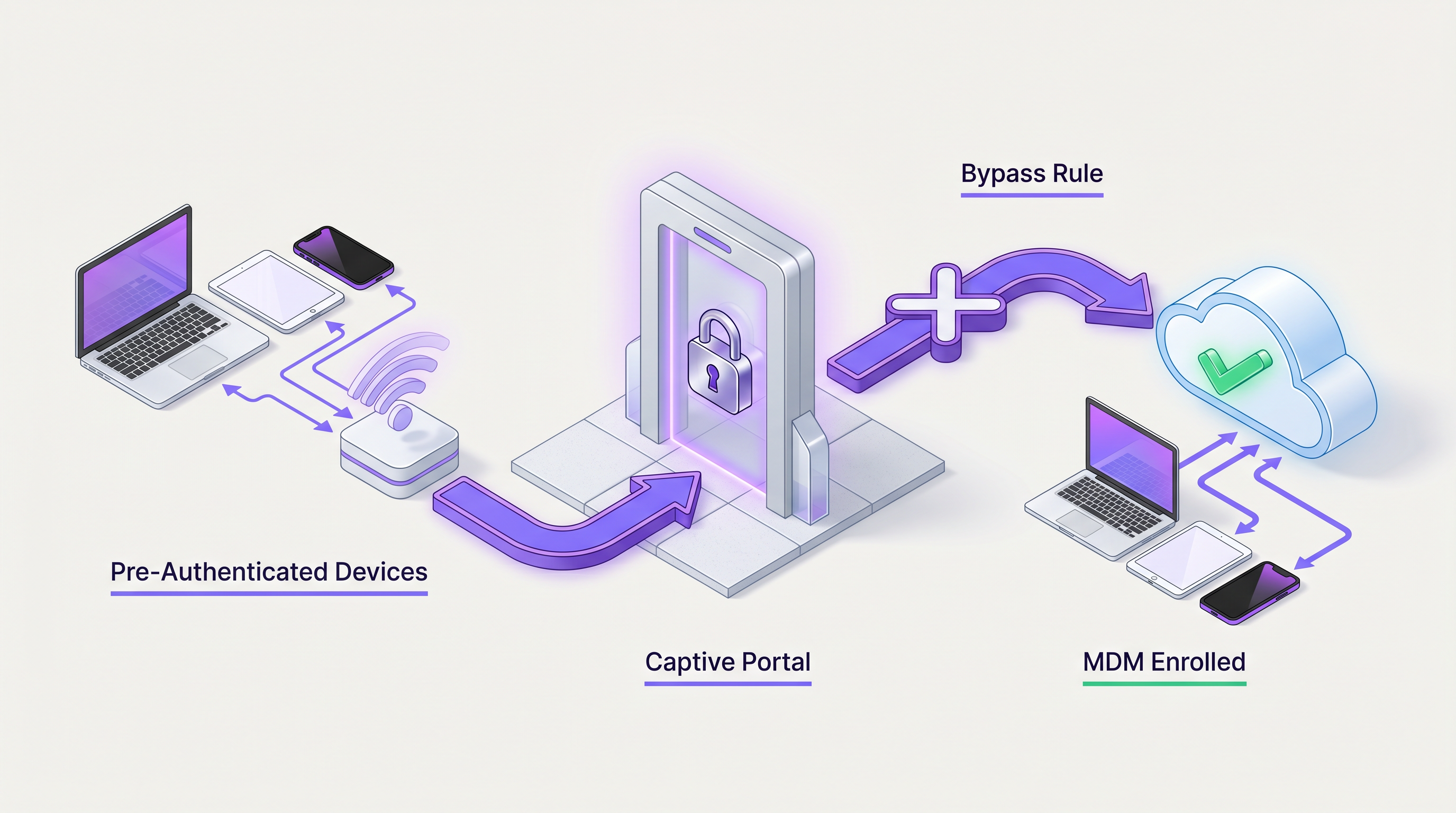
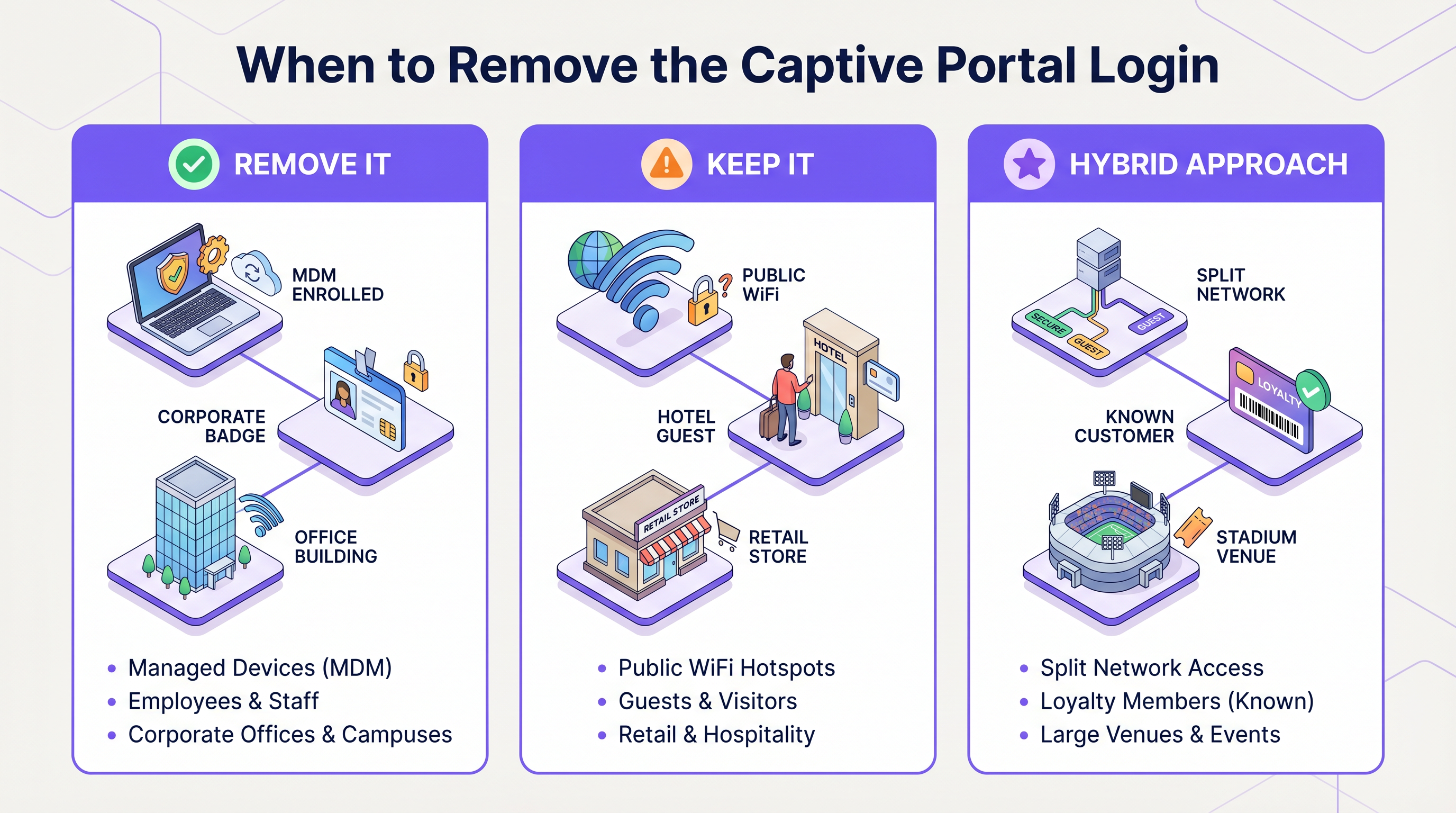
For enterprise IT leaders and venue operators, the captive portal login has long been a necessary evil. It provides a crucial checkpoint for terms of service acceptance, legal compliance, and first-party data collection. However, in environments prioritizing seamless connectivity—such as corporate campuses, VIP hospitality zones, and large-scale public venues—forcing users through a web-based authentication flow can introduce unacceptable latency and user frustration.
This guide details the technical mechanisms for bypassing or entirely removing captive portals for specific user cohorts. By leveraging MAC Authentication Bypass (MAB), IEEE 802.1X, Mobile Device Management (MDM) integration, and seamless authentication frameworks like OpenRoaming, network architects can design a hybrid access model. This approach ensures that known devices, corporate endpoints, and loyal customers connect instantly, while unknown guests are still routed through a Guest WiFi portal for initial onboarding and data capture. We will explore the deployment architectures, security implications, and how Purple's identity provider capabilities facilitate these advanced access strategies.
Technical Deep-Dive
Removing a captive portal login requires shifting the authentication mechanism from Layer 7 (Application/Web) down to Layer 2 (Data Link) or leveraging seamless identity federation. The architecture must dynamically differentiate between devices that require a portal and those that should bypass it.
1. MAC Authentication Bypass (MAB)
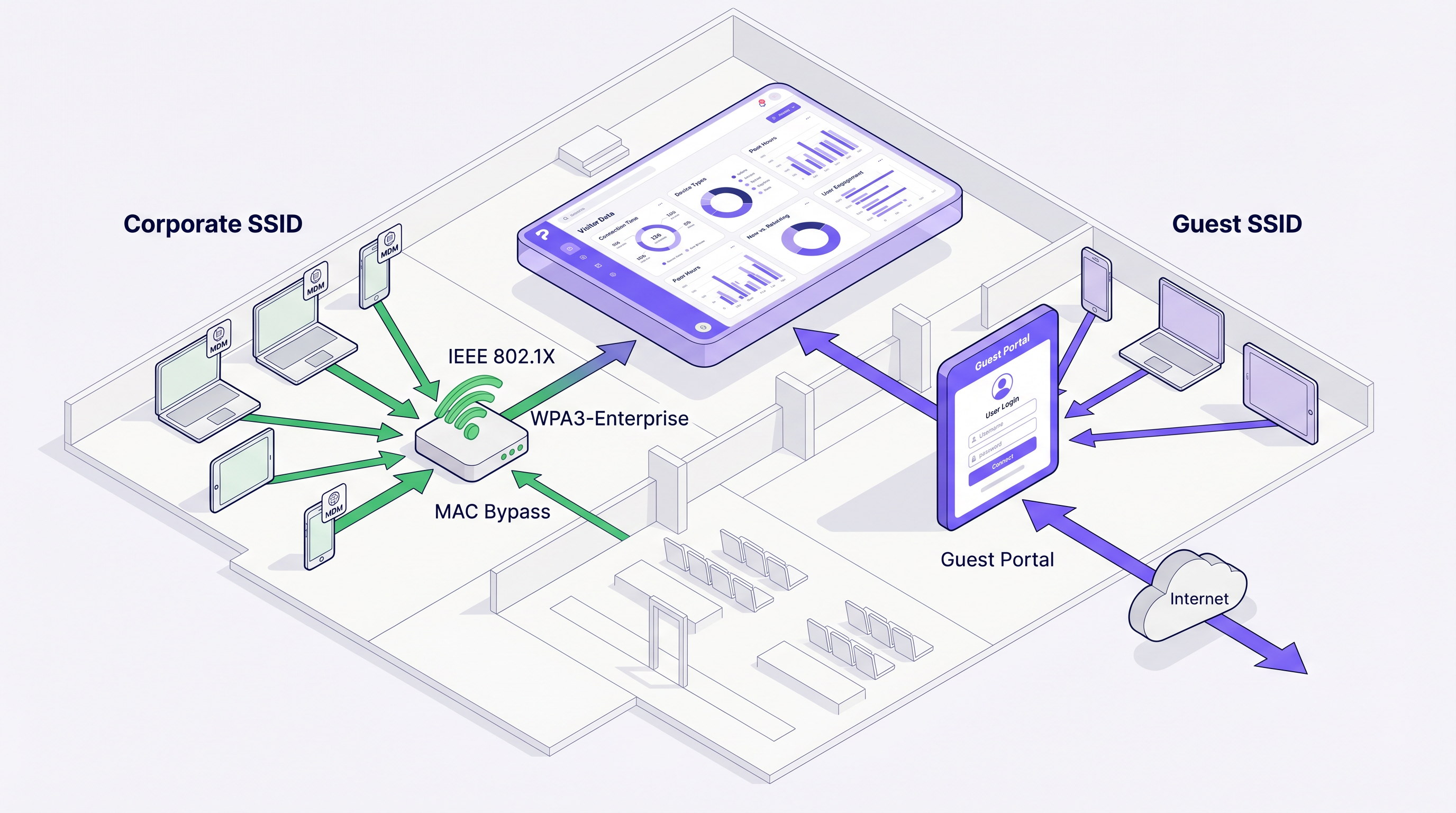
MAB allows a network access control (NAC) system or RADIUS server to authenticate devices based on their MAC address. When a device associates with the access point, the controller sends a RADIUS Access-Request containing the MAC address. If the address exists in the authorized database (such as Purple's known visitor database), the RADIUS server returns an Access-Accept, and the controller places the device on the network without redirecting HTTP/HTTPS traffic to a captive portal.
Architecture Flow:
- Device Association
- Controller intercepts and sends MAC to RADIUS
- RADIUS checks endpoint database
- Access-Accept returned with optional Vendor-Specific Attributes (VSAs) for VLAN assignment or bandwidth throttling.
Note on MAC Randomization: Modern mobile operating systems (iOS 14+, Android 10+) utilize randomized MAC addresses by default. For MAB to function reliably for returning guests, the venue must encourage users to disable private addressing for that specific SSID, or the system must rely on profile-based authentication (like Passpoint/Hotspot 2.0).
2. IEEE 802.1X and WPA3-Enterprise
For corporate devices or staff networks, 802.1X provides robust port-based network access control. Devices authenticate using EAP (Extensible Authentication Protocol), typically EAP-TLS (certificate-based) or PEAP (credential-based).
When devices are enrolled via MDM, certificates can be pushed automatically. These devices connect to a secure SSID and bypass any portal infrastructure entirely. This is the standard for corporate office deployments and back-of-house operations in Retail and Hospitality .
3. Passpoint (Hotspot 2.0) and OpenRoaming
Passpoint enables cellular-like roaming for WiFi. Devices with installed profiles (credentials or certificates) automatically authenticate to Passpoint-enabled networks without user intervention. OpenRoaming, an initiative by the Wireless Broadband Alliance (WBA), federates identity providers and network providers.
Purple acts as a free identity provider for OpenRoaming under the Connect license. When a user authenticates once via a Purple portal and downloads the OpenRoaming profile, their device will automatically connect to any OpenRoaming-enabled network globally, bypassing captive portals entirely while still allowing the venue to log the session via RADIUS accounting.
Implementation Guide
Deploying a hybrid portal/bypass architecture requires coordination between the WLAN controller, the RADIUS server, and the identity management platform.
Step 1: Define User Cohorts
Identify which groups require bypass:
- Corporate/Staff Devices: Route to an 802.1X SSID.
- IoT/Headless Devices: Use MAB on a dedicated hidden SSID or dynamic VLAN assignment.
- Loyalty Members/VIPs: Utilize MAC caching (MAB) on the guest SSID or deploy Passpoint profiles.
- Standard Guests: Route through the standard captive portal.
Step 2: Configure MAC Caching (Returning Visitor Bypass)
To remove the captive portal login for returning guests:
- Configure the WLAN controller to use external RADIUS authentication (e.g., Purple's RADIUS servers).
- Enable MAC Authentication Bypass on the guest SSID.
- In the Purple WiFi Analytics dashboard, configure the "Seamless Login" or MAC caching duration (e.g., 30 days, 365 days).
- When a user authenticates via the portal, Purple stores their MAC address.
- On subsequent visits within the caching window, the controller performs MAB, Purple returns an Access-Accept, and the user connects instantly.
Step 3: Implement MDM Integration
For managed devices:
- Configure your MDM (Intune, Jamf, Workspace ONE) to deploy a WiFi profile containing the WPA3-Enterprise configuration and client certificate.
- Ensure the RADIUS server is configured to trust the issuing Certificate Authority (CA).
- Devices will connect silently without encountering the guest portal.
Best Practices
When designing your authentication architecture, adhere to these vendor-neutral best practices:
- Segment Traffic via Dynamic VLANs: Instead of broadcasting multiple SSIDs (which degrades airtime efficiency), broadcast a single SSID and use RADIUS VSAs to assign users to different VLANs (e.g., Guest VLAN, Staff VLAN, IoT VLAN) based on their authentication method. This is detailed further in WiFi Onboarding and Captive Portal Best Practices .
- Manage MAC Randomization: Educate VIPs or staff on how to disable MAC randomization for the venue's network if relying on MAB. Better yet, transition to Passpoint profiles for long-term loyalty users.
- Monitor RADIUS Latency: MAB adds latency to the association process. Ensure your RADIUS servers are geographically close or utilize cloud-edge nodes to keep authentication times under 500ms.
- Enforce Session Limits: Even when bypassing the portal, use RADIUS Session-Timeout attributes to force re-authentication periodically, ensuring compliance and accurate analytics tracking.
Troubleshooting & Risk Mitigation
Removing the portal introduces specific failure modes. Network administrators must monitor for the following:
1. MAB Failures due to MAC Randomization Symptom: Returning users who should bypass the portal are forced to log in again. Cause: The device generated a new randomized MAC address for the network. Mitigation: Shift to profile-based authentication (Passpoint) or implement a captive portal message explaining how to disable private addressing for improved experience.
2. RADIUS Timeout Issues Symptom: Devices fail to connect entirely or experience long delays before the portal appears. Cause: The controller is waiting for a MAB response from an unreachable RADIUS server before falling back to the portal redirect. Mitigation: Configure aggressive RADIUS timeout and retry settings on the controller (e.g., 2 seconds, 2 retries) and ensure fallback mechanisms are in place.
3. Stale Session Data Symptom: Analytics show users connected for days at a time. Cause: Bypassing the portal means users don't trigger explicit login events, and if accounting updates fail, sessions appear infinite. Mitigation: Enable Interim-Update accounting on the controller and enforce strict idle timeouts.
ROI & Business Impact
The decision to remove a captive portal login must balance user experience against data acquisition goals.
For environments like Transport hubs, reducing connection friction directly improves customer satisfaction scores (CSAT). By implementing OpenRoaming or MAC caching, venues can see a 40-60% reduction in support tickets related to WiFi connectivity.
Furthermore, integrating bypass mechanisms with The Core SD WAN Benefits for Modern Businesses ensures that traffic from authenticated corporate devices is prioritized and routed securely, while guest traffic is segregated and bandwidth-limited, optimizing the overall network ROI.
By leveraging Purple's robust identity management and analytics, organizations can maintain granular visibility into visitor behavior even when the captive portal login is removed, ensuring marketing teams still receive the data they need while IT delivers a frictionless network experience.
Key Terms & Definitions
Captive Portal
A web page that a user of a public access network is obliged to view and interact with before access is granted.
The primary mechanism for guest onboarding, data capture, and terms acceptance.
MAC Authentication Bypass (MAB)
A process where a network device uses the client's MAC address as the username and password for RADIUS authentication.
Used to allow headless devices or returning visitors to connect without interacting with a portal.
IEEE 802.1X
An IEEE Standard for port-based Network Access Control, providing an authentication mechanism to devices wishing to attach to a LAN or WLAN.
The standard for secure, portal-less access for corporate and MDM-enrolled devices.
OpenRoaming
A roaming federation service enabling automatic and secure WiFi connections across different networks without captive portals.
Provides cellular-like roaming for WiFi users, with Purple acting as a free identity provider.
Passpoint (Hotspot 2.0)
A Wi-Fi Alliance specification that streamlines network access and roaming, allowing devices to automatically discover and connect to networks.
The underlying technology that enables OpenRoaming and secure profile-based authentication.
RADIUS
Remote Authentication Dial-In User Service, a networking protocol that provides centralized Authentication, Authorization, and Accounting (AAA).
The core protocol used by the WLAN controller to communicate with Purple's identity platform for MAB and accounting.
VSA (Vendor-Specific Attribute)
Custom attributes in a RADIUS message used to pass vendor-specific configuration data, such as VLAN IDs or bandwidth limits.
Used to dynamically assign users to specific network segments after authentication.
MAC Randomization
A privacy feature in modern OSs that generates a random MAC address for each WiFi network to prevent tracking.
A significant challenge for MAB-based portal bypass, requiring users to disable it for reliable recognition.
Case Studies
A 500-room luxury hotel wants VIP guests (loyalty tier members) to connect to the WiFi automatically without seeing the captive portal, while standard guests must accept terms and conditions.
The IT team implements a single SSID with MAC Authentication Bypass (MAB) pointing to Purple's RADIUS. When a standard guest connects, MAB fails (MAC not in VIP database), and they are routed to the portal. When they log in, the PMS integration checks their loyalty status. If they are a VIP, Purple updates their MAC address in the authorized database. On their next visit, the controller performs MAB, Purple returns Access-Accept, and the VIP connects instantly without a portal.
A retail chain needs to deploy 1,000 barcode scanners across 50 stores. The scanners lack web browsers and cannot navigate a captive portal.
The network architect deploys WPA3-Enterprise (802.1X) for the scanners. The MDM platform pushes a unique client certificate to each scanner. The scanners connect to a hidden 'Ops' SSID, authenticate via EAP-TLS against the corporate RADIUS server, and bypass the portal infrastructure entirely.
Scenario Analysis
Q1. A large conference center wants to provide seamless WiFi access to attendees who downloaded the event app, bypassing the standard captive portal. What is the most robust technical approach?
💡 Hint:Consider the impact of MAC randomization on temporary event attendees.
Show Recommended Approach
Integrate a Passpoint (Hotspot 2.0) profile into the event app. When attendees download the app, the profile is installed on their device. When they arrive at the venue, their device automatically authenticates securely via 802.1X using the profile credentials, completely bypassing the captive portal. This avoids the unreliability of MAC Authentication Bypass (MAB) caused by MAC randomization on modern smartphones.
Q2. You are deploying a new WLAN for a corporate campus. Employees complain about having to log into a captive portal every morning. How do you resolve this while maintaining security?
💡 Hint:Employees use corporate-managed laptops and smartphones.
Show Recommended Approach
Migrate corporate devices from the portal-based SSID to an 802.1X (WPA3-Enterprise) SSID. Use the company's Mobile Device Management (MDM) solution to push unique client certificates to all managed devices. Configure the RADIUS server to authenticate these certificates (EAP-TLS). Devices will connect silently and securely without user interaction.
Q3. A stadium wants to use MAC caching to allow season ticket holders to bypass the portal on subsequent visits. What communication strategy must accompany this technical deployment?
💡 Hint:Why might MAC caching fail for iOS and Android users?
Show Recommended Approach
The stadium must implement a communication campaign (e.g., on the initial captive portal success page or via email) instructing season ticket holders to disable 'Private Wi-Fi Address' (MAC randomization) specifically for the stadium's SSID. If users do not disable this feature, their device will generate a new MAC address on future visits, defeating the MAC caching mechanism and forcing them back to the portal.




