

So entfernen Sie einen Captive Portal Login (und wann Sie es sollten)
Dieser maßgebliche Leitfaden untersucht die technische Architektur, Anwendungsfälle und Implementierungsstrategien zum Entfernen oder Umgehen von Captive Portal Logins. Er wurde für erfahrene IT-Profis entwickelt und bietet umsetzbare Einblicke, wann MAC Authentication Bypass, 802.1X und OpenRoaming eingesetzt werden sollten, um den Zugang zu optimieren und gleichzeitig Sicherheit und Datenerfassung zu gewährleisten.
🎧 Diesen Leitfaden anhören
Transkript anzeigen
Zusammenfassung für Führungskräfte
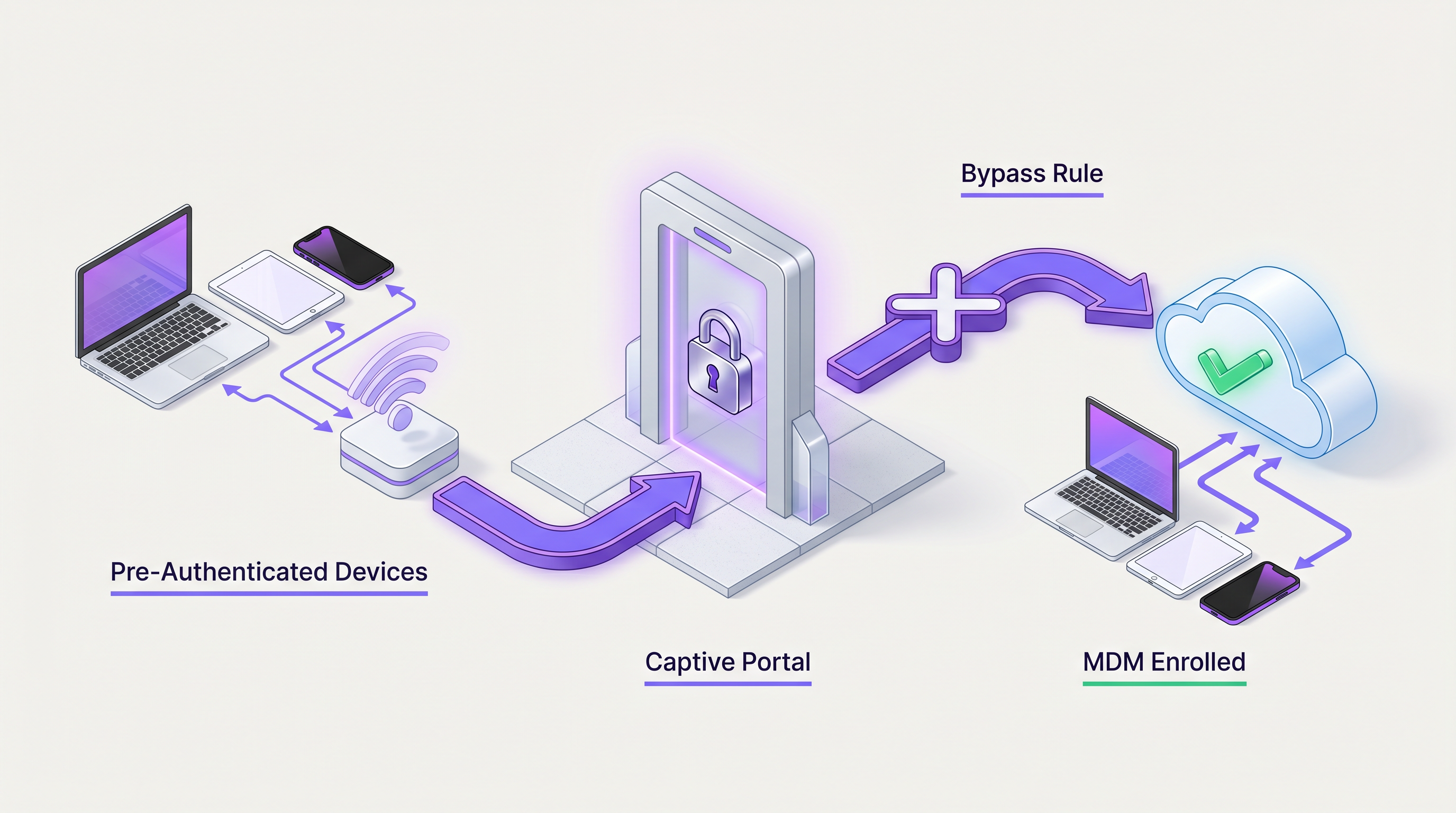
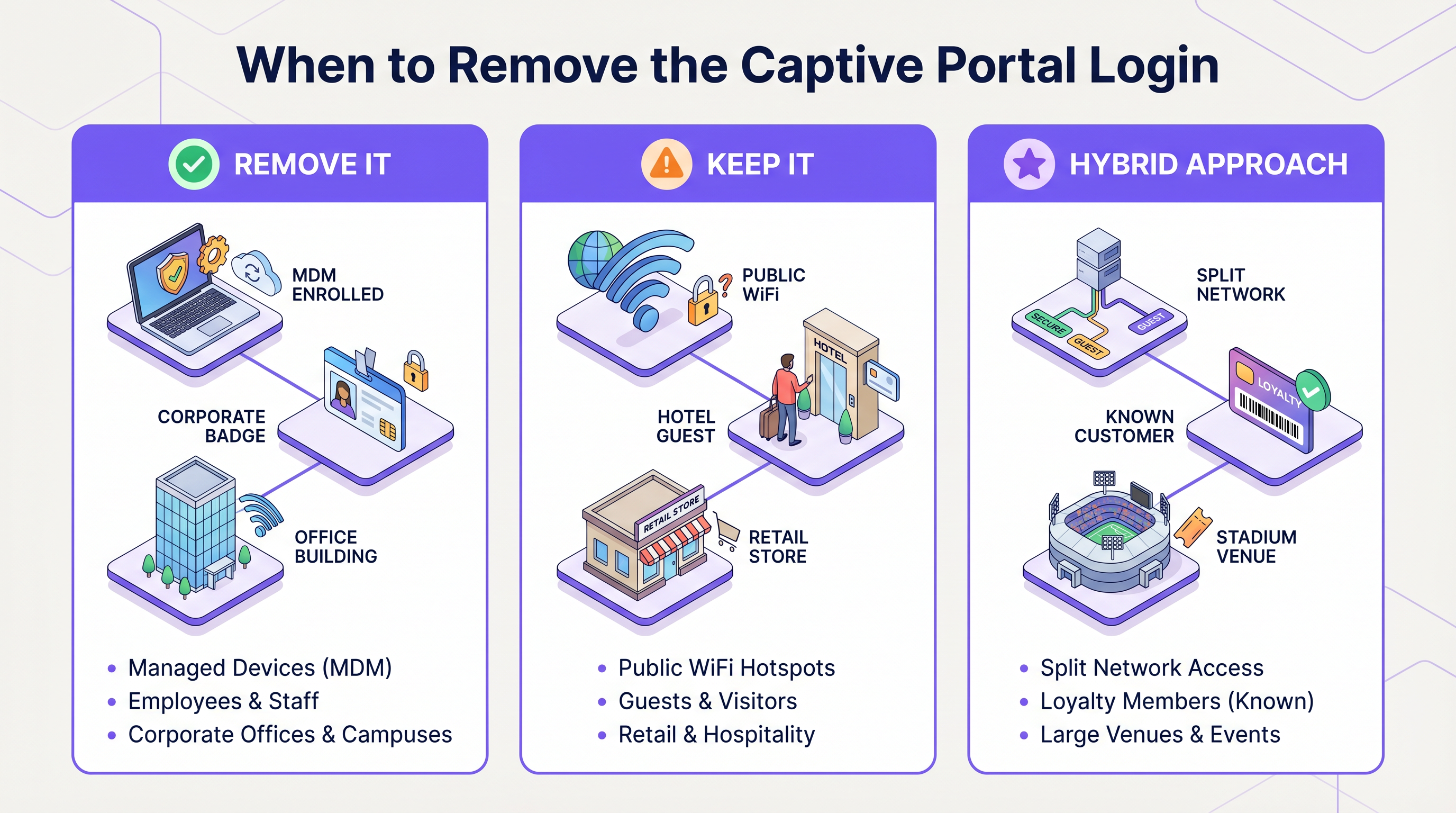
Für IT-Führungskräfte in Unternehmen und Betreiber von Veranstaltungsorten war der Captive Portal Login lange Zeit ein notwendiges Übel. Er bietet einen entscheidenden Kontrollpunkt für die Akzeptanz von Nutzungsbedingungen, die Einhaltung gesetzlicher Vorschriften und die Erfassung von Erstanbieterdaten. In Umgebungen, die nahtlose Konnektivität priorisieren – wie Unternehmenscampusse, VIP-Hospitality-Zonen und große öffentliche Veranstaltungsorte – kann die Erzwingung eines webbasierten Authentifizierungsflusses jedoch zu inakzeptabler Latenz und Benutzerfrustration führen.
Dieser Leitfaden beschreibt die technischen Mechanismen zum Umgehen oder vollständigen Entfernen von Captive Portals für bestimmte Benutzergruppen. Durch die Nutzung von MAC Authentication Bypass (MAB), IEEE 802.1X, Mobile Device Management (MDM)-Integration und nahtlosen Authentifizierungsframeworks wie OpenRoaming können Netzwerkarchitekten ein hybrides Zugangsmodell entwerfen. Dieser Ansatz stellt sicher, dass bekannte Geräte, Unternehmens-Endpunkte und treue Kunden sofort eine Verbindung herstellen, während unbekannte Gäste weiterhin über ein Guest WiFi -Portal für die erste Registrierung und Datenerfassung geleitet werden. Wir werden die Bereitstellungsarchitekturen, Sicherheitsimplikationen und wie Purples Identitätsanbieter-Funktionen diese fortschrittlichen Zugangsstrategien erleichtern, untersuchen.
Technischer Einblick
Das Entfernen eines Captive Portal Logins erfordert eine Verlagerung des Authentifizierungsmechanismus von Layer 7 (Anwendung/Web) auf Layer 2 (Data Link) oder die Nutzung einer nahtlosen Identitätsföderation. Die Architektur muss dynamisch zwischen Geräten unterscheiden, die ein Portal benötigen, und solchen, die es umgehen sollten.
1. MAC Authentication Bypass (MAB)
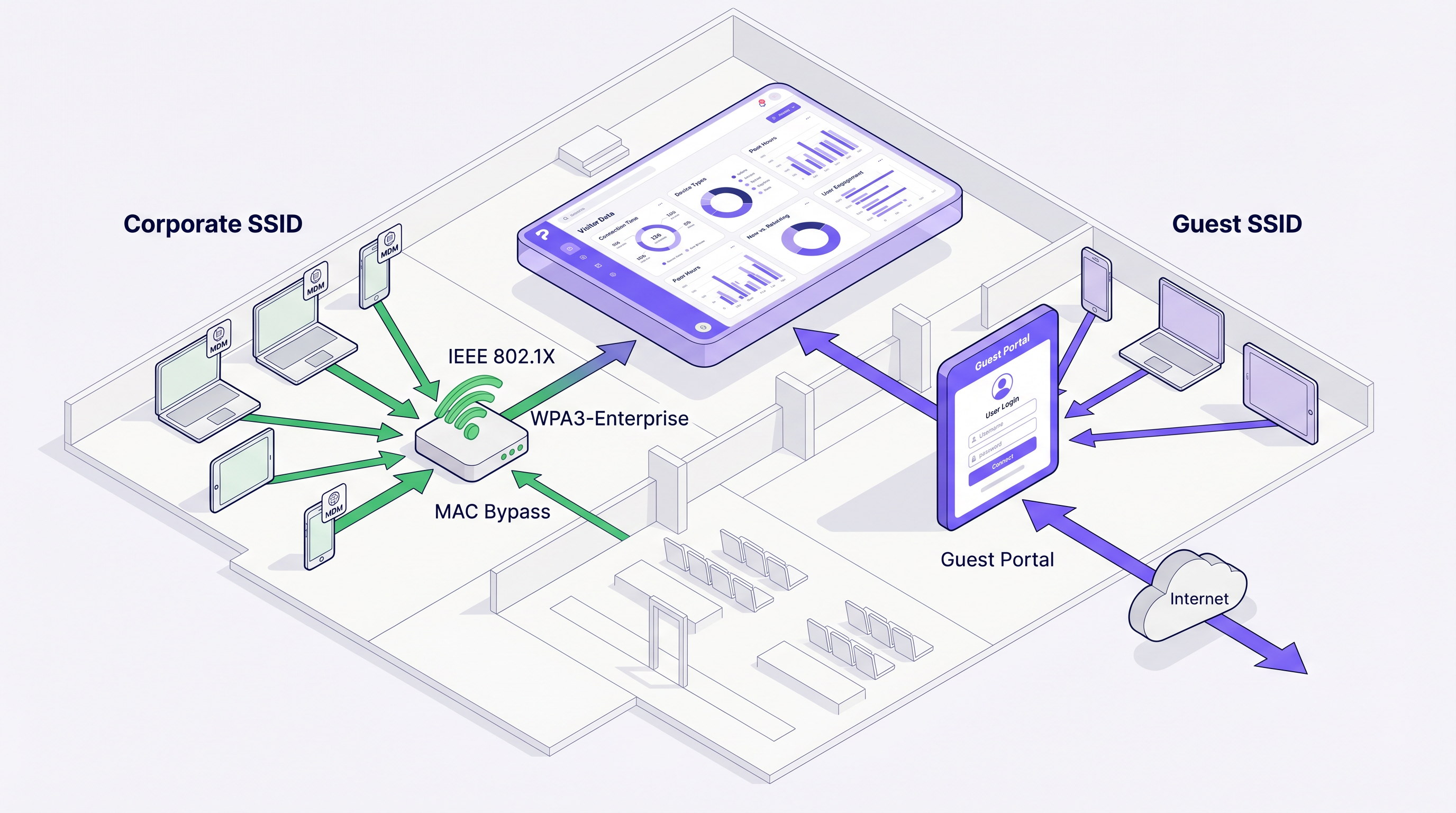
MAB ermöglicht es einem Network Access Control (NAC)-System oder RADIUS-Server, Geräte basierend auf ihrer MAC address zu authentifizieren. Wenn sich ein Gerät mit dem Access Point verbindet, sendet der Controller eine RADIUS Access-Request, die die MAC address enthält. Wenn die Adresse in der autorisierten Datenbank (wie Purples Datenbank bekannter Besucher) existiert, gibt der RADIUS-Server einen Access-Accept zurück, und der Controller platziert das Gerät im Netzwerk, ohne den HTTP/HTTPS-Verkehr zu einem Captive Portal umzuleiten.
Architekturfluss:
- Geräteverbindung
- Controller fängt MAC ab und sendet sie an RADIUS
- RADIUS prüft die Endpunkt-Datenbank
- Access-Accept wird mit optionalen Vendor-Specific Attributes (VSAs) für VLAN-Zuweisung oder Bandbreitenbegrenzung zurückgegeben.
Hinweis zur MAC Randomization: Moderne mobile Betriebssysteme (iOS 14+, Android 10+) verwenden standardmäßig randomisierte MAC addresses. Damit MAB für wiederkehrende Gäste zuverlässig funktioniert, muss der Veranstaltungsort Benutzer dazu ermutigen, die private Adressierung für die spezifische SSID zu deaktivieren, oder das System muss sich auf profilbasierte Authentifizierung (wie Passpoint/Hotspot 2.0) verlassen.
2. IEEE 802.1X und WPA3-Enterprise
Für Unternehmensgeräte oder Mitarbeiternetzwerke bietet 802.1X eine robuste portbasierte Netzwerkzugangskontrolle. Geräte authentifizieren sich mithilfe von EAP (Extensible Authentication Protocol), typischerweise EAP-TLS (zertifikatbasiert) oder PEAP (anmeldeinformationenbasiert).
Wenn Geräte über MDM registriert werden, können Zertifikate automatisch übertragen werden. Diese Geräte verbinden sich mit einer sicheren SSID und umgehen die gesamte Portal-Infrastruktur. Dies ist der Standard für Unternehmensbüro-Bereitstellungen und Back-of-House-Operationen im Retail und Hospitality .
3. Passpoint (Hotspot 2.0) und OpenRoaming
Passpoint ermöglicht zelluläres Roaming für WiFi. Geräte mit installierten Profilen (Anmeldeinformationen oder Zertifikate) authentifizieren sich automatisch und ohne Benutzerinteraktion bei Passpoint-fähigen Netzwerken. OpenRoaming, eine Initiative der Wireless Broadband Alliance (WBA), föderiert Identitätsanbieter und Netzwerkanbieter.
Purple fungiert als kostenloser Identitätsanbieter für OpenRoaming unter der Connect-Lizenz. Wenn sich ein Benutzer einmal über ein Purple Portal authentifiziert und das OpenRoaming-Profil herunterlädt, verbindet sich sein Gerät automatisch mit jedem OpenRoaming-fähigen Netzwerk weltweit, umgeht Captive Portals vollständig und ermöglicht es dem Veranstaltungsort dennoch, die Sitzung über RADIUS-Accounting zu protokollieren.
Implementierungsleitfaden
Die Bereitstellung einer hybriden Portal-/Bypass-Architektur erfordert die Koordination zwischen dem WLAN controller, dem RADIUS server und der identity management platform.
Schritt 1: Benutzerkohorten definieren
Identifizieren Sie, welche Gruppen einen Bypass benötigen:
- Unternehmens-/Mitarbeitergeräte: Weiterleitung an eine 802.1X SSID.
- IoT-/Headless-Geräte: Verwenden Sie MAB auf einer dedizierten versteckten SSID oder dynamische VLAN-Zuweisung.
- Treue Mitglieder/VIPs: Nutzen Sie MAC caching (MAB) auf der Gast-SSID oder stellen Sie Passpoint-Profile bereit.
- Standardgäste: Weiterleitung über das Standard-Captive Portal.
Schritt 2: MAC Caching konfigurieren (Bypass für wiederkehrende Besucher)
So entfernen Sie den Captive Portal Login für wiederkehrende Gäste:
- Konfigurieren Sie den WLAN controller so, dass er externe RADIUS authentication verwendet (z. B. Purples RADIUS servers).
- Aktivieren Sie MAC Authentication Bypass auf der Gast-SSID.
- Im Purple WiFi Analytics -Dashboard konfigurieren Sie die Dauer für „Seamless Login“ oder MAC caching (z. B. 30 Tage, 365 Tage).
- Wenn sich ein Benutzer über das Portal authentifiziert, speichert Purple seine MAC address.
- Bei nachfolgenden Besuchen innerhalb des Caching-Fensters führt der Controller MAB durch, Purple gibt einen Access-Accept zurück, und der Benutzer verbindet sich sofort.
Schritt 3: MDM Integration implementieren
Für verwaltete Geräte:
- Konfigurieren Sie Ihr MDM (Intune, Jamf, Workspace ONE), um ein WiFi-Profil bereitzustellen, das die WPA3-Enterprise-Konfiguration und clClient-Zertifikat.
- Stellen Sie sicher, dass der RADIUS-Server so konfiguriert ist, dass er der ausstellenden Zertifizierungsstelle (CA) vertraut.
- Geräte verbinden sich stillschweigend, ohne auf das Gastportal zu stoßen.
Best Practices
Beachten Sie beim Entwurf Ihrer Authentifizierungsarchitektur diese herstellerneutralen Best Practices:
- Segmentieren Sie den Datenverkehr über dynamische VLANs: Anstatt mehrere SSIDs zu senden (was die Effizienz der Sendezeit beeinträchtigt), senden Sie eine einzige SSID und verwenden Sie RADIUS VSAs, um Benutzer basierend auf ihrer Authentifizierungsmethode verschiedenen VLANs (z. B. Gast-VLAN, Mitarbeiter-VLAN, IoT-VLAN) zuzuweisen. Dies wird ausführlicher in WiFi Onboarding and Captive Portal Best Practices beschrieben.
- MAC-Randomisierung verwalten: Informieren Sie VIPs oder Mitarbeiter darüber, wie die MAC-Randomisierung für das Netzwerk des Veranstaltungsortes deaktiviert werden kann, wenn Sie sich auf MAB verlassen. Besser noch, wechseln Sie zu Passpoint-Profilen für langfristige Stammkunden.
- RADIUS-Latenz überwachen: MAB fügt dem Assoziierungsprozess Latenz hinzu. Stellen Sie sicher, dass Ihre RADIUS-Server geografisch nah sind oder nutzen Sie Cloud-Edge-Knoten, um die Authentifizierungszeiten unter 500 ms zu halten.
- Sitzungslimits durchsetzen: Auch wenn das Portal umgangen wird, verwenden Sie RADIUS Session-Timeout-Attribute, um eine regelmäßige erneute Authentifizierung zu erzwingen und so die Einhaltung und genaue Analyse-Verfolgung sicherzustellen.
Fehlerbehebung & Risikominderung
Das Entfernen des Portals führt zu spezifischen Fehlerursachen. Netzwerkadministratoren müssen Folgendes überwachen:
1. MAB-Fehler aufgrund von MAC-Randomisierung Symptom: Wiederkehrende Benutzer, die das Portal umgehen sollten, werden gezwungen, sich erneut anzumelden. Ursache: Das Gerät hat eine neue randomisierte MAC-Adresse für das Netzwerk generiert. Abhilfe: Wechseln Sie zu profilbasierter Authentifizierung (Passpoint) oder implementieren Sie eine Captive Portal-Nachricht, die erklärt, wie private Adressierung für eine verbesserte Erfahrung deaktiviert werden kann.
2. RADIUS-Timeout-Probleme Symptom: Geräte können sich überhaupt nicht verbinden oder es treten lange Verzögerungen auf, bevor das Portal erscheint. Ursache: Der Controller wartet auf eine MAB-Antwort von einem unerreichbaren RADIUS-Server, bevor er auf die Portal-Weiterleitung zurückgreift. Abhilfe: Konfigurieren Sie aggressive RADIUS-Timeout- und Wiederholungseinstellungen auf dem Controller (z. B. 2 Sekunden, 2 Wiederholungen) und stellen Sie sicher, dass Fallback-Mechanismen vorhanden sind.
3. Veraltete Sitzungsdaten Symptom: Analysen zeigen, dass Benutzer tagelang verbunden sind. Ursache: Das Umgehen des Portals bedeutet, dass Benutzer keine expliziten Anmeldeereignisse auslösen, und wenn Buchhaltungsaktualisierungen fehlschlagen, erscheinen Sitzungen unendlich. Abhilfe: Aktivieren Sie die Interim-Update-Buchhaltung auf dem Controller und erzwingen Sie strenge Leerlauf-Timeouts.
ROI & Geschäftsauswirkungen
Die Entscheidung, eine Captive Portal-Anmeldung zu entfernen, muss die Benutzererfahrung mit den Zielen der Datenerfassung in Einklang bringen.
Für Umgebungen wie Transport -Hubs verbessert die Reduzierung der Verbindungsreibung direkt die Kundenzufriedenheitswerte (CSAT). Durch die Implementierung von OpenRoaming oder MAC-Caching können Veranstaltungsorte eine Reduzierung der Support-Tickets im Zusammenhang mit WiFi-Konnektivität um 40-60 % feststellen.
Darüber hinaus stellt die Integration von Bypass-Mechanismen mit The Core SD WAN Benefits for Modern Businesses sicher, dass der Datenverkehr von authentifizierten Unternehmensgeräten priorisiert und sicher geleitet wird, während der Gastdatenverkehr getrennt und bandbreitenbegrenzt ist, wodurch der gesamte Netzwerk-ROI optimiert wird.
Durch die Nutzung von Purples robuster Identitätsverwaltung und Analysen können Organisationen auch nach dem Entfernen der Captive Portal-Anmeldung eine detaillierte Sichtbarkeit des Besucherverhaltens aufrechterhalten, wodurch sichergestellt wird, dass Marketingteams weiterhin die benötigten Daten erhalten, während die IT ein reibungsloses Netzwerkerlebnis bietet.
Schlüsselbegriffe & Definitionen
Captive Portal
A web page that a user of a public access network is obliged to view and interact with before access is granted.
The primary mechanism for guest onboarding, data capture, and terms acceptance.
MAC Authentication Bypass (MAB)
A process where a network device uses the client's MAC address as the username and password for RADIUS authentication.
Used to allow headless devices or returning visitors to connect without interacting with a portal.
IEEE 802.1X
An IEEE Standard for port-based Network Access Control, providing an authentication mechanism to devices wishing to attach to a LAN or WLAN.
The standard for secure, portal-less access for corporate and MDM-enrolled devices.
OpenRoaming
A roaming federation service enabling automatic and secure WiFi connections across different networks without captive portals.
Provides cellular-like roaming for WiFi users, with Purple acting as a free identity provider.
Passpoint (Hotspot 2.0)
A Wi-Fi Alliance specification that streamlines network access and roaming, allowing devices to automatically discover and connect to networks.
The underlying technology that enables OpenRoaming and secure profile-based authentication.
RADIUS
Remote Authentication Dial-In User Service, a networking protocol that provides centralized Authentication, Authorization, and Accounting (AAA).
The core protocol used by the WLAN controller to communicate with Purple's identity platform for MAB and accounting.
VSA (Vendor-Specific Attribute)
Custom attributes in a RADIUS message used to pass vendor-specific configuration data, such as VLAN IDs or bandwidth limits.
Used to dynamically assign users to specific network segments after authentication.
MAC Randomization
A privacy feature in modern OSs that generates a random MAC address for each WiFi network to prevent tracking.
A significant challenge for MAB-based portal bypass, requiring users to disable it for reliable recognition.
Fallstudien
A 500-room luxury hotel wants VIP guests (loyalty tier members) to connect to the WiFi automatically without seeing the captive portal, while standard guests must accept terms and conditions.
The IT team implements a single SSID with MAC Authentication Bypass (MAB) pointing to Purple's RADIUS. When a standard guest connects, MAB fails (MAC not in VIP database), and they are routed to the portal. When they log in, the PMS integration checks their loyalty status. If they are a VIP, Purple updates their MAC address in the authorized database. On their next visit, the controller performs MAB, Purple returns Access-Accept, and the VIP connects instantly without a portal.
A retail chain needs to deploy 1,000 barcode scanners across 50 stores. The scanners lack web browsers and cannot navigate a captive portal.
The network architect deploys WPA3-Enterprise (802.1X) for the scanners. The MDM platform pushes a unique client certificate to each scanner. The scanners connect to a hidden 'Ops' SSID, authenticate via EAP-TLS against the corporate RADIUS server, and bypass the portal infrastructure entirely.
Szenarioanalyse
Q1. A large conference center wants to provide seamless WiFi access to attendees who downloaded the event app, bypassing the standard captive portal. What is the most robust technical approach?
💡 Hinweis:Consider the impact of MAC randomization on temporary event attendees.
Empfohlenen Ansatz anzeigen
Integrate a Passpoint (Hotspot 2.0) profile into the event app. When attendees download the app, the profile is installed on their device. When they arrive at the venue, their device automatically authenticates securely via 802.1X using the profile credentials, completely bypassing the captive portal. This avoids the unreliability of MAC Authentication Bypass (MAB) caused by MAC randomization on modern smartphones.
Q2. You are deploying a new WLAN for a corporate campus. Employees complain about having to log into a captive portal every morning. How do you resolve this while maintaining security?
💡 Hinweis:Employees use corporate-managed laptops and smartphones.
Empfohlenen Ansatz anzeigen
Migrate corporate devices from the portal-based SSID to an 802.1X (WPA3-Enterprise) SSID. Use the company's Mobile Device Management (MDM) solution to push unique client certificates to all managed devices. Configure the RADIUS server to authenticate these certificates (EAP-TLS). Devices will connect silently and securely without user interaction.
Q3. A stadium wants to use MAC caching to allow season ticket holders to bypass the portal on subsequent visits. What communication strategy must accompany this technical deployment?
💡 Hinweis:Why might MAC caching fail for iOS and Android users?
Empfohlenen Ansatz anzeigen
The stadium must implement a communication campaign (e.g., on the initial captive portal success page or via email) instructing season ticket holders to disable 'Private Wi-Fi Address' (MAC randomization) specifically for the stadium's SSID. If users do not disable this feature, their device will generate a new MAC address on future visits, defeating the MAC caching mechanism and forcing them back to the portal.




