
NETGEAR Insight आणि Enterprise Access Points चे Purple WiFi सोबत एकत्रीकरण
हे मार्गदर्शक IT व्यवस्थापकांना NETGEAR Insight आणि WAX एंटरप्राइझ ॲक्सेस पॉइंट्सचे Purple WiFi सोबत एकत्रीकरण करण्यासाठी एक निश्चित तांत्रिक रोडमॅप प्रदान करते. यामध्ये Guest captive portals, 802.1X कर्मचारी नेटवर्क आणि PPSK व डायनॅमिक VLAN असाइनमेंट वापरून मल्टी-टेनंट सेगमेंटेशन यांसारख्या आवश्यक कॉन्फिगरेशन्सचा समावेश आहे.
हे मार्गदर्शक ऐका
पॉडकास्ट ट्रान्सक्रिप्ट पहा
Executive Summary
Relying on pre-shared keys for enterprise WiFi access is a significant security liability. A single compromised credential exposes the entire network, and revoking access requires changing the password for every device. This guide provides IT managers and network architects with a definitive roadmap for integrating NETGEAR Insight and WAX series enterprise access points with Purple.
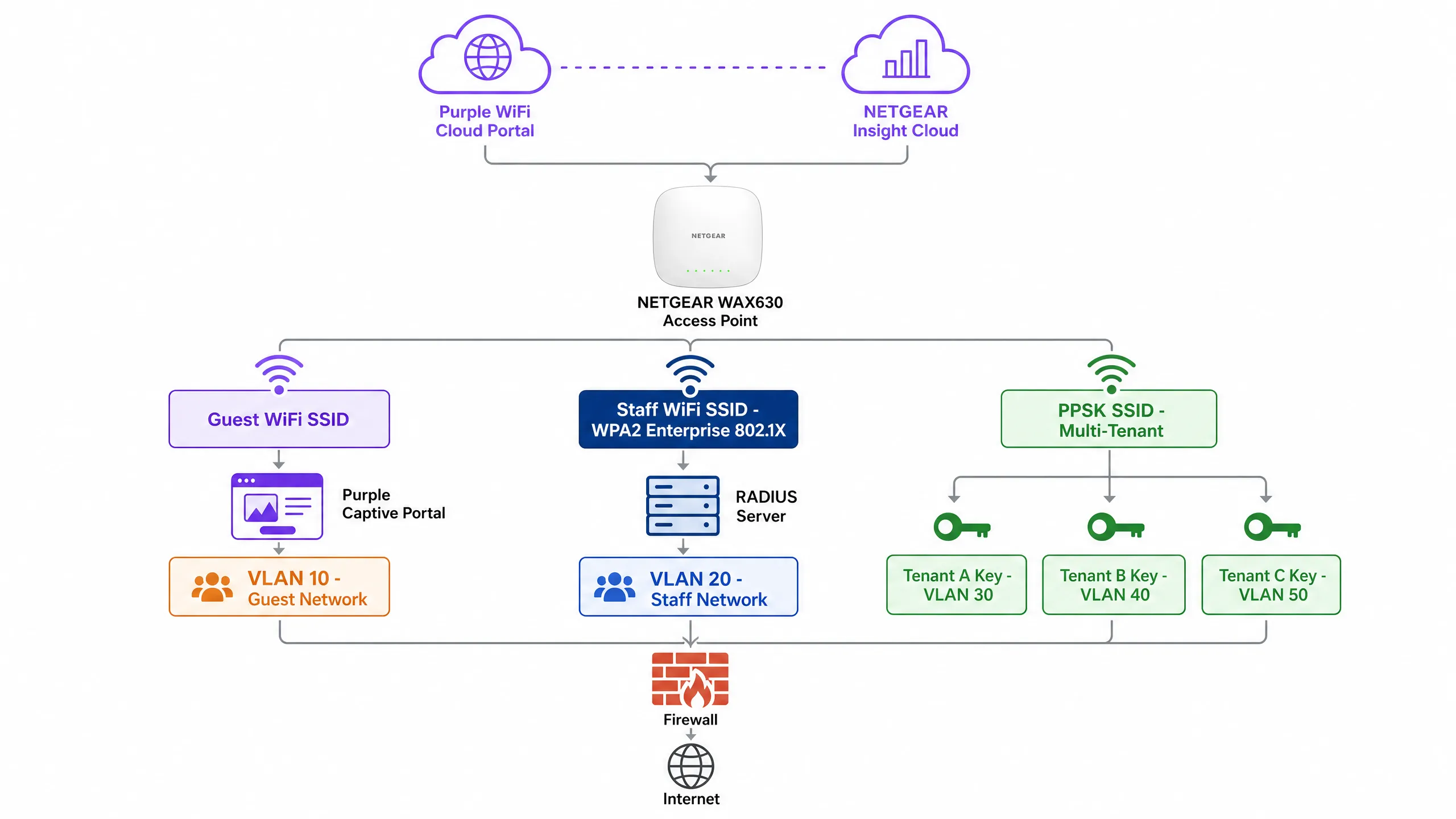
We detail four core deployment architectures: Guest WiFi with a captive portal, Secure Staff WiFi using 802.1X, Multi-Tenant segmentation via NETGEAR Private Pre-Shared Keys (PPSK), and Identity-Based Networks using dynamic VLAN assignment. Whether you operate Hospitality venues, Retail spaces, or public-sector environments, these configurations eliminate shared passwords, enforce strict network segmentation, and capture actionable WiFi Analytics .
Listen to our technical briefing podcast below for a comprehensive overview of the architecture and common deployment pitfalls.
Technical Deep-Dive
NETGEAR WAX series access points (WAX610, WAX620, WAX630) are cloud-managed WiFi 6 devices designed for high-density environments. Managed via the NETGEAR Insight portal, they support up to eight separate SSIDs per radio, WPA3 encryption, and multi-gigabit throughput. Purple acts as a hardware-agnostic cloud overlay, integrating with NETGEAR Insight to deliver enterprise-grade access control and data capture.
1. Guest WiFi with Captive Portal
For public-facing environments, you must deploy an External Captive Portal. This configuration intercepts guest HTTP requests and redirects them to a Purple-hosted splash page.
Architecture:
- Access Point: NETGEAR WAX access point broadcasts an open or WPA2 Personal Guest SSID.
- Walled Garden: NETGEAR Insight permits pre-authentication traffic to Purple's servers and social login providers.
- Authentication: Purple handles the user session via RADIUS or HTTP web authentication.
When a guest connects, they are presented with a branded portal. Upon accepting the terms and providing details, Purple's RADIUS server returns an Access-Accept message, granting internet access. This approach guarantees compliance with data privacy regulations like GDPR while capturing valuable first-party data.
2. Secure Staff WiFi (802.1X)
Pre-shared keys are unacceptable for staff networks. You must implement IEEE 802.1X authentication. In this model, every user has an individual credential. When an employee departs, you disable their directory account, and their access is revoked instantly.
In NETGEAR Insight, you configure a Staff SSID with WPA2 Enterprise or WPA3 Enterprise security. The access point acts as the authenticator, relaying Extensible Authentication Protocol (EAP) messages to the RADIUS server. The RADIUS server validates the credentials against your directory (e.g., Microsoft Entra ID or Okta) and returns the authorisation decision.
3. Multi-Tenant Segmentation (PPSK)
Mixed-use developments and retail parks face a specific challenge: multiple tenants sharing physical WiFi infrastructure. Deploying separate SSIDs for each tenant creates radio frequency congestion. Providing a single shared password compromises security.
NETGEAR Private Pre-Shared Key (PPSK) solves this. You broadcast a single SSID. In NETGEAR Insight, you generate unique passwords for each tenant. Crucially, each password maps to a specific VLAN.
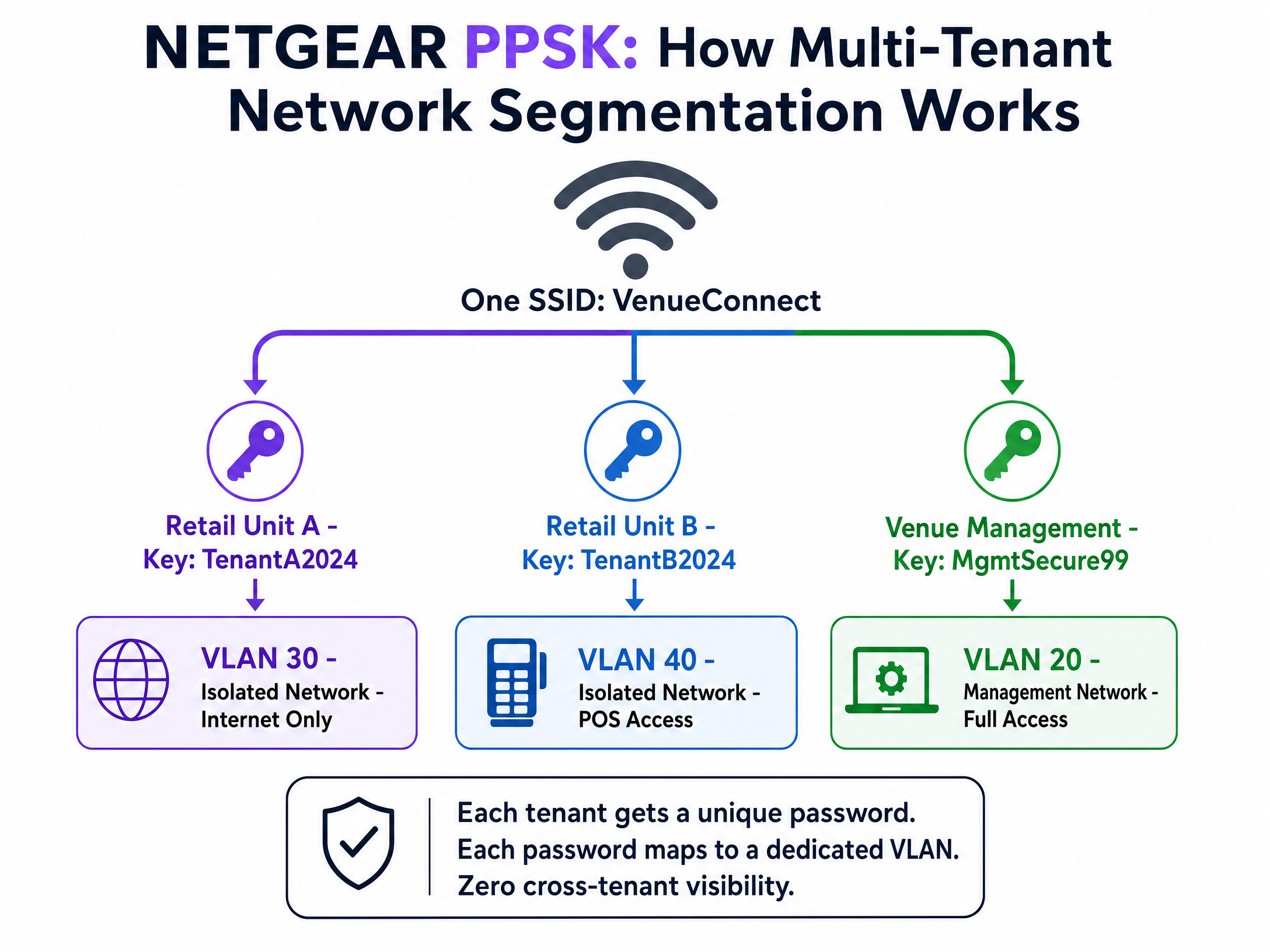
When a device connects using the retail unit's password, the access point places it on the isolated retail VLAN. When venue management connects using their password, they land on the management VLAN. You achieve complete traffic isolation with zero additional hardware. Note that PPSK requires WPA2 Personal and cannot be combined with a captive portal on the same SSID.
4. Dynamic VLAN Assignment via RADIUS
For sophisticated Identity-Based Networks, you must use dynamic VLAN assignment. Instead of statically assigning a VLAN to an SSID or a password, the RADIUS server dictates the VLAN based on the user's directory profile.
The RADIUS server returns three standard attributes in the Access-Accept message:
[64] Tunnel-Type = 13 (VLAN)[65] Tunnel-Medium-Type = 6 (802)[81] Tunnel-Private-Group-ID = [VLAN ID]
A single WPA2 Enterprise SSID can serve the entire organisation. A hotel manager authenticates and lands on VLAN 20. A front desk agent lands on VLAN 21. A contractor lands on VLAN 50. The network adapts to the identity of the user. For a broader look at securing your environment, review our Enterprise WiFi Security: A Complete Guide for 2026 .
Implementation Guide
Follow these steps to deploy NETGEAR Insight with Purple Guest WiFi .
Step 1: Configure the Guest SSID
- Log in to the NETGEAR Insight Cloud Portal.
- Select your network location and navigate to Wireless > Settings.
- Create a new SSID (e.g., "Venue Guest WiFi").
- Select Captive Portal and choose External Captive Portal.
Step 2: Configure the Captive Portal
- In the Splash Page URL field, enter the URL provided by Purple.
- Select the Radius radio button.
- Enter the Primary Authentication Server IP, port (1812), and shared secret provided by Purple.
- Enter the Primary Accounting Server IP, port (1813), and shared secret.
- Set a descriptive NAS-Identifier (e.g., "London-Retail-01").
Step 3: Configure the Walled Garden
This is the most critical step. If the walled garden is incorrect, guests will see a blank screen.
- Scroll to the Walled Garden section in the Captive Portal settings.
- Add every domain provided in Purple's integration documentation. This includes Purple's CDN domains, authentication servers, and any enabled social login providers (e.g., Facebook, Google).
- Click Save.
Step 4: Verify RADIUS Reachability
Ensure your firewall permits UDP ports 1812 and 1813 outbound from the access point management IP addresses to the Purple RADIUS servers.
Best Practices
- Enforce Certificate Validation: For 802.1X deployments, you must enforce strict certificate validation on all client devices via Group Policy Objects (GPO) or Mobile Device Management (MDM). If clients do not validate the RADIUS server certificate, they are vulnerable to rogue access point attacks.
- Isolate Management Traffic: Always place access point management IP addresses on a dedicated management VLAN, isolated from guest and staff traffic.
- Enable Failsafe: In the NETGEAR Insight Captive Portal settings, enable the FailSafe option. If the RADIUS servers become unreachable, guests are granted temporary internet access, preventing a total WiFi outage.
- Separate SSIDs for PPSK: Because NETGEAR Insight does not support PPSK and Captive Portal on the same SSID, you must create dedicated SSIDs (e.g., "Venue-Guest" and "Venue-Tenant").
Troubleshooting & Risk Mitigation
Symptom: Guests connect to the SSID but the splash page does not load.
- Cause: Incomplete Walled Garden configuration.
- Resolution: Verify that all Purple domains and social login domains are entered correctly in the NETGEAR Insight Walled Garden settings. Test with a device that has no cached credentials.
Symptom: Staff devices fail to authenticate via 802.1X.
- Cause: RADIUS timeout or incorrect shared secret.
- Resolution: Verify that UDP ports 1812 and 1813 are open outbound. Confirm the shared secret matches exactly between the NETGEAR Insight portal and the RADIUS server. Check the RADIUS server logs for
Access-Rejectmessages.
Symptom: PPSK clients are placed on the wrong VLAN.
- Cause: Incorrect VLAN mapping or missing VLAN configuration on the switch.
- Resolution: Ensure the VLAN is created in NETGEAR Insight under Wired settings. Verify the Multi PSK Settings map the correct password to the correct VLAN ID. Ensure the switch port connecting the access point is configured as a trunk port allowing the target VLAN.
ROI & Business Impact
Deploying NETGEAR Insight with Purple transforms your wireless infrastructure from a cost centre into a revenue-generating asset. By implementing Identity-Based Networks and captive portals, you achieve:
- Reduced IT Overhead: PPSK and 802.1X eliminate the need to manually manage shared passwords or dispatch engineers for routine access changes.
- Actionable Analytics: Capture demographic data, dwell times, and return rates to optimise venue operations and tenant mix.
- Marketing ROI: Build a high-intent, GDPR-compliant CRM database. Venues typically see a significant reduction in customer acquisition costs when leveraging first-party data collected via WiFi.
- Enhanced Security: Dynamic VLAN assignment isolates IoT devices, point-of-sale systems, and guest traffic, significantly reducing the attack surface and ensuring PCI DSS compliance.
महत्वाच्या व्याख्या
802.1X
पोर्ट-आधारित नेटवर्क ॲक्सेस कंट्रोलसाठी एक IEEE मानक जे LAN किंवा WLAN ला कनेक्ट करू इच्छिणाऱ्या उपकरणांना ऑथेंटिकेशन यंत्रणा प्रदान करते.
एंटरप्राइझ सुरक्षेसाठी आवश्यक; सामायिक पासवर्डच्या जागी वैयक्तिक वापरकर्ता क्रेडेंशियल्स आणते.
Captive Portal
एक वेब पेज जे सार्वजनिक ॲक्सेस नेटवर्कच्या वापरकर्त्याला ॲक्सेस मिळण्यापूर्वी पाहणे आणि त्यावर प्रक्रिया करणे बंधनकारक असते.
फर्स्ट-पार्टी डेटा कॅप्चर करण्यासाठी आणि सेवा अटींच्या मंजुरीची खात्री करण्यासाठी Purple द्वारे वापरले जाते.
PPSK (Private Pre-Shared Key)
एकाच SSID वर एकाधिक युनिक पासवर्ड वापरण्याची परवानगी देणारे वैशिष्ट्य, जिथे प्रत्येक पासवर्ड वापरकर्त्याला विशिष्ट VLAN वर नियुक्त करतो.
मल्टी-टेनंट इमारतींसाठी किंवा एकाधिक SSIDs तयार न करता IoT उपकरणांना वेगळे करण्यासाठी आदर्श.
RADIUS
रिमोट ऑथेंटिकेशन डायल-इन युझर सर्व्हिस (Remote Authentication Dial-In User Service); एक नेटवर्किंग प्रोटोकॉल जो केंद्रीकृत ऑथेंटिकेशन, ऑथरायझेशन आणि अकाउंटिंग (AAA) व्यवस्थापन प्रदान करतो.
मुख्य सर्व्हर जो क्रेडेंशियल्सची पडताळणी करतो आणि NETGEAR AP ला ॲक्सेस द्यायचा की नाही हे सांगतो.
Walled Garden
एक मर्यादित वातावरण जे पूर्ण ऑथेंटिकेशन होण्यापूर्वी वापरकर्त्याच्या वेब सामग्री आणि सेवांच्या ॲक्सेसवर नियंत्रण ठेवते.
उपकरणांना Purple स्प्लॅश पेज आणि सोशल लॉगिन प्रदात्यांपर्यंत पोहोचू देण्यासाठी NETGEAR Insight मध्ये कॉन्फिगर करणे आवश्यक आहे.
Dynamic VLAN Assignment
अशी प्रक्रिया जिथे RADIUS सर्व्हर ॲक्सेस पॉइंटला ऑथेंटिकेट केलेल्या वापरकर्त्याला त्याच्या ओळखीच्या आधारे विशिष्ट VLAN वर ठेवण्याची सूचना देतो.
आयडेंटिटी-बेस्ड नेटवर्क्स सक्षम करते, ज्यामुळे एकच SSID एकाधिक विभागांना सुरक्षितपणे सेवा देऊ शकतो.
NAS-Identifier
नेटवर्क ॲक्सेस सर्व्हर आयडेंटिफायर (Network Access Server Identifier); RADIUS ॲक्सेस विनंतीचा स्रोत ओळखण्यासाठी वापरली जाणारी स्ट्रिंग.
NETGEAR Insight मध्ये कॉन्फिगर केले जाते जेणेकरून वापरकर्ता कोणत्या ठिकाणाहून किंवा ॲक्सेस पॉइंटवरून कनेक्ट होत आहे हे Purple ला समजते.
EAP-TLS
एक्सटेन्सिबल ऑथेंटिकेशन प्रोटोकॉल - ट्रान्सपोर्ट लेयर सिक्युरिटी (Extensible Authentication Protocol - Transport Layer Security); क्लायंट आणि सर्व्हर दोन्हीवर डिजिटल सर्टिफिकेट्सची आवश्यकता असणारी ऑथेंटिकेशन पद्धत.
सर्वात सुरक्षित 802.1X पद्धत, जी पासवर्ड पूर्णपणे काढून टाकते, जरी सर्टिफिकेट्स तैनात करण्यासाठी MDM ची आवश्यकता असते.
सोडवलेली उदाहरणे
एका ४०-युनिटच्या रिटेल पार्कला प्रत्येक भाडेकरूच्या (tenant) पॉइंट-ऑफ-सेल सिस्टीमसाठी सुरक्षित, वेगळे WiFi आणि खरेदीदारांसाठी ब्रँडेड सार्वजनिक WiFi नेटवर्क प्रदान करायचे आहे. त्यांनी NETGEAR WAX630 ॲक्सेस पॉइंट्स तैनात केले आहेत. नेटवर्क कसे कॉन्फिगर केले जावे?
NETGEAR Insight मध्ये दोन SSIDs तयार करा. SSID 1: 'RetailPark-Guest'. हे Purple च्या स्प्लॅश पेजकडे निर्देशित करणाऱ्या External Captive Portal सह कॉन्फिगर करा, ज्यामध्ये RADIUS ऑथेंटिकेशन आणि सर्वसमावेशक वॉल्ड गार्डन (walled garden) असेल. हे VLAN 10 (केवळ इंटरनेट) वर मॅप करा. SSID 2: 'RetailPark-Tenants'. हे WPA2 Personal सह कॉन्फिगर करा आणि Multi PSK (PPSK) सक्षम करा. ४० युनिक पासवर्ड तयार करा. भाडेकरू A चा पासवर्ड VLAN 101 वर, भाडेकरू B चा VLAN 102 वर मॅप करा, इत्यादी. कोअर स्विच सर्व VLANs ला ॲक्सेस पॉइंट्सवर ट्रंक करत असल्याची खात्री करा.
एका कॉर्पोरेट मुख्यालयाला सामायिक केलेल्या WPA2 पासवर्डचा वापर बंद करायचा आहे. त्यांच्या कर्मचाऱ्यांनी त्यांच्या Microsoft Entra ID क्रेडेंशियल्ससह ऑथेंटिकेट करणे आवश्यक आहे आणि त्यांना फायनान्स टीम VLAN 50 वर आणि मार्केटिंग टीम VLAN 60 वर हवी आहे.
WPA2 Enterprise साठी कॉन्फिगर केलेले एकच 'Corporate-Secure' SSID तैनात करा. NETGEAR Insight RADIUS सेटिंग्ज Entra ID सह एकत्रित केलेल्या RADIUS सर्व्हरकडे निर्देशित करा. वापरकर्त्याच्या डिरेक्टरी ग्रुप मेंबरशिपच्या आधारे मानक टनेल ॲट्रिब्युट्स (Tunnel-Type=13, Tunnel-Medium-Type=6, Tunnel-Private-Group-ID=50 किंवा 60) परत करण्यासाठी RADIUS सर्व्हर कॉन्फिगर करा. MDM द्वारे सर्व कॉर्पोरेट लॅपटॉपवर सर्टिफिकेट व्हॅलिडेशन सक्तीचे करा.
सराव प्रश्न
Q1. तुम्ही NETGEAR WAX620 वर Purple captive portal तैनात केले आहे. अतिथी WiFi शी कनेक्ट करू शकतात, परंतु त्यांच्या ब्राउझरमध्ये स्प्लॅश पेजऐवजी 'Cannot reach destination' एरर दिसते. सर्वात संभाव्य कॉन्फिगरेशन त्रुटी कोणती आहे?
टीप: बाह्य सर्व्हरपर्यंत पोहोचण्यासाठी अतिथी पूर्णपणे ऑथेंटिकेट होण्यापूर्वी काय घडले पाहिजे याचा विचार करा.
नमुना उत्तर पहा
Walled Garden चुकीच्या पद्धतीने कॉन्फिगर केले आहे किंवा अपूर्ण आहे. NETGEAR ॲक्सेस पॉइंट Purple च्या सर्व्हरवरील सुरुवातीच्या ट्रॅफिकला ब्लॉक करत आहे. तुम्ही सर्व आवश्यक Purple CDN डोमेन्स, ऑथेंटिकेशन URLs आणि सोशल लॉगिन डोमेन्स Insight पोर्टलवरील Walled Garden च्या सूचीमध्ये जोडल्याची खात्री केली पाहिजे.
Q2. एका ठिकाणासाठी अतिथी captive portal आणि १० वेगवेगळ्या रिटेल भाडेकरूंसाठी सुरक्षित, स्वतंत्र WiFi दोन्ही आवश्यक आहे. त्यांना RF इंटरफेरन्स कमी करायचा आहे. तुम्ही NETGEAR ॲक्सेस पॉइंट्स कसे कॉन्फिगर कराल?
टीप: NETGEAR Insight मध्ये captive portals आणि PPSK एकत्र करण्याबाबत विशिष्ट मर्यादा आहेत.
नमुना उत्तर पहा
तुम्ही नेमके दोन SSIDs तयार केले पाहिजेत. NETGEAR एकाच SSID वर PPSK आणि Captive Portal ला सपोर्ट करत नाही. Purple कडे निर्देशित करणाऱ्या External Captive Portal सह 'Venue-Guest' तयार करा. WPA2 Personal सह 'Venue-Retail' तयार करा आणि १० युनिक पासवर्डसह Multi PSK (PPSK) कॉन्फिगर करा, ज्यातील प्रत्येक पासवर्ड वेगवेगळ्या VLAN वर मॅप होईल.
Q3. 802.1X वापरून कर्मचाऱ्यांसाठी डायनॅमिक VLAN असाइनमेंट कॉन्फिगर करताना, सर्व्हरने Access-Accept मेसेजमध्ये कोणते तीन RADIUS ॲट्रिब्युट्स परत केले पाहिजेत?
टीप: टनेल कॉन्फिगरेशनसाठी RFC 2868 मानक ॲट्रिब्युट्सचा विचार करा.
नमुना उत्तर पहा
RADIUS सर्व्हरने हे परत केले पाहिजे: [64] Tunnel-Type = 13 (VLAN), [65] Tunnel-Medium-Type = 6 (802), आणि [81] Tunnel-Private-Group-ID = [विशिष्ट VLAN ID स्ट्रिंग].
या मालिकेमध्ये पुढे वाचा
Cisco WLC and Catalyst Integration with Purple WiFi: Step-by-Step Guest Access Guide
हा अधिकृत मार्गदर्शक Cisco Catalyst 9800 WLCs चे Purple WiFi सोबतच्या स्टेप-बाय-स्टेप इंटिग्रेशनची तपशीलवार माहिती देतो. यामध्ये गेस्ट कॅप्टिव्ह पोर्टल्ससाठी External Web Authentication, सुरक्षित कर्मचारी ऍक्सेससाठी 802.1X EAP-TLS, आणि मल्टी-टेनंट डायनॅमिक VLAN सेगमेंटेशनसाठी Cisco iPSK कव्हर केले आहे.
CommScope Ruckus चे Purple WiFi सोबत एकत्रीकरण: सेटअप आणि कॉन्फिगरेशन मार्गदर्शिका
हे तांत्रिक संदर्भ मार्गदर्शक Purple WiFi सोबत CommScope Ruckus आर्किटेक्चर समाकलित करण्यासाठी एक अधिकृत कॉन्फिगरेशन प्लेबुक प्रदान करते. यात Guest WiFi Captive Portals, 802.1X द्वारे सुरक्षित Staff WiFi, आणि Ruckus Dynamic PSK वापरून Multi-Tenant नेटवर्क अलगाव (network isolation) साठी चरण-दर-चरण उपयोजनांची तपशीलवार माहिती दिली आहे.
Allied Telesis Access Points चे Purple WiFi सोबत एकत्रीकरण
हे मार्गदर्शक Allied Telesis TQ-Series access points ला Purple WiFi सोबत एकत्रित करण्यासाठी एक सर्वसमावेशक कॉन्फिगरेशन प्लेबुक प्रदान करते. यामध्ये बाह्य Captive Portal रिडायरेक्शन, 802.1X RADIUS ऑथेंटिकेशन आणि सुरक्षित मल्टी-टेनंट डिप्लॉयमेंट्ससाठी Private Pre-Shared Keys (PPSK) वापरून डायनॅमिक VLAN स्टिअरिंग समाविष्ट आहे.