
WiFi Roaming-এর সমস্যাগুলো চিহ্নিত করার জন্য একটি ধাপে ধাপে নির্দেশিকা
এই বিস্তারিত নির্দেশিকাটি এন্টারপ্রাইজ IT লিডার এবং নেটওয়ার্ক আর্কিটেক্টদের WiFi roaming-এর সমস্যাগুলো চিহ্নিত এবং সমাধান করার জন্য একটি নির্ভরযোগ্য, ধাপে ধাপে পদ্ধতি প্রদান করে। IEEE 802.11k/v/r স্ট্যান্ডার্ডের প্রযুক্তিগত বিশ্লেষণকে বাস্তব জীবনের কেস স্টাডি এবং প্যাকেট-লেভেল বিশ্লেষণের সাথে যুক্ত করে, এই রেফারেন্সটি টিমগুলোকে 'sticky client' সমস্যা দূর করতে এবং নিরবচ্ছিন্ন মোবাইল কানেক্টিভিটি প্রদান করতে সক্ষম করে। এটি RF সাইট সার্ভে এবং কন্ট্রোলার কনফিগারেশন অডিট থেকে শুরু করে ওভার-দ্য-এয়ার প্যাকেট ক্যাপচার অ্যানালাইসিস এবং সমাধান-পরবর্তী যাচাইকরণ পর্যন্ত সম্পূর্ণ ডায়াগনস্টিক ওয়ার্কফ্লো কভার করে।
এই গাইডটি শুনুন
পডকাস্ট ট্রান্সক্রিপ্ট দেখুন
আমাদের মূল সিরিজের অংশ: WiFi RF Engineering Guide →
WiFi roaming & AP handoff diagnostic tool
Troubleshoot sticky clients, handoff VoIP packet drops, 802.1X re-authentication delays, and AP oscillation across enterprise wireless architectures.
Sticky Client Syndrome (Lack of 802.11v BSS Transition / Power Asymmetry)
Severity: HighThe client stays associated to an AP at -78 dBm or lower despite standing adjacent to a stronger AP (-52 dBm). Often caused by missing 802.11v BSS transition management, excessive 2.4 GHz transmit power masking 5 GHz advantages, or disabled neighbor reports (802.11k).
Technical root cause factors:
- Client driver roaming algorithm triggers only when signal drops below device threshold (e.g., iOS roams at -70 dBm, macOS at -75 dBm).
- Without 802.11k neighbor reports, client must perform full active/passive scanning across all channels, delaying handoff.
- Equal Tx power on 2.4 GHz and 5 GHz creates cell overlap asymmetry: 2.4 GHz propagates further, trapping clients on congested lower bands.
Actionable remediation steps:
- Enable 802.11k (Neighbor Reports) and 802.11v (BSS Transition Management) on the target RF profile.
- Reduce 2.4 GHz transmit power by 6 to 9 dBm relative to 5 GHz (e.g., 2.4 GHz @ 11 dBm, 5 GHz @ 17 dBm).
- Configure minimum RSSI / Disassociate Low RSSI clients threshold to -75 dBm or -78 dBm to force de-authentication when clients cling.
- Ensure AP cell edge overlap is calibrated to 15-20% at -67 dBm for high-density voice and enterprise environments.
# Cisco Meraki Dashboard:
Wireless > Configure > Radio Settings > RF Profiles > Enable 802.11k & 802.11v

# Aruba Central / CLI:
wlan ssid-profile <SSID>
  dot11k
  dot11v
  advertise-ap-name
  min-rssi -75
Need an enterprise RF site survey & roaming audit?
Purple provides cloud-managed captive portals, 802.1X identity-based networking, and RF location analytics for thousands of high-density venues worldwide.
এক্সিকিউটিভ সামারি
আধুনিক এন্টারপ্রাইজ ভেন্যুতে - যেমন লাক্সারি হোটেল, বহুতল বিশিষ্ট রিটেল ফ্ল্যাগশিপ, জনাকীর্ণ স্টেডিয়াম এবং সুবিস্তৃত কর্পোরেট ক্যাম্পাস - ওয়্যারলেস কানেক্টিভিটি আর কোনো স্থবির সুযোগ-সুবিধা নয় বরং একটি গতিশীল অপারেশনাল ভিত্তি। ব্যবহারকারী, স্টাফ এবং IoT ডিভাইসগুলো যখন এই ভৌত স্থানগুলোর মধ্য দিয়ে চলাচল করে, তখন তাদের ডিভাইসগুলোকে অবশ্যই একটি অ্যাক্সেস পয়েন্ট (AP) থেকে অন্যটিতে নির্বিঘ্নে স্থানান্তরিত হতে হবে। যখন সেই রূপান্তরটি ব্যর্থ বা বিলম্বিত হয়, তখন তার ফলাফল হয় তাৎক্ষণিক এবং ব্যয়বহুল: ড্রপ হওয়া VoIP কল, আটকে যাওয়া ভিডিও কনফারেন্স, স্থবির মোবাইল পয়েন্ট-অফ-সেল (mPOS) লেনদেন, এবং অবনমিত ব্যবহারকারীর অভিজ্ঞতা যা সরাসরি ব্র্যান্ডের সুনাম এবং ভেন্যুর ROI ক্ষতিগ্রস্ত করে।
এই টেকনিক্যাল রেফারেন্স গাইডটি নেটওয়ার্ক আর্কিটেক্ট, CTO এবং IT ম্যানেজারদের WiFi রোমিং ব্যর্থতা শনাক্তকরণ, বিচ্ছিন্নকরণ এবং সমাধানের জন্য একটি কঠোর, ধাপে ধাপে ডায়াগনস্টিক ফ্রেমওয়ার্ক প্রদান করে। আমরা জেনেরিক ট্রাবলশুটিং পরামর্শের বাইরে গিয়ে IEEE 802.11k, 802.11v, এবং 802.11r সংশোধনীগুলোর একটি গভীর আর্কিটেকচারাল বিশ্লেষণ প্রদান করি। এই প্রোটোকলগুলোর প্যাকেট-স্তরের মেকানিক্স বোঝার মাধ্যমে এবং উন্নত ডায়াগনস্টিক টুলিং - যার মধ্যে রয়েছে মাল্টি-চ্যানেল ওভার-দ্য-এয়ার (OTA) প্যাকেট ক্যাপচার এবং ক্লায়েন্ট-সাইড লগিং - প্রয়োগ করে IT টিমগুলো সুশৃঙ্খলভাবে কুখ্যাত "স্টিকি ক্লায়েন্ট" সমস্যার সমাধান করতে পারে।
অতিরিক্তভাবে, এই গাইডটি ফাস্ট রোমিং এবং সেন্ট্রালাইজড সেশন ম্যানেজমেন্টের মধ্যে গুরুত্বপূর্ণ সমন্বয়টি অন্বেষণ করে, এবং স্পষ্ট করে যে কীভাবে Purple-এর Guest WiFi এবং WiFi Analytics-এর মতো প্ল্যাটফর্মগুলো নিশ্চিত করে যে গেস্ট অথেন্টিকেশন সেশনগুলো বারবার Captive Portal লগইন ছাড়াই হাজার হাজার AP জুড়ে বজায় থাকে। Hospitality এবং Retail খাতের বাস্তব-অভিজ্ঞতার কেস স্টাডির মাধ্যমে, এই গাইডটি এন্টারপ্রাইজ IT টিমগুলোকে একটি স্থিতিস্থাপক, উচ্চ-ক্ষমতাসম্পন্ন ওয়্যারলেস পরিকাঠামো স্থাপন করার জন্য প্রয়োজনীয় কার্যকরী কৌশলগুলো প্রদান করে।
-
টেকনিক্যাল ডিপ ডাইভ: WiFi রোমিংয়ের কার্যপ্রণালী
রোমিংয়ের ব্যর্থতা নির্ণয় করতে, আপনাকে প্রথমে বুঝতে হবে যে রোমিং মূলত একটি ক্লায়েন্ট-সাইড সিদ্ধান্ত। যদিও পরিকাঠামোটি সহায়তা করতে পারে, ক্লায়েন্ট ডিভাইসই নির্ধারণ করে যে কখন স্ক্যান করতে হবে, কোন টার্গেট AP বেছে নিতে হবে এবং কখন হ্যান্ডঅফ শুরু করতে হবে।
রোমিংয়ের তিনটি ধাপ
প্রতিটি roaming ইভেন্ট তিনটি ধারাবাহিক ধাপ নিয়ে গঠিত। প্রথম ধাপ হলো স্ক্যানিং (আবিষ্কার): ক্লায়েন্ট ডিভাইস সনাক্ত করে যে তার বর্তমান সংযোগটি দুর্বল হয়ে পড়ছে (সাধারণত একটি RSSI থ্রেশহোল্ডের ভিত্তিতে) এবং প্রার্থী APগুলি আবিষ্কার করতে একটি সক্রিয় স্ক্যান (চ্যানেল জুড়ে প্রোব রিকোয়েস্ট পাঠানো) বা একটি নিষ্ক্রিয় স্ক্যান (বিকন শোনা) সম্পাদন করে। দ্বিতীয় ধাপ হলো AP নির্বাচন (সিদ্ধান্ত): ক্লায়েন্ট সিগন্যালের শক্তি (RSSI), সিগন্যাল-টু-নয়েজ রেশিও (SNR), চ্যানেল লোড এবং সমর্থিত ক্ষমতার উপর ভিত্তি করে প্রার্থীদের মূল্যায়ন করে এবং সেরা টার্গেটটি নির্বাচন করে। তৃতীয় ধাপ হলো হ্যান্ডঅফ (কার্যসম্পাদন): ক্লায়েন্ট তার বর্তমান AP (BSSID) থেকে সংযোগ বিচ্ছিন্ন করে এবং নতুনের সাথে যুক্ত হয়, যার মধ্যে প্রমাণীকরণ, পুনঃসংযুক্তি এবং ক্রিপ্টোগ্রাফিক কি হ্যান্ডশেক অন্তর্ভুক্ত থাকে।
"Sticky Client" সমস্যা এবং RSSI থ্রেশহোল্ড
সবচেয়ে সাধারণ roaming ব্যর্থতা হলো sticky client ঘটনা। এটি ঘটে যখন একটি ক্লায়েন্ট ডিভাইস একটি শক্তিশালী, কাছাকাছি AP-এর সরাসরি নিচে থাকা সত্ত্বেও একটি দূরবর্তী, দুর্বল AP-এর (প্রায়শই -75 dBm থেকে -85 dBm-এর RSSI-তে) সাথে যুক্ত থাকে। এটি ঘটে কারণ ক্লায়েন্টের অভ্যন্তরীণ roaming থ্রেশহোল্ড (সাধারণত প্রায় -70 dBm থেকে -75 dBm, অপারেটিং সিস্টেমের উপর নির্ভর করে) অতিক্রম করেনি, অথবা এর ড্রাইভার অ্যালগরিদমগুলি দুর্বলভাবে অপ্টিমাইজড হওয়ার কারণে।
Sticky clients শুধুমাত্র কম থ্রুপুট এবং উচ্চ প্যাকেট লসে ভোগে না - তারা পুরো সেলের পারফরম্যান্সকেও হ্রাস করে। যেহেতু তারা কম ফিজিক্যাল ডেটা রেটে (PHY রেট) ট্রান্সমিট করে, তাই তারা অতিরিক্ত পরিমাণে এয়ারটাইম গ্রাস করে, যার ফলে একই চ্যানেল ব্যবহার করা অন্য প্রতিটি ডিভাইস এয়ারটাইম থেকে বঞ্চিত হয়।
দ্য Roaming অ্যাসিস্ট্যান্স ফ্রেমওয়ার্ক: 802.11k, 802.11v, এবং 802.11r
ক্লায়েন্টের অদক্ষতা কমাতে, IEEE তিনটি মূল স্ট্যান্ডার্ড চালু করেছে যা roaming-কে একটি অন্ধ, শুধুমাত্র ক্লায়েন্ট-ভিত্তিক প্রক্রিয়া থেকে একটি সহযোগিতামূলক, অবকাঠামো-সহায়ক ইন্টারঅ্যাকশনে রূপান্তর করে।
| স্ট্যান্ডার্ড | নাম | মূল মেকানিজম | ব্যবহারিক সুবিধা |
|---|---|---|---|
| IEEE 802.11k | রেডিও রিসোর্স ম্যানেজমেন্ট | কাছাকাছি AP এবং তাদের চ্যানেলের একটি কিউরেটেড তালিকা সহ একটি Neighbour Report প্রদান করে | ফুল-ব্যান্ড সক্রিয় স্ক্যানিং দূর করে, আবিষ্কারের সময়কে >100ms থেকে কমিয়ে <10ms-এ নামিয়ে আনে |
| IEEE 802.11v | BSS ট্রানজিশন ম্যানেজমেন্ট | AP-কে ক্লায়েন্টদের নির্দেশিত করার জন্য BTM Request ফ্রেম পাঠানোর অনুমতি দেয় | নেটওয়ার্ককে সক্রিয়ভাবে "sticky" বা ওভারলোডেড ক্লায়েন্টদের সর্বোত্তম AP-তে নির্দেশিত করতে সক্ষম করে |
| IEEE 802.11r | ফাস্ট BSS ট্রানজিশন (FT) | AP-জুড়ে ক্রিপ্টোগ্রাফিক কি উপাদান আগে থেকে বিতরণ করার জন্য একটি মোবিলিটি ডোমেইন প্রতিষ্ঠা করে | 802.1X/EAP হ্যান্ডশেককে সংকুচিত করে, হ্যান্ডঅফের সময়কে 200–400ms থেকে কমিয়ে <50ms-এ নামিয়ে আনে |
বাস্তবে 802.11k Neighbour Reports
যখন একটি 802.11k-সক্ষম ক্লায়েন্ট লক্ষ্য করে যে তার RSSI একটি নির্দিষ্ট থ্রেশহোল্ডের নিচে নেমে গেছে, তখন এটি তার বর্তমান AP-তে একটি 802.11k Neighbour Report Request পাঠায়। AP প্রতিবেশী BSSID এবং তাদের অপারেটিং চ্যানেলগুলির একটি তালিকা দিয়ে প্রতিক্রিয়া জানায়। 5 GHz ব্যান্ডের সমস্ত ২৫টির বেশি চ্যানেল স্ক্যান করার পরিবর্তে, ক্লায়েন্ট রিপোর্টে তালিকাভুক্ত শুধুমাত্র ৩ বা ৪টি চ্যানেল স্ক্যান করে, যা নাটকীয়ভাবে লেটেন্সি এবং ব্যাটারি ক্ষয় কমিয়ে দেয়।
802.11v BSS Transition Management (BTM)
802.11v-এর অধীনে, ইনফ্রাস্ট্রাকচার সক্রিয়ভাবে একটি ক্লায়েন্টকে রোমিং করার পরামর্শ দিতে পারে। যদি একটি AP ওভারলোড হয় বা ক্লায়েন্টের সিগন্যাল হ্রাস পাচ্ছে তা সনাক্ত করে, তবে এটি একটি 802.11v BTM Request ফ্রেম পাঠায়। ফ্রেমটিতে একটি পছন্দের টার্গেট BSSID থাকে। যদিও ক্লায়েন্ট প্রযুক্তিগতভাবে অনুরোধটি উপেক্ষা করতে পারে, আধুনিক অপারেটিং সিস্টেমগুলি (iOS, Android, Windows) তাদের রোমিং সিদ্ধান্তে 802.11v পরামর্শগুলিকে অত্যন্ত গুরুত্ব দেয়।
802.11r Fast BSS Transition (FT) কি হাইয়ারার্কি
WPA2/WPA3-Enterprise (802.1X) দ্বারা সুরক্ষিত এন্টারপ্রাইজ নেটওয়ার্কগুলিতে, একটি স্ট্যান্ডার্ড রোমের জন্য RADIUS সার্ভারের সাথে একটি সম্পূর্ণ EAP এক্সচেঞ্জ প্রয়োজন হয়, যা ৪০০ মিলিসেকেন্ড পর্যন্ত সময় নিতে পারে। 802.11r একটি থ্রি-টিয়ার কি হাইয়ারার্কি তৈরি করে এটিকে বাইপাস করে। প্রাথমিক 802.1X অথেন্টিকেশনের সময় MSK (Master Session Key) জেনারেট হয়। PMK-R0 (Pairwise Master Key Level 0) কি হোল্ডারের (সাধারণত ওয়্যারলেস কন্ট্রোলার) কাছে থাকে। PMK-R1 (Pairwise Master Key Level 1) PMK-R0 থেকে উদ্ভূত হয় এবং একই মোবিলিটি ডোমেনের প্রতিটি AP-তে পূর্ব-বিতরণ করা হয়। ক্লায়েন্ট যখন একটি নতুন AP-তে রোম করে, তখন এটি তার PMK-R1 আইডেন্টিফায়ার উপস্থাপন করে। টার্গেট AP ইতিমধ্যে সংশ্লিষ্ট কি-টি ধারণ করে, যা ক্লায়েন্টকে একটি একক এক্সচেঞ্জে অ্যাসোসিয়েশন এবং ৪-ওয়ে হ্যান্ডশেক সম্পূর্ণ করতে দেয়, যা সাধারণত ৫০ মিলিসেকেন্ডের কম সময়ে ঘটে।
আপনার নির্দিষ্ট সেটআপ নিয়ে কোনো প্রশ্ন আছে?
আমাদের টিম ৮০,০০০ ভেন্যুতে ভেন্যু অপারেটর, IT ম্যানেজার এবং নেটওয়ার্ক ইঞ্জিনিয়ারদের সাথে কাজ করে। একটি ২০ মিনিটের কল বুক করুন এবং আপনার মতো অন্যরা কীভাবে এর সমাধান করেছেন তা আমরা আপনাকে দেখাব।
ধাপে ধাপে ডায়াগনস্টিক ওয়ার্কফ্লো
রোমিং সমস্যা নির্ণয় করার জন্য একটি সুগঠিত, বৈজ্ঞানিক পদ্ধতির প্রয়োজন। নিম্নলিখিত ছয় ধাপের ফ্রেমওয়ার্কটি রোমিং ব্যর্থতাগুলিকে পদ্ধতিগতভাবে সনাক্ত করতে এবং সমাধান করার জন্য ডিজাইন করা হয়েছে।
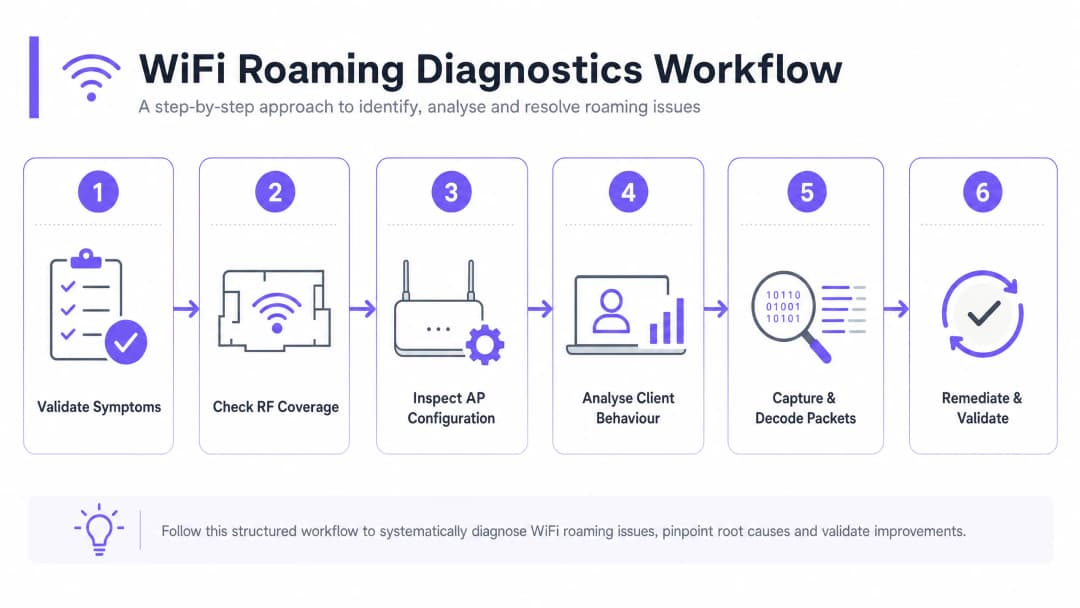
ধাপ ১: লক্ষণ এবং পরিধি যাচাই করুন
সমস্যার পরিধি নির্ধারণ করতে পরীক্ষামূলক তথ্য সংগ্রহ করে শুরু করুন। যদি রোমিং সমস্যাগুলি সমস্ত ডিভাইসকে প্রভাবিত করে, তবে এটি সাধারণত একটি আর্কিটেকচারাল বা ফিজিক্যাল ডিপ্লয়মেন্ট ত্রুটি নির্দেশ করে - যেমন দুর্বল AP প্লেসমেন্ট, অতিরিক্ত চ্যানেল ওভারল্যাপ, বা ভুল কনফিগার করা কন্ট্রোলার সেটিংস। যদি সমস্যাটি ডিভাইস-নির্দিষ্ট হয়, তবে এটি সাধারণত একটি ক্লায়েন্ট ড্রাইভার বাগ, নির্দিষ্ট ব্যান্ড বা চ্যানেলের (যেমন DFS চ্যানেল) সমর্থনের অভাব, বা অতিরিক্ত আক্রমণাত্মক অভ্যন্তরীণ রোমিং থ্রেশহোল্ডকে নির্দেশ করে।
ধাপ ২: RF কভারেজ এবং সিগন্যাল ওভারল্যাপ পরীক্ষা করুন
রোমিং ব্যর্থতার প্রধান ফিজিক্যাল কারণ হলো ভুল AP স্পেসিং। যদি AP-গুলি খুব দূরে থাকে, তবে তাদের মধ্যে ডেড জোন বা দুর্বল-সিগন্যাল এলাকা তৈরি হয়। যদি তারা খুব কাছাকাছি থাকে, তবে ক্লায়েন্টরা রোম করবে না কারণ মূল AP থেকে সিগন্যাল খুব শক্তিশালী থেকে যায়, যা "স্টিকি ক্লায়েন্ট" সমস্যা তৈরি করে।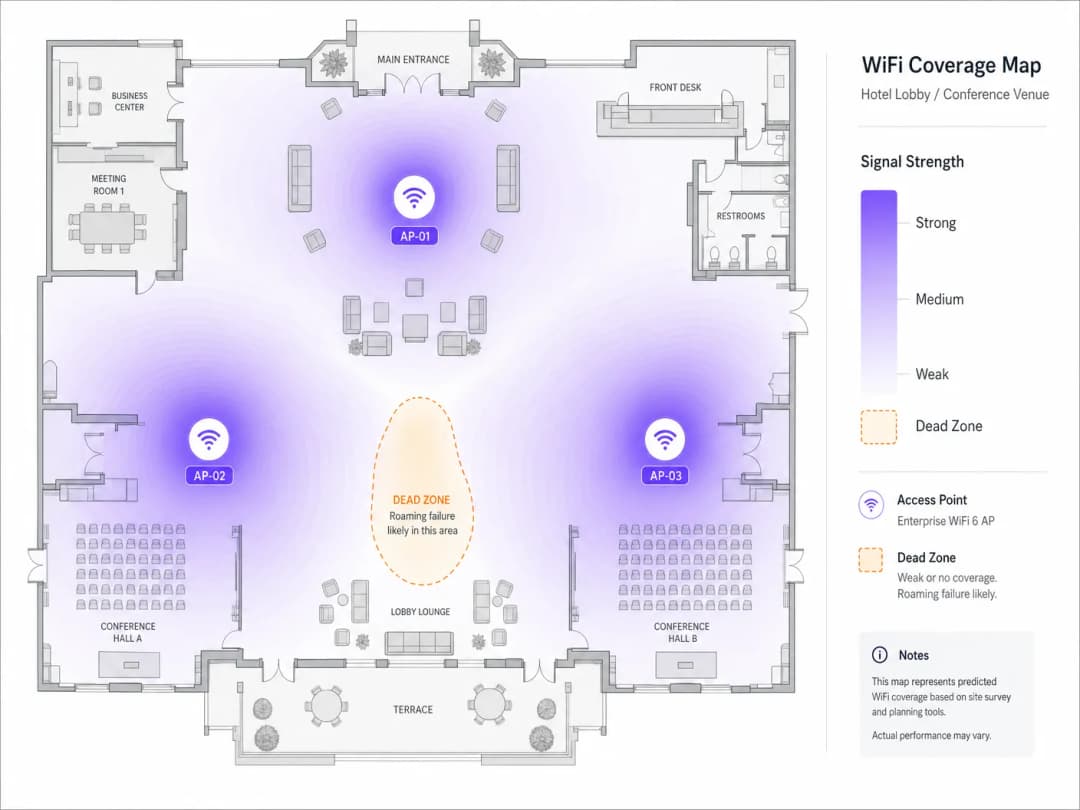
একটি ডেডিকেটেড WiFi অ্যানালাইজার দিয়ে একটি অ্যাক্টিভ সাইট সার্ভে পরিচালনা করুন। লক্ষ্য মেট্রিক হলো সেল বাউন্ডারিতে পার্শ্ববর্তী AP থেকে -67 dBm এর একটি ওভারল্যাপিং সিগন্যাল স্ট্রেন্থ। হাই-ডেন্সিটি পরিবেশে, 20% থেকে 30% সেল ওভারল্যাপের লক্ষ্য রাখুন। ওভারল্যাপিং AP-গুলি যেন একই চ্যানেলে কাজ না করে তা যাচাই করুন। 5 GHz ব্যান্ডে, কো-চ্যানেল ইন্টারফারেন্স (CCI) কমানোর জন্য নন-ওভারল্যাপিং 20 MHz বা 40 MHz চ্যানেল ব্যবহার করুন।
ধাপ ৩: AP এবং কন্ট্রোলার কনফিগারেশন পর্যালোচনা করুন
ওয়্যারলেস কন্ট্রোলারটি যাতে রোমিং অ্যাসিস্ট্যান্স ফিচার সমর্থন এবং ব্রডকাস্ট করার জন্য কনফিগার করা থাকে তা নিশ্চিত করুন। SSID নাম, সিকিউরিটি টাইপ (যেমন WPA3-Enterprise), এবং VLAN অ্যাসাইনমেন্ট সব AP-তে সম্পূর্ণ সামঞ্জস্যপূর্ণ কিনা তা যাচাই করুন। টার্গেট SSID-তে 802.11k, 802.11v, এবং 802.11r সক্ষম করুন। WPA2/WPA3 ট্রানজিশন মোড চালানোর সময় সতর্ক থাকুন, কারণ কিছু পুরনো ক্লায়েন্ট ডিভাইস বিকন ফ্রেমের জটিল ইনফরমেশন এলিমেন্টস (IEs) পার্স করতে সমস্যায় পড়ে, যার ফলে অ্যাসোসিয়েশন ব্যর্থ হয়।
ধাপ ৪: ক্লায়েন্ট আচরণ এবং ড্রাইভার সেটিংস বিশ্লেষণ করুন
ইনফ্রাস্ট্রাকচারটি সঠিকভাবে কনফিগার করা থাকলে, ক্লায়েন্ট ডিভাইসগুলো পরীক্ষা করুন। ক্লায়েন্ট NIC ড্রাইভার - বিশেষ করে Windows-এ Intel এবং Realtek চিপসেটগুলো - যেন সর্বশেষ এন্টারপ্রাইজ-সার্টিফাইড সংস্করণে আপডেট করা থাকে তা নিশ্চিত করুন। Windows ক্লায়েন্টদের ক্ষেত্রে, Device Manager > Network Adapters > Wireless Adapter Properties > Advanced-এ যান এবং ক্লায়েন্টকে দ্রুত আরও ভালো AP স্ক্যান করতে বাধ্য করতে "Roaming Aggressiveness" বাড়িয়ে "Medium-High" বা "High"-এ সেট করুন। ক্লায়েন্ট ডিভাইসগুলো ডায়নামিক ফ্রিকোয়েন্সি সিলেকশন (DFS) চ্যানেল সমর্থন করে কিনা তা যাচাই করুন। যদি AP-গুলি DFS চ্যানেলে (52–144) থাকে এবং ক্লায়েন্ট সেগুলি সমর্থন না করে, তবে ক্লায়েন্ট কখনই সেই AP-গুলিতে রোম করবে না, যা কভারেজের অন্ধ দাগ তৈরি করবে।
ধাপ ৫: ওভার দ্য এয়ার (OTA) প্যাকেট ক্যাপচার এবং ডিকোড করুন
ওয়্যারলেস ট্রাবলশুটিংয়ের সর্বোত্তম উপায় হলো ওভার-দ্য-এয়ার (OTA) প্যাকেট ক্যাপচার। একটি রোমিং ইভেন্ট ক্যাপচার করতে, আপনাকে উৎস এবং লক্ষ্য উভয় AP-র চ্যানেলে একই সাথে ওয়্যারলেস ফ্রেম ক্যাপচার করতে হবে। যে শারীরিক এলাকায় রোমটি ঘটে সেখানে প্যাকেট ক্যাপচার ডিভাইসটি স্থাপন করুন এবং ম্যানেজমেন্ট ফ্রেম আলাদা করতে নিচের Wireshark ফিল্টারটি প্রয়োগ করুন:
wlan.fc.type_subtype == 0x00 || wlan.fc.type_subtype == 0x01 || wlan.fc.type_subtype == 0x0b || wlan.fc.type_subtype == 0x0c
একটি ত্রুটিহীন 802.11r ওভার-দ্য-এয়ার রোমিংয়ে, আপনি দেখতে পাবেন: ক্লায়েন্ট লক্ষ্য AP-তে Fast BSS Transition Information Element (FTIE) এবং Mobility Domain Information Element (MDIE) সহ একটি Reassociation Request পাঠাচ্ছে, যার পরে স্ট্যাটাস কোড 0x0000 (Success) সহ একটি Reassociation Response আসছে, এবং 4-way হ্যান্ডশেকটি রিঅ্যাসোসিয়েশন ফ্রেমের মধ্যেই এমবেড করা রয়েছে।
যদি roam ব্যর্থ হয়, Reassociation Response-এ স্ট্যাটাস কোডটি পরীক্ষা করুন। স্ট্যাটাস কোড 0x000c (অ্যাসোসিয়েশন প্রত্যাখ্যাত) সাধারণত নির্দেশ করে যে টার্গেট AP ওভারলোডেড। স্ট্যাটাস কোড 0x001e (নিরাপত্তার কারণে অ্যাসোসিয়েশন প্রত্যাখ্যাত) একটি FT কি নেগোশিয়েশন অমিল নির্দেশ করে। ক্লায়েন্ট যদি Reassociation Request-এর পরিবর্তে একটি স্ট্যান্ডার্ড Association Request পাঠায়, তবে এটি সম্পূর্ণ অথেন্টিকেশন সম্পাদন করছে - যা নির্দেশ করে যে AP-তে 802.11r নিষ্ক্রিয় রয়েছে, অথবা ক্লায়েন্ট প্রোটোকলটি সমর্থন করে না।
ধাপ ৬: প্রতিকার এবং যাচাইকরণ
প্রয়োজনীয় শারীরিক বা যৌক্তিক পরিবর্তনগুলি করুন, তারপর ফলাফলগুলি যাচাই করুন। AP ট্রান্সমিট পাওয়ার সামঞ্জস্য করুন - একটি পরিচ্ছন্ন 5 GHz অগ্রাধিকার বজায় রাখতে 2.4 GHz পাওয়ার ৬ - ৯ dBm এবং 5 GHz পাওয়ার ১২ - ১৫ dBm-এ সেট করা একটি সাধারণ সর্বোত্তম অনুশীলন। BSS Minimum Rate (ডেটা রেট প্রুনিং) সামঞ্জস্য করুন: লেগ্যাসি রেট (১, ২, ৫.৫, ১১ Mbps) নিষ্ক্রিয় করুন এবং ক্লায়েন্টদের দ্রুত roam করতে বাধ্য করতে এবং স্টিকি ক্লায়েন্ট আচরণ প্রতিরোধ করতে ন্যূনতম বাধ্যতামূলক রেট ১২ Mbps বা ২৪ Mbps-এ সেট করুন। ভেন্যুতে হাঁটার সময় অবিচ্ছিন্ন পিং বা VoIP পরীক্ষা চালিয়ে যাচাই করুন, এটি নিশ্চিত করুন যে কোনো প্যাকেট হারানো ছাড়াই হ্যান্ডঅফ সময় ৫০ms-এর নিচে থাকে।
সর্বোত্তম অনুশীলন এবং শিল্প মান
১. ইউনিফাইড সিকিউরিটি এবং নেটওয়ার্ক অ্যাক্সেস কন্ট্রোল (NAC)
সীমাহীন roaming-এর জন্য পুরো ভেন্যু জুড়ে সামঞ্জস্যপূর্ণ অথেন্টিকেশন প্রয়োজন। এন্টারপ্রাইজ-গ্রেড নিরাপত্তা স্থাপন করার সময়, আপনার ওয়্যারলেস পরিকাঠামোকে একটি সেন্ট্রালাইজড RADIUS বা NAC সমাধানের সাথে একীভূত করুন। এই আর্কিটেকচারের একটি বিস্তারিত গাইডের জন্য, আমাদের গাইডটি দেখুন: How to Implement 802.1X Authentication with Cloud RADIUS। ভেন্ডর বিকল্পগুলি মূল্যায়ন করতে, 10 Best Network Access Control (NAC) Solutions for 2026-এর আমাদের পর্যালোচনাটি দেখুন।
২. SSID-এর শারীরিক এবং যৌক্তিক পৃথকীকরণ
আধুনিক এবং লেগ্যাসি ডিভাইসের মিশ্রণ রয়েছে এমন পরিবেশে, একটি একক-SSID কনফিগারেশন সামঞ্জস্যতার সমস্যা তৈরি করতে পারে। প্রস্তাবিত পদ্ধতি হলো তিনটি পৃথক SSID বজায় রাখা: WPA3-Enterprise এবং 802.11k/v/r সক্ষম সহ একটি Corporate/Staff SSID; প্রতিটি roam-এ পুনরায় অথেন্টিকেশন প্রতিরোধ করতে MAC ক্যাশিং এবং ৮ ঘণ্টার সেশন টাইমআউট সহ Purple-এর Guest WiFi প্ল্যাটফর্ম দ্বারা পরিচালিত একটি Guest WiFi SSID; এবং যে সমস্ত ডিভাইস 802.11r সমর্থন করে না তাদের জন্য WPA2-PSK সহ 2.4 GHz-এ সীমাবদ্ধ একটি Legacy/IoT SSID।
৩. কমপ্লায়েন্স এবং রেগুলেটরি স্ট্যান্ডার্ড
খুচরা পরিবেশে, PCI-DSS-এর আওতাভুক্ত ডিভাইসগুলি (যেমন মোবাইল পয়েন্ট-অফ-সেল mPOS টার্মিনাল) অবশ্যই নিরাপদে roam করবে। WPA3-Enterprise প্রয়োগ করা নিশ্চিত করুন এবং roaming ক্লায়েন্টদের "evil twin" আক্রমণ থেকে রক্ষা করতে রোগ AP সনাক্তকরণ সক্ষম করুন। ব্যবহারকারীর roaming প্যাটার্ন এবং থাকার সময় ট্র্যাক করতে WiFi Analytics ব্যবহার করার সময়, GDPR কমপ্লায়েন্ট থাকতে সংগ্রহের পয়েন্টে MAC অ্যাড্রেসগুলি ক্রিপ্টোগ্রাফিকভাবে সল্ট এবং হ্যাশ করা নিশ্চিত করুন।
AP হার্ডওয়্যার নির্বাচন এবং স্থাপনের সর্বোত্তম অনুশীলনের রেফারেন্সের জন্য, আমাদের Cisco Wireless APs: 2026 Guide to Products & Deployment দেখুন। শিক্ষা প্রতিষ্ঠানের জন্য, এই গাইডের নীতিগুলো একইভাবে প্রযোজ্য - WiFi in Schools: The 2026 Administrator & IT Guide দেখুন।
বাস্তব-অভিজ্ঞতার কেস স্টাডি
কেস স্টাডি ১: ৫০০ রুমের একটি বিলাসবহুল হোটেলে রোমিংয়ের ব্যর্থতা দূরীকরণ
৫০০টি রুম, কনফারেন্স স্পেস এবং একটি বড় লবি লাউঞ্জ সহ একটি বহুতল বিলাসবহুল হোটেলে, লবি থেকে গেস্ট রুমের দিকে যাওয়ার সময় VoIP কল কেটে যাওয়া এবং VPN সেশন বিচ্ছিন্ন হওয়ার বিষয়ে অতিথিদের কাছ থেকে ক্রমাগত অভিযোগ আসছিল। কর্মীরাও জানিয়েছিলেন যে তাদের মোবাইল হাউসকিপিং ট্যাবলেটগুলো ঘন ঘন ডিসকানেক্ট হয়ে যাচ্ছিল, যার ফলে রুমের স্ট্যাটাস আপডেট করতে দেরি হচ্ছিল।
একটি বিস্তৃত RF অডিট করে দুটি প্রধান সমস্যা সনাক্ত করা গেছে। প্রথমত, AP গুলো ২.৪ GHz এবং ৫ GHz উভয় ব্যান্ডেই সর্বোচ্চ ট্রান্সমিট পাওয়ারে (২০+ dBm) চলছিল, যা বিশাল কভারেজ ওভারল্যাপ তৈরি করেছিল এবং গেস্ট রুমের ক্লায়েন্ট ডিভাইসগুলোকে লবির AP গুলোর সাথে "আটকে" রাখছিল। দ্বিতীয়ত, পুরানো ডিভাইসের সামঞ্জস্যতা সংক্রান্ত উদ্বেগের কারণে মূল গেস্ট SSID-এ 802.11r নিষ্ক্রিয় করে রাখা হয়েছিল।
সমাধানের মধ্যে অন্তর্ভুক্ত ছিল: AP ট্রান্সমিট পাওয়ার ২.৪ GHz-এ ৮ dBm এবং ৫ GHz-এ ১৪ dBm-এ সমন্বয় করা; 802.11k, 802.11v এবং 802.11r (over-the-air FT) সক্রিয় করা; ১২ Mbps-এর নিচের প্রয়োজনীয় ডেটা রেটগুলো ছেঁটে ফেলা; এবং MAC ক্যাশিং এবং ৮ ঘণ্টার সেশন টাইমআউট সহ ওয়্যারলেস কন্ট্রোলারটিকে Purple-এর hospitality WiFi প্ল্যাটফর্মের সাথে একীভূত করা। এর ফলে, গড় রোমিং হ্যান্ডঅফ ল্যাটেন্সি ৩৮০ মিলিসেকেন্ড থেকে কমে ৪২ মিলিসেকেন্ডে নেমে আসে, VoIP কল ড্রপ সম্পূর্ণ বন্ধ হয়ে যায় এবং ৩০ দিনের মধ্যে WiFi কানেক্টিভিটির জন্য অতিথিদের সন্তুষ্টির স্কোর ৪৮% বৃদ্ধি পায়।
কেস স্টাডি ২: একটি গ্লোবাল রিটেলারের জন্য mPOS রোমিং অপ্টিমাইজ করা
তিনটি তলা জুড়ে বিস্তৃত একটি হাই-ডেনসিটি ফ্ল্যাগশিপ রিটেল স্টোর চেকআউটের জন্য মোবাইল পয়েন্ট-অফ-সেল (mPOS) টার্মিনাল ব্যবহার করছিল। কেনাকাটার ব্যস্ততম সময়ে, বিক্রয়কর্মীরা যখন গ্রাহকদের সাথে রিটেল ফ্লোর জুড়ে চলাফেরা করতেন, তখন mPOS টার্মিনালগুলো প্রায়শই লেনদেন সম্পন্ন করতে ব্যর্থ হচ্ছিল।
Over-the-air প্যাকেট ক্যাপচারে দেখা গেছে যে mPOS টার্মিনালগুলো স্টিকি ক্লায়েন্ট আচরণ প্রদর্শন করছিল, অর্থাৎ গ্রাউন্ড ফ্লোরে থাকা সত্ত্বেও সেগুলো তৃতীয় তলার AP-র সাথে সংযুক্ত ছিল। তারা যখন অবশেষে রোমিং করার চেষ্টা করত, তখন 802.11r না থাকার কারণে একটি সম্পূর্ণ 802.1X/EAP রি-অথেন্টিকেশন করতে বাধ্য হতো, যা কো-চ্যানেল ইন্টারফারেন্সের কারণে চরম চ্যানেল ইউটিলাইজেশনের (৮৫%) ফলে টাইমআউট হয়ে যেত।
সমাধানের মধ্যে অন্তর্ভুক্ত ছিল: নন-ওভারল্যাপিং ২০ MHz চ্যানেল ব্যবহার করে চ্যানেল প্ল্যানটি নতুন করে সাজানো (যা চ্যানেল ইউটিলাইজেশন ৩৫%-এর নিচে নামিয়ে আনে); 802.11k এবং 802.11v সক্রিয় করা; স্টোর অপারেশনের জন্য 802.11r সক্রিয় সহ একটি ডেডিকেটেড হিডেন SSID ইমপ্লিমেন্ট করা; এবং চেকআউট লাইনের কাছাকাছি AP স্থাপন অপ্টিমাইজ করার জন্য retail ডিপ্লয়মেন্ট গাইডলাইন অনুসরণ করা। এর ফলে একটি mPOS লেনদেনও ব্যর্থ হয়নি, গড় লেনদেন সম্পন্ন হওয়ার সময় ১৪ সেকেন্ড হ্রাস পেয়েছে, যা সরাসরি চেকআউট লাইন ছোট করেছে এবং ব্যস্ত সময়ে বিক্রয়ের পরিমাণ বাড়িয়েছে।
ROI এবং ব্যবসায়িক প্রভাব
WiFi roaming অপ্টিমাইজ করা একটি কৌশলগত ব্যবসায়িক বিনিয়োগ যা পরিমাপযোগ্য আর্থিক এবং কর্মক্ষম রিটার্ন প্রদান করে। পরিবহন এবং স্বাস্থ্যসেবা-র মতো ক্ষেত্রগুলিতে, মোবাইল ডিভাইসের উপর কর্মীদের নির্ভরতা অত্যন্ত বেশি। যখন ক্লিনিকাল কর্মী বা লজিস্টিক কর্মীরা roaming ড্রপের সম্মুখীন হন, তখন গুরুত্বপূর্ণ কাজের ধারা থমকে যায়। Handoff লেটেন্সি ৫০ মিলিসেকেন্ডের নিচে কমিয়ে এনে, প্রতিষ্ঠানগুলি প্রশাসনিক বিলম্ব দূর করে এবং সরাসরি কর্মীদের উপযোগিতা ও কর্মক্ষমতা উন্নত করে।
আতিথেয়তা এবং ইভেন্টের ক্ষেত্রে, গেস্ট WiFi হলো গ্রাহক সন্তুষ্টির একটি প্রাথমিক চালিকাশক্তি। একটি নির্বিঘ্ন ওয়্যারলেস অভিজ্ঞতা গেস্টদের সাইটে দীর্ঘ সময় কাটাতে উৎসাহিত করে, যা খাদ্য, পানীয় এবং খুচরা পরিষেবাগুলিতে অতিরিক্ত ব্যয় বৃদ্ধি করে। Purple-এর WiFi Analytics ব্যবহার করে, ভেন্যু অপারেটররা যাতায়াতের গতিপথ ট্র্যাক করতে পারে এবং রিয়েল-টাইম ডওয়েল ডেটার ওপর ভিত্তি করে কর্মীদের রোস্টারিং এবং রিটেল লেআউট অপ্টিমাইজ করতে পারে।
যেহেতু ভেন্যুগুলি OpenRoaming এবং প্রোফাইল-ভিত্তিক প্রমাণীকরণের ব্যাপক গ্রহণের জন্য প্রস্তুতি নিচ্ছে, তাই একটি নিখুঁতভাবে টিউন করা roaming অবকাঠামো অন্যতম পূর্বশর্ত। আজই 802.11k/v/r স্থাপন করে, প্রতিষ্ঠানগুলি বিশ্বব্যাপী roaming ফেডারেশনগুলির সাথে নির্বিঘ্ন একীকরণের জন্য নিজেদের প্রস্তুত করছে, যা নতুন মনেটাইজেশন চ্যানেল উন্মুক্ত করছে এবং আধুনিক ডিজিটাল ভেন্যুর নেটওয়ার্ক প্রভাবগুলিকে চালিত করছে।
-
তথ্যসূত্র
- [১] WiFi Roaming and Handoff: 802.11r and 802.11k Explained
- [২] Cisco Wireless APs: 2026 Guide to Products & Deployment
- [৩] How to Implement 802.1X Authentication with Cloud RADIUS
- [৪] 10 Best Network Access Control (NAC) Solutions for 2026
- [৫] WiFi in Schools: The 2026 Administrator & IT Guide
- [৬] Understanding and Troubleshooting Client Roaming Issues
- [৭] Troubleshooting WiFi Connectivity and Roaming Problems
মূল সংজ্ঞাসমূহ
Sticky Client
একটি ওয়্যারলেস ডিভাইস যা কাছাকাছি একটি শক্তিশালী অ্যাক্সেস পয়েন্ট উপলব্ধ থাকা সত্ত্বেও দূরের একটি দুর্বল অ্যাক্সেস পয়েন্টের সাথে সংযুক্ত থাকে।
Sticky clients-রা কম ফিজিক্যাল ডেটা রেটে ট্রান্সমিট করার মাধ্যমে তাদের নিজস্ব পারফরম্যান্স কমিয়ে দেয় এবং অন্যান্য ডিভাইসের এয়ারটাইম নষ্ট করে। এন্টারপ্রাইজ ভেন্যুগুলোতে রোমিং-সংক্রান্ত অভিযোগগুলোর জন্য এগুলোই সবচেয়ে সাধারণ মূল কারণ।
802.11r (Fast BSS Transition)
একটি IEEE সংশোধনী যা একটি Mobility Domain-এর মধ্যে থাকা AP জুড়ে ক্রিপ্টোগ্রাফিক কি ম্যাটেরিয়াল আগে থেকে বিতরণ করার অনুমতি দেয়, যা হ্যান্ডঅফ প্রমাণীকরণ (authentication) সময় ২০০-৪০০ মিলি-সেকেন্ড থেকে কমিয়ে ৫০ মিলি-সেকেন্ডের নিচে নিয়ে আসে।
VoIP, ভিডিও কনফারেন্সিং এবং মোবাইল পেমেন্টের মতো রিয়েল-টাইম অ্যাপ্লিকেশনের জন্য অত্যন্ত গুরুত্বপূর্ণ। রোমিংয়ের সময় কল ড্রপ হওয়া দূর করার জন্য সবচেয়ে প্রভাবশালী একক স্ট্যান্ডার্ড।
802.11k (রেডিও রিসোর্স ম্যানেজমেন্ট)
একটি IEEE সংশোধনী যা ক্লায়েন্ট ডিভাইসগুলোকে তাদের বর্তমান AP থেকে একটি Neighbour Report - কাছাকাছি থাকা AP এবং তাদের অপারেটিং চ্যানেলগুলোর একটি কিউরেটেড তালিকা - অনুরোধ করার অনুমতি দেয়।
ক্লায়েন্টের জন্য একটি ফুল-ব্যান্ড অ্যাক্টিভ স্ক্যান করার প্রয়োজনীয়তা দূর করে, যার ফলে রোমিং ডিসকভারি সময় ১০০ মিলি-সেকেন্ডের বেশি থেকে ১০ মিলি-সেকেন্ডের নিচে নেমে আসে।
802.11v (BSS ট্রানজিশন ম্যানেজমেন্ট)
একটি IEEE সংশোধনী যা ওয়্যারলেস ইনফ্রাস্ট্রাকচারকে ক্লায়েন্ট ডিভাইসে BTM অনুরোধ ফ্রেম পাঠাতে সক্ষম করে, যা রোমিংয়ের জন্য সর্বোত্তম টার্গেট AP-এর পরামর্শ দেয়।
নেটওয়ার্ক অ্যাডমিনিস্ট্রেটরদের দ্বারা ক্লায়েন্টদের লোড-ব্যালেন্স করতে এবং সক্রিয়ভাবে স্টিকি ক্লায়েন্ট সমস্যা সমাধান করতে ব্যবহৃত হয়। বিশেষ করে iOS এবং আধুনিক Android ডিভাইসে কার্যকর।
Mobility Domain
একটি ওয়্যারলেস নেটওয়ার্কের মধ্যে অ্যাক্সেস পয়েন্টগুলোর একটি লজিক্যাল গ্রুপিং যা 802.11r ক্রিপ্টোগ্রাফিক কি শেয়ার করে এবং সদস্যদের মধ্যে দ্রুত রোমিং সমর্থন করে।
ক্লায়েন্টরা শুধুমাত্র তখনই Fast BSS Transitions (FT) সম্পাদন করতে পারে যখন একই Mobility Domain-এর অন্তর্ভুক্ত AP-গুলোর মধ্যে রোমিং করা হয়। ভুলভাবে কনফিগার করা Mobility Domain ID-গুলো হল 802.11r ব্যর্থতার একটি সাধারণ কারণ।
Pairwise Master Key (PMK)
প্রাথমিক 802.1X বা WPA প্রি-শেয়ার্ড কি প্রমাণীকরণের সময় প্রতিষ্ঠিত শীর্ষ-স্তরের ক্রিপ্টোগ্রাফিক কি, যা থেকে সমস্ত সেশন কি উদ্ভূত হয়।
802.11r-এ, সম্পূর্ণ RADIUS রাউন্ড-ট্রিপ ছাড়াই দ্রুত হ্যান্ডঅফ সহজতর করার জন্য PMK-কে PMK-R0 (কন্ট্রোলার দ্বারা রাখা হয়) এবং PMK-R1 (AP-গুলোতে আগে থেকে বিতরণ করা) এ বিভক্ত করা হয়।
BSS সর্বনিম্ন রেট
সর্বনিম্ন ডেটা রেট যা একটি অ্যাক্সেস পয়েন্ট একটি ক্লায়েন্টকে SSID-এর সাথে যুক্ত থাকার সময় ব্যবহার করার অনুমতি দেবে। যেসব ক্লায়েন্ট এই রেট বজায় রাখতে পারে না তাদের বিচ্ছিন্ন (disassociated) করা হয়।
কম রেট ছাঁটাই করা (যেমন, সর্বনিম্ন ১২ Mbps সেট করা) একটি স্বাভাবিক রোমিং ট্রিগার হিসাবে কাজ করে, যা স্টিকি ক্লায়েন্টদের তাদের ফিজিক্যাল ডেটা রেট থ্রেশহোল্ডের নিচে নেমে গেলে একটি নতুন AP খুঁজতে বাধ্য করে।
Co-Channel Interference (CCI)
একই ফিজিক্যাল এলাকায় একই ফ্রিকোয়েন্সি চ্যানেলে কাজ করা একাধিক অ্যাক্সেস পয়েন্টের কারণে ঘটা RF হস্তক্ষেপ, যা ডিভাইসগুলোকে ট্রান্সমিট করার জন্য তাদের নিজস্ব টার্নের অপেক্ষা করতে বাধ্য করে।
CCI এয়ারটাইম প্রতিযোগিতা বাড়ায় এবং রোমিং ম্যানেজমেন্ট ফ্রেমগুলোকে বিলম্বিত বা ব্যাহত করতে পারে, যার ফলে হ্যান্ডঅফ ব্যর্থ হয়। ঘনবসতিপূর্ণ নেটওয়ার্কগুলোতে এটি রোমিং ব্যর্থতার একটি প্রাথমিক কারণ।
Over-the-Air (OTA) প্যাকেট ক্যাপচার
একটি ওয়্যারলেস ডায়াগনস্টিক টেকনিক যেখানে মনিটর মোডে থাকা একটি ডিভাইস একটি নির্দিষ্ট চ্যানেলে ট্রান্সমিট হওয়া সমস্ত 802.11 ফ্রেম ক্যাপচার করে, যার মধ্যে ম্যানেজমেন্ট, কন্ট্রোল এবং ডেটা ফ্রেম অন্তর্ভুক্ত রয়েছে।
রোমিং ব্যর্থতা নির্ণয় করার জন্য গোল্ড স্ট্যান্ডার্ড। এটি ইঞ্জিনিয়ারদের একটি হ্যান্ডঅফ ইভেন্টের সময় প্রমাণীকরণ, অ্যাসোসিয়েশন এবং রিঅ্যাসোসিয়েশন ফ্রেমের সঠিক সিকোয়েন্স পরীক্ষা করার অনুমতি দেয়।
সমাধানকৃত উদাহরণসমূহ
৮০টি অ্যাক্সেস পয়েন্ট বিশিষ্ট একটি বড় কনফারেন্স সেন্টারে ইভেন্ট কর্মীরা যখন এক্সিবিশন হলগুলোর মধ্যে চলাচল করেন, তখন ওয়্যারলেস VoIP ব্যাজে (Vocera) মারাত্মক অডিও ড্রপ হয়। নেটওয়ার্কটি একটি লোকাল RADIUS সার্ভারের সাথে WPA2-Enterprise (802.1X) অথেনটিকেশন ব্যবহার করে।
১. চ্যানেল ৩৬ এবং ৪৪ (প্রধান হলের সংলগ্ন AP-গুলোর অপারেটিং চ্যানেল) এ একটি OTA প্যাকেট ক্যাপচার পরিচালনা করুন। ২. এটি চিহ্নিত করুন যে VoIP ব্যাজগুলো প্রতিটি roam-এ সম্পূর্ণ EAP-TLS অথেনটিকেশন সম্পাদন করছে, যা গড়ে ৩৪০ms সময় নিচ্ছে, যা রিয়েল-টাইম ভয়েসের জন্য প্রয়োজনীয় ৫০ms থ্রেশহোল্ড অতিক্রম করে। ৩. কর্মীদের SSID-এর জন্য কন্ট্রোলারে 802.11r (Fast BSS Transition) চালু করুন। ৪. ব্যাজ হার্ডওয়্যারের সাথে সর্বোচ্চ সামঞ্জস্যতা নিশ্চিত করতে 802.11r মোডটি 'FT over-the-Air'-এ কনফিগার করুন। ৫. অ্যাক্টিভ স্ক্যানিংয়ের প্রয়োজনীয়তা দূর করতে 802.11k Neighbour Reports চালু করুন। ৬. ব্যাজগুলোকে দূরের AP-তে আটকে থাকা প্রতিরোধ করতে BSS Minimum Rate ১২ Mbps-এ সেট করুন। ৭. Wireshark-এ roam টাইম যাচাই করুন: নিশ্চিত করুন যে reassociation এক্সচেঞ্জটি ৩২ms সময় নেয় এবং ভয়েস ট্রাফিক নির্বিঘ্ন থাকে।
মোবাইল পয়েন্ট-অফ-সেল (mPOS) iPads মোতায়েন করা একটি বড় রিটেল ফ্ল্যাগশিপ স্টোরে ট্রানজেকশন ব্যর্থতার ঘটনা ঘটছে। iPads-গুলো গ্রাউন্ড ফ্লোরের চেকআউট এলাকায় নিয়ে আসার পরেও তৃতীয় তলার AP-গুলোর সাথে আটকে থাকছে, যার ফলে RSSI -৭৮ dBm এবং উচ্চ রিট্রি রেট দেখা যাচ্ছে।
১. তৃতীয় তলা এবং গ্রাউন্ড ফ্লোরের AP-গুলোর মধ্যে সিগন্যাল ওভারল্যাপ পরিমাপ করার জন্য একটি RF সাইট সার্ভে পরিচালনা করুন। ২. আবিষ্কার করুন যে তৃতীয় তলার AP-গুলো সর্বোচ্চ পাওয়ারে (২০ dBm) ট্রান্সমিট করছে, যা ফ্লোর বোর্ড ভেদ করে গ্রাউন্ড ফ্লোরে একটি শক্তিশালী কিন্তু নিম্ন-মানের সিগন্যাল তৈরি করছে। ৩. ৫ GHz রেডিওর ট্রান্সমিট পাওয়ার ১৪ dBm এবং ২.৪ GHz রেডিওর ট্রান্সমিট পাওয়ার ৮ dBm-এ কমিয়ে দিন। ৪. ওয়্যারলেস কন্ট্রোলারে 802.11v BSS Transition Management (BTM) চালু করুন। ৫. কন্ট্রোলারে সর্বনিম্ন অ্যাসোসিয়েশন RSSI থ্রেশহোল্ড -৭২ dBm কনফিগার করুন। যখন একটি iPad-এর RSSI -৭২ dBm-এর নিচে নেমে যাবে, তখন AP একটি 802.11v BTM Request পাঠিয়ে গ্রাউন্ড ফ্লোরের AP সাজেস্ট করবে। ৬. যাচাই করুন যে iPads-গুলো ফিজিক্যাল থ্রেশহোল্ড অতিক্রম করার ৪৫ms-এর মধ্যে সফলভাবে গ্রাউন্ড ফ্লোরের AP-তে roam করছে।
অনুশীলনী প্রশ্নসমূহ
Q1. একটি গুদামের অপারেটর রিপোর্ট করেছেন যে আইলগুলোর মধ্যে ফর্কলিফ্ট চালানোর সময় হ্যান্ডহেল্ড বারকোড স্ক্যানারগুলো ঘন ঘন ERP সিস্টেম থেকে বিচ্ছিন্ন হয়ে যায়। নেটওয়ার্কটিতে 802.11r সক্রিয় করা আছে, কিন্তু স্ক্যানারগুলো 802.11r সমর্থন করে না। সবচেয়ে ভালো তাৎক্ষণিক প্রতিকার কৌশল কী?
ইঙ্গিত: 802.11r এর সাথে লিগ্যাসি ক্লায়েন্টদের সামঞ্জস্য এবং প্রাথমিক এন্টারপ্রাইজ নেটওয়ার্কের ক্ষতি না করে কীভাবে তাদের আলাদা করা যায় তা বিবেচনা করুন।
মডেল উত্তর দেখুন
যেহেতু বারকোড স্ক্যানারগুলো 802.11r সমর্থন করে না, তাই তারা হয় একটি 802.11r-সক্রিয় SSID-এর সাথে সংযোগ করতে ব্যর্থ হবে অথবা ধীর গতির, স্ট্যান্ডার্ড 802.1X প্রমাণীকরণের সম্মুখীন হবে। প্রস্তাবিত পদ্ধতি হল WPA2-PSK এবং শুধুমাত্র ২.৪ GHz রেডিও ব্যবহার করে গুদামের স্ক্যানারগুলোর জন্য বিশেষভাবে একটি ডেডিকেটেড, আলাদা SSID তৈরি করা। এটি লিগ্যাসি ট্রাফিককে আলাদা করে, 802.11r সামঞ্জস্যের সমস্যাগুলো এড়ায় এবং বেসিক প্রি-শেয়ার্ড কি হ্যান্ডওভার ব্যবহার করে স্থিতিশীল রোমিং নিশ্চিত করে, যা স্ক্যানারগুলো নেটিভভাবে সমর্থন করে। 802.11r সহ প্রাথমিক এন্টারপ্রাইজ SSID আধুনিক ডিভাইসগুলোর জন্য অক্ষত রাখা যেতে পারে।
Q2. একটি রোমিং ব্যর্থতার প্যাকেট ক্যাপচার বিশ্লেষণের সময়, আপনি লক্ষ্য করেন যে ক্লায়েন্ট ডিভাইসটি লক্ষ্য AP-তে যাওয়ার সময় Reassociation Request (Type 0x02)-এর পরিবর্তে একটি Association Request (Type 0x00) পাঠায়। এটি আপনাকে রোমিং অবস্থা সম্পর্কে কী বলে, এবং সবচেয়ে সম্ভাব্য তিনটি মূল কারণ কী?
ইঙ্গিত: ফাস্ট রোমিং এবং Mobility Domain মেম্বারশিপের প্রেক্ষাপটে একটি অ্যাসোসিয়েশন এবং একটি রিঅ্যাসোসিয়েশন ফ্রেমের মধ্যে পার্থক্য বিশ্লেষণ করুন।
মডেল উত্তর দেখুন
একটি Association Request নির্দেশ করে যে ক্লায়েন্ট একটি 802.11r ফাস্ট হ্যান্ডঅফ সম্পাদন করার পরিবর্তে স্ক্র্যাচ থেকে সম্পূর্ণ নতুন সংযোগ শুরু করছে। এটি FT প্রক্রিয়াকে বাইপাস করে এবং একটি সম্পূর্ণ 802.1X/EAP পুনরায় প্রমাণীকরণ করতে বাধ্য করে। সবচেয়ে সম্ভাব্য তিনটি মূল কারণ হল: ১) ক্লায়েন্ট ডিভাইসটি 802.11r সমর্থন করে না (ডিভাইস স্পেসিফিকেশন শীটের সাথে যাচাই করুন); ২) লক্ষ্য SSID-এ 802.11r নিষ্ক্রিয় করা আছে (কন্ট্রোলার কনফিগারেশন পরীক্ষা করুন); অথবা ৩) লক্ষ্য AP-টি উৎস AP-এর চেয়ে ভিন্ন Mobility Domain ID-এর অন্তর্ভুক্ত, যা কী (key) শেয়ারিং প্রতিরোধ করে (কন্ট্রোলারে সমস্ত AP একই Mobility Domain ID শেয়ার করছে কিনা তা যাচাই করুন)।
Q3. একজন আইটি ম্যানেজার লক্ষ্য করেছেন যে 802.11v BSS Transition Management সক্রিয় করার পরে, বেশ কয়েকটি পুরানো ল্যাপটপ ক্লায়েন্ট প্রায়শই রোমিং করার পরিবর্তে নেটওয়ার্ক থেকে সম্পূর্ণ সংযোগ বিচ্ছিন্ন হয়ে যায়। এর সম্ভাব্য কারণ কী, এবং কীভাবে এটি সমাধান করা উচিত?
ইঙ্গিত: পুরানো বা দুর্বলভাবে কোড করা ক্লায়েন্ট ড্রাইভার কীভাবে 802.11v BTM Request ফ্রেমগুলি পরিচালনা করে এবং ড্রাইভার অনুরোধটিকে কী হিসাবে ব্যাখ্যা করে তা নিয়ে ভাবুন।
মডেল উত্তর দেখুন
কিছু পুরানো বা দুর্বলভাবে কোড করা ক্লায়েন্ট ড্রাইভার 802.11v BTM Request ফ্রেম সঠিকভাবে পার্স করে না। প্রস্তাবিত লক্ষ্য AP-গুলি মূল্যায়ন করার পরিবর্তে, তারা অনুরোধটিকে একটি ডিঅথেনটিকেশন বা ডিসঅ্যাসোসিয়েশন কমান্ড হিসাবে ব্যাখ্যা করে, যার ফলে তারা নেটওয়ার্ক থেকে সম্পূর্ণ বিচ্ছিন্ন হয়ে যায়। সমাধানের পদক্ষেপগুলি হল: ১) সমস্যাটি অনুভব করা নির্দিষ্ট ক্লায়েন্ট MAC ঠিকানাগুলি সনাক্ত করুন; ২) তাদের ওয়্যারলেস NIC ড্রাইভারগুলিকে সর্বশেষ সংস্করণে আপডেট করুন; ৩) যদি ড্রাইভার আপডেট করা সম্ভব না হয়, তবে সেই ডিভাইসগুলির জন্য একটি পৃথক লেগ্যাসি SSID-এ 802.11v নিষ্ক্রিয় করুন, অথবা কন্ট্রোলারের স্টিয়ারিং এগ্রেসিভনেস 'প্যাসিভ' মোডে কনফিগার করুন, যা ক্লায়েন্টকে জোরপূর্বক সংযোগ বিচ্ছিন্ন না করে BTM অনুরোধ উপেক্ষা করার অনুমতি দেয়।
প্রায়শই জিজ্ঞাসিত প্রশ্নাবলী
What causes sticky client issues in enterprise WiFi networks?
Sticky clients occur when a device clings to an enterprise WiFi access point at low signal (-75 dBm or lower) instead of roaming to an adjacent AP with stronger RSSI. The primary causes are missing 802.11v BSS Transition Management, unequal transmit power between 2.4 GHz and 5 GHz radios, missing 802.11k neighbor reports, or an uncalibrated cell overlap where minimum RSSI thresholds are not configured.
What is the optimal RSSI threshold for enterprise WiFi roaming handoff?
Most enterprise WiFi clients initiate roaming scans when signal drops below -70 dBm (iOS triggers at -70 dBm; macOS triggers at -75 dBm). Access points should be calibrated to maintain 15% to 20% cell overlap at -67 dBm for voice and high-density environments. Setting a minimum RSSI disconnect threshold between -75 dBm and -78 dBm prevents client stagnation without causing premature coverage drops.
How do 802.11k, 802.11v, and 802.11r collaborate during roaming?
802.11k provides the client with a radio neighbor list so it scans only candidate channels rather than the full RF spectrum. 802.11v enables the controller to send BSS Transition Management frames requesting the client steer to a specific AP. 802.11r (Fast BSS Transition) pre-authenticates the client's encryption keys (PMK-R1) with target APs, slashing 802.1X WiFi handoff latency from 800ms down to under 30ms.
Why do VoIP and video calls drop during WiFi access point handoff?
Real-time voice (VoIP) and video sessions drop when WiFi roaming handoff latency exceeds 50ms to 100ms, overflowing RTP packet jitter buffers. In networks without 802.11r FT, an 802.1X client must execute a full EAP exchange and RADIUS round-trip upon every AP change, creating 400ms to 1200ms delays. Enabling 802.11r and verifying upstream WMM / DSCP 46 (Expedited Forwarding) QoS prevents voice packet drop.
How do you prevent WiFi client bouncing (ping-pong) between two APs?
Client ping-pong occurs when two adjacent WiFi access points provide identical signal levels (for example, fluctuating between -64 dBm and -65 dBm) with excessive cell overlap (>30%). To eliminate oscillation, reduce AP transmit power to achieve a 15% to 20% cell edge, configure an 802.11v roaming hysteresis delta of 6 dBm, and set dynamic Radio Resource Management (RRM) sensitivity to conservative intervals.
How does Purple help enterprise venues optimize WiFi roaming and performance?
Purple provides hardware-agnostic cloud captive portals and enterprise WiFi management across Cisco Meraki, HPE Aruba, Ruckus, Juniper Mist, Fortinet, and Ubiquiti UniFi networks. Purple automates guest onboarding, monitors client connection health and venue dwell times, and integrates with 802.1X identity platforms to deliver seamless, drop-free wireless mobility.
এই সিরিজে পড়া চালিয়ে যান
কর্পোরেট WiFi-এ VoIP এবং ভিডিও কলের জন্য রোমিং অপ্টিমাইজেশন
এই গাইডটি IT ম্যানেজার, নেটওয়ার্ক আর্কিটেক্ট এবং CTO-দের কর্পোরেট স্টাফ নেটওয়ার্কে নির্বিঘ্ন VoIP এবং ভিডিও কল সমর্থন করার জন্য WiFi রোমিং অপ্টিমাইজ করার একটি বিস্তৃত, ভেন্ডর-নিরপেক্ষ ব্লুপ্রিন্ট প্রদান করে। এতে ৫০ms-এর কম হ্যান্ডঅফ লেটেন্সি অর্জনের জন্য প্রয়োজনীয় IEEE 802.11k/r/v প্রোটোকল স্ট্যাক, WMM QoS কনফিগারেশন, RF সেল ডিজাইন এবং এন্ড-টু-এন্ড তারযুক্ত QoS ম্যাপিং কভার করা হয়েছে। হোটেল, রিটেইল, চিকিৎসা এবং বড় ভেন্যু পরিবেশের জন্য প্রযোজ্য এই রেফারেন্সে বাস্তব-জগতের বাস্তবায়ন পরিস্থিতি, ট্রাবলশুটিং ফ্রেমওয়ার্ক এবং একটি পরিমাপযোগ্য ROI বিশ্লেষণ অন্তর্ভুক্ত রয়েছে।
অপ্টিমাল চ্যানেল প্ল্যানিংয়ের জন্য RSSI এবং সিগন্যালের ক্ষমতা বোঝা
এই নির্দেশিকাটি অপ্টিমাল চ্যানেল প্ল্যানিংয়ের জন্য RSSI, সিগন্যাল-টু-নয়েজ রেশিও (SNR), এবং RF প্রোপাগেশন নীতিগুলির একটি বিস্তৃত প্রযুক্তিগত বিশ্লেষণ প্রদান করে। এটি IT ম্যানেজার, নেটওয়ার্ক আর্কিটেক্ট এবং ভেন্যু অপারেশন ডিরেক্টরদের কো-চ্যানেল এবং অ্যাডজাসেন্ট চ্যানেল ইন্টারফারেন্স হ্রাস করার, AP প্লেসমেন্ট অপ্টিমাইজ করার এবং হসপিটালিটি, রিটেইল এবং পাবলিক-সেক্টর পরিবেশে পরিমাপযোগ্য ব্যবসায়িক প্রভাবের জন্য অ্যানালিটিক্স ব্যবহার করার কার্যকর কৌশল প্রদান করে।
20MHz বনাম 40MHz বনাম 80MHz: আপনার কোন Channel Width ব্যবহার করা উচিত?
এই নির্দেশিকাটি হসপিটালিটি, রিটেইল, ইভেন্ট এবং পাবলিক-সেক্টর পরিবেশে এন্টারপ্রাইজ ডেপ্লয়মেন্ট জুড়ে সঠিক WiFi channel width - 20MHz, 40MHz, বা 80MHz - নির্বাচন করার বিষয়ে IT ম্যানেজার, নেটওয়ার্ক আর্কিটেক্ট এবং ভেন্যু অপারেশনস ডিরেক্টরদের জন্য একটি সুনির্দিষ্ট, ভেন্ডর-নিরপেক্ষ প্রযুক্তিগত রেফারেন্স প্রদান করে। এটি অন্তর্নিহিত IEEE 802.11 মেকানিক্স, বাস্তব-বিশ্বের ধারণক্ষমতার আপস এবং ধাপে ধাপে ডেপ্লয়মেন্ট নির্দেশিকা কভার করে যাতে দলগুলিকে এই কোয়ার্টারে সঠিক সিদ্ধান্ত নিতে সহায়তা করা যায়। ওয়্যারলেস LAN ডিজাইনে channel width নির্বাচন করা অন্যতম সবচেয়ে গুরুত্বপূর্ণ সিদ্ধান্ত, যা থ্রুপুট, ইন্টারফেয়ারেন্স, ক্লায়েন্ট ডেনসিটি সাপোর্ট এবং গেস্ট-ফেসিং পরিষেবাগুলির নির্ভরযোগ্যতাকে সরাসরি প্রভাবিত করে।
আপনার নির্দিষ্ট সেটআপ নিয়ে কোনো প্রশ্ন আছে?
আমাদের টিম ৮০,০০০ ভেন্যুতে ভেন্যু অপারেটর, IT ম্যানেজার এবং নেটওয়ার্ক ইঞ্জিনিয়ারদের সাথে কাজ করে। একটি ২০ মিনিটের কল বুক করুন এবং আপনার মতো অন্যরা কীভাবে এর সমাধান করেছেন তা আমরা আপনাকে দেখাব।