
মূল কন্টেন্টে যান

CommScope Ruckus Integration with Purple WiFi: Setup and Configuration Guide

এই টেকনিক্যাল রেফারেন্স গাইডটি CommScope Ruckus আর্কিটেকচারের সাথে Purple WiFi ইন্টিগ্রেট করার জন্য একটি নির্ভরযোগ্য কনফিগারেশন প্লেবুক প্রদান করে। এটি Guest WiFi Captive Portal, 802.1X-এর মাধ্যমে Secure Staff WiFi এবং Ruckus Dynamic PSK ব্যবহার করে Multi-Tenant নেটওয়ার্ক আইসোলেশনের জন্য ধাপে ধাপে ডেপ্লয়মেন্টের বিস্তারিত বিবরণ দেয়।

📖 5 মিনিট পাঠ📝 1,177 শব্দ🔧 2 সমাধানকৃত উদাহরণ3 অনুশীলনী প্রশ্ন📚 8 মূল সংজ্ঞা

এই গাইডটি শুনুন

পডকাস্ট ট্রান্সক্রিপ্ট দেখুন
Welcome to the Purple Technical Briefing. I'm your host, and today we're covering a deployment pattern that comes up on nearly every enterprise WiFi project we see at scale - integrating CommScope Ruckus with Purple's cloud platform. Whether you're running a hotel group, a retail estate, a stadium, or a conference centre, this episode will give you the configuration playbook you need. Let's set the scene first. Ruckus - now under CommScope - is one of the dominant enterprise WiFi platforms globally. SmartZone in particular is the controller of choice for high-density environments. Hotels like Premier Inn, large retail chains, stadiums, and convention centres all run Ruckus infrastructure. When you're deploying guest WiFi at that scale, you need more than an open SSID. You need structured authentication, GDPR-compliant data capture, and the ability to feed that guest data into your marketing stack. That's exactly where Purple comes in. Purple operates across 80,000 plus live venues, has processed 440 million logins in 2024 alone, and holds ISO 27001, GDPR, and Cyber Essentials certification. The Ruckus integration is one of our most mature deployment patterns. Now, Ruckus has three distinct controller platforms you need to understand before you touch a configuration screen. SmartZone - available as a physical SZ300 appliance or a virtual vSZ - is the enterprise controller for large, multi-site deployments. It manages thousands of access points across multiple zones, gives you deep policy control, and supports the full range of authentication methods we'll cover today. ZoneDirector is the legacy on-premises controller - still widely deployed, particularly in hospitality - and it supports the same WISPr-based captive portal flow, though with a slightly different configuration path. And Unleashed is the controller-less model, where one AP acts as the master for up to 128 others. It's ideal for smaller, single-site deployments - independent hotels, retail branches, SMB offices. Right. Let's get into the technical detail. I'll cover three distinct use cases: Guest WiFi with captive portal redirection, Secure Staff WiFi using 802.1X, and Multi-Tenant network isolation using Ruckus Dynamic PSK. Starting with Guest WiFi. The architecture here is a WISPr-based hotspot flow. WISPr - Wireless Internet Service Provider roaming - is an industry standard that defines how a wireless controller intercepts unauthenticated HTTP traffic and redirects it to an external portal. The guest connects to your SSID. Their device sends an HTTP request. SmartZone intercepts it and issues an HTTP 302 redirect to your external portal URL - in this case, Purple's captive portal. The guest authenticates - via social login, email, SMS, or a custom form - and then the portal communicates back to the controller via the Northbound Interface, or NBI, to grant access. On SmartZone, the configuration has four main components. First, the RADIUS authentication server profile. Navigate to Services and Profiles, then Authentication. Create a new AAA server profile. Set the Service Protocol to RADIUS. Your primary server IP and shared secret are provided in the Purple admin console. Port 1812 for authentication. Always configure a backup RADIUS server for resilience. Then create the accounting server under Services and Profiles, Accounting - port 1813, same shared secret. Second, the Hotspot WISPr profile. Go to Services and Profiles, Hotspots and Portals, and select the Hotspot WISPr tab. Create a new profile. Set the Login URL to External, and enter your portal redirect URL. Set the Start Page to redirect to your post-authentication URL - typically a success page or your venue's homepage. Now, the Walled Garden. This is where engineers trip up most often. The Walled Garden defines which domains and IP addresses a guest can reach before they've authenticated. You need to include your portal domain, any CDN or asset domains your portal loads from, and standard OS captive portal detection endpoints. In SmartZone, wildcards are supported using the asterisk-dot format - so star-dot-purple-dot-ai covers all subdomains. You also need Apple's captive portal detection domain - captive.apple.com - and Google's connectivity check endpoints to prevent the CNA mini-browser from misbehaving on iOS and Android devices. One critical step that's easy to miss. By default, SmartZone encrypts the MAC address and IP address it passes to the external portal in the redirect URL. Purple needs to see the actual client MAC address to perform MAC-based session management. You must disable this via the CLI. SSH into your SmartZone, enter config mode, and run: no encrypt-mac-ip. That's one command, but it's a hard blocker if you skip it. The Northbound Interface is the other essential piece. This is the API that allows Purple to communicate back to SmartZone to grant or deny access after authentication. Enable it under Administration, External Services, WISPr Northbound Interface. Set a username and password, and provide those credentials to Purple. The NBI runs on TCP port 9080 for HTTP and 9443 for HTTPS - make sure your firewall allows inbound connections from Purple's IP range to these ports. Finally, create your WLAN. Set the Authentication Type to Hotspot WISPr, select your portal profile, and assign your RADIUS authentication and accounting services. Set the NAS ID to User-defined if Purple requires a specific value, set Called Station ID to AP MAC, and enable Single Session ID. For Unleashed, the architecture is fundamentally different - it's a distributed, controller-less model. The configuration lives at Admin and Services, Services, Hotspot Services. The steps are broadly similar - create a Hotspot service, configure your external portal URL, set up your AAA authentication server, add your Walled Garden entries - but there are two key differences. There's no Northbound Interface requirement in Unleashed. And MAC address encryption is not applied by default, so you don't need the CLI command. Unleashed's walled garden also accepts domain-level entries rather than the full wildcard syntax. Now let's move to Secure Staff WiFi using 802.1X. This is a completely different authentication model. Instead of a captive portal, staff devices authenticate directly using the Extensible Authentication Protocol - EAP. The most common method in enterprise environments is PEAP-MSCHAPv2, where the user enters their Active Directory credentials, or EAP-TLS, where the device presents a certificate. Purple's SecurePass add-on integrates with Microsoft Entra ID, Okta, and Google Workspace to act as the RADIUS backend for this flow. On SmartZone, create a new WLAN and set the Authentication Type to 802.1X EAP. Under the AAA settings, point to your RADIUS server - Purple's SecurePass endpoint. The key difference from the guest flow is that you also configure dynamic VLAN assignment here. When Purple's RADIUS server returns an Access-Accept, it includes three IETF standard attributes: Tunnel-Type set to VLAN, value 13; Tunnel-Medium-Type set to IEEE-802, value 6; and Tunnel-Private-Group-ID containing the VLAN ID string - for example, twenty for the Staff VLAN. SmartZone reads these attributes and dynamically tags the staff member's traffic with the correct VLAN, regardless of which AP they're connected to. This is dynamic VLAN steering, and it's what allows a single SSID to serve multiple user roles with different network access policies. Enable AAA Override in the WLAN advanced settings to ensure SmartZone processes the RADIUS-returned VLAN attributes. Without that checkbox, the dynamic assignment won't work even if the RADIUS server is sending the correct attributes. The third use case is Multi-Tenant isolation using Ruckus Dynamic PSK - or DPSK. This is a Ruckus-proprietary technology that assigns a unique WPA2 passphrase to each user or tenant, all on a single SSID. Unlike a shared PSK where everyone uses the same password, DPSK means Tenant A has a unique 62-character key, Tenant B has a different one, and so on. Each key is bound to a specific VLAN, so Tenant A's traffic lands on VLAN 101 and Tenant B's lands on VLAN 102 - complete isolation, no shared password risk, and instant revocation without affecting other tenants. This is particularly powerful in co-working spaces, build-to-rent residential buildings, student accommodation, and multi-tenant retail parks. Purple integrates with Ruckus DPSK via the SmartZone API to automate key provisioning - when a new tenant is onboarded in Purple, a DPSK is generated, bound to the correct VLAN, and delivered to the tenant automatically. To configure DPSK on SmartZone: navigate to WLANs, add a new WLAN, and under Security set the method to Dynamic PSK. Set the DPSK length to 62 characters for maximum entropy. Under VLAN, enable Per-DPSK VLAN assignment. Then use the SmartZone API or the DPSK management interface to create individual keys per tenant, each mapped to its own VLAN ID. On Unleashed, the same feature is available under WiFi Networks, Advanced Options, Dynamic PSK. DPSK3 is the WPA3 variant, offering stronger SAE-based encryption. If your AP fleet supports WPA3 - which all current Ruckus R-series APs do - DPSK3 is the preferred choice for new deployments. Let me walk through two real-world implementation scenarios that illustrate how these three use cases come together. First scenario: a 250-room hotel. The property runs Ruckus SmartZone with R750 access points throughout. They need three network types: guest WiFi for hotel guests, secure staff WiFi for front-of-house and back-of-house staff, and an IoT network for smart room controls and CCTV. The guest WLAN uses the WISPr captive portal flow with Purple. Guests connect, get redirected to a branded Purple portal, authenticate via email or social login, and land on VLAN 10. The portal captures first-party data - email, marketing consent, stay preferences - which feeds directly into the hotel's CRM. Purple's analytics dashboard shows the hotel which floors have the highest connection rates, peak usage times, and repeat visitor rates. Premier Inn deployed this model across their UK estate and saw measurable improvements in guest satisfaction scores directly linked to the WiFi experience. The staff WLAN uses 802.1X with Purple's SecurePass. Staff authenticate with their Active Directory credentials via PEAP-MSCHAPv2. Front desk staff land on VLAN 20 with access to the property management system. Back-of-house staff land on VLAN 21 with access to HR and scheduling systems only. The VLAN assignment is driven entirely by the RADIUS attributes Purple returns - no manual port configuration required. When a member of staff leaves, their account is disabled in Microsoft Entra ID, and access is revoked instantly across all properties. The IoT WLAN uses a static PSK, isolated on VLAN 30, with client isolation enabled. Smart thermostats, door locks, and CCTV cameras sit here, completely separated from guest and staff traffic. Second scenario: a co-working space with 15 tenant companies. This is where DPSK really earns its place. The operator runs Ruckus Unleashed across three floors. Each tenant company gets a unique DPSK bound to its own VLAN. Tenant A's 20 staff members all use the same DPSK-A passphrase, but that passphrase is unique to Tenant A and maps only to VLAN 101. Tenant B uses DPSK-B, mapping to VLAN 102. The tenants are completely isolated from each other at the network layer. When a tenant leaves, the operator revokes their DPSK in SmartZone - or via Purple's management interface - and that's it. No other tenant is affected, no SSID changes required, no password resets across the building. Purple's multi-tenant management layer sits above this, giving the co-working operator a single dashboard to manage onboarding, access revocation, and usage analytics across all 15 tenants. Now let me cover the most common failure modes and how to avoid them. Number one: Walled Garden misconfiguration. If your portal page fails to load after redirect, the first thing to check is whether all the domains your portal page references are in the walled garden. Modern portal pages load assets from multiple CDN domains, analytics scripts, and social login SDKs. If any of those are blocked pre-authentication, the page will either fail to load or load broken. Use your browser's developer tools on a test device connected to the guest SSID to identify which requests are being blocked. Purple provides a documented walled garden list for SmartZone and Unleashed - use it as your baseline and add any venue-specific domains on top. Number two: the NBI connectivity issue. If guests can see the portal and authenticate, but never get internet access, the likely cause is that SmartZone can't receive the NBI callback from Purple. Check that ports 9080 and 9443 are open inbound to the SmartZone's management IP from Purple's IP range. Also verify that the NBI credentials you've configured match what Purple has on file. Number three: the missing no encrypt-mac-ip command. This is the most common SmartZone-specific gotcha. If Purple is receiving redirect requests but can't match the session to a MAC address, this is almost certainly the cause. It's a one-line CLI fix, but it's easy to miss because it's not surfaced in the GUI. Number four: AAA Override not enabled for dynamic VLAN. If staff are authenticating successfully on 802.1X but all landing on the same default VLAN rather than their role-specific VLAN, check that AAA Override is enabled in the WLAN advanced settings. This is the switch that tells SmartZone to honour the VLAN attributes returned by the RADIUS server. Number five: DPSK VLAN not propagating. If DPSK users are authenticating but not landing on the correct VLAN, verify that Per-DPSK VLAN assignment is enabled in the WLAN settings, and that the switch ports connected to your APs are configured as trunk ports carrying all the DPSK VLANs. If the switch port is an access port, the VLAN tagging will be stripped. Now, three rapid-fire questions I get asked on every Ruckus-Purple deployment. Do I need a dedicated VLAN for guest WiFi? Yes, always. Isolate guest traffic on a dedicated VLAN. This is both a security requirement and a PCI DSS compliance consideration if your venue processes card payments on the same network. Enable client isolation on the guest WLAN to prevent guest devices from communicating with each other. Can I use Purple with Ruckus One - the cloud-managed platform - instead of SmartZone? Yes. The configuration path is different - it's under WiFi Networks, Guest Access settings in the Ruckus One portal - but the walled garden and RADIUS configuration principles are identical. Does Purple support SmartZone multi-zone deployments? Yes. Purple's integration handles multi-zone SmartZone environments, and you can scope portal configurations to individual zones for different venues or floors within a single SmartZone instance. To wrap up. The Ruckus and Purple integration covers three distinct use cases, each with its own configuration model. Guest WiFi uses the WISPr captive portal flow - five key configuration points: RADIUS on ports 1812 and 1813 with a backup server, the Hotspot WISPr profile with an external login URL, a correctly scoped walled garden using wildcard entries, the no encrypt-mac-ip CLI command, and the Northbound Interface enabled with the correct credentials. Secure Staff WiFi uses 802.1X EAP with dynamic VLAN steering via RADIUS attributes - the critical enabler is AAA Override in the WLAN advanced settings. Multi-Tenant isolation uses Ruckus DPSK - unique per-tenant keys, each bound to a dedicated VLAN, with instant revocation and zero shared-password risk. Get those three patterns right, and you have a network architecture that scales from a 50-room independent hotel on Unleashed to a 5,000-seat stadium on SmartZone, with the same Purple platform sitting above it all providing unified analytics, GDPR-compliant data capture, and centralised access management. If you're planning a Ruckus deployment with Purple, the technical onboarding team can walk you through a pre-launch checklist and validate your configuration before go-live. The Purple platform also provides real-time analytics on portal load times, authentication success rates, and session data - giving you the visibility to catch issues before your guests do. Thanks for listening. Until next time.

header_image.png

এক্সিকিউটিভ সামারি

এন্টারপ্রাইজ ভেন্যুতে একটি উচ্চ-ক্ষমতাসম্পন্ন ওয়্যারলেস নেটওয়ার্ক ডেপ্লয় করার জন্য নির্বিঘ্ন ব্যবহারকারীর অভিজ্ঞতা এবং শক্তিশালী টেকনিক্যাল নিরাপত্তার মধ্যে একটি সূক্ষ্ম ভারসাম্যের প্রয়োজন। CommScope Ruckus আর্কিটেকচার পরিচালনাকারী প্রতিষ্ঠানগুলোর জন্য - যার মধ্যে উচ্চ-ঘনত্বের স্টেডিয়াম এবং কনভেনশন সেন্টার থেকে শুরু করে বিশাল রিটেল এস্টেট এবং হসপিটালিটি গ্রুপ অন্তর্ভুক্ত - নেটওয়ার্কটি ডিজিটাল এনগেজমেন্টের প্রাথমিক গেটওয়ে হিসেবে কাজ করে। এই গাইডটি Purple ক্লাউড প্ল্যাটফর্মের সাথে Ruckus SmartZone, ZoneDirector এবং Unleashed কন্ট্রোলার ইন্টিগ্রেট করার জন্য একটি সুনির্দিষ্ট টেকনিক্যাল প্লেবুক প্রদান করে। আমরা WISPr Captive Portal রিডাইরেকশন ব্যবহার করে Guest WiFi ডেপ্লয় করা, 802.1X ডাইনামিক VLAN স্টিয়ারিং-এর মাধ্যমে স্টাফ নেটওয়ার্ক সুরক্ষিত করা এবং Ruckus Dynamic Pre-Shared Keys (DPSK) ব্যবহার করে multi-tenant নেটওয়ার্ক আইসোলেশন করার জন্য প্রয়োজনীয় সঠিক কনফিগারেশন ধাপগুলো বিস্তারিতভাবে বর্ণনা করেছি। এই ভেন্ডর-নিরপেক্ষ সেরা অনুশীলনগুলো অনুসরণ করে, IT টিমগুলো নেটওয়ার্ক সেগমেন্টেশন স্বয়ংক্রিয় করতে পারে, PCI DSS-এর মতো মানদণ্ডগুলোর সাথে সম্মতি নিশ্চিত করতে পারে এবং নিরাপদে ফার্স্ট-পার্টি ডেটা সংগ্রহ করতে পারে।

টেকনিক্যাল ডিপ-ডাইভ

CommScope Ruckus হার্ডওয়্যার এবং Purple-এর মধ্যকার ইন্টিগ্রেশনটি ইন্ডাস্ট্রি-স্ট্যান্ডার্ড অথেন্টিকেশন প্রোটোকল এবং সুরক্ষিত API যোগাযোগের উপর নির্ভর করে। এই আর্কিটেকচারটি তিনটি ভিন্ন ডেপ্লয়মেন্ট মডেল সমর্থন করে, যার প্রতিটি ভেন্যুর মধ্যে একটি নির্দিষ্ট ব্যবহারকারী গ্রুপকে পরিষেবা দেয়।

Guest WiFi আর্কিটেকচার (WISPr)

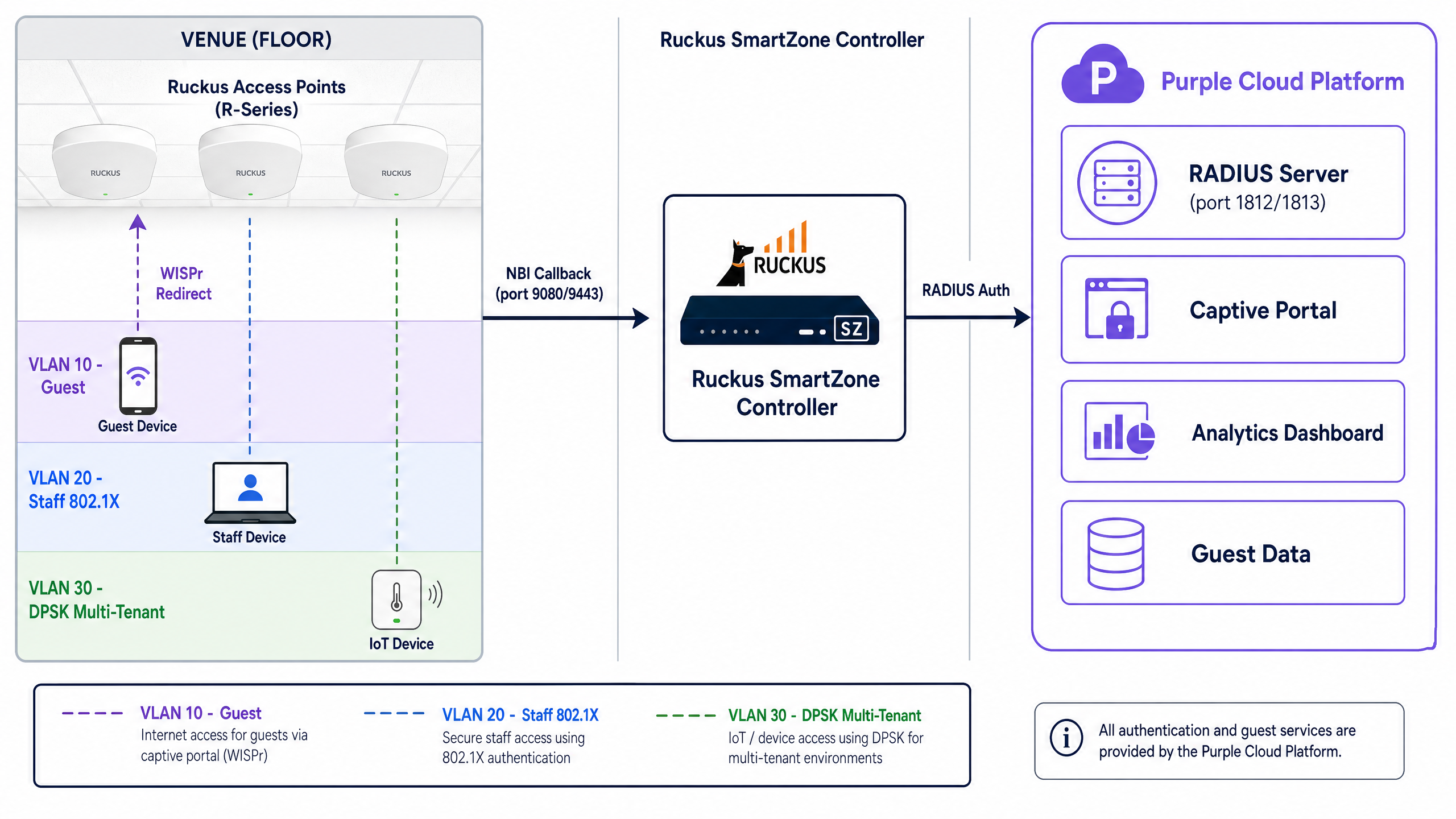
রিটেল এবং হসপিটালিটিতে পাবলিক অ্যাক্সেস নেটওয়ার্কের জন্য, Ruckus ওয়্যারলেস ইন্টারনেট সার্ভিস প্রোভাইডার রোমিং (WISPr) প্রোটোকল ব্যবহার করে। যখন একটি গেস্ট একটি ওপেন SSID-এর সাথে সংযুক্ত হন, তখন Ruckus কন্ট্রোলার তাদের প্রাথমিক HTTP রিকোয়েস্ট ইন্টারসেপ্ট করে এবং Purple-এর এক্সটার্নাল Captive Portal-এ একটি HTTP 302 রিডাইরেক্ট ইস্যু করে। গেস্ট একটি সচেতন-পছন্দের অপ্ট-ইন প্রক্রিয়ার মাধ্যমে অথেন্টিকেট করেন - যেমন ইমেল বা একটি সোশ্যাল আইডেন্টিটি প্রোভাইডার। সফল অথেন্টিকেশনের পর, Purple ম্যাক (MAC) অ্যাড্রেস অথরাইজ করতে এবং ইন্টারনেট অ্যাক্সেস মঞ্জুর করতে Northbound Interface (NBI)-এর মাধ্যমে Ruckus কন্ট্রোলারের সাথে পুনরায় যোগাযোগ করে।
architecture_overview.png

Secure Staff WiFi (802.1X এবং ডাইনামিক VLAN)

স্টাফ ডিভাইসগুলোর জন্য মৌলিকভাবে ভিন্ন পদ্ধতির প্রয়োজন। Captive Portal-এর উপর নির্ভর করার পরিবর্তে, এন্টারপ্রাইজ পরিবেশগুলো 802.1X অথেন্টিকেশন ব্যবহার করে। ডিভাইসগুলো EAP-TLS (সার্টিফিকেট-ভিত্তিক) বা PEAP-MSCHAPv2 (ক্রিডেনশিয়াল-ভিত্তিক) প্রোটোকল ব্যবহার করে সরাসরি Purple-এর RADIUS ইনফ্রাস্ট্রাকচারের বিরুদ্ধে অথেন্টিকেট করে।

এখানকার গুরুত্বপূর্ণ উপাদানটি হলো ডাইনামিক VLAN স্টিয়ারিং। যখন Purple-এর RADIUS সার্ভার একটি Access-Accept বার্তা ফেরত পাঠায়, তখন এতে তিনটি নির্দিষ্ট IETF স্ট্যান্ডার্ড অ্যাট্রিবিউট অন্তর্ভুক্ত থাকে:

  • Tunnel-Type (Attribute 64): VLAN (value 13) হিসেবে সেট করা
  • Tunnel-Medium-Type (Attribute 65): IEEE-802 (value 6) হিসেবে সেট করা
  • Tunnel-Private-Group-ID (Attribute 81): VLAN ID স্ট্রিং ধারণ করে (যেমন, স্টাফের জন্য "20")

Ruckus SmartZone কন্ট্রোলার এই অ্যাট্রিবিউটগুলো পড়ে এবং ব্যবহারকারীর ট্রাফিককে ডাইনামিকভাবে ট্যাগ করে, তারা যে ফিজিক্যাল অ্যাক্সেস পয়েন্টের সাথেই সংযুক্ত থাকুক না কেন তাদের সঠিক আইসোলেটেড নেটওয়ার্ক সেগমেন্টে স্থাপন করে।

Multi-Tenant আইসোলেশন (Ruckus DPSK)

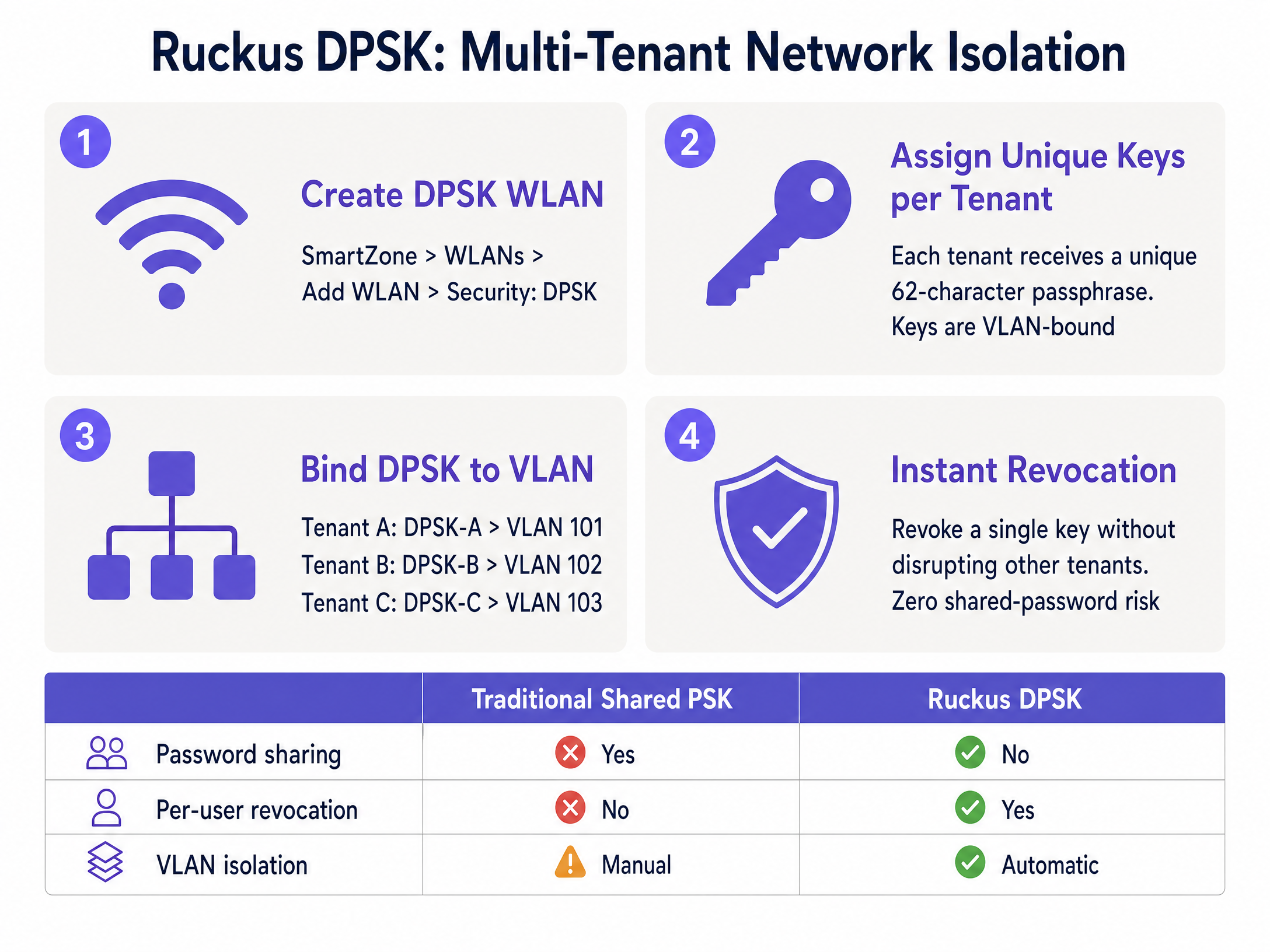
কো-ওয়ার্কিং স্পেস, স্টুডেন্ট অ্যাকোমোডেশন এবং মাল্টি-ডুয়েলিং ইউনিটের (MDU) মতো পরিবেশের জন্য, ডজন ডজন SSID ব্রডকাস্ট করা মারাত্মক চ্যানেল ইন্টারফারেন্স তৈরি করে। Ruckus Dynamic Pre-Shared Key (DPSK) একটি একক শেয়ার্ড SSID-এ প্রতিটি টেন্যান্টকে একটি অনন্য WPA2/WPA3 পাসফ্রেজ অ্যাসাইন করে এই সমস্যার সমাধান করে।

প্রতিটি DPSK একটি নির্দিষ্ট VLAN-এর সাথে আবদ্ধ থাকে। যখন কোনো বাসিন্দা সংযুক্ত হন, তখন কন্ট্রোলার ডিভাইসটিকে অথেন্টিকেট করতে এবং তাদের নিজস্ব প্রাইভেট VLAN-এ পাঠাতে তাদের অনন্য কী ব্যবহার করে। Purple এই প্রক্রিয়াটিকে API ইন্টিগ্রেশনের মাধ্যমে স্বয়ংক্রিয় করে, টেন্যান্টরা আসা-যাওয়ার সাথে সাথে কী জেনারেট এবং রিভোক করে, যা ঐতিহ্যবাহী শেয়ার্ড পাসওয়ার্ডের সাথে সম্পর্কিত নিরাপত্তা ঝুঁকিগুলো দূর করে।
dpsk_configuration_guide.png

ইমপ্লিমেন্টেশন গাইড

এই সেকশনটি Purple-কে একটি Ruckus SmartZone কন্ট্রোলারের সাথে ইন্টিগ্রেট করার জন্য প্রয়োজনীয় নির্দিষ্ট কনফিগারেশন ধাপগুলোর রূপরেখা দেয়। Unleashed-এর ধাপগুলো মূলত একই রকম তবে এতে Northbound Interface-এর প্রয়োজনীয়তা নেই।

১. RADIUS AAA সার্ভার কনফিগার করুন

  1. Services & Profiles > Authentication-এ যান।
  2. সার্ভিস প্রোটোকল RADIUS হিসেবে সেট করে একটি নতুন AAA সার্ভার প্রোফাইল তৈরি করুন।
  3. আপনার Purple অ্যাডমিন কনসোলে দেওয়া প্রাইমারি সার্ভার IP এবং শেয়ার্ড সিক্রেট লিখুন।
  4. অথেন্টিকেশন পোর্ট 1812 হিসেবে সেট করুন।
  5. Services & Profiles > Accounting-এর অধীনে এই প্রক্রিয়াটি পুনরাবৃত্তি করুন, পোর্টটি 1813 হিসেবে সেট করুন।

২. Hotspot WISPr প্রোফাইল কনফিগার করুন

  1. Services & Profiles > Hotspots & Portals > Hotspot (WISPr)-এ যান।
  2. একটি নতুন প্রোফাইল তৈরি করুন এবং লগইন URL-টি External হিসেবে সেট করুন।
  3. আপনার Purple Captive Portal রিডাইরেক্ট URL লিখুন।
  4. আপনার Walled Garden নির্ধারণ করুন। এটি অত্যন্ত গুরুত্বপূর্ণ। অথেন্টিকেশনের আগে আপনাকে অবশ্যই Purple-এর ডোমেনগুলোতে অ্যাক্সেসের অনুমতি দিতে হবে। SmartZone ওয়াইল্ডকার্ড সমর্থন করে (যেমন, *.purple.ai)। iOS Captive Network Assistant (CNA) আচরণ পরিচালনা করতে আপনাকে অবশ্যই captive.apple.com অন্তর্ভুক্ত করতে হবে।

৩. MAC অ্যাড্রেস এনক্রিপশন নিষ্ক্রিয় করুন (গুরুত্বপূর্ণ ধাপ)

ডিফল্টভাবে, SmartZone রিডাইরেক্ট URL-এ পাস করা MAC এবং IP অ্যাড্রেসগুলো এনক্রিপ্ট করে। সেশন ম্যানেজমেন্টের জন্য Purple-এর র (raw) MAC অ্যাড্রেস প্রয়োজন। আপনাকে অবশ্যই CLI-এর মাধ্যমে এটি নিষ্ক্রিয় করতে হবে:

enable
config
no encrypt-mac-ip
exit

৪. Northbound Interface (NBI) সক্ষম করুন

  1. Administration > External Services > WISPr Northbound Interface-এ যান।
  2. সার্ভিসটি সক্ষম করুন এবং একটি ইউজারনেম ও পাসওয়ার্ড কনফিগার করুন।
  3. এই ক্রিডেনশিয়ালগুলো Purple-কে প্রদান করুন। নিশ্চিত করুন আপনার ফায়ারওয়াল Purple-এর IP রেঞ্জ থেকে পোর্ট 9080 (HTTP) এবং 9443 (HTTPS)-এ ইনবাউন্ড TCP ট্রাফিকের অনুমতি দেয়।

5. WLAN তৈরি করুন

  1. একটি নতুন WLAN তৈরি করুন এবং Authentication Type-টি Hotspot (WISPr) হিসেবে সেট করুন।
  2. আগে কনফিগার করা Hotspot প্রোফাইল এবং AAA সার্ভারগুলো নির্বাচন করুন।
  3. 802.1X স্টাফ নেটওয়ার্কের জন্য, ডায়নামিক VLAN অ্যাট্রিবিউটগুলো প্রসেস করা নিশ্চিত করতে অ্যাডভান্সড সেটিংসে AAA Override সক্ষম করুন।

সর্বোত্তম অনুশীলনসমূহ

একটি শক্তিশালী এবং সুরক্ষিত ডিপ্লয়মেন্ট নিশ্চিত করতে, এই ইন্ডাস্ট্রি-স্ট্যান্ডার্ড সুপারিশগুলো মেনে চলুন:

  • গেস্ট ট্রাফিক আলাদা করুন: গেস্ট WiFi সবসময় একটি ডেডিকেটেড VLAN-এ রাখুন এবং ক্লায়েন্ট আইসোলেশন সক্ষম করুন। আপনার ভেন্যুতে যদি একই ফিজিক্যাল ইনফ্রাস্ট্রাকচারে পেমেন্ট প্রসেস করা হয়, তবে PCI DSS কমপ্লায়েন্সের জন্য এটি একটি বাধ্যতামূলক প্রয়োজনীয়তা।
  • VLAN ID স্ট্যান্ডার্ডাইজ করুন: একাধিক ভেন্যুতে ডায়নামিক VLAN স্টিয়ারিং ডিপ্লয় করার সময়, আপনার VLAN নাম্বারিং স্কিমটি বিশ্বব্যাপী অভিন্ন হওয়া নিশ্চিত করুন (যেমন, VLAN 20 সর্বদা স্টাফ)। অসঙ্গতিপূর্ণ নামকরণের কারণে অথেন্টিকেশন ব্যর্থ হতে পারে।
  • RADIUS Fallback প্রয়োগ করুন: আপনার কন্ট্রোলারগুলোতে একটি ক্রিটিক্যাল VLAN বা ফলব্যাক মেকানিজম কনফিগার করুন। যদি প্রাইমারি RADIUS সার্ভারটি অ্যাক্সেস করা না যায়, তবে মৌলিক কানেক্টিভিটি বজায় রাখতে ডিভাইসগুলোকে একটি সীমাবদ্ধ ইন্টারনেট-অনলি VLAN-এ স্থানান্তর করা উচিত।
  • নতুন ডিপ্লয়মেন্টের জন্য DPSK3 ব্যবহার করুন: আপনার Ruckus হার্ডওয়্যার যদি WPA3 সমর্থন করে, তবে SAE-ভিত্তিক এনক্রিপশনের সুবিধা পেতে লেগ্যাসি DPSK-এর পরিবর্তে DPSK3 ডিপ্লয় করুন।

ট্রাবলশুটিং এবং ঝুঁকি হ্রাসকরণ

এক্সটার্নাল Captive Portal এবং RADIUS পরিষেবাগুলো ইন্টিগ্রেট করার সময়, ইঞ্জিনিয়াররা সাধারণত নিম্নলিখিত ব্যর্থতার সম্মুখীন হন:

  • পোর্টাল লোড হতে ব্যর্থ হওয়া: এটি প্রায় সবসময়ই একটি Walled Garden মিসকনফিগারেশন। আধুনিক পোর্টালগুলো একাধিক CDN এবং আইডেন্টিটি প্রোভাইডার থেকে অ্যাসেট লোড করে। ব্লক করা রিকোয়েস্টগুলো সনাক্ত করতে ব্রাউজার ডেভেলপার টুল ব্যবহার করুন এবং আপনার SmartZone Walled Garden-এ প্রয়োজনীয় ডোমেনগুলো যোগ করুন।
  • অথেন্টিকেশন সফল কিন্তু ইন্টারনেট অ্যাক্সেস নেই: এটি একটি Northbound Interface ব্যর্থতা নির্দেশ করে। SmartZone Purple থেকে অথরাইজেশন কলব্যাক পাচ্ছে না। আপনার NBI ক্রেডেনশিয়াল যাচাই করুন এবং TCP পোর্ট 9080/9443-এ ড্রপ হওয়া ট্রাফিকের জন্য ফায়ারওয়াল লগ পরীক্ষা করুন।
  • ডায়নামিক VLAN অ্যাসাইনমেন্ট ব্যর্থ হওয়া: যদি 802.1X ব্যবহারকারীরা সফলভাবে অথেন্টিকেট হন কিন্তু ডিফল্ট VLAN-এ চলে যান, তবে WLAN সেটিংসে AAA Override সক্ষম করা আছে কিনা তা পরীক্ষা করুন। এটি ছাড়া, SmartZone Purple দ্বারা রিটার্ন করা Tunnel-Private-Group-ID অ্যাট্রিবিউটটি উপেক্ষা করে।

ROI এবং ব্যবসায়িক প্রভাব

Ruckus ইনফ্রাস্ট্রাকচারকে Purple-এর সাথে ইন্টিগ্রেট করা একটি স্ট্যান্ডার্ড ওয়্যারলেস নেটওয়ার্ককে একটি পরিমাপযোগ্য ব্যবসায়িক সম্পদে রূপান্তরিত করে।

রিটেইল এবং হসপিটালিটি ভেন্যুগুলোর জন্য, Captive Portal যাচাইকৃত ফার্স্ট-পার্টি ডেটা সংগ্রহ করে, যা লয়্যালটি প্রোগ্রামের প্রবৃদ্ধি বাড়ায় এবং টার্গেটেড মার্কেটিং ক্যাম্পেইন পরিচালনা করতে সাহায্য করে। যুক্তরাজ্যের একটি বড় হোটেল চেইন তাদের Ruckus এবং Purple রোলআউটের পর অতিথিদের সন্তুষ্টির স্কোরে ৪০% বৃদ্ধির কথা জানিয়েছে।

IT অপারেশনের জন্য, ডায়নামিক VLAN স্টিয়ারিং এবং DPSK অটোমেশন ম্যানুয়াল কনফিগারেশনের ঝামেলা নাটকীয়ভাবে কমিয়ে দেয়। কোনো টেন্যান্ট চলে যাওয়ার সময় স্ট্যাটিক সুইচ পোর্ট ম্যানেজ করা বা শেয়ার্ড পাসওয়ার্ড রিসেট করার পরিবর্তে, অ্যাক্সেস কন্ট্রোল সেন্ট্রালাইজড এবং অটোমেটেড করা হয়, যা নিরাপত্তার ঝুঁকি কমায় এবং সাপোর্ট টিকিটের সংখ্যা হ্রাস করে।

মূল সংজ্ঞাসমূহ

WISPr

Wireless Internet Service Provider roaming. An industry-standard protocol used by wireless controllers to intercept HTTP traffic and redirect users to an external captive portal.

This is the foundational architecture for all public Guest WiFi deployments on Ruckus hardware.

Northbound Interface (NBI)

An API on the Ruckus SmartZone controller that allows external platforms to send authorisation commands.

Required for Purple to grant a user internet access after they successfully complete the captive portal login.

Walled Garden

A whitelist of domains and IP addresses that a device is permitted to access before authenticating on the network.

Essential for allowing the captive portal page, its associated images, and social login providers to load for unauthenticated guests.

Dynamic PSK (DPSK)

A Ruckus-proprietary technology that assigns a unique WPA2/WPA3 passphrase to individual users or groups on a single shared SSID.

Used heavily in multi-tenant environments (MDUs, co-working spaces) to provide secure network isolation without SSID bloat.

Dynamic VLAN Steering

The process of automatically assigning a device to a specific network segment (VLAN) based on RADIUS attributes returned during 802.1X authentication.

Allows IT teams to use a single 'Staff' SSID while securely separating HR, Finance, and Front Desk traffic at the network layer.

AAA Override

A configuration setting on wireless controllers that forces the access point to apply the policies (like VLAN IDs) returned by the RADIUS server.

Must be enabled on Ruckus WLANs for dynamic VLAN steering to function correctly.

Client Isolation

A security feature that prevents devices connected to the same wireless network from communicating directly with each other.

A mandatory security control for public Guest WiFi networks to prevent peer-to-peer attacks and ensure compliance.

Captive Network Assistant (CNA)

The mini-browser built into mobile operating systems (like iOS and Android) that automatically pops up when a captive portal is detected.

Engineers must manage CNA behaviour via the Walled Garden to ensure a smooth login experience for mobile users.

সমাধানকৃত উদাহরণসমূহ

A 250-room hotel needs to deploy three distinct networks on their Ruckus SmartZone infrastructure: a public guest network, a secure staff network with access to the property management system, and an isolated IoT network for smart thermostats.

The IT team configures three WLANs. The 'Guest-WiFi' WLAN uses Hotspot (WISPr) authentication redirecting to Purple's captive portal, dropping users onto VLAN 10 with client isolation enabled. The 'Staff-Secure' WLAN uses 802.1X EAP authentication against Purple SecurePass; the RADIUS server returns Tunnel-Private-Group-ID = 20, dynamically steering staff to the internal VLAN. The 'IoT-Devices' WLAN uses a static WPA2 PSK bound to VLAN 30, restricted via firewall rules to communicate only with the thermostat control server.

পরীক্ষকের মন্তব্য: This architecture correctly applies the principle of least privilege. By leveraging dynamic VLAN steering for staff, the hotel avoids broadcasting multiple department-specific SSIDs, reducing channel utilisation while maintaining strict network segmentation required for PCI DSS compliance.

A co-working space operator manages a building with 15 different tenant companies. They need to provide secure, isolated wireless access for each company without broadcasting 15 separate SSIDs.

The operator deploys Ruckus Unleashed and configures a single 'Tenant-WiFi' WLAN using Dynamic PSK (DPSK) security. Within the controller, they enable Per-DPSK VLAN assignment. Each of the 15 tenant companies is issued a unique 62-character passphrase. When Tenant A's employees connect using their specific key, the controller automatically assigns their traffic to VLAN 101. Tenant B's employees use a different key and land on VLAN 102.

পরীক্ষকের মন্তব্য: This is the optimal use case for Ruckus DPSK. It provides enterprise-grade isolation at the network layer while keeping the RF environment clean by broadcasting only one SSID. It also eliminates the security risk of a shared password, as revoking Tenant A's access requires deleting a single key without impacting the other 14 companies.

অনুশীলনী প্রশ্নসমূহ

Q1. You have configured a Guest WiFi network on a Ruckus SmartZone controller integrated with Purple. When connecting a test device, the Purple captive portal page appears, but the logo image is missing and the 'Login with Facebook' button does not work. What is the most likely cause?

ইঙ্গিত: Consider what network access the device has before it successfully authenticates.

মডেল উত্তর দেখুন

The Walled Garden is misconfigured. The domains hosting the logo image (e.g., a CDN) and the Facebook authentication servers have not been added to the Walled Garden whitelist, so the SmartZone controller is blocking those requests pre-authentication.

Q2. A network engineer is deploying 802.1X for staff access. The Purple RADIUS server is correctly returning the `Tunnel-Private-Group-ID` attribute for VLAN 20. However, when staff connect, they are placed on the default VLAN assigned to the WLAN. How do you resolve this?

ইঙ্গিত: The controller is receiving the RADIUS instructions but choosing to ignore them.

মডেল উত্তর দেখুন

You must enable 'AAA Override' in the advanced settings of the WLAN on the SmartZone controller. Without this setting enabled, the controller will not apply the dynamic VLAN attributes returned by the RADIUS server.

Q3. A co-working space wants to provide secure WiFi for 10 different companies. They currently broadcast 10 separate SSIDs, which is causing severe channel interference. They cannot use 802.1X because many devices are shared printers or smart TVs. What is the recommended Ruckus architecture?

ইঙ্গিত: Look for a solution that provides unique encryption keys without requiring enterprise certificates or credentials.

মডেল উত্তর দেখুন

Implement Ruckus Dynamic PSK (DPSK) on a single SSID. Issue a unique DPSK to each tenant company, and configure the controller to bind each DPSK to a specific VLAN. This eliminates SSID bloat, provides network isolation, and supports headless devices like printers.

এই সিরিজে পড়া চালিয়ে যান

Purple WiFi-এর সাথে Allied Telesis Access Points ইন্টিগ্রেশন

এই গাইডটি Purple WiFi-এর সাথে Allied Telesis TQ-Series access points ইন্টিগ্রেট করার জন্য একটি ব্যাপক কনফিগারেশন প্লেবুক প্রদান করে। এটি নিরাপদ মাল্টি-টেন্যান্ট ডেপ্লয়মেন্টের জন্য এক্সটার্নাল Captive Portal রিডাইরেকশন, 802.1X RADIUS অথেন্টিকেশন এবং প্রাইভেট প্রি-শেয়ার্ড কি (PPSK) ব্যবহার করে ডাইনামিক VLAN স্টিয়ারিং কভার করে।

গাইডটি পড়ুন →

Purple WiFi-এর সাথে Grandstream GWN Access Points-এর ইন্টিগ্রেশন

এই নির্ভরযোগ্য প্রযুক্তিগত রেফারেন্স গাইডটিতে Grandstream GWN access points-এর সাথে Purple-এর Guest WiFi এবং অ্যানালিটিক্স প্ল্যাটফর্ম কীভাবে ইন্টিগ্রেট করতে হয় তা বিস্তারিতভাবে আলোচনা করা হয়েছে। এতে Grandstream captive portal কনফিগারেশন, RADIUS AAA সেটিংস, walled garden সেটআপ, ডাইনামিক VLAN স্টিয়ারিং সহ সুরক্ষিত স্টাফ 802.1X অথেন্টিকেশন এবং মাল্টি-টেন্যান্ট PPSK সেগমেন্টেশন অন্তর্ভুক্ত রয়েছে - যা স্কেলে গেস্ট এবং স্টাফ WiFi স্থাপনকারী MSP এবং IT টিমগুলোর জন্য কার্যকর, ধাপে ধাপে নির্দেশিকা প্রদান করে।

গাইডটি পড়ুন →

OpenWrt Custom Firmware Integration with Purple WiFi

এই গাইডটি Purple WiFi-এর সাথে OpenWrt কাস্টম ফার্মওয়্যার স্থাপনের জন্য সম্পূর্ণ ইন্টিগ্রেশন প্লেবুক প্রদান করে। এতে CoovaChilli captive portal কনফিগারেশন, iptables walled garden ম্যানেজমেন্ট, hostapd-এর মাধ্যমে 802.1X সুরক্ষিত স্টাফ WiFi এবং ডাইনামিক VLAN অ্যাসাইনমেন্ট সহ মাল্টি-টেন্যান্ট PPSK সেগমেন্টেশন কভার করা হয়েছে - যা IT টিমগুলোকে যেকোনো OpenWrt-সক্ষম হার্ডওয়্যারে একটি আইডেন্টিটি-ভিত্তিক নেটওয়ার্ক তৈরি করার জন্য প্রয়োজনীয় সঠিক কনফিগারেশন ধাপগুলো প্রদান করে।

গাইডটি পড়ুন →