
অন-প্রিমিজ RADIUS (NPS) থেকে RADIUS as a Service-এ মাইগ্রেট করা
এই প্রামাণিক নির্দেশিকাটি অন-প্রিমিজ Microsoft Network Policy Server (NPS) থেকে একটি ক্লাউড-নেটিভ RADIUS as a Service মডেলে মাইগ্রেট করার প্রযুক্তিগত স্থাপত্য, বাস্তবায়ন পদ্ধতি এবং ব্যবসায়িক প্রভাব বিস্তারিতভাবে তুলে ধরে। এটি আইটি নেতা এবং নেটওয়ার্ক স্থপতিদেরকে অপারেশনাল খরচ কমাতে, একক ব্যর্থতার পয়েন্ট দূর করতে এবং বিতরণ করা স্থান জুড়ে এন্টারপ্রাইজ প্রমাণীকরণ সুরক্ষিত করার জন্য ব্যবহারিক কাঠামো সরবরাহ করে।
এই গাইডটি শুনুন
পডকাস্ট ট্রান্সক্রিপ্ট দেখুন
কার্যনির্বাহী সারসংক্ষেপ
প্রায় দুই দশক ধরে, Microsoft-এর Network Policy Server (NPS) এন্টারপ্রাইজ নেটওয়ার্কগুলির জন্য ডিফল্ট RADIUS বাস্তবায়ন হিসাবে কাজ করেছে। তবে, ভেন্যু অপারেটররা যখন বিতরণ করা স্থানগুলিতে—খুচরা চেইন থেকে শুরু করে বিশ্বব্যাপী আতিথেয়তা গোষ্ঠী পর্যন্ত—বিস্তার লাভ করে, তখন অন-প্রিমিজ প্রমাণীকরণ অবকাঠামো পরিচালনার অপারেশনাল বোঝা একটি উল্লেখযোগ্য দায়বদ্ধতায় পরিণত হয়েছে।
RADIUS as a Service-এ মাইগ্রেট করা প্রমাণীকরণকে একটি পরিচালিত হার্ডওয়্যার উপাদান থেকে একটি ব্যবহৃত ক্লাউড পরিষেবাতে স্থানান্তরিত করে। এই স্থাপত্যগত পরিবর্তনটি স্বতন্ত্র NPS স্থাপনাগুলিতে বিদ্যমান একক ব্যর্থতার পয়েন্টকে দূর করে, হার্ডওয়্যার রিফ্রেশ চক্রগুলি সরিয়ে দেয় এবং স্টেডিয়াম ও সম্মেলন কেন্দ্রগুলির মতো উচ্চ-ঘনত্বের পরিবেশের জন্য প্রয়োজনীয় স্থিতিস্থাপক স্কেলেবিলিটি সরবরাহ করে। আইটি ম্যানেজার এবং নেটওয়ার্ক স্থপতিদের জন্য, এই নির্দেশিকাটি উৎপাদন ট্র্যাফিককে প্রভাবিত না করে, PCI DSS এবং GDPR-এর সাথে সম্মতি নিশ্চিত করে, এবং প্রমাণীকরণ অবকাঠামো OpEx ৮০% পর্যন্ত হ্রাস করে 802.1X প্রমাণীকরণকে ক্লাউডে স্থানান্তরিত করার জন্য একটি বিক্রেতা-নিরপেক্ষ, কাঠামোগত পদ্ধতি সরবরাহ করে।
প্রযুক্তিগত গভীর বিশ্লেষণ: স্থাপত্য এবং মান
মাইগ্রেশন বোঝার জন্য, আমাদের প্রথমে IEEE 802.1X পোর্ট-ভিত্তিক অ্যাক্সেস নিয়ন্ত্রণ কীভাবে সরবরাহ করা হয় তার স্থাপত্যগত পরিবর্তনটি পরীক্ষা করতে হবে।
অন-প্রিমিজ NPS-এর সীমাবদ্ধতা
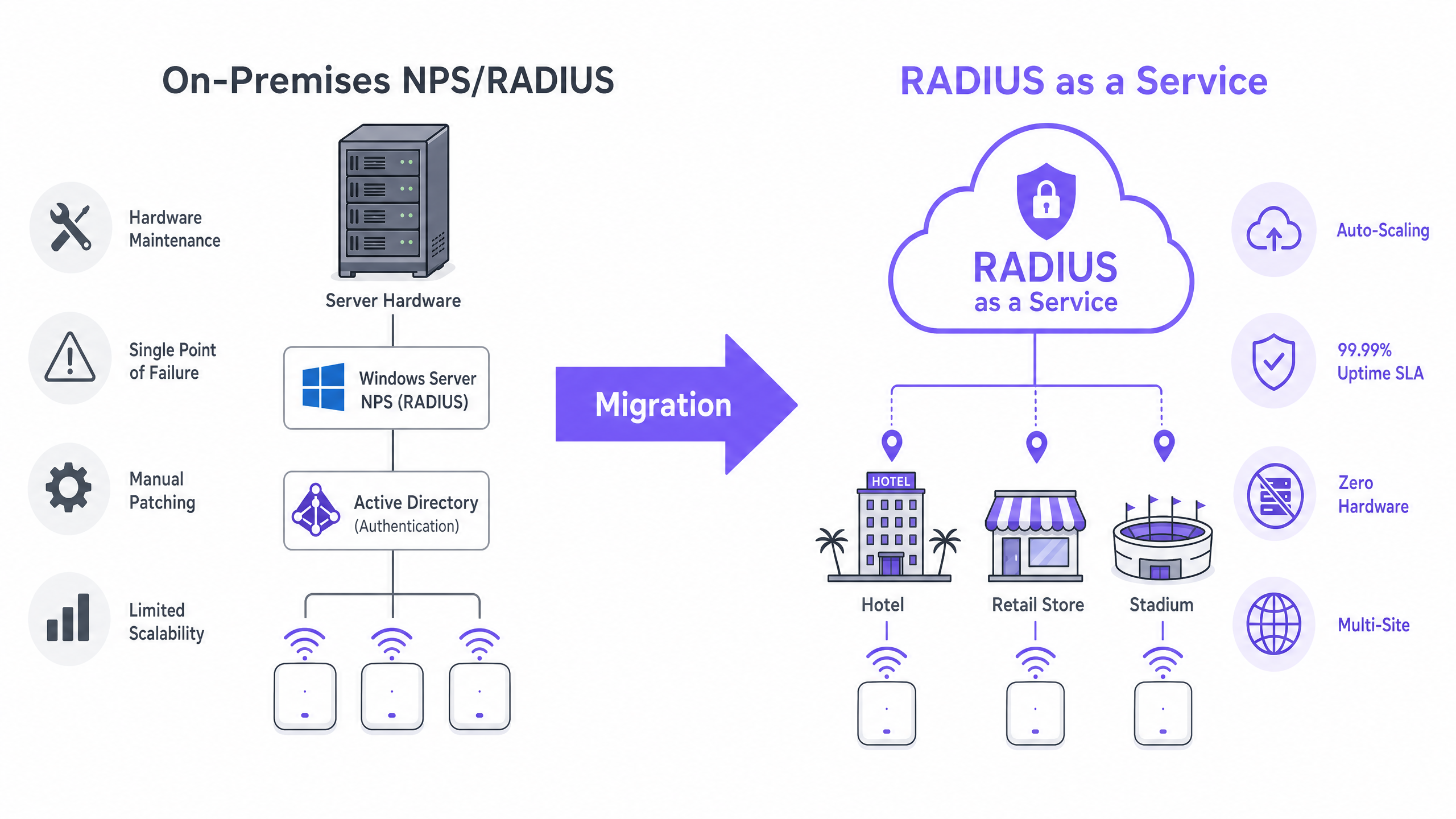
একটি ঐতিহ্যবাহী স্থাপনায়, অ্যাক্সেস পয়েন্টগুলি Network Access Server (NAS) হিসাবে কাজ করে, প্রমাণীকরণ অনুরোধগুলি একটি অন-প্রিমিজ NPS সার্ভারে ফরোয়ার্ড করে। NPS সার্ভার সংযোগ অনুরোধ নীতিগুলি মূল্যায়ন করে, একটি পরিচয় স্টোরের (সাধারণত LDAP এর মাধ্যমে Active Directory) বিরুদ্ধে শংসাপত্রগুলি যাচাই করে এবং একটি Access-Accept বা Access-Reject বার্তা ফেরত দেয়।
এই মডেলটি আধুনিক নেটওয়ার্কগুলির জন্য তিনটি গুরুত্বপূর্ণ সীমাবদ্ধতা উপস্থাপন করে:
- হার্ডওয়্যার নির্ভরতা ও রক্ষণাবেক্ষণ: NPS-এর জন্য ডেডিকেটেড ফিজিক্যাল বা ভার্চুয়াল মেশিন প্রয়োজন, যা অবিচ্ছিন্ন প্যাচিং, ক্ষমতা পরিকল্পনা এবং জীবনচক্র ব্যবস্থাপনার দাবি রাখে।
- উচ্চ প্রাপ্যতা জটিলতা: রিডানডেন্সি অর্জনের জন্য NPS-কে একটি ফেইলওভার পেয়ারে স্থাপন করা প্রয়োজন, যা প্রকৃত ভৌগোলিক রিডানডেন্সি প্রদান না করেই লাইসেন্সিং খরচ দ্বিগুণ করে।
- থ্রুপুট বাধা: সর্বোচ্চ সমকালীনতার সময়—যেমন একটি স্টেডিয়ামের প্রবেশ বা খুচরা ব্যবসার সর্বোচ্চ সময়—একটি একক NPS ইনস্ট্যান্স একটি বাধা হয়ে উঠতে পারে, যার ফলে প্রমাণীকরণ টাইমআউট এবং ব্যবহারকারীর অভিজ্ঞতা হ্রাস পেতে পারে।
ক্লাউড RADIUS স্থাপত্য
RADIUS as a Service প্রমাণীকরণ স্তরকে বিমূর্ত করে। ক্লাউড সরবরাহকারীরা RADIUS সার্ভারগুলির বিতরণ করা, ভূ-রিডানড্যান্ট ক্লাস্টার পরিচালনা করে। NAS এই ক্লাউড এন্ডপয়েন্টগুলির দিকে নির্দেশ করে এবং অনুরোধগুলি স্বয়ংক্রিয়ভাবে লোড-ব্যালেন্স করা হয়।
পরিবহন নিরাপত্তা: RadSec-এর ভূমিকা RADIUS ক্লাউডে স্থানান্তরিত করার সময়, প্রমাণীকরণ ট্র্যাফিক পাবলিক ইন্টারনেট অতিক্রম করে। যদিও ঐতিহ্যবাহী RADIUS একটি শেয়ার্ড সিক্রেট এবং MD5 হ্যাশিং ব্যবহার করে, আধুনিক স্থাপনাগুলিতে RadSec (RADIUS over TLS, RFC 6614) বাস্তবায়ন করতে হবে। RadSec সম্পূর্ণ RADIUS কথোপকথনকে একটি TLS টানেলে (সাধারণত TCP পোর্ট 2083) আবৃত করে, যা HTTPS-এর সমতুল্য পরিবহন-স্তর এনক্রিপশন এবং NAS ও ক্লাউড RADIUS এন্ডপয়েন্টের মধ্যে পারস্পরিক প্রমাণীকরণ সরবরাহ করে।
পরিচয় ইন্টিগ্রেশন ক্লাউড RADIUS আপনার ব্যবহারকারী ডিরেক্টরি মাইগ্রেট করার প্রয়োজন হয় না। পরিষেবাগুলি সাধারণত অন-প্রিমিজ Active Directory-তে LDAPS সংযোগ বা SAML বা SCIM এর মাধ্যমে Azure Active Directory (Entra ID)-এর সাথে নেটিভ API ইন্টিগ্রেশন সমর্থন করে। এটি নিশ্চিত করে যে আপনার বিদ্যমান ব্যবহারকারী জীবনচক্র ব্যবস্থাপনা প্রক্রিয়াগুলি অক্ষত থাকে।
Guest WiFi প্ল্যাটফর্ম ব্যবহারকারী ভেন্যুগুলির জন্য, ক্লাউড RADIUS সরাসরি ইন্টিগ্রেট করে, যা কর্পোরেট 802.1X প্রমাণীকরণ এবং গেস্ট নেটওয়ার্ক অ্যাক্সেস উভয়ের জন্য একটি সমন্বিত নিয়ন্ত্রণ প্লেন সরবরাহ করে, উন্নত WiFi Analytics সহ।
বাস্তবায়ন নির্দেশিকা: একটি ৫-পর্যায়ের পদ্ধতি
ডাউনটাইম ছাড়াই একটি মাইগ্রেশন কার্যকর করার জন্য একটি কাঠামোগত, পর্যায়ক্রমিক পদ্ধতির প্রয়োজন।
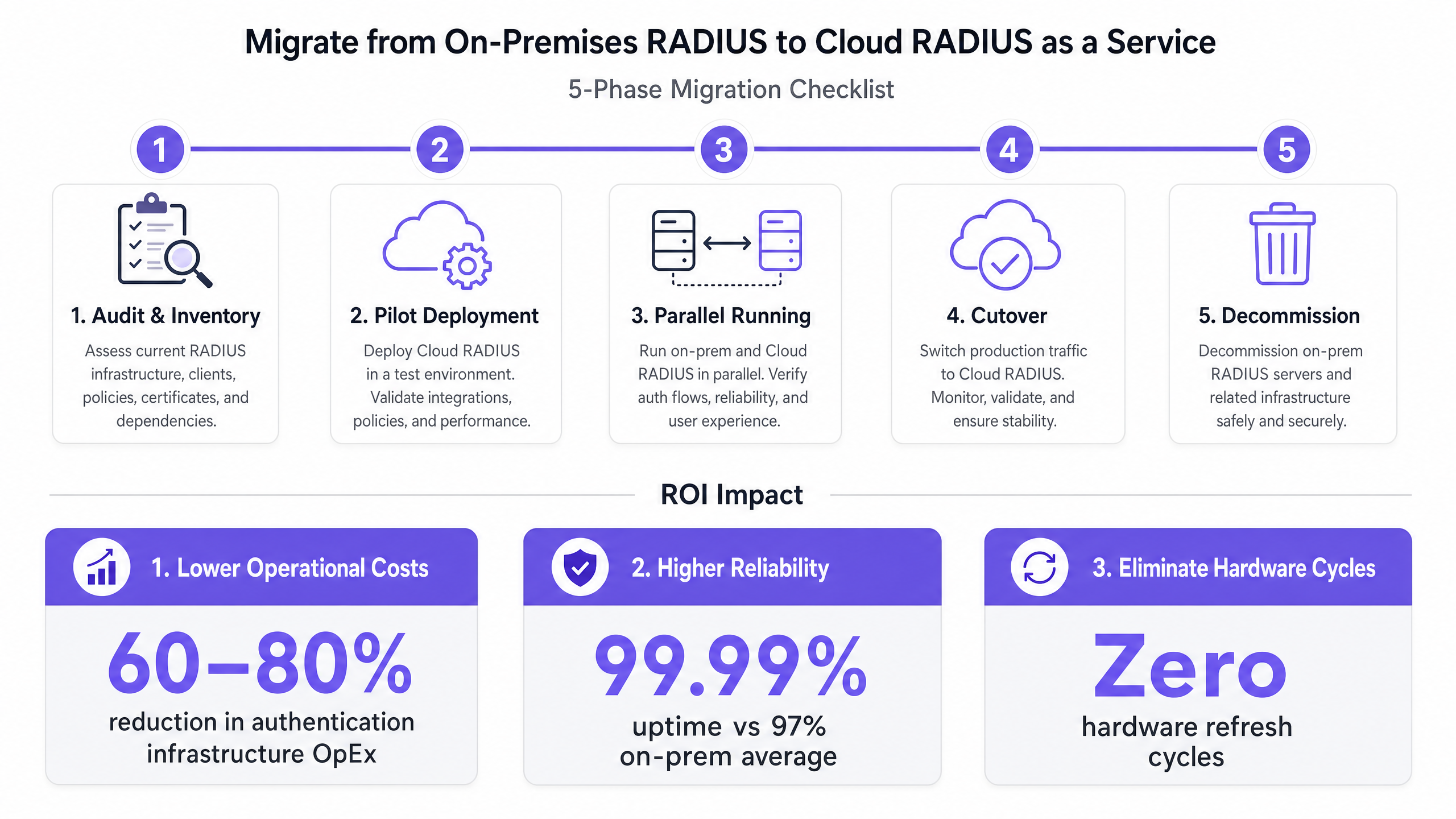
পর্যায় ১: নিরীক্ষা এবং ইনভেন্টরি
কোনো পরিবর্তন করার আগে, বর্তমান অবস্থা নথিভুক্ত করুন:
- RADIUS ক্লায়েন্ট: প্রতিটি NAS (অ্যাক্সেস পয়েন্ট, সুইচ, VPN কনসেন্ট্রেটর) চিহ্নিত করুন।
- নীতিমালা: বিদ্যমান NPS সংযোগ অনুরোধ এবং নেটওয়ার্ক নীতিগুলি নথিভুক্ত করুন, যার মধ্যে VLAN অ্যাসাইনমেন্টের জন্য ব্যবহৃত Vendor-Specific Attributes (VSAs) অন্তর্ভুক্ত।
- EAP পদ্ধতি: কোন Extensible Authentication Protocol পদ্ধতিগুলি ব্যবহার করা হচ্ছে তা চিহ্নিত করুন (যেমন, EAP-TLS, PEAP-MSCHAPv2)।
পর্যায় ২: পাইলট স্থাপনা
ক্লাউড RADIUS ইনস্ট্যান্স প্রভিশন করুন এবং একটি নন-প্রোডাকশন SSID বা একটি একক পরীক্ষা সাইট কনফিগার করুন। পরিচয় ডিরেক্টরি ইন্টিগ্রেশন (যেমন, Entra ID সিঙ্ক) যাচাই করুন এবং নিশ্চিত করুন যে EAP পদ্ধতি এন্ড-টু-এন্ড কাজ করছে।
পর্যায় ৩: সমান্তরাল পরিচালনা (ঝুঁকি প্রশমন)
উৎপাদন NAS ডিভাইসগুলিকে ক্লাউড RADIUS সার্ভার (প্রাথমিক) এবং লিগ্যাসি NPS সার্ভার (ফলব্যাক) উভয়ই ব্যবহার করার জন্য কনফিগার করুন। এই কনফিগারেশনটি কমপক্ষে দুই সপ্তাহের জন্য চালান। কাটওভারের আগে কোনো নীতিগত অসঙ্গতি চিহ্নিত করতে প্রমাণীকরণ সাফল্যের হার, লেটেন্সি মেট্রিক্স এবং অ্যাকাউন্টিং ডেটা প্রবাহ পর্যবেক্ষণ করুন।
পর্যায় ৪: কাটওভার
একটি নির্ধারিত রক্ষণাবেক্ষণ উইন্ডোর সময়, NAS ডিভাইসগুলি থেকে লিগ্যাসি NPS ফলব্যাক কনফিগারেশন সরিয়ে ফেলুন। সম্পূর্ণরূপে ক্লাউড অবকাঠামোতে প্রতিশ্রুতিবদ্ধ হন। নিশ্চিত করুন যে আপনার রোলব্যাক পদ্ধতি নথিভুক্ত এবং পরীক্ষিত হয়েছে।
পর্যায় ৫: ডিকমিশন
৩০ দিনের স্থিতিশীল অপারেশনের পর, নিরাপদে লিগ্যাসি NPS সার্ভারগুলি ডিকমিশন করুন এবং কম্পিউট রিসোর্সগুলি পুনরুদ্ধার করুন।
সেরা অনুশীলন এবং সম্মতি
আপনার ক্লাউড RADIUS স্থাপত্য ডিজাইন করার সময়, নিম্নলিখিত মানগুলি মেনে চলুন:
- RadSec বাধ্যতামূলক করুন: আপনার NAS হার্ডওয়্যার RadSec (TCP 2083) সমর্থন করলে স্ট্যান্ডার্ড UDP 1812/1813 ব্যবহার করে পাবলিক ইন্টারনেটের মাধ্যমে RADIUS ট্র্যাফিক পাঠাবেন না।
- সার্টিফিকেট ট্রাস্ট চেইন: নিশ্চিত করুন যে ক্লায়েন্ট ডিভাইসগুলি Certক্লাউড RADIUS সার্ভারের সার্টিফিকেট ইস্যু করা অথরিটি (CA)। মাইগ্রেশনের আগে MDM বা গ্রুপ পলিসির মাধ্যমে রুট CA পরিচালিত ডিভাইসগুলিতে পুশ করুন।
- কমপ্লায়েন্স পজিশন: এমন একটি ক্লাউড RADIUS প্রদানকারী নির্বাচন করুন যা SOC 2 Type II সার্টিফিকেশন এবং ISO 27001 স্বীকৃতি বজায় রাখে। এটি আপনার বার্ষিক PCI DSS মূল্যায়নকে উল্লেখযোগ্যভাবে সহজ করে, বিশেষ করে খুচরা এবং আতিথেয়তা পরিবেশের জন্য।
বিস্তৃত নেটওয়ার্ক ডিজাইন নীতিগুলির জন্য, ব্যবসায়ের জন্য WiFi সেট আপ করা: একটি 2026 প্লেবুক এবং সর্বোত্তম চ্যানেল পরিকল্পনার জন্য RSSI এবং সিগন্যাল শক্তি বোঝা সম্পর্কিত আমাদের গাইডগুলি দেখুন।
সমস্যা সমাধান ও ঝুঁকি প্রশমন
| ব্যর্থতার ধরণ | মূল কারণ | প্রশমন কৌশল |
|---|---|---|
| প্রমাণীকরণ সময়সীমা | ফায়ারওয়াল আউটবাউন্ড UDP 1812/1813 বা TCP 2083 ব্লক করছে। | ক্লাউড RADIUS প্রদানকারীর নির্দিষ্ট IP রেঞ্জগুলিতে আউটবাউন্ড ট্র্যাফিকের অনুমতি দেয় কিনা তা পেরিমিটার ফায়ারওয়াল নিয়মগুলি যাচাই করুন। |
| সার্টিফিকেট ট্রাস্ট ত্রুটি | ক্লায়েন্ট ডিভাইসগুলির বিশ্বস্ত স্টোরে রুট CA নেই। | ফেজ 3 (সমান্তরাল চলমান) এর আগে MDM/GPO এর মাধ্যমে রুট CA স্থাপন করুন। |
| VLAN অ্যাসাইনমেন্ট ব্যর্থ | ক্লাউড নীতিগুলিতে বিক্রেতা-নির্দিষ্ট অ্যাট্রিবিউট (VSAs) সঠিকভাবে ম্যাপ করা হয়নি। | ফেজ 1 চলাকালীন NPS থেকে ক্লাউড RADIUS নীতি ইঞ্জিনে সঠিক VSA স্ট্রিং ফর্ম্যাটগুলি প্রতিলিপি করুন। |
| WAN বিভ্রাটের প্রভাব | ইন্টারনেট সংযোগ বিচ্ছিন্ন হলে ক্লাউড RADIUS-এ অ্যাক্সেস হারানো। | রিডানড্যান্ট WAN লিঙ্ক স্থাপন করুন বা একটি স্থানীয় RADIUS প্রক্সি প্রয়োগ করুন যা পরিচিত ডিভাইসগুলির জন্য প্রমাণপত্র ক্যাশে করে। |
ROI এবং ব্যবসায়িক প্রভাব
RADIUS অ্যাজ এ সার্ভিস-এ স্থানান্তরিত হওয়া পরিমাপযোগ্য ব্যবসায়িক ফলাফল প্রদান করে:
- খরচ হ্রাস: হার্ডওয়্যার সংগ্রহ, Windows Server লাইসেন্সিং এবং প্যাচিং ও রক্ষণাবেক্ষণে ব্যয় করা ইঞ্জিনিয়ারিং ঘন্টা দূর করে। সাধারণ OpEx হ্রাস 60-80%।
- নির্ভরযোগ্যতা SLA: ক্লাউড প্রদানকারীরা আর্থিকভাবে সমর্থিত 99.99% আপটাইম SLA অফার করে, যা একক-সাইট NPS স্থাপনা দ্বারা অর্জিত সাধারণ 97-98% এর তুলনায় বেশি।
- চটপটেতা: স্থানীয় প্রমাণীকরণ হার্ডওয়্যার সরবরাহ ছাড়াই নতুন সাইটগুলি তাৎক্ষণিকভাবে অনলাইনে আনা যেতে পারে, যা পরিবহন হাব এবং স্বাস্থ্যসেবা সুবিধাগুলির জন্য স্থাপনার সময়সীমা দ্রুত করে।
আমাদের সিনিয়র কনসালটিং টিমের এই 10 মিনিটের ব্রিফিংয়ে কৌশলগত প্রভাবগুলি নিয়ে আলোচনা শুনুন:
মূল সংজ্ঞাসমূহ
RADIUS (Remote Authentication Dial-In User Service)
A networking protocol that provides centralized Authentication, Authorization, and Accounting (AAA) management for users who connect and use a network service.
The core protocol used by enterprise WiFi networks to validate user credentials before granting network access.
NPS (Network Policy Server)
Microsoft's implementation of a RADIUS server and proxy, bundled as a role in Windows Server.
The legacy on-premises infrastructure that organizations are actively migrating away from to reduce maintenance overhead.
NAS (Network Access Server)
The device that acts as the gateway to the network and passes authentication requests to the RADIUS server.
In a wireless context, the NAS is typically the WiFi Access Point or Wireless LAN Controller.
RadSec (RADIUS over TLS)
A protocol defined in RFC 6614 that transports RADIUS packets over a TCP connection encrypted with TLS.
Essential for cloud RADIUS deployments to ensure credential data is encrypted while traversing the public internet.
EAP (Extensible Authentication Protocol)
An authentication framework frequently used in wireless networks and point-to-point connections.
Determines how the client and server securely exchange credentials (e.g., certificates via EAP-TLS, or passwords via PEAP).
VSA (Vendor-Specific Attribute)
Custom attributes defined by hardware vendors within the RADIUS protocol to support proprietary features.
Crucial during migration; VSAs are often used to assign authenticated users to specific network VLANs dynamically.
LDAPS (Lightweight Directory Access Protocol over SSL)
A secure protocol for querying and modifying directory services like Active Directory.
Used by cloud RADIUS services to securely query on-premises identity stores without migrating the user directory to the cloud.
802.1X
An IEEE standard for port-based network access control (PNAC).
The underlying standard that uses RADIUS to ensure only authenticated devices can pass traffic onto the enterprise LAN or WLAN.
সমাধানকৃত উদাহরণসমূহ
A 200-property hotel group currently runs local NPS servers at each site for staff 802.1X authentication. They are migrating to Entra ID (Azure AD) and want to decommission the local servers. How should they approach the migration?
- Deploy a cloud RADIUS service that integrates natively with Entra ID via SAML/SCIM.
- Configure the cloud RADIUS policies to map Entra ID groups (e.g., 'Front Desk', 'Management') to specific VLAN VSAs.
- At a pilot property, configure the access points to use RadSec to connect to the cloud RADIUS endpoint.
- Push the cloud RADIUS server's Root CA to all staff devices via Microsoft Intune.
- Run parallel authentication at the pilot site, then execute a phased rollout across the remaining 199 properties.
A stadium with 50,000 capacity experiences authentication failures on their corporate SSID during major events because their on-premises NPS server cannot handle the throughput of thousands of devices roaming simultaneously.
- Audit the existing NPS policies and EAP methods.
- Provision a cloud RADIUS service capable of auto-scaling to handle high authentications per second (APS).
- Establish an LDAPS connection from the cloud RADIUS service to the stadium's on-premises Active Directory.
- Update the stadium's high-density wireless LAN controllers to point to the cloud RADIUS endpoints as the primary authentication servers.
অনুশীলনী প্রশ্নসমূহ
Q1. Your organization is migrating to Cloud RADIUS. The security team mandates that no authentication traffic can be sent over the internet in cleartext or using deprecated hashing algorithms like MD5. What protocol must you configure on your wireless LAN controllers?
ইঙ্গিত: Look for the protocol that wraps RADIUS in a TLS tunnel.
মডেল উত্তর দেখুন
You must configure RadSec (RADIUS over TLS). RadSec establishes a TLS tunnel over TCP port 2083 between the NAS and the cloud RADIUS server, providing transport-layer encryption and mutual authentication, satisfying the security team's requirements.
Q2. During Phase 3 (Parallel Running) of your migration, you notice that users are authenticating successfully against the cloud RADIUS server, but they are not being placed in the correct network segments. What is the most likely configuration gap?
ইঙ্গিত: How does a RADIUS server tell an access point which network segment to use?
মডেল উত্তর দেখুন
The Vendor-Specific Attributes (VSAs) for dynamic VLAN assignment have not been configured correctly in the cloud RADIUS policies. You must ensure the exact VSA strings used in the legacy NPS server are replicated in the cloud environment so the NAS knows which VLAN to assign to the user.
Q3. A client device is repeatedly failing EAP-TLS authentication against the new cloud RADIUS service, but it works fine against the legacy NPS server. The device logs show an 'untrusted server' error. How do you resolve this?
ইঙ্গিত: EAP-TLS requires the client to trust the server's identity.
মডেল উত্তর দেখুন
The client device does not have the Root Certificate Authority (CA) that issued the cloud RADIUS server's certificate in its trusted root store. You must deploy the Root CA to the client device using a Mobile Device Management (MDM) solution or Group Policy.