
Migrating from On-Premises RADIUS (NPS) to RADIUS-as-a-Service
This authoritative guide details the technical architecture, implementation methodology, and business impact of migrating from on-premises Microsoft Network Policy Server (NPS) to a cloud-native RADIUS-as-a-Service model. It provides IT leaders and network architects with practical frameworks to reduce operational overhead, eliminate single points of failure, and secure enterprise authentication across distributed venues.
Video overview
Listen to this guide
View podcast transcript
Part of our core series: Enterprise WiFi Security Guide →

Executive Summary
For nearly two decades, Microsoft's Network Policy Server (NPS) has been the default RADIUS implementation for enterprise networks. However, as venue operators scale across distributed sites - from retail chains to global hospitality groups - the operational burden of managing on-premises authentication infrastructure has become a significant liability.
Migrating to RADIUS as a Service transforms authentication from a managed hardware component into a consumed cloud service. This architectural shift eliminates the single points of failure inherent in standalone NPS deployments, removes hardware refresh cycles, and provides the elastic scalability required for high-density environments such as stadiums and conference centers. For IT managers and network architects, this guide provides a vendor-neutral, structured methodology for migrating 802.1X authentication to the cloud without impacting production traffic, ensuring compliance with PCI-DSS and GDPR, and reducing authentication infrastructure OpEx by up to 80%.
Technical Deep-Dive: Architecture and Standards
To understand this migration, we must first examine the architectural shift in how IEEE 802.1X port-based access control is delivered.
The Limitations of On-Premises NPS
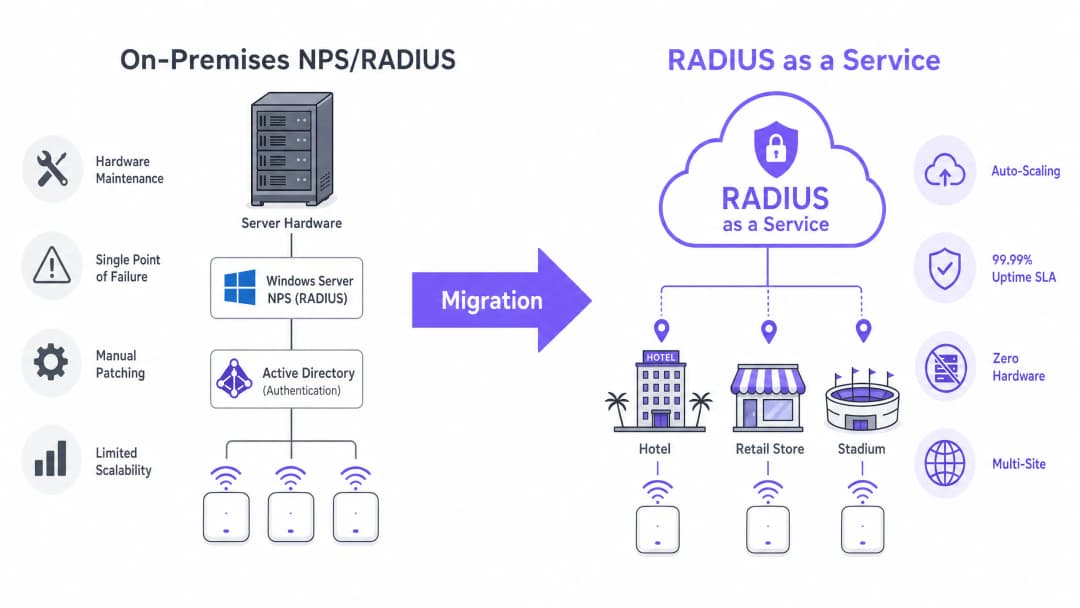
In a traditional deployment, the access point acts as the Network Access Server (NAS), forwarding authentication requests to an on-premises NPS server. The NPS server evaluates connection request policies, validates credentials against the identity store (typically Active Directory via LDAP), and returns an Access-Accept or Access-Reject message.
This model presents three critical limitations for modern networks:
- Hardware dependency and maintenance: NPS requires dedicated physical or virtual machines, demanding continuous patching, capacity planning and lifecycle management.
- High-availability complexity: Achieving redundancy requires deploying NPS in failover pairs, which doubles licensing costs without providing true geographic redundancy.
- Throughput bottlenecks: During peak concurrency (such as stadium ingress or retail peak trading hours), a single NPS instance can become a bottleneck, causing authentication timeouts and a degraded user experience.
Cloud RADIUS Architecture
RADIUS as a Service abstracts the authentication layer. The cloud provider operates distributed, geographically redundant clusters of RADIUS servers. The NAS points to these cloud endpoints, and requests are load-balanced automatically.
Transport security: the role of RadSec When RADIUS moves to the cloud, authentication traffic traverses the public internet. While legacy RADIUS relies on shared secrets and MD5 hashing, modern deployments must implement RadSec (RADIUS over TLS, RFC 6614). RadSec encapsulates the entire RADIUS conversation in a TLS tunnel (typically TCP port 2083), providing transport-layer encryption equivalent to HTTPS along with mutual authentication between the NAS and the cloud RADIUS endpoint.
Identity integration Cloud RADIUS does not require you to migrate your user directory. Services typically support LDAPS connections back to on-premises Active Directory, or native API integration with Azure Active Directory (Entra ID) via SAML or SCIM. This ensures your existing user lifecycle management processes remain unchanged.
For venues leveraging a Guest WiFi platform, cloud RADIUS integrates directly, providing a unified control plane for both corporate 802.1X authentication and guest network access, complete with advanced WiFi Analytics.
Got questions about your specific setup?
Our team works with venue operators, IT managers, and network engineers across 80,000 venues. Book a 20-minute call and we will show you how others like you solved it.
Implementation Guide: The 5-Phase Methodology
Executing the migration without service disruption requires a structured, phased approach.
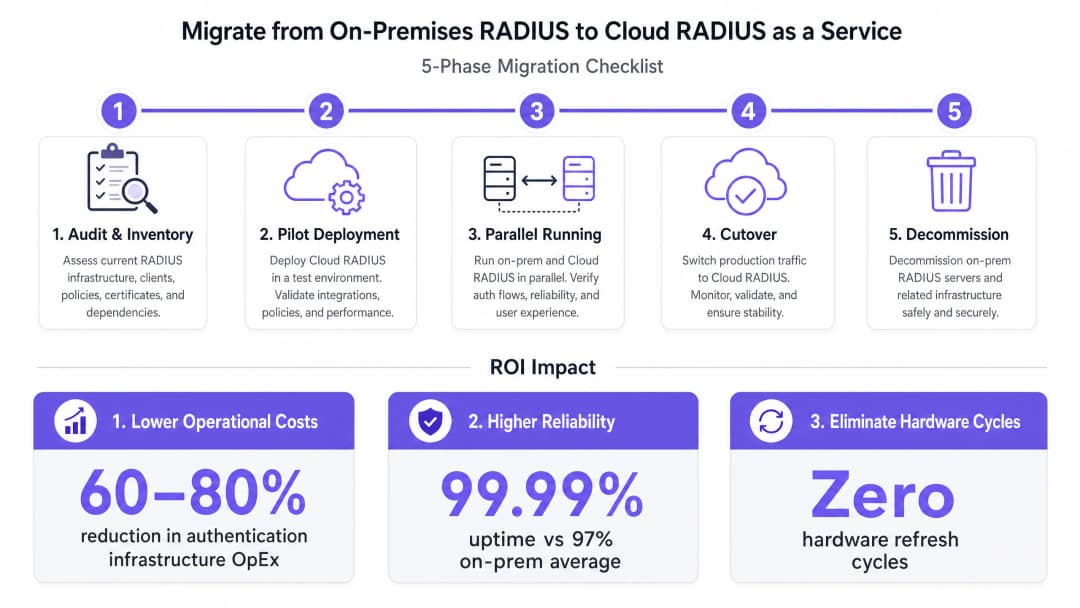
Phase 1: Audit and Inventory
Before making any changes, document the current state:
- RADIUS clients: Identify every NAS (wireless access points, switches, VPN concentrators).
- Policies: Document existing NPS connection request and network policies, including vendor-specific attributes (VSAs) used for VLAN assignment.
- EAP methods: Identify which Extensible Authentication Protocol methods are in use (e.g., EAP-TLS, PEAP-MSCHAPv2).
Phase 2: Pilot Deployment
Provision the cloud RADIUS instance and configure a non-production SSID or a single test site. Validate identity directory integration (e.g., Entra ID synchronization) and confirm that EAP methods function correctly end to end.
Phase 3: Parallel Running (Risk Mitigation)
Configure production NAS devices to use both the cloud RADIUS servers (primary) and the legacy NPS servers (backup) simultaneously. Maintain this configuration for a minimum of two weeks. Monitor authentication success rates, latency metrics, and accounting data flows to identify any policy discrepancies before cutover.
Phase 4: Cutover
During a scheduled maintenance window, remove the legacy NPS backup configuration from the NAS devices. Transition fully to the cloud infrastructure. Ensure your rollback procedure is documented and tested.
Phase 5: Decommissioning
After 30 days of stable operation, securely decommission the legacy NPS servers and reclaim the compute resources.
Best Practices and Compliance
Adhere to the following standards when designing your cloud RADIUS architecture:
- Mandate RadSec: If your NAS hardware supports RadSec (TCP 2083), never send RADIUS traffic over the public internet using standard UDP 1812/1813.
- Certificate trust chain: Ensure client devices trust the Certificate Authority (CA) that issues the cloud RADIUS server certificates. Push the root CA to managed devices via MDM or Group Policy before the migration.
- Compliance posture: Choose a cloud RADIUS provider that maintains SOC 2 Type II attestation and ISO 27001 certification. This significantly simplifies your annual PCI DSS assessments, particularly for retail and hospitality environments.
For broader network design principles, see our guides: Setting Up WiFi for Business: A 2026 Guide and Understanding RSSI and Signal Strength for Optimal Channel Planning.
Troubleshooting and Risk Mitigation
| Failure mode | Root cause | Mitigation strategy |
|---|---|---|
| Authentication timeouts | Firewall blocking outbound UDP 1812/1813 or TCP 2083. | Verify perimeter firewall rules allow outbound traffic to the cloud RADIUS provider's specific IP ranges. |
| Certificate trust errors | Root CA missing from the client device's trust store. | Deploy the root CA via MDM/GPO before Phase 3 (parallel running). |
| VLAN assignment failures | Vendor-specific attributes (VSAs) not mapped correctly in the cloud policy. | During Phase 1, replicate the exact VSA string formats from NPS into the cloud RADIUS policy engine. |
| WAN outage impact | Loss of internet connectivity prevents access to cloud RADIUS. | Deploy redundant WAN links, or implement a local RADIUS proxy that caches credentials for known devices. |
ROI and Business Impact
Migrating to RADIUS as a Service delivers measurable business outcomes:
- Cost reduction: Eliminates hardware procurement, Windows Server licensing, and the engineering hours spent on patching and maintenance. Typical OpEx reductions are 60-80%.
- Reliability SLAs: Cloud providers offer financially backed 99.99% availability SLAs, compared with the 97-98% availability typical of a single-site NPS deployment.
- Agility: Bring new sites online instantly without provisioning local authentication hardware, shortening deployment timelines for transport hubs and healthcare organizations.
Listen to our senior consultant team discuss the strategic implications in this 10-minute briefing:
Key Definitions
RADIUS (Remote Authentication Dial-In User Service)
A networking protocol that provides centralized Authentication, Authorization, and Accounting (AAA) management for users who connect and use a network service.
The core protocol used by enterprise WiFi networks to validate user credentials before granting network access.
NPS (Network Policy Server)
Microsoft's implementation of a RADIUS server and proxy, bundled as a role in Windows Server.
The legacy on-premises infrastructure that organizations are actively migrating away from to reduce maintenance overhead.
NAS (Network Access Server)
The device that acts as the gateway to the network and passes authentication requests to the RADIUS server.
In a wireless context, the NAS is typically the WiFi Access Point or Wireless LAN Controller.
RadSec (RADIUS over TLS)
A protocol defined in RFC 6614 that transports RADIUS packets over a TCP connection encrypted with TLS.
Essential for cloud RADIUS deployments to ensure credential data is encrypted while traversing the public internet.
EAP (Extensible Authentication Protocol)
An authentication framework frequently used in wireless networks and point-to-point connections.
Determines how the client and server securely exchange credentials (e.g., certificates via EAP-TLS, or passwords via PEAP).
VSA (Vendor-Specific Attribute)
Custom attributes defined by hardware vendors within the RADIUS protocol to support proprietary features.
Crucial during migration; VSAs are often used to assign authenticated users to specific network VLANs dynamically.
LDAPS (Lightweight Directory Access Protocol over SSL)
A secure protocol for querying and modifying directory services like Active Directory.
Used by cloud RADIUS services to securely query on-premises identity stores without migrating the user directory to the cloud.
802.1X
An IEEE standard for port-based network access control (PNAC).
The underlying standard that uses RADIUS to ensure only authenticated devices can pass traffic onto the enterprise LAN or WLAN.
Worked Examples
A 200-property hotel group currently runs local NPS servers at each site for staff 802.1X authentication. They are migrating to Entra ID (Azure AD) and want to decommission the local servers. How should they approach the migration?
- Deploy a cloud RADIUS service that integrates natively with Entra ID via SAML/SCIM.
- Configure the cloud RADIUS policies to map Entra ID groups (e.g., 'Front Desk', 'Management') to specific VLAN VSAs.
- At a pilot property, configure the access points to use RadSec to connect to the cloud RADIUS endpoint.
- Push the cloud RADIUS server's Root CA to all staff devices via Microsoft Intune.
- Run parallel authentication at the pilot site, then execute a phased rollout across the remaining 199 properties.
A stadium with 50,000 capacity experiences authentication failures on their corporate SSID during major events because their on-premises NPS server cannot handle the throughput of thousands of devices roaming simultaneously.
- Audit the existing NPS policies and EAP methods.
- Provision a cloud RADIUS service capable of auto-scaling to handle high authentications per second (APS).
- Establish an LDAPS connection from the cloud RADIUS service to the stadium's on-premises Active Directory.
- Update the stadium's high-density wireless LAN controllers to point to the cloud RADIUS endpoints as the primary authentication servers.
Practice Questions
Q1. Your organization is migrating to Cloud RADIUS. The security team mandates that no authentication traffic can be sent over the internet in cleartext or using deprecated hashing algorithms like MD5. What protocol must you configure on your wireless LAN controllers?
Hint: Look for the protocol that wraps RADIUS in a TLS tunnel.
View model answer
You must configure RadSec (RADIUS over TLS). RadSec establishes a TLS tunnel over TCP port 2083 between the NAS and the cloud RADIUS server, providing transport-layer encryption and mutual authentication, satisfying the security team's requirements.
Q2. During Phase 3 (Parallel Running) of your migration, you notice that users are authenticating successfully against the cloud RADIUS server, but they are not being placed in the correct network segments. What is the most likely configuration gap?
Hint: How does a RADIUS server tell an access point which network segment to use?
View model answer
The Vendor-Specific Attributes (VSAs) for dynamic VLAN assignment have not been configured correctly in the cloud RADIUS policies. You must ensure the exact VSA strings used in the legacy NPS server are replicated in the cloud environment so the NAS knows which VLAN to assign to the user.
Q3. A client device is repeatedly failing EAP-TLS authentication against the new cloud RADIUS service, but it works fine against the legacy NPS server. The device logs show an 'untrusted server' error. How do you resolve this?
Hint: EAP-TLS requires the client to trust the server's identity.
View model answer
The client device does not have the Root Certificate Authority (CA) that issued the cloud RADIUS server's certificate in its trusted root store. You must deploy the Root CA to the client device using a Mobile Device Management (MDM) solution or Group Policy.
Continue reading in this series
The Security Benefits of RADIUS as a Service for Hybrid Workforces
This technical reference guide explains how RADIUS as a Service secures network access for hybrid workforces across distributed venues. It covers the architecture, security benefits, and deployment steps for replacing on-premises RADIUS infrastructure with a cloud-managed authentication service. For IT managers and network architects at hotels, retail chains, stadiums, and public-sector organizations, this guide provides the evidence needed to evaluate and act on a cloud RADIUS migration this quarter.
Integrating RADIUS as a Service with Cloud Directories (Azure AD & Google Workspace)
This technical reference guide details how to integrate RADIUS as a Service with cloud directories - Microsoft Entra ID and Google Workspace - for enterprise WiFi authentication. It covers the architectural shift from on-premise NPS to cloud-native RADIUS, the deployment of certificate-based EAP-TLS authentication, and the operational best practices for securing wireless access across hospitality, retail, and public-sector environments. For IT managers and network architects already invested in cloud identity, this guide bridges the gap between directory management and physical network security.
How to Implement 802.1X Authentication with Cloud RADIUS
This technical reference guide provides a comprehensive framework for implementing 802.1X authentication with Cloud RADIUS across distributed enterprise estates. It details the architecture, EAP method selection, deployment sequencing, and risk mitigation strategies required to secure network access while eliminating the operational overhead of on-premises infrastructure.
Got questions about your specific setup?
Our team works with venue operators, IT managers, and network engineers across 80,000 venues. Book a 20-minute call and we will show you how others like you solved it.