
অপ্টিমাল চ্যানেল প্ল্যানিংয়ের জন্য RSSI এবং সিগন্যালের ক্ষমতা বোঝা
এই নির্দেশিকাটি অপ্টিমাল চ্যানেল প্ল্যানিংয়ের জন্য RSSI, সিগন্যাল-টু-নয়েজ রেশিও (SNR), এবং RF প্রোপাগেশন নীতিগুলির একটি বিস্তৃত প্রযুক্তিগত বিশ্লেষণ প্রদান করে। এটি IT ম্যানেজার, নেটওয়ার্ক আর্কিটেক্ট এবং ভেন্যু অপারেশন ডিরেক্টরদের কো-চ্যানেল এবং অ্যাডজাসেন্ট চ্যানেল ইন্টারফারেন্স হ্রাস করার, AP প্লেসমেন্ট অপ্টিমাইজ করার এবং হসপিটালিটি, রিটেইল এবং পাবলিক-সেক্টর পরিবেশে পরিমাপযোগ্য ব্যবসায়িক প্রভাবের জন্য অ্যানালিটিক্স ব্যবহার করার কার্যকর কৌশল প্রদান করে।
Video overview
এই গাইডটি শুনুন
পডকাস্ট ট্রান্সক্রিপ্ট দেখুন
আমাদের মূল সিরিজের অংশ: WiFi RF Engineering Guide →
WiFi RSSI, SNR & channel planning advisor
Simulate enterprise received signal strength (RSSI), evaluate signal-to-noise ratio (SNR), prevent co-channel interference, and calculate roaming handoff boundaries for high-density venues.
RF design analysis & engineering recommendations
- Modulation and data rate capacity: MCS 5 to 8 (64-QAM up to 256-QAM at 3/4) - High throughput for business workflows; 256-QAM MCS 8-9 needs roughly 28 to 32 dB SNR.
- Transmit power balance: Transmit power is slightly elevated for this environment. Monitor co-channel contention and consider reducing power by 2 to 3 dBm.
- Roaming handoff behaviour: Solid primary coverage (+7 dB above roaming trigger). Fast roaming candidates are evaluated proactively without audio or video packet loss. Ensure secondary AP cell overlap reaches at least -67 dBm for uninterrupted voice and video handoff.
- Channel width policy: 20 MHz recommended (40 MHz maximum). Narrower channels double available channel count and reduce noise floor by 3 dB per step.
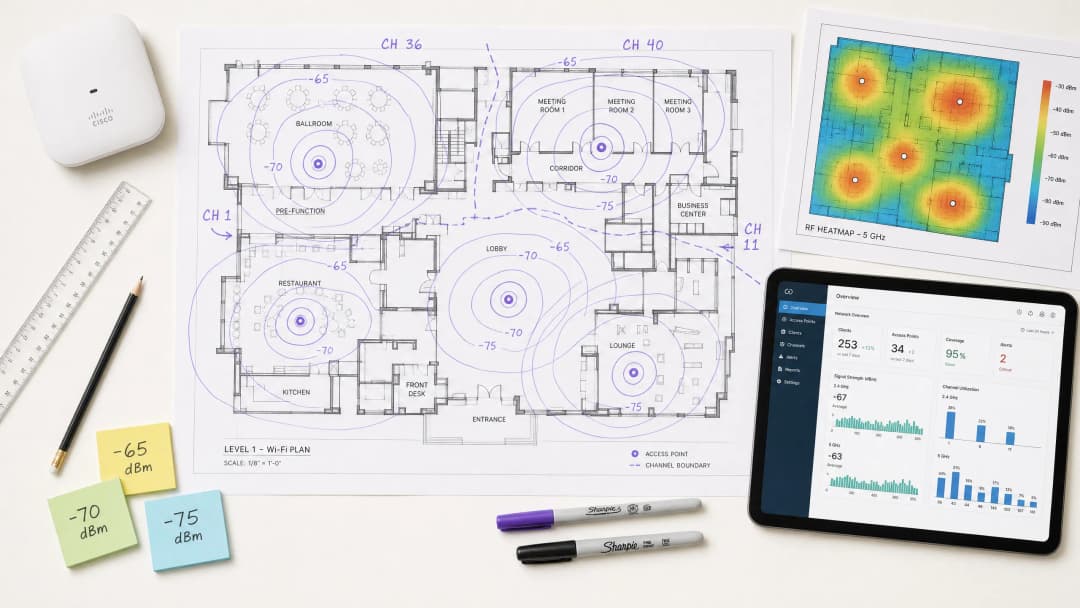
এক্সিকিউটিভ সামারি
উচ্চ-ঘনত্বের ভেন্যু পরিচালনা করছেন এমন CTO এবং নেটওয়ার্ক আর্কিটেক্টদের জন্য - হোক তা hospitality, retail বা বড় পাবলিক স্পেস - একটি শক্তিশালী ওয়্যারলেস অবকাঠামো স্থাপন করা অপারেশনাল দক্ষতা এবং গেস্টদের সন্তুষ্টি উন্নত করার মূল ভিত্তি। এই প্রযুক্তিগত নির্দেশিকাটি RSSI কী এবং চ্যানেল প্ল্যানিং অপ্টিমাইজ করার জন্য এটি কীভাবে একটি অত্যন্ত গুরুত্বপূর্ণ মেট্রিক হিসেবে কাজ করে তা গভীরভাবে আলোচনা করে। মৌলিক কভারেজ ম্যাপের বাইরে গিয়ে RF প্রোপাগেশন এবং কো-চ্যানেল ইন্টারফেয়ারেন্স (CCI) ও অ্যাডজাসেন্ট চ্যানেল ইন্টারফেয়ারেন্স (ACI) এর সূক্ষ্ম বিষয়গুলো গভীরভাবে বোঝার মাধ্যমে, IT লিডাররা এমন নেটওয়ার্ক ডিজাইন করতে পারেন যা বৃহৎ-স্কেল, উচ্চ-থ্রুপুট এবং কম-লেটেন্সি অ্যাপ্লিকেশন সমর্থন করে। আমরা পরীক্ষা করব কীভাবে সুনির্দিষ্ট RSSI থ্রেশহোল্ড রোমিং সিদ্ধান্তগুলোকে চালিত করে, কীভাবে চ্যানেলের প্রস্থ স্পেকট্রাল দক্ষতাকে প্রভাবিত করে এবং কীভাবে উন্নত WiFi Analytics প্ল্যাটফর্মগুলোকে ব্যবহার করে ঝুঁকি কমানো যায় এবং পরিমাপযোগ্য রিটার্ন অন ইনভেস্টমেন্ট (ROI) প্রদান করা যায়। এই নির্দেশিকাটিতে IEEE 802.11k/v/r রোমিং প্রোটোকল, SNR অপ্টিমাইজেশন, AP প্লেসমেন্ট কৌশল এবং hospitality ও retail পরিবেশের বাস্তব-জগতের স্থাপনার উদাহরণ অন্তর্ভুক্ত রয়েছে।
টেকনিক্যাল ডিপ-ডাইভ
RSSI কী? সংজ্ঞা এবং পরিমাপ
Received Signal Strength Indicator (RSSI) হল একটি ক্লায়েন্ট ডিভাইস দ্বারা প্রাপ্ত রেডিও ফ্রিকোয়েন্সি সিগন্যালের পাওয়ার লেভেলের একটি আপেক্ষিক পরিমাপ। RSSI মিলিওয়াট (dBm) এর বিপরীতে ডেসিবেলে একটি নেতিবাচক মান হিসেবে প্রকাশ করা হয় - এটি শূন্যের যত কাছাকাছি হবে, সিগন্যাল তত শক্তিশালী হবে। -30 dBm মান একটি অত্যন্ত শক্তিশালী সিগন্যাল নির্দেশ করে (যা সাধারণত এপি-র এক মিটারের মধ্যেই কেবল পাওয়া সম্ভব), আর -90 dBm ব্যবহারযোগ্যতার একদম শেষ সীমায় অবস্থান করে। RSSI থ্রেশহোল্ড এবং তাদের জন্য উপযুক্ত অ্যাপ্লিকেশনের একটি ব্যবহারিক রেফারেন্স নিচের টেবিলে দেওয়া হল:
| RSSI (dBm) | সিগন্যালের গুণমান | উপযুক্ত অ্যাপ্লিকেশন |
|---|---|---|
| -30 থেকে -50 | চমৎকার | 4K স্ট্রিমিং এবং হাই-ডেন্সিটি VoWiFi সহ সব ধরনের অ্যাপ্লিকেশন |
| -51 থেকে -65 | ভালো | হাই-থ্রুপুট ডেটা, VoWiFi, লোকেশন অ্যানালিটিক্স |
| -66 থেকে -70 | মোটামুটি | স্ট্যান্ডার্ড ডেটা, ওয়েব ব্রাউজিং, ইমেল |
| -71 to -80 | দুর্বল | কেবল মাত্র মৌলিক কানেক্টিভিটি; VoWiFi অস্থির |
| -80 এর নিচে | ব্যবহার অযোগ্য | ঘন ঘন ডিসকানেকশন; এন্টারপ্রাইজ ডেপ্লয়মেন্টের জন্য অনুপযুক্ত |
RSSI বনাম সিগন্যাল-টু-নয়েজ রেশিও (SNR)
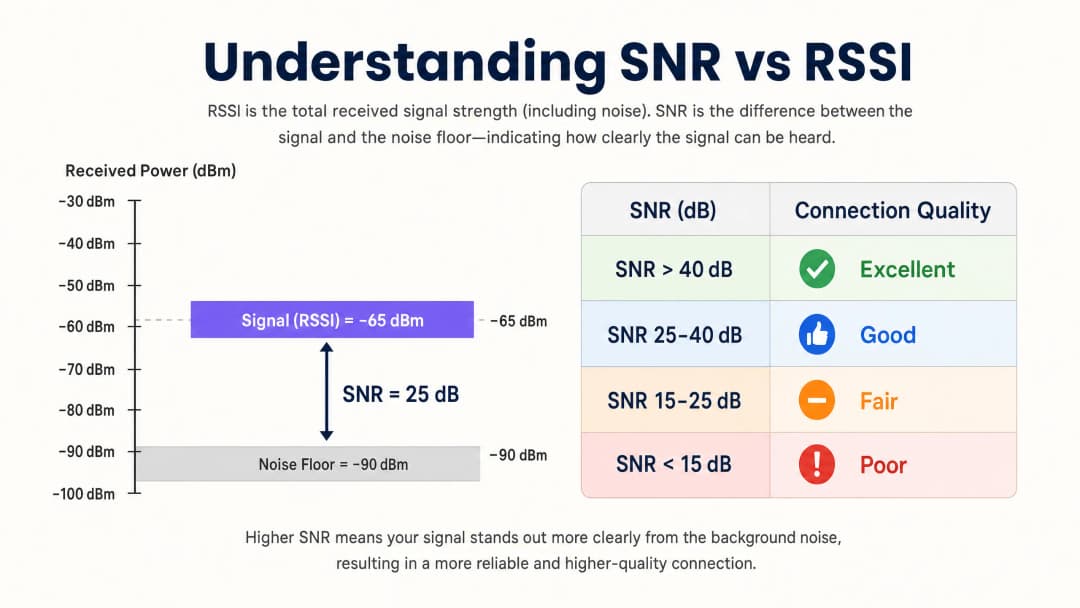
নেটওয়ার্কের গুণমান মূল্যায়ন করার জন্য কেবল RSSI যথেষ্ট নয়। সিগন্যাল-টু-নয়েজ রেশিও (SNR) প্রাপ্ত সিগন্যালের শক্তিকে পারিপার্শ্বিক নয়েজ ফ্লোরের সাথে তুলনা করে, যা লিঙ্কের গুণমানের আরও সঠিক প্রতিফলন প্রদান করে। 802.11ac/ax-এ 256-QAM-এর মতো হাই-থ্রুপুট মড্যুলেশন স্কিম সমর্থন করতে সাধারণত 25 dB বা তার বেশি SNR-এর প্রয়োজন হয়। যদি নয়েজ ফ্লোর -90 dBm হয় এবং RSSI হয় -65 dBm, তবে SNR হবে 25 dB - যা নির্ভরযোগ্য হাই-পারফরম্যান্স অপারেশনের জন্য ন্যূনতম থ্রেশহোল্ড।
ব্যবহারিক অর্থে, এর মানে হল একটি নেটওয়ার্ক কভারেজ হিটম্যাপে চমৎকার RSSI মান দেখাতে পারে কিন্তু তবুও অত্যন্ত খারাপ পারফর্ম করতে পারে কারণ নন-WiFi ইন্টারফারেন্সের উৎস (মাইক্রোওয়েভ ওভেন, DECT ফোন, ব্লুটুথ ডিভাইস বা ইন্ডাস্ট্রিয়াল ইকুইপমেন্ট) নয়েজ ফ্লোর বাড়িয়ে দিয়েছে। তাই সাইট সার্ভে এবং চলমান মনিটরিংয়ের সময় RSSI এবং SNR উভয় পরিমাপ করা অত্যন্ত জরুরি।
RF প্রপাগেশন এবং অ্যাটেন্যুয়েশনের ফিজিক্স
হাসপাতাল (Healthcare) বা পরিবহন হাব (Transport)-এর মতো জটিল পরিবেশে, RF সিগন্যাল যখন বিভিন্ন শারীরিক বাধার মধ্য দিয়ে যায় তখন তা অ্যাটেন্যুয়েট বা দুর্বল হয়ে পড়ে। প্রেডিক্টিভ সাইট সার্ভে পরিচালনা এবং SNR সীমানা নির্ধারণের সময় নেটওয়ার্ক আর্কিটেক্টদের অবশ্যই এই উপাদান-নির্দিষ্ট ক্ষতিগুলো বিবেচনায় রাখতে হবে:
| উপাদান | সাধারণ অ্যাটেন্যুয়েশন (dB) |
|---|---|
| ড্রাইওয়াল / প্লাস্টারবোর্ড | 3-4 dB |
| কাচ (স্ট্যান্ডার্ড) | 2-3 dB |
| ইটের দেয়াল | 8-12 dB |
| কংক্রিট | 12-15 dB |
| রিইনফোর্সড কংক্রিট / স্টিল | 15-25+ dB |
| মেটাল শেল্ভিং (রিটেইল) | 10-20 dB |
ডেসিবল স্কেলের লগারিদমিক প্রকৃতির একটি গভীর ধারণা থাকা অপরিহার্য: একটি 3 dB হ্রাস সিগন্যালের শক্তিকে অর্ধেক করে দেয়, যেখানে একটি 10 dB হ্রাস সিগন্যালের শক্তিকে দশ গুণ কমিয়ে দেয়। দুটি ইটের দেয়ালের (মোটামুটি 20 dB ক্ষয়সাধন বা attenuation) মধ্য দিয়ে যাওয়া একটি সিগন্যাল তাই প্রেরিত সিগন্যালের চেয়ে 100 গুণ দুর্বল হয়ে যায়।
চ্যানেল পরিকল্পনা: Co-Channel Interference (CCI) বনাম Adjacent Channel Interference (ACI)
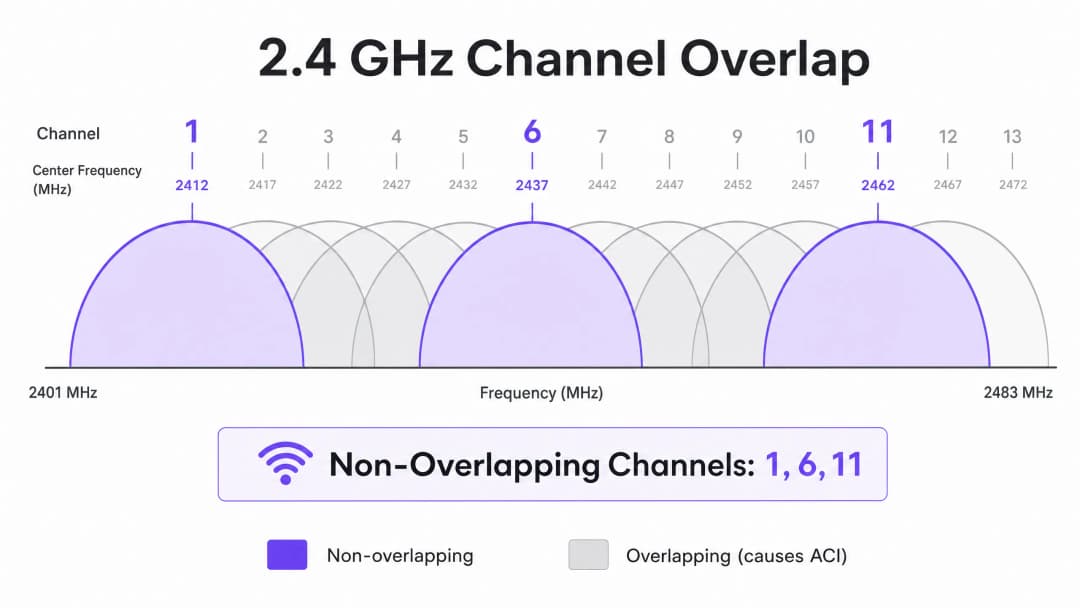
সর্বোত্তম চ্যানেল পরিকল্পনার জন্য দুই ধরনের নির্দিষ্ট হস্তক্ষেপ প্রশমিত করা প্রয়োজন। Co-Channel Interference (CCI) তখন ঘটে যখন একই চ্যানেলে চালিত অ্যাক্সেস পয়েন্টগুলো একে অপরকে "শুনতে" পায়, যার ফলে CSMA/CA (Carrier Sense Multiple Access with Collision Avoidance) প্রোটোকলের কারণে মিডিয়ামের দ্বন্দ্ব তৈরি হয় এবং লেটেন্সি বৃদ্ধি পায়। ওই চ্যানেলে থাকা প্রতিটি ডিভাইসকে তার নিজের পালা আসার জন্য অপেক্ষা করতে হয়, এবং যখন একাধিক AP একসাথে প্রতিযোগিতা করে, তখন মাঝারি ক্লায়েন্ট লোড থাকা সত্ত্বেও চ্যানেলের ব্যবহার অনেক বেশি বেড়ে যায়।
Adjacent Channel Interference (ACI) তখন ঘটে যখন AP-গুলো ওভারল্যাপ বা একে অপরের ওপর চলে আসা চ্যানেলগুলোতে চালিত হয়, যা নয়েজ ফ্লোর বাড়িয়ে দেয় এবং SNR-কে হ্রাস করে। 2.4 GHz ব্যান্ডে, শুধুমাত্র চ্যানেল 1, 6 এবং 11 ওভারল্যাপ বা একে অপরের ওপর চলে আসে না। অন্য কোনো চ্যানেল বরাদ্দ করা হলে তা তার পার্শ্ববর্তী এক বা উভয় চ্যানেলে ACI তৈরি করে। 5 GHz ব্যান্ডে Dynamic Frequency Selection (DFS) চ্যানেলের সুবিধা নিলে তা উপলব্ধ স্পেকট্রাম প্রসারিত করে, কিন্তু রাডার সনাক্তকরণের ঘটনাগুলো চ্যানেল পরিবর্তনে বাধ্য করতে পারে, যার ফলে সংযোগে সংক্ষিপ্ত বাধা সৃষ্টি হয়। চ্যানেলের প্রস্থ নির্ধারণের সময় 20MHz vs 40MHz vs 80MHz: Which Channel Width Should You Use? দেখুন। মূল নীতিটি হলো: চওড়া চ্যানেলগুলো উচ্চতর তাত্ত্বিক থ্রুপুট প্রদান করে তবে নন-ওভারল্যাপিং চ্যানেল বিকল্পের সংখ্যা কমিয়ে দেয়, যার ফলে ঘন নেটওয়ার্ক বিন্যাসে Co-Channel Interference (CCI) বৃদ্ধি পায়।
আপনার নির্দিষ্ট সেটআপ নিয়ে কোনো প্রশ্ন আছে?
আমাদের টিম ৮০,০০০ ভেন্যুতে ভেন্যু অপারেটর, IT ম্যানেজার এবং নেটওয়ার্ক ইঞ্জিনিয়ারদের সাথে কাজ করে। একটি ২০ মিনিটের কল বুক করুন এবং আপনার মতো অন্যরা কীভাবে এর সমাধান করেছেন তা আমরা আপনাকে দেখাব।
বাস্তবায়ন নির্দেশিকা
ধাপ ১: প্রয়োজনীয়তা সংজ্ঞায়িত করুন এবং LCMI ডিভাইস সনাক্ত করুন
যেকোনো হার্ডওয়্যার স্থাপন করার আগে, প্রাইমারি কভারেজ এরিয়া (PCA) এবং সেকেন্ডারি কভারেজ এরিয়া (SCA) নির্ধারণ করুন। অত্যন্ত গুরুত্বপূর্ণভাবে, Least Capable, Most Important (LCMI) ডিভাইস-টি সনাক্ত করুন - দুর্বলতম RF ক্ষমতাসম্পন্ন যে ডিভাইসটির নির্ভরযোগ্যভাবে কাজ করার নিশ্চয়তা অবশ্যই দিতে হবে। এটি সাধারণত একটি গুদামে থাকা পুরনো হ্যান্ডহেল্ড স্ক্যানার, একটি হাসপাতালে থাকা কোনো নির্দিষ্ট মডেলের চিকিৎসা সরঞ্জাম, অথবা আতিথেয়তা পরিবেশে থাকা একটি পুরনো স্মার্টফোন হতে পারে। সেই ডিভাইসের ন্যূনতম RSSI প্রয়োজনীয়তা মেটানোর জন্য সম্পূর্ণ RF আর্কিটেকচার ডিজাইন করুন, যার ফলে অন্য প্রতিটি ডিভাইসের পারফরম্যান্স স্বাভাবিকভাবেই আরও ভালো হবে।
ধাপ ২: একটি সক্রিয় সাইট সার্ভে পরিচালনা করুন
প্রকৃত RSSI এবং SNR পরিমাপ করতে একটি সক্রিয় সাইট সার্ভে পরিচালনা করুন - শুধুমাত্র কোনো সফটওয়্যার ব্যবহার করে একটি প্রেডিক্টিভ সার্ভে নয়। নন-WiFi ইন্টারফারেন্সের উৎসগুলো শনাক্ত করতে স্পেকট্রাম অ্যানালিসিস টুল ব্যবহার করুন। নিশ্চিত করুন যে প্রাইমারি কভারেজ -65 dBm থ্রেশহোল্ড পূরণ করে এবং সেকেন্ডারি কভারেজ (রোমিং ওভারল্যাপ জোনের জন্য) -70 dBm পূরণ করে। সব এলাকার নয়েজ ফ্লোর রেকর্ড করুন, কারণ এটি অর্জনযোগ্য SNR এবং সর্বোচ্চ সমর্থিত ডেটা রেট নির্ধারণ করে।
ধাপ ৩: AP স্থাপন এবং পাওয়ার টিউনিং
"যত জোরে তত ভালো" - এই ভুল ধারণাটি এড়িয়ে চলুন। AP ট্রান্সমিট পাওয়ার খুব বেশি সেট করলে একটি অ্যাসিমেট্রিক লিঙ্ক তৈরি হয়, যেখানে ক্লায়েন্ট AP-এর সিগন্যাল স্পষ্টভাবে পায় কিন্তু AP নির্ভরযোগ্যভাবে ক্লায়েন্টের দুর্বল ট্রান্সমিশন পেতে পারে না। এটিই হলো sticky client সমস্যার মূল কারণ - ডিভাইসগুলো একটি দূরবর্তী AP-এর সাথে সংযুক্ত থাকে এমনকি যখন তারা শারীরিকভাবে অন্য একটির কাছাকাছি থাকে। ক্লায়েন্টের ক্ষমতার সাথে সামঞ্জস্য রাখতে AP ট্রান্সমিট পাওয়ার ১০-১৪ dBm-এ টিউন করুন এবং IEEE 802.11k/v/r স্ট্যান্ডার্ড অনুযায়ী নির্বিঘ্ন রোমিংয়ের সুবিধার্থে ১৫-২০% সেল ওভারল্যাপ নিশ্চিত করুন।
ধাপ ৪: সর্বনিম্ন বাধ্যতামূলক ডেটা রেট প্রয়োগ করা
লিগ্যাসি ডেটা রেট নিষ্ক্রিয় করুন (২.৪ GHz-এ ১, ২, ৫.৫ এবং ১১ Mbps; ৫ GHz-এ ৬ এবং ৯ Mbps)। এটি সর্বনিম্ন RSSI থ্রেশহোল্ডকে বাড়িয়ে দেয় যেখানে ক্লায়েন্টরা সংযোগটিকে গ্রহণযোগ্য বলে মনে করে, ফলে ডিভাইসগুলো আরও আগেই রোমিংয়ের সিদ্ধান্ত নিতে বাধ্য হয় এবং কম রেটের ক্লায়েন্টদের অতিরিক্ত এয়ারটাইম ব্যবহার করা প্রতিরোধ করে।
ধাপ ৫: গেস্ট WiFi এবং অ্যানালিটিক্স একীভূত করা
একটি এন্টারপ্রাইজ-গ্রেড Guest WiFi সমাধান স্থাপন করার জন্য ব্যবহারকারীর অভিজ্ঞতা ব্যাহত না করে নির্বিঘ্ন অথেন্টিকেশন প্রয়োজন। করপোরেট ডিভাইসের জন্য 802.1X এবং গেস্টদের জন্য একটি সুরক্ষিত Captive Portal বাস্তবায়ন করুন, যেখানে ডিভাইসের সামঞ্জস্যতা অনুমতি দেয় সেখানে WPA3 গ্রহণ করুন। আধুনিক পদ্ধতিগুলো (যেমন How a wi fi assistant Enables Passwordless Access in 2026) PCI-DSS এবং GDPR সম্মতি বজায় রেখে অনবোর্ডিংয়ের জটিলতা হ্রাস করে। নির্ভরযোগ্য অ্যানালিটিক্স এবং লোকেশন সার্ভিসের জন্য এই গাইডে বর্ণিত RF আর্কিটেকচার একটি পূর্বশর্ত - দুর্বল RF ডিজাইনের কারণে ডেটা ভুল হবে।
সেরা অনুশীলনসমূহ
কভারেজের জন্য নয়, ধারণক্ষমতার জন্য ডিজাইন করুন। আধুনিক উচ্চ-ঘনত্বের পরিবেশে, সীমাবদ্ধতার কারণটি প্রায় কখনোই সিগন্যাল কভারেজ নয় - এটি হলো চ্যানেল এয়ারটাইম কনটেনশন। কয়েকটি হাই-পাওয়ার AP-এর পরিবর্তে কম ট্রান্সমিট পাওয়ারে আরও বেশি AP স্থাপন করুন। এটি কো-চ্যানেল ইন্টারফারেন্স (CCI) হ্রাস করে, SNR উন্নত করে এবং একই সাথে সেবা দেওয়া যেতে পারে এমন ক্লায়েন্টের সংখ্যা বৃদ্ধি করে।
পরিবেশ অনুযায়ী চ্যানেলের প্রস্থ স্ট্যান্ডার্ডাইজ করুন। ২.৪ GHz ব্যান্ডে সর্বজনীনভাবে ২০ MHz ডিফল্ট রাখুন। ৫ GHz ব্যান্ডে, অত্যন্ত উচ্চ-ঘনত্বের পরিবেশে (স্টেডিয়াম, কনফারেন্স হল) ২০ MHz এবং মাঝারি-ঘনত্বের পরিবেশে (হোটেল, রিটেল) ৪০ MHz ব্যবহার করুন। ৮০ MHz শুধুমাত্র কম-ঘনত্ব, উচ্চ-থ্রুপুট সিনারিওগুলোর জন্য সংরক্ষণ করুন। রমিং প্রোটোকল স্ট্যাক প্রয়োগ করুন। সমস্ত AP-তে 802.11k (রেডিও রিসোর্স মেজারমেন্ট), 802.11v (BSS ট্রানজিশন ম্যানেজমেন্ট) এবং 802.11r (ফাস্ট BSS ট্রানজিশন) সক্রিয় করুন। এটি নিশ্চিত করে যে রমিংয়ের সিদ্ধান্তগুলি ক্লায়েন্টের জড়তার চেয়ে RF অবস্থার দ্বারা চালিত হয়, এবং পুনরায় প্রমাণীকরণের লেটেন্সি শত শত মিলিসেকেন্ড থেকে কমিয়ে ৫০ মিলিসেকেন্ডের নিচে নিয়ে আসে।
স্বয়ংক্রিয়ভাবে বরাদ্দ করা চ্যানেলগুলি ম্যানুয়ালি যাচাই করুন। বেশিরভাগ এন্টারপ্রাইজ AP বিক্রেতারা স্বয়ংক্রিয় রেডিও রিসোর্স ম্যানেজমেন্ট (RRM) প্রদান করে। যদিও RRM একটি বেসলাইন হিসেবে কাজ করে, এটি জটিল পরিবেশে সাব-অপ্টিমাল সিদ্ধান্ত নিতে পারে। সর্বদা স্থাপনার পরে চ্যানেল পরিকল্পনাটি অডিট করুন এবং যেখানে প্রয়োজন সেখানে এটিকে ওভাররাইড করুন।
শুধুমাত্র স্থাপনের সময় নয়, ক্রমাগত পর্যবেক্ষণ করুন। সময়ের সাথে সাথে RF পরিবেশ পরিবর্তিত হয় - নতুন ইন্টারফেয়ারেন্সের উৎস আবির্ভূত হয়, অকুপেন্সি প্যাটার্ন পরিবর্তিত হয় এবং ফার্মওয়্যার আপডেটগুলি রেডিওর আচরণকে পরিবর্তন করে। ব্যবহারকারীদের প্রভাবিত করার আগে পারফরম্যান্সের অবনতি সনাক্ত করতে ক্রমাগত RF মনিটরিং সহ একটি WiFi Analytics প্ল্যাটফর্মের সুবিধা নিন।
নেটওয়ার্ক অবকাঠামোকে ব্যবসায়িক ফলাফলে রূপান্তর করার জন্য আরও বিস্তৃত কৌশলের জন্য, How To Improve Guest Satisfaction: The Ultimate Playbook দেখুন।
সমস্যা সমাধান এবং ঝুঁকি হ্রাস
স্টিকি ক্লায়েন্ট সমস্যা
লক্ষণ: ডিভাইসগুলি শক্তিশালী সিগন্যাল সহ অন্য একটি AP-এর শারীরিকভাবে কাছাকাছি থাকা সত্ত্বেও দুর্বল RSSI (-৮০ dBm) সহ একটি দূরবর্তী AP-এর সাথে সংযুক্ত থাকে।
মূল কারণ: AP ট্রান্সমিট পাওয়ার খুব বেশি সেট করা হয়েছে, যা একটি অসম লিঙ্ক তৈরি করছে। ক্লায়েন্ট AP-এর সিগন্যালটি ভালোভাবে গ্রহণ করে, তাই এটি কখনই একটি রমিং শুরু করে না। বিকল্পভাবে, 802.11k/v প্রোটোকলগুলি নিষ্ক্রিয় করা হয়েছে, যার ফলে ক্লায়েন্টরা আরও ভালো উপলব্ধ AP সম্পর্কে কোনো নির্দেশনা পাচ্ছে না।
সমাধান: AP ট্রান্সমিট পাওয়ার ১০ থেকে ১২ dBm-এ কমিয়ে দিন। 802.11k/v/r সক্রিয় করুন। ন্যূনতম বাধ্যতামূলক ডেটা রেট সেট করুন যাতে RSSI ন্যূনতম-রেটের থ্রেশহোল্ডের নিচে নেমে গেলে ক্লায়েন্টরা রমিং করতে বাধ্য হয়।
উচ্চ সহ-চ্যানেল ইন্টারফেয়ারেন্স
লক্ষণ: সামান্য ক্লায়েন্ট লোডের মধ্যেও চ্যানেল ব্যবহার ক্রমাগত ৪০ থেকে ৫০% এর উপরে থাকে, যার ফলে লেটেন্সি বৃদ্ধি পায় এবং থ্রুটপুট হ্রাস পায়।
মূল কারণ: একই চ্যানেলের APগুলি একে অপরের খুব কাছাকাছি স্থাপন করা হয়েছে, অথবা স্থাপনার ঘনত্বের তুলনায় চ্যানেলের প্রস্থ খুব বেশি প্রশস্ত।
সমাধান: চ্যানেলের প্রস্থ ২০ MHz-এ কমিয়ে দিন। একই চ্যানেলে থাকা APগুলির মধ্যে শারীরিক দূরত্ব সর্বাধিক করতে চ্যানেল পরিকল্পনাটি পর্যালোচনা করুন। খুব উচ্চ ঘনত্বের স্থাপনায়, প্রতি বিকল্প AP-তে ২.৪ GHz রেডিও নিষ্ক্রিয় করার কথা বিবেচনা করুন।
উন্নত নয়েজ ফ্লোর
লক্ষণ: হিটম্যাপে RSSI মানগুলি গ্রহণযোগ্য বলে মনে হচ্ছে, কিন্তু থ্রুটপুট দুর্বল এবং সংযোগগুলি অস্থির।
মূল কারণ: নন-WiFi ইন্টারফেয়ারেন্সের উৎসগুলি (মাইক্রোওয়েভ ওভেন, DECT ফোন, শিল্প সরঞ্জাম, ব্লুটুথ) নয়েজ ফ্লোর বাড়িয়ে দিয়েছে, যা SNR-কে উচ্চ-ক্রমের মড্যুলেশনের জন্য প্রয়োজনীয় থ্রেশহোল্ডের নিচে ঠেলে দিয়েছে। Mitigation: হস্তক্ষেপের উৎসগুলি সনাক্ত এবং চিহ্নিত করতে একটি স্পেকট্রাম অ্যানালাইজার ব্যবহার করুন। সম্ভব হলে প্রভাবিত ক্লায়েন্টদের 5 GHz-এ স্থানান্তরিত করুন, কারণ বেশিরভাগ নন-WiFi হস্তক্ষেপ 2.4 GHz-এ ঘনীভূত থাকে। যদি হস্তক্ষেপের উৎসটি দূর করা না যায়, তাহলে RSSI উন্নত করতে AP ডেনসিটি বাড়ান, যার ফলে উন্নত নয়েজ ফ্লোর থাকা সত্ত্বেও পর্যাপ্ত SNR বজায় রাখা যায়।
যেহেতু নেটওয়ার্কগুলি পৌরসভা এবং পাবলিক স্পেসগুলিতে প্রসারিত হচ্ছে, কৌশলগত পরিকল্পনা ক্রমবর্ধমানভাবে গুরুত্বপূর্ণ হয়ে উঠছে। পাবলিক-সেক্টর ডেপ্লয়মেন্টের অন্তর্দৃষ্টির জন্য, Purple Appoints Iain Fox as VP of Public Sector Growth to Drive Digital Inclusion and Smart City Innovation পড়ুন।
-
ROI এবং ব্যবসায়িক প্রভাব
RSSI অপ্টিমাইজ করা এবং চ্যানেল পরিকল্পনা একাধিক মাত্রায় এন্টারপ্রাইজের রাজস্বকে সরাসরি প্রভাবিত করে। নিচের টেবিলটি একটি সুপরিকল্পিত ওয়্যারলেস নেটওয়ার্কের সাথে সম্পর্কিত মূল ব্যবসায়িক ফলাফলগুলির সংক্ষিপ্ত বিবরণ দেয়:
| ব্যবসায়িক ফলাফল | কার্যপ্রণালী | সাধারণ প্রভাব |
|---|---|---|
| কম আইটি সাপোর্ট খরচ | সংযোগের কম অভিযোগ; সাইটে কম ভিজিট করা | WiFi সংক্রান্ত সাপোর্ট টিকিটে ২০ - ৪০% হ্রাস |
| উন্নত অতিথির সন্তুষ্টি | পুরো ভেন্যু জুড়ে নির্ভরযোগ্য, হাই-স্পিড সংযোগ | NPS (Net Promoter Score) এবং রেটিং-এ উল্লেখযোগ্য বৃদ্ধি |
| সঠিক লোকেশন অ্যানালিটিক্স | নির্ভরযোগ্য ট্রাইলেটারেশনের জন্য পর্যাপ্ত AP ডেনসিটি এবং SNR | ফুটফল অ্যানালিটিক্সের জন্য ৩ মিটারের মধ্যে সঠিক লোকেশন |
| ফার্স্ট-পার্টি ডেটা সংগ্রহ | নির্ভরযোগ্য Captive Portal পারফরম্যান্স | গেস্ট WiFi অনবোর্ডিংয়ের জন্য উচ্চতর সমাপ্তির হার |
| কর্মক্ষম দক্ষতা | হ্যান্ডহেল্ড, POS সিস্টেম, IoT-এর জন্য নির্ভরযোগ্য সংযোগ | কম ব্যর্থ লেনদেন এবং কম অপারেশনাল ডাউনটাইম |
ভেন্যু অপারেটরদের জন্য, নির্ভরযোগ্য WiFi আর কোনো খরচের খাত নয় - এটি রাজস্ব উপার্জনের একটি মাধ্যম। ধারাবাহিক সিগন্যাল স্ট্রেন্থ এবং উচ্চ SNR নিশ্চিত করে, ভেন্যুগুলি ফার্স্ট-পার্টি ডেটা ক্যাপচার করতে আত্মবিশ্বাসের সাথে Captive Portals স্থাপন করতে পারে, যা ব্যক্তিগতকৃত বিপণন প্রচারণাকে চালিত করে এবং গ্রাহকের লাইফটাইম ভ্যালু বাড়িয়ে তোলে। সঠিক RF ডিজাইনে বিনিয়োগ উন্নত অপারেশনাল দক্ষতা, বর্ধিত ডিজিটাল এনগেজমেন্ট এবং উন্নত অ্যানালিটিক্স ও লোকেশন সার্ভিস স্থাপনের আত্মবিশ্বাসের মাধ্যমে পরিমাপযোগ্য ROI প্রদান করে।
Purple-এর হার্ডওয়্যার-অ্যাগনস্টিক প্ল্যাটফর্ম বিদ্যমান পরিকাঠামোর সাথে নির্বিঘ্নে সংহত হয়, একটি সুপরিকল্পিত RF ফাউন্ডেশনের উপরে অ্যানালিটিক্স লেয়ার প্রদান করে - যা সিগন্যাল স্ট্রেন্থ ডেটাকে hospitality, retail, healthcare এবং transport পরিবেশে কার্যকরী ব্যবসায়িক বুদ্ধিমত্তায় রূপান্তর করে।
মূল সংজ্ঞাসমূহ
RSSI (রিসিভড সিগন্যাল স্ট্রেংথ ইন্ডিকেটর)
একটি ক্লায়েন্ট ডিভাইস দ্বারা প্রাপ্ত একটি RF সিগন্যালের পাওয়ার লেভেলের একটি আপেক্ষিক পরিমাপ, যা নেতিবাচক dBm-এ প্রকাশ করা হয়। এটি শূন্যের যত কাছাকাছি হবে, সিগন্যাল তত শক্তিশালী হবে।
কভারেজের সীমানা নির্ধারণ করতে, রোমিংয়ের সিদ্ধান্তগুলি ট্রিগার করতে এবং মৌলিক সিগন্যালের প্রাপ্যতা মূল্যায়ন করতে ব্যবহৃত হয়। লিঙ্কের গুণমান মূল্যায়ন করার জন্য এটি একাই যথেষ্ট নয়।
SNR (সিগন্যাল-টু-নয়েজ রেশিও)
প্রাপ্ত সিগন্যালের শক্তি এবং পারিপার্শ্বিক নয়েজ ফ্লোরের মধ্যে ডেসিবেল (dB) পার্থক্য। যেভাবে গণনা করা হয়: SNR (dB) = RSSI (dBm) - নয়েজ ফ্লোর (dBm)।
অর্জনযোগ্য মডুলেশন স্কিম এবং ডেটা রেটের প্রাথমিক নির্ধারক। ২৫ dB-এর একটি SNR হলো ২৫৬-QAM (উচ্চ-থ্রুপুট) অপারেশনের জন্য সর্বনিম্ন প্রয়োজনীয়তা। সর্বদা RSSI-এর পাশাপাশি পরিমাপ করুন।
CCI (কো-চ্যানেল ইন্টারফারেন্স)
হস্তক্ষেপ যা ঘটে যখন একাধিক AP এবং ক্লায়েন্ট একই চ্যানেলে কাজ করে এবং একে অপরের ট্রান্সমিশন সনাক্ত করতে পারে, যা CSMA/CA প্রোটোকলের অধীনে মিডিয়াম কনটেনশন তৈরি করে।
এন্টারপ্রাইজ ডেপ্লয়মেন্টে উচ্চ চ্যানেল ব্যবহার এবং লেটেন্সির সবচেয়ে সাধারণ কারণ। সঠিক চ্যানেল প্ল্যানিং, পাওয়ার টিউনিং এবং একই চ্যানেলে থাকা AP-গুলির মধ্যে পর্যাপ্ত ফিজিক্যাল দূরত্ব নিশ্চিত করার মাধ্যমে এটি প্রশমিত করা হয়।
ACI (অ্যাডজাসেন্ট চ্যানেল ইন্টারফারেন্স)
একটি চ্যানেল থেকে RF শক্তির অন্য একটি সংলগ্ন ওভারল্যাপিং চ্যানেলে ছড়িয়ে পড়ার কারণে সৃষ্ট হস্তক্ষেপ, যা নয়েজ ফ্লোর বাড়িয়ে দেয় এবং SNR হ্রাস করে।
২.৪ GHz ব্যান্ডে ওভারল্যাপ করা চ্যানেলগুলি (১, ৬, ১১ ছাড়া অন্য যেকোনো কিছু) ব্যবহার করার কারণে ঘটে। ওভারল্যাপ না করা চ্যানেল অ্যাসাইনমেন্ট কঠোরভাবে মেনে চলার মাধ্যমে এটি এড়ানো যায়।
DFS (ডায়নামিক ফ্রিকোয়েন্সি সিলেকশন)
একটি নিয়ন্ত্রক প্রক্রিয়া যা WiFi ডিভাইসগুলিকে রাডার সিগন্যাল মনিটর করার মাধ্যমে এবং সনাক্ত করা হলে চ্যানেল খালি করে রাডার সিস্টেমের সাথে ৫ GHz স্পেকট্রাম ভাগ করে নেওয়ার অনুমতি দেয়।
উপলব্ধ ৫ GHz চ্যানেল সেটকে প্রসারিত করে, কিন্তু রাডার সনাক্তকরণের সাথে সাথে AP-গুলিকে চ্যানেল পরিবর্তন করতে হয়, যা কানেক্টিভিটিতে একটি সংক্ষিপ্ত ব্যাঘাত ঘটায়। বিমানবন্দর, সামরিক স্থাপনা বা আবহাওয়া রাডার সাইটের কাছাকাছি ডেপ্লয়মেন্টে অবশ্যই এটি বিবেচনায় নিতে হবে।
CSMA/CA (ক্যারিয়ার-সেন্স মাল্টিপল অ্যাক্সেস উইথ কলিশন অ্যাভয়েডেন্স)
WiFi দ্বারা ব্যবহৃত মিডিয়াম অ্যাক্সেস প্রোটোকল, যেখানে ডিভাইসগুলি ট্রান্সমিট করার আগে RF চ্যানেলটি শোনে এবং চ্যানেলটি ব্যস্ত থাকলে অপেক্ষা করে।
WiFi একটি হাফ-ডুপ্লেক্স, শেয়ার্ড মিডিয়াম হওয়ার মূল কারণ। CCI একাধিক AP এবং ক্লায়েন্টকে একই চ্যানেলের জন্য প্রতিযোগিতা করতে বাধ্য করে, এই কারণেই পারফরম্যান্সের জন্য চ্যানেল প্ল্যানিং অত্যন্ত গুরুত্বপূর্ণ।
স্টিকি ক্লায়েন্ট
একটি ক্লায়েন্ট ডিভাইস যা শক্তিশালী সিগন্যাল সহ একটি ভিন্ন AP-এর শারীরিকভাবে কাছাকাছি থাকা সত্ত্বেও একটি দুর্বল সিগন্যাল প্রদানকারী AP-এর সাথে সংযুক্ত থাকে।
অ্যাসিমেট্রিক লিঙ্ক বাজেট (AP ট্রান্সমিট পাওয়ার খুব বেশি হওয়া) বা ৮M২.১১k/v রোমিং প্রোটোকলের অনুপস্থিতির কারণে ঘটে। এর ফলে দুর্বল থ্রুপুট, উচ্চ লেটেন্সি এবং ব্যবহারকারীর অভিজ্ঞতা হ্রাস পায়।
LCMI (লিস্ট ক্যাপেবল, মোস্ট ইম্পর্ট্যান্ট) ডিভাইস
সবচেয়ে দুর্বল রেডিও ক্ষমতাসম্পন্ন একটি ডেপ্লয়মেন্টের এমন একটি ডিভাইস যা তা সত্ত্বেও ব্যবসায়িক কার্যক্রমের জন্য অত্যন্ত গুরুত্বপূর্ণ।
RF আর্কিটেকচারের জন্য ডিজাইনের বেসলাইন হিসাবে ব্যবহৃত হয়। LCMI ডিভাইসের প্রয়োজনীয়তা মেটাতে ডিজাইন করা হলে অন্য সমস্ত ডিভাইস পর্যাপ্তভাবে কাজ করে তা নিশ্চিত হয়।
৮০২.১১k/v/r
IEEE ৮০২.১১ সংশোধনীসমূহের একটি স্যুট: ৮০২.১১k (রেডিও রিসোর্স মেজারমেন্ট), ৮০২.১১v (BSS ট্রানজিশন ম্যানেজমেন্ট), এবং ৮০২.১১r (ফাস্ট BSS ট্রানজিশন)।
একত্রে, এই প্রোটোকলগুলি বুদ্ধিমান, লো-লেটেন্সি ক্লায়েন্ট রোমিং সক্ষম করে। ৮০২.১১k নেইবার রিপোর্ট সরবরাহ করে, ৮০২.১১v নেটওয়ার্ক-নির্দেশিত রোমিং সক্ষম করে এবং ৮০২.১১r রি-অথেন্টিকেশন সময় কমিয়ে ৫০ ms-এর নিচে নিয়ে আসে।
সমাধানকৃত উদাহরণসমূহ
প্রতিটি করিডোরে একটি করে AP থাকা সত্ত্বেও একটি ৩০০ রুমের হোটেলে অতিথিদের রুমে দুর্বল WiFi পারফরম্যান্সের অভিজ্ঞতা হচ্ছে। অতিথিরা ডিসকানেক্ট হয়ে যাওয়া এবং ধীরগতির অভিযোগ করছেন, বিশেষ করে করিডোরের AP থেকে সবচেয়ে দূরে থাকা রুমগুলোতে। বিদ্যমান AP-গুলি অটো চ্যানেল অ্যাসাইনমেন্টে সর্বোচ্চ ট্রান্সমিট পাওয়ারে (23 dBm) কনফিগার করা রয়েছে।
এর মূল কারণ হলো করিডোরের AP-গুলি দীর্ঘ হলওয়ে জুড়ে একে অপরকে শোনার ফলে কো-চ্যানেল ইন্টারফারেন্স (CCI), অতিথিদের রুমের দরজা ও দেয়ালের মাধ্যমে সিগন্যাল অ্যাটেনুয়েশন, এবং অতিরিক্ত উচ্চ ট্রান্সমিট পাওয়ারের কারণে সৃষ্ট স্টিকি ক্লায়েন্ট সমস্যা। এর জন্য সুপারিশকৃত সমাধান হলো ওয়াল-প্লেট AP (যেমন, Cisco Catalyst 9105AXW বা Aruba AP-303H) ব্যবহার করে ইন-রুম AP ডিপ্লয়মেন্ট মডেলে স্থানান্তরিত হওয়া। প্রতিটি AP-কে 10-12 dBm ট্রান্সমিট পাওয়ার দিয়ে কনফিগার করুন। CCI কমাতে করিডোরের প্রতি দ্বিতীয় AP-তে 2.4 GHz নিষ্ক্রিয় করুন। একটি রিপিটিং প্যাটার্নে চ্যানেল ৩৬, ৪০, ৪৪, ৪৮, ৫২, ৫৬, ৬০, ৬৪ অ্যাসাইন করে 5 GHz-এ 20 MHz চ্যানেলে ম্যানুয়াল চ্যানেল প্ল্যান স্ট্যান্ডার্ডাইজ করুন। সমস্ত AP-তে 802.11k/v/r সক্রিয় করুন। ন্যূনতম বাধ্যতামূলক ডেটা রেট 2.4 GHz-এ 12 Mbps এবং 5 GHz-এ 24 Mbps সেট করুন। সমস্ত গেস্ট রুমে -65 dBm RSSI এবং 25 dB SNR লক্ষ্য করে একটি পোস্ট-ডিপ্লয়মেন্ট অ্যাক্টিভ সাইট সার্ভে দিয়ে এটি যাচাই করুন।
৫০,০০০ বর্গফুটের স্টোর পরিচালনাকারী একটি বড় রিটেইল চেইন ডিপার্টমেন্ট অনুযায়ী কাস্টমার ফুটফল এবং ডুয়েলিং টাইম ট্র্যাক করতে WiFi লোকেশন অ্যানালিটিক্স স্থাপন করতে চায়। বিদ্যমান নেটওয়ার্কের প্রাথমিক ডেটায় লোকেশন অ্যাকুরেসি ±১৫ মিটার দেখাচ্ছে, যা ডিপার্টমেন্ট-স্তরের বিশ্লেষণের জন্য যথেষ্ট নয়। বিদ্যমান পরিকাঠামোতে স্টোরের কেন্দ্রীয় অক্ষ বরাবর ৬-মিটার ব্যবধানে AP-গুলি মাউন্ট করা রয়েছে।
RSSI ট্রাইলেটারেশনের ওপর ভিত্তি করে লোকেশন অ্যানালিটিক্স পেতে হলে একটি ক্লায়েন্ট ডিভাইসকে একই সাথে অন্তত তিনটি AP-তে শুনতে হবে, যেখানে প্রতিটি AP -75 dBm বা তার চেয়ে ভালো সিগন্যাল গ্রহণ করবে। বর্তমান লিনিয়ার AP লেআউটের অর্থ হলো বাইরের ডিপার্টমেন্টগুলিতে ক্লায়েন্টরা কেবল একটি বা দুটি AP-এর সীমার মধ্যে থাকে, যার ফলে সঠিক ট্রাইলেটারেশন অসম্ভব হয়ে পড়ে। এই সমস্যার সমাধানের জন্য একটি পরিবর্তিত স্ট্যাগআর্ড গ্রিড প্যাটার্ন লেআউট প্রয়োজন, যেখানে প্রতিটি ডিপার্টমেন্ট জোনের সীমানা এবং অভ্যন্তরে AP থাকবে, যাতে শপ ফ্লোরের যেকোনো পয়েন্ট অন্তত তিনটি AP-এর -75 dBm রেঞ্জের মধ্যে থাকে। RF সেলগুলিকে সুনির্দিষ্ট করতে এবং AP রিডিংয়ের মধ্যকার পার্থক্য (যা লোকেশন অ্যাকুরেসি বাড়ায়) উন্নত করতে AP ট্রান্সমিট পাওয়ার কমিয়ে 10 dBm করুন। ডিভাইসগুলো যাতে দূরের AP-র সাথে সংযুক্ত না থাকে (যা লোকেশনের ডেটা নষ্ট করে) তা নিশ্চিত করতে 802.11k/v সক্রিয় করুন। RSSI ডেটাকে ডিপার্টমেন্ট অনুযায়ী ফুটফল হিটম্যাপ এবং ডুয়েলিং টাইম রিপোর্টে প্রসেস করতে AP ইনফ্রাস্ট্রাকচারকে Purple-এর WiFi Analytics প্ল্যাটফর্মের সাথে ইন্টিগ্রেট করুন।
অনুশীলনী প্রশ্নসমূহ
Q1. আপনি একটি ৪০,০০০-আসন বিশিষ্ট স্টেডিয়ামের জন্য একটি WiFi নেটওয়ার্ক ডিজাইন করছেন। ভেন্যু অপারেটর ইভেন্টের সময় সমসাময়িক ভিডিও স্ট্রিমিং এবং সোশ্যাল মিডিয়া আপলোডের জন্য সর্বোচ্চ থ্রুপুট চান। প্রতি ক্লায়েন্ট থ্রুপুট সর্বাধিক করার জন্য আপনি ৫ গিগাহার্জ ব্যান্ডে ৮০ মেগাহার্জ চ্যানেল ব্যবহার করার কথা ভাবছেন। এটি কি প্রস্তাবিত পদ্ধতি, এবং এর পরিবর্তে আপনি কোন চ্যানেল পরিকল্পনা বাস্তবায়ন করবেন?
ইঙ্গিত: ৫ গিগাহার্জ ব্যান্ডে উপলব্ধ নন-ওভারল্যাপিং ৮০ মেগাহার্জ চ্যানেল বনাম ২০ মেগাহার্জ চ্যানেলের সংখ্যা এবং একটি খোলা, উচ্চ-ঘনত্বের পরিবেশে কো-চ্যানেল ইন্টারফারেন্সের (CCI) প্রভাব বিবেচনা করুন।
মডেল উত্তর দেখুন
না। স্টেডিয়ামে ৮০ মেগাহার্জ চ্যানেল ব্যবহার করা কঠোরভাবে অনুৎসাহিত করা হয়। স্ট্যান্ডার্ড ৫ গিগাহার্জ UNII-1/2/2e ব্যান্ডে মাত্র কয়েকটি নন-ওভারল্যাপিং ৮০ মেগাহার্জ চ্যানেল রয়েছে, যার অর্থ হলো ৪০,০০০ সমসাময়িক ব্যবহারকারীর জন্য প্রয়োজনীয় এপি ঘনত্বের সাথে গুরুতর CCI অনিবার্য। সঠিক পদ্ধতি হলো সর্বত্র ২০ মেগাহার্জ চ্যানেল ব্যবহার করা, যা ৫ গিগাহার্জে (DFS সহ) ২৪টি পর্যন্ত নন-ওভারল্যাপিং চ্যানেল সরবরাহ করে এবং চ্যানেল পুনঃব্যবহার সর্বাধিক করে। আরএফ সেল কভারেজ কঠোরভাবে নিয়ন্ত্রণ করার জন্য ডিরেকশনাল সেক্টর অ্যান্টেনা ব্যবহার করা উচিত, যা চারদিকে ছড়িয়ে না পড়ে সরাসরি বসার জায়গাগুলোর দিকে নির্দেশ করবে। প্রতিটি এপি রেডিওতে ৩০-৫০টির বেশি ক্লায়েন্ট না রাখার লক্ষ্যমাত্রা নির্ধারণ করে এপি ঘনত্ব গণনা করা উচিত, যেখানে ট্রান্সমিট পাওয়ার প্রতিটি সেক্টরের কভারেজ এলাকার সাথে সামঞ্জস্য রেখে টিউন করা হবে।
Q2. একটি গুদামঘরের সেটআপে হ্যান্ডহেল্ড বারকোড স্ক্যানার ব্যবহার করা হয় যা অপারেটররা আইলগুলোর মধ্যে চলাচল করার সময় ঘন ঘন সংযোগ বিচ্ছিন্ন করে ফেলে। সম্পূর্ণ কভারেজ নিশ্চিত করতে এপিগুলোকে সর্বোচ্চ ট্রান্সমিট পাওয়ারে (২৩ ডিবিএম) কনফিগার করা হয়েছে। স্ক্যানারগুলো একটি লেগাসি WMS অ্যাপ্লিকেশন চালায় যার জন্য ১০০ মিলি-সেকেন্ডের কম লেটেন্সি প্রয়োজন। এর সম্ভাব্য কারণ কী এবং এটি সমাধানের জন্য আপনি কী পদক্ষেপ নেবেন?
ইঙ্গিত: একটি ছোট হ্যান্ডহেল্ড স্ক্যানার বনাম একটি এন্টারপ্রাইজ এপির ট্রান্সমিট পাওয়ার ক্ষমতা এবং উভয় দিকে লিঙ্ক বাজেটের প্রভাব বিবেচনা করুন।
মডেল উত্তর দেখুন
সম্ভাব্য কারণটি হলো একটি অসম লিঙ্ক বাজেটের ফলে সৃষ্ট স্টিকি ক্লায়েন্ট সমস্যা। এপিগুলো ২৩ ডিবিএম-এ ট্রান্সমিট করছে, তাই স্ক্যানারগুলো পুরো গুদামঘর জুড়েই তাদের সংকেত ভালো পায় এবং রোমিং শুরু করে না। তবে স্ক্যানারগুলোর অভ্যন্তরীণ রেডিও সাধারণত মাত্র ১৫-১৭ ডিবিএম-এ ট্রান্সমিট করে, যার অর্থ হলো স্ক্যানারটি দূরে থাকলে এপি নির্ভরযোগ্যভাবে তার ট্রান্সমিশন গ্রহণ করতে পারে না। সমাধান হলো এপির ট্রান্সমিট পাওয়ার কমিয়ে ১০-১২ ডিবিএম-এ আনা যাতে তা স্ক্যানারগুলোর ক্ষমতার সাথে মেলে, যার ফলে কভারেজ সেলগুলো যথাযথ আকারের হয় এবং স্ক্যানারগুলো সীমার বাইরে গেলে রোম করে। দ্রুত রোমিং সহজ করতে 802.11k/v/r সক্রিয় করুন। দ্রুত রোমিংয়ের সিদ্ধান্ত নিতে বাধ্য করতে ন্যূনতম বাধ্যতামূলক ডেটা রেট ১২ এমবিপিএস সেট করুন। সমস্ত আইল জুড়ে -৬৫ ডিবিএম RSSI এবং ২৫ ডিবি SNR নিশ্চিত করতে আসল স্ক্যানার হার্ডওয়্যার ব্যবহার করে একটি সক্রিয় সাইট সার্ভে দিয়ে যাচাই করুন।
Q3. একটি নতুন হাসপাতালের উইংয়ের সাইট সার্ভে করার সময় আপনি লক্ষ্যযুক্ত এলাকা জুড়ে প্রাথমিক এপি থেকে -৫৮ ডিবিএম-এর একটি RSSI পরিমাপ করেছেন। তবে ২.৪ গিগাহার্জ ব্যান্ডে მოকর্মরত লেগাসি চিকিৎসা পর্যবেক্ষণ যন্ত্রপাতির কারণে স্পেকট্রাম অ্যানালাইজার দ্বারা পরিমাপকৃত নয়েজ ফ্লোর ক্রমাগত -৭২ ডিবিএম থাকে। ক্লিনিকাল যোগাযোগের জন্য হাসপাতালের নির্ভরযোগ্য VoWiFi প্রয়োজন। এই নেটওয়ার্কটি কি VoWiFi সমর্থন করবে, এবং আপনি কী পদক্ষেপ নেওয়ার সুপারিশ করবেন?
ইঙ্গিত: SNR গণনা করুন এবং VoWiFi-এর জন্য ন্যূনতম প্রয়োজনীয়তার বিপরীতে এটি মূল্যায়ন করুন। কোন ফ্রিকোয়েন্সি ব্যান্ড প্রভাবিত হচ্ছে এবং কী কী প্রশমন বিকল্প উপলব্ধ রয়েছে তা বিবেচনা করুন।
মডেল উত্তর দেখুন
না, এই নেটওয়ার্কটি বর্তমান অবস্থায় নির্ভরযোগ্যভাবে VoWiFi সমর্থন করবে না। SNR গণনা করা হয়েছে -58 dBm - (-72 dBm) = 14 dB হিসেবে। এটি VoWiFi-এর জন্য প্রয়োজনীয় সর্বনিম্ন 20 dB SNR-এর নিচে এবং উচ্চ-মানের ভয়েসের জন্য নির্ধারিত ২৫ dB লক্ষ্যের চেয়ে অনেক নিচে। -58 dBm-এর শক্তিশালী RSSI থাকা সত্ত্বেও, চিকিৎসা সরঞ্জাম থেকে উৎপন্ন উচ্চ মাত্রার নয়েজ ফ্লোর লিঙ্কের মানকে একটি অগ্রহণযোগ্য স্তরে নামিয়ে দেয়। প্রস্তাবিত পদক্ষেপসমূহ: প্রথমত, VoWiFi ট্রাফিককে 5 GHz ব্যান্ডে স্থানান্তরিত করুন, যা মূলত লিগ্যাসি 2.4 GHz চিকিৎসা সরঞ্জাম দ্বারা প্রভাবিত হয় না। দ্বিতীয়ত, আক্রান্ত এলাকায় AP ঘনত্ব বৃদ্ধি করুন যাতে RSSI উন্নত হয়ে -50 dBm বা তার বেশি হয়, যা উচ্চ নয়েজ ফ্লোরের মধ্যেও 22 dB SNR প্রদান করবে - যা VoWiFi-এর জন্য সামান্য গ্রহণযোগ্য। তৃতীয়ত, লিগ্যাসি সরঞ্জামগুলি প্রতিস্থাপন বা শিল্ডেড করা যায় কিনা তা মূল্যায়ন করতে বায়োমেডিক্যাল ইঞ্জিনিয়ারিং দলের সাথে যোগাযোগ করুন। চতুর্থত, যানজটের সময়ে ডেটা ট্রাফিকের সাথে VoWiFi ট্রাফিকের প্রতিযোগিতা প্রতিরোধ করার জন্য ভয়েস ট্রাফিক অগ্রাধিকার সহ QoS (WMM) প্রয়োগ করুন।
এই সিরিজে পড়া চালিয়ে যান
20MHz বনাম 40MHz বনাম 80MHz: আপনার কোন Channel Width ব্যবহার করা উচিত?
এই নির্দেশিকাটি হসপিটালিটি, রিটেইল, ইভেন্ট এবং পাবলিক-সেক্টর পরিবেশে এন্টারপ্রাইজ ডেপ্লয়মেন্ট জুড়ে সঠিক WiFi channel width - 20MHz, 40MHz, বা 80MHz - নির্বাচন করার বিষয়ে IT ম্যানেজার, নেটওয়ার্ক আর্কিটেক্ট এবং ভেন্যু অপারেশনস ডিরেক্টরদের জন্য একটি সুনির্দিষ্ট, ভেন্ডর-নিরপেক্ষ প্রযুক্তিগত রেফারেন্স প্রদান করে। এটি অন্তর্নিহিত IEEE 802.11 মেকানিক্স, বাস্তব-বিশ্বের ধারণক্ষমতার আপস এবং ধাপে ধাপে ডেপ্লয়মেন্ট নির্দেশিকা কভার করে যাতে দলগুলিকে এই কোয়ার্টারে সঠিক সিদ্ধান্ত নিতে সহায়তা করা যায়। ওয়্যারলেস LAN ডিজাইনে channel width নির্বাচন করা অন্যতম সবচেয়ে গুরুত্বপূর্ণ সিদ্ধান্ত, যা থ্রুপুট, ইন্টারফেয়ারেন্স, ক্লায়েন্ট ডেনসিটি সাপোর্ট এবং গেস্ট-ফেসিং পরিষেবাগুলির নির্ভরযোগ্যতাকে সরাসরি প্রভাবিত করে।
WiFi 6 বনাম WiFi 5: এটি কি চ্যানেল ইন্টারফেয়ারেন্সের সমাধান করে?
এই গাইডটি OFDMA এবং BSS Coloring-এর মাধ্যমে কীভাবে WiFi 6 (802.11ax) উচ্চ-ঘনত্বের এন্টারপ্রাইজ পরিবেশে চ্যানেল ইন্টারফেয়ারেন্সের সমাধান করে সে সম্পর্কে একটি প্রযুক্তিগত বিশ্লেষণ প্রদান করে। এটি IT ম্যানেজার, নেটওয়ার্ক আর্কিটেক্ট এবং CTO-দের কার্যকর ডেপ্লয়মেন্ট কৌশল, হসপিটালিটি ও হেলথকেয়ারের বাস্তব কেস স্টাডি এবং ওয়্যারলেস পারফরম্যান্স ব্যবসায়িকভাবে অত্যন্ত গুরুত্বপূর্ণ এমন ভেন্যুগুলোতে ইনফ্রাস্ট্রাকচার আপগ্রেডের ROI মূল্যায়নের জন্য একটি ফ্রেমওয়ার্ক প্রদান করে।
5GHz DFS WiFi চ্যানেল: Enterprise-এ কখন ব্যবহার ও এড়িয়ে চলবেন
5GHz DFS WiFi চ্যানেলগুলি কীভাবে কাজ করে, রাডার ইন্টারফেয়ারেন্সের ঝুঁকি, CAC অপেক্ষার সময়, ওয়েদার রাডার চ্যানেল এবং enterprise চ্যানেল পরিকল্পনার সেরা অনুশীলনগুলি সম্পর্কে জানুন।
আপনার নির্দিষ্ট সেটআপ নিয়ে কোনো প্রশ্ন আছে?
আমাদের টিম ৮০,০০০ ভেন্যুতে ভেন্যু অপারেটর, IT ম্যানেজার এবং নেটওয়ার্ক ইঞ্জিনিয়ারদের সাথে কাজ করে। একটি ২০ মিনিটের কল বুক করুন এবং আপনার মতো অন্যরা কীভাবে এর সমাধান করেছেন তা আমরা আপনাকে দেখাব।