
Comprensión de RSSI y la potencia de señal para una planificación óptima de canales
Esta guía proporciona un análisis técnico profundo y detallado sobre RSSI, la relación señal - ruido (SNR) y los principios de propagación de RF para una planificación óptima de canales. Equipará a los gerentes de TI, arquitectos de red y directores de operaciones de establecimientos con estrategias prácticas para mitigar la interferencia de cocanal y de canal adyacente, optimizar la ubicación de los AP y aprovechar la analítica para lograr un impacto comercial cuantificable en entornos de hotelería, retail y sector público.
Video overview
Escucha esta guía
Ver transcripción del podcast
Parte de nuestra serie principal: WiFi RF Engineering Guide →
Resumen Ejecutivo
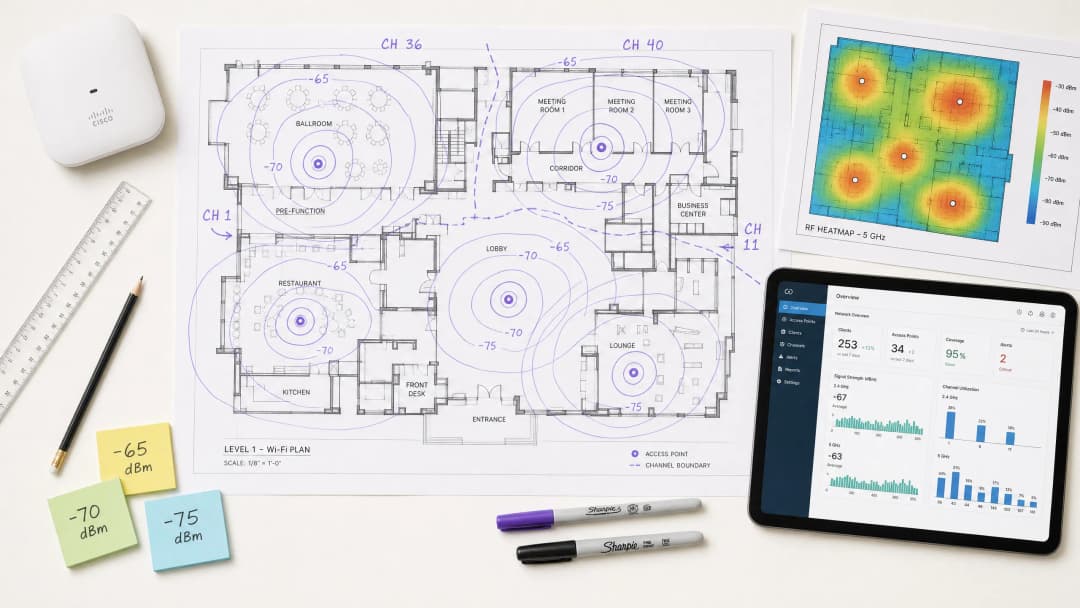
Para los CTO y arquitectos de red que gestionan entornos de alta densidad - ya sea en hospitalidad, retail o grandes espacios públicos - implementar una infraestructura inalámbrica sólida es la piedra angular para mejorar la eficiencia operativa y la satisfacción de los huéspedes. Esta guía técnica analiza a fondo qué es el RSSI y cómo funciona como una métrica crítica para optimizar la planificación de canales. Al ir más allá de los mapas de cobertura básicos para comprender a fondo la propagación de RF y los matices de la Interferencia de Co-Canal (CCI) y la Interferencia de Canal Adyacente (ACI), los líderes de TI pueden diseñar redes que admitan aplicaciones a gran escala, de alto rendimiento y baja latencia. Examinaremos cómo los umbrales precisos de RSSI impulsan las decisiones de roaming, cómo el ancho de canal afecta la eficiencia del espectro y cómo se pueden aprovechar las plataformas avanzadas de WiFi Analytics para reducir el riesgo y ofrecer un retorno de inversión (ROI) medible. Esta guía cubre los protocolos de roaming IEEE 802.11k/v/r, la optimización de SNR, las estrategias de ubicación de AP y ejemplos de implementación en el mundo real en entornos de hospitalidad y retail.
Technical Deep-Dive
What is RSSI? Definition and Measurement
Received Signal Strength Indicator (RSSI) es una medida relativa del nivel de potencia de una señal de radiofrecuencia recibida por un dispositivo cliente. RSSI se expresa en decibelios en relación con un milivatio (dBm) como un valor negativo - cuanto más cercano a cero, más fuerte es la señal. Un valor de -30 dBm representa una señal excepcionalmente fuerte (generalmente alcanzable solo a un metro de distancia del AP), mientras que -90 dBm se encuentra en el límite de la usabilidad. La siguiente tabla proporciona una referencia práctica de los umbrales de RSSI y la idoneidad de sus aplicaciones correspondientes:
| RSSI (dBm) | Calidad de la Señal | Aplicaciones Adecuadas |
|---|---|---|
| -30 a -50 | Excelente | Todas las aplicaciones, incluyendo streaming 4K y VoWiFi de alta densidad |
| -51 a -65 | Buena | Datos de alto rendimiento, VoWiFi, análisis de ubicación |
| -66 a -70 | Aceptable | Datos estándar, navegación web, correo electrónico |
| -71 a -80 | Mala | Solo conectividad básica; VoWiFi inestable |
| Menor a -80 | Inutilizable | Desconexiones frecuentes; no apto para despliegues empresariales |
RSSI vs Signal-to-Noise Ratio (SNR)
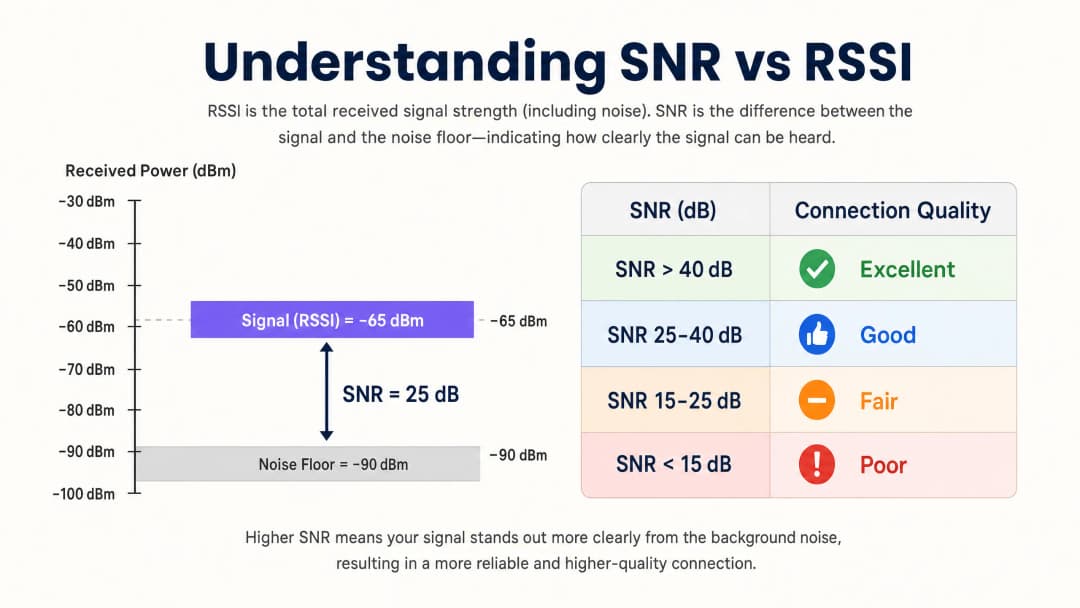
El RSSI por sí solo no es suficiente para evaluar la calidad de la red. El Signal-to-Noise Ratio (SNR) compara la fuerza de la señal recibida con el nivel de ruido ambiental, lo que proporciona un reflejo más preciso de la calidad del enlace. Por lo general, se requiere un SNR de 25 dB o superior para admitir esquemas de modulación de alto rendimiento como 256-QAM en 802.11ac/ax. Si el nivel de ruido es de -90 dBm y el RSSI es de -65 dBm, el SNR es de 25 dB - el umbral mínimo para un funcionamiento confiable de alto rendimiento.
En términos prácticos, esto significa que una red puede mostrar excelentes valores de RSSI en un mapa de calor de cobertura y, sin embargo, tener un rendimiento terrible debido a que fuentes de interferencia que no son de WiFi (hornos de microondas, teléfonos DECT, dispositivos Bluetooth o equipos industriales) han elevado el nivel de ruido. Por lo tanto, es esencial medir tanto el RSSI como el SNR durante los estudios de sitio y el monitoreo continuo.
The Physics of RF Propagation and Attenuation
En entornos complejos como hospitales (Healthcare) o centros de transporte (Transport), las señales de RF se atenúan a medida que pasan a través de obstáculos físicos. Los arquitectos de red deben tener en cuenta estas pérdidas específicas de cada material al realizar estudios de sitio predictivos y definir los límites de SNR:
| Material | Atenuación Típica (dB) |
|---|---|
| Tablaroca / cartón yeso | 3-4 dB |
| Vidrio (estándar) | 2-3 dB |
| Pared de ladrillo | 8-12 dB |
| Concreto | 12-15 dB |
| Concreto reforzado / acero | 15-25+ dB |
| Estanterías metálicas (retail) | 10-20 dB |
Es fundamental comprender a fondo la naturaleza logarítmica de la escala de decibelios: una pérdida de 3 dB reduce la potencia de la señal a la mitad, mientras que una pérdida de 10 dB la reduce diez veces. Por lo tanto, una señal que pasa a través de dos paredes de ladrillo (aproximadamente 20 dB de atenuación) es 100 veces más débil que la señal transmitida.
Planificación de canales: interferencia de cocanal (CCI) frente a interferencia de canal adyacente (ACI)
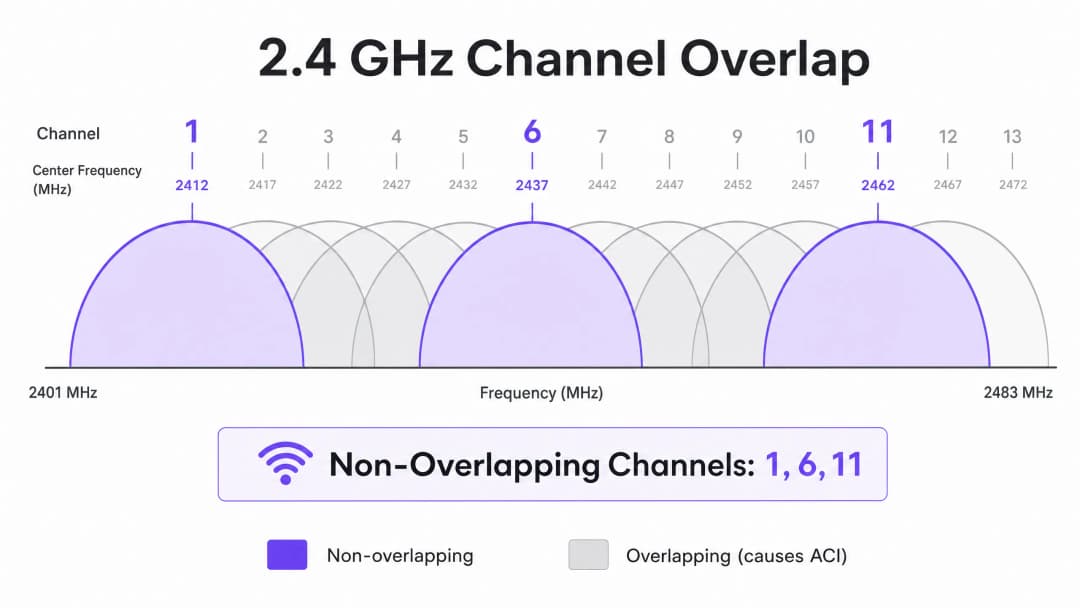
Una planificación de canales óptima requiere mitigar dos tipos distintos de interferencia. La interferencia de cocanal (CCI) ocurre cuando los puntos de acceso que operan en el mismo canal se pueden "escuchar" entre sí, lo que provoca contienda por el medio y un aumento en la latencia debido al protocolo CSMA/CA (Carrier Sense Multiple Access with Collision Avoidance). Cada dispositivo en ese canal debe esperar su turno, y cuando múltiples AP contienden simultáneamente, la utilización del canal se dispara incluso con cargas de clientes moderadas.
La interferencia de canal adyacente (ACI) ocurre cuando los AP operan en canales superpuestos, lo que eleva el piso de ruido y degrada la SNR. En la banda de 2.4 GHz, sólo los canales 1, 6 y 11 no se superponen. Cualquier otra asignación de canal provoca ACI en uno o ambos canales vecinos. En la banda de 5 GHz, el aprovechamiento de los canales de selección dinámica de frecuencias (DFS) amplía el espectro disponible, pero los eventos de detección de radar pueden forzar cambios de canal, lo que provoca breves interrupciones de conectividad. Al determinar el ancho de canal, consulte 20MHz vs 40MHz vs 80MHz: ¿Qué ancho de canal debería utilizar?. El principio fundamental: los canales más anchos ofrecen un rendimiento teórico más alto, pero reducen el número de opciones de canales no superpuestos, lo que aumenta la interferencia de cocanal (CCI) en implementaciones densas.
¿Tiene preguntas sobre su configuración específica?
Nuestro equipo trabaja con gestores de espacios, responsables de TI e ingenieros de redes en 80 000 establecimientos. Reserve una llamada de 20 minutos y le mostraremos cómo lo resolvieron otros profesionales como usted.
Guía de implementación
Paso 1: Definir los requisitos e identificar el dispositivo LCMI
Antes de implementar cualquier hardware, defina el Área de Cobertura Primaria (PCA) y el Área de Cobertura Secundaria (SCA). Es crucial identificar el dispositivo menos capaz y más importante (LCMI) - el dispositivo con la capacidad de RF más débil que debe garantizarse para operar de manera confiable. Por lo general, se trata de un escáner de mano antiguo en un almacén, un modelo específico de equipo médico en un hospital o un teléfono inteligente más antiguo en un entorno de hospitalidad. Diseñe toda la arquitectura de RF para cumplir con el requisito mínimo de RSSI de ese dispositivo, y el rendimiento de todos los demás dispositivos será naturalmente mejor.
Paso 2: Realizar un estudio de sitio activo
Realice un estudio de sitio activo para medir el RSSI y SNR reales, no simplemente un estudio predictivo mediante software. Utilice herramientas de análisis de espectro para identificar fuentes de interferencia que no sean de WiFi. Asegúrese de que la cobertura primaria cumpla con el umbral de -65 dBm y que la cobertura secundaria (para zonas de traslape de roaming) cumpla con -70 dBm. Registre el nivel de ruido de fondo en todas las áreas, ya que esto determina el SNR alcanzable y las tasas de datos máximas admitidas.
Paso 3: Ubicación de AP y ajuste de potencia
Evite la falacia de "más fuerte es mejor". Configurar la potencia de transmisión de los AP demasiado alta crea enlaces asimétricos, donde el cliente recibe la señal del AP con claridad pero el AP no puede recibir de manera confiable las transmisiones más débiles del cliente. Esta es la causa raíz del problema del cliente pegajoso - dispositivos que permanecen conectados a un AP lejano incluso cuando están físicamente más cerca de otro. Ajuste la potencia de transmisión de los AP a 10-14 dBm para que coincida con las capacidades del cliente, y asegure un traslape de celdas del 15-20% para facilitar un roaming fluido de acuerdo con los estándares IEEE 802.11k/v/r.
Paso 4: Forzar tasas de datos mínimas obligatorias
Desactive las tasas de datos heredadas (1, 2, 5.5 y 11 Mbps en 2.4 GHz; 6 y 9 Mbps en 5 GHz). Esto eleva el umbral mínimo de RSSI en el cual los clientes consideran aceptable una conexión, obligando a los dispositivos a tomar decisiones de roaming antes y evitando que los clientes de baja tasa consuman un tiempo de aire excesivo.
Paso 5: Integrar WiFi de invitados y analíticos
El despliegue de una solución de WiFi de invitados de nivel empresarial requiere una autenticación fluida sin degradar la experiencia del usuario. Implemente 802.1X para dispositivos corporativos y un Captive Portal seguro para invitados, adoptando WPA3 donde la compatibilidad de los dispositivos lo permita. Los enfoques modernos (como Cómo un asistente de wi fi permite el acceso sin contraseña en 2026) reducen la fricción de incorporación al mismo tiempo que mantienen el cumplimiento con PCI DSS y GDPR. La arquitectura de RF descrita en esta guía es un prerrequisito para servicios de ubicación y analíticos confiables - con un diseño de RF deficiente, los datos serán inexactos.
Mejores prácticas
Diseñe para capacidad, no para cobertura. En los entornos modernos de alta densidad, el factor limitante casi nunca es la cobertura de la señal - es la saturación del tiempo de aire del canal. Despliegue más APs con menor potencia de transmisión en lugar de unos pocos APs de alta potencia. Esto reduce la interferencia de cocanal (CCI), mejora el SNR y aumenta el número de clientes que pueden ser atendidos simultáneamente.
Estandarice el ancho de canal por entorno. Utilice de forma predeterminada 20 MHz en la banda de 2.4 GHz de manera universal. En la banda de 5 GHz, use 20 MHz en entornos de muy alta densidad (estadios, salas de conferencias) y 40 MHz en entornos de densidad media (hoteles, comercio minorista). Reserve los 80 MHz únicamente para escenarios de baja densidad y alto rendimiento. Implemente la pila de protocolos de roaming. Habilite 802.11k (Medición de Recursos de Radio), 802.11v (Gestión de Transición de BSS) y 802.11r (Transición Rápida de BSS) en todos los puntos de acceso. Esto garantiza que las decisiones de roaming sean impulsadas por las condiciones de RF en lugar de la inercia del cliente, y reduce la latencia de reautenticación de cientos de milisegundos a menos de 50 ms.
Valide manualmente los canales asignados automáticamente. La mayoría de los proveedores de puntos de acceso empresariales ofrecen una Gestión Automática de Recursos de Radio (RRM). Aunque RRM sirve como punto de partida, puede tomar decisiones subóptimas en entornos complejos. Siempre audite el plan de canales después del despliegue y anúlelo cuando sea necesario.
Monitoree de forma continua, no solo durante el despliegue. El entorno de RF cambia con el tiempo: aparecen nuevas fuentes de interferencia, los patrones de ocupación varían y las actualizaciones de firmware alteran el comportamiento de la radio. Aproveche una plataforma de WiFi Analytics con monitoreo continuo de RF para detectar la degradación antes de que afecte a los usuarios.
Para conocer estrategias más amplias sobre cómo convertir la infraestructura de red en resultados comerciales, consulte Cómo mejorar la satisfacción de los huéspedes: la guía definitiva.
Solución de problemas y mitigación de riesgos
El problema del cliente pegajoso (Sticky Client)
Síntoma: Los dispositivos permanecen conectados a un punto de acceso lejano con un RSSI deficiente (-80 dBm) a pesar de estar físicamente más cerca de otro punto de acceso con una señal fuerte.
Causa raíz: La potencia de transmisión del punto de acceso está configurada demasiado alta, lo que crea un enlace asimétrico. El cliente recibe bien la señal del punto de acceso, por lo que nunca inicia el roaming. Alternativamente, se han desactivado los protocolos 802.11k/v, dejando a los clientes sin guía sobre mejores puntos de acceso disponibles.
Mitigación: Reduzca la potencia de transmisión del punto de acceso a 10-12 dBm. Habilite 802.11k/v/r. Establezca velocidades de datos mínimas obligatorias para que los clientes se vean obligados a realizar roaming cuando el RSSI caiga por debajo del umbral de velocidad mínima.
Alta interferencia de cocanal
Síntoma: Utilización del canal constantemente por encima del 40-50% incluso bajo cargas de clientes moderadas, lo que provoca un aumento de la latencia y una reducción del rendimiento.
Causa raíz: Los puntos de acceso en el mismo canal están desplegados demasiado cerca entre sí, o el ancho de canal es demasiado amplio para la densidad del despliegue.
Mitigación: Reduzca el ancho de canal a 20 MHz. Revise el plan de canales para maximizar la separación física entre los puntos de acceso en el mismo canal. En despliegues de muy alta densidad, considere desactivar la radio de 2.4 GHz en uno de cada dos puntos de acceso.
Piso de ruido elevado
Síntoma: Los valores de RSSI se ven aceptables en el mapa de calor, pero el rendimiento es deficiente y las conexiones son inestables.
Causa raíz: Fuentes de interferencia ajenas a WiFi (hornos de microondas, teléfonos DECT, equipos industriales, Bluetooth) han elevado el piso de ruido, empujando la relación señal/ruido (SNR) por debajo del umbral requerido para una modulación de alto orden. Mitigación: Utilice un analizador de espectro para identificar y caracterizar las fuentes de interferencia. Migre los clientes afectados a 5 GHz siempre que sea posible, ya que la mayor parte de la interferencia que no es de WiFi se concentra en 2.4 GHz. Si la fuente de interferencia no se puede eliminar, aumente la densidad de AP para mejorar el RSSI, manteniendo así una SNR suficiente a pesar del elevado umbral de ruido.
A medida que las redes se expanden hacia espacios municipales y públicos, la planificación estratégica se vuelve cada vez más crítica. Para conocer más sobre implementaciones en el sector público, lea Purple Appoints Iain Fox as VP of Public Sector Growth to Drive Digital Inclusion and Smart City Innovation.
ROI e Impacto Comercial
Optimizar el RSSI y la planificación de canales afecta directamente los ingresos de la empresa en múltiples dimensiones. La siguiente tabla resume los resultados comerciales clave asociados con una red inalámbrica bien estructurada:
| Resultado Comercial | Mecanismo | Impacto Típico |
|---|---|---|
| Reducción de costos de soporte de TI | Menos quejas de conectividad; menos visitas técnicas en sitio | Reducción del 20 al 40% en tickets de soporte relacionados con WiFi |
| Mayor satisfacción de los huéspedes | Conectividad confiable y de alta velocidad en todo el recinto | Incremento significativo en el NPS (Net Promoter Score) y calificaciones |
| Análisis de ubicación preciso | Densidad de AP y SNR suficientes para una trilateración confiable | Precisión de ubicación dentro de los 3 metros para análisis de afluencia |
| Captura de datos de primera mano (first-party data) | Rendimiento confiable del Captive Portal | Mayores tasas de finalización para el inicio de sesión de WiFi de invitados |
| Eficiencia operativa | Conectividad confiable para dispositivos portátiles, sistemas POS e IoT | Menos transacciones fallidas y menor tiempo de inactividad operativa |
Para los operadores de recintos, el WiFi confiable ya no es un centro de costos - es un facilitador de ingresos. Al garantizar una intensidad de señal constante y una SNR alta, los recintos pueden implementar con confianza Captive Portals para capturar datos de primera mano (first-party data), impulsando campañas de marketing personalizadas y aumentando el valor de vida del cliente. Invertir en un diseño de RF sólido ofrece un ROI medible a través de una mejor eficiencia operativa, un mayor compromiso digital y la confianza para implementar servicios de ubicación y análisis avanzados.
La plataforma independiente del hardware de Purple se integra perfectamente con la infraestructura existente, entregando la capa de análisis sobre una base de RF bien diseñada - transformando los datos de intensidad de señal en inteligencia comercial procesable en entornos de hospitalidad, comercio minorista, atención médica y transporte.
Definiciones clave
RSSI (Indicador de fuerza de señal recibida)
Una medida relativa del nivel de potencia de una señal de RF recibida por un dispositivo cliente, expresada en dBm negativos. Cuanto más cercano a cero, más fuerte es la señal.
Se utiliza para determinar los límites de cobertura, activar decisiones de roaming y evaluar la disponibilidad básica de la señal. No es suficiente por sí solo para evaluar la calidad del enlace.
SNR (Relación señal a ruido)
La diferencia en decibelios (dB) entre la fuerza de la señal recibida y el umbral de ruido ambiental. Se calcula como: SNR (dB) = RSSI (dBm) - Umbral de ruido (dBm).
El factor determinante principal para el esquema de modulación y la tasa de datos alcanzables. Un SNR de 25 dB es el mínimo para una operación 256-QAM (alto rendimiento). Siempre se debe medir junto con el RSSI.
CCI (Interferencia de cocanal)
Interferencia que ocurre cuando múltiples AP y clientes operan en el mismo canal y pueden detectar las transmisiones de los demás, lo que provoca contienda por el medio bajo el protocolo CSMA/CA.
La causa más común de alta utilización de canal y latencia en implementaciones empresariales. Se mitiga mediante una planificación adecuada de canales, ajuste de potencia y garantizando una separación física adecuada entre los AP en el mismo canal.
ACI (Interferencia de canal adyacente)
Interferencia causada por la energía de RF de un canal que se filtra en un canal adyacente superpuesto, lo que eleva el umbral de ruido y degrada el SNR.
Causada por el uso de canales superpuestos en la banda de 2.4 GHz (cualquiera que no sea 1, 6, 11). Se evita mediante una estricta adherencia a asignaciones de canales no superpuestos.
DFS (Selección dinámica de frecuencia)
Un mecanismo regulatorio que permite a los dispositivos WiFi compartir el espectro de 5 GHz con sistemas de radar al monitorear las señales de radar y desalojar el canal si se detectan.
Amplía el conjunto de canales de 5 GHz disponibles, pero requiere que los AP cambien de canal al detectar un radar, lo que provoca una breve interrupción de la conectividad. Se debe tener en cuenta en implementaciones cerca de aeropuertos, instalaciones militares o sitios de radares meteorológicos.
CSMA/CA (Acceso múltiple por detección de portadora con evasión de colisiones)
El protocolo de acceso al medio utilizado por el WiFi, en el cual los dispositivos escuchan el canal de RF antes de transmitir y se abstienen de hacerlo si el canal está ocupado.
La razón fundamental por la cual el WiFi es un medio compartido half-duplex. La CCI obliga a múltiples AP y clientes a competir por el mismo canal, razón por la cual la planificación de canales es fundamental para el rendimiento.
Cliente pegajoso (Sticky Client)
Un dispositivo cliente que permanece asociado a un AP que ofrece una señal débil a pesar de estar físicamente más cerca de un AP diferente con una señal más fuerte.
Causado por presupuestos de enlace asimétricos (potencia de transmisión del AP demasiado alta) o la ausencia de protocolos de roaming 802.11k/v. Da como resultado un rendimiento deficiente, alta latencia y una experiencia de usuario degradada.
Dispositivo LCMI (Menos capaz, más importante)
El dispositivo en una implementación con las capacidades de radio más débiles que, no obstante, es fundamental para las operaciones comerciales.
Se utiliza como línea base de diseño para la arquitectura de RF. El diseño para cumplir con los requisitos del dispositivo LCMI garantiza que todos los demás dispositivos funcionen de manera adecuada.
802.11k/v/r
Un conjunto de enmiendas IEEE 802.11: 802.11k (Medición de recursos de radio), 802.11v (Gestión de transición BSS) y 802.11r (Transición rápida BSS).
Juntos, estos protocolos permiten un roaming de clientes inteligente y de baja latencia. 802.11k proporciona informes de vecinos, 802.11v permite el roaming dirigido por la red y 802.11r reduce el tiempo de autenticación a menos de 50 ms.
Ejemplos resueltos
Un hotel de 300 habitaciones está experimentando un bajo rendimiento de WiFi en las habitaciones de los huéspedes a pesar de tener un AP en cada pasillo. Los huéspedes informan de caídas de conexión y velocidades lentas, especialmente en las habitaciones más alejadas de los AP del pasillo. Los AP existentes están configurados con la máxima potencia de transmisión (23 dBm) en asignación automática de canales.
La causa raíz es una combinación de interferencia de cocanal (CCI) por la proximidad de los AP de los pasillos que se escuchan entre sí a lo largo de los corredores, la atenuación de la señal a través de las puertas y paredes de las habitaciones, y el problema del cliente adherido (sticky client) provocado por una potencia de transmisión excesivamente alta. La solución recomendada consiste en la transición a un modelo de despliegue de AP en la habitación mediante AP de placa de pared (por ejemplo, Cisco Catalyst 9105AXW o Aruba AP-303H). Configure cada AP con una potencia de transmisión de 10 - 12 dBm. Desactive la frecuencia de 2.4 GHz en uno de cada dos AP del pasillo para reducir la CCI. Estandarice a canales de 20 MHz en la banda de 5 GHz con un plan de canales manual que asigne los canales 36, 40, 44, 48, 52, 56, 60, 64 en un patrón repetitivo. Habilite 802.11k/v/r en todos los AP. Establezca tasas de datos mínimas obligatorias de 12 Mbps en 2.4 GHz y de 24 Mbps en 5 GHz. Valide con un estudio de sitio activo posterior al despliegue que tenga como objetivo un RSSI de -65 dBm y un SNR de 25 dB en todas las habitaciones.
Una gran cadena de retail que opera tiendas de 50,000 pies cuadrados desea implementar analítica de ubicación WiFi para rastrear la afluencia de clientes y el tiempo de permanencia por departamento. Los datos iniciales de la red existente muestran una precisión de ubicación de ±15 metros, lo cual es insuficiente para el análisis a nivel de departamento. La infraestructura existente cuenta con AP montados a intervalos de 6 metros a lo largo de la columna central de la tienda.
La analítica de ubicación basada en la trilateración de RSSI requiere un mínimo de tres AP que escuchen a un dispositivo cliente de forma simultánea, recibiendo cada AP una señal de -75 dBm o mejor. El diseño lineal actual de los AP significa que en los departamentos exteriores, los clientes solo están dentro del alcance de uno o dos AP, lo que imposibilita una trilateración precisa. La solución requiere un rediseño de la distribución de los AP utilizando un patrón de cuadrícula escalonada con AP en el perímetro y en el interior de cada zona de departamento, asegurando que cualquier punto de la tienda esté dentro del alcance de -75 dBm de al menos tres AP. Reduzca la potencia de transmisión de los AP a 10 dBm para estrechar las celdas de RF y mejorar el diferencial entre las lecturas de los AP (que es lo que impulsa la precisión de la ubicación). Habilite 802.11k/v para garantizar que los dispositivos no se queden adheridos a AP lejanos, lo que sesga los datos de ubicación. Integre la infraestructura de AP con la plataforma WiFi Analytics de Purple para procesar los datos de RSSI en mapas de calor de afluencia y reportes de tiempo de permanencia por departamento.
Preguntas de práctica
Q1. ¿Está diseñando una red WiFi para un estadio con capacidad para 40,000 personas. El operador del recinto desea el máximo rendimiento para la transmisión de video simultánea y la subida de contenidos a redes sociales durante los eventos. Está considerando utilizar canales de 80 MHz en la banda de 5 GHz para maximizar el rendimiento por cliente. ¿Es este el enfoque recomendado y qué plan de canales implementaría en su lugar?
Sugerencia: Considere el número de canales no superpuestos de 80 MHz disponibles en la banda de 5 GHz en comparación con los canales de 20 MHz, y el impacto de la Interferencia de Co-Canal en un entorno abierto de alta densidad.
Ver respuesta modelo
No. El uso de canales de 80 MHz en un estadio está totalmente contraindicado. En las bandas estándar de 5 GHz UNII-1/2/2e, solo hay un puñado de canales de 80 MHz no superpuestos, lo que significa que con la densidad de AP requerida para 40,000 usuarios concurrentes, una CCI severa es inevitable. El enfoque correcto es utilizar canales de 20 MHz en toda la instalación, lo que proporciona hasta 24 canales no superpuestos en 5 GHz (incluido DFS), maximizando la reutilización de canales. Se deben utilizar antenas de sector direccionales para controlar de forma estricta la cobertura de la celda de RF, apuntando hacia abajo, a las secciones de asientos, en lugar de irradiar de forma omnidireccional. La densidad de AP debe calcularse sobre la base de un objetivo de no más de 30 a 50 clientes por radio de AP, con la potencia de transmisión ajustada para coincidir con el área de cobertura de cada sector.
Q2. Una implementación en un almacén utiliza escáneres de código de barras de mano que pierden la conexión con frecuencia cuando los operadores se mueven entre pasillos. Los AP están configurados a la máxima potencia de transmisión (23 dBm) para garantizar una cobertura total. Los escáneres ejecutan una aplicación de WMS heredada que requiere una latencia inferior a 100 ms. ¿Cuál es la causa probable y qué pasos daría para resolverlo?
Sugerencia: Considere las capacidades de potencia de transmisión de un escáner de mano pequeño frente a un AP empresarial, y las implicaciones para el presupuesto de enlace en ambas direcciones.
Ver respuesta modelo
La causa probable es el problema del cliente pegajoso que resulta de un presupuesto de enlace asimétrico. Los AP transmiten a 23 dBm, por lo que los escáneres los escuchan bien en todo el almacén y no inician el roaming. Sin embargo, los radios internos de los escáneres suelen transmitir a solo 15 o 17 dBm, lo que significa que el AP no puede recibir de manera confiable las transmisiones del escáner cuando está lejos. La solución es reducir la potencia de transmisión del AP a 10 o 12 dBm para que coincida con las capacidades de los escáneres, asegurando que las celdas de cobertura tengan el tamaño adecuado y que los escáneres realicen roaming al salir del rango. Habilite 802.11k/v/r para facilitar el roaming rápido. Establezca tasas de datos mínimas obligatorias en 12 Mbps para forzar decisiones de roaming más tempranas. Valide con un estudio de sitio activo utilizando el hardware de escáner real para confirmar un RSSI de -65 dBm y un SNR de 25 dB en todos los pasillos.
Q3. Durante un estudio de sitio para una nueva ala de un hospital, mide un RSSI de -58 dBm desde el AP primario en toda el área objetivo. Sin embargo, el umbral de ruido medido por un analizador de espectro es constantemente de -72 dBm debido a equipos de monitoreo médico heredados que funcionan en la banda de 2.4 GHz. El hospital requiere un servicio de VoWiFi confiable para las comunicaciones clínicas. ¿Soportará esta red VoWiFi y qué acciones recomendaría?
Sugerencia: Calcule el SNR y evalúelo frente al requisito mínimo para VoWiFi. Considere qué banda de frecuencia se ve afectada y qué opciones de mitigación están disponibles.
Ver respuesta modelo
No, esta red no soportará VoWiFi de manera confiable en su estado actual. La SNR se calcula como -58 dBm - (-72 dBm) = 14 dB. Esto queda por debajo de la SNR mínima de 20 dB requerida para VoWiFi y muy por debajo del objetivo de 25 dB para voz de alta calidad. A pesar del fuerte RSSI de -58 dBm, el elevado piso de ruido del equipo médico degrada la calidad del enlace a un nivel inaceptable. Acciones recomendadas: Primero, migrar el tráfico de VoWiFi a la banda de 5 GHz, la cual no se ve afectada en gran medida por los equipos médicos heredados de 2.4 GHz. Segundo, aumentar la densidad de AP en las áreas afectadas para mejorar el RSSI a -50 dBm o mejor, lo que generaría una SNR de 22 dB incluso con el elevado piso de ruido - lo cual es apenas aceptable para VoWiFi. Tercero, coordinar con el equipo de ingeniería biomédica para evaluar si el equipo heredado puede ser reemplazado o blindado. Cuarto, implementar QoS (WMM) con priorización de tráfico de voz para proteger el tráfico de VoWiFi de competir con el tráfico de datos durante períodos de congestión.
Continúe leyendo esta serie
20MHz vs 40MHz vs 80MHz: ¿Qué ancho de canal debería utilizar?
Esta guía proporciona una referencia técnica definitiva e independiente del proveedor para gerentes de TI, arquitectos de red y directores de operaciones de instalaciones sobre cómo seleccionar el ancho de canal de WiFi correcto - 20MHz, 40MHz o 80MHz - en implementaciones empresariales en los sectores de hotelería, retail, eventos y entornos del sector público. Abarca los mecanismos subyacentes de IEEE 802.11, el equilibrio de capacidad en el mundo real y una guía de implementación paso a paso para ayudar a los equipos a tomar la decisión correcta este trimestre. Comprender la selección del ancho de canal es una de las decisiones con mayor impacto en cualquier diseño de red LAN inalámbrica, afectando directamente el rendimiento, la interferencia, el soporte de densidad de clientes y la confiabilidad de los servicios para invitados.
WiFi 6 vs WiFi 5: ¿resuelve la interferencia de canales?
Esta guía ofrece un análisis técnico profundo sobre cómo WiFi 6 (802.11ax) aborda la interferencia de canales en entornos empresariales de alta densidad mediante OFDMA y BSS Coloring. Proporciona a los gerentes de TI, arquitectos de red y CTO estrategias de implementación prácticas, casos de estudio reales de hotelería y salud, y un marco para evaluar el ROI de las actualizaciones de infraestructura en lugares donde el rendimiento inalámbrico es crítico para el negocio.
Canales WiFi DFS de 5GHz: Cuándo usarlos y evitarlos en la empresa
Conozca cómo funcionan los canales WiFi DFS de 5GHz, los riesgos de interferencia de radar, los tiempos de espera de CAC, los canales de radar meteorológico y las mejores prácticas de planeación de canales empresariales.
¿Tiene preguntas sobre su configuración específica?
Nuestro equipo trabaja con gestores de espacios, responsables de TI e ingenieros de redes en 80 000 establecimientos. Reserve una llamada de 20 minutos y le mostraremos cómo lo resolvieron otros profesionales como usted.