
উচ্চ-ঘনত্বের WiFi নেটওয়ার্কে লেটেন্সি কমানো
এই গাইডটি বিস্তারিতভাবে আলোচনা করে কীভাবে ট্র্যাকিং ডোমেনগুলোর জন্য অপ্রয়োজনীয় DNS লুকআপ দূর করা উচ্চ-ঘনত্বের WiFi নেটওয়ার্কে লেটেন্সি মারাত্মকভাবে কমিয়ে দেয়। এটি জনাকীর্ণ ভেন্যু পরিবেশ পরিচালনাকারী IT লিডারদের জন্য কার্যকর আর্কিটেকচার, বাস্তবায়ন এবং ROI নির্দেশিকা প্রদান করে।
এই গাইডটি শুনুন
পডকাস্ট ট্রান্সক্রিপ্ট দেখুন
আমাদের মূল সিরিজের অংশ: Guest WiFi Guide →
কার্যনির্বাহী সারসংক্ষেপ

আতিথেয়তা ভেন্যু, স্টেডিয়াম এবং রিটেল এস্টেটের মতো উচ্চ-ঘনত্বের পরিবেশ পরিচালনা করা CTO এবং নেটওয়ার্ক আর্কিটেক্টদের জন্য, লেটেন্সি প্রায়শই কেবল RF বা ব্যাকহল সমস্যা হিসেবে ভুল বোঝা হয়। তবে, আধুনিক WiFi নেটওয়ার্কে অনুভূত লেটেন্সির একটি উল্লেখযোগ্য শতাংশ DNS লেয়ার থেকে উৎপন্ন হয়। যখন কোনো ব্যবহারকারী আপনার গেস্ট WiFi-এর সাথে সংযুক্ত হন, তখন একটি একক পেজ লোড ২০ থেকে ৭০টি DNS কোয়েরি ট্রিগার করতে পারে, যা মূলত থার্ড-পার্টি ট্র্যাকিং পিক্সেল, বিজ্ঞাপন নেটওয়ার্ক এবং টেলিমেট্রি বিকনের জন্য হয়ে থাকে। জনাকীর্ণ ভেন্যুতে, এটি একটি 'DNS কোয়েরি স্টর্ম' (DNS query storm) তৈরি করে যা লোকাল রিজলভারকে অবরুদ্ধ করে এবং মূল্যবান এয়ারটাইম (airtime) দখল করে।
এজ (edge)-এ আক্রমণাত্মক লোকাল DNS ক্যাশিং প্রয়োগ করে এবং ট্র্যাকিং ডোমেন ফিল্টার করে, ভেন্যুগুলো অপ্রয়োজনীয় অনুরোধের জন্য অবিলম্বে NXDOMAIN ফেরত দিতে পারে। এই পদ্ধতিটি পাবলিক ইন্টারনেটের রাউন্ড-ট্রিপ দূর করে, যার ফলে অনুভূত লেটেন্সি ৮৭% পর্যন্ত কমে যায়। এই গাইডটি DNS-অপ্টিমাইজড WiFi স্থাপন করতে, ব্যবহারকারীর অভিজ্ঞতা উন্নত করতে, সাপোর্ট টিকিট কমাতে এবং নির্বিঘ্ন WiFi অ্যানালিটিক্স ডেটা ক্যাপচার নিশ্চিত করতে প্রযুক্তিগত আর্কিটেকচার এবং বাস্তবায়ন ফ্রেমওয়ার্ক প্রদান করে।
প্রযুক্তিগত ডিপ-ডাইভ
DNS কোয়েরি স্টর্মের গঠন
802.11ax (WiFi 6/6E) চালিত উচ্চ-ঘনত্বের ডিপ্লয়মেন্টে, কো-চ্যানেল ইন্টারফারেন্স পরিচালনা করতে এবং এয়ারটাইম অপ্টিমাইজ করতে OFDMA এবং BSS কালারিং-এর মতো দক্ষতা প্রক্রিয়া ডিজাইন করা হয়েছে। তবে, এই প্রক্রিয়াগুলো ধরে নেয় যে রেডিও মাধ্যমটি প্রকৃত ব্যবহারকারীর ডেটা ট্রান্সমিট করছে। যখন কোনো হোটেলে ৩,০০০ অতিথি বা স্টেডিয়ামে ১০,০০০ ভক্ত একসাথে ওয়েব পেজ লোড করার চেষ্টা করেন, তখন অপ্রয়োজনীয় ডোমেনের (যেমন, ad-tracker.com, analytics.thirdparty.net) জন্য প্রচুর পরিমাণে DNS কোয়েরি ব্যাপক ওভারহেড তৈরি করে।
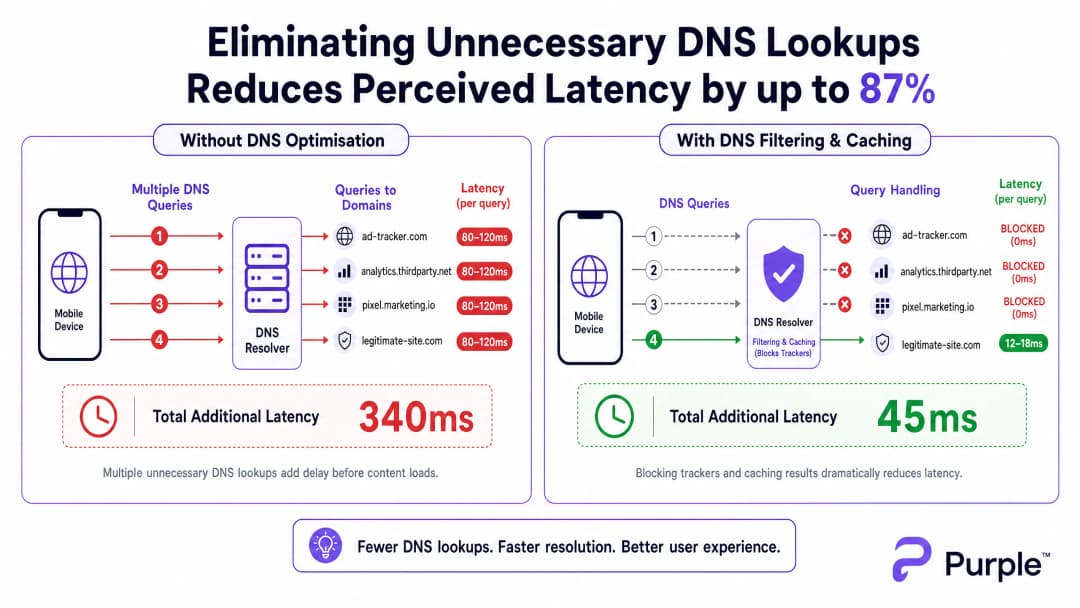
বাইরের রিজলভার (जैसे ISP-এর ডিফল্ট DNS বা Google-এর 8.8.8.8)-এ পাঠানো প্রতিটি DNS কোয়েরি জনাকীর্ণ নেটওয়ার্কে ৮০-১৫০ms রাউন্ড-ট্রিপ সময় নেয়। যদি একটি পেজের কন্টেন্ট রেন্ডার করার আগে ১৫টি ট্র্যাকিং ডোমেন লুকআপের প্রয়োজন হয়, তবে ব্যবহারকারী এক সেকেন্ডেরও বেশি 'অদৃশ্য' বিলম্বের সম্মুখীন হন। এটি থ্রুপুটের সমস্যা নয়; এটি একটি ট্রানজ্যাকশনাল বটলেনেক।
এজ রেজোলিউশনের জন্য আর্কিটেকচার
এটি কমাতে, আর্কিটেকচারকে রেজোলিউশন নেটওয়ার্ক এজে স্থানান্তরিত করতে হবে। আক্রমণাত্মক TTL ক্যাশ সহ লোকাল DNS রিজলভার স্থাপন করা নিশ্চিত করে যে বৈধ, ঘন ঘন অনুরোধ করা ডোমেনগুলো ৫ms-এরও কম সময়ে রিজলভ হয়ে যায়।

গুরুত্বপূর্ণভাবে, এই রিজলভারের পরিচিত ট্র্যাকিং ডোমেনগুলোর কোয়েরি ড্রপ করার জন্য একটি কিউরেটেড ব্লকলিস্ট (যেমন, Pi-hole এন্টারপ্রাইজ মোড, Cisco Umbrella) একীভূত করা উচিত। অবিলম্বে NXDOMAIN ফেরত দিলে ওয়্যারলেস মাধ্যমে ট্রান্সমিশন সুযোগ (TXOP) মুক্ত হয়, যার ফলে প্রকৃত পেলোড ডেটা দ্রুত প্রবাহিত হতে পারে।
আপনার নির্দিষ্ট সেটআপ নিয়ে কোনো প্রশ্ন আছে?
আমাদের টিম ৮০,০০০ ভেন্যুতে ভেন্যু অপারেটর, IT ম্যানেজার এবং নেটওয়ার্ক ইঞ্জিনিয়ারদের সাথে কাজ করে। একটি ২০ মিনিটের কল বুক করুন এবং আপনার মতো অন্যরা কীভাবে এর সমাধান করেছেন তা আমরা আপনাকে দেখাব।
বাস্তবায়ন গাইড
ধাপ ১: বেসলাইন অডিটিং
DNS পাথ পরিবর্তন করার আগে, একটি বেসলাইন তৈরি করুন। পিক ব্যবহারের সময় কোয়েরি লগ ক্যাপচার করতে আপনার বিদ্যমান রিজলভারকে ইন্সট্রুমেন্ট করুন বা প্যাসিভ ট্যাপ স্থাপন করুন। শীর্ষ ৫০টি সবচেয়ে বেশি কোয়েরি করা ডোমেন চিহ্নিত করুন; সাধারণত, ৩০-৫০% ট্র্যাকিং বা টেলিমেট্রি পরিষেবা হবে।
ধাপ ২: লোকাল রিজলভার স্থাপন
অন-প্রিমিসেস বা এজ-হোস্টেড রিজলভার স্থাপন করুন। অভ্যন্তরীণ রিসোর্সের (স্প্লিট DNS) জন্য অথরিটেটিভ জোন কনফিগার করুন এবং একটি রক্ষণশীল ব্লকলিস্ট প্রয়োগ করুন। বৈধ অ্যাপ্লিকেশন ভেঙে যাওয়া এড়াতে শুরুতে আক্রমণাত্মক তালিকা এড়িয়ে চলুন।
ধাপ ৩: DNS over HTTPS (DoH) পরিচালনা
আধুনিক অপারেটিং সিস্টেমগুলো DoH ব্যবহার করে লোকাল রিজলভারকে দ্রুত বাইপাস করছে। নিয়ন্ত্রণ বজায় রাখতে, পরিচিত DoH প্রদানকারীদের জন্য আউটবাউন্ড TCP/UDP 443 ব্লক করে ফায়ারওয়ালে DoH ট্রাফিক ইন্টারসেপ্ট করুন এবং সেগুলোকে আপনার পরিচালিত DoH রিজলভারে রিডাইরেক্ট করুন। এর গভীর প্রভাবগুলোর জন্য, DNS Over HTTPS (DoH): পাবলিক WiFi ফিল্টারিংয়ের জন্য প্রভাব সংক্রান্ত আমাদের গাইডটি পর্যালোচনা করুন।
সর্বোত্তম অনুশীলনসমূহ
- ইটারেটিভ ব্লকলিস্টিং: স্বয়ংক্রিয় ফিডের মাধ্যমে সাপ্তাহিক ব্লকলিস্ট আপডেট করুন, তবে ফলস পজিটিভের জন্য দ্রুত-প্রতিক্রিয়া হোয়াইটলিস্ট প্রক্রিয়া বজায় রাখুন।
- কমপ্লায়েন্স সারিবদ্ধকরণ: আপনার ক্যাপটিভ পোর্টাল-এর পরিষেবার শর্তাবলীতে DNS ফিল্টারিং নথিভুক্ত করুন। এটি থার্ড-পার্টি ডেটা সংগ্রহ সক্রিয়ভাবে হ্রাস করে GDPR-এর সাথে সারিবদ্ধ হয়।
- VLAN সেগমেন্টেশন: পুরো ভেন্যুতে রোলআউট করার আগে স্টেজিং VLAN বা AP-এর নির্দিষ্ট সাবসেটে নতুন ব্লকলিস্ট পরীক্ষা করুন।
समस्या निवारण और जोखिम न्यूनीकरण
- অ্যাপ্লিকেশন ভেঙে যাওয়া: সবচেয়ে সাধারণ ব্যর্থতার মোড হলো একটি বৈধ অ্যাপের ব্যর্থ হওয়া কারণ একটি ডিপেন্ডেন্সি ব্লক করা হয়েছিল।
NXDOMAINস্পাইক রেট পর্যবেক্ষণ করুন; আকস্মিক বৃদ্ধি সাধারণত ফলস পজিটিভের ইঙ্গিত দেয়। - DoH বাইপাস ব্যর্থতা: যদি লোকাল ফিল্টারিং সত্ত্বেও লেটেন্সি বেশি থাকে, তবে আপনার ইন্টারসেপ্ট নিয়মগুলোকে বাইপাস করা এনক্রিপ্ট করা DNS-এর জন্য ফায়ারওয়াল লগ পরীক্ষা করুন।
- ক্যাশ পয়জনিং: নিশ্চিত করুন যে আপনার লোকাল রিজলভার ক্যাশ পয়জনিং আক্রমণের বিরুদ্ধে সুরক্ষিত, বিশেষ করে সর্বজনীন Transport বা Healthcare ডিপ্লয়মেন্টে।
ROI এবং ব্যবসায়িক প্রভাব
DNS অপ্টিমাইজেশনের মাধ্যমে লেটেন্সি কমানো সরাসরি বটম লাইনে প্রভাব ফেলে। একটি হোটেলের জন্য, দ্রুত ক্যাপটিভ পোর্টাল লোড এবং প্রতিক্রিয়াশীল ব্রাউজিং সরাসরি উচ্চতর TripAdvisor স্কোরের সাথে সম্পর্কিত। একটি রিটেল পরিবেশের জন্য, এটি ডিজিটাল অন্তর্ভুক্তি এবং স্মার্ট সিটি উদ্ভাবন চালনা করতে পাবলিক সেক্টরের ভিপি গ্রোথ হিসেবে Purple আইয়েন ফক্সকে নিয়োগ দিয়েছে উদ্যোগ বা WiFi হটস্পটগুলোতে নির্বিঘ্ন, নিরাপদ নেভিগেশনের জন্য Purple অফলাইন ম্যাপ মোড চালু করেছে-এর মতো অবস্থান-ভিত্তিক পরিষেবাগুলোর মতো টুলের সাথে নির্বিঘ্ন একীকরণ নিশ্চিত করে।
DNS-কে পরবর্তী চিন্তার পরিবর্তে একটি গুরুত্বপূর্ণ অবকাঠামো লেয়ার হিসেবে বিবেচনা করে, ভেন্যুগুলো তাদের বিদ্যমান RF হার্ডওয়্যার বিনিয়োগ থেকে সর্বোচ্চ পারফরম্যান্স অর্জন করতে পারে।
এক্সপার্ট ব্রিফিং পডকাস্ট
উচ্চ-ঘনত্বের ভেন্যুতে DNS অপ্টিমাইজেশনের মেকানিক্স এবং বাস্তবায়ন কৌশলগুলোর ওপর আমাদের সিনিয়র কনসালট্যান্টের বিশ্লেষণ শুনুন।
মূল সংজ্ঞাসমূহ
DNS Query Storm
ডোমেন নেম রেজোলিউশন অনুরোধের একটি বিশাল, যুগপৎ স্পাইক, যা সাধারণত ঘটে যখন শত শত ডিভাইস একসাথে সংযুক্ত হয় এবং ট্র্যাকিং-ভারী ওয়েব পেজ লোড করে।
পিক প্রবেশের সময় স্টেডিয়াম এবং হোটেলগুলোতে সাধারণ ঘটনা, যা ব্যান্ডউইথ উপলব্ধ থাকা সত্ত্বেও অনুভূত নেটওয়ার্ক ব্যর্থতার কারণ হয়।
NXDOMAIN
একটি DNS রেসপন্স কোড যা নির্দেশ করে যে অনুরোধ করা ডোমেন নেমটির কোনো অস্তিত্ব নেই।
পরিচিত ট্র্যাকিং ডোমেনগুলোর জন্য অনুরোধগুলো অবিলম্বে বন্ধ করতে, লেটেন্সি এবং এয়ারটাইম বাঁচাতে DNS ফিল্টারিংয়ে কৌশলগতভাবে ব্যবহৃত হয়।
DNS over HTTPS (DoH)
HTTPS প্রোটোকলের মাধ্যমে দূরবর্তী Domain Name System রেজোলিউশন সম্পাদন করার একটি প্রোটোকল, যা DoH ক্লায়েন্ট এবং DoH-ভিত্তিক DNS রিজলভারের মধ্যে ডেটা এনক্রিপ্ট করে।
ভোক্তাদের গোপনীয়তার জন্য ভালো হলেও, DoH কর্পোরেট নেটওয়ার্ক নিয়ন্ত্রণ এবং ফিল্টারিং বাইপাস করতে পারে, যার জন্য নির্দিষ্ট ফায়ারওয়াল ইন্টারসেপশন কৌশল প্রয়োজন।
TTL Cache (Time to Live)
এমন একটি প্রক্রিয়া যেখানে একটি লোকাল DNS রিজলভার একটি নির্দিষ্ট সময়ের জন্য সম্প্রতি রিজলভ করা ডোমেনের IP ঠিকানা সংরক্ষণ করে, অথরিটেটিভ সার্ভারে কোয়েরি না করেই পরবর্তী অনুরোধগুলো অবিলম্বে পরিবেশন করে।
একটি ভেন্যুতে বৈধ, অত্যন্ত ট্রাফিকযুক্ত ডোমেনগুলোর (যেমন, google.com, netflix.com) লেটেন্সি কমানোর জন্য অত্যন্ত গুরুত্বপূর্ণ।
Airtime Overhead
প্রকৃত ব্যবহারকারীর পেলোড ডেটার পরিবর্তে ম্যানেজমেন্ট ফ্রেম, কন্ট্রোল ফ্রেম এবং ট্রানজ্যাকশনাল প্রোটোকল (যেমন DNS) দ্বারা ব্যবহৃত ওয়্যারলেস ট্রান্সমিশন ক্ষমতার অনুপাত।
অप्रয়োজনীয় DNS কোয়েরি হ্রাস করা সরাসরি এয়ারটাইম ওভারহেড কমায়, যা সম্পূর্ণ AP ক্লাস্টারের দক্ষতা উন্নত করে।
Split DNS
একটি বাস্তবায়ন যেখানে অনুরোধের সোর্স IP ঠিকানার ওপর ভিত্তি করে বিভিন্ন DNS রেসপন্স প্রদান করা হয়, যা প্রায়শই অভ্যন্তরীণ হোস্টনেমগুলোকে বাহ্যিক হোস্টনেম থেকে ভিন্নভাবে রিজলভ করতে ব্যবহৃত হয়।
প্রয়োজন যখন একটি ভেন্যু লোকাল পরিষেবা হোস্ট করে (যেমন একটি ক্যাপটিভ পোর্টাল বা লোকাল মিডিয়া সার্ভার) যা পাবলিক ইন্টারনেটের মাধ্যমে রিজলভ করা উচিত নয়।
BSS Colouring
802.11ax (WiFi 6)-এ একটি স্পেশাল রিইউজ কৌশল যা প্রতিটি Basic Service Set-এ একটি 'রঙ' (একটি সংখ্যা) বরাদ্দ করে, যা একই চ্যানেলের AP-গুলোকে তাদের নিজস্ব ট্রাফিক এবং ওভারল্যাপিং নেটওয়ার্ক ট্রাফিকের মধ্যে পার্থক্য করতে দেয়।
একটি মূল RF অপ্টিমাইজেশন বৈশিষ্ট্য যা সবচেয়ে ভালো কাজ করে যখন নেটওয়ার্কটি অতিরিক্ত DNS লুকআপের মতো অপ্রয়োজনীয় ট্রানজ্যাকশনাল ওভারহেড দ্বারা জর্জরিত না হয়।
Passive DNS Tap
ট্রাফিকের প্রকৃত প্রবাহে হস্তক্ষেপ না করে একটি সুইচ পোর্ট (SPAN পোর্ট) থেকে প্যাকেট কপি করে DNS ট্রাফিক পর্যবেক্ষণ করার একটি পদ্ধতি।
ফিল্টারিং বাস্তবায়নের আগে কোয়েরি ভলিউম বুঝতে এবং শীর্ষ ট্র্যাকিং ডোমেনগুলো সনাক্ত করতে প্রাথমিক অডিট পর্বের সময় ব্যবহৃত হয়।
সমাধানকৃত উদাহরণসমূহ
গত বছর WiFi 6 অ্যাক্সেস পয়েন্টে আপগ্রেড করা সত্ত্বেও, একটি ৫০০-রুমের রিসোর্ট হোটেল বিকেল ৪:০০টা থেকে সন্ধ্যা ৬:০০টার চেক-ইন সময়ের মধ্যে মারাত্মক 'ধীরগতির WiFi' অভিযোগের সম্মুখীন হয়। ব্যাকহল ব্যবহার মাত্র ৪০%।
১. গেস্ট VLAN-এ একটি লোকাল ক্যাশিং DNS রিজলভার (যেমন, Unbound) স্থাপন করুন। ২. একটি রক্ষণশীল ট্র্যাকিং ডোমেন ব্লকলিস্ট প্রয়োগ করুন। ৩. সমস্ত গেস্ট ক্লায়েন্টকে লোকাল রিজলভারের IP বরাদ্দ করতে DHCP সার্ভার কনফিগার করুন। ৪. সমস্ত DNS ট্রাফিককে লোকাল রিজলভারের মধ্য দিয়ে যেতে বাধ্য করতে আউটবাউন্ড পোর্ট ৫৩ ব্লক করে ফায়ারওয়াল নিয়ম প্রয়োগ করুন।
একটি বড় কনফারেন্স সেন্টারের লেটেন্সি উন্নত করতে DNS ফিল্টারিং প্রয়োগ করা প্রয়োজন, তবে আধুনিক স্মার্টফোনগুলো DNS over HTTPS (DoH) ব্যবহার করে লোকাল রিজলভারকে বাইপাস করার বিষয়ে তারা চিন্তিত।
১. প্রধান পাবলিক DoH প্রদানকারীদের (Cloudflare, Google, Quad9) IP রেঞ্জগুলো চিহ্নিত করুন। ২. এই নির্দিষ্ট IP রেঞ্জগুলোতে আউটবাউন্ড TCP পোর্ট ৪৪৩ ব্লক করে ফায়ারওয়াল নিয়ম তৈরি করুন। ৩. একটি লোকাল DoH-সক্ষম রিজলভার স্থাপন করুন। ৪. ক্লায়েন্টদের পরিচালিত DoH রিজলভারে নির্দেশ করতে নেটওয়ার্ক পলিসি (যেমন, DHCP অপশন ৬) ব্যবহার করুন।
অনুশীলনী প্রশ্নসমূহ
Q1. আপনি একটি স্টেডিয়াম WiFi নেটওয়ার্ক পরিচালনা করছেন। হাফটাইমের সময়, ব্যবহারকারীরা ধীরগতির লোডিং সময়ের রিপোর্ট করছেন। ড্যাশবোর্ড মেট্রিক্স দেখায় যে AP CPU ব্যবহার কম এবং ব্যাকহল ব্যান্ডউইথ ৩০% ক্ষমতায় রয়েছে। সবচেয়ে সম্ভাব্য কারণ কী এবং তাৎক্ষণিক সমাধান কী?
ইঙ্গিত: ১৫,০০০ মানুষ একসাথে তাদের ফোন খুললে যে ট্রানজ্যাকশনাল ভলিউম তৈরি হয় তা বিবেচনা করুন।
মডেল উত্তর দেখুন
সবচেয়ে সম্ভাব্য কারণ হলো একটি DNS কোয়েরি স্টর্ম লোকাল রিজলভার বা আপস্ট্রিম ISP রিজলভারকে অভিভূত করছে। তাৎক্ষণিক সমাধান হলো লোকাল রিজলভারের ক্যাশ হিট রেট যাচাই করা এবং উচ্চ-ভলিউম ট্র্যাকিং ডোমেনগুলোর জন্য একটি ব্লকলিস্ট সক্রিয় রয়েছে তা নিশ্চিত করা, যা কোয়েরি লোড কমাতে অবিলম্বে NXDOMAIN ফেরত দেবে।
Q2. একটি রিটেল চেইন ট্র্যাকিং ডোমেন ব্লক করতে লোকাল DNS ফিল্টারিং প্রয়োগ করে। এক সপ্তাহ পরে, মার্কেটিং টিম অভিযোগ করে যে তাদের নতুন ইন-স্টোর অ্যানালিটিক্স অ্যাপটি গেস্ট WiFi-এ লোড হতে ব্যর্থ হচ্ছে। লেটেন্সির সুবিধা বজায় রেখে আপনি কীভাবে এটি সমাধান করবেন?
ইঙ্গিত: ফিল্টারিং কোনো সেট-অ্যান্ড-ফরগেট কনফিগারেশন নয়।
মডেল উত্তর দেখুন
অ্যাপটি ব্যর্থ হওয়ার নির্দিষ্ট ডিভাইস বা সময়সীমার জন্য DNS কোয়েরি লগগুলো পর্যালোচনা করুন। অ্যাপটি যে ব্লক করা ডোমেনের ওপর নির্ভরশীল তা চিহ্নিত করুন (একটি ফলস পজিটিভ)। এই নির্দিষ্ট ডোমেনটিকে রিজলভারের হোয়াইটলিস্টে যুক্ত করুন, যাতে বাকি ট্র্যাকিং ডোমেনগুলো ব্লক থাকা অবস্থায় অ্যাপটি কাজ করে তা নিশ্চিত করা যায়।
Q3. আপনি একটি পাবলিক সেক্টর বিল্ডিংয়ে আক্রমণাত্মক ক্যাশিং এবং ফিল্টারিং সহ একটি লোকাল DNS রিজলভার স্থাপন করেছেন। তবে, প্যাকেট ক্যাপচারগুলো দেখায় যে উল্লেখযোগ্য পরিমাণ DNS ট্রাফিক এখনও পোর্ট ৪৪৩-এ নেটওয়ার্ক ছেড়ে যাচ্ছে। কী ঘটছে এবং আপনি কীভাবে লোকাল পলিসি প্রয়োগ করবেন?
ইঙ্গিত: আধুনিক ব্রাউজারগুলো স্ট্যান্ডার্ড পোর্ট ৫৩ DNS বাইপাস করতে এনক্রিপ্ট করা প্রোটোকল ব্যবহার করে।
মডেল উত্তর দেখুন
ডিভাইসগুলো লোকাল রিজলভারকে বাইপাস করতে DNS over HTTPS (DoH) ব্যবহার করছে। পলিসি প্রয়োগ করতে, আপনাকে পরিচিত পাবলিক DoH প্রদানকারীর IP রেঞ্জগুলোর (যেমন, Cloudflare, Google) উদ্দেশ্যে পাঠানো আউটবাউন্ড TCP/UDP পোর্ট ৪৪৩ ট্রাফিক ব্লক করতে ফায়ারওয়াল কনফিগার করতে হবে, যা ডিভাইসগুলোকে DHCP-প্রদত্ত লোকাল রিজলভারে ফিরে যেতে বাধ্য করবে।
এই সিরিজে পড়া চালিয়ে যান
অপ্টিমাল চ্যানেল প্ল্যানিংয়ের জন্য RSSI এবং সিগন্যালের ক্ষমতা বোঝা
এই নির্দেশিকাটি অপ্টিমাল চ্যানেল প্ল্যানিংয়ের জন্য RSSI, সিগন্যাল-টু-নয়েজ রেশিও (SNR), এবং RF প্রোপাগেশন নীতিগুলির একটি বিস্তৃত প্রযুক্তিগত বিশ্লেষণ প্রদান করে। এটি IT ম্যানেজার, নেটওয়ার্ক আর্কিটেক্ট এবং ভেন্যু অপারেশন ডিরেক্টরদের কো-চ্যানেল এবং অ্যাডজাসেন্ট চ্যানেল ইন্টারফারেন্স হ্রাস করার, AP প্লেসমেন্ট অপ্টিমাইজ করার এবং হসপিটালিটি, রিটেইল এবং পাবলিক-সেক্টর পরিবেশে পরিমাপযোগ্য ব্যবসায়িক প্রভাবের জন্য অ্যানালিটিক্স ব্যবহার করার কার্যকর কৌশল প্রদান করে।
WiFi 6 বনাম WiFi 5: এটি কি চ্যানেল ইন্টারফেয়ারেন্সের সমাধান করে?
এই গাইডটি OFDMA এবং BSS Coloring-এর মাধ্যমে কীভাবে WiFi 6 (802.11ax) উচ্চ-ঘনত্বের এন্টারপ্রাইজ পরিবেশে চ্যানেল ইন্টারফেয়ারেন্সের সমাধান করে সে সম্পর্কে একটি প্রযুক্তিগত বিশ্লেষণ প্রদান করে। এটি IT ম্যানেজার, নেটওয়ার্ক আর্কিটেক্ট এবং CTO-দের কার্যকর ডেপ্লয়মেন্ট কৌশল, হসপিটালিটি ও হেলথকেয়ারের বাস্তব কেস স্টাডি এবং ওয়্যারলেস পারফরম্যান্স ব্যবসায়িকভাবে অত্যন্ত গুরুত্বপূর্ণ এমন ভেন্যুগুলোতে ইনফ্রাস্ট্রাকচার আপগ্রেডের ROI মূল্যায়নের জন্য একটি ফ্রেমওয়ার্ক প্রদান করে।
উচ্চ-ঘনত্বের ভেন্যুর জন্য সেরা WiFi চ্যানেলসমূহ
স্টেডিয়াম, অ্যারেনা এবং বৃহৎ পাবলিক ভেন্যুর মতো উচ্চ-ঘনত্বের পরিবেশে WiFi চ্যানেল নির্বাচন এবং অপ্টিমাইজ করার জন্য একটি চূড়ান্ত প্রযুক্তিগত নির্দেশিকা। এটি RF ফিজিক্স, 5 GHz এবং 6 GHz ব্যান্ড জুড়ে চ্যানেল পুনরায় ব্যবহারের কৌশল এবং IT লিডারদের জন্য কার্যকরী স্থাপনা নির্দেশিকা কভার করে।
আপনার নির্দিষ্ট সেটআপ নিয়ে কোনো প্রশ্ন আছে?
আমাদের টিম ৮০,০০০ ভেন্যুতে ভেন্যু অপারেটর, IT ম্যানেজার এবং নেটওয়ার্ক ইঞ্জিনিয়ারদের সাথে কাজ করে। একটি ২০ মিনিটের কল বুক করুন এবং আপনার মতো অন্যরা কীভাবে এর সমাধান করেছেন তা আমরা আপনাকে দেখাব।