
DNS Over HTTPS (DoH): পাবলিক WiFi ফিল্টারিংয়ের জন্য এর প্রভাব
এই টেকনিক্যাল রেফারেন্স গাইডটি ব্যাখ্যা করে যে কীভাবে DNS over HTTPS (DoH) পাবলিক WiFi নেটওয়ার্কগুলোতে প্রথাগত পোর্ট 53 কন্টেন্ট ফিল্টারিং বাইপাস করে। এটি নেটওয়ার্ক আর্কিটেক্ট এবং আইটি ম্যানেজারদের ভিজিবিলিটি পুনরুদ্ধার করতে, কমপ্লায়েন্স প্রয়োগ করতে এবং এন্টারপ্রাইজ পরিবেশে গেস্ট অ্যাক্সেস সুরক্ষিত করার জন্য কার্যকর, ভেন্ডর-নিউট্রাল মিটিগেশন স্ট্র্যাটেজি প্রদান করে।
এই গাইডটি শুনুন
পডকাস্ট ট্রান্সক্রিপ্ট দেখুন
আমাদের মূল সিরিজের অংশ: Enterprise WiFi Security Guide →
এক্সিকিউটিভ সামারি
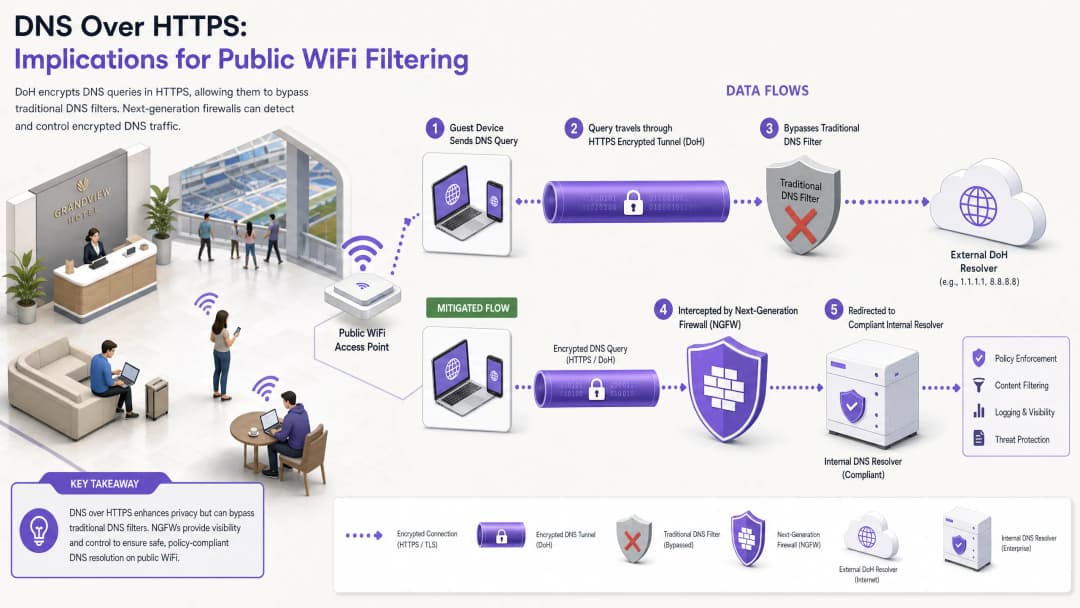
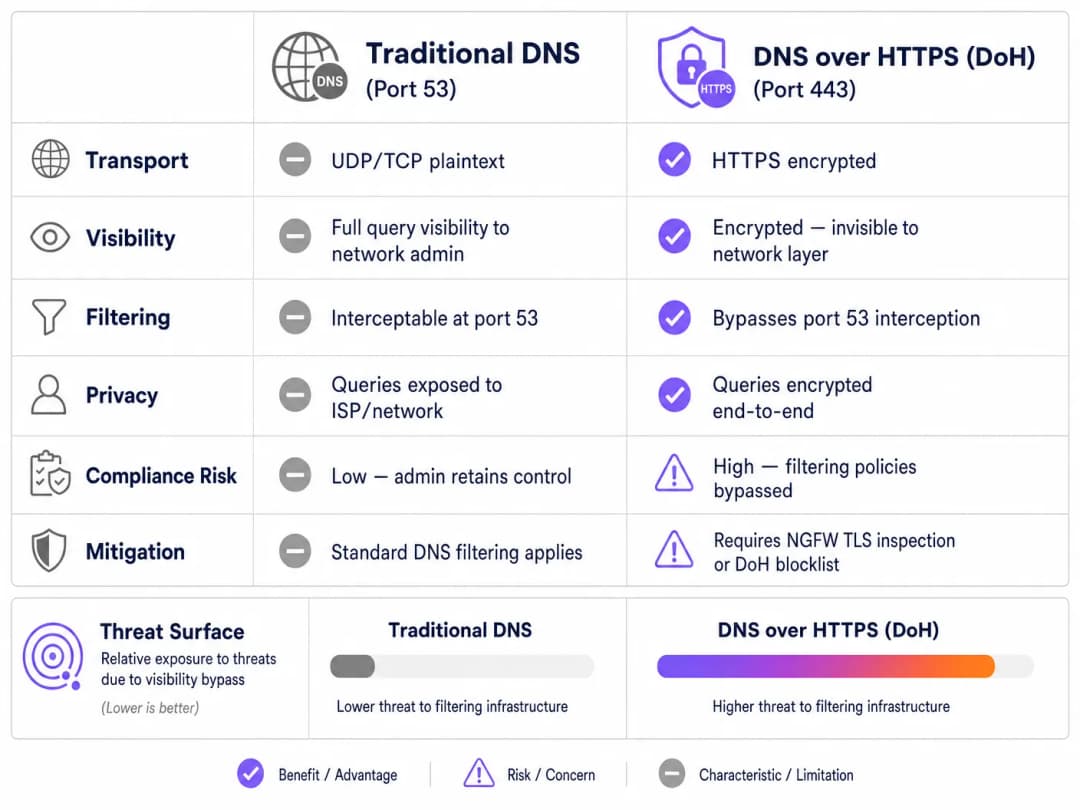
প্রায় এক দশক ধরে, পোর্ট 53-এ প্রথাগত DNS ফিল্টারিং পাবলিক WiFi নেটওয়ার্কগুলোতে কন্টেন্ট পলিসি প্রয়োগ এবং ম্যালওয়্যার হুমকি প্রশমিত করার প্রাথমিক মেকানিজম হিসেবে কাজ করেছে। তবে, মূলধারার ব্রাউজার এবং অপারেটিং সিস্টেমগুলোর দ্বারা DNS over HTTPS (DoH)-এর ব্যাপক গ্রহণ এই মডেলটিকে মৌলিকভাবে ব্যাহত করে। পোর্ট 443-এ স্ট্যান্ডার্ড HTTPS ট্রাফিকের মধ্যে DNS কোয়েরিগুলোকে এনক্যাপসুলেট করার মাধ্যমে, DoH এই কোয়েরিগুলোকে প্রথাগত নেটওয়ার্ক ইন্টারসেপশন কৌশলগুলোর কাছে অদৃশ্য করে তোলে।
এন্টারপ্রাইজ আইটি ম্যানেজার এবং নেটওয়ার্ক আর্কিটেক্ট যারা Hospitality, Retail, স্টেডিয়াম এবং পাবলিক-সেক্টর ভেন্যুগুলোতে গেস্ট WiFi পরিচালনা করেন, তাদের জন্য এটি একটি উল্লেখযোগ্য কমপ্লায়েন্স এবং সিকিউরিটি গ্যাপ তৈরি করে। যখন গেস্ট ডিভাইসগুলো নীরবে ভেন্যুর নির্ধারিত DNS রিভলভারগুলোকে বাইপাস করে, তখন সতর্কতার সাথে তৈরি করা গ্রহণযোগ্য ব্যবহারের পলিসিগুলো ব্যর্থ হয়, যা নেটওয়ার্কটিকে কমান্ড-অ্যান্ড-কন্ট্রোল (C2) ম্যালওয়্যার ট্রাফিক এবং অনুপযুক্ত কন্টেন্টের সম্মুখীন করে। এই গাইডটি DoH বাইপাস ভেক্টরের মেকানিক্স বিস্তারিতভাবে বর্ণনা করে এবং নেটওয়ার্ক ভিজিবিলিটি পুনরুদ্ধার, রেগুলেটরি কমপ্লায়েন্স নিশ্চিত করতে এবং শক্তিশালী Guest WiFi সিকিউরিটি বজায় রাখতে একটি স্তরযুক্ত, ডিফেন্স-ইন-ডেপথ আর্কিটেকচার প্রদান করে।
টেকনিক্যাল ডিপ-ডাইভ: DoH বাইপাস মেকানিজম
DoH থ্রেট ভেক্টর বুঝতে হলে, প্রথমে প্রথাগত DNS ফিল্টারিংয়ের বেসলাইন আর্কিটেকচার পরীক্ষা করতে হবে। ঐতিহাসিকভাবে, যখন কোনো গেস্ট ডিভাইস পাবলিক নেটওয়ার্কে কানেক্ট করে কোনো ডোমেইনের জন্য রিকোয়েস্ট করত, তখন কোয়েরিটি প্লেইনটেক্সটে UDP বা TCP পোর্ট 53-এর মাধ্যমে ট্রান্সমিট হতো। নেটওয়ার্ক অ্যাডমিনিস্ট্রেটররা সহজেই ফায়ারওয়াল বা ওয়্যারলেস কন্ট্রোলারে এই ট্রাফিক ইন্টারসেপ্ট করতে পারতেন এবং এটিকে একটি কমপ্লায়েন্ট DNS রিভলভারের দিকে রিডাইরেক্ট করতে পারতেন, যা থ্রেট ইন্টেলিজেন্স ফিড এবং কন্টেন্ট ক্যাটাগরাইজেশন পলিসির বিপরীতে রিকোয়েস্ট করা ডোমেইনটি চেক করত।
DNS over HTTPS এই সম্পূর্ণ কন্ট্রোল প্লেনটিকে এড়িয়ে যায়। ডিজাইন অনুযায়ী, DoH DNS কোয়েরিটিকে এনক্রিপ্ট করে এবং পোর্ট 443-এ স্ট্যান্ডার্ড TLS এনক্রিপশন ব্যবহার করে একটি এক্সটার্নাল রিভলভারের (যেমন Cloudflare-এর 1.1.1.1 বা Google-এর 8.8.8.8) কাছে ট্রান্সমিট করে। ভেন্যুর নেটওয়ার্ক ইনফ্রাস্ট্রাকচারের দৃষ্টিকোণ থেকে, একটি DoH কোয়েরি এবং একজন ব্যবহারকারীর সুরক্ষিত ওয়েবসাইট ব্রাউজ করা বা ভিডিও স্ট্রিম করার মধ্যে কোনো পার্থক্য করা যায় না।
ইমপ্লিমেন্টেশন প্যাটার্ন: অ্যাপ্লিকেশন বনাম OS-লেভেল DoH
বিভিন্ন প্ল্যাটফর্মে DoH কীভাবে ইমপ্লিমেন্ট করা হয়, তার কারণে নেটওয়ার্ক অ্যাডমিনিস্ট্রেটরদের জন্য চ্যালেঞ্জ আরও বেড়ে যায়। এর দুটি প্রাথমিক ডিপ্লয়মেন্ট প্যাটার্ন রয়েছে:
- অ্যাপ্লিকেশন-লেভেল DoH: এই মডেলে, অ্যাপ্লিকেশনটি হোস্ট অপারেটিং সিস্টেম থেকে স্বাধীনভাবে তার নিজস্ব DoH কনফিগারেশন বজায় রাখে। Mozilla Firefox এর একটি আদর্শ উদাহরণ; যখন DoH এনাবল করা থাকে, তখন Firefox DHCP-অ্যাসাইন করা DNS সার্ভারগুলোকে উপেক্ষা করে এবং সমস্ত কোয়েরি তার পছন্দের DoH প্রোভাইডারের কাছে রাউট করে। ভেন্যুর পোর্ট 53 ইন্টারসেপশন রুলগুলো সম্পূর্ণভাবে বাইপাস হয়ে যায়।
- OS-লেভেল (অপারচুনিস্টিক) DoH: Windows 11 এবং Android সহ আধুনিক অপারেটিং সিস্টেমগুলো অপারচুনিস্টিক DoH ব্যবহার করে। OS চেক করে যে DHCP-অ্যাসাইন করা DNS রিভলভারের কোনো পরিচিত DoH এন্ডপয়েন্ট আছে কি না। যদি কোনো ম্যাচ পাওয়া যায়, তবে OS স্বয়ংক্রিয়ভাবে কানেকশনটিকে DoH-এ আপগ্রেড করে। যদিও এটি অ্যাডমিনিস্ট্রেটরের রিভলভার পছন্দকে বজায় রাখে, তবুও এটি ট্রাফিকটিকে পোর্ট 443-এ শিফট করে, যা পোর্ট 53-এ ট্রাফিক প্রত্যাশাকারী লিগ্যাসি মনিটরিং টুলগুলোকে বাইপাস করতে পারে।
অধিকন্তু, অ্যাডমিনিস্ট্রেটরদের অবশ্যই DNS over TLS (DoT) বিবেচনা করতে হবে, যা পোর্ট 853-এ কাজ করে। ডেডিকেটেড পোর্টের কারণে DoT ব্লক করা সহজ হলেও, এটি Android-এর "Private DNS" ফিচারের ডিফল্ট স্ট্যান্ডার্ড এবং গেস্ট VLAN-এ পোর্ট 853 খোলা থাকলে এটি একই ধরনের বাইপাস ঝুঁকি তৈরি করে।
ইমপ্লিমেন্টেশন গাইড: একটি ডিফেন্স-ইন-ডেপথ আর্কিটেকচার
DNS রেজোলিউশনের ওপর নিয়ন্ত্রণ ফিরে পেতে একটি মাল্টি-লেয়ারড মিটিগেশন স্ট্র্যাটেজি প্রয়োজন। আধুনিক, এনক্রিপ্টেড প্রোটোকলগুলোর বিরুদ্ধে শুধুমাত্র একটি কন্ট্রোল পয়েন্টের ওপর নির্ভর করা যথেষ্ট নয়। গেস্ট অ্যাক্সেস সুরক্ষিত করতে এবং PCI DSS ও GDPR-এর মতো ফ্রেমওয়ার্কগুলোর সাথে কমপ্লায়েন্স নিশ্চিত করতে নেটওয়ার্ক আর্কিটেক্টদের নিচের আর্কিটেকচারটি ইমপ্লিমেন্ট করা উচিত।
লেয়ার 1: পরিচিত DoH রিভলভার এন্ডপয়েন্টগুলো ব্লক করুন
সবচেয়ে তাৎক্ষণিক এবং কার্যকর মিটিগেশন হলো নেটওয়ার্ক এজে পরিচিত পাবলিক DoH রিভলভারগুলোতে আউটবাউন্ড HTTPS ট্রাফিক ব্লক করা। যদিও DoH ট্রাফিক স্ট্যান্ডার্ড HTTPS-এর সাথে মিশে যায়, তবে প্রধান DoH প্রোভাইডারদের ডেস্টিনেশন IP অ্যাড্রেস এবং ডোমেইনগুলো সুপরিচিত।
এই নির্দিষ্ট এন্ডপয়েন্টগুলোতে (যেমন, dns.google, cloudflare-dns.com) কানেকশন ড্রপ করার জন্য নেক্সট-জেনারেশন ফায়ারওয়াল (NGFW) কনফিগার করার মাধ্যমে, অ্যাডমিনিস্ট্রেটররা ক্লায়েন্ট ডিভাইসের DoH রেজোলিউশন ব্যর্থ হতে বাধ্য করেন। বেশিরভাগ ইমপ্লিমেন্টেশনে, DoH ব্যর্থ হলে, ক্লায়েন্ট স্বাভাবিকভাবেই পোর্ট 53-এ প্রথাগত, আনএনক্রিপ্টেড DNS-এ ফিরে যাবে, যা পরবর্তীতে ইন্টারসেপ্ট এবং ফিল্টার করা যেতে পারে।
ইমপ্লিমেন্টেশন নোট: এই অ্যাপ্রোচের জন্য একটি আপডেটেড ব্লকলিস্ট বজায় রাখা প্রয়োজন। এন্টারপ্রাইজ ফায়ারওয়াল ভেন্ডররা প্রায়শই ডায়নামিক থ্রেট ফিড সরবরাহ করে যা পরিচিত DoH এন্ডপয়েন্টগুলোকে স্বয়ংক্রিয়ভাবে আপডেট করে, যা অপারেশনাল ওভারহেড উল্লেখযোগ্যভাবে হ্রাস করে。
লেয়ার 2: পোর্ট 53 ইন্টারসেপশন এবং রিডাইরেক্ট এনফোর্স করুন
DoH ব্লক করা তখনই কার্যকর হয় যদি ফলব্যাক ট্রাফিক সঠিকভাবে ম্যানেজ করা হয়। গেস্ট VLAN থেকে উৎপন্ন পোর্ট 53-এর সমস্ত আউটবাউন্ড UDP এবং TCP ট্রাফিক ইন্টারসেপ্ট করার জন্য নেটওয়ার্কটিকে কনফিগার করতে হবে। এই ট্রাফিকটিকে অবশ্যই (NAT/পোর্ট ফরোয়ার্ডিং রুলগুলোর মাধ্যমে) ভেন্যুর অনুমোদিত, কমপ্লায়েন্ট DNS রিভলভারের দিকে জোরপূর্বক রিডাইরেক্ট করতে হবে।
এই ধাপটি অত্যন্ত গুরুত্বপূর্ণ কারণ অনেক ডিভাইস বা ক্ষতিকারক অ্যাপ্লিকেশন তাদের নেটওয়ার্ক স্ট্যাকে পাবলিক DNS সার্ভারগুলোকে (যেমন, 8.8.8.8) হার্ডকোড করে রাখে, যা DHCP-প্রদত্ত সেটিংগুলোকে উপেক্ষা করে। জোরপূর্বক ইন্টারসেপশন ছাড়া, DoH ব্লক করা হলেও এই ডিভাইসগুলো সফলভাবে ভেন্যুর ফিল্টারিং পলিসিগুলোকে বাইপাস করবে।
লেয়ার 3: পোর্ট 853 (DNS over TLS) ব্লক করুন
DoT বাইপাস ভেক্টর মোকাবেলা করতে, অ্যাডমিনিস্ট্রেটরদের অবশ্যই গেস্ট নেটওয়ার্ক থেকে TCP পোর্ট 853-এ আউটবাউন্ড ট্রাফিক স্পষ্টভাবে ব্লক করতে হবে। DoH মিটিগেশনের মতোই, DoT ব্লক করা Android ডিভাইস এবং অন্যান্য DoT-সক্ষম ক্লায়েন্টগুলোকে স্ট্যান্ডার্ড পোর্ট 53 DNS-এ ফিরে যেতে বাধ্য করে।

আপনার নির্দিষ্ট সেটআপ নিয়ে কোনো প্রশ্ন আছে?
আমাদের টিম ৮০,০০০ ভেন্যুতে ভেন্যু অপারেটর, IT ম্যানেজার এবং নেটওয়ার্ক ইঞ্জিনিয়ারদের সাথে কাজ করে। একটি ২০ মিনিটের কল বুক করুন এবং আপনার মতো অন্যরা কীভাবে এর সমাধান করেছেন তা আমরা আপনাকে দেখাব।
বেস্ট প্র্যাকটিস এবং কমপ্লায়েন্স বিবেচনা
DoH মিটিগেশন ইমপ্লিমেন্ট করা কেবল একটি টেকনিক্যাল কাজ নয়; এটি রেগুলেটরি কমপ্লায়েন্স বজায় রাখা এবং গ্রহণযোগ্য ব্যবহারের পলিসিগুলো প্রয়োগ করার জন্য একটি মৌলিক প্রয়োজনীয়তা।
- পলিসি ডকুমেন্টেশন: নিশ্চিত করুন যে ভেন্যুর Captive Portal-এর টার্মস অ্যান্ড কন্ডিশনগুলোতে স্পষ্টভাবে উল্লেখ করা আছে যে সিকিউরিটি এবং কমপ্লায়েন্সের উদ্দেশ্যে DNS ফিল্টারিং চালু রয়েছে। এনক্রিপ্টেড DNS প্রোটোকলগুলো ব্লক করার সময় এটি GDPR এবং যুক্তরাজ্যের অনলাইন সেফটি অ্যাক্টের অধীনে আইনি সমর্থন প্রদান করে।
- নেটওয়ার্ক সেগমেন্টেশন: VLAN এবং ফায়ারওয়াল রুল ব্যবহার করে গেস্ট WiFi-কে কর্পোরেট এবং পেমেন্ট নেটওয়ার্ক থেকে কঠোরভাবে আলাদা করতে হবে। এটি PCI DSS v4.0-এর একটি মূল প্রয়োজনীয়তা, যা নেটওয়ার্ক ট্রাফিকের শক্তিশালী মনিটরিংও বাধ্যতামূলক করে—যদি DoH-কে সিকিউরিটি কন্ট্রোল বাইপাস করার অনুমতি দেওয়া হয় তবে এই মনিটরিং অসম্ভব হয়ে পড়ে।
- কন্টিনিউয়াস মনিটরিং: কোয়েরি ভলিউম মনিটর করতে এবং অস্বাভাবিক প্যাটার্ন শনাক্ত করতে আপনার এন্টারপ্রাইজ DNS ফিল্টারিং সার্ভিসের রিপোর্টিং সক্ষমতাগুলো কাজে লাগান। কোনো নির্দিষ্ট সাবনেট থেকে পোর্ট 53 ট্রাফিকের হঠাৎ পতন প্রায়শই নির্দেশ করে যে ক্লায়েন্ট ডিভাইসগুলো একটি নতুন, আনব্লক করা DoH রিভলভার ব্যবহার করছে।
- অ্যানালিটিক্সের সাথে ইন্টিগ্রেশন: সুরক্ষিত গেস্ট অ্যাক্সেস ইমপ্লিমেন্ট করার সময়, অথেনটিকেশন ফ্লো কীভাবে বৃহত্তর ব্যবসায়িক উদ্দেশ্যগুলোর সাথে একীভূত হয় তা বিবেচনা করুন। সুরক্ষিত, প্রোফাইল-ভিত্তিক অথেনটিকেশনের জন্য একটি wi fi assistant ব্যবহার করা নিশ্চিত করে যে ব্যবহারকারীরা নিরাপদে কানেক্ট করতে পারে, পাশাপাশি ভেন্যুকে WiFi Analytics ব্যবহার করে ফুটফল এবং ডুয়েলের সময় বুঝতে সাহায্য করে, ঠিক যেমনভাবে Offline Maps Mode ভিজিটর এক্সপেরিয়েন্সকে উন্নত করে।
ট্রাবলশুটিং এবং রিস্ক মিটিগেশন
DoH মিটিগেশন ডিপ্লয় করার সময়, নেটওয়ার্ক টিমগুলো প্রায়শই নির্দিষ্ট ফেইলিওর মোডের সম্মুখীন হয়। এই সমস্যাগুলো আগে থেকে অনুমান করা ডাউনটাইম এবং গেস্টদের অসুবিধা হ্রাস করে।
অসম্পূর্ণ ইন্টারসেপশন রুল
সবচেয়ে সাধারণ ডিপ্লয়মেন্ট ফেইলিওর হলো অসম্পূর্ণ পোর্ট 53 ইন্টারসেপশন। অ্যাডমিনিস্ট্রেটররা সঠিক DNS IP প্রদান করার জন্য DHCP সার্ভার কনফিগার করতে পারেন কিন্তু হার্ডকোড করা DNS রিকোয়েস্টগুলো ধরার জন্য প্রয়োজনীয় ফায়ারওয়াল NAT রুলগুলো ইমপ্লিমেন্ট করতে ব্যর্থ হতে পারেন। মিটিগেশন: একটি স্ট্যাটিক, এক্সটার্নাল DNS সার্ভার (যেমন, 9.9.9.9) দিয়ে একটি ক্লায়েন্ট ডিভাইস কনফিগার করে সর্বদা ডিপ্লয়মেন্ট পরীক্ষা করুন এবং যাচাই করুন যে রিকোয়েস্টগুলো এখনও সফলভাবে ভেন্যুর ফিল্টারিং সার্ভিসে রাউট করা হচ্ছে।
IPv6 ওভারসাইট
যেহেতু নেটওয়ার্কগুলো ডুয়াল-স্ট্যাক কনফিগারেশনে ট্রানজিশন করছে, ফায়ারওয়াল রুলগুলো প্রায়শই একচেটিয়াভাবে IPv4-এর জন্য লেখা হয়। যদি DoH ব্লকলিস্ট এবং পোর্ট 53 ইন্টারসেপশন রুলগুলো IPv6 কভার না করে, তবে আধুনিক ডিভাইসগুলো তাদের IPv6 স্ট্যাক ব্যবহার করে নির্বিঘ্নে IPv4 কন্ট্রোলগুলোকে বাইপাস করবে। মিটিগেশন: নিশ্চিত করুন যে সমস্ত DoH ব্লকলিস্ট, পোর্ট 53 রিডাইরেক্ট রুল এবং পোর্ট 853 ড্রপ রুলগুলো IPv4 এবং IPv6 উভয় রাউটিং টেবিলে সমানভাবে প্রয়োগ করা হয়েছে।
অ্যাপ্লিকেশন ব্রেকএজ
অ্যাগ্রেসিভ DoH ব্লকিং মাঝে মাঝে নির্দিষ্ট মোবাইল অ্যাপ্লিকেশনগুলোকে ব্রেক করতে পারে যেগুলো একচেটিয়াভাবে তাদের নিজস্ব DoH ইমপ্লিমেন্টেশনের ওপর নির্ভর করে এবং স্ট্যান্ডার্ড DNS-এ ফিরে যেতে অস্বীকার করে। মিটিগেশন: একটি ডকুমেন্টেড এক্সেপশন প্রসেস বজায় রাখুন। যদি কোনো বিজনেস-ক্রিটিক্যাল অ্যাপ্লিকেশন ব্রেক করে, তবে বিশ্বব্যাপী DoH ওপেন করার পরিবর্তে, সেই নির্দিষ্ট অ্যাপ্লিকেশনের রিভলভারের জন্য DoH ট্রাফিককে সিলেক্টিভভাবে অনুমতি দিতে TLS ইন্সপেকশন (যদি NGFW-তে উপলব্ধ থাকে) ব্যবহার করুন।
ROI এবং বিজনেস ইমপ্যাক্ট
শক্তিশালী DoH মিটিগেশনের বিজনেস কেসটি ঝুঁকি এড়ানো এবং কমপ্লায়েন্স নিশ্চিতকরণের ওপর ভিত্তি করে তৈরি। একটি একক ঘটনা—যেমন কোনো গেস্ট অবৈধ কন্টেন্ট অ্যাক্সেস করার ফলে রেগুলেটরি ইনকোয়ারি হওয়া, অথবা কোনো আপোসকৃত IoT ডিভাইস DoH-এর মাধ্যমে C2 কানেকশন স্থাপন করা—এমন খরচ ডেকে আনতে পারে যা সঠিক কন্ট্রোল ইমপ্লিমেন্ট করার জন্য প্রয়োজনীয় ইঞ্জিনিয়ারিং সময়ের চেয়ে অনেক বেশি।
একাধিক ভেন্যু জুড়ে পরিচালিত একটি এন্টারপ্রাইজের জন্য, DoH মিটিগেশন আর্কিটেকচারকে স্ট্যান্ডার্ডাইজ করা ধারাবাহিক পলিসি এনফোর্সমেন্ট নিশ্চিত করে। এই স্ট্যান্ডার্ডাইজেশন IT সার্ভিস ডেস্কের ওপর অপারেশনাল বোঝা কমায়, কারণ ISP-গুলোর কাছ থেকে আসা অ্যাবিউজ নোটিশ শূন্যে নেমে আসে এবং উচ্চ-ব্যান্ডউইথের অনুপযুক্ত কন্টেন্ট ব্লক করার মাধ্যমে নেটওয়ার্ক পারফরম্যান্স বজায় থাকে। পরিশেষে, DNS লেয়ার সুরক্ষিত করা নিশ্চিত করে যে Guest WiFi-এ ভেন্যুর বিনিয়োগ একটি দায়বদ্ধতার পরিবর্তে একটি নিরাপদ, কমপ্লায়েন্ট সম্পদ হিসেবে থাকে।
মূল সংজ্ঞাসমূহ
DNS over HTTPS (DoH)
HTTPS প্রোটোকলের মাধ্যমে রিমোট ডোমেইন নেম সিস্টেম (DNS) রেজোলিউশন সম্পাদন করার জন্য একটি প্রোটোকল, যা DoH ক্লায়েন্ট এবং DoH-ভিত্তিক DNS রিভলভারের মধ্যে ডেটা এনক্রিপ্ট করে।
যখন আইটি টিমগুলো কন্টেন্ট ফিল্টারিং ডিপ্লয় করে, তখন DoH একটি বাইপাস মেকানিজম হিসেবে কাজ করে, যা স্ট্যান্ডার্ড এনক্রিপ্টেড ওয়েব ট্রাফিকের মধ্যে DNS কোয়েরিগুলোকে লুকিয়ে রাখে।
DNS over TLS (DoT)
ট্রান্সপোর্ট লেয়ার সিকিউরিটি (TLS) প্রোটোকলের মাধ্যমে DNS কোয়েরি এবং উত্তরগুলোকে এনক্রিপ্ট এবং র্যাপ করার জন্য একটি সিকিউরিটি প্রোটোকল, যা একটি ডেডিকেটেড পোর্টে (853) কাজ করে।
প্রায়শই আধুনিক Android ডিভাইসগুলোতে (Private DNS) ডিফল্টভাবে এনাবল করা থাকে, কোয়েরিগুলো যাতে ভেন্যুর ফিল্টার করা DNS-এ ফিরে যায় তা নিশ্চিত করতে ফায়ারওয়ালে DoT ব্লক করতে হবে।
অপারচুনিস্টিক DoH
এমন একটি আচরণ যেখানে কোনো অপারেটিং সিস্টেম বা ব্রাউজার স্বয়ংক্রিয়ভাবে স্ট্যান্ডার্ড DNS কোয়েরিগুলোকে DoH-এ আপগ্রেড করে যদি এটি শনাক্ত করে যে কনফিগার করা DNS রিভলভার এনক্রিপ্টেড প্রোটোকল সমর্থন করে।
Windows 11 এবং Chrome-এ সাধারণ এই ফিচারটির অর্থ হলো, কোনো ভেন্যু যদি একটি স্ট্যান্ডার্ড DNS IP অ্যাসাইনও করে, তবুও ট্রাফিক এনক্রিপ্টেড পোর্ট 443-এ শিফট হতে পারে, যা লিগ্যাসি মনিটরিং বাইপাস করে।
পোর্ট 53 ইন্টারসেপশন
একটি নেটওয়ার্ক ফায়ারওয়াল কনফিগারেশন যা UDP/TCP পোর্ট 53-এ সমস্ত আউটবাউন্ড ট্রাফিক ক্যাপচার করে এবং ক্লায়েন্টের রিকোয়েস্ট করা ডেস্টিনেশন IP নির্বিশেষে এটিকে একটি নির্ধারিত DNS রিভলভারের দিকে জোরপূর্বক রিডাইরেক্ট করে।
হার্ডকোড করা DNS সেটিংযুক্ত ডিভাইসগুলো থেকে বা ব্যর্থ DoH কানেকশন থেকে ফিরে আসা ডিভাইসগুলো থেকে DNS কোয়েরি ক্যাপচার করার জন্য অপরিহার্য।
নেক্সট-জেনারেশন ফায়ারওয়াল (NGFW)
একটি নেটওয়ার্ক সিকিউরিটি ডিভাইস যা ডিপ প্যাকেট ইন্সপেকশন, অ্যাপ্লিকেশন অ্যাওয়ারনেস এবং TLS/SSL ডিক্রিপশন সহ একটি প্রথাগত, স্টেটফুল ফায়ারওয়ালের বাইরের সক্ষমতাগুলো প্রদান করে।
DoH মিটিগেশনের জন্য NGFW-গুলো অত্যন্ত গুরুত্বপূর্ণ কারণ এগুলো শুধুমাত্র IP অ্যাড্রেসের পরিবর্তে অ্যাপ্লিকেশন সিগনেচারের ওপর ভিত্তি করে DoH ট্রাফিক শনাক্ত এবং ব্লক করতে পারে।
ফলব্যাক বিহেভিয়ার
কোনো ক্লায়েন্ট ডিভাইসের প্রোগ্রাম করা রেসপন্স যখন এর পছন্দের এনক্রিপ্টেড DNS প্রোটোকল (DoH বা DoT) কানেক্ট করতে ব্যর্থ হয়, যার ফলে সাধারণত ডিভাইসটি স্ট্যান্ডার্ড, আনএনক্রিপ্টেড DNS-এ ফিরে যায়।
নেটওয়ার্ক আর্কিটেক্টরা এই আচরণের ওপর নির্ভর করেন; ইচ্ছাকৃতভাবে DoH/DoT কানেকশনগুলো ব্রেক করার মাধ্যমে, তারা ডিভাইসটিকে ইন্টারসেপ্টযোগ্য পোর্ট 53 ব্যবহার করতে বাধ্য করেন।
কমান্ড-অ্যান্ড-কন্ট্রোল (C2)
টার্গেট নেটওয়ার্কের মধ্যে আপোসকৃত ডিভাইসগুলোর (ম্যালওয়্যার/বটনেট) সাথে যোগাযোগ করার জন্য আক্রমণকারীদের দ্বারা ব্যবহৃত ইনফ্রাস্ট্রাকচার।
আধুনিক ম্যালওয়্যার এন্টারপ্রাইজ নেটওয়ার্ক মনিটরগুলো থেকে C2 কমিউনিকেশন লুকাতে ক্রমবর্ধমানভাবে DoH ব্যবহার করে, যা DoH মিটিগেশনকে একটি গুরুত্বপূর্ণ সিকিউরিটি প্রয়োজনীয়তা করে তোলে।
Captive Portal
একটি ওয়েব পেজ যা কোনো পাবলিক-অ্যাক্সেস নেটওয়ার্কের ব্যবহারকারীকে অ্যাক্সেস দেওয়ার আগে দেখতে এবং ইন্টারঅ্যাক্ট করতে বাধ্য করা হয়।
ব্যবহারকারীদের তাদের DNS ট্রাফিক ফিল্টার করা হচ্ছে এবং এনক্রিপ্টেড DNS প্রোটোকলগুলো ব্লক করা হয়েছে তা জানানোর জন্য Captive Portal হলো আইনগতভাবে উপযুক্ত স্থান।
সমাধানকৃত উদাহরণসমূহ
একটি 400-রুমের হোটেল সম্প্রতি ফ্যামিলি-ফ্রেন্ডলি কন্টেন্ট সম্পর্কিত ব্র্যান্ড স্ট্যান্ডার্ডগুলো মেনে চলার জন্য একটি ক্লাউড-ভিত্তিক DNS ফিল্টারিং সার্ভিস ডিপ্লয় করেছে। তবে, আইটি ম্যানেজার লক্ষ্য করেছেন যে গেস্ট ট্রাফিকের একটি উল্লেখযোগ্য অংশ এখনও অ্যাডাল্ট কন্টেন্ট সাইটগুলোতে পৌঁছাচ্ছে এবং DNS ফিল্টারিং ড্যাশবোর্ড প্রত্যাশার চেয়ে কম কোয়েরি ভলিউম দেখাচ্ছে। নেটওয়ার্ক আর্কিটেক্টের কীভাবে এই বাইপাসটি প্রতিকার করা উচিত?
- ফায়ারওয়াল রুল অডিট করুন: আর্কিটেক্টকে প্রথমে যাচাই করতে হবে যে আউটবাউন্ড TCP/UDP পোর্ট 53 ইন্টারসেপ্ট করা হচ্ছে এবং ক্লাউড DNS সার্ভিসে NAT-রিডাইরেক্ট করা হচ্ছে।
- DoH রিভলভারগুলো ব্লক করুন: পরিচিত DoH প্রোভাইডারদের (যেমন, Cloudflare, Google, Quad9) উদ্দেশ্যে আউটবাউন্ড HTTPS (পোর্ট 443) ট্রাফিক ড্রপ করার জন্য একটি NGFW ব্লকলিস্ট ইমপ্লিমেন্ট করুন।
- DoT ব্লক করুন: Android Private DNS বাইপাস প্রতিরোধ করতে সমস্ত আউটবাউন্ড TCP পোর্ট 853 ট্রাফিক ড্রপ করার জন্য একটি ফায়ারওয়াল রুল যোগ করুন।
- IPv6 যাচাই করুন: নিশ্চিত করুন যে উপরের সমস্ত রুল IPv4 এবং IPv6 উভয় ট্রাফিকের ক্ষেত্রে প্রয়োগ করা হয়েছে।
150টি লোকেশন বিশিষ্ট একটি রিটেইল চেইনের তাদের গেস্ট WiFi-এ ম্যালওয়্যার এবং ফিশিং ব্লক করার জন্য DNS ফিল্টারিং ইমপ্লিমেন্ট করা প্রয়োজন। তারা অ্যাডভান্সড TLS ইন্সপেকশন সক্ষমতা ছাড়াই বেসিক ব্রাঞ্চ ফায়ারওয়াল ব্যবহার করে। হার্ডওয়্যার আপগ্রেড না করে তারা কীভাবে কার্যকরভাবে DoH মিটিগেট করতে পারে?
TLS ইন্সপেকশন ছাড়া, চেইনটিকে অবশ্যই শক্তিশালী রাউটিং এবং ব্লকলিস্টের ওপর নির্ভর করতে হবে।
- ব্রাঞ্চ ফায়ারওয়ালগুলোতে একটি ডায়নামিক DoH IP/ডোমেইন ব্লকলিস্ট ডিপ্লয় করুন, যা একটি এক্সটার্নাল থ্রেট ফিডের মাধ্যমে স্বয়ংক্রিয়ভাবে আপডেট হওয়ার জন্য কনফিগার করা।
- এন্টারপ্রাইজ DNS ফিল্টারে কঠোর পোর্ট 53 NAT রিডাইরেকশন ইমপ্লিমেন্ট করুন।
- পোর্ট 853 সম্পূর্ণভাবে ব্লক করুন।
- নেটওয়ার্ক সিকিউরিটি পলিসি প্রয়োগ করার জন্য এনক্রিপ্টেড DNS প্রোটোকলগুলো ব্লক করা হয়েছে তা স্পষ্টভাবে উল্লেখ করতে Captive Portal-এর টার্মস অফ সার্ভিস আপডেট করুন।
অনুশীলনী প্রশ্নসমূহ
Q1. একজন স্টেডিয়াম নেটওয়ার্ক ইঞ্জিনিয়ার সমস্ত গেস্ট ডিভাইসকে তাদের সুরক্ষিত, ফিল্টার করা DNS সার্ভিসের IP অ্যাড্রেস প্রদান করার জন্য DHCP সার্ভার কনফিগার করেন। তবে, টেস্টিংয়ে দেখা যায় যে ম্যানুয়ালি কনফিগার করা DNS সেটিংযুক্ত ডিভাইসগুলো (যেমন, 8.8.8.8) সফলভাবে ফিল্টারটিকে বাইপাস করছে। এর সবচেয়ে উপযুক্ত আর্কিটেকচারাল সমাধান কী?
ইঙ্গিত: নেটওয়ার্ক এজে কোনো রাউটের পরামর্শ দেওয়া এবং কোনো রাউট এনফোর্স করার মধ্যে পার্থক্য বিবেচনা করুন।
মডেল উত্তর দেখুন
ইঞ্জিনিয়ারকে অবশ্যই স্টেডিয়ামের ফায়ারওয়ালে একটি NAT পোর্ট ফরোয়ার্ডিং রুল ইমপ্লিমেন্ট করতে হবে। এই রুলটিকে গেস্ট VLAN থেকে উৎপন্ন পোর্ট 53-এর সমস্ত আউটবাউন্ড UDP এবং TCP ট্রাফিক ইন্টারসেপ্ট করতে হবে এবং ডেস্টিনেশন IP-কে জোরপূর্বক সুরক্ষিত DNS সার্ভিসের IP অ্যাড্রেসে ট্রান্সলেট করতে হবে। এটি নিশ্চিত করে যে ক্লায়েন্টের লোকাল কনফিগারেশন যাই হোক না কেন, ট্রাফিকটি ফিল্টারিং পলিসির মাধ্যমে রাউট করা হয়।
Q2. একটি কঠোর DoH ব্লকলিস্ট ইমপ্লিমেন্ট করার পর, একটি কনফারেন্স সেন্টারের আইটি হেল্পডেস্ক রিপোর্ট পায় যে অংশগ্রহণকারীদের জন্য একটি নির্দিষ্ট, কাস্টম ইভেন্ট ম্যানেজমেন্ট অ্যাপ লোড হতে ব্যর্থ হচ্ছে। প্যাকেট ক্যাপচারে দেখা যায় যে অ্যাপটি তার নিজস্ব হার্ডকোড করা DoH রিভলভার ব্যবহার করার চেষ্টা করছে, যা ব্লক করা হচ্ছে এবং অ্যাপটি স্ট্যান্ডার্ড DNS-এ ফিরে যেতে অস্বীকার করছে। এটি কীভাবে সমাধান করা উচিত?
ইঙ্গিত: বিজনেস কন্টিনিউইটির সাথে সিকিউরিটি পলিসির ভারসাম্য বজায় রাখুন। ফায়ারওয়াল কি সাধারণ DoH ট্রাফিক এবং একটি নির্দিষ্ট, অনুমোদিত এন্ডপয়েন্টের ট্রাফিকের মধ্যে পার্থক্য করতে পারে?
মডেল উত্তর দেখুন
অ্যাডমিনিস্ট্রেটরের উচিত NGFW পলিসিতে একটি এক্সেপশন তৈরি করা। বিশ্বব্যাপী DoH ব্লকলিস্ট ডিজেবল করার পরিবর্তে, তাদের ইভেন্ট ম্যানেজমেন্ট অ্যাপ দ্বারা ব্যবহৃত DoH রিভলভারের নির্দিষ্ট IP অ্যাড্রেস বা ডোমেইন শনাক্ত করা এবং এটিকে হোয়াইটলিস্ট করা উচিত। যদি ফায়ারওয়াল অ্যাপ্লিকেশন-লেয়ার (লেয়ার 7) ইন্সপেকশন সমর্থন করে, তবে আরও শক্তিশালী সমাধান হলো এমন একটি পলিসি তৈরি করা যা শুধুমাত্র ডেস্টিনেশনটি অনুমোদিত অ্যাপ্লিকেশনের ইনফ্রাস্ট্রাকচারের সাথে মিলে গেলেই DoH ট্রাফিকের অনুমতি দেয়, যা নিশ্চিত করে যে সাধারণ DoH বাইপাস প্রচেষ্টাগুলো ব্লক করা থাকে।
Q3. একটি পাবলিক সেক্টর সংস্থা তাদের গেস্ট WiFi কমপ্লায়েন্স অডিট করছে। তারা সফলভাবে পোর্ট 853 (DoT) ব্লক করেছে এবং পোর্ট 53 ইন্টারসেপশন ইমপ্লিমেন্ট করেছে। তবে, অ্যাডভান্সড TLS ইন্সপেকশন বা ডায়নামিক DoH ব্লকলিস্টসহ একটি NGFW-এর জন্য তাদের বাজেটের অভাব রয়েছে। DoH মিটিগেট করার জন্য সবচেয়ে কার্যকর অবশিষ্ট স্ট্র্যাটেজি কী?
ইঙ্গিত: যদি ডায়নামিক লিস্টগুলো উপলব্ধ না থাকে, তবে আপনি কীভাবে অপারচুনিস্টিক DoH ট্রাফিকের বিশাল অংশ মোকাবেলা করতে পারেন?
মডেল উত্তর দেখুন
সংস্থাটির উচিত তাদের বিদ্যমান ফায়ারওয়ালে একটি স্ট্যাটিক ব্লকলিস্ট ইমপ্লিমেন্ট করা, যা সবচেয়ে সাধারণ পাবলিক DoH প্রোভাইডারদের (যেমন, Cloudflare, Google, Quad9) IP অ্যাড্রেস এবং ডোমেইনগুলোকে টার্গেট করে। যদিও এর জন্য ম্যানুয়াল মেইনটেন্যান্স প্রয়োজন এবং এটি অখ্যাত DoH রিভলভারগুলোকে ধরতে পারবে না, গবেষণায় দেখা যায় যে DoH ট্রাফিকের বিশাল অংশ ডিফল্টভাবে মুষ্টিমেয় কয়েকটি প্রধান প্রোভাইডারের কাছে যায়। এটি তাদের বাজেট সীমাবদ্ধতার মধ্যে একটি অত্যন্ত কার্যকর '80/20' সমাধান প্রদান করে।
এই সিরিজে পড়া চালিয়ে যান
Public WiFi Liability: কেন কনটেন্ট ফিল্টারিং বাধ্যতামূলক
এই টেকনিক্যাল রেফারেন্স নির্দেশিকাটি ফিল্টারবিহীন পাবলিক WiFi প্রদানের আইনি এবং অপারেশনাল ঝুঁকিগুলির রূপরেখা প্রদান করে, যেখানে ভেন্যু অপারেটরদের জন্য কনটেন্ট ফিল্টারিং কেন একটি বাধ্যতামূলক ডেপ্লয়মেন্টের প্রয়োজনীয়তা তা বিস্তারিতভাবে ব্যাখ্যা করা হয়েছে। এটি নেটওয়ার্ককে অবৈধ কার্যকলাপ, কপিরাইট লঙ্ঘন এবং নিয়ন্ত্রক নন-কমপ্লায়েন্স থেকে রক্ষা করার জন্য অ্যাকশনেবল আর্কিটেকচার কৌশল, বাস্তবায়ন পদক্ষেপ এবং ঝুঁকি প্রশমন কৌশল প্রদান করে। ভেন্যু অপারেটর এবং CTO-গণ একটি সুরক্ষিত, কমপ্লায়েন্ট Guest WiFi পরিবেশ বাস্তবায়নের জন্য সুনির্দিষ্ট কেস স্টাডি, সিদ্ধান্ত নেওয়ার ফ্রেমওয়ার্ক এবং কনফিগারেশন নির্দেশিকা পাবেন।
Network Edge-এ Malware এবং Phishing ব্লক করা
এই টেকনিক্যাল রেফারেন্স গাইডে আনম্যানেজড গেস্ট এবং IoT ডিভাইসগুলোকে সুরক্ষিত করতে network-level থ্রেট প্রোটেকশন বাস্তবায়নের আর্কিটেকচার, ডেপ্লয়মেন্ট এবং ব্যবসায়িক প্রভাব সম্পর্কে আলোচনা করা হয়েছে। এটি IT লিডারদের জন্য প্রোঅ্যাক্টিভ উপায়ে malware এবং phishing ব্লক করার কার্যকর নির্দেশনা প্রদান করে।
UK-তে পাবলিক WiFi নেটওয়ার্কের জন্য IWF কমপ্লায়েন্স
এই নির্ভরযোগ্য গাইডটি UK জুড়ে বিভিন্ন ভেন্যুতে IWF-কমপ্লায়েন্ট পাবলিক WiFi নেটওয়ার্ক বাস্তবায়নের জন্য কারিগরি প্রয়োজনীয়তা, আর্কিটেকচার এবং ডিপ্লয়মেন্ট কৌশল বিস্তারিতভাবে বর্ণনা করে। এটি আইটি লিডারদের উচ্চ-কার্যক্ষমতার নেটওয়ার্ক অ্যাক্সেস বজায় রেখে আইনি ঝুঁকি হ্রাস করার জন্য কার্যকর ফ্রেমওয়ার্ক প্রদান করে।
আপনার নির্দিষ্ট সেটআপ নিয়ে কোনো প্রশ্ন আছে?
আমাদের টিম ৮০,০০০ ভেন্যুতে ভেন্যু অপারেটর, IT ম্যানেজার এবং নেটওয়ার্ক ইঞ্জিনিয়ারদের সাথে কাজ করে। একটি ২০ মিনিটের কল বুক করুন এবং আপনার মতো অন্যরা কীভাবে এর সমাধান করেছেন তা আমরা আপনাকে দেখাব।