
DNS Over HTTPS (DoH): Public WiFi Filtering पर प्रभाव
यह तकनीकी संदर्भ गाइड बताती है कि कैसे DNS over HTTPS (DoH) पब्लिक WiFi नेटवर्क पर पारंपरिक पोर्ट 53 कंटेंट फ़िल्टरिंग को बायपास करता है। यह नेटवर्क आर्किटेक्ट्स और IT प्रबंधकों को विजिबिलिटी वापस पाने, अनुपालन लागू करने और एंटरप्राइज वातावरण में गेस्ट एक्सेस सुरक्षित करने के लिए व्यावहारिक, वेंडर-न्यूट्रल समाधान रणनीतियाँ प्रदान करता है।
Video overview
इस गाइड को सुनें
पॉडकास्ट ट्रांसक्रिप्ट देखें
हमारी मुख्य श्रृंखला का हिस्सा: Enterprise WiFi Security Guide →
कार्यकारी सारांश (Executive Summary)
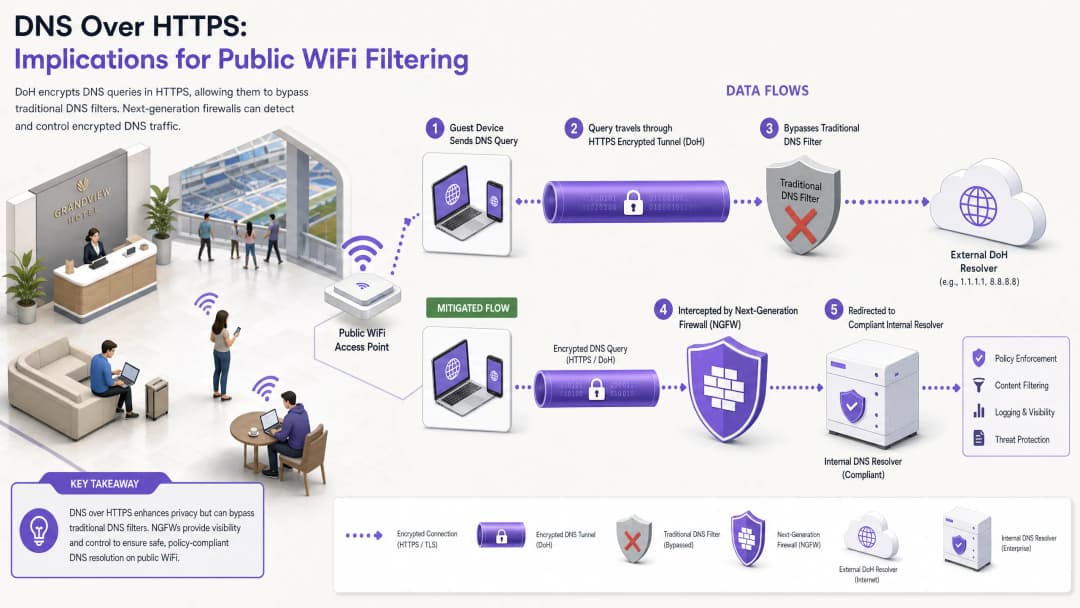
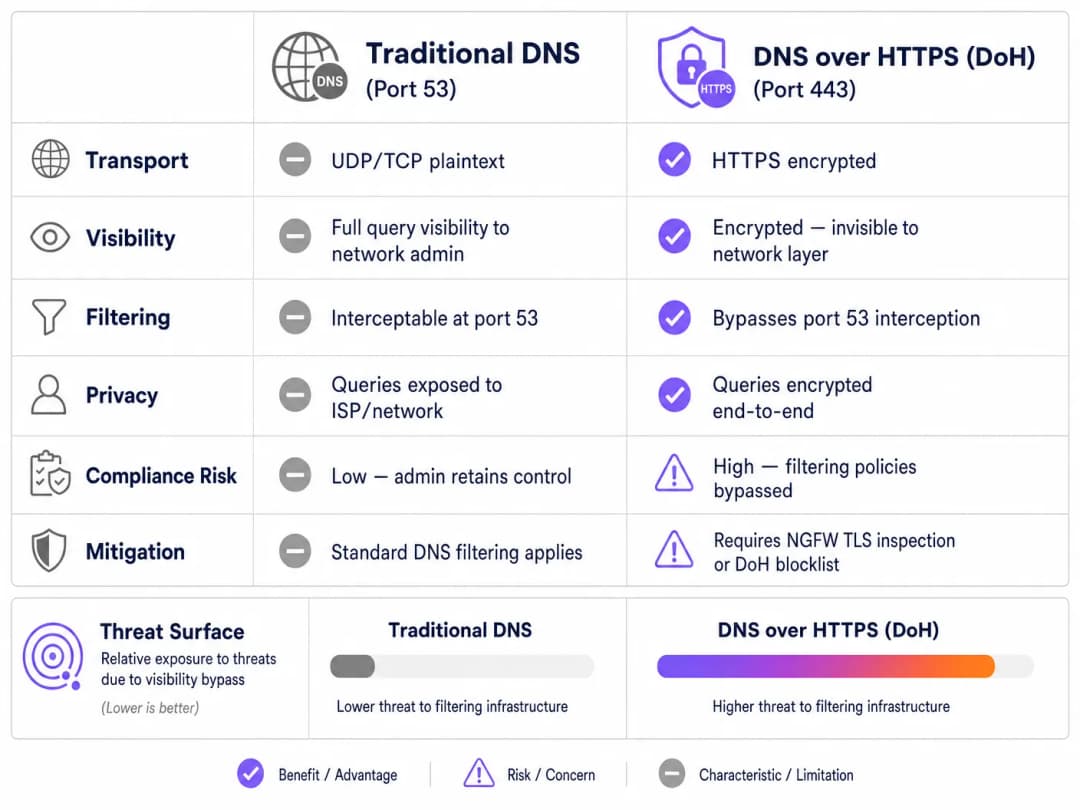
लगभग एक दशक से, पोर्ट 53 पर पारंपरिक DNS फ़िल्टरिंग ने पब्लिक WiFi नेटवर्क पर कंटेंट पॉलिसियों को लागू करने और मैलवेयर खतरों को कम करने के प्राथमिक तंत्र के रूप में कार्य किया है। हालांकि, मुख्यधारा के ब्राउज़रों और ऑपरेटिंग सिस्टम द्वारा DNS over HTTPS (DoH) को व्यापक रूप से अपनाने से यह मॉडल मौलिक रूप से बाधित हो जाता है। पोर्ट 443 पर मानक HTTPS ट्रैफ़िक के भीतर DNS प्रश्नों को समाहित करके, DoH इन प्रश्नों को पारंपरिक नेटवर्क इंटरसेप्शन तकनीकों के लिए अदृश्य बना देता है।
एंटरप्राइज IT प्रबंधकों और नेटवर्क आर्किटेक्ट्स के लिए जो Hospitality, Retail, स्टेडियमों और सार्वजनिक-क्षेत्र के स्थानों में गेस्ट WiFi का प्रबंधन करते हैं, यह एक महत्वपूर्ण अनुपालन और सुरक्षा अंतर पैदा करता है। जब गेस्ट डिवाइस चुपचाप स्थल के निर्दिष्ट DNS रिज़ॉल्वर को बायपास कर देते हैं, तो सावधानीपूर्वक तैयार की गई स्वीकार्य उपयोग नीतियां विफल हो जाती हैं, जिससे नेटवर्क कमांड-एंड-कंट्रोल (C2) मैलवेयर ट्रैफ़िक और अनुपयुक्त कंटेंट के संपर्क में आ जाता है। यह गाइड DoH बायपास वेक्टर के मैकेनिक्स का विवरण देती है और नेटवर्क विजिबिलिटी को बहाल करने, नियामक अनुपालन सुनिश्चित करने और मजबूत Guest WiFi सुरक्षा बनाए रखने के लिए एक स्तरित, गहन सुरक्षा आर्किटेक्चर प्रदान करती है।
तकनीकी गहन विश्लेषण: DoH बायपास मैकेनिज्म
DoH थ्रेट वेक्टर को समझने के लिए, सबसे पहले पारंपरिक DNS फ़िल्टरिंग के बेसलाइन आर्किटेक्चर की जांच करनी होगी। ऐतिहासिक रूप से, जब कोई गेस्ट डिवाइस किसी पब्लिक नेटवर्क से कनेक्ट होता था और किसी डोमेन के लिए अनुरोध करता था, तो क्वेरी को UDP या TCP पोर्ट 53 के माध्यम से प्लेनटेक्स्ट में ट्रांसमिट किया जाता था। नेटवर्क एडमिनिस्ट्रेटर आसानी से फ़ायरवॉल या वायरलेस कंट्रोलर पर इस ट्रैफ़िक को इंटरसेप्ट कर सकते थे और इसे एक अनुपालन करने वाले DNS रिज़ॉल्वर पर रीडायरेक्ट कर सकते थे, जो थ्रेट इंटेलिजेंस फीड और कंटेंट वर्गीकरण पॉलिसियों के खिलाफ अनुरोधित डोमेन की जांच करता था।
DNS over HTTPS इस पूरे कंट्रोल प्लेन को बायपास कर देता है। डिज़ाइन के अनुसार, DoH, DNS क्वेरी को एन्क्रिप्ट करता है और पोर्ट 443 पर मानक TLS एन्क्रिप्शन का उपयोग करके इसे एक बाहरी रिज़ॉल्वर (जैसे क्लाउडफ्लेयर के 1.1.1.1 या गूगल के 8.8.8.8) पर ट्रांसमिट करता है। स्थल के नेटवर्क इन्फ्रास्ट्रक्चर के दृष्टिकोण से, एक DoH क्वेरी और एक सुरक्षित वेबसाइट ब्राउज़ करने वाले या वीडियो स्ट्रीमिंग करने वाले उपयोगकर्ता के बीच अंतर करना असंभव है।
इम्प्लीमेंटेशन पैटर्न: एप्लिकेशन बनाम OS-लेवल DoH
नेटवर्क एडमिनिस्ट्रेटर्स के लिए चुनौतियां इस बात से और बढ़ जाती हैं कि विभिन्न प्लेटफॉर्मों पर DoH को कैसे लागू किया जाता है। इसके दो प्राथमिक डिप्लॉयमेंट पैटर्न हैं:
- एप्लिकेशन-लेवल DoH: इस मॉडल में, एप्लिकेशन होस्ट ऑपरेटिंग सिस्टम से स्वतंत्र रूप से अपना स्वयं का DoH कॉन्फ़िगरेशन बनाए रखता है। मोज़िला फ़ायरफ़ॉक्स एक क्लासिक उदाहरण है; जब DoH सक्षम होता है, तो फ़ायरफ़ॉक्स DHCP-असाइन किए गए DNS सर्वरों को अनदेखा करता है और सभी प्रश्नों को अपने पसंदीदा DoH प्रदाता पर रूट करता है। स्थल के पोर्ट 53 इंटरसेप्शन नियम पूरी तरह से बायपास हो जाते हैं।
- OS-level (Opportunistic) DoH: Windows 11 और Android सहित आधुनिक ऑपरेटिंग सिस्टम, अवसरवादी (opportunistic) DoH का उपयोग करते हैं। OS जाँच करता है कि क्या DHCP-assigned DNS रिज़ॉल्वर में कोई ज्ञात DoH एंडपॉइंट है। यदि कोई मिलान मिलता है, तो OS कनेक्शन को स्वचालित रूप से DoH पर अपग्रेड कर देता है। हालाँकि यह रिज़ॉल्वर के व्यवस्थापक के विकल्प को सुरक्षित रखता है, यह ट्रैफ़िक को पोर्ट 443 पर स्थानांतरित कर देता है, जो पोर्ट 53 पर ट्रैफ़िक की उम्मीद करने वाले लीगेसी मॉनिटरिंग टूल को बायपास कर सकता है।
इसके अलावा, व्यवस्थापकों को DNS over TLS (DoT) पर विचार करना चाहिए, जो पोर्ट 853 पर काम करता है। हालांकि इसके समर्पित पोर्ट के कारण DoT को ब्लॉक करना आसान है, यह Android के "प्राइवेट DNS" फ़ीचर के लिए डिफ़ॉल्ट मानक है और यदि गेस्ट VLAN पर पोर्ट 853 खुला रहता है तो यह एक समान बायपास जोखिम पैदा करता है।
कार्यान्वयन गाइड: एक गहन सुरक्षा (Defence-in-Depth) आर्किटेक्चर
DNS रिज़ॉल्यूशन पर नियंत्रण वापस पाने के लिए बहु-स्तरीय शमन रणनीति की आवश्यकता होती है। आधुनिक, एन्क्रिप्टेड प्रोटोकॉल के खिलाफ एक ही नियंत्रण बिंदु पर भरोसा करना पर्याप्त नहीं है। गेस्ट एक्सेस को सुरक्षित करने और PCI DSS और GDPR जैसे फ्रेमवर्क का अनुपालन सुनिश्चित करने के लिए, नेटवर्क आर्किटेक्ट्स को निम्नलिखित आर्किटेक्चर को लागू करना चाहिए।
लेयर 1: ज्ञात DoH रिज़ॉल्वर एंडपॉइंट्स को ब्लॉक करें
सबसे त्वरित और प्रभावी शमन नेटवर्क एज पर ज्ञात सार्वजनिक DoH रिज़ॉल्वर के लिए आउटबाउंड HTTPS ट्रैफ़िक को ब्लॉक करना है। हालाँकि DoH ट्रैफ़िक मानक HTTPS के साथ मिल जाता है, प्रमुख DoH प्रदाताओं के डेस्टिनेशन IP पते और डोमेन अच्छी तरह से ज्ञात हैं।
नेक्स्ट-जेन फ़ायरवॉल (NGFWs) को इन विशिष्ट एंडपॉइंट्स (जैसे, dns.google, cloudflare-dns.com) के कनेक्शन को ड्रॉप करने के लिए कॉन्फ़िगर करके, व्यवस्थापक क्लाइंट डिवाइस के DoH रिज़ॉल्यूशन को विफल होने के लिए मजबूर करते हैं। अधिकांश कार्यान्वयनों में, जब DoH विफल हो जाता है, तो क्लाइंट स्वाभाविक रूप से पोर्ट 53 पर पारंपरिक, अनएन्क्रिप्टेड DNS पर वापस आ जाएगा, जिसे बाद में इंटरसेप्ट और फ़िल्टर किया जा सकता है।
कार्यान्वयन नोट: इस दृष्टिकोण के लिए एक अपडेटेड ब्लॉकलिस्ट बनाए रखने की आवश्यकता होती है। एंटरप्राइज फ़ायरवॉल विक्रेता अक्सर डायनामिक थ्रेट फ़ीड प्रदान करते हैं जो ज्ञात DoH एंडपॉइंट्स को स्वचालित रूप से अपडेट करते हैं, जिससे परिचालन ओवरहेड काफी कम हो जाता है।
लेयर 2: पोर्ट 53 इंटरसेप्शन और रीडायरेक्शन लागू करें
DoH को ब्लॉक करना केवल तभी प्रभावी होता है जब फ़ॉलबैक ट्रैफ़िक को ठीक से प्रबंधित किया जाए। नेटवर्क को गेस्ट VLAN से उत्पन्न होने वाले पोर्ट 53 पर सभी आउटबाउंड UDP और TCP ट्रैफ़िक को इंटरसेप्ट करने के लिए कॉन्फ़िगर किया जाना चाहिए। इस ट्रैफ़िक को बलपूर्वक (NAT/पोर्ट फ़ॉरवर्डिंग नियमों के माध्यम से) वेन्यू के अधिकृत, अनुपालन करने वाले DNS रिज़ॉल्वर पर रीडायरेक्ट किया जाना चाहिए।
यह कदम महत्वपूर्ण है क्योंकि कई डिवाइस या दुर्भावनापूर्ण एप्लिकेशन DHCP द्वारा प्रदान की गई सेटिंग्स को अनदेखा करते हुए, अपने नेटवर्क स्टैक में सार्वजनिक DNS सर्वर (जैसे 8.8.8.8) को हार्डकोड करते हैं। जबरन इंटरसेप्शन के बिना, ये डिवाइस वेन्यू की फ़िल्टरिंग नीतियों को सफलतापूर्वक बायपास कर देंगे, भले ही DoH ब्लॉक हो।
लेयर 3: पोर्ट 853 (DNS over TLS) को ब्लॉक करें
DoT बाईपास वेक्टर को संबोधित करने के लिए, एडमिनिस्ट्रेटर को गेस्ट नेटवर्क से TCP पोर्ट 853 पर आउटबाउंड ट्रैफ़िक को स्पष्ट रूप से ब्लॉक करना होगा। DoH शमन के समान, DoT को ब्लॉक करने से Android डिवाइस और अन्य DoT-सक्षम क्लाइंट्स मानक पोर्ट 53 DNS पर वापस आने के लिए बाध्य होते हैं।

अपने विशिष्ट सेटअप को लेकर कोई सवाल हैं?
हमारी टीम 80,000 से अधिक वेन्यू में वेन्यू ऑपरेटरों, IT मैनेजरों और नेटवर्क इंजीनियरों के साथ काम करती है। 20 मिनट का कॉल बुक करें और हम आपको दिखाएंगे कि आपके जैसे अन्य लोगों ने इसे कैसे हल किया।
सर्वोत्तम अभ्यास और अनुपालन संबंधी विचार
DoH शमन को लागू करना केवल एक तकनीकी कार्य नहीं है; यह नियामक अनुपालन बनाए रखने और स्वीकार्य उपयोग नीतियों को लागू करने के लिए एक मौलिक आवश्यकता है।
- नीति दस्तावेज़ीकरण: सुनिश्चित करें कि वेन्यू की Captive Portal नियम और शर्तें स्पष्ट रूप से बताती हैं कि सुरक्षा और अनुपालन उद्देश्यों के लिए DNS फ़िल्टरिंग सक्रिय है। एन्क्रिप्टेड DNS प्रोटोकॉल को ब्लॉक करते समय यह GDPR और UK के Online Safety Act के तहत कानूनी सहायता प्रदान करता है।
- नेटवर्क सेगमेंटेशन: VLANs और फ़ायरवॉल नियमों का उपयोग करके कॉर्पोरेट और भुगतान नेटवर्क से गेस्ट WiFi को सख्ती से अलग करें। यह PCI DSS v4.0 की एक मुख्य आवश्यकता है, जो नेटवर्क ट्रैफ़िक की मजबूत निगरानी को भी अनिवार्य बनाती है - यदि DoH को सुरक्षा नियंत्रणों को बाईपास करने की अनुमति दी जाती है तो यह निगरानी असंभव हो जाती है।
- निरंतर निगरानी: क्वेरी वॉल्यूम की निगरानी करने और विसंगतिपूर्ण पैटर्न का पता लगाने के लिए अपने एंटरप्राइज DNS फ़िल्टरिंग सेवा की रिपोर्टिंग क्षमताओं का लाभ उठाएं। किसी विशिष्ट सबनेट से पोर्ट 53 ट्रैफ़िक में अचानक गिरावट अक्सर यह दर्शाती है कि क्लाइंट डिवाइस एक नए, अनब्लॉक किए गए DoH रिज़ॉल्वर का उपयोग कर रहे हैं।
- एनालिटिक्स के साथ एकीकरण: सुरक्षित गेस्ट एक्सेस लागू करते समय, विचार करें कि ऑथेंटिकेशन फ़्लो व्यापक व्यावसायिक उद्देश्यों के साथ कैसे एकीकृत होते हैं। सुरक्षित, प्रोफ़ाइल-आधारित ऑथेंटिकेशन के लिए एक WiFi Assistant का उपयोग करना सुनिश्चित करता है कि उपयोगकर्ता सुरक्षित रूप से कनेक्ट हों, जबकि वेन्यू को WiFi Analytics का उपयोग करके फुटफॉल और ड्वेल टाइम को समझने में मदद मिलती है, ठीक वैसे ही जैसे Offline Maps Mode विज़िटर अनुभव को बेहतर बनाता है।
समस्या निवारण और जोखिम शमन
DoH शमन को लागू करते समय, नेटवर्क टीमों को अक्सर विशिष्ट विफलता मोड का सामना करना पड़ता है। इन समस्याओं का पहले से अनुमान लगाने से डाउनटाइम और गेस्ट की असुविधा कम हो जाती है।
अपूर्ण इंटरसेप्शन नियम
सबसे आम परिनियोजन विफलता अपूर्ण पोर्ट 53 इंटरसेप्शन है। एडमिनिस्ट्रेटर सही DNS IPs प्रदान करने के लिए DHCP सर्वर को कॉन्फ़िगर कर सकते हैं लेकिन हार्डकोडेड DNS अनुरोधों को पकड़ने के लिए आवश्यक फ़ायरवॉल NAT नियमों को लागू करने में विफल हो सकते हैं। शमन: हमेशा एक क्लाइंट डिवाइस को एक स्टैटिक, बाहरी DNS सर्वर (जैसे, 9.9.9.9) के साथ कॉन्फ़िगर करके परिनियोजन का परीक्षण करें और सत्यापित करें कि अनुरोध अभी भी वेन्यू की फ़िल्टरिंग सेवा पर सफलतापूर्वक रूट किए जा रहे हैं।
IPv6 ओवरसाइट
जैसे-जैसे नेटवर्क dual-stack कॉन्फ़िगरेशन में परिवर्तित होते हैं, फ़ायरवॉल नियम अक्सर विशेष रूप से IPv4 के लिए लिखे जाते हैं। यदि DoH ब्लॉकलिस्ट और पोर्ट 53 इंटरसेप्शन नियम IPv6 को कवर नहीं करते हैं, तो आधुनिक डिवाइस अपने IPv6 स्टैक का उपयोग करके IPv4 नियंत्रणों को आसानी से बायपास कर देंगे। शमन (Mitigation): सुनिश्चित करें कि सभी DoH ब्लॉकलिस्ट, पोर्ट 53 रीडायरेक्ट नियम, और पोर्ट 853 ड्रॉप नियम IPv4 और IPv6 दोनों राउटिंग टेबल पर समान रूप से लागू किए गए हैं।
एप्लिकेशन का टूटना (Application Breakage)
आक्रामक DoH ब्लॉकिंग कभी-कभी विशिष्ट मोबाइल एप्लिकेशन को बाधित कर सकती है जो विशेष रूप से अपने स्वयं के DoH कार्यान्वयन पर निर्भर करते हैं और मानक DNS पर वापस जाने से इनकार करते हैं। शमन (Mitigation): एक दस्तावेजी अपवाद प्रक्रिया बनाए रखें। यदि कोई व्यावसायिक रूप से महत्वपूर्ण एप्लिकेशन बाधित होता है, तो वैश्विक स्तर पर DoH को खोलने के बजाय, उस विशिष्ट एप्लिकेशन के रिज़ॉल्वर के लिए चुनिंदा रूप से DoH ट्रैफ़िक की अनुमति देने के लिए TLS निरीक्षण (यदि NGFW पर उपलब्ध हो) का उपयोग करें।
ROI और व्यावसायिक प्रभाव
मजबूत DoH शमन का व्यावसायिक मामला जोखिम से बचने और अनुपालन आश्वासन पर बनाया गया है। एक एकल घटना - जैसे कि किसी अतिथि द्वारा अवैध सामग्री तक पहुँचने के परिणामस्वरूप नियामक पूछताछ, या DoH के माध्यम से C2 कनेक्शन स्थापित करने वाला एक समझौता किया गया IoT डिवाइस - ऐसी लागतें ला सकती हैं जो उचित नियंत्रणों को लागू करने के लिए आवश्यक इंजीनियरिंग समय से कहीं अधिक हैं।
कई स्थानों पर काम करने वाले उद्यम के लिए, DoH शमन आर्किटेक्चर को मानकीकृत करना सुसंगत नीति प्रवर्तन सुनिश्चित करता है। यह मानकीकरण IT सेवा डेस्क पर परिचालन बोझ को कम करता है, क्योंकि ISPs से दुरुपयोग नोटिस शून्य हो जाते हैं और उच्च-बैंडविड्थ अनुपयुक्त सामग्री को ब्लॉक करके नेटवर्क प्रदर्शन बनाए रखा जाता है। अंततः, DNS लेयर को सुरक्षित करना यह सुनिश्चित करता है कि वेन्यू का Guest WiFi में निवेश एक देनदारी के बजाय एक सुरक्षित, अनुपालन वाली संपत्ति बना रहे।
मुख्य परिभाषाएं
DNS over HTTPS (DoH)
HTTPS प्रोटोकॉल के माध्यम से रिमोट डोमेन नेम सिस्टम (DNS) रिज़ॉल्यूशन को निष्पादित करने का एक प्रोटोकॉल, जो DoH क्लाइंट और DoH-आधारित DNS रिज़ॉल्वर के बीच डेटा को एन्क्रिप्ट करता है।
जब IT टीमें कंटेंट फ़िल्टरिंग लागू करती हैं, तो DoH एक बायपास तंत्र के रूप में कार्य करता है, जो सामान्य एन्क्रिप्टेड वेब ट्रैफ़िक के भीतर DNS क्वेरी को छिपा देता है।
DNS over TLS (DoT)
Transport Layer Security (TLS) प्रोटोकॉल के माध्यम से DNS क्वेरी और उत्तरों को एन्क्रिप्ट और सुरक्षित करने के लिए एक सुरक्षा प्रोटोकॉल, जो एक समर्पित पोर्ट (853) पर काम करता है।
आधुनिक Android डिवाइसों (प्राइवेट DNS) पर अक्सर डिफ़ॉल्ट रूप से सक्षम, DoT को फ़ायरवॉल पर ब्लॉक किया जाना चाहिए ताकि यह सुनिश्चित हो सके कि क्वेरी वेन्यू के फ़िल्टर किए गए DNS पर वापस आ जाएं।
Opportunistic DoH
एक व्यवहार जहां कोई ऑपरेटिंग सिस्टम या ब्राउज़र स्वचालित रूप से मानक DNS क्वेरी को DoH में अपग्रेड कर देता है यदि उसे पता चलता है कि कॉन्फ़िगर किया गया DNS रिज़ॉल्वर एन्क्रिप्टेड प्रोटोकॉल का समर्थन करता है।
यह सुविधा, जो Windows 11 और Chrome में आम है, इसका मतलब है कि भले ही कोई वेन्यू एक मानक DNS IP असाइन करता है, फिर भी ट्रैफ़िक एन्क्रिप्टेड पोर्ट 443 पर जा सकता है, जिससे पुरानी मॉनिटरिंग प्रणाली बायपास हो जाती है।
Port 53 Interception
एक नेटवर्क फ़ायरवॉल कॉन्फ़िगरेशन जो UDP/TCP पोर्ट 53 पर सभी आउटबाउंड ट्रैफ़िक को कैप्चर करता है और क्लाइंट द्वारा अनुरोधित डेस्टिनेशन IP की परवाह किए बिना इसे जबरन एक निर्दिष्ट DNS रिज़ॉल्वर पर रीडायरेक्ट करता है।
हार्डकोडेड DNS सेटिंग्स वाले डिवाइस या जो विफल DoH कनेक्शन से वापस आए हैं, उनसे DNS क्वेरी कैप्चर करने के लिए आवश्यक है।
Next-Generation Firewall (NGFW)
एक नेटवर्क सुरक्षा उपकरण जो पारंपरिक, स्टेटफ़ुल फ़ायरवॉल से परे क्षमताएं प्रदान करता है, जिसमें डीप पैकेट इंस्पेक्शन, एप्लिकेशन अवेयरनेस और TLS/SSL डिक्रिप्शन शामिल हैं।
DoH के प्रभाव को कम करने के लिए NGFW महत्वपूर्ण हैं क्योंकि वे केवल IP पते के बजाय एप्लिकेशन सिग्नेचर के आधार पर DoH ट्रैफ़िक की पहचान और ब्लॉक कर सकते हैं।
फ़ॉलबैक व्यवहार
क्लाइंट डिवाइस की प्रोग्राम की गई प्रतिक्रिया जब उसका पसंदीदा एन्क्रिप्टेड DNS प्रोटोकॉल (DoH या DoT) कनेक्ट होने में विफल रहता है, जिसके परिणामस्वरूप आमतौर पर डिवाइस मानक, अनएन्क्रिप्टेड DNS पर वापस आ जाता है।
नेटवर्क आर्किटेक्ट इस व्यवहार पर भरोसा करते हैं; जानबूझकर DoH/DoT कनेक्शन को तोड़कर, वे डिवाइस को इंटरसेप्ट करने योग्य पोर्ट 53 का उपयोग करने के लिए मजबूर करते हैं।
कमांड-एंड-कंट्रोल (C2)
हमलावरों द्वारा लक्षित नेटवर्क के भीतर समझौता किए गए उपकरणों (मैलवेयर/बॉटनेट) के साथ संवाद करने के लिए उपयोग किया जाने वाला बुनियादी ढांचा।
आधुनिक मैलवेयर एंटरप्राइज नेटवर्क मॉनिटर से C2 संचार को छिपाने के लिए तेजी से DoH का उपयोग कर रहे हैं, जिससे DoH शमन एक महत्वपूर्ण सुरक्षा आवश्यकता बन जाता है।
Captive Portal
एक वेब पेज जिसे सार्वजनिक-पहुंच वाले नेटवर्क के उपयोगकर्ता को पहुंच प्रदान करने से पहले देखने और उसके साथ इंटरैक्ट करने के लिए बाध्य होना पड़ता है।
यह उपयोगकर्ताओं को सूचित करने के लिए कानूनी रूप से उपयुक्त स्थान है कि उनके DNS ट्रैफ़िक को फ़िल्टर किया जा रहा है और एन्क्रिप्टेड DNS प्रोटोकॉल ब्लॉक कर दिए गए हैं।
हल किए गए उदाहरण
एक 400 कमरों वाले होटल ने हाल ही में फैमिली-फ्रेंडली कंटेंट से संबंधित ब्रांड मानकों का अनुपालन करने के लिए क्लाउड-आधारित DNS फ़िल्टरिंग सेवा लागू की है। हालांकि, IT प्रबंधक को पता चलता है कि गेस्ट ट्रैफ़िक का एक महत्वपूर्ण हिस्सा अभी भी एडल्ट कंटेंट साइटों तक पहुँच रहा है, और DNS फ़िल्टरिंग डैशबोर्ड पर क्वेरी वॉल्यूम उम्मीद से कम दिख रहा है। नेटवर्क आर्किटेक्ट को इस बायपास को कैसे ठीक करना चाहिए?
- फ़ायरवॉल नियमों का ऑडिट करें: आर्किटेक्ट को सबसे पहले यह सत्यापित करना होगा कि आउटबाउंड TCP/UDP पोर्ट 53 को इंटरसेप्ट किया जा रहा है और क्लाउड DNS सेवा पर NAT-रीडायरेक्ट किया जा रहा है।
- DoH रिजॉल्वर्स को ब्लॉक करें: ज्ञात DoH प्रदाताओं (जैसे, Cloudflare, Google, Quad9) के लिए लक्षित आउटबाउंड HTTPS (पोर्ट 443) ट्रैफ़िक को रोकने के लिए एक NGFW ब्लॉकलिस्ट लागू करें।
- DoT को ब्लॉक करें: Android प्राइवेट DNS बायपास को रोकने के लिए सभी आउटबाउंड TCP पोर्ट 853 ट्रैफ़िक को ब्लॉक करने का एक फ़ायरवॉल नियम जोड़ें।
- IPv6 सत्यापित करें: सुनिश्चित करें कि उपरोक्त सभी नियम IPv4 और IPv6 दोनों ट्रैफ़िक पर लागू हों।
150 स्थानों वाली एक रिटेल चेन को अपने गेस्ट WiFi पर मैलवेयर और फ़िशिंग को ब्लॉक करने के लिए DNS फ़िल्टरिंग लागू करने की आवश्यकता है। वे उन्नत TLS निरीक्षण क्षमताओं के बिना बुनियादी ब्रांच फ़ायरवॉल का उपयोग करते हैं। वे अपने हार्डवेयर को अपग्रेड किए बिना DoH को प्रभावी ढंग से कैसे नियंत्रित कर सकते हैं?
TLS निरीक्षण के बिना, रिटेल चेन को मजबूत रूटिंग और ब्लॉकलिस्ट पर भरोसा करना होगा।
- ब्रांच फ़ायरवॉल पर एक डायनेमिक DoH IP/Domain ब्लॉकलिस्ट तैनात करें, जिसे बाहरी थ्रेट फीड के माध्यम से स्वचालित रूप से अपडेट होने के लिए कॉन्फ़िगर किया गया हो।
- एंटरप्राइज DNS फ़िल्टर के लिए सख्त पोर्ट 53 NAT रीडायरेक्शन लागू करें।
- पोर्ट 853 को पूरी तरह से ब्लॉक करें।
- Captive Portal की सेवा शर्तों (Terms of Service) को अपडेट करें ताकि स्पष्ट रूप से उल्लेख किया जा सके कि नेटवर्क सुरक्षा नीतियों को लागू करने के लिए एन्क्रिप्टेड DNS प्रोटोकॉल ब्लॉक किए गए हैं।
अभ्यास प्रश्न
Q1. एक स्टेडियम नेटवर्क इंजीनियर सभी अतिथि उपकरणों को अपने सुरक्षित, फ़िल्टर किए गए DNS सेवा का IP पता प्रदान करने के लिए DHCP सर्वर को कॉन्फ़िगर करता है। हालाँकि, परीक्षण से पता चलता है कि मैन्युअल रूप से कॉन्फ़िगर किए गए DNS सेटिंग्स (जैसे, 8.8.8.8) वाले डिवाइस सफलतापूर्वक फ़िल्टर को बायपास कर रहे हैं। सबसे उपयुक्त आर्किटेक्चरल समाधान क्या है?
संकेत: नेटवर्क किनारे पर केवल मार्ग सुझाने और मार्ग को जबरन लागू करने के बीच के अंतर पर विचार करें।
मॉडल उत्तर देखें
इंजीनियर को स्टेडियम के फ़ायरवॉल पर एक NAT पोर्ट फॉरवर्डिंग नियम लागू करना चाहिए। इस नियम को गेस्ट VLAN से उत्पन्न होने वाले पोर्ट 53 पर सभी आउटबाउंड UDP और TCP ट्रैफ़िक को इंटरसेप्ट करना चाहिए और डेस्टिनेशन IP को सुरक्षित DNS सेवा के IP पते पर जबरन ट्रांसलेट करना चाहिए। यह सुनिश्चित करता है कि क्लाइंट के स्थानीय कॉन्फ़िगरेशन की परवाह किए बिना, ट्रैफ़िक को फ़िल्टरिंग नीति के माध्यम से ही रूट किया जाए।
Q2. एक सख्त DoH ब्लॉकलिस्ट लागू करने के बाद, एक कॉन्फ्रेंस सेंटर के IT हेल्पडेस्क को रिपोर्ट मिलती है कि उपस्थित लोगों के लिए एक विशिष्ट, कस्टम इवेंट मैनेजमेंट ऐप लोड होने में विफल हो रहा है। पैकेट कैप्चर से पता चलता है कि ऐप अपने स्वयं के हार्डकोडेड DoH रिज़ॉल्वर का उपयोग करने का प्रयास कर रहा है, जिसे ब्लॉक किया जा रहा है, और ऐप मानक DNS पर वापस जाने से इनकार कर रहा है। इसे कैसे हल किया जाना चाहिए?
संकेत: व्यावसायिक निरंतरता के साथ सुरक्षा नीति को संतुलित करें। क्या फ़ायरवॉल सामान्य DoH ट्रैफ़िक और किसी विशिष्ट, स्वीकृत एंडपॉइंट के ट्रैफ़िक के बीच अंतर कर सकता है?
मॉडल उत्तर देखें
प्रशासक को NGFW नीति में एक अपवाद बनाना चाहिए। वैश्विक स्तर पर DoH ब्लॉकलिस्ट को अक्षम करने के बजाय, उन्हें इवेंट मैनेजमेंट ऐप द्वारा उपयोग किए जाने वाले DoH रिज़ॉल्वर के विशिष्ट IP पते या डोमेन की पहचान करनी चाहिए और उसे व्हाइटलिस्ट करना चाहिए। यदि फ़ायरवॉल एप्लिकेशन-लेयर (लेयर 7) इंस्पेक्शन का समर्थन करता है, तो एक अधिक मजबूत समाधान एक ऐसी नीति बनाना है जो केवल तभी DoH ट्रैफ़िक की अनुमति देती है जब डेस्टिनेशन स्वीकृत एप्लिकेशन के बुनियादी ढांचे से मेल खाता हो, जिससे यह सुनिश्चित हो सके कि सामान्य DoH बायपास प्रयास ब्लॉक रहें।
Q3. एक सार्वजनिक क्षेत्र का संगठन अपने अतिथि WiFi अनुपालन का ऑडिट कर रहा है। उन्होंने सफलतापूर्वक पोर्ट 853 (DoT) को ब्लॉक कर दिया है और पोर्ट 53 इंटरसेप्शन लागू किया है। हालाँकि, उनके पास उन्नत TLS इंस्पेक्शन या डायनेमिक DoH ब्लॉकलिस्ट वाले NGFW के लिए बजट की कमी है। DoH को कम करने के लिए सबसे प्रभावी शेष रणनीति क्या है?
संकेत: यदि डायनेमिक सूचियां उपलब्ध नहीं हैं, तो आप अधिकांश अवसरवादी DoH ट्रैफ़िक को कैसे संबोधित कर सकते हैं?
मॉडल उत्तर देखें
संगठन को अपने मौजूदा फ़ायरवॉल पर एक स्टेटिक ब्लॉकलिस्ट लागू करनी चाहिए, जो सबसे आम सार्वजनिक DoH प्रदाताओं (जैसे, Cloudflare, Google, Quad9) के IP एड्रेस और डोमेन को लक्षित करती हो। हालांकि इसके लिए मैन्युअल रखरखाव की आवश्यकता होती है और यह अज्ञात DoH रिज़ॉल्वर को नहीं पकड़ पाएगा, लेकिन शोध से पता चलता है कि अधिकांश DoH ट्रैफ़िक डिफ़ॉल्ट रूप से कुछ ही प्रमुख प्रदाताओं पर जाता है। यह उनकी बजट सीमाओं के भीतर एक अत्यधिक प्रभावी '80/20' समाधान प्रदान करता है।
इस श्रृंखला में आगे पढ़ें
पब्लिक WiFi दायित्व: कंटेंट फ़िल्टरिंग क्यों अनिवार्य है
यह तकनीकी संदर्भ मार्गदर्शिका अनफ़िल्टर्ड पब्लिक WiFi प्रदान करने के कानूनी और परिचालन जोखिमों की रूपरेखा तैयार करती है, और विस्तार से बताती है कि वेन्यू ऑपरेटरों के लिए कंटेंट फ़िल्टरिंग एक अनिवार्य परिनियोजन आवश्यकता क्यों है। यह नेटवर्क को अवैध गतिविधि, कॉपीराइट उल्लंघन और नियामक गैर - अनुपालन से बचाने के लिए व्यावहारिक आर्किटेक्चर रणनीतियाँ, कार्यान्वयन कदम और जोखिम शमन रणनीतियाँ प्रदान करता है। वेन्यू ऑपरेटरों और CTOs को एक सुरक्षित, अनुपालन योग्य गेस्ट WiFi वातावरण लागू करने के लिए ठोस केस स्टडीज, निर्णय फ्रेमवर्क और कॉन्फ़िगरेशन मार्गदर्शन मिलेगा।
नेटवर्क एज (Network Edge) पर मैलवेयर और फ़िशिंग को ब्लॉक करना
यह तकनीकी संदर्भ मार्गदर्शिका नेटवर्क एज पर अप्रबंधित गेस्ट और IoT उपकरणों को सुरक्षित करने के लिए नेटवर्क - स्तरीय खतरा सुरक्षा लागू करने की वास्तुकला, परिनियोजन और व्यावसायिक प्रभाव की रूपरेखा तैयार करती है। यह IT लीडरों को सक्रिय रूप से मैलवेयर और फ़िशिंग को ब्लॉक करने के लिए व्यावहारिक मार्गदर्शन प्रदान करती है।
यूके में पब्लिक WiFi नेटवर्क के लिए IWF अनुपालन
यह आधिकारिक मार्गदर्शिका यूके के वेन्यू में IWF-अनुपालक पब्लिक WiFi नेटवर्क लागू करने के लिए तकनीकी आवश्यकताओं, आर्किटेक्चर और परिनियोजन रणनीतियों का विवरण देती है। यह IT लीडर्स को उच्च-प्रदर्शन नेटवर्क एक्सेस बनाए रखते हुए कानूनी जोखिमों को कम करने के लिए कार्रवाई योग्य फ्रेमवर्क प्रदान करती है।
अपने विशिष्ट सेटअप को लेकर कोई सवाल हैं?
हमारी टीम 80,000 से अधिक वेन्यू में वेन्यू ऑपरेटरों, IT मैनेजरों और नेटवर्क इंजीनियरों के साथ काम करती है। 20 मिनट का कॉल बुक करें और हम आपको दिखाएंगे कि आपके जैसे अन्य लोगों ने इसे कैसे हल किया।