
সবকিছুর জন্য তিনটি SSID: guest, Passpoint, এবং IoT WiFi সেটআপ গাইড
এই প্রযুক্তিগত গাইডটি এন্টারপ্রাইজ ভেন্যু জুড়ে থ্রি-SSID WiFi ডিজাইন বাস্তবায়নের জন্য একটি নির্দিষ্ট ব্লুপ্রিন্ট প্রদান করে। এটি সম্পূর্ণ VLAN সেগমেন্টেশন এবং জিরো-ট্রাস্ট নেটওয়ার্ক অ্যাক্সেস অর্জনের জন্য একটি ওপেন Guest WiFi পোর্টাল কনফিগারেশন, স্বয়ংক্রিয় Passpoint অনবোর্ডিং এবং প্রতি ডিভাইসে xPSK প্রমাণীকরণ বিস্তারিতভাবে আলোচনা করে।
এই গাইডটি শুনুন
পডকাস্ট ট্রান্সক্রিপ্ট দেখুন
📚 আমাদের মূল সিরিজের অংশ: Enterprise WiFi Security Guide →
এক্সিকিউটিভ সামারি
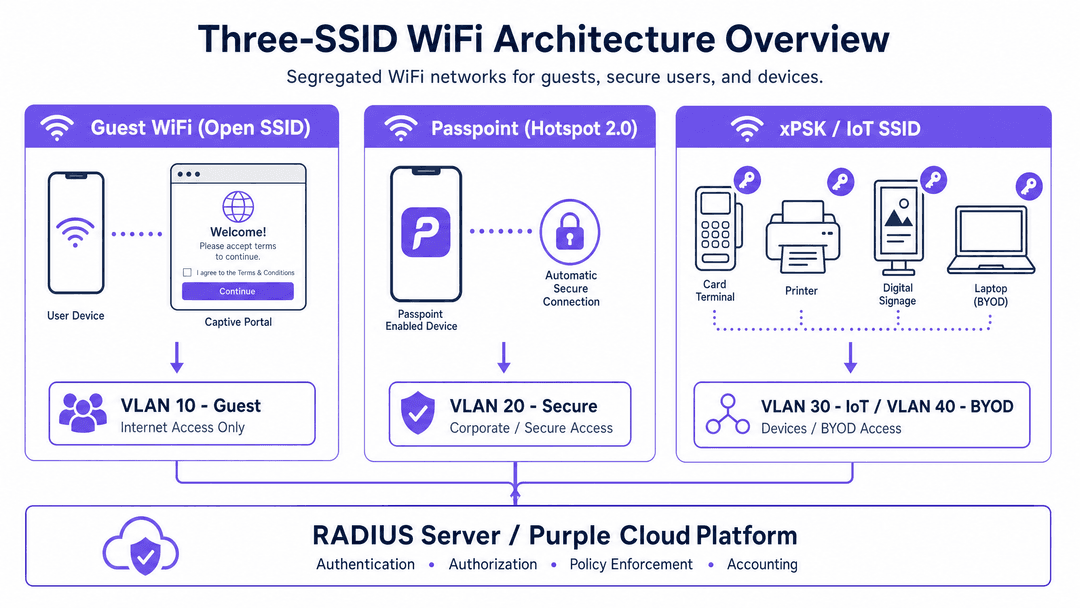
অধিকাংশ এন্টারপ্রাইজ ভেন্যু এখনও লেগ্যাসি ওয়্যারলেস আর্কিটেকচার পরিচালনা করে যা সমস্ত ট্রাফিক এক বা দুটি SSID-এর উপর চাপিয়ে দেয়। এই পদ্ধতিটি অসুরক্ষিত IoT ডিভাইস, ঠিকাদারদের হার্ডওয়্যার এবং সাধারণ দর্শকদের শেয়ার্ড নেটওয়ার্ক সেগমেন্টে রেখে এক অগ্রহণযোগ্য ঝুঁকি তৈরি করে। থ্রি-SSID WiFi ডিজাইন প্রতিটি ক্লাসের ডিভাইস এবং ব্যবহারকারীকে নিজস্ব ডেডিকেটেড নেটওয়ার্ক, নিজস্ব VLAN এবং নিজস্ব অথেনটিকেশন মেথড বরাদ্দ করে এই দুর্বলতা দূর করে। এই নির্দেশিকাটি তিনটি পৃথক SSID স্থাপনের জন্য একটি ধাপে ধাপে ব্লুপ্রিন্ট প্রদান করে: কমপ্লায়েন্স এবং ডেটা ক্যাপচারের জন্য একটি ওপেন Guest WiFi নেটওয়ার্ক, Purple অ্যাপ বা SDK-এর মাধ্যমে স্বয়ংক্রিয় নিরাপদ অ্যাক্সেসের জন্য একটি Passpoint (Hotspot 2.0) নেটওয়ার্ক, এবং একটি xPSK নেটওয়ার্ক যা প্রতি-ডিভাইস কী-এর অধীনে সমস্ত হেডলেস ডিভাইসকে একত্রিত করে। এই আর্কিটেকচারের মানককরণের মাধ্যমে, আইটি টিম কঠোর VLAN সেগমেন্টেশন অর্জন করতে পারে, রেডিও ফ্রিকোয়েন্সি ওভারহেড কমাতে পারে এবং Cisco Meraki, HPE Aruba, Ruckus, Juniper Mist এবং Ubiquiti UniFi ডেপ্লয়মেন্টে নেটওয়ার্ক অপারেশনকে স্ট্রীমলাইন করতে পারে।
ব্রিফিংটি শুনুন
টেকনিক্যাল আর্কিটেকচার ডিপ-ডাইভ
থ্রি-SSID ডিজাইন হল ওয়্যারলেস এজে প্রয়োগ করা একটি জিরো-ট্রাস্ট পদ্ধতি। এটি এই নীতির উপর নির্ভর করে যে SSID কেবল একটি এন্ট্রি পয়েন্ট; আসল সিকিউরিটি বাউন্ডারি হল অথেনটিকেশন মেথড দ্বারা নির্ধারিত VLAN অ্যাসাইনমেন্ট।
১. Guest WiFi (ওপেন SSID)
প্রথম SSID-টি হল Captive Portal সহ একটি ওপেন নেটওয়ার্ক। এটি ভিজিটর, সাময়িক অতিথি এবং সাধারণ ব্যবহারকারীদের পরিষেবা প্রদান করে। যেহেতু এটি ওপেন, সংযোগের সময় কোনো বাধা থাকে না। সিকিউরিটি কন্ট্রোল পয়েন্টটি পোর্টাল লেয়ারে স্থানান্তরিত হয়। যখন একটি ডিভাইস সংযুক্ত হয়, তখন এটিকে একটি কঠোরভাবে সীমাবদ্ধ সাবনেট থেকে একটি IP অ্যাড্রেস বরাদ্দ করা হয় এবং একটি ওয়াল্ড গার্ডেনে (walled garden) রাখা হয়। ব্যবহারকারীকে একটি স্প্ল্যাশ পেজে রিডাইরেক্ট করা হয় যেখানে তারা ব্যবহারের শর্তাবলী স্বীকার করে এবং ঐচ্ছিকভাবে আইডেন্টিটি ডেটা প্রদান করে।
এই SSID-টি কমপ্লায়েন্সের জন্য অত্যন্ত গুরুত্বপূর্ণ। GDPR-এর অধীনে, আপনাকে অবশ্যই সম্মতি এবং ডেটা প্রসেসিংয়ের আইনি ভিত্তি রেকর্ড করতে হবে। Purple এটি নেটিভভাবে পরিচালনা করে, সম্মতির টাইমস্ট্যাম্প লগ করে এবং ফার্স্ট-পার্টি ডেটা ক্যাপচার করে। একবার অথেনটিকেটেড হয়ে গেলে, সেশনটি VLAN 10-এ ম্যাপ করা হয়। ফায়ারওয়াল নিয়মগুলি নিশ্চিত করে যে VLAN 10-এর কেবল ইন্টারনেট অ্যাক্সেস রয়েছে, যা অভ্যন্তরীণ সিস্টেম থেকে সম্পূর্ণ বিচ্ছিন্ন। PCI DSS-এর আওতাভুক্ত ভেন্যুগুলির জন্য, এই সেগমেন্টেশন নিশ্চিত করে যে গেস্ট ট্রাফিক কখনও কার্ডহোল্ডার ডেটা এনভায়রনমেন্ট স্পর্শ না করে।
২. Passpoint (Hotspot 2.0)
দ্বিতীয় SSID-টি স্বয়ংক্রিয়, এনক্রিপ্ট করা অ্যাক্সেস প্রদান করতে IEEE 802.11u Passpoint ব্যবহার করে। এটি পুনরায় আসা অতিথি, লয়্যালটি মেম্বার এবং কর্মীদের জন্য ডিজাইন করা হয়েছে। একটি Captive Portal-এর পরিবর্তে, Passpoint ব্যাকগ্রাউন্ডে EAP-TLS বা PEAP সহ EAP-TTLS এর মাধ্যমে প্রমাণীকরণ সম্পন্ন করতে একটি ইনস্টল করা প্রোফাইল ব্যবহার করে।
যখন Purple অ্যাপ (অথবা Purple SDK ইন্টিগ্রেট করা আপনার নিজস্ব অ্যাপ) থাকা কোনো ব্যবহারকারী ভেন্যুতে প্রবেশ করেন, তখন তাদের ডিভাইসটি নির্দিষ্ট ANQP (Access Network Query Protocol) উপাদান সম্প্রচারকারী Passpoint SSID সনাক্ত করে। এটি প্রোফাইলের সাথে এগুলো মিলিয়ে নেয় এবং স্বয়ংক্রিয়ভাবে সংযুক্ত হয়। Purple ক্লাউড RADIUS সার্ভার হিসেবে কাজ করে, ক্রেডেন্সিয়াল প্রসেস করে এবং একটি RADIUS Access-Accept বার্তা ফেরত পাঠায়। গুরুত্বপূর্ণভাবে, এই বার্তার মধ্যে VLAN অ্যাসাইনমেন্ট অ্যাট্রিবিউট (যেমন Tunnel-Private-Group-ID) অন্তর্ভুক্ত থাকে। একজন লয়্যালটি মেম্বারকে VLAN 20-এ অ্যাসাইন করা হতে পারে, যেখানে একই SSID ব্যবহারকারী একজন কর্মীকে VLAN 30-এ অ্যাসাইন করা হয়। এই ডায়নামিক VLAN অ্যাসাইনমেন্ট প্রতি SSID-এর পরিবর্তে প্রতি আইডেন্টিটি অনুযায়ী পলিসি প্রয়োগ করতে সক্ষম করে।
৩. xPSK (IoT এবং BYOD)
তৃতীয় SSID-টি xPSK (iPSK, PPSK, DPSK, বা MPSK) ব্যবহার করে অন্য সব ব্যবহারের ক্ষেত্র - যেমন কার্ড টার্মিনাল, ডিজিটাল সাইনেজ, প্রিন্টার, ঠিকাদার এবং BYOD - একত্রিত করে। একটি একক শেয়ার্ড পাসওয়ার্ডের পরিবর্তে, প্রতিটি ডিভাইস বা গ্রুপ একটি ইউনিক প্রি-শেয়ার্ড কী পায়।
যখন কোনো ডিভাইস সংযুক্ত হয়, তখন অ্যাক্সেস পয়েন্টটি ডিভাইসের MAC অ্যাড্রেস এবং ব্যবহৃত নির্দিষ্ট PSK-টি Purple RADIUS সার্ভারে পাঠায়। Purple কী-টি যাচাই করে এবং সংশ্লিষ্ট VLAN অ্যাসাইনমেন্ট ফেরত পাঠায়। একটি কার্ড টার্মিনাল VLAN 40 (PCI-scoped)-এ যায়, যেখানে একটি ডিজিটাল সাইনেজ প্লেয়ার VLAN 50-এ যায়। যদি কোনো ঠিকাদারের কী বাতিল করা হয়, তবে অন্য কোনো ডিভাইসকে প্রভাবিত না করেই তাদের অ্যাক্সেস অবিলম্বে বন্ধ করে দেওয়া হয়। এটি MAC authentication bypass (MAB) তালিকা এবং শেয়ার্ড পাসওয়ার্ডের প্রয়োজনীয়তা দূর করে।
ইমপ্লিমেন্টেশন গাইড
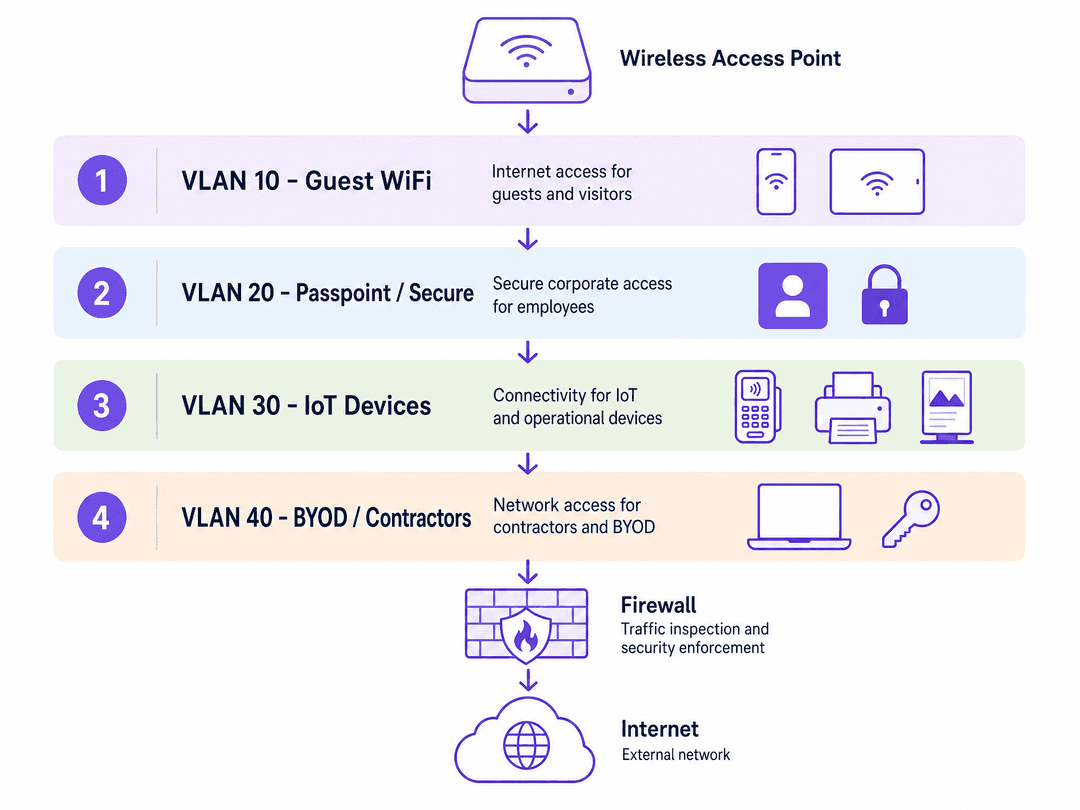
এই আর্কিটেকচারটি ডিপ্লয় করার জন্য কঠোর সিকোয়েন্সিং বা পর্যায়ক্রমিক ধাপ অনুসরণ করা প্রয়োজন। অন্তর্নিহিত ওয়্যার্ড নেটওয়ার্ক প্রস্তুত না হওয়া পর্যন্ত ওয়্যারলেস কন্ট্রোলারগুলো কনফিগার করবেন না।
ধাপ ১: সুইচ এবং ফায়ারওয়াল কনফিগারেশন
প্রথমে সুইচ লেয়ারে আপনার VLAN-গুলো সংজ্ঞায়িত করুন। প্রতিটি ডিভাইস ক্লাসের জন্য আলাদা VLAN তৈরি করুন (যেমন, VLAN 10 Guest, VLAN 20 Secure, VLAN 30 IoT, VLAN 40 PCI)। কঠোর আইসোলেশন বা বিচ্ছিন্নতা প্রয়োগ করতে আপনার ফায়ারওয়ালে ইন্টার-VLAN রাউটিং পলিসি কনফিগার করুন। Guest এবং IoT VLAN-গুলোর সাধারণত শুধুমাত্র আউটবাউন্ড ইন্টারনেট অ্যাক্সেস থাকা উচিত। নিশ্চিত করুন যে সমস্ত অ্যাক্সেস পয়েন্ট আপলিঙ্ক পোর্টগুলো ট্রাঙ্ক হিসেবে কনফিগার করা হয়েছে যা সমস্ত প্রয়োজনীয় VLAN বহন করে।
ধাপ ২: RADIUS সার্ভার ইন্টিগ্রেশন
Purple পোর্টালে যান এবং আপনার RADIUS ক্রেডেন্সিয়াল তৈরি করুন। প্রাইমারি ও সেকেন্ডারি IP অ্যাড্রেস, প্রমাণীকরণ পোর্ট (সাধারণত 1812), অ্যাকাউন্টিং পোর্ট (1813) এবং শেয়ার্ড সিক্রেট নোট করে রাখুন। আপনার ওয়্যারলেস কন্ট্রোলারের AAA কনফিগারেশনে এই বিবরণগুলো লিখুন। ক্লাউড লেটেন্সি সামঞ্জস্য করতে RADIUS টাইমআউট অন্তত দুই সেকেন্ডে সেট করুন।
ধাপ ৩: SSID কনফিগারেশন
Configure the three SSIDs according to your vendor's specific implementation:
Guest SSID: Set security to Open. Enable captive portal redirect and point it to your Purple portal URL. Configure the walled garden to allow access to Purple's domains, your DNS resolver, and OS captive portal detection endpoints (e.g., captivedetect.apple.com).
Passpoint SSID: Enable 802.11u/Hotspot 2.0. Configure the ANQP elements, ensuring the NAI Realm matches the profile deployed by the Purple app exactly. Set security to WPA2-Enterprise or WPA3-Enterprise and point authentication to the Purple RADIUS servers.
xPSK SSID: Enable the vendor-specific xPSK feature (e.g., iPSK on Cisco Meraki, MPSK on HPE Aruba). Point the MAC authentication to the Purple RADIUS servers and enable dynamic VLAN assignment.
সর্বোত্তম অনুশীলন
- SSID সংখ্যা সীমিত রাখুন: প্রতি অ্যাক্সেস পয়েন্টে চারটির বেশি SSID ব্রডকাস্ট করবেন না। অতিরিক্ত SSID-এর ফলে বিকন ওভারহেড বৃদ্ধি পায়, যা নেটওয়ার্কের সামগ্রিক কার্যকারিতা হ্রাস করে। তিনটি-SSID বিশিষ্ট ডিজাইন এয়ারটাইম ব্যবহার অপ্টিমাইজ করে।
- Walled Garden-এর সঠিকতা: আপনার walled garden যতটা সম্ভব সুনির্দিষ্ট রাখুন। শুধুমাত্র পোর্টাল ফ্লো এবং OS সনাক্তকরণের জন্য প্রয়োজনীয় ডোমেনগুলো অন্তর্ভুক্ত করুন। বিস্তৃত IP রেঞ্জ সিকিউরিটি লুপহোল তৈরি করে।
- Key লাইফসাইকেল ম্যানেজমেন্ট: xPSK কী-গুলোর (keys) জন্য একটি কঠোর লাইফসাইকেল তৈরি করুন। প্রোভিশনিং করার সময় ঠিকাদারের কী-গুলোর জন্য মেয়াদ শেষ হওয়ার তারিখ সেট করুন। প্রতি বছর IoT কী-গুলো পর্যালোচনা ও পরিবর্তন করুন।
ট্রাবলশুটিং ও ঝুঁকি হ্রাসকরণ
- RADIUS টাইমআউট: ডিভাইসগুলো Passpoint বা xPSK নেটওয়ার্কে সংযুক্ত হতে ব্যর্থ হলে, কন্ট্রোলারে RADIUS টাইমআউট সেটিংস চেক করুন। লোকাল সার্ভারের তুলনায় ক্লাউড RADIUS-এর জন্য কিছুটা দীর্ঘ টাইমআউট প্রয়োজন। নিশ্চিত করুন যেন প্রাইমারি ও সেকেন্ডারি উভয় Purple RADIUS IP কনফিগার করা থাকে।
- VLAN ট্যাগিং ব্যর্থতা: একটি ডিভাইস সফলভাবে অথেন্টিকেট হলেও যদি IP অ্যাড্রেস পেতে ব্যর্থ হয়, তবে সমস্যাটি প্রায় সময়ই অ্যাক্সেস পয়েন্টের সুইচ পোর্টে VLAN ট্যাগের অনুপস্থিতির কারণে ঘটে। ট্রাঙ্ক কনফিগারেশন যাচাই করুন।
- Passpoint ডিসকভারি সমস্যা: ডিভাইসগুলো Passpoint SSID উপেক্ষা করলে, ANQP NAI Realm কনফিগারেশন যাচাই করুন। সামান্য টাইপো বা বানানের ভুল হলেও ডিভাইসটি নীরবে নেটওয়ার্কটি প্রত্যাখ্যান করবে।
ROI ও ব্যবসায়িক প্রভাব
তিনটি-SSID বিশিষ্ট ডিজাইন বাস্তবায়ন করা পরিমাপযোগ্য ব্যবসায়িক মূল্য প্রদান করে। SSID একত্রিত করার মাধ্যমে, ভেন্যুগুলো RF ইন্টারফেয়ারেন্স হ্রাস করে এবং ক্লায়েন্টের পারফরম্যান্স উন্নত করে। Passpoint এবং xPSK-এর মাধ্যমে ডাইনামিক VLAN অ্যাসাইনমেন্ট পাসওয়ার্ড রিসেট এবং MAC অ্যাড্রেস হোয়াইটলিস্টিং সম্পর্কিত IT সাপোর্ট টিকিটের সংখ্যা উল্লেখযোগ্যভাবে হ্রাস করে। তদুপরি, শক্তিশালী সেগমেন্টেশন PCI DSS এবং GDPR-এর সম্মতি নিশ্চিত করে, যা ডেটা লঙ্ঘনের আর্থিক ঝুঁকি হ্রাস করার পাশাপাশি Guest WiFi পোর্টালের মাধ্যমে ফার্স্ট-পার্টি ডেটা সংগ্রহকে সর্বোচ্চ করে।
মূল সংজ্ঞাসমূহ
Passpoint (Hotspot 2.0)
একটি IEEE 802.11u স্ট্যান্ডার্ড যা মোবাইল ডিভাইসগুলোকে ব্যবহারকারীর কোনো হস্তক্ষেপ ছাড়াই স্বয়ংক্রিয়ভাবে WiFi নেটওয়ার্ক সনাক্ত করতে এবং নিরাপদে সংযোগ করতে সক্ষম করে।
ফিরে আসা ভিজিটর এবং স্টাফদের জন্য সেলুলারের মতো রোমিং অভিজ্ঞতা এবং নিরাপদ, এনক্রিপ্ট করা অ্যাক্সেস প্রদানের জন্য অত্যন্ত গুরুত্বপূর্ণ।
xPSK
ভেন্ডর-নির্দিষ্ট বাস্তবায়নের (iPSK, PPSK, DPSK, MPSK) একটি সামগ্রিক শব্দ যা একটি একক SSID-এ একাধিক অনন্য প্রি-শেয়ার্ড কি (key) ব্যবহারের অনুমতি দেয়, যেখানে প্রতিটি কি একটি নির্দিষ্ট VLAN-এ ম্যাপ করা থাকে।
হেডলেস IoT ডিভাইস, প্রিন্টার এবং কার্ড টার্মিনাল সুরক্ষিত করতে ব্যবহৃত হয় যা 802.1X এন্টারপ্রাইজ প্রমাণীকরণ সমর্থন করতে পারে না।
Captive Portal
একটি ওয়েব পেজ যা কোনো পাবলিক WiFi নেটওয়ার্কে অ্যাক্সেস পাওয়ার আগে ব্যবহারকারীদের দেখতে এবং ইন্টারঅ্যাক্ট করতে বাধ্য করা হয়।
ফার্স্ট-পার্টি ডেটা সংগ্রহ করার এবং স্পষ্ট সম্মতির মাধ্যমে GDPR কমপ্লায়েন্স নিশ্চিত করার প্রধান মাধ্যম।
VLAN Segmentation
ট্রাফিক আলাদা করতে এবং নিরাপত্তা নীতিগুলো প্রয়োগ করতে একটি ফিজিক্যাল নেটওয়ার্ককে একাধিক লজিক্যাল নেটওয়ার্কে বিভক্ত করার প্রক্রিয়া।
সংবেদনশীল অভ্যন্তরীণ সিস্টেম এবং PCI-স্কোপের পেমেন্ট ডিভাইস থেকে অবিশ্বস্ত গেস্ট ট্রাফিককে আলাদা করার জন্য অপরিহার্য।
RADIUS
Remote Authentication Dial-In User Service; একটি নেটওয়ার্কিং প্রোটোকল যা সেন্ট্রালাইজড Authentication, Authorization, এবং Accounting (AAA) ম্যানেজমেন্ট প্রদান করে।
ইঞ্জিন যা Passpoint এবং xPSK-কে চালিত করে, ক্রেডেনশিয়াল যাচাই করে এবং অ্যাক্সেস পয়েন্টকে নির্দেশ দেয় যে কোন VLAN বরাদ্দ করতে হবে।
ANQP
Access Network Query Protocol; একটি অ্যাক্সেস পয়েন্টের সাথে যুক্ত হওয়ার আগে নেটওয়ার্কের তথ্য (যেমন রোমিং কনসোর্টিয়াম এবং প্রমাণীকরণের ধরন) আবিষ্কার করতে ডিভাইসগুলোর দ্বারা ব্যবহৃত একটি প্রোটোকল।
একটি ডিভাইসে স্বয়ংক্রিয়ভাবে সংযোগ করার জন্য সঠিক প্রোফাইল আছে কিনা তা নির্ধারণ করতে Passpoint যে মেকানিজম ব্যবহার করে।
Walled Garden
একটি সীমিত পরিবেশ যা ব্যবহারকারীর সম্পূর্ণ প্রমাণীকরণের আগে ওয়েব কন্টেন্টে তাদের অ্যাক্সেস নিয়ন্ত্রণ করে।
ডিভাইসগুলো যাতে captive portal এবং OS ডিটেকশন এন্ডপয়েন্টে পৌঁছাতে পারে তা নিশ্চিত করার জন্য এটি সঠিকভাবে কনফিগার করা আবশ্যক।
EAP-TLS
Extensible Authentication Protocol - Transport Layer Security; একটি প্রমাণীকরণ ফ্রেমওয়ার্ক যা ক্লায়েন্ট এবং সার্ভার উভয়ের যাচাইকরণের জন্য সার্টিফিকেট ব্যবহার করে।
এনক্রিপ্ট করা সংযোগ নিশ্চিত করতে সাধারণত Passpoint প্রোফাইল দ্বারা ব্যবহৃত অত্যন্ত সুরক্ষিত প্রমাণীকরণ পদ্ধতি।
সমাধানকৃত উদাহরণসমূহ
একটি ৩৫০-রুমের হোটেলের কার্ড টার্মিনালগুলোর নিরাপত্তা নিশ্চিত করার পাশাপাশি তার লয়্যালটি প্রোগ্রামের জন্য অতিথিদের ডেটা সংগ্রহ করা প্রয়োজন। বর্তমানে, সমস্ত ডিভাইস একটি একক WPA2-Personal SSID শেয়ার করে।
থ্রি-SSID আর্কিটেকচার মোতায়েন করুন। অতিথিদের জন্য VLAN 10, লয়্যালটি মেম্বারদের জন্য VLAN 20 এবং পেমেন্ট টার্মিনালগুলোর জন্য VLAN 40 তৈরি করুন। ডেটা সংগ্রহের জন্য একটি Purple Captive Portal সহ Guest SSID-টিকে ওপেন হিসেবে কনফিগার করুন। Purple অ্যাপ ব্যবহার করে লয়্যালটি মেম্বারদের জন্য Passpoint SSID কনফিগার করুন। কার্ড টার্মিনালগুলোর জন্য xPSK SSID কনফিগার করুন। Purple ড্যাশবোর্ডে, প্রতিটি টার্মিনালের জন্য অনন্য PSK তৈরি করুন এবং সেগুলোকে VLAN 40-এ ম্যাপ করুন। ফায়ারওয়ালে, পেমেন্ট প্রসেসরের IP ঠিকানাগুলোতে শুধুমাত্র আউটবাউন্ড HTTPS ট্রাফিকের অনুমতি দিতে VLAN 40-কে সীমাবদ্ধ করুন।
৮০টি স্টোর সহ একটি রিটেল চেইন প্রতি স্টোরে পাঁচটি করে SSID (Guest, Staff, POS, Signage, Scanners) ব্রডকাস্ট করার কারণে মারাত্মক WiFi পারফরম্যান্স সমস্যার সম্মুখীন হচ্ছে।
থ্রি-SSID ডিজাইন ব্যবহার করে নেটওয়ার্কগুলোকে একত্রিত করুন। একটি Captive Portal সহ Guest SSID-টি রেখে দিন। স্টাফদের জন্য একটি Passpoint SSID মোতায়েন করুন, যা Purple-এর RADIUS ইন্টিগ্রেশনের মাধ্যমে Microsoft Entra ID-এর বিপরীতে প্রমাণীকরণ করবে এবং সেগুলোকে স্টাফ VLAN-এ ম্যাপ করবে। POS, Signage এবং Scanners-কে একটি একক xPSK SSID-এ একত্রিত করুন। প্রতিটি ডিভাইস ক্যাটাগরিতে অনন্য কি (key) বরাদ্দ করুন, যেখানে POS-কে VLAN 40, Signage-কে VLAN 50 এবং Scanners-কে VLAN 60-এ ম্যাপ করুন।
অনুশীলনী প্রশ্নসমূহ
Q1. একটি স্টেডিয়ামের IT ডিরেক্টর অফিসিয়াল টিম অ্যাপ ব্যবহার করে ভক্তদের জন্য Passpoint মোতায়েন করতে চান, কিন্তু RADIUS টাইমআউট সেটিংসের কারণে উচ্চ-ঘনত্বের ইভেন্ট চলাকালীন সংযোগে ব্যর্থতার বিষয়ে চিন্তিত। এর জন্য প্রস্তাবিত পদ্ধতি কী?
ইঙ্গিত: লোকাল কন্ট্রোলারের তুলনায় ক্লাউড-ভিত্তিক প্রমাণীকরণের লেটেন্সি বা বিলম্বের কথা বিবেচনা করুন।
মডেল উত্তর দেখুন
ওয়্যারলেস কন্ট্রোলারে RADIUS টাইমআউট ন্যূনতম দুই থেকে তিন সেকেন্ডে কনফিগার করুন। উচ্চ-ঘনত্বের পরিবেশে, ক্লাউড RADIUS রেসপন্স লোকাল সার্ভারের চেয়ে কিছুটা বেশি সময় নিতে পারে। অতিরিক্তভাবে, ফেইলওভার রিডান্ডেন্সি প্রদানের জন্য প্রাইমারি এবং সেকেন্ডারি উভয় Purple RADIUS IP অ্যাড্রেস কনফিগার করা হয়েছে তা নিশ্চিত করুন।
Q2. আপনি একদল নতুন ওয়্যারলেস বারকোড স্ক্যানারের জন্য xPSK SSID কনফিগার করছেন। স্ক্যানারগুলো সফলভাবে SSID-এর সাথে সংযুক্ত হচ্ছে, কিন্তু সেগুলো ইনভেন্টরি সার্ভারে পৌঁছাতে পারছে না। এর সম্ভাব্য কারণ কী হতে পারে?
ইঙ্গিত: অ্যাক্সেস পয়েন্ট এবং কোর সুইচের মধ্যকার পথের কথা চিন্তা করুন।
মডেল উত্তর দেখুন
সবচেয়ে সম্ভাব্য কারণ হলো অ্যাক্সেস পয়েন্টের সুইচ পোর্টে VLAN ট্যাগটি অনুপস্থিত থাকা। যদিও Purple RADIUS স্ক্যানারটিকে সঠিকভাবে ইনভেন্টরি VLAN-এ অ্যাসাইন করছে, তবে সেই VLAN যদি অ্যাক্সেস পয়েন্টকে সুইচের সাথে সংযুক্তকারী ট্রাঙ্ক পোর্টে অনুমোদিত না হয়, তবে ট্রাফিকটি ড্রপ হয়ে যাবে।
Q3. একটি হোটেলকে অতিথিদের captive portal-এর মাধ্যমে প্রমাণীকরণের আগেই তাদের ডাইরেক্ট বুকিং ইঞ্জিন অ্যাক্সেস করার অনুমতি দিতে হবে। এটি কীভাবে কনফিগার করা উচিত?
ইঙ্গিত: এর মধ্যে প্রি-অথেন্টিকেশন (প্রাক-প্রমাণীকরণ) ট্রাফিক নিয়ন্ত্রণ করা অন্তর্ভুক্ত রয়েছে।
মডেল উত্তর দেখুন
IT টিমকে অবশ্যই ওয়্যারলেস কন্ট্রোলারের ওয়াল্ড গার্ডেন (walled garden) কনফিগারেশনে বুকিং ইঞ্জিনের ডোমেইন এবং IP অ্যাড্রেসগুলো যোগ করতে হবে। এটি captive portal প্রবাহ সম্পূর্ণ না হওয়া পর্যন্ত অন্য সমস্ত ইন্টারনেট অ্যাক্সেস ব্লক রেখে, সেই নির্দিষ্ট গন্তব্যগুলোতে প্রি-অথেন্টিকেশন ট্রাফিক পৌঁছানোর অনুমতি দেয়।
এই সিরিজে পড়া চালিয়ে যান
WPA2 Personal বনাম Enterprise: পার্থক্য কী এবং আপনার কোনটি ব্যবহার করা উচিত?
এই কারিগরি নির্দেশিকাটি এন্টারপ্রাইজ WiFi পরিবেশে WPA2 Personal এবং WPA2 Enterprise নিরাপত্তা প্রোটোকলের মধ্যে একটি বিস্তৃত তুলনা প্রদান করে। এটি নেটওয়ার্ক আর্কিটেক্ট এবং IT লিডারদের সঠিক সিদ্ধান্ত নিতে সহায়তা করার জন্য প্রতিটি স্ট্যান্ডার্ডের আর্কিটেকচারাল পার্থক্য, ডিপ্লয়মেন্ট পদ্ধতি এবং নিরাপত্তা সংক্রান্ত প্রভাবগুলি রূপরেখা দেয়।
Active Directory বা অন-প্রেম (on-prem) সার্ভার ছাড়াই এন্টারপ্রাইজ WiFi অথেন্টিকেশন
এই গাইডটি ব্যাখ্যা করে যে কীভাবে একটি অন-প্রেমিসেস Active Directory, Windows NPS, বা RADIUS সার্ভার ছাড়াই সুরক্ষিত WPA2/3-Enterprise WiFi অথেন্টিকেশন ডিপ্লয় করা যায়। এটি ক্লাউড আইডেন্টিটি প্রোভাইডার এবং 802.1X-এর মধ্যে প্রোটোকলের অমিল, PEAP-MSCHAPv2-এর পরিবর্তে EAP-TLS ব্যবহারের যৌক্তিকতা এবং কীভাবে Microsoft Entra ID, Okta, বা Google Workspace-এর বিপরীতে MDM-ইস্যুকৃত সার্টিফিকেট সহ ক্লাউড RADIUS ডিপ্লয় করতে হয় তা কভার করে। এটি ক্লাউড-ফার্স্ট এবং Mac/Chromebook-নির্ভর প্রতিষ্ঠানের আইটি প্রধানদের জন্য লেখা হয়েছে যারা অন-প্রেমিসেস অবকাঠামো বাদ দিতে প্রস্তুত।
কোনো कर्मचारी চলে গেলে কীভাবে WiFi অ্যাক্সেস বাতিল করবেন
এই গাইডে বিস্তারিত আলোচনা করা হয়েছে কীভাবে কোনো কর্মচারী চলে গেলে WiFi অ্যাক্সেস বাতিল করতে হয়, যেখানে অনিরাপদ শেয়ার্ড পাসওয়ার্ডের পরিবর্তে প্রতি-ব্যবহারকারী অনুযায়ী 802.1X সার্টিফিকেট বা iPSK ব্যবহার করা হয়। এটি ISO 27001 এবং SOC 2 অডিটের প্রয়োজনীয়তা পূরণের জন্য SCIM-এর মাধ্যমে স্বয়ংক্রিয় ডিপ্রোভিশনিং কভার করে।