

Identity-Based Networking: Was es ist und warum es wichtig ist
This guide provides a comprehensive technical reference on Identity-Based Networking (IBN) — what it is, how it works, and why it is a critical investment for any organisation managing large, diverse user populations across hotels, retail chains, stadiums, and public-sector venues. It covers the core IEEE 802.1X architecture, Purple's cloud-native implementation, real-world deployment scenarios, and a clear ROI framework to support procurement decisions.
🎧 Diesen Leitfaden anhören
Transkript anzeigen
Executive Summary
Identity-Based Networking (IBN) stellt einen grundlegenden Wandel in der Verwaltung von Netzwerkzugriffen dar – weg von einem statischen, portbasierten Modell hin zu einem dynamischen, nutzerzentrierten Ansatz. In einem herkömmlichen Netzwerk sind Zugriffsrechte an physische Ports oder MAC-Adressen gebunden, was eine starre und unsichere Umgebung schafft. IBN bindet Netzwerkzugriffsprivilegien an die verifizierte Identität eines Nutzers. Das bedeutet, dass unabhängig davon, wie oder wo sich ein Nutzer verbindet – über Wi-Fi, Ethernet oder VPN –, sein Zugriff auf Netzwerkressourcen dadurch bestimmt wird, wer er ist, und nicht dadurch, welches Gerät er verwendet oder wo er sich einsteckt.
Für Unternehmen, die große, vielfältige Nutzergruppen in Umgebungen wie Hotels, Einzelhandelsketten und Stadien verwalten, ist dies ein Gamechanger. Es ermöglicht standardmäßig eine Zero-Trust-Sicherheitsarchitektur, bei der jeder Nutzer und jedes Gerät authentifiziert und autorisiert werden muss, bevor Zugriff gewährt wird. Dies vereinfacht die Netzwerksegmentierung drastisch, erhöht die Sicherheit durch die Eindämmung von Bedrohungen und optimiert die Einhaltung von Vorschriften wie PCI DSS und GDPR.
Für einen CTO liefert IBN einen signifikanten ROI, indem es den administrativen Aufwand für die Verwaltung komplexer VLANs und Access Control Lists (ACLs) reduziert, das Risiko von Sicherheitsverletzungen mindert und tiefe Einblicke in Netzwerknutzungsmuster bietet, die als Grundlage für die Geschäftsstrategie dienen können. Die IBN-Implementierung von Purple nutzt die bestehende Infrastruktur und lässt sich nahtlos in Cloud-Identitätsanbieter integrieren, um eine skalierbare, ausfallsichere und intelligente Zugriffsebene bereitzustellen, die für das moderne Unternehmen geeignet ist.

Technischer Deep-Dive
Von Ports zu Personen: Der zentrale Architekturwandel
Herkömmliches Networking, ein Relikt aus einer Zeit, als Geräte statisch waren und Nutzer an Schreibtische gebunden waren, basiert auf dem Prinzip des impliziten Vertrauens innerhalb eines Netzwerk-Perimeters. Einem authentifizierten Gerät wird vertraut, und sein physischer Verbindungspunkt (ein Switch-Port) diktiert seinen Netzwerkzugriff. Dieses Modell ist in der modernen Ära von BYOD (Bring Your Own Device), IoT und mobilen Belegschaften mit Herausforderungen behaftet.
Identity-Based Networking (IBN), das häufig unter Verwendung des IEEE 802.1X-Standards implementiert wird, kehrt dieses Modell grundlegend um. Es entkoppelt den Nutzer vom physischen Port und macht die Identität zum neuen Perimeter. Die Kernkomponenten einer IBN-Architektur sind:
Supplicant: Das Client-Gerät (z. B. Laptop, Smartphone), das Netzwerkzugriff anfordert. Es führt Software aus, die mit dem Authenticator kommuniziert. Moderne Betriebssysteme – Windows, macOS, iOS und Android – enthalten einen nativen 802.1X-Supplicant, sodass für Endnutzer keine zusätzliche Softwareinstallation erforderlich ist.
Authenticator: Das Netzwerkzugriffsgerät, wie z. B. ein Wireless Access Point (WAP) oder ein Ethernet-Switch. Er fungiert als Gatekeeper, der den Datenverkehr vom Supplicant blockiert oder zulässt. Der Authenticator hält den Port in einem nicht autorisierten Zustand, bis er eine explizite Anweisung vom Authentifizierungsserver erhält.
Authentication Server (AS): Typischerweise ein RADIUS-Server (Remote Authentication Dial-In User Service). Dieser Server ist die Intelligenzschicht des Vorgangs. Er empfängt die Anmeldeinformationen des Supplicants vom Authenticator, validiert sie gegen einen Identitätsspeicher (z. B. Azure Active Directory, Google Workspace, eine lokale Datenbank) und sendet eine Autorisierungsentscheidung zurück, die eine spezifische Netzwerkrichtlinie enthält.
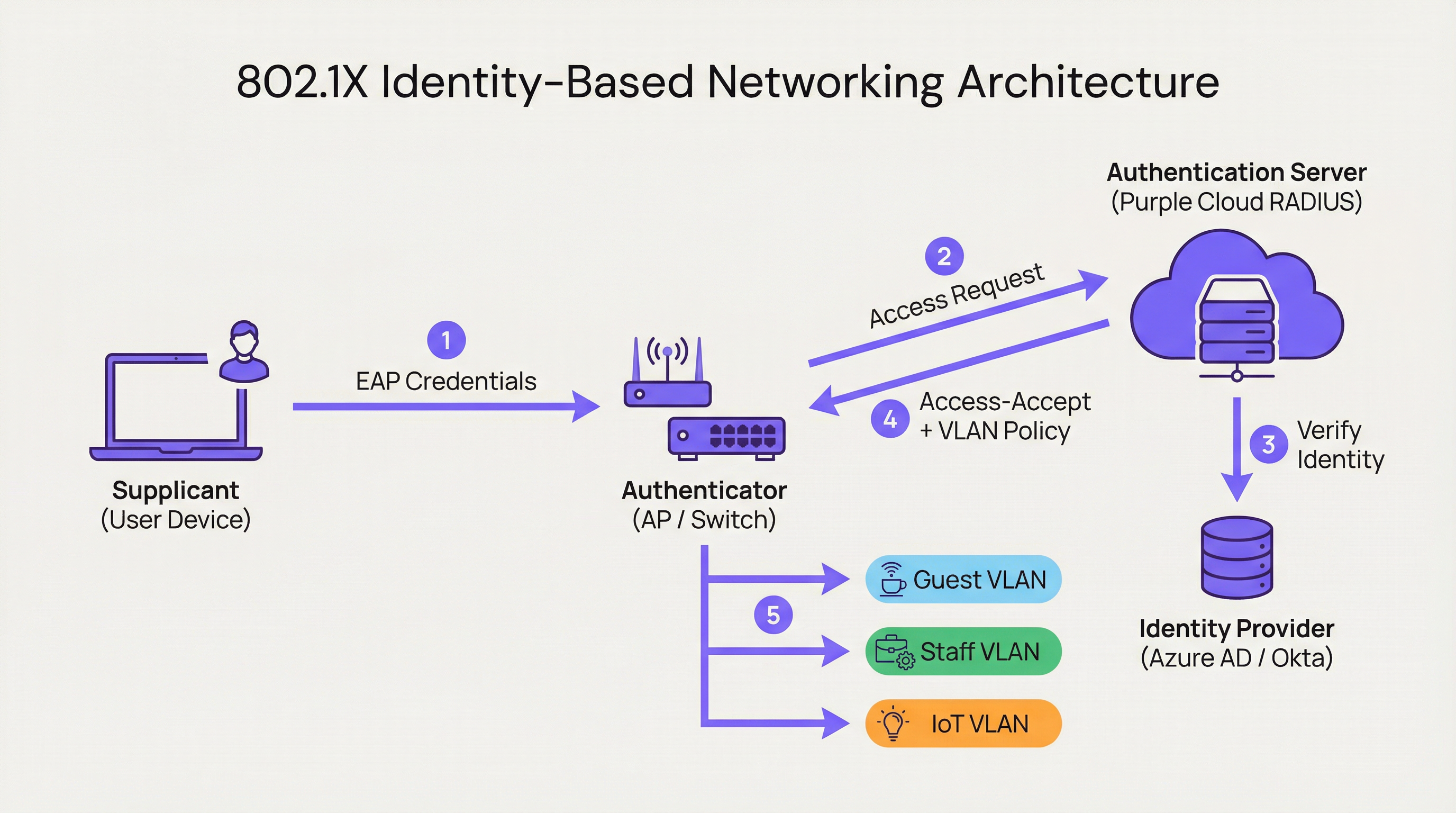
Wenn sich ein Nutzer verbindet, versetzt der Authenticator den Port in einen nicht autorisierten Zustand und blockiert den gesamten Datenverkehr mit Ausnahme von 802.1X-Authentifizierungspaketen. Der Supplicant stellt seine Anmeldeinformationen bereit, die der Authenticator an den Authentifizierungsserver weiterleitet. Der AS überprüft die Identität und weist den Authenticator basierend auf vordefinierten Richtlinien an, was zu tun ist. Diese Anweisung ist nicht einfach ein binäres Zulassen oder Verweigern; sie kann dynamische VLAN-Zuweisungen, Quality of Service (QoS)-Profile, Sitzungs-Timeouts und spezifische Firewall-Regeln umfassen. Ein Unternehmensnutzer könnte dem CORP_VLAN mit Zugriff auf interne Server zugewiesen werden, während ein Gast dem GUEST_VLAN mit reinem Internetzugang zugewiesen wird – und das über dieselbe SSID oder denselben physischen Port.
Wie Purple IBN implementiert
Die Plattform von Purple fungiert als Cloud-nativer Authentifizierungsserver und Policy-Engine, die für die Komplexität großer öffentlicher Veranstaltungsorte konzipiert ist. Unser Ansatz konzentriert sich darauf, die Komplexität der RADIUS- und 802.1X-Konfiguration zu abstrahieren.
Cloud-Nativer RADIUS: Wir eliminieren die Notwendigkeit lokaler Authentifizierungsserver und bieten einen global verteilten, hochverfügbaren Service, der bei Bedarf skaliert. Es müssen keine Server in Racks eingebaut, keine Firmware gepatcht werden und es gibt keinen Single Point of Failure.
Identity Provider (IdP)-Integration: Wir verbinden uns nahtlos mit führenden IdPs wie Azure AD, Okta und Google Workspace. Dies ermöglicht es Unternehmen, ihre bestehende Single Source of Truth für Identitäten zu nutzen und stellt sicher, dass der Netzwerkzugriff eines Mitarbeiters sofort widerrufen wird, wenn dessen Konto deaktiviert wird.
Dynamische Policy-Engine: Unsere intuitive Management-Konsole ermöglicht es IT-Managern, granulare Zugriffsrichtlinien basierend auf Nutzerattributen wie Gruppenmitgliedschaft, Rolle und Abteilung zu erstellen. Eine Richtlinie könnte lauten: "Alle Nutzer der Gruppe 'Retail-Staff', die sich zwischen 9:00 und 17:00 Uhr mit der SSID 'Staff-WiFi' verbinden, werden dem 'POS_VLAN' mit einem Bandbreitenlimit von 10 Mbit/s zugewiesen."
Dynamische VLAN-Zuweisung: Dies ist ein Eckpfeiler unserer IBN-Implementierung. Anstatt VLANs an jedem Switch-Port manuell zu konfigurieren, weist das Netzwerk einen Nutzer basierend auf seiner Identität dynamisch dem richtigen VLAN zu. Dies ist ein massiver Gewinn an betrieblicher Effizienz und eine erhebliche Sicherheitsverbesserung.

Implementierungsleitfaden
Die Bereitstellung von IBN mit Purple ist ein strukturierter Prozess, der darauf ausgelegt ist, Unterbrechungen zu minimieren und die Sicherheit vom ersten Tag an zu maximieren.
Schritt 1: Audit der Netzwerkinfrastruktur
Stellen Sie vor der Bereitstellung sicher, dass Ihre Netzwerk-Hardware – Switches und Access Points – IEEE 802.1X unterstützt. Die meisten Enterprise-Geräte, die im letzten Jahrzehnt hergestellt wurden, tun dies. Dazu gehören Anbieter wie Cisco, Meraki, Aruba und Ruckus. Stellen Sie sicher, dass die gesamte Firmware aktuell ist, da ältere Firmware-Versionen bekannte 802.1X-Schwachstellen aufweisen können.
Schritt 2: Definition von Nutzerrollen und Zugriffsrichtlinien
Dies ist die kritischste Phase. Arbeiten Sie mit Stakeholdern aus HR, Operations und Management zusammen, um alle Netzwerknutzer in eindeutige Rollen einzuteilen. Häufige Beispiele sind Unternehmensmitarbeiter (voller Zugriff auf interne Ressourcen), Gastnutzer (reiner Internetzugang über ein Captive Portal), externe Dienstleister (zeitlich begrenzter Zugriff auf bestimmte Anwendungen) und IoT-Geräte (stark eingeschränkter Zugriff auf ein dediziertes VLAN, die nur mit ihrem spezifischen Management-Server kommunizieren). Definieren Sie für jede Rolle explizit die erforderliche Zugriffsebene.
Schritt 3: Konfiguration von Purple als Authentifizierungsserver
Konfigurieren Sie in Ihrem Netzwerk-Controller – wie dem Meraki Dashboard oder Aruba Central – ein neues RADIUS-Profil, das mit einem Shared Secret auf die Authentifizierungs-Endpunkte von Purple verweist. Dies stellt die Vertrauensbeziehung zwischen Ihrer Netzwerk-Hardware und der Purple-Cloud her. Die Onboarding-Dokumentation von Purple bietet Schritt-für-Schritt-Konfigurationsanleitungen für alle großen Hardware-Anbieter.
Schritt 4: Phasenweiser Rollout und Tests
Versuchen Sie keine abrupte Migration (Flash-Cut). Beginnen Sie mit einer Pilotgruppe von Nutzern oder einem bestimmten Bereich Ihres Standorts, z. B. einer einzelnen Etage oder einer unkritischen Einzelhandelsfiliale. Erstellen Sie eine neue, dedizierte SSID für den IBN-Test. Binden Sie die Pilotnutzer ein und testen Sie alle definierten Rollen. Validieren Sie, dass die Nutzer den richtigen VLANs zugewiesen werden und dass die Zugriffsberechtigungen korrekt durchgesetzt werden. Testen Sie vor allem Fehlerszenarien: Was passiert, wenn der RADIUS-Server nicht erreichbar ist? Konfigurieren Sie die Hardware für ein Fail-Closed-Verhalten.
Schritt 5: Vollständige Bereitstellung und Außerbetriebnahme von Altsystemen
Sobald der Pilot erfolgreich ist, weiten Sie den Rollout auf das gesamte Unternehmen aus. Entwickeln Sie einen klaren Kommunikationsplan, um die Nutzer durch den einmaligen Prozess der Verbindung mit dem neuen sicheren Netzwerk zu führen. Sobald alle Nutzer migriert sind, nehmen Sie die alten, unsicheren SSIDs und Port-Konfigurationen außer Betrieb.
Best Practices
Nutzen Sie WPA3-Enterprise: Sofern unterstützt, verwenden Sie WPA3-Enterprise in Verbindung mit 802.1X. Es bietet erhebliche Sicherheitsverbesserungen gegenüber WPA2, einschließlich Schutz für Management-Frames (802.11w) und stärkere Verschlüsselungsalgorithmen.
Zertifikatsbasierte Authentifizierung: Gehen Sie bei Unternehmensgeräten über Anmeldeinformationen mit Nutzername und Passwort (EAP-PEAP) hinaus und implementieren Sie eine zertifikatsbasierte Authentifizierung (EAP-TLS). Dies ist der Goldstandard für 802.1X-Sicherheit, da es Phishing-Risiken mindert und die Nutzererfahrung durch den Wegfall von Passwortabfragen vereinfacht.
Identitäten zentralisieren: Pflegen Sie eine einzige, maßgebliche Single Source of Truth für die Nutzeridentität. Dies verhindert Identitätswildwuchs und stellt sicher, dass beim Verlassen des Unternehmens durch einen Mitarbeiter dessen Netzwerkzugriff sofort an der Quelle widerrufen wird.
Regelmäßige Überprüfung der Richtlinien: Nutzerrollen und Zugriffsanforderungen ändern sich. Führen Sie vierteljährliche Überprüfungen Ihrer IBN-Richtlinien durch, um sicherzustellen, dass sie weiterhin mit den Geschäftsanforderungen und Sicherheitsprinzipien übereinstimmen. Entfernen Sie ungenutzte Rollen und verschärfen Sie zu freizügige Regeln.
| Best Practice | Standard / Referenz | Priorität |
|---|---|---|
| WPA3-Enterprise | IEEE 802.11ax, Wi-Fi Alliance | Hoch |
| Zertifikatsbasierte Authentifizierung (EAP-TLS) | RFC 5216 | Hoch |
| Dynamische VLAN-Segmentierung | IEEE 802.1Q | Kritisch |
| Zentralisierte Identität (IdP) | NIST SP 800-63 | Kritisch |
| Fail-Closed RADIUS-Richtlinie | CIS Benchmark | Hoch |
| Vierteljährliche Richtlinienüberprüfung | ISO 27001 | Mittel |
Fehlerbehebung & Risikominderung
Fehlerszenario: RADIUS-Server nicht erreichbar
Wenn der Authenticator die Purple-Cloud nicht erreichen kann, besteht das Standardverhalten der Hardware möglicherweise in einem Fail-Open (gesamten Zugriff zulassen) oder Fail-Closed (gesamten Zugriff verweigern). Konfigurieren Sie Ihre Hardware für maximale Sicherheit auf ein Fail-Closed-Verhalten. Die geografisch verteilte Infrastruktur von Purple macht längere Ausfälle höchst unwahrscheinlich, aber Defense-in-Depth ist unerlässlich. Erwägen Sie die Konfiguration eines lokalen RADIUS-Fallbacks für kritische Infrastrukturen.
Fehlerszenario: Falsch konfigurierte Richtlinien
Eine schlecht geschriebene Richtlinie kann übermäßige Privilegien gewähren oder legitimen Zugriff verweigern. Verwenden Sie eine Staging-Umgebung oder eine Pilotgruppe, um jede Richtlinienänderung zu testen, bevor Sie sie in die Produktion überführen. Der Policy-Simulator von Purple ermöglicht es Ihnen, die erwartete Zugriffsebene eines Nutzers zu testen, bevor Sie eine Änderung übernehmen.
Risiko: Onboarding-Komplexität
Der anfängliche Verbindungsprozess für Nutzer kann komplex sein, insbesondere bei der Bereitstellung von Zertifikaten. Stellen Sie klare Schritt-für-Schritt-Anleitungen mit Screenshots bereit und bieten Sie während der Übergangsphase Helpdesk-Support an. Erwägen Sie den Einsatz eines Onboarding-Tools wie dem Network Access Manager von Purple, um den Gerätekonfigurationsprozess zu automatisieren.
Risiko: Legacy-Geräte ohne 802.1X-Unterstützung
Nicht alle Geräte – insbesondere ältere IoT-Hardware, Drucker und medizinische Geräte – unterstützen 802.1X. Verwenden Sie für diese Geräte MAC Authentication Bypass (MAB), indem Sie deren MAC-Adressen vorab registrieren und sie stark eingeschränkten, isolierten VLANs mit strengen Firewall-Regeln zuweisen.
ROI & Geschäftsauswirkungen
Der Business Case für IBN basiert auf drei Säulen: Kostensenkung, Risikominderung und Business Enablement.
Kostensenkung: Die primäre Einsparung ist operativer Natur. Die Automatisierung des VLAN- und ACL-Managements reduziert die für die Netzwerkadministration erforderlichen Arbeitsstunden drastisch. Die dynamische VLAN-Zuweisung kann die Zeit für die Netzwerkbereitstellung laut unabhängigen Benchmarks für den Netzwerkbetrieb um über 85 % reduzieren. Dadurch wird IT-Personal freigesetzt, um sich auf strategische Initiativen statt auf Routinewartungen zu konzentrieren.
Risikominderung: Die Kosten einer Datenschutzverletzung sind beträchtlich – der Cost of a Data Breach Report von IBM beziffert den weltweiten Durchschnitt konstant auf über 4 Millionen USD. Durch die Implementierung eines Zero-Trust-Modells und von Mikrosegmentierung reduziert IBN die Angriffsfläche erheblich. Wenn das Gerät eines Nutzers kompromittiert wird, bleibt die Sicherheitsverletzung auf dessen spezifisches, begrenztes Netzwerksegment beschränkt. Dies ist entscheidend für die PCI DSS-Compliance im Einzelhandel und die GDPR-Compliance in Organisationen des öffentlichen Sektors.
Business Enablement: IBN liefert umfangreiche Daten darüber, wer das Netzwerk nutzt, wo sich die Nutzer befinden und was sie tun. Diese Informationen sind für den Betrieb von Veranstaltungsorten von unschätzbarem Wert. Ein Hotel kann die Bewegungsmuster der Gäste nachvollziehen, ein Einzelhändler kann die Kundenfrequenz in verschiedenen Abteilungen analysieren und ein Stadion kann den Personaleinsatz basierend auf der Echtzeit-Menschendichte optimieren. Dies verwandelt das Netzwerk von einer Kostenstelle in einen strategischen Geschäftswert.
| ROI-Dimension | Metrik | Typisches Ergebnis |
|---|---|---|
| Operative Effizienz | Eingesparte IT-Admin-Stunden pro Woche | 40-60 % Reduzierung |
| Sicherheitsstatus | Reduzierung der Angriffsfläche | Signifikant durch Mikrosegmentierung |
| Compliance | Zeit für Audit-Vorbereitung | Reduziert durch automatisiertes Logging |
| Business Intelligence | Erfassungsrate von Gastdaten | Erhöht durch Captive Portal-Integration |
| Mitarbeiterproduktivität | Zeit für Netzwerkbereitstellung | 85 %+ Reduzierung |
Schlüsselbegriffe & Definitionen
Identity-Based Networking (IBN)
An approach to network administration where access to network resources is granted based on the authenticated identity of a user or device, rather than its physical connection point or IP address.
IT teams use IBN to create more secure and flexible networks that can handle BYOD, IoT, and mobile users safely. It is the foundational technology for a Zero Trust network architecture.
IEEE 802.1X
An IEEE standard for Port-Based Network Access Control (PNAC). It provides an authentication mechanism to devices wishing to attach to a LAN or WLAN, using the EAP framework to carry authentication credentials.
This is the primary technical standard that underpins most IBN deployments. Network hardware must support 802.1X to be compatible with an identity-driven access model.
RADIUS
Remote Authentication Dial-In User Service. A networking protocol that provides centralised Authentication, Authorisation, and Accounting (AAA) management for users who connect and use a network service.
The RADIUS server is the brain of an IBN system. It makes the decisions about who gets access and what level of access they receive. Purple provides this as a cloud-native service, eliminating the need for on-premises RADIUS infrastructure.
Dynamic VLAN Assignment
The ability of a network to assign a user to a specific Virtual LAN (VLAN) based on their authenticated identity, regardless of the physical port or SSID they connect to.
This is a key operational benefit of IBN. It automates the process of network segmentation, saving significant administrative time and reducing the risk of misconfiguration that leads to security incidents.
Supplicant
The software on a client device (such as a laptop or smartphone) that provides credentials to the network authenticator as part of the 802.1X authentication process.
Modern operating systems (Windows, macOS, iOS, Android) have a built-in 802.1X supplicant, so end users do not need to install any special software to connect to an IBN-secured network.
EAP (Extensible Authentication Protocol)
An authentication framework that provides a common way for supplicants and authentication servers to negotiate an authentication method. Common EAP types include EAP-TLS (certificate-based) and EAP-PEAP (password-based).
IT teams choose an EAP type based on their desired balance of security and usability. EAP-TLS is the most secure option and is recommended for corporate devices; EAP-PEAP is simpler to deploy but relies on password security.
MAC Authentication Bypass (MAB)
A technique that allows devices without 802.1X supplicant support to be authenticated on an IBN network by pre-registering their hardware MAC address with the authentication server.
MAB is a pragmatic solution for IoT devices, printers, and legacy hardware that cannot participate in 802.1X. It is less secure than full 802.1X authentication and should be combined with strict VLAN isolation and firewall rules.
Zero Trust
A security model based on the principle of 'never trust, always verify.' It requires that all users, whether inside or outside the organisation's network, be authenticated, authorised, and continuously validated before being granted access to applications and data.
IBN is a foundational technology for implementing a Zero Trust architecture. It ensures that the principle of 'always verify' is applied right at the network edge, before any traffic is allowed to flow.
WPA3-Enterprise
The latest generation of the Wi-Fi Protected Access security protocol for enterprise networks. It mandates the use of 802.1X authentication and offers stronger encryption (192-bit security mode) and protection for management frames.
IT teams should target WPA3-Enterprise for all new deployments and hardware refreshes. It provides a significant security uplift over WPA2-Enterprise, particularly in high-density public environments.
Fallstudien
A 500-room luxury hotel needs to provide secure, differentiated Wi-Fi access for guests, conference attendees, staff, and back-of-house IoT devices (minibars, smart locks). They currently use a single, shared WPA2-Personal password for everyone, which is a major security and compliance risk.
Role Definition: Define four distinct roles: Guest, Conference, Staff, and IoT.
Policy Creation in Purple:
- Guest: Authenticate via captive portal with room number and surname. Assign to Guest_VLAN with a 20 Mbps bandwidth cap and client isolation enabled to prevent peer-to-peer attacks.
- Conference: Authenticate via a shared, time-limited credential provided by the event organiser. Assign to Conference_VLAN with a 50 Mbps cap, allowing communication between devices within the same conference group.
- Staff: Authenticate via Azure AD credentials. Assign to Staff_VLAN with access to the Property Management System (PMS) and internal servers only.
- IoT: Authenticate using MAC Authentication Bypass (MAB) with a pre-registered list of device MAC addresses. Assign to IoT_VLAN, which has no internet access and can only communicate with the IoT management platform.
Network Configuration: Configure hotel APs to use Purple's cloud RADIUS. Create a single SSID, Hotel_WiFi, using WPA2/WPA3-Enterprise.
Rollout: Pilot the new SSID in a single wing of the hotel before full deployment. Validate each role before expanding.
A retail chain with 150 stores wants to replace its aging guest Wi-Fi and provide secure network access for corporate staff, store associates using handheld scanners, and third-party vendors (merchandisers). They need to achieve and maintain PCI DSS compliance.
Role Definition: Define four roles: Corporate, Store_Associate, Vendor, and Guest.
Policy Creation in Purple:
- Corporate: Authenticate via Okta credentials. Assign to CORP_VLAN with full network access.
- Store_Associate: Authenticate handheld scanners via EAP-TLS (device certificates issued by the company CA). Assign to POS_VLAN, which is fully segmented from all other network traffic and only has access to the payment processing gateway and inventory server. This is the critical control for PCI DSS compliance.
- Vendor: Authenticate via a self-service portal where they register for time-limited access (e.g., 8 hours). Assign to Vendor_VLAN with internet-only access.
- Guest: Authenticate via a social login (Facebook, Google) or email on a branded captive portal. Assign to Guest_VLAN with client isolation.
Network Configuration: Deploy Meraki APs in all stores, managed centrally via Meraki Dashboard. Configure the Retail_Secure SSID to point to Purple for authentication. Centralise all policy management in Purple.
Measurement: Use Purple's analytics to track guest engagement, dwell times, and repeat visits, providing valuable data to the marketing team and demonstrating the commercial value of the Wi-Fi investment.
Szenarioanalyse
Q1. A large conference centre is hosting a high-profile tech event with 5,000 attendees, 200 event staff, and a dedicated live-streaming production crew requiring guaranteed bandwidth. How would you design the IBN policy to serve all three groups from a single network infrastructure?
💡 Hinweis:Consider the distinct requirements of each group: attendees need basic internet access, staff need access to event management systems, and the production crew needs guaranteed, high-priority bandwidth with no contention.
Empfohlenen Ansatz anzeigen
Define three distinct roles. Attendees authenticate via a simple captive portal (email address or event registration code). Place them on a Public_VLAN with a strict per-client bandwidth limit (e.g., 5 Mbps) and client isolation enabled to prevent peer-to-peer attacks and ensure fair bandwidth distribution. Event Staff authenticate using pre-shared credentials managed by the event organiser. Place them on a Staff_VLAN with a higher bandwidth limit (e.g., 25 Mbps) and access to event management systems. Production Crew is the most critical group. Authenticate their equipment using EAP-TLS certificates for maximum security. Place them on a dedicated Production_VLAN with the highest QoS priority (DSCP EF marking) and no bandwidth restrictions. This VLAN must be completely isolated from all other traffic to guarantee performance for the live stream. Use Purple's policy engine to set session timeouts for attendee credentials that align with the event schedule.
Q2. Your CFO is questioning the investment in an IBN solution, arguing that the existing WPA2-Personal passwords 'work fine.' How do you construct a compelling business case focused on ROI?
💡 Hinweis:Translate the technical benefits — security, automation, compliance — into financial terms: cost savings, risk reduction, and revenue enablement.
Empfohlenen Ansatz anzeigen
The business case has three parts. First, Operational Savings: calculate the weekly hours your IT team spends on manual network changes (MAC whitelisting, VLAN updates, ACL changes, password resets). Show how automating this with IBN frees up that time for strategic projects. Even recovering five hours per week at a fully-loaded cost of £50/hour represents £13,000 per year in recovered productivity. Second, Risk Reduction: reference industry data on the average cost of a data breach. Frame IBN as an insurance policy that significantly lowers the probability of such an event by implementing micro-segmentation and Zero Trust principles. Third, Compliance Costs: if subject to PCI DSS or GDPR, highlight the cost of failing an audit or the scale of potential regulatory fines (up to 4% of global annual turnover under GDPR). Position IBN as a key enabler for compliance, directly reducing that financial risk.
Q3. You are deploying IBN in a hospital. A critical piece of medical equipment — an MRI scanner — does not support 802.1X. How do you securely connect it to the network while maintaining your Zero Trust posture?
💡 Hinweis:The device cannot authenticate itself using standard 802.1X. How can the network authenticate it on its behalf, and what compensating controls are needed?
Empfohlenen Ansatz anzeigen
This is a classic use case for MAC Authentication Bypass (MAB). Register the MRI scanner's MAC address in the Purple platform and associate it with a Medical_Device access profile. When the switch detects that MAC address, it queries Purple, which instructs the switch to place the device into a highly restricted Medical_VLAN. This VLAN must have a strict firewall policy (implemented at the network layer) that only permits the MRI machine to communicate with its dedicated imaging server on specific ports, and blocks all other traffic. This provides a secure, albeit less ideal, alternative to 802.1X for legacy or non-supplicant devices. Document this as a known exception in your security risk register, and schedule a hardware refresh to a 802.1X-capable model at the next available opportunity. The compensating control of strict VLAN isolation and firewall rules is the key to maintaining your Zero Trust posture.
Wichtigste Erkenntnisse
- ✓Identity-Based Networking (IBN) ties network access to verified user identity, not physical ports or MAC addresses.
- ✓It is a core component of a modern Zero Trust security strategy, operating on the principle of 'never trust, always verify.'
- ✓Key enabling technologies are IEEE 802.1X, RADIUS, EAP, and dynamic VLAN assignment.
- ✓IBN dramatically simplifies network administration by automating VLAN and access rule management.
- ✓It delivers measurable ROI through reduced operational costs, mitigated breach risk, and enhanced regulatory compliance (PCI DSS, GDPR).
- ✓Purple provides a cloud-native RADIUS platform that integrates with existing IdPs (Azure AD, Okta) to implement IBN at scale without on-premises infrastructure.
- ✓Deployment should follow a phased approach: audit infrastructure, define roles, configure Purple, pilot test, then roll out fully.




