

Redes Baseadas na Identidade: O Que São e Por Que Importam
This guide provides a comprehensive technical reference on Identity-Based Networking (IBN) — what it is, how it works, and why it is a critical investment for any organisation managing large, diverse user populations across hotels, retail chains, stadiums, and public-sector venues. It covers the core IEEE 802.1X architecture, Purple's cloud-native implementation, real-world deployment scenarios, and a clear ROI framework to support procurement decisions.
🎧 Ouça este Guia
Ver Transcrição
Resumo Executivo
As Redes Baseadas na Identidade (IBN - Identity-Based Networking) representam uma mudança fundamental na forma como o acesso à rede é gerido, passando de um modelo estático baseado em portas para um modelo dinâmico centrado no utilizador. Numa rede tradicional, os direitos de acesso estão associados a portas físicas ou endereços MAC, criando um ambiente rígido e inseguro. As IBN associam os privilégios de acesso à rede à identidade verificada de um utilizador. Isto significa que, independentemente de como ou onde um utilizador se liga — via Wi-Fi, Ethernet ou VPN —, o seu acesso aos recursos da rede é determinado por quem é, e não pelo dispositivo que está a utilizar ou onde se está a ligar.
Para as organizações que gerem bases de utilizadores grandes e diversas em ambientes como hotéis, cadeias de retalho e estádios, isto é um fator de mudança. Permite uma postura de segurança Zero Trust por defeito, onde cada utilizador e dispositivo deve ser autenticado e autorizado antes de obter acesso. Isto simplifica drasticamente a segmentação da rede, melhora a segurança ao conter ameaças e agiliza a conformidade com regulamentos como o PCI DSS e o GDPR.
Para um CTO, as IBN proporcionam um ROI significativo ao reduzir a sobrecarga administrativa da gestão de VLANs complexas e listas de controlo de acesso (ACLs), mitigando o risco de falhas de segurança e fornecendo uma visibilidade profunda sobre os padrões de utilização da rede que podem informar a estratégia de negócio. A implementação de IBN da Purple tira partido da infraestrutura existente e integra-se perfeitamente com fornecedores de identidade na cloud para fornecer uma camada de acesso escalável, resiliente e inteligente, adequada à empresa moderna.

Análise Técnica Aprofundada
Das Portas para as Pessoas: A Mudança Arquitetónica Central
As redes tradicionais, uma relíquia de uma época em que os dispositivos eram estáticos e os utilizadores estavam presos às secretárias, operam com base num princípio de confiança implícita dentro de um perímetro de rede. Um dispositivo autenticado é considerado de confiança e o seu ponto de ligação física (uma porta de switch) dita o seu acesso à rede. Este modelo está repleto de desafios na era moderna do BYOD (Bring Your Own Device), IoT e forças de trabalho móveis.
As Redes Baseadas na Identidade (IBN), frequentemente implementadas utilizando a norma IEEE 802.1X, invertem fundamentalmente este modelo. Desvinculam o utilizador da porta física e fazem da identidade o novo perímetro. Os componentes centrais de uma arquitetura IBN são:
Suplicante (Supplicant): O dispositivo cliente (por exemplo, portátil, smartphone) que solicita acesso à rede. Executa software que comunica com o autenticador. Os sistemas operativos modernos — Windows, macOS, iOS e Android — incluem um suplicante 802.1X nativo, pelo que não é necessária a instalação de software adicional para os utilizadores finais.
Autenticador (Authenticator): O dispositivo de acesso à rede, como um Ponto de Acesso Sem Fios (WAP) ou um switch Ethernet. Atua como um controlador de acessos, bloqueando ou permitindo o tráfego do suplicante. O autenticador mantém a porta num estado não autorizado até receber instruções explícitas do servidor de autenticação.
Servidor de Autenticação (AS): Tipicamente um servidor RADIUS (Remote Authentication Dial-In User Service). Este servidor é a camada de inteligência da operação. Recebe as credenciais do suplicante a partir do autenticador, valida-as num repositório de identidades (por exemplo, Azure Active Directory, Google Workspace, uma base de dados local) e devolve uma decisão de autorização que inclui uma política de rede específica.
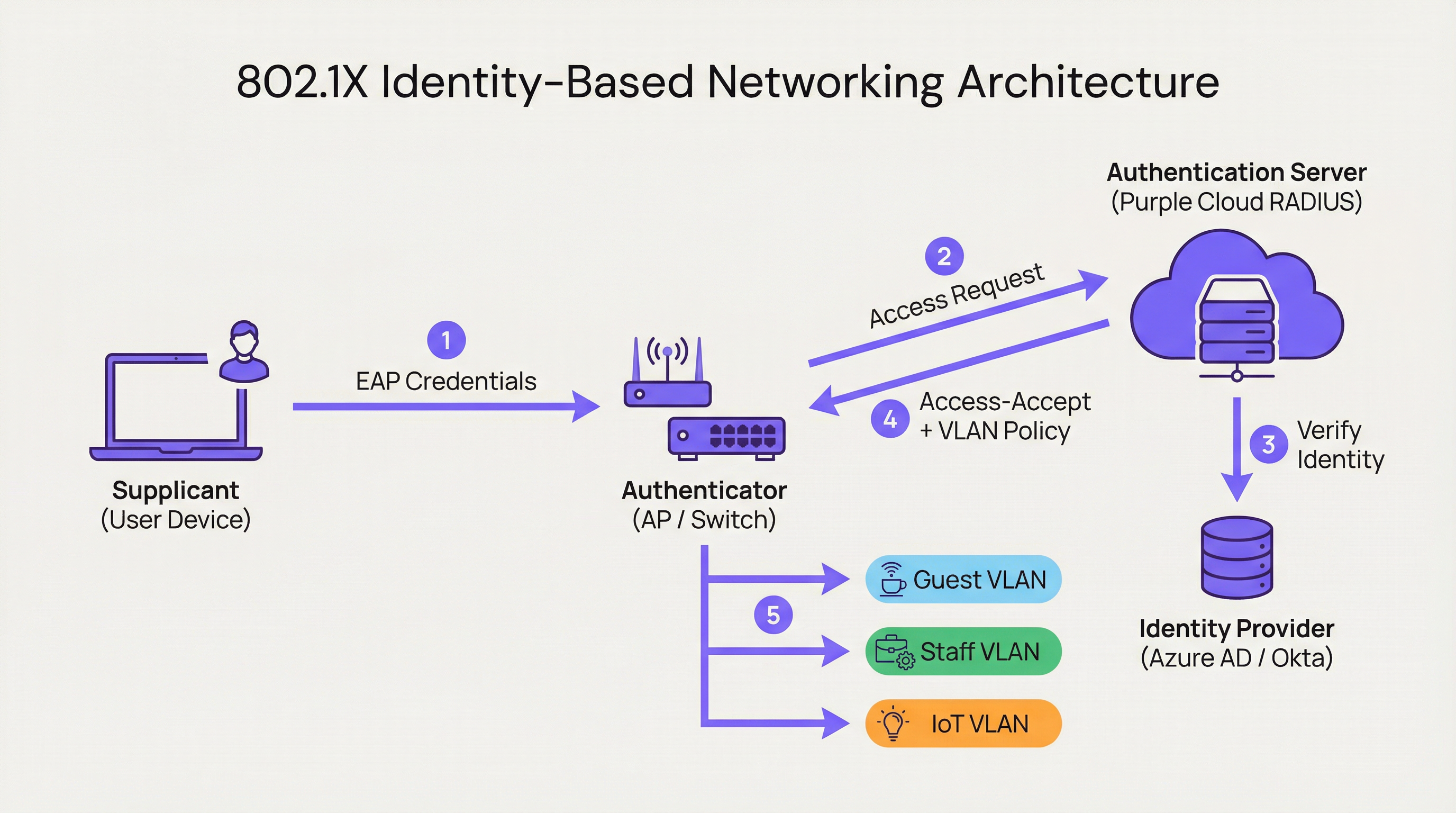
Quando um utilizador se liga, o autenticador coloca a porta num estado não autorizado, bloqueando todo o tráfego exceto os pacotes de autenticação 802.1X. O suplicante fornece as suas credenciais, que o autenticador reencaminha para o Servidor de Autenticação. O AS verifica a identidade e, com base em políticas predefinidas, instrui o autenticador sobre o que fazer. Esta instrução não é simplesmente um permitir ou negar binário; pode incluir a atribuição dinâmica de VLAN, perfis de Qualidade de Serviço (QoS), tempos limite de sessão e regras de firewall específicas. Um utilizador corporativo pode ser colocado na CORP_VLAN com acesso a servidores internos, enquanto um convidado é colocado na GUEST_VLAN com acesso apenas à internet — a partir do mesmo SSID ou porta física.
Como a Purple Implementa as IBN
A plataforma da Purple atua como um Servidor de Autenticação nativo da cloud e um motor de políticas, concebido para as complexidades de grandes recintos públicos. A nossa abordagem foca-se em abstrair a complexidade da configuração do RADIUS e do 802.1X.
RADIUS Nativo da Cloud: Eliminamos a necessidade de servidores de autenticação locais, fornecendo um serviço globalmente distribuído e de alta disponibilidade que escala a pedido. Não há servidores para instalar em bastidores, nem firmware para atualizar, nem um ponto único de falha.
Integração com Fornecedores de Identidade (IdP): Ligamo-nos perfeitamente aos principais IdPs, incluindo Azure AD, Okta e Google Workspace. Isto permite que as organizações utilizem a sua fonte única de verdade existente para a identidade, garantindo que, quando a conta de um colaborador é desativada, o seu acesso à rede é revogado instantaneamente.
Motor de Políticas Dinâmico: A nossa consola de gestão intuitiva permite aos gestores de TI criar políticas de acesso granulares com base em atributos do utilizador, tais como a pertença a grupos, a função e o departamento. Uma política pode estipular: "Todos os utilizadores do grupo 'Retail-Staff' que se liguem ao SSID 'Staff-WiFi' entre as 9h e as 17h são atribuídos à 'POS_VLAN' com um limite de largura de banda de 10 Mbps."
Atribuição Dinâmica de VLAN: Esta é uma pedra angular da nossa implementação de IBN. Em vez de configurar manualmente as VLANs em cada porta de switch, a rede atribui dinamicamente um utilizador à VLAN correta com base na sua identidade. Este é um enorme ganho de eficiência operacional e uma melhoria significativa na segurança.

Guia de Implementação
A implementação de IBN com a Purple é um processo estruturado, concebido para minimizar as interrupções e maximizar a segurança desde o primeiro dia.
Passo 1: Auditoria à Infraestrutura de Rede
Antes da implementação, verifique se o seu hardware de rede — switches e pontos de acesso — suporta IEEE 802.1X. A maioria dos equipamentos de nível empresarial fabricados na última década suporta. Isto inclui fornecedores como a Cisco, Meraki, Aruba e Ruckus. Certifique-se de que todo o firmware está atualizado, uma vez que versões mais antigas podem ter vulnerabilidades 802.1X conhecidas.
Passo 2: Definir Funções de Utilizador e Políticas de Acesso
Esta é a fase mais crítica. Trabalhe com as partes interessadas dos RH, operações e gestão para classificar todos os utilizadores da rede em funções distintas. Exemplos comuns incluem Colaboradores Corporativos (acesso total a recursos internos), Utilizadores Convidados (acesso apenas à internet através de um Captive Portal), Contratados (acesso limitado no tempo a aplicações específicas) e Dispositivos IoT (acesso altamente restrito a uma VLAN dedicada, comunicando apenas com o seu servidor de gestão específico). Para cada função, defina explicitamente o nível de acesso necessário.
Passo 3: Configurar a Purple como Servidor de Autenticação
No seu controlador de rede — como o Meraki Dashboard ou o Aruba Central — configure um novo perfil RADIUS a apontar para os endpoints de autenticação da Purple com um segredo partilhado. Isto estabelece a relação de confiança entre o seu hardware de rede e a cloud da Purple. A documentação de integração da Purple fornece guias de configuração passo a passo para todos os principais fornecedores de hardware.
Passo 4: Implementação Faseada e Testes
Não tente uma migração abrupta. Comece com um grupo piloto de utilizadores ou uma área específica do seu recinto, como um único piso ou uma loja de retalho não crítica. Crie um novo SSID dedicado para o teste das IBN. Integre os utilizadores piloto e teste todas as funções definidas. Valide se os utilizadores estão a ser atribuídos às VLANs corretas e se as permissões de acesso são aplicadas corretamente. Fundamentalmente, teste os modos de falha: o que acontece se o servidor RADIUS estiver inacessível? Configure o hardware para uma postura 'fail-closed' (fechar em caso de falha).
Passo 5: Implementação Total e Desativação de Sistemas Legados
Assim que o piloto for bem-sucedido, expanda a implementação a toda a organização. Desenvolva um plano de comunicação claro para guiar os utilizadores através do processo único de ligação à nova rede segura. Quando todos os utilizadores estiverem migrados, desative os SSIDs e as configurações de portas antigos e inseguros.
Melhores Práticas
Tirar Partido do WPA3-Enterprise: Sempre que suportado, utilize o WPA3-Enterprise em conjunto com o 802.1X. Oferece melhorias de segurança significativas em relação ao WPA2, incluindo proteção para tramas de gestão (802.11w) e algoritmos de encriptação mais fortes.
Autenticação Baseada em Certificados: Para dispositivos corporativos, vá além das credenciais de nome de utilizador e palavra-passe (EAP-PEAP) e implemente a autenticação baseada em certificados (EAP-TLS). Este é o padrão de excelência para a segurança 802.1X, uma vez que mitiga os riscos de phishing e simplifica a experiência do utilizador ao eliminar os pedidos de palavra-passe.
Centralizar a Identidade: Mantenha uma fonte única e autoritária de verdade para a identidade do utilizador. Isto evita a dispersão de identidades e garante que, quando um colaborador sai da organização, o seu acesso à rede é revogado instantaneamente na origem.
Revisão Regular de Políticas: As funções dos utilizadores e os requisitos de acesso mudam. Realize revisões trimestrais das suas políticas de IBN para garantir que continuam alinhadas com as necessidades do negócio e os princípios de segurança. Elimine funções não utilizadas e restrinja regras permissivas.
| Melhor Prática | Norma / Referência | Prioridade |
|---|---|---|
| WPA3-Enterprise | IEEE 802.11ax, Wi-Fi Alliance | Alta |
| Autenticação por Certificado (EAP-TLS) | RFC 5216 | Alta |
| Segmentação Dinâmica de VLAN | IEEE 802.1Q | Crítica |
| Identidade Centralizada (IdP) | NIST SP 800-63 | Crítica |
| Política RADIUS Fail-Closed | CIS Benchmark | Alta |
| Revisão Trimestral de Políticas | ISO 27001 | Média |
Resolução de Problemas e Mitigação de Riscos
Modo de Falha: Servidor RADIUS Inacessível
Se o autenticador não conseguir aceder à cloud da Purple, o comportamento predefinido do hardware pode ser 'fail-open' (permitir todo o acesso) ou 'fail-closed' (negar todo o acesso). Configure o seu hardware para uma postura 'fail-closed' para obter a máxima segurança. A infraestrutura geo-distribuída da Purple torna as interrupções prolongadas altamente improváveis, mas a defesa em profundidade é essencial. Considere configurar um fallback RADIUS local para infraestruturas críticas.
Modo de Falha: Políticas Mal Configuradas
Uma política mal redigida pode conceder privilégios excessivos ou negar acessos legítimos. Utilize um ambiente de testes (staging) ou um grupo piloto para testar cada alteração de política antes de a implementar em produção. O simulador de políticas da Purple permite-lhe testar o nível de acesso esperado de um utilizador antes de confirmar uma alteração.
Risco: Complexidade de Integração (Onboarding)
O processo de ligação inicial para os utilizadores pode ser complexo, especialmente com a implementação de certificados. Forneça guias claros, passo a passo, com capturas de ecrã e ofereça suporte de helpdesk durante o período de transição. Considere implementar uma ferramenta de integração como o Network Access Manager da Purple para automatizar o processo de configuração dos dispositivos.
Risco: Dispositivos Legados Sem Suporte 802.1X
Nem todos os dispositivos — particularmente hardware IoT mais antigo, impressoras e equipamento médico — suportam 802.1X. Utilize o MAC Authentication Bypass (MAB) para estes dispositivos, pré-registando os seus endereços MAC e atribuindo-os a VLANs isoladas e altamente restritas, com regras de firewall rigorosas.
ROI e Impacto no Negócio
O business case para as IBN assenta em três pilares: redução de custos, mitigação de riscos e capacitação do negócio.
Redução de Custos: A principal poupança é operacional. A automatização da gestão de VLANs e ACLs reduz drasticamente as horas de trabalho necessárias para a administração da rede. A atribuição dinâmica de VLAN pode reduzir o tempo de aprovisionamento da rede em mais de 85%, de acordo com benchmarks independentes de operações de rede. Isto liberta a equipa de TI para se focar em iniciativas estratégicas em vez de manutenção de rotina.
Mitigação de Riscos: O custo de uma violação de dados é substancial — o relatório Cost of a Data Breach da IBM coloca consistentemente a média global acima dos 4 milhões de dólares. Ao implementar um modelo Zero Trust e a micro-segmentação, as IBN reduzem significativamente a superfície de ataque. Se o dispositivo de um utilizador for comprometido, a falha é contida dentro do seu segmento de rede específico e limitado. Isto é crítico para a conformidade com o PCI DSS no retalho e a conformidade com o GDPR em organizações do setor público.
Capacitação do Negócio: As IBN fornecem dados ricos sobre quem está a utilizar a rede, onde estão e o que estão a fazer. Esta inteligência é inestimável para as operações dos recintos. Um hotel pode compreender os padrões de movimento dos hóspedes, um retalhista pode analisar o tráfego pedonal em diferentes departamentos e um estádio pode otimizar a alocação de pessoal com base na densidade da multidão em tempo real. Isto transforma a rede de um centro de custos num ativo estratégico de negócio.
| Dimensão do ROI | Métrica | Resultado Típico |
|---|---|---|
| Eficiência Operacional | Horas de administração de TI poupadas por semana | Redução de 40-60% |
| Postura de Segurança | Redução da superfície de ataque | Significativa via micro-segmentação |
| Conformidade | Tempo de preparação para auditorias | Reduzido via registo automatizado |
| Business Intelligence | Taxa de captura de dados de convidados | Aumentada via integração com Captive Portal |
| Produtividade do Pessoal | Tempo de aprovisionamento da rede | Redução de 85%+ |
Termos-Chave e Definições
Identity-Based Networking (IBN)
An approach to network administration where access to network resources is granted based on the authenticated identity of a user or device, rather than its physical connection point or IP address.
IT teams use IBN to create more secure and flexible networks that can handle BYOD, IoT, and mobile users safely. It is the foundational technology for a Zero Trust network architecture.
IEEE 802.1X
An IEEE standard for Port-Based Network Access Control (PNAC). It provides an authentication mechanism to devices wishing to attach to a LAN or WLAN, using the EAP framework to carry authentication credentials.
This is the primary technical standard that underpins most IBN deployments. Network hardware must support 802.1X to be compatible with an identity-driven access model.
RADIUS
Remote Authentication Dial-In User Service. A networking protocol that provides centralised Authentication, Authorisation, and Accounting (AAA) management for users who connect and use a network service.
The RADIUS server is the brain of an IBN system. It makes the decisions about who gets access and what level of access they receive. Purple provides this as a cloud-native service, eliminating the need for on-premises RADIUS infrastructure.
Dynamic VLAN Assignment
The ability of a network to assign a user to a specific Virtual LAN (VLAN) based on their authenticated identity, regardless of the physical port or SSID they connect to.
This is a key operational benefit of IBN. It automates the process of network segmentation, saving significant administrative time and reducing the risk of misconfiguration that leads to security incidents.
Supplicant
The software on a client device (such as a laptop or smartphone) that provides credentials to the network authenticator as part of the 802.1X authentication process.
Modern operating systems (Windows, macOS, iOS, Android) have a built-in 802.1X supplicant, so end users do not need to install any special software to connect to an IBN-secured network.
EAP (Extensible Authentication Protocol)
An authentication framework that provides a common way for supplicants and authentication servers to negotiate an authentication method. Common EAP types include EAP-TLS (certificate-based) and EAP-PEAP (password-based).
IT teams choose an EAP type based on their desired balance of security and usability. EAP-TLS is the most secure option and is recommended for corporate devices; EAP-PEAP is simpler to deploy but relies on password security.
MAC Authentication Bypass (MAB)
A technique that allows devices without 802.1X supplicant support to be authenticated on an IBN network by pre-registering their hardware MAC address with the authentication server.
MAB is a pragmatic solution for IoT devices, printers, and legacy hardware that cannot participate in 802.1X. It is less secure than full 802.1X authentication and should be combined with strict VLAN isolation and firewall rules.
Zero Trust
A security model based on the principle of 'never trust, always verify.' It requires that all users, whether inside or outside the organisation's network, be authenticated, authorised, and continuously validated before being granted access to applications and data.
IBN is a foundational technology for implementing a Zero Trust architecture. It ensures that the principle of 'always verify' is applied right at the network edge, before any traffic is allowed to flow.
WPA3-Enterprise
The latest generation of the Wi-Fi Protected Access security protocol for enterprise networks. It mandates the use of 802.1X authentication and offers stronger encryption (192-bit security mode) and protection for management frames.
IT teams should target WPA3-Enterprise for all new deployments and hardware refreshes. It provides a significant security uplift over WPA2-Enterprise, particularly in high-density public environments.
Estudos de Caso
A 500-room luxury hotel needs to provide secure, differentiated Wi-Fi access for guests, conference attendees, staff, and back-of-house IoT devices (minibars, smart locks). They currently use a single, shared WPA2-Personal password for everyone, which is a major security and compliance risk.
Role Definition: Define four distinct roles: Guest, Conference, Staff, and IoT.
Policy Creation in Purple:
- Guest: Authenticate via captive portal with room number and surname. Assign to Guest_VLAN with a 20 Mbps bandwidth cap and client isolation enabled to prevent peer-to-peer attacks.
- Conference: Authenticate via a shared, time-limited credential provided by the event organiser. Assign to Conference_VLAN with a 50 Mbps cap, allowing communication between devices within the same conference group.
- Staff: Authenticate via Azure AD credentials. Assign to Staff_VLAN with access to the Property Management System (PMS) and internal servers only.
- IoT: Authenticate using MAC Authentication Bypass (MAB) with a pre-registered list of device MAC addresses. Assign to IoT_VLAN, which has no internet access and can only communicate with the IoT management platform.
Network Configuration: Configure hotel APs to use Purple's cloud RADIUS. Create a single SSID, Hotel_WiFi, using WPA2/WPA3-Enterprise.
Rollout: Pilot the new SSID in a single wing of the hotel before full deployment. Validate each role before expanding.
A retail chain with 150 stores wants to replace its aging guest Wi-Fi and provide secure network access for corporate staff, store associates using handheld scanners, and third-party vendors (merchandisers). They need to achieve and maintain PCI DSS compliance.
Role Definition: Define four roles: Corporate, Store_Associate, Vendor, and Guest.
Policy Creation in Purple:
- Corporate: Authenticate via Okta credentials. Assign to CORP_VLAN with full network access.
- Store_Associate: Authenticate handheld scanners via EAP-TLS (device certificates issued by the company CA). Assign to POS_VLAN, which is fully segmented from all other network traffic and only has access to the payment processing gateway and inventory server. This is the critical control for PCI DSS compliance.
- Vendor: Authenticate via a self-service portal where they register for time-limited access (e.g., 8 hours). Assign to Vendor_VLAN with internet-only access.
- Guest: Authenticate via a social login (Facebook, Google) or email on a branded captive portal. Assign to Guest_VLAN with client isolation.
Network Configuration: Deploy Meraki APs in all stores, managed centrally via Meraki Dashboard. Configure the Retail_Secure SSID to point to Purple for authentication. Centralise all policy management in Purple.
Measurement: Use Purple's analytics to track guest engagement, dwell times, and repeat visits, providing valuable data to the marketing team and demonstrating the commercial value of the Wi-Fi investment.
Análise de Cenários
Q1. A large conference centre is hosting a high-profile tech event with 5,000 attendees, 200 event staff, and a dedicated live-streaming production crew requiring guaranteed bandwidth. How would you design the IBN policy to serve all three groups from a single network infrastructure?
💡 Dica:Consider the distinct requirements of each group: attendees need basic internet access, staff need access to event management systems, and the production crew needs guaranteed, high-priority bandwidth with no contention.
Mostrar Abordagem Recomendada
Define three distinct roles. Attendees authenticate via a simple captive portal (email address or event registration code). Place them on a Public_VLAN with a strict per-client bandwidth limit (e.g., 5 Mbps) and client isolation enabled to prevent peer-to-peer attacks and ensure fair bandwidth distribution. Event Staff authenticate using pre-shared credentials managed by the event organiser. Place them on a Staff_VLAN with a higher bandwidth limit (e.g., 25 Mbps) and access to event management systems. Production Crew is the most critical group. Authenticate their equipment using EAP-TLS certificates for maximum security. Place them on a dedicated Production_VLAN with the highest QoS priority (DSCP EF marking) and no bandwidth restrictions. This VLAN must be completely isolated from all other traffic to guarantee performance for the live stream. Use Purple's policy engine to set session timeouts for attendee credentials that align with the event schedule.
Q2. Your CFO is questioning the investment in an IBN solution, arguing that the existing WPA2-Personal passwords 'work fine.' How do you construct a compelling business case focused on ROI?
💡 Dica:Translate the technical benefits — security, automation, compliance — into financial terms: cost savings, risk reduction, and revenue enablement.
Mostrar Abordagem Recomendada
The business case has three parts. First, Operational Savings: calculate the weekly hours your IT team spends on manual network changes (MAC whitelisting, VLAN updates, ACL changes, password resets). Show how automating this with IBN frees up that time for strategic projects. Even recovering five hours per week at a fully-loaded cost of £50/hour represents £13,000 per year in recovered productivity. Second, Risk Reduction: reference industry data on the average cost of a data breach. Frame IBN as an insurance policy that significantly lowers the probability of such an event by implementing micro-segmentation and Zero Trust principles. Third, Compliance Costs: if subject to PCI DSS or GDPR, highlight the cost of failing an audit or the scale of potential regulatory fines (up to 4% of global annual turnover under GDPR). Position IBN as a key enabler for compliance, directly reducing that financial risk.
Q3. You are deploying IBN in a hospital. A critical piece of medical equipment — an MRI scanner — does not support 802.1X. How do you securely connect it to the network while maintaining your Zero Trust posture?
💡 Dica:The device cannot authenticate itself using standard 802.1X. How can the network authenticate it on its behalf, and what compensating controls are needed?
Mostrar Abordagem Recomendada
This is a classic use case for MAC Authentication Bypass (MAB). Register the MRI scanner's MAC address in the Purple platform and associate it with a Medical_Device access profile. When the switch detects that MAC address, it queries Purple, which instructs the switch to place the device into a highly restricted Medical_VLAN. This VLAN must have a strict firewall policy (implemented at the network layer) that only permits the MRI machine to communicate with its dedicated imaging server on specific ports, and blocks all other traffic. This provides a secure, albeit less ideal, alternative to 802.1X for legacy or non-supplicant devices. Document this as a known exception in your security risk register, and schedule a hardware refresh to a 802.1X-capable model at the next available opportunity. The compensating control of strict VLAN isolation and firewall rules is the key to maintaining your Zero Trust posture.
Principais Conclusões
- ✓Identity-Based Networking (IBN) ties network access to verified user identity, not physical ports or MAC addresses.
- ✓It is a core component of a modern Zero Trust security strategy, operating on the principle of 'never trust, always verify.'
- ✓Key enabling technologies are IEEE 802.1X, RADIUS, EAP, and dynamic VLAN assignment.
- ✓IBN dramatically simplifies network administration by automating VLAN and access rule management.
- ✓It delivers measurable ROI through reduced operational costs, mitigated breach risk, and enhanced regulatory compliance (PCI DSS, GDPR).
- ✓Purple provides a cloud-native RADIUS platform that integrates with existing IdPs (Azure AD, Okta) to implement IBN at scale without on-premises infrastructure.
- ✓Deployment should follow a phased approach: audit infrastructure, define roles, configure Purple, pilot test, then roll out fully.




