

HIPAA-Compliant WiFi: हेल्थकेयर संगठनों के लिए एक मार्गदर्शिका
यह तकनीकी संदर्भ मार्गदर्शिका हेल्थकेयर IT टीमों के लिए कार्रवाई योग्य अनुपालन रणनीतियाँ प्रदान करती है जो एंटरप्राइज़ और गेस्ट WiFi तैनात करती हैं। इसमें नेटवर्क सेगमेंटेशन, 802.1X प्रमाणीकरण, ऑडिट लॉगिंग और Purple के प्लेटफॉर्म का उपयोग करके सुरक्षित, पृथक वायरलेस एक्सेस को कैसे लागू किया जाए, यह शामिल है।
🎧 Listen to this Guide
View Transcript
कार्यकारी सारांश
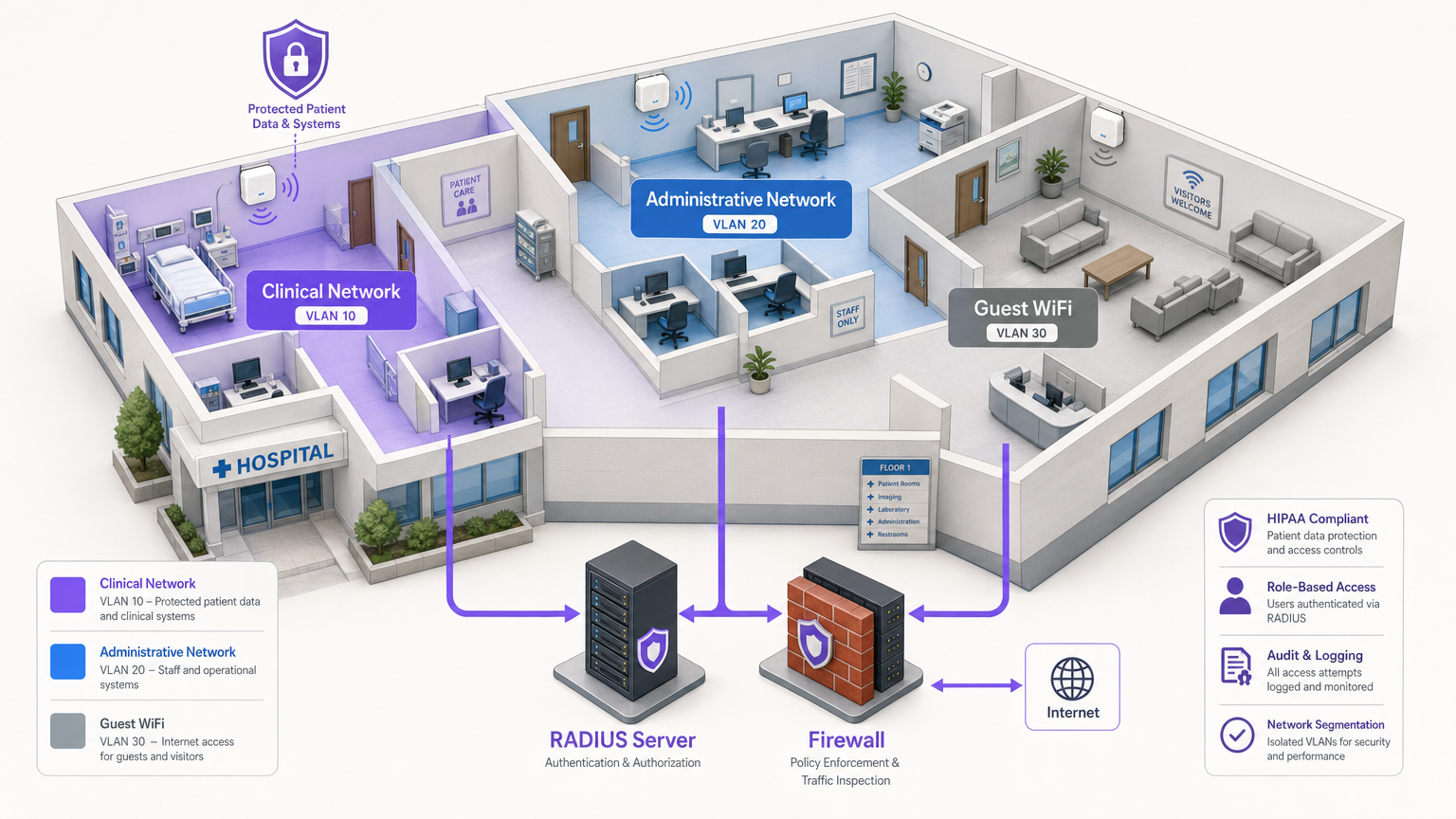
हेल्थकेयर परिवेशों में IT प्रबंधकों, नेटवर्क आर्किटेक्ट्स और CTOs के लिए, वायरलेस नेटवर्क तैनात करने में दो महत्वपूर्ण, अक्सर प्रतिस्पर्धी प्राथमिकताओं को संतुलित करना शामिल है: कठोर HIPAA विनियमों को पूरा करने के लिए इलेक्ट्रॉनिक संरक्षित स्वास्थ्य जानकारी (ePHI) को सुरक्षित करना, और मरीजों, आगंतुकों और क्लिनिकल कर्मचारियों के लिए सहज, उच्च-गुणवत्ता वाली कनेक्टिविटी प्रदान करना। एक गलत कॉन्फ़िगर किया गया एक्सेस पॉइंट या साझा पासवर्ड एक विनाशकारी डेटा उल्लंघन, नियामक जुर्माना और प्रतिष्ठा को नुकसान पहुंचा सकता है। यह मार्गदर्शिका HIPAA-अनुरूप WiFi तैनात करने के लिए एक व्यावहारिक, विक्रेता-तटस्थ ढाँचा प्रदान करती है। इसमें आवश्यक थ्री-ज़ोन सेगमेंटेशन मॉडल, डेटा एन्क्रिप्शन मानक (WPA3-एंटरप्राइज़), 802.1X के माध्यम से मजबूत पहचान प्रबंधन, और व्यापक ऑडिट लॉगिंग शामिल है। इसके अलावा, यह बताता है कि Guest WiFi और WiFi Analytics के लिए Purple जैसे एंटरप्राइज़ प्लेटफॉर्म को एकीकृत करना कैसे सुनिश्चित करता है कि सार्वजनिक पहुंच क्लिनिकल सिस्टम से सख्ती से अलग रहे, जबकि मूल्यवान जुड़ाव डेटा भी कैप्चर किया जा सके।
तकनीकी गहन विश्लेषण
HIPAA-अनुरूप वायरलेस नेटवर्क प्राप्त करने के लिए बुनियादी कनेक्टिविटी से आगे बढ़कर गहन सुरक्षा वास्तुकला को लागू करना आवश्यक है। HIPAA सुरक्षा नियम एक्सेस कंट्रोल, ऑडिट कंट्रोल, अखंडता और ट्रांसमिशन सुरक्षा के लिए तकनीकी सुरक्षा उपायों को अनिवार्य करता है [1]।
1. एन्क्रिप्शन और प्रमाणीकरण (802.1X और WPA3-एंटरप्राइज़)
वायरलेस सुरक्षा का आधार मजबूत एन्क्रिप्शन है। WEP, WPA और यहां तक कि WPA2-पर्सनल (प्री-शेयर्ड कीज़ का उपयोग करके) जैसे पुराने प्रोटोकॉल ePHI को संभालने वाले परिवेशों के लिए पूरी तरह से अपर्याप्त हैं। एक समझौता किया गया PSK हमलावर को पूरे सबनेट तक पहुंच प्रदान करता है।
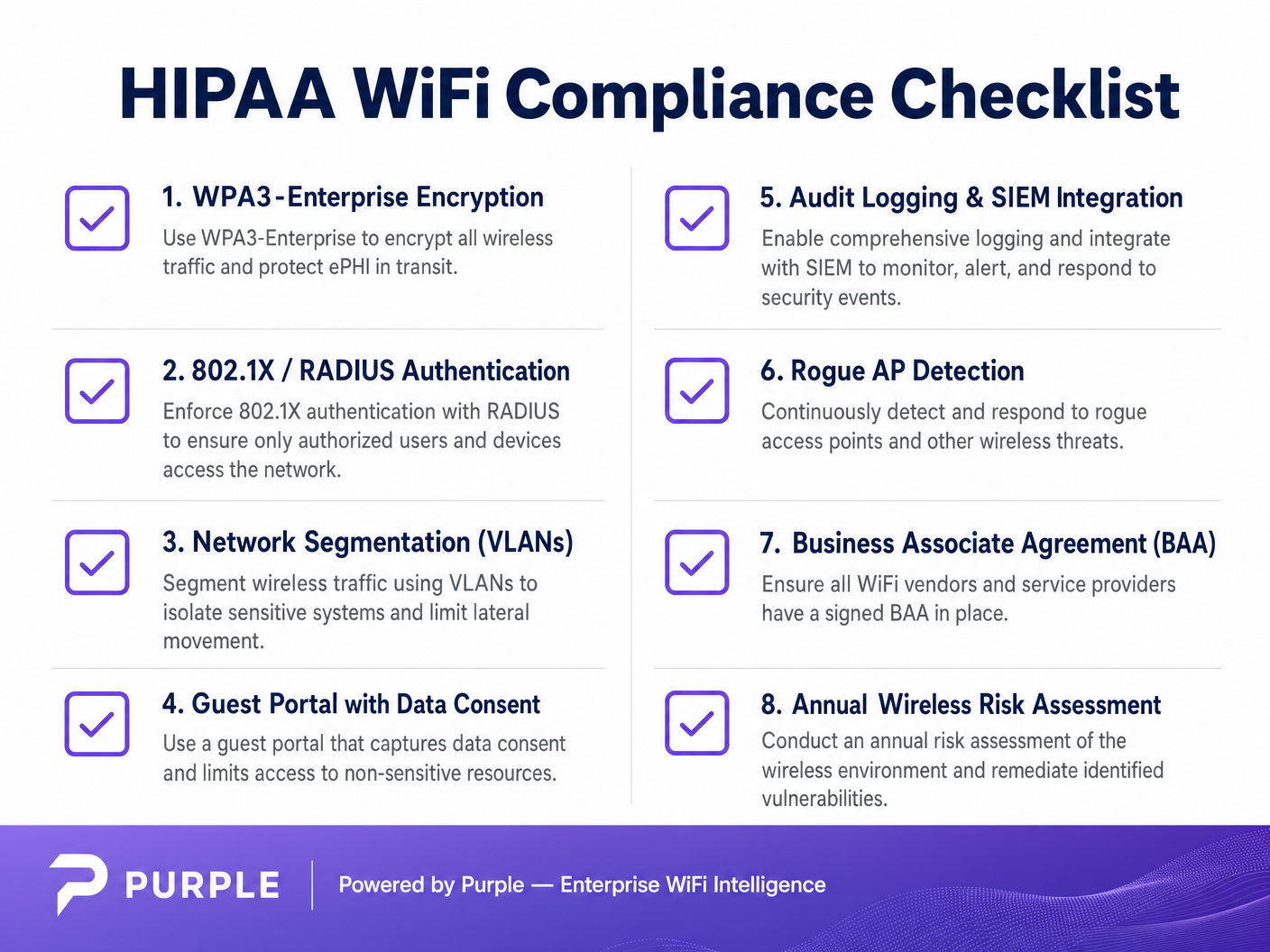
हेल्थकेयर संगठनों को WPA3-एंटरप्राइज़ (या न्यूनतम WPA2-एंटरप्राइज़) को 802.1X प्रमाणीकरण के साथ लागू करना चाहिए। इस वास्तुकला के लिए प्रत्येक उपयोगकर्ता और डिवाइस को नेटवर्क एक्सेस प्राप्त करने से पहले RADIUS (रिमोट ऑथेंटिकेशन डायल-इन यूजर सर्विस) सर्वर के विरुद्ध व्यक्तिगत रूप से प्रमाणित करना आवश्यक है [2]।
- क्लिनिकल डिवाइस (IoT, WOWs): प्रमाणपत्र-आधारित प्रमाणीकरण का उपयोग करें, विशेष रूप से EAP-TLS (एक्सटेंसिबल ऑथेंटिकेशन प्रोटोकॉल-ट्रांसपोर्ट लेयर सिक्योरिटी)। यह पासवर्ड को पूरी तरह से समाप्त कर देता है, अधिकृत उपकरणों पर स्थापित केंद्रीय रूप से प्रबंधित डिजिटल प्रमाणपत्रों पर निर्भर करता है। यदि कोई डिवाइस खो जाता है, तो उसका प्रमाणपत्र तुरंत रद्द किया जा सकता है।
- कर्मचारी डिवाइस (लैपटॉप, मोबाइल): रोल-आधारित एक्सेस कंट्रोल (RBAC) से जुड़े डोमेन क्रेडेंशियल का उपयोग करके प्रमाणीकरण लागू करें, अक्सर एक्टिव डायरेक्टरी या आइडेंटिटी प्रोवाइडर (IdP) के साथ एकीकृत करते हुए।
2. नेटवर्क सेगमेंटेशन (थ्री-ज़ोन मॉडल)
सेगमेंटेशन पार्श्व गति के खिलाफ सबसे महत्वपूर्ण वास्तुशिल्प रक्षा है। आप अतिथि स्मार्टफ़ोन को अपने इलेक्ट्रॉनिक हेल्थ रिकॉर्ड (EHR) टर्मिनलों के समान VLAN पर नहीं रख सकते। उद्योग मानक एक सख्त थ्री-ज़ोन वास्तुकला है, जो VLANs और फ़ायरवॉल के माध्यम से भौतिक या तार्किक रूप से अलग होती है।
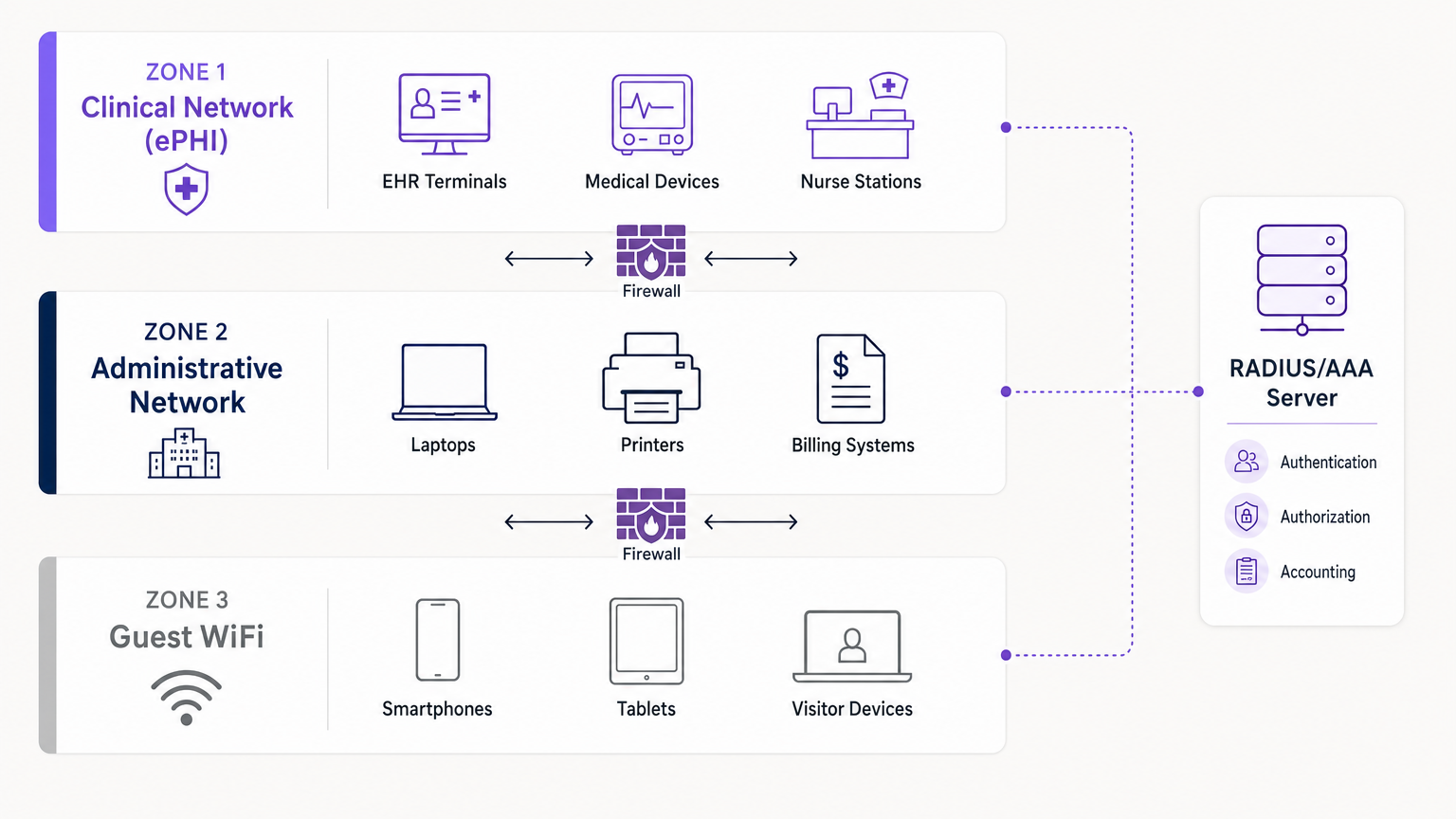
- ज़ोन 1: क्लिनिकल नेटवर्क (ePHI): यह अत्यधिक प्रतिबंधित VLAN सभी संवेदनशील डेटा को संभालता है। यह EHR सिस्टम, चिकित्सा उपकरणों और नर्स स्टेशनों को जोड़ता है। एक्सेस 802.1X के माध्यम से प्रमाणित क्लिनिकल कर्मचारियों और प्रबंधित उपकरणों तक सख्ती से सीमित है।
- ज़ोन 2: प्रशासनिक नेटवर्क: यह VLAN अस्पताल के संचालन—बिलिंग सिस्टम, कर्मचारी लैपटॉप और प्रिंटर—का समर्थन करता है, जिन्हें रोगी रिकॉर्ड तक सीधी पहुंच की आवश्यकता नहीं होती है।
- ज़ोन 3: गेस्ट WiFi: मरीजों और आगंतुकों के लिए एक पृथक, केवल इंटरनेट कनेक्शन। इसे ज़ोन 1 और 2 से पूरी तरह से अलग किया जाना चाहिए, क्लाइंट आइसोलेशन का उपयोग करके अतिथि उपकरणों को एक-दूसरे के साथ संचार करने से रोकना चाहिए।
3. ऑडिट लॉगिंग और SIEM एकीकरण
HIPAA संगठनों को हार्डवेयर, सॉफ्टवेयर और प्रक्रियात्मक तंत्रों को लागू करने की आवश्यकता है जो ePHI [1] वाले सूचना प्रणालियों में गतिविधि को रिकॉर्ड और जांचते हैं। आपके वायरलेस कंट्रोलर और RADIUS सर्वर को सभी प्रमाणीकरण प्रयासों (सफल और विफल), सत्र की अवधि और प्रशासनिक परिवर्तनों को लॉग करना चाहिए। इन लॉग को निरंतर निगरानी और विसंगति का पता लगाने के लिए एक केंद्रीकृत सुरक्षा सूचना और इवेंट मैनेजमेंट (SIEM) सिस्टम को अग्रेषित किया जाना चाहिए।
कार्यान्वयन मार्गदर्शिका
एक अनुरूप नेटवर्क तैनात करने के लिए सावधानीपूर्वक योजना और निष्पादन की आवश्यकता होती है। सुरक्षित क्लिनिकल एक्सेस को पृथक अतिथि सेवाओं के साथ एकीकृत करने के लिए यहां एक चरण-दर-चरण दृष्टिकोण दिया गया है।
चरण 1: वायरलेस जोखिम मूल्यांकन करें
नया हार्डवेयर तैनात करने से पहले, एक व्यापक RF साइट सर्वेक्षण और जोखिम मूल्यांकन करें। संभावित दुष्ट उपकरणों सहित सभी मौजूदा एक्सेस पॉइंट की पहचान करें। क्लिनिकल बनाम अतिथि एक्सेस के लिए आवश्यक कवरेज क्षेत्रों का मानचित्रण करें। हार्डवेयर चयन पर जानकारी के लिए, एंटरप्राइज़ WiFi समाधान: एक खरीदार की मार्गदर्शिका देखें।
चरण 2: क्लिनिकल और प्रशासनिक VLANs कॉन्फ़िगर करें
अपनी मुख्य अवसंरचना (जैसे, सिस्को मेराकी, अरुबा, या वायरलेस एक्सेस पॉइंट रकस के लिए आपकी मार्गदर्शिका ) तैनात करें। क्लिनिकल SSID को केवल आवश्यक क्षेत्रों में प्रसारित करने के लिए कॉन्फ़िगर करें। WPA3-एंटरप्राइज़ लागू करें और अपने कंट्रोलर को RADIUS सर्वर से कनेक्ट करें। सभी अस्पताल-स्वामित्व वाले चिकित्सा उपकरणों पर EAP-TLS प्रमाणपत्र तैनात करें।
चरण 3: गेस्ट WiFi पोर्टल तैनात करें
यहीं पर Purple जैसे प्लेटफॉर्म उत्कृष्ट प्रदर्शन करते हैं। एक साधारण खुले नेटवर्क के बजाय, एक पृथक गेस्ट SSID तैनात करें जो Purple के कैप्टिव पोर्टल के माध्यम से ट्रैफ़िक को रूट करता है।
- पृथक्करण: सुनिश्चित करें कि गेस्ट VLAN में कोई भी आंतरिक IP रूटिंग को अस्वीकार करने वाले सख्त फ़ायरवॉल नियम हों। क्लाइंट isolatएक्सेस पॉइंट पर आयन।
- सहमति और शर्तें: कैप्टिव पोर्टल को उपयोगकर्ताओं से नियम और शर्तें स्वीकार करने की आवश्यकता होनी चाहिए, जिससे कानूनी सीमाएं और डेटा उपयोग की सहमति स्थापित हो सके।
- प्रमाणीकरण: Purple मेहमानों के लिए पहचान प्रदाता के रूप में कार्य करता है, SMS, ईमेल या सोशल लॉगिन को संभालता है, इस ट्रैफ़िक को आपके आंतरिक Active Directory से पूरी तरह से अलग रखता है।
चरण 4: निरंतर निगरानी लागू करें
अपने वायरलेस इंट्रूज़न प्रिवेंशन सिस्टम (WIPS) पर रोग AP डिटेक्शन सक्षम करें। यह कर्मचारियों या आगंतुकों द्वारा नेटवर्क में प्लग किए गए अनधिकृत एक्सेस पॉइंट को स्वचालित रूप से पहचान और दबा देगा। सुनिश्चित करें कि सभी लॉग आपके SIEM में प्रवाहित हो रहे हैं।
सर्वोत्तम अभ्यास
- न्यूनतम विशेषाधिकार का सिद्धांत: उपयोगकर्ताओं और उपकरणों को केवल उनके कार्य के लिए आवश्यक विशिष्ट नेटवर्क संसाधनों तक ही पहुंच होनी चाहिए। एक बिलिंग क्लर्क को इमेजिंग VLAN तक पहुंच की आवश्यकता नहीं होती है।
- बिजनेस एसोसिएट एग्रीमेंट (BAA): सुनिश्चित करें कि क्लाउड-मैनेज्ड नेटवर्किंग या एनालिटिक्स सेवाएं प्रदान करने वाले किसी भी विक्रेता ने BAA पर हस्ताक्षर किए हैं, जो डेटा सुरक्षा के संबंध में उनकी जिम्मेदारियों को स्पष्ट रूप से परिभाषित करता है।
- लेगेसी प्रोटोकॉल अक्षम करें: सभी नेटवर्क हार्डवेयर पर WEP, WPA, TKIP और Telnet जैसे पुराने प्रबंधन प्रोटोकॉल बंद करें। प्रशासनिक पहुंच के लिए SSH और HTTPS लागू करें।
- नियमित ऑडिट: वायरलेस सुरक्षा एक "सेट एंड फॉरगेट" परिनियोजन नहीं है। वार्षिक पेनेट्रेशन टेस्टिंग और कॉन्फ़िगरेशन समीक्षाएं करें। सुरक्षित परिनियोजन पर व्यापक संदर्भ के लिए, पढ़ें WiFi in Hospitals: A Guide to Secure Clinical Networks ।
समस्या निवारण और जोखिम शमन
सामान्य विफलता मोड
- "शैडो IT" एक्सेस पॉइंट: एक विभाग को बेहतर कवरेज की आवश्यकता है, इसलिए एक कर्मचारी एक उपभोक्ता राउटर को दीवार के जैक में लगा देता है। शमन: सख्त भौतिक पोर्ट सुरक्षा (वायर्ड पोर्ट पर 802.1X) और WIPS के माध्यम से सक्रिय रोग AP दमन।
- प्रमाणपत्र की समय-सीमा समाप्त होना: क्लिनिकल डिवाइस अचानक नेटवर्क से डिस्कनेक्ट हो जाते हैं क्योंकि उनके EAP-TLS प्रमाणपत्रों की समय-सीमा समाप्त हो गई है। शमन: स्वचालित प्रमाणपत्र जीवनचक्र प्रबंधन (CLM) और समय-सीमा समाप्त होने से 30 दिन पहले अलर्ट थ्रेशोल्ड लागू करें।
- गेस्ट ट्रैफ़िक ब्लीड: गलत कॉन्फ़िगर किया गया VLAN टैगिंग गेस्ट ट्रैफ़िक को प्रशासनिक सबनेट में रूट करने की अनुमति देता है। शमन: VLAN अलगाव को सत्यापित करने के लिए नियमित पेनेट्रेशन टेस्टिंग और स्वचालित कॉन्फ़िगरेशन ऑडिटिंग।
ROI और व्यावसायिक प्रभाव
HIPAA-अनुरूप वायरलेस आर्किटेक्चर में निवेश करने से नियामक जुर्माने से बचने (जो लाखों डॉलर तक पहुंच सकता है) से कहीं अधिक महत्वपूर्ण रिटर्न मिलता है।
- जोखिम शमन: मजबूत 802.1X और सेगमेंटेशन हमले की सतह को नाटकीय रूप से कम करते हैं, संगठन को रैंसोमवेयर और डेटा उल्लंघनों से बचाते हैं।
- परिचालन दक्षता: क्लिनिकल उपकरणों के लिए प्रमाणपत्र-आधारित प्रमाणीकरण पासवर्ड रीसेट और कनेक्टिविटी समस्याओं से संबंधित IT हेल्पडेस्क टिकटों को कम करता है, जिससे चिकित्सक रोगी देखभाल पर ध्यान केंद्रित कर पाते हैं।
- बेहतर रोगी अनुभव: Purple के गेस्ट WiFi प्लेटफॉर्म को सुरक्षित रूप से तैनात करके, अस्पताल विश्वसनीय इंटरनेट एक्सेस प्रदान कर सकते हैं—जो रोगी संतुष्टि स्कोर (HCAHPS) का एक प्रमुख चालक है—जबकि कैप्टिव पोर्टल का उपयोग वेफाइंडिंग, रोगी संचार और नैदानिक नेटवर्क सुरक्षा से समझौता किए बिना प्रतिक्रिया एकत्र करने के लिए कर सकते हैं।
संदर्भ
[1] Health Insurance Portability and Accountability Act of 1996 (HIPAA), Pub. L. No. 104-191, 110 Stat. 1936 (1996). [2] Censinet. "HIPAA-Compliant Wireless Network Setup Guide." Censinet Perspectives, 2024.
Key Terms & Definitions
ePHI (Electronic Protected Health Information)
Any protected health information that is created, stored, transmitted, or received electronically.
The primary asset that HIPAA regulations are designed to protect. If a network transmits ePHI, it falls under the strict requirements of the HIPAA Security Rule.
802.1X
An IEEE standard for port-based network access control (PNAC) that provides an authentication mechanism to devices wishing to attach to a LAN or WLAN.
The mandatory authentication framework for enterprise healthcare networks, ensuring that only verified users and devices can access the clinical VLAN.
RADIUS (Remote Authentication Dial-In User Service)
A networking protocol that provides centralized Authentication, Authorization, and Accounting (AAA) management for users who connect and use a network service.
The core server infrastructure that processes 802.1X requests, verifying credentials against a directory (like Active Directory) before granting WiFi access.
EAP-TLS (Extensible Authentication Protocol-Transport Layer Security)
An EAP method that relies on client and server certificates to establish a secure connection, providing strong mutual authentication.
The gold standard for authenticating headless medical devices and mobile workstations, eliminating the need for vulnerable passwords.
Network Segmentation
The practice of splitting a computer network into subnetworks, each being a network segment or VLAN.
Crucial for HIPAA compliance, it ensures that a compromised device on the guest or administrative network cannot access the clinical network housing ePHI.
VLAN (Virtual Local Area Network)
A logical subnetwork that groups a collection of devices from different physical LANs.
The primary mechanism used by network engineers to implement segmentation, isolating clinical, administrative, and guest traffic on the same physical access points.
Captive Portal
A web page accessed with a web browser that is displayed to newly connected users of a Wi-Fi network before they are granted broader access to network resources.
Used for Guest WiFi (often provided by platforms like Purple) to capture user consent, enforce Terms and Conditions, and authenticate visitors without touching internal systems.
Rogue AP (Access Point)
A wireless access point that has been installed on a secure network without explicit authorization from a local network administrator.
A major security risk in hospitals (Shadow IT). Enterprise wireless controllers must actively scan for and suppress these devices to prevent unauthorized network bridging.
Case Studies
A 300-bed regional hospital needs to deploy new mobile workstations (WOWs) for nursing staff. The current network uses a single SSID with a WPA2 Pre-Shared Key (PSK) for all hospital-owned devices. How should the IT architect redesign this for HIPAA compliance?
The architect must eliminate the PSK. They should create a dedicated 'Clinical_ePHI' VLAN and SSID. The new SSID must be configured for WPA3-Enterprise (or WPA2-Enterprise). The architect will deploy a RADIUS server and implement EAP-TLS certificate-based authentication. Each WOW will be provisioned with a unique digital certificate via Mobile Device Management (MDM). The RADIUS server will authenticate the certificate before granting the WOW access to the clinical VLAN.
A large outpatient clinic wants to offer free WiFi to patients in the waiting room, but the CTO is concerned about visitors attempting to access the clinic's billing servers. How should this be implemented?
The network team must implement strict network segmentation. They will create a 'Guest_WiFi' SSID mapped to a dedicated, isolated VLAN (e.g., VLAN 30). Firewall rules must be configured to explicitly deny any routing from VLAN 30 to the internal clinical or administrative subnets (VLANs 10 and 20). Client isolation must be enabled on the access points to prevent guest devices from communicating with each other. Finally, the guest SSID should route through a captive portal, such as Purple, to capture Terms and Conditions consent and handle guest authentication (SMS/Email) separately from the clinic's Active Directory.
Scenario Analysis
Q1. A clinic administrator requests that the new Guest WiFi network use a simple WPA2 password ('ClinicGuest2024') posted on the wall to make it easy for elderly patients to connect, rather than using a captive portal. As the network architect, how do you respond?
💡 Hint:Consider the requirements for audit logging, user consent, and the risks of shared credentials on public networks.
Show Recommended Approach
You must advise against using a shared PSK for the guest network. A shared password provides no individual accountability or audit trail, making it impossible to identify malicious actors on the network. Furthermore, it bypasses the opportunity to present a captive portal where users must accept Terms and Conditions, which is critical for limiting the clinic's liability. The recommended approach is an open Guest SSID that routes immediately to a captive portal (like Purple) for individual authentication (e.g., via SMS or email) and T&C acceptance, ensuring secure, logged, and legally compliant access.
Q2. During a wireless risk assessment, you discover a consumer-grade WiFi router plugged into an Ethernet jack in the radiology department. The staff explains they installed it because the enterprise WiFi signal was weak in that corner. What immediate actions must be taken?
💡 Hint:Address both the immediate technical threat and the underlying infrastructure issue.
Show Recommended Approach
- Immediately disconnect the rogue router from the network, as it creates an unmonitored, unencrypted bridge into the clinical environment, violating HIPAA transmission security rules. 2) Ensure that the enterprise Wireless Intrusion Prevention System (WIPS) is configured to automatically detect and suppress rogue APs. 3) Configure 802.1X on all wired switch ports so unauthorized devices cannot connect to the LAN. 4) Conduct an RF site survey in the radiology department to identify the coverage gap and deploy an authorized, properly configured enterprise access point to resolve the staff's legitimate connectivity issue.
Q3. You are configuring 802.1X authentication for a fleet of new medical infusion pumps. The devices do not have keyboards or screens for users to input credentials. How do you securely authenticate them to the clinical VLAN?
💡 Hint:Look for an authentication method that relies on machine identity rather than user identity.
Show Recommended Approach
The devices should be authenticated using EAP-TLS (certificate-based authentication). You will generate unique digital certificates from the hospital's internal Certificate Authority (CA) and install them on each infusion pump. The RADIUS server will be configured to verify these certificates. When a pump connects to the clinical SSID, it presents its certificate; if valid, the RADIUS server assigns it to the clinical VLAN. This provides strong, passwordless mutual authentication.




