

WiFi conforme a HIPAA: Una Guida per le Organizzazioni Sanitarie
Questa guida di riferimento tecnico fornisce strategie di conformità attuabili per i team IT sanitari che implementano WiFi aziendale e per ospiti. Copre la segmentazione della rete, l'autenticazione 802.1X, la registrazione degli audit e come implementare un accesso wireless sicuro e isolato utilizzando la piattaforma di Purple.
🎧 Ascolta questa guida
Visualizza trascrizione
Riepilogo Esecutivo
Per i responsabili IT, gli architetti di rete e i CTO negli ambienti sanitari, l'implementazione di reti wireless comporta il bilanciamento di due priorità critiche, spesso in competizione: la protezione delle informazioni sanitarie protette elettronicamente (ePHI) per soddisfare le rigorose normative HIPAA, e la fornitura di connettività fluida e di alta qualità per pazienti, visitatori e personale clinico. Un singolo access point mal configurato o una password condivisa possono portare a una devastante violazione dei dati, multe normative e danni alla reputazione. Questa guida fornisce un framework pratico e indipendente dal fornitore per l'implementazione di WiFi conforme a HIPAA. Copre l'essenziale modello di segmentazione a tre zone, gli standard di crittografia dei dati (WPA3-Enterprise), una robusta gestione delle identità tramite 802.1X e una registrazione completa degli audit. Inoltre, descrive in dettaglio come l'integrazione di una piattaforma aziendale come Purple per il Guest WiFi e WiFi Analytics garantisce che l'accesso pubblico rimanga strettamente isolato dai sistemi clinici, pur acquisendo preziosi dati di coinvolgimento.
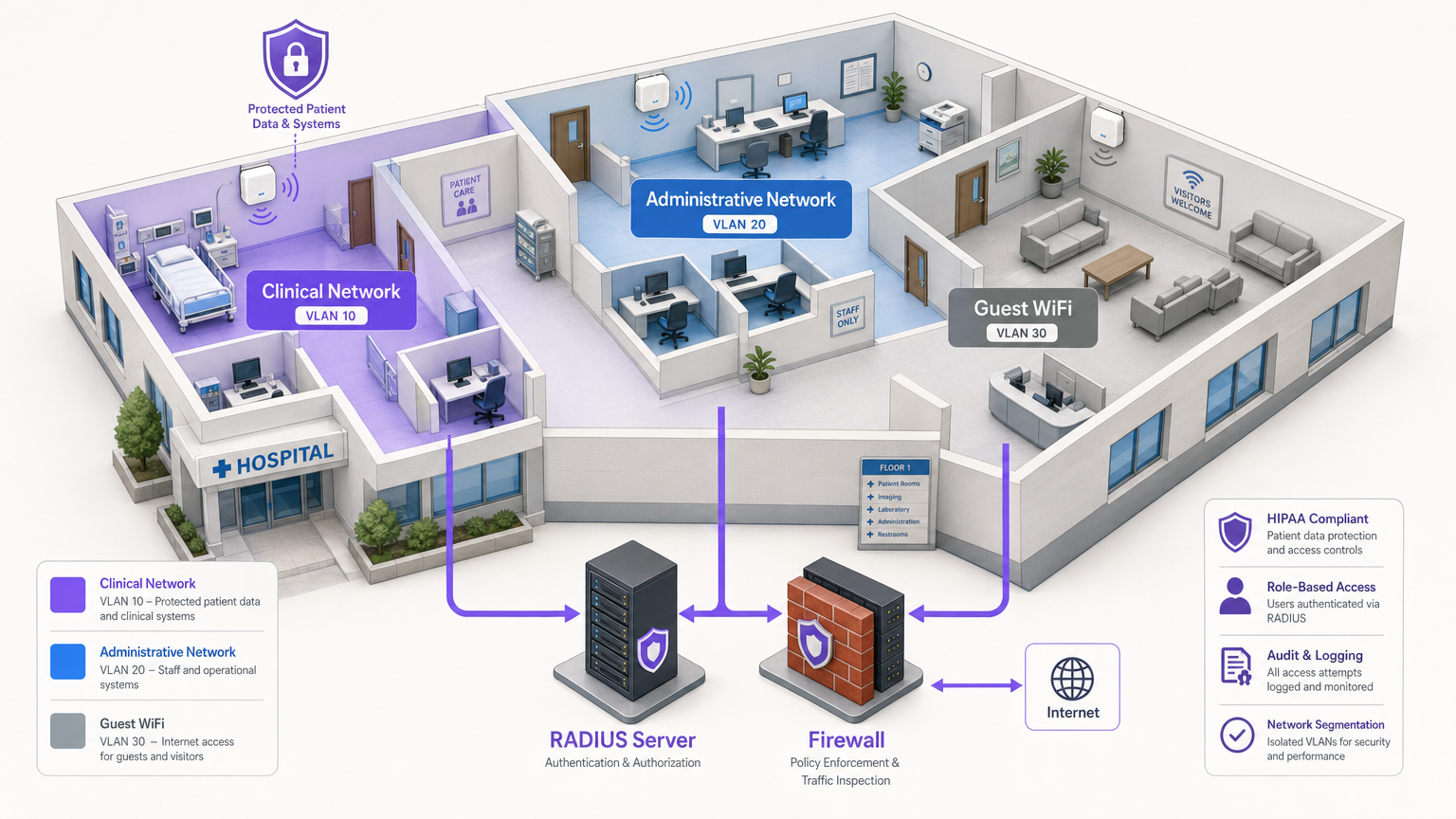
Approfondimento Tecnico
Ottenere una rete wireless conforme a HIPAA richiede di andare oltre la connettività di base e implementare un'architettura di difesa in profondità. La HIPAA Security Rule impone salvaguardie tecniche per il controllo degli accessi, i controlli di audit, l'integrità e la sicurezza della trasmissione [1].
1. Crittografia e Autenticazione (802.1X e WPA3-Enterprise)
La base della sicurezza wireless è una crittografia robusta. I protocolli legacy come WEP, WPA e persino WPA2-Personal (che utilizzano chiavi pre-condivise) sono del tutto insufficienti per ambienti che gestiscono ePHI. Una PSK compromessa garantisce a un attaccante l'accesso all'intera sottorete.
Le organizzazioni sanitarie devono implementare WPA3-Enterprise (o WPA2-Enterprise come minimo) abbinato all'autenticazione 802.1X. Questa architettura richiede che ogni utente e dispositivo si autentichi individualmente contro un server RADIUS (Remote Authentication Dial-In User Service) prima di ottenere l'accesso alla rete [2].
- Dispositivi Clinici (IoT, WOWs): Utilizzare l'autenticazione basata su certificati, in particolare EAP-TLS (Extensible Authentication Protocol-Transport Layer Security). Questo elimina completamente le password, basandosi su certificati digitali gestiti centralmente installati sui dispositivi autorizzati. Se un dispositivo viene smarrito, il suo certificato può essere immediatamente revocato.
- Dispositivi del Personale (Laptop, Mobile): Applicare l'autenticazione utilizzando credenziali di dominio legate al controllo degli accessi basato sui ruoli (RBAC), spesso integrandosi con Active Directory o un Identity Provider (IdP).
2. Segmentazione della Rete (Il Modello a Tre Zone)
La segmentazione è la difesa architettonica più critica contro il movimento laterale. Non è possibile avere smartphone degli ospiti sulla stessa VLAN dei terminali della cartella clinica elettronica (EHR). Lo standard del settore è un'architettura rigorosa a tre zone, fisicamente o logicamente separate tramite VLAN e firewall.
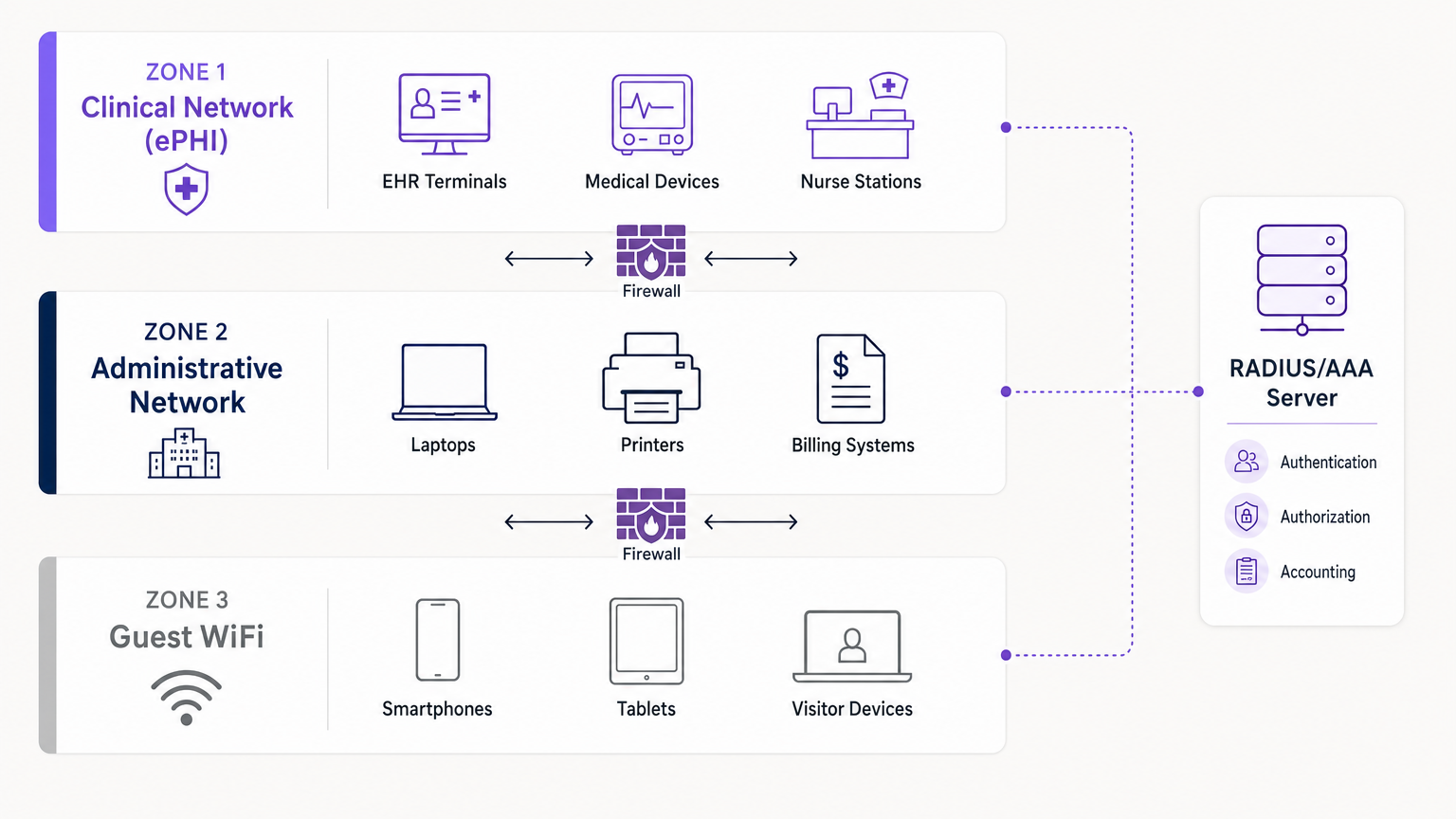
- Zona 1: Rete Clinica (ePHI): Questa VLAN altamente ristretta gestisce tutti i dati sensibili. Collega i sistemi EHR, i dispositivi medici e le postazioni infermieristiche. L'accesso è strettamente limitato al personale clinico autenticato e ai dispositivi gestiti tramite 802.1X.
- Zona 2: Rete Amministrativa: Questa VLAN supporta le operazioni ospedaliere — sistemi di fatturazione, laptop del personale e stampanti — che non richiedono accesso diretto ai registri dei pazienti.
- Zona 3: Guest WiFi: Una connessione isolata, solo internet, per pazienti e visitatori. Deve essere completamente separata dalle Zone 1 e 2, utilizzando l'isolamento del client per impedire ai dispositivi degli ospiti di comunicare tra loro.
3. Registrazione degli Audit e Integrazione SIEM
HIPAA richiede alle organizzazioni di implementare meccanismi hardware, software e procedurali che registrano ed esaminano l'attività nei sistemi informativi contenenti ePHI [1]. I controller wireless e i server RADIUS devono registrare tutti i tentativi di autenticazione (riusciti e falliti), le durate delle sessioni e le modifiche amministrative. Questi log dovrebbero essere inoltrati a un sistema centralizzato di Security Information and Event Management (SIEM) per il monitoraggio continuo e il rilevamento delle anomalie.
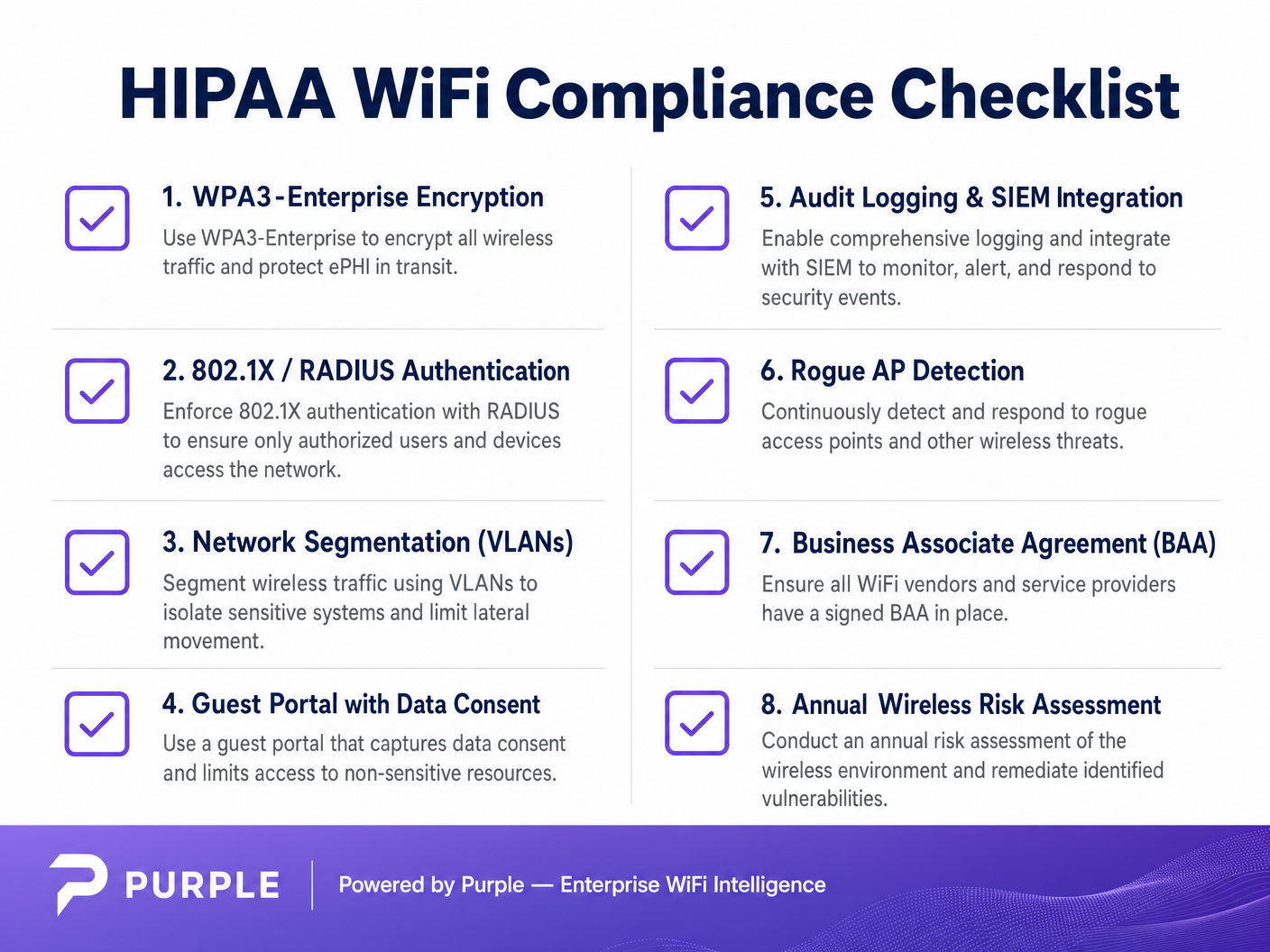
Guida all'Implementazione
L'implementazione di una rete conforme richiede un'attenta pianificazione ed esecuzione. Ecco un approccio passo-passo per integrare l'accesso clinico sicuro con servizi per ospiti isolati.
Fase 1: Condurre una Valutazione del Rischio Wireless
Prima di implementare nuovo hardware, condurre un'indagine RF completa del sito e una valutazione del rischio. Identificare tutti gli access point esistenti, inclusi i potenziali dispositivi non autorizzati. Mappare le aree di copertura richieste per l'accesso clinico rispetto a quello degli ospiti. Per approfondimenti sulla selezione dell'hardware, consultare Soluzioni WiFi Aziendali: Una Guida all'Acquisto .
Fase 2: Configurare le VLAN Cliniche e Amministrative
Implementare l'infrastruttura principale (ad esempio, Cisco Meraki, Aruba o La Tua Guida a un Access Point Wireless Ruckus ). Configurare l'SSID clinico per trasmettere solo nelle aree necessarie. Implementare WPA3-Enterprise e collegare i controller al server RADIUS. Distribuire i certificati EAP-TLS a tutti i dispositivi medici di proprietà dell'ospedale.
Fase 3: Implementare il Portale Guest WiFi
È qui che piattaforme come Purple eccellono. Invece di una semplice rete aperta, implementare un SSID Guest isolato che instrada il traffico attraverso il captive portal di Purple.
- Isolamento: Assicurarsi che la Guest VLAN abbia regole firewall rigorose che neghino qualsiasi routing IP interno. Abilitare l'isolamento del clientione sui punti di accesso.
- Consenso e Termini: Il captive portal deve richiedere agli utenti di accettare Termini e Condizioni, stabilendo confini legali e il consenso all'utilizzo dei dati.
- Autenticazione: Purple agisce come fornitore di identità per gli ospiti, gestendo accessi tramite SMS, email o social media, mantenendo questo traffico completamente separato dalla vostra Active Directory interna.
Fase 4: Implementare il Monitoraggio Continuo
Abilitate il rilevamento di AP non autorizzati (Rogue AP) sul vostro sistema di prevenzione delle intrusioni wireless (WIPS). Questo identificherà e sopprimerà automaticamente i punti di accesso non autorizzati collegati alla rete dal personale o dai visitatori. Assicuratevi che tutti i log confluiscano nel vostro SIEM.
Migliori Pratiche
- Principio del Minimo Privilegio: Utenti e dispositivi dovrebbero avere accesso solo alle risorse di rete specifiche richieste per la loro funzione. Un impiegato della fatturazione non necessita di accesso alla VLAN di imaging.
- Accordi con i Partner Commerciali (BAA): Assicuratevi che qualsiasi fornitore di servizi di rete o di analisi gestiti in cloud abbia firmato un BAA, definendo chiaramente le proprie responsabilità in materia di sicurezza dei dati.
- Disabilitare i Protocolli Legacy: Disattivate WEP, WPA, TKIP e i protocolli di gestione obsoleti come Telnet su tutto l'hardware di rete. Impostate SSH e HTTPS per l'accesso amministrativo.
- Audit Regolari: La sicurezza wireless non è un'implementazione "imposta e dimentica". Conducete test di penetrazione annuali e revisioni della configurazione. Per un contesto più ampio sulle implementazioni sicure, leggete WiFi negli Ospedali: Una Guida alle Reti Cliniche Sicure .
Risoluzione dei Problemi e Mitigazione del Rischio
Modalità di Guasto Comuni
- Il Punto di Accesso "Shadow IT": Un reparto necessita di una migliore copertura, quindi un dipendente collega un router consumer a una presa a muro. Mitigazione: Rigorosa sicurezza fisica delle porte (802.1X sulle porte cablate) e soppressione attiva degli AP non autorizzati tramite WIPS.
- Scadenza dei Certificati: I dispositivi clinici si disconnettono improvvisamente dalla rete perché i loro certificati EAP-TLS sono scaduti. Mitigazione: Implementare la gestione automatizzata del ciclo di vita dei certificati (CLM) e soglie di avviso 30 giorni prima della scadenza.
- Fuga di Traffico Ospite: Una configurazione errata del tagging VLAN consente al traffico ospite di instradarsi nella sottorete amministrativa. Mitigazione: Test di penetrazione regolari e audit automatici della configurazione per verificare l'isolamento della VLAN.
ROI e Impatto sul Business
Investire in un'architettura wireless conforme a HIPAA offre rendimenti significativi che vanno oltre la semplice prevenzione di multe normative (che possono raggiungere milioni di dollari).
- Mitigazione del Rischio: Un robusto 802.1X e la segmentazione riducono drasticamente la superficie di attacco, proteggendo l'organizzazione da ransomware e violazioni dei dati.
- Efficienza Operativa: L'autenticazione basata su certificati per i dispositivi clinici riduce i ticket dell'helpdesk IT relativi al ripristino delle password e ai problemi di connettività, mantenendo i clinici concentrati sull'assistenza ai pazienti.
- Migliore Esperienza del Paziente: Implementando in modo sicuro la piattaforma guest WiFi di Purple, gli ospedali possono fornire un accesso internet affidabile — un fattore chiave per i punteggi di soddisfazione dei pazienti (HCAHPS) — sfruttando al contempo il captive portal per l'orientamento, le comunicazioni con i pazienti e la raccolta di feedback senza compromettere la sicurezza della rete clinica.
Riferimenti
[1] Health Insurance Portability and Accountability Act of 1996 (HIPAA), Pub. L. No. 104-191, 110 Stat. 1936 (1996). [2] Censinet. "HIPAA-Compliant Wireless Network Setup Guide." Censinet Perspectives, 2024.
Termini chiave e definizioni
ePHI (Electronic Protected Health Information)
Any protected health information that is created, stored, transmitted, or received electronically.
The primary asset that HIPAA regulations are designed to protect. If a network transmits ePHI, it falls under the strict requirements of the HIPAA Security Rule.
802.1X
An IEEE standard for port-based network access control (PNAC) that provides an authentication mechanism to devices wishing to attach to a LAN or WLAN.
The mandatory authentication framework for enterprise healthcare networks, ensuring that only verified users and devices can access the clinical VLAN.
RADIUS (Remote Authentication Dial-In User Service)
A networking protocol that provides centralized Authentication, Authorization, and Accounting (AAA) management for users who connect and use a network service.
The core server infrastructure that processes 802.1X requests, verifying credentials against a directory (like Active Directory) before granting WiFi access.
EAP-TLS (Extensible Authentication Protocol-Transport Layer Security)
An EAP method that relies on client and server certificates to establish a secure connection, providing strong mutual authentication.
The gold standard for authenticating headless medical devices and mobile workstations, eliminating the need for vulnerable passwords.
Network Segmentation
The practice of splitting a computer network into subnetworks, each being a network segment or VLAN.
Crucial for HIPAA compliance, it ensures that a compromised device on the guest or administrative network cannot access the clinical network housing ePHI.
VLAN (Virtual Local Area Network)
A logical subnetwork that groups a collection of devices from different physical LANs.
The primary mechanism used by network engineers to implement segmentation, isolating clinical, administrative, and guest traffic on the same physical access points.
Captive Portal
A web page accessed with a web browser that is displayed to newly connected users of a Wi-Fi network before they are granted broader access to network resources.
Used for Guest WiFi (often provided by platforms like Purple) to capture user consent, enforce Terms and Conditions, and authenticate visitors without touching internal systems.
Rogue AP (Access Point)
A wireless access point that has been installed on a secure network without explicit authorization from a local network administrator.
A major security risk in hospitals (Shadow IT). Enterprise wireless controllers must actively scan for and suppress these devices to prevent unauthorized network bridging.
Casi di studio
A 300-bed regional hospital needs to deploy new mobile workstations (WOWs) for nursing staff. The current network uses a single SSID with a WPA2 Pre-Shared Key (PSK) for all hospital-owned devices. How should the IT architect redesign this for HIPAA compliance?
The architect must eliminate the PSK. They should create a dedicated 'Clinical_ePHI' VLAN and SSID. The new SSID must be configured for WPA3-Enterprise (or WPA2-Enterprise). The architect will deploy a RADIUS server and implement EAP-TLS certificate-based authentication. Each WOW will be provisioned with a unique digital certificate via Mobile Device Management (MDM). The RADIUS server will authenticate the certificate before granting the WOW access to the clinical VLAN.
A large outpatient clinic wants to offer free WiFi to patients in the waiting room, but the CTO is concerned about visitors attempting to access the clinic's billing servers. How should this be implemented?
The network team must implement strict network segmentation. They will create a 'Guest_WiFi' SSID mapped to a dedicated, isolated VLAN (e.g., VLAN 30). Firewall rules must be configured to explicitly deny any routing from VLAN 30 to the internal clinical or administrative subnets (VLANs 10 and 20). Client isolation must be enabled on the access points to prevent guest devices from communicating with each other. Finally, the guest SSID should route through a captive portal, such as Purple, to capture Terms and Conditions consent and handle guest authentication (SMS/Email) separately from the clinic's Active Directory.
Analisi degli scenari
Q1. A clinic administrator requests that the new Guest WiFi network use a simple WPA2 password ('ClinicGuest2024') posted on the wall to make it easy for elderly patients to connect, rather than using a captive portal. As the network architect, how do you respond?
💡 Suggerimento:Consider the requirements for audit logging, user consent, and the risks of shared credentials on public networks.
Mostra l'approccio consigliato
You must advise against using a shared PSK for the guest network. A shared password provides no individual accountability or audit trail, making it impossible to identify malicious actors on the network. Furthermore, it bypasses the opportunity to present a captive portal where users must accept Terms and Conditions, which is critical for limiting the clinic's liability. The recommended approach is an open Guest SSID that routes immediately to a captive portal (like Purple) for individual authentication (e.g., via SMS or email) and T&C acceptance, ensuring secure, logged, and legally compliant access.
Q2. During a wireless risk assessment, you discover a consumer-grade WiFi router plugged into an Ethernet jack in the radiology department. The staff explains they installed it because the enterprise WiFi signal was weak in that corner. What immediate actions must be taken?
💡 Suggerimento:Address both the immediate technical threat and the underlying infrastructure issue.
Mostra l'approccio consigliato
- Immediately disconnect the rogue router from the network, as it creates an unmonitored, unencrypted bridge into the clinical environment, violating HIPAA transmission security rules. 2) Ensure that the enterprise Wireless Intrusion Prevention System (WIPS) is configured to automatically detect and suppress rogue APs. 3) Configure 802.1X on all wired switch ports so unauthorized devices cannot connect to the LAN. 4) Conduct an RF site survey in the radiology department to identify the coverage gap and deploy an authorized, properly configured enterprise access point to resolve the staff's legitimate connectivity issue.
Q3. You are configuring 802.1X authentication for a fleet of new medical infusion pumps. The devices do not have keyboards or screens for users to input credentials. How do you securely authenticate them to the clinical VLAN?
💡 Suggerimento:Look for an authentication method that relies on machine identity rather than user identity.
Mostra l'approccio consigliato
The devices should be authenticated using EAP-TLS (certificate-based authentication). You will generate unique digital certificates from the hospital's internal Certificate Authority (CA) and install them on each infusion pump. The RADIUS server will be configured to verify these certificates. When a pump connects to the clinical SSID, it presents its certificate; if valid, the RADIUS server assigns it to the clinical VLAN. This provides strong, passwordless mutual authentication.




