

Enterprise WiFi Solutions: A Buyer's Guide
A comprehensive, vendor-agnostic technical reference for IT managers and CTOs evaluating enterprise WiFi solutions. Covers hardware architecture, cloud management, security standards, and the strategic deployment of guest WiFi and analytics to drive ROI.
🎧 Listen to this Guide
View Transcript
Executive Summary
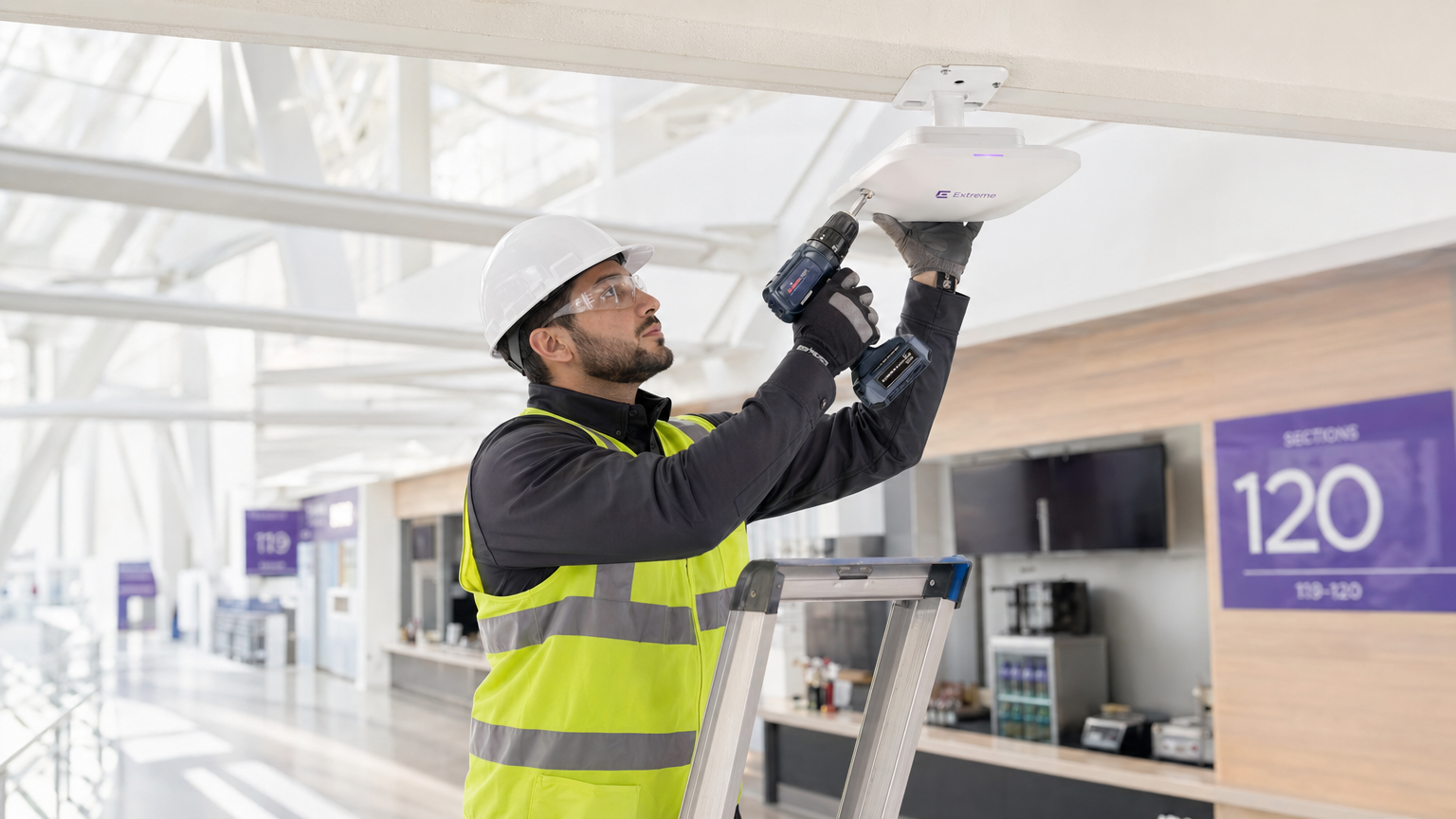
Enterprise WiFi has evolved from a basic connectivity utility into a mission-critical data and experience platform. For IT leaders at hospitality venues, retail chains, stadiums, and public-sector organisations, evaluating enterprise wifi solutions requires balancing hardware performance with security, compliance, and commercial return on investment.
This guide provides a vendor-agnostic framework for assessing commercial WiFi systems. We explore the architectural shifts toward cloud management and Wi-Fi 6/6E, the mandatory security standards (including WPA3 and IEEE 802.1X), and the strategic imperative of deploying robust guest access and analytics layers. Rather than treating guest access as an afterthought, modern deployments integrate platforms like Purple's Guest WiFi to capture first-party data, ensure GDPR compliance, and drive measurable business value.
Whether you are upgrading a legacy on-premises controller or designing a high-density stadium network from the ground up, this reference provides the actionable intelligence required to specify, procure, and deploy a secure, high-performance network.
Technical Architecture & Standards
The Access Layer: Wi-Fi 6 and Beyond
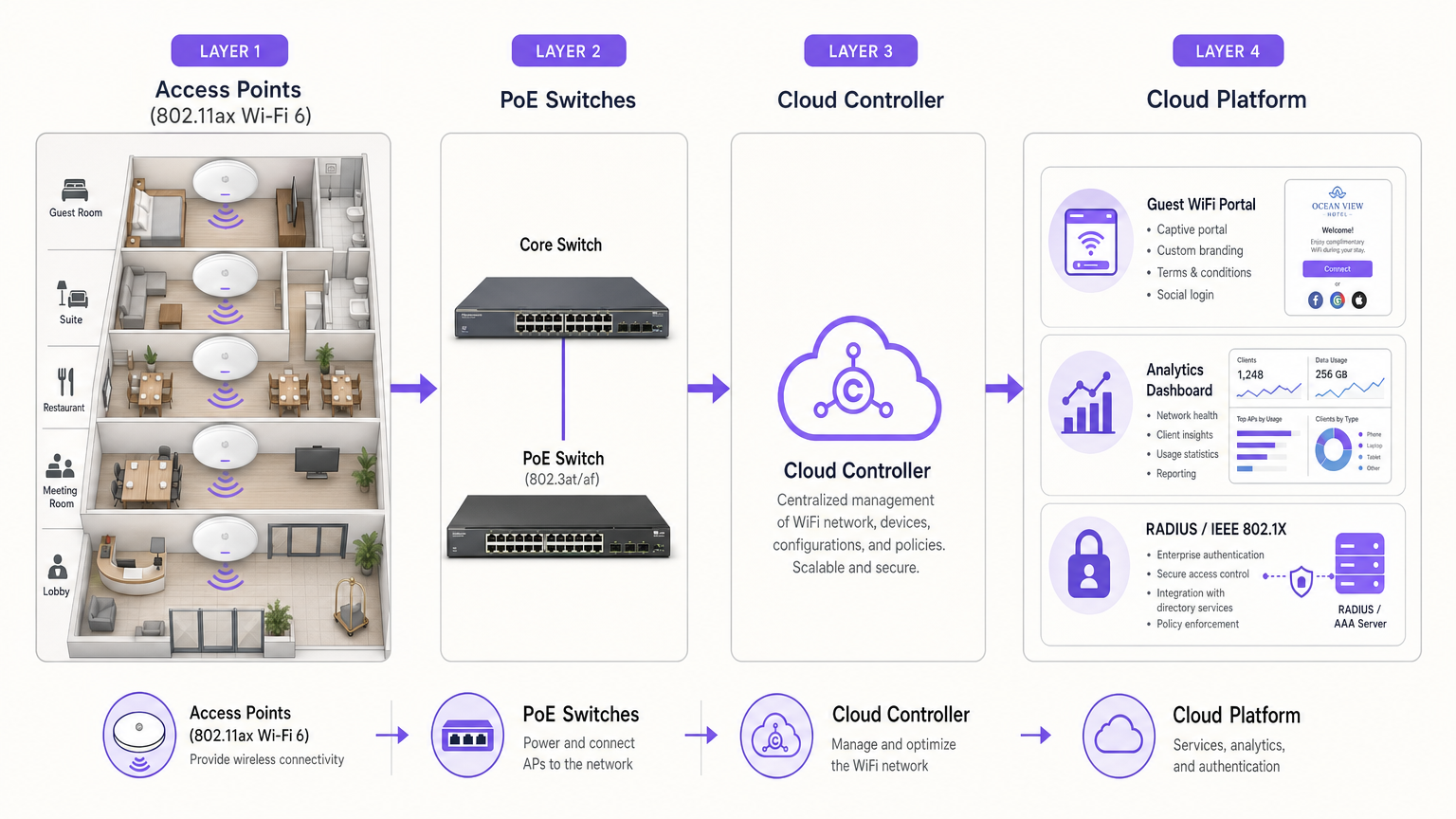
When evaluating hardware for business wifi solutions, IEEE 802.11ax (Wi-Fi 6) is the baseline standard for new deployments. Wi-Fi 6 introduces Orthogonal Frequency Division Multiple Access (OFDMA), which fundamentally changes how access points handle high client density by allowing simultaneous transmissions to multiple devices. For high-density environments such as conference centres or transport hubs, Wi-Fi 6E extends these capabilities into the 6 GHz spectrum, providing additional non-overlapping channels to mitigate congestion.
Rule of Thumb for AP Density: In standard enterprise environments, plan for one access point per 30 to 50 concurrent users. In high-density event spaces, this ratio should drop to one AP per 15 to 20 users, coupled with aggressive channel planning and transmit power management.
Controller Architecture: The Shift to Cloud
The controller architecture dictates how your access points are managed, configured, and monitored. Historically, on-premises hardware controllers were standard, but the industry has decisively shifted toward cloud-managed platforms.
Cloud management eliminates the single point of failure associated with hardware controllers and provides a unified pane of glass for multi-site deployments. This is particularly advantageous for distributed environments like Retail chains or Hospitality groups, where firmware updates and policy changes must be pushed across hundreds of locations simultaneously.
The Services Layer: Authentication and Analytics
The access points provide the physical connection, but the services layer dictates the user experience and the commercial value of the network. This layer must securely handle two distinct user populations: staff and guests.
For staff, IEEE 802.1X with a RADIUS back-end remains the gold standard, providing credential or certificate-based authentication integrated with directory services.
For guests, an open SSID with a basic splash page is no longer sufficient. Modern deployments utilise sophisticated onboarding flows to capture verified identity data, ensure regulatory compliance, and provide seamless access. Integrating a robust WiFi Analytics platform transforms the guest network from a cost centre into a strategic asset for marketing and operations.
Implementation Guide: Avoiding Common Pitfalls
Deploying commercial wifi systems at scale requires rigorous planning. The most common failure modes occur not in the hardware selection, but in the deployment methodology.
1. The Mandatory Site Survey
A predictive RF design is non-negotiable. Relying on basic square-footage estimates will inevitably result in coverage holes and co-channel interference. Invest in a professional predictive design using tools like Ekahau or iBwave, followed by a post-deployment validation survey to ensure the physical installation matches the RF model.
2. Strategic Guest Network Design
Do not treat the guest network as an afterthought. Specify your guest access platform alongside your hardware procurement. Ensure your chosen hardware supports the necessary RADIUS integrations and VLAN segmentation required to run a secure, compliant guest network. For guidance on securely handling non-corporate devices, consult our guide on BYOD WiFi Security: How to Safely Let Personal Devices on Your Network .
3. Comprehensive Security Segmentation
Guest traffic must be completely segmented from corporate and payment networks. This segmentation must be enforced at the VLAN and firewall level. If you are operating in specialised environments, such as healthcare, specific regulatory frameworks apply. For instance, read our detailed guidance on WiFi in Hospitals: A Guide to Secure Clinical Networks .
ROI & Business Impact
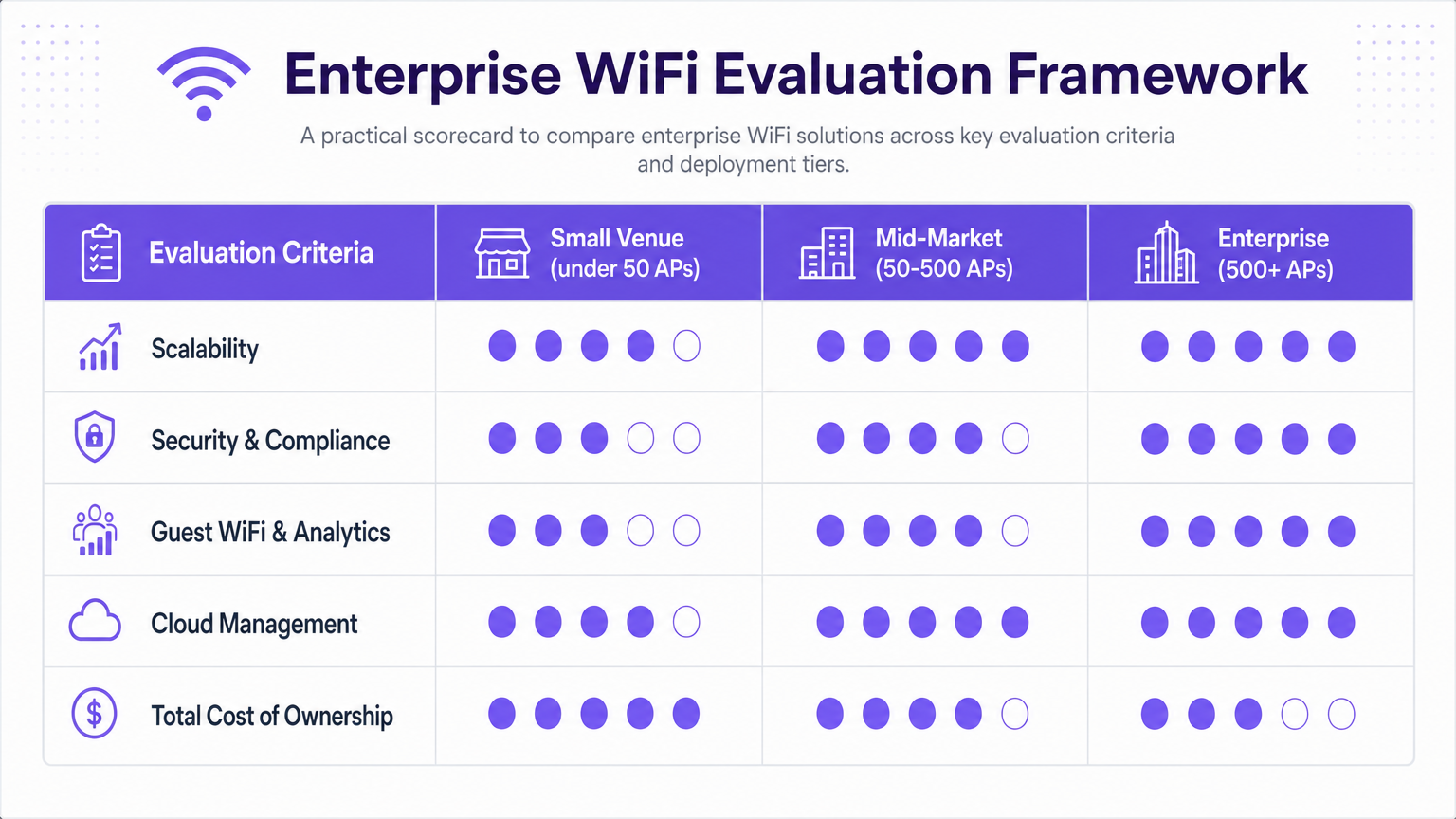
The total cost of ownership (TCO) for enterprise wifi providers extends far beyond the initial hardware purchase. Licensing, cloud subscriptions, and internal management overhead typically constitute 60% of the five-year TCO.
However, the ROI of a well-architected network is substantial when leveraging the services layer. By capturing first-party data through compliant guest onboarding, venues can drive direct revenue through targeted marketing, improve operational efficiency via footfall analytics, and increase customer loyalty. The network becomes a measurable contributor to the bottom line, rather than just an IT expense.
Key Terms & Definitions
OFDMA (Orthogonal Frequency Division Multiple Access)
A feature of Wi-Fi 6 that allows a single access point to communicate with multiple devices simultaneously.
Crucial for high-density environments like stadiums and conference centres where many devices compete for airtime.
IEEE 802.1X
An IEEE Standard for port-based Network Access Control, providing an authentication mechanism to devices wishing to attach to a LAN or WLAN.
The mandatory standard for securing corporate and staff devices on an enterprise network, replacing shared passwords.
RADIUS (Remote Authentication Dial-In User Service)
A networking protocol that provides centralised Authentication, Authorization, and Accounting (AAA) management.
Used to authenticate staff against a directory (like Active Directory) and to integrate third-party guest WiFi platforms like Purple.
Captive Portal
A web page that the user of a public-access network is obliged to view and interact with before access is granted.
The primary interface for guest onboarding, compliance consent, and data capture.
VLAN (Virtual Local Area Network)
A logical subnetwork that groups a collection of devices from different physical LANs.
Essential for security segmentation, ensuring guest traffic cannot access corporate or payment systems.
Cloud Controller
A management platform hosted in the cloud that configures, monitors, and manages distributed access points.
The modern standard for managing multi-site enterprise WiFi deployments, eliminating the need for on-premises hardware controllers.
WPA3-Enterprise
The latest generation of Wi-Fi security, providing enhanced cryptographic strength and mandating Protected Management Frames.
The recommended security standard for all new enterprise network deployments to mitigate vulnerabilities found in WPA2.
Band Steering
A technique used in dual-band WiFi deployments to encourage capable clients to connect to the less congested 5 GHz or 6 GHz bands.
Improves overall network performance by clearing the heavily congested 2.4 GHz band for legacy or IoT devices.
Case Studies
A 400-room hotel is upgrading its legacy WiFi network. The current setup uses on-premises hardware controllers and provides a basic open SSID for guests, which frequently drops connections during peak conference hours. They need a secure, scalable solution that improves the guest experience and provides marketing data.
- Architecture: Migrate to a cloud-managed controller architecture to simplify management across the property. Deploy Wi-Fi 6 access points in guest rooms and Wi-Fi 6E in the high-density conference spaces.
- Authentication: Implement IEEE 802.1X with WPA3-Enterprise for hotel staff and corporate devices.
- Guest Access: Deploy Purple's Guest WiFi platform integrated via RADIUS to the new APs. Configure a branded captive portal requiring email or social login, with clear GDPR consent mechanisms.
- Segmentation: Enforce strict VLAN segmentation at the switch and firewall level to isolate guest traffic from the hotel's property management system (PMS) and payment terminals.
A national retail chain with 150 locations needs to standardise its in-store WiFi. They currently use a mix of consumer-grade routers and disparate hardware, making central management impossible. They want to understand customer dwell times and improve the omnichannel experience.
- Standardisation: Standardise on a single enterprise AP vendor across all 150 sites, managed via a central cloud controller.
- Deployment: Conduct predictive RF surveys for typical store layouts to create standard deployment templates.
- Analytics Integration: Implement Purple's WiFi Analytics platform across the estate. Utilise location analytics to measure footfall, dwell times, and return rates without requiring users to actively connect.
- Marketing: Use the captive portal to offer in-store discounts in exchange for email registration, feeding directly into the retailer's CRM.
Scenario Analysis
Q1. You are designing the network for a new 50,000-seat stadium. The executive team wants to use standard Wi-Fi 6 access points to save on hardware costs. What is your recommendation?
💡 Hint:Consider the device density and available spectrum in a stadium environment.
Show Recommended Approach
Recommend upgrading to Wi-Fi 6E for the seating bowl and high-density concourses. While Wi-Fi 6 provides OFDMA, the sheer density of a stadium will quickly saturate the 2.4 GHz and 5 GHz bands. Wi-Fi 6E opens up the 6 GHz spectrum, providing significantly more non-overlapping channels to handle the massive concurrent client load without crippling co-channel interference.
Q2. A retail client wants to implement guest WiFi but is concerned about PCI compliance, as their point-of-sale (POS) terminals operate on the same physical switches. How do you secure the deployment?
💡 Hint:Physical separation is not always required if logical separation is strictly enforced.
Show Recommended Approach
Implement strict VLAN segmentation. The guest SSID must be mapped to a dedicated guest VLAN. At the firewall level, create rules that explicitly deny any traffic routing between the guest VLAN and the POS/Corporate VLAN. Ensure the guest VLAN only has access to the internet gateway and the necessary authentication servers (e.g., the captive portal).
Q3. When comparing two vendor proposals for a 200-site deployment, Vendor A's hardware is 20% cheaper than Vendor B's. However, Vendor A requires an on-premises hardware controller at each site, while Vendor B is fully cloud-managed. Which is likely the better commercial decision over 5 years?
💡 Hint:Look beyond the initial capital expenditure (CapEx) to the operational expenditure (OpEx).
Show Recommended Approach
Vendor B is almost certainly the better decision. The 20% hardware saving from Vendor A will be quickly eclipsed by the Total Cost of Ownership (TCO) of maintaining 200 hardware controllers. The IT staff time required to manage firmware updates, monitor health, and troubleshoot across 200 disparate controllers will be massive compared to Vendor B's single-pane-of-glass cloud management.




