

HIPAA-konformes WiFi: Ein Leitfaden für Gesundheitseinrichtungen
Dieser technische Referenzleitfaden bietet umsetzbare Compliance-Strategien für IT-Teams im Gesundheitswesen, die Enterprise- und Gast-WiFi bereitstellen. Er behandelt Netzwerksegmentierung, 802.1X-Authentifizierung, Audit-Logging und wie man sicheren, isolierten drahtlosen Zugang mit der Purple-Plattform implementiert.
🎧 Diesen Leitfaden anhören
Transkript anzeigen
Executive Summary
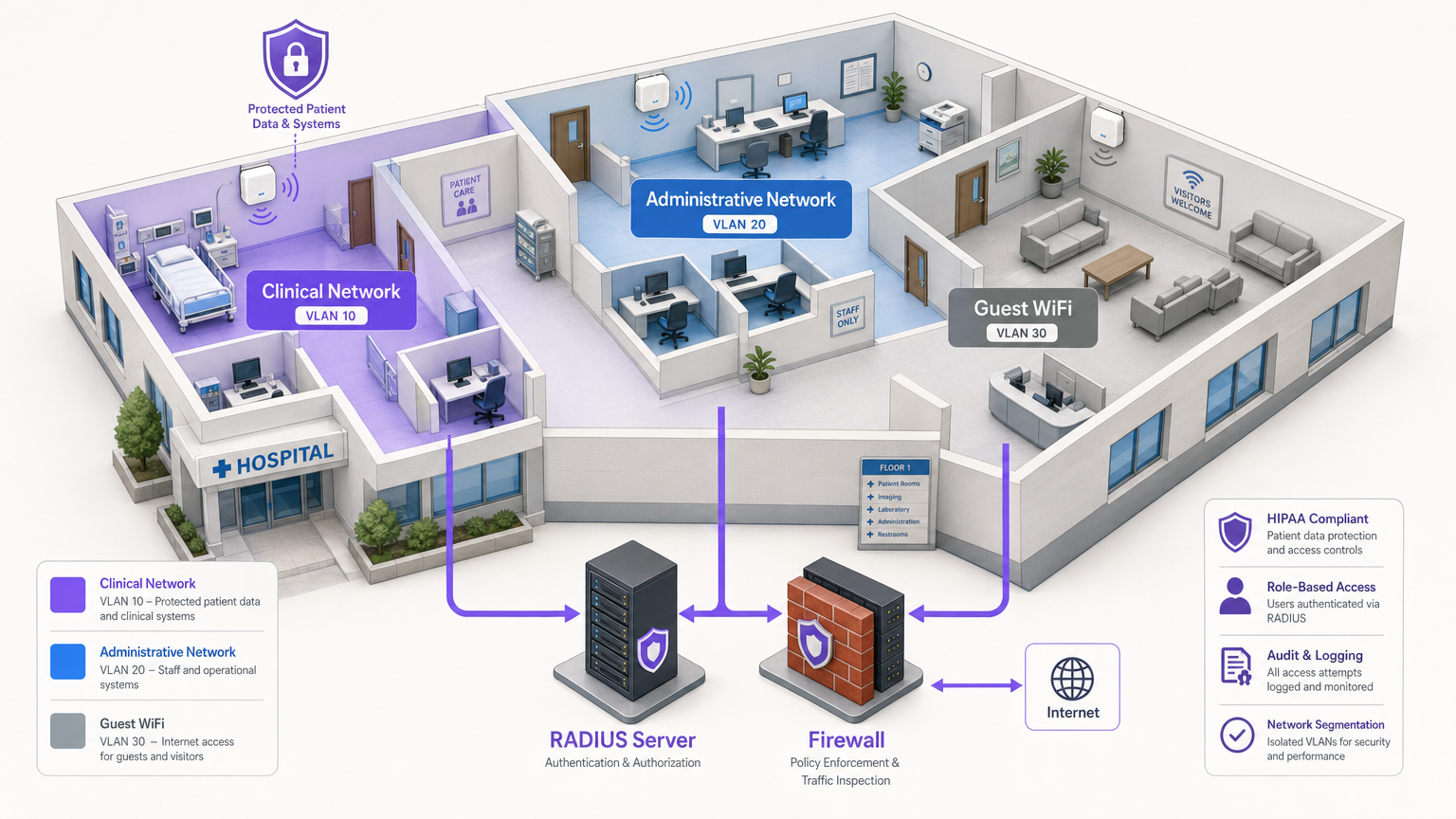
Für IT-Manager, Netzwerkarchitekten und CTOs in Gesundheitseinrichtungen beinhaltet die Bereitstellung drahtloser Netzwerke das Ausbalancieren zweier kritischer, oft konkurrierender Prioritäten: die Sicherung elektronischer geschützter Gesundheitsinformationen (ePHI) zur Einhaltung strenger HIPAA-Vorschriften und die Bereitstellung nahtloser, hochwertiger Konnektivität für Patienten, Besucher und klinisches Personal. Ein einziger falsch konfigurierter Access Point oder ein geteiltes Passwort kann zu einer verheerenden Datenpanne, behördlichen Bußgeldern und Reputationsschäden führen. Dieser Leitfaden bietet einen praktischen, herstellerneutralen Rahmen für die Bereitstellung von HIPAA-konformem WiFi. Er behandelt das wesentliche Drei-Zonen-Segmentierungsmodell, Datenverschlüsselungsstandards (WPA3-Enterprise), robustes Identitätsmanagement über 802.1X und umfassendes Audit-Logging. Darüber hinaus wird detailliert beschrieben, wie die Integration einer Unternehmensplattform wie Purple für Guest WiFi und WiFi Analytics sicherstellt, dass der öffentliche Zugang streng von klinischen Systemen isoliert bleibt, während gleichzeitig wertvolle Engagement-Daten erfasst werden.
Technical Deep-Dive
Ein HIPAA-konformes drahtloses Netzwerk erfordert mehr als nur grundlegende Konnektivität und die Implementierung einer Defense-in-Depth-Architektur. Die HIPAA Security Rule schreibt technische Schutzmaßnahmen für Zugriffskontrolle, Audit-Kontrollen, Integrität und Übertragungssicherheit vor [1].
1. Verschlüsselung und Authentifizierung (802.1X und WPA3-Enterprise)
Die Grundlage der drahtlosen Sicherheit ist eine starke Verschlüsselung. Ältere Protokolle wie WEP, WPA und sogar WPA2-Personal (mit Pre-Shared Keys) sind für Umgebungen, die ePHI verarbeiten, völlig unzureichend. Ein kompromittierter PSK gewährt einem Angreifer Zugang zum gesamten Subnetz.
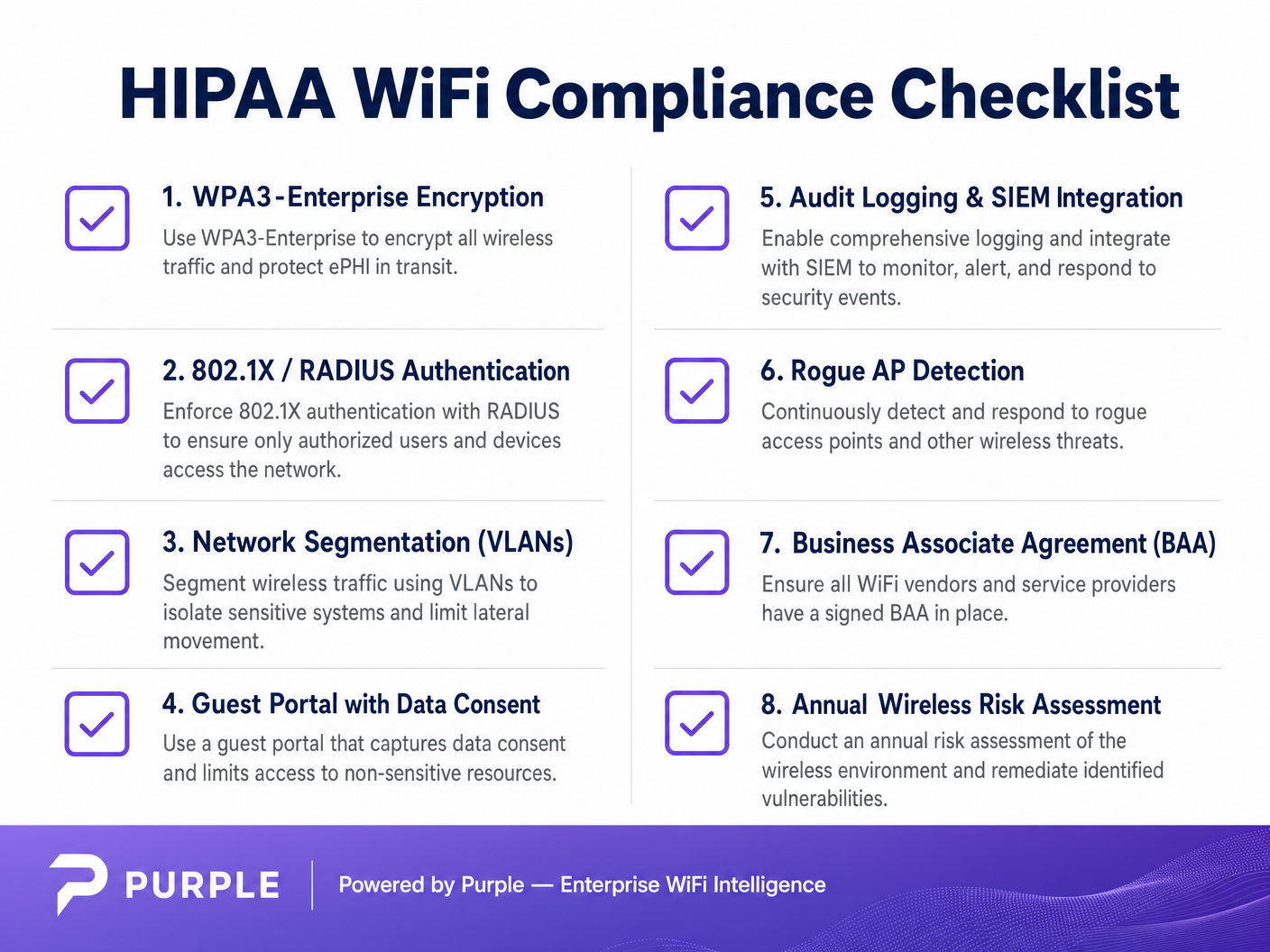
Gesundheitseinrichtungen müssen WPA3-Enterprise (oder mindestens WPA2-Enterprise) in Verbindung mit 802.1X-Authentifizierung implementieren. Diese Architektur erfordert, dass sich jeder Benutzer und jedes Gerät individuell bei einem RADIUS-Server (Remote Authentication Dial-In User Service) authentifiziert, bevor es Netzwerkzugang erhält [2].
- Klinische Geräte (IoT, WOWs): Verwenden Sie zertifikatbasierte Authentifizierung, insbesondere EAP-TLS (Extensible Authentication Protocol-Transport Layer Security). Dies eliminiert Passwörter vollständig und basiert auf zentral verwalteten digitalen Zertifikaten, die auf autorisierten Geräten installiert sind. Geht ein Gerät verloren, kann sein Zertifikat sofort widerrufen werden.
- Mitarbeitergeräte (Laptops, Mobile): Erzwingen Sie die Authentifizierung mithilfe von Domänenanmeldeinformationen, die an die rollenbasierte Zugriffskontrolle (RBAC) gebunden sind, oft integriert mit Active Directory oder einem Identity Provider (IdP).
2. Netzwerksegmentierung (Das Drei-Zonen-Modell)
Die Segmentierung ist die kritischste architektonische Verteidigung gegen laterale Bewegung. Sie können keine Gast-Smartphones auf demselben VLAN wie Ihre Electronic Health Record (EHR)-Terminals haben. Der Industriestandard ist eine strikte Drei-Zonen-Architektur, physisch oder logisch getrennt über VLANs und Firewalls.
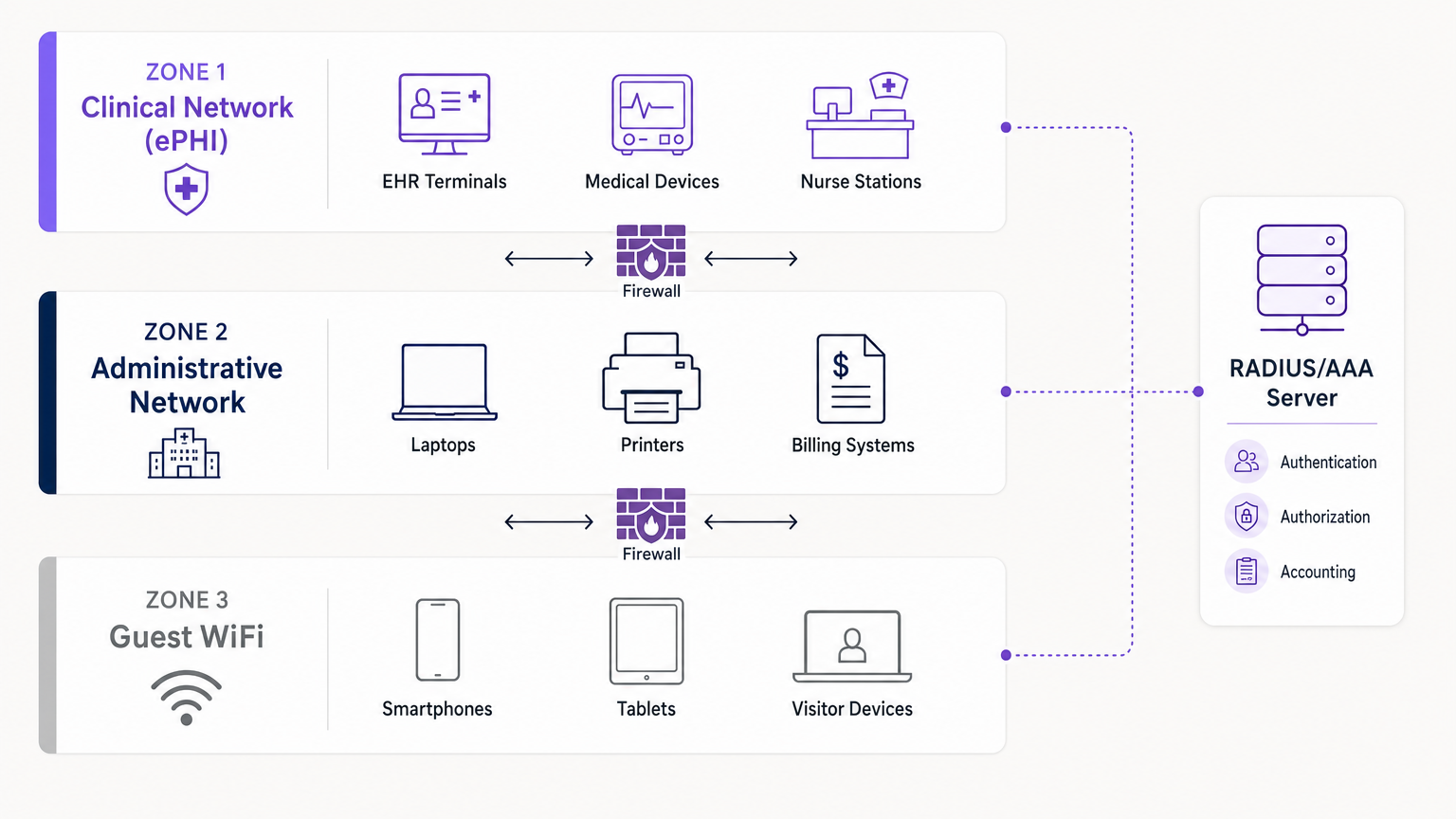
- Zone 1: Klinisches Netzwerk (ePHI): Dieses stark eingeschränkte VLAN verarbeitet alle sensiblen Daten. Es verbindet EHR-Systeme, medizinische Geräte und Schwesternstationen. Der Zugang ist streng auf authentifiziertes klinisches Personal und verwaltete Geräte über 802.1X beschränkt.
- Zone 2: Administratives Netzwerk: Dieses VLAN unterstützt den Krankenhausbetrieb – Abrechnungssysteme, Mitarbeiter-Laptops und Drucker –, die keinen direkten Zugriff auf Patientenakten erfordern.
- Zone 3: Guest WiFi: Eine isolierte, reine Internetverbindung für Patienten und Besucher. Sie muss vollständig von Zone 1 und 2 abgeschottet sein und Client-Isolation nutzen, um zu verhindern, dass Gastgeräte miteinander kommunizieren.
3. Audit-Logging und SIEM-Integration
HIPAA verlangt von Organisationen die Implementierung von Hardware-, Software- und Verfahrensmechanismen, die Aktivitäten in Informationssystemen, die ePHI enthalten, aufzeichnen und überprüfen [1]. Ihre Wireless Controller und RADIUS-Server müssen alle Authentifizierungsversuche (erfolgreiche und fehlgeschlagene), Sitzungsdauern und administrativen Änderungen protokollieren. Diese Protokolle sollten an ein zentralisiertes Security Information and Event Management (SIEM)-System zur kontinuierlichen Überwachung und Anomalieerkennung weitergeleitet werden.
Implementation Guide
Die Bereitstellung eines konformen Netzwerks erfordert sorgfältige Planung und Ausführung. Hier ist ein schrittweiser Ansatz zur Integration eines sicheren klinischen Zugangs mit isolierten Gastdiensten.
Step 1: Durchführung einer Wireless-Risikobewertung
Führen Sie vor der Bereitstellung neuer Hardware eine umfassende HF-Standortuntersuchung und Risikobewertung durch. Identifizieren Sie alle vorhandenen Access Points, einschließlich potenzieller Rogue Devices. Kartieren Sie die erforderlichen Abdeckungsbereiche für klinischen versus Gastzugang. Für Einblicke in die Hardwareauswahl konsultieren Sie Enterprise WiFi Solutions: A Buyer's Guide .
Step 2: Konfiguration der klinischen und administrativen VLANs
Stellen Sie Ihre Kerninfrastruktur bereit (z. B. Cisco Meraki, Aruba oder Your Guide to a Wireless Access Point Ruckus ). Konfigurieren Sie die klinische SSID so, dass sie nur in den notwendigen Bereichen sendet. Implementieren Sie WPA3-Enterprise und verbinden Sie Ihre Controller mit dem RADIUS-Server. Stellen Sie EAP-TLS-Zertifikate auf allen krankenhauseigenen medizinischen Geräten bereit.
Step 3: Bereitstellung des Guest WiFi Portals
Hier zeichnen sich Plattformen wie Purple aus. Anstelle eines einfachen offenen Netzwerks stellen Sie eine isolierte Guest SSID bereit, die den Datenverkehr über das Captive Portal von Purple leitet.
- Isolation: Stellen Sie sicher, dass das Guest VLAN strenge Firewall-Regeln hat, die jegliches internes IP-Routing verweigern. Aktivieren Sie die Client-Isolation auf den Access Points.
- Einwilligung und Bedingungen: Das Captive Portal muss von den Nutzern die Annahme der Allgemeinen Geschäftsbedingungen verlangen, um rechtliche Rahmenbedingungen und die Einwilligung zur Datennutzung festzulegen.
- Authentifizierung: Purple fungiert als Identitätsanbieter für Gäste und verwaltet SMS-, E-Mail- oder Social Logins, wobei dieser Datenverkehr vollständig von Ihrem internen Active Directory getrennt bleibt.
Schritt 4: Kontinuierliche Überwachung implementieren
Aktivieren Sie die Erkennung von Rogue APs in Ihrem Wireless Intrusion Prevention System (WIPS). Dies identifiziert und unterdrückt automatisch unautorisierte Access Points, die von Mitarbeitern oder Besuchern in das Netzwerk eingesteckt werden. Stellen Sie sicher, dass alle Protokolle an Ihr SIEM fließen.
Best Practices
- Prinzip der geringsten Rechte: Benutzer und Geräte sollten nur Zugriff auf die spezifischen Netzwerkressourcen haben, die für ihre Funktion erforderlich sind. Ein Sachbearbeiter für Abrechnungen benötigt keinen Zugriff auf das Imaging VLAN.
- Business Associate Agreements (BAA): Stellen Sie sicher, dass jeder Anbieter von Cloud-managed Networking- oder Analysediensten ein BAA unterzeichnet hat, das seine Verantwortlichkeiten bezüglich der Datensicherheit klar definiert.
- Legacy-Protokolle deaktivieren: Deaktivieren Sie WEP, WPA, TKIP und veraltete Management-Protokolle wie Telnet auf der gesamten Netzwerkhardware. Erzwingen Sie SSH und HTTPS für den administrativen Zugriff.
- Regelmäßige Audits: Wireless-Sicherheit ist keine „einmal einrichten und vergessen“-Bereitstellung. Führen Sie jährliche Penetrationstests und Konfigurationsüberprüfungen durch. Für einen breiteren Kontext zu sicheren Bereitstellungen lesen Sie WiFi in Krankenhäusern: Ein Leitfaden für sichere klinische Netzwerke .
Fehlerbehebung & Risikominderung
Häufige Fehlerursachen
- Der „Schatten-IT“-Access Point: Eine Abteilung benötigt eine bessere Abdeckung, daher steckt ein Mitarbeiter einen Consumer-Router in eine Wandbuchse. Minderung: Strenge physische Port-Sicherheit (802.1X an kabelgebundenen Ports) und aktive Rogue AP-Unterdrückung über WIPS.
- Zertifikatsablauf: Klinische Geräte fallen plötzlich aus dem Netzwerk, weil ihre EAP-TLS-Zertifikate abgelaufen sind. Minderung: Implementieren Sie ein automatisiertes Zertifikats-Lebenszyklus-Management (CLM) und Warnschwellen 30 Tage vor dem Ablauf.
- Gast-Traffic-Leckage: Fehlkonfigurierte VLAN-Tagging ermöglicht es Gast-Traffic, in das administrative Subnetz zu routen. Minderung: Regelmäßige Penetrationstests und automatisierte Konfigurationsprüfungen zur Überprüfung der VLAN-Isolation.
ROI & Geschäftsauswirkungen
Die Investition in eine HIPAA-konforme Wireless-Architektur liefert erhebliche Erträge, die über die bloße Vermeidung von Bußgeldern (die Millionen von Dollar erreichen können) hinausgehen.
- Risikominderung: Robuste 802.1X und Segmentierung reduzieren die Angriffsfläche drastisch und schützen die Organisation vor Ransomware und Datenlecks.
- Operative Effizienz: Zertifikatsbasierte Authentifizierung für klinische Geräte reduziert IT-Helpdesk-Tickets im Zusammenhang mit Passwort-Resets und Konnektivitätsproblemen, wodurch Kliniker sich auf die Patientenversorgung konzentrieren können.
- Verbesserte Patientenerfahrung: Durch die sichere Bereitstellung der Gast-WiFi-Plattform von Purple können Krankenhäuser einen zuverlässigen Internetzugang bieten – ein wichtiger Faktor für die Patientenzufriedenheit (HCAHPS) – und gleichzeitig das Captive Portal für Wegfindung, Patientenkommunikation und das Sammeln von Feedback nutzen, ohne die Sicherheit des klinischen Netzwerks zu gefährden.
Referenzen
[1] Health Insurance Portability and Accountability Act von 1996 (HIPAA), Pub. L. No. 104-191, 110 Stat. 1936 (1996). [2] Censinet. „HIPAA-konformer Wireless-Netzwerk-Einrichtungsleitfaden.“ Censinet Perspectives, 2024.
Schlüsselbegriffe & Definitionen
ePHI (Electronic Protected Health Information)
Any protected health information that is created, stored, transmitted, or received electronically.
The primary asset that HIPAA regulations are designed to protect. If a network transmits ePHI, it falls under the strict requirements of the HIPAA Security Rule.
802.1X
An IEEE standard for port-based network access control (PNAC) that provides an authentication mechanism to devices wishing to attach to a LAN or WLAN.
The mandatory authentication framework for enterprise healthcare networks, ensuring that only verified users and devices can access the clinical VLAN.
RADIUS (Remote Authentication Dial-In User Service)
A networking protocol that provides centralized Authentication, Authorization, and Accounting (AAA) management for users who connect and use a network service.
The core server infrastructure that processes 802.1X requests, verifying credentials against a directory (like Active Directory) before granting WiFi access.
EAP-TLS (Extensible Authentication Protocol-Transport Layer Security)
An EAP method that relies on client and server certificates to establish a secure connection, providing strong mutual authentication.
The gold standard for authenticating headless medical devices and mobile workstations, eliminating the need for vulnerable passwords.
Network Segmentation
The practice of splitting a computer network into subnetworks, each being a network segment or VLAN.
Crucial for HIPAA compliance, it ensures that a compromised device on the guest or administrative network cannot access the clinical network housing ePHI.
VLAN (Virtual Local Area Network)
A logical subnetwork that groups a collection of devices from different physical LANs.
The primary mechanism used by network engineers to implement segmentation, isolating clinical, administrative, and guest traffic on the same physical access points.
Captive Portal
A web page accessed with a web browser that is displayed to newly connected users of a Wi-Fi network before they are granted broader access to network resources.
Used for Guest WiFi (often provided by platforms like Purple) to capture user consent, enforce Terms and Conditions, and authenticate visitors without touching internal systems.
Rogue AP (Access Point)
A wireless access point that has been installed on a secure network without explicit authorization from a local network administrator.
A major security risk in hospitals (Shadow IT). Enterprise wireless controllers must actively scan for and suppress these devices to prevent unauthorized network bridging.
Fallstudien
A 300-bed regional hospital needs to deploy new mobile workstations (WOWs) for nursing staff. The current network uses a single SSID with a WPA2 Pre-Shared Key (PSK) for all hospital-owned devices. How should the IT architect redesign this for HIPAA compliance?
The architect must eliminate the PSK. They should create a dedicated 'Clinical_ePHI' VLAN and SSID. The new SSID must be configured for WPA3-Enterprise (or WPA2-Enterprise). The architect will deploy a RADIUS server and implement EAP-TLS certificate-based authentication. Each WOW will be provisioned with a unique digital certificate via Mobile Device Management (MDM). The RADIUS server will authenticate the certificate before granting the WOW access to the clinical VLAN.
A large outpatient clinic wants to offer free WiFi to patients in the waiting room, but the CTO is concerned about visitors attempting to access the clinic's billing servers. How should this be implemented?
The network team must implement strict network segmentation. They will create a 'Guest_WiFi' SSID mapped to a dedicated, isolated VLAN (e.g., VLAN 30). Firewall rules must be configured to explicitly deny any routing from VLAN 30 to the internal clinical or administrative subnets (VLANs 10 and 20). Client isolation must be enabled on the access points to prevent guest devices from communicating with each other. Finally, the guest SSID should route through a captive portal, such as Purple, to capture Terms and Conditions consent and handle guest authentication (SMS/Email) separately from the clinic's Active Directory.
Szenarioanalyse
Q1. A clinic administrator requests that the new Guest WiFi network use a simple WPA2 password ('ClinicGuest2024') posted on the wall to make it easy for elderly patients to connect, rather than using a captive portal. As the network architect, how do you respond?
💡 Hinweis:Consider the requirements for audit logging, user consent, and the risks of shared credentials on public networks.
Empfohlenen Ansatz anzeigen
You must advise against using a shared PSK for the guest network. A shared password provides no individual accountability or audit trail, making it impossible to identify malicious actors on the network. Furthermore, it bypasses the opportunity to present a captive portal where users must accept Terms and Conditions, which is critical for limiting the clinic's liability. The recommended approach is an open Guest SSID that routes immediately to a captive portal (like Purple) for individual authentication (e.g., via SMS or email) and T&C acceptance, ensuring secure, logged, and legally compliant access.
Q2. During a wireless risk assessment, you discover a consumer-grade WiFi router plugged into an Ethernet jack in the radiology department. The staff explains they installed it because the enterprise WiFi signal was weak in that corner. What immediate actions must be taken?
💡 Hinweis:Address both the immediate technical threat and the underlying infrastructure issue.
Empfohlenen Ansatz anzeigen
- Immediately disconnect the rogue router from the network, as it creates an unmonitored, unencrypted bridge into the clinical environment, violating HIPAA transmission security rules. 2) Ensure that the enterprise Wireless Intrusion Prevention System (WIPS) is configured to automatically detect and suppress rogue APs. 3) Configure 802.1X on all wired switch ports so unauthorized devices cannot connect to the LAN. 4) Conduct an RF site survey in the radiology department to identify the coverage gap and deploy an authorized, properly configured enterprise access point to resolve the staff's legitimate connectivity issue.
Q3. You are configuring 802.1X authentication for a fleet of new medical infusion pumps. The devices do not have keyboards or screens for users to input credentials. How do you securely authenticate them to the clinical VLAN?
💡 Hinweis:Look for an authentication method that relies on machine identity rather than user identity.
Empfohlenen Ansatz anzeigen
The devices should be authenticated using EAP-TLS (certificate-based authentication). You will generate unique digital certificates from the hospital's internal Certificate Authority (CA) and install them on each infusion pump. The RADIUS server will be configured to verify these certificates. When a pump connects to the clinical SSID, it presents its certificate; if valid, the RADIUS server assigns it to the clinical VLAN. This provides strong, passwordless mutual authentication.




