

WiFi compatible con HIPAA: Una guía para organizaciones de atención médica
Esta guía de referencia técnica proporciona estrategias de cumplimiento prácticas para equipos de TI de atención médica que implementan WiFi empresarial y para invitados. Cubre la segmentación de red, la autenticación 802.1X, el registro de auditoría y cómo implementar acceso inalámbrico seguro y aislado utilizando la plataforma de Purple.
🎧 Escucha esta guía
Ver transcripción
Resumen Ejecutivo
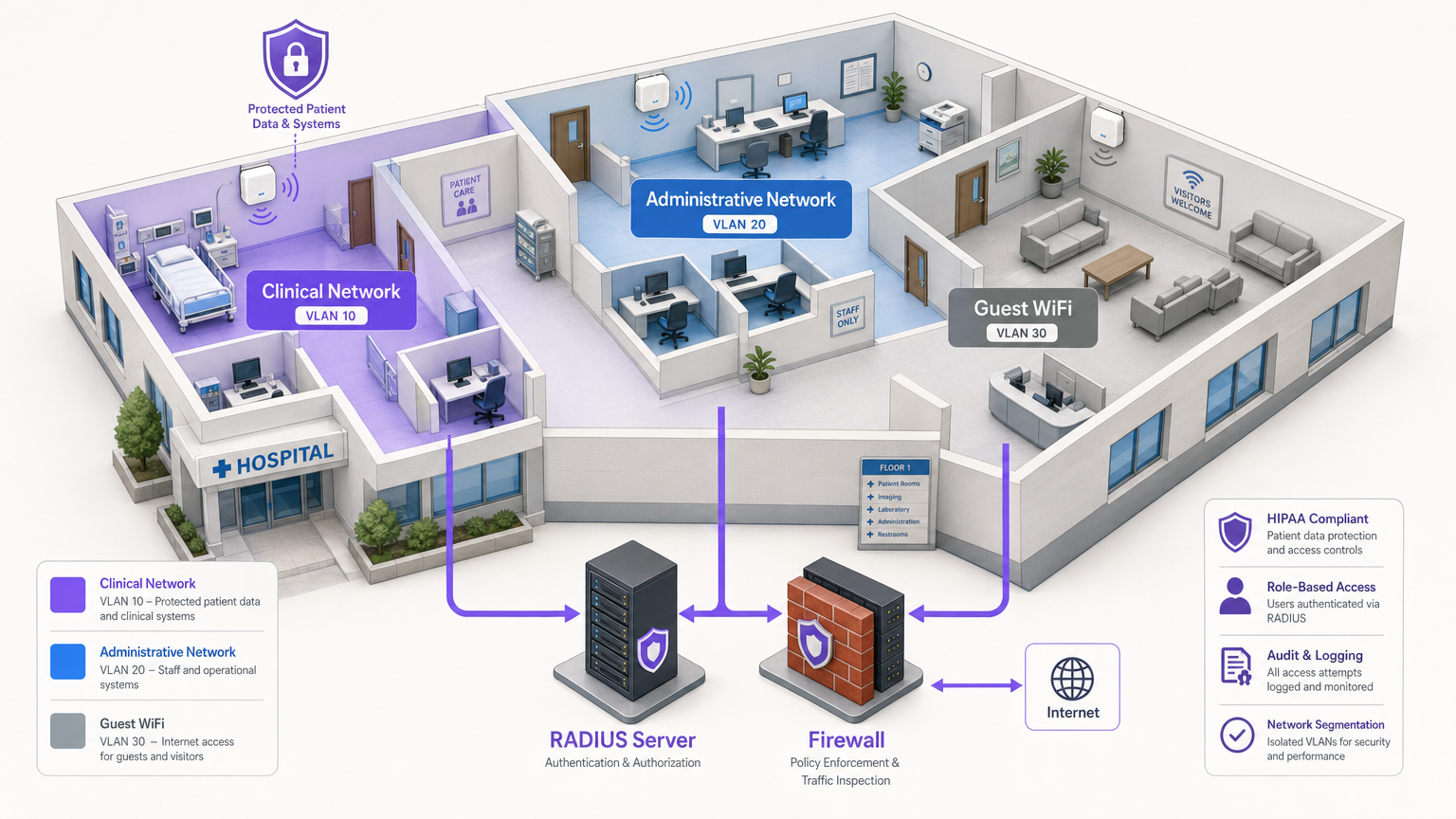
Para gerentes de TI, arquitectos de red y CTOs en entornos de atención médica, la implementación de redes inalámbricas implica equilibrar dos prioridades críticas, a menudo contrapuestas: asegurar la Información de Salud Protegida electrónica (ePHI) para cumplir con las estrictas regulaciones HIPAA, y proporcionar conectividad fluida y de alta calidad para pacientes, visitantes y personal clínico. Un único punto de acceso mal configurado o una contraseña compartida puede provocar una devastadora violación de datos, multas regulatorias y daño a la reputación. Esta guía proporciona un marco práctico y neutral en cuanto a proveedores para implementar WiFi compatible con HIPAA. Cubre el modelo esencial de segmentación de tres zonas, los estándares de cifrado de datos (WPA3-Enterprise), la gestión de identidad robusta a través de 802.1X y el registro de auditoría completo. Además, detalla cómo la integración de una plataforma empresarial como Purple para Guest WiFi y WiFi Analytics garantiza que el acceso público permanezca estrictamente aislado de los sistemas clínicos, al tiempo que captura datos valiosos de interacción.
Análisis Técnico Detallado
Lograr una red inalámbrica compatible con HIPAA requiere ir más allá de la conectividad básica e implementar una arquitectura de defensa en profundidad. La Regla de Seguridad de HIPAA exige salvaguardas técnicas para el control de acceso, controles de auditoría, integridad y seguridad de la transmisión [1].
1. Cifrado y Autenticación (802.1X y WPA3-Enterprise)
La base de la seguridad inalámbrica es un cifrado robusto. Los protocolos heredados como WEP, WPA e incluso WPA2-Personal (que utilizan claves precompartidas) son completamente insuficientes para entornos que manejan ePHI. Una PSK comprometida otorga a un atacante acceso a toda la subred.
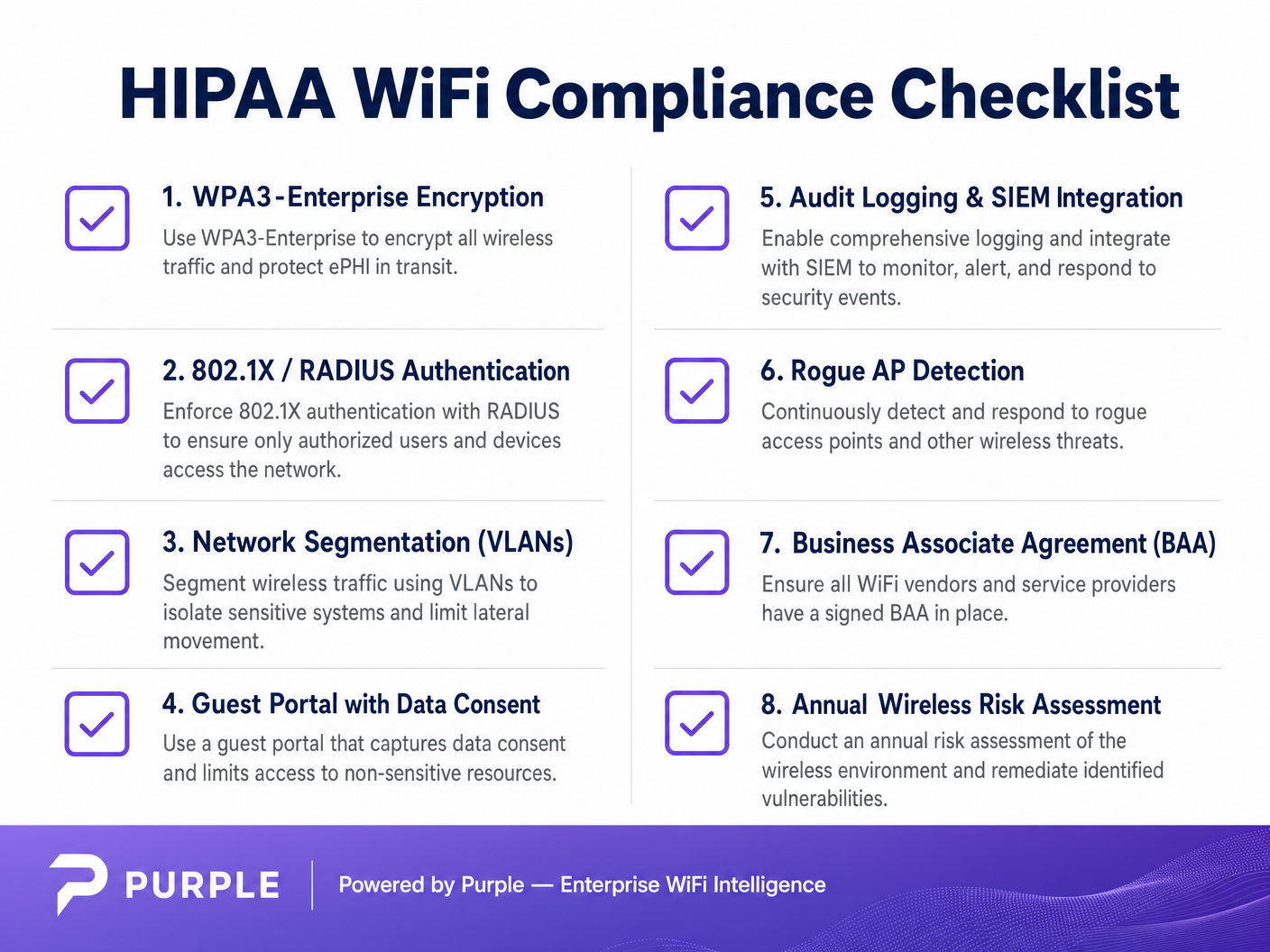
Las organizaciones de atención médica deben implementar WPA3-Enterprise (o WPA2-Enterprise como mínimo) junto con la autenticación 802.1X. Esta arquitectura requiere que cada usuario y dispositivo se autentique individualmente contra un servidor RADIUS (Remote Authentication Dial-In User Service) antes de obtener acceso a la red [2].
- Dispositivos Clínicos (IoT, WOWs): Utilice autenticación basada en certificados, específicamente EAP-TLS (Extensible Authentication Protocol-Transport Layer Security). Esto elimina por completo las contraseñas, dependiendo de certificados digitales gestionados centralmente instalados en dispositivos autorizados. Si un dispositivo se pierde, su certificado puede ser revocado instantáneamente.
- Dispositivos del Personal (Laptops, Móviles): Aplique la autenticación utilizando credenciales de dominio vinculadas al control de acceso basado en roles (RBAC), a menudo integrándose con Active Directory o un Proveedor de Identidad (IdP).
2. Segmentación de Red (El Modelo de Tres Zonas)
La segmentación es la defensa arquitectónica más crítica contra el movimiento lateral. No puede tener teléfonos inteligentes de invitados en la misma VLAN que sus terminales de Expedientes Médicos Electrónicos (EHR). El estándar de la industria es una arquitectura estricta de tres zonas, separadas física o lógicamente a través de VLANs y firewalls.
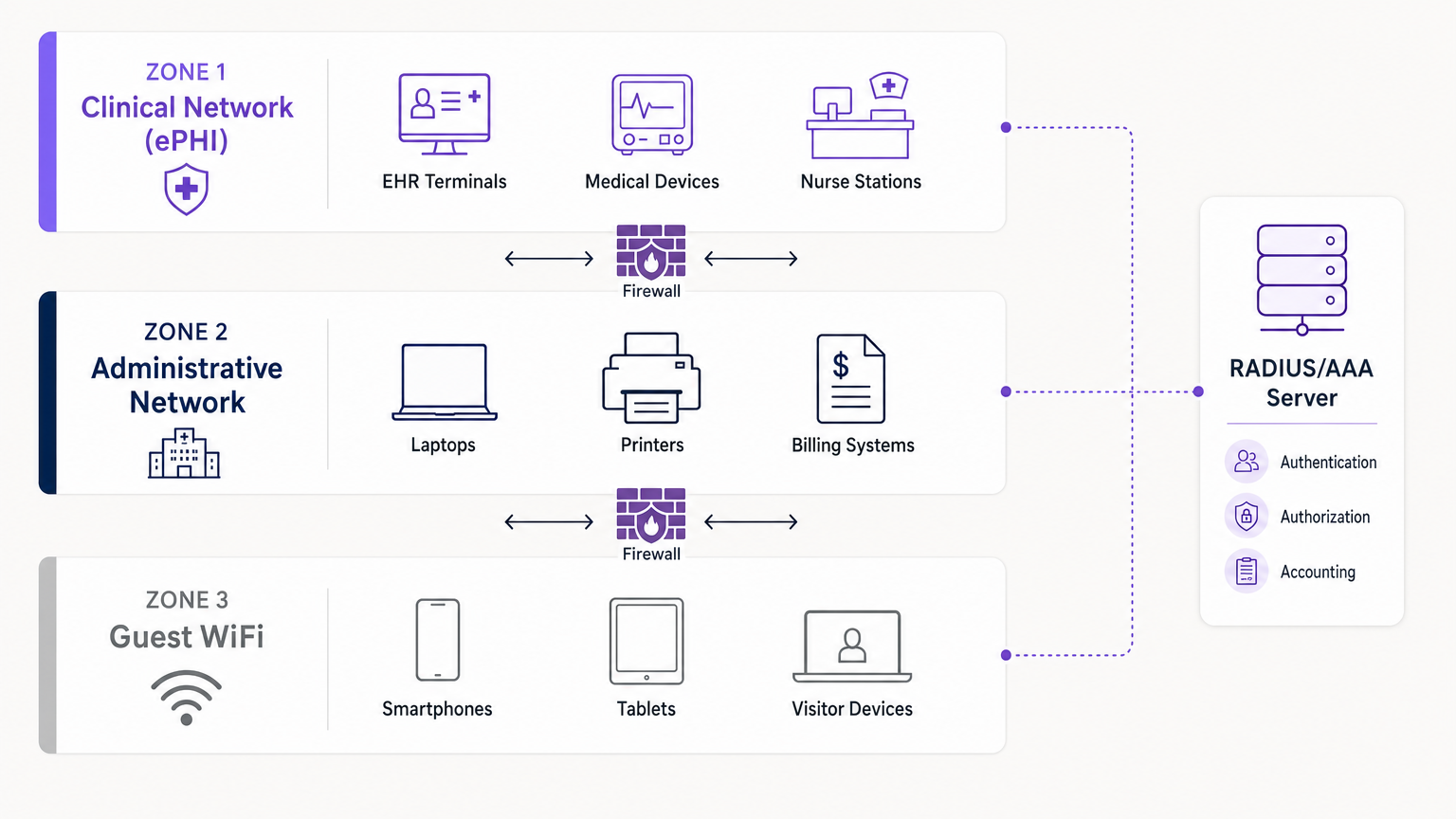
- Zona 1: Red Clínica (ePHI): Esta VLAN altamente restringida maneja todos los datos sensibles. Conecta sistemas EHR, dispositivos médicos y estaciones de enfermería. El acceso está estrictamente limitado al personal clínico autenticado y a los dispositivos gestionados a través de 802.1X.
- Zona 2: Red Administrativa: Esta VLAN soporta las operaciones del hospital —sistemas de facturación, laptops del personal e impresoras— que no requieren acceso directo a los registros de pacientes.
- Zona 3: Guest WiFi: Una conexión aislada, solo a internet, para pacientes y visitantes. Debe estar completamente separada de las Zonas 1 y 2, utilizando el aislamiento de clientes para evitar que los dispositivos de los invitados se comuniquen entre sí.
3. Registro de Auditoría e Integración SIEM
HIPAA exige que las organizaciones implementen mecanismos de hardware, software y procedimientos que registren y examinen la actividad en los sistemas de información que contienen ePHI [1]. Sus controladores inalámbricos y servidores RADIUS deben registrar todos los intentos de autenticación (exitosos y fallidos), las duraciones de las sesiones y los cambios administrativos. Estos registros deben ser enviados a un sistema centralizado de Gestión de Información y Eventos de Seguridad (SIEM) para monitoreo continuo y detección de anomalías.
Guía de Implementación
La implementación de una red compatible requiere una planificación y ejecución cuidadosas. Aquí se presenta un enfoque paso a paso para integrar el acceso clínico seguro con servicios de invitados aislados.
Paso 1: Realizar una Evaluación de Riesgos Inalámbricos
Antes de implementar nuevo hardware, realice un estudio de sitio de RF completo y una evaluación de riesgos. Identifique todos los puntos de acceso existentes, incluidos los posibles dispositivos no autorizados. Mapee las áreas de cobertura requeridas para el acceso clínico versus el acceso de invitados. Para obtener información sobre la selección de hardware, consulte Soluciones WiFi Empresariales: Una Guía del Comprador .
Paso 2: Configurar las VLANs Clínicas y Administrativas
Implemente su infraestructura central (por ejemplo, Cisco Meraki, Aruba o Su Guía para un Punto de Acceso Inalámbrico Ruckus ). Configure el SSID clínico para que se transmita solo en las áreas necesarias. Implemente WPA3-Enterprise y conecte sus controladores al servidor RADIUS. Implemente certificados EAP-TLS en todos los dispositivos médicos propiedad del hospital.
Paso 3: Implementar el Portal Guest WiFi
Aquí es donde plataformas como Purple sobresalen. En lugar de una red abierta simple, implemente un Guest SSID aislado que enrute el tráfico a través del Captive Portal de Purple.
- Aislamiento: Asegúrese de que la Guest VLAN tenga reglas de firewall estrictas que denieguen cualquier enrutamiento IP interno. Habilite el aislamiento de clientesión en los puntos de acceso.
- Consentimiento y Términos: El Captive Portal debe requerir que los usuarios acepten los Términos y Condiciones, estableciendo límites legales y el consentimiento para el uso de datos.
- Autenticación: Purple actúa como proveedor de identidad para los invitados, gestionando inicios de sesión por SMS, email o redes sociales, manteniendo este tráfico completamente separado de su Active Directory interno.
Paso 4: Implementar Monitoreo Continuo
Habilite la detección de APs Rogue en su sistema de prevención de intrusiones Wireless (WIPS). Esto identificará y suprimirá automáticamente los puntos de acceso no autorizados conectados a la red por personal o visitantes. Asegúrese de que todos los registros fluyan a su SIEM.
Mejores Prácticas
- Principio de Mínimo Privilegio: Los usuarios y dispositivos solo deben tener acceso a los recursos de red específicos requeridos para su función. Un empleado de facturación no necesita acceso a la VLAN de imágenes.
- Acuerdos de Asociado Comercial (BAA): Asegúrese de que cualquier proveedor que ofrezca servicios de redes o análisis gestionados en la nube haya firmado un BAA, definiendo claramente sus responsabilidades con respecto a la seguridad de los datos.
- Deshabilitar Protocolos Heredados: Desactive WEP, WPA, TKIP y protocolos de gestión obsoletos como Telnet en todo el hardware de red. Imponga SSH y HTTPS para el acceso administrativo.
- Auditorías Regulares: La seguridad Wireless no es una implementación de "configurar y olvidar". Realice pruebas de penetración y revisiones de configuración anuales. Para un contexto más amplio sobre implementaciones seguras, lea WiFi en Hospitales: Una Guía para Redes Clínicas Seguras .
Resolución de Problemas y Mitigación de Riesgos
Modos de Falla Comunes
- El Punto de Acceso de "Shadow IT": Un departamento necesita mejor cobertura, por lo que un empleado conecta un router de consumo a una toma de pared. Mitigación: Seguridad estricta de puertos físicos (802.1X en puertos cableados) y supresión activa de APs Rogue a través de WIPS.
- Vencimiento de Certificados: Los dispositivos clínicos se desconectan repentinamente de la red porque sus certificados EAP-TLS caducaron. Mitigación: Implemente una gestión automatizada del ciclo de vida de los certificados (CLM) y umbrales de alerta 30 días antes del vencimiento.
- Fuga de Tráfico de Invitados: Una configuración incorrecta del etiquetado de VLAN permite que el tráfico de invitados se enrute a la subred administrativa. Mitigación: Pruebas de penetración regulares y auditorías de configuración automatizadas para verificar el aislamiento de VLAN.
ROI e Impacto Comercial
Invertir en una arquitectura Wireless compatible con HIPAA ofrece retornos significativos más allá de simplemente evitar multas regulatorias (que pueden alcanzar millones de dólares).
- Mitigación de Riesgos: Un robusto 802.1X y la segmentación reducen drásticamente la superficie de ataque, protegiendo a la organización contra ransomware y filtraciones de datos.
- Eficiencia Operacional: La autenticación basada en certificados para dispositivos clínicos reduce los tickets de soporte de TI relacionados con restablecimientos de contraseñas y problemas de conectividad, manteniendo a los médicos enfocados en la atención al paciente.
- Experiencia del Paciente Mejorada: Al implementar de forma segura la plataforma de WiFi para invitados de Purple, los hospitales pueden proporcionar acceso a internet confiable —un factor clave en las puntuaciones de satisfacción del paciente (HCAHPS)— mientras aprovechan el Captive Portal para la orientación, comunicaciones con el paciente y la recopilación de comentarios sin comprometer la seguridad de la red clínica.
Referencias
[1] Ley de Portabilidad y Responsabilidad del Seguro Médico de 1996 (HIPAA), Pub. L. No. 104-191, 110 Stat. 1936 (1996). [2] Censinet. "Guía de Configuración de Red Wireless Compatible con HIPAA." Censinet Perspectives, 2024."
Términos clave y definiciones
ePHI (Electronic Protected Health Information)
Any protected health information that is created, stored, transmitted, or received electronically.
The primary asset that HIPAA regulations are designed to protect. If a network transmits ePHI, it falls under the strict requirements of the HIPAA Security Rule.
802.1X
An IEEE standard for port-based network access control (PNAC) that provides an authentication mechanism to devices wishing to attach to a LAN or WLAN.
The mandatory authentication framework for enterprise healthcare networks, ensuring that only verified users and devices can access the clinical VLAN.
RADIUS (Remote Authentication Dial-In User Service)
A networking protocol that provides centralized Authentication, Authorization, and Accounting (AAA) management for users who connect and use a network service.
The core server infrastructure that processes 802.1X requests, verifying credentials against a directory (like Active Directory) before granting WiFi access.
EAP-TLS (Extensible Authentication Protocol-Transport Layer Security)
An EAP method that relies on client and server certificates to establish a secure connection, providing strong mutual authentication.
The gold standard for authenticating headless medical devices and mobile workstations, eliminating the need for vulnerable passwords.
Network Segmentation
The practice of splitting a computer network into subnetworks, each being a network segment or VLAN.
Crucial for HIPAA compliance, it ensures that a compromised device on the guest or administrative network cannot access the clinical network housing ePHI.
VLAN (Virtual Local Area Network)
A logical subnetwork that groups a collection of devices from different physical LANs.
The primary mechanism used by network engineers to implement segmentation, isolating clinical, administrative, and guest traffic on the same physical access points.
Captive Portal
A web page accessed with a web browser that is displayed to newly connected users of a Wi-Fi network before they are granted broader access to network resources.
Used for Guest WiFi (often provided by platforms like Purple) to capture user consent, enforce Terms and Conditions, and authenticate visitors without touching internal systems.
Rogue AP (Access Point)
A wireless access point that has been installed on a secure network without explicit authorization from a local network administrator.
A major security risk in hospitals (Shadow IT). Enterprise wireless controllers must actively scan for and suppress these devices to prevent unauthorized network bridging.
Casos de éxito
A 300-bed regional hospital needs to deploy new mobile workstations (WOWs) for nursing staff. The current network uses a single SSID with a WPA2 Pre-Shared Key (PSK) for all hospital-owned devices. How should the IT architect redesign this for HIPAA compliance?
The architect must eliminate the PSK. They should create a dedicated 'Clinical_ePHI' VLAN and SSID. The new SSID must be configured for WPA3-Enterprise (or WPA2-Enterprise). The architect will deploy a RADIUS server and implement EAP-TLS certificate-based authentication. Each WOW will be provisioned with a unique digital certificate via Mobile Device Management (MDM). The RADIUS server will authenticate the certificate before granting the WOW access to the clinical VLAN.
A large outpatient clinic wants to offer free WiFi to patients in the waiting room, but the CTO is concerned about visitors attempting to access the clinic's billing servers. How should this be implemented?
The network team must implement strict network segmentation. They will create a 'Guest_WiFi' SSID mapped to a dedicated, isolated VLAN (e.g., VLAN 30). Firewall rules must be configured to explicitly deny any routing from VLAN 30 to the internal clinical or administrative subnets (VLANs 10 and 20). Client isolation must be enabled on the access points to prevent guest devices from communicating with each other. Finally, the guest SSID should route through a captive portal, such as Purple, to capture Terms and Conditions consent and handle guest authentication (SMS/Email) separately from the clinic's Active Directory.
Análisis de escenarios
Q1. A clinic administrator requests that the new Guest WiFi network use a simple WPA2 password ('ClinicGuest2024') posted on the wall to make it easy for elderly patients to connect, rather than using a captive portal. As the network architect, how do you respond?
💡 Sugerencia:Consider the requirements for audit logging, user consent, and the risks of shared credentials on public networks.
Mostrar enfoque recomendado
You must advise against using a shared PSK for the guest network. A shared password provides no individual accountability or audit trail, making it impossible to identify malicious actors on the network. Furthermore, it bypasses the opportunity to present a captive portal where users must accept Terms and Conditions, which is critical for limiting the clinic's liability. The recommended approach is an open Guest SSID that routes immediately to a captive portal (like Purple) for individual authentication (e.g., via SMS or email) and T&C acceptance, ensuring secure, logged, and legally compliant access.
Q2. During a wireless risk assessment, you discover a consumer-grade WiFi router plugged into an Ethernet jack in the radiology department. The staff explains they installed it because the enterprise WiFi signal was weak in that corner. What immediate actions must be taken?
💡 Sugerencia:Address both the immediate technical threat and the underlying infrastructure issue.
Mostrar enfoque recomendado
- Immediately disconnect the rogue router from the network, as it creates an unmonitored, unencrypted bridge into the clinical environment, violating HIPAA transmission security rules. 2) Ensure that the enterprise Wireless Intrusion Prevention System (WIPS) is configured to automatically detect and suppress rogue APs. 3) Configure 802.1X on all wired switch ports so unauthorized devices cannot connect to the LAN. 4) Conduct an RF site survey in the radiology department to identify the coverage gap and deploy an authorized, properly configured enterprise access point to resolve the staff's legitimate connectivity issue.
Q3. You are configuring 802.1X authentication for a fleet of new medical infusion pumps. The devices do not have keyboards or screens for users to input credentials. How do you securely authenticate them to the clinical VLAN?
💡 Sugerencia:Look for an authentication method that relies on machine identity rather than user identity.
Mostrar enfoque recomendado
The devices should be authenticated using EAP-TLS (certificate-based authentication). You will generate unique digital certificates from the hospital's internal Certificate Authority (CA) and install them on each infusion pump. The RADIUS server will be configured to verify these certificates. When a pump connects to the clinical SSID, it presents its certificate; if valid, the RADIUS server assigns it to the clinical VLAN. This provides strong, passwordless mutual authentication.




