
Bar and restaurant group WiFi providers checklist: guest sign-in, family-safe filtering and registers kept apart
Use this checklist to brief and compare bar and restaurant group WiFi providers. You will be able to separate guest, staff, payments and venue-device networks in every location, and build a short consented sign-in. You can also set one family-safe filter at group level, keep POS terminals out of PCI DSS scope, and share one guest list across corporate and franchise locations.
By Tom HackettPublished
📖 13 min read2,982 words2 worked examples12 key definitions
Part of our core series: Guest WiFi: the complete guide →
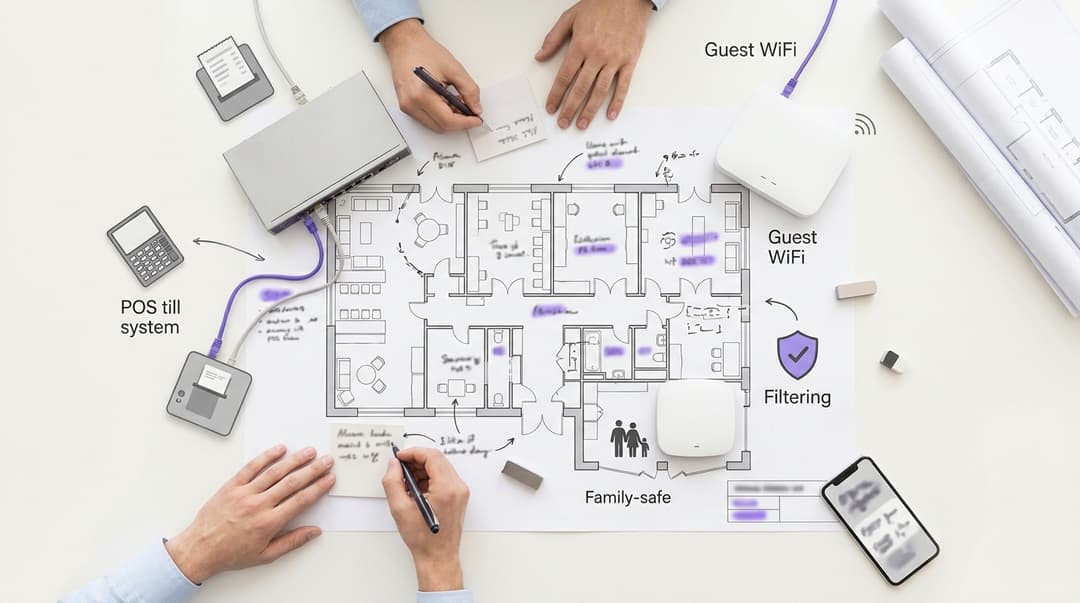
Pub group WiFi providers should give every pub at least three separated networks: guest, staff and payments. Register tape, card terminals and EPOS sit on the payments network, never the guest one. Ask for a one-screen sign-in with unchecked consent boxes. Filtering should be family-safe and set by the group. Each pub and the group should email one consented guest list.
Which networks does a pub need, and who uses each?
A pub runs more devices than most operators realize. Guests bring cell phones, staff bring cell phones and tablets, and the bar runs EPOS. EPOS stands for electronic point of sale: the registers, card terminals and kitchen printers that take orders and payments. Behind the bar sit music systems, TV boxes, cellar monitoring and CCTV.
Each group of devices needs its own network. A VLAN (virtual LAN, defined in IEEE 802.1Q) splits one physical network into separate logical ones. You can therefore run four networks on the access points and switches already in the pub.
Purple Access runs the guest, staff and EPOS networks across every pub on its existing access points. It works as a cloud overlay, so nothing in the ceiling changes.
| Network | Who uses it | How they connect | What it can reach | Filtering |
|---|---|---|---|---|
| Guest | Drinkers, diners, families, overnight guests | Captive portal sign-in on an open or OWE network | Internet only | Family-safe policy through Purple Shield |
| Staff | Bar team, kitchen team, pub managers | iPSK per pub, or 802.1X through Microsoft Entra ID for managed staff | Internet, schedule and stock apps | Group staff policy |
| Payments (EPOS) | Registers, card terminals, kitchen printers | Wired VLAN or a dedicated WPA3 network | Payment processor and EPOS cloud only | Allow-list only |
| Venue devices | Music, TV boxes, cellar monitoring, CCTV | Wired VLAN or iPSK per device | Each vendor's cloud service only | Allow-list only |
A few terms need defining. A captive portal is the sign-in page a guest sees before the internet opens. OWE (Opportunistic Wireless Encryption, RFC 8110) encrypts an open network without a password. iPSK (identity pre-shared key) gives each pub or device its own key on one network name. IEEE 802.1X authenticates each person against a directory, such as Microsoft Entra ID, Okta or Google Workspace.
Pubs with rooms add overnight guests who stay for hours, not minutes. Treat them as guests on the same network, with the stay patterns described in our Hotels pages.
What do you need before you ask pub group WiFi providers to quote?
Collect six facts per pub before you approach providers. Without them, every quote carries guesswork and every rollout carries surprises.
- Estate list by operating model. Mark each pub as managed, tenanted or leased, and record its brand. This decides who controls guest data and who signs off filtering.
- Access point inventory. Record the vendor and model in each pub. Purple runs on Cisco Meraki, HPE Aruba, Ruckus, Juniper Mist, Ubiquiti UniFi, Cambium, Extreme and Fortinet.
- Broadband and firewall. Note who supplies the line and the router in each pub. Tenants often buy their own, which changes who configures the firewall.
- How card terminals connect. Record whether each terminal is wired, on WiFi or on its own 4G SIM. This one fact shapes your PCI-DSS scope.
- Children's admission. Record which pubs welcome children and until what time. Family pubs need the guest filter in place from day one.
- Your CRM and email platform. Name the system that will receive the guest list, so the provider can confirm the integration.
Agree one more thing in writing: who owns guest data in a tenanted pub. Your lease agreement may already say. If it does not, settle it before the first guest signs in.
How do you set up guest sign-in, filtering and till separation across every pub?
Step 1: Map the estate into brands and pubs
Set up the group as the account holder, each brand as a group of venues, and each pub as a venue. Brand-level settings then flow to every pub in that brand. A change to the sign-in page or the filter happens once, not hundreds of times.
Give pub managers and tenants access to their own venue only. Area managers see their patch. Head office sees the estate.
Step 2: Build a guest sign-in that asks for the minimum
Every extra field costs sign-ins. Ask for what you will use and nothing else. Data privacy laws require data minimization, so the law points the same way as conversion.
A pub guest sign-in needs four elements:
- Email address and first name. Enough to send and personalize a message.
- Age confirmation. Regulations bar alcohol marketing directed at minors. You need to know who is an adult before you email them about a drinks offer.
- Two unchecked consent boxes. One for the pub, one for the group or brand. Unchecked boxes ensure valid consent.
- A link to your privacy notice. It names who controls the data and why.
Keep WiFi access and marketing consent separate. Regulations treat consent as unlikely to be freely given when a service depends on it. A guest who checks nothing still gets online. The TCPA and CAN-SPAM then govern every marketing email and text you send to those who did check the box.
Our Guest WiFi pages show the sign-in options Purple supports for each brand.
Step 3: Set family-safe filtering once, at group level
Purple Shield applies content filtering to the guest network. The group sets one baseline policy and locks it, so no bar can weaken it locally. That matters most in bars that welcome children, where a guest's screen is visible to every table.
Use Friendly WiFi as your benchmark. It is the certification scheme for public WiFi. As a minimum, it requires filtering of pornography and of child sexual abuse material on the Internet Watch Foundation (IWF) list.
Decide who can change what:
- The group sets and owns the baseline categories for every bar.
- Brand owners can add stricter categories for family brands.
- Bar managers and tenants can request an allow-list entry, which the group approves centrally.
Apply the guest filter to the guest network only. The staff network gets its own policy, so a manager can still reach a supplier site that the guest filter blocks.
Step 4: Keep registers, card terminals and POS off the guest network
PCI DSS v4.0 does not require segmentation. It does treat every system that can reach card data as in scope for assessment. Put registers on the guest network and every guest phone joins your cardholder data environment. Separate them and the guest network falls out of scope.
Separate the networks at three layers:
- VLANs. Put guest, staff, payments and venue devices on separate IEEE 802.1Q VLANs.
- Firewall rules. Deny all traffic from the guest VLAN to the payments VLAN. Allow the payments VLAN to reach only your processor and POS cloud.
- Client isolation. Stop guest devices from seeing each other on the guest network.
Encrypt the payments network with WPA3, or keep it wired. PCI DSS Requirement 2.3.1 requires wireless vendor defaults to be changed on any network carrying account data. Our guide to securing a business network covers the firewall side in more depth.
How your terminals connect decides the work involved:
| How the terminal connects | What you do | Effect on the guest network |
|---|---|---|
| Own 4G SIM | Leave it off the bar network entirely | Guest network carries no card traffic |
| Wired to the POS switch | Put the switch port on the payments VLAN | Guest network carries no card traffic |
| WiFi | Move it to a dedicated WPA3 payments network on its own VLAN | Guest network carries no card traffic once firewall rules block it |
| WiFi on a shared network with guests | Migrate before go-live, then retire the shared network | Guest network is in PCI DSS scope until you do |
Step 5: Connect managed and tenanted bars to one guest list
Purple Engage holds the consented guest list and sends email by bar and by brand. The model differs between managed and tenanted bars, because the businesses differ.
In a managed bar, the group runs the business. The group is the controller and the consent names the group and the brand.
In a tenanted pub, the tenant runs their own business under your brand or your tie. The consent should name both the tenant's business and the group. FTC and state attorneys general consent guidance asks you to name every controller that will rely on the consent. Where both decide how the data is used, CCPA/CPRA calls for a joint controller arrangement.
Then set access to match:
- Each tenant sees and emails their own pub's list only.
- The group emails across the estate, filtered by brand, region or visit pattern.
- Both honor every unsubscribe, wherever it starts.
Agree what happens when a lease ends. Consents given to the departing tenant's business usually leave with that business. Consents given to the group stay. Our post on first-party data strategy for US venues covers the CRM side.
Step 6: Roll out in waves, not all at once
Start with five to 10 pubs that cover each brand and each access point vendor. Fix what breaks, then scale in batches. Our multi-site WiFi rollout plan sets out the wave structure and the go/no-go checks.
Because Purple works on hardware you already own, most pubs need configuration rather than new equipment. Our post on why your next WiFi upgrade doesn't need new hardware explains how.
Got questions about your specific setup?
Our team works with venue operators, IT managers, and network engineers across 80,000 venues. Book a 20-minute call and we will show you how others like you solved it.
How do you check each pub is set up correctly?
Test every pub before you call it live. Run these checks from a cell phone on the guest network, then record the result against the venue.
- Sign-in works end to end. Connect, sign in and confirm the internet opens. Confirm a guest who ticks no boxes still gets online.
- The consent record lands in the right place. Check the new record appears under the correct pub, with the consent choices the guest made.
- The filter blocks what it should. Try a known blocked category and confirm the block page appears.
- The POS systems are unreachable. Try to reach the POS and terminal addresses from the guest network. Every attempt should fail.
- Guests cannot see each other. Confirm client isolation blocks a second test cell phone.
Then build two checks into the calendar. PCI DSS Requirement 11.2.1 calls for testing for unauthorized wireless access points every three months. Requirement 11.4.5 calls for penetration tests of segmentation controls every 12 months, and after any change.
Watch connections per pub in WiFi Analytics. A pub whose sign-ins fall to zero overnight has a fault, not a quiet week.
What goes wrong in pub WiFi rollouts, and how do you fix it?
Most failures trace back to the pre-rollout facts in the checklist above. These are the ones we see most often.
| Symptom | Likely cause | Fix |
|---|---|---|
| Card terminal drops off after go-live | Terminal was on the old shared network you retired | Move it to the payments network or its 4G SIM, and confirm it before switch-off |
| Guest phone can reach a register address | Guest network mapped to the same VLAN as POS | Remap guest to its own VLAN, add a deny rule, then retest |
| Tenant cannot email their own guests | Consent wording named only the group | Reword to name the bar operator; new consents count, old ones do not |
| Family complains a school site is blocked | A filter category is broader than intended | The group adds the domain to the central allow-list |
| Few guests complete sign-in | Too many fields on the sign-in page | Cut to email, first name, age confirmation and consent |
| Staff use the guest network | No staff network, or one shared key that leaked | Issue an iPSK per bar and revoke it when someone leaves |
Rewording consent never rescues past records. A guest who agreed to emails from the group did not agree to emails from the tenant. Fix the wording early, because every week of the wrong wording is a week of unusable sign-ins.
How does this play out in managed and tenanted estates?
The two scenarios below are worked examples built from typical estate shapes, not named deployments. The outcomes are the measurable changes each step produces.
Scenario 1: a 180-bar managed estate with three brands
Situation. Local installers had built a separate sign-in page in each bar, giving 180 pages to maintain. In 40 bars, registers shared a network with guests. No bar filtered guest traffic, although most of the family brand admits children until 9 p.m. Newer bars ran Cisco Meraki; older ones ran Ubiquiti UniFi.
What was done. The group replaced the 180 pages with three brand templates. Every bar moved to four VLANs: guest, staff, payments and venue devices. Card terminals in the 40 shared bars moved to a WPA3 payments network. One Purple Shield policy covered all 180 guest networks, with stricter categories for the family brand.
Outcome. Sign-in pages fell from 180 to three. Bars with registers on the guest network fell from 40 to zero, confirmed by the reachability test in every bar. A filtering change went from 180 local edits to one central edit.
Scenario 2: a 450-bar estate, mostly tenanted
Situation. The group ran 60 managed bars and leased the other 390 to tenants. Tenants wanted their own guest lists. The group wanted one view across every bar for brand campaigns. Each side was collecting data the other could not legally use.
What was done. The group became the account holder, with each bar as a venue. Consent wording in tenanted bars named both the tenant's business and the group. Tenants received access to their own bar's list in Purple Engage. Head office segmented the estate list by brand and region.
Outcome. Each of the 390 tenants gained their own consented list. The group gained one list across 450 bars, with the consent to email it. When a lease changed hands, the group reassigned venue access in one step rather than reinstalling anything.
What does bar WiFi cost, and what do you get back?
Purple licenses three plans: Connect, Capture and Engage. Shield is a security add-on for filtering. Ask for a quote based on your bar count and the plans each brand needs. Tenanted bars can sit on a different plan from managed ones.
Four cost lines decide the total:
- Licenses for the plans and add-ons each bar uses.
- Hardware, which is none where your access points are on Purple's supported list.
- Configuration of VLANs and firewall rules in each bar, done centrally where the hardware allows.
- Compliance effort, which shrinks once the guest network leaves your PCI DSS scope.
The return comes from three places. First, a smaller cardholder data environment means fewer systems to assess. Second, a consented guest list gives each bar and the group a first-party channel they own. Third, one platform replaces the per-bar contracts that tenanted estates often accumulate.
Purple has done this at scale since 2012. We run in 80,000+ live venues in over 90 countries and handle 500 million users and logins a year. Purple is ISO 27001, Cyber Essentials and B Corp certified, and works with groups including Sweetgreen, Under Armour, Chase, and Eastern Michigan University.
Frequently asked questions
Does Purple work with the access points already in our bars?
Yes, Purple runs on access points you already own. Supported vendors include Cisco Meraki, HPE Aruba, Ruckus, Juniper Mist, Ubiquiti UniFi, Cambium, Extreme and Fortinet. Purple works as a cloud overlay, so a bar with mixed hardware still runs one guest sign-in, one filter policy and one guest list. You only buy new equipment where an access point is too old to support separate networks.
Can managed and tenanted bars share one WiFi platform?
Yes, managed and tenanted bars can run on one platform. The group holds the account and each bar becomes a venue with its own access. Managed bars follow group settings. Tenants see and email only their own guests. Consent wording in tenanted bars names both the tenant's business and the group, so each can lawfully email the guests who agreed to hear from them.
Who owns the guest data in a tenanted bar?
The businesses named in the consent control the guest data. In a tenanted bar, that is usually the tenant's business and the group together. CCPA/CPRA calls for clear joint agreement when both decide how data is used. Agree in writing what happens when a lease ends, because consents given to a departing tenant normally leave with that business.
Does a separate guest network take guest WiFi out of PCI DSS scope?
Yes, a properly segmented guest network falls outside your cardholder data environment. PCI DSS treats any system that can reach card data as in scope. Separate VLANs, firewall rules blocking guest-to-payments traffic and client isolation remove guest devices from that reach. You must prove it, though. Requirement 11.4.5 calls for penetration tests of segmentation controls every 12 months and after any change.
Can we move from our current bar WiFi provider without visiting every location?
Yes, in most locations the move is configuration, not installation. Where access points are on Purple's supported list, the guest, staff and payments networks are configured centrally. Some bars still need a visit, typically where card terminals sit on a shared network or the router belongs to the tenant. Run the pre-rollout checklist first, so you know which bars those are.
Who decides what the family-safe filter blocks?
The group decides, and the policy is set once for every location. Purple Shield applies the group's baseline to each guest network, and no manager can weaken it locally. Family brands can add stricter categories. Bar managers and tenants request allow-list entries, which head office approves centrally.
Is a quick guest sign-in compatible with CCPA/CPRA and alcohol marketing rules?
Yes, a short sign-in can meet both sets of rules. Ask for email, first name, age confirmation and two unchecked consent boxes. CCPA/CPRA rules out pre-checked boxes, and regulations mean WiFi access cannot depend on marketing consent. The age confirmation keeps you compliant with marketing codes that bar alcohol marketing directed at under-21s.
Key Definitions
VLAN (IEEE 802.1Q)
A virtual LAN, specified in IEEE 802.1Q, which adds a tag to Ethernet frames so one physical switch and access point network carries several logically separate networks.
You meet it when configuring switches and access points in each location. It lets you run guest, staff, payments and venue-device networks on hardware already in the ceiling, without new cabling.
POS
Point of sale: the registers, card terminals and kitchen printers that take orders and payments. Any POS system that stores, processes or can reach card data falls within PCI DSS assessment scope.
Recording how each location's POS and terminals connect (wired, WiFi or 4G cellular) is the single fact that decides how much segmentation work a location needs.
Captive portal
A web page presented to a device on joining a network, intercepting HTTP traffic until the visitor authenticates or accepts terms, after which the network opens internet access.
It is where guest sign-in, age confirmation and the two unchecked consent boxes live, so its design decides both conversion and CCPA/CPRA compliance.
OWE (Opportunistic Wireless Encryption)
Defined in IETF RFC 8110, OWE uses a Diffie-Hellman key exchange during association to encrypt traffic on an open network without a shared password.
Running the guest network as OWE rather than fully open encrypts guest traffic while keeping the one-screen sign-in free of password friction.
iPSK (identity pre-shared key)
A method that issues a distinct pre-shared key per bar, device or person on a single network name (SSID), with the key mapping the client to its own VLAN and policy.
Use it for staff in each location and for venue devices, so a leaked key can be revoked for one location when someone leaves rather than changed across the estate.
IEEE 802.1X
The IEEE port-based network access control standard, which authenticates each person or device against a directory through an EAP method and a RADIUS (Remote Authentication Dial-In User Service) server before granting network access.
Suits managed staff whose identities sit in Microsoft Entra ID, Okta or Google Workspace, giving per-person access to schedule and inventory apps.
WPA3
The current WiFi security certification, replacing WPA2 personal mode with SAE (Simultaneous Authentication of Equals, from IEEE 802.11) to resist offline password guessing, and mandating protected management frames.
Card terminals that must stay on WiFi move to a dedicated WPA3 payments network on its own VLAN, never the guest network.
PCI DSS v4.0 and the cardholder data environment
The Payment Card Industry Data Security Standard v4.0 treats every system that stores, processes, transmits or can connect to card data as in scope. Requirement 2.3.1 covers wireless vendor defaults, 11.2.1 quarterly rogue access point testing and 11.4.5 segmentation penetration testing.
Segmenting POS terminals from guests removes every guest phone from assessment scope, which shrinks your compliance effort and sets your testing calendar.
Client isolation
An access point or controller setting that blocks layer 2 traffic between wireless clients on the same network, so devices reach the gateway but not each other.
It is one of the three separation layers on the guest network and is checked at launch by confirming a second test phone cannot be seen.
Joint controller (CCPA/CPRA Article 26)
Under privacy regulations such as the CCPA/CPRA, where two or more controllers jointly determine the purposes and means of processing, they must set out their respective responsibilities in a transparent arrangement.
Applies in leased bars where the operator and the group both decide how guest data is used, and it shapes the consent wording and lease exit terms.
TCPA and CAN-SPAM regulations
The TCPA and CAN-SPAM regulations govern unsolicited marketing by electronic mail and commercial messages to individuals, requiring prior opt-in consent or clear opt-out options.
It governs every marketing email each bar and the group send to guests who checked a consent box at sign-in.
Friendly WiFi
The certification scheme for public WiFi, which as a minimum requires filtering of pornography and of child sexual abuse material on the Internet Watch Foundation (IWF) list.
Use it as the benchmark for the group's locked family-safe baseline in Purple Shield, especially in bars that admit children.
Worked Examples
A 180-location managed estate with three brands had 180 locally built sign-in pages, POS terminals sharing a network with guests in 40 locations and no guest filtering, despite the family brand admitting children until 9pm. Hardware was mixed Cisco Meraki and Ubiquiti UniFi. How should the group fix it?
The group replaced the 180 pages with three brand templates, so a brand-level change flows to every location. Every location moved to four VLANs: guest, staff, payments and venue devices. Card terminals in the 40 shared locations moved to a WPA3 payments network, removing guest devices from PCI DSS scope. One Purple Shield policy covered all 180 guest networks, with stricter categories for the family brand. Because Purple is hardware-agnostic, the mixed estate needed configuration, not new equipment. Sign-in pages fell from 180 to three. Locations with POS terminals on the guest network fell from 40 to zero, confirmed by a reachability test in every location. A filtering change went from 180 local edits to one central edit.
A 450-location group runs 60 corporate locations and leases 390 to franchisees. Franchisees want their own guest lists and the group wants one estate view for brand campaigns, but each side collects data the other cannot legally use. How do you resolve it?
The group became the account holder, with each location set up as a venue. In franchise locations, consent wording named both the franchisee's business and the group, in line with the FTC and state attorneys general guidance to name every controller relying on consent and CCPA/CPRA requirements. Franchisees received access to their own location's list in Purple Engage only. Corporate headquarters segmented the estate list by brand and region. Each of the 390 franchisees gained their own consented list, and the group gained one list across 450 locations with consent to email it. When a franchise changed hands, the group reassigned venue access in one step rather than reinstalling anything.
Frequently asked questions
Does Purple work with the access points already in our venues?
Yes, Purple runs on access points you already own. Supported vendors include Cisco Meraki, HPE Aruba, Ruckus, Juniper Mist, Ubiquiti UniFi, Cambium, Extreme, and Fortinet. Purple works as a cloud overlay, so a venue with mixed hardware still runs one guest sign-in, one filter policy, and one guest list. You only buy new equipment where an access point is too old to support separate networks.
Can corporate-owned and franchised venues share one WiFi platform?
Yes, corporate-owned and franchise or tenant locations can run on one platform. The group holds the account and each location becomes a venue with its own access. Corporate-owned venues follow group settings. Franchisees see and email only their own guests. Consent wording in franchised venues names both the operator's business and the group, so each can lawfully email the guests who agreed to hear from them.
Who owns the guest data in a franchised or tenanted venue?
The businesses named in the consent control the guest data. In a franchised venue, that is usually the franchisee's business and the group together. Under the TCPA and CAN-SPAM regulations, explicit consent must be maintained for marketing. Agree in writing what happens when a lease or franchise ends, because consents given to a departing operator normally leave with that business.
Does a separate guest network take guest WiFi out of PCI DSS scope?
Yes, a properly segmented guest network falls outside your cardholder data environment. PCI DSS treats any system that can reach card data as in scope. Separate VLANs, firewall rules blocking guest-to-payments traffic, and client isolation remove guest devices from that reach. You must prove it, though. Requirement 11.4.5 calls for penetration tests of segmentation controls every 12 months and after any change.
Can we move from our current venue WiFi provider without visiting every location?
Yes, in most venues the move is configuration, not installation. Where access points are on Purple's supported list, the guest, staff, and payments networks are configured centrally. Some locations still need a visit, typically where card terminals sit on a shared network or the router belongs to the tenant. Run the pre-rollout checklist first, so you know which locations those are.
Who decides what the family-safe filter blocks?
The group decides, and the policy is set once for every location. Purple Shield applies the group's baseline to each guest network, and no location can weaken it locally. Family brands can add stricter categories. Venue managers and franchisees request allow-list entries, which head office approves centrally. Content filtering provides a sensible minimum benchmark to ensure family-safe browsing.
Is a quick guest sign-in compatible with US privacy and alcohol marketing rules?
Yes, a short sign-in can meet both sets of rules. Ask for email, first name, age confirmation, and two unchecked consent boxes. The TCPA and CAN-SPAM rules require clear opt-in options, and marketing consent must remain optional for guest WiFi access. The age confirmation keeps your marketing compliant with regulations that bar alcohol marketing directed at minors under 21.
Sources
- IETF RFC 8110: Opportunistic Wireless Encryption
- UK GDPR (Regulation (EU) 2016/679 as retained), legislation.gov.uk
- Privacy and Electronic Communications (EC Directive) Regulations 2003
- Information Commissioner's Office
- PCI Security Standards Council document library (PCI DSS v4.0)
- CAP Code (UK Code of Non-broadcast Advertising), section 18 alcohol
- Friendly WiFi certification scheme
- Internet Watch Foundation
Continue reading in this series
Multi-site WiFi rollout plan: moving guest, staff and filtering to one platform across an estate
You will be able to plan and run a multi-site WiFi rollout in four phases: pilot, site template, cutover waves and sign-off. You can decide which sites to pilot, the order in which guest, staff and filtering move, how to size waves, and how to keep estate reporting comparable while legacy and Purple sites run side by side.
Fitness center and gym WiFi providers: members, swim-school parents and staff on one platform
Use this guide to shortlist fitness center WiFi providers and specify three networks on your existing access points: filtered guest WiFi for members and swim-school parents, 802.1X Staff WiFi tied to work accounts, and an isolated device network for turnstiles and POS registers. You can then test each provider against 10 questions on filtering, PCI DSS scope and consented marketing.
Guest WiFi and DNS filtering platforms for MSPs: a multi-site checklist for multi-tenant management and white label
You will be able to shortlist a guest WiFi platform for your MSP practice and run multi-tenant management across every client from one console. You can template white-label sign-in pages, layer DNS filtering by client, site and network, and close bypass routes. You will also be able to pick a billing model that matches the contracts you sell.
Got questions about your specific setup?
Our team works with venue operators, IT managers, and network engineers across 80,000 venues. Book a 20-minute call and we will show you how others like you solved it.