
गेस्ट WiFi वर वेळ आणि बँडविड्थ निर्बंध कसे लागू करावे
एंटरप्राइझ गेस्ट WiFi नेटवर्कवर वेळ आणि बँडविड्थ निर्बंध लागू करण्याबाबतचे एक अधिकृत तांत्रिक संदर्भ मार्गदर्शक. हे मार्गदर्शक IT नेत्यांना नेटवर्क कार्यप्रदर्शन, सुरक्षा अनुपालन आणि अभ्यागतांचा अनुभव यामध्ये संतुलन राखण्यास मदत करण्यासाठी कृतीयोग्य आर्किटेक्चरल ब्ल्यूप्रिंट्स, व्हेंडर-तटस्थ कॉन्फिगरेशन्स आणि वास्तविक-जगातील केस स्टडीज प्रदान करते.
हे मार्गदर्शक ऐका
पॉडकास्ट ट्रान्सक्रिप्ट पहा
कार्यकारी सारांश
आधुनिक उपक्रमांसाठी, गेस्ट वायरलेस ॲक्सेस देणे ही आता चैनीची गोष्ट राहिलेली नाही; ती एक कार्यात्मक गरज बनली आहे. तथापि, अनमॅनेज्ड गेस्ट नेटवर्क हे एक मोठे धोक्याचे कारण ठरू शकते, जे कॉर्पोरेट नेटवर्कचे कार्यप्रदर्शन खराब करू शकते, संवेदनशील डेटा उघड करू शकते आणि नियामक दायित्वे निर्माण करू शकते. IT व्यवस्थापक, नेटवर्क आर्किटेक्ट्स आणि CTOs यांनी आता ओपन-एंडेड कनेक्टिव्हिटीच्या मॉडेलकडून अत्यंत संरचित, पॉलिसी-चालित गेस्ट ॲक्सेस लेयरकडे वळले पाहिजे.
हे संदर्भ मार्गदर्शक गेस्ट वायरलेस नेटवर्कवर अचूक वेळ आणि बँडविड्थ निर्बंध लागू करण्यासाठीच्या तांत्रिक धोरणांचे तपशील देते. व्हर्च्युअल लोकल एरिया नेटवर्क (VLANs) द्वारे लॉजिकल नेटवर्क सेगमेंटेशन तैनात करून, एंटरप्राइझ-ग्रेड क्वालिटी ऑफ सर्व्हिस (QoS) फ्रेमवर्कचा वापर करून आणि क्लाउड-मॅनेज्ड पॉलिसी डिसिजन पॉइंट्स (PDPs) चा लाभ घेऊन, संस्था उच्च दर्जाचा अभ्यागत अनुभव प्रदान करत असतानाच गंभीर व्यावसायिक ऑपरेशन्सचे रक्षण करू शकतात.
प्रोॲक्टिव्ह बँडविड्थ थ्रॉटलिंग, सेशन कालावधी मर्यादा आणि वेळ-आधारित SSID शेड्यूलिंगद्वारे, नेटवर्क प्रशासक अपस्ट्रीम लिंक्स सॅच्युरेट करणाऱ्या "बँडविड्थ हॉग्स" चा धोका कमी करू शकतात, PCI DSS v4.0 आणि GDPR सारख्या मानकांचे अनुपालन राखू शकतात आणि ग्राहक सहभागासाठी नवीन मार्ग खुले करू शकतात. २०० खोल्यांचे हॉटेल असो, हाय-डेन्सिटी स्पोर्ट्स स्टेडियम असो किंवा मल्टी-साइट रिटेल फूटप्रिंट असो, संरचित गेस्ट नेटवर्क ॲक्सेस पॉलिसी तैनात करणे हा आधुनिक नेटवर्क इन्फ्रास्ट्रक्चर डिझाइनचा एक मुख्य पाया आहे.
तांत्रिक सखोल विश्लेषण
गेस्ट वायरलेस नेटवर्कवर वेळ आणि बँडविड्थ निर्बंध लागू करण्यासाठी वायरलेस प्रोटोकॉल आणि नेटवर्क सुरक्षा आर्किटेक्चर या दोन्हीची सखोल माहिती असणे आवश्यक आहे. एक लवचिक गेस्ट नेटवर्क तयार करण्यासाठी, प्रशासकांनी OSI मॉडेलच्या अनेक लेयर्सवर काम केले पाहिजे, ज्यामध्ये ॲक्सेस पॉइंट्स, वायरलेस कंट्रोलर्स, फायरवॉल्स आणि ऑथेंटिकेशन सर्व्हर्सचे समन्वय साधणे समाविष्ट आहे.
1. बँडविड्थ व्यवस्थापन आणि क्वालिटी ऑफ सर्व्हिस (QoS)
वैयक्तिक क्लायंट किंवा संपूर्ण गेस्ट नेटवर्कला वेन्यूच्या WAN अपलिंकला सॅच्युरेट करण्यापासून रोखण्यासाठी बँडविड्थ निर्बंध लागू केले जातात. हे दोन मुख्य यंत्रणांचा वापर करून साध्य केले जाते: रेट लिमिटिंग (थ्रॉटलिंग) आणि ट्रॅफिक प्राधान्यीकरण.
वायरलेस लेयरवर, क्वालिटी ऑफ सर्व्हिस हे IEEE 802.11e मानकाद्वारे नियंत्रित केले जाते, जे Wi-Fi Multimedia (WMM) [1] सादर करते. WMM ट्रॅफिकला चार ॲक्सेस कॅटेगरी (AC) मध्ये प्राधान्य देते:
- Voice (AC_VO): सर्वोच्च प्राधान्य, सर्वात कमी लेटन्सी (उदा. VoIP).
- Video (AC_VI): उच्च प्राधान्य, कमी लेटन्सी (उदा. स्ट्रीमिंग मीडिया).
- Best Effort (AC_BE): मध्यम प्राधान्य, मानक ट्रॅफिक (उदा. वेब ब्राउझिंग).
- Background (AC_BK): सर्वात कमी प्राधान्य, हाय-थ्रूपुट डेटा (उदा. फाइल डाउनलोड).
गेस्ट नेटवर्कसाठी, सर्व ट्रॅफिक Best Effort (AC_BE) किंवा Background (AC_BK) कॅटेगरीमध्ये मॅप केले जावे. हे सुनिश्चित करते की पॉईंट ऑफ सेल (POS) व्यवहार किंवा कॉर्पोरेट VoIP कॉल्स यांसारख्या गंभीर कॉर्पोरेट ट्रॅफिकला गेस्ट वेब ब्राउझिंगपेक्षा प्राधान्य मिळेल.
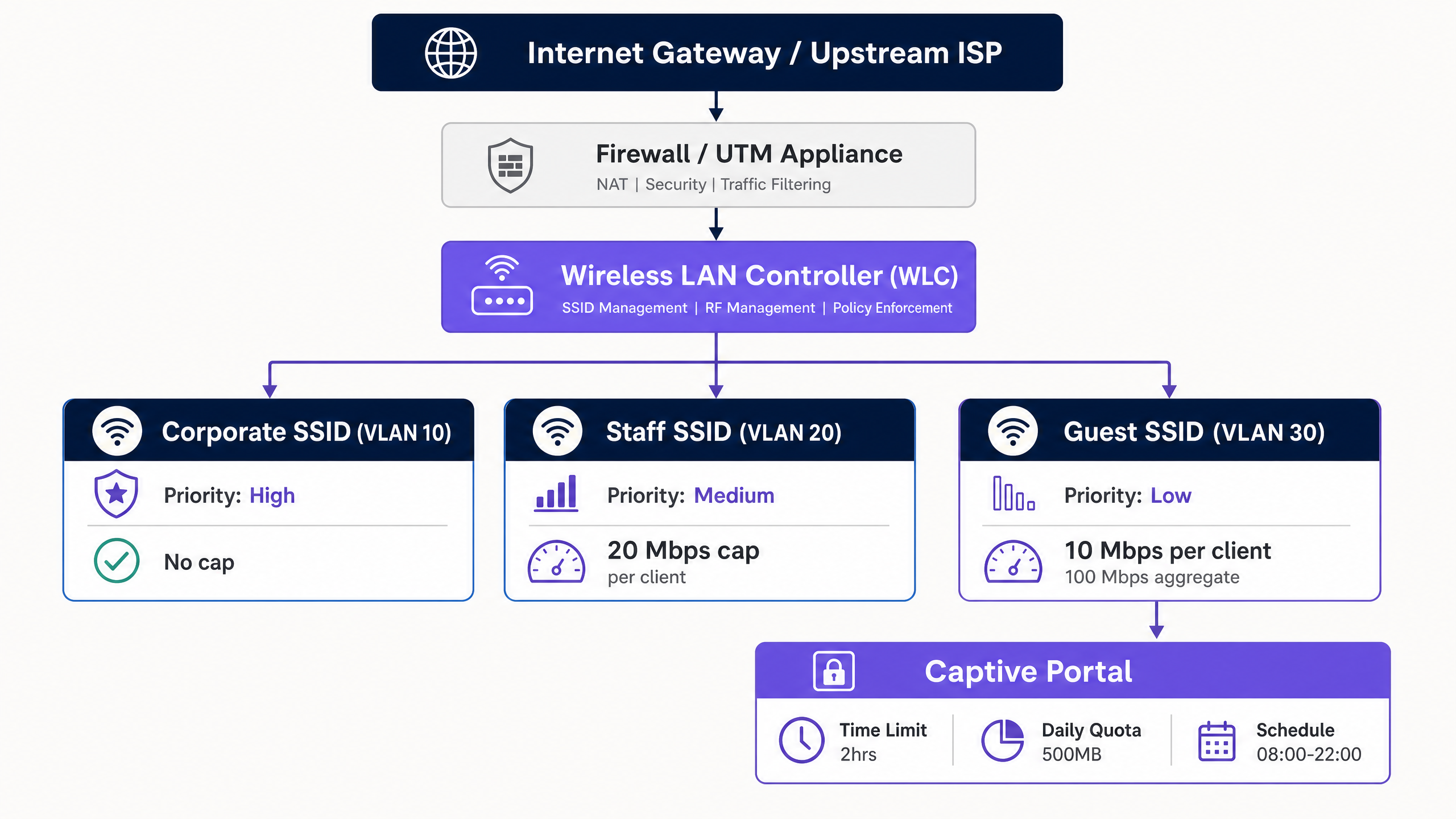
To enforce hard throughput limits, administrators deploy Per-Client Rate Limiting and Per-SSID Rate Limiting. Per-client limits cap the maximum downstream and upstream speeds for an individual device (e.g., 10 Mbps down / 2 Mbps up), while per-SSID limits restrict the aggregate bandwidth allocated to the entire guest network (e.g., 100 Mbps total).
2. वेळ-आधारित ॲक्सेस आणि सेशन व्यवस्थापन
वेळ-आधारित निर्बंध नेटवर्क कॉन्करन्सी व्यवस्थापित करतात आणि अनधिकृत दीर्घकालीन प्रवेशास प्रतिबंध करतात. यामध्ये दोन स्वतंत्र संकल्पनांचा समावेश आहे: सेशन टाइमआउट्स आणि SSID शेड्यूलिंग.
- Session Timeout: Captive Portal ऑथेंटिकेशन दरम्यान परत आलेल्या RADIUS ॲट्रिब्युट्सद्वारे लागू केले जाते. RADIUS सर्व्हर
Session-Timeoutॲट्रिब्युट (RADIUS Attribute 27) ॲक्सेस पॉईंट (AP) किंवा वायरलेस LAN कंट्रोलर (WLC) कडे पाठवतो [2]. सेकंदांमध्ये निर्दिष्ट केलेले हे मूल्य, पुन्हा ऑथेंटिकेशन आवश्यक होण्यापूर्वी क्लायंटचे सेशन किती काळ सक्रिय राहील हे ठरवते. - Idle Timeout: जर एखाद्या विशिष्ट कालावधीसाठी (उदा. १५ मिनिटे) क्लायंटकडून कोणताही ट्रॅफिक आढळला नाही, तर
Idle-Timeoutॲट्रिब्युट (RADIUS Attribute 28) सेशन समाप्त करते. निष्क्रिय उपकरणांकडून IP पत्ते परत मिळवण्यासाठी हाय-डेन्सिटी वेन्यूजमध्ये हे अत्यंत महत्त्वाचे आहे. - RADIUS Change of Authorization (CoA): RFC 5176 मध्ये परिभाषित केलेले, CoA RADIUS सर्व्हरला भौतिक वायरलेस लिंक डिस्कनेक्ट न करता WLC किंवा AP वर पॉलिसी बदल डायनॅमिकपणे पुश करण्याची परवानगी देते [3]. उदाहरणार्थ, जर एखाद्या गेस्टने त्यांचा दैनंदिन डेटा कोटा संपवला, तर RADIUS सर्व्हर क्लायंटची बँडविड्थ 20 Mbps वरून 1 Mbps पर्यंत डायनॅमिकपणे थ्रॉटल करण्यासाठी CoA संदेश जारी करू शकतो.
3. नेटवर्क सेगमेंटेशन आणि अनुपालन
गेस्ट वायरलेस आर्किटेक्चरचा एक मूलभूत नियम म्हणजे कॉर्पोरेट सिस्टमपासून पूर्णपणे वेगळे असणे. हे VLAN Segmentation द्वारे साध्य केले जाते. गेस्ट ट्रॅफिक एका समर्पित VLAN वर (उदा. VLAN 30) असणे आवश्यक आहे, जे कॉर्पोरेट LAN (VLAN 10) आणि व्हॉइस/मॅनेजमेंट नेटवर्क (VLAN 20) पासून पूर्णपणे वेगळे असेल.
इंटर-VLAN राउटिंग फायरवॉल लेयरवर प्रतिबंधित केले पाहिजे. प्रतिबंधात्मक फायरवॉल पॉलिसींनी सर्व गेस्ट-टू-कॉर्पोरेट ट्रॅफिक ब्लॉक केले पाहिजे. याव्यतिरिक्त, गेस्ट SSID वर Client Isolation (ज्याला पीअर-टू-पीअर ब्लॉकिंग देखील म्हटले जाते) सक्षम केले पाहिजे. हे एकाच गेस्ट नेटवर्कवरील वायरलेस क्लायंटना एकमेकांशी संवाद साधण्यापासून रोखते, ज्यामुळे लॅटरल मालवेअरचा प्रसार किंवा मॅन-इन-द-मिडल (MITM) हल्ल्यांचा धोका कमी होतो.
नेटवर्क सेगमेंटेशन ही केवळ एक सर्वोत्तम पद्धत नाही; ती एक कठोर अनुपालन आवश्यकता आहे. PCI DSS v4.0 Requirement 1.3 अंतर्गत, संस्थांनी कार्डधारक डेटा पर्यावरण (CDE) ला गेस्ट WiFi सह अविश्वसनीय नेटवर्कपासून वेगळे करण्यासाठी नेटवर्क सेगमेंटेशन लागू केले पाहिजे [4]. गेस्ट नेटवर्कचे सेगमेंटेशन न केल्यास संपूर्ण गेस्ट इन्फ्रास्ट्रक्चर...PCI ऑडिटच्या कक्षेत येतात, ज्यामुळे अनुपालन खर्च आणि सुरक्षा धोके कमालीचे वाढतात.
Additionally, Captive Portal द्वारे वैयक्तिक डेटा गोळा करणाऱ्या संस्थांनी GDPR चे पालन करणे आवश्यक आहे. यासाठी डेटा संकलनासाठी कायदेशीर आधार लागू करणे, स्पष्ट गोपनीयता सूचना सादर करणे आणि सत्र (session) लॉगवर कठोर डेटा धारणा मर्यादा लागू करणे आवश्यक आहे.
अंमलबजावणी मार्गदर्शक
एंटरप्राइझ इस्टेटमध्ये वेळ आणि बँडविड्थ निर्बंध लागू करण्यासाठी पद्धतशीर, विक्रेता-तटस्थ (vendor-neutral) वर्कफ्लो आवश्यक आहे. वरिष्ठ नेटवर्क अभियंत्यांसाठी शिफारस केलेली चरण-दर-चरण अंमलबजावणीची रूपरेषा खालीलप्रमाणे आहे.
पायरी १: लॉजिकल नेटवर्क विभाजन (VLAN आणि DHCP)
कोणतीही वायरलेस सेटिंग्ज कॉन्फिगर करण्यापूर्वी, तुमच्या कोर स्विच आणि फायरवॉलवर लॉजिकल नेटवर्क सीमा स्थापित करा.
- गेस्ट VLAN तयार करा: तुमच्या कोर स्विचेसवर एक समर्पित VLAN (उदा. VLAN 30) कॉन्फिगर करा आणि त्यास सर्व ॲक्सेस पॉइंट्सवर ट्रंक करा.
- DHCP स्कोप कॉन्फिगर करा: गेस्ट VLAN साठी एक समर्पित DHCP स्कोप सेट करा. उच्च-टर्नओव्हर वातावरणात IP ॲड्रेस संपू नये म्हणून कमी लीज वेळ (उदा. २ ते ४ तास) वापरा.
- DHCP स्नूपिंग आणि ARP इन्स्पेक्शन सक्षम करा: स्विचेसवर, अनधिकृत (rogue) DHCP सर्व्हर्स आणि MAC स्पूफिंग हल्ल्यांपासून संरक्षण करण्यासाठी DHCP स्नूपिंग आणि डायनॅमिक ARP इन्स्पेक्शन (DAI) सक्षम करा.
पायरी २: फायरवॉल पॉलिसी आणि ट्रॅफिक शेपिंग
गेस्ट VLAN ट्रॅफिक नियंत्रित करण्यासाठी सुरक्षा गेटवे कॉन्फिगर करा.
- इंटर-VLAN राउटिंग ब्लॉक करा: एक फायरवॉल नियम तयार करा जो गेस्ट VLAN (VLAN 30) मधून उद्भवणारा आणि कोणत्याही अंतर्गत सबनेटसाठी (उदा. VLAN 10, VLAN 20) असलेला सर्व ट्रॅफिक स्पष्टपणे ड्रॉप करेल.
- ट्रॅफिक शेपिंग लागू करा: प्राथमिक WAN लिंकचे संरक्षण करण्यासाठी गेस्ट VLAN इंटरफेसच्या एकूण थ्रूपुटला मर्यादित करण्यासाठी फायरवॉलवर एक सामायिक ट्रॅफिक शेपिंग पॉलिसी तयार करा. उदाहरणार्थ, १ Gbps फायबर सर्किटवर, गेस्ट VLAN ला १५० Mbps वर मर्यादित करा.
पायरी ३: वायरलेस SSID कॉन्फिगरेशन
तुमच्या वायरलेस LAN कंट्रोलर (WLC) किंवा क्लाउड-व्यवस्थापित डॅशबोर्डवर गेस्ट वायरलेस नेटवर्क कॉन्फिगर करा.
- गेस्ट SSID तयार करा: एक समर्पित SSID ब्रॉडकास्ट करा (उदा., "Venue Guest WiFi").
- क्लायंट आयसोलेशन सक्षम करा: गेस्ट उपकरणांना एकमेकांशी संवाद साधण्यापासून रोखण्यासाठी "Client Isolation" किंवा "Peer-to-Peer Blocking" सुरू करा.
- WPA3 अपॉर्च्युनिस्टिक वायरलेस एन्क्रिप्शन (OWE) सक्षम करा: सामायिक प्री-शेअर्ड की (PSK) च्या त्रासाशिवाय डेटा गोपनीयता प्रदान करण्यासाठी, WPA3-OWE कॉन्फिगर करा. हे प्रत्येक गेस्ट सत्रासाठी हवेतील ट्रॅफिक स्वतंत्रपणे एन्क्रिप्ट करते.
पायरी ४: RADIUS आणि Captive Portal एकत्रीकरण
प्रमाणीकरण आणि पॉलिसी अंमलबजावणी व्यवस्थापित करण्यासाठी तुमच्या वायरलेस इन्फ्रास्ट्रक्चरला Guest WiFi सारख्या केंद्रीकृत पॉलिसी डिसिजन पॉइंट (PDP) सह एकत्रित करा.
- RADIUS सर्व्हर्स कॉन्फिगर करा: तुमचे WLC/APs क्लाउड RADIUS सर्व्हर IP ॲड्रेसकडे निर्देशित करा. सुरक्षित शेअर्ड सिक्रेट्स सेट करा.
- RADIUS ॲट्रिब्युट्स मॅप करा: यशस्वी प्रमाणीकरणानंतर सत्र-मर्यादित करणारे ॲट्रिब्युट्स परत करण्यासाठी RADIUS प्रोफाइल कॉन्फिगर करा:
Session-Timeout=7200(२ तासांची सत्र मर्यादा लागू करते).Idle-Timeout=900(१५ मिनिटांचा निष्क्रिय टाइमआउट लागू करते).
- Captive Portal रिडायरेक्ट कॉन्फिगर करा: DNS, DHCP आणि Captive Portal होस्टनेम्सना ट्रॅफिकची परवानगी देण्यासाठी WLC/APs वर प्री-ऑथेंटिकेशन ACLs सेट करा, तर इतर सर्व HTTP/HTTPS ट्रॅफिकला पोर्टल स्प्लॅश पेजवर रिडायरेक्ट करा.
पायरी ५: SSID शेड्यूलिंग आणि टाइम विंडोज
नेटवर्क अधिक सुरक्षित करण्यासाठी आणि हल्ल्याची शक्यता कमी करण्यासाठी, कामकाजाच्या तासांच्या बाहेर गेस्ट ॲक्सेस अक्षम करण्यासाठी SSID शेड्यूलिंग कॉन्फिगर करा.
- शेड्यूल निश्चित करा: WLC किंवा क्लाउड डॅशबोर्डमध्ये, गेस्ट SSID ला वेळ प्रोफाइलशी मॅप करा (उदा., सोमवार-रविवार, ०८:०० ते २२:००).
- शटडाउन लागू करा: केवळ असोसिएशन ब्लॉक करण्याऐवजी, या तासांच्या बाहेर APs ने गेस्ट SSID ब्रॉडकास्ट करणे पूर्णपणे थांबवले आहे याची खात्री करा.
सर्वोत्तम पद्धती
गेस्टना कोणताही त्रास न देता उच्च नेटवर्क कार्यक्षमता राखणारे संतुलित डिप्लॉयमेंट सुनिश्चित करण्यासाठी, नेटवर्क आर्किटेक्ट्सनी खालील उद्योग-मानक सर्वोत्तम पद्धतींचे पालन केले पाहिजे.
१. डायनॅमिक बँडविड्थ वाटप आणि "Bursting"
स्थिर (static) बँडविड्थ मर्यादा कधीकधी कमी-वापर असलेल्या कालावधीत गेस्टना निकृष्ट दर्जाचा अनुभव देऊ शकते. डायनॅमिक बँडविड्थ वाटप किंवा bursting पॉलिसी लागू करण्याची अत्यंत शिफारस केली जाते.
- Bursting (किंवा Boost): जलद पेज लोड किंवा व्हिडिओ बफरिंगसाठी गेस्ट उपकरणाला तात्पुरती त्यांची बँडविड्थ मर्यादा ओलांडण्याची परवानगी देते (उदा. डाउनलोडच्या पहिल्या १५ सेकंदांसाठी १० Mbps वरून ३० Mbps पर्यंत वाढवणे), आणि त्यानंतर त्यांना हळूवारपणे त्यांच्या बेसलाइन रेट मर्यादेवर परत आणते. हे Tanaza [5] सारख्या प्रगत नियंत्रक आणि प्लॅटफॉर्मद्वारे मूळतः (natively) समर्थित आहे.
- डायनॅमिक शेपिंग: एकूण WAN वापराच्या आधारे एकूण गेस्ट SSID बँडविड्थ मर्यादा समायोजित करते. कॉर्पोरेट नेटवर्क निष्क्रिय असल्यास, गेस्ट नेटवर्क त्याची मर्यादा डायनॅमिकपणे वाढवू शकते, आणि कॉर्पोरेट ट्रॅफिक वाढताच ती त्वरित कमी करू शकते.
२. उद्योग क्षेत्रानुसार (Industry Vertical) योग्य आकाराच्या पॉलिसी
बँडविड्थ आणि वेळ मर्यादा वेगवेगळ्या वातावरणात एकसारख्या नसाव्यात. त्या प्रत्येक उद्योगाच्या विशिष्ट निवास वेळ (dwell times) आणि वापरकर्त्यांच्या अपेक्षांनुसार तयार केल्या पाहिजेत.
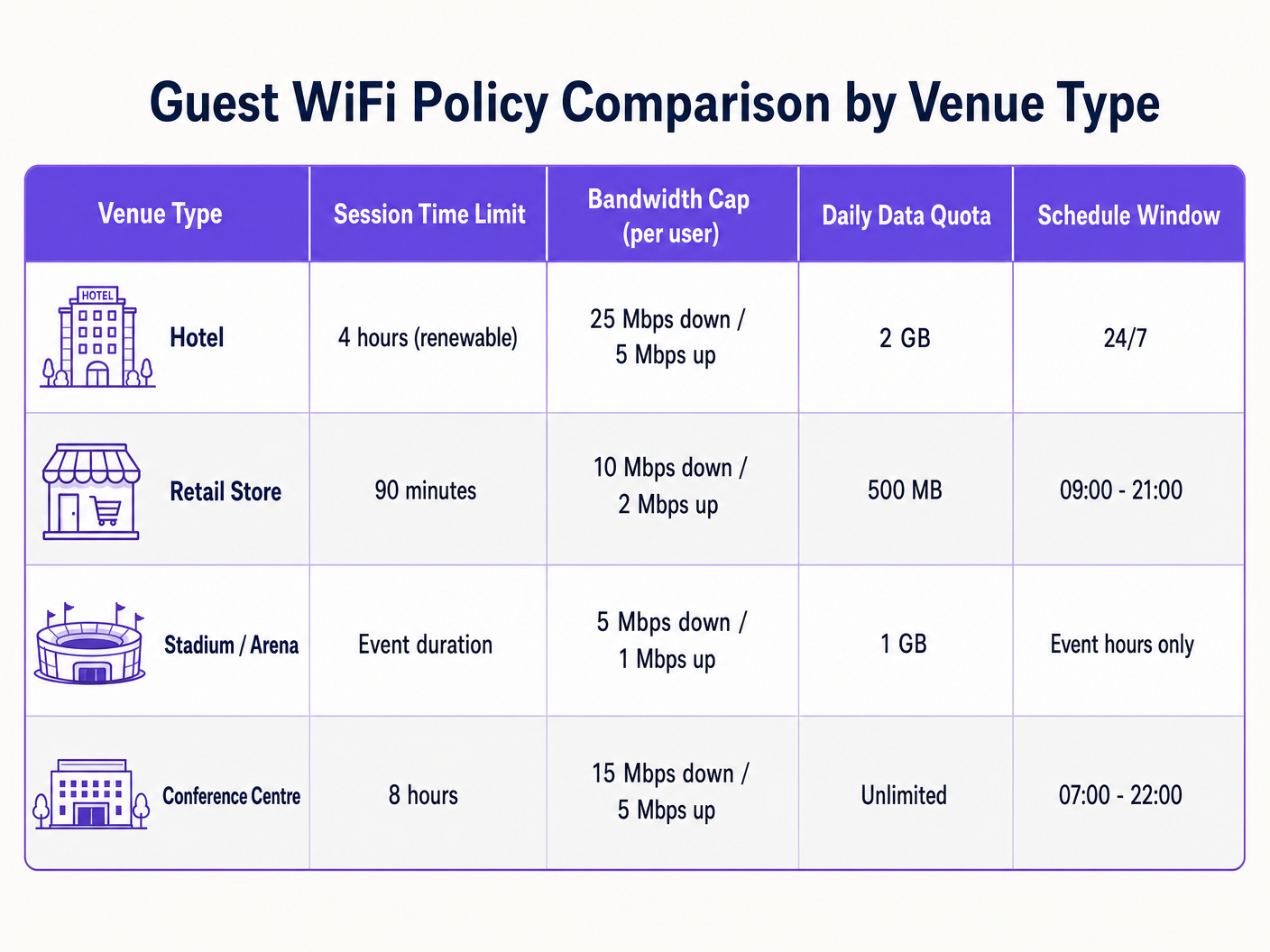
- हॉस्पिटॅलिटी: हॉटेल्समधील पाहुणे स्ट्रीमिंग आणि रिमोट कामासाठी हाय-थ्रूपुट कनेक्शनची अपेक्षा करतात. वारंवार पुन्हा-प्रमाणीकरणाचा त्रास टाळण्यासाठी प्रति खोली किमान २५ Mbps डाउन स्पीड आणि दीर्घ सत्र वेळेसह (उदा. २४ तास) पॉलिसी तयार करा [6]. सखोल माहितीसाठी, आमच्या Hotel WiFi Speed & Bandwidth Planning मार्गदर्शकाचा सल्ला घ्या.
- रिटेल: निवास वेळ कमी असतो, साधारणपणे ३० ते ९० मिनिटे. टर्नओव्हरला प्रोत्साहन देण्यासाठी आणि पुन्हा-प्रमाणीकरणादरम्यान WiFi Analytics द्वारे मार्केटिंग डेटा गोळा करण्यासाठी ९० मिनिटांचा कठोर सत्र टाइमआउट लागू करा [7].
- स्टेडियम आणि क्रीडांगणे: हजारो समवर्ती (concurrent) वापरकर्ते असलेले उच्च-घनता (high-density) वातावरण. बँडविएकूण बॅकहॉल सॅचुरेशन रोखण्यासाठी मर्यादा अतिशय कमी (उदा. ५ Mbps डाउन) असणे आवश्यक आहे, आणि सेशनची वेळ इव्हेंटच्या कालावधीशी सुसंगत असावी [8].
३. प्रोफाइल-आधारित टियर ऍक्सेसचा (Tiered Access) वापर करा
सर्व पाहुण्यांसाठी एकच नियम असणारे ("one-size-fits-all") गेस्ट नेटवर्क टाळा. निष्ठावंत ग्राहकांना (loyalty) बक्षीस देण्यासाठी आणि प्रीमियम कनेक्टिव्हिटीचे कमाईत रूपांतर करण्यासाठी टियर ऍक्सेस प्रोफाइल लागू करा:
- Free Tier: मानक गती (उदा. ५ Mbps डाउन), १-तास सेशन मर्यादा, बेसिक Captive Portal लॉगिन.
- Premium Tier: उच्च गती (उदा. ५० Mbps डाउन), २४-तास सेशन मर्यादा, लॉयल्टी क्रेडेंशियल्स, रूम नंबर किंवा थेट पेमेंटद्वारे प्रमाणित (authenticated). हे सहसा २०२६ साठी १० सर्वोत्तम नेटवर्क ऍक्सेस कंट्रोल (NAC) सोल्यूशन्स वापरून लागू केले जाते किंवा क्लाउड RADIUS सह 802.1X ऑथेंटिकेशन कसे लागू करावे सह समाकलित (integrate) केले जाते.
त्रुटी निवारण आणि जोखीम कमी करणे (Troubleshooting & Risk Mitigation)
सक्रिय निर्बंधांसह गेस्ट वायरलेस नेटवर्क चालवल्याने काही विशिष्ट त्रुटी उद्भवू शकतात, ज्यांचे IT टीम्सनी सक्रियपणे निरीक्षण आणि निवारण केले पाहिजे.
१. MAC ॲड्रेस रँडमायझेशन आणि सेशन ट्रॅकिंग
आधुनिक मोबाईल ऑपरेटिंग सिस्टीम्स (iOS १४+, Android १०+) डीफॉल्टनुसार MAC ॲड्रेस रँडमायझेशन वापरतात, ज्यामुळे वापरकर्त्याच्या गोपनीयतेचे रक्षण करण्यासाठी डिव्हाइसचा हार्डवेअर आयडेंटिफायर बदलला (rotate) जातो.
- जोखीम: जर तुमचे गेस्ट नेटवर्क केवळ MAC ॲड्रेसद्वारे सेशन टाइमआउट किंवा डेटा कोटा ट्रॅक करत असेल, तर जो डिव्हाइस त्याचा MAC ॲड्रेस रँडमाइज करतो तो एक अगदी नवीन डिव्हाइस म्हणून दिसेल, ज्यामुळे तुमच्या वेळेच्या मर्यादा आणि डेटा मर्यादा (data caps) बायपास होतील.
- निवारण: सेशन स्टेटसाठी (session state) केवळ MAC ॲड्रेसवर अवलंबून राहू नका. Captive Portal लेयरवर ओळख-आधारित (identity-based) ऑथेंटिकेशन मॉडेलचा वापर करा. तुमच्या RADIUS डेटाबेसमध्ये वापरकर्त्याच्या प्रमाणित ओळखीशी (उदा. ईमेल पत्ता, सत्यापित फोन नंबर किंवा लॉयल्टी आयडी) सेशन स्टेट, वेळ मर्यादा आणि डेटा कोटा जोडला जाईल याची खात्री करा.
२. IP ॲड्रेस संपणे (IP Address Exhaustion)
ट्रान्झिट हब किंवा रिटेल मॉल्ससारख्या जास्त गर्दीच्या ठिकाणी, जास्त DHCP लीझ टाइम उपलब्ध IP पूल पटकन संपवू शकतो, ज्यामुळे नवीन पाहुण्यांना कनेक्ट होण्यापासून रोखले जाते.
- जोखीम: जर DHCP लीझ मानक २४ तासांवर सेट केले असेल, परंतु पाहुण्यांचा सरासरी थांबण्याचा वेळ २० मिनिटे असेल, तर हजारो IP ॲड्रेस निघून गेलेल्या डिव्हाइसेसना लीझवर राहतील, ज्यामुळे सक्रिय वापरकर्त्यांना IP मिळणार नाही.
- निवारण: गेस्ट स्कोपवरील DHCP लीझ वेळ ३० किंवा ६० मिनिटांपर्यंत कमी करा. उपलब्ध IP पूल वाढवण्यासाठी मोठा सबनेट मास्क (उदा.
/२४ऐवजी/२०किंवा/१९) लागू करा. तुमच्या वायरलेस कंट्रोलरद्वारे समर्थित असल्यास DHCP Release on Disconnect सक्षम (enable) करा.
३. Captive Portal रिडायरेक्ट अयशस्वी होणे (DNS आणि SSL)
पाहुण्यांची सर्वात सामान्य तक्रार म्हणजे "लॉगिन पेज लोड होत नाही." हे सहसा चुकीच्या पद्धतीने कॉन्फिगर केलेल्या DNS किंवा SSL सर्टिफिकेटच्या समस्यांमुळे होते.
- जोखीम: जर गेस्ट डिव्हाइस ऑथेंटिकेशनपूर्वी DNS क्वेरी सोडवू (resolve) शकले नाही, तर ते Captive Portal लोड करू शकत नाही. शिवाय, जर Captive Portal रिडायरेक्ट अविश्वासू किंवा कालबाह्य झालेले SSL सर्टिफिकेट वापरत असेल, तर आधुनिक ब्राउझर सुरक्षा चेतावणीसह रिडायरेक्ट ब्लॉक करतील.
- निवारण: प्री-ऑथेंटिकेशन ACL (walled garden) सार्वजनिक रिझोल्व्हर्स (उदा.
1.1.1.1या8.8.8.8) किंवा स्थानिक गेटवे DNS कडे जाणाऱ्या DNS ट्रॅफिकला स्पष्टपणे अनुमती देईल याची खात्री करा. तुमच्या Captive Portal रिडायरेक्ट होस्टनेमसाठी नेहमी वैध, सार्वजनिकरित्या विश्वसनीय SSL/TLS सर्टिफिकेट वापरा. सेल्फ-साइन केलेल्या सर्टिफिकेट्सचा वापर टाळा.
ROI आणि व्यावसायिक प्रभाव (ROI & Business Impact)
रचनात्मक गेस्ट WiFi निर्बंध लागू करणे हा केवळ एक तांत्रिक सराव नाही; हे एंटरप्राइझसाठी मोजता येण्याजोगे आर्थिक आणि ऑपरेशनल फायदे प्रदान करते.
१. WAN खर्च नियंत्रण आणि बँडविड्थ बचत
अनियंत्रित गेस्ट नेटवर्क्स संस्थांना पीक डिमांड (peak demand) हाताळण्यासाठी त्यांचे WAN सर्किट्स सतत अपग्रेड करण्यास भाग पाडतात. प्रति-क्लायंट रेट मर्यादा आणि एकूण मर्यादा (aggregate caps) लागू करून, एंटरप्राइजेस त्यांच्या विद्यमान इंटरनेट कनेक्शनचे आयुष्य लक्षणीयरीत्या वाढवू शकतात.
- परिस्थिती (Scenario): ५०० Mbps सर्किट असलेले एक मध्यम आकाराचे हॉटेल संध्याकाळच्या गर्दीच्या वेळी काही पाहुण्यांनी ४K व्हिडिओ स्ट्रीमिंग केल्यामुळे गंभीर लॅटन्सीचा (latency) सामना करते.
- उपाय: प्रति-क्लायंट १५ Mbps ची मर्यादा लागू केल्याने पीक युटिलायझेशन ४०% ने कमी होते, ज्यामुळे महागड्या १ Gbps सर्किटवर अपग्रेड करण्याची आवश्यकता नाहीशी होते आणि ISP च्या आवर्ती खर्चामध्ये (recurring costs) दरवर्षी हजारो डॉलर्सची बचत होते.
२. सुधारित ऑपरेशनल नेटवर्क विश्वसनीयता
रिटेल आणि हॉस्पिटॅलिटीमध्ये, बऱ्याचदा एकच फिजिकल इंटरनेट कनेक्शन गेस्ट सेवा आणि व्यवसाय-महत्त्वाच्या ऑपरेशन्स (जसे की POS सिस्टीम्स, बॅक-ऑफिस ERP आणि कर्मचारी संवाद) दोन्हीसाठी वापरले जाते.
- व्यावसायिक प्रभाव: कडक VLAN सेगमेंटेशन लागू करणे आणि WMM द्वारे कॉर्पोरेट ट्रॅफिकला प्राधान्य देणे हे सुनिश्चित करते की गेस्टच्या हालचालींमुळे व्यवहारात कधीही अडथळा येणार नाही. गेस्ट नेटवर्क खरेदीदारांनी भरलेले असले तरीही रिटेल स्टोअरचे क्रेडिट कार्ड प्रोसेसिंग त्वरित होईल, ज्यामुळे थेट पॉईंट ऑफ सेलवरील (POS) महसुलाचे रक्षण होते.
३. मार्केटिंग मॉनिटायझेशन आणि फर्स्ट-पार्टी डेटा कॅप्चर
सेशन वेळेच्या मर्यादा (उदा. ९० मिनिटे) लागू केल्याने पाहुण्यांना वेळोवेळी Captive Portal शी संवाद साधावा लागतो. हे मौल्यवान फर्स्ट-पार्टी डेटा कॅप्चर करण्यासाठी, लॉयल्टी नोंदणी वाढवण्यासाठी आणि लक्ष्यित जाहिराती प्रदर्शित करण्यासाठी वारंवार वापरता येणारे टचपॉइंट्स तयार करते.
- डेटा कॅप्चर: सेशन नूतनीकरण करण्यासाठी ईमेल किंवा सोशल लॉगिनची आवश्यकता ठेवून, ठिकाणे समृद्ध, सुसंगत ग्राहक डेटाबेस तयार करतात जे CRM आणि मार्केटिंग प्लॅटफॉर्मला डेटा पुरवतात.
- जाहिरात महसूल: ठिकाणे पुन्हा-ऑथेंटिकेशन प्रक्रियेदरम्यान प्रायोजित स्प्लॅश पेजेस किंवा स्थानिक व्यापाऱ्यांच्या जाहिराती प्रदर्शित करून Captive Portal स्क्रीन स्पेसचे कमाईत रूपांतर करू शकतात, ज्यामुळे गेस्ट WiFi चे एका ऑपरेशनल खर्च केंद्रातून थेट महसूल जनरेटरमध्ये रूपांतर होते.
संदर्भ (References)
[1] IEEE Standard for Information Technology - Telecommunications and Information Exchange Between Systems - Wireless LAN Medium Access Control (MAC) and Physical Layer (PHY) Specifications. Amendment 8: Medium Access Control (MAC) Quality of Service Enhancements. IEEE Std 802.11e-2005. [2] Rigney, C., et al. Remote Authentication Dial In User Service (RADIUS). RFC 2865, June 2000. [3] Chiba, M., et al. Dynamic Authorization Extensions to Remote Authentication Dial In User Service (RADIUS). RFC 5176, January 2008. [4] पेमेंट कार्ड इंडस्ट्री (PCI) डेटा सुरक्षा मानक, आवश्यकता आणि सुरक्षा मूल्यांकन प्रक्रिया, आवृत्ती 4.0. PCI सुरक्षा मानक परिषद, मार्च 2022. [5] Tanaza S.p.A. Tanaza क्लाउड प्लॅटफॉर्मवर प्रति ग्राहक बँडविड्थ नियंत्रण. Tanaza दस्तऐवजीकरण, 2018. [6] Purple.ai. हॉटेल WiFi गती आणि बँडविड्थ नियोजन: आयटी व्यवस्थापकांसाठी एक अधिकृत मार्गदर्शक. Purple संदर्भ मार्गदर्शक, 2024. [7] Purple.ai. अतिथी WiFi विपणन आणि विश्लेषण प्लॅटफॉर्म: प्रत्यक्ष पाऊलखुणांचा लाभ उठवणे. Purple श्वेतपत्रिका, 2025. [8] Cox Business. स्टेडियम कनेक्टिव्हिटी सोल्यूशन्स: हाय-डेन्सिटी वायरलेस उपयोजन. Cox Communications श्वेतपत्रिका, 2025.
महत्वाच्या व्याख्या
IEEE 802.11e / WMM
An amendment to the IEEE 802.11 standard that introduces Quality of Service (QoS) enhancements, prioritizing wireless traffic into voice, video, best effort, and background categories.
IT teams use WMM to map guest wireless traffic to low-priority categories, ensuring critical corporate applications are never starved of bandwidth.
RADIUS Attribute 27 (Session-Timeout)
A standard RADIUS attribute returned by the authentication server that defines the maximum number of seconds a user session can remain active before requiring re-authentication.
Encountered when integrating captive portals with RADIUS. It is used to enforce strict time limits on guest sessions (e.g., 7200 seconds for 2 hours).
RADIUS Attribute 28 (Idle-Timeout)
A RADIUS attribute that specifies the maximum period of inactivity (in seconds) allowed for a client session before the network access point automatically terminates the connection.
Critical in high-density venues to reclaim IP addresses from devices that have left the area without logging out.
RADIUS Change of Authorization (CoA)
A protocol extension (RFC 5176) that enables a RADIUS server to dynamically modify an active session's policies (such as bandwidth caps or VLAN assignment) without disconnecting the client.
Used to dynamically throttle a guest's bandwidth in real-time once they exceed their daily data quota.
Client Isolation
A security feature on wireless access points that prevents wireless clients associated with the same SSID from communicating with each other.
Essential on guest networks to prevent lateral malware propagation, device snooping, and local man-in-the-middle attacks.
WPA3 Opportunistic Wireless Encryption (OWE)
A Wi-Fi Alliance certified standard that provides individualized data encryption for open wireless networks, preventing passive eavesdropping without requiring a shared password.
The modern replacement for completely open guest networks, delivering security and data privacy to visitors with zero connection friction.
DHCP Lease Time
The duration for which a network device is allocated a specific IP address by the DHCP server before the address is returned to the pool or renewed.
In guest networks with high turnover, DHCP lease times must be kept short (e.g., 1 hour) to prevent IP pool exhaustion.
Network Segmentation
The architectural practice of splitting a physical network into multiple logical subnets (VLANs), each isolated by firewall rules and security policies.
A mandatory requirement under PCI DSS v4.0 to isolate the untrusted guest wireless network from the Cardholder Data Environment (CDE).
सोडवलेली उदाहरणे
A 200-room luxury hotel wants to implement a tiered guest WiFi model. Standard guests should receive a free, basic connection sufficient for web browsing, while loyalty members and paying guests should receive premium high-speed access capable of streaming 4K video. The hotel uses Cisco Catalyst 9800 WLCs and Cisco DNA Center.
Deploy a single Guest SSID configured with 802.1X and MAC Authentication Bypass (MAB) pointing to a centralized RADIUS server (e.g., Cloud RADIUS). Configure the captive portal to authenticate users. Upon successful login, the RADIUS server evaluates the user's profile:
- For Standard Guests: The RADIUS server returns access-accept with Cisco Vendor-Specific Attributes (VSAs) for rate limiting:
cisco-avpair = "subscriber:traffic-class=in direction=input action=shape rate=5000000"andcisco-avpair = "subscriber:traffic-class=out direction=output action=shape rate=1000000"(5 Mbps down / 1 Mbps up), along withSession-Timeout = 86400(24 hours). - For Premium/Loyalty Guests: The RADIUS server returns Cisco VSAs for high-speed rate limiting:
cisco-avpair = "subscriber:traffic-class=in direction=input action=shape rate=50000000"andcisco-avpair = "subscriber:traffic-class=out direction=output action=shape rate=10000000"(50 Mbps down / 10 Mbps up), along withSession-Timeout = 604800(7 days). This tiered model is enforced dynamically on a single SSID, minimizing RF overhead by avoiding multiple guest SSIDs.
A high-density sports stadium with a capacity of 50,000 concurrent spectators needs to prevent guest WiFi from saturating their 10 Gbps WAN uplink during live events, while ensuring spectators can still upload social media posts and access the stadium's mobile ordering app.
Configure a highly structured, high-density wireless policy on the Wireless LAN Controller (e.g., HPE Aruba Mobility Conductor):
- SSID Rate Limiting: Set a strict per-client bandwidth cap of 3 Mbps downstream and 1 Mbps upstream. This is sufficient for mobile apps and text/image uploads but discourages high-bandwidth video streaming.
- Aggregate Bandwidth Shaping: Apply an aggregate traffic shaping contract on the guest VLAN at the firewall (e.g., Fortinet FortiGate) to cap the entire guest network at 2 Gbps (20% of the total WAN capacity), leaving 8 Gbps for broadcast media, POS transactions, and operational staff.
- Time-Based Access: Set the captive portal session timeout to 14,400 seconds (4 hours), matching the typical duration of a sports event. Enable an aggressive
Idle-Timeoutof 600 seconds (15 minutes) to quickly reclaim IP addresses from spectators who leave the stadium early.
A national retail chain with 150 stores wants to implement a guest WiFi network that automatically shuts down outside of store hours to prevent security risks and unauthorized use of store internet by loiterers in the parking lot overnight.
Deploy a cloud-managed wireless architecture (e.g., Cisco Meraki or Juniper Mist) integrated with a centralized policy dashboard:
- Configure SSID Scheduling: In the cloud-managed dashboard, configure a time schedule profile for the 'Store Guest' SSID. Set the active hours to match store trading hours plus a 30-minute buffer (e.g., Monday-Saturday, 08:30 to 21:30; Sunday, 10:30 to 18:30).
- Enforce Complete SSID Suppression: Ensure the cloud profile is set to completely disable the radio broadcasting the Guest SSID outside these hours. This prevents the SSID from appearing in scan lists, eliminating the risk of overnight brute-force or probing attacks.
- Session Expiry: Set a strict 90-minute session timeout (
Session-Timeout = 5400) at the captive portal layer. This matches average retail dwell times and prompts users to re-authenticate if they stay longer, driving repeat marketing engagement.
सराव प्रश्न
Q1. A major retail shopping mall experiences frequent DHCP IP address exhaustion on its guest WiFi network during peak weekend hours. The current configuration uses a `/24` subnet (254 available IPs) with a 24-hour DHCP lease time. How should the network architect resolve this issue without expanding the hardware infrastructure?
टीप: Consider the relationship between average dwell time, DHCP lease duration, and the size of the logical subnet.
नमुना उत्तर पहा
The network architect should implement two immediate changes:
- Reduce the DHCP lease time from 24 hours to 30 or 60 minutes. Since the average dwell time in a shopping mall is 1 to 2 hours, a short lease time ensures that IP addresses are rapidly reclaimed from departed devices and returned to the pool.
- Expand the DHCP scope by changing the subnet mask from a
/24to a/21(providing 2,046 available IPs) or/20(providing 4,094 available IPs). This increases the logical size of the IP pool on Guest VLAN 30 without requiring any new physical switches or access points.
Q2. An IT manager notices that several users on the guest WiFi network are consistently bypassing the 500 MB daily data quota. The network uses MAC-based tracking to enforce quotas. How are the users likely bypassing this restriction, and what is the recommended enterprise-grade solution?
टीप: Modern mobile operating systems rotate their physical identifiers automatically.
नमुना उत्तर पहा
The users are bypassing the quota by utilizing MAC Address Randomization, a native privacy feature on modern iOS and Android devices. By toggling their WiFi connection off and on, or modifying their device settings, they generate a new randomized MAC address, which the network access point treats as a brand-new device with a fresh 500 MB quota. The recommended solution is to transition from MAC-based session tracking to Identity-Based Session Tracking. Configure the captive portal to require user authentication (e.g., email verification, SMS OTP, or social login). Associate the data consumption quota with the user's authenticated identity in the centralized RADIUS/policy database. When a user connects, regardless of what randomized MAC address their device presents, they must log in, and their session will be mapped to their unique identity, enforcing the 500 MB daily limit across all MAC addresses they use.
Q3. A hotel chain wants to ensure its guest wireless network complies with PCI DSS v4.0. During an audit, the QSA (Qualified Security Assessor) discovers that the hotel's property management system (PMS) and guest WiFi are on different subnets but connected to the same physical switches without firewall rules blocking inter-subnet traffic. What is the compliance risk, and how should it be remediated?
टीप: PCI DSS requires logical segmentation to be actively enforced, not just defined by subnets.
नमुना उत्तर पहा
The compliance risk is that the guest WiFi network is not segmented from the Cardholder Data Environment (CDE) where the PMS resides. In a flat physical network with inter-subnet routing enabled and no firewall restrictions, any guest device on the WiFi can route traffic directly to the PMS server. This brings the entire guest WiFi network into the scope of the PCI audit, representing a critical non-compliance finding. To remediate this:
- Enforce strict VLAN segmentation on the switches. Assign the guest WiFi to a dedicated VLAN (VLAN 30) and the PMS/CDE to a separate secure VLAN (VLAN 100).
- Implement firewall policies at the gateway/router level. Configure explicit Access Control Lists (ACLs) or firewall rules that drop all traffic originating from VLAN 30 destined for VLAN 100.
- Enable stateful packet inspection and perform regular penetration testing to verify that no guest device can establish a connection to any device within the CDE, thereby officially segmenting the guest network out of the PCI audit scope.
या मालिकेमध्ये पुढे वाचा
डेटा ॲनालिटिक्स आणि स्प्लॅश पेजेसद्वारे गेस्ट WiFi मधून कमाई करणे
हे अधिकृत मार्गदर्शक IT व्यवस्थापक, नेटवर्क आर्किटेक्ट्स आणि CTOs यांना गेस्ट WiFi ला एका खर्च केंद्रातून (cost centre) उच्च-उत्पन्न देणाऱ्या फर्स्ट-पार्टी डेटा मालमत्तेमध्ये रूपांतरित करण्यासाठी एक व्यापक तांत्रिक फ्रेमवर्क प्रदान करते. यामध्ये मोजता येण्याजोग्या वेन्यू महसुलाला चालना देण्यासाठी नेटवर्क आर्किटेक्चर, डेटा ॲनालिटिक्स एकत्रीकरण, Captive Portal ऑप्टिमायझेशन आणि जागतिक अनुपालन (compliance) धोरणांची रूपरेषा दिली आहे.
सार्वजनिक अतिथी नेटवर्कवरील कायदेशीर दायित्वे आणि कंटेंट फिल्टरिंग
हे मार्गदर्शक IT व्यवस्थापक, नेटवर्क आर्किटेक्ट्स आणि CTOs यांना सार्वजनिक अतिथी WiFi नेटवर्कवर कंटेंट फिल्टरिंग तैनात करण्यासाठी एक निश्चित तांत्रिक आणि कायदेशीर फ्रेमवर्क प्रदान करते. यामध्ये GDPR, UK ऑनलाइन सेफ्टी ऍक्ट २०२३ आणि PCI DSS अंतर्गत नियामक दायित्वांसह DNS फिल्टरिंग, Captive Portal प्रमाणीकरण, ॲप्लिकेशन-लेअर फायरवॉलिंग आणि VLAN सेगमेंटेशनसाठी बहु-स्तरीय आर्किटेक्चर समाविष्ट आहे. हॉस्पिटॅलिटी, रिटेल, हेल्थकेअर आणि ट्रान्सपोर्ट क्षेत्रातील वेन्यू ऑपरेटर्सना कायदेशीररित्या सुरक्षित, उच्च-कार्यक्षमता असलेले अतिथी नेटवर्क तयार करण्यासाठी व्यावहारिक अंमलबजावणीच्या पायऱ्या, वास्तविक केस स्टडीज आणि निर्णय फ्रेमवर्क मिळतील.
नेटवर्क-स्तरीय ॲड ब्लॉकिंगसह विद्यार्थ्यांचे लक्ष विचलित होणे कमी करणे
हे अधिकृत तांत्रिक संदर्भ मार्गदर्शक शैक्षणिक वातावरणातील नेटवर्क-स्तरीय ॲड ब्लॉकिंगचे आर्किटेक्चर, डिप्लॉयमेंट आणि व्यावसायिक प्रभावाचा तपशील देते. हे IT व्यवस्थापक आणि नेटवर्क आर्किटेक्ट्सना बँडविड्थ परत मिळवण्यासाठी, कंप्लायन्स मजबूत करण्यासाठी आणि मालव्हर्टायझिंगचे धोके दूर करण्यासाठी कृतीयोग्य धोरणे प्रदान करते.