
वायफाय गतीचा अर्थ समजून घेणे: थ्रुपुट वि. बँडविड्थ
हे अधिकृत तांत्रिक संदर्भ मार्गदर्शक एंटरप्राइझ आयटी नेत्यांसाठी वायफाय गती मेट्रिक्सचे गूढ उकलते, लिंक स्पीड, बँडविड्थ आणि थ्रुपुट यांच्यातील फरक स्पष्टपणे दर्शवते. ते वास्तविक-जगातील कार्यक्षमतेचे मोजमाप करण्यासाठी, आरएफ गर्दी कमी करण्यासाठी आणि उच्च-घनतेच्या ठिकाणांच्या उपयोजनांमध्ये WLAN पायाभूत सुविधा ऑप्टिमाइझ करण्यासाठी कृती करण्यायोग्य पद्धती प्रदान करते. आयटी व्यवस्थापक, नेटवर्क आर्किटेक्ट आणि ठिकाण संचालन संचालक पायाभूत सुविधांच्या गुंतवणुकीला मोजता येण्याजोग्या व्यावसायिक परिणामांशी जुळवण्यासाठी ठोस फ्रेमवर्कसह जातील.
हे मार्गदर्शक ऐका
पॉडकास्ट ट्रान्सक्रिप्ट पहा

कार्यकारी सारांश
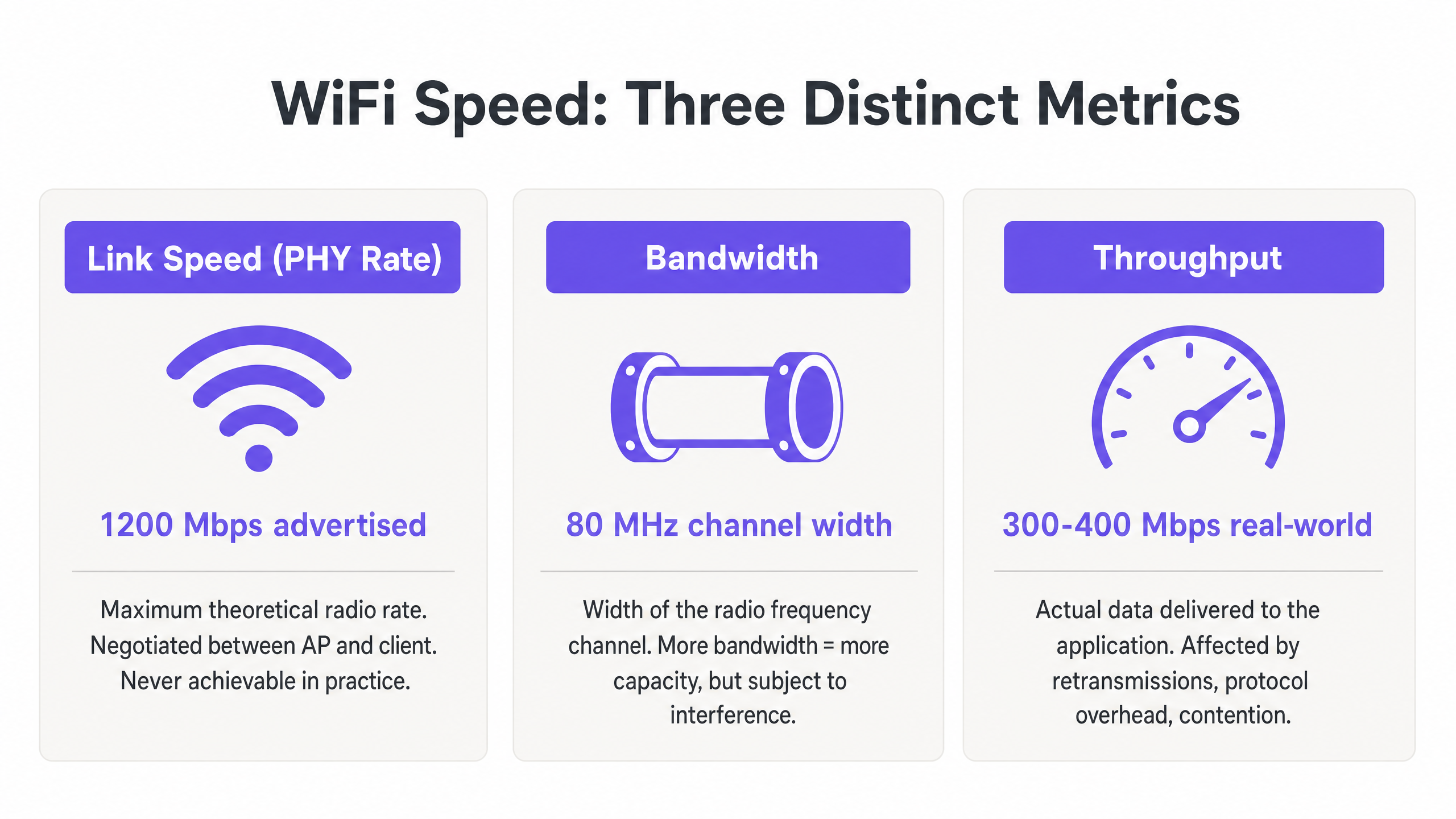
एंटरप्राइझ WLANs तैनात करणाऱ्या आयटी व्यवस्थापक आणि नेटवर्क आर्किटेक्टसाठी, जाहिरात केलेल्या WiFi गती आणि वास्तविक वापरकर्ता अनुभवामधील विसंगती ही एक सततची कार्यात्मक समस्या आहे. मूळ कारण जवळजवळ नेहमीच तीन भिन्न मेट्रिक्सच्या गैरसमजातून उद्भवते: लिंक स्पीड (PHY दर), बँडविड्थ आणि थ्रुपुट. विक्रेते जास्तीत जास्त सैद्धांतिक लिंक स्पीडची जाहिरात करत असले तरी — उदाहरणार्थ, 802.11ax वर 1200 Mbps — प्रोटोकॉल ओव्हरहेड, हाफ-डुप्लेक्स रेडिओ ऑपरेशन आणि पर्यावरणीय स्पर्धेमुळे ॲप्लिकेशनला वितरित केलेला वास्तविक थ्रुपुट सामान्यतः त्या आकडेवारीच्या 40–60% असतो.
हे तांत्रिक संदर्भ मार्गदर्शक एंटरप्राइझ वातावरणात wifi speed meaning समजून घेण्यासाठी एक निश्चित फ्रेमवर्क प्रदान करते. ते हॉटेल्स, रिटेल चेन आणि मोठ्या ठिकाणांवरील आयटी टीम्सना वास्तविक-जगातील कार्यक्षमतेचे अचूक मोजमाप करण्यासाठी, कव्हरेजऐवजी क्षमतेसाठी डिझाइन करण्यासाठी आणि पायाभूत सुविधांच्या गुंतवणुकीला मोजता येण्याजोग्या व्यावसायिक परिणामांशी जुळवण्यासाठी ज्ञानाने सुसज्ज करते. सैद्धांतिक कमाल मर्यादेवरून सततच्या थ्रुपुट आणि इष्टतम बँडविड्थ वाटपाकडे लक्ष केंद्रित करून, ठिकाण संचालक आधुनिक Guest WiFi आणि WiFi Analytics प्लॅटफॉर्मना आवश्यक असलेली विश्वसनीय कनेक्टिव्हिटी प्रदान करू शकतात.
तांत्रिक सखोल अभ्यास: वायफाय गती मेट्रिक्सचे डिकोडिंग
एक मजबूत WLAN तयार करण्यासाठी, आयटी व्यावसायिकांनी आरएफ माध्यमाच्या सैद्धांतिक क्षमता आणि डेटा पेलोड्सच्या व्यावहारिक वितरणादरम्यान फरक करणे आवश्यक आहे. तीन मेट्रिक्स — लिंक स्पीड, बँडविड्थ आणि थ्रुपुट — विक्रेत्यांच्या मार्केटिंगमध्ये, खरेदीच्या चर्चांमध्ये आणि अगदी अंतर्गत आयटी रिपोर्टिंगमध्ये वारंवार गोंधळले जातात. हे योग्यरित्या समजून घेणे इतर प्रत्येक ऑप्टिमायझेशन निर्णयासाठी मूलभूत आहे.
लिंक स्पीड (PHY दर): सैद्धांतिक कमाल मर्यादा
लिंक स्पीड, किंवा Physical Layer (PHY) दर, रेडिओ स्तरावर Access Point (AP) आणि क्लायंट डिव्हाइस दरम्यान कमाल सैद्धांतिक डेटा हस्तांतरण दर दर्शवतो. हा दर modulation and coding scheme (MCS), spatial streams ची संख्या आणि असोसिएशनच्या वेळी signal-to-noise ratio (SNR) यावर आधारित गतिशीलपणे वाटाघाटी केला जातो.
महत्वाचे म्हणजे, लिंक स्पीड प्रत्यक्षात कधीही साध्य करता येत नाही. ते एकूण बिट दर दर्शवते, ज्यात सर्व 802.11 व्यवस्थापन फ्रेम्स, नियंत्रण फ्रेम्स (RTS/CTS आणि ACKs) आणि inter-frame spacing (AIFS/DIFS) समाविष्ट आहेत. Retail किंवा Hospitality वातावरणातील एंटरप्राइझ उपयोजनांमध्ये, 802.11ac नेटवर्कवर 866 Mbps लिंक स्पीडची नोंदवणारे क्लायंट प्रत्यक्षात आदर्श, वेगळ्या परिस्थितीत अंदाजे 400–500 Mbps वास्तविक डेटा हस्तांतरण करण्यास सक्षम असते — आणि सामायिक, मल्टी-क्लायंट वातावरणात त्याहून खूप कमी.
बँडविड्थ: आरएफ चॅनेल क्षमता
बँडविड्थ म्हणजे प्रेषणासाठी वाटप केलेल्या रेडिओ फ्रिक्वेन्सी चॅनेलची रुंदी, जी सामान्यतः Megahertz (MHz) मध्ये मोजली जाते. 5 GHz आणि 6 GHz बँडमध्ये, चॅनेल 20, 40, 80 किंवा 160 MHz रुंद असू शकतात. रुंद चॅनेल उच्च संभाव्य लिंक स्पीड देतात — चॅनेलची रुंदी दुप्पट केल्याने संभाव्य डेटा दर अंदाजे दुप्पट होतो — परंतु ते प्रत्येक दुप्पट वाढीसाठी नॉइज फ्लोअर 3 dB ने वाढवतात आणि उपलब्ध नॉन-ओव्हरलॅपिंग चॅनेलची संख्या लक्षणीयरीत्या कमी करतात.
स्टेडियम, कॉन्फरन्स सेंटर्स किंवा हॉटेल कॉरिडॉरसारख्या उच्च-घनतेच्या वातावरणात, 80 MHz चॅनेल तैनात केल्याने अनेकदा विनाशकारी co-channel interference (CCI) होतो. त्यामुळे एंटरप्राइझ सर्वोत्तम पद्धतीनुसार, वैयक्तिक कमाल गतीचा पाठलाग करण्याऐवजी spectral reuse आणि एकूण सिस्टम क्षमता वाढवण्यासाठी 20 MHz किंवा 40 MHz चॅनेल वापरणे आवश्यक आहे. हे एक डिझाइन तत्त्वज्ञान आहे जे कोणत्याही एका वापरकर्त्यासाठी सैद्धांतिक कमाल मर्यादेपेक्षा सर्व वापरकर्त्यांमध्ये एकत्रित थ्रुपुटला प्राधान्य देते.
थ्रुपुट: वास्तविक-जगातील मोजमाप
थ्रुपुट म्हणजे ॲप्लिकेशन लेयर (Layer 7) ला वितरित केलेला वास्तविक पेलोड डेटा, जो Megabits per second (Mbps) मध्ये मोजला जातो. हे एकमेव मेट्रिक आहे जे अंतिम वापरकर्त्यासाठी महत्त्वाचे आहे आणि नेटवर्क डिझाइन निर्णयांना चालना देणारे हे एकमेव मेट्रिक असावे.
WiFi च्या हाफ-डुप्लेक्स स्वरूपामुळे थ्रुपुट मूलभूतपणे मर्यादित आहे — एका वेळी दिलेल्या चॅनेलवर फक्त एकच डिव्हाइस प्रसारित करू शकते. जेव्हा अनेक डिव्हाइसेस एअरटाइमसाठी स्पर्धा करतात, तेव्हा थ्रुपुट प्रमाणात कमी होतो. याव्यतिरिक्त, कमी डेटा दराने प्रसारित करणारे जुने क्लायंट असमान एअरटाइम वापरतात, ज्यामुळे समान चॅनेल सामायिक करणाऱ्या वेगवान क्लायंटना नुकसान होते. तुमच्या WLAN वर पार्श्वभूमी डेटा संकलनाच्या परिणामाचे मूल्यांकन करताना एअरटाइम वापराची खरी किंमत समजून घेणे महत्त्वाचे आहे, जसे की The Hidden Cost of Telemetry Data on Corporate WLANs मध्ये सखोलपणे शोधले आहे.
खालील सारणी या तीन मेट्रिक्समधील व्यावहारिक संबंधांचा सारांश देते:
| मेट्रिक | व्याख्या | सामान्य मूल्य (802.11ax) | आयटी टीम्सने काय करावे |
|---|---|---|---|
| लिंक स्पीड (PHY दर) | एकूण सैद्धांतिक रेडिओ दर | 9.6 Gbps पर्यंत | केवळ बेसलाइन सूचक म्हणून वापरा; कार्यक्षमतेचे लक्ष्य म्हणून कधीही नाही |
| बँडविड्थ (चॅनेल रुंदी) | MHz मध्ये आरएफ चॅनेल रुंदी | 20, 40, 80, किंवा 160 MHz | एंटरप्राइझमध्ये 40 MHz ला डीफॉल्ट करा; उच्च-घनतेमध्ये 20 MHz |
| थ्रुपुट | वास्तविक ॲप्लिकेशन-लेयर डेटा दर | प्रति क्लायंट 300–500 Mbps (आदर्श) | हे सर्व WLAN कार्यक्षमतेच्या मूल्यांकनासाठी प्राथमिक KPI आहे |
अंमलबजावणी मार्गदर्शक: कार्यक्षमतेचे मोजमाप आणि ऑप्टिमायझेशन
सिद्धांतापासून प्रत्यक्षात येण्यासाठी कठोर मोजमाप पद्धती आणि पद्धतशीर ट्यूनिंग आवश्यक आहे. खालील पायऱ्या विक्रेता-निरपेक्ष सर्वोत्तम पद्धती दर्शवतात ज्या लागू आहेत एक्रोसर्व प्रमुख WLAN प्लॅटफॉर्मवर.
पायरी 1: अचूक बेसलाइन स्थापित करा
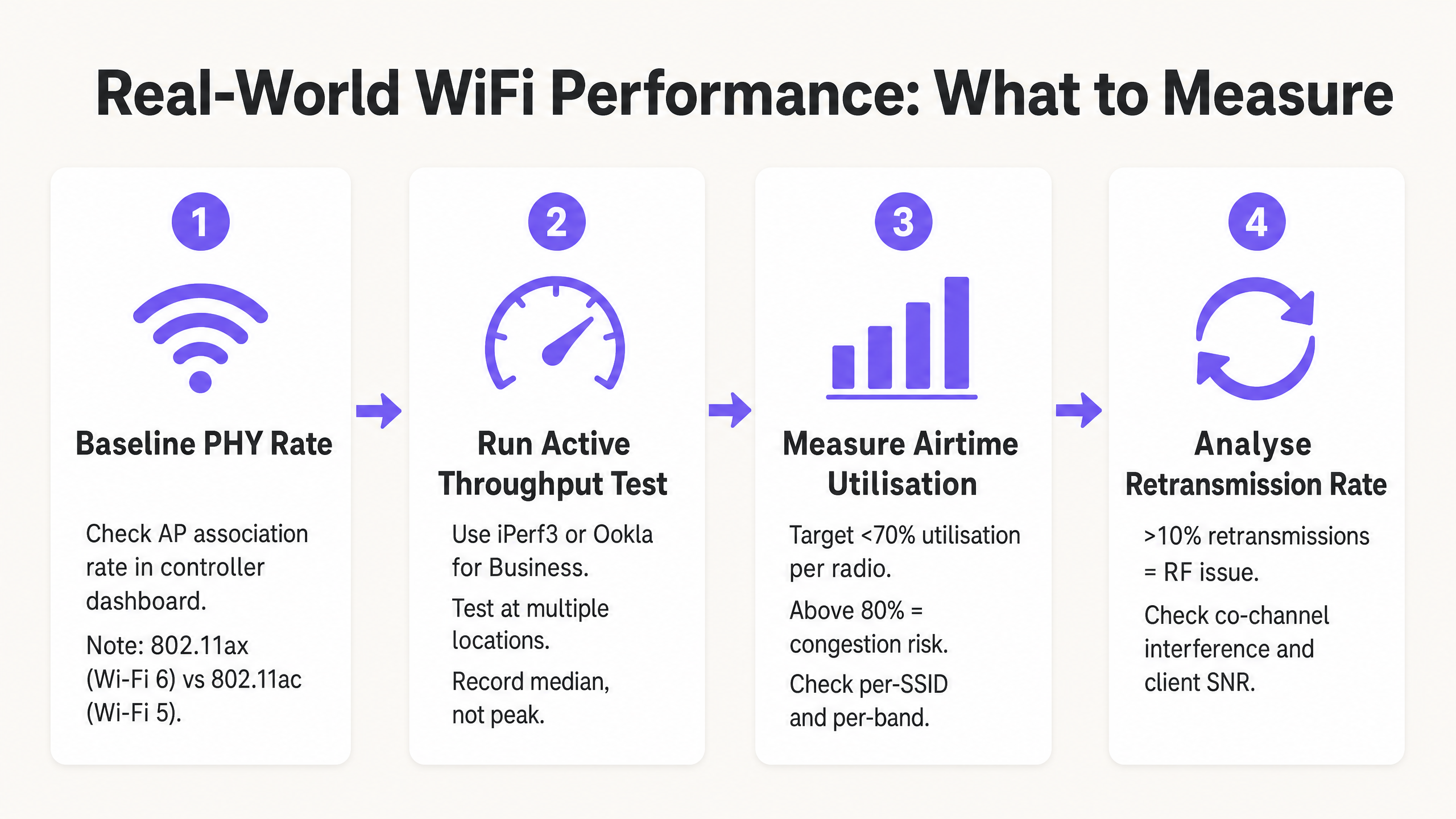
WLAN कार्यक्षमतेचे मोजमाप करण्यासाठी ग्राहक इंटरनेट स्पीड चाचण्यांवर (उदा. fast.com किंवा Speedtest.net) अवलंबून राहू नका. या चाचण्या WAN विलंबता, ISP राउटिंग व्हेरिएबल्स आणि सर्व्हर-साइड अडथळे निर्माण करतात, जे तुमच्या वायरलेस नेटवर्कशी पूर्णपणे असंबंधित आहेत. त्याऐवजी, RF सेगमेंट वेगळे करण्यासाठी AP व्यवस्थापन इंटरफेसच्या समान VLAN वर स्थानिक iPerf3 सर्व्हर तैनात करा. कच्च्या चॅनेल क्षमतेचे मूल्यांकन करण्यासाठी UDP थ्रूपुट चाचण्या चालवा आणि ॲप्लिकेशन-स्तरीय कार्यक्षमतेचे मूल्यांकन करण्यासाठी TCP थ्रूपुट चाचण्या चालवा — TCP पॅकेट लॉस आणि विलंबतेसाठी अत्यंत संवेदनशील आहे, ज्यामुळे ते वास्तविक ॲप्लिकेशन वर्तनासाठी एक अचूक प्रॉक्सी बनते.
पायरी 2: एअरटाइम कार्यक्षमतेसाठी डिझाइन करा
कोणत्याही WiFi उपयोजनामध्ये एअरटाइम हे सर्वात मौल्यवान संसाधन आहे. स्थळावर थ्रूपुट वाढवण्यासाठी, तीन कॉन्फिगरेशन बदल सर्वात मोठा परिणाम देतात:
कमी मूलभूत दर अक्षम करा. 802.11b दर (1, 2, 5.5, 11 Mbps) अक्षम करा आणि किमान 12 Mbps किंवा 24 Mbps चा मूलभूत दर अनिवार्य करा. यामुळे क्लायंट्सना व्यवस्थापन फ्रेम्स जलद प्रसारित करण्यास भाग पाडले जाते, ज्यामुळे डेटा पेलोड्ससाठी एअरटाइम मोकळा होतो. 1 Mbps वर पाठवलेली एकच व्यवस्थापन फ्रेम 54 Mbps वर पाठवलेल्या त्याच फ्रेमपेक्षा 54 पट जास्त एअरटाइम वापरते.
एअरटाइम फेअरनेस (ATF) सक्षम करा. जिथे विक्रेत्याद्वारे समर्थित आहे, तिथे क्लायंट्सना समान पॅकेट संख्यांऐवजी समान प्रसारण वेळ वाटप करण्यासाठी ATF सक्षम करा. यामुळे धीमे लेगसी क्लायंट्सना जलद, आधुनिक उपकरणांच्या खर्चावर चॅनेलवर मक्तेदारी करण्यापासून रोखले जाते.
चॅनेल रुंदी ऑप्टिमाइझ करा. उच्च-घनता एंटरप्राइझ उपयोजनांसाठी 2.4 GHz बँडमध्ये (नेहमी चॅनेल 1, 6, आणि 11) 20 MHz चॅनेल आणि 5 GHz बँडमध्ये 40 MHz चॅनेल डीफॉल्ट करा. 80 MHz चॅनेल केवळ वेगळ्या, कमी-घनतेच्या वातावरणासाठी राखून ठेवा.
पायरी 3: आधुनिक प्रमाणीकरण आणि सुरक्षा लागू करा
सुरक्षा प्रोटोकॉल एन्क्रिप्शन ओव्हरहेड आणि रोमिंग विलंबतेद्वारे थ्रूपुटवर परिणाम करतात. जिथे क्लायंट इस्टेट समर्थन करते तिथे WPA3 लागू करा, किंवा 50 ms पेक्षा कमी रोमिंग विलंब कमी करण्यासाठी फास्ट BSS ट्रान्झिशन (802.11r) सह WPA2-एंटरप्राइझ (IEEE 802.1X) लागू करा. गेस्ट नेटवर्कसाठी, GDPR आणि PCI DSS चे पालन करण्यासाठी मजबूत नेटवर्क सेगमेंटेशन आवश्यक आहे — गेस्ट ट्रॅफिकला समर्पित VLANs आणि फायरवॉल धोरणांद्वारे कॉर्पोरेट आणि पेमेंट इन्फ्रास्ट्रक्चरपासून वेगळे केले पाहिजे. प्रमाणीकरण घर्षण कमी करणारे आणि पालन राखणारे आधुनिक ऑनबोर्डिंग सोल्यूशन्स How a wi fi assistant Enables Passwordless Access in 2026 मध्ये चर्चा केली आहेत.
सर्वोत्तम पद्धती आणि उद्योग मानके
पुढील तत्त्वे IEEE 802.11 कार्यगटाच्या शिफारसी आणि आरोग्यसेवा , वाहतूक आणि मोठ्या स्थळांच्या वातावरणातील एंटरप्राइझ WLAN उपयोजन अनुभवाचे एकमत दर्शवतात.
कव्हरेजपेक्षा क्षमता. आधुनिक एंटरप्राइझ वातावरणात, APs केवळ सिग्नल प्रदान करण्यासाठी नव्हे, तर क्लायंट घनता हाताळण्यासाठी तैनात केले पाहिजेत. चॅनेल गर्दीचे असल्यास मजबूत सिग्नल (कव्हरेज) उच्च थ्रूपुट (क्षमता) ची हमी देत नाही. ही दोन पूर्णपणे भिन्न अभियांत्रिकी उद्दिष्टे आहेत.
बँड स्टीअरिंग. 2.4 GHz स्पेक्ट्रमवरील गर्दी कमी करण्यासाठी ड्युअल-बँड आणि ट्राय-बँड क्लायंट्सना 5 GHz आणि 6 GHz बँड्सकडे आक्रमकपणे वळवा. 2.4 GHz बँड केवळ तीन नॉन-ओव्हरलॅपिंग चॅनेल (1, 6, 11) प्रदान करतो आणि नॉन-WiFi उपकरणांमुळे लक्षणीय हस्तक्षेपाला बळी पडतो.
किमान SNR थ्रेशोल्ड. किमान SNR थ्रेशोल्डच्या (सामान्यतः 20 dB) खालील क्लायंट असोसिएशन नाकारण्यासाठी AP रेडिओ कॉन्फिगर करा. यामुळे दूरच्या, कमकुवत क्लायंट्सना कमी MCS दरांवर संबद्ध होण्यापासून आणि प्रसारित करण्यापासून प्रतिबंध होतो, ज्यामुळे जास्त एअरटाइम वापरला जाईल.
नियमित RF ऑडिट. स्पेक्ट्रम विश्लेषण आणि सक्रिय थ्रूपुट चाचणी किमान त्रैमासिक, आणि भौतिक वातावरणात (नवीन विभाजने, AV उपकरणे किंवा भाडेकरू बदल) कोणताही महत्त्वपूर्ण बदल झाल्यानंतर त्वरित करा. RF वातावरण गतिशील आहे; उपयोजनावेळी कार्य करणारी चॅनेल योजना सहा महिन्यांनंतर इष्टतम नसू शकते.
समस्यानिवारण आणि जोखीम कमी करणे
जेव्हा थ्रूपुट कमी होते, तेव्हा IT टीम्सनी त्वरित हार्डवेअर अपग्रेडकडे न जाता RF वातावरणाचे पद्धतशीरपणे निदान केले पाहिजे. बहुतेक एंटरप्राइझ WLAN कार्यक्षमतेच्या समस्या कॉन्फिगरेशन आणि डिझाइन समस्या आहेत, हार्डवेअर मर्यादा नाहीत.
उच्च रिट्रान्समिशन दर. 10% पेक्षा जास्त रिट्रान्समिशन दर सामान्यतः RF हस्तक्षेप, हिडन नोड समस्या किंवा खराब क्लायंट SNR दर्शवतो. नॉन-WiFi हस्तक्षेपाचे स्रोत ओळखण्यासाठी स्पेक्ट्रम विश्लेषण साधने वापरा — मायक्रोवेव्ह ओव्हन, AV उपकरणे आणि शेजारील नेटवर्क हॉस्पिटॅलिटी आणि रिटेल वातावरणात सामान्य गुन्हेगार आहेत.
को-चॅनेल हस्तक्षेप (CCI). जर एकाच चॅनेलवरील अनेक APs एकमेकांना -85 dBm किंवा त्याहून अधिक आवाजात ऐकू शकत असतील, तर ते समान टक्कर डोमेन सामायिक करतात, ज्यामुळे त्या चॅनेलवरील सर्व क्लायंट्ससाठी थ्रूपुट मोठ्या प्रमाणात कमी होते. AP ट्रान्समिट पॉवर कमी करून, चॅनेल रुंदी कमी करून आणि डायनॅमिक चॅनेल असाइनमेंट (DCA) अल्गोरिदम योग्यरित्या कार्य करत असल्याची खात्री करून हे कमी करा.
स्टिकी क्लायंट्स. दूरच्या AP वरून जवळच्या AP कडे रोम करण्यात अयशस्वी होणारे क्लायंट कमी SNR राखतात, ज्यामुळे AP ला कमी MCS दर वापरण्यास भाग पाडले जाते आणि जास्त एअरटाइम वापरला जातो. असोसिएशनसाठी किमान RSSI थ्रेशोल्ड, 802.11v BSS ट्रान्झिशन मॅनेजमेंट आणि 802.11r फास्ट रोमिंग वापरून हे कमी करा.
क्लायंट ड्रायव्हर समस्या. एंड-यूझर उपकरणांवरील जुने वायरलेस ड्रायव्हर्स चुकीचे MCS नेगोशिएशन, MIMO स्पेशल स्ट्रीम वापरण्यात अयशस्वी होणे किंवा थ्रूपुटमध्ये व्यत्यय आणणारे आक्रमक पॉवर-सेव्हिंग वर्तन होऊ शकतात. वायरलेस ड्रायव्हर आवृत्ती मानकांचा समावेश असलेले क्लायंट डिव्हाइस व्यवस्थापन धोरण राखा.
ROI आणि व्यवसाय परिणाम
सैद्धांतिक लिंक स्पीडऐवजी थ्रूपुटसाठी WiFi ऑप्टिमाइझ करणे प्रत्येक उभ्या व्यवसायाच्या नफ्यावर थेट परिणाम करते. वाहतूक हब आणि मोठ्या स्थळांमध्ये, मोबाइल पॉइंट-ऑफ-सेल (mPOS) सिस्टीमपासून ते कार्यक्षमतेसाठी विश्वसनीय कनेक्टिव्हिटी आवश्यक आहे. डिजिटल साइनेज आणि ॲक्सेस कंट्रोलपर्यंत.
स्थळांच्या संचालकांसाठी, उच्च-थ्रुपुट नेटवर्क प्रगत स्थान-आधारित सेवा आणि विश्लेषणे सक्षम करतात. सुसंगत, विश्वसनीय कनेक्टिव्हिटी सुनिश्चित करणे हे Purple Launches Offline Maps Mode for Seamless, Secure Navigation to WiFi Hotspots मध्ये सादर केलेल्या वैशिष्ट्यांसाठी एक पूर्वअट आहे, जे पाहुण्यांचा अनुभव वाढवतात आणि मोजता येण्याजोगा सहभाग वाढवतात. Purple च्या सार्वजनिक क्षेत्रातील विस्ताराचे तपशील Purple Appoints Iain Fox as VP Growth – Public Sector to Drive Digital Inclusion and Smart City Innovation मध्ये दिले आहेत, जे स्मार्ट सिटी सेवांसाठी एक आधार म्हणून विश्वसनीय, उच्च-थ्रुपुट सार्वजनिक WiFi पायाभूत सुविधांचे महत्त्व अधोरेखित करते.
थ्रुपुट-केंद्रित WLAN डिझाइनसाठी व्यवसायिक प्रकरण सरळ आहे: पीक अवर्समध्ये प्रति क्लायंट 200 Mbps सातत्याने प्रदान करणारे नेटवर्क, 85% एअरटाइम युटिलायझेशन आणि अप्रत्याशित वास्तविक-जगातील कार्यक्षमतेसह 866 Mbps लिंक स्पीड प्रदान करणाऱ्या नेटवर्कपेक्षा अधिक मौल्यवान आहे. IT मेट्रिक्स — थ्रुपुट, एअरटाइम युटिलायझेशन, रिट्रान्समिशन रेट — व्यवसायिक परिणामांशी — पाहुण्यांच्या समाधानाचे स्कोअर, mPOS व्यवहाराची विश्वसनीयता, ऑपरेशनल अपटाइम — जुळवून, IT नेते पायाभूत सुविधांच्या गुंतवणुकीचे समर्थन करू शकतात आणि स्पष्ट, मोजता येण्याजोगा ROI दर्शवू शकतात.
महत्वाच्या व्याख्या
Link Speed (PHY Rate)
The maximum theoretical physical layer data rate negotiated between a client and an AP, measured in Mbps. Determined by MCS index, spatial streams, and channel width.
Frequently cited in vendor marketing and procurement documents. IT teams must understand this is a gross rate that includes massive protocol overhead and is never achievable as application throughput.
Throughput
The actual rate of successful payload data delivery over a communication channel to the application layer, measured in Mbps.
The primary KPI for any WLAN performance assessment. The only metric that accurately reflects end-user experience and application performance.
Bandwidth (RF Channel Width)
The width of the frequency spectrum allocated for a transmission channel, typically 20, 40, 80, or 160 MHz in the 5 GHz band.
Determines the potential capacity of the channel. Wider bandwidths increase peak link speed but reduce the number of non-overlapping channels and increase susceptibility to interference in dense deployments.
Co-Channel Interference (CCI)
Performance degradation caused when multiple APs operate on the same frequency channel and can detect each other's transmissions, forcing them to share airtime via the CSMA/CA contention mechanism.
The primary cause of poor throughput in dense enterprise deployments. Mitigated by proper channel planning, reduced transmit power, and narrower channel widths.
Airtime Utilisation
The percentage of time a specific RF channel is occupied with transmissions (data, management, or control frames).
A critical operational metric. Sustained utilisation above 70–80% indicates severe congestion and impending throughput collapse. Should be monitored per-radio and per-SSID.
Half-Duplex
A communication mode where data can be transmitted in both directions, but only one direction at a time on a shared medium.
The fundamental characteristic of WiFi that limits throughput to significantly below the theoretical link speed. Unlike wired Ethernet (full-duplex), WiFi requires all devices to take turns transmitting.
Spatial Streams (MIMO)
Multiple independent data signals transmitted simultaneously using Multiple Input Multiple Output (MIMO) antenna technology, increasing throughput without requiring wider bandwidth.
A key differentiator between 802.11ac (up to 8 spatial streams) and 802.11ax (Wi-Fi 6). Effective only when both the AP and client device support multiple antennas.
Basic Rates
The mandatory data rates that all clients must support to associate with a BSS. Management and control frames are transmitted at the lowest enabled basic rate.
Disabling low basic rates (1, 2, 5.5, 11 Mbps) is a standard and highly effective IT configuration practice. A frame sent at 1 Mbps consumes 54 times more airtime than the same frame at 54 Mbps.
MCS (Modulation and Coding Scheme)
An index value that defines the combination of modulation technique (e.g., 256-QAM, 1024-QAM) and forward error correction coding rate used for a given transmission.
Higher MCS indices deliver higher throughput but require a stronger signal-to-noise ratio. The AP and client negotiate the highest feasible MCS based on current RF conditions.
सोडवलेली उदाहरणे
A 400-room hotel is experiencing guest complaints about slow WiFi speeds during the evening peak (7 PM – 10 PM). The IT manager notes that the APs are reporting link speeds of 866 Mbps, but guests are struggling to stream video. The network uses 80 MHz channels on the 5 GHz band with APs deployed in corridors at maximum transmit power.
- Conduct an airtime utilisation assessment during peak hours using the WLAN controller's built-in analytics or a dedicated tool such as Ekahau Sidekick. Expect to find utilisation above 80% on the primary 5 GHz channels, confirming Co-Channel Interference (CCI). 2. Reconfigure the WLAN controller to reduce channel widths on the 5 GHz band from 80 MHz to 40 MHz. This doubles the number of available non-overlapping channels from 6 to 12 in the UNII-1/UNII-3 bands, significantly reducing CCI. 3. Reduce AP transmit power to approximately 11–14 dBm to shrink cell sizes and reduce the number of APs that can hear each other on the same channel. 4. Enable dynamic channel assignment (DCA) to allow the controller to optimise channel allocation automatically. 5. Implement per-client bandwidth throttling (e.g., 15 Mbps downstream per device) to prevent individual users from monopolising the internet uplink during peak hours.
A large retail chain is deploying mobile Point-of-Sale (mPOS) tablets across 50 stores. The tablets require reliable, low-latency connections for payment processing, but are frequently dropping sessions when staff move between aisles. The WLAN uses WPA2-Personal with default basic rates enabled.
- Implement IEEE 802.11r (Fast BSS Transition) on the corporate mPOS SSID to reduce roaming authentication delays from 300–500 ms to under 50 ms. This is critical for session-sensitive payment applications. 2. Adjust the AP minimum mandatory basic rate to 12 Mbps. This reduces the effective cell size, encouraging tablets to roam to closer APs sooner rather than maintaining a weak connection to a distant AP (sticky client behaviour). 3. Migrate the mPOS SSID from WPA2-Personal to WPA2-Enterprise (802.1X) with certificate-based authentication to meet PCI DSS requirements for cardholder data environments. 4. Apply WMM (Wi-Fi Multimedia) QoS tags to the mPOS SSID, prioritising traffic in the Voice or Video queue to protect throughput during periods of high guest network usage. 5. Implement 802.11k (Neighbour Reports) and 802.11v (BSS Transition Management) to assist tablets in identifying and roaming to optimal APs proactively.
सराव प्रश्न
Q1. You are designing the WLAN for a high-density university lecture theatre with 300 seats. Your goal is to maximise aggregate throughput for all users simultaneously. The venue has 8 APs deployed in the ceiling. Should you configure the 5 GHz radios to use 20 MHz, 40 MHz, or 80 MHz channel widths?
टीप: Consider the number of non-overlapping channels available in the 5 GHz UNII-1 and UNII-3 bands, and the impact of Co-Channel Interference in a single open room with multiple APs.
नमुना उत्तर पहा
Use 20 MHz channels. In a high-density, single-room environment with 8 APs, you need each AP to operate on a distinct, non-overlapping channel to avoid CCI. The 5 GHz band offers approximately 24 non-overlapping 20 MHz channels (in regions with full UNII band access), but only 6 non-overlapping 40 MHz channels and 3 non-overlapping 80 MHz channels. With 8 APs using 80 MHz channels, at least 5 APs would be sharing channels, creating severe CCI. By using 20 MHz channels, you can assign unique channels to all 8 APs, allowing them to transmit simultaneously without contention. The individual link speed per client will be lower, but the aggregate throughput across all 300 users will be dramatically higher.
Q2. A client complains that their new 802.11ax (Wi-Fi 6) laptop only achieves 480 Mbps on a local iPerf3 test, despite Windows reporting a link speed of 1.2 Gbps. The client believes the AP is faulty. How do you assess and explain this situation?
टीप: Apply the Rule of Half and consider the relationship between PHY rate and TCP throughput in a half-duplex medium.
नमुना उत्तर पहा
The AP is almost certainly functioning correctly. The 1.2 Gbps is the negotiated Link Speed (PHY rate) — the gross theoretical radio rate. Because WiFi is half-duplex, and because the 802.11 protocol requires significant overhead (management frames, ACKs, inter-frame spacing), actual TCP throughput is typically 40–60% of the link speed. 480 Mbps from a 1.2 Gbps link represents a 40% efficiency ratio, which is within the expected range and indicates the network is performing well. To confirm, check the retransmission rate (should be below 5%) and airtime utilisation (should be below 50% for a single-client test). If both are healthy, the result is excellent and the AP should not be replaced.
Q3. During a site survey in a busy retail warehouse, you notice the airtime utilisation on channel 6 (2.4 GHz) is consistently at 88%, but there are only 6 active clients connected to the AP. The AP is a modern 802.11ax device. What are the two most likely causes, and what is the remediation for each?
टीप: Think about how legacy data rates affect airtime consumption, and consider sources of non-WiFi interference common in warehouse environments.
नमुना उत्तर पहा
Cause 1: Legacy basic rates are enabled. If the AP is transmitting management frames (beacons, probe responses) at 1 Mbps, each frame takes 54 times longer than at 54 Mbps, consuming enormous amounts of airtime even with few clients. Remediation: Disable 802.11b rates and set the minimum basic rate to 12 Mbps or 24 Mbps. Cause 2: Non-WiFi interference in the 2.4 GHz band. Warehouses commonly contain microwave ovens, Bluetooth devices, and older industrial wireless equipment that generate broadband interference in the 2.4 GHz band, artificially inflating airtime utilisation figures. Remediation: Conduct a spectrum analysis using a tool such as Ekahau Sidekick or a dedicated spectrum analyser to identify the interference source, and where possible migrate clients to the 5 GHz band.