
मल्टी-टेनंट सुरक्षिततेसाठी डायनॅमिक प्री-शेअर्ड की (DPSK)
हे अधिकृत तांत्रिक संदर्भ मार्गदर्शक मल्टी-टेनंट WiFi वातावरणासाठी 802.1X ला एक उच्च-सुरक्षा, कमी-त्रास असलेला पर्याय म्हणून डायनॅमिक प्री-शेअर्ड की (DPSK) चा शोध घेते. हे अंतर्निहित आर्किटेक्चर, व्हेंडर इम्प्लीमेंटेशन्स, डायनॅमिक VLAN स्टिअरिंग आणि API-चालित लाइफसायकल ऑटोमेशनचे तपशील देते. IT व्यवस्थापक आणि नेटवर्क आर्किटेक्ट्सना मजबूत भाडेकरू अलगाव (tenant isolation), नियामक अनुपालन आणि अखंड डिव्हाइस ऑनबोर्डिंग साध्य करण्यासाठी DPSK तैनात करण्याबाबत कृतीयोग्य मार्गदर्शन मिळेल.
हे मार्गदर्शक ऐका
पॉडकास्ट ट्रान्सक्रिप्ट पहा
आमच्या मुख्य मालिकेचा भाग: मल्टी-टेनंट WiFi मार्गदर्शक →
कार्यकारी सारांश (Executive Summary)
मल्टी - टेंटंट वास्तू - जसे की हॉटेल्स, विद्यार्थी वसतिगृहे, रिटेल डेव्हलपमेंट्स आणि कॉन्फरन्स सेंटर्सचे व्यवस्थापन करणाऱ्या प्रॉपर्टी मॅनेजर्स, नेटवर्क आर्किटेक्ट्स आणि आयटी डायरेक्टर्ससाठी वायरलेस कनेक्टिव्हिटी आता केवळ एक युटिलिटी राहिलेली नाही. हा एक मुख्य ऑपरेशनल पाया आणि अतिथींच्या समाधानाचा प्रमुख चालक आहे. तथापि, ऐतिहासिकदृष्ट्या या वातावरणांना सुरक्षित ठेवण्यासाठी दोन टोकांच्या पर्यायांमध्ये तडजोड करावी लागत असे.
पारंपारिक WPA2 - Personal डेप्लॉयमेंट्स संपूर्ण प्रॉपर्टीमध्ये एकाच सामायिक प्री - शेअर्ड की (PSK) वर अवलंबून असतात. हे अत्यंत सुसंगत आणि ऑनबोर्डिंगसाठी सोपे असले, तरी हा मॉडेल गंभीर सुरक्षा धोके, वापरकर्त्याच्या उत्तरदायित्वाचा अभाव आणि की (key) बदलताना मोठ्या ऑपरेशनल अडचणी निर्माण करतो. दुसरीकडे, WPA2/WPA3-Enterprise (802.1X) सुरक्षेचा सुवर्ण मानक मानला जातो, जो RADIUS सर्व्हरच्या विरोधात प्रमाणित वैयक्तिक क्रेडेंशियल्स किंवा डिजिटल सर्टिफिकेट्सचा वापर करतो. तरीही, 802.1X साठी मोठ्या प्रमाणावर पायाभूत सुविधांचा खर्च येतो आणि हे गेमिंग कन्सोल, स्मार्ट टीव्ही आणि स्ट्रीमिंग स्टिक्स यांसारख्या "हेडलेस" ग्राहक उपकरणांशी मूलभूतपणे विसंगत आहे, कारण त्यांच्यामध्ये सर्टिफिकेट - आधारित ऑथेंटिकेशन व्यवस्थापित करण्यासाठी सप्लिकंट सॉफ्टवेअर नसते.
Dynamic Pre-Shared Keys (DPSK), ज्याला Identity PSK (iPSK) किंवा Multi-PSK (MPSK) म्हणून देखील ओळखले जाते, ही कोंडी दूर करते. DPSK एका मानक WiFi पासवर्डसारखा अखंड, विनासायास ऑनबोर्डिंग अनुभव प्रदान करते आणि त्याच वेळी एंटरप्राइझ - ग्रेड 802.1X आर्किटेक्चरसारखे प्रति - वापरकर्ता उत्तरदायित्व, डायनॅमिक VLAN स्टिअरिंग आणि तपशीलवार लाइफसायकल मॅनेजमेंट सुनिश्चित करते. डायनॅमिकरित्या ट्रॅफिक सेगमेंट आणि एन्क्रिप्ट करण्यासाठी एकाच SSID चा वापर करून, DPSK ऑपरेटर्सना सुरक्षित "होम - अवे - फ्रॉम - होम" अनुभव प्रदान करण्यास, ऑपरेशनल टेक्नॉलॉजी (IoT) सुरक्षित ठेवण्यास आणि PCI-DSS व GDPR सारख्या मानकांशी कठोर कमप्लायन्स राखण्यास सक्षम करते.
Technical Deep-Dive
DPSK यशस्वीरित्या डिप्लॉय करण्यासाठी, नेटवर्क आर्किटेक्ट्सना त्याचे अंतर्गत प्रोटोकॉल मेकॅनिक्स, ऑथेंटिकेशन फ्लो आणि विविध वेंडर्स त्यांच्या आर्किटेक्चरची रचना कशी करतात हे समजून घेणे आवश्यक आहे.
The Authentication and Authorization Flow
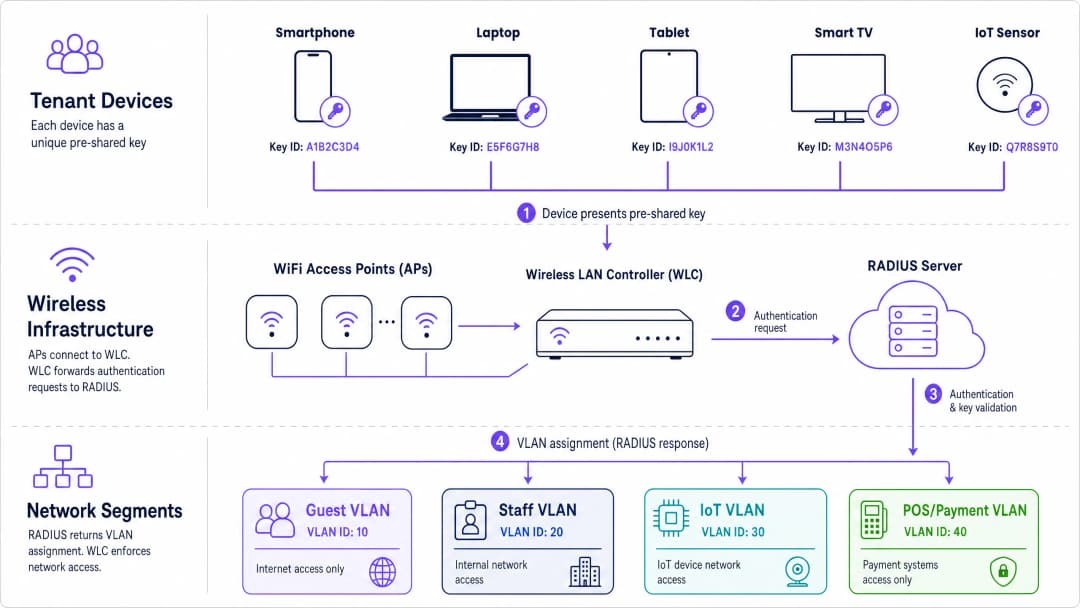
DPSK त्याचा पाया म्हणून क्लायंट साइडवर मानक WPA2-Personal किंवा WPA3-SAE (Simultaneous Authentication of Equals) असोसिएशन फ्रेमवर्क वापरतो. क्लायंट डिव्हाइस पूर्णपणे अनभिज्ञ असते की त्याची प्री-शेअर्ड की युनिक आहे; ते मानक 4-वे हँडशेक प्रोटोकॉल वापरून ॲक्सेस पॉइंट (AP) शी जोडले जाते. यामधील इंटेलिजन्स आणि युनिकनेस पूर्णपणे वायरलेस इन्फ्रास्ट्रक्चर आणि RADIUS ऑर्केस्ट्रेशन लेयरमध्ये व्यवस्थापित केले जातात.
+---------------+       +------------------+       +-------------------+       +-----------------+
| Tenant Device |       |  Wireless LAN   |       |   Cloud RADIUS    |       |   Identity /    |
| (Enters Key)  |       | Controller (WLC) |       |  Server (RADIUS)  |       | PMS Database    |
+-------+-------+       +--------+---------+       +---------+---------+       +--------+--------+
        |                        |                           |                          |
        |  1. Association Request|                           |                          |
        +----------------------->+                           |                          |
        |                        |  2. Access-Request        |                          |
        |                        |     (MAC & Key Hash)      |                          |
        |                        +-------------------------->+                          |
        |                        |                           |  3. Lookup Credentials   |
        |                        |                           +-------------------------->
        |                        |                           |                          |
        |                        |                           |  4. Return User Policy   |
        |                        |                           |<--------------------------
        |                        |  5. Access-Accept         |                          |
        |                        |     (VLAN, Bandwidth, PSK)|                          |
        |                        |<--------------------------+                          |
        |  6. 4-Way Handshake    |                           |                          |
        |<---------------------->+                           |                          |
        |  7. Encrypted Session  |                           |                          |
        |<======================>+                           |                          |
- Association Request: टेनंट डिव्हाइस त्याला नियुक्त केलेली प्री-शेअर्ड की सबमिट करून DPSK सक्षम SSID शी कनेक्ट करण्याचा प्रयत्न करते.
- RADIUS Access-Request: Wireless LAN Controller (WLC) किंवा ॲक्सेस पॉइंट हे असोसिएशन इंटरसेप्ट करते. हे RADIUS सर्व्हरला RADIUS Access-Request पॅकेट पाठवते. या पॅकेटमध्ये डिव्हाइसचा MAC ॲड्रेस (बहुतेकदा
User-NameआणिUser-Passwordॲट्रिब्युट म्हणून) आणि कनेक्शनचा मेटाडेटा असतो. - Identity Lookup: RADIUS सर्व्हर त्याच्या डेटाबेसमध्ये (किंवा Microsoft Entra ID, Okta, किंवा प्रॉपर्टी मॅनेजमेंट सिस्टम सारख्या इंटिग्रेटेड आयडेंटिटी प्रोव्हाइडरमध्ये) तो MAC ॲड्रेस किंवा विशिष्ट की पूलशी संबंधित रेकॉर्ड शोधण्यासाठी क्वेरी करतो.
- RADIUS Access-Accept: पडताळणीनंतर, RADIUS सर्व्हर WLC ला Access-Accept संदेश पाठवतो. महत्त्वाचे म्हणजे, या संदेशात व्हेंडर-विशिष्ट ॲट्रिब्युट्स (VSAs) असतात जे सेशनचे पॅरामीटर्स ठरवतात:
- The Expected PSK: क्लायंटने WPA2/WPA3 हँडशेक यशस्वीरित्या पूर्ण करण्यासाठी वापरली जाणारी अचूक पासफ्रेज.
- VLAN ID: ज्या विशिष्ट व्हर्च्युअल LAN वर क्लायंटला मार्गदर्शित करायचे आहे तो आयडी. - ACLs / Bandwidth Contracts: या सेशनसाठी लागू असणारे फायरवॉल नियम आणि अपलोड/डाउनलोड मर्यादा.
- Key Validation and Handshake: क्लायंटसोबत स्टँडर्ड 802.1X 4-way हँडशेक पूर्ण करण्यासाठी WLC/AP RADIUS सर्व्हरद्वारे रिटर्न केलेली PSK वापरते. क्लायंटने एंटर केलेली की मॅच झाल्यास, सेशन स्थापित होते.
- Dynamic Placement: WLC/AP त्वरित रिटर्न केलेला VLAN ID आणि पॉलिसी निर्बंध लागू करते, क्लायंटच्या ट्रॅफिकला त्याच्या स्वतंत्र नेटवर्क सेगमेंटवर पाठवते.
Vendor-Specific Implementations
संकल्पनात्मक आर्किटेक्चर समान असले, तरी प्रमुख एंटरप्राइझ वायरलेस व्हेंडरनी विविध RADIUS ॲट्रिब्युट्स आणि स्केलिंग मर्यादा वापरून या तंत्रज्ञानाचे स्वतःचे मालकीचे इम्पलिमेंटेशन्स विकसित केले आहेत:
| व्हेंडर | व्यावसायिक नाव | वापरले जाणारे मुख्य RADIUS ॲट्रिब्युट | स्केलिंग / की मर्यादा | ज्यासाठी सर्वात योग्य आहे |
|---|---|---|---|---|
| Cisco / Meraki | Identity PSK (iPSK) | Cisco-AVPair = "psk-mode=ascii"Cisco-AVPair = "psk=your_key_here" |
प्रति SSID ५०,००० की पर्यंत (प्लॅटफॉर्मवर अवलंबून) | एंटरप्राइझ ऑफिस, मिश्र-डिव्हाइस कॉर्पोरेट फ्लिट्स, Retail वातावरण. |
| Aruba / HPE | Multi-Pre-Shared Key (MPSK) | Aruba-MPSK-Passphrase = "your_key_here" |
Aruba ClearPass पॉलिसी इंजिनद्वारे स्केल केले जाते | उच्च-सुरक्षा एंटरप्राइझ, युनिव्हर्सिटी हॉस्टेल्स, Healthcare सुविधा. |
| Ruckus / CommScope | Dynamic PSK (DPSK / DPSK3) | Ruckus-DPSK = "your_key_here" |
प्रति कंट्रोलर १,००,००० की पर्यंत | Hospitality, उच्च-घनता असणारे MDU, विद्यार्थी गृहनिर्माण. |
| Extreme Networks | Private PSK (PPSK) | Extreme-PPSK = "your_key_here" |
ExtremeCloud IQ द्वारे स्केल केले जाते | Transport हब्स, म्युनिसिपल पब्लिक WiFi, शाळा. |
WPA2-DPSK vs. WPA3-DPSK3
WPA3-मधील संक्रमण Simultaneous Authentication of Equals (SAE) सादर करते, जे दुर्बल WPA2 Pre-Shared Key 4-way हँडशेकला पुनर्स्थित करते. WPA2 अंतर्गत, जर एखाद्या आक्रमणकर्त्याने हँडशेक एक्सचेंजमध्ये अडथळा आणला तर ऑफलाइन डिक्शनरी अटॅक हा एक मोठा धोका बनतो. WPA3-SAE फॉरवर्ड सिक्रेसी प्रदान करून आणि ब्रूट-फोर्स प्रयत्नांविरूद्ध संरक्षण देऊन हे कमी करते.
व्हेंडरनी DPSK ला WPA3 शी जुळवून घेण्यासाठी DPSK3 किंवा iPSK3 सारखी नावे दिली आहेत. WPA3-DPSK3 वातावरणात, ऑथेंटिकेशन फ्लो तसाच राहतो, परंतु ओव्हर-द-एअर क्रिप्टोग्राफिक एक्सचेंज SAE चा वापर करते. आधुनिक क्रिप्टोग्राफिक हल्ल्यांपासून संरक्षण करण्यासाठी नवीन डेप्लॉयमेंटसाठी हे अत्यंत शिफारसीय आहे, जरी व्हॅन्य जर लेगसी IoT किंवा जुन्या गेस्ट डिव्हाइसेसना सपोर्ट करत असेल तर ट्रान्झिशन मोड (WPA2/WPA3) सक्रिय करणे आवश्यक आहे.
Private Area Networks (PAN) and User Isolation
मल्टी-टेनंट वातावरणात DPSK द्वारे सक्रिय केलेल्या सर्वात शक्तिशाली वैशिष्ट्यांपैकी एक म्हणजे Private Area Network (PAN) तयार करणे. एका पारंपारिक गेस्ट नेटवर्कमध्ये, अतिथींनी एकमेकांच्या डिव्हाइसेसवर हल्ले करू नयेत म्हणून जागतिक स्तरावर क्लायंट आयसोलेशन सक्रिय केलेले असते. हे सुरक्षित असले तरी, हे वैध लोकल संवादास अडथळा आणते - जसे की एखादा अतिथी त्याच्या स्मार्टफोनवरून त्याच्या खोलीतील Chromecast वर Netflix कास्ट करणे, किंवा लोकल वायरलेस प्रिंटरवर प्रिंट करणे.
DPSK की चे ग्रुपिंग करून याचे निराकरण करते. एका टेनंटला एकच DPSK प्रदान केला जातो जो ते त्यांच्या सर्व वैयक्तिक डिव्हाइसेसवर (स्मार्टफोन, लॅपटॉप, टॅब्लेट, स्मार्ट टीव्ही) इनपुट करतात. RADIUS सर्व्हर या डिव्हाइसेसना एकाच टेनंट ID शी जोडतो. यानंतर वायरलेस नेटवर्क Group-Based Policy / Layer 2 Isolation लागू करते:
- ग्रुपच्या अंतर्गत संवादास परवानगी (Intra-Group Communication Allowed): समान DPSK शेअर करणारे (किंवा समान टेनंट ID शी जोडलेले) डिव्हाइसेस ओव्हर-द-एअर एकमेकांशी मुक्तपणे संवाद साधू शकतात. स्मार्टफोन Chromecast शोधू शकतो आणि त्यावर कास्ट करू शकतो.
- ग्रुप्स दरम्यान आयसोलेशन लागू करणे (Inter-Group Isolation Enforced): वेगवेगळ्या टेनंटमधील ट्रॅफिक Layer 2 वर काटेकोरपणे ब्लॉक केले जाते, जरी ते एकाच SSID आणि फिजिकल ऍक्सेस पॉईंटवर असले तरीही. रूम १०१ चा अतिथी रूम १०२ चे डिव्हाइसेस पाहू शकत नाही, ऍक्सेस करू शकत नाही किंवा कास्ट करू शकत नाही.
- हे एक अस्सल "घराबाहेरही घरासारखा" अनुभव प्रदान करते, ज्यामुळे अतिथींची निराशा दूर होते आणि टेनंट्स दरम्यान पूर्ण क्रिप्टोग्राफिक आयसोलेशन राखले जाते.
अंमलबजावणी मार्गदर्शक
मोठ्या प्रमाणावर DPSK डेप्लॉय करण्यासाठी एका संरचित, टप्प्याटप्प्याने जाणाऱ्या पद्धतीची आवश्यकता आहे. हे मार्गदर्शक सिनियर नेटवर्क इंजिनियर्ससाठी डिझाइन केलेले व्हेंडर-तटस्थ अंमलबजावणी फ्रेमवर्कOutline प्रदान करते.
टप्पा १: RF आणि SSID नियोजन
DPSK कॉन्फिगर करण्यापूर्वी, आपण आपले RF वातावरण ऑप्टिमाइझ केले पाहिजे. एक सामान्य चूक म्हणजे खूप जास्त SSID राखणे, ज्यामुळे बिकन ओव्हरहेडमुळे परफॉर्मन्स कमी होतो.
आर्किटेक्चरल मार्गदर्शक तत्त्व: तुमचे वायरलेस वातावरण जास्तीत जास्त तीन SSID मध्ये एकत्रित करा. मल्टी - टेनंट हॉस्पिटॅलिटी व्हेन्यूसाठी हे तैनात करा: १.
Venue-Guest(सर्व गेस्ट, रहिवासी आणि IoT उपकरणांसाठी DPSK सक्षम). २.Venue-Secure(कॉर्पोरेट व्यवस्थापित उपकरणे, कर्मचारी लॅपटॉप आणि प्रशासकीय प्रणालींसाठी 802.1X EAP-TLS). ३.Venue-Legacy(प्रमाणित WPA2-Personal, लपवलेले, लेगसी ऑपरेशनल हार्डवेअरपुरते मर्यादित जे DPSK हँडशेकला समर्थन देऊ शकत नाही).
गेस्ट, रहिवासी आणि IoT उपकरणांना एकाच DPSK SSID द्वारे राउटींग करून, तुम्ही अनेक SSID चा ओव्हरहेड काढून टाकता, ज्यामुळे मौल्यवान एअरटाइम मोकळा होतो आणि एकूण थ्रूपुट सुधारतो.
टप्पा २: कोअर नेटवर्क कॉन्फिगरेशन (VLANs आणि सबनेट)
तुमच्या कोअर स्विच आणि फायरवॉलवर आवश्यक VLAN कॉन्फिगर करा. उच्च - घनतेच्या वातावरणासाठी DHCP स्कोप योग्य आकाराचे आहेत याची खात्री करा.
- VLAN १० (गेस्ट / रहिवासी): टेनंट संख्येच्या आधारे
/१६किंवा/२०सबनेट. क्लायंट आयसोलेशन DPSK PAN ग्रुपिंगद्वारे डायनॅमिकली व्यवस्थापित केले जाते, परंतु DHCP लीज कालावधी कमी ठेवला पाहिजे (उदा. तात्पुरत्या पाहुण्यांसाठी २ ते ४ तास, दीर्घकालीन रहिवाशांसाठी २४ तास). - VLAN २० (कर्मचारी / ऑपरेशन्स):
/२४सबनेट. केवळ अंतर्गत कॉर्पोरेट संसाधनांकडे राउटींग केले जाते. - VLAN ३० (IoT / बिल्डिंग मॅनेजमेंट):
/२२सबनेट. स्मार्ट थर्मोस्टॅट्स, स्मार्ट लॉक्स आणि पर्यावरणीय सेन्सर्ससाठी कडक फायरवॉल असलेले, केवळ इंटरनेट प्रवेश. - VLAN ४० (PCI-DSS / पेमेंट):
/२४सबनेट. काटेकोरपणे विलग केलेले; गेस्ट सबनेटवर कोणतेही राउटींग नाही, इंटरनेट प्रवेश केवळ पेमेंट गेटवे एंडपॉइंट्सपुरता मर्यादित.
टप्पा ३: RADIUS आणि WLC कॉन्फिगरेशन
१. RADIUS सर्व्हर कॉन्फिगर करा: तुमच्या WLC/AP कडून प्रमाणीकरण विनंत्या स्वीकारण्यासाठी तुमचे RADIUS इंजिन (उदा. Cisco ISE, Aruba ClearPass, किंवा Cloud RADIUS) सेट अप करा. २. MAC-Authentication Bypass (MAB) निश्चित करा: MAC प्रमाणीकरण वापरण्यासाठी WLC वर SSID कॉन्फिगर करा. जेव्हा एखादा क्लायंट कनेक्ट होतो, तेव्हा WLC क्लायंटचा MAC ॲड्रेस वापरून RADIUS सर्व्हरकडे चौकशी करतो. ३. Vendor-Specific Attributes (VSAs) कॉन्फिगर करा: तुमच्या RADIUS पॉलिसीमध्ये, ऑथोरायझेशन प्रोफाईल निश्चित करा. हे सुनिश्चित करा की प्रत्येक यशस्वी MAC शोधासाठी, RADIUS सर्व्हर क्लायंटची अनन्य PSK आणि लक्ष्य VLAN समाविष्ट असलेले योग्य VSA परत पाठवतो. ४. WPA2-Personal (DPSK/MAB सह) सक्षम करा: WLC वर, SSID सुरक्षा WPA2-Personal (किंवा WPA3-SAE ट्रान्झिशन) वर सेट करा. SSID वर "MAC फिल्टरिंग" किंवा "RADIUS प्रमाणीकरण" पर्याय सक्षम करा, जे PSK हँडशेक पूर्ण करण्यापूर्वी WLC ला RADIUS चौकशी करण्यास भाग पाडते.
टप्पा ४: API-चालित लाइफसायकल ऑटोमेशन
हजारो अनन्य की मॅन्युअली व्यवस्थापित करणे ऑपरेशनलदृष्ट्या अशक्य आहे. वास्तविक ROI मिळविण्यासाठी, तुम्ही की प्रोव्हिजनिंग, वितरण आणि रद्द करण्याची प्रक्रिया स्वयंचलित केली पाहिजे.
API-च्या माध्यमातून तुमच्या प्रॉपर्टी मॅनेजमेंट सिस्टीम (PMS) किंवा भाडेकरू डेटाबेससह तुमची वायरलेस इन्फ्रास्ट्रक्चर समाकलित करणे अत्यंत महत्त्वाचे आहे. Purple सारखे प्लॅटफॉर्म्स ऑर्केस्ट्रेशन लेयर म्हणून काम करतात, जे या संपूर्ण लाइफसायकलला स्वयंचलित करतात:
+-------------+         +------------------+         +-----------------+         +--------------------+
|   Tenant    |  Check  |     Property     |   API   |  Purple Cloud   |   API   |    Wireless LAN    |
|   Arrives   |  In     | Management (PMS) |  Trigger|   Orchestrator  |  Update |  Controller (WLC)  |
+-----+-------+  -----> +--------+---------+  -----> +--------+--------+  -----> +---------+----------+
      |                          |                            |                            |
      |                          |                            |  १. युनिक की तयार करा     |
      |                          |                            |  २. RADIUS रेकॉर्ड तयार करा |
      |                          |                            +----------------------------+
      |                          |                            |                            |
      |  ३. SMS द्वारे की पाठवा   |<---------------------------+                            |
      |<-------------------------+                            |                            |
      |                          |                            |                            |
      |  ४. डिव्हाइस असोसिएशन    |                            |                            |
      +----------------------------------------------------------------------------------->+
      |                          |                            |                            |
      |                          |                            |                            |
      |  ५. Check Out Trigger    |                            |                            |
      |  ----------------------> +--------------------------->+                            |
      |                          |                            |  ६. Revoke Key / RADIUS    |
      |                          |                            |  ७. Disconnect Session     |
      |                          |                            +--------------------------->+
१. Check-In Trigger: एखादा पाहुणा हॉटेलमध्ये चेक-इन करतो किंवा एखादा भाडेकरू त्यांच्या भाडेपट्ट्यावर स्वाक्षरी करतो. PMS एक वेबहुक ट्रिगर करतो. २. Key Generation: Purple ऑर्केस्ट्रेशन इंजिन ट्रिगर प्राप्त करते, स्वयंचलितपणे एक क्रिप्टोग्राफिकदृष्ट्या सुरक्षित २०-वर्णांची रँडम की तयार करते आणि RADIUS डेटाबेसमध्ये एक संबंधित नोंद तयार करते जी भाडेकरूच्या अपेक्षित MAC ॲड्रेस मॅप करते (आधीच नोंदणीकृत असल्यास) किंवा ती सादर करणाऱ्या पहिल्या डिव्हाइससाठी की सुरक्षित ठेवते. ३. Key Distribution: युनिक की स्वयंचलितपणे भाडेकरूपर्यंत पोहोचवली जाते. हे एका स्वयंचलित SMS, सुरक्षित ईमेल लिंक किंवा फ्रंट डेस्कवर थेट फिजिकल की कार्ड फोल्डरवर प्रिंट करून पाठवले जाऊ शकते.४. Onboarding: भाडेकरू त्यांच्या डिव्हाइसवर की (key) प्रविष्ट करतात. डिव्हाइसेस डायनॅमिकली त्यांच्या स्वतःच्या प्रायव्हेट VLAN सेगमेंटमध्ये ग्रुप केले जातात. ५. Check-Out Revocation: चेक-आउट किंवा लीजची मुदत संपल्यानंतर, PMS एक चेक-आउट ट्रिगर पाठवते. Purple इंजिन त्वरित RADIUS डेटाबेसमधून की काढून टाकते आणि WLC ला Change of Authorization (CoA) डिस्कनेक्ट मेसेज पाठवते, जे तात्काळ डिव्हाइस सेशन्स बंद करते. की निष्क्रिय केली जाते, ज्यामुळे नेटवर्कची सुरक्षा पूर्णपणे सुरक्षित राहणे सुनिश्चित होते.
तुमच्या विशिष्ट सेटअपबद्दल काही प्रश्न आहेत का?
आमची टीम ८०,००० हून अधिक वेन्यूजमधील वेन्यू ऑपरेटर्स, IT मॅनेजर्स आणि नेटवर्क इंजिनिअर्ससोबत काम करते. २० मिनिटांचा कॉल बुक करा आणि तुमच्यासारख्या इतरांनी ही समस्या कशी सोडवली हे आम्ही तुम्हाला दाखवू.
सर्वोत्तम पद्धती (Best Practices)
उच्च कार्यक्षमता, सुरक्षा आणि अनुपालन (compliance) सुनिश्चित करण्यासाठी, नेटवर्क आर्किटेक्ट्सनी खालील इंडस्ट्री-स्टँडर्ड सर्वोत्तम पद्धतींचे पालन केले पाहिजे.
१. की ची क्लिष्टता आणि क्रिप्टोग्राफिक ताकद (Key Complexity and Cryptographic Strength)
भाडेकरूंना कधीही त्यांची स्वतःची DPSK की निवडू देऊ नका, कारण ते अपरिहार्यपणे कमकुवत, सहज अंदाज लावता येण्यासारखे पासवर्ड वापरतील. की प्रोग्रामॅटिक पद्धतीने तयार केल्या पाहिजेत.
- किमान लांबी: २० अक्षरे.
- अक्षर संच: अल्फान्यूमेरिक (मोठी अक्षरे, लहान अक्षरे आणि संख्या). विशेष अक्षरे टाळा जी स्मार्ट टीव्ही किंवा गेमिंग कंट्रोलर सारख्या मर्यादित-इनपुट डिव्हाइसेसवर प्रविष्ट करणे कठीण असू शकते.
- तयार करण्याची पद्धत: क्रिप्टोग्राफिकली सुरक्षित स्यूडो-रँडम नंबर जनरेटर (CSPRNG), जे कोणताही सुसंगत किंवा अंदाज लावता येईल असा पॅटर्न नसणे सुनिश्चित करते.
२. "ब्लास्ट रेडियस" कमी करणे (Mitigating the "Blast Radius")
स्टँडर्ड PSK च्या तुलनेत DPSK चा मुख्य सुरक्षा फायदा म्हणजे क्रेडेंशियल लीक किंवा तडजोड झाल्यास "ब्लास्ट रेडियस" कमी करणे. जर एखाद्या भाडेकरूने त्यांची की लीक केली, तर केवळ त्यांचा विशिष्ट नेटवर्क सेगमेंट (त्यांचा PAN) प्रभावित होईल.
- डिव्हाइसची मर्यादा लागू करा: प्रति DPSK की मागे जास्तीत जास्त किती डिव्हाइसेस एकाच वेळी कनेक्ट होऊ शकतात याची कडक मर्यादा निश्चित करा (साधारणपणे हॉस्पिटॅलिटी आणि MDU साठी ४ ते ६ डिव्हाइसेस). हे कोणत्याही भाडेकरूला त्याची की पूर्ण फ्लोअर किंवा ब्लॉकसोबत शेअर करण्यापासून रोखते.
- डायनॅमिक बँडविड्थ करार: प्रति की वर बँडविड्थची मर्यादा लागू करा (उदा. प्रति भाडेकरूसाठी ५० Mbps डाउनलोड / १० Mbps अपलोड). हे सुनिश्चित करते की उच्च-बँडविड्थ टॉरेंट चालवणारा किंवा एकाधिक 4K व्हिडिओ स्ट्रीम करणारा कोणताही एक भाडेकरू इतर रहिवाशांसाठी WAN लिंक पूर्णपणे संपवू शकणार नाही.
३. मानके आणि अनुपालनाशी सुसंगतता
DPSK तैनात करणे अनुपालन ऑडिटिंग (compliance auditing) लक्षणीयरित्या सुलभ करते, विशेषतः PCI DSS आणि GDPR साठी:
- PCI DSS आवश्यकता १.२.१ आणि २.१: पेमेंट प्रोसेसिंग सिस्टम (POS) हे गेस्ट आणि सामान्य ऑपरेशनल ट्रॅफिकपासून वेगळे ठेवले पाहिजे [१]. DPSK एका शेअर केलेल्या SSID वर POS टर्मिनल्सना डायनॅमिकली क्रिप्टोग्राफिकली वेगळ्या VLAN मध्ये पाठवून हे साध्य करते, ज्यामुळे स्वतंत्र फिजिकल नेटवर्क किंवा डेडिकेटेड SSID तैनात करण्याची आवश्यकता दूर होते.- GDPR जबाबदारीचे तत्व: GDPR च्या अंतर्गत, ऑपरेटर्सनी नेटवर्क ॲक्सेसचा ऑडिट ट्रेल राखणे आवश्यक आहे [२]. DPSK प्रत्येक कनेक्शनाला एका युनिक की सोबत - आणि पर्यायाने एका विशिष्ट गेस्ट चेक - इन किंवा भाडेकरूच्या रेकॉर्डसोबत मॅप करत असल्याने, ते नेटवर्क ॲक्टिव्हिटी ट्रॅक करण्यासाठी आवश्यक असलेला अचूक, कायदेशीरदृष्ट्या स्वीकार्य ऑडिट ट्रेल प्रदान करते, जो सामान्य शेअर्ड PSK मध्ये पूर्णपणे नसतो.

ट्रबलशूटिंग आणि जोखीम कमी करणे
योग्य नियोजन करूनही, मोठ्या प्रमाणावर DPSK तैनात करताना तांत्रिक समस्या उद्भवू शकतात. खाली मुख्य अपयशाचे प्रकार आणि प्रभावी जोखीम कमी करण्याचे धोरण दिले आहेत.
१. MAC ॲड्रेस रँडमायझेशन व्यवस्थापित करणे
वापरकर्त्याची गोपनीयता सुरक्षित ठेवण्यासाठी आधुनिक मोबाईल ऑपरेटिंग सिस्टीम - ज्यामध्ये iOS १४+, Android १०+, आणि Windows ११ समाविष्ट आहेत - डिफॉल्टनुसार MAC ॲड्रेस रँडमायझेशन वापरतात. DPSK आर्किटेक्चर्स की तपासण्यासाठी आणि पॉलिसी असाइन करण्यासाठी RADIUS डेटाबेसमध्ये MAC ॲड्रेस शोधण्यावर अवलंबून असल्याने, रँडमायझ्ड MAC ॲड्रेस ऑथेंटिकेशन फ्लो विस्कळीत करू शकतात.
लक्षणे: एखादे डिव्हाइस एकदा यशस्वीरित्या ऑथेंटिकेट होते, परंतु वेन्युमध्ये परत आल्यानंतर, ते पुन्हा पासवर्डसाठी विचारते किंवा पूर्णपणे कनेक्ट होण्यास अपयशी ठरते कारण त्याचा MAC ॲड्रेस बदललेला असतो आणि RADIUS सर्व्हर त्याला एक अनोळखी डिव्हाइस मानतो.
जोखीम कमी करण्याचे धोरण:
- SSID वर रँडमायझेशन निष्क्रीय करा: तुम्ही तुमचे वायरलेस नेटवर्क अशा प्रकारे कॉन्फिगर करू शकता जेणेकरून ते 802.11 बीकन एलिमेंट पाठवेल जे क्लायंटना त्या विशिष्ट SSID साठी MAC रँडमायझेशन निष्क्रीय करण्याची विनंती किंवा आवश्यकता दर्शवते. जरी हे १००% डिव्हाइसेसवर सपोर्टेड नसले तरी, आधुनिक iOS आणि Android डिव्हाइसेस त्या नेटवर्कशी कनेक्ट करताना वापरकर्त्याला "Use Device MAC" वापरण्यास सूचित करतील.
- Pre-Registration Portal: एक युझर फ्रेंडली Captive Portal किंवा रजिस्ट्रेशन वेब पेज लागू करा (जे तात्पुरत्या ओपन ऑनबोर्डिंग VLAN च्या माध्यमातून ॲक्सेस केले जाऊ शकते). भाडेकरू जेव्हा पहिल्यांदा रजिस्टर करतो, तेव्हा ते त्यांचा DPSK इनपुट करतात. पोर्टल त्यांचा सक्रिय MAC ॲड्रेस (रँडमायझ्ड असला तरीही) एक्सट्रॅक्ट करते आणि त्यांच्या वास्तव्याच्या कालावधीसाठी RADIUS डेटाबेसमध्ये रजिस्टर करते.
- Key-First Authentication: तुमचा वायरलेस कंट्रोलर "Key-First" ऑथेंटिकेशनला सपोर्ट करतो याची खात्री करा, जिथे WLC प्रथम सादर केलेली PSK तपासतो आणि नंतर कनेक्ट झालेल्या MAC ॲड्रेसला डायनॅमिकपणे त्या की सोबत रजिस्टर करतो, ज्यामुळे डेटाबेसमध्ये आधीच MAC ॲड्रेस रजिस्टर असण्याची आवश्यकता नसते.
२. RADIUS सर्व्हर सॅच्युरेशन आणि लेटन्सी
स्टेडियम किंवा मोठ्या कॉन्फरन्स सेंटरसारख्या हाय-डेन्सिटी पर्यावरणांमध्ये, हजारो डिवाइसेस एकाच वेळी कनेक्ट करण्याचा प्रयत्न करू शकतात (उदा. हाफ-टाईम ब्रेक किंवा एखाद्या कीनोट ट्रान्झिशन दरम्यान). यामुळे RADIUS ऑथेंटिकेशन रिक्वेस्ट्समध्ये एक मोठी स्पाईक तयार होते. जर तुमच्या RADIUS सर्व्हरचा रिस्पॉन्स लेटन्सी WLC च्या टाईमआऊट थ्रेशोल्ड (साधारणपणे २ ते ५ सेकंद) ओलांडत असेल, तर WLC चे कनेक्शन फेल होईल, ज्यामुळे मोठ्या प्रमाणावर कनेक्टिव्हिटीमध्ये बिघाड होईल.
शमन धोरणे (Mitigation Strategies):
- RADIUS क्लस्टर स्थापित करा: एकाधिक नोड्समध्ये ऑथेंटिकेशन ट्रॅफिक डिस्ट्रिब्युट करण्यासाठी लोड बॅलन्सरसह ॲक्टिव्ह-ॲक्टिव्ह RADIUS क्लस्टरिंगचा वापर करा.
- कॅश सेटिंग्ज ऑप्टिमाइझ करा: एका विशिष्ट कालावधीसाठी (उदा. १२ ते २४ तास) यशस्वी RADIUS ऑथरायझेशन स्थानिक पातळीवर कॅश करण्यासाठी WLC कॉन्फिगर करा. जर एखादे डिवाइस ॲक्सेस पॉईंट्समध्ये रोमिंग करत असेल किंवा तात्पुरते डिस्कनेक्ट झाले असेल, तर WLC पुन्हा RADIUS सर्व्हरवर क्वेरी न करता स्थानिक पातळीवरच सेशन पुन्हा ऑथेंटिकेट करू शकते.
- टाईमआऊट थ्रेशोल्ड वाढवा: WLC चा RADIUS टाईमआऊट ५ सेकंदांवर ॲडजस्ट करा आणि एखादा RADIUS सर्व्हर डेड म्हणून घोषित करण्यापूर्वी रिट्रान्समिट प्रयत्न ३ वर सेट करा.
3. हेडलेस आणि IoT डिवाइसेसची हँडशेक गुंतागुंत
काही लेगसी किंवा कमी खर्चाचे IoT डिवाइसेस (जसे की जुने स्मार्ट प्लग, एन्व्हायरनमेंटल सेन्सर्स किंवा लेगसी स्मार्ट टीव्ही) नॉन-स्टँडर्ड 802.11 प्रोटोकॉल इम्प्लिमेंटेशन्ससह स्वस्त वायरलेस चिपसेट्स वापरतात. हे डिवाइसेस DPSK साठी आवश्यक असलेल्या जलद MAC-लुकअप आणि की-व्हॅलिडेशन सिक्वेन्सशी जुळवून घेण्यास असमर्थ ठरू शकतात, ज्यामुळे हँडशेक टाईमआऊट होतो.
शमन धोरणे (Mitigation Strategies):
- लेगसी फॉलबॅक SSID: विशेषतः लेगसी ऑपरेशनल डिवाइसेससाठी जे DPSK ला सपोर्ट करू शकत नाहीत, स्टॅटिक की सह स्टँडर्ड WPA2-Personal वापरून एक हिडन, अत्यंत मर्यादित SSID सुरू ठेवा.
- WPA3 ट्रान्झिशन मोड निष्क्रिय करा: लेगसी डिवाइसेस कनेक्ट होण्यास अयशस्वी ठरल्यास, SSID वर WPA3 ट्रान्झिशन मोड इनेबल आहे का ते तपासा. काही जुने चिपसेट्स बीकन्समध्ये WPA3 क्षमता आढळल्यास असोसिएट होण्यास अपयशी ठरतात, जरी ते WPA2 द्वारे कनेक्ट करण्याचा प्रयत्न करत असले तरीही. त्या विशिष्ट SSID वर WPA3 निष्क्रिय करणे आणि ते पूर्णपणे WPA2-Personal वर ठेवल्यास समस्येचे निराकरण होऊ शकते.
ROI आणि व्यावसायिक प्रभाव
स्टँडर्ड शेअर केलेल्या PSK किंवा गुंतागुंतीच्या 802.1X सिस्टम्सवरून DPSK-इनेबल्ड आर्किटेक्चरमध्ये स्थलांतरित केल्यास ऑपरेशनल कार्यक्षमता, जोखीम कमी करणे आणि गेस्ट सॅटिस्फॅक्शन यामध्ये मोजता येण्याजोगा व्यावसायिक फायदा मिळतो.
ऑपरेशनल खर्च कमी करणे
५०० बेडच्या स्टुडंट ॲकॉमोडेशन डेव्हलपमेंटसाठी, भाडेकरूंचे येणे-जाणे (टेनंट टर्नओव्हर) हा एक मोठा ऑपरेशनल ड्रायव्हर आहे.
- एका Shared PSK मॉडेल अंतर्गत: सुरक्षा राखण्यासाठी प्रॉपर्टी मॅनेजर्सना प्रत्येक टर्मच्या शेवटी संपूर्ण बिल्डिंग-व्यापी पासवर्ड बदलावा लागतो. यामुळे सरासरी प्रति रहिवासी १.५ सपोर्ट तिकिटे तयार होतात, कारण ते त्यांचे विविध डिव्हाइसेस (लॅपटॉप, फोन, स्मार्ट टीव्ही, गेमिंग कन्सोल) पुन्हा कनेक्ट करताना अडचणींना सामोरे जातात. प्रति सपोर्ट तिकीट सरासरी £२५ खर्च गृहीत धरल्यास, पासवर्ड बदलांमुळे ऑपरेटरचा थेट आयटी सपोर्टवर वर्षाला £१८,७५० खर्च होतो, सोबतच भाडेकरूंना देखील तीव्र असंतोषाचा सामना करावा लागतो.
- एका DPSK मॉडेल अंतर्गत: PMS इंटिग्रेशनद्वारे की (key) प्रोव्हिजनिंग आणि रिव्होकेशन पूर्णपणे स्वयंचलितपणे पूर्ण होते. जेव्हा एखादा विद्यार्थी चेक-आउट करतो, तेव्हा कोणत्याही मॅन्युअल हस्तक्षेपाशिवाय त्याची की (key) त्वरित रद्द केली जाते. पासवर्ड बदलाशी संबंधित सपोर्ट तिकिटे शून्यावर येतात, जे थेट गुंतवणुकीवर त्वरित परतावा (ROI) प्रदान करते.
जोखीम कमी करणे आणि इन्शुरन्स प्रीमियमवरील परिणाम
असुरक्षित गेस्ट नेटवर्क किंवा शेअर्ड-पासवर्ड वातावरण एक मोठी सायबर सिक्युरिटी दायित्व (liability) निर्माण करते.
- डेटा ब्रीच एक्सपोजर: जर एखाद्या दुर्भावनापूर्ण घटकाने अनएनक्रिप्टेड किंवा शेअर्ड-पासवर्ड नेटवर्कवर गेस्ट डेटा इंटरसेप्ट केला, तर व्हेन्यू ऑपरेटरला GDPR अंतर्गत प्रचंड नियामक दंडाचा (जागतिक वार्षिक उलाढालीच्या ४% पर्यंत) आणि गंभीर ब्रँड नुकसानीचा सामना करावा लागू शकतो.
- सायबर इन्शुरन्स बचत: इन्शुरन्स अंडररायटर्स सायबर दायित्व पॉलिसी जारी करण्यापूर्वी संस्थांना मजबूत नेटवर्क सेगमेंटेशन आणि वैयक्तिक वापरकर्त्याची जबाबदारी प्रदर्शित करण्यासाठी वाढती मागणी करत आहेत. डायनॅमिक VLAN स्टिअरिंग आणि प्रति-वापरकर्ता एनक्रिप्शनसह DPSK लागू करून ऑपरेटर्स या आवश्यकता पूर्ण करू शकतात, ज्यामुळे बऱ्याचदा वार्षिक सायबर इन्शुरन्स प्रीमियममध्ये १५% ते २५% घट होते.
गेस्ट सॅटिस्फॅक्शन आणि ब्रँड लॉयल्टी
हॉस्पिटॅलिटी क्षेत्रात, गेस्टचे रिव्ह्यूज WiFi गुणवत्तेवर अत्यंत संवेदनशील असतात. TripAdvisor आणि Booking.com सारख्या प्लॅटफॉर्मवर हॉटेल्सच्या नकारात्मक रिव्ह्यूचे मुख्य कारण म्हणून वारंवार "खराब WiFi" चा उल्लेख केला जातो.
- Captive Portal ची गुंतागुंत दूर करणे: वारंवार टाईम आऊट होणारे आणि गेस्टना पुन्हा लॉगिन करण्यास भाग पाडणारे Captive Portal हे गेस्टच्या तक्रारींचे एक मुख्य कारण आहे. DPSK ही गुंतागुंत पूर्णपणे दूर करते. गेस्ट चेक-इन दरम्यान एकदाच लॉगिन करतात - अगदी घरी करतात तसे - आणि संपूर्ण प्रॉपर्टीमध्ये त्यांच्या सर्व डिव्हाइसेसवर अखंडपणे कनेक्टेड राहतात.
- आधुनिक सोयी-सुविधा प्रदान करणे: Private Area Networks ला सपोर्ट करून, DPSK हॉटेल्सना आधुनिक आणि अत्यंत मागणी असलेल्या सुविधा देण्याची परवानगी देते, जसे की सुरक्षित इन-रूम कास्टिंग (Chromecast/Apple TV) आणि स्मार्ट रूम पर्सनलायझेशन, जे थेट उच्च गेस्ट सॅटिस्फॅक्शन स्कोअर, अधिक चांगले रिव्ह्यूज आणि वाढीव ब्रँड लॉयल्टीमध्ये रूपांतरित होते.
संदर्भ
- [१] PCI Security Standards Council. PCI DSS Version 4.0.1 Quick Reference Guide. येथे उपलब्ध आहे: https://www.pcisecuritystandards.org/
- [२] European Parliament and Council. Regulation (EU) 2016/679 (GDPR). येथे उपलब्ध: https://gdpr-info.eu/
- [3] CommScope Ruckus. Dynamic Pre-Shared Key (DPSK) Technology Brief. येथे उपलब्ध: https://www.ruckusnetworks.com/
- [4] Cisco Systems. Identity PSK (iPSK) Deployment Guide. येथे उपलब्ध: https://www.cisco.com/
- [5] Aruba Networks. Multi-Pre-Shared Key (MPSK) Architecture and Configuration. येथे उपलब्ध: https://www.arubanetworks.com/
महत्वाच्या व्याख्या
Dynamic Pre-Shared Key (DPSK)
एक वायरलेस सुरक्षा तंत्रज्ञान जे एकाच SSID ला एकाधिक, युनिक प्री-शेअर की चे समर्थन करण्यास सक्षम करते. प्रत्येक की एका विशिष्ट युझर, डिव्हाइस किंवा ग्रुपशी संबंधित असते, ज्यामुळे 802.1X च्या क्लिष्टतेशिवाय वैयक्तिक एन्क्रिप्शन आणि पॉलिसी लागू करणे शक्य होते.
वैयक्तिक जबाबदारी आणि सुरक्षा स्थापित करण्यासाठी मल्टी-टेनंट किंवा हॉस्पिटॅलिटी वातावरणातील इमारत-व्यापी शेअर केलेले पासवर्ड बदलताना वापरले जाते.
Identity PSK (iPSK)
Dynamic Pre-Shared Key तंत्रज्ञानाची Cisco ची अंमलबजावणी. हे MAC ऑथेंटिकेशन बायपास फेज दरम्यान वायरलेस LAN कंट्रोलरकडे युनिक पासफ्रेजेस आणि नेटवर्क पॉलिसी परत पाठवण्यासाठी RADIUS व्हेंडर-स्पेसिफिक ॲट्रिब्युट्स (VSAs) चा वापर करते.
Cisco Catalyst किंवा Cisco Meraki वायरलेस प्लॅटफॉर्मवर मल्टी-टेनंट सुरक्षेची रचना करणाऱ्या नेटवर्क आर्किटेक्ट्सद्वारे वापरले जाते.
Multi-Pre-Shared Key (MPSK)
Aruba चे युनिक प्रति-डिव्हाइस प्री-शेअर की चे ब्रँडिंग आणि अंमलबजावणी. रोल-बेस्ड ॲक्सेस कंट्रोल आणि डायनॅमिक VLAN स्टिअरिंग लागू करण्यासाठी हे सहसा Aruba ClearPass पॉलिसी मॅनेजरद्वारे व्यवस्थापित केले जाते.
Aruba वायरलेस इन्फ्रास्ट्रक्चर चालवणाऱ्या एंटरप्राइझ वातावरणात वापरले जाते जेथे हेडलेस IoT डिव्हाइसेस सुरक्षितपणे विभागणे आवश्यक असते.
Dynamic VLAN Steering
अशी नेटवर्क प्रक्रिया ज्यामध्ये वायरलेस कंट्रोलर कनेक्ट होणाऱ्या क्लायंट डिव्हाइसला, SSID ला स्टॅटिकली एकाच VLAN वर मॅप करण्याऐवजी, ऑथेंटिकेशन दरम्यान RADIUS सर्व्हरद्वारे परत पाठवलेल्या ॲट्रिब्युट्सवर आधारित विशिष्ट व्हर्च्युअल LAN (VLAN) कडे डायनॅमिकली असाइन करतो.
एकाच शेअर केलेल्या SSID वर विविध प्रकारच्या युझर्सना (गेस्ट, कर्मचारी, IoT, पेमेंट सिस्टम) वेगळे ठेवण्यासाठी महत्त्वपूर्ण आहे.
Private Area Network (PAN)
एका विशिष्ट युझरच्या डिव्हाइसेसभोवती डायनॅमिकली तयार केलेला लॉजिकल नेटवर्क विभाग. हे टेनंटच्या डिव्हाइसेसना एकमेकांचा शोध घेण्यास आणि संवाद साधण्यास अनुमती देते (उदा. Chromecast वर कास्ट करणे), तर त्याच सबनेटवरील इतर सर्व टेनंट्सपासून पूर्णपणे वेगळे राहते.
हॉटेल्स, स्टुडंट हाउसिंग आणि मल्टी-ड्वेलिंग युनिट्समध्ये सुरक्षित, घरगुती पद्धतीचा WiFi अनुभव देण्यासाठी वापरले जाणारे प्राथमिक तंत्रज्ञान.
MAC Authentication Bypass (MAB)
एक ऑथेंटिकेशन प्रक्रिया जिथे नेटवर्क स्विच किंवा वायरलेस कंट्रोलर क्लायंट डिव्हाइसचा MAC ॲड्रेस हा त्याचे क्रेडेंशियल म्हणून वापरून RADIUS सर्व्हरकडे चौकशी करतो, ज्यामुळे मानक संवादात्मक लॉगिन प्रॉम्प्ट्सची आवश्यकता उरत नाही.
DPSK द्वारे कनेक्शनच्या प्रयत्नांना थांबवण्यासाठी आणि डिव्हाइसच्या युनिक प्री-शेअर्ड की साठी RADIUS सर्व्हरकडे चौकशी करण्यासाठी वापरली जाणारी मूळ प्रणाली.
Simultaneous Authentication of Equals (SAE)
WPA3 मध्ये सादर केलेले सुरक्षित की एक्सचेंज प्रोटोकॉल जे पारंपारिक WPA2 Pre-Shared Key 4-way हँडशेकची जागा घेते. हे ऑफलाइन डिक्शनरी हल्ल्यांपासून संरक्षण करते आणि फॉरवर्ड गुप्तता प्रदान करते.
हवेमध्ये जास्तीत जास्त क्रिप्टोग्राफिक सुरक्षा सुनिश्चित करण्यासाठी DPSK डिप्लॉयमेंटला WPA3 (DPSK3/iPSK3) वर अपग्रेड करताना आवश्यक असणारे.
Vendor-Specific Attributes (VSAs)
नेटवर्क हार्डवेअर विक्रेत्यांनी (उदा. Cisco, Aruba, Ruckus) परिभाषित केलेले सानुकूल गुणधर्म जे मानक RADIUS प्रोटोकॉलचा विस्तार करतात. ते RADIUS सर्व्हर आणि वायरलेस कंट्रोलर दरम्यान युनिक PSKs सारखा मालकीचा कॉन्फिगरेशन डेटा पाठवण्यासाठी वापरले जातात.
प्रगत DPSK क्षमता आणि पॉलिसी अंमलबजावणी सक्षम करण्यासाठी RADIUS पॉलिसी इंजिनमध्ये नेटवर्क इंजिनियर्सद्वारे कॉन्फिगर केलेले.
सोडवलेली उदाहरणे
एका २५० खोल्यांच्या लक्झरी हॉटेलला त्यांचे त्रासदायक captive portal असणारे अतिथी WiFi काढून टाकायचे आहे. त्यांना प्रत्येक खोलीत अतिथींच्या मालकीच्या Chromecasts ला सपोर्ट देणे आवश्यक आहे जेणेकरून अतिथी त्यांच्या फोनवरून खोलीतील स्मार्ट टीव्हीवर Netflix सुरक्षितपणे कास्ट करू शकतील, शेजारच्या खोल्यांमधील टीव्ही न दिसता किंवा त्यावर कास्ट न करता. ते Cisco Meraki वायरलेस इन्फ्रास्ट्रक्चर आणि क्लाउड-आधारित प्रॉपर्टी मॅनेजमेंट सिस्टम (PMS) वापरतात. याची रचना आणि अंमलबजावणी कशी करावी?
१. SSID आर्किटेक्चर: अतिथी WiFi ला WPA2-Personal आणि Identity PSK (iPSK) सक्षम असलेल्या 'Hotel-Guest' नावाच्या एकाच SSID वर एकत्रित करा.
२. VLAN सेगमेंटेशन: अतिथी उपकरणांसाठी VLAN 100 वर /20 सबनेट परिभाषित करा. या VLAN वर जागतिक स्तरावर लेयर २ आयसोलेशन सक्षम करण्यासाठी Meraki ग्रुप पॉलिसी कॉन्फिगर करा, डीफॉल्टनुसार सर्व क्लायंट-टू-क्लायंट कम्युनिकेशन ब्लॉक करा.
३. प्रायव्हेट एरिया नेटवर्क (PAN) ग्रुपिंग: रूम नंबरनुसार की गटबद्ध करण्यासाठी RADIUS सर्व्हर (उदा. Cisco ISE) कॉन्फिगर करा. जेव्हा एखादा अतिथी चेक-इन करतो, तेव्हा PMS त्या खोलीसाठी (उदा. रूम २०४) एक अद्वितीय २०-अक्षरी iPSK व्युत्पन्न करण्यासाठी Cisco ISE ला API कॉल ट्रिगर करते.
४. mDNS गेटवे कॉन्फिगरेशन: VLAN 100 वर Meraki mDNS गेटवे (Bonjour फॉरवर्डिंग) सक्षम करा. एक सानुकूल पॉलिसी कॉन्फिगर करा: केवळ तंतोतंत समान iPSK क्रेडेंशियल वापरून ऑथेंटिकेट होणाऱ्या उपकरणांमध्येच mDNS रिफ्लेक्शन आणि लेयर २ ट्रॅफिकला अनुमती द्या.
५. ऑनबोर्डिंग: अतिथी त्यांच्या फोनवर आणि त्यांच्या Chromecast वर अद्वितीय रूम पासवर्ड प्रविष्ट करतात. ते एकच की सामायिक करत असल्यामुळे, mDNS गेटवे फोनला Chromecast शोधण्याची अनुमती देतो, ज्यामुळे सुरक्षित कास्टिंग सक्षम होते. वेगवेगळ्या कीज दरम्यान लेयर २ आयसोलेशन सक्रिय राहत असल्यामुळे, शेजारच्या खोल्यांमधील अतिथी Chromecast पाहू किंवा ॲक्सेस करू शकत नाहीत.
४५० स्टोअर्स असलेल्या एका राष्ट्रीय रिटेल साखळीला त्यांच्या स्टोअरमधील वायरलेस इन्फ्रास्ट्रक्चर एकत्रित करायचे आहे. प्रत्येक स्टोअरमध्ये सध्या चार स्वतंत्र SSIDs (अतिथी, कॉर्पोरेट, POS/पेमेंट आणि हँडहेल्ड स्कॅनर) चालतात, ज्यामुळे गंभीर RF गर्दी आणि कार्यप्रदर्शन घसरण होते. POS टर्मिनल्स आणि हँडहेल्ड स्कॅनर्सनी कडक PCI DSS आयसोलेशन आवश्यकतांचे पालन केले पाहिजे. ते Aruba APs आणि Aruba Central वापरतात. त्यांचे SSIDs एकत्रित करण्यासाठी ते DPSK चा कसा फायदा घेऊ शकतात?
- SSID Consolidation: तीन SSIDs काढून टाका, आणि Aruba Multi-Pre-Shared Key (MPSK) सह कॉन्फिगर केलेले 'Store-Connect' नावाचे एकच ब्रॉडकास्ट SSID ठेवा.
- RADIUS Policy Mapping: रिटेलरच्या ॲक्टिव्ह डिरेक्टरी आणि इन्व्हेंटरी डेटाबेससह एकत्रित करून, Aruba ClearPass ला RADIUS इंजिन म्हणून कॉन्फिगर करा.
- MPSK Key Assignment & VLAN Steering: डिव्हाइस प्रोफाइलवर आधारित युनिक MPSK की जनरेट करा आणि असाइन करा:
- POS Terminals: अत्यंत क्लिष्ट, 32-अक्षरी स्टॅटिक MPSK जारी केली जाते. ClearPass पॉलिसी ही की VLAN 40 ला मॅप करते (इतर सर्व सबनेट्सपासून फायरवॉलद्वारे पूर्णपणे वेगळे केलेले पेमेंट VLAN).
- Handheld Scanners: एक स्वतंत्र MPSK जारी केली जाते. ClearPass ही की VLAN 30 ला मॅप करते (ऑपरेशनल इन्व्हेंटरी VLAN).
- Staff Tablets: एकाच SSID वर (Aruba एकाच SSID वर मिक्स MPSK आणि 802.1X ला सपोर्ट करते) मानक 802.1X प्रमाणपत्रांद्वारे ऑथेंटिकेट होतात आणि त्यांना VLAN 20 (कॉर्पोरेट) कडे निर्देशित केले जाते.
- Customers: सेल्फ-सर्व्हिस पोर्टलद्वारे जनरेट केलेल्या तात्पुरत्या DPSK द्वारे ऑनबोर्ड केले जाते, जे VLAN 10 ला मॅप केलेले असते (गेस्ट, फक्त इंटरनेट ॲक्सेस).
- RF Optimisation: अतिरिक्त तीन SSIDs बंद केल्याने अनावश्यक बीकन फ्रेम्स काढून टाकल्या जातात आणि एअरटाइम क्षमतेच्या 9% पर्यंतची जागा त्वरित मोकळी होते. यामुळे अत्यंत महत्त्वाच्या POS आणि स्कॅनर डिव्हाइसेससाठी थ्रूटपुट आणि कनेक्शनची विश्वासार्हता लक्षणीयरीत्या सुधारते.
सराव प्रश्न
Q1. एका स्टेडियमच्या ऑपरेशन्स डायरेक्टरला संपूर्ण आवारात (क्षमता ५५,०००) अतिथी सार्वजनिक WiFi आणि टर्नस्टाइल कर्मचाऱ्यांद्वारे वापरल्या जाणाऱ्या हँडहेल्ड तिकीट-स्कॅनिंग डिव्हाइसेस या दोन्हीला सपोर्ट करण्यासाठी एकच SSID डिप्लॉय करायचा आहे. तिकीट स्कॅनरसाठी कठोर नेटवर्क आयसोलेशन आवश्यक आहे आणि अतिथी ट्रॅफिकमुळे त्यांच्या कामात कधीही अडथळा येता कामा नये. या आवश्यकता पूर्ण करण्यासाठी आयटी टीमने DPSK चा वापर कसा करावा?
टीप: उच्च-घनतेचे RADIUS कार्यप्रदर्शन, SSID बीकन ओव्हरहेड आणि की प्रोफाइलवर आधारित डायनॅमिक VLAN स्टियरिंगचा विचार करा.
नमुना उत्तर पहा
१. SSID आर्किटेक्चर: संपूर्ण आवारात 'Stadium-Connect' नावाचे एकच SSID डिप्लॉय करा. २. DPSK की प्रोफाइल: RADIUS सर्व्हरमध्ये (उदा. Aruba ClearPass किंवा Cisco ISE) दोन स्वतंत्र DPSK की पूल तयार करा:
- स्टाफ तिकीट स्कॅनर्स: अत्यंत क्लिष्ट, ३२-वर्णांचे स्टॅटिक DPSK जारी केले जाते. RADIUS पॉलिसी या की प्रोफाइलला VLAN ३०० (तिकीट स्कॅनिंग VLAN) वर मॅप करते, ज्यामध्ये कठोर क्वालिटी ऑफ सर्विस (QoS) प्राधान्यक्रम असतो आणि ते इतर सर्व सबनेटपासून फायरवॉल केलेले असते.
- सार्वजनिक अतिथी: तात्पुरत्या ओपन VLAN वरील सेल्फ-सर्व्हिस captive portal द्वारे ऑनबोर्ड केले जातात, जे त्यांच्या MAC ॲड्रेसची नोंदणी करते आणि VLAN १०० (अतिथी, केवळ-इंटरनेट, ५ Mbps पर्यंत मर्यादित वेग) वर मॅप केलेले तात्पुरते, कमी-प्राधान्य असलेले अतिथी DPSK जारी करते. ३. RADIUS ऑप्टिमायझेशन: ५५,००० युजर्सच्या उच्च-घनतेच्या वातावरणात, प्रत्येक अतिथी कनेक्शनसाठी RADIUS सर्व्हरकडे चौकशी केल्याने सर्व्हर सॅच्युरेट होऊ शकतो. हे कमी करण्यासाठी, अतिथी सेशन्ससाठी ॲक्सेस पॉइंट्सवर स्थानिक RADIUS कॅशिंग सक्षम करा. महत्त्वाच्या तिकीट स्कॅनरसाठी, सब-मिलिसेकंद ऑथेंटिकेशन प्रतिसादांची हमी देण्यासाठी लोड बॅलन्सरसह स्टॅटिक MAC प्री-रजिस्ट्रेशन आणि समर्पित प्रायमरी/सेकंडरी RADIUS सर्व्हर नोड्स वापरा. ४. परिणाम: एकाच SSID मध्ये एकत्र केल्याने रिडंडंट बीकन फ्रेम्स काढून टाकून एअरटाइम क्षमतेची १५% पर्यंत बचत होते. तिकीट स्कॅनर्स पूर्णपणे आयसोलेट केलेले असतात आणि थेट AP वर लेयर २ वर प्राधान्य दिले जाते, ज्यामुळे स्टेडियम पूर्ण क्षमतेने भरलेले असतानाही ते कार्यरत राहतात.
Q2. ६०० बेडच्या गृहनिर्माण प्रकल्पाचे व्यवस्थापन करणाऱ्या एका स्टुडंट हाउसिंग ऑपरेटरला गंभीर नेटवर्क कार्यप्रदर्शन समस्या भेडसावत आहेत. रहिवासी तक्रार करत आहेत की ते त्यांचे स्मार्ट स्पीकर्स, स्मार्ट टीव्ही आणि गेमिंग कन्सोल कनेक्ट करू शकत नाहीत कारण नेटवर्कसाठी 802.1X सर्टिफिकेट ऑथेंटिकेशन आवश्यक आहे. याव्यतिरिक्त, विद्यार्थी वारंवार शेजारच्या खोल्यांमधील मित्रांसोबत त्यांचे वैयक्तिक WiFi पासवर्ड शेअर करत आहेत, ज्यामुळे बँडविड्थ सॅच्युरेट होत आहे. DPSK या समस्यांचे कसे निराकरण करू शकते?
टीप: Private Area Networks (PAN), एकाच वेळी कनेक्ट होणाऱ्या डिव्हाइसेसच्या मर्यादा आणि ऑटोमेटेड PMS इंटिग्रेशनचा विचार करा.
नमुना उत्तर पहा
- 802.1X ऐवजी DPSK वापरा: रेसिडेन्शियल नेटवर्क ८०२.१एक्स वरून 'Student-Home' नावाच्या सिंगल SSID वर स्विच करा आणि ते Dynamic PSK (DPSK) सह कॉन्फिगर करा.
- Private Area Network (PAN) डिप्लॉयमेंट: प्रायव्हेट एरिया नेटवर्क सक्षम करण्यासाठी वायरलेस कंट्रोलर कॉन्फिगर करा. प्रत्येक विद्यार्थ्याला एक युनिक DPSK की द्या (उदा. त्यांच्या भाडेकरू रेकॉर्डशी लिंक केलेली). जेव्हा एखादा विद्यार्थी त्याच्या स्मार्टफोन, लॅपटॉप, गेमिंग कन्सोल आणि स्मार्ट टीव्हीवर ही की एंटर करेल, तेव्हा नेटवर्क डायनॅमिकली या डिव्हाइसेसचा एका प्रायव्हेट क्रिप्टोग्राफिक बबलमध्ये गट तयार करेल. यामुळे डिव्हाइसेस एकमेकांशी कम्युनिकेट करू शकतात (स्मार्ट स्पीकर कंट्रोल आणि Chromecast कास्टिंग सक्षम करते) आणि इतर विद्यार्थ्यांच्या डिव्हाइसेसवरील सर्व ट्रॅफिक ब्लॉक होते.
- कॉन्करंट डिव्हाइस मर्यादा लागू करा: प्रति DPSK की ६ कॉन्करंट डिव्हाइसेसची कडक मर्यादा सेट करा. जर एखाद्या विद्यार्थ्याने त्याची की मित्रांसोबत शेअर करण्याचा प्रयत्न केला, तर तो त्वरीत डिव्हाइस मर्यादेपर्यंत पोहोचेल, ज्यामुळे अनधिकृत शेअरिंग थांबेल आणि बँडविड्थ सुरक्षित राहील.
- की लाइफसायकल स्वयंचलित करा: प्रॉपर्टी मॅनेजमेंट सिस्टम (PMS) ला वायरलेस ऑर्केस्ट्रेटर (उदा. Purple) सोबत इंटिग्रेट करा. चेक-इन केल्यावर की स्वयंचलितपणे तयार होऊन विद्यार्थ्यांना ईमेल/SMS द्वारे पाठवल्या जातात आणि चेक-आउट केल्यावर त्वरित रद्द केल्या जातात, ज्यामुळे मॅन्युअल व्यवस्थापनाचा त्रास कमी होतो.
- बँडविड्थचे वाटप: प्रति की डायनॅमिक बँडविड्थ कॉन्ट्रॅक्ट लागू करा (उदा. प्रति रहिवासी १०० Mbps डाउनलोड / २० Mbps अपलोड), ज्यामुळे WAN क्षमतेचे योग्य वितरण सुनिश्चित होईल आणि कोणताही एक वापरकर्ता संपूर्ण लिंक सॅच्युरेट करू शकणार नाही.
Q3. एक हेल्थकेअर प्रदाता मल्टि-टेंनंट क्लिनिक बिल्डिंग चालवतो जिथे विविध मेडिकल प्रॅक्टिस एकच फिजिकल वायरलेस इन्फ्रास्ट्रक्चर शेअर करतात. ही क्लिनिक्स संवेदनशील पेशंट हेल्थ इन्फॉर्मेशन (PHI) हाताळतात आणि त्यांनी कडक HIPAA सुरक्षा मानकांचे पालन करणे आवश्यक आहे. एक नेटवर्क इंजिनिअर प्रत्येक क्लिनिकच्या डिव्हाइसेसना शेअर केलेल्या SSID वर आयसोलेट करण्यासाठी DPSK वापरण्याचा सल्ला देतो. हा नियम पाळणारा दृष्टिकोन आहे का, आणि यामध्ये आर्किटेक्चरल मर्यादा काय आहेत?
टीप: 802.1X च्या तुलनेत PSK-आधारित नेटवर्कच्या क्रिप्टोग्राफिक मर्यादांचे आणि VLAN स्टिअरिंग व फायरवॉल कशा प्रकारे तयार केल्या पाहिजेत याचे विश्लेषण करा.
नमुना उत्तर पहा
- कॉम्प्लायन्स योग्यता: होय, कडक नेटवर्क सेगमेंटेशन आणि स्वतंत्र एन्क्रिप्शन लागू करून DPSK HIPAA कॉम्प्लायन्सचे समर्थन करू शकते, परंतु हे विशिष्ट आर्किटेक्चरल मर्यादांसह लागू केले पाहिजे.
- क्रिप्टोग्राफिक आयसोलेशन: मानक शेअर केलेल्या PSK च्या विरुद्ध जिथे कोणताही वापरकर्ता इतरांचे ओव्हर-द-एअर ट्रॅफिक स्निफ करू शकतो, DPSK प्रत्येक क्लायंटचे सेशन युनिक की ने एन्क्रिप्ट करते. तथापि, हे अद्याप WPA2-Personal/WPA3-SAE फ्रेमवर्कवर आधारित असल्याने, हे WPA3-Enterprise (802.1X) चे सेंट्रलाइज्ड आयडेंटिटी व्हॅलिडेशन आणि सर्टिफिकेट-आधारित सुरक्षा प्रदान करत नाही. इलेक्ट्रॉनिक PHI (ePHI) हाताळणाऱ्या क्लिनिक कर्मचाऱ्यांच्या लॅपटॉपसाठी, 802.1X ऑथेंटिकेशन (EAP-TLS) हाच शिफारस केलेला मार्ग आहे.
- हेडलेस मेडिकल डिव्हाइसेससाठी DPSK: ८०२.१एक्स ला सपोर्ट न करणाऱ्या मेडिकल डिव्हाइसेससाठी (उदा. वायरलेस व्हायटल्स मॉनिटर्स, लेगसी इमेजिंग मशीन्स), DPSK हा एक उत्कृष्ट, सुसंगत उपाय आहे. प्रत्येक क्लिनिकच्या डिव्हाइस ग्रुपला एक युनिक, गुंतागुंतीची ३२-कॅरेक्टरची DPSK असाइन करा.
- डायनॅमिक VLAN आणि फायरवॉल स्टिअरिंग: RADIUS सर्व्हरने प्रत्येक क्लिनिकच्या डिव्हाइसेसना त्यांच्या स्वतःच्या समर्पित VLAN मध्ये निर्देशित केले पाहिजे (उदा. VLAN ५० वर क्लिनिक A, VLAN ६० वर क्लिनिक B). कोर फायरवॉलवर, कडक ॲक्सेस कंट्रोल लिस्ट्स (ACLs) लागू करा ज्या क्लिनिक्समधील सर्व इंटर-VLAN ट्रॅफिक ब्लॉक करतील. क्लिनिक सबनेटमधून बाहेर पडणाऱ्या सर्व ट्रॅफिकचे स्टेटफुल इन्स्पेक्शन आणि लॉगिंग सुरू करा.
- की लाइफसायकल मॅनेजमेंट: एक डॉक्युमेंटेड की रोटेशन पॉलिसी तयार करा (उदा. दर ९० दिवसांनी किंवा एखादा कर्मचारी सोडून गेल्यावर लगेच की रोटेट करणे). मानवी चुका टाळण्यासाठी क्लिनिकच्या आयडेंटिटी मॅनेजमेंट सिस्टमसह इंटिग्रेशनद्वारे हे स्वयंचलित केले पाहिजे.
- निष्कर्ष: शेअर केलेल्या इन्फ्रास्ट्रक्चरवर नॉन-802.1X-सक्षम मेडिकल डिव्हाइसेस सेगमेंट करण्यासाठी DPSK अत्यंत प्रभावी आहे, परंतु डिफेन्स-इन-डेप्थ सिक्युरिटी पोश्चर राखण्यासाठी PHI हाताळणारे कॉर्पोरेट वर्कस्टेशन्स स्वतंत्र 802.1X-सुरक्षित SSID वर ठेवले पाहिजेत.
या मालिकेमध्ये पुढे वाचा
बहुभाडेकरू कार्यालयीन इमारतींसाठी WiFi नेटवर्कचे डिझाइन करणे
हे मार्गदर्शक IT व्यवस्थापक, नेटवर्क आर्किटेक्ट आणि CTOs ना बहुभाडेकरू कार्यालयीन इमारतींमध्ये स्केलेबल, सुरक्षित आणि वेगळे केलेले WiFi नेटवर्क डिझाइन करण्यासाठी विक्रेता-तटस्थ ब्लू प्रिंट प्रदान करते. यामध्ये IEEE 802.1Q अंतर्गत VLAN विभाजन, 802.1X आणि RADIUS द्वारे डायनॅमिक VLAN असाइनमेंट, हाय-डेन्सिटी वातावरणासाठी RF नियोजन, आणि GDPR आणि PCI-DSS अंतर्गत अनुपालन बाबींचा समावेश आहे. स्थळ संचालक आणि इमारत व्यवस्थापकांना प्रत्यक्ष उपयोजनापूर्वी उपयुक्त आर्किटेक्चर मार्गदर्शन, वास्तविक-जगातील केस स्टडीज आणि टाळण्यासारख्या कॉन्फिगरेशन त्रुटी मिळतील.
Mean time to innocence: WiFi चे दोषारोपण कसे टाळायचे
Mean time to innocence (MTTI) हा एक महत्त्वाचा मेट्रिक आहे जो नेटवर्कची समस्या ही त्यांची चूक नाही हे सिद्ध करण्यासाठी आयटी टीम्स किती वेळ घालवतात हे ठरवतो. हा मार्गदर्शक मल्टी-टेनंट वातावरणात एकमेकांवर दोषारोप करणे टाळण्यासाठी आणि सरासरी रिझोल्यूशन वेळ (MTTR) कमी करण्यासाठी सामायिक पुराव्यांच्या मदतीने पाच-पाच पायऱ्यांची एक ऑब्झर्वेबिलिटी कार्यपद्धती तपशीलवार सांगतो.
सामायिक WiFi इन्फ्रास्ट्रक्चरसाठी कायदेशीर आणि अनुपालन आवश्यकता
हे अधिकृत तांत्रिक संदर्भ मार्गदर्शक सामायिक WiFi इन्फ्रास्ट्रक्चर उपयोजित आणि व्यवस्थापित करण्यासाठी महत्त्वाच्या कायदेशीर, नियामक आणि आर्किटेक्चरल आवश्यकतांचे वर्णन करते. हे IT व्यवस्थापक, नेटवर्क आर्किटेक्ट आणि वेन्यू ऑपरेटर्सना मजबूत डेटा संरक्षण, कठोर पेमेंट सुरक्षा अनुपालन आणि एंटरप्राइझ मानके वापरून उच्च-कार्यक्षमता भाडेकरू अलगाव सुनिश्चित करण्यासाठी कृती करण्यायोग्य फ्रेमवर्क प्रदान करते.
तुमच्या विशिष्ट सेटअपबद्दल काही प्रश्न आहेत का?
आमची टीम ८०,००० हून अधिक वेन्यूजमधील वेन्यू ऑपरेटर्स, IT मॅनेजर्स आणि नेटवर्क इंजिनिअर्ससोबत काम करते. २० मिनिटांचा कॉल बुक करा आणि तुमच्यासारख्या इतरांनी ही समस्या कशी सोडवली हे आम्ही तुम्हाला दाखवू.