
Starlink वर Captive Portal कसे सेट करावे: दुर्गम आणि सागरी ठिकाणांसाठी एक मार्गदर्शक
या मार्गदर्शकामध्ये मूळ Starlink हार्डवेअरला बायपास कसे करावे आणि एंटरप्राइझ राउटिंग उपकरणांचा वापर करून क्लाउड-व्यवस्थापित captive portal कसे समाकलित करावे याचे तपशील दिले आहेत. तुम्ही CGNAT मर्यादा कशी ओलांडायची, VLAN विभागणी कशी लागू करायची, सॅटेलाइट बँडविड्थ मर्यादा कशा व्यवस्थापित करायच्या आणि नियामक अनुपालन कसे सुनिश्चित करायचे हे शिकाल.
हे मार्गदर्शक ऐका
पॉडकास्ट ट्रान्सक्रिप्ट पहा
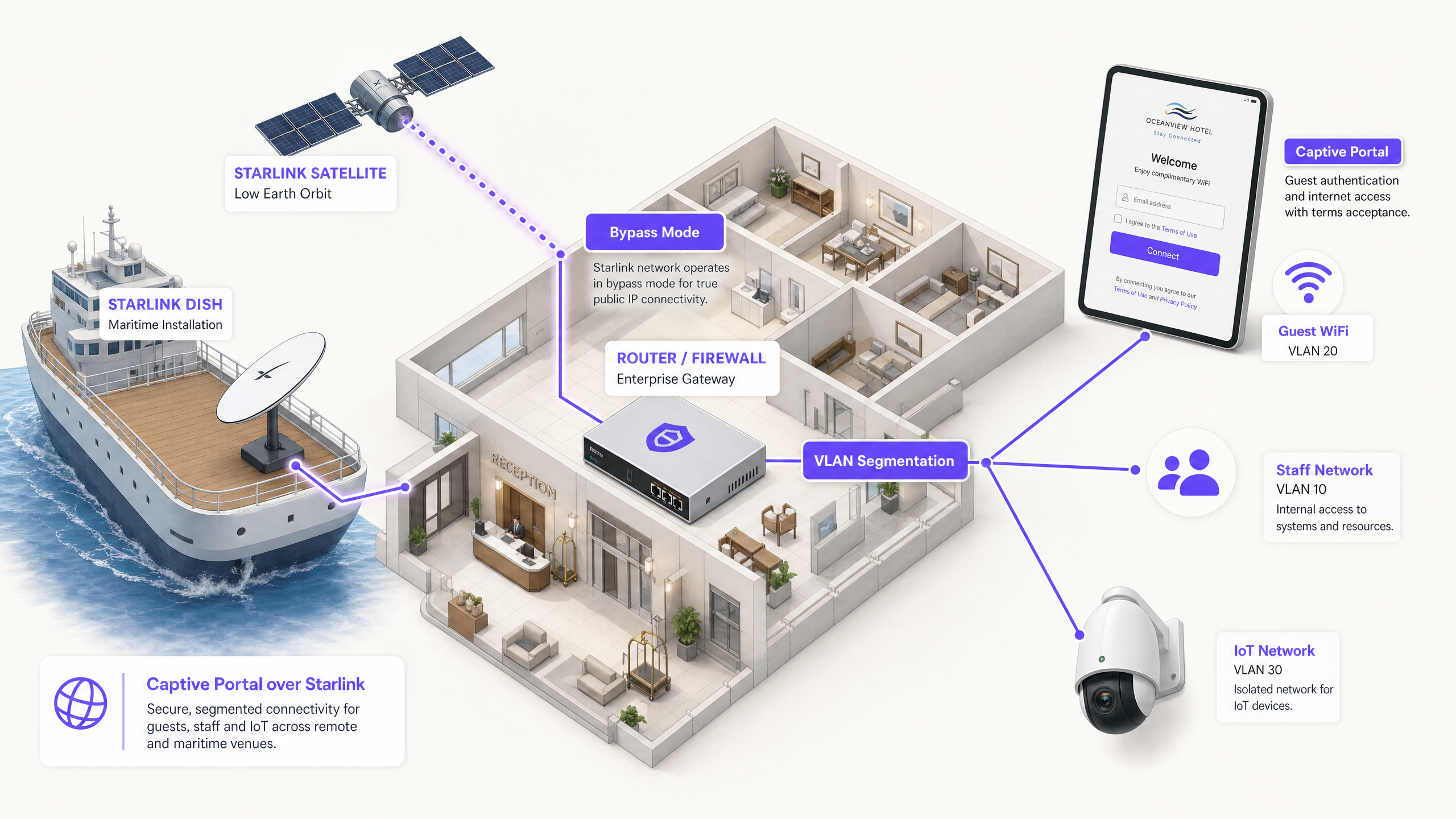
कार्यकारी सारांश
Starlink अशा ठिकाणी 220 Mbps कनेक्टिव्हिटी प्रदान करते जिथे फायबर पोहोचू शकत नाही, ज्यामुळे दुर्गम आणि सागरी ठिकाणांसाठी नेटवर्किंगचे स्वरूप पूर्णपणे बदलते. तथापि, सार्वजनिक-वापराच्या वातावरणासाठी केवळ कनेक्टिव्हिटी पुरेशी नाही. जेव्हा तुम्ही पाहुणे, प्रवासी किंवा क्रू सदस्यांसाठी Starlink तैनात करता, तेव्हा तुम्ही प्रमाणीकरण (authentication), प्रवेश नियंत्रण (access control), GDPR-सुसंगत संमती आणि बँडविड्थ व्यवस्थापन लागू केले पाहिजे. मूळ Starlink राउटर यापैकी कोणतीही क्षमता प्रदान करत नाही.
या मार्गदर्शकामध्ये मूळ Starlink हार्डवेअरला बायपास कसे करावे आणि एंटरप्राइझ राउटिंग उपकरणांचा वापर करून क्लाउड-व्यवस्थापित captive portal कसे समाकलित करावे याचे तपशील दिले आहेत. तुम्ही CGNAT मर्यादा कशी ओलांडायची, VLAN विभागणी कशी लागू करायची, सॅटेलाइट बँडविड्थ मर्यादा कशा व्यवस्थापित करायच्या आणि नियामक अनुपालन कसे सुनिश्चित करायचे हे शिकाल.
ही आर्किटेक्चर लागू करून, ठिकाण चालक (venue operators) एका अव्यवस्थित इंटरनेट पाईपला सुरक्षित, विभागलेल्या नेटवर्कमध्ये रूपांतरित करतात जे फर्स्ट-पार्टी डेटा गोळा करते आणि मुख्य व्यावसायिक पायाभूत सुविधांचे रक्षण करते.
तांत्रिक सखोल विश्लेषण
CGNAT ची मर्यादा
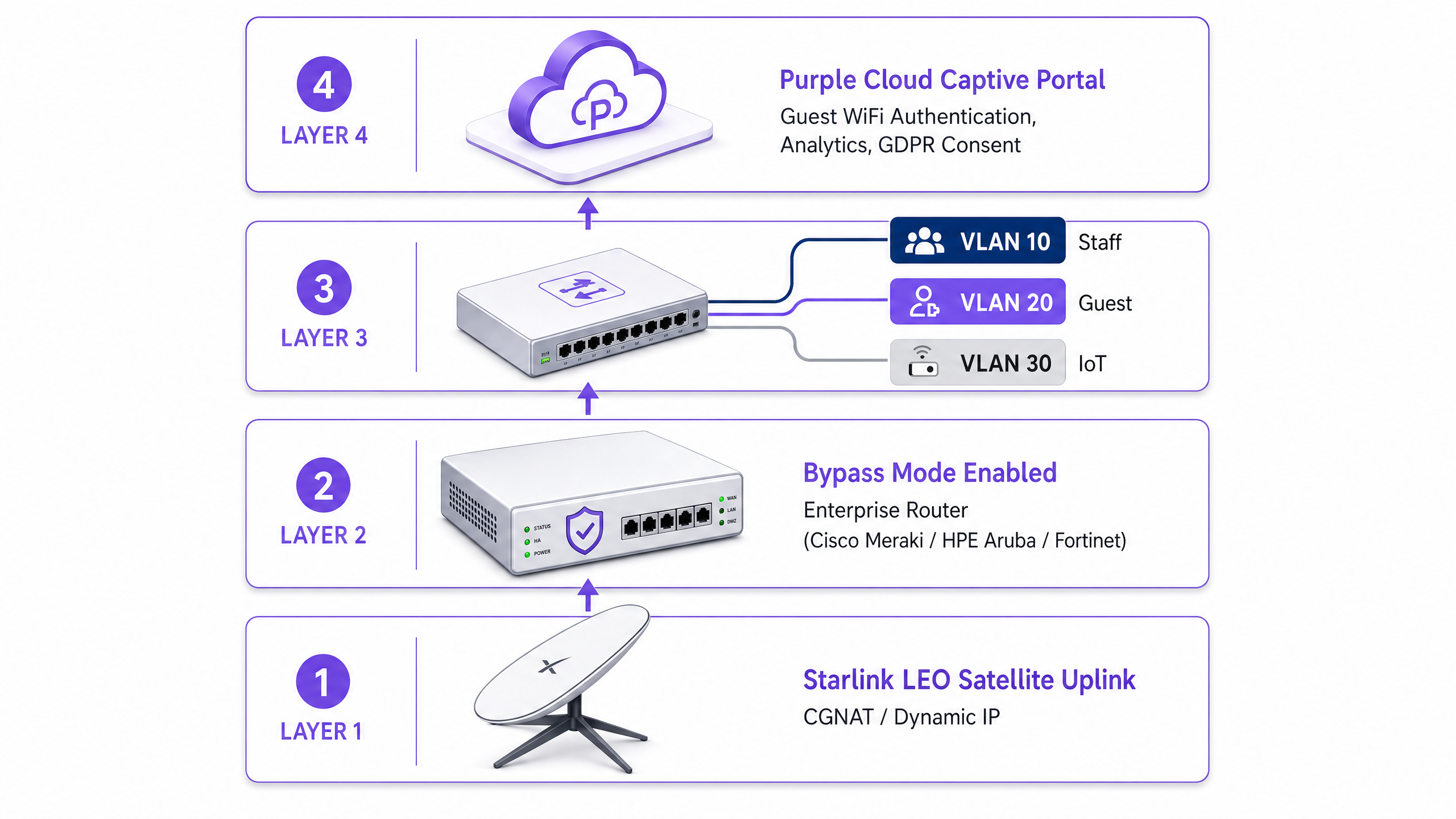
Starlink वर captive portal तैनात करताना मुख्य तांत्रिक अडथळा म्हणजे Carrier Grade NAT (CGNAT) हा आहे. मानक Starlink डिश एका प्रोप्रायटरी राउटरशी जोडली जाते जी DHCP आणि NAT हाताळते. डीफॉल्टनुसार, तुमच्या उपकरणाला नियुक्त केलेला WAN IP पत्ता 100.64.0.0/10 श्रेणीमध्ये येतो. हा सार्वजनिक IP पत्ता नसल्यामुळे, तुमचा राउटर इंटरनेटवरून येणारे (inbound) कनेक्शन प्राप्त करू शकत नाही.
मानक captive portal आर्किटेक्चर सहसा असे गृहीत धरतात की क्लाउड पोर्टल वापरकर्त्यांचे प्रमाणीकरण करण्यासाठी किंवा प्रवेश नियंत्रण सूची (access control lists) अद्यतनित करण्यासाठी तुमच्या नेटवर्कमध्ये परत पोहोचू शकते. CGNAT मुळे, येणारे कनेक्शन अयशस्वी होतात.
याचे निराकरण करण्यासाठी, तुम्ही Starlink डिश Bypass Mode मध्ये (ज्याला सहसा ब्रिज मोड म्हटले जाते) कॉन्फिगर करणे आवश्यक आहे. Bypass Mode मध्ये, Starlink राउटरची कार्ये अक्षम केली जातात आणि डिश थेट तुमच्या एंटरप्राइझ राउटरच्या WAN पोर्टवर CGNAT पत्ता पाठवते. त्यानंतर तुमचा एंटरप्राइझ राउटर राउटिंग लेयरवर पूर्ण नियंत्रण मिळवतो.
रिव्हर्स टनेल आर्किटेक्चर
एंटरप्राइझ राउटर ट्रॅफिक हाताळत असतानाही, CGNAT ची येणाऱ्या कनेक्शनची मर्यादा कायम राहते. याचे समाधान म्हणजे रिव्हर्स टनेल आर्किटेक्चर आहे. तुमचा राउटर क्लाउड पोर्टलशी एक आउटबाउंड कनेक्शन स्थापित करतो आणि ते सतत चालू ठेवतो. सर्व प्रमाणीकरण ट्रॅफिक या स्थापित टनेलमधून वाहते. क्लाउड इन्फ्रास्ट्रक्चरला कधीही येणारे कनेक्शन सुरू करण्याची आवश्यकता नसते.
Purple चे क्लाउड ओव्हरले आर्किटेक्चर हे मूळतः हाताळते. तुम्हाला मॅन्युअल VPN टनेल्स कॉन्फिगर करण्याची आवश्यकता नाही. जर तुमच्या उपयोजनासाठी (deployment) जुन्या ऑन-प्रिमाइस RADIUS सर्व्हरसाठी किंवा कठोर IP परवानगी सूचीसाठी (allowlisting) स्थिर (static) IP ची आवश्यकता असेल, तर Starlink Business आणि Maritime प्लॅन्स सशुल्क ॲड-ऑन म्हणून स्थिर IP ऑफर करतात.
बँडविड्थ मर्यादा आणि ट्रॅफिक शेपिंग
सॅटेलाइट बँडविड्थ हा एक सामायिक, मर्यादित स्त्रोत आहे. 4K व्हिडिओ प्रवाहित (stream) करणारा एकच वापरकर्ता सतत 25 Mbps वापरू शकतो. 220 Mbps Starlink कनेक्शन सामायिक करणाऱ्या 50 प्रवाशांसह असलेल्या जहाजावर, एक वापरकर्ता एकूण क्षमतेच्या 11% वापर करू शकतो.
तुम्ही आक्रमक ट्रॅफिक शेपिंगद्वारे captive portal आणि राउटर स्तरावर याचे निराकरण केले पाहिजे:
- प्रति-डिव्हाइस मर्यादा: वैयक्तिक अतिथी उपकरणांना 5 Mbps डाउनलोड आणि 2 Mbps अपलोडपर्यंत मर्यादित करा.
- वाजवी-वापर धोरणे (Fair-Use Policies): दैनिक डेटा मर्यादा लागू करा (उदा. २४ तासांत 2GB).
- ॲप्लिकेशन नियंत्रण: व्हिडिओ स्ट्रीमिंग आणि पीअर-टू-पीअर फाइल शेअरिंगपेक्षा वेब ब्राउझिंग आणि मेसेजिंग प्रोटोकॉलला प्राधान्य द्या.
- स्तरीय प्रवेश (Tiered Access): मूलभूत कनेक्टिव्हिटीसाठी विनामूल्य स्तर आणि स्ट्रीमिंगसाठी सशुल्क प्रीमियम स्तर ऑफर करा, ज्यामुळे WiFi पायाभूत सुविधांचे रूपांतर खर्च केंद्रातून महसूल निर्मितीच्या स्त्रोतामध्ये होईल.
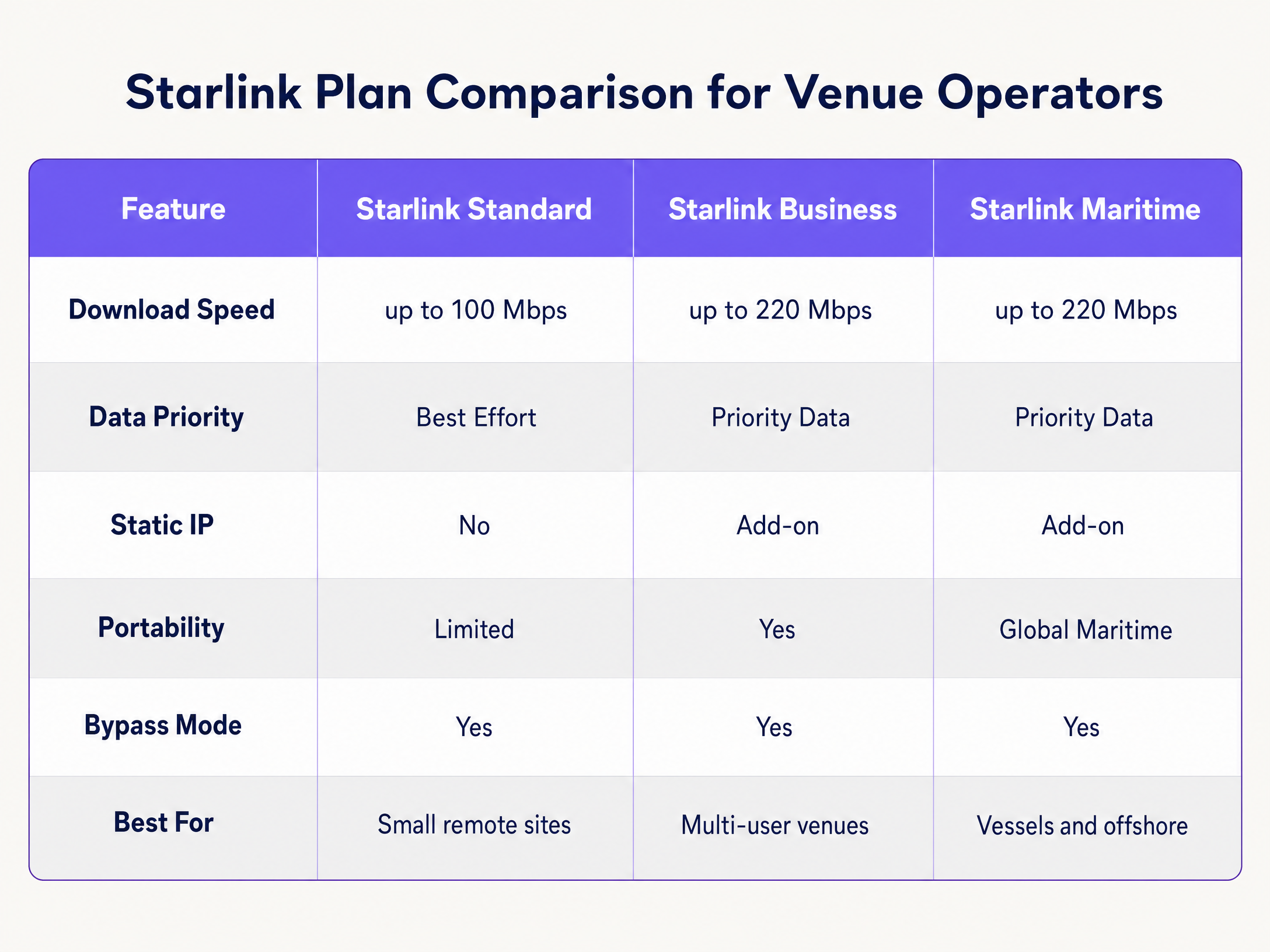
अंमलबजावणी मार्गदर्शक
एंटरप्राइझ हार्डवेअरचा वापर करून Starlink वर सुरक्षित captive portal तैनात करण्यासाठी या चरणांचे अनुसरण करा.
पायरी १: Bypass Mode सक्षम करा
- Starlink हार्डवेअर स्थापित करा आणि मूळ राउटर वापरून कनेक्टिव्हिटीची पडताळणी करा.
- Starlink मोबाईल ॲप्लिकेशन उघडा आणि Settings वर जा.
- Bypass Starlink WiFi router निवडा आणि पुष्टी करा.
- Starlink इथरनेट अडॅप्टर तुमच्या एंटरप्राइझ राउटरच्या (Cisco Meraki, HPE Aruba, Ruckus, Juniper Mist, Ubiquiti UniFi, Cambium, Extreme, किंवा Fortinet) WAN पोर्टशी जोडा.
टीप: जर Starlink डिश फॅक्टरी रिसेट केली गेली, तर Bypass Mode आपोआप अक्षम होतो. तुमच्या साईट रनबुकमध्ये याची नोंद करा आणि तुमच्या राउटरच्या WAN इंटरफेसवर मॉनिटरिंग अलर्ट कॉन्फिगर करा.
पायरी २: VLAN विभागणी कॉन्फिगर करा
तुम्ही तुमच्या मुख्य व्यवसाय प्रणालींपासून अतिथी ट्रॅफिक वेगळे केले पाहिजे. तुमच्या मुख्य स्विच आणि ॲक्सेस पॉइंट्सवर किमान तीन VLAN कॉन्फिगर करा:
- VLAN 10 (कर्मचारी): यामध्ये POS प्रणाली, बॅक-ऑफिस ॲप्लिकेशन्स आणि व्यवस्थापन ट्रॅफिक समाविष्ट असते.
- VLAN 20 (अतिथी): केवळ-इंटरनेट विभाग जो captive portal कडे रिडायरेक्ट करतो.
- VLAN 30 (IoT): कॅमेरे, स्मार्ट थर्मोस्टॅट्स आणि बिल्डिंग मॅनेजमेंट सिस्टमसाठी वेगळे केलेले नेटवर्क.
सर्व आंतर-VLAN राउटिंग ब्लॉक करण्यासाठी फायरवॉल नियम कॉन्फिगर करा. VLAN 20 वरील अतिथी डिव्हाइस कधीही VLAN 10 वरील POS टर्मिनलला पिंग करण्यास सक्षम नसावे. ही विभागणी PCI DSS अनुपालनासाठी एक कठोर आवश्यकता आहे.
पायरी ३: क्लाउड Captive Portal तैनात करा
- VLAN 20 वर अतिथी SSID प्रसारित करण्यासाठी तुमचे ॲक्सेस पॉइंट्स कॉन्फिगर करा.
- प्रमाणीकरण पद्धत बाह्य RADIUS वर सेट करा किंवा विक्रेत्याचे API एकत्रीकरण वापरा.
- प्रमाणीकरण सर्व्हर Purple च्या क्लाउड इन्फ्रास्ट्रक्चरकडे निर्देशित करा.
- प्रमाणीकरण पूर्ण होण्यापूर्वी Purple च्या डोमेन्सना ट्रॅफिकची परवानगी देण्यासाठी वॉल्ड गार्डन (परवानगी सूची) कॉन्फिगर करा.
- Purple पोर्टलमध्ये स्प्लॅश पेज डिझाइन करा, हे सुनिश्चित करून की ब्रँडिंग तुमच्या ठिकाणाशी सुसंगत आहे आणि सेवा अटी स्पष्टपणे दिसत आहेत याची खात्री करा.
Step 4: Test the User Flow
iOS आणि Android दोन्ही उपकरणांवर ऑथेंटिकेशन फ्लोची चाचणी घ्या. Apple चे Captive Network Assistant (CNA) आणि Android चे नेटवर्क प्रोब वेगवेगळ्या प्रकारे कार्य करतात. स्प्लॅश पेज १० सेकंदांच्या आत लोड होत असल्याची आणि ऑथेंटिकेशननंतर लगेचच उपकरणाला इंटरनेट ॲक्सेस मिळत असल्याची पडताळणी करा.
Best Practices
- HTTPS Intercept: तुमचा राउटर HTTPS इंटरसेप्शन योग्यरित्या हाताळत असल्याची खात्री करा. आधुनिक उपकरणे डीफॉल्टनुसार HTTPS वापरतात. जर राउटर HTTPS विनंत्या सुरळीतपणे रिडायरेक्ट करू शकला नाही, तर पाहुण्यांना पोर्टलवर पोहोचण्यापूर्वी सर्टिफिकेट एररचा सामना करावा लागेल.
- Session Keepalive: Starlink चे लो अर्थ ऑर्बिट (LEO) कॉन्स्टेलेशन २० ते ४० मिलिसेकंद लेटन्सी प्रदान करते, परंतु सॅटेलाइट हँडऑफ दरम्यान काही काळासाठी लेटन्सी वाढू शकते. अकाली डिस्कनेक्ट टाळण्यासाठी तुमचे Captive Portal सेशन कीपअलाईव्ह (keepalive) इंटरव्हल्स ६० सेकंद किंवा त्यापेक्षा कमी सेट करा.
- Offline Caching: सक्रिय सेशन्स स्थानिक पातळीवर कॅश करण्यासाठी तुमचा राउटर कॉन्फिगर करा. Starlink कनेक्शन तात्पुरते खंडित झाल्यास, जे पाहुणे आधीच ऑथेंटिकेट झाले आहेत ते कनेक्टिव्हिटी पूर्ववत झाल्यावर पुन्हा लॉग इन न करता ऑनलाइन राहतील.
Troubleshooting & Risk Mitigation
| बिघाडाचा प्रकार | मूळ कारण | उपाय |
|---|---|---|
| Captive Portal लोड होण्यात अपयशी ठरते | वॉल्ड गार्डन चुकीचे कॉन्फिगरेशन | राउटरवरील प्री-ऑथेंटिकेशन अलाउलिस्टमध्ये सर्व आवश्यक Purple डोमेन्स आणि CDN एंडपॉइंट्स जोडले गेले असल्याची पडताळणी करा. |
| डबल NAT एरर्स | बायपास मोड निष्क्रिय आहे | बायपास मोड सक्रिय असल्याची खात्री करण्यासाठी Starlink ॲप तपासा. पॉवर सर्ज किंवा मॅन्युअल रीसेटमुळे डिश डीफॉल्ट सेटिंग्जवर परत गेली असावी. |
| पाहुण्यांना मिळणारा संथ स्पीड | अमर्यादित बँडविड्थ | प्रति-उपकरण बँडविड्थ मर्यादा (उदा. ५ Mbps) लागू करा आणि फायरवॉलवर BitTorrent सारख्या हाय-बँडविड्थ ॲप्लिकेशन्सना ब्लॉक करा. |
| सुरक्षा ऑडिट अयशस्वी | इंटर-VLAN राउटिंग सक्षम आहे | गेस्ट VLAN कडून येणारा ट्रॅफिक स्टाफ किंवा मॅनेजमेंट VLAN कडे जाऊ शकत नाही याची खात्री करण्यासाठी फायरवॉल नियमांचे ऑडिट करा. |
ROI & Business Impact
Starlink वर व्यवस्थापित Captive Portal तैनात केल्याने सामान्य इंटरनेट कनेक्शनचे रूपांतर एका मोजता येण्याजोग्या व्यावसायिक मालमत्तेत होते.
२२० Mbps वर Starlink Maritime चालवणाऱ्या १२०-केबिनच्या क्रूझ जहाजासाठी, थेट ॲक्सेस कोणताही व्यावसायिक परतावा देत नाही. Cisco Meraki ॲक्सेस पॉइंट्स आणि Purple चे Captive Portal तैनात करून, ऑपरेटर सामान्य प्रवाशांसाठी २GB ची दैनिक मर्यादा लागू करू शकतो आणि सोबतच १०GB च्या प्रीमियम टियरची विक्री करू शकतो. यातून मिळणारे WiFi उत्पन्न $२५०+ च्या मासिक Starlink सबस्क्रिप्शनचा खर्च भागवते. याव्यतिरिक्त, हे पोर्टल पूर्णपणे सुसंगत फर्स्ट-पार्टी ईमेल डेटा गोळा करते, ज्यामुळे भविष्यातील प्रवासासाठी ऑपरेटरची थेट विपणन सूची वाढते.
दुर्गम हॉटेलच्या वातावरणात, कडक बँडविड्थ पॉलिसीसह पोर्टल तैनात केल्याने संथ WiFi बाबत पाहुण्यांच्या तक्रारी ६०% पर्यंत कमी होतात, कारण जास्त वापर करणाऱ्या युझर्सना सॅटेलाइट लिंकवर मक्तेदारी मिळवण्यापासून रोखले जाते.
महत्वाच्या व्याख्या
Bypass Mode
A configuration setting that disables the native Starlink router's DHCP and NAT functions, passing the WAN IP directly to a third-party enterprise router.
Required when integrating enterprise networking equipment with a Starlink dish to avoid double NAT and routing conflicts.
CGNAT (Carrier Grade NAT)
A method used by ISPs to share a single public IP address among multiple customers. The customer's router receives a private IP address (typically 100.64.0.0/10).
Starlink uses CGNAT by default, which prevents inbound connections from the internet and requires reverse tunnel architectures for cloud management.
VLAN (Virtual Local Area Network)
A logical subnetwork that groups a collection of devices from different physical LANs.
Used to isolate guest WiFi traffic from staff and IoT networks, ensuring security and compliance.
Captive Portal
A web page that a user of a public access network is obliged to view and interact with before access is granted.
Used to enforce terms of service, collect marketing data, and authenticate users on guest WiFi networks.
Walled Garden
A limited environment that controls the user's access to web content and services before they have fully authenticated.
Required to allow guest devices to reach the cloud captive portal and authentication servers before they are granted full internet access.
RADIUS
A networking protocol that provides centralized Authentication, Authorization, and Accounting management for users who connect and use a network service.
The underlying protocol used by enterprise access points to communicate with the cloud captive portal to verify user credentials.
Traffic Shaping
The manipulation and prioritization of network traffic to reduce the impact of heavy users or latency-sensitive applications.
Essential on Starlink networks to prioritize web browsing over high-bandwidth activities like video streaming.
First-Party Data
Information a company collects directly from its customers and owns.
Captured via the captive portal login process (e.g., email addresses) and used for direct marketing and loyalty campaigns.
सोडवलेली उदाहरणे
A 120-cabin cruise vessel running Starlink Maritime at 220 Mbps needs to provide passenger WiFi without degrading ship operations. They require a mechanism to monetise the connection and collect marketing data.
The operator deploys Cisco Meraki access points throughout the vessel with three strict VLANs: crew, passenger, and ship systems. Purple's captive portal handles passenger authentication via email or a cabin number lookup integrated with the PMS. Each passenger receives a 2GB daily allowance. Premium tier passengers can purchase a 10GB allocation. The portal collects first-party email data for post-voyage marketing.
A remote Highland hotel with no fibre infrastructure runs Starlink Business at 150 Mbps. Guests frequently complain about slow speeds during the evening, and the hotel has no visibility into who is using the network.
The hotel deploys HPE Aruba access points across the main building and outbuildings. They configure the Starlink dish in Bypass Mode and connect it to an Aruba gateway. Guests authenticate via email on Purple's portal. The hotel enforces a strict 5 Mbps per-device bandwidth cap and uses Purple's analytics to monitor peak usage times.
सराव प्रश्न
Q1. A remote mining camp has deployed Starlink Business. They have connected a Cisco Meraki MX firewall to the Starlink router. Guests can connect to the WiFi, but the captive portal page times out and fails to load. What is the most likely cause?
टीप: Consider how the Starlink hardware handles routing by default and what the Meraki firewall requires to manage traffic effectively.
नमुना उत्तर पहा
The Starlink dish has not been placed in Bypass Mode. As a result, the network is suffering from double NAT (the Starlink router and the Meraki firewall are both attempting to perform Network Address Translation). The administrator must use the Starlink app to enable Bypass Mode, allowing the Meraki firewall to receive the CGNAT IP directly and manage the routing and captive portal interception.
Q2. You are deploying a captive portal for a hotel using Starlink. You have configured Bypass Mode and VLAN segmentation. During testing, you notice that Apple devices prompt the user to log in immediately, but some Android devices show a certificate error when the user tries to browse to a secure website before authenticating. How do you resolve this?
टीप: Think about how modern browsers handle initial connection requests and what the router must do to intercept them cleanly.
नमुना उत्तर पहा
The enterprise router is not configured to handle HTTPS interception correctly for the captive portal redirect. Modern browsers default to HTTPS. When the user attempts to visit an HTTPS site before authenticating, the router intercepts the traffic and presents its own certificate, which the browser rejects as invalid. You must ensure the router's captive portal settings are configured to use a valid SSL certificate for the redirect, or rely on the OS-level network probes (like Apple's CNA) which use HTTP endpoints to trigger the portal automatically.
Q3. A maritime operator complains that their Starlink Maritime connection (220 Mbps) becomes unusable every evening. They currently provide an open, password-free guest network. What three specific configurations should you implement on the enterprise router and captive portal to resolve this?
टीप: Focus on controlling how much data individual users can consume and prioritising critical traffic types.
नमुना उत्तर पहा
- Implement a captive portal requiring authentication to track and manage individual users. 2. Enforce per-device bandwidth caps (e.g., 5 Mbps down / 2 Mbps up) to prevent a single user from monopolising the connection. 3. Apply traffic shaping rules at the firewall to prioritise web browsing and messaging protocols while throttling or blocking high-bandwidth applications like video streaming and P2P file sharing.
या मालिकेमध्ये पुढे वाचा
हॉटेल अतिथी WiFi व्यवस्थापन: PMS, पोर्टल्स आणि ब्रँड मानकांचे एकत्रीकरण
हे तांत्रिक मार्गदर्शक एंटरप्राइझ-ग्रेड हॉटेल WiFi नेटवर्कची रचना कशी करावी याबद्दल तपशीलवार माहिती देते, ज्यामध्ये VLAN विभागणी, स्वयंचलित सत्र व्यवस्थापनासाठी PMS एकत्रीकरण आणि GDPR-सुसंगत डेटा कॅप्चरसाठी Captive Portal ऑप्टिमायझेशन यावर लक्ष केंद्रित केले आहे.
Captive Portal सर्वोत्तम पद्धती: उच्च रूपांतरण आणि अनुपालनासाठी डिझाइन करणे
हा तांत्रिक मार्गदर्शक आयटी व्यवस्थापक, नेटवर्क आर्किटेक्ट्स आणि ठिकाण ऑपरेशन्स संचालकांना नेटवर्क सुरक्षा आणि उच्च युझर रूपांतरण यामध्ये संतुलन राखणारे captive portals तैनात करण्यासाठी एक संपूर्ण आराखडा देतो. यामध्ये VLAN सेगमेंटेशन आणि RADIUS ऑथेंटिकेशनपासून ते GDPR-सुसंगत संमती डिझाइन आणि ऑथेंटिकेशन पद्धत निवडीपर्यंतच्या संपूर्ण आर्किटेक्चरचा समावेश आहे. 2024 मधील Purple च्या 80,000+ ठिकाणांवरील आणि 440 दशलक्ष लॉगिनच्या ऑपरेशनल अनुभवातून घेतलेली, प्रत्येक शिफारस वास्तविक अंमलबजावणी डेटावर आधारित आहे.
कमाल नेटवर्क सुरक्षा आणि युझर कन्व्हर्जनसाठी Captive Portals कसे ऑप्टिमाइझ करावे
हे मार्गदर्शक एंटरप्राइझ ठिकाणांवर captive portals ऑप्टिमाइझ करण्यासाठी संपूर्ण तांत्रिक ब्ल्यूप्रिंट प्रदान करते, ज्यामध्ये नेटवर्क सेगमेंटेशन आर्किटेक्चर, ऑथेंटिकेशन पद्धतीची निवड, GDPR-सुसंगत संमती डिझाइन आणि कन्व्हर्जन ऑप्टिमायझेशन समाविष्ट आहे. हे हॉटेल्स, रिटेल चेन्स, स्टेडियम्स आणि सार्वजनिक क्षेत्रातील संस्थांमधील IT मॅनेजर्स, नेटवर्क आर्किटेक्ट्स आणि CTOs यांच्यासाठी लिहिले गेले आहे ज्यांना फर्स्ट-पार्टी डेटा कॅप्चरसह नेटवर्क सुरक्षेचा समतोल राखायचा आहे. Purple हे २०२४ मध्ये ४४ कोटी (440 million) लॉगइन्ससह ८०,००0+ पेक्षा जास्त ठिकाणांवर captive portal इन्फ्रास्ट्रक्चर चालवते आणि येथील फ्रेमवर्क तो कार्यात्मक अनुभव दर्शवतात.