
Cómo configurar un Captive Portal en Starlink: una guía para ubicaciones remotas y marítimas
Esta guía detalla cómo omitir el hardware nativo de Starlink e integrar un Captive Portal gestionado en la nube utilizando equipos de enrutamiento empresarial. Aprenderá a superar la limitación de CGNAT, aplicar la segmentación por VLAN, gestionar las limitaciones de ancho de banda satelital y garantizar el cumplimiento normativo.
Escuchar esta guía
Ver transcripción del podcast
Parte de nuestra serie principal: Captive Portal Guide →
Resumen Ejecutivo
Starlink ofrece una conectividad de 220 Mbps en ubicaciones a las que la fibra no puede llegar, transformando por completo el panorama de las redes para entornos remotos y marítimos. Sin embargo, para entornos de cara al público, la conectividad por sí sola no es suficiente. Al desplegar Starlink para invitados, pasajeros o tripulación, debe implementar autenticación, control de acceso, consentimiento que cumpla con el GDPR y gestión de ancho de banda. El router nativo de Starlink no proporciona ninguna de estas capacidades.
Esta guía explica detalladamente cómo omitir el hardware nativo de Starlink e integrar un Captive Portal gestionado en la nube utilizando equipos de enrutamiento empresarial. Aprenderá a superar las limitaciones de Carrier Grade NAT (CGNAT), implementar la segmentación de VLAN, gestionar las limitaciones de ancho de banda satelital y garantizar el cumplimiento normativo.
Al implementar esta arquitectura, los operadores de las instalaciones transforman un canal de internet no gestionado en una red segura y segmentada que captura datos de origen y protege la infraestructura empresarial principal.
Análisis Técnico Detallado
La Limitación de CGNAT
El principal obstáculo técnico al desplegar un Captive Portal en Starlink es el Carrier Grade NAT (CGNAT). La antena estándar de Starlink se conecta a un router propietario que gestiona el DHCP y la NAT. Por defecto, la dirección IP WAN asignada a su equipo entra dentro del rango 100.64.0.0/10. Dado que no se trata de una dirección IP pública, su router no puede recibir conexiones entrantes desde internet.
Las arquitecturas estándar de Captive Portal a menudo asumen que el portal en la nube puede conectarse de vuelta a su red para autenticar usuarios o actualizar las listas de control de acceso. Con CGNAT, las conexiones entrantes fallan.
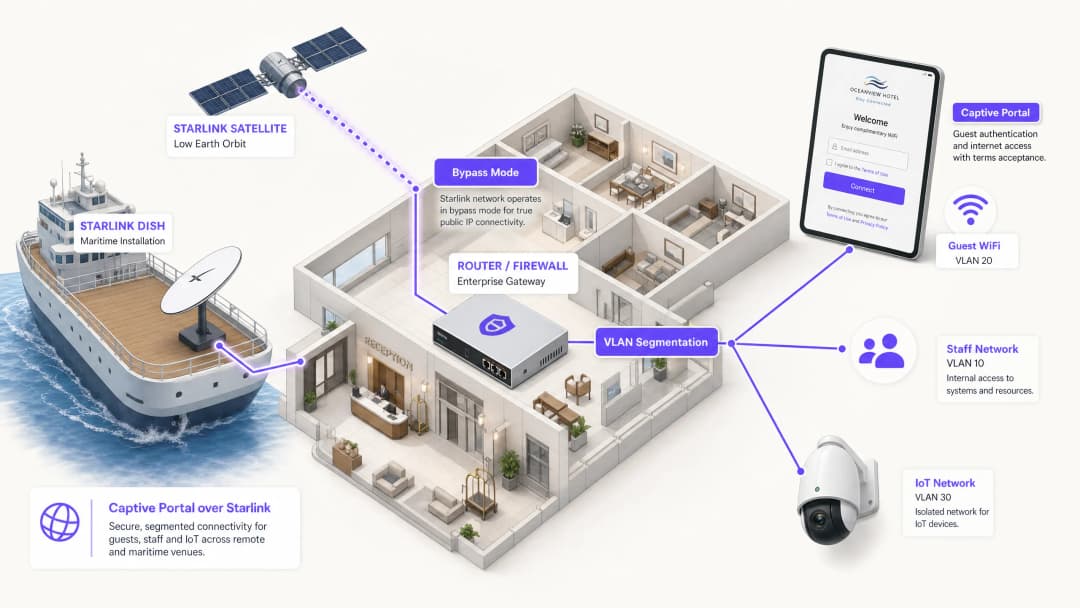
Para resolver esto, debe configurar la antena de Starlink en Bypass Mode (a menudo denominado modo puente). En Bypass Mode, las funciones del router de Starlink se desactivan y la antena envía la dirección CGNAT directamente al puerto WAN de su router empresarial. Su router empresarial asume entonces el control total de la capa de enrutamiento.

Arquitectura de Túnel Inverso
Incluso con el router empresarial gestionando el tráfico, la restricción de entrada de CGNAT permanece. La solución es una arquitectura de túnel inverso. Su router establece una conexión saliente con el portal en la nube y la mantiene continuamente. Todo el tráfico de autenticación fluye a través de este túnel establecido. La infraestructura en la nube nunca necesita iniciar una conexión entrante.
La arquitectura superpuesta en la nube de Purple maneja esto de forma nativa. No es necesario configurar túneles VPN manuales. Si su despliegue requiere una IP estática para servidores RADIUS locales heredados o una lista blanca de IP estricta, los planes Starlink Business y Maritime proporcionan una IP estática como complemento de pago.
Limitaciones de ancho de banda y modelado de tráfico
El ancho de banda de satélite es un recurso compartido y finito. Un solo usuario que reproduzca vídeo en 4K puede consumir de forma continua 25 Mbps. En una embarcación con 50 pasajeros que comparten una conexión Starlink de 220 Mbps, un solo usuario podría consumir el 11% de la capacidad total.
Debe solucionar esto a nivel de Captive Portal y de router mediante un modelado de tráfico estricto:
- Límites por dispositivo: Restrinja los dispositivos de invitados individuales a 5 Mbps de bajada y 2 Mbps de subida.
- Políticas de uso justo: Aplique asignaciones de datos diarias (por ejemplo, 2 GB cada 24 horas).
- Control de aplicaciones: Dé prioridad a la navegación web y a los protocolos de mensajería frente a la transmisión de vídeo y el intercambio de archivos peer-to-peer.
- Acceso por niveles: Ofrezca un nivel gratuito para conectividad básica y un nivel premium de pago para streaming, transformando la infraestructura WiFi de un centro de costes en una fuente de ingresos.
¿Tiene preguntas sobre su configuración específica?
Nuestro equipo trabaja con operadores de recintos, responsables de TI e ingenieros de redes en 80 000 espacios. Reserve una llamada de 20 minutos y le mostraremos cómo lo han solucionado otros profesionales como usted.
Guía de implementación
Siga estos pasos para desplegar un Captive Portal seguro en Starlink utilizando hardware empresarial.
Paso 1: Activar el modo bypass
- Instale el hardware de Starlink y verifique la conectividad utilizando el router original.
- Abra la aplicación móvil de Starlink y diríjase a Ajustes.
- Seleccione y confirme Bypass del router WiFi de Starlink.
- Conecte el adaptador Ethernet de Starlink al puerto WAN de su router empresarial (Cisco Meraki, HPE Aruba, Ruckus, Juniper Mist, Ubiquiti UniFi, Cambium, Extreme o Fortinet).
Nota: Si la antena de Starlink se restablece a los valores de fábrica, el modo bypass se desactiva automáticamente. Documente esto en su manual de procedimientos del sitio y configure una alerta de monitorización en la interfaz WAN de su router.
Paso 2: Configurar la segmentación de VLAN
Debe aislar el tráfico de invitados de sus sistemas empresariales principales. Configure al menos tres VLAN en su switch principal y puntos de acceso:
- VLAN 10 (Personal): Transporta los sistemas POS, las aplicaciones de back-office y el tráfico de gestión.
- VLAN 20 (Invitados): Segmento exclusivo de Internet que redirige al Captive Portal.
- VLAN 30 (IoT): Red aislada para cámaras, termostatos inteligentes y sistemas de gestión de edificios.
Configure reglas de firewall para bloquear todo el enrutamiento inter-VLAN. Un dispositivo de invitado en la VLAN 20 nunca debe poder hacer ping a un terminal POS en la VLAN 10. Esta segmentación es un requisito estricto para el cumplimiento de PCI-DSS.
Paso 3: Desplegar el Captive Portal en la nube
- Configure sus puntos de acceso para transmitir el SSID de invitados en la VLAN 20.
- Establezca el método de autenticación en un RADIUS externo o utilice la integración API del proveedor.3. Apunte el servidor de autenticación a la infraestructura en la nube de Purple.
- Configure el walled garden (lista de permitidos) para autorizar el tráfico a los dominios de Purple antes de que se complete la autenticación.
- Diseñe la splash page en el portal de Purple, asegurándose de que la imagen de marca coincida con su establecimiento y que las condiciones del servicio se muestren claramente.
Paso 4: Probar el flujo de usuario
Pruebe el flujo de autenticación tanto en dispositivos iOS como Android. El Asistente de Red Cautiva (CNA) de Apple y la sonda de red de Android se comportan de forma diferente. Verifique que la splash page se cargue en un plazo de 10 segundos y que el dispositivo obtenga acceso a internet inmediatamente después de la autenticación.
Buenas prácticas
- Intercepción HTTPS: Asegúrese de que su router gestione correctamente la intercepción HTTPS. Los dispositivos modernos utilizan HTTPS por defecto. Si el router no puede redirigir las solicitudes HTTPS de forma limpia, los clientes experimentarán errores de certificado antes de llegar al portal.
- Keepalive de sesión: La constelación de órbita terrestre baja (LEO) de Starlink proporciona latencias de 20 a 40 milisegundos, pero se producen breves picos durante las transiciones entre satélites. Establezca el intervalo de keepalive de sesión del Captive Portal en 60 segundos o menos para evitar desconexiones prematuras.
- Caché sin conexión: Configure su router para almacenar en caché las sesiones activas de forma local. Si la conexión de Starlink se cae temporalmente, los clientes que ya estén autenticados seguirán conectados cuando se restablezca la conectividad, en lugar de verse obligados a iniciar sesión de nuevo.
Resolución de problemas y mitigación de riesgos
| Modo de fallo | Causa raíz | Mitigación |
|---|---|---|
| El Captive Portal no se carga | Configuración incorrecta del walled garden | Verifique que todos los dominios de Purple y endpoints de CDN requeridos estén añadidos a la lista de permitidos previa a la autenticación en el router. |
| Errores de doble NAT | El modo Bypass está desactivado | Compruebe la aplicación Starlink para confirmar que el modo Bypass está activo. Las fluctuaciones de energía o los reinicios manuales pueden haber devuelto la antena a la configuración predeterminada. |
| Velocidades lentas para invitados | Ancho de banda sin restricciones | Aplique límites de ancho de banda por dispositivo (por ejemplo, 5 Mbps) y bloquee aplicaciones de gran ancho de banda como BitTorrent en el firewall. |
| Fallo en la auditoría de seguridad | El enrutamiento inter-VLAN está habilitado | Audite las reglas del firewall para asegurarse de que el tráfico de la VLAN de invitados no pueda enrutarse a la VLAN de personal o de gestión. |
Retorno de la inversión (ROI) e impacto empresarial
La implementación de un Captive Portal gestionado en Starlink transforma una conexión a internet básica en un activo empresarial cuantificable.
Para un crucero de 120 camarotes que utiliza Starlink Maritime a 220 Mbps, el acceso directo no genera ningún retorno comercial. Al implementar puntos de acceso Cisco Meraki y el Captive Portal de Purple, el operador puede imponer un límite diario de 2 GB para los pasajeros estándar y, al mismo tiempo, vender una categoría premium de 10 GB. Los ingresos resultantes del servicio WiFi cubren el coste de la suscripción mensual a Starlink de más de 250 $. Además, el portal recopila datos de correo electrónico de origen de conformidad con la normativa, ampliando la lista de marketing directo del operador para futuros viajes.En el entorno de un hotel remoto, implementar un portal con políticas estrictas de ancho de banda reduce las quejas de los huéspedes sobre la lentitud del WiFi hasta en un 60%, ya que se evita que los usuarios de alto consumo monopolicen el enlace satelital.
Definiciones clave
Bypass Mode
Un ajuste de configuración que desactiva las funciones de DHCP y NAT del router nativo de Starlink, pasando la IP WAN directamente a un router empresarial de terceros.
Requerido al integrar equipos de red empresariales con una antena Starlink para evitar el doble NAT y conflictos de enrutamiento.
CGNAT (Carrier Grade NAT)
Un método utilizado por los ISP para compartir una única dirección IP pública entre varios clientes. El router del cliente recibe una dirección IP privada (normalmente 100.64.0.0/10).
Starlink utiliza CGNAT por defecto, lo que impide las conexiones entrantes desde internet y requiere arquitecturas de túnel inverso para la gestión en la nube.
VLAN (Virtual Local Area Network)
Una subred lógica que agrupa un conjunto de dispositivos de diferentes redes LAN físicas.
Se utiliza para aislar el tráfico de la red WiFi de invitados de las redes del personal y de IoT, garantizando la seguridad y el cumplimiento normativo.
Captive Portal
Una página web que el usuario de una red de acceso público está obligado a visualizar e interactuar con ella antes de que se le conceda acceso.
Se utiliza para hacer cumplir los términos de servicio, recopilar datos de marketing y autenticar a los usuarios en redes WiFi de invitados.
Walled Garden
Un entorno limitado que controla el acceso del usuario a contenidos y servicios web antes de que se haya autenticado por completo.
Requerido para permitir que los dispositivos de los invitados accedan al Captive Portal en la nube y a los servidores de autenticación antes de que se les conceda acceso total a internet.
RADIUS
Un protocolo de red que proporciona una gestión centralizada de autenticación, autorización y registro (AAA) para los usuarios que se conectan y utilizan un servicio de red.
El protocolo subyacente utilizado por los puntos de acceso empresariales para comunicarse con el Captive Portal en la nube para verificar las credenciales de los usuarios.
Modelado de Tráfico
La manipulación y priorización del tráfico de red para reducir el impacto de los usuarios intensivos o de las aplicaciones sensibles a la latencia.
Esencial en las redes Starlink para priorizar la navegación web sobre actividades de gran ancho de banda como la transmisión de vídeo.
Datos de origen
Información que una empresa recopila directamente de sus clientes y de la que es propietaria.
Capturados a través del proceso de inicio de sesión del captive portal (por ejemplo, direcciones de correo electrónico) y utilizados para campañas de marketing directo y fidelización.
Ejemplos prácticos
Un crucero de 120 camarotes que utiliza Starlink Marítimo a 220 Mbps necesita proporcionar WiFi para pasajeros sin degradar las operaciones del barco. Requieren un mecanismo para monetizar la conexión y recopilar datos de marketing.
El operador despliega puntos de acceso Cisco Meraki por todo el barco con tres VLAN estrictas: tripulación, pasajeros y sistemas del barco. El Captive Portal de Purple gestiona la autenticación de los pasajeros mediante correo electrónico o una búsqueda por número de camarote integrada con el PMS. Cada pasajero recibe un límite diario de 2 GB. Los pasajeros de categoría premium pueden adquirir una asignación de 10 GB. El portal recopila datos de correo electrónico de origen para acciones de marketing posteriores al viaje.
Un hotel rural remoto sin infraestructura de fibra utiliza Starlink Negocios a 150 Mbps. Los huéspedes se quejan con frecuencia de la lentitud de la velocidad durante la noche, y el hotel no tiene visibilidad de quién está utilizando la red.
El hotel despliega puntos de acceso HPE Aruba en el edificio principal y en los anexos. Configuran la antena de Starlink en Bypass Mode y la conectan a una puerta de enlace de Aruba. Los huéspedes se autentican por correo electrónico en el portal de Purple. El hotel aplica un límite estricto de ancho de banda de 5 Mbps por dispositivo y utiliza los análisis de Purple para supervisar las horas de mayor uso.
Preguntas de práctica
Q1. Un campamento minero remoto ha implementado Starlink Business. Han conectado un firewall Cisco Meraki MX al router de Starlink. Los invitados pueden conectarse a la WiFi, pero la página del captive portal agota el tiempo de espera y no se carga. ¿Cuál es la causa más probable?
Sugerencia: Considere cómo maneja el enrutamiento el hardware de Starlink de forma predeterminada y qué requiere el firewall de Meraki para gestionar el tráfico de manera eficaz.
Ver respuesta modelo
La antena de Starlink no se ha configurado en Bypass Mode. Como resultado, la red sufre de doble NAT (tanto el router de Starlink como el firewall de Meraki intentan realizar la traducción de direcciones de red). El administrador debe usar la aplicación de Starlink para habilitar el Bypass Mode, lo que permitirá que el firewall de Meraki reciba directamente la IP CGNAT y gestione el enrutamiento y la intercepción del captive portal.
Q2. Está implementando un captive portal para un hotel que utiliza Starlink. Ha configurado el Bypass Mode y la segmentación por VLAN. Durante las pruebas, observa que los dispositivos Apple solicitan al usuario que inicie sesión de inmediato, pero algunos dispositivos Android muestran un error de certificado cuando el usuario intenta navegar a un sitio web seguro antes de autenticarse. ¿Cómo resuelve esto?
Sugerencia: Piense en cómo gestionan los navegadores modernos las solicitudes de conexión iniciales y qué debe hacer el router para interceptarlas limpiamente.
Ver respuesta modelo
El router empresarial no está configurado para gestionar correctamente la intercepción HTTPS para la redirección del captive portal. Los navegadores modernos utilizan HTTPS por defecto. Cuando el usuario intenta visitar un sitio HTTPS antes de autenticarse, el router intercepta el tráfico y presenta su propio certificado, que el navegador rechaza por no ser válido. Debe asegurarse de que la configuración del captive portal del router esté establecida para utilizar un certificado SSL válido para la redirección, o confiar en las sondas de red a nivel de sistema operativo (como el CNA de Apple) que utilizan endpoints HTTP para activar el portal automáticamente.
Q3. Un operador marítimo se queja de que su conexión Starlink Maritime (220 Mbps) se vuelve inutilizable todas las noches. Actualmente ofrecen una red de invitados abierta y sin contraseña. ¿Qué tres configuraciones específicas debería implementar en el router empresarial y en el captive portal para resolver esto?
Sugerencia: Concéntrese en controlar la cantidad de datos que pueden consumir los usuarios individuales y en priorizar los tipos de tráfico críticos.
Ver respuesta modelo
- Implementar un captive portal que requiera autenticación para rastrear y gestionar a los usuarios individuales. 2. Aplicar límites de ancho de banda por dispositivo (por ejemplo, 5 Mbps de bajada / 2 Mbps de subida) para evitar que un solo usuario monopolice la conexión. 3. Aplicar reglas de modelado de tráfico en el firewall para priorizar la navegación web y los protocolos de mensajería, al tiempo que se limita o bloquea el uso de aplicaciones de gran ancho de banda, como la transmisión de vídeo y el intercambio de archivos P2P.
Continúe leyendo esta serie
El portal de invitados Ubiquiti UniFi no redirige: causas y soluciones
Esta guía aísla los fallos de redirección del portal de invitados de UniFi analizando en secuencia el estado del invitado, la redirección, la ruta de preautorización y la autorización del controlador. Ofrece a los equipos de TI de los establecimientos un método estructurado para resolver la confusión entre red de invitados y Hotspot, integraciones con portales externos, los requisitos actuales de las cuentas de UniFi OS y pruebas de aislamiento de DNS.
La página splash de Cisco Meraki no funciona: diagrama de flujo para la resolución de problemas
Esta práctica guía de mantenimiento identifica dónde ha fallado un flujo de splash de Cisco Meraki: autorización del cliente, inicio de redirección HTTP, accesibilidad de walled-garden o inicio de sesión RADIUS. Proporciona a los equipos de TI de los establecimientos una ruta de evidencias controlada para restablecer el WiFi de invitados sin realizar cambios drásticos en una red en producción.
Guía de configuración de WiFi para invitados empresariales: segmentación por VLAN, seguridad y Captive Portals
Esta guía técnica muestra a los equipos de TI cómo configurar el WiFi de invitados como un servicio controlado de acceso a internet, mediante segmentación por VLAN, políticas de firewall y un Captive Portal. También explica cómo los formularios de registro y los controles de incorporación de Purple admiten una experiencia de visitante proporcionada sin debilitar el límite en torno a los sistemas de personal, pago y operativos.
¿Tiene preguntas sobre su configuración específica?
Nuestro equipo trabaja con operadores de recintos, responsables de TI e ingenieros de redes en 80 000 espacios. Reserve una llamada de 20 minutos y le mostraremos cómo lo han solucionado otros profesionales como usted.