
DrayTek Vigor राउटर आणि ऍक्सेस पॉईंट्सचे Purple WiFi सोबत एकत्रीकरण
हे मार्गदर्शक DrayTek Vigor राउटर आणि VigorAP ऍक्सेस पॉईंट्सना Purple च्या क्लाउड प्लॅटफॉर्मसह एकत्रित करण्यासाठी टप्प्याटप्प्याने तांत्रिक सूचना प्रदान करते. यामध्ये Guest WiFi साठी DrayTek Captive Portal कॉन्फिगरेशन, सुरक्षित Staff WiFi साठी 802.1X ऑथेंटिकेशन, Walled Garden सेटअप आणि डायनॅमिक VLAN असाइनमेंटसह मल्टी-टेनंट नेटवर्क सेगमेंटेशनसाठी DrayTek Multiple PSK (PPSK) कॉन्फिगरेशन समाविष्ट आहे. हे हॉस्पिटॅलिटी, रिटेल आणि मल्टी-टेनंट ठिकाणी Purple तैनात करणाऱ्या IT इंस्टॉलर्स आणि SMB नेटवर्क प्रशासकांसाठी डिझाइन केले आहे.
हे मार्गदर्शक ऐका
पॉडकास्ट ट्रान्सक्रिप्ट पहा
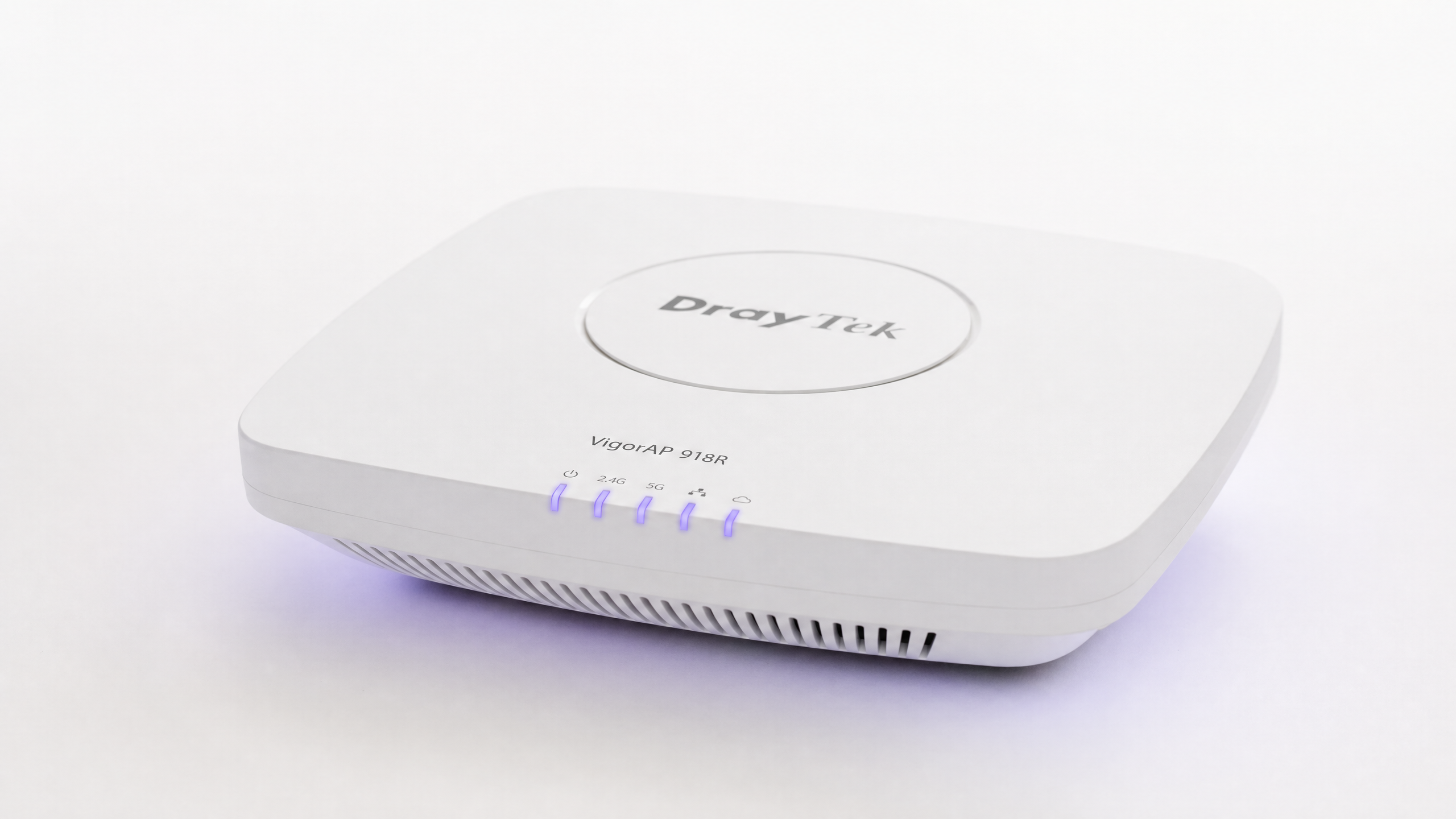
कार्यकारी सारांश
DrayTek Vigor राउटर आणि VigorAP ऍक्सेस पॉईंट्स यूके आणि युरोपमधील हजारो SMB, रिटेल आणि हॉस्पिटॅलिटी साइट्सवर तैनात केले आहेत. जेव्हा Purple च्या क्लाउड ओव्हरलेसह एकत्रित केले जाते, तेव्हा हे हार्डवेअर एकाच प्लॅटफॉर्मवरून फर्स्ट-पार्टी डेटा कॅप्चर करणे, अंतर्गत संसाधने सुरक्षित करणे आणि मल्टी-टेनंट ट्रॅफिकचे विभाजन करणे यासह आयडेंटिटी-बेस्ड नेटवर्कचा (Identity-Based Network) पाया बनते.
हे मार्गदर्शक चार उपयोजन परिस्थितींचा (deployment scenarios) समावेश करते: ब्रँडेड स्प्लॅश पेज आणि RADIUS ऑथेंटिकेशनसह Guest WiFi , IEEE 802.1X Enterprise वापरून सुरक्षित Staff WiFi, प्री-ऑथेंटिकेशन ट्रॅफिकला अनुमती देण्यासाठी Walled Garden कॉन्फिगरेशन, आणि डायनॅमिक VLAN असाइनमेंटसह DrayTek च्या WPA2-PPSK वैशिष्ट्याचा वापर करून Multi-Tenant WiFi. Purple ९९.९९९% अपटाइमसह ८०,०००+ पेक्षा जास्त थेट ठिकाणी कार्यरत आहे आणि ISO 27001, GDPR आणि Cyber Essentials प्रमाणपत्रे धारण करते - त्यामुळे तुमच्या ठिकाणाला भेडसावणाऱ्या सुरक्षा आणि अनुपालन आवश्यकता आधीच प्लॅटफॉर्ममध्ये समाविष्ट आहेत.
समर्थित DrayTek मॉडेल्समध्ये Vigor 2862, 2865, 2866, 2926, 2927, 2952, 2962, 3220 आणि 3910 मालिका समाविष्ट आहेत. Central AP Management (APM) द्वारे व्यवस्थापित केलेले सर्व VigorAP ऍक्सेस पॉईंट्स या एकत्रीकरणाशी सुसंगत आहेत.
तांत्रिक सखोल विश्लेषण
हे एकत्रीकरण कसे कार्य करते
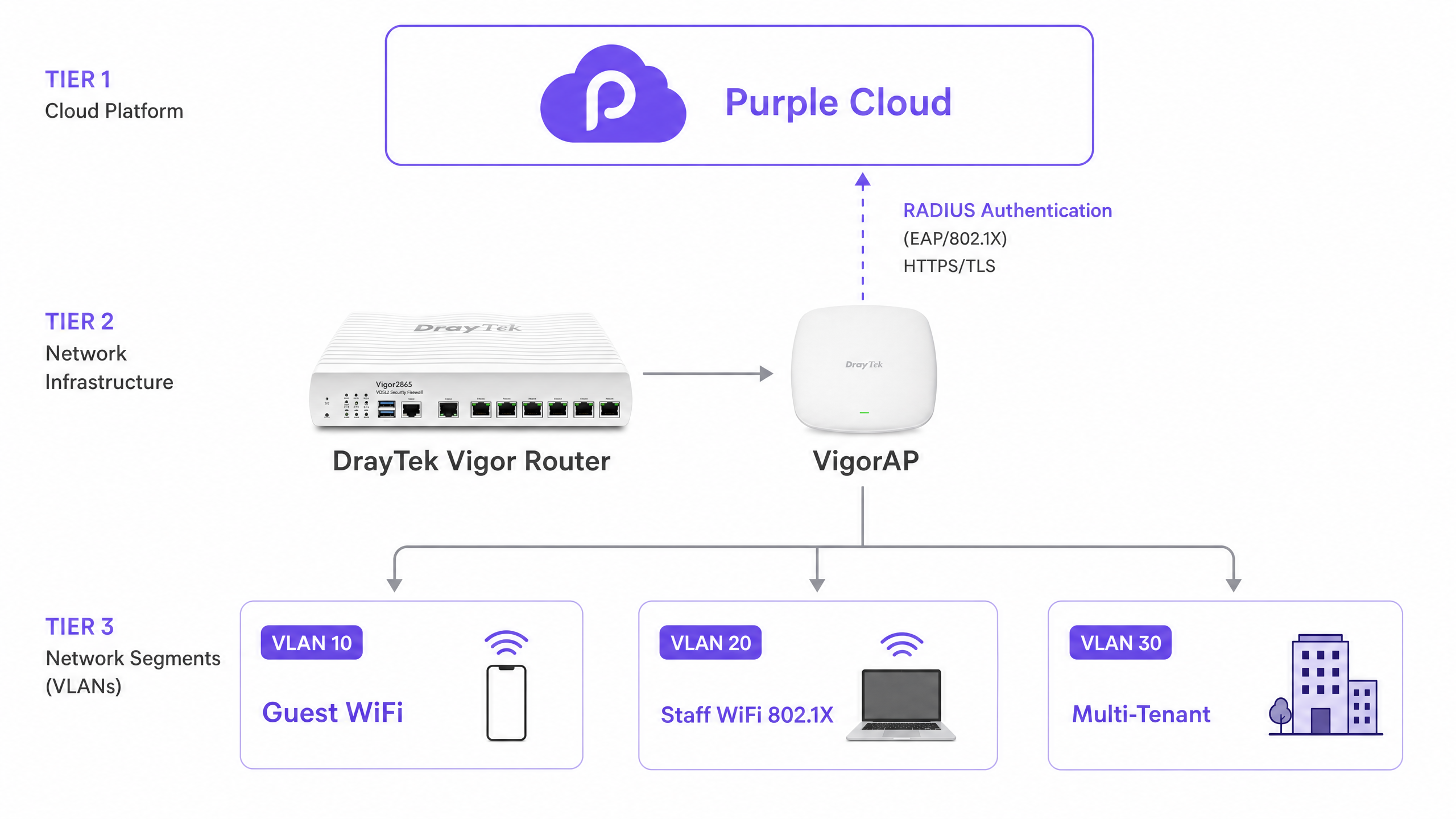
DrayTek आणि Purple एकत्रीकरण दोन यंत्रणांवर अवलंबून आहे जे एकत्रितपणे कार्य करतात: बाह्य Captive Portal पुनर्निर्देशन (redirection) आणि RADIUS (Remote Authentication Dial-In User Service) ऑथेंटिकेशन. Purple केंद्रीकृत ओळख प्रदाता (identity provider) आणि पॉलिसी इंजिन म्हणून कार्य करते. DrayTek Vigor राउटर नेटवर्क ऍक्सेस सर्व्हर (NAS) म्हणून कार्य करतो, जो Purple च्या RADIUS सर्व्हरद्वारे परत पाठवलेले प्रवेश निर्णय लागू करतो.
जेव्हा एखादा पाहुणा WiFi SSID शी कनेक्ट होतो, तेव्हा DrayTek राउटर डिव्हाइसला प्री-ऑथेंटिकेशन स्थितीत ठेवतो. हे डिव्हाइसचे HTTP ट्रॅफिक अडवते आणि DrayOS मधील Hotspot Web Portal वैशिष्ट्याद्वारे Purple च्या क्लाउड-होस्ट केलेल्या स्प्लॅश पेजवर पुनर्निर्देशित करते. वापरकर्ता Purple च्या प्लॅटफॉर्मवर लॉगिन प्रक्रिया पूर्ण करतो - सोशल लॉगिन, ईमेल, SMS किंवा Microsoft Entra ID, Okta किंवा Google Workspace सारख्या व्यवस्थापित ओळख प्रदात्याचा (identity provider) वापर करून. Purple चे RADIUS सर्व्हर नंतर DrayTek राउटरला Access-Accept संदेश पाठवते, जे इंटरनेट प्रवेश मंजूर करते आणि पोर्ट १८१३ वर RADIUS अकाउंटिंग सुरू करते.
Guest WiFi आणि DrayTek Captive Portal
DrayTek Hotspot Web Portal ही अतिथी ऑथेंटिकेशनसाठी मुख्य यंत्रणा आहे. DrayOS मध्ये, तुम्ही एक Hotspot Profile कॉन्फिगर करता जे पोर्टल पद्धत, ऑथेंटिकेशन सर्व्हर, सत्र मर्यादा (session limits) आणि लँडिंग पेज परिभाषित करते. पोर्टल पद्धत External Server वर सेट केल्याने DrayOS ला अनधिकृत क्लायंटना स्थानिक पातळीवर होस्ट केलेले पेज दाखवण्याऐवजी बाह्य URL वर - या प्रकरणात, तुमच्या Purple ऍक्सेस URL वर - पुनर्निर्देशित करण्यास सांगते.
Hotspot Profile मधील RADIUS कॉन्फिगरेशन ऑथेंटिकेशनसाठी पोर्ट १८१२ वर आणि अकाउंटिंगसाठी पोर्ट १८१३ वर Purple च्या RADIUS सर्व्हर IP कडे निर्देश करते. सामायिक गुप्त की (shared secret) तुमच्या Purple व्हेन्यू डॅशबोर्डमध्ये दर्शविलेल्या गोष्टींशी तंतोतंत जुळली पाहिजे. येथील विसंगती हे ऑथेंटिकेशन अयशस्वी होण्याचे सर्वात सामान्य कारण आहे.
सत्र व्यवस्थापन (Session management) Expired Time After Activation सेटिंगद्वारे नियंत्रित केले जाते. बहुतेक हॉस्पिटॅलिटी आणि रिटेल उपयोजनांसाठी, सहा तास हा एक व्यावहारिक डीफॉल्ट आहे. तुम्ही हे तुमच्या Purple सत्र कालबाह्यतेशी (session timeout) संरेखित करू शकता.
Walled Garden कॉन्फिगरेशन
अतिथी ऑथेंटिकेट होण्यापूर्वी, त्यांच्या डिव्हाइसला इंटरनेट प्रवेश नसतो. तथापि, स्प्लॅश पेज लोड करण्यासाठी डिव्हाइस Purple च्या सर्व्हरपर्यंत पोहोचण्यास सक्षम असणे आवश्यक आहे. Walled Garden - जे DrayTek Hotspot Profile मधील Dest Domain टॅबद्वारे कॉन्फिगर केले जाते - ऑथेंटिकेशनपूर्वी कोणते डोमेन प्रवेशयोग्य आहेत हे परिभाषित करते.
तुम्ही या सूचीमध्ये Purple चे ऑथेंटिकेशन डोमेन जोडणे आवश्यक आहे, प्रति इंडेक्स एक. तुम्ही सोशल लॉगिन प्रदाते (जसे की Google किंवा Facebook) किंवा Microsoft Entra ID सारखे व्यवस्थापित ओळख प्रदाते वापरत असल्यास, त्यांचे डोमेन देखील समाविष्ट केले पाहिजेत. Walled Garden योग्यरित्या कॉन्फिगर न करणे हे DrayTek Captive Portal स्प्लॅश पेज प्रदर्शित करण्यात अयशस्वी होण्याचे सर्वात सामान्य कारण आहे. Purple चे सपोर्ट दस्तऐवज प्रत्येक लॉगिन पद्धतीसाठी आवश्यक डोमेनची वर्तमान सूची प्रदान करतात.
802.1X वापरून सुरक्षित Staff WiFi
अंतर्गत कर्मचाऱ्यांसाठी, Captive Portal हे चुकीचे साधन आहे. सामायिक केलेले WPA2 पासवर्ड हे सुरक्षेसाठी धोकादायक आहेत: जेव्हा एखादा कर्मचारी नोकरी सोडतो, तेव्हा तुम्हाला प्रत्येक डिव्हाइसवर पासवर्ड अपडेट करावा लागतो. IEEE 802.1X Enterprise ऑथेंटिकेशन ही समस्या पूर्णपणे दूर करते.
DrayOS मध्ये, Wireless LAN > Security वर जा आणि तुमच्या स्टाफ SSID साठी WPA2/802.1X निवडा. RADIUS Server लिंकवर क्लिक करा आणि Purple चा सर्व्हर IP, पोर्ट आणि सामायिक गुप्त की (shared secret) प्रविष्ट करा. स्टाफ डिव्हाइसेस PEAP (Protected Extensible Authentication Protocol) चा वापर करून अंतर्गत पद्धत म्हणून MS-CHAPv2 सह ऑथेंटिकेट होतात. एंटरप्राइझ वायरलेस नेटवर्कशी कनेक्ट होणाऱ्या Windows, macOS, iOS आणि Android डिव्हाइसेससाठी हे कॉन्फिगरेशन आवश्यक आहे.
Purple ओळख पातळीवर (identity level) प्रवेश रद्द करते. जेव्हा एखादा कर्मचारी नोकरी सोडतो, तेव्हा तुम्ही तुमच्या ओळख प्रदात्यामध्ये (Microsoft Entra ID, Okta किंवा Google Workspace) त्यांचे खाते निष्क्रिय करता. Purple चे RADIUS सर्व्हर त्या खात्याकडून ऑथेंटिकेशन विनंत्या स्वीकारणे त्वरित थांबवते. संपूर्ण ठिकाणी पासवर्ड बदलण्याची आवश्यकता नाही.
एंटरप्राइझ वायरलेस सुरक्षा आर्किटेक्चरबद्दल अधिक माहितीसाठी, आमचे Enterprise WiFi Security: A Complete Guide for 2026 पहा.
DrayTek Multiple PSKs सह Multi-Tenant नेटवर्क सेगमेंटेशन
मल्टी-टेनंट वातावरण - भाड्याने घेतलेले रेस्टॉरंट किंवा रिटेल जागा असलेली हॉटेल्स, कोवर्किंग जागा, विद्यार्थी निवास आणि बिल्ड-टू-रेंट डेव्हलपमेंट्स - यांना भाडेकरूंमध्ये कठोर नेटवर्क अलगाव (network isolation) आवश्यक असते. सवलतीच्या युनिटमधील खरेदीदार हॉटेलच्या अंतर्गत नेटवर्कपर्यंत पोहोचू शकणार नाही आणि दोन रिटेल भाडेकरू एकमेकांचे ट्रॅफिक पाहू शकणार नाहीत याची खात्री करणे आवश्यक आहे.
DrayTek यायाचे निराकरण दोन पूरक वैशिष्ट्यांसह करते: VLAN टॅगिंग आणि WPA2-PPSK (Private Pre-Shared Key).
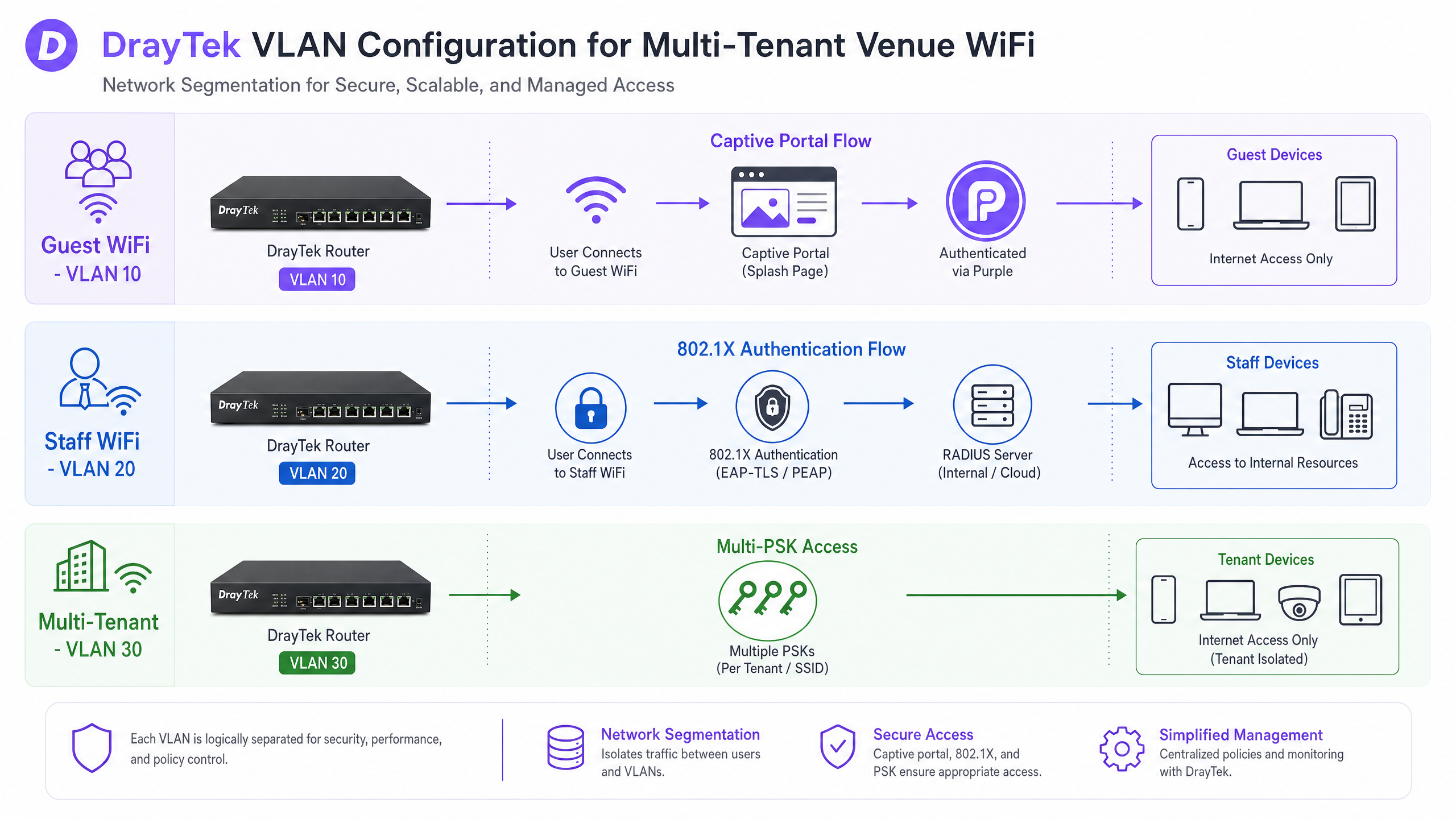
VLAN configuration on the Vigor router प्रत्येक भाडेकरूला (tenant) एका स्वतंत्र लॉजिकल नेटवर्कवर नियुक्त करते. LAN > VLAN वर जा, VLAN Configuration सक्षम करा आणि प्रत्येक भाडेकरूच्या विभागाला एक युनिक VLAN ID नियुक्त करा. VigorAPs शी कनेक्ट होणारे सर्व LAN पोर्ट्स सर्व संबंधित VLANs चे सदस्य असणे आवश्यक आहे, जे प्रभावीपणे 802.1Q ट्रंक पोर्ट्स म्हणून काम करतात. LAN > General Setup मधील Inter-LAN Routing Table ट्रॅफिक VLANs दरम्यान जाऊ शकते की नाही हे नियंत्रित करते - भाडेकरूच्या अलगावसाठी (tenant isolation), हे अक्षम (disabled) केले पाहिजे.
WPA2-PPSK on the VigorAP प्रत्येक भाडेकरूला एक युनिक पासफ्रेज नियुक्त करते. ॲक्सेस पॉईंट हा पासफ्रेज डिव्हाइसच्या MAC ॲड्रेसशी जोडतो (binds). जेव्हा एखादे डिव्हाइस कनेक्ट होते, तेव्हा AP वापरलेला पासफ्रेज ओळखतो आणि संबंधित VLAN ID सह ट्रॅफिक टॅग करतो. हे एकाच SSID ला एकाच वेळी अनेक स्वतंत्र भाडेकरू नेटवर्क्सना सेवा देण्याची परवानगी देते, ज्यामुळे वायरलेस ओव्हरहेड कमी होतो आणि अंतिम वापरकर्त्याचा अनुभव सोपा होतो.
RADIUS द्वारे डायनॅमिक VLAN असाइनमेंट
ज्या उपयोजनांमध्ये (deployments) VLAN असाइनमेंट स्टॅटिक पासफ्रेजऐवजी वापरकर्त्याच्या ओळखीवर आधारित असावी, तिथे Purple चे RADIUS सर्व्हर डायनॅमिक VLAN स्टिअरिंगला सपोर्ट करते. जेव्हा एखादा वापरकर्ता ऑथेंटिकेट (प्रमाणित) होतो, त्या वेळी Purple Access-Accept मेसेजमध्ये तीन RADIUS ॲट्रिब्युट्स परत पाठवते:
| RADIUS Attribute | Value |
|---|---|
| Tunnel-Type | VLAN (13) |
| Tunnel-Medium-Type | IEEE-802 (6) |
| Tunnel-Private-Group-ID | VLAN ID (उदा., "20") |
DrayTek राउटर हे ॲट्रिब्युट्स वाचतो आणि ऑथेंटिकेट केलेल्या क्लायंटला निर्दिष्ट केलेल्या VLAN वर नियुक्त करतो, मग ते कोणत्याही SSID शी कनेक्ट केलेले असोत. हे आयडेंटिटी-बेस्ड नेटवर्किंग (Identity-Based Networking) आहे: नेटवर्क विभाग वापरकर्ता कोण आहे यावरून ठरवला जातो, त्यांनी कोणता पासवर्ड टाईप केला यावरून नाही.
अंमलबजावणी मार्गदर्शक
उपयोजन-पूर्व (Pre-deployment) चेकलिस्ट
सुरू करण्यापूर्वी, खालील गोष्टींची खात्री करा:
| घटक | आवश्यकता |
|---|---|
| DrayTek फर्मवेअर | नवीनतम स्थिर (stable) DrayOS रिलीज |
| Purple ठिकाण (venue) | Purple डॅशबोर्डमध्ये तयार केलेले आणि सक्रिय असलेले |
| RADIUS क्रेडेंशियल्स | Purple कडून मिळवलेले Access URL, RADIUS सर्व्हर IP, शेअर केलेला सिक्रेट (shared secret), NAS आयडेंटिफायर |
| VLAN प्लॅन | Guest, Staff आणि प्रत्येक भाडेकरूसाठी दस्तऐवजीकरण केलेले (documented) VLAN IDs |
| VigorAP बॅकहॉल | सर्व ॲक्सेस पॉईंट्ससाठी वायर्ड इथरनेटची खात्री केली आहे |
पायरी १: DrayTek राउटरवर RADIUS कॉन्फिगर करा
DrayOS वेब इंटरफेसमध्ये Applications > RADIUS/TACACS+ वर जा. External RADIUS टॅबवर, प्रोफाइल सक्षम करा आणि Purple चा RADIUS सर्व्हर IP पत्ता, पोर्ट (1812) आणि शेअर केलेला सिक्रेट प्रविष्ट करा. सेव्ह करण्यासाठी OK वर क्लिक करा. हा बदल लागू करण्यासाठी राउटर रीबूट करणे आवश्यक आहे - ही पायरी वगळू नका.
पायरी २: Hotspot Web Portal प्रोफाइल तयार करा
Hotspot Web Portal > Profile Setup वर जा आणि उपलब्ध इंडेक्स निवडा. प्रोफाइल खालीलप्रमाणे कॉन्फिगर करा:
| सेटिंग | मूल्य |
|---|---|
| हे प्रोफाइल सक्षम करा | होय |
| पोर्टल पद्धत | बाह्य सर्व्हर (External Server) |
| Captive Portal URL | तुमचे Purple ॲक्सेस URL |
| Redirection URL | http://portal.draytek.com |
| ऑथेंटिकेशन पद्धत | बाह्य RADIUS सर्व्हर |
| सर्व्हर IP पत्ता | Purple RADIUS सर्व्हर IP |
| डेस्टिनेशन पोर्ट | 1812 |
| शेअर केलेला सिक्रेट | तुमचा Purple शेअर केलेला सिक्रेट |
| अकाउंटिंग सक्षम करा | होय |
| अकाउंटिंग पोर्ट | 1813 |
| MAC Address Format | AA-BB-CC-DD-EE-FF |
सेव्ह करण्यासाठी OK वर क्लिक करा.
पायरी ३: Walled Garden कॉन्फिगर करा
Dest Domain टॅबवर जाण्यासाठी Save and Next वर क्लिक करा. प्रत्येक आवश्यक Purple डोमेन जोडा, प्रति इंडेक्स एक. सध्याच्या सूचीसाठी सपोर्ट दस्तऐवजातील Purple च्या Walled Garden Domain Whitelist चा संदर्भ घ्या. पुढे जाण्यासाठी Save and Next वर क्लिक करा.
पायरी ४: सेशन आणि लँडिंग पेज सेटिंग्ज कॉन्फिगर करा
अंतिम कॉन्फिगरेशन स्क्रीनवर, खालीलप्रमाणे सेट करा:
| सेटिंग | मूल्य |
|---|---|
| सक्रियतेनंतर कालबाह्य वेळ | 0 दिवस, 6 तास, 0 मिनिटे (किंवा तुमचा पसंतीचा कालावधी) |
| HTTPS रिडायरेक्शन | नाही |
| Captive Portal शोधणे | होय |
| ऑथेंटिकेशननंतर लँडिंग पेज | तुमचे Purple रिडायरेक्ट URL |
| लागू केलेले इंटरफेस | Guest WiFi SSID(s) निवडा |
सेव्ह करण्यासाठी Finish वर क्लिक करा. चाचणी करण्यापूर्वी राउटर रीबूट करा.
पायरी ५: नेटवर्क विभाजनासाठी VLANs कॉन्फिगर करा
LAN > VLAN वर जा आणि VLAN Configuration सक्षम करा. प्रत्येक नेटवर्क विभागासाठी एक VLAN एंट्री तयार करा. VigorAPs शी कनेक्ट होणारे सर्व LAN पोर्ट्स सर्व संबंधित VLANs चे सदस्य म्हणून नियुक्त करा (ट्रंक कॉन्फिगरेशन). LAN > General Setup वर जा आणि आवश्यकतेनुसार क्रॉस-VLAN ॲक्सेस ब्लॉक करण्यासाठी Inter-LAN Routing Table चा वापर करा.
पायरी ६: Staff WiFi साठी 802.1X कॉन्फिगर करा
Wireless LAN > Security वर जा आणि Staff SSID निवडा. सिक्युरिटी मोड WPA2/802.1X वर सेट करा. RADIUS Server लिंकवर क्लिक करा आणि Purple चा सर्व्हर IP, पोर्ट 1812 आणि शेअर केलेला सिक्रेट प्रविष्ट करा. कॉन्फिगरेशन सेव्ह करा.
पायरी ७: मल्टी-टेनंट अलगावसाठी PPSK कॉन्फिगर करा
प्रत्येक VigorAP वर, Wireless LAN > Security Settings वर जा आणि WPA2PPSK निवडा. एंट्रीज जोडण्यासाठी PPSK बटणावर क्लिक करा. प्रत्येक भाडेकरूसाठी, भाडेकरूच्या डिव्हाइसच्या MAC ॲड्रेससह आणि युनिक पासफ्रेजसह एक PPSK एंट्री तयार करा. तुमच्या राउटर कॉन्फिगरेशनमध्ये पासफ्रेज योग्य VLAN शी संबंधित असल्याची खात्री करा. लक्षात ठेवा की VigorAPs वर 2.4GHz आणि 5GHz साठी PPSK प्रोफाइल स्वतंत्रपणे व्यवस्थापित केले जातात.
सर्वोत्तम पद्धती
खालील शिफारसी हॉस्पिटॅलिटी , रिटेल , हेल्थकेअर आणि वाहतूक वातावरणांसह ८०,०००+ पेक्षा जास्त ठिकाणांवरील Purple च्या उपयोजन (deployment) अनुभवाचे प्रतिनिधित्व करतात.
सर्व VigorAPs साठी वायर्ड बॅकहॉल वापरा. वायरलेस डिस्ट्रिब्युशन सिस्टम्स (WDS) आणि युनिव्हर्सल रिपीटर मोड 802.1Q VLAN टॅग्ज पास करू शकत नाहीत. जर तुम्हाला नेटवर्क विभाजनाची आवश्यकता असेल - आणि कोणत्याही मल्टी-टेनंट किंवा मिश्र-वापर असलेल्या ठिकाणी ती असतेच - तर प्रत्येक ॲक्सेस पॉईंट इथरनेटद्वारे राउटर किंवा मॅनेज्ड स्विचशी कनेक्ट केलेला असणे आवश्यक आहे.
AP-Assisted Mobility सक्षम करा. जेव्हा एखादा क्लायंट रोमिंग करतो तेव्हा 802.1X री-ऑथेंटिकेशन जलद करण्यासाठी DrayTek VigorAPs प्री-ऑथेंटिकेशन आणि PMK कॅशिंगला सपोर्ट करतातऍक्सेस पॉईंट्स दरम्यान. कमकुवत सिग्नल स्ट्रेंथ असलेल्या क्लायंट्सना सक्रियपणे डिस्कनेक्ट करण्यासाठी AP-Assisted Mobility सक्षम करा, ज्यामुळे त्यांना सर्वात जवळच्या AP शी कनेक्ट होण्यास भाग पाडले जाईल. हे विशेषतः रिटेल वातावरणात महत्त्वाचे आहे जिथे खरेदीदार सतत जागेत फिरत असतात.
डिप्लॉयमेंटपूर्वी तुमच्या VLAN योजनेचे नियोजन करा. डिप्लॉयमेंटनंतर VLAN IDs बदलण्यासाठी राउटर, सर्व ऍक्सेस पॉईंट्स आणि मार्गातील कोणत्याही मॅनेज्ड स्विचेसचे रीकॉन्फिगरेशन करणे आवश्यक आहे. तुम्ही हार्डवेअरला स्पर्श करण्यापूर्वी तुमच्या योजनेचे दस्तऐवजीकरण करा - अतिथींसाठी VLAN 10, कर्मचाऱ्यांसाठी VLAN 20, भाडेकरूंसाठी VLAN 30+ - तुमच्या हार्डवेअरला स्पर्श करण्यापूर्वी.
DrayTek आणि Purple मधील सेशन टाईमआउट्स संरेखित करा. जर DrayTek Hotspot प्रोफाइल सहा तासांनंतर सेशन संपवत असेल परंतु Purple चे सेशन २४ तासांवर सेट केले असेल, तर युजर्सना सेशनच्या मध्यभागीच स्प्लॅश पेजवर रिडायरेक्ट केले जाईल. दोन्ही समान मूल्यावर सेट करा.
PPSK डिप्लॉयमेंटसाठी MAC रँडमायझेशन निष्क्रिय करा. iOS आणि macOS डिव्हाइसेस डीफॉल्टनुसार खाजगी WiFi पत्ते (रँडमाइज्ड MACs) वापरतात. DrayTek PPSK विशिष्ट MAC पत्त्याशी पासफ्रेज बाइंड करत असल्याने, रँडमायझेशनमुळे ऑथेंटिकेशन अयशस्वी होईल. युजर्सना तुमच्या नेटवर्कसाठी ही सेटिंग निष्क्रिय करण्यास सांगा, किंवा तुमच्या ऑनबोर्डिंग फ्लोमध्ये या प्रक्रियेचे स्पष्टपणे दस्तऐवजीकरण करा.
VigorAPs वर Band Steering वापरा. ड्युअल-बँड सक्षम डिव्हाइसेसना 5GHz बँडकडे मार्गदर्शित करण्यासाठी Band Steering सक्षम करा. यामुळे 2.4GHz बँडवरील गर्दी कमी होते आणि सर्व कनेक्ट केलेल्या डिव्हाइसेससाठी थ्रूपुट सुधारतो.
एंटरप्राइझ वायरलेस सुरक्षा आर्किटेक्चरच्या विस्तृत दृश्यासाठी, आमचे Enterprise WiFi Security: A Complete Guide for 2026 वरील मार्गदर्शक पहा. जर तुम्ही वेगवेगळ्या हार्डवेअर विक्रेत्यांसह एकाधिक साइट्सवर डिप्लॉय करत असाल, तर आमचे SonicWall TZ and SonicWave Integration with Purple WiFi मार्गदर्शक तत्सम एकत्रीकरण पॅटर्न कव्हर करते.
ट्रबलशूटिंग आणि जोखीम कमी करणे
स्प्लॅश पेज लोड होण्यास अपयशी ठरते. याचे सर्वात सामान्य कारण म्हणजे अपूर्ण Walled Garden. सर्व आवश्यक Purple डोमेन्स Dest Domain टॅबमध्ये सूचीबद्ध असल्याची खात्री करा. तसेच अतिथी DHCP पूल सक्रिय असल्याची आणि प्री-ऑथेंटिकेटेड क्लायंटसाठी DNS रिझोल्यूशन कार्य करत असल्याची पुष्टी करा. एखादे डिव्हाइस कनेक्ट करून आणि ज्ञात HTTP URL ब्राउझ करण्याचा प्रयत्न करून चाचणी घ्या.
RADIUS ऑथेंटिकेशन अयशस्वी होते. टाईप करण्यातील चुकांसाठी शेअर केलेले गुपित तपासा - हे केस-सेन्सिटिव्ह आहे. DrayTek राउटरचा इंटरनेटशी मार्ग आहे आणि तो पोर्ट्स १८१२ आणि १८१३ वर आउटबाउंड UDP ट्रॅफिक ब्लॉक करत नाही याची पुष्टी करा. RADIUS कॉन्फिगरेशन लागू केल्यानंतर तुम्ही राउटर रीबूट केल्याची खात्री करा. विनंती Purple च्या सर्व्हरपर्यंत पोहोचत आहे की नाही हे ओळखण्यासाठी ऑथेंटिकेशन लॉगसाठी Purple डॅशबोर्ड तपासा.
क्लायंट्स चुकीच्या VLAN वर नियुक्त केले गेले आहेत. DrayTek राउटर आणि VigorAPs मधील ट्रंक पोर्ट कॉन्फिगरेशन सत्यापित करा. स्विच पोर्ट्सने विशिष्ट VLAN टॅग्सना अनुमती दिली पाहिजे. तुम्ही अनमॅनेज्ड स्विच वापरत असल्यास, ते टॅग न काढता 802.1Q टॅग केलेले फ्रेम्स पास करत असल्याची पुष्टी करा. योग्य पासफ्रेज-टू-VLAN मॅपिंगची पुष्टी करण्यासाठी PPSK प्रोफाइल तपासा.
स्टिकी क्लायंट्स रोमिंग करत नाहीत. जर डिव्हाइसेस अपेक्षेप्रमाणे VigorAPs दरम्यान रोमिंग करत नसतील, तर AP-Assisted Mobility सक्षम असल्याची आणि तुमच्या ठिकाणासाठी RSSI थ्रेशोल्ड योग्यरित्या सेट केल्याची खात्री करा. तसेच सर्व VigorAPs समान फर्मवेअर व्हर्जन चालवत असल्याची पुष्टी करा, कारण विसंगती रोमिंग वर्तनावर परिणाम करू शकतात.
iOS डिव्हाइसेस PPSK ऑथेंटिकेशनमध्ये अपयशी ठरत आहेत. युजरने तुमच्या विशिष्ट नेटवर्कसाठी Settings > WiFi > [Network Name] > Private WiFi Address मध्ये खाजगी WiFi पत्ता निष्क्रिय केल्याची पुष्टी करा. PPSK प्रोफाइलमध्ये डिव्हाइसचा वास्तविक हार्डवेअर MAC पत्ता असणे आवश्यक आहे.
ROI आणि व्यावसायिक प्रभाव
Purple सह DrayTek हार्डवेअर डिप्लॉय केल्याने तीन क्षेत्रांमध्ये मोजता येण्याजोगा परतावा मिळतो: ऑपरेशनल कार्यक्षमता, डेटा कॅप्चर आणि अनुपालन.
ऑपरेशनल कार्यक्षमता. 802.1X ऑथेंटिकेशन सामायिक केलेले WiFi पासवर्ड व्यवस्थापित करण्याचा अतिरिक्त भार काढून टाकते. जेव्हा एखादा कर्मचारी नोकरी सोडतो, तेव्हा तुम्ही Microsoft Entra ID, Okta, किंवा Google Workspace मध्ये त्यांचे खाते निष्क्रिय करता. Purple चे RADIUS सर्व्हर त्यांची क्रेडेन्शियल्स त्वरित स्वीकारणे थांबवते. संपूर्ण ठिकाणासाठी पासवर्ड बदलण्याची आवश्यकता नाही. ५०-साइट्सच्या रिटेल साखळीसाठी, केवळ यामुळेच दरवर्षी शेकडो तासांचा IT ओव्हरहेड वाचतो.
डेटा कॅप्चर आणि marketing ROI. Purple Captive Portal द्वारे कनेक्ट होणारा प्रत्येक अतिथी सत्यापित ओळख प्रदान करतो - ईमेल पत्ता, फोन नंबर किंवा सोशल प्रोफाइल. हा फर्स्ट-पार्टी डेटा थेट Purple च्या WiFi Analytics प्लॅटफॉर्मवर पाठवला जातो, जिथे तुम्ही ड्वेल टाईम, पुन्हा भेट देण्याचे प्रमाण आणि मोहिमेतील सहभाग ट्रॅक करू शकता. Purple ने आपल्या नेटवर्कवर २९ अब्ज डेटा पॉइंट्स गोळा केले आहेत. Purple ची Engage योजना वापरणारी ठिकाणे लक्ष्यित पोस्ट-व्हिजिट संवादांद्वारे पुन्हा भेट देण्याच्या दरांमध्ये मोजता येण्याजोगी वाढ नोंदवतात.
अनुपालन. Purple हे ISO 27001 प्रमाणित, GDPR आणि CCPA अनुपालन असलेले आणि Cyber Essentials प्रमाणित आहे. Captive Portal जाणीवपूर्वक निवडलेल्या ऑप्ट-इन्सची अंमलबजावणी करते, ज्यामुळे डेटा संकलन GDPR आवश्यकता पूर्ण करते याची खात्री होते. VLAN सेगमेंटेशन पेमेंट कार्ड वातावरणाला अतिथी ट्रॅफिकपासून वेगळे करते, जे PCI DSS अनुपालनास समर्थन देते. आरोग्य सेवा ठिकाणांसाठी, रुग्ण आणि अभ्यागत नेटवर्कचे अलगीकरण डेटा हाताळणीवरील NHS आणि ICO मार्गदर्शक तत्त्वांची पूर्तता करते.
Purple ठिकाणच्या वातावरणात विश्लेषणावर आधारित निर्णय घेण्यास कशी मदत करते याच्या तपशीलवार दृश्यासाठी, आमचे WiFi Analytics platform overview पहा.
महत्वाच्या व्याख्या
Captive portal
A web page that intercepts a user's HTTP traffic and requires interaction - login, terms acceptance, or data submission - before granting network access.
The mechanism Purple uses to capture first-party guest data on the DrayTek Hotspot Web Portal. Configured via the External Server portal method in DrayOS.
RADIUS
Remote Authentication Dial-In User Service. A networking protocol that provides centralised authentication, authorisation, and accounting (AAA) for network access.
The DrayTek router sends authentication requests to Purple's RADIUS server on UDP port 1812 and accounting data on port 1813. The shared secret must match on both sides.
802.1X
An IEEE standard for port-based network access control. Requires devices to authenticate with a RADIUS server before being granted network access.
Used for Staff WiFi on DrayTek hardware. Eliminates shared passwords and enables per-user access revocation via the identity provider.
VLAN
Virtual Local Area Network. A logical network segment that isolates traffic at Layer 2, even when devices share the same physical infrastructure.
Used on DrayTek Vigor routers to separate Guest, Staff, and Tenant traffic. Requires 802.1Q trunk ports between the router and VigorAPs.
Walled Garden
A set of domains or IP ranges that unauthenticated users can access before completing the captive portal flow.
Configured in the Dest Domain tab of the DrayTek Hotspot Profile. Must include Purple's authentication servers and any identity provider domains used for login.
PPSK
Private Pre-Shared Key. A security method where each user or device is assigned a unique passphrase, rather than sharing a single network password.
Used on DrayTek VigorAPs to assign multi-tenant devices to specific VLANs. The passphrase is bound to the device's MAC address.
AP-Assisted Mobility
A DrayTek VigorAP feature that monitors client signal strength and actively disassociates clients below a defined RSSI threshold, prompting them to roam to a closer access point.
Critical for retail and hospitality deployments where users move through the venue. Prevents sticky client behaviour that causes captive portal session drops.
PEAP
Protected Extensible Authentication Protocol. An 802.1X EAP method that encapsulates the authentication exchange in a TLS tunnel, protecting credentials in transit.
The EAP method used for Staff WiFi on DrayTek hardware. Combined with MS-CHAPv2 as the inner authentication method for Windows, macOS, iOS, and Android devices.
Dynamic VLAN assignment
A mechanism where the RADIUS server returns VLAN attributes in the Access-Accept message, and the network device assigns the authenticated client to the specified VLAN automatically.
Purple's RADIUS server returns Tunnel-Type, Tunnel-Medium-Type, and Tunnel-Private-Group-ID attributes. The DrayTek router applies the VLAN assignment based on user identity.
सोडवलेली उदाहरणे
A 150-room boutique hotel is deploying a DrayTek Vigor 2865 router with six VigorAP 903 access points. They need to provide branded Guest WiFi with data capture, secure Staff WiFi for 40 employees, and an isolated network for a leased ground-floor restaurant. The hotel's IT manager has never configured 802.1X before.
The IT manager creates three VLANs on the Vigor 2865: VLAN 10 for guests (192.168.10.0/24), VLAN 20 for staff (192.168.20.0/24), and VLAN 30 for the restaurant (192.168.30.0/24). Inter-LAN routing is disabled between all three segments. All six VigorAP 903 units are connected via Ethernet and managed through Central AP Management on the router. Three SSIDs are broadcast: 'Hotel Guest' (VLAN 10, Hotspot Web Portal pointing to Purple), 'Hotel Staff' (VLAN 20, WPA2/802.1X pointing to Purple RADIUS), and 'Restaurant' (VLAN 30, WPA2-PPSK with a passphrase specific to the restaurant's POS devices). The restaurant's PPSK entry binds the POS MAC addresses to VLAN 30. The IT manager registers the hotel's Microsoft Entra ID tenant with Purple, enabling staff to authenticate with their existing company credentials. The Walled Garden is configured with all required Purple domains. After rebooting the router, the IT manager tests each SSID and confirms correct VLAN assignment via the router's DHCP lease table.
A retail chain with 80 stores is experiencing poor captive portal completion rates. Analytics show that 40% of shoppers who connect to the Guest WiFi SSID never reach the splash page. The chain uses DrayTek Vigor 2865 routers and VigorAP 912C access points. Store layouts are large, with access points at both ends of the floor.
The network administrator investigates two root causes. First, they audit the Walled Garden configuration across all 80 sites using VigorACS 3, DrayTek's central management platform. They find that 23 sites are missing two of the required Purple authentication domains, causing the splash page to time out for shoppers on those networks. They update the Hotspot profiles centrally via VigorACS 3. Second, they enable AP-Assisted Mobility on all VigorAPs with an RSSI threshold of -75 dBm. This forces shoppers' devices to roam to the nearest AP as they move through the store, preventing the sticky client issue that was causing captive portal sessions to drop mid-authentication. After both changes, the portal completion rate rises from 60% to 89% across the estate.
सराव प्रश्न
Q1. You have configured the DrayTek Hotspot Web Portal and pointed it to the Purple access URL. The RADIUS settings are correct. However, when clients connect to the Guest WiFi SSID, their browsers report a connection timeout and the splash page never loads. What is the most likely cause, and what is the first step to diagnose it?
टीप: Clients in a pre-authentication state have heavily restricted network access. Consider what traffic the router permits before authentication completes.
नमुना उत्तर पहा
The most likely cause is an incomplete or missing Walled Garden configuration. The DrayTek router blocks all traffic from unauthenticated clients except to domains explicitly listed in the Dest Domain tab. If Purple's authentication domains are not listed, the client's browser cannot reach the splash page server. The first diagnostic step is to navigate to the Hotspot Profile, click through to the Dest Domain tab, and verify that all required Purple domains are present. Cross-reference against Purple's Walled Garden Domain Whitelist in the support documentation. A secondary check is to confirm that DNS is resolving correctly for pre-authenticated clients.
Q2. A coworking venue has 12 member companies sharing a single DrayTek Vigor 2865 and four VigorAP 912C access points. Each company needs to be isolated from the others, but the venue manager wants to broadcast only one SSID to avoid cluttering the WiFi list on members' devices. How do you architect this?
टीप: Consider how DrayTek handles unique passphrases on a single SSID, and what additional configuration is needed to enforce isolation between companies.
नमुना उत्तर पहा
Configure WPA2-PPSK on the VigorAPs with a single SSID. Create 12 VLANs on the Vigor 2865, one per company. For each company, create a PPSK entry that binds a unique passphrase to that company's device MAC addresses and assigns them to their dedicated VLAN. Disable inter-VLAN routing in the Inter-LAN Routing Table to prevent cross-company traffic. Each company's devices connect to the same SSID using their unique passphrase, and the VigorAP automatically drops them into their isolated VLAN. For companies with multiple devices, each device needs its own PPSK entry with its specific MAC address and the shared company passphrase.
Q3. After a routine firmware update on a DrayTek Vigor 2865, staff members report that their laptops can no longer connect to the Staff WiFi SSID. The SSID is visible, but authentication fails. Guest WiFi continues to work normally. What are the three most likely causes, and in what order should you investigate them?
टीप: The Guest WiFi uses a different authentication mechanism to the Staff WiFi. Isolate which layer of the 802.1X stack has broken.
नमुना उत्तर पहा
The three most likely causes are: (1) The firmware update reset the RADIUS server configuration for the WPA2/802.1X SSID - navigate to Wireless LAN > Security, confirm the RADIUS server IP and shared secret are still correct, and reboot if you make any changes. (2) The firmware update changed the EAP method or RADIUS port settings - verify that port 1812 is still configured and that the router can reach Purple's RADIUS server on that port. (3) The firmware update introduced a certificate change that is causing EAP-TLS validation to fail on client devices - check the Purple dashboard for authentication log entries to see whether requests are reaching the server. Investigate in this order: RADIUS configuration first (most common after a firmware update), then network connectivity to the RADIUS server, then certificate or EAP method issues.
या मालिकेमध्ये पुढे वाचा
Purple WiFi सह Zyxel Nebula Cloud आणि USG Integration
हे तांत्रिक संदर्भ मार्गदर्शक Zyxel Nebula Cloud आणि USG Flex Firewalls चे Purple WiFi प्लॅटफॉर्मसोबतच्या एंड-टू-एंड Integration बद्दल माहिती देते. हे गेस्ट Captive Portal रिडायरेक्शन, RADIUS ऑथेंटिकेशन, Walled Garden सेटअप, 802.1X वापरून सुरक्षित Staff WiFi, आणि डायनॅमिक VLAN असाइनमेंटसह Zyxel Private Pre-Shared Keys (PPSK) वापरून मल्टी-टेनंट नेटवर्क सेगमेंटेशनसाठी टप्प्याटप्प्याने कॉन्फिगरेशन सूचना प्रदान करते. हॉस्पिटॅलिटी, रिटेल आणि मल्टी-टेनंट ठिकाणी WiFi तैनात करणारे IT मॅनेजर्स, MSPs आणि नेटवर्क आर्किटेक्ट्सना PCI DSS, IEEE 802.1X आणि GDPR सह उद्योग मानकांवर आधारित कृतीयोग्य मार्गदर्शन मिळेल.
Alcatel-Lucent Enterprise (ALE) OmniAccess चे Purple WiFi सोबत एकत्रीकरण
हे मार्गदर्शक Alcatel-Lucent Enterprise (ALE) OmniAccess Stellar ॲक्सेस पॉइंट्स आणि Purple WiFi मधील तांत्रिक एकत्रीकरणाचा तपशील देते. यामध्ये Captive Portal रिडायरेक्शन, RADIUS ऑथेंटिकेशन, Walled Garden कॉन्फिगरेशन, सुरक्षित 802.1X Staff WiFi, आणि प्रायव्हेट प्री-शेअर्ड की (PPSK) सह डायनॅमिक VLAN स्टिअरिंग वापरून मल्टी-टेनंट WiFi सेगमेंटेशन समाविष्ट आहे - जे IT व्यवस्थापक आणि नेटवर्क आर्किटेक्ट्सना ALE हार्डवेअरवर आयडेंटिटी-बेस्ड नेटवर्क्स तैनात करण्यासाठी एक संपूर्ण, कृतीयोग्य संदर्भ प्रदान करते.
Cisco Meraki साठी Captive Portal
Cisco Meraki MR ॲक्सेस पॉइंट्सला Purple च्या क्लाउड Captive Portal सोबत समाकलित करण्यासाठी एक अधिकृत, मध्यम-स्तरीय तांत्रिक संदर्भ मार्गदर्शिका. यामध्ये उच्च-कार्यक्षमता असलेल्या गेस्ट WiFi उपयोजनांसाठी टप्प्याटप्प्याने Meraki डॅशबोर्ड कॉन्फिगरेशन, RADIUS सर्व्हर सेटिंग्ज (पोर्ट्स 1812/1813), Walled Garden वाइल्डकार्ड डोमेन अपवाद आणि सेशन टाइमआउट पॅरामीटर्स समाविष्ट आहेत.