
WeChat WiFi प्रमाणीकरण समाकलित करणे: APAC ग्राहकांसाठी Captive Portal ऑनबोर्डिंग
WeChat चे 1.41 अब्ज मासिक सक्रिय वापरकर्ते आहेत, ज्यामुळे ती जागतिक स्तरावर चीनी ग्राहकांसाठी प्राथमिक डिजिटल ओळख बनते. हे मार्गदर्शक APAC मधील ठिकाणांसाठी एंटरप्राइझ captive portals मध्ये WeChat OAuth 2.0 प्रमाणीकरण कसे समाकलित करावे हे स्पष्ट करते, ज्यामध्ये प्लॅटफॉर्म नोंदणी, स्कोप निवड, RADIUS Change of Authorisation अंमलबजावणी आणि GDPR आणि चीनच्या PIPL सह दुहेरी-फ्रेमवर्क अनुपालन समाविष्ट आहे. हे IT व्यवस्थापक, नेटवर्क आर्किटेक्ट्स आणि ठिकाण ऑपरेशन्स डायरेक्टर्ससाठी उद्दिष्टित आहे ज्यांना या तिमाहीत कृती करणे आवश्यक आहे.
हे मार्गदर्शक ऐका
पॉडकास्ट ट्रान्सक्रिप्ट पहा
आमच्या मुख्य मालिकेचा भाग: Captive Portal Guide →
कार्यकारी सारांश (Executive summary)
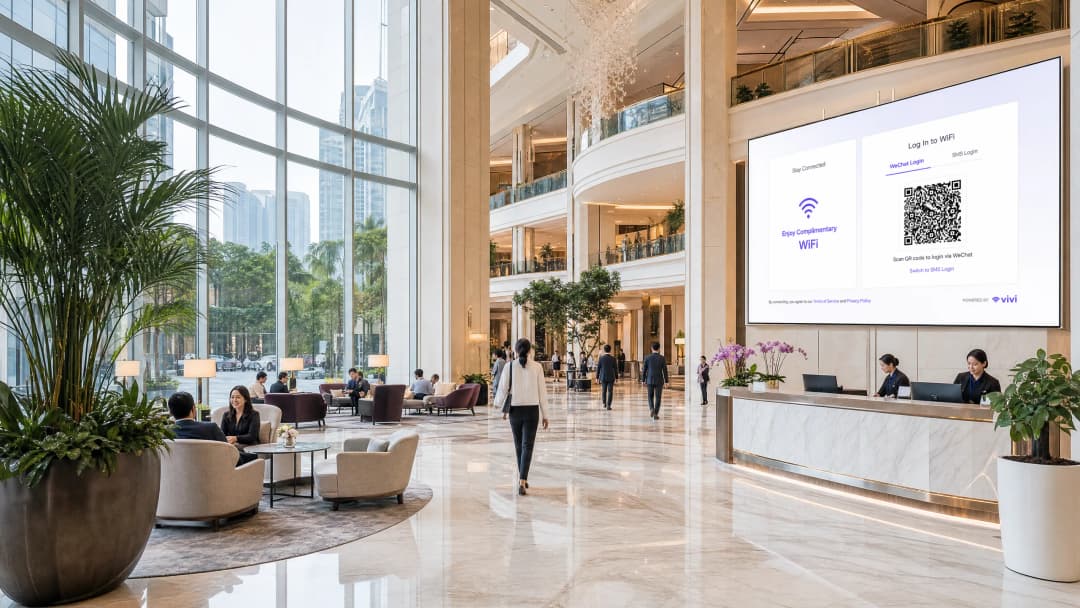
APAC क्षेत्रात कार्यरत असलेल्या किंवा जागतिक स्तरावर चिनी पर्यटकांना सेवा देणाऱ्या एंटरप्राइझ ठिकाणांसाठी, WeChat WiFi प्रमाणीकरण (authentication) आता पर्यायी राहिलेले नाही. २०२५ पर्यंत १.४१ अब्ज मासिक सक्रिय वापरकर्त्यांसह (स्रोत: Tencent), WeChat ही चिनी ग्राहकांसाठी प्राथमिक डिजिटल ओळख आहे. जेव्हा एखादा पाहुणा तुमच्या SSID शी जोडला जातो आणि त्याला फक्त ईमेल किंवा Facebook लॉगिनचे पर्याय दिसतात, तेव्हा त्याला त्वरित अडथळा जाणवतो. त्यांच्याकडे WeChat असण्याची शक्यता पूर्णपणे असते. त्या उपकरणावर स्थानिक ईमेल पत्ता कॉन्फिगर केलेला नसण्याची शक्यता सर्वाधिक असते.
हा मार्गदर्शक WeChat OAuth 2.0 ला captive portal मध्ये कसे समाकलित (integrate) करावे याचे तपशील देतो. आम्ही Tencent ला आवश्यक असणाऱ्या दोन स्वतंत्र प्लॅटफॉर्म नोंदणी, तुम्ही कोणता फर्स्ट-पार्टी डेटा गोळा करता हे ठरवणारा स्कोप निर्णय, आणि यशस्वी OAuth एक्सचेंजचे प्रत्यक्ष नेटवर्क ऍक्सेसमध्ये रूपांतर करणारी RADIUS Change of Authorisation (CoA) यंत्रणा याविषयी माहिती देतो. आम्ही GDPR आणि चीनच्या Personal Information Protection Law (PIPL) च्या ओव्हरलॅपिंग अनुपालन (compliance) आवश्यकतांवर देखील चर्चा करतो.
Purple चे Guest WiFi प्लॅटफॉर्म Cisco Meraki, HPE Aruba, Ruckus, Juniper Mist, Ubiquiti UniFi, Cambium, Extreme, आणि Fortinet हार्डवेअरवर नेटवर्क अंमलबजावणी स्तर स्वयंचलित करते. Purple ८०,०००+ हून अधिक लाइव्ह ठिकाणांवर कार्यरत आहे आणि २०२४ मध्ये ४४० दशलक्ष लॉगिन नोंदवले गेले आहेत (Purple अंतर्गत डेटा).
तांत्रिक सखोल माहिती (Technical deep-dive)
OAuth 2.0 फ्लो
एक captive portal (प्रमाणित नसलेल्या उपकरणांमधील HTTP रहदारी अडवणारे वेब-आधारित प्रमाणीकरण गेटवे) पाहुण्यांना पोर्टल सर्व्हरवर होस्ट केलेल्या लॉगिन पृष्ठावर रिडायरेक्ट करते, जे स्थानिक पातळीवर किंवा क्लाउडमध्ये असू शकते. WeChat OAuth जोडल्याने त्या फ्लोमध्ये Tencent ची ओळख पायाभूत सुविधा समाविष्ट होते.
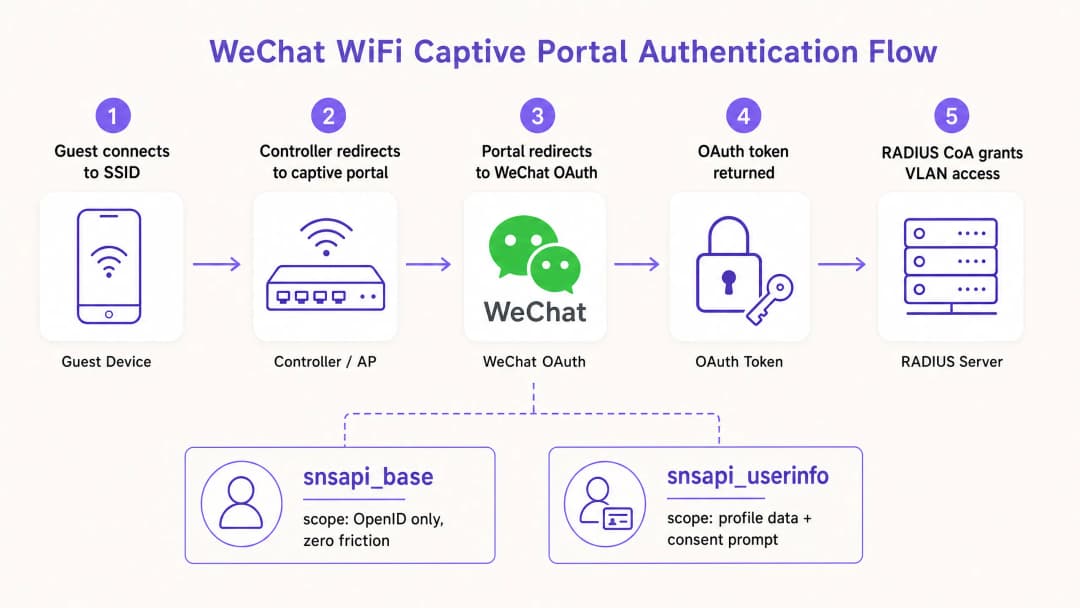
हा क्रम खालीलप्रमाणे चालतो. पाहुणा SSID शी जोडला जातो. वायरलेस कंट्रोलर प्रमाणित सत्राची (authenticated session) अनुपस्थिती शोधून काढतो आणि सर्व HTTP रहदारी captive portal URL कडे रिडायरेक्ट करतो. पोर्टल पृष्ठ लोड होते आणि लॉगिन पर्याय सादर करते, ज्यामध्ये WeChat समाविष्ट असते. पाहुणा WeChat निवडतो. पोर्टल सर्व्हर open.weixin.qq.com वर WeChat च्या अधिकृतता एंडपॉईंटवर रिडायरेक्ट तयार करतो, ज्यामध्ये चार पॅरामीटर्स पाठवले जातात: AppID, रिडायरेक्ट URI, code वर सेट केलेला प्रतिसाद प्रकार, आणि विनंती केलेला स्कोप.
WeChat वापरकर्त्याचे प्रमाणीकरण पूर्णपणे स्वतःच्या इन्फ्रास्ट्रक्चरवर करते. जर पाहुणा आधीच WeChat इन-अॅप ब्राउझरद्वारे साइन इन केलेला असेल, तर snsapi_base स्कोप कोणत्याही दृश्यमान प्रॉम्प्टशिवाय मूक (silent) प्रमाणीकरणास अनुमती देतो. WeChat अल्पावधीच्या ऑथोरायझेशन कोडसह पोर्टलच्या नोंदणीकृत रिडायरेक्ट URI वर परत रिडायरेक्ट करतो. पोर्टल सर्व्हर AppID, AppSecret, कोड आणि ग्रँट प्रकारासह api.weixin.qq.com/sns/oauth2/access_token ला कॉल करून या कोडची ऍक्सेस टोकनसाठी अदलाबदल करतो. WeChat एक ऍक्सेस टोकन, रिफ्रेश टोकन, वापरकर्त्याचा OpenID आणि मंजूर केलेला स्कोप परत करतो. जर snsapi_userinfo ची विनंती केली गेली असेल, तर api.weixin.qq.com/sns/userinfo वर दुसरा API कॉल वापरकर्त्याचे टोपणनाव (nickname), प्रोफाइल इमेज, लिंग आणि शहर मिळवतो.
प्लॅटफॉर्म नोंदणी: बहुतांश उपयोजनांना अपयशी ठरवणारा निर्णय
Tencent दोन स्वतंत्र डेव्हलपर प्लॅटफॉर्म ऑपरेट करते, आणि चुकीचा प्लॅटफॉर्म निवडणे हे अयशस्वी अंमलबजावणीचे सर्वात सामान्य कारण आहे.
| प्रवेशाचा संदर्भ | आवश्यक नोंदणी | प्लॅटफॉर्म URL | समर्थित स्कोप |
|---|---|---|---|
| WeChat इन-अॅप ब्राउझर | Service Account (Official Accounts Platform) | mp.weixin.qq.com | snsapi_base, snsapi_userinfo |
| मानक मोबाईल ब्राउझर (Chrome, Safari) | Website Application (Open Platform) | open.weixin.qq.com | snsapi_login (QR कोड प्रवाह) |
Official Accounts Platform वरील Subscription Account काम करणार नाही. यामध्ये OAuth वेब पेज ऑथोरायझेशन परवानग्या नसतात. फक्त Service Account कडे या परवानग्या असतात.
Hospitality आणि Retail मधील बहुतेक एंटरप्राइझ उपयोजने दोन्ही नोंदणी अंमलात आणतात. हॉटेलमधील पाहुणा Chrome मध्ये पोर्टल उघडू शकतो, WeChat ने QR कोड स्कॅन करू शकतो आणि Open Platform प्रवाहाद्वारे प्रमाणीकरण करू शकतो. किंवा ते WeChat च्या आतच असलेल्या लिंकवर क्लिक करू शकतात, इन-अॅप ब्राउझरमध्ये पोहोचू शकतात आणि Official Accounts प्रवाहाद्वारे मूकपणे प्रमाणीकरण करू शकतात. हे दोन्ही मार्ग हाताळले गेले पाहिजेत.
स्कोप निवड आणि डेटा गोळा करणे
OAuth स्कोप हा एक खरा आर्किटेक्चरल निर्णय आहे, कोणताही कॉन्फिगरेशन तपशील नाही. वापरकर्त्याला येणारा अडथळा आणि तुमच्या WiFi Analytics प्लॅटफॉर्मला मिळणारा डेटा यावरूनच ठरतो.
snsapi_base केवळ OpenID परत करतो - जो तुमच्या Official Account मधील त्या वापरकर्त्याचा एक स्थिर, अद्वितीय आयडेंटिफायर आहे. यासाठी कोणत्याही वापरकर्त्याच्या संमती प्रॉम्प्टची आवश्यकता नसते. प्रमाणीकरण अदृश्य असते. याचा वापर परत येणाऱ्या पाहुण्यांसाठी करा ज्यांचे प्रोफाइल तुमच्याकडे आधीपासूनच आहे, किंवा स्टेडियम आणि ट्रान्सपोर्ट हब सारख्या उच्च-थ्रूपुट वातावरणासाठी करा जिथे कनेक्शनचा वेग ही प्राथमिकता असते.snsapi_userinfo हे OpenID सोबत टोपणनाव, प्रोफाईल इमेज, लिंग, भाषा सेटिंग आणि शहर परत मिळवून देते. हे एक स्पष्ट संमती स्क्रीन ट्रिगर करते. नवीन पाहुण्यांच्या नोंदणीसाठी फर्स्ट-पार्टी डेटा प्रोफाईल तयार करण्यासाठी याचा वापर करा, ज्यासोबत पोर्टल पेजवर PIPL-सुसंगत आणि GDPR-सुसंगत संमती स्तर जोडलेला असावा.
व्यावहारिक नियम: वेगासाठी snsapi_base वापरा, आणि डेटासाठी snsapi_userinfo वापरा. वापरकर्त्याचा OpenID तुमच्या डेटाबेसमध्ये आधीपासून अस्तित्वात आहे की नाही हे तपासून तुम्ही हे दोन्ही लागू करू शकता. तसे असल्यास, snsapi_base ची विनंती करा. नसल्यास, snsapi_userinfo ची विनंती करा.
नेटवर्क अंमलबजावणी: RADIUS CoA आणि MAC बायपास
एक OAuth टोकन ओळख सिद्ध करते. ते नेटवर्क सुरू करत नाही. एका स्वतंत्र यंत्रणेने यशस्वी प्रमाणीकरणाचे नेटवर्क पॉलिसी बदलामध्ये रूपांतर करणे आवश्यक आहे.
RFC 3576 मध्ये परिभाषित केलेले RADIUS Change of Authorisation (CoA) हा मानक दृष्टिकोन आहे. पोर्टल सर्व्हरला वैध OAuth टोकन मिळाल्यानंतर, ते वायरलेस कंट्रोलरला CoA विनंती पाठवते. कंट्रोलर सेशन अपडेट करतो, डिव्हाइसला वॉल्ड गार्डन VLAN (एक प्रतिबंधित नेटवर्क विभाग जो केवळ पोर्टल ट्रॅफिकला अनुमती देतो) मधून पूर्ण गेस्ट VLAN मध्ये हलवतो. हे Cisco Meraki, HPE Aruba, Ruckus, Juniper Mist, Ubiquiti UniFi, Cambium, Extreme, आणि Fortinet सोबत काम करते.
MAC address bypass यशस्वी OAuth नंतर डिव्हाइसचा MAC ॲड्रेस अधिकृत क्लायंट म्हणून नोंदणीकृत करतो. त्यानंतर कंट्रोलर पुढील कोणत्याही आव्हानाशिवाय त्या ॲड्रेसवरील ट्रॅफिकला अनुमती देतो. हे लागू करणे सोपे आहे परंतु यात दोन धोके आहेत: MAC ॲड्रेस स्पूफ केले जाऊ शकतात, आणि iOS 14 तसेच Android 10 नंतरचे व्हर्जन डीफॉल्टनुसार MAC ॲड्रेस रँडमायझेशन वापरतात, जे पुन्हा कनेक्ट करताना यंत्रणा खंडित करते.
सुरक्षा महत्त्वाची असलेल्या कोणत्याही डिप्लॉयमेंटसाठी, RADIUS CoA हा योग्य पर्याय आहे. गेस्ट नेटवर्क सुरक्षित करण्याबद्दल अधिक माहितीसाठी, What Is Secure WiFi: Essential Guide for Business 2026 आणि Enterprise WiFi Security: A Complete Guide for 2026 पहा.
तुमच्या विशिष्ट सेटअपबद्दल काही प्रश्न आहेत का?
आमची टीम ८०,००० हून अधिक वेन्यूजमधील वेन्यू ऑपरेटर्स, IT मॅनेजर्स आणि नेटवर्क इंजिनिअर्ससोबत काम करते. २० मिनिटांचा कॉल बुक करा आणि तुमच्यासारख्या इतरांनी ही समस्या कशी सोडवली हे आम्ही तुम्हाला दाखवू.
अंमलबजावणी मार्गदर्शक
डिप्लॉयमेंट-पूर्व चेकलिस्ट
कॉन्फिगरेशनची एकही ओळ लिहिण्यापूर्वी, या पाच पायऱ्या पूर्ण करा.
प्रथम, ॲक्सेस संदर्भ निश्चित करा. तुमच्या ठिकाणाचे सर्वेक्षण करा आणि पाहुण्यांना WeChat इन-ॲप ब्राउझरमध्ये, मानक मोबाईल ब्राउझरमध्ये किंवा दोन्हीमध्ये पोर्टलचा सामना करावा लागेल का ते ओळखा. याचे उत्तर तुमच्या प्लॅटफॉर्म नोंदणी आवश्यकता ठरवते.
दुसरे, योग्य प्लॅटफॉर्मवर नोंदणी करा. इन-ॲप ब्राउझर ॲक्सेससाठी, WeChat Official Accounts Platform वर एक सर्व्हिस अकाउंट तयार करा. मानक ब्राउझर ॲक्सेससाठी, WeChat Open Platform वर वेबसाइट ॲप्लिकेशनची नोंदणी करा. प्रत्येकासाठी तुमचे AppID आणि AppSecret लिहून ठेवा.
तिसरे, तुमचे रीडायरेक्ट URIs कॉन्फिगर करा. तुमचे पोर्टल वापरत असलेले प्रत्येक डोमेन आणि सबडोमेन नोंदणीकृत करा, ज्यामध्ये स्टेजिंग एन्व्हायरमेंटचा समावेश आहे. WeChat तंतोतंत-जुळणी प्रमाणीकरण लागू करते. न जुळल्यास एरर 40029 येते.
चौथे, सर्व्हर-साइड टोकन एक्सचेंज लागू करा. AppSecret कधीही क्लायंट-साइड कोडमध्ये दिसू नये. एक सर्व्हर-साइड एंडपॉईंट तयार करा जो ऑथरायझेशन कोड स्वीकारेल, टोकनसाठी त्याची देवाणघेवाण करेल आणि तुमच्या पोर्टलला केवळ आवश्यक असलेला डेटा परत करेल.
पाचवे, CSRF संरक्षणासाठी state पॅरामीटर लागू करा. एक क्रिप्टोग्राफिकली रँडम व्हॅल्यू जनरेट करा, ती वापरकर्त्याच्या सेशनमध्ये स्टोअर करा, ती OAuth विनंतीमध्ये पास करा आणि परत आल्यावर ती व्हॅलिडेट करा.
Ruckus SmartZone साठी कॉन्फिगरेशन स्टेप्स
Ruckus SmartZone चालवणाऱ्या ठिकाणांसाठी (venues), WeChat पोर्टल कॉन्फिगरेशन Services and Profiles अंतर्गत, नंतर Hotspots and Portals आणि त्यानंतर WeChat टॅबमध्ये असते. आपण Authentication URL (तुमच्या पोर्टल सर्व्हरचा WeChat कॉलबॅक एंडपॉईंट), DNAT Destination (अन-ऑथेंटिकेट केलेल्या क्लायंट रीडायरेक्ट्स हाताळणारा सर्व्हर) आणि Grace Period (अलीकडेच डिस्कनेक्ट झालेला वापरकर्ता पुन्हा ऑथेंटिकेट न करता पुन्हा कनेक्ट होऊ शकतो तो कालावधी, जो डीफॉल्टनुसार ६० मिनिटे असतो) कॉन्फिगर करता. ऑथेंटिकेशन टप्प्यादरम्यान WeChat च्या API एंडपॉईंट्सवर ट्रॅफिकला अनुमती देण्यासाठी आपण वॉल्ड गार्डन व्हाईटलिस्ट देखील कॉन्फिगर करता. समान कंट्रोलर कॉन्फिगरेशन पॅटर्नसाठी Step-by-Step Guide: Configuring Ruijie Wireless Controllers for Guest WiFi Captive Portals देखील पहा.
इन-ॲप ब्राउझर डिटेक्शन
WeChat चा इन-ॲप ब्राउझर एक युझर एजंट स्ट्रिंग सेट करतो ज्यामध्ये MicroMessenger समाविष्ट असते. तुमच्या पोर्टलने ही स्ट्रिंग डिटेक्ट केली पाहिजे आणि योग्य OAuth फ्लो दाखवला पाहिजे. जर MicroMessenger उपलब्ध असेल, तर Official Accounts फ्लो वापरा. नसल्यास, Open Platform QR कोड फ्लो वापरा. हे अचूकपणे डिटेक्ट न केल्यास तुटलेला अनुभव किंवा ऑथेंटिकेशन त्रुटी निर्माण होतात.
सर्वोत्तम पद्धती (Best practices)
डेटा मिनिमायझेशन आणि ड्युअल-फ्रेमवर्क अनुपालन
GDPR (युरोपियन अभ्यागतांसाठी लागू) आणि PIPL (चीनी नागरिकांसाठी लागू) या दोघांनाही वैयक्तिक डेटावर प्रक्रिया करण्यासाठी कायदेशीर आधार, स्पष्ट हेतू मर्यादा आणि डेटा मिनिमायझेशन (कमीत कमी डेटा वापरणे) आवश्यक आहे. snsapi_base स्कोप हा snsapi_userinfo च्या तुलनेत डेटा मिनिमायझेशन नियमांच्या अंतर्गत न्याय्य ठरवणे सोपे आहे. जेव्हा तुम्ही snsapi_userinfo द्वारे डेमोग्राफिक डेटा गोळा करता, तेव्हा तुमचा कायदेशीर आधार, तुमचा डेटा साठवण्याचा कालावधी (retention period) आणि Tencent सोबतचा तुमचा डेटा प्रोसेसिंग करार दस्तऐवजीकरण (document) करा.
PILP, जे नोव्हेंबर २०२१ पासून लागू आहे, संवेदनशील वैयक्तिक माहितीसाठी स्पष्ट संमती आवश्यक करते आणि चीनबाहेरील डेटा प्रोसेसर्सनी समतुल्य संरक्षण मानके लागू करणे अनिवार्य करते. जर तुमचा पोर्टल सर्व्हर मुख्य भूमी चीनच्या बाहेर असेल, तर तुम्हाला मिळणाऱ्या WeChat OpenID आणि प्रोफाइल डेटावर क्रॉस-बॉर्डर डेटा ट्रान्सफरचे नियम लागू होतात की नाही याचे मूल्यांकन तुम्ही केले पाहिजे.
मल्टी-प्रॉपर्टी डिप्लॉयमेंटसाठी UnionID
प्रत्येक Official Account नुसार प्रति वापरकर्ता OpenID युनिक असतो. जर तुम्ही विविध प्रॉपर्टीजमध्ये एकापेक्षा जास्त Official Accounts चालवत असाल, तर एकाच पाहुण्याचे (guest) प्रत्येक अकाउंटमध्ये वेगवेगळे OpenID असतील. WeChat एक UnionID प्रदान करते जे समान Open Platform नोंदणीशी लिंक केलेल्या सर्व अकाउंट्समध्ये स्थिर राहते. हॉटेल चेन, रिटेल ग्रुप्स किंवा अनेक ठिकाणे व्यवस्थापित करणाऱ्या एअरपोर्ट ऑपरेटर्ससाठी, सुरुवातीपासूनच UnionID-आधारित ओळख रिझोल्यूशन लागू करा.
सिक्युरिटी हार्डनिंग
AppSecret ला पर्यावरण व्हेरिएबल किंवा सिक्रेट्स मॅनेजरमध्ये स्टोअर करा, ते कधीही सोर्स कोडमध्ये ठेवू नका. एक्सपोजरची शंका असल्यास ते ताबडतोब रोटेट करा. गैरवापर रोखण्यासाठी तुमच्या टोकन एक्सचेंज एंडपॉइंटवर रेट लिमिटिंग लागू करा. सर्व OAuth त्रुटींची नोंद ठेवा, विशेषतः 40029 (अवैध कोड) आणि 40163 (कोड कालबाह्य), कारण हे चुकीचे कॉन्फिगरेशन किंवा सक्रिय प्रोबिंग दर्शवतात.
गेस्ट नेटवर्क सुरक्षा आर्किटेक्चरच्या विस्तृत माहितीसाठी, Why Consumer WiFi Gear Doesn't Belong on Your Guest Network पहा.
केस स्टडीज
लक्झरी हॉटेल चेन, सिंगापूर
सिंगापूरमधील एका ३५० खोल्यांच्या लक्झरी हॉटेलने, जे प्रामुख्याने चिनी व्यावसायिक प्रवाशांना सेवा देते, त्यांच्या विद्यमान ईमेल लॉगिन पर्यायासोबत WeChat WiFi ऑथेंटिकेशन लागू केले. अंमलबजावणीपूर्वी, फ्रंट-डेस्क कर्मचाऱ्यांनी WiFi लॉगिनच्या अडचणींबद्दल दररोज सरासरी १५ गेस्ट तक्रारी नोंदवल्या होत्या. चिनी गेस्ट अशा ईमेल पत्त्यांचा वापर करण्याचा प्रयत्न करत होते जे त्यांनी त्यांच्या ट्रॅव्हल डिव्हाइसेसवर कॉन्फिगर केले नव्हते.
हॉटेलने WeChat ऑफिशियल अकाउंट्स प्लॅटफॉर्मवर सर्व्हिस अकाउंट आणि ओपन प्लॅटफॉर्मवर वेबसाइट ॲप्लिकेशन नोंदणीकृत केले. त्यांनी पहिल्यांदा कनेक्ट होणाऱ्या गेस्टसाठी snsapi_userinfo आणि MAC ॲड्रेसद्वारे ओळखल्या जाणाऱ्या परत येणाऱ्या गेस्टसाठी snsapi_base कॉन्फिगर केले. सेशन प्रमोशन हाताळण्यासाठी RADIUS CoA साठी HPE Aruba कंट्रोलर कॉन्फिगर केले गेले होते.
३० दिवसांच्या आत, गेस्ट WiFi लॉगिन तक्रारी दररोज दोनपेक्षा कमी झाल्या. पहिल्या महिन्यात हॉटेलचा WiFi Analytics डेटाबेस ४,२०० सत्यापित फर्स्ट-पार्टी प्रोफाइल्सनी वाढला, ज्यामधील शहर-स्तरीय डेमोग्राफिक डेटाने मुक्कामानंतरच्या लक्षित संवादांना सक्षम केले.
आंतरराष्ट्रीय रिटेल मॉल, क्वालालंप
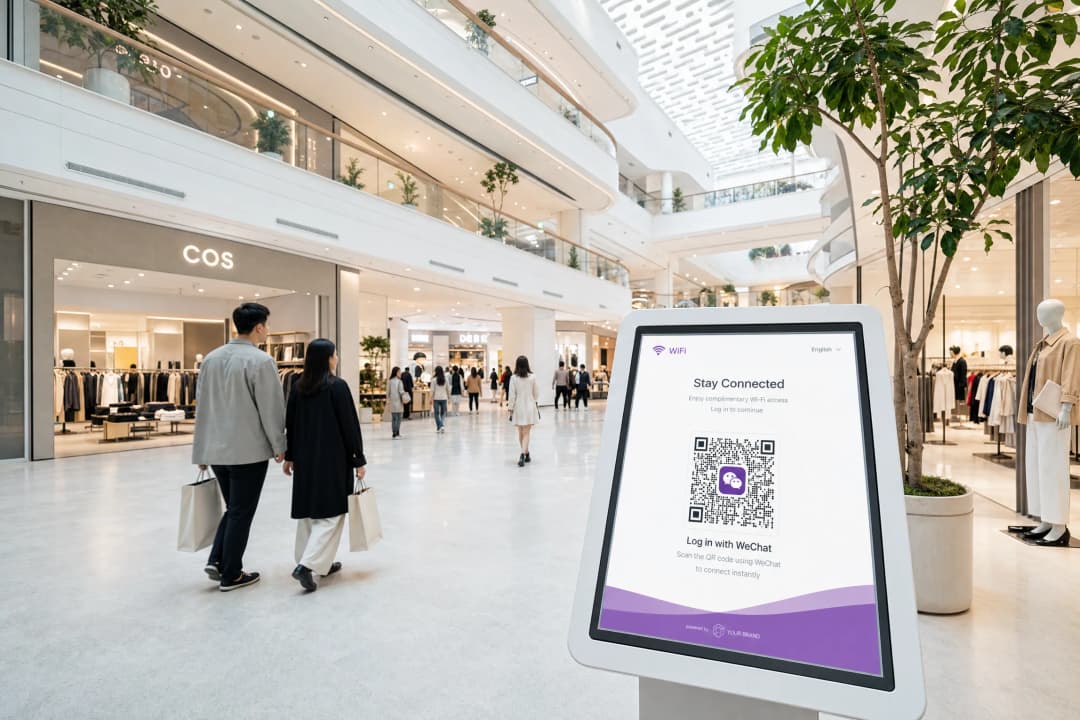
क्वालालंपमधील एका प्रीमियम रिटेल मॉलला, जिथे एकट्या मलेशियामध्ये १२ दशलक्ष WeChat युजर्स आहेत, त्यांच्या खरेदीदारांच्या डिजिटल अपेक्षांशी सुसंगत असा WiFi ऑनबोर्डिंग अनुभव हवा होता. मॉलने १८०,००० चौरस मीटरच्या रिटेल क्षेत्रामध्ये Cisco Meraki ॲक्सेस पॉइंट्स ऑपरेट केले.
या डिप्लॉयमेंटमध्ये क्लाउड ओव्हरले म्हणून Purple च्या Guest WiFi प्लॅटफॉर्मचा वापर केला गेला, ज्यामध्ये WeChat OAuth हे प्राथमिक ऑथेंटिकेशन आणि SMS OTP हा फॉलबॅक पर्याय होता. Purple च्या हार्डवेअर-अज्ञेयवादी (hardware-agnostic) आर्किटेक्चरने कोणत्याही कस्टम डेव्हलपमेंटशिवाय Cisco Meraki सोबत RADIUS CoA इंटिग्रेशन यशस्वीरित्या हाताळले.
मॉलने डिप्लॉयमेंटनंतर पहिल्या तिमाहीत WiFi सेशन सुरू होण्याच्या प्रमाणात ३४% वाढ नोंदवली, ज्याचे श्रेय WeChat युजर्ससाठी कमी झालेल्या ऑनबोर्डिंग त्रासाला दिले गेले. snsapi_userinfo संमती प्रवाहांद्वारे गोळा केलेल्या फर्स्ट-पार्टी डेटाने मॉलच्या मार्केटिंग टीमला लक्षित मोहिमा राबवण्यासाठी खरेदीदारांचे त्यांच्या मूळ शहरानुसार वर्गीकरण करण्यास सक्षम केले.
ट्रबलशूटिंग आणि जोखीम कमी करणे
| त्रुटी | कारण | उपाय |
|---|---|---|
| 40029 अवैध कोड | रिडायरेक्ट URI न जुळणे किंवा कोडचा पुन्हा वापर | नोंदणीकृत URIs तंतोतंत जुळत असल्याची पडताळणी करा; कोड फक्त एकदाच वापरता येतात |
| ऑथेंटिकेशननंतर रिकामी स्क्रीन | RADIUS CoA कॉन्फिगर केलेले नाही किंवा अयशस्वी होत आहे | UDP पोर्ट 3799 वर कंट्रोलर CoA सेटिंग्ज आणि फायरवॉल नियम तपासा |
| MAC रँडममायझेशन परत येणाऱ्या गेस्ट फ्लोला व्यत्यय आणते | iOS/Android MAC रँडममायझेशन | OpenID-आधारित सेशन ट्रॅकिंगवर स्थलांतरित व्हा; केवळ-MAC ओळखीचा वापर टाळा |
| snsapi_userinfo रिकामी फील्ड्स रिटर्न करते | युझरने WeChat प्रायव्हसी निर्बंध सेट केले आहेत | नल (null) फील्ड्स व्यवस्थितपणे हाताळा; प्रवेशासाठी प्रोफाइल डेटाची आवश्यकता ठेवू नका |
ROI आणि व्यावसायिक प्रभाव
WeChat WiFi ऑथेंटिकेशनचा व्यावसायिक फायदा तीन मोजता येण्याजोग्या परिणामांवर आधारित आहे.
फर्स्ट-पार्टी डेटा संपादन. प्रत्येक snsapi_userinfo ऑथेंटिकेशन डेमोग्राफिक डेटासह एक व्हेरिफाइड गेस्ट प्रोफाइल तयार करते. ४०% चिनी पाहुण्यांसह ७०% ऑक्युपेंसीवर चालणाऱ्या २०० खोल्यांच्या हॉटेलसाठी, हे प्रति वर्ष अंदाजे २०,००० नवीन व्हेरिफाइड प्रोफाइल दर्शवते, जे प्रत्येक एका WeChat ओळखीशी जोडलेले असते जे सततच्या पुन्हा-सहभागाला (re-engagement) समर्थन देते.
कमी झालेला सपोर्टचा भार. लॉगिनमधील येणाऱ्या अडचणी हे गेस्ट WiFi सपोर्ट कॉल्सचे मुख्य कारण आहे. जे व्यवसाय सध्याच्या पर्यायांसोबत WeChat ऑथेंटिकेशन जोडतात, ते WiFi शी संबंधित फ्रंट-डेस्क चौकशीमध्ये सातत्याने घट नोंदवतात, ज्यामुळे कर्मचाऱ्यांचा वेळ इतर महत्त्वाच्या कामांसाठी मोकळा होतो.
मार्केटिंग पोहोच. WeChat ऑफिशियल अकाउंट्स व्यवसायांना फॉलोअर्सना पुश नोटिफिकेशन्स पाठवण्याची परवानगी देतात. तुमच्या ऑफिशियल अकाउंटद्वारे ऑथेंटिकेट होणाऱ्या पाहुण्याला ते फॉलो करण्यास सांगितले जाऊ शकते, ज्यामुळे थेट संवाद चॅनेल तयार होतो जो WeChat च्या इकोसिस्टममध्ये कार्य करतो, जिथे चिनी ग्राहक दररोज सरासरी ८२ मिनिटे घालवतात (स्रोत: Walk the Chat).
Purple चा Engage प्लॅन याला आणखी पुढे नेतो, ज्यामुळे थेट WiFi ऑथेंटिकेशनच्या वेळी गोळा केलेल्या फर्स्ट-पार्टी डेटावर आधारित ऑटोमेटेड पोस्ट-व्हिजिट मेसेजिंग, लॉयल्टी ट्रिगर्स आणि सेगमेंटेड मोहिमा सक्षम होतात.
महत्वाच्या व्याख्या
Captive Portal
वेब आधारित प्रमाणीकरण गेटवे जो अप्रमाणित डिव्हाइसवरील HTTP ट्रॅफिक अडवतो आणि नेटवर्क प्रवेश देण्यापूर्वी त्याला लॉगिन पृष्ठावर पुनर्निर्देशित करतो.
ज्याद्वारे पाहुण्यांना WiFi प्रमाणीकरण सादर केले जाते ती प्रणाली. WeChat OAuth ही Captive Portal ऑफर करू शकत असलेल्या अनेक प्रमाणीकरण पद्धतींपैकी एक आहे.
OAuth 2.0
एक उद्योग-मानक अधिकृतता प्रोटोकॉल जो वापरकर्त्याच्या वतीने तृतीय-पक्ष ॲप्लिकेशनला (Captive Portal) वेब सेवेवर (WeChat) मर्यादित प्रवेश मिळविण्याची परवानगी देतो, ज्यामध्ये वापरकर्त्याला तृतीय-पक्षासोबत आपला पासवर्ड शेअर करावा लागत नाही.
WeChat लॉगिन शक्य करणारी मूळ फ्रेमवर्क. पोर्टल कधीही वापरकर्त्याची WeChat क्रेडेन्शियल्स पाहत नाही; WeChat ने त्यांचे प्रमाणीकरण केले असल्याची पुष्टी करणारा केवळ एक टोकन त्याला प्राप्त होतो.
RADIUS CoA
Change of Authorisation. RFC 3576 मध्ये परिभाषित केलेली एक प्रणाली जी RADIUS सर्व्हरला सक्रिय नेटवर्क क्लायंटचे सेशन अधिकृतता गुणधर्म डायनॅमिकपणे सुधारण्याची परवानगी देते, जसे की VLAN असाइनमेंट बदलणे.
यशस्वी WeChat OAuth देवाणघेवाणीचे वास्तविक नेटवर्क प्रवेशामध्ये रूपांतर करणारी नेटवर्क अंमलबजावणी प्रणाली. CoA शिवाय, पाहुण्याचे प्रमाणीकरण होते परंतु कंट्रोलरला नेटवर्क सुरू करण्याचे समजत नाही.
OpenID
WeChat द्वारे एखाद्या विशिष्ट Official Account किंवा वेबसाइट ॲप्लिकेशनसाठी विशिष्ट वापरकर्त्याला नियुक्त केलेला एक अनन्य आयडेंटिफायर. हा वेगवेगळ्या सेशन्समध्ये स्थिर राहतो परंतु वेगवेगळ्या खात्यांमध्ये भिन्न असतो.
तुमच्या WiFi विश्लेषण डेटाबेसमध्ये पाहुण्याची ओळख पटवण्यासाठी वापरली जाणारी प्राथमिक की. जर तुम्ही एकापेक्षा जास्त Official Accounts चालवत असाल आणि तुम्हाला क्रॉस-अकाउंट ओळख निश्चिती हवी असेल, तर त्याऐवजी UnionID वापरा.
snsapi_base
एक WeChat OAuth स्कोप जो संमतीची विनंती न दाखवता वापरकर्त्याचा केवळ OpenID मिळवून मूक प्रमाणीकरण (silent authentication) सक्षम करतो.
परत येणाऱ्या पाहुण्यांसाठी किंवा जलद गती आवश्यक असलेल्या उच्च-थ्रूपूट वातावरणासाठी वापरा. यामध्ये OpenID व्यतिरिक्त इतर कोणताही डेमोग्राफिक डेटा मिळत नाही.
snsapi_userinfo
एक WeChat OAuth स्कोप जो वापरकर्त्याचा OpenID, टोपणनाव, प्रोफाइल प्रतिमा, लिंग, भाषा आणि शहर मिळवून देतो, ज्यासाठी वापरकर्त्याच्या स्पष्ट संमती स्क्रीनची आवश्यकता असते.
प्रथमच येणाऱ्या पाहुण्यांची नोंदणी करून फर्स्ट-पार्टी डेटा प्रोफाइल तयार करण्यासाठी वापरा. हे GDPR आणि PIPL-अनुपालन संमती स्तरासह जोडलेले असणे आवश्यक आहे.
PIPL
Personal Information Protection Law. नोव्हेंबर २०२१ पासून लागू झालेला चीनचा सर्वसमावेशक डेटा गोपनीयता कायदा, जो चिनी नागरिकांचा वैयक्तिक डेटा कसा गोळा, प्रक्रिया आणि हस्तांतरित केला जावा हे नियंत्रित करतो.
WeChat OAuth द्वारे चिनी नागरिकांचा डेटा गोळा करणाऱ्या कोणत्याही ठिकाणासाठी लागू होते, मग ते ठिकाण कुठेही असले तरीही. यासाठी स्पष्ट संमती, उद्देश मर्यादा आणि डेटा किमान राखणे आवश्यक आहे.
AppSecret
WeChat द्वारे जारी केलेली एक गोपनीय क्रिप्टोग्राफिक की जी तुमचे ॲप्लिकेशन WeChat च्या टोकन एक्सचेंज API ला कॉल करते तेव्हा त्याचे प्रमाणीकरण करते.
फक्त सर्व्हरच्या बाजूला साठवले पाहिजे. क्लायंट-साइड कोडमध्ये उघड झाल्यास कोणतीही व्यक्ती तुमच्या ॲप्लिकेशनचे सोंग घेऊ शकते आणि WeChat ला अनधिकृत API कॉल्स करू शकते.
VLAN
Virtual Local Area Network. डेटा लिंक लेयरवर ट्रॅफिक वेगळा करणारा एक लॉजिकल नेटवर्क विभाग, जो एकाच भौतिक नेटवर्कला अनेक स्वतंत्र ट्रॅफिक प्रवाह वाहून नेण्याची परवानगी देतो.
अप्रमाणित डिव्हाइसेसना (walled garden VLAN) प्रमाणित पाहुण्यांपासून (guest VLAN) वेगळे करण्यासाठी Captive Portal उपयोजनांमध्ये वापरले जाते. यशस्वी प्रमाणीकरण झाल्यावर RADIUS CoA डिव्हाइसला VLAN दरम्यान हलवते.
UnionID
एक WeChat आयडेंटिफायर जो एकाच Open Platform नोंदणीशी लिंक केलेल्या सर्व Official Accounts आणि वेबसाइट ॲप्लिकेशन्सवर विशिष्ट वापरकर्त्यासाठी स्थिर राहतो.
हॉटेल चेन्स, किरकोळ विक्री गट आणि बहु-स्थान ऑपरेटर यांच्यासाठी अत्यंत आवश्यक, ज्यांना एकाच पाहुण्याला वेगवेगळ्या मालमत्तांवर ओळखायचे असते, जिथे प्रत्येकाचे स्वतःचे स्वतंत्र Official Account असते.
सोडवलेली उदाहरणे
सिंगापूरमधील एका 200 खोल्यांच्या लक्झरी हॉटेलमध्ये HPE Aruba कंट्रोलर्स वापरले जातात आणि तिथे मोठ्या प्रमाणात चीनी व्यावसायिक प्रवासी येतात. त्यांना पहिल्यांदा येणाऱ्या पाहुण्यांकडून लोकसंख्याशास्त्रीय डेटा गोळा करायचा आहे आणि परत येणारे पाहुणे पोर्टल पुन्हा न पाहता स्वयंचलितपणे कनेक्ट होतील याची खात्री करायची आहे. त्यांनी WeChat OAuth एकत्रीकरण कसे कॉन्फिगर करावे?
पायरी 1: WeChat इन-अॅप ब्राउझरमधील पोर्टलवर प्रवेश करणाऱ्या पाहुण्यांना हाताळण्यासाठी WeChat Official Accounts Platform (mp.weixin.qq.com) वर सर्व्हिस अकाउंटची नोंदणी करा. मानक मोबाईल ब्राउझरवरील पाहुण्यांसाठी WeChat Open Platform (open.weixin.qq.com) वर वेबसाइट अॅप्लिकेशनची नोंदणी करा.
पायरी 2: MicroMessenger वापरकर्ता एजंट स्ट्रिंग शोधण्यासाठी Captive Portal कॉन्फिगर करा. इन-अॅप ब्राउझर वापरकर्त्यांसाठी Official Accounts OAuth प्रवाह आणि मानक ब्राउझर वापरकर्त्यांसाठी Open Platform QR कोड प्रवाह प्रदान करा.
पायरी 3: पहिल्यांदा येणाऱ्या जोडण्यांसाठी (डेटाबेसमध्ये कोणतेही विद्यमान OpenID नसलेले), snsapi_userinfo स्कोपची विनंती करा. OAuth पुनर्निर्देशनापूर्वी PIPL-अनुपालक संमती स्क्रीन प्रदर्शित करा. परत आलेले OpenID, टोपणनाव, शहर आणि लिंग पाहुण्यांच्या प्रोफाइल डेटाबेसमध्ये संग्रहित करा.
पायरी 4: परत येणाऱ्या पाहुण्यांसाठी (डेटाबेसमध्ये OpenID अस्तित्वात आहे), snsapi_base स्कोपची विनंती करा. हे वापरकर्त्याला कोणतीही सूचना न दाखवता मूकपणे प्रमाणित करते.
पायरी 5: UDP पोर्ट 3799 वर RADIUS CoA साठी HPE Aruba कंट्रोलर कॉन्फिगर करा. यशस्वी OAuth नंतर, पोर्टल सर्व्हर डिव्हाइसला वॉलड गार्डन VLAN मधून गेस्ट VLAN मध्ये पाठवण्यासाठी CoA विनंती पाठवतो.
पायरी 6: परत येणाऱ्या पाहुण्यांचा शोध हाताळण्यासाठी OpenID सोबत MAC पत्ता लॉगिंग लागू करा. लक्षात ठेवा की MAC रँडमायझेशनसाठी केवळ MAC पत्त्याऐवजी OpenID हा प्राथमिक आयडेंटिफायर असणे आवश्यक आहे.
एका रिटेल चेनच्या IT टीमने तीन मॉल ठिकाणांवर WeChat WiFi लॉगिनसाठी उच्च अपयश दराची नोंद केली आहे. वापरकर्ते WeChat मध्ये प्रमाणित होतात परंतु त्रुटीसह पोर्टल पृष्ठावर परत येतात. पोर्टल लॉग त्रुटी 40029 दर्शवतात. याचे संभाव्य कारण काय आहे आणि तुम्ही त्याचे निराकरण कसे कराल?
त्रुटी 40029 म्हणजे टोकन एक्सचेंज दरम्यान WeChat ने ऑथोरायझेशन कोड नाकारला आहे. दोन सर्वात सामान्य कारणे म्हणजे रीडायरेक्ट URI विसंगती आणि कोडचा पुनर्वापर.
पायरी 1: Official Accounts Platform आणि Open Platform या दोन्हीसाठी WeChat डेव्हलपर कन्सोलमध्ये लॉग इन करा. OAuth सेटिंग्जवर जा आणि सर्व नोंदणीकृत रीडायरेक्ट URIs ची सूची पहा.
पायरी 2: तिन्ही ठिकाणांवर उत्पादन प्रक्रियेत तुमचा पोर्टल सर्व्हर वापरत असलेल्या वास्तविक रीडायरेक्ट URIs शी यांची तुलना करा. सबडोमेन फरक (portal.brand.com विरुद्ध brand.com), प्रोटोकॉल फरक (HTTP विरुद्ध HTTPS), आणि पाथ फरक (/callback विरुद्ध /wechat/callback) तपासा.
पायरी 3: WeChat कन्सोलमध्ये प्रत्येक व्हेरिएंटची नोंदणी करा. WeChat अचूक-जुळणीचे प्रमाणीकरण करते, प्रिफिक्स जुळणीचे नाही.
पायरी 4: जर URIs जुळत असतील, तर तुमचा पोर्टल सर्व्हर ऑथोरायझेशन कोडचा पुनर्वापर करण्याचा प्रयत्न करत आहे का याची चौकशी करा. WeChat कोड केवळ एकदाच वापरता येतात आणि पाच मिनिटांनंतर कालबाह्य होतात. जर तुमच्या सर्व्हरने त्याच कोडसह टोकन एक्सचेंजचा पुन्हा प्रयत्न केला, तर दुसऱ्या प्रयत्नात 40029 त्रुटी येईल.
पायरी 5: डुप्लिकेट विनंत्या टाळण्यासाठी टोकन एक्सचेंज एंडपॉइंटमध्ये आयडेम्पोटेन्सी लागू करा.
सराव प्रश्न
Q1. तुम्ही आंतरराष्ट्रीय कार्यक्रमांचे आयोजन करणाऱ्या ६०,००० क्षमतेच्या स्टेडियमसाठी Captive Portal तैनात करत आहात, जेथे मोठ्या संख्येने चिनी चाहते उपस्थित आहेत. दळणवळणाची कोंडी (cellular congestion) कमी करण्यासाठी दारे उघडल्यापासून पहिल्या १५ मिनिटांत सर्व उपस्थितांना ऑनलाइन आणणे हे मुख्य प्राधान्य आहे. मार्केटिंग डेटा गोळा करणे हे दुय्यम उद्दिष्ट आहे. तुम्ही कोणते WeChat OAuth scope कॉन्फिगर केले पाहिजे आणि का?
टीप: पोर्टल सर्व्हरवरील १५,००० समकालीन वापरकर्त्यांना दाखवल्या जाणाऱ्या संमती स्क्रीनच्या प्रभावाचा विचार करा.
नमुना उत्तर पहा
snsapi_base scope कॉन्फिगर करा. हे वापरकर्त्याच्या संमती प्रॉम्प्टशिवाय सायलेंट ऑथेंटिकेशन सक्षम करते, ज्यामुळे शक्य तितक्या जलद ऑनबोर्डिंगचा अनुभव मिळतो. स्टेडियमच्या मोठ्या प्रमाणावर, संमती स्क्रीनमुळे अडथळा निर्माण होतो जो एकाच वेळी होणाऱ्या हजारो कनेक्शनवर वाढतो आणि पोर्टल सर्व्हरच्या लोडमध्ये अचानक वाढ होण्यास कारणीभूत ठरू शकतो. snsapi_base केवळ OpenID परत करते, जे सेशन लॉग करण्यासाठी आणि परत येणाऱ्या चाहत्यांना ओळखण्यासाठी पुरेसे आहे. ज्या पहिल्यांदाच येणाऱ्या चाहत्यांचा डेमोग्राफिक डेटा तुम्हाला हवा आहे, त्यांच्यासाठी तुम्ही ऑथेंटिकेशन गेट ऐवजी कनेक्शननंतरच्या सर्वेक्षणाद्वारे प्रोफाइल पूर्ण करण्यासाठी प्रॉम्प्ट करू शकता.
Q2. तुमच्या टीममधील नेटवर्क आर्किटेक्ट थेट ब्राउझरमधून टोकन एक्सचेंज कॉल करून सर्व्हरचे राऊंड-ट्रिप्स कमी करण्यासाठी Captive Portal च्या क्लायंट-साइड JavaScript मध्ये WeChat AppSecret स्टोअर करण्याचा सल्ला देतो. हा दृष्टिकोन एक गंभीर सुरक्षा त्रुटी का आहे आणि योग्य आर्किटेक्चर काय आहे ते स्पष्ट करा.
टीप: क्लायंट-साइड कोड कोण पाहू शकते आणि AppSecret त्यांना काय करण्याची परवानगी देते याचा विचार करा.
नमुना उत्तर पहा
क्लायंट-साइड JavaScript मध्ये AppSecret स्टोअर केल्याने ते पेज सोर्स पाहणाऱ्या किंवा नेटवर्क ट्रॅफिक इंटरसेप्ट करणाऱ्या कोणत्याही व्यक्तीसमोर उघड होते. AppSecret तुमच्या ॲप्लिकेशनचे WeChat च्या API कडे ऑथेंटिकेशन करते. याद्वारे, एखादा गैरप्रवृत्तीचा व्यक्ती तुमच्या ॲप्लिकेशनचे सोंग घेऊ शकतो, कोणत्याही वैध ऑथरायझेशन कोडसह WeChat च्या टोकन एक्सचेंज एंडपॉइंटला कॉल करू शकतो, वापरकर्त्यांचे OpenIDs आणि प्रोफाइल डेटा मिळवू शकतो आणि संभाव्यत: तुमच्या API रेट मर्यादा संपवू शकतो. योग्य आर्किटेक्चर हे सर्व्हर-साइड टोकन एक्सचेंज एंडपॉइंट आहे. ब्राउझरला WeChat कडून ऑथरायझेशन कोड मिळतो आणि तो तुमच्या सर्व्हरकडे पाठवला जातो. तुमचा सर्व्हर, एन्व्हायर्नमेंट व्हेरिएबल किंवा सिक्रेट्स मॅनेजरमध्ये स्टोअर केलेल्या AppSecret चा वापर करून, टोकनसाठी कोड एक्सचेंज करतो आणि पोर्टलला आवश्यक असलेला डेटाच परत करतो. AppSecret तुमच्या सर्व्हरमधून कधीही बाहेर पडत नाही.
Q3. तुमचे ठिकाण वेगवेगळ्या शहरांमध्ये तीन हॉटेल प्रॉपर्टीज चालवते, ज्यातील प्रत्येकाचे स्वतःचे WeChat Official Account आहे. तिन्ही प्रॉपर्टीजमध्ये ऑथेंटिकेट झालेल्या एका लॉयल्टी प्रोग्राम मेंबरचे तुमच्या डेटाबेसमध्ये तीन वेगवेगळे OpenID आहेत. तुम्ही याचे एकाच अतिथी ओळखीमध्ये (guest identity) कसे निराकरण कराल?
टीप: WeChat क्रॉस-अकाउंट आयडेंटिटी रिझोल्यूशनसाठी एक यंत्रणा प्रदान करते ज्यासाठी विशिष्ट प्लॅटफॉर्म कॉन्फिगरेशन आवश्यक असते.
नमुना उत्तर पहा
WeChat ची UnionID यंत्रणा लागू करा. तिन्ही Official Accounts open.weixin.qq.com वरील एकाच Open Platform रजिस्ट्रेशनशी लिंक करा. एकदा लिंक झाल्यानंतर, WeChat snsapi_userinfo प्रतिसादात OpenID सोबत एक UnionID परत करते. एकाच Open Platform रजिस्ट्रेशनशी लिंक केलेल्या सर्व अकाउंट्सवर विशिष्ट वापरकर्त्यासाठी UnionID समान असतो. क्रॉस-प्रॉपर्टी रेकॉर्डसाठी मुख्य अतिथी आयडेंटिफायर म्हणून UnionID वापरण्यासाठी तुमचा डेटाबेस मायग्रेट करा आणि अकाउंट-विशिष्ट API कॉल्ससाठी प्रति-अकाउंट OpenID राखून ठेवा. UnionID लागू होण्यापूर्वी ऑथेंटिकेट झालेल्या अतिथींसाठी, त्यांच्या पुढील भेटीदरम्यान UnionID कॅप्चर करण्यासाठी snsapi_userinfo सह पुन्हा ऑथेंटिकेशन सुरू करा.
Q4. Cisco Meraki ॲक्सेस पॉइंट्स चालवणाऱ्या एका रिटेल ठिकाणी WeChat WiFi ऑथेंटिकेशन तैनात केल्यानंतर, अतिथी तक्रार करतात की त्यांनी WeChat लॉगिन यशस्वीरित्या पूर्ण केले आहे परंतु ते पुन्हा पोर्टल पेजवर परत येतात आणि इंटरनेट ब्राउझ करू शकत नाहीत. पोर्टल सर्व्हर लॉग यशस्वी टोकन प्राप्ती दर्शवतात. याचे सर्वात संभाव्य कारण काय आहे आणि तुम्ही त्याचे निदान कसे कराल?
टीप: पोर्टलने ओळख सत्यापित केली आहे. अद्याप काय घडलेले नाही?
नमुना उत्तर पहा
RADIUS Change of Authorisation (CoA) पूर्ण होत नाही आहे. पोर्टल सर्व्हरने WeChat OAuth द्वारे अतिथीची ओळख सत्यापित केली आहे परंतु Cisco Meraki कंट्रोलरला डिव्हाइसला वॉल्ड गार्डन VLAN मधून गेस्ट VLAN मध्ये हलवण्याचे यशस्वी निर्देश दिले नाहीत. याचे निदान करण्यासाठी पुढील गोष्टी तपासा: (1) Meraki कंट्रोलरवर RADIUS CoA सक्षम आहे का आणि पोर्टल सर्व्हरचा IP अधिकृत CoA क्लायंट म्हणून सूचीबद्ध आहे का; (2) पोर्टल सर्व्हर आणि कंट्रोलर दरम्यान UDP पोर्ट 3799 उघडा आहे का; (3) CoA विनंती त्रुटी किंवा टाइमआउटसाठी पोर्टल सर्व्हर लॉग्स; आणि (4) दोन्ही बाजूंनी कॉन्फिगर केलेले सामायिक गुपित जुळत आहे का. तुमच्या Meraki लायसन्स टियरमध्ये CoA समर्थित नसल्यास, MAC address bypass हा पर्यायी मार्ग आहे, जरी त्यामध्ये मार्गदर्शकामध्ये नमूद केल्याप्रमाणे MAC रँडमायझेशनचा धोका असतो.
या मालिकेमध्ये पुढे वाचा
Ubiquiti UniFi guest portal redirection होत नाही: कारणे आणि उपाय
ही मार्गदर्शिका guest state, redirect, pre-authorisation route आणि controller authorisation यांचा अनुक्रमे मागोवा घेऊन UniFi guest portal redirect बिघाड वेगळा करते. हे वेन्यू IT टीम्सना guest-network विरुद्ध Hotspot गोंधळ, बाह्य portal हँड-ऑफ, सद्य UniFi OS खाते आवश्यकता आणि DNS आयसोलेशन चाचणीचे निराकरण करण्यासाठी एक विश्वसनीय पद्धत प्रदान करते.
Cisco Meraki splash page काम करत नाही: एक ट्रबलशूटिंग फ्लोचार्ट
हा व्यावहारिक मार्गदर्शक Cisco Meraki splash फ्लो नेमका कुठे अयशस्वी झाला आहे ते शोधून काढतो: client authorisation, HTTP redirect initiation, walled-garden reachability किंवा RADIUS sign-on. हा व्हेन्यू IT टीम्सना एक नियंत्रित पुरावा मार्ग देतो, जेणेकरून ते थेट कार्यरत असलेल्या नेटवर्क मालमत्तेत मोठे बदल न करता Guest WiFi पूर्ववत करू शकतील.
Enterprise Guest WiFi सेटअप मार्गदर्शक: VLAN विभागणी, सुरक्षा आणि Captive Portals
हे तांत्रिक मार्गदर्शक IT टीम्सना VLAN विभागणी, फायरवॉल पॉलिसी आणि captive portal चा वापर करून Guest WiFi एक नियंत्रित इंटरनेट - ऍक्सेस सेवा म्हणून कसे सेट करावे हे दर्शवते. हे मार्गदर्शक कर्मचारी, पेमेंट आणि ऑपरेशनल सिस्टम्सच्या सुरक्षिततेची सीमा कमकुवत न करता Purple चे नोंदणी फॉर्म्स आणि ऑनबोर्डिंग नियंत्रणे पाहुण्यांना एक सुयोग्य अनुभव कसा देतात हे देखील स्पष्ट करते.
तुमच्या विशिष्ट सेटअपबद्दल काही प्रश्न आहेत का?
आमची टीम ८०,००० हून अधिक वेन्यूजमधील वेन्यू ऑपरेटर्स, IT मॅनेजर्स आणि नेटवर्क इंजिनिअर्ससोबत काम करते. २० मिनिटांचा कॉल बुक करा आणि तुमच्यासारख्या इतरांनी ही समस्या कशी सोडवली हे आम्ही तुम्हाला दाखवू.