
5GHz का वेगवान आहे पण 2.4GHz अधिक विश्वासार्ह का आहे
हे सर्वसमावेशक तांत्रिक मार्गदर्शक 2.4GHz आणि 5GHz वायरलेस फ्रिक्वेन्सीमधील आर्किटेक्चरल तडजोडींचा शोध घेते, जे IT व्यवस्थापक आणि नेटवर्क आर्किटेक्ट्ससाठी कृतीयोग्य डिप्लॉयमेंट रणनीती प्रदान करते. यामध्ये फ्रिक्वेन्सी प्रोपॅगेशनचे भौतिकशास्त्र, चॅनेल प्लॅनिंग, बँड स्टीयरिंग आणि हॉस्पिटॅलिटी, रिटेल आणि सार्वजनिक क्षेत्रातील वातावरणातील वास्तविक अंमलबजावणीच्या परिस्थितींचा समावेश आहे. व्हेन्यू ऑपरेटर्स आणि CTOs ना कव्हरेज ऑप्टिमाइझ करणे, इंटरफेरन्स कमी करणे आणि त्यांच्या वायरलेस इन्फ्रास्ट्रक्चर गुंतवणुकीतून ROI मोजणे यावर ठोस मार्गदर्शन मिळेल.
हे मार्गदर्शक ऐका
पॉडकास्ट ट्रान्सक्रिप्ट पहा
आमच्या मुख्य मालिकेचा भाग: Guest WiFi Guide →

कार्यकारी सारांश
एंटरप्राइझ वायरलेस डिप्लॉयमेंट्स व्यवस्थापित करणाऱ्या CTOs आणि नेटवर्क आर्किटेक्ट्ससाठी, 2.4GHz आणि 5GHz मधील निर्णय हा केवळ एक पर्याय नाही — ती एक पायाभूत आर्किटेक्चरल रणनीती आहे. 5GHz हाय-डेन्सिटी वातावरण आणि गुंतागुंतीच्या ॲप्लिकेशन्ससाठी आवश्यक असणारा प्रचंड थ्रूपुट प्रदान करते, तर 2.4GHz भौतिक अडथळे पार करण्यासाठी आणि जुन्या IoT उपकरणांना सपोर्ट करण्यासाठी आवश्यक असलेला महत्त्वपूर्ण कव्हरेज स्तर प्रदान करते. हे मार्गदर्शक या दोन्ही फ्रिक्वेन्सीमागील भौतिकशास्त्राचे विश्लेषण करते, 5GHz मुळे गतीमध्ये कमालीची वाढ का होते आणि मूलभूत विश्वासार्हतेसाठी 2.4GHz का अपरिहार्य आहे हे स्पष्ट करते. आम्ही चॅनेल प्लॅनिंग, ट्रान्समिट पॉवर ट्यूनिंग आणि इंटेलिजेंट बँड स्टीयरिंगसाठी वेंडर-न्यूट्रल, कृतीयोग्य शिफारसी प्रदान करतो. Guest WiFi सारख्या मजबूत ॲनालिटिक्स प्लॅटफॉर्मद्वारे समर्थित योग्यरित्या ट्यून केलेली ड्युअल-बँड रणनीती लागू करून, व्हेन्यू ऑपरेटर्स जोखीम कमी करू शकतात, ROI ऑप्टिमाइझ करू शकतात आणि Hospitality , Retail , Healthcare आणि Transport वातावरणात अखंड कनेक्टिव्हिटीचा अनुभव देऊ शकतात.
तांत्रिक सखोल विश्लेषण
फ्रिक्वेन्सीचे भौतिकशास्त्र: तरंगलांबी (Wavelength) सर्व काही कशी ठरवते
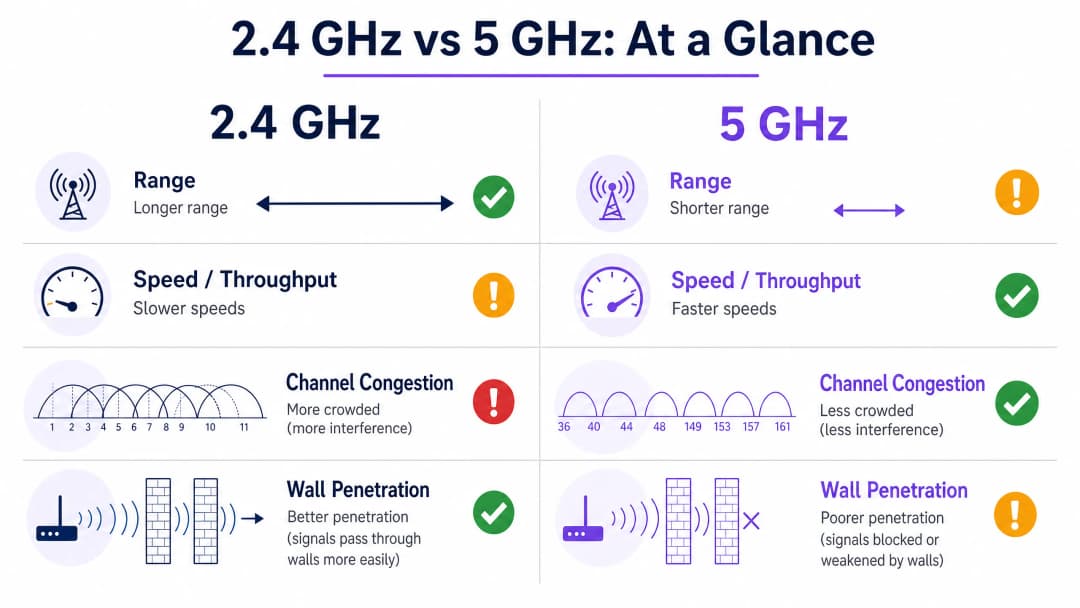
2.4GHz आणि 5GHz मधील मूलभूत फरक त्यांच्या तरंगलांबीमध्ये आहे. 2.4GHz बँड लांब तरंगलांबीवर (अंदाजे 12.5 सेमी) काम करतो, जो काँक्रीटच्या भिंती, स्टीलचे दरवाजे आणि गर्दीच्या ठिकाणी मानवी शरीरासारख्या घन वस्तूंमधून आरपार जाण्यासाठी अत्यंत प्रभावी आहे. या भौतिक वैशिष्ट्यामुळेच 2.4GHz विस्तृत कव्हरेज क्षेत्र प्रदान करते आणि जेव्हा वापरकर्ते गुंतागुंतीच्या वातावरणात फिरत असतात किंवा ॲक्सेस पॉईंटपासून दूर असतात तेव्हा ते अधिक विश्वासार्ह मानले जाते.
तथापि, या लांब रेंजसोबत काही मोठे तडजोड करावे लागणारे मुद्दे देखील येतात. 2.4GHz स्पेक्ट्रम अत्यंत अरुंद आहे, जो बहुतांश नियामक क्षेत्रांमध्ये केवळ तीन नॉन-ओव्हरलॅपिंग चॅनेल्स (1, 6 आणि 11) ऑफर करतो. दाट डिप्लॉयमेंट्समध्ये — हॉटेलचा मजला, रिटेल स्टोअर, कॉन्फरन्स सेंटर — यामुळे अपरिहार्यपणे गंभीर को-चॅनेल इंटरफेरन्स (CCI) होतो. शिवाय, 2.4GHz बँड हा एक सामायिक, गर्दीचा स्त्रोत आहे: तो Bluetooth उपकरणे, मायक्रोवेव्ह ओव्हन, बेबी मॉनिटर्स आणि जुन्या IoT हार्डवेअरच्या वाढत्या इकोसिस्टमशी स्पर्धा करतो, ज्यामुळे नेटवर्कवरील प्रत्येक उपकरणाचा एकूण थ्रूपुट कमी होतो.
याउलट, 5GHz बँड लहान तरंगलांबीवर (अंदाजे 6 सेमी) काम करतो. यामुळे भौतिक अडथळे पार करण्याची त्याची क्षमता मर्यादित होते — 2.4GHz वर भिंतीमधून सहज जाणारा सिग्नल 5GHz वर पूर्णपणे ब्लॉक होऊ शकतो — परंतु तो अत्यंत विस्तृत स्पेक्ट्रम ऑफर करतो. उपलब्ध असलेल्या 24 पर्यंत नॉन-ओव्हरलॅपिंग चॅनेल्ससह (नियामक क्षेत्र आणि DFS चॅनेलच्या उपलब्धतेवर अवलंबून), 5GHz विस्तृत चॅनेल बाँडिंगसाठी अनुमती देते: IEEE 802.11ac (Wi-Fi 5) आणि 802.11ax (Wi-Fi 6/6E) अंतर्गत 40MHz, 80MHz किंवा अगदी 160MHz. हाय-डेन्सिटी वातावरण, HD व्हिडिओ स्ट्रीमिंग आणि आधुनिक एंटरप्राइझ ॲप्लिकेशन्ससाठी आवश्यक असलेला प्रचंड थ्रूपुट मिळवण्यासाठी हे विस्तृत चॅनेल अत्यंत महत्त्वाचे आहे. जेव्हा एखादे उपकरण स्पष्ट दृष्टीरेषेत (line of sight) 5GHz वर कनेक्ट होते, तेव्हा मिळणारा वेग 2.4GHz च्या तुलनेत कित्येक पटीने जास्त असतो.
चॅनेल आर्किटेक्चर आणि इंटरफेरन्स मॉडेल्स
कोणत्याही एंटरप्राइझ डिप्लॉयमेंटसाठी चॅनेल आर्किटेक्चर समजून घेणे अत्यंत महत्त्वाचे आहे. 2.4GHz वर, IEEE 802.11 मानके 14 चॅनेल्स परिभाषित करतात (जरी नियामक क्षेत्रे भिन्न असली तरी), परंतु केवळ चॅनेल 1, 6 आणि 11 हेच खरोखर नॉन-ओव्हरलॅपिंग आहेत. याचा अर्थ असा की कोणत्याही विशिष्ट क्षेत्रात, शेजारील-चॅनेल इंटरफेरन्स न करता जास्तीत जास्त तीन ॲक्सेस पॉईंट्स एकाच वेळी कार्य करू शकतात. बहुमजली हॉटेल किंवा दाट रिटेल वातावरणात, ही मर्यादा नेटवर्क क्षमतेवर मर्यादा आणते.
5GHz वर, चित्र पूर्णपणे वेगळे आहे. UNII-1 (5.15–5.25 GHz), UNII-2 (5.25–5.35 GHz), UNII-2 Extended (5.47–5.725 GHz), आणि UNII-3 (5.725–5.85 GHz) बँड्स एकत्रितपणे 24 पर्यंत नॉन-ओव्हरलॅपिंग 20MHz चॅनेल्स प्रदान करतात. आर्किटेक्ट्स इंटरफेरन्स निर्माण न करता एकाच भौतिक जागेत लक्षणीयरीत्या अधिक ॲक्सेस पॉईंट्स तैनात करू शकतात, ज्यामुळे स्टेडियम, कॉन्फरन्स सेंटर्स आणि मोठ्या रिटेल वातावरणासाठी आवश्यक असलेले हाय-डेन्सिटी डिझाइन सक्षम होते.
डायनॅमिक फ्रिक्वेन्सी सिलेक्शन (DFS) चॅनेल्स, जे UNII-2 आणि UNII-2 Extended बँडमध्ये येतात, उपलब्ध स्पेक्ट्रमचा अधिक विस्तार करतात परंतु त्यासाठी काळजीपूर्वक विचार करणे आवश्यक आहे. हे चॅनेल्स रडार सिस्टम्ससोबत सामायिक केले गेले पाहिजेत, आणि रडार सिग्नल शोधणाऱ्या ॲक्सेस पॉईंटने 10 सेकंदांच्या आत चॅनेल रिकामा केला पाहिजे आणि 30 मिनिटांसाठी त्या चॅनेलपासून दूर राहिले पाहिजे. विमानतळ किंवा हवामान केंद्रांजवळील वातावरणात, DFS चॅनेलच्या अस्थिरतेमुळे गंभीर सेवांमध्ये व्यत्यय येऊ शकतो, म्हणून आर्किटेक्ट्सनी त्यानुसार फॉलबॅक चॅनेल्सचे नियोजन केले पाहिजे.
अंमलबजावणी मार्गदर्शक
ड्युअल-बँड आर्किटेक्चर आणि बँड स्टीयरिंग
आधुनिक वायरलेस आर्किटेक्चरसाठी उद्योग-मानक दृष्टिकोन म्हणजे आक्रमक बँड स्टीयरिंगसह ड्युअल-बँड डिप्लॉयमेंट आहे. ड्युअल-बँड सक्षम उपकरणांना — आधुनिक स्मार्टफोन, लॅपटॉप आणि टॅब्लेट — सक्रियपणे 5GHz बँडकडे वळवण्यासाठी ॲक्सेस पॉईंट्स कॉन्फिगर केले पाहिजेत. ही रणनीती जुनी उपकरणे, महत्त्वपूर्ण IoT सेन्सर्स आणि 5GHz पोहोचू शकत नसलेल्या कव्हरेज क्षेत्रांसाठी 2.4GHz एअरस्पेस मोकळी करते.
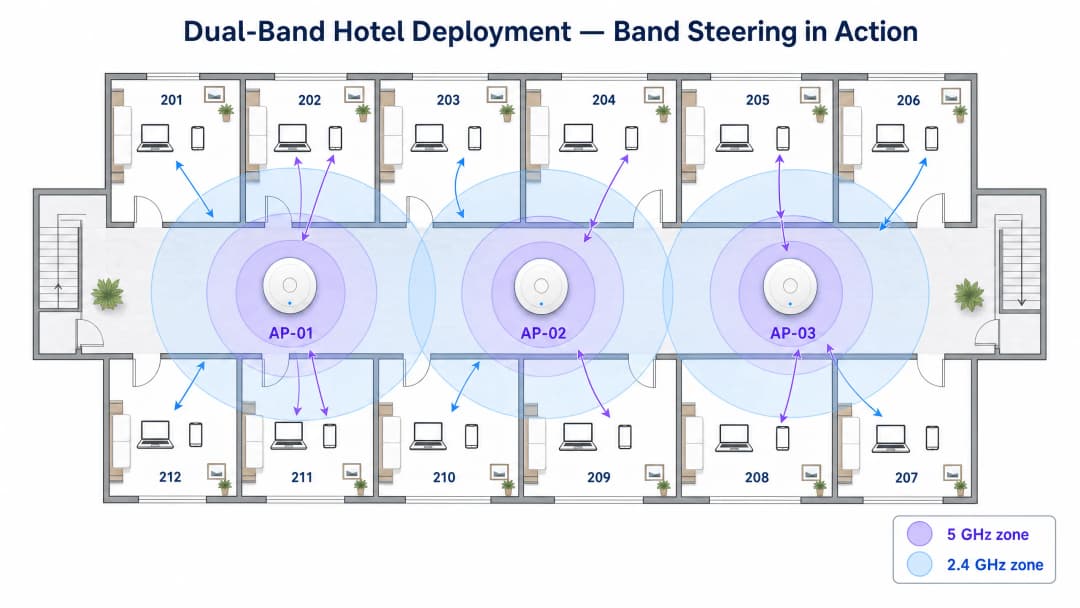
बँड स्टीयरिंग सक्षम क्लायंटसाठी 2.4GHz प्रोब प्रतिसादांना दाबून काम करते जोपर्यंत ते एकतर 5GHz वर जोडले जात नाहीत किंवा ठराविक प्रयत्नांनंतर प्रतिसाद देण्यास अपयशी ठरत नाहीत. बहुतेक एंटरप्राइझ-ग्रेड इन्फ्रास्ट्रक्चर वेंडर्स हे मूळतः लागू करतात, परंतु स्टीयरिंग पॉलिसीची आक्रमकता वातावरणाशी सुसंगत असावी लागते. ज्या ठिकाणी अनेक जुनी उपकरणे उपस्थित आहेत — उदाहरणार्थ, सार्वजनिक क्षेत्रातील इमारत किंवा आरोग्य सेवा केंद्र — तिथे अत्यंत आक्रमक बँड स्टीयरिंगमुळे केवळ 2.4GHz-सक्षम असलेल्या उपकरणांना कनेक्ट होण्यापासून पूर्णपणे रोखले जाऊ शकते.
कव्हरेजसाठी नाही, तर क्षमतेसाठी डिझाइन करणे
Hospitality आणि Retail डिप्लॉयमेंट्समधील एक सामान्य आणि खर्चिक चूक म्हणजे 2.4GHz च्या कव्हरेज क्षेत्राशी जुळवून घेण्याच्या प्रयत्नात 5GHz रेडिओवरील ट्रान्समिट पॉवर वाढवणे. हा दृष्टिकोन "sticky client" समस्या निर्माण करतो: उपकरणे मजबूत ॲक्सेस पॉईंटवर रोमिंग करण्याऐवजी कमकुवत 5GHz सिग्नल धरून ठेवतात, ज्यामुळे संबंधित क्लायंटच्या कामगिरीत घट होते आणि एअरटाइम वाया जातो ज्यामुळे सेल मधील इतर सर्व क्लायंटची कामगिरी खालावते.
योग्य दृष्टिकोन म्हणजे कमी ट्रान्समिट पॉवर सेटिंग्जवर अधिक ॲक्सेस पॉईंट्स तैनात करून क्षमतेसाठी डिझाइन करणे. लहान, सुस्पष्ट कव्हरेज cells अखंड रोमिंग, इष्टतम चॅनेलचा पुनर्वापर आणि संपूर्ण नेटवर्कवर संतुलित लोड सुनिश्चित करतात. व्यावहारिक नियम म्हणून, 5GHz ट्रान्समिट पॉवर सामान्यतः 2.4GHz ट्रान्समिट पॉवरपेक्षा 6–9 dBm जास्त सेट केली पाहिजे, ज्यामुळे एक नैसर्गिक कव्हरेज फरक तयार होतो जो क्लायंटला AP च्या जवळ असताना 5GHz ला प्राधान्य देण्यास आणि सेलच्या टोकाला 2.4GHz वर फॉलबॅक करण्यास प्रोत्साहित करतो.
Purple च्या WiFi Analytics सारख्या हार्डवेअर-अज्ञेयवादी प्लॅटफॉर्मचे एकत्रीकरण केल्याने व्हेन्यू ऑपरेटर्सना दोन्ही बँडवरील कामगिरीचा डेटा कॅप्चर करण्याची परवानगी मिळते, ज्यामुळे स्टिकी क्लायंट, उच्च-इंटरफेरन्स झोन आणि खराब कामगिरी करणारे ॲक्सेस पॉईंट्स ओळखण्यासाठी आवश्यक असलेली दृश्यमानता मिळते. नेटवर्क ऑप्टिमायझेशनचा हा डेटा-चालित दृष्टिकोन इव्हेंट व्हेन्यू सारख्या गतिमान वातावरणात विशेषतः मौल्यवान आहे, जिथे इव्हेंट दरम्यान RF वातावरण नाटकीयरित्या बदलते.
टप्प्याटप्प्याने अंमलबजावणी चेकलिस्ट
| टप्पा | कृती | मानक / संदर्भ |
|---|---|---|
| 1. RF सर्व्हे | सध्याच्या इंटरफेरन्स स्त्रोतांचा नकाशा तयार करण्यासाठी पॅसिव्ह आणि ॲक्टिव्ह साईट सर्व्हे करा | IEEE 802.11-2020 |
| 2. चॅनेल प्लॅन | नॉन-ओव्हरलॅपिंग चॅनेल्स नियुक्त करा; 2.4GHz वर 1, 6, 11 वापरा; 5GHz वर काळजीपूर्वक DFS चॅनेल्सचे वाटप करा | Wi-Fi Alliance सर्वोत्तम पद्धती |
| 3. पॉवर ट्यूनिंग | 5GHz ट्रान्समिट पॉवर 2.4GHz च्या वर 6–9 dBm सेट करा; कमाल पॉवर सेटिंग्ज टाळा | वेंडर-विशिष्ट RRM मार्गदर्शक तत्त्वे |
| 4. बँड स्टीयरिंग | बँड स्टीयरिंग सक्षम करा; उपकरणांच्या मिश्रणावर आधारित आक्रमकता ट्यून करा | IEEE 802.11v (BSS Transition) |
| 5. किमान RSSI | स्टिकी क्लायंट रोखण्यासाठी किमान RSSI थ्रेशोल्ड कॉन्फिगर करा | वेंडर-विशिष्ट |
| 6. सुरक्षा | गेस्ट नेटवर्कवर WPA3-SAE लागू करा; कॉर्पोरेट SSIDs वर WPA3-Enterprise (IEEE 802.1X) लागू करा | WPA3 तपशील, GDPR |
| 7. ॲनालिटिक्स | बँडचा वापर, क्लायंटची संख्या आणि रोमिंग इव्हेंट्सचे निरीक्षण करण्यासाठी WiFi Analytics तैनात करा | Purple प्लॅटफॉर्म |
तुमच्या विशिष्ट सेटअपबद्दल काही प्रश्न आहेत का?
आमची टीम ८०,००० हून अधिक वेन्यूजमधील वेन्यू ऑपरेटर्स, IT मॅनेजर्स आणि नेटवर्क इंजिनिअर्ससोबत काम करते. २० मिनिटांचा कॉल बुक करा आणि तुमच्यासारख्या इतरांनी ही समस्या कशी सोडवली हे आम्ही तुम्हाला दाखवू.
सर्वोत्तम पद्धती
कडक चॅनेल प्लॅनिंग तडजोड न करण्यासारखे आहे. शेजारील-चॅनेल इंटरफेरन्स टाळण्यासाठी 2.4GHz बँडवर चॅनेल 1, 6 आणि 11 चे पालन करा. 5GHz वर, जिथे वातावरण परवानगी देते तिथे DFS चॅनेल्सचा वापर करा, परंतु रडार-ट्रिगर केलेल्या चॅनेल बदलांसाठी दस्तऐवजीकरण केलेला फॉलबॅक प्लॅन ठेवा.
दोन्ही बँडवर लेगसी डेटा रेट्स निष्क्रिय करा. 2.4GHz वर 802.11b डेटा रेट्स (1, 2, 5.5, आणि 11 Mbps) चा सपोर्ट काढून टाकल्याने व्यवस्थापन ओव्हरहेड लक्षणीयरीत्या कमी होते आणि खराब सिग्नल असलेल्या क्लायंटला खराब कनेक्शन धरून ठेवण्याऐवजी जवळच्या ॲक्सेस पॉईंटवर रोमिंग करण्यास भाग पाडले जाते. हा एकच कॉन्फिगरेशन बदल दाट वातावरणात एकूण नेटवर्क कार्यक्षमता 20-30% सुधारू शकतो.
ॲक्सेस पॉईंट्स दरम्यान अखंड रोमिंग सक्षम करण्यासाठी 802.11r (Fast BSS Transition) लागू करा. ज्या वातावरणात वापरकर्ते फिरते असतात — रिटेल फ्लोअर्स, हॉस्पिटल वॉर्ड्स, ट्रान्सपोर्ट हब्स — 802.11r रोमिंग हँडऑफ वेळ काहीशे मिलिसेकंदांवरून 50ms पेक्षा कमी करतो, जे voice-over-WiFi आणि रिअल-टाइम ॲप्लिकेशन्ससाठी अत्यंत महत्त्वाचे आहे.
उद्देशानुसार SSIDs चे वर्गीकरण करा. एकाच SSID वर सर्व ट्रॅफिक चालवण्याचा मोह टाळा. योग्यरित्या विभागलेले नेटवर्क गेस्ट ट्रॅफिक (योग्य कॅप्टिव्ह पोर्टल आणि डेटा कॅप्चरसह Guest WiFi द्वारे व्यवस्थापित), कॉर्पोरेट ट्रॅफिक (IEEE 802.1X आणि WPA3-Enterprise सह सुरक्षित), आणि IoT उपकरणे (समर्पित VLAN वर वेगळे केलेले) वेगळे करते. हे वर्गीकरण कार्ड पेमेंट हाताळणाऱ्या रिटेल वातावरणासाठी PCI DSS अनुपालनास देखील समर्थन देते.
समस्या निवारण आणि जोखीम कमी करणे
को-चॅनेल इंटरफेरन्स (CCI)
जोखीम: एकमेकांच्या ऐकण्याच्या मर्यादेत एकाच चॅनेलवर कार्यरत असलेले अनेक ॲक्सेस पॉईंट्स, ज्यामुळे उपकरणांना ट्रान्समिट करण्यापूर्वी मोकळ्या एअरटाइमची वाट पाहावी लागते. एंटरप्राइझ वातावरणात खराब WiFi कामगिरीचे हे सर्वात सामान्य कारण आहे.
उपाय: स्वयंचलित Radio Resource Management (RRM) लागू करा या त्रैमासिक चॅनेल असाइनमेंटचे मॅन्युअली ऑडिट करा. अनधिकृत ॲक्सेस पॉईंट्स आणि नॉन-WiFi इंटरफेरन्स स्त्रोत ओळखण्यासाठी स्पेक्ट्रम विश्लेषण साधने वापरा. मल्टी-टेनंट इमारतींमध्ये, शक्य असल्यास शेजारील भाडेकरूंसोबत चॅनेल प्लॅन्सचे समन्वय साधा.
स्टिकी क्लायंट्स
जोखीम: मजबूत सिग्नल उपलब्ध असतानाही कमकुवत सिग्नल असलेल्या ॲक्सेस पॉईंटशी उपकरणे कनेक्ट राहणे, ज्यामुळे एअरटाइम वाया जातो आणि सेलची कामगिरी खालावते.
उपाय: खराब सिग्नल असलेल्या क्लायंटला हळूवारपणे डिस्कनेक्ट करण्यासाठी किमान RSSI थ्रेशोल्ड (सामान्यतः –70 ते –75 dBm) कॉन्फिगर करा. डिस्कनेक्ट करणे आवश्यक होण्यापूर्वी क्लायंटला चांगल्या ॲक्सेस पॉईंट्सकडे वळवण्यासाठी 802.11v BSS Transition Management सह एकत्र करा.
DFS चॅनेल अस्थिरता
जोखीम: रडार डिटेक्शन इव्हेंट्समुळे ॲक्सेस पॉईंट्सना DFS चॅनेल्स सोडण्यास भाग पाडले जाते, ज्यामुळे संबंधित क्लायंटसाठी कनेक्टिव्हिटीमध्ये थोडा वेळ व्यत्यय येतो.
उपाय: विमानतळ, लष्करी तळ या हवामान केंद्रांजवळील वातावरणात, DFS चॅनेल्स पूर्णपणे टाळा. इतर वातावरणात, ॲक्सेस पॉईंट्स डायनॅमिकपणे नवीन चॅनेल निवडण्याऐवझि पूर्वनिर्धारित फॉलबॅक चॅनेलवर जाण्यासाठी कॉन्फिगर केले आहेत याची खात्री करा, ज्यामुळे अनपेक्षित इंटरफेरन्स होऊ शकतो.
IoT डिव्हाइस सुसंगतता
जोखीम: जुनी IoT उपकरणे — पर्यावरणीय सेन्सर्स, पेमेंट टर्मिनल्स, ॲक्सेस कंट्रोल रीडर्स — केवळ 2.4GHz आणि जुन्या सुरक्षा प्रोटोकॉलला सपोर्ट करू शकतात, जर ही उपकरणे गेस्ट किंवा कॉर्पोरेट ट्रॅफिक सारखेच नेटवर्क सामायिक करत असतील तर सुरक्षा धोका निर्माण होतो.
उपाय: IoT उपकरणांना समर्पित SSID आणि VLAN वर वेगळे करा. नेटवर्क सोपे करण्याच्या प्रयत्नात 2.4GHz रेडिओ बंद केला जाणार नाही याची खात्री करा, कारण यामुळे ही उपकरणे निकामी होतील. हाय-डेन्सिटी IoT वातावरणात नेटवर्क ॲड्रेस मर्यादा व्यवस्थापित करण्याच्या मार्गदर्शनासाठी, Managing Public IP Exhaustion in Student Housing वरील आमचे मार्गदर्शक पहा.
ROI आणि व्यावसायिक प्रभाव
योग्यरित्या डिझाइन केलेले ड्युअल-बँड नेटवर्क प्रत्येक क्षेत्रात मोजता येण्याजोगे व्यावसायिक परिणाम देते. Hospitality मध्ये, विश्वासार्ह हाय-स्पीड WiFi हे गेस्ट समाधानाच्या स्कोअरमधील प्रमुख घटकांपैकी एक मानले जाते, जे थेट पुनरावलोकन रेटिंग आणि पुन्हा बुकिंगवर परिणाम करते. योग्यरित्या ट्यून केलेले 5GHz डिप्लॉयमेंट हे सुनिश्चित करते की पाहुणे कोणत्याही व्यत्ययाशिवाय सामग्री प्रवाहित करू शकतात, व्हिडिओ कॉल करू शकतात आणि क्लाउड ॲप्लिकेशन्स वापरू शकतात, तर 2.4GHz स्तर ॲक्सेस पॉईंटपासून सर्वात दूर असलेल्या खोल्यांमध्ये देखील कनेक्टिव्हिटी राखली जाईल याची खात्री करतो.
Retail वातावरणात, व्यावसायिक बाजू आणखी थेट आहे. एक विश्वासार्ह 5GHz नेटवर्क हे सुनिश्चित करते की पॉईंट-ऑफ-सेल सिस्टम्स विनाविलंब व्यवहार प्रक्रिया करतात, तर 2.4GHz नेटवर्क शेल्फ्सच्या आत खोलवर असलेल्या इन्व्हेंटरी स्कॅनर्सना सपोर्ट करते. खराब डिझाइन केलेल्या RF वातावरणामुळे होणारा डाउनटाइम थेट महसूल नुकसानीत बदलतो. WiFi Analytics चा फायदा घेऊन, रिटेल ऑपरेटर्स ग्राहकांचा थांबण्याचा वेळ (dwell time) आणि फूटफॉल पॅटर्न देखील मोजू शकतात, ज्यामुळे नेटवर्क इन्फ्रास्ट्रक्चरचे रूपांतर फर्स्ट-पार्टी डेटा मालमत्तेत होते.
सार्वजनिक क्षेत्रातील संस्था आणि ट्रान्सपोर्ट ऑपरेटर्ससाठी, ROI च्या गणनेमध्ये जोखीम कमी करणे तसेच थेट महसूल समाविष्ट आहे. पीक डिमांड दरम्यान — स्टेडियममधील इव्हेंट, गर्दीच्या वेळेचा प्रवास — अपयशी ठरणारे नेटवर्क प्रतिष्ठेचे नुकसान करते ज्याचे मोजमाप करणे कठीण आहे परंतु योग्य आर्किटेक्चरसह ते टाळणे सोपे आहे. या क्षेत्रातील Purple चे काम, ज्यामध्ये सार्वजनिक क्षेत्रातील डिजिटल समावेशासाठी तज्ञ नेतृत्वाची नियुक्ती समाविष्ट आहे जसे की Iain Fox announcement मध्ये तपशीलवार दिले आहे, हे दर्शवते की एंटरप्राइझ WiFi हे महत्त्वपूर्ण सार्वजनिक पायाभूत सुविधा आहे.
पासवर्डशिवाय ऑथेंटिकेशन तंत्रज्ञानाचा उदय, जसे की आमच्या How a WiFi Assistant Enables Passwordless Access in 2026 वरील मार्गदर्शकामध्ये शोधले गेले आहे, सपोर्ट ओव्हरहेड कमी करून आणि गेस्ट ऑनबोर्डिंग अनुभव सुधारून चांगल्या प्रकारे डिझाइन केलेल्या नेटवर्कचा ROI अधिक वाढवतो. ऑफलाइन लवचिकता क्षमता, जसे की Purple's Offline Maps Mode मध्ये वर्णन केले आहे, हे सुनिश्चित करतात की अपस्ट्रीम कनेक्टिव्हिटी खराब असतानाही वापरकर्त्याचा अनुभव अबाधित राहील.
योग्यरित्या ट्यून केलेल्या ड्युअल-बँड डिप्लॉयमेंटमधून अपेक्षित परिणाम:
| मेट्रिक | ठराविक सुधारणा |
|---|---|
| Guest WiFi समाधान स्कोअर | +15–25% |
| नेटवर्क-संबंधित सपोर्ट तिकिटे | –30–40% |
| पीक-अवर दरम्यान प्रति क्लायंट थ्रूपुट | +40–60% |
| रोमिंग हँडऑफ वेळ (802.11r सह) | –80% (~300ms वरून <50ms पर्यंत) |
| 2.4GHz एअरटाइम वापर | –20–30% (5GHz वर वळवल्यामुळे) |
महत्वाच्या व्याख्या
Band Steering
एक यंत्रणा ज्याद्वारे ॲक्सेस पॉईंट ड्युअल-बँड सक्षम क्लायंटसाठी 2.4GHz प्रोब प्रतिसादांना दाबतो, ज्यामुळे त्यांना त्याऐवजी 5GHz बँडवर जोडण्यास प्रोत्साहित केले जाते.
दाट वातावरणात एअरटाइम वापर ऑप्टिमाइझ करण्यासाठी अत्यंत महत्त्वाचे. केवळ 2.4GHz-सक्षम असलेल्या वैध उपकरणांना ब्लॉक करणे टाळण्यासाठी काळजीपूर्वक ट्यून केले पाहिजे.
Co-Channel Interference (CCI)
जेव्हा एकाच चॅनेलवर कार्यरत असलेले दोन किंवा अधिक ॲक्सेस पॉईंट्स एकमेकांच्या ऐकण्याच्या मर्यादेत असतात तेव्हा होणारा इंटरफेरन्स, ज्यामुळे CSMA/CA प्रोटोकॉल उपकरणांना ट्रान्समिट करण्यापूर्वी मोकळ्या एअरटाइमची वाट पाहण्यास भाग पाडतो.
एंटरप्राइझ डिप्लॉयमेंट्समध्ये खराब WiFi कामगिरीचे प्राथमिक कारण. काळजीपूर्वक चॅनेल प्लॅनिंग आणि योग्य AP डेन्सिटीद्वारे कमी केले जाते.
Channel Bonding
संबंधित क्लायंटसाठी उपलब्ध थ्रूपुट वाढवण्यासाठी विस्तृत चॅनेल्स (40MHz, 80MHz, 160MHz) तयार करण्यासाठी शेजारील 20MHz चॅनेल्स एकत्र करण्याची पद्धत.
हाय-बँडविड्थ ॲप्लिकेशन्ससाठी 5GHz वर अत्यंत प्रभावी. मर्यादित स्पेक्ट्रम उपलब्ध असल्यामुळे 2.4GHz वर हे टाळले पाहिजे.
Dynamic Frequency Selection (DFS)
एक नियामक आवश्यकता जी विशिष्ट 5GHz चॅनेल्सवर कार्यरत असलेल्या WiFi उपकरणांना रडार सिग्नल शोधण्यास आणि टाळण्यास भाग पाडते, रडार आढळल्यास 10 सेकंदांच्या आत चॅनेल रिकामा करते.
उपलब्ध 5GHz चॅनेल संच विस्तारित करतो परंतु रडार डिटेक्शन इव्हेंट्स दरम्यान चॅनेल बदलण्याचा धोका निर्माण करतो. विमानतळ आणि लष्करी तळांजवळ काळजीपूर्वक नियोजनाची आवश्यकता आहे.
Received Signal Strength Indicator (RSSI)
प्राप्त झालेल्या रेडिओ सिग्नलमधील पॉवरचे मोजमाप, सामान्यतः dBm मध्ये व्यक्त केले जाते (ऋण मूल्ये, जिथे 0 च्या जवळ असणे म्हणजे अधिक मजबूत सिग्नल).
क्लायंटचे आरोग्य निश्चित करण्यासाठी, रोमिंग इव्हेंट्स ट्रिगर करण्यासाठी आणि साईट सर्व्हे दरम्यान कव्हरेज प्रमाणित करण्यासाठी वापरले जाते. विश्वासार्ह एंटरप्राइझ WiFi ऑपरेशनसाठी सामान्यतः किमान –70 dBm आवश्यक असते.
Sticky Client
मजबूत ॲक्सेस पॉईंट उपलब्ध असतानाही कमकुवत सिग्नल (कमी RSSI) असूनही एखाद्या ॲक्सेस पॉईंटशी कनेक्ट राहणारे उपकरण. असे घडते कारण 802.11 मानक क्लायंटला रोमिंगच्या निर्णयांवर पूर्ण नियंत्रण देते.
संबंधित क्लायंटच्या कामगिरीत घट करते आणि एअरटाइम वाया घालवते ज्यामुळे सेल मधील इतर सर्व क्लायंटची कामगिरी खालावते. किमान RSSI थ्रेशोल्ड आणि 802.11v BSS Transition Management द्वारे कमी केले जाते.
Throughput
ॲक्सेस पॉईंटद्वारे जाहिरात केलेल्या सैद्धांतिक कमाल डेटा दरापेक्षा (PHY दर) वेगळा, दिलेल्या कालावधीत नेटवर्कवर यशस्वीरित्या हस्तांतरित केलेल्या डेटाची वास्तविक मात्रा.
वापरकर्त्याच्या अनुभवासाठी व्यावहारिक मेट्रिक. प्रोटोकॉल ओव्हरहेड, रीट्रांसमिशन आणि सामायिक एअरटाइममुळे थ्रूपुट नेहमी PHY दरापेक्षा कमी असतो.
Radio Resource Management (RRM)
एक स्वयंचलित प्रणाली जी इंटरफेरन्स कमी करण्यासाठी आणि कव्हरेज ऑप्टिमाइझ करण्यासाठी ॲक्सेस पॉईंट्सच्या समूहामध्ये चॅनेल असाइनमेंट आणि ट्रान्समिट पॉवर लेव्हल्स डायनॅमिकपणे समायोजित करते.
बहुतांश एंटरप्राइझ-ग्रेड वायरलेस कंट्रोलर्सवर उपलब्ध. मॅन्युअल चॅनेल प्लॅनिंगचे ऑपरेशनल ओव्हरहेड कमी करते परंतु नियमितपणे प्रमाणित केले पाहिजे, कारण RRM निर्णय गुंतागुंतीच्या वातावरणात नेहमीच इष्टतम नसतात.
IEEE 802.11r (Fast BSS Transition)
802.11 मानकातील एक सुधारणा जी शेजारील ॲक्सेस पॉईंट्ससह क्लायंटला पूर्व-ऑथेंटिकेट करते, ज्यामुळे रोमिंग हँडऑफ वेळ काहीशे मिलिसेकंदांवरून 50ms पेक्षा कमी होतो.
voice-over-WiFi, रिअल-टाइम ॲप्लिकेशन्स आणि रिटेल फ्लोअर्स आणि हॉस्पिटल वॉर्ड्स यांसारख्या फिरत्या कामगारांच्या वातावरणासाठी आवश्यक.
सोडवलेली उदाहरणे
एक 200 खोल्यांचे हॉटेल संध्याकाळच्या पीक अवर्स (18:00–22:00) दरम्यान संथ WiFi च्या व्यापक तक्रारींचा सामना करत आहे. सध्याच्या डिप्लॉयमेंटमध्ये कॉरिडॉरमध्ये बसवलेले ॲक्सेस पॉईंट्स वापरले जातात ज्यामध्ये 2.4GHz आणि 5GHz दोन्ही रेडिओ कमाल ट्रान्समिट पॉवरवर सेट केले आहेत. एका साईट सर्व्हेमधून असे दिसून आले आहे की बहुतेक खोल्या जवळच्या AP पासून 8-12 मीटर अंतरावर आहेत, ज्यामध्ये डिव्हाइस आणि AP दरम्यान दोन काँक्रीटच्या भिंती आहेत.
पायरी 1 - दोन्ही बँडवर ट्रान्समिट पॉवर कमी करा. 5GHz ला 17 dBm आणि 2.4GHz ला 10 dBm वर सेट करा. यामुळे एक नैसर्गिक कव्हरेज फरक तयार होतो जो क्लायंटला AP च्या जवळ असताना 5GHz ला प्राधान्य देण्यास आणि सेलच्या टोकाला 2.4GHz वर फॉलबॅक करण्यास प्रोत्साहित करतो, ज्यामुळे स्टिकी क्लायंटच्या घटना कमी होतात.
पायरी 2 - आक्रमक बँड स्टीयरिंग सक्षम करा. ड्युअल-बँड सक्षम उपकरणांसाठी किमान 200ms साठी 2.4GHz प्रोब प्रतिसादांना दाबण्यासाठी इन्फ्रास्ट्रक्चर कॉन्फिगर करा, ज्यामुळे 5GHz ला प्राधान्य मिळेल. ॲनालिटिक्स प्लॅटफॉर्मद्वारे बँड वापर गुणोत्तराचे निरीक्षण करा; पीक अवर्स दरम्यान 5GHz वर 70-80% क्लायंटचे लक्ष्य ठेवा.
पायरी 3 - 2.4GHz वर लेगसी 802.11b डेटा रेट्स (1, 2, 5.5, 11 Mbps) निष्क्रिय करा. यामुळे व्यवस्थापन ओव्हरहेड कमी होते आणि खराब सिग्नल असलेल्या क्लायंटला खराब कनेक्शन धरून ठेवण्याऐवजी रोमिंग करण्यास भाग पाडले जाते.
पायरी 4 - 802.11r Fast BSS Transition लागू करा आणि सिग्नलची गुणवत्ता वापरण्यायोग्य पातळीच्या खाली जाण्यापूर्वी क्लायंट रोमिंग करतील याची खात्री करण्यासाठी –72 dBm वर किमान RSSI थ्रेशोल्ड कॉन्फिगर करा.
पायरी 5 - पहिल्या तीन मजल्यांसाठी (सर्वात जास्त तक्रारींची घनता) इन-रूम ॲक्सेस पॉईंट्समध्ये टप्प्याटप्प्याने अपग्रेड करण्याचे नियोजन करा. इन-रूम APs पाहुण्यांच्या उपकरणांना थेट 5GHz दृष्टीरेषा (line-of-sight) प्रदान करतात, ज्यामुळे त्या मजल्यांसाठी भिंत ओलांडण्याची समस्या पूर्णपणे दूर होते.
एका मोठ्या रिटेल वेअरहाऊस (15,000 चौ. मी.) ला कॉर्पोरेट ऑफिस एरिया (लॅपटॉप आणि व्हिडिओ कॉन्फरन्सिंग वापरणारे 50 कर्मचारी) आणि वेअरहाऊस फ्लोअर (8-मीटर-उंच मेटल रॅकिंगमध्ये फिरणारे 200 लेगसी बारकोड स्कॅनर्स) या दोन्हीसाठी WiFi कनेक्टिव्हिटीची आवश्यकता आहे. सध्याचे नेटवर्क दोन्ही बँडवर एकच SSID वापरते.
पायरी 1 - नेटवर्कचे वर्गीकरण करा. तीन SSIDs तयार करा: CORP (WPA3-Enterprise, 802.1X, 5GHz ला प्राधान्य), WAREHOUSE (WPA2-PSK, केवळ 2.4GHz, वेगळे केलेले VLAN), आणि GUEST (Purple Guest WiFi द्वारे कॅप्टिव्ह पोर्टल, ड्युअल-बँड).
पायरी 2 - ऑफिस एरिया 5GHz क्षमतेसाठी डिझाइन करा. हाय-थ्रूपुट व्हिडिओ कॉन्फरन्सिंगसाठी 5GHz वर 80MHz चॅनेल बाँडिंगसह 10-12 मीटर अंतरावर ॲक्सेस पॉईंट्स तैनात करा. ऑफिस-एरिया APs वर 2.4GHz निष्क्रिय करा किंवा त्याची पॉवर किमान पातळीवर कमी करा.
पायरी 3 - वेअरहाऊस फ्लोअर विशेषतः 2.4GHz विश्वासार्हतेसाठी डिझाइन करा. मेटल रॅकिंग 5GHz साठी एक गंभीर मल्टिपाथ वातावरण तयार करते, ज्यामुळे सिग्नल वेगाने खराब होतो. प्रत्येक गल्लीच्या (aisle) शेवटी 2.4GHz-ऑप्टिमाइझ केलेल्या पॉवर लेव्हल्सवर APs तैनात करा. CCI कमी करण्यासाठी गल्ल्यांमध्ये कडक अल्टरनेटिंग पॅटर्नमध्ये चॅनेल 1, 6 आणि 11 वापरा.
पायरी 4 - प्रत्येक गल्लीच्या शेवटच्या टोकाला RSSI मोजून, वॉकथ्रू चाचणीसह स्कॅनर कनेक्टिव्हिटी प्रमाणित करा. विश्वासार्ह स्कॅनर ऑपरेशनसाठी किमान –65 dBm चे लक्ष्य ठेवा.
पायरी 5 - स्कॅनर रोमिंग इव्हेंट्सचे निरीक्षण करण्यासाठी आणि कव्हरेज गॅप असलेल्या कोणत्याही गल्ल्या ओळखण्यासाठी Purple WiFi Analytics समाकलित करा.
सराव प्रश्न
Q1. तुम्ही एका नवीन विद्यापीठाच्या लेक्चर हॉलसाठी WiFi नेटवर्क डिझाइन करत आहात जिथे 300 विद्यार्थी बसण्याची अपेक्षा आहे, प्रत्येक विद्यार्थी 2-3 उपकरणे आणत आहे. हॉलला 4 मीटरवर सपाट छत आहे आणि कोणतीही अंतर्गत भिंत नाही. तुमची प्राथमिक फ्रिक्वेन्सी रणनीती आणि AP प्लेसमेंट दृष्टिकोन काय आहे?
टीप: उपकरणांची घनता, भौतिक वातावरण आणि को-चॅनेल इंटरफेरन्स कमी करण्याची आवश्यकता विचारात घ्या.
नमुना उत्तर पहा
प्राथमिक रणनीती हाय-डेन्सिटी 5GHz कव्हरेज आहे. एकाच खोलीत 900 पर्यंत उपकरणे असल्याने, 2.4GHz बँड त्याच्या तीन-चॅनेल मर्यादेमुळे त्वरित सॅच्युरेट होईल. छतावर डायरेक्शनल अँटेनासह 6-8 ॲक्सेस पॉईंट्स तैनात करा, ज्यामुळे लहान, नॉन-ओव्हरलॅपिंग 5GHz कव्हरेज सेल्स तयार होतील. घट्ट सेल सीमा निश्चित करण्यासाठी आणि स्टिकी क्लायंट रोखण्यासाठी ट्रान्समिट पॉवर कमी (5GHz वर 12–15 dBm) सेट करा. आक्रमक बँड स्टीयरिंग सक्षम करा आणि बहुतेक APs वर 2.4GHz निष्क्रिय करा, कोणत्याही जुन्या उपकरणांसाठी हॉलच्या मागील बाजूस 1-2 APs वर ते सक्रिय ठेवा. थ्रूपुट आणि चॅनेलचा पुनर्वापर संतुलित करण्यासाठी 5GHz वर 40MHz चॅनेल बाँडिंग वापरा.
Q2. हॉस्पिटलच्या IT संचालकांनी अहवाल दिला आहे की वैद्यकीय टेलिमेट्री कार्ट्स वॉर्ड्स दरम्यान फिरताना वारंवार त्यांचे WiFi कनेक्शन गमावतात. नेटवर्क ड्युअल-बँड आहे आणि बँड स्टीयरिंग सक्षम आहे. सर्वात संभाव्य कारण काय आहे आणि तुमची शिफारस केलेली उपाययोजना काय आहे?
टीप: रोमिंग वर्तन, हॉस्पिटल बांधकामाची भौतिक वैशिष्ट्ये आणि मोबाईल उपकरणांवर बँड स्टीयरिंगचा प्रभाव विचारात घ्या.
नमुना उत्तर पहा
सर्वात संभाव्य कारण म्हणजे स्टिकी क्लायंट वर्तन आणि अत्यंत आक्रमक बँड स्टीयरिंग यांचे संयोजन आहे. कार्ट्स कदाचित काँक्रीटच्या भिंतींमधून जाताना मजबूत AP वर रोमिंग करण्याऐवजी कमकुवत 5GHz सिग्नल धरून ठेवत आहेत. जेव्हा ते शेवटी रोमिंग करतात, तेव्हा हँडऑफ विलंबाने ॲप्लिकेशनचे कनेक्शन तुटत आहे. उपाययोजना: (1) ट्रान्समिट पॉवर सेटिंग्जचे ऑडिट करा - स्पष्ट सेल सीमा तयार करण्यासाठी 2.4GHz हे 5GHz पेक्षा कमी सेट केले असल्याची खात्री करा. (2) सिग्नल वापरण्यायोग्य पातळीच्या खाली जाण्यापूर्वी रोमिंग ट्रिगर करण्यासाठी –70 dBm वर किमान RSSI थ्रेशोल्ड कॉन्फिगर करा. (3) रोमिंग हँडऑफ वेळ 50ms पेक्षा कमी करण्यासाठी 802.11r Fast BSS Transition लागू करा. (4) जर टेलिमेट्री ॲप्लिकेशनला केवळ कमी बँडविड्थची आवश्यकता असेल, तर कार्ट्सना केवळ 2.4GHz वर कनेक्ट करण्यासाठी कॉन्फिगर करण्याचा विचार करा, जे हॉस्पिटलच्या काँक्रीटच्या भिंतींमधून अधिक सुसंगत कव्हरेज प्रदान करेल.
Q3. एका रिटेल चेनला ग्राहकांचा थांबण्याचा वेळ (dwell time) आणि कस्टमर जर्नी मॅपिंग मोजण्यासाठी 50 स्टोअर्समध्ये WiFi-आधारित लोकेशन ॲनालिटिक्स तैनात करायचे आहे. ॲनालिटिक्स प्लॅटफॉर्मने प्रामुख्याने 2.4GHz की 5GHz प्रोब डेटावर अवलंबून राहावे आणि का?
टीप: उपकरणे कोणत्या फ्रिक्वेन्सीवर वारंवार प्रोब करतात, ट्रायँग्युलेशन अचूकतेसाठीレンジचे परिणाम आणि Purple WiFi Analytics सारख्या प्लॅटफॉर्मची भूमिका विचारात घ्या.
नमुना उत्तर पहा
लोकेशन ॲनालिटिक्सने प्रामुख्याने दोन कारणांमुळे 2.4GHz प्रोब डेटावर अवलंबून राहावे. पहिले, 2.4GHz ची रेंज जास्त असते, याचा अर्थ ॲक्सेस पॉईंट्स जास्त अंतरावरून उपकरणांच्या प्रोब विनंत्या शोधू शकतात, ज्यामुळे ट्रायँग्युलेशनसाठी अधिक डेटा पॉईंट्स मिळतात आणि अचूकता सुधारते. दुसरे, अनेक स्मार्टफोन बॅटरी वाचवण्यासाठी अजूनही 2.4GHz वर अधिक आक्रमकपणे प्रोब करतात, ज्यामुळे प्रोब डेटाचे प्रमाण जास्त मिळते. तथापि, Purple च्या WiFi Analytics सारखा मजबूत प्लॅटफॉर्म कव्हरेज आणि अचूकता वाढवण्यासाठी दोन्ही बँडमधील प्रोब डेटा एकत्रित करेल. हे लक्षात घेणे देखील महत्त्वाचे आहे की iOS 14+ आणि Android 10+ प्रोब विनंत्यांसाठी MAC ॲड्रेस रँडमायझेशन लागू करतात, ज्यासाठी ॲनालिटिक्स प्लॅटफॉर्मला केवळ MAC-आधारित ट्रॅकिंगवर अवलंबून न राहता सांख्यिकीय फिंगरप्रिंटिंग तंत्र वापरावे लागते.
या मालिकेमध्ये पुढे वाचा
सर्वोत्तम चॅनेल नियोजनासाठी RSSI आणि सिग्नलची ताकद समजून घेणे
हे मार्गदर्शक सर्वोत्तम चॅनेल नियोजनासाठी RSSI, सिग्नल-टू-नॉइज रेशो (SNR) आणि RF प्रोपॅगेशन सिद्धांतात एक सर्वसमावेशक तांत्रिक सखोल माहिती प्रदान करते. हे IT व्यवस्थापक, नेटवर्क आर्किटेक्ट आणि वेन्यू ऑपरेशन्स डायरेक्टर्सना को-चॅनेल आणि शेजारील चॅनेल इंटरफेरियन्स कमी करण्यासाठी, AP प्लेसमेंट ऑप्टिमाइझ करण्यासाठी आणि हॉस्पिटॅलिटी, रिटेल आणि सार्वजनिक क्षेत्रातील वातावरणात मोजता येण्याजोग्या व्यावसायिक प्रभावासाठी ॲनालिटिक्सचा वापर करण्यासाठी कृतीयोग्य धोरणे प्रदान करते.
20MHz vs 40MHz vs 80MHz: आपण कोणती चॅनेल विड्थ वापरावी?
हा मार्गदर्शक IT व्यवस्थापक, नेटवर्क आर्किटेक्ट आणि वेन्यू ऑपरेशन्स डायरेक्टर्सना हॉस्पिटॅलिटी, रिटेल, इव्हेंट्स आणि सार्वजनिक क्षेत्रातील व्यावसायिक वातावरणात योग्य WiFi चॅनेल विड्थ - 20MHz, 40MHz किंवा 80MHz - निवडण्याबाबत एक निश्चित, वेंडर-तटस्थ तांत्रिक संदर्भ प्रदान करतो. यामध्ये मूलभूत IEEE 802.11 मेकॅनिक्स, प्रत्यक्ष वापरातील कॅपॅसिटी तडजोडी आणि टीम्सना या तिमाहीत योग्य निर्णय घेण्यास मदत करण्यासाठी टप्प्याटप्प्याने उपयोजन मार्गदर्शन समाविष्ट आहे. चॅनेल विड्थ निवड समजून घेणे हा कोणत्याही वायरलेस LAN डिझाइनमधील सर्वात महत्त्वाच्या निर्णयांपैकी एक आहे, ज्याचा थेट परिणाम थ्रूपुट, इंटरफेरन्स, क्लायंट डेन्सिटी सपोर्ट आणि अतिथी-केंद्रित सेवांच्या विश्वासार्हतेवर होतो.
WiFi 6 विरुद्ध WiFi 5: हे चॅनेल इंटरफेरन्स सोडवते का?
हे मार्गदर्शक WiFi 6 (802.11ax) हे OFDMA आणि BSS Coloring द्वारे हाय-डेन्सिटी एंटरप्राइझ वातावरणात चॅनेल इंटरफेरन्सचे निवारण कसे करते याचे तांत्रिक सखोल विश्लेषण प्रदान करते. हे IT व्यवस्थापक, network architects, आणि CTOs ना व्यावहारिक अंमलबजावणी धोरणे, हॉस्पिटॅलिटी आणि हेल्थकेअरमधील वास्तविक केस स्टडीज आणि ज्या ठिकाणी वायरलेस कामगिरी व्यवसायासाठी अत्यंत महत्त्वाची आहे अशा ठिकाणी इन्फ्रास्ट्रक्चर अपग्रेडच्या ROI चे मूल्यमापन करण्यासाठी एक फ्रेमवर्क प्रदान करते.
तुमच्या विशिष्ट सेटअपबद्दल काही प्रश्न आहेत का?
आमची टीम ८०,००० हून अधिक वेन्यूजमधील वेन्यू ऑपरेटर्स, IT मॅनेजर्स आणि नेटवर्क इंजिनिअर्ससोबत काम करते. २० मिनिटांचा कॉल बुक करा आणि तुमच्यासारख्या इतरांनी ही समस्या कशी सोडवली हे आम्ही तुम्हाला दाखवू.