

वायफाय ऑनबोर्डिंग आणि Captive Portal सर्वोत्तम पद्धती
हे मार्गदर्शक आदरातिथ्य, किरकोळ विक्री, कार्यक्रम आणि सार्वजनिक क्षेत्रातील ठिकाणांवर अतिथी WiFi साठी Captive Portal तैनात आणि ऑप्टिमाइझ करण्यासाठी एक व्यापक तांत्रिक संदर्भ प्रदान करते. हे प्रारंभिक डिव्हाइस असोसिएशन आणि DNS रीडायरेक्शनपासून walled garden कॉन्फिगरेशन, ACL व्यवस्थापन, प्रमाणीकरण आणि लॉगिननंतरच्या सत्र नियंत्रणापर्यंतचा संपूर्ण ऑनबोर्डिंग प्रवास — ठोस अंमलबजावणी परिस्थिती आणि अनुपालन मार्गदर्शनासह समाविष्ट करते. IT व्यवस्थापक, नेटवर्क आर्किटेक्ट आणि CTOs यांना प्रत्यक्ष ठिकाणांच्या कामकाजाशी थेट जुळणारे कृतीशील उपयोजन फ्रेमवर्क, जोखीम कमी करण्याच्या धोरणे आणि ROI मापन दृष्टिकोन मिळतील.
🎧 हे मार्गदर्शक ऐका
ट्रान्सक्रिप्ट पहा
Executive Summary
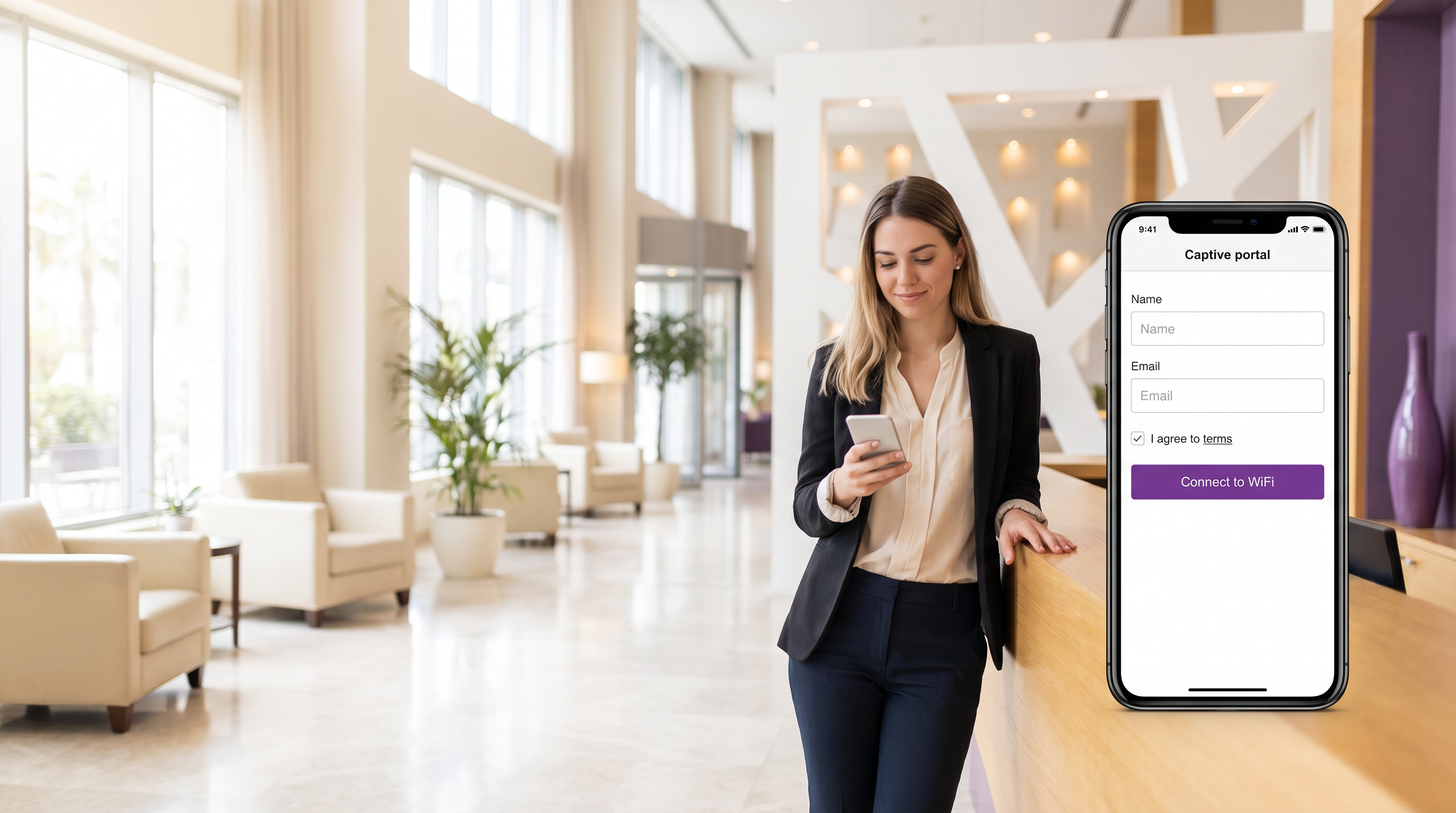
अतिथी WiFi साठी Captive Portal हे नियंत्रित गेटवे आहे ज्याद्वारे ठिकाणाचे अभ्यागत इंटरनेट प्रवेश मिळवण्यापूर्वी प्रमाणीकरण करतात. हॉटेल, किरकोळ मालमत्ता, स्टेडियम किंवा सार्वजनिक क्षेत्रातील इमारती व्यवस्थापित करणाऱ्या IT टीमसाठी, Captive Portal एकाच वेळी नेटवर्क सुरक्षा सीमा, नियामक अनुपालन यंत्रणा आणि फर्स्ट-पार्टी डेटा कॅप्चर मालमत्ता आहे. योग्यरित्या केल्यास, ते तुमच्या कॉर्पोरेट पायाभूत सुविधांचे संरक्षण करते, GDPR आणि PCI DSS च्या जबाबदाऱ्या पूर्ण करते आणि मोजता येण्याजोगा मार्केटिंग ROI निर्माण करते. चुकीच्या पद्धतीने केल्यास, ते अतिथींना निराश करते, तुमच्या नेटवर्कला lateral-movement हल्ल्यांसाठी उघड करते आणि अनुपालन दायित्व निर्माण करते.
हे मार्गदर्शक वायरलेस Captive Portal उपयोजनाची संपूर्ण तांत्रिक रचना समाविष्ट करते: प्री-प्रमाणीकरण झोन, walled garden ACL डिझाइन, RADIUS-आधारित सत्र प्रमाणीकरण, लॉगिननंतरचे बँडविड्थ व्यवस्थापन आणि सत्र जीवनचक्र व्यवस्थापन. हे MAC ॲड्रेस रँडमायझेशनच्या वाढत्या गंभीर आव्हानाला आणि Passpoint व OpenRoaming कडे स्थलांतर करण्याच्या मार्गाला देखील संबोधित करते. दोन सविस्तर केस स्टडीज — 200 खोल्यांचे हॉटेल आणि 40 ठिकाणांची किरकोळ साखळी — ही तत्त्वे उत्पादन उपयोजनांमध्ये कशी रूपांतरित होतात हे स्पष्ट करतात. प्लॅटफॉर्म पर्याय तपासणाऱ्या ठिकाणांसाठी, The Best Captive Portal Software in 2026: A Comparison Guide पहा.
Technical Deep-Dive
The Captive Portal Onboarding Flow
अतिथी WiFi Captive Portal उपयोजनातील घटनांचा अचूक क्रम समजून घेणे कोणत्याही कॉन्फिगरेशन निर्णय घेण्यापूर्वी आवश्यक आहे. खालील प्रवाह अतिथी डिव्हाइस ॲक्सेस पॉइंटशी संलग्न झाल्यापासून ते पूर्ण इंटरनेट प्रवेश मिळेपर्यंत काय होते याचे वर्णन करतो.
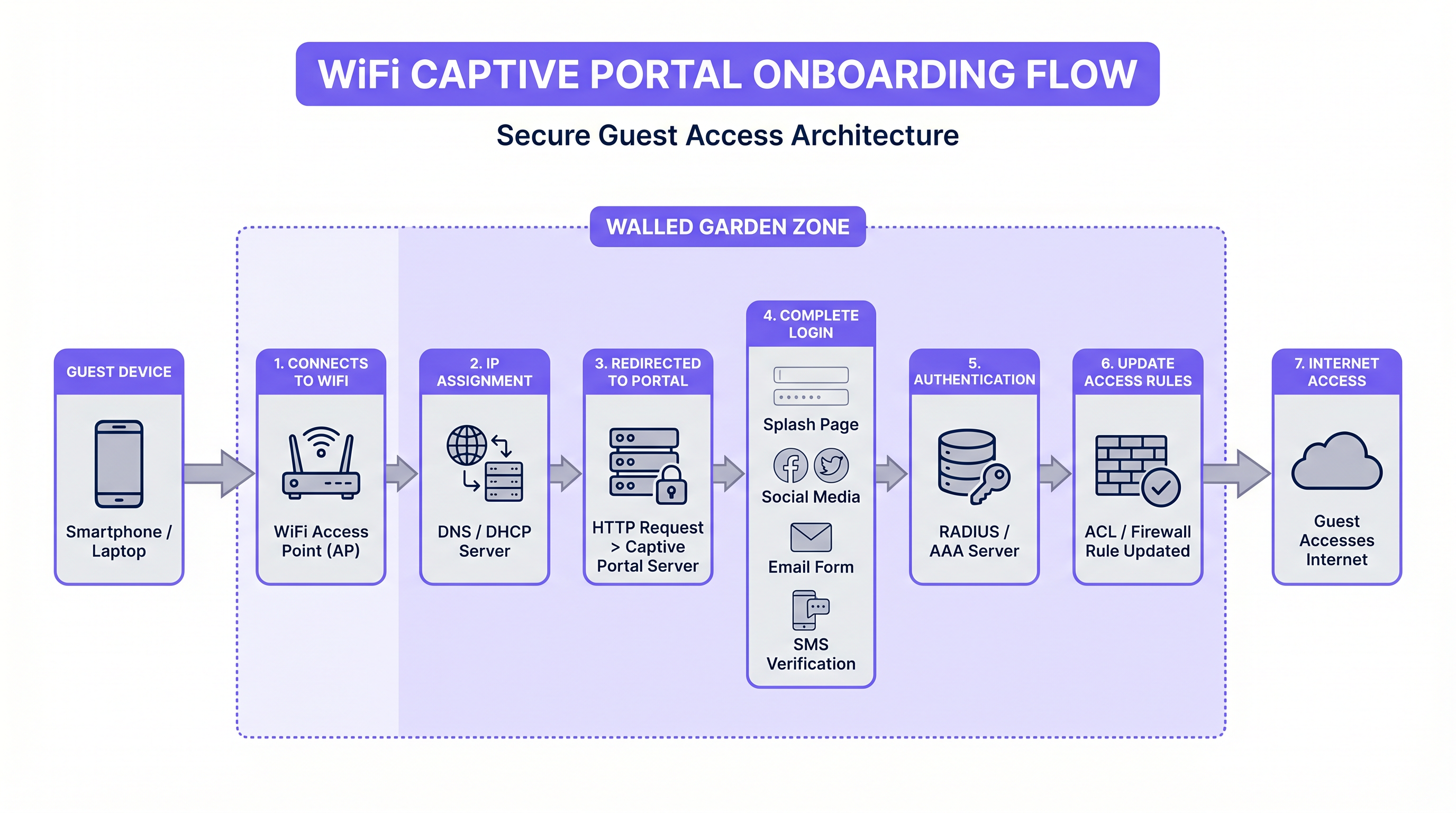
जेव्हा अतिथी डिव्हाइस SSID शी संलग्न होते, तेव्हा ॲक्सेस पॉइंट त्याला प्री-प्रमाणीकरण VLAN मध्ये ठेवतो. DHCP एक IP ॲड्रेस नियुक्त करते आणि DNS प्रतिबंधित केले जाते — सामान्यतः पोर्टल सर्व्हरच्या स्वतःच्या डोमेनवर आणि walled garden साठी आवश्यक असलेल्या कोणत्याही डोमेनवर. डिव्हाइसची ऑपरेटिंग सिस्टीम नंतर Captive Portal डिटेक्शन प्रोब करते: iOS captive.apple.com वर HTTP विनंती पाठवते, Android connectivitycheck.gstatic.com वर आणि Windows www.msftconnecttest.com वर. गेटवे ही विनंती अडवतो आणि Captive Portal URL वर रीडायरेक्ट परत करतो, ज्यामुळे डिव्हाइसवर मूळ "Sign in to network" प्रॉम्प्ट ट्रिगर होतो.
ही डिटेक्शन यंत्रणा आहे जिथे अनेक उपयोजनांमध्ये त्यांची पहिली अपयश पद्धत येते. जर पोर्टल सर्व्हरचे SSL प्रमाणपत्र अवैध किंवा सेल्फ-साईन केलेले असेल, तर आधुनिक ऑपरेटिंग सिस्टीम पोर्टल प्रदर्शित करण्यास नकार देतील, ज्यामुळे अतिथीला कनेक्टिव्हिटीसाठी कोणताही कृतीशील मार्ग राहणार नाही. सर्व उत्पादन Captive Portal उपयोजनांनी सार्वजनिकरित्या विश्वसनीय TLS प्रमाणपत्र वापरणे आवश्यक आहे, जे Let's Encrypt किंवा समतुल्य द्वारे आपोआप नूतनीकरण केले जाते.
Walled Garden Architecture and ACL Design
walled garden हा IP ॲड्रेस आणि डोमेनचा संच आहे जिथे पूर्व-प्रमाणीकृत अतिथीला लॉगिन प्रवाह पूर्ण करण्यापूर्वी पोहोचण्याची परवानगी आहे. हे गेटवे किंवा वायरलेस कंट्रोलरवर ACL म्हणून लागू केले जाते. walled garden योग्यरित्या सेट करणे हे Captive Portal व्यवस्थापनाच्या सर्वात ऑपरेशनलदृष्ट्या मागणी असलेल्या पैलूंपैकी एक आहे, कारण तृतीय-पक्ष प्रमाणीकरण प्रदात्यांच्या IP श्रेणी सूचना न देता बदलतात.
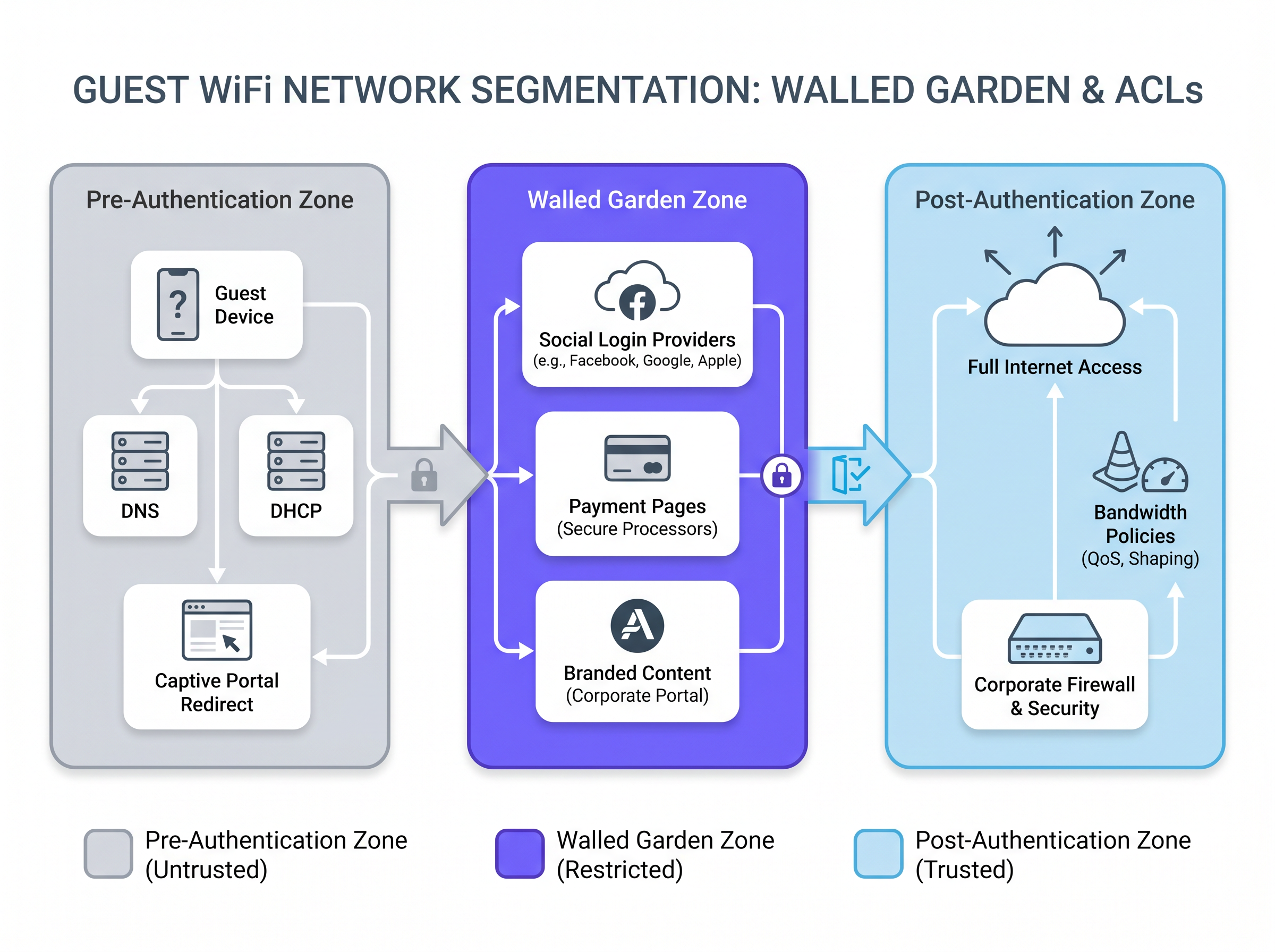
Facebook (Meta), Google आणि Apple द्वारे सोशल लॉगिन प्रदान करणाऱ्या पोर्टलसाठी, walled garden मध्ये OAuth एंडपॉइंट डोमेन आणि त्यांच्या संबंधित IP श्रेणी समाविष्ट असणे आवश्यक आहे. यामध्ये accounts.google.com, appleid.apple.com, www.facebook.com, आणि प्रमाणीकरण JavaScript प्रदान करणाऱ्या अंतर्निहित CDN श्रेणींचा समावेश आहे. एक व्यावहारिक दृष्टिकोन म्हणजे गेटवे DNS-आधारित ACLs ला समर्थन देत असेल तिथे IP ऐवजी FQDN द्वारे व्हाईटलिस्ट करणे, ज्यामुळे प्रदात्यांच्या IP श्रेणी बदलल्यावर देखभालीचा भार कमी होतो.
पेमेंट-गेटेड प्रवेश प्रदान करणाऱ्या ठिकाणांसाठी — जे वाहतूक केंद्रे आणि कॉन्फरन्स सेंटरमध्ये सामान्य आहे — walled garden मध्ये पेमेंट प्रोसेसरचे डोमेन देखील समाविष्ट असणे आवश्यक आहे. हे HTTPS वरून दिले जाणे आवश्यक आहे, आणि नेटवर्क सेगमेंटेशनसाठी PCI DSS ची आवश्यकता म्हणजे पेमेंट प्रवाह तुमच्या स्वतःच्या नेटवर्कवरील कोणत्याही प्रणालीऐवजी बाह्य प्रोसेसरद्वारे हाताळला जावा.
| Zone | Traffic Permitted | Implementation |
|---|---|---|
| प्री-प्रमाणीकरण | DNS (प्रतिबंधित), DHCP, पोर्टल सर्व्हर, Captive Portal डिटेक्शन एंडपॉइंट्स | गेटवे ACL — व्हाईटलिस्ट वगळता सर्व नाकारा |
| Walled Garden | सोशल लॉगिन प्रदाते, पेमेंट प्रोसेसर, ब्रँडेड पोर्टल ॲसेट्स | FQDN-आधारित ACL किंवा IP व्हाईटलिस्ट |
| पोस्ट-प्रमाणीकरण | सामग्री फिल्टरिंग आणि बँडविड्थ धोरणाच्या अधीन पूर्ण इंटरनेट प्रवेश | RADIUS CoA द्वारे लागू केलेले प्रति-वापरकर्ता ACL |
Authentication Architecture: RADIUS, CoA, and Identity Providers
एकदा अतिथीने पोर्टल फॉर्म पूर्ण केल्यावर — ईमेल कॅप्चर, सोशल लॉगिन किंवा SMS OTP द्वारे असो — पोर्टल सर्व्हरने गेटवेला प्रवेश मंजूर करण्यासाठी सिग्नल देणे आवश्यक आहे. प्रमाणित यंत्रणा RADIUS Change of Authorization (CoA) आहे, जी RFC 3576 मध्ये परिभाषित केली आहे. पोर्टल सर्व्हर गेटवेच्या RADIUS सर्व्हरला CoA-विनंती पाठवतो, ज्यात अतिथीचा MAC ॲड्रेस आणि लागू करावयाचे प्रवेश धोरण असते. गेटवे त्या क्लायंटसाठी ACL अद्यतनित करतो, त्यांना प्री-प्रमाणीकरण झोनमधून पोस्ट-प्रमाणीकरण झोनमध्ये हलवतो.
मजबूत ओळख हमी आवश्यक असलेल्या एंटरप्राइझ उपयोजनांसाठी — आरोग्य सेवा सुविधा, कॉर्पोरेट कॅम्पस किंवा सरकारी इमारती — IEEE 802.1X आणि SAML 2.0 द्वारे विद्यमान ओळख प्रदात्यासह एकत्रीकरण सिंगल साइन-ऑन क्षमता प्रदान करते. अतिथी त्यांच्या कॉर्पोरेट क्रेडेन्शियल्स वापरून प्रमाणीकरण करतात आणि पोर्टल SAML सेवा प्रदाता म्हणून कार्य करते,संस्थेच्या Identity Provider (IdP) ला प्रमाणीकरण (authentication) सोपवणे. यामुळे स्वतंत्र अतिथी क्रेडेंशियल स्टोअरची गरज दूर होते आणि कर्मचारी सोडून गेल्यास प्रवेश आपोआप रद्द होतो याची खात्री होते.
Purple's Guest WiFi सारखे प्लॅटफॉर्म यातील बरीच गुंतागुंत कमी करतात, सामाजिक ओळख प्रदात्यांसह (social identity providers) पूर्व-निर्मित एकत्रीकरण (integrations), अनुरूप संमती कॅप्चर प्रवाह (compliant consent capture flow) आणि Cisco, Aruba, Ruckus आणि Ubiquiti सह प्रमुख वायरलेस कंट्रोलर विक्रेत्यांसोबत काम करणारा RADIUS इंटरफेस प्रदान करतात.
MAC ॲड्रेस रँडमायझेशन: उदयास येणारे आर्किटेक्चरल आव्हान
iOS 14 (2020) आणि Android 10 पासून, उपकरणे (devices) त्यांच्या MAC ॲड्रेसला प्रति SSID डीफॉल्टनुसार रँडमाइज करतात. MAC ॲड्रेसला प्राथमिक सत्र ओळखकर्ता (primary session identifier) म्हणून वापरणाऱ्या Captive Portal च्या उपयोजनांसाठी (deployments) याचे महत्त्वपूर्ण परिणाम होतात. काल भेट दिलेल्या परत येणाऱ्या अतिथीचा आज वेगळा MAC ॲड्रेस दिसेल, ज्यामुळे त्यांचे सत्र (session) संपले नसले तरी पोर्टल प्रवाह (portal flow) पुन्हा सुरू होईल.
योग्य दीर्घकालीन आर्किटेक्चरल प्रतिसाद म्हणजे Passpoint (Hotspot 2.0) आणि OpenRoaming. हे मानक MAC ॲड्रेसऐवजी EAP-आधारित प्रमाणीकरण (authentication) आणि क्रिप्टोग्राफिक क्रेडेंशियल्स (प्रमाणपत्रे किंवा SIM-आधारित) सह 802.1X वापरतात. उपकरण प्रत्येक भेटीवर पोर्टल सादर न करता आपोआप आणि सुरक्षितपणे प्रमाणीकृत होते. Purple त्याच्या Connect परवान्याअंतर्गत OpenRoaming ला समर्थन देते, एक विनामूल्य ओळख प्रदाता (identity provider) म्हणून कार्य करते — याचा अर्थ ठिकाणे (venues) स्वतःची PKI पायाभूत सुविधा न उभारता अखंड, मानक-अनुरूप पुनर्जोडणी (reconnection) देऊ शकतात.
Passpoint वर स्थलांतरित होण्यासाठी अद्याप तयार नसलेल्या ठिकाणांसाठी, एक व्यावहारिक अंतरिम दृष्टिकोन म्हणजे ईमेल-आधारित सत्र टोकन (session tokens) वापरणे, ज्यामध्ये दीर्घकालीन निरपेक्ष टाइमआउट (उदा. 30 दिवस) असतो, आणि ब्राउझर कुकीमधून ईमेल फील्ड पूर्व-भरणाऱ्या हलक्या वजनाच्या पुनर्प्रमाणीकरण प्रवाहाशी (re-authentication flow) ते एकत्रित करणे.
अंमलबजावणी मार्गदर्शक
टप्पा 1: नेटवर्क सेगमेंटेशन
कोणतेही Captive Portal सॉफ्टवेअर उपयोजित करण्यापूर्वी, अंतर्निहित नेटवर्क आर्किटेक्चरने कठोर सेगमेंटेशन लागू केले पाहिजे. अतिथी SSID ला समर्पित VLANs वापरून लेयर 2 वर कॉर्पोरेट नेटवर्कपासून वेगळे केले पाहिजे. फायरवॉल नियमांनी अतिथी VLAN मधून कॉर्पोरेट VLAN, व्यवस्थापन VLAN आणि पॉइंट-ऑफ-सेल किंवा पेमेंट डेटा वाहून नेणाऱ्या कोणत्याही VLAN कडे जाणारी कोणतीही रहदारी (traffic) स्पष्टपणे नाकारली पाहिजे. PCI DSS v4.0 अंतर्गत ही एक कठोर आवश्यकता आहे आणि सार्वजनिक क्षेत्रातील संस्थांसाठी NCSC च्या नेटवर्क सुरक्षा मार्गदर्शनाखाली एक मजबूत शिफारस आहे.
हॉस्पिटॅलिटी उपयोजनांसाठी, प्रति-खोली किंवा प्रति-मजला VLANs अतिरिक्त अलगीकरण प्रदान करतात, ज्यामुळे अतिथींना नेटवर्कवर एकमेकांची उपकरणे शोधण्यापासून प्रतिबंध होतो — हॉटेल वातावरणात हा एक सामान्य हल्ला वेक्टर आहे.
टप्पा 2: पोर्टल सर्व्हर उपयोजन
मल्टी-साइट उपयोजनांसाठी, क्लाउड-होस्टेड पोर्टल प्लॅटफॉर्म जवळजवळ नेहमीच योग्य निवड असते. ते ऑन-साइट हार्डवेअर अवलंबित्व दूर करते, प्रमाणपत्र व्यवस्थापन सुलभ करते आणि सर्व ठिकाणांवर एकच व्यवस्थापन प्लेन प्रदान करते. प्रमाणीकरणापूर्वी पोर्टल सर्व्हर अतिथी VLAN मधून पोहोचण्यायोग्य असणे आवश्यक आहे — हा "सर्व नाकारा" (deny all) पूर्व-प्रमाणीकरण ACL ला एक अपवाद आहे.
पोर्टल पेजची कार्यक्षमता (performance) हा अनेकदा कमी लेखला जाणारा घटक आहे. 4G मोबाइल कनेक्शनवर 200KB पेक्षा कमी पेज वजन आणि 2 सेकंदांपेक्षा कमी लोड वेळ लक्ष्य करा. जड पोर्टल पेज — ज्यात मोठ्या पार्श्वभूमी प्रतिमा, अनऑप्टिमाइज्ड फॉन्ट किंवा ब्लॉकिंग JavaScript असते — लक्षणीय प्रमाणात वापरकर्ते सोडून जाण्याचे कारण ठरतात, विशेषतः उच्च-घनतेच्या वातावरणात जिथे सामायिक अपलिंक आधीच लोडखाली असतो.
टप्पा 3: संमती कॅप्चर आणि अनुपालन कॉन्फिगरेशन
वैयक्तिक डेटावर प्रक्रिया करणाऱ्या कोणत्याही उपयोजनासाठी — ज्यात ईमेल ॲड्रेस, नावे आणि सामाजिक प्रोफाइल डेटा समाविष्ट आहे — पोर्टलने GDPR-अनुरूप संमती यंत्रणा (consent mechanism) सादर करणे आवश्यक आहे. मुख्य आवश्यकता खालीलप्रमाणे आहेत:
- अटी आणि शर्ती साध्या भाषेत सादर केल्या पाहिजेत, कायदेशीर क्लिष्ट भाषेत (legal boilerplate) नाही.
- संमती चेकबॉक्स डीफॉल्टनुसार अनचेक केलेला असणे आवश्यक आहे. यूके GDPR आणि EU General Data Protection Regulation अंतर्गत पूर्व-टिक केलेले बॉक्स स्पष्टपणे प्रतिबंधित आहेत.
- प्रत्येक संमती घटनेची नोंद ठेवली पाहिजे, ज्यात टाइमस्टॅम्प, सादर केलेल्या अटींची आवृत्ती आणि वापरकर्ता ओळखकर्ता (user identifier) यांचा समावेश आहे.
- गोपनीयता सूचनेमध्ये डेटा कंट्रोलर, प्रक्रियेचे उद्देश, डेटा किती काळ ठेवला जाईल (retention period) आणि वापरकर्त्याचे अधिकार निर्दिष्ट केले पाहिजेत.
Purple च्या WiFi Analytics प्लॅटफॉर्ममध्ये एक अंगभूत संमती व्यवस्थापन मॉड्यूल (consent management module) समाविष्ट आहे जे लॉगिंग, व्हर्जनिंग आणि डेटा विषय प्रवेश विनंती वर्कफ्लो हाताळते, ज्यामुळे ठिकाण चालकांसाठी अनुपालन खर्च (compliance overhead) कमी होतो.
टप्पा 4: सत्र व्यवस्थापन कॉन्फिगरेशन
सत्र पॅरामीटर्स ठिकाणाच्या प्रकारानुसार समायोजित केले पाहिजेत. खालील सारणी शिफारस केलेले प्रारंभिक बिंदू प्रदान करते:
| ठिकाणाचा प्रकार | निष्क्रिय टाइमआउट | निरपेक्ष टाइमआउट | बँडविड्थ मर्यादा (डाउन/अप) |
|---|---|---|---|
| हॉटेल (प्रति खोली) | 30 मिनिटे | 24 तास (प्रति मुक्काम) | 50 Mbps / 20 Mbps |
| किरकोळ दुकान | 15 मिनिटे | 2 तास | 10 Mbps / 5 Mbps |
| स्टेडियम / कार्यक्रम | 10 मिनिटे | 4 तास | 5 Mbps / 2 Mbps |
| वाहतूक केंद्र | 5 मिनिटे | 1 तास | 10 Mbps / 5 Mbps |
| कॉन्फरन्स सेंटर | 20 मिनिटे | 8 तास | 20 Mbps / 10 Mbps |
QoS धोरणे (policies) RADIUS ॲट्रिब्यूट्सद्वारे प्रमाणीकरणाच्या वेळी लागू केली पाहिजेत, ज्यामुळे बँडविड्थ मर्यादा ॲप्लिकेशन-लेयर थ्रॉटलिंगवर अवलंबून न राहता गेटवे स्तरावर लागू केल्या जातात याची खात्री होते.
सर्वोत्तम पद्धती
सुरक्षितता: अतिथी SSID नेहमी समर्पित VLAN वर कॉर्पोरेट सेगमेंटसाठी स्पष्ट 'सर्व नाकारा' (deny-all) फायरवॉल नियमांसह उपयोजित करा. केवळ SSID अलगीकरणावर अवलंबून राहू नका — ते लेयर 3 हल्ल्यांना प्रतिबंध करत नाही.
अनुपालन: संमती कॅप्चर प्रवाहावर कायदेशीर दस्तऐवज म्हणून उपचार करा. तुमच्या अटींचे व्हर्जन-कंट्रोल करा, प्रत्येक संमती घटनेची नोंद करा आणि कार्यान्वित करण्यापूर्वी डेटा संरक्षण अधिकाऱ्यासोबत प्रवाह तपासा.
कार्यक्षमता: पोर्टल लोड वेळ अतिथी नेटवर्कवरील मोबाइल डिव्हाइसवरून मोजा, कॉर्पोरेट LAN वरील डेव्हलपरच्या मशीनवरून नाही. हे दोन्ही अनुभव पूर्णपणे भिन्न आहेत.
वॉल्ड गार्डन देखभाल: वॉल्ड गार्डन एंट्रीजची त्रैमासिक (quarterly) पुनरावलोकन करण्याची योजना करा. सामाजिक लॉगिन प्रदात्यांच्या IP श्रेणी सूचना न देता बदलतात. तुटलेले वॉल्ड गार्डन हे पोर्टल प्रमाणीकरणाचे सर्वात सामान्य कारण आहे. अपयश.
MAC रँडमायझेशन: MAC ॲड्रेसवर दीर्घकालीन सत्र व्यवस्थापन तर्कशास्त्र तयार करू नका. आता Passpoint किंवा OpenRoaming कडे स्थलांतर करण्याची योजना सुरू करा, विशेषतः जर तुम्ही किरकोळ किंवा वाहतूक वातावरणात उच्च वारंवार भेट देणाऱ्या ग्राहकांसह कार्यरत असाल.
ॲनालिटिक्स इंटिग्रेशन: पोर्टल लॉगिन इव्हेंट हा अतिथीच्या प्रवासातील सर्वात महत्त्वाचा डेटा पॉइंट आहे. तुमचे पोर्टल प्लॅटफॉर्म लॉगिन इव्हेंट, थांबण्याचा वेळ आणि पुन्हा भेट देण्याचा डेटा तुमच्या ॲनालिटिक्स स्टॅकमध्ये फीड करत असल्याची खात्री करा. Purple चे WiFi Analytics प्लॅटफॉर्म संमती दिलेल्या WiFi डेटामधून प्राप्त झालेले ठिकाणाचे हीटमॅप्स, फुटफॉल ट्रेंड आणि लोकसंख्याशास्त्रीय विश्लेषण प्रदान करते.
प्लॅटफॉर्म पर्यायांच्या विस्तृत मूल्यांकनासाठी, The Best Captive Portal Software in 2026: A Comparison Guide प्रमुख उपयोजन निकषांवर विक्रेता-तटस्थ तुलना प्रदान करते.
केस स्टडीज
केस स्टडी 1: 200-खोल्यांची बुटीक हॉटेल चेन (हॉस्पिटॅलिटी)
यूकेमध्ये आठ मालमत्ता चालवणारे एक बुटीक हॉटेल समूह जुने Captive Portal सोल्यूशन वापरत होते, ज्यामध्ये पाहुण्यांना रिसेप्शनमधून मिळालेला खोली-विशिष्ट पासवर्ड टाकावा लागत असे. पासवर्ड वितरण मॅन्युअल होते, पासवर्ड वारंवार शेअर केले जात होते किंवा हरवले जात होते आणि सिस्टमने मार्केटिंग टीमला कोणताही अतिथी डेटा प्रदान केला नाही.
या समूहाने त्यांच्या प्रॉपर्टी मॅनेजमेंट सिस्टम (PMS) सह एकत्रित Purple चे Guest WiFi प्लॅटफॉर्म तैनात केले. चेक-इन झाल्यावर, PMS अतिथीचे नाव, ईमेल, खोली क्रमांक आणि चेकआउटची तारीख API द्वारे Purple प्लॅटफॉर्मवर पाठवते. Captive Portal अतिथीच्या नावाने पूर्व-भरलेले असते आणि अटींच्या एका-क्लिक स्वीकृतीसह एक ब्रँडेड स्प्लॅश पेज सादर करते. कोणत्याही पासवर्डची आवश्यकता नाही. चेकआउटनंतर, सत्र आपोआप समाप्त होते.
परिणाम: पोर्टल पूर्णत्वाचा दर 34% (पासवर्ड-आधारित) वरून 91% (सिंगल-क्लिक) पर्यंत वाढला. मार्केटिंग टीमला दरमहा 2,400 नवीन संपर्कांसह वाढणारी संमती दिलेली ईमेल सूची मिळाली, ज्यामध्ये मुक्काम-पश्चात मोहिमांवर 28% ओपन रेट होता. WiFi ॲक्सेसशी संबंधित IT हेल्पडेस्क तिकिटे 76% नी कमी झाली.
केस स्टडी 2: 40-ठिकाणांची किरकोळ साखळी
40 स्टोअर्स असलेल्या एका मध्यम-बाजारपेठेतील फॅशन रिटेलरला विषम नेटवर्क इन्फ्रास्ट्रक्चर असलेल्या ठिकाणांवर एक सुसंगत अतिथी WiFi अनुभव हवा होता — Cisco Meraki, Aruba Instant आणि जुन्या Netgear ॲक्सेस पॉइंट्सचे मिश्रण. मार्केटिंग टीमला फुटफॉल ॲनालिटिक्स आणि स्टोअरमधील WiFi शी कनेक्ट झालेल्या ग्राहकांना वैयक्तिकृत ऑफर ट्रिगर करण्याची क्षमता हवी होती.
रिटेलरने Purple चे क्लाउड-होस्टेड Captive Portal तैनात केले, जे सामान्य RADIUS इंटरफेसद्वारे अनेक AP विक्रेता इंटिग्रेशनला समर्थन देते. सर्व 40 स्टोअर्स एकाच पोर्टल इन्फ्रास्ट्रक्चरवर रीडायरेक्ट होतात, ज्यामुळे ब्रँडची सुसंगतता सुनिश्चित होते. पोर्टल लॉगिनवर ईमेल आणि ऑप्ट-इन मार्केटिंग संमती कॅप्चर करते. Purple चे WiFi Analytics प्लॅटफॉर्म सर्व स्टोअर्समधील थांबण्याचा वेळ, पुन्हा भेट देण्याची वारंवारता आणि पीक ट्रॅफिक तास एकाच डॅशबोर्डमध्ये एकत्रित करते.
सहा महिन्यांच्या आत, रिटेलरने तीन स्टोअर्स ओळखले ज्यांचा थांबण्याचा वेळ इस्टेटच्या सरासरीपेक्षा लक्षणीयरीत्या कमी होता — हे एक संकेत होते ज्यामुळे स्टोअर लेआउटचे पुनरावलोकन झाले. स्टोअरमधील WiFi कनेक्शनद्वारे ट्रिगर केलेल्या ईमेल मोहिमांनी ब्रॉडकास्ट ईमेल मोहिमांपेक्षा 3.2 पट जास्त रूपांतरण दर प्राप्त केला, जो ट्रिगरच्या प्रासंगिकतेमुळे होता. केवळ किरकोळ ॲनालिटिक्स वापर केसने पहिल्या वर्षात 340% चा ROI दिला.
समस्यानिवारण आणि जोखीम कमी करणे
iOS/Android वर पोर्टल दिसत नाही: Captive Portal डिटेक्शन डोमेन तुमच्या DNS निर्बंधांद्वारे ब्लॉक केलेले नाहीत याची खात्री करा. तसेच, पोर्टल सर्व्हरचे TLS प्रमाणपत्र वैध आहे आणि डिव्हाइसच्या रूट स्टोअरद्वारे विश्वसनीय आहे याची पडताळणी करा. सेल्फ-साइन केलेले प्रमाणपत्रे आधुनिक मोबाइल ऑपरेटिंग सिस्टमवर मूक अपयश निर्माण करतील.
सोशल लॉगिन अयशस्वी होत आहे: सर्वात सामान्य कारण म्हणजे अपूर्ण वॉल्ड गार्डन. OAuth प्रवाह कोणत्या डोमेनपर्यंत पोहोचण्याचा प्रयत्न करत आहे हे ओळखण्यासाठी अतिथी VLAN वर पॅकेट कॅप्चर वापरा, नंतर त्यांना ACL मध्ये जोडा. लक्षात ठेवा की प्रमुख प्रदात्यांसाठी CDN IP श्रेणी वारंवार बदलतात.
उच्च-घनतेच्या ठिकाणी IP ॲड्रेसची कमतरता: DHCP लीज वेळ आणि निष्क्रिय सत्र टाइमआउट कमी करा. स्टेडियम किंवा कॉन्फरन्स वातावरणात, 5 मिनिटांचा निष्क्रिय टाइमआउट आणि 4 तासांचा पूर्ण टाइमआउट ठिकाणाहून बाहेर पडलेल्या डिव्हाइसेसकडून ॲड्रेस परत मिळवेल.
GDPR ऑडिट अपयश: तुमचे संमती लॉग अपरिवर्तनीय आहेत आणि संमतीच्या वेळी सादर केलेल्या अटींचा संपूर्ण मजकूर (किंवा आवृत्तीकृत हॅश) समाविष्ट करतात याची खात्री करा. ज्या संस्थांच्या संमती रेकॉर्डमध्ये माहितीपूर्ण संमती दर्शवण्यासाठी पुरेशी माहिती नव्हती, त्यांच्या विरोधात नियामकांनी निर्णय दिला आहे.
बँडविड्थ सॅचुरेशन: जर कमी संख्येतील वापरकर्ते असमान बँडविड्थ वापरत असतील, तर प्रति-वापरकर्ता QoS धोरणे RADIUS ॲट्रिब्यूट्सद्वारे योग्यरित्या लागू केली जात आहेत याची पडताळणी करा. गेटवे लेयर 3 वर मर्यादा लागू करत आहे, ॲप्लिकेशन-लेयर नियंत्रणांवर अवलंबून नाही याची खात्री करा, कारण ती बायपास केली जाऊ शकतात.
ROI आणि व्यवसायावर परिणाम
अतिथी WiFi साठी चांगल्या प्रकारे तैनात केलेल्या Captive Portal साठी व्यवसाय केस तीन आयामांवर कार्य करते: खर्च कमी करणे, महसूल सक्षम करणे आणि जोखीम कमी करणे.
खर्च कमी करणे: मॅन्युअल पासवर्ड वितरणाऐवजी स्वयंचलित पोर्टल प्रमाणीकरण वापरल्याने सामान्यतः WiFi-संबंधित हेल्पडेस्क तिकिटे 60-80% नी कमी होतात, जसे की वरील हॉटेल केस स्टडीमध्ये दर्शविले आहे. समर्पित IT सपोर्ट फंक्शन असलेल्या ठिकाणासाठी, याचा थेट अर्थ कर्मचाऱ्यांच्या वेळेची बचत असा होतो.
महसूल सक्षम करणे: पोर्टलद्वारे तयार केलेली संमती दिलेली, ऑप्ट-इन ईमेल सूची ही मोजता येण्याजोग्या व्यावसायिक मूल्याची फर्स्ट-पार्टी डेटा ॲसेट आहे. Purple चे प्लॅटफॉर्म वापरणारे रिटेलर्स ईमेल-ट्रिगर केलेल्या मोहिमांमध्ये ब्रॉडकास्ट मोहिमांपेक्षा 2-4 पट जास्त रूपांतरण दर प्राप्त करत असल्याचे सांगतात. हॉस्पिटॅलिटी ऑपरेटरसाठी, पोर्टल-कॅप्चर केलेल्या डेटामुळे चालवलेल्या मुक्काम-पश्चात ईमेल मोहिमा ओपन रेट आणि बुकिंग रूपांतरण या दोन्ही बाबतीत थर्ड-पार्टी सूची मोहिमांपेक्षा सातत्याने सरस ठरतात.
जोखीम कमी करणे: GDPR अंमलबजावणी कारवाईचा खर्च — यूके GDPR अंतर्गत जागतिक वार्षिक उलाढालीच्या 4% पर्यंत — अनुपालन करणाऱ्या पोर्टलच्या स्थापनेच्या खर्चापेक्षा खूपच कमी आहे. त्याचप्रमाणे, अपुऱ्या नेटवर्क सेगमेंटेशनमुळे होणाऱ्या PCI DSS उल्लंघनामुळे आर्थिक दंड आणि प्रतिष्ठेचे नुकसान दोन्ही होते, जे मोजणे कठीण असले तरी ते रोखणे सोपे आहे.
मापन चौकट: पोर्टलची कार्यक्षमता मोजण्यासाठी खालील KPI चा मागोवा घ्या:
| KPI | Target | Measurement Method |
|---|---|---|
| पोर्टल पूर्णत्वाचा दर | >85% | पोर्टल ॲनालिटिक्स |
| सरासरी पोर्टल लोड वेळ | <2 सेकंद | मोबाइल डिव्हाइसवरून सिंथेटिक मॉनिटरिंग |
| संमती मिळवण्याचा दर | >80% पूर्णत्वापैकी | पोर्टल ॲनालिटिक्स |
| हेल्पडेस्क तिकिटे (WiFi) | प्रत्येक 100 पाहुण्यांमागे <5 | हेल्पडेस्क प्रणाली |
| ईमेल सूची वाढीचा दर | ठिकाण-विशिष्ट आधारभूत रेषा | CRM |
| पुन्हा भेट देणाऱ्यांचा दर | ठिकाण-विशिष्ट आधारभूत रेषा | WiFi ॲनालिटिक्स |
नेटवर्क आधुनिकीकरणाचे अधिक व्यापकपणे मूल्यांकन करणाऱ्या संस्थांसाठी, येथे चर्चा केलेली स्थापत्यशास्त्रीय तत्त्वे — सेगमेंटेशन, क्लाउड-व्यवस्थापित पायाभूत सुविधा, मानक-आधारित प्रमाणीकरण — SD-WAN उपयोजन सर्वोत्तम पद्धतींशी जवळून जुळतात. नेटवर्क आर्किटेक्चरच्या निर्णयांवर पूरक दृष्टिकोन मिळवण्यासाठी आधुनिक व्यवसायांसाठी SD-WAN चे मुख्य फायदे पहा.
महत्त्वाच्या संज्ञा आणि व्याख्या
Captive Portal
A web page presented to a newly connected guest before they are granted full internet access. It serves as the authentication and consent gateway for the guest WiFi network, typically implemented by intercepting HTTP requests and redirecting them to the portal server.
IT teams encounter this as the core component of any guest WiFi deployment. The portal is the intersection of network access control and user-facing UX — getting it wrong affects both security posture and guest satisfaction.
Walled Garden
An Access Control List (ACL) that permits pre-authenticated guests to reach a defined set of domains or IP addresses before completing the login flow. It is the mechanism that allows social login providers and payment processors to be reachable during the authentication process.
Misconfigured walled gardens are the most common cause of social login failures on captive portals. IT teams must maintain walled garden entries as a recurring operational task, as third-party provider IP ranges change without notice.
RADIUS CoA (Change of Authorization)
A RADIUS protocol extension defined in RFC 3576 that allows a RADIUS server to dynamically modify or terminate an active session. In captive portal deployments, it is used by the portal server to instruct the gateway to grant internet access after a guest completes authentication.
Without CoA support on the gateway, the portal cannot dynamically update ACLs after authentication. Network architects must verify CoA support on the wireless controller or gateway before selecting a portal platform.
VLAN (Virtual Local Area Network)
A logical network segment created at Layer 2 of the OSI model, used to isolate traffic between different groups of devices on the same physical infrastructure. In guest WiFi deployments, VLANs separate guest traffic from corporate, management, and payment network traffic.
VLAN segmentation is the foundational security control for guest WiFi. It is required by PCI DSS for any venue with payment systems and strongly recommended by the NCSC for all public-sector deployments.
Passpoint (Hotspot 2.0)
A Wi-Fi Alliance certification programme based on IEEE 802.11u that enables automatic, secure authentication to WiFi networks using 802.1X and EAP-based credentials. It eliminates the need for a captive portal for returning users by using cryptographic credentials rather than MAC addresses.
Passpoint is the long-term architectural response to MAC address randomisation. IT teams planning new deployments should evaluate Passpoint compatibility in their AP hardware selection, as it will become the standard for seamless guest reconnection.
OpenRoaming
A Wireless Broadband Alliance standard that extends Passpoint to enable automatic roaming between participating networks using a federated identity model. Users authenticated on one OpenRoaming network are automatically connected on any other participating network without a portal interaction.
OpenRoaming is particularly relevant for transport hubs, retail chains, and hospitality groups that want to offer seamless connectivity across multiple sites. Purple acts as a free identity provider for OpenRoaming under its Connect licence.
MAC Address Randomisation
A privacy feature in iOS 14+, Android 10+, and Windows 10+ that assigns a randomised MAC address to each WiFi network the device connects to, rather than using the device's hardware MAC address. This prevents tracking of device movement across networks.
MAC randomisation breaks any captive portal or analytics system that relies on MAC addresses for user identification or session persistence. IT teams must audit their portal and analytics platforms for MAC dependency and plan migration to standards-based identity approaches.
QoS (Quality of Service)
Network traffic management policies that prioritise, throttle, or shape traffic based on defined rules. In guest WiFi deployments, QoS is used to enforce per-user bandwidth caps and to prioritise latency-sensitive traffic (e.g., VoIP) over bulk downloads.
QoS policies should be applied at the point of authentication via RADIUS attributes, ensuring that bandwidth caps are enforced at the gateway level. Without QoS, a single user can saturate the shared uplink, degrading the experience for all guests.
Idle Timeout
A session management parameter that terminates a guest's network session after a defined period of inactivity (no data transmitted or received). It is used to reclaim IP addresses and free up network resources in high-turnover environments.
In environments with limited DHCP address pools — stadiums, transport hubs, retail stores — a correctly configured idle timeout is essential to prevent IP address exhaustion. It should be tuned to the expected dwell time of guests at the venue.
GDPR Consent Logging
The practice of recording a timestamped, versioned record of each user's consent event on the captive portal, including the exact terms presented and the user identifier. Required under UK GDPR Article 7(1) to demonstrate that consent was freely given, specific, informed, and unambiguous.
IT teams and data protection officers must ensure that the portal platform generates and retains compliant consent logs. In the event of a regulatory investigation or data subject access request, these logs are the primary evidence of lawful processing.
केस स्टडीज
A 200-room hotel is replacing its legacy password-based WiFi with a modern captive portal. Guests currently receive a paper card with a daily password at check-in. The hotel wants to eliminate password distribution, capture guest email addresses for post-stay marketing, and ensure GDPR compliance. The network runs Cisco Meraki APs. What architecture should they deploy?
Deploy a cloud-hosted captive portal platform (such as Purple) integrated with the hotel's PMS via API. Configure the Meraki network with a dedicated guest SSID on a separate VLAN (e.g., VLAN 100), isolated from the corporate and management VLANs by explicit firewall deny rules. Point the SSID's captive portal URL to the cloud portal platform. Configure the PMS integration to push guest name, email, room number, and checkout date to the portal at check-in. The portal presents a branded splash page pre-populated with the guest's name, requiring only a single acceptance of terms (GDPR-compliant, unchecked consent checkbox, plain-language terms). On acceptance, the portal sends a RADIUS CoA to the Meraki gateway, granting the guest's device internet access. Set the absolute session timeout to match the checkout date/time, so the session is automatically terminated on departure. Configure per-device bandwidth caps (e.g., 50 Mbps down / 20 Mbps up) via RADIUS attributes. Ensure the walled garden includes the portal server domain, the PMS API endpoint, and any social login provider domains if offering social authentication as an alternative. Log all consent events with timestamps and terms version to a compliant data store.
A conference centre hosts 50+ events per year, ranging from 200-person seminars to 5,000-person trade shows. The IT team needs a captive portal that can scale from low to high density, support multiple concurrent event SSIDs with different branding, and provide event organisers with post-event attendance analytics. How should the portal architecture be designed?
Deploy a cloud-hosted captive portal platform with multi-SSID and multi-brand support. For each event, create a dedicated SSID with its own VLAN and a branded portal template (logo, colours, welcome message) configured by the event organiser via a self-service portal. The underlying network infrastructure (Aruba or Cisco) should support dynamic VLAN assignment via RADIUS, allowing the same physical AP infrastructure to serve multiple isolated event networks simultaneously. Configure per-event bandwidth policies: for a 5,000-person trade show, set aggressive per-device caps (5 Mbps down / 2 Mbps up) and short idle timeouts (10 minutes) to manage IP address pool exhaustion. For a 200-person seminar, more generous caps (20 Mbps down / 10 Mbps up) are appropriate. The portal should capture attendee email and company name at login, with explicit consent for the event organiser to receive the data. Post-event, the organiser receives a report including total unique connections, peak concurrent users, average session duration, and a breakdown by device type. Ensure the portal infrastructure is geographically distributed or CDN-backed to handle the load spike at event start, when hundreds of devices will attempt to authenticate within a few minutes.
A large NHS trust wants to deploy guest WiFi across three hospital sites for patients and visitors. The requirements include GDPR compliance, network segmentation from clinical systems, content filtering to block inappropriate content, and the ability to provide free access without collecting personal data from patients who may be vulnerable. How should the captive portal be configured?
Deploy a portal with a simplified, accessibility-compliant splash page that requires only acceptance of terms — no email or personal data collection. This satisfies the requirement to avoid collecting data from potentially vulnerable patients while still providing a legally documented consent event. The guest SSID must be on a dedicated VLAN with firewall rules explicitly denying access to all clinical VLANs, the trust's corporate network, and any VLAN carrying patient data — this is a hard requirement under both PCI DSS (if payment systems are present) and NHS DSPT (Data Security and Protection Toolkit). Deploy a DNS-based content filtering service (e.g., Cisco Umbrella or similar) on the guest VLAN to block categories including adult content, gambling, and malware distribution sites. Set bandwidth caps appropriate for a healthcare environment (10 Mbps down / 5 Mbps up per device) with an absolute session timeout of 8 hours to cover a typical visiting day. For staff who require guest WiFi access (e.g., contractors), provide a separate SSID with email-based authentication and a longer session timeout, keeping staff and patient/visitor traffic on separate VLANs. Document the network segmentation architecture for NHS DSPT evidence submission.
परिस्थिती विश्लेषण
Q1. You are the IT director of a 15-site restaurant chain. The marketing team wants to capture guest email addresses through the WiFi portal to build a CRM list for loyalty campaigns. The legal team has flagged GDPR concerns. The operations team wants the portal to be as quick as possible to avoid frustrating diners. How do you design the portal flow to satisfy all three stakeholders?
💡 संकेत:Consider what GDPR requires for valid consent, what the minimum viable data capture looks like, and how portal page weight affects load time on a busy restaurant network.
शिफारस केलेला दृष्टिकोन दाखवा
Design a single-screen portal with: (1) a branded header image under 50KB; (2) a single email field (required); (3) an unchecked opt-in checkbox for marketing communications (optional — this is separate from the terms acceptance); (4) a mandatory, unchecked terms acceptance checkbox with a link to the privacy notice; (5) a prominent 'Connect' button. The terms acceptance is required for access; the marketing opt-in is optional. This satisfies GDPR by separating the access consent (required) from the marketing consent (optional and freely given). Log both consent events with timestamps and terms version. Keep the total page weight under 150KB and host assets on a CDN to ensure sub-2-second load times. The marketing team gets a clean, opted-in list; the legal team gets compliant consent records; the operations team gets a fast, single-screen flow.
Q2. Your stadium's captive portal is working well on Android devices but failing on iOS. Guests report that the portal page does not appear — they see a 'Cannot connect to server' error when they tap 'Sign in to network'. What are the most likely causes and how do you diagnose them?
💡 संकेत:iOS uses a specific captive portal detection mechanism and has strict TLS requirements. Consider what could cause the detection probe to fail or the portal page to be unreachable on iOS specifically.
शिफारस केलेला दृष्टिकोन दाखवा
The most likely causes, in order of probability: (1) Invalid or expired TLS certificate on the portal server — iOS requires a publicly trusted certificate; a self-signed cert will cause a silent failure. Check the certificate expiry and trust chain. (2) The iOS captive portal detection domain (captive.apple.com) is blocked by the DNS restrictions in the pre-authentication zone — add it to the walled garden. (3) The portal server is returning an HTTP redirect to an HTTPS URL, but the HTTPS response is failing — check the portal server's HTTPS configuration. (4) iOS 14+ Captive Network Assistant (CNA) has a known issue with portals that use JavaScript redirects rather than HTTP 302 redirects — ensure the portal uses a standard HTTP redirect. Diagnose by connecting an iOS device to the guest network and capturing DNS and HTTP traffic on the pre-authentication VLAN to identify exactly where the flow is failing.
Q3. A large conference centre is planning a 3,000-person trade show. The event starts at 09:00 and the IT team expects most attendees to attempt WiFi connection between 09:00 and 09:30. The existing portal infrastructure handled a 1,000-person event last month without issues. What specific risks does the 3x increase in concurrent authentication attempts introduce, and how should the infrastructure be scaled to mitigate them?
💡 संकेत:Think about the authentication burst at event start, IP address pool sizing, portal server capacity, and the impact of social login OAuth flows on the walled garden.
शिफारस केलेला दृष्टिकोन दाखवा
The 3x increase introduces three specific risks: (1) Portal server overload during the authentication burst — if the portal server is not horizontally scaled, it will queue or drop authentication requests, causing timeouts and a poor first impression. Scale the portal infrastructure to handle at least 500 concurrent authentication sessions, or use a cloud-hosted platform with auto-scaling. (2) DHCP pool exhaustion — a 3,000-person event requires at least 3,500 IP addresses in the guest DHCP pool (allowing for devices with multiple interfaces and some headroom). Verify the pool size and reduce the DHCP lease time to 1 hour to reclaim addresses from devices that leave early. (3) Walled garden saturation — 3,000 devices simultaneously initiating OAuth flows to Facebook/Google will generate significant traffic to the walled garden domains. Ensure the uplink has sufficient headroom for this burst, and consider pre-resolving and caching the OAuth provider IP ranges to reduce DNS lookup latency. Additionally, set aggressive per-device bandwidth caps (5 Mbps down / 2 Mbps up) from the start of the event to prevent early arrivals from saturating the uplink before the main crowd connects.




