

WiFi-Onboarding und Captive Portal Best Practices
Dieser Leitfaden bietet eine umfassende technische Referenz für die Bereitstellung und Optimierung eines Captive Portal für Gast-WiFi in den Bereichen Gastgewerbe, Einzelhandel, Veranstaltungen und öffentliche Einrichtungen. Er deckt den gesamten Onboarding-Prozess ab – von der anfänglichen Gerätezuordnung und DNS-Umleitung über die Walled Garden-Konfiguration, ACL-Verwaltung, Authentifizierung und Sitzungssteuerung nach dem Login – mit konkreten Implementierungsszenarien und Compliance-Hinweisen. IT-Manager, Netzwerkarchitekten und CTOs finden hier umsetzbare Bereitstellungs-Frameworks, Strategien zur Risikominderung und ROI-Messansätze, die direkt auf den realen Betrieb von Veranstaltungsorten zugeschnitten sind.
🎧 Diesen Leitfaden anhören
Transkript anzeigen
Zusammenfassung
Ein Captive Portal für Gast-WiFi ist das kontrollierte Gateway, über das sich Besucher eines Veranstaltungsortes authentifizieren, bevor sie Internetzugang erhalten. Für IT-Teams, die Hotels, Einzelhandelsimmobilien, Stadien oder Gebäude des öffentlichen Sektors verwalten, ist das Captive Portal gleichzeitig eine Netzwerksicherheitsgrenze, ein Mechanismus zur Einhaltung gesetzlicher Vorschriften und ein Asset zur Erfassung von Erstanbieterdaten. Richtig umgesetzt, schützt es Ihre Unternehmensinfrastruktur, erfüllt GDPR- und PCI DSS-Verpflichtungen und generiert messbaren Marketing-ROI. Schlecht umgesetzt, frustriert es Gäste, setzt Ihr Netzwerk Lateral-Movement-Angriffen aus und schafft Compliance-Haftung.
Dieser Leitfaden behandelt die vollständige technische Architektur einer drahtlosen Captive Portal-Bereitstellung: die Pre-Authentifizierungszone, das Walled Garden ACL-Design, die RADIUS-basierte Sitzungsautorisierung, das Bandbreitenmanagement nach dem Login und das Sitzungslebenszyklusmanagement. Er befasst sich auch mit der zunehmend kritischen Herausforderung der MAC-Adressen-Randomisierung und dem Migrationspfad hin zu Passpoint und OpenRoaming. Zwei detaillierte Fallstudien – ein Hotel mit 200 Zimmern und eine Einzelhandelskette mit 40 Standorten – veranschaulichen, wie diese Prinzipien in Produktionsumgebungen umgesetzt werden. Für Veranstaltungsorte, die Plattformoptionen evaluieren, siehe Die beste Captive Portal Software im Jahr 2026: Ein Vergleichsleitfaden .
Technischer Einblick
Der Captive Portal Onboarding-Flow
Das Verständnis der genauen Abfolge von Ereignissen bei einer Gast-WiFi Captive Portal-Bereitstellung ist unerlässlich, bevor Konfigurationsentscheidungen getroffen werden. Der untenstehende Flow beschreibt, was von dem Moment an geschieht, in dem sich ein Gastgerät mit einem Access Point verbindet, bis zu dem Moment, in dem es vollen Internetzugang hat.
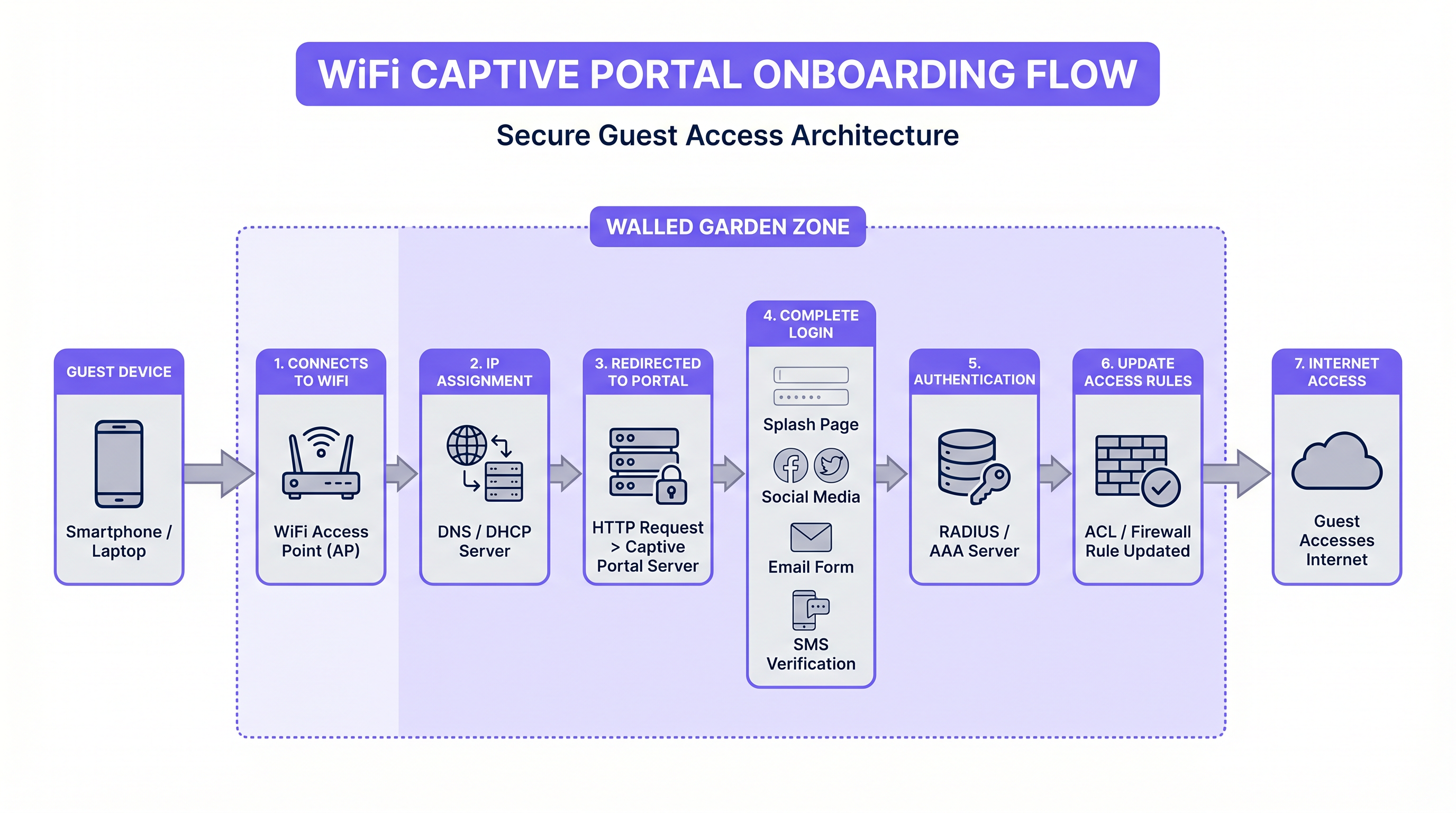
Wenn sich ein Gastgerät mit der SSID verbindet, platziert der Access Point es in einem Pre-Authentifizierungs-VLAN. DHCP weist eine IP-Adresse zu, und DNS ist eingeschränkt – typischerweise auf die eigene Domain des Portal-Servers und alle für den Walled Garden erforderlichen Domains. Das Betriebssystem des Geräts führt dann eine Captive Portal-Erkennung durch: iOS sendet eine HTTP-Anfrage an captive.apple.com, Android an connectivitycheck.gstatic.com und Windows an www.msftconnecttest.com. Das Gateway fängt diese Anfrage ab und gibt eine Weiterleitung zur Captive Portal-URL zurück, wodurch die native „Im Netzwerk anmelden“-Aufforderung auf dem Gerät ausgelöst wird.
Dieser Erkennungsmechanismus ist der Punkt, an dem viele Bereitstellungen ihren ersten Fehlerfall aufweisen. Ist das SSL-Zertifikat des Portal-Servers ungültig oder selbstsigniert, weigern sich moderne Betriebssysteme, das Portal anzuzeigen, sodass dem Gast kein nutzbarer Weg zur Konnektivität bleibt. Alle Captive Portal-Produktionsbereitstellungen müssen ein öffentlich vertrauenswürdiges TLS-Zertifikat verwenden, das automatisch über Let's Encrypt oder Ähnliches erneuert wird.
Walled Garden-Architektur und ACL-Design
Der Walled Garden ist die Menge von IP-Adressen und Domains, die ein vorauthentifizierter Gast erreichen darf, bevor er den Login-Flow abschließt. Er wird als ACL auf dem Gateway oder Wireless Controller implementiert. Den Walled Garden richtig zu konfigurieren, ist einer der operativ anspruchsvollsten Aspekte des Captive Portal-Managements, da sich die IP-Bereiche von Drittanbieter-Authentifizierungsanbietern ohne Vorankündigung ändern.
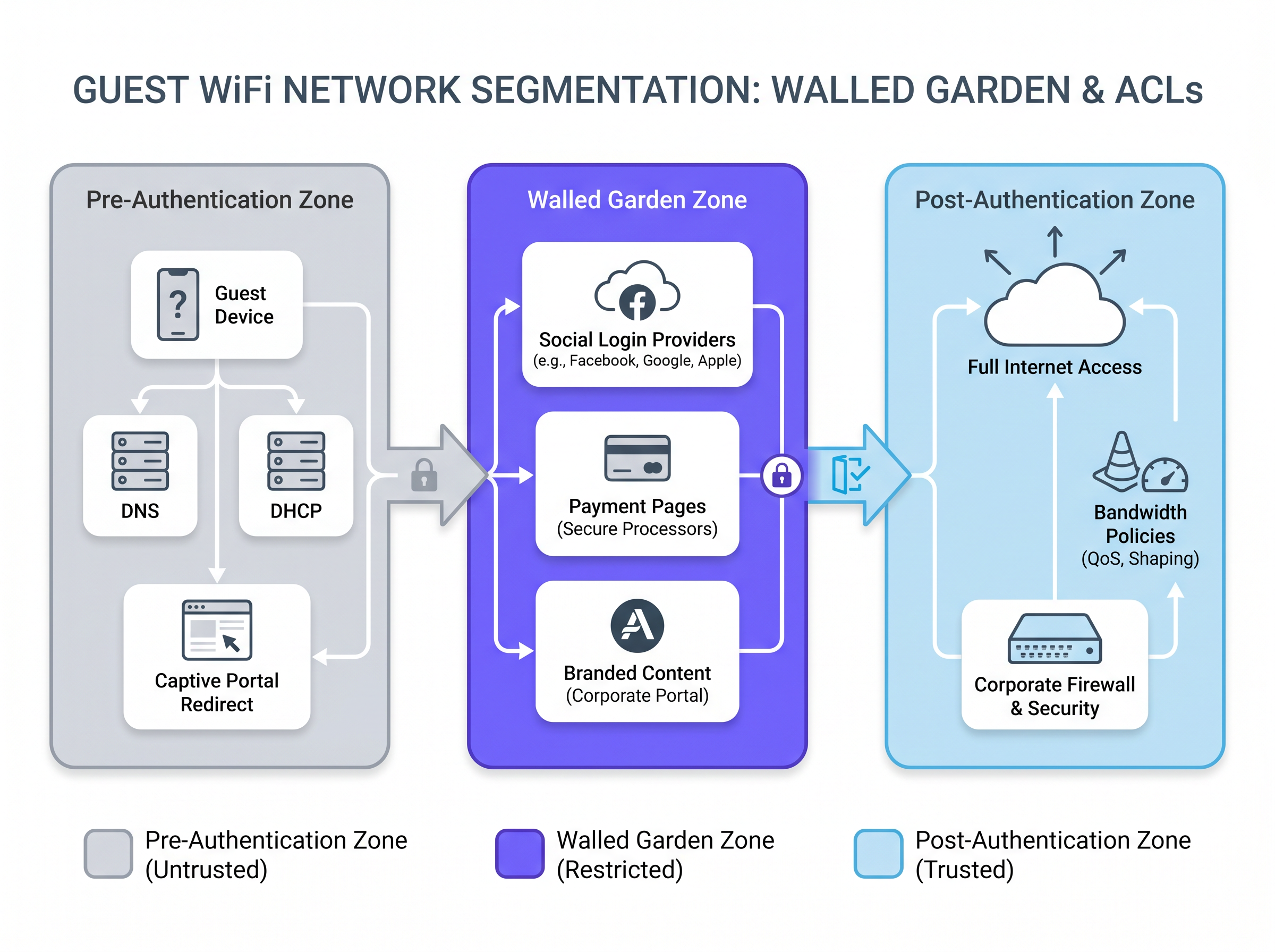
Für ein Portal, das Social Login über Facebook (Meta), Google und Apple anbietet, muss der Walled Garden die OAuth-Endpunkt-Domains und deren zugehörige IP-Bereiche umfassen. Dazu gehören accounts.google.com, appleid.apple.com, www.facebook.com und die zugrunde liegenden CDN-Bereiche, die das Authentifizierungs-JavaScript bereitstellen. Ein praktischer Ansatz ist das Whitelisting nach FQDN statt nach IP, wo das Gateway DNS-basierte ACLs unterstützt, was den Wartungsaufwand reduziert, wenn sich die IP-Bereiche der Anbieter ändern.
Für Veranstaltungsorte, die zugangsgesteuerten Zugang über Zahlungen anbieten – üblich in Verkehrsknotenpunkten und Konferenzzentren – muss der Walled Garden auch die Domains des Zahlungsabwicklers umfassen. Diese müssen über HTTPS bereitgestellt werden, und die PCI DSS-Anforderung für die Netzwerksegmentierung bedeutet, dass der Zahlungsfluss von einem externen Prozessor und nicht von einem System in Ihrem eigenen Netzwerk abgewickelt werden sollte.
| Zone | Erlaubter Traffic | Implementierung |
|---|---|---|
| Pre-Authentifizierung | DNS (eingeschränkt), DHCP, Portal-Server, Captive Portal-Erkennungsendpunkte | Gateway ACL — alles verweigern außer Whitelist |
| Walled Garden | Social Login-Anbieter, Zahlungsabwickler, gebrandete Portal-Assets | FQDN-basierte ACL oder IP-Whitelist |
| Post-Authentifizierung | Voller Internetzugang vorbehaltlich Inhaltsfilterung und Bandbreitenrichtlinie | Pro-Benutzer-ACL angewendet über RADIUS CoA |
Authentifizierungsarchitektur: RADIUS, CoA und Identitätsanbieter
Sobald der Gast das Portalformular ausgefüllt hat – sei es über E-Mail-Erfassung, Social Login oder SMS OTP – muss der Portal-Server dem Gateway signalisieren, den Zugang zu gewähren. Der Standardmechanismus ist RADIUS Change of Authorization (CoA), definiert in RFC 3576. Der Portal-Server sendet eine CoA-Anfrage an den RADIUS-Server des Gateways, die die MAC-Adresse des Gastes und die anzuwendende Zugriffsrichtlinie enthält. Das Gateway aktualisiert die ACL für diesen Client und verschiebt ihn von der Pre-Authentifizierungszone in die Post-Authentifizierungszone.
Für Unternehmensbereitstellungen, die eine stärkere Identitätssicherung erfordern – Gesundheitseinrichtungen, Unternehmenscampusse oder Regierungsgebäude – bietet die Integration mit einem bestehenden Identitätsanbieter über IEEE 802.1X und SAML 2.0 Single Sign-On-Fähigkeit. Gäste authentifizieren sich mit ihren Unternehmenszugangsdaten, und das Portal fungiert als SAML Service Provider, die Authentifizierung an den Identity Provider (IdP) der Organisation delegiert. Dies eliminiert die Notwendigkeit eines separaten Gast-Anmeldeinformationsspeichers und stellt sicher, dass der Zugang automatisch widerrufen wird, wenn ein Mitarbeiter das Unternehmen verlässt.
Plattformen wie Purple's Guest WiFi abstrahieren einen Großteil dieser Komplexität, indem sie vorgefertigte Integrationen mit sozialen Identitätsanbietern, einen konformen Einwilligungs-Erfassungsfluss und eine RADIUS-Schnittstelle bereitstellen, die mit wichtigen Anbietern von Wireless Controllern wie Cisco, Aruba, Ruckus und Ubiquiti zusammenarbeitet.
MAC-Adressen-Randomisierung: Die aufkommende architektonische Herausforderung
Seit iOS 14 (2020) und Android 10 randomisieren Geräte ihre MAC-Adresse pro SSID standardmäßig. Dies hat erhebliche Auswirkungen auf Captive Portal-Implementierungen, die die MAC-Adresse als primären Sitzungsidentifikator verwenden. Ein wiederkehrender Gast, der gestern zu Besuch war, wird heute eine andere MAC-Adresse präsentieren, wodurch der Portalfluss erneut ausgelöst wird, selbst wenn seine Sitzung noch nicht abgelaufen ist.
Die korrekte langfristige architektonische Antwort sind Passpoint (Hotspot 2.0) und OpenRoaming. Diese Standards verwenden 802.1X mit EAP-basierter Authentifizierung und kryptografischen Anmeldeinformationen (Zertifikate oder SIM-basiert) anstelle von MAC-Adressen. Das Gerät authentifiziert sich bei jedem Besuch automatisch und sicher, ohne ein Portal anzuzeigen. Purple unterstützt OpenRoaming unter seiner Connect-Lizenz und fungiert als kostenloser Identitätsanbieter – was bedeutet, dass Veranstaltungsorte eine nahtlose, standardkonforme Wiederverbindung anbieten können, ohne ihre eigene PKI-Infrastruktur aufbauen zu müssen.
Für Veranstaltungsorte, die noch nicht bereit sind, auf Passpoint umzusteigen, ist ein pragmatischer Zwischenansatz die Verwendung von E-Mail-basierten Sitzungstoken mit einer längeren absoluten Zeitüberschreitung (z. B. 30 Tage), kombiniert mit einem leichtgewichtigen Re-Authentifizierungsfluss, der das E-Mail-Feld aus einem Browser-Cookie vorab ausfüllt.
Implementierungsleitfaden
Phase 1: Netzwerksegmentierung
Vor der Bereitstellung jeglicher Captive Portal-Software muss die zugrunde liegende Netzwerkarchitektur eine strikte Segmentierung durchsetzen. Die Gast-SSID muss auf Layer 2 mithilfe dedizierter VLANs vom Unternehmensnetzwerk isoliert werden. Firewall-Regeln müssen jeglichen Datenverkehr vom Gast-VLAN zum Unternehmens-VLAN, zum Management-VLAN und zu jedem VLAN, das Point-of-Sale- oder Zahlungsdaten überträgt, explizit verweigern. Dies ist eine harte Anforderung gemäß PCI DSS v4.0 und eine starke Empfehlung gemäß den Netzwerksicherheitsrichtlinien des NCSC für Organisationen des öffentlichen Sektors.
Für Gastgewerbe -Implementierungen bieten VLANs pro Zimmer oder pro Etage zusätzliche Isolation, wodurch verhindert wird, dass Gäste die Geräte anderer Gäste im Netzwerk entdecken – ein häufiger Angriffsvektor in Hotelumgebungen.
Phase 2: Bereitstellung des Portal-Servers
Für Multi-Site-Implementierungen ist eine Cloud-gehostete Portal-Plattform fast immer die richtige Wahl. Sie eliminiert Hardware-Abhängigkeiten vor Ort, vereinfacht die Zertifikatsverwaltung und bietet eine einzige Verwaltungsebene über alle Veranstaltungsorte hinweg. Der Portal-Server muss vom Gast-VLAN vor der Authentifizierung erreichbar sein – dies ist die einzige Ausnahme von der „Alles verweigern“-Pre-Authentifizierungs-ACL.
Die Leistung der Portalseite ist ein häufig unterschätzter Faktor. Ziel ist ein Seitengewicht von unter 200 KB und eine Ladezeit von unter 2 Sekunden bei einer 4G-Mobilfunkverbindung. Schwere Portalseiten – solche mit großen Hintergrundbildern, unoptimierten Schriftarten oder blockierendem JavaScript – führen zu einer erheblichen Abbruchrate, insbesondere in Umgebungen mit hoher Dichte, wo der gemeinsame Uplink bereits unter Last steht.
Phase 3: Erfassung der Einwilligung und Compliance-Konfiguration
Für jede Implementierung, die personenbezogene Daten verarbeitet – dazu gehören E-Mail-Adressen, Namen und soziale Profildaten – muss das Portal einen GDPR-konformen Einwilligungsmechanismus bereitstellen. Die wichtigsten Anforderungen sind:
- Allgemeine Geschäftsbedingungen müssen in einfacher Sprache präsentiert werden, nicht als juristisches Fachchinesisch.
- Das Kontrollkästchen für die Einwilligung muss standardmäßig deaktiviert sein. Vorgegebene Häkchen sind gemäß UK GDPR und der EU-Datenschutz-Grundverordnung ausdrücklich verboten.
- Jedes Einwilligungsereignis muss protokolliert werden, einschließlich Zeitstempel, der Version der präsentierten Bedingungen und des Benutzeridentifikators.
- Die Datenschutzerklärung muss den Datenverantwortlichen, die Zwecke der Verarbeitung, die Aufbewahrungsfrist und die Rechte des Benutzers angeben.
Die WiFi Analytics -Plattform von Purple enthält ein integriertes Einwilligungsmanagement-Modul, das Protokollierung, Versionierung und Workflows für Anfragen von betroffenen Personen handhabt und so den Compliance-Aufwand für Veranstaltungsbetreiber reduziert.
Phase 4: Sitzungsmanagement-Konfiguration
Sitzungsparameter müssen an den Veranstaltungsorttyp angepasst werden. Die folgende Tabelle enthält empfohlene Ausgangspunkte:
| Veranstaltungsorttyp | Leerlauf-Timeout | Absolutes Timeout | Bandbreitenbegrenzung (Down/Up) |
|---|---|---|---|
| Hotel (pro Zimmer) | 30 Minuten | 24 Stunden (pro Aufenthalt) | 50 Mbit/s / 20 Mbit/s |
| Einzelhandelsgeschäft | 15 Minuten | 2 Stunden | 10 Mbit/s / 5 Mbit/s |
| Stadion / Veranstaltung | 10 Minuten | 4 Stunden | 5 Mbit/s / 2 Mbit/s |
| Verkehrsknotenpunkt | 5 Minuten | 1 Stunde | 10 Mbit/s / 5 Mbit/s |
| Konferenzzentrum | 20 Minuten | 8 Stunden | 20 Mbit/s / 10 Mbit/s |
QoS-Richtlinien sollten am Authentifizierungspunkt über RADIUS-Attribute angewendet werden, um sicherzustellen, dass Bandbreitenbegrenzungen auf Gateway-Ebene durchgesetzt werden, anstatt sich auf Drosselung auf Anwendungsebene zu verlassen.
Best Practices
Sicherheit: Stellen Sie die Gast-SSID immer in einem dedizierten VLAN mit expliziten Deny-All-Firewall-Regeln für Unternehmenssegmente bereit. Verlassen Sie sich niemals allein auf die SSID-Isolation – sie verhindert keine Layer-3-Angriffe.
Compliance: Behandeln Sie den Einwilligungs-Erfassungsfluss als juristisches Dokument. Versionieren Sie Ihre Bedingungen, protokollieren Sie jedes Einwilligungsereignis und testen Sie den Fluss vor dem Go-Live mit einem Datenschutzbeauftragten.
Performance: Messen Sie die Ladezeit des Portals von einem mobilen Gerät im Gastnetzwerk, nicht von einem Entwicklerrechner im Unternehmens-LAN. Die beiden Erfahrungen sind radikal unterschiedlich.
Walled Garden Wartung: Planen Sie eine vierteljährliche Überprüfung der Walled Garden Einträge. IP-Bereiche von Social-Login-Anbietern ändern sich ohne Vorankündigung. Ein fehlerhafter Walled Garden ist die häufigste Ursache für die Portal-Authentifizierung Fehler.
MAC Randomisierung: Bauen Sie keine langfristige Sitzungsverwaltungslogik auf MAC-Adressen auf. Beginnen Sie jetzt mit der Planung Ihrer Migration zu Passpoint oder OpenRoaming, insbesondere wenn Sie in Einzelhandels- oder Transportumgebungen mit hohen Wiederholungsbesucherquoten tätig sind.
Analyse-Integration: Das Portal-Login-Ereignis ist der reichhaltigste Datenpunkt in der Gastreise. Stellen Sie sicher, dass Ihre Portalplattform Login-Ereignisse, Verweildauer und Daten zu wiederholten Besuchen in Ihren Analyse-Stack einspeist. Die WiFi Analytics -Plattform von Purple bietet Standort-Heatmaps, Besucherstrom-Trends und demografische Aufschlüsselungen, die aus zugestimmten WiFi-Daten abgeleitet werden.
Für eine umfassendere Bewertung der Plattformoptionen bietet Die beste Captive Portal Software im Jahr 2026: Ein Vergleichsleitfaden einen herstellerneutralen Vergleich über wichtige Bereitstellungskriterien hinweg.
Fallstudien
Fallstudie 1: Boutique-Hotelkette mit 200 Zimmern (Gastgewerbe)
Eine Boutique-Hotelgruppe mit acht Häusern in ganz Großbritannien nutzte eine veraltete Captive Portal-Lösung, die von den Gästen die Eingabe eines zimmerspezifischen Passworts erforderte, das an der Rezeption erhältlich war. Die Passwortverteilung erfolgte manuell, Passwörter wurden häufig geteilt oder gingen verloren, und das System lieferte dem Marketingteam keine Gastdaten.
Die Gruppe implementierte die Guest WiFi -Plattform von Purple, die in ihr Property Management System (PMS) integriert ist. Beim Check-in übermittelt das PMS den Namen, die E-Mail-Adresse, die Zimmernummer und das Check-out-Datum des Gastes über die API an die Purple-Plattform. Das Captive Portal wird mit dem Namen des Gastes vorab ausgefüllt und präsentiert eine gebrandete Splash-Page mit einer Ein-Klick-Annahme der Bedingungen. Es ist kein Passwort erforderlich. Nach dem Check-out wird die Sitzung automatisch beendet.
Das Ergebnis: Die Portal-Abschlussrate stieg von 34 % (passwortbasiert) auf 91 % (Ein-Klick). Das Marketingteam erhielt eine zugestimmte E-Mail-Liste, die monatlich um 2.400 neue Kontakte im gesamten Bestand wuchs, mit einer Öffnungsrate von 28 % bei Kampagnen nach dem Aufenthalt. IT-Helpdesk-Tickets im Zusammenhang mit dem WiFi-Zugang sanken um 76 %.
Fallstudie 2: Einzelhandelskette mit 40 Standorten
Ein mittelständischer Modehändler mit 40 Filialen benötigte ein konsistentes Gast-WiFi-Erlebnis an Standorten mit heterogener Netzwerkinfrastruktur – einer Mischung aus Cisco Meraki, Aruba Instant und älteren Netgear Access Points. Das Marketingteam wünschte sich Besucherstromanalysen und die Möglichkeit, personalisierte Angebote an Kunden auszulösen, die sich mit dem In-Store-WiFi verbanden.
Der Einzelhändler implementierte das Cloud-gehostete Captive Portal von Purple, das mehrere AP-Herstellerintegrationen über eine gemeinsame RADIUS-Schnittstelle unterstützt. Alle 40 Filialen leiten auf dieselbe Portal-Infrastruktur um, was die Markenkonsistenz gewährleistet. Das Portal erfasst E-Mail-Adressen und Opt-in-Marketing-Zustimmungen beim Login. Die WiFi Analytics -Plattform von Purple aggregiert Verweildauer, Häufigkeit wiederholter Besuche und Spitzenverkehrszeiten über alle Filialen hinweg in einem einzigen Dashboard.
Innerhalb von sechs Monaten hatte der Einzelhändler drei Filialen mit deutlich geringeren Verweildauern als der Durchschnitt des Bestands identifiziert – ein Signal, das eine Überprüfung des Ladenlayouts veranlasste. E-Mail-Kampagnen, die durch die In-Store-WiFi-Verbindung ausgelöst wurden, erzielten eine 3,2-fach höhere Konversionsrate als Broadcast-E-Mail-Kampagnen, was auf die kontextuelle Relevanz des Auslösers zurückzuführen ist. Der Einzelhandels- Analyse-Anwendungsfall allein lieferte im ersten Jahr einen berechneten ROI von 340 %.
Fehlerbehebung & Risikominderung
Portal wird auf iOS/Android nicht angezeigt: Überprüfen Sie, ob die Erkennungsdomänen des Captive Portal nicht durch Ihre DNS-Beschränkungen blockiert werden. Vergewissern Sie sich auch, dass das TLS-Zertifikat des Portal-Servers gültig und vom Root-Store des Geräts vertrauenswürdig ist. Selbstsignierte Zertifikate führen auf modernen mobilen Betriebssystemen zu stillen Fehlern.
Social Login schlägt fehl: Die häufigste Ursache ist ein unvollständiger Walled Garden. Verwenden Sie eine Paketerfassung im Gast-VLAN, um zu identifizieren, welche Domänen der OAuth-Fluss zu erreichen versucht, und fügen Sie diese dann der ACL hinzu. Denken Sie daran, dass sich die CDN-IP-Bereiche großer Anbieter häufig ändern.
IP-Adressen-Erschöpfung an Orten mit hoher Dichte: Reduzieren Sie die DHCP-Lease-Zeit und das Idle Session Timeout. In Stadion- oder Konferenzumgebungen führen ein 5-minütiges Idle Timeout und ein 4-stündiges absolutes Timeout dazu, dass Adressen von Geräten, die den Veranstaltungsort verlassen haben, wieder freigegeben werden.
GDPR Audit-Fehler: Stellen Sie sicher, dass Ihre Einwilligungs-Logs unveränderlich sind und den vollständigen Text (oder einen versionierten Hash) der zum Zeitpunkt der Einwilligung präsentierten Bedingungen enthalten. Aufsichtsbehörden haben gegen Organisationen entschieden, deren Einwilligungsaufzeichnungen keine ausreichenden Details enthielten, um eine informierte Einwilligung nachzuweisen.
Bandbreitensättigung: Wenn eine kleine Anzahl von Benutzern unverhältnismäßig viel Bandbreite verbraucht, überprüfen Sie, ob die QoS-Richtlinien pro Benutzer über RADIUS-Attribute korrekt angewendet werden. Stellen Sie sicher, dass das Gateway die Begrenzungen auf Schicht 3 durchsetzt und sich nicht auf Anwendungsschicht-Kontrollen verlässt, die umgangen werden können.
ROI & Geschäftsauswirkungen
Der Business Case für ein gut implementiertes Captive Portal für Gast-WiFi erstreckt sich über drei Dimensionen: Kostenreduzierung, Umsatzsteigerung und Risikominderung.
Kostenreduzierung: Der Ersatz der manuellen Passwortverteilung durch eine automatisierte Portal-Authentifizierung reduziert WiFi-bezogene Helpdesk-Tickets typischerweise um 60–80 %, wie in der oben genannten Hotel-Fallstudie gezeigt. Für einen Veranstaltungsort mit einer dedizierten IT-Supportfunktion führt dies direkt zu Personaleinsparungen.
Umsatzsteigerung: Eine über das Portal aufgebaute, zugestimmte und Opt-in-E-Mail-Liste ist ein First-Party-Datenasset mit messbarem kommerziellem Wert. Einzelhändler, die die Purple-Plattform nutzen, berichten, dass E-Mail-gesteuerte Kampagnen eine 2–4-fach höhere Konversionsrate erzielen als Broadcast-Kampagnen. Für Gastgewerbe- Betreiber übertreffen E-Mail-Kampagnen nach dem Aufenthalt, die auf über das Portal erfassten Daten basieren, konsistent Kampagnen von Drittanbieterlisten sowohl bei der Öffnungsrate als auch bei der Buchungskonversion.
Risikominderung: Die Kosten einer GDPR-Durchsetzungsmaßnahme – bis zu 4 % des weltweiten Jahresumsatzes gemäß UK GDPR — stellt die Kosten einer konformen Portalbereitstellung in den Schatten. Ähnlich zieht eine PCI DSS-Verletzung, die aus unzureichender Netzwerksegmentierung resultiert, sowohl finanzielle Strafen als auch Reputationsschäden nach sich, die schwer zu quantifizieren, aber einfach zu verhindern sind.
Messrahmen: Verfolgen Sie die folgenden KPIs, um die Portal-Performance zu messen:
| KPI | Ziel | Messmethode |
|---|---|---|
| Portal-Abschlussrate | >85% | Portal analytics |
| Durchschnittliche Ladezeit des Portals | <2 Sekunden | Synthetisches Monitoring vom Mobilgerät |
| Zustimmungserfassungsrate | >80% der Abschlüsse | Portal analytics |
| Helpdesk-Tickets (WiFi) | <5 pro 100 Gäste | Helpdesk-System |
| Wachstumsrate der E-Mail-Liste | Standortspezifischer Basiswert | CRM |
| Wiederholungsbesucher-Rate | Standortspezifischer Basiswert | WiFi analytics |
Für Organisationen, die eine umfassendere Netzwerkmodernisierung in Betracht ziehen, stimmen die hier diskutierten Architekturprinzipien — Segmentierung, Cloud-verwaltete Infrastruktur, standardbasierte Authentifizierung — eng mit den Best Practices für die SD-WAN-Bereitstellung überein. Siehe Die wichtigsten SD-WAN-Vorteile für moderne Unternehmen für eine ergänzende Perspektive zu Entscheidungen bezüglich der Netzwerkarchitektur.
Schlüsselbegriffe & Definitionen
Captive Portal
A web page presented to a newly connected guest before they are granted full internet access. It serves as the authentication and consent gateway for the guest WiFi network, typically implemented by intercepting HTTP requests and redirecting them to the portal server.
IT teams encounter this as the core component of any guest WiFi deployment. The portal is the intersection of network access control and user-facing UX — getting it wrong affects both security posture and guest satisfaction.
Walled Garden
An Access Control List (ACL) that permits pre-authenticated guests to reach a defined set of domains or IP addresses before completing the login flow. It is the mechanism that allows social login providers and payment processors to be reachable during the authentication process.
Misconfigured walled gardens are the most common cause of social login failures on captive portals. IT teams must maintain walled garden entries as a recurring operational task, as third-party provider IP ranges change without notice.
RADIUS CoA (Change of Authorization)
A RADIUS protocol extension defined in RFC 3576 that allows a RADIUS server to dynamically modify or terminate an active session. In captive portal deployments, it is used by the portal server to instruct the gateway to grant internet access after a guest completes authentication.
Without CoA support on the gateway, the portal cannot dynamically update ACLs after authentication. Network architects must verify CoA support on the wireless controller or gateway before selecting a portal platform.
VLAN (Virtual Local Area Network)
A logical network segment created at Layer 2 of the OSI model, used to isolate traffic between different groups of devices on the same physical infrastructure. In guest WiFi deployments, VLANs separate guest traffic from corporate, management, and payment network traffic.
VLAN segmentation is the foundational security control for guest WiFi. It is required by PCI DSS for any venue with payment systems and strongly recommended by the NCSC for all public-sector deployments.
Passpoint (Hotspot 2.0)
A Wi-Fi Alliance certification programme based on IEEE 802.11u that enables automatic, secure authentication to WiFi networks using 802.1X and EAP-based credentials. It eliminates the need for a captive portal for returning users by using cryptographic credentials rather than MAC addresses.
Passpoint is the long-term architectural response to MAC address randomisation. IT teams planning new deployments should evaluate Passpoint compatibility in their AP hardware selection, as it will become the standard for seamless guest reconnection.
OpenRoaming
A Wireless Broadband Alliance standard that extends Passpoint to enable automatic roaming between participating networks using a federated identity model. Users authenticated on one OpenRoaming network are automatically connected on any other participating network without a portal interaction.
OpenRoaming is particularly relevant for transport hubs, retail chains, and hospitality groups that want to offer seamless connectivity across multiple sites. Purple acts as a free identity provider for OpenRoaming under its Connect licence.
MAC Address Randomisation
A privacy feature in iOS 14+, Android 10+, and Windows 10+ that assigns a randomised MAC address to each WiFi network the device connects to, rather than using the device's hardware MAC address. This prevents tracking of device movement across networks.
MAC randomisation breaks any captive portal or analytics system that relies on MAC addresses for user identification or session persistence. IT teams must audit their portal and analytics platforms for MAC dependency and plan migration to standards-based identity approaches.
QoS (Quality of Service)
Network traffic management policies that prioritise, throttle, or shape traffic based on defined rules. In guest WiFi deployments, QoS is used to enforce per-user bandwidth caps and to prioritise latency-sensitive traffic (e.g., VoIP) over bulk downloads.
QoS policies should be applied at the point of authentication via RADIUS attributes, ensuring that bandwidth caps are enforced at the gateway level. Without QoS, a single user can saturate the shared uplink, degrading the experience for all guests.
Idle Timeout
A session management parameter that terminates a guest's network session after a defined period of inactivity (no data transmitted or received). It is used to reclaim IP addresses and free up network resources in high-turnover environments.
In environments with limited DHCP address pools — stadiums, transport hubs, retail stores — a correctly configured idle timeout is essential to prevent IP address exhaustion. It should be tuned to the expected dwell time of guests at the venue.
GDPR Consent Logging
The practice of recording a timestamped, versioned record of each user's consent event on the captive portal, including the exact terms presented and the user identifier. Required under UK GDPR Article 7(1) to demonstrate that consent was freely given, specific, informed, and unambiguous.
IT teams and data protection officers must ensure that the portal platform generates and retains compliant consent logs. In the event of a regulatory investigation or data subject access request, these logs are the primary evidence of lawful processing.
Fallstudien
A 200-room hotel is replacing its legacy password-based WiFi with a modern captive portal. Guests currently receive a paper card with a daily password at check-in. The hotel wants to eliminate password distribution, capture guest email addresses for post-stay marketing, and ensure GDPR compliance. The network runs Cisco Meraki APs. What architecture should they deploy?
Deploy a cloud-hosted captive portal platform (such as Purple) integrated with the hotel's PMS via API. Configure the Meraki network with a dedicated guest SSID on a separate VLAN (e.g., VLAN 100), isolated from the corporate and management VLANs by explicit firewall deny rules. Point the SSID's captive portal URL to the cloud portal platform. Configure the PMS integration to push guest name, email, room number, and checkout date to the portal at check-in. The portal presents a branded splash page pre-populated with the guest's name, requiring only a single acceptance of terms (GDPR-compliant, unchecked consent checkbox, plain-language terms). On acceptance, the portal sends a RADIUS CoA to the Meraki gateway, granting the guest's device internet access. Set the absolute session timeout to match the checkout date/time, so the session is automatically terminated on departure. Configure per-device bandwidth caps (e.g., 50 Mbps down / 20 Mbps up) via RADIUS attributes. Ensure the walled garden includes the portal server domain, the PMS API endpoint, and any social login provider domains if offering social authentication as an alternative. Log all consent events with timestamps and terms version to a compliant data store.
A conference centre hosts 50+ events per year, ranging from 200-person seminars to 5,000-person trade shows. The IT team needs a captive portal that can scale from low to high density, support multiple concurrent event SSIDs with different branding, and provide event organisers with post-event attendance analytics. How should the portal architecture be designed?
Deploy a cloud-hosted captive portal platform with multi-SSID and multi-brand support. For each event, create a dedicated SSID with its own VLAN and a branded portal template (logo, colours, welcome message) configured by the event organiser via a self-service portal. The underlying network infrastructure (Aruba or Cisco) should support dynamic VLAN assignment via RADIUS, allowing the same physical AP infrastructure to serve multiple isolated event networks simultaneously. Configure per-event bandwidth policies: for a 5,000-person trade show, set aggressive per-device caps (5 Mbps down / 2 Mbps up) and short idle timeouts (10 minutes) to manage IP address pool exhaustion. For a 200-person seminar, more generous caps (20 Mbps down / 10 Mbps up) are appropriate. The portal should capture attendee email and company name at login, with explicit consent for the event organiser to receive the data. Post-event, the organiser receives a report including total unique connections, peak concurrent users, average session duration, and a breakdown by device type. Ensure the portal infrastructure is geographically distributed or CDN-backed to handle the load spike at event start, when hundreds of devices will attempt to authenticate within a few minutes.
A large NHS trust wants to deploy guest WiFi across three hospital sites for patients and visitors. The requirements include GDPR compliance, network segmentation from clinical systems, content filtering to block inappropriate content, and the ability to provide free access without collecting personal data from patients who may be vulnerable. How should the captive portal be configured?
Deploy a portal with a simplified, accessibility-compliant splash page that requires only acceptance of terms — no email or personal data collection. This satisfies the requirement to avoid collecting data from potentially vulnerable patients while still providing a legally documented consent event. The guest SSID must be on a dedicated VLAN with firewall rules explicitly denying access to all clinical VLANs, the trust's corporate network, and any VLAN carrying patient data — this is a hard requirement under both PCI DSS (if payment systems are present) and NHS DSPT (Data Security and Protection Toolkit). Deploy a DNS-based content filtering service (e.g., Cisco Umbrella or similar) on the guest VLAN to block categories including adult content, gambling, and malware distribution sites. Set bandwidth caps appropriate for a healthcare environment (10 Mbps down / 5 Mbps up per device) with an absolute session timeout of 8 hours to cover a typical visiting day. For staff who require guest WiFi access (e.g., contractors), provide a separate SSID with email-based authentication and a longer session timeout, keeping staff and patient/visitor traffic on separate VLANs. Document the network segmentation architecture for NHS DSPT evidence submission.
Szenarioanalyse
Q1. You are the IT director of a 15-site restaurant chain. The marketing team wants to capture guest email addresses through the WiFi portal to build a CRM list for loyalty campaigns. The legal team has flagged GDPR concerns. The operations team wants the portal to be as quick as possible to avoid frustrating diners. How do you design the portal flow to satisfy all three stakeholders?
💡 Hinweis:Consider what GDPR requires for valid consent, what the minimum viable data capture looks like, and how portal page weight affects load time on a busy restaurant network.
Empfohlenen Ansatz anzeigen
Design a single-screen portal with: (1) a branded header image under 50KB; (2) a single email field (required); (3) an unchecked opt-in checkbox for marketing communications (optional — this is separate from the terms acceptance); (4) a mandatory, unchecked terms acceptance checkbox with a link to the privacy notice; (5) a prominent 'Connect' button. The terms acceptance is required for access; the marketing opt-in is optional. This satisfies GDPR by separating the access consent (required) from the marketing consent (optional and freely given). Log both consent events with timestamps and terms version. Keep the total page weight under 150KB and host assets on a CDN to ensure sub-2-second load times. The marketing team gets a clean, opted-in list; the legal team gets compliant consent records; the operations team gets a fast, single-screen flow.
Q2. Your stadium's captive portal is working well on Android devices but failing on iOS. Guests report that the portal page does not appear — they see a 'Cannot connect to server' error when they tap 'Sign in to network'. What are the most likely causes and how do you diagnose them?
💡 Hinweis:iOS uses a specific captive portal detection mechanism and has strict TLS requirements. Consider what could cause the detection probe to fail or the portal page to be unreachable on iOS specifically.
Empfohlenen Ansatz anzeigen
The most likely causes, in order of probability: (1) Invalid or expired TLS certificate on the portal server — iOS requires a publicly trusted certificate; a self-signed cert will cause a silent failure. Check the certificate expiry and trust chain. (2) The iOS captive portal detection domain (captive.apple.com) is blocked by the DNS restrictions in the pre-authentication zone — add it to the walled garden. (3) The portal server is returning an HTTP redirect to an HTTPS URL, but the HTTPS response is failing — check the portal server's HTTPS configuration. (4) iOS 14+ Captive Network Assistant (CNA) has a known issue with portals that use JavaScript redirects rather than HTTP 302 redirects — ensure the portal uses a standard HTTP redirect. Diagnose by connecting an iOS device to the guest network and capturing DNS and HTTP traffic on the pre-authentication VLAN to identify exactly where the flow is failing.
Q3. A large conference centre is planning a 3,000-person trade show. The event starts at 09:00 and the IT team expects most attendees to attempt WiFi connection between 09:00 and 09:30. The existing portal infrastructure handled a 1,000-person event last month without issues. What specific risks does the 3x increase in concurrent authentication attempts introduce, and how should the infrastructure be scaled to mitigate them?
💡 Hinweis:Think about the authentication burst at event start, IP address pool sizing, portal server capacity, and the impact of social login OAuth flows on the walled garden.
Empfohlenen Ansatz anzeigen
The 3x increase introduces three specific risks: (1) Portal server overload during the authentication burst — if the portal server is not horizontally scaled, it will queue or drop authentication requests, causing timeouts and a poor first impression. Scale the portal infrastructure to handle at least 500 concurrent authentication sessions, or use a cloud-hosted platform with auto-scaling. (2) DHCP pool exhaustion — a 3,000-person event requires at least 3,500 IP addresses in the guest DHCP pool (allowing for devices with multiple interfaces and some headroom). Verify the pool size and reduce the DHCP lease time to 1 hour to reclaim addresses from devices that leave early. (3) Walled garden saturation — 3,000 devices simultaneously initiating OAuth flows to Facebook/Google will generate significant traffic to the walled garden domains. Ensure the uplink has sufficient headroom for this burst, and consider pre-resolving and caching the OAuth provider IP ranges to reduce DNS lookup latency. Additionally, set aggressive per-device bandwidth caps (5 Mbps down / 2 Mbps up) from the start of the event to prevent early arrivals from saturating the uplink before the main crowd connects.




