

The Best Captive Portal Software in 2026: A Comparison Guide
This guide provides an authoritative, vendor-neutral comparison of the leading captive portal software platforms available in 2026, evaluated across features, compliance posture, integration depth, and total cost of deployment. It is written for IT managers, network architects, and CTOs at hotels, retail chains, stadiums, conference centres, and public-sector organisations who need to make a procurement or architecture decision this quarter. The guide covers technical architecture, real-world implementation scenarios, and a structured selection framework to help teams align their network access control strategy with measurable business outcomes.
🎧 Listen to this Guide
View Transcript
Executive Summary
Captive portal software sits at the intersection of network access control and first-party data capture. In 2026, the market has moved well beyond simple splash pages: the leading platforms now offer cloud-based deployment, GDPR-compliant consent management, deep CRM integration, and real-time location analytics. For venue operators and IT teams, the right choice depends on three primary drivers — the scale and complexity of your network environment, your compliance obligations, and the degree to which your organisation intends to monetise guest WiFi data.
This guide evaluates the six most widely deployed captive portal solutions in the enterprise and mid-market segments: Purple, Cisco Meraki, Cloud4Wi, IronWiFi, Cloudi-Fi, and Beambox. Each platform is assessed on authentication capability, multi-site management, analytics depth, integration ecosystem, and compliance readiness. For organisations in hospitality , retail , healthcare , and transport , we map each platform to the specific operational requirements of that vertical. The guide closes with a structured vendor selection framework and two detailed implementation case studies.
Bottom line for the CTO: If analytics and marketing ROI are your primary goals, Purple leads the field. If you are already in the Cisco ecosystem, Meraki is the path of least resistance. For combined guest and employee access management under a single compliance umbrella, IronWiFi is the strongest contender.
What Is Captive Portal Software?
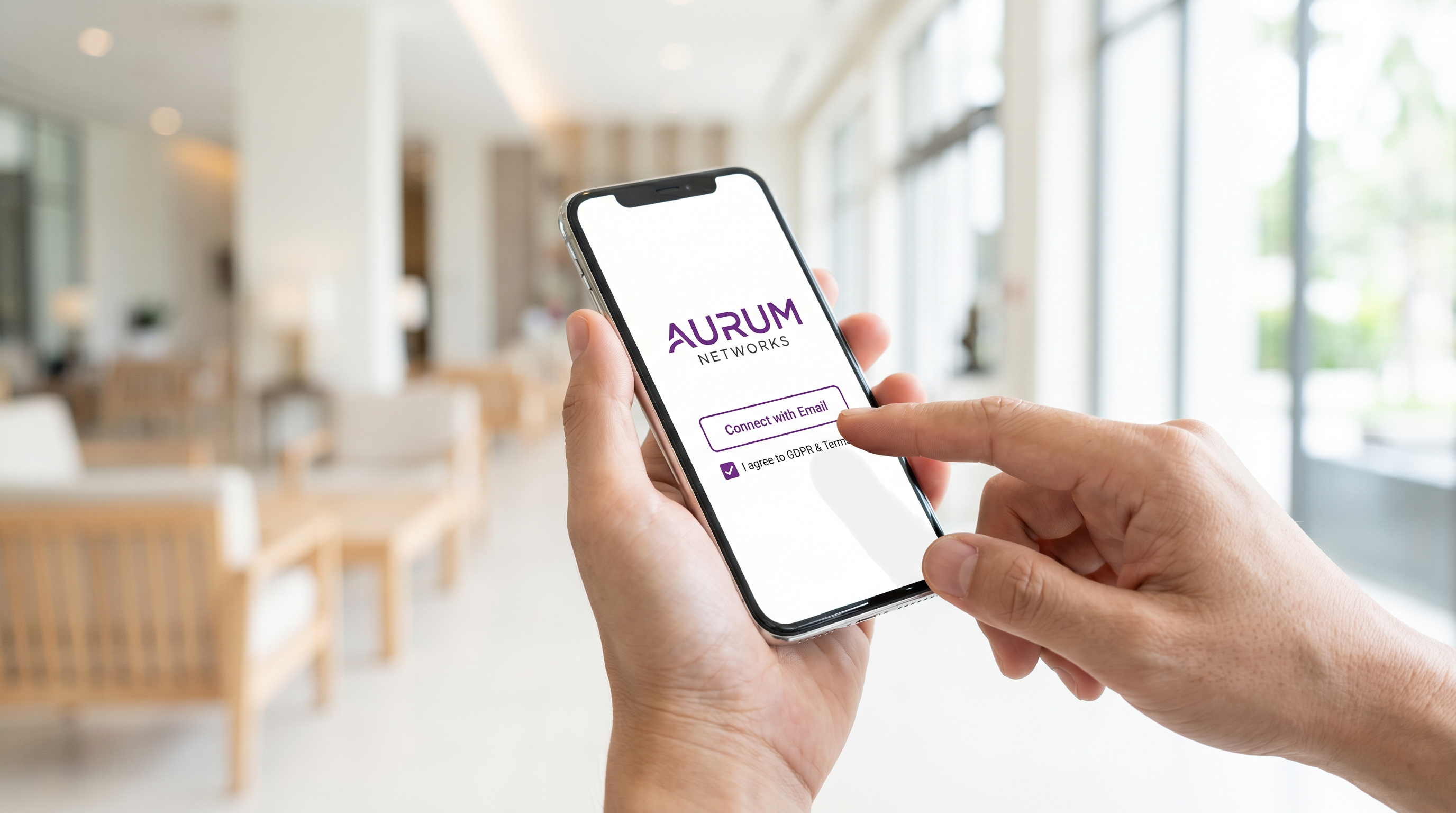
A captive portal is a network access control mechanism that intercepts a connecting device's initial HTTP or HTTPS request and redirects it to a hosted splash page. The user must complete a defined action — accepting terms of service, submitting an email address, authenticating via social login, or entering a voucher code — before the network grants full internet access. The underlying protocol behaviour is standardised in RFC 8952 , which defines the Captive Portal API and ensures modern operating systems can detect and surface the portal correctly.
For a detailed technical breakdown of how the interception, redirect, and authentication flow works at the protocol level, see our guide: How Does a Captive Portal Work? Technical Deep Dive .
At the infrastructure level, captive portal software operates in one of three deployment models. In a cloud-hosted model, the splash page and authentication logic are served from the vendor's cloud infrastructure, with the access point or controller redirecting unauthenticated clients to the hosted URL. In an on-premises model, a dedicated gateway appliance or virtual machine sits between the access point layer and the upstream router, handling all redirect and authentication traffic locally. In a controller-integrated model, the captive portal is a native feature of the wireless LAN controller (such as Cisco Meraki or Aruba), removing the need for a separate platform.
The choice of deployment model has direct implications for latency, resilience, compliance data residency, and total cost of ownership.
Technical Architecture
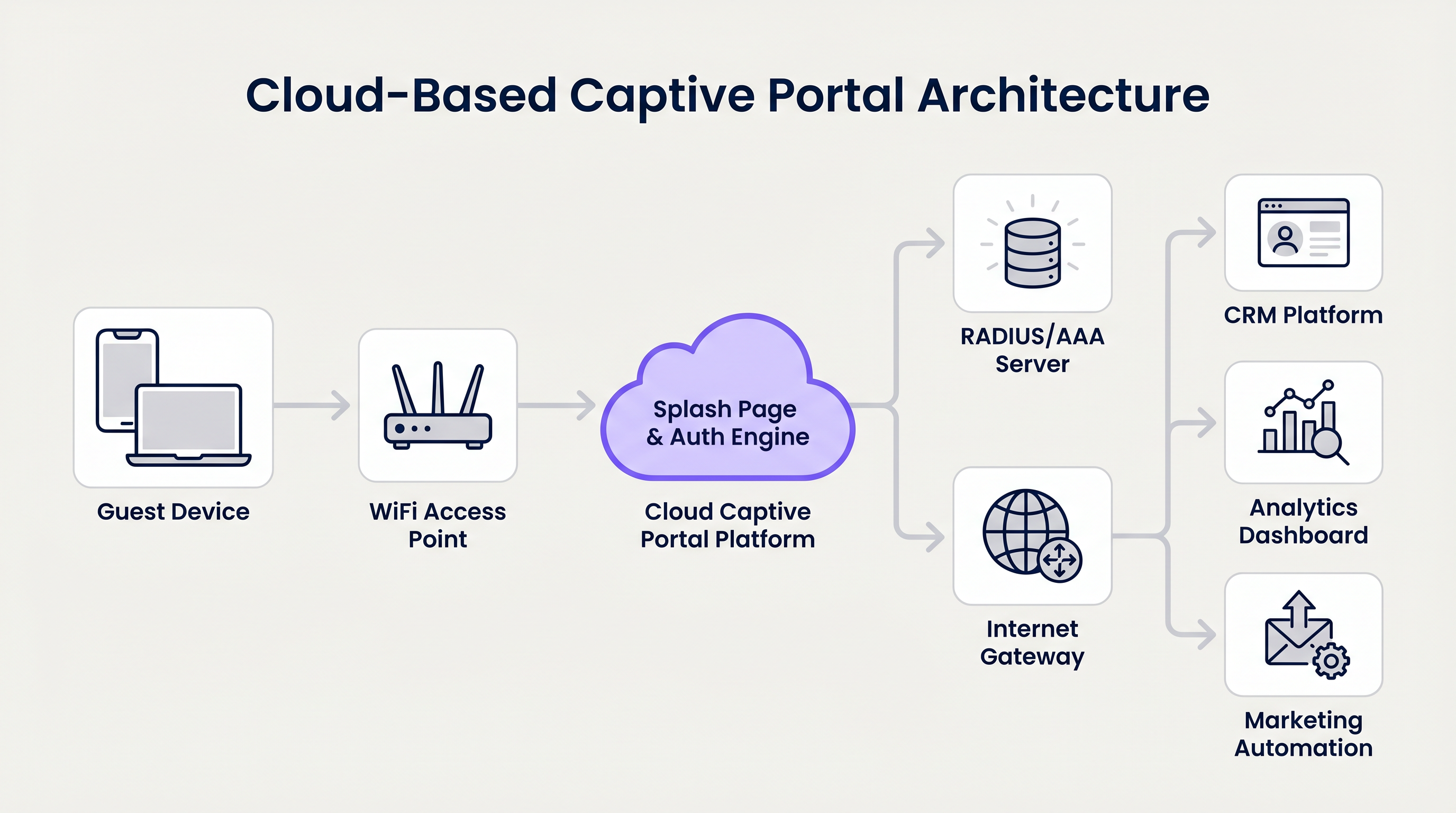
The architecture of a modern cloud-based captive portal service involves several distinct layers. At the edge, WiFi access points broadcast one or more SSIDs. Unauthenticated clients are placed in a restricted VLAN with DNS and HTTP/HTTPS access only to the captive portal platform's IP range — this is the walled garden. When the client's operating system or browser attempts to reach the internet, the access point or controller intercepts the request and issues an HTTP 302 redirect to the portal's splash page URL.
The splash page and authentication engine — hosted in the vendor's cloud — presents the branded login interface. Upon successful authentication (social OAuth, email submission, SMS OTP, or voucher validation), the platform sends an authorisation signal back to the access point or controller via a RADIUS Access-Accept message or an API call, depending on the integration method. The client is then moved to the authenticated VLAN and granted internet access.
Downstream of the authentication engine, the platform pushes captured identity data — email addresses, social profile attributes, consent records — to integrated systems: CRM platforms (Salesforce, HubSpot, Mailchimp), marketing automation tools, and analytics dashboards. For enterprise deployments, this integration is typically handled via REST API or webhook, with field-level mapping configured in the portal's admin console.
The RADIUS protocol (defined in RFC 2865) remains the dominant method for communicating authentication decisions between the captive portal platform and the network infrastructure. Platforms that also support IEEE 802.1X (port-based network access control) can extend the same infrastructure to handle WPA-Enterprise authentication for staff devices, eliminating the need for a separate RADIUS server.
Platform Comparison
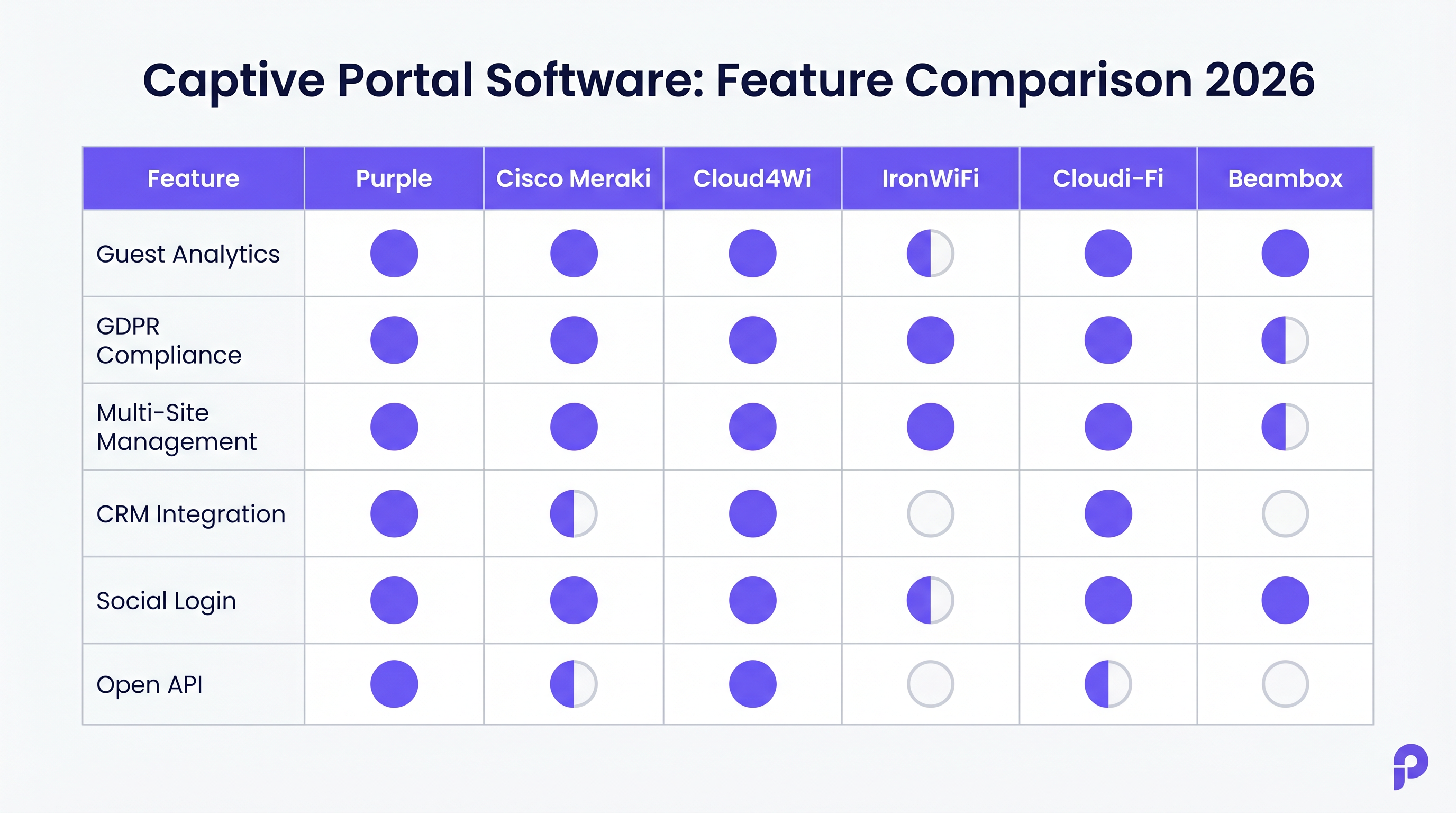
The table below summarises the key differentiators across the six platforms evaluated in this guide.
| Platform | Deployment Model | Best Vertical | Analytics Depth | GDPR/Compliance | Multi-Site | Open API | Indicative Pricing |
|---|---|---|---|---|---|---|---|
| Purple | Cloud SaaS | Hospitality, Retail, Stadiums, Transport | Advanced (footfall, dwell, heatmaps) | Full (audit trail, consent management) | Yes (centralised) | Yes (REST) | Custom / per venue |
| Cisco Meraki | Controller-integrated | Enterprise, Healthcare, Education | Moderate | Strong (Cisco compliance stack) | Yes (Meraki dashboard) | Partial | Premium (hardware + licence) |
| Cloud4Wi | Cloud SaaS | Multi-site Retail, Enterprise | Advanced | Full | Yes | Yes | Custom / enterprise |
| IronWiFi | Cloud SaaS | Enterprise, Healthcare, Education | Moderate | Full (SOC 2, GDPR, HIPAA) | Yes | Limited | Per-location SaaS |
| Cloudi-Fi | Cloud SaaS | Enterprise, Transport, Education | Advanced | Full | Yes | Partial | Custom / enterprise |
| Beambox | Cloud SaaS | SMB, Hospitality, F&B | Basic | Partial | Limited | No | Per-location SaaS |
Purple
Purple's Guest WiFi platform is the most analytically capable solution in this comparison. Its captive portal is the front door to a broader WiFi analytics engine that tracks footfall patterns, dwell times, zone-level heat maps, and repeat visit frequency. For large venues — shopping centres, stadiums, airports, and hotel chains — this transforms the WiFi network from a cost centre into a source of operational intelligence.
Purple supports all standard authentication methods (social login via Google, Facebook, and Apple; email capture; SMS OTP; click-through) and provides a drag-and-drop splash page builder with full white-labelling. GDPR consent capture is built into the onboarding flow, with a full audit trail stored per user record. The platform integrates natively with Salesforce, HubSpot, Mailchimp, and dozens of other marketing tools via REST API and pre-built connectors.
For organisations managing both guest and staff WiFi, Purple integrates with Microsoft Entra ID, Google Workspace, and Okta, enabling time-limited or role-based access for contractors and temporary staff without requiring manual credential management.
Cisco Meraki
Meraki's captive portal capability is embedded within the Meraki dashboard and is the natural choice for organisations already operating Meraki access points and switches. It supports click-through, sign-on splash pages, and billing integration. RADIUS authentication is handled natively, and the platform integrates with Cisco ISE for advanced policy enforcement and 802.1X.
The primary constraint is ecosystem lock-in: Meraki's captive portal is tightly coupled to Meraki hardware, and the licensing model (per-device, annual) makes it one of the more expensive options on a per-location basis. Analytics are moderate — sufficient for basic reporting but not comparable to Purple or Cloud4Wi for venue intelligence use cases.
Cloud4Wi
Cloud4Wi is a strong contender for multi-site retail and enterprise deployments where centralised management and consistent brand experience across hundreds of locations are the primary requirements. Its analytics capabilities are comparable to Purple, with detailed visitor journey mapping and integration with major retail analytics platforms. The platform's enterprise pricing reflects its positioning at the top of the market.
IronWiFi
IronWiFi's differentiated positioning is its combination of captive portal and cloud RADIUS in a single platform. For IT teams that need to manage guest WiFi alongside WPA-Enterprise (802.1X) for staff devices, this eliminates the need to run a separate RADIUS server. The platform is SOC 2 Type II certified and HIPAA-ready, making it the strongest compliance story in this comparison. It is compatible with over 200 access point vendors, which is a significant advantage for organisations with heterogeneous hardware estates.
Cloudi-Fi
Cloudi-Fi targets enterprise and public-sector organisations with complex onboarding requirements — BYOD management, guest access, and IoT device segmentation from a single platform. Its cloud-native architecture supports centralised policy management across distributed sites, and its analytics layer provides visitor behaviour data comparable to Cloud4Wi.
Beambox
Beambox is the most accessible entry point in this comparison. It is designed for single-site or small multi-site deployments in hospitality and food and beverage, with a simple setup process, social login, and basic email marketing integration. It is not suitable for enterprise deployments requiring VLAN management, 802.1X integration, or rigorous compliance auditing.
Vendor Selection Framework
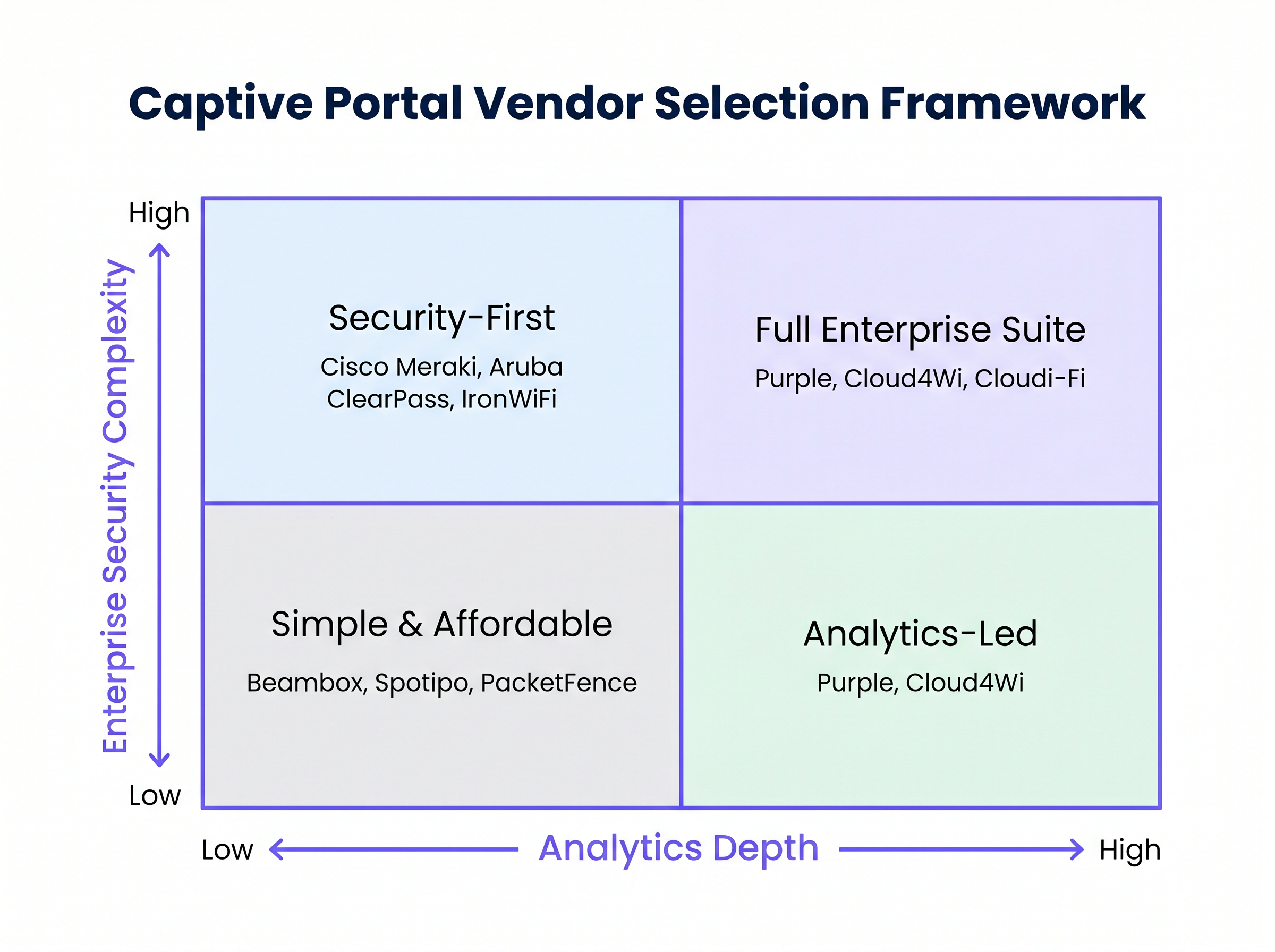
The 2x2 matrix above plots platforms on two axes: analytics depth (horizontal) and enterprise security complexity (vertical). This framework helps IT and operations teams quickly identify the quadrant that matches their primary requirements before engaging vendors.
Organisations in the Full Enterprise Suite quadrant (high analytics, high security) should evaluate Purple, Cloud4Wi, and Cloudi-Fi. Those in the Security-First quadrant (high security, lower analytics priority) should focus on Cisco Meraki, Aruba ClearPass, and IronWiFi. The Analytics-Led quadrant (high analytics, lower security complexity) is dominated by Purple and Cloud4Wi. The Simple and Affordable quadrant is served by Beambox, Spotipo, and open-source options like PacketFence.
Implementation Guide
Deploying a captive portal solution follows a consistent sequence regardless of platform. The steps below represent vendor-neutral best practice for a cloud-based captive portal deployment.
Step 1 — Network Architecture Review. Before any software configuration, map your existing network topology. Identify the VLAN structure, the access point vendor and firmware version, and the upstream router or firewall. Confirm that your access points support RADIUS CoA (Change of Authorisation) if you require dynamic policy enforcement post-authentication.
Step 2 — SSID and VLAN Design. Create a dedicated guest SSID, isolated from your corporate network via a separate VLAN. Configure the VLAN to permit DNS and HTTP/HTTPS traffic to the captive portal platform's IP ranges only (the walled garden). All other traffic from unauthenticated clients should be dropped at the firewall.
Step 3 — Platform Configuration. Configure the captive portal platform with your RADIUS shared secret and the IP address or hostname of your access point controller. Build the splash page using the platform's editor, incorporating your brand assets, the required authentication method, and the GDPR consent checkbox with a link to your privacy policy.
Step 4 — Integration Setup. Configure the data push to your CRM or marketing automation platform. Map the fields captured at login (email, name, consent status) to the corresponding fields in your CRM. Set up webhook notifications for new registrations if real-time data sync is required.
Step 5 — Compliance Verification. Before go-live, verify that the consent capture mechanism meets GDPR Article 7 requirements: consent must be freely given, specific, informed, and unambiguous. The platform must store a timestamped record of each consent event. Confirm that your data processing agreement (DPA) with the captive portal vendor is in place.
Step 6 — Pilot and Load Testing. Deploy to a single site or a subset of access points. Simulate concurrent connections at the expected peak load (use tools such as iperf3 or a dedicated WiFi load testing appliance). Verify that authentication latency remains below 3 seconds at peak load, and that the RADIUS server responds within 500ms.
Step 7 — Rollout and Monitoring. Roll out to remaining sites. Configure alerting for RADIUS authentication failures, portal availability, and data push errors. Establish a monthly review cadence for analytics data to ensure the investment is generating measurable business outcomes.
Case Studies
Case Study 1: 350-Room Hotel Chain — Hospitality WiFi Transformation
A UK-based hotel group operating 12 properties across England and Scotland was running a legacy on-premises captive portal solution that provided no analytics and required manual GDPR consent logging via paper forms. The IT team was managing 12 separate portal configurations with no centralised visibility.
The group deployed Purple across all 12 properties, integrating the captive portal with their existing Aruba access point infrastructure via RADIUS. The splash page was configured with email capture and explicit GDPR consent, with data pushed automatically to Salesforce. Within 90 days of deployment, the group had captured over 28,000 verified guest email addresses with full consent records. The marketing team ran a post-stay re-engagement campaign that generated a 12% increase in direct bookings, reducing OTA commission costs by an estimated £180,000 annually. The IT team reduced portal management overhead from approximately 8 hours per week to under 1 hour, with all 12 sites managed from a single dashboard.
For more on deploying guest WiFi in hotel environments, see our hospitality industry page .
Case Study 2: 45-Store Retail Chain — Footfall Analytics and CRM Integration
A mid-market fashion retailer operating 45 stores across the UK and Ireland needed to understand in-store customer behaviour — specifically, how dwell time in different zones correlated with conversion rates. Their existing guest WiFi provided no analytics beyond basic connection counts.
The retailer deployed Cloud4Wi across all 45 stores, with Purple evaluated as an alternative. Cloud4Wi was selected on the basis of its native integration with the retailer's existing Salesforce CRM and its zone-level analytics capability. The captive portal was configured with social login (Google and Apple) to minimise friction and maximise opt-in rates. Within six months, the retailer had mapped dwell time data to sales conversion data at the zone level, identifying three underperforming store layouts. Reconfiguring those layouts based on the analytics data produced a measurable uplift in conversion rate of 8% in the affected zones.
For retail-specific deployment considerations, see our retail industry page .
Best Practices
The following recommendations reflect vendor-neutral best practice for captive portal deployments in enterprise environments.
Keep the authentication flow to a single screen. Every additional field or step in the login process reduces opt-in rates. Research consistently shows that requiring more than an email address and a consent checkbox reduces completion rates by 20-40%. If you need additional data, collect it progressively after the initial connection.
Segment your network correctly from day one. Guest WiFi must be isolated from corporate infrastructure. This is not just a security requirement — it is a PCI DSS compliance requirement if your corporate network handles payment card data. Use a dedicated VLAN, and ensure your firewall rules prevent any lateral movement from the guest segment.
Maintain a GDPR-compliant consent audit trail. Under GDPR Article 7, you must be able to demonstrate that consent was obtained. Your captive portal platform must store a timestamped record of each consent event, including the version of the privacy policy presented at the time. Platforms like Purple and IronWiFi handle this natively; on simpler platforms, you may need to implement this separately.
Test RADIUS failover. If your captive portal platform's RADIUS service is unavailable, what happens to connecting clients? Ensure your access point configuration defines a fallback behaviour — either deny all access (fail-closed) or grant access without authentication (fail-open). For most enterprise environments, fail-closed is the correct default.
Review your walled garden configuration regularly. Social login providers (Google, Facebook, Apple) periodically change the IP ranges and domains used by their OAuth flows. If these are not included in your walled garden, social login will silently fail for users. Establish a quarterly review process for walled garden entries.
Troubleshooting and Risk Mitigation
The most common failure modes in captive portal deployments, and their mitigations, are as follows.
Portal not appearing on iOS or Android devices. Modern mobile operating systems use a Captive Network Assistant (CNA) that detects captive portals by making a probe request to a known URL. If the probe succeeds (i.e., the device receives a 200 response when it expects a 302 redirect), the CNA will not trigger. Ensure your walled garden configuration correctly intercepts the Apple and Google probe URLs. Also verify that your DNS configuration is redirecting all queries from unauthenticated clients to the portal's IP.
HTTPS interception issues. Modern browsers enforce HSTS (HTTP Strict Transport Security) on many domains, which prevents HTTP redirects to a captive portal splash page. Ensure your captive portal platform uses a valid SSL certificate on its splash page domain, and that the initial redirect is to an HTTP URL that the platform then upgrades to HTTPS. Attempting to intercept HTTPS traffic directly will trigger browser security warnings.
RADIUS authentication timeouts. If the RADIUS server is geographically distant from your access points, authentication latency can exceed acceptable thresholds. For cloud-based RADIUS, verify that the vendor has a point of presence in your region. For on-premises deployments, ensure the RADIUS server is on the same LAN segment as the access point controller.
GDPR consent data not syncing to CRM. Webhook delivery failures are a common integration issue. Implement a dead-letter queue or retry mechanism on the receiving end, and configure alerting for failed webhook deliveries. Audit the CRM integration monthly to verify that consent records are being written correctly.
ROI and Business Impact
The business case for captive portal software investment rests on three value streams: first-party data acquisition, compliance risk mitigation, and operational efficiency.
First-party data is increasingly valuable as third-party cookie deprecation reduces the effectiveness of digital advertising. A captive portal that captures verified, consented email addresses at scale provides a direct marketing channel with measurable ROI. Industry benchmarks suggest that a well-configured captive portal in a high-footfall venue can capture 15-30% of connecting users as opted-in marketing contacts, depending on the friction of the login flow.
Compliance risk mitigation is harder to quantify but significant. GDPR fines for inadequate consent management can reach 4% of global annual turnover. For a retail chain with £100 million in annual turnover, that represents a potential exposure of £4 million. A captive portal platform with built-in consent management and audit trails directly reduces this exposure.
Operational efficiency gains are most visible in multi-site deployments. Centralised management of portal configurations, user policies, and analytics reporting reduces the per-site IT overhead significantly. The hotel case study above demonstrated a reduction from 8 hours to under 1 hour per week across 12 sites — an annualised saving equivalent to approximately 0.2 FTE.
For a detailed exploration of how Purple's platform delivers measurable ROI across guest WiFi deployments, see the Guest WiFi and WiFi Analytics product pages.
Related Reading
For teams evaluating wider network architecture decisions alongside their captive portal deployment, the following resources are relevant: The Core SD-WAN Benefits for Modern Businesses covers how SD-WAN can simplify multi-site network management and reduce the complexity of deploying centralised captive portal solutions across distributed estates.
Key Terms & Definitions
Captive Portal
A network access control mechanism that intercepts a connecting device's HTTP/HTTPS requests and redirects them to a hosted splash page, requiring the user to complete an authentication action before internet access is granted. Standardised in RFC 8952.
IT teams encounter this when configuring guest WiFi for any public-facing venue. The captive portal is the technical mechanism that enables both access control and data capture.
RADIUS (Remote Authentication Dial-In User Service)
A networking protocol defined in RFC 2865 that provides centralised Authentication, Authorisation, and Accounting (AAA) for network access. In captive portal deployments, the portal platform sends a RADIUS Access-Accept or Access-Reject message to the access point to grant or deny internet access.
Network architects encounter RADIUS when integrating a captive portal platform with access point controllers. The RADIUS shared secret and server IP address must be configured on both the portal platform and the access point controller.
Walled Garden
A set of IP addresses, domains, or URLs that unauthenticated clients are permitted to reach before completing the captive portal login flow. Typically includes the portal platform's own IP ranges, social login provider OAuth domains, and any content the operator wants to make freely accessible.
IT teams must configure the walled garden correctly to ensure that the captive portal login flow (including social OAuth) functions correctly. Incorrect walled garden configuration is the most common cause of social login failures.
IEEE 802.1X
An IEEE standard for port-based network access control that provides an authentication mechanism for devices wishing to attach to a LAN or WLAN. In WiFi deployments, 802.1X is used for WPA-Enterprise authentication, requiring each device to authenticate with a RADIUS server using EAP credentials.
Relevant when an organisation needs to manage both guest WiFi (captive portal) and secure staff WiFi (WPA-Enterprise) on the same infrastructure. Platforms like IronWiFi support both use cases from a single cloud RADIUS service.
GDPR Consent Audit Trail
A timestamped record of each instance in which a user provided consent for data collection and marketing communications, including the version of the privacy policy presented, the user identifier, and the IP address of the connecting device. Required under GDPR Article 7.
IT and legal teams must verify that their captive portal platform stores this data correctly before deployment. Inadequate consent records are a primary finding in GDPR enforcement actions against venue operators.
Splash Page
The branded web page presented to a connecting user by the captive portal system. Contains the authentication mechanism (login form, social login buttons, click-through), terms of service, privacy policy link, and GDPR consent checkbox.
Marketing teams typically own the design of the splash page; IT teams own the technical configuration. Alignment between both teams on the fields captured and the consent language is essential before deployment.
VLAN (Virtual Local Area Network)
A logical network segment created within a physical network infrastructure, used to isolate traffic between different user groups. In captive portal deployments, guest devices are placed in a dedicated guest VLAN, isolated from corporate and IoT VLANs.
Correct VLAN design is a prerequisite for any captive portal deployment. Guest VLAN isolation is a PCI DSS requirement for any venue where the corporate network handles payment card data.
RADIUS CoA (Change of Authorisation)
An extension to the RADIUS protocol (RFC 5176) that allows a RADIUS server to dynamically modify an active user session — for example, to change VLAN assignment, apply bandwidth limits, or disconnect a user — without requiring re-authentication.
Required for captive portal deployments where dynamic policy enforcement is needed post-authentication, such as applying different bandwidth tiers based on the user's subscription level or session duration.
OAuth 2.0 Social Login
An authorisation framework that allows users to authenticate with a captive portal using their existing Google, Facebook, or Apple account credentials, without creating a separate account. The portal receives a verified email address and basic profile data from the identity provider.
Social login is the highest-converting authentication method for captive portals in consumer-facing venues, as it eliminates the need for users to remember or type a password. It requires the identity provider's OAuth domains to be included in the walled garden.
PCI DSS (Payment Card Industry Data Security Standard)
A set of security standards designed to ensure that all companies that accept, process, store, or transmit credit card information maintain a secure environment. In the context of captive portals, PCI DSS requires that guest WiFi networks are fully isolated from any network segment that handles payment card data.
Relevant for any retail, hospitality, or venue operator that processes card payments on-site. Network segmentation between the guest WiFi VLAN and the payment network is a mandatory PCI DSS control.
Case Studies
A 350-room hotel group operating 12 properties needs to replace a legacy on-premises captive portal with a cloud-based solution. They need GDPR-compliant consent capture, CRM integration with Salesforce, and centralised management across all sites. Their existing infrastructure is Aruba access points running ArubaOS 8.x. What platform and deployment architecture should they use?
Deploy Purple as the cloud-based captive portal service, integrated with the existing Aruba infrastructure via RADIUS. Configuration steps: (1) Create a dedicated guest SSID on each Aruba controller, assigned to a guest VLAN isolated from the corporate network. (2) Configure the Aruba controller to redirect unauthenticated clients to Purple's hosted splash page URL, with the walled garden including Purple's IP ranges and the OAuth domains for social login providers. (3) In Purple's admin console, configure the RADIUS shared secret and the Aruba controller's IP address. (4) Build the splash page with email capture, GDPR consent checkbox, and a link to the hotel's privacy policy. (5) Configure the Salesforce integration in Purple, mapping email, first name, last name, and consent status to the corresponding Salesforce Lead fields. (6) Set up a webhook to notify the CRM of new registrations in real time. (7) Test the full flow on a single property before rolling out to the remaining 11. (8) Configure Purple's multi-site dashboard to provide centralised visibility across all 12 properties.
A 45-store fashion retailer needs to understand zone-level dwell time and its correlation with sales conversion. They have a heterogeneous access point estate (mix of Cisco Meraki and Ubiquiti UniFi across different stores) and an existing Salesforce CRM. They want to minimise login friction to maximise opt-in rates. Which captive portal platform should they deploy, and how should they handle the mixed hardware estate?
Deploy Purple or Cloud4Wi — both support the required analytics depth and Salesforce integration. For a mixed Meraki/UniFi estate: (1) For Meraki stores, configure the captive portal as an external splash page in the Meraki dashboard, pointing to the chosen platform's hosted URL. Meraki supports external splash pages natively via its API. (2) For UniFi stores, configure the UniFi controller's guest portal to redirect to the external splash page URL. UniFi supports external portal redirection in the guest network settings. (3) Configure social login (Google and Apple) as the primary authentication method to minimise friction — this reduces the login flow to a single tap on most mobile devices. (4) Ensure the walled garden on both controller types includes the OAuth domains for Google and Apple. (5) Map the captured social profile data (email, name) to Salesforce via the platform's native connector. (6) Use the platform's zone analytics feature to define zones within each store layout, correlating WiFi probe data with zone boundaries. (7) Export zone dwell time data monthly and join it with Salesforce sales data at the store level to identify conversion correlations.
A regional NHS trust needs to deploy guest WiFi across three hospital sites. The requirements are: HIPAA-equivalent compliance (NHS DSP Toolkit), strict network segmentation between guest and clinical VLANs, support for 802.1X for staff devices, and GDPR consent capture for patients. The existing infrastructure is a mix of Cisco and Aruba access points.
Deploy IronWiFi, which is the only platform in this comparison that natively combines captive portal for guests with cloud RADIUS for 802.1X staff authentication. Configuration: (1) Create three SSIDs per site: guest (captive portal), staff (WPA-Enterprise/802.1X), and IoT (MAC authentication). (2) Configure IronWiFi's cloud RADIUS as the authentication server for the staff SSID, integrating with the trust's Active Directory via LDAP or SAML. (3) Configure the guest SSID to redirect to IronWiFi's captive portal, with email capture and GDPR consent. (4) Ensure the guest VLAN has no routing to clinical VLANs — enforce this at the firewall, not just the VLAN configuration. (5) Configure IronWiFi's compliance reporting to generate monthly audit logs for DSP Toolkit evidence. (6) Test RADIUS failover to ensure that if the cloud RADIUS service is unavailable, staff devices fail closed (no access) rather than fail open.
Scenario Analysis
Q1. A conference centre hosting 50 events per year, with peak concurrent WiFi users of 3,000, needs to deploy a captive portal solution. The primary requirements are: branded splash page per event sponsor, GDPR consent capture, and basic analytics on session counts and peak usage. The existing infrastructure is Cisco Meraki. Should they use Meraki's built-in captive portal, or deploy a third-party platform?
💡 Hint:Consider the per-event branding requirement and the analytics depth needed. Meraki's built-in portal supports external splash pages — this is a key capability to evaluate.
Show Recommended Approach
The per-event sponsor branding requirement is the deciding factor. Meraki's built-in captive portal supports a single splash page configuration per SSID, which makes dynamic per-event branding operationally complex. A third-party platform like Purple or Cloud4Wi, configured as an external splash page in Meraki, allows the events team to switch splash page templates per event without IT intervention. The analytics requirement (session counts, peak usage) is basic and can be met by either Meraki's built-in reporting or the third-party platform. The recommended approach is to deploy Purple as an external splash page on the existing Meraki infrastructure, using Purple's template management to handle per-event branding. This preserves the existing Meraki investment while adding the operational flexibility required for a multi-event venue.
Q2. An IT manager at a 200-bed private hospital is evaluating captive portal software for patient guest WiFi. The hospital's legal team has flagged that the current setup — a simple click-through portal with no consent record — creates GDPR exposure. The hospital also needs to ensure that patient devices cannot reach clinical systems. Which platform should they deploy, and what are the three most critical configuration steps?
💡 Hint:GDPR compliance and network segmentation are the two non-negotiable requirements. Consider which platforms have the strongest compliance posture and how VLAN isolation should be configured.
Show Recommended Approach
Deploy IronWiFi for its HIPAA-ready compliance posture and SOC 2 Type II certification, which provides the strongest audit evidence for the legal team. The three most critical configuration steps are: (1) VLAN isolation — create a dedicated patient guest VLAN with firewall rules that explicitly deny all routing to clinical VLANs. This must be enforced at the firewall, not just via VLAN tagging. (2) GDPR consent capture — configure the splash page with an explicit, unchecked consent checkbox linked to the hospital's privacy policy. IronWiFi stores a timestamped consent record per user, which satisfies the GDPR Article 7 audit trail requirement. (3) RADIUS fail-closed — configure the access point to deny access if the RADIUS server is unreachable, preventing unauthenticated devices from gaining network access during a cloud outage.
Q3. A retail chain with 80 stores is currently using Beambox for guest WiFi. The marketing director wants to implement post-visit email campaigns triggered by in-store WiFi connection events, with personalisation based on visit frequency and dwell time. The IT director is concerned about the cost and complexity of migrating 80 stores. How should they approach the platform migration decision?
💡 Hint:Evaluate whether Beambox can meet the marketing requirements before assuming migration is necessary. If migration is required, consider the phased approach and the total cost of ownership comparison.
Show Recommended Approach
First, assess whether Beambox can meet the requirements: Beambox supports basic email marketing integration but does not provide dwell time analytics or visit frequency segmentation at the level required for personalised post-visit campaigns. Migration is therefore necessary. The recommended approach is a phased migration: (1) Select Purple or Cloud4Wi as the target platform — both support dwell time analytics, visit frequency segmentation, and direct integration with major email marketing platforms. (2) Pilot the new platform in 5-10 stores before committing to a full rollout. (3) Negotiate a parallel-run period with Beambox to avoid data gaps during migration. (4) Map the total cost of ownership: the new platform's per-location SaaS cost versus the projected revenue uplift from personalised campaigns. Industry benchmarks suggest that triggered post-visit email campaigns with visit-frequency personalisation generate 3-5x higher open rates than generic broadcast campaigns, providing a clear ROI justification for the migration cost.




