

WiFi Onboarding and Captive Portal Best Practices
This guide provides a comprehensive technical reference for deploying and optimising a captive portal for guest WiFi across hospitality, retail, events, and public-sector venues. It covers the full onboarding journey — from initial device association and DNS redirection through walled garden configuration, ACL management, authentication, and post-login session control — with concrete implementation scenarios and compliance guidance. IT managers, network architects, and CTOs will find actionable deployment frameworks, risk mitigation strategies, and ROI measurement approaches that map directly to real-world venue operations.
🎧 Listen to this Guide
View Transcript
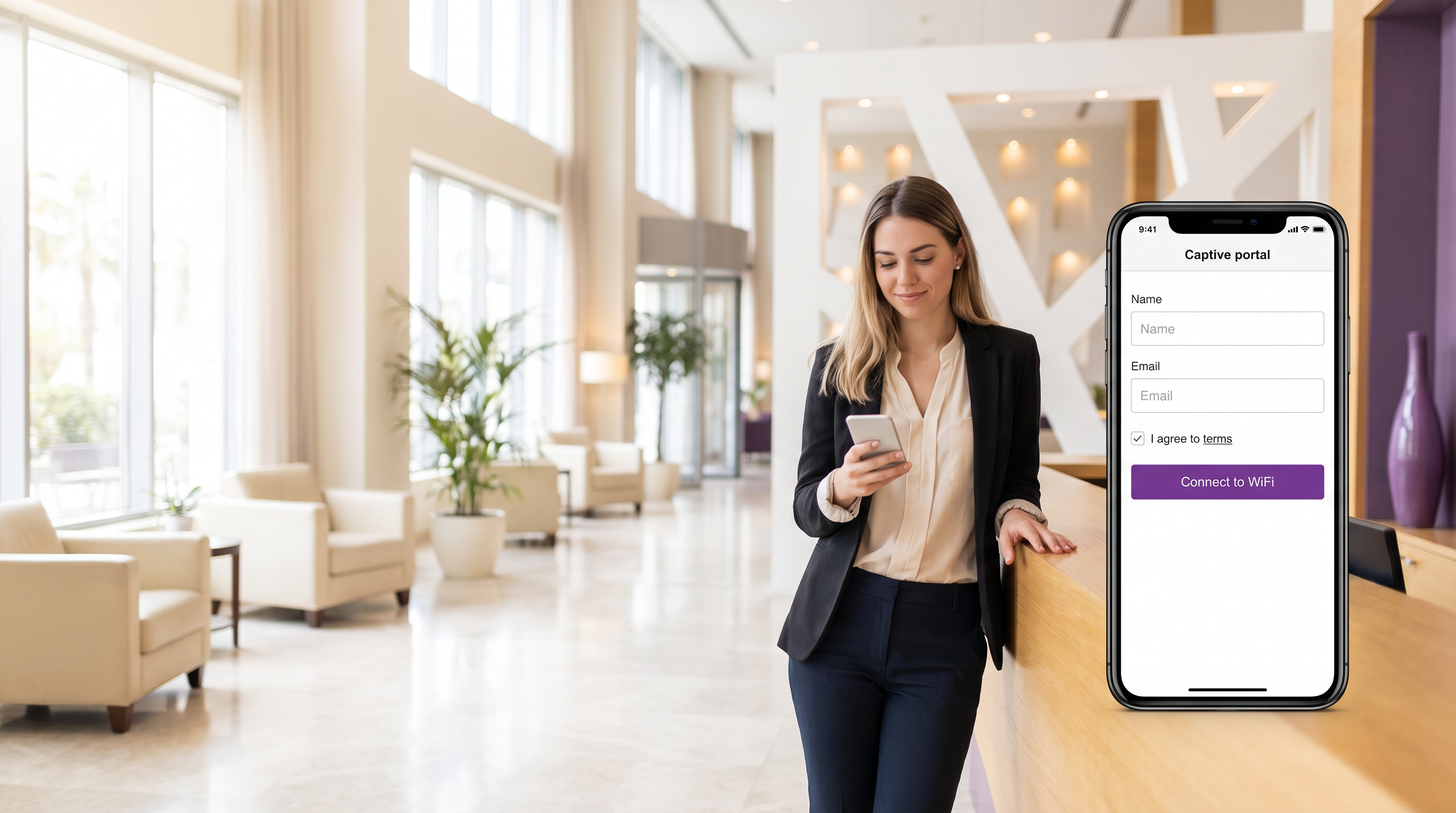
Executive Summary
A captive portal for guest WiFi is the controlled gateway through which venue visitors authenticate before receiving internet access. For IT teams managing hotels, retail estates, stadiums, or public-sector buildings, the captive portal is simultaneously a network security boundary, a regulatory compliance mechanism, and a first-party data capture asset. Done correctly, it protects your corporate infrastructure, satisfies GDPR and PCI DSS obligations, and generates measurable marketing ROI. Done poorly, it frustrates guests, exposes your network to lateral-movement attacks, and creates compliance liability.
This guide covers the complete technical architecture of a wireless captive portal deployment: the pre-authentication zone, walled garden ACL design, RADIUS-based session authorisation, post-login bandwidth management, and session lifecycle management. It also addresses the increasingly critical challenge of MAC address randomisation and the migration path towards Passpoint and OpenRoaming. Two detailed case studies — a 200-room hotel and a 40-site retail chain — illustrate how these principles translate into production deployments. For venues evaluating platform options, see The Best Captive Portal Software in 2026: A Comparison Guide .
Technical Deep-Dive
The Captive Portal Onboarding Flow
Understanding the precise sequence of events in a guest WiFi captive portal deployment is essential before making any configuration decisions. The flow below describes what happens from the moment a guest device associates with an access point to the moment it has full internet access.
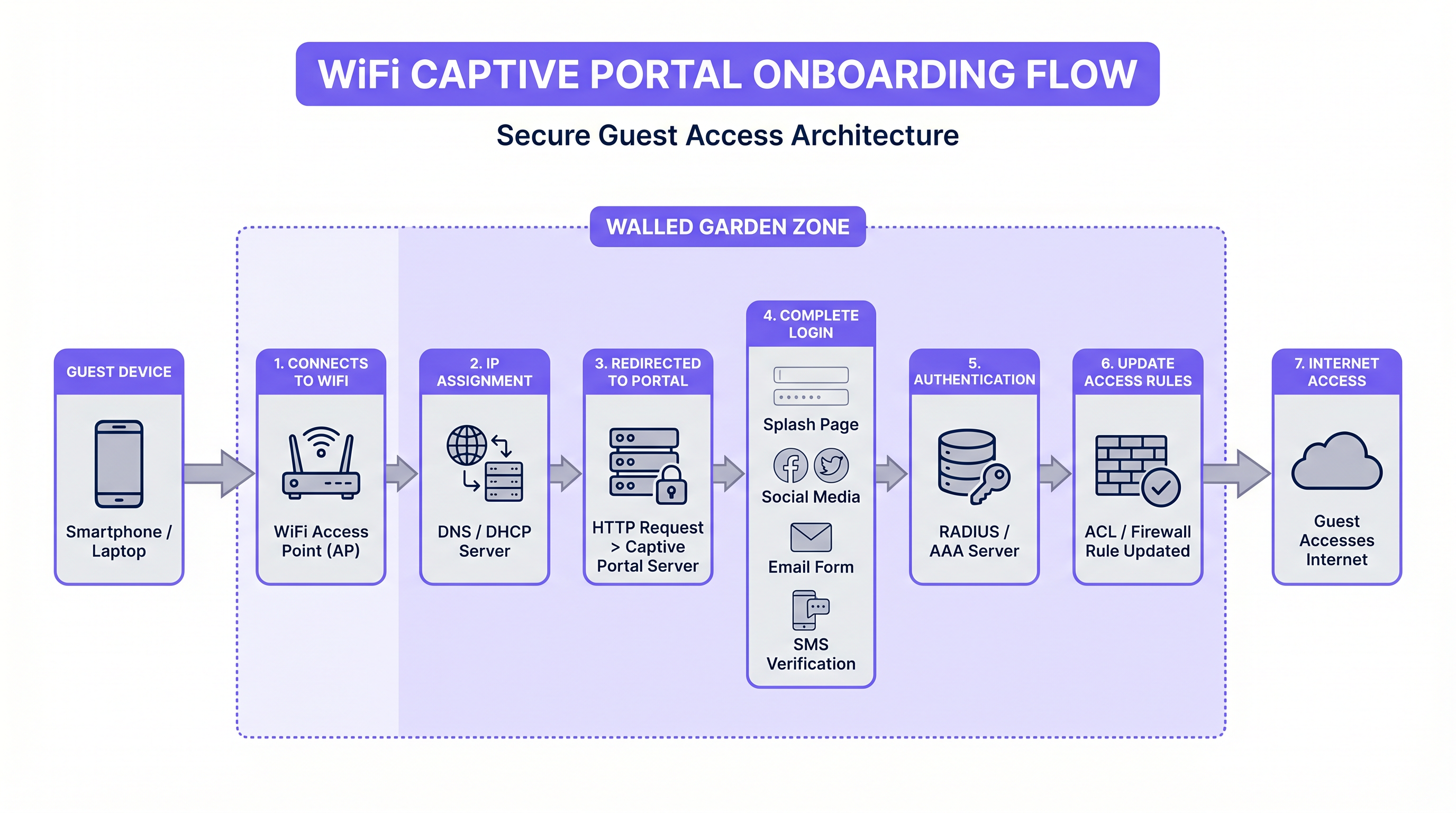
When a guest device associates with the SSID, the access point places it in a pre-authentication VLAN. DHCP assigns an IP address, and DNS is restricted — typically to the portal server's own domain and any domains required for the walled garden. The device's operating system then performs a captive portal detection probe: iOS sends an HTTP request to captive.apple.com, Android to connectivitycheck.gstatic.com, and Windows to www.msftconnecttest.com. The gateway intercepts this request and returns a redirect to the captive portal URL, triggering the native "Sign in to network" prompt on the device.
This detection mechanism is where many deployments introduce their first failure mode. If the portal server's SSL certificate is invalid or self-signed, modern operating systems will refuse to display the portal, leaving the guest with no actionable path to connectivity. All production captive portal deployments must use a publicly trusted TLS certificate, renewed automatically via Let's Encrypt or equivalent.
Walled Garden Architecture and ACL Design
The walled garden is the set of IP addresses and domains that a pre-authenticated guest is permitted to reach before completing the login flow. It is implemented as an ACL on the gateway or wireless controller. Getting the walled garden right is one of the most operationally demanding aspects of captive portal management, because the IP ranges of third-party authentication providers change without notice.
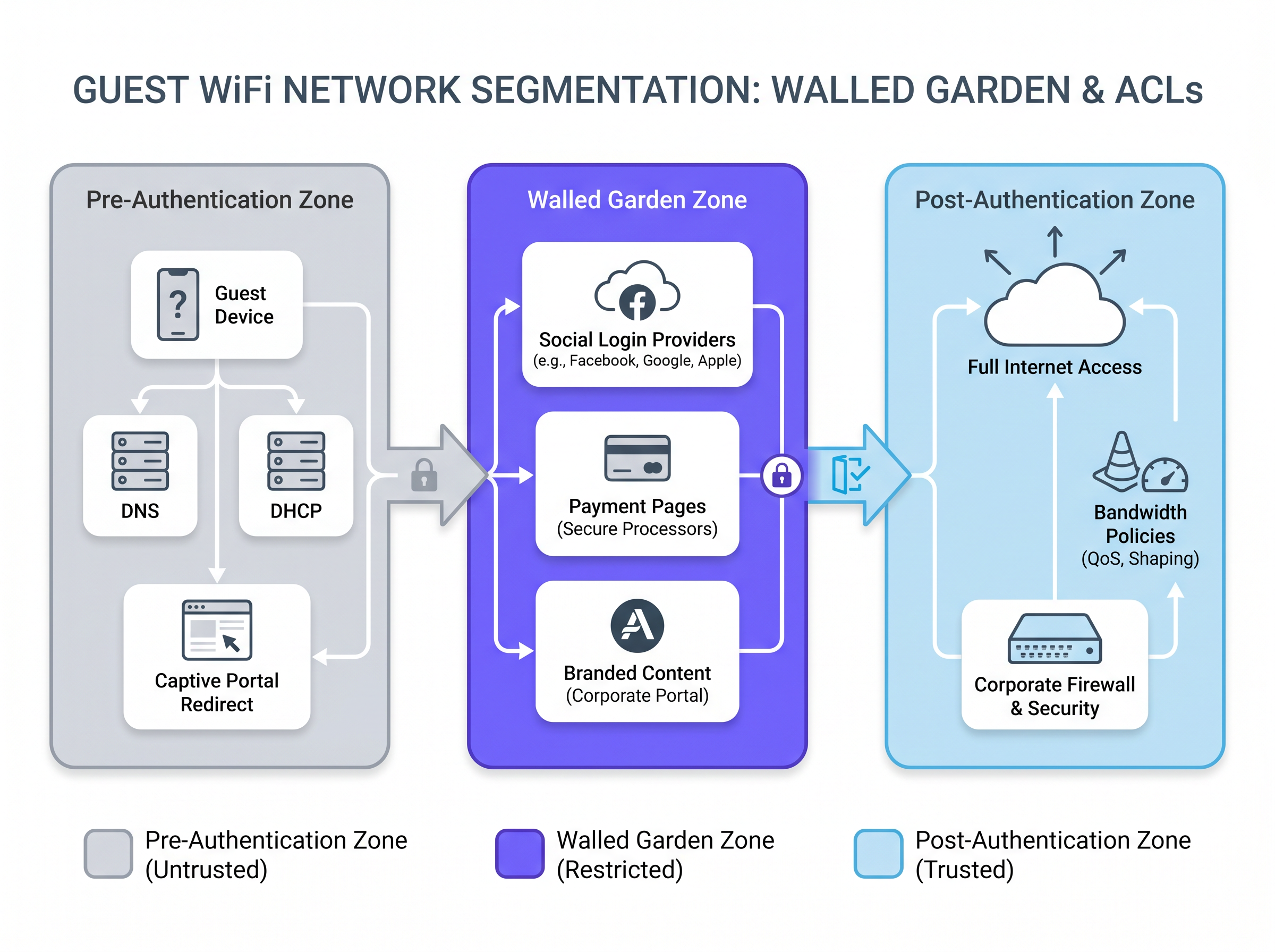
For a portal offering social login via Facebook (Meta), Google, and Apple, the walled garden must include the OAuth endpoint domains and their associated IP ranges. These include accounts.google.com, appleid.apple.com, www.facebook.com, and the underlying CDN ranges that serve the authentication JavaScript. A practical approach is to whitelist by FQDN rather than IP where the gateway supports DNS-based ACLs, reducing the maintenance burden when provider IP ranges change.
For venues offering payment-gated access — common in transport hubs and conference centres — the walled garden must also include the payment processor's domains. These must be served over HTTPS, and the PCI DSS requirement for network segmentation means that the payment flow should be handled by an external processor rather than any system on your own network.
| Zone | Traffic Permitted | Implementation |
|---|---|---|
| Pre-Authentication | DNS (restricted), DHCP, portal server, captive portal detection endpoints | Gateway ACL — deny all except whitelist |
| Walled Garden | Social login providers, payment processors, branded portal assets | FQDN-based ACL or IP whitelist |
| Post-Authentication | Full internet access subject to content filtering and bandwidth policy | Per-user ACL applied via RADIUS CoA |
Authentication Architecture: RADIUS, CoA, and Identity Providers
Once the guest completes the portal form — whether via email capture, social login, or SMS OTP — the portal server must signal the gateway to grant access. The standard mechanism is RADIUS Change of Authorisation (CoA), defined in RFC 3576. The portal server sends a CoA-Request to the gateway's RADIUS server, carrying the guest's MAC address and the access policy to apply. The gateway updates the ACL for that client, moving them from the pre-authentication zone to the post-authentication zone.
For enterprise deployments requiring stronger identity assurance — healthcare facilities, corporate campuses, or government buildings — integration with an existing identity provider via IEEE 802.1X and SAML 2.0 provides single sign-on capability. Guests authenticate using their corporate credentials, and the portal acts as a SAML Service Provider, delegating authentication to the organisation's Identity Provider (IdP). This eliminates the need for a separate guest credential store and ensures that access is automatically revoked when an employee leaves.
Platforms like Purple's Guest WiFi abstract much of this complexity, providing pre-built integrations with social identity providers, a compliant consent capture flow, and a RADIUS interface that works with major wireless controller vendors including Cisco, Aruba, Ruckus, and Ubiquiti.
MAC Address Randomisation: The Emerging Architectural Challenge
Since iOS 14 (2020) and Android 10, devices randomise their MAC address per SSID by default. This has significant implications for Captive Portal deployments that use MAC address as the primary session identifier. A returning guest who visited yesterday will present a different MAC address today, triggering the portal flow again even if their session has not expired.
The correct long-term architectural response is Passpoint (Hotspot 2.0) and OpenRoaming. These standards use 802.1X with EAP-based authentication and cryptographic credentials (certificates or SIM-based) rather than MAC addresses. The device authenticates automatically and securely on every visit without presenting a portal. Purple supports OpenRoaming under its Connect licence, acting as a free identity provider — meaning venues can offer seamless, standards-compliant reconnection without building their own PKI infrastructure.
For venues not yet ready to migrate to Passpoint, a pragmatic interim approach is to use email-based session tokens with a longer absolute timeout (e.g., 30 days), combined with a lightweight re-authentication flow that pre-populates the email field from a browser cookie.
Implementation Guide
Phase 1: Network Segmentation
Before deploying any Captive Portal software, the underlying network architecture must enforce strict segmentation. The guest SSID must be isolated from the corporate network at Layer 2 using dedicated VLANs. Firewall rules must explicitly deny any traffic from the guest VLAN to the corporate VLAN, the management VLAN, and any VLAN carrying point-of-sale or payment data. This is a hard requirement under PCI DSS v4.0 and a strong recommendation under the NCSC's network security guidance for public-sector organisations.
For hospitality deployments, per-room or per-floor VLANs provide additional isolation, preventing guests from discovering each other's devices on the network — a common attack vector in hotel environments.
Phase 2: Portal Server Deployment
For multi-site deployments, a cloud-hosted portal platform is almost always the correct choice. It eliminates on-site hardware dependencies, simplifies certificate management, and provides a single management plane across all venues. The portal server must be reachable from the guest VLAN before authentication — this is the one exception to the "deny all" pre-authentication ACL.
Portal page performance is a frequently underestimated factor. Target a page weight of under 200KB and a load time of under 2 seconds on a 4G mobile connection. Heavy portal pages — those with large background images, unoptimised fonts, or blocking JavaScript — cause significant abandonment, particularly in high-density environments where the shared uplink is already under load.
Phase 3: Consent Capture and Compliance Configuration
For any deployment processing personal data — which includes email addresses, names, and social profile data — the portal must present a GDPR-compliant consent mechanism. The key requirements are:
- Terms and conditions must be presented in plain language, not legal boilerplate.
- The consent checkbox must be unchecked by default. Pre-ticked boxes are explicitly prohibited under UK GDPR and the EU General Data Protection Regulation.
- A record of each consent event must be logged, including the timestamp, the version of the terms presented, and the user identifier.
- The privacy notice must specify the data controller, the purposes of processing, the retention period, and the user's rights.
Purple's WiFi Analytics platform includes a built-in consent management module that handles logging, versioning, and data subject access request workflows, reducing the compliance overhead for venue operators.
Phase 4: Session Management Configuration
Session parameters must be tuned to the venue type. The following table provides recommended starting points:
| Venue Type | Idle Timeout | Absolute Timeout | Bandwidth Cap (Down/Up) |
|---|---|---|---|
| Hotel (per room) | 30 minutes | 24 hours (per stay) | 50 Mbps / 20 Mbps |
| Retail store | 15 minutes | 2 hours | 10 Mbps / 5 Mbps |
| Stadium / Event | 10 minutes | 4 hours | 5 Mbps / 2 Mbps |
| Transport hub | 5 minutes | 1 hour | 10 Mbps / 5 Mbps |
| Conference centre | 20 minutes | 8 hours | 20 Mbps / 10 Mbps |
QoS policies should be applied at the point of authentication via RADIUS attributes, ensuring that bandwidth caps are enforced at the gateway level rather than relying on application-layer throttling.
Best Practices
Security: Always deploy the guest SSID on a dedicated VLAN with explicit deny-all firewall rules to corporate segments. Never rely on SSID isolation alone — it does not prevent Layer 3 attacks.
Compliance: Treat the consent capture flow as a legal document. Version-control your terms, log every consent event, and test the flow with a data protection officer before go-live.
Performance: Measure portal load time from a mobile device on the guest network, not from a developer's machine on the corporate LAN. The two experiences are radically different.
Walled Garden Maintenance: Schedule a quarterly review of walled garden entries. Social login provider IP ranges change without notice. A broken walled garden is the most common cause of portal authentication failures.
MAC Randomisation: Do not build long-term session management logic on MAC addresses. Begin planning your migration to Passpoint or OpenRoaming now, particularly if you operate in retail or transport environments with high repeat-visitor rates.
Analytics Integration: The portal login event is the richest data point in the guest journey. Ensure your portal platform feeds login events, dwell time, and repeat visit data into your analytics stack. Purple's WiFi Analytics platform provides venue heatmaps, footfall trends, and demographic breakdowns derived from consented WiFi data.
For a broader evaluation of platform options, The Best Captive Portal Software in 2026: A Comparison Guide provides a vendor-neutral comparison across key deployment criteria.
Case Studies
Case Study 1: 200-Room Boutique Hotel Chain (Hospitality)
A boutique hotel group operating eight properties across the UK was running a legacy captive portal solution that required guests to enter a room-specific password obtained from reception. Password distribution was manual, passwords were frequently shared or lost, and the system provided no guest data to the marketing team.
The group deployed Purple's Guest WiFi platform integrated with their property management system (PMS). Upon check-in, the PMS pushes the guest's name, email, room number, and checkout date to the Purple platform via API. The captive portal is pre-populated with the guest's name and presents a branded splash page with a single-click acceptance of terms. No password is required. Post-checkout, the session is automatically terminated.
The outcome: portal completion rate increased from 34% (password-based) to 91% (single-click). The marketing team gained a consented email list growing at 2,400 new contacts per month across the estate, with a 28% open rate on post-stay campaigns. IT helpdesk tickets related to WiFi access dropped by 76%.
Case Study 2: 40-Site Retail Chain
A mid-market fashion retailer with 40 stores needed a consistent guest WiFi experience across sites with heterogeneous network infrastructure — a mix of Cisco Meraki, Aruba Instant, and legacy Netgear access points. The marketing team wanted footfall analytics and the ability to trigger personalised offers to customers who connected to in-store WiFi.
The retailer deployed Purple's cloud-hosted captive portal, which supports multiple AP vendor integrations via a common RADIUS interface. All 40 stores redirect to the same portal infrastructure, ensuring brand consistency. The portal captures email and opt-in marketing consent at login. Purple's WiFi Analytics platform aggregates dwell time, repeat visit frequency, and peak traffic hours across all stores into a single dashboard.
Within six months, the retailer had identified three stores with significantly lower dwell times than the estate average — a signal that drove a store layout review. Email campaigns triggered by in-store WiFi connection achieved a 3.2x higher conversion rate than broadcast email campaigns, attributed to the contextual relevance of the trigger. The retail analytics use case alone delivered a calculated ROI of 340% in the first year.
Troubleshooting & Risk Mitigation
Portal Not Displaying on iOS/Android: Check that the captive portal detection domains are not blocked by your DNS restrictions. Also verify that the portal server's TLS certificate is valid and trusted by the device's root store. Self-signed certificates will cause silent failures on modern mobile operating systems.
Social Login Failing: The most common cause is an incomplete walled garden. Use a packet capture on the guest VLAN to identify which domains the OAuth flow is attempting to reach, then add them to the ACL. Remember that CDN IP ranges for major providers change frequently.
IP Address Exhaustion in High-Density Venues: Reduce the DHCP lease time and the idle session timeout. In stadium or conference environments, a 5-minute idle timeout and a 4-hour absolute timeout will reclaim addresses from devices that have left the venue.
GDPR Audit Failure: Ensure your consent logs are immutable and include the full text (or a versioned hash) of the terms presented at the time of consent. Regulators have found against organisations whose consent records did not include sufficient detail to demonstrate informed consent.
Bandwidth Saturation: If a small number of users are consuming disproportionate bandwidth, verify that per-user QoS policies are being applied correctly via RADIUS attributes. Check that the gateway is enforcing the caps at Layer 3, not relying on application-layer controls that can be bypassed.
ROI & Business Impact
The business case for a well-deployed captive portal for guest WiFi operates across three dimensions: cost reduction, revenue enablement, and risk mitigation.
Cost Reduction: Replacing manual password distribution with automated portal authentication typically reduces WiFi-related helpdesk tickets by 60–80%, as demonstrated in the hotel case study above. For a venue with a dedicated IT support function, this translates directly to staff time savings.
Revenue Enablement: A consented, opted-in email list built through the portal is a first-party data asset with measurable commercial value. Retailers using Purple's platform report email-triggered campaigns achieving 2–4x the conversion rate of broadcast campaigns. For hospitality operators, post-stay email campaigns driven by portal-captured data consistently outperform third-party list campaigns on both open rate and booking conversion.
Risk Mitigation: The cost of a GDPR enforcement action — up to 4% of global annual turnover under UK GDPR — dwarfs the cost of a compliant portal deployment. Similarly, a PCI DSS breach resulting from inadequate network segmentation carries both financial penalties and reputational damage that are difficult to quantify but straightforward to prevent.
Measurement Framework: Track the following KPIs to measure portal performance:
| KPI | Target | Measurement Method |
|---|---|---|
| Portal completion rate | >85% | Portal analytics |
| Average portal load time | <2 seconds | Synthetic monitoring from mobile device |
| Consent capture rate | >80% of completions | Portal analytics |
| Helpdesk tickets (WiFi) | <5 per 100 guests | Helpdesk system |
| Email list growth rate | Venue-specific baseline | CRM |
| Repeat visitor rate | Venue-specific baseline | WiFi analytics |
For organisations evaluating network modernisation more broadly, the architectural principles discussed here — segmentation, cloud-managed infrastructure, standards-based authentication — align closely with SD-WAN deployment best practices. See The Core SD-WAN Benefits for Modern Businesses for a complementary perspective on network architecture decisions.
Key Terms & Definitions
Captive Portal
A web page presented to a newly connected guest before they are granted full internet access. It serves as the authentication and consent gateway for the guest WiFi network, typically implemented by intercepting HTTP requests and redirecting them to the portal server.
IT teams encounter this as the core component of any guest WiFi deployment. The portal is the intersection of network access control and user-facing UX — getting it wrong affects both security posture and guest satisfaction.
Walled Garden
An Access Control List (ACL) that permits pre-authenticated guests to reach a defined set of domains or IP addresses before completing the login flow. It is the mechanism that allows social login providers and payment processors to be reachable during the authentication process.
Misconfigured walled gardens are the most common cause of social login failures on captive portals. IT teams must maintain walled garden entries as a recurring operational task, as third-party provider IP ranges change without notice.
RADIUS CoA (Change of Authorization)
A RADIUS protocol extension defined in RFC 3576 that allows a RADIUS server to dynamically modify or terminate an active session. In captive portal deployments, it is used by the portal server to instruct the gateway to grant internet access after a guest completes authentication.
Without CoA support on the gateway, the portal cannot dynamically update ACLs after authentication. Network architects must verify CoA support on the wireless controller or gateway before selecting a portal platform.
VLAN (Virtual Local Area Network)
A logical network segment created at Layer 2 of the OSI model, used to isolate traffic between different groups of devices on the same physical infrastructure. In guest WiFi deployments, VLANs separate guest traffic from corporate, management, and payment network traffic.
VLAN segmentation is the foundational security control for guest WiFi. It is required by PCI DSS for any venue with payment systems and strongly recommended by the NCSC for all public-sector deployments.
Passpoint (Hotspot 2.0)
A Wi-Fi Alliance certification programme based on IEEE 802.11u that enables automatic, secure authentication to WiFi networks using 802.1X and EAP-based credentials. It eliminates the need for a captive portal for returning users by using cryptographic credentials rather than MAC addresses.
Passpoint is the long-term architectural response to MAC address randomisation. IT teams planning new deployments should evaluate Passpoint compatibility in their AP hardware selection, as it will become the standard for seamless guest reconnection.
OpenRoaming
A Wireless Broadband Alliance standard that extends Passpoint to enable automatic roaming between participating networks using a federated identity model. Users authenticated on one OpenRoaming network are automatically connected on any other participating network without a portal interaction.
OpenRoaming is particularly relevant for transport hubs, retail chains, and hospitality groups that want to offer seamless connectivity across multiple sites. Purple acts as a free identity provider for OpenRoaming under its Connect licence.
MAC Address Randomisation
A privacy feature in iOS 14+, Android 10+, and Windows 10+ that assigns a randomised MAC address to each WiFi network the device connects to, rather than using the device's hardware MAC address. This prevents tracking of device movement across networks.
MAC randomisation breaks any captive portal or analytics system that relies on MAC addresses for user identification or session persistence. IT teams must audit their portal and analytics platforms for MAC dependency and plan migration to standards-based identity approaches.
QoS (Quality of Service)
Network traffic management policies that prioritise, throttle, or shape traffic based on defined rules. In guest WiFi deployments, QoS is used to enforce per-user bandwidth caps and to prioritise latency-sensitive traffic (e.g., VoIP) over bulk downloads.
QoS policies should be applied at the point of authentication via RADIUS attributes, ensuring that bandwidth caps are enforced at the gateway level. Without QoS, a single user can saturate the shared uplink, degrading the experience for all guests.
Idle Timeout
A session management parameter that terminates a guest's network session after a defined period of inactivity (no data transmitted or received). It is used to reclaim IP addresses and free up network resources in high-turnover environments.
In environments with limited DHCP address pools — stadiums, transport hubs, retail stores — a correctly configured idle timeout is essential to prevent IP address exhaustion. It should be tuned to the expected dwell time of guests at the venue.
GDPR Consent Logging
The practice of recording a timestamped, versioned record of each user's consent event on the captive portal, including the exact terms presented and the user identifier. Required under UK GDPR Article 7(1) to demonstrate that consent was freely given, specific, informed, and unambiguous.
IT teams and data protection officers must ensure that the portal platform generates and retains compliant consent logs. In the event of a regulatory investigation or data subject access request, these logs are the primary evidence of lawful processing.
Case Studies
A 200-room hotel is replacing its legacy password-based WiFi with a modern captive portal. Guests currently receive a paper card with a daily password at check-in. The hotel wants to eliminate password distribution, capture guest email addresses for post-stay marketing, and ensure GDPR compliance. The network runs Cisco Meraki APs. What architecture should they deploy?
Deploy a cloud-hosted captive portal platform (such as Purple) integrated with the hotel's PMS via API. Configure the Meraki network with a dedicated guest SSID on a separate VLAN (e.g., VLAN 100), isolated from the corporate and management VLANs by explicit firewall deny rules. Point the SSID's captive portal URL to the cloud portal platform. Configure the PMS integration to push guest name, email, room number, and checkout date to the portal at check-in. The portal presents a branded splash page pre-populated with the guest's name, requiring only a single acceptance of terms (GDPR-compliant, unchecked consent checkbox, plain-language terms). On acceptance, the portal sends a RADIUS CoA to the Meraki gateway, granting the guest's device internet access. Set the absolute session timeout to match the checkout date/time, so the session is automatically terminated on departure. Configure per-device bandwidth caps (e.g., 50 Mbps down / 20 Mbps up) via RADIUS attributes. Ensure the walled garden includes the portal server domain, the PMS API endpoint, and any social login provider domains if offering social authentication as an alternative. Log all consent events with timestamps and terms version to a compliant data store.
A conference centre hosts 50+ events per year, ranging from 200-person seminars to 5,000-person trade shows. The IT team needs a captive portal that can scale from low to high density, support multiple concurrent event SSIDs with different branding, and provide event organisers with post-event attendance analytics. How should the portal architecture be designed?
Deploy a cloud-hosted captive portal platform with multi-SSID and multi-brand support. For each event, create a dedicated SSID with its own VLAN and a branded portal template (logo, colours, welcome message) configured by the event organiser via a self-service portal. The underlying network infrastructure (Aruba or Cisco) should support dynamic VLAN assignment via RADIUS, allowing the same physical AP infrastructure to serve multiple isolated event networks simultaneously. Configure per-event bandwidth policies: for a 5,000-person trade show, set aggressive per-device caps (5 Mbps down / 2 Mbps up) and short idle timeouts (10 minutes) to manage IP address pool exhaustion. For a 200-person seminar, more generous caps (20 Mbps down / 10 Mbps up) are appropriate. The portal should capture attendee email and company name at login, with explicit consent for the event organiser to receive the data. Post-event, the organiser receives a report including total unique connections, peak concurrent users, average session duration, and a breakdown by device type. Ensure the portal infrastructure is geographically distributed or CDN-backed to handle the load spike at event start, when hundreds of devices will attempt to authenticate within a few minutes.
A large NHS trust wants to deploy guest WiFi across three hospital sites for patients and visitors. The requirements include GDPR compliance, network segmentation from clinical systems, content filtering to block inappropriate content, and the ability to provide free access without collecting personal data from patients who may be vulnerable. How should the captive portal be configured?
Deploy a portal with a simplified, accessibility-compliant splash page that requires only acceptance of terms — no email or personal data collection. This satisfies the requirement to avoid collecting data from potentially vulnerable patients while still providing a legally documented consent event. The guest SSID must be on a dedicated VLAN with firewall rules explicitly denying access to all clinical VLANs, the trust's corporate network, and any VLAN carrying patient data — this is a hard requirement under both PCI DSS (if payment systems are present) and NHS DSPT (Data Security and Protection Toolkit). Deploy a DNS-based content filtering service (e.g., Cisco Umbrella or similar) on the guest VLAN to block categories including adult content, gambling, and malware distribution sites. Set bandwidth caps appropriate for a healthcare environment (10 Mbps down / 5 Mbps up per device) with an absolute session timeout of 8 hours to cover a typical visiting day. For staff who require guest WiFi access (e.g., contractors), provide a separate SSID with email-based authentication and a longer session timeout, keeping staff and patient/visitor traffic on separate VLANs. Document the network segmentation architecture for NHS DSPT evidence submission.
Scenario Analysis
Q1. You are the IT director of a 15-site restaurant chain. The marketing team wants to capture guest email addresses through the WiFi portal to build a CRM list for loyalty campaigns. The legal team has flagged GDPR concerns. The operations team wants the portal to be as quick as possible to avoid frustrating diners. How do you design the portal flow to satisfy all three stakeholders?
💡 Hint:Consider what GDPR requires for valid consent, what the minimum viable data capture looks like, and how portal page weight affects load time on a busy restaurant network.
Show Recommended Approach
Design a single-screen portal with: (1) a branded header image under 50KB; (2) a single email field (required); (3) an unchecked opt-in checkbox for marketing communications (optional — this is separate from the terms acceptance); (4) a mandatory, unchecked terms acceptance checkbox with a link to the privacy notice; (5) a prominent 'Connect' button. The terms acceptance is required for access; the marketing opt-in is optional. This satisfies GDPR by separating the access consent (required) from the marketing consent (optional and freely given). Log both consent events with timestamps and terms version. Keep the total page weight under 150KB and host assets on a CDN to ensure sub-2-second load times. The marketing team gets a clean, opted-in list; the legal team gets compliant consent records; the operations team gets a fast, single-screen flow.
Q2. Your stadium's captive portal is working well on Android devices but failing on iOS. Guests report that the portal page does not appear — they see a 'Cannot connect to server' error when they tap 'Sign in to network'. What are the most likely causes and how do you diagnose them?
💡 Hint:iOS uses a specific captive portal detection mechanism and has strict TLS requirements. Consider what could cause the detection probe to fail or the portal page to be unreachable on iOS specifically.
Show Recommended Approach
The most likely causes, in order of probability: (1) Invalid or expired TLS certificate on the portal server — iOS requires a publicly trusted certificate; a self-signed cert will cause a silent failure. Check the certificate expiry and trust chain. (2) The iOS captive portal detection domain (captive.apple.com) is blocked by the DNS restrictions in the pre-authentication zone — add it to the walled garden. (3) The portal server is returning an HTTP redirect to an HTTPS URL, but the HTTPS response is failing — check the portal server's HTTPS configuration. (4) iOS 14+ Captive Network Assistant (CNA) has a known issue with portals that use JavaScript redirects rather than HTTP 302 redirects — ensure the portal uses a standard HTTP redirect. Diagnose by connecting an iOS device to the guest network and capturing DNS and HTTP traffic on the pre-authentication VLAN to identify exactly where the flow is failing.
Q3. A large conference centre is planning a 3,000-person trade show. The event starts at 09:00 and the IT team expects most attendees to attempt WiFi connection between 09:00 and 09:30. The existing portal infrastructure handled a 1,000-person event last month without issues. What specific risks does the 3x increase in concurrent authentication attempts introduce, and how should the infrastructure be scaled to mitigate them?
💡 Hint:Think about the authentication burst at event start, IP address pool sizing, portal server capacity, and the impact of social login OAuth flows on the walled garden.
Show Recommended Approach
The 3x increase introduces three specific risks: (1) Portal server overload during the authentication burst — if the portal server is not horizontally scaled, it will queue or drop authentication requests, causing timeouts and a poor first impression. Scale the portal infrastructure to handle at least 500 concurrent authentication sessions, or use a cloud-hosted platform with auto-scaling. (2) DHCP pool exhaustion — a 3,000-person event requires at least 3,500 IP addresses in the guest DHCP pool (allowing for devices with multiple interfaces and some headroom). Verify the pool size and reduce the DHCP lease time to 1 hour to reclaim addresses from devices that leave early. (3) Walled garden saturation — 3,000 devices simultaneously initiating OAuth flows to Facebook/Google will generate significant traffic to the walled garden domains. Ensure the uplink has sufficient headroom for this burst, and consider pre-resolving and caching the OAuth provider IP ranges to reduce DNS lookup latency. Additionally, set aggressive per-device bandwidth caps (5 Mbps down / 2 Mbps up) from the start of the event to prevent early arrivals from saturating the uplink before the main crowd connects.




