অনেক টিম বুঝতে পারে যে তাদের ইন্টারনেটের সমস্যা আছে কেবল তখনই যখন বিল্ডিংটি ইতিমধ্যে চাপের মধ্যে থাকে।
একটি হোটেল দেখছে যে চেক-ইনের সময় WiFi ধীরগতির হওয়ার কারণে রিসেপশনে অতিথিদের অভিযোগ জমা হচ্ছে। একটি ক্লিনিক দেখছে যে কর্মীরা যখন ক্লাউড সিস্টেমে রেকর্ড আপলোড করছেন তখন ভয়েস কলগুলি কেটে যাচ্ছে। একজন আবাসিক অপারেটর প্রতি সন্ধ্যায় সহায়তা টিকিট পান কারণ কয়েক ডজন বাসিন্দা একই সময়ে নেটওয়ার্ক ব্যবহার করছেন। প্রতিটি ক্ষেত্রে, সমস্যাটি প্রায়শই এই নয় যে সাইটে "ইন্টারনেট" আছে। এটি এই কারণে যে সংযোগটি সাধারণ অ্যাক্সেসের জন্য ডিজাইন করা হয়েছিল, এমন ক্রিয়াকলাপের জন্য নয় যা যানজট সহ্য করতে পারে না।
ঠিক এখানেই Dedicated Internet Access কার্যকরী হয়ে ওঠে। এটি কেবল "দ্রুতগতির ব্রডব্যান্ড" নয়। এটি কানেক্টিভিটি ক্রয়ের একটি ভিন্ন পদ্ধতি, যা ডেডিকেটেড ক্যাপাসিটি, অনুমানযোগ্য পারফরম্যান্স এবং এমন চুক্তিভিত্তিক গ্যারান্টি প্রদান করে যা অত্যন্ত গুরুত্বপূর্ণ যখন ইন্টারনেট পেমেন্ট, টেলিফোনি, কর্মী সিস্টেম, গেস্ট অ্যাক্সেস এবং দৈনন্দিন পরিষেবা সরবরাহে সহায়তা করে।
যখন "যথেষ্ট ভালো" ইন্টারনেট আর যথেষ্ট ভালো থাকে না
একটি সাধারণ হসপিটালিটি পরিস্থিতির কথা বিবেচনা করুন। এটি বিকেল শেষের সময়। গেস্টরা আসছেন, প্রোপার্টি ম্যানেজমেন্ট সিস্টেম ব্যস্ত, কার্ড টার্মিনালগুলো সক্রিয় রয়েছে, কর্মীরা ক্লাউড অ্যাপ ব্যবহার করছেন এবং শত শত ডিভাইস গেস্ট WiFi-এ যুক্ত হচ্ছে। প্রযুক্তিগতভাবে কোনো কিছুই "ব্যর্থ" হয়নি, কিন্তু সবকিছু একসাথে ধীরগতির হয়ে গেছে। গেস্ট নেটওয়ার্কটি অস্থিতিশীল মনে হচ্ছে, কর্মীদের অ্যাপ্লিকেশনগুলো ল্যাগ করছে এবং ফ্রন্ট ডেস্ককে এই সবকিছুর জন্য দায়ী করা হচ্ছে।
অতিরিক্ত লোডের সময় শেয়ার্ড বিজনেস ব্রডব্যান্ড প্রায়শই এই ধরণের আচরণ করে। এটি নিরিবিলি সময়ে স্পিড টেস্টে ভালো দেখাতে পারে, তবে অ্যাক্সেস নেটওয়ার্ক ব্যস্ত থাকলে অসামঞ্জস্যপূর্ণ হয়ে ওঠে। একটি ক্যাফের জন্য এটি সহনীয় হতে পারে। তবে একটি হোটেল, ক্লিনিক, রিটেল সাইট বা মাল্টি-টেন্যান্ট বিল্ডিংয়ের জন্য এটি দ্রুত একটি অপারেশনাল সমস্যায় পরিণত হয়।
ব্যবহারিক পার্থক্যটি সহজ। Dedicated internet access সাধারণত তখন কেনা হয় যখন ব্যবসার ধারাবাহিকতা, পূর্বাভাসযোগ্য ব্যান্ডউইথ এবং পরিষেবার নিশ্চয়তা বেস্ট-এফোর্ট সংযোগের চেয়ে বেশি গুরুত্বপূর্ণ। UK-তে, এটি আরও প্রাসঙ্গিক হয়ে উঠেছে কারণ ঘন শহরের কেন্দ্রের বাইরেও ফাইবার সংযোগের প্রাপ্যতা প্রসারিত হয়েছে। সরকারের Project Gigabit কর্মসূচিটি 2021 সালে চালু করা হয়েছিল যার সরকারি তহবিল প্রতিশ্রুতি ২০২৫ সালের মধ্যে বৃদ্ধি পেয়ে £৫ বিলিয়ন-এ দাঁড়িয়েছে, যা ফাইবারের পরিধি প্রসারিত করেছে এবং এর ফলে পৌঁছানো কঠিন এমন এলাকার অফিস, হাসপাতাল, হোটেল এবং অনুরূপ সাইটগুলোর জন্য ডেডিকেটেড পরিষেবাগুলো গ্রহণ করা আরও সহজসাধ্য হয়েছে (UK Project Gigabit and DIA market context)।
একটি ধীরগতির ইন্টারনেট লাইন বিরক্তিকর। একটি অনিয়মিত ইন্টারনেট লাইন ব্যয়বহুল।
সেই পার্থক্যটি ক্রেতাদের বিভ্রান্ত করে। তারা হেডলাইন স্পিডের তুলনা করে, ধরে নেয় সস্তা পরিষেবাটি যথেষ্ট ভালো হবে, এবং পরবর্তীতে বুঝতে পারে যে কোটের সংখ্যার চেয়ে পিক পিরিয়ডের পারফরম্যান্স অনেক বেশি গুরুত্বপূর্ণ। আপনার ইন্টারনেট যদি রেভিনিউ, নিরাপত্তা বা বাসিন্দাদের অভিজ্ঞতার ক্ষেত্রে সহায়তা করে, তবে চুক্তি শেষ হওয়ার অনেক আগেই "যথেষ্ট ভালো" অপশনটি আর যথেষ্ট ভালো থাকে না।
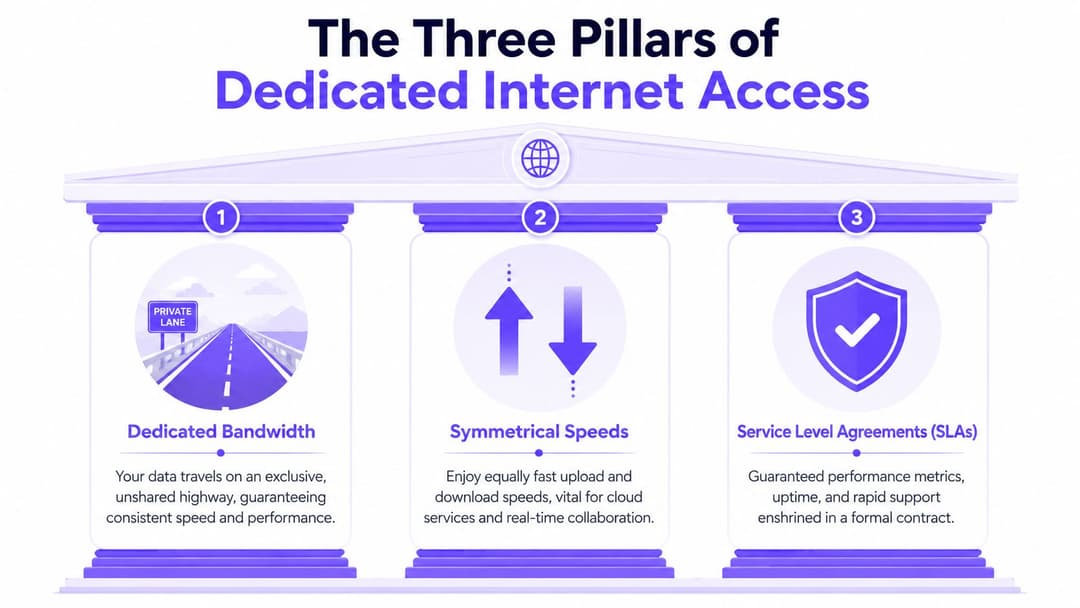
ডেডিকেটেড ইন্টারনেট অ্যাক্সেসের তিনটি স্তম্ভ
ডেডিকেটেড ইন্টারনেট অ্যাক্সেস বোঝার সবচেয়ে সহজ উপায় হলো রাস্তার সাথে তুলনা করা।
শেয়ার্ড ব্রডব্যান্ড হলো ব্যস্ত সময়ে পাবলিক রাস্তা ব্যবহার করার মতো। রাস্তা যখন শান্ত থাকে তখন আপনি দ্রুত গাড়ি চালাতে পারেন, তবে আপনার যাত্রা নির্ভর করে সেই রুটে অন্য কতজন মানুষ রয়েছে তার ওপর। ডেডিকেটেড ইন্টারনেট অ্যাক্সেস একটি সংরক্ষিত লেন থাকার মতো। আপনার ট্রাফিক এখনও সাধারণ নেটওয়ার্কের মাধ্যমেই চলাচল করে, তবে আপনার অ্যাক্সেস সার্কিটটি শেষ মাইলে প্রতিবেশীদের দ্বারা বাধাগ্রস্ত হয় না।
অখণ্ড ব্যান্ডউইথ
uncontended bandwidth-এর সাথে, আপনার কেনা ব্যান্ডউইথ শুধুমাত্র আপনার সার্ভিসের জন্যই সংরক্ষিত থাকে। এটি গুরুত্বপূর্ণ কারণ "ধীরগতির ইন্টারনেট"-এর জন্য দায়ী করা অনেক ব্যবসায়িক সমস্যা আসলে কনজেশন বা জ্যামের সমস্যা। একটি শেয়ার্ড লাইন ইমেল এবং ব্রাউজিংয়ের জন্য ঠিকঠাক মনে হতে পারে, কিন্তু একটি সাইট যখন একই সাথে ভয়েস, ক্লাউড ব্যাকআপ, পেমেন্ট ট্রাফিক, CCTV ফিড এবং গেস্ট অ্যাক্সেস পরিচালনা করা শুরু করে, তখনই এটি থমকে যেতে পারে।
UK-তে, Ofcom-এর রিপোর্টে দেখা গেছে যে ২০২৪ সালের মার্চ মাসে মিডিয়ান ফিক্সড-লাইন ব্রডব্যান্ড ডাউনলোড স্পিড ৬৯.৪ Mbit/s-এ পৌঁছেছে, তবে অ্যাক্সেস প্রযুক্তি এবং অবস্থানের ভিত্তিতে কার্যক্ষমতা উল্লেখযোগ্যভাবে পরিবর্তিত হয়। ডেডিকেটেড ইন্টারনেট অ্যাক্সেস প্রযুক্তিগতভাবে আলাদা কারণ এটি একটি অবিরত, প্রতিসম সার্কিট সংরক্ষণ করে, যা VoIP এবং পেমেন্ট সিস্টেমের মতো লেটেন্সি-সংবেদনশীল কাজের জন্য কনজেশন-জনিত জিটার এবং থ্রুপুট পরিবর্তনশীলতা হ্রাস করে (DIA বৈশিষ্ট্য এবং UK গতির প্রেক্ষাপট নিয়ে Arelion-এর আলোচনা)।
আপনি যদি একটি হসপিটালিটি ভেন্যু পরিচালনা করেন, তাহলে এর মানে হলো অতিথি স্ট্রিমিং ট্রাফিকের কারণে কার্ড লেনদেন বা ক্লাউড টেলিফোনিতে খুব কমই বাধা পড়বে। আপনি যদি কোনো স্বাস্থ্যসেবা সাইট পরিচালনা করেন, তবে এর অর্থ হলো কর্মীদের অ্যাক্টিভিটি হঠাৎ বেড়ে গেলেও সংযোগটি আরও অনুমানযোগ্য আচরণ করবে।
প্রতিসম গতি
অধিকাংশ ব্রডব্যান্ড প্রোডাক্টই অপ্রতিসম (asymmetrical) হয়ে থাকে। ডাউনলোড স্পিড আপলোড স্পিডের চেয়ে বেশি হয় কারণ এটি বাড়ির ব্যবহারের জন্য উপযুক্ত, যেখানে মানুষ মূলত কনটেন্ট কনজিউম করে। ব্যবসার ক্ষেত্রে কাজগুলো প্রায়শই ভিন্ন হয়। তারা ক্লাউড প্ল্যাটফর্মে ফাইল আপলোড করে, ভিডিও কল পরিচালনা করে, সিস্টেম সিঙ্ক করে এবং অনবরত ডেটা পাঠায়।
এই কারণেই প্রতিসাম্য বা সিমেট্রি গুরুত্বপূর্ণ। ডেডিকেটেড ইন্টারনেট অ্যাক্সেসের ক্ষেত্রে, আপলোড এবং ডাউনলোড ক্ষমতা সমান থাকে। এটিকে উভয় দিকে একই প্রস্থ বিশিষ্ট একটি টু-লেনের রাস্তা হিসেবে বিবেচনা করুন।
এটি অনেক ক্রেতার প্রত্যাশার চেয়ে বেশি গুরুত্বপূর্ণ:
- ক্লাউড অ্যাপ্লিকেশন: কর্মীরা কেবল ডেটা পড়েন না। তারা তৈরি করেন, আপলোড করেন, সিঙ্ক করেন এবং একসঙ্গে কাজ করেন।
- ভয়েস এবং ভিডিও: আপস্ট্রিম পারফরম্যান্স দুর্বল বা অস্থির হলে কলগুলো খুব দ্রুত ব্যাহত হয়।
- অপারেশনাল প্ল্যাটফর্ম: প্রপার্টি সিস্টেম, ব্যাকআপ, সিকিউরিটি টুল এবং শেয়ার্ড ড্রাইভ সবই আপলোড ট্রাফিক তৈরি করে।
এখানে একটি সাধারণ বিভ্রান্তি হলো এই ধারণা করা যে "দ্রুত ডাউনলোড" সমৃদ্ধ একটি সাইট ভালো পরিষেবা পাচ্ছে। এটি প্রায়শই ঘটে না। আপস্ট্রিম চাহিদা বেড়ে গেলে ডাউনস্ট্রিম পারফরম্যান্স ভালো থাকা সত্ত্বেও একটি ভেন্যুকে বেশ বেগ পেতে হতে পারে।
পরিষেবা স্তরের চুক্তি
তৃতীয় স্তম্ভটি হলো সার্ভিস লেভেল এগ্রিমেন্ট, যা সাধারণত সংক্ষেপে SLA নামে পরিচিত। এটি ডেডিকেটেড ইন্টারনেট অ্যাক্সেসকে একটি কনজিউমার-স্টাইল ইউটিলিটি থেকে একটি বিজনেস সার্ভিসে রূপান্তরিত করতে সক্ষম করে।
একটি SLA সাধারণত পারফরম্যান্স এবং সাপোর্টের বিষয়ে সরবরাহকারী কী প্রতিশ্রুতি দিচ্ছে তা নির্ধারণ করে। এর মধ্যে আপটাইম, ত্রুটি প্রতিক্রিয়া, মেরামতের লক্ষ্য এবং এসক্যালেশন প্রক্রিয়া অন্তর্ভুক্ত থাকতে পারে। সঠিক শব্দচয়ন সরবরাহকারীভেদে পরিবর্তিত হতে পারে, তাই গুরুত্বপূর্ণ বিষয়টি লেবেল নয়। আসল বিষয়টি হলো চুক্তিতে কী প্রতিশ্রুতি দেওয়া হয়েছে।
বাস্তবসম্মত নিয়ম: যদি কোনো সংযোগ পেমেন্ট, টেলিফোনি, ক্লিনিকাল সিস্টেম বা আবাসিক সার্ভিসগুলোকে সচল রাখে, তবে কেবল ব্যান্ডউইথের ওপর ভিত্তি করে সেটি কিনবেন না। এটি কিনুন সাপোর্টের শর্তাবলী, ত্রুটি হ্যান্ডলিং এবং কত দ্রুত সরবরাহকারী সার্ভিস পুনরুদ্ধার করে তার ওপর ভিত্তি করে।
ক্রেতারা অনেক সময় স্পিডের ওপর বেশি মনোযোগ দেন কারণ এটি তুলনা করা সহজ। অভিজ্ঞ নেটওয়ার্ক টিমগুলো রিস্টোরেশনের প্রতিশ্রুতি, সার্ভিস ক্রেডিট এবং সাপোর্ট কি কেবল ব্যবসায়িক ঘণ্টার মধ্যে সীমাবদ্ধ নাকি সার্বক্ষণিক চালু থাকে - এই বিষয়গুলোর ওপরও সমানভাবে নজর দেয়। একটি সাধারণ ইন্টারনেট লাইন এবং সঠিকভাবে পরিচালিত একটি অপারেশনাল ডিপেন্ডেন্সির মধ্যে পার্থক্য এখানেই।
আপনার কানেক্টিভিটি নির্বাচন করা - DIA বনাম Broadband বনাম MPLS বনাম SD-WAN
বেশিরভাগ ক্রেতা "ইন্টারনেট" এবং "ইন্টারনেট নেই" এর মধ্যে বেছে নেন না। তারা আর্কিটেকচারের মধ্যে বেছে নেন।
মূল সিদ্ধান্তটি হলো প্রতিটি সাইটের জন্য কতটা নিয়ন্ত্রণ, স্থিতিস্থাপকতা এবং অনুমানযোগ্যতা প্রয়োজন এবং আপনার দল কতটা জটিলতা পরিচালনা করতে প্রস্তুত। অনেক UK ব্যবসার জন্য, সবচেয়ে কঠিন অংশটি নিছক গতি নয়। এটি হলো সাশ্রয়ী মূল্য এবং স্থিতিস্থাপকতার মধ্যে ভারসাম্য বজায় রাখা, বিশেষ করে যখন একটি সুপরিকল্পিত ফেইলওভার সেটআপ কিছু সাইটের জন্য যথেষ্ট হলেও অন্যদের জন্য নাও হতে পারে (UK কানেক্টিভিটির সাশ্রয়ী মূল্য এবং স্থিতিস্থাপকতা বিষয়ক আলোচনা)।
কানেক্টিভিটি বিকল্পগুলির তুলনা
| মানদণ্ড | Dedicated Internet Access (DIA) | Business Broadband | MPLS | SD-WAN |
|---|---|---|---|---|
| পারফরম্যান্স এবং নির্ভরযোগ্যতা | পূর্বাভাসযোগ্য এবং চুক্তি-দ্বারা সমর্থিত। যেখানে বিভ্রাট বা ট্রাফিক জ্যাম ব্যবসার সরাসরি ক্ষতি করতে পারে, তার জন্য সেরা। | পরিবর্তনশীল। হালকা ব্যবহারের জন্য ঠিক আছে, তবে ব্যস্ত সময়ে পারফরম্যান্স কমে যেতে পারে। | সাইটগুলোর মধ্যে প্রাইভেট WAN ট্রাফিকের জন্য অত্যন্ত সামঞ্জস্যপূর্ণ। | নিহিত সার্কিটের গুণমানের উপর নির্ভর করে। পাথ সিলেকশন এবং ফেইলওভারের মাধ্যমে পারফরম্যান্স উন্নত করতে পারে। |
| নিরাপত্তা মডেল | বিজনেস ফায়ারওয়াল এবং পলিসি কন্ট্রোলের সাথে যুক্ত করা হলে নিরাপদ ইন্টারনেট অ্যাক্সেসের জন্য শক্তিশালী ভিত্তি। | ডিজাইনগতভাবে ইন্টারনেটের মুখোমুখি এবং কম নিয়ন্ত্রিত। | প্রাইভেট নেটওয়ার্কিং মডেল, প্রায়শই কঠোরভাবে নিয়ন্ত্রিত সাইট-টু-সাইট ট্রাফিকের জন্য নির্বাচিত হয়। | পলিসি-চালিত ওভারলে। সেগমেন্টেশন এবং ট্রাফিক স্টিয়ারিংয়ের জন্য দরকারী, তবে এটি নিজে কোনো সার্কিট নয়। |
| খরচের প্রোফাইল | সাধারণত একটি প্রিমিয়াম পরিষেবা কারণ আপনি ডেডিকেটেড ক্যাপাসিটি এবং SLA শর্তাবলীর জন্য অর্থ প্রদান করছেন। | কম প্রাথমিক খরচ। প্রায়শই বাজেট ফ্রেন্ডলি বিকল্প। | প্রায়শই ব্যয়বহুল এবং কম নমনীয়, বিশেষ করে ইন্টারনেট-ফার্স্ট পরিবেশের জন্য। | খরচ পরিবর্তিত হয়। মিশ্র আন্ডারলে লিঙ্কগুলো আরও বুদ্ধিমত্তার সাথে ব্যবহার করে সাধারণত খরচ সাশ্রয় করা যায়। |
| সবচেয়ে উপযুক্ত | প্রধান কার্যালয়, হাসপাতাল, হোটেল, পেমেন্ট-নির্ভর রিটেল, ঘনবসতিপূর্ণ ভেন্যু, গুরুত্বপূর্ণ অপারেশনাল সাইট। | ছোট শাখা, ব্যাকআপ লিঙ্ক, কম-গুরুত্বপূর্ণ অবস্থান। | লিগ্যাসি প্রাইভেট WAN, নিয়ন্ত্রিত পরিবেশ, নিয়ন্ত্রিত সাইট-টু-সাইট ট্রাফিক। | বহু-সাইট বিশিষ্ট প্রতিষ্ঠান যারা কেন্দ্রীয় পলিসি, স্মার্ট ফেইলওভার এবং ট্রান্সপোর্ট নমনীয়তা চায়। |
যেখানে ক্রেতারা আটকে যান
অনেক প্রতিষ্ঠান DIA-এর সাথে MPLS-এর তুলনা এমনভাবে করে যেন তারা একই সমস্যার সমাধান করছে। আসলে তা নয়। MPLS হলো সাইটগুলোর মধ্যে প্রাইভেট কানেক্টিভিটি। আর Dedicated internet access হলো কোনো নির্দিষ্ট সাইটে প্রিমিয়াম ইন্টারনেট অ্যাক্সেস প্রদান করা। ডিজাইনের ওপর নির্ভর করে আপনি একটি, অন্যটি, উভয়ই অথবা কোনোটিই ব্যবহার না করতে পারেন।
SD-WAN আবার একটি সম্পূর্ণ ভিন্ন লেয়ার তৈরি করে। এটি সার্কিটগুলোর উপরে অবস্থান করে এবং আপনাকে একাধিক লিঙ্ক আরও বুদ্ধিমত্তার সাথে ব্যবহার করতে সাহায্য করে। এই ওভারলে কীভাবে পাথ স্টিয়ারিং এবং ব্রাঞ্চ ডিজাইনে সাহায্য করে সে সম্পর্কে একটি ভালো প্রাথমিক ধারণার জন্য, আধুনিক নেটওয়ার্কের জন্য SD-WAN-এর সুবিধাগুলোর ওপর Purple-এর ওভারভিউ একটি দরকারী রেফারেন্স হতে পারে।
বেছে নেওয়ার একটি ব্যবহারিক উপায়
এই প্রশ্নগুলো ব্যবহার করুন:
- সাইটের রাজস্ব কি অত্যন্ত গুরুত্বপূর্ণ? উত্তর যদি হ্যাঁ হয়, তবে DIA দ্রুত শর্টলিস্টের শীর্ষে চলে আসে।
- সাইটটি কি সাময়িক কর্মক্ষমতা হ্রাস সহ্য করতে পারে? উত্তর যদি হ্যাঁ হয়, তবে ব্রডব্যান্ড এবং ফেইলওভারই যথেষ্ট হতে পারে।
- আপনার কি প্রাইভেট সাইট-টু-সাইট ট্রান্সপোর্ট প্রয়োজন? এটি MPLS বা ইন্টারনেট ভিত্তিক WAN বিকল্পের দিকে নির্দেশ করে।
- আপনি কি অনেকগুলো লোকেশনে প্রমিতকরণ করছেন? এটি প্রায়শই মিশ্র অ্যাক্সেস প্রকারের উপরে SD-WAN ব্যবহারের দিকে নির্দেশ করে।
ব্রাঞ্চ পরিবেশের জন্য, প্রতিটি জায়গায় একটি একক ব্যয়বহুল সার্কিট ব্যবহার করার চেয়ে একটি সুগঠিত ডিজাইন অনেক বেশি কার্যকর। কিছু লোকেশনের জন্য DIA যুক্তিযুক্ত কারণ সেখানে ডাউনটাইম অত্যন্ত ক্ষতিকর। অন্য লোকেশনগুলোর জন্য ব্রডব্যান্ডের সাথে ওয়্যারলেস ব্যাকআপ রাখা বেশি সুবিধাজনক। আপনি যদি ব্যান্ডউইথের চেয়ে ধারাবাহিকতার কথা চিন্তা করেন, তবে কীভাবে প্রাইভেট কানেক্টিভিটি ইন্ডিয়ানায় ব্যবসার আপটাইম সর্বোচ্চ করতে পারে সে সম্পর্কিত এই নির্দেশিকাটি আরও ব্যাপক ডিজাইনের মানসিকতা বোঝার জন্য একটি সহায়ক উদাহরণ।
"সবচেয়ে দ্রুতগামী লাইন কোনটি?" তা জিজ্ঞাসা করবেন না। জিজ্ঞাসা করুন, "ব্যবসার ক্ষতি না করে এই সাইটটি কোন ধরনের ব্যর্থতা সামলে নিতে পারে?"
এই প্রশ্নটি সাধারণত যেকোনো স্পিড টেস্টের চেয়ে ভালো উত্তরের দিকে নিয়ে যায়।
DIA-এর মূল্য নির্ধারণ - ব্যান্ডউইথ এবং চুক্তি ডিকোড করা
একটি হোটেল গ্রুপ একটি ফ্ল্যাগশিপ সাইটের জন্য DIA অনুমোদন করে। তারপর যখন কোটেশন আসে, তখন দেখা যায় মাসিক চার্জটি গল্পের একটি অংশ মাত্র। একজন প্রোভাইডার ধরে নেয় যে রাস্তায় ইতিমধ্যেই অতিরিক্ত ফাইবার রয়েছে। অন্যজন নতুন সিভিল ওয়ার্ক অন্তর্ভুক্ত করে। তৃতীয় একজন একই ব্যান্ডউইথ অফার করে কিন্তু মেরামতের প্রতিশ্রুতি একেবারেই আলাদা দেয়। কাগজে-কলমে, তিনটিকে কাছাকাছি মনে হতে পারে। বাস্তবে, তারা আপনাকে বিভিন্ন স্তরের নিশ্চয়তা দিচ্ছে।
এই কারণেই DIA কেনা ব্রডব্যান্ড অর্ডার করার চেয়ে একটি ব্যবসা-গুরুত্বপূর্ণ সাইটের জন্য একটি ইউটিলিটি সংযোগ চালু করার মতো মনে হয়। আপনি সক্ষমতার জন্য অর্থ প্রদান করছেন, হ্যাঁ, তবে সেই সক্ষমতা কীভাবে সরবরাহ করা হচ্ছে, কীভাবে সাপোর্ট দেওয়া হচ্ছে এবং চুক্তির মাধ্যমে কীভাবে সুরক্ষিত করা হচ্ছে তার জন্যও অর্থ দিচ্ছেন।
যা দামকে প্রভাবিত করে
সাধারণত পাঁচটি বিষয় উদ্ধৃতিটিকে প্রভাবিত করে:
- নির্বাচিত ব্যান্ডউইথ: উচ্চতর প্রতিশ্রুতিবদ্ধ ক্ষমতা সাধারণত পুনরাবৃত্তিমূলক চার্জ বাড়িয়ে দেয়।
- সাইটের অবস্থান: নেটওয়ার্ক সম্প্রসারণের প্রয়োজন আছে এমন বিল্ডিংয়ের চেয়ে বিদ্যমান ফাইবারের কাছাকাছি কোনো বিল্ডিংয়ে সংযোগ দেওয়া সহজ।
- ইন্সটলেশনের জটিলতা: বাড়িওয়ালার অনুমোদন, রাস্তা পারাপার, অভ্যন্তরীণ ক্যাবলিং রুট এবং হ্যান্ডঅফ প্রয়োজনীয়তা সবই খরচ এবং সময় বাড়িয়ে দিতে পারে।
- মেয়াদের দৈর্ঘ্য: এক বছরের মেয়াদ এবং তিন বছরের মেয়াদ সম্পূর্ণ ভিন্ন ধরণের ব্যবসায়িক সুবিধা তৈরি করতে পারে।
- SLA স্তর: দ্রুত মেরামতের লক্ষ্যমাত্রা এবং কঠোর পরিষেবার প্রতিশ্রুতি সাধারণত প্রিমিয়াম মূল্যে আসে।
একটি DIA কোটেশন পড়ার সবচেয়ে সহজ উপায় হলো এটিকে দুটি ভাগে ভাগ করা। প্রথম ভাগটি হলো মাসিক পরিষেবা। দ্বিতীয়টি হলো প্রথম ধাপে আপনার বিল্ডিংয়ে পরিষেবাটি আনার খরচ এবং ঝুঁকি।
এই দ্বিতীয় ক্ষেত্রটিতেই ক্রেতারা প্রায়শই বিভ্রান্ত হন। একটি গ্রামীণ কেয়ার হোম, একটি হেরিটেজ ভবনে অবস্থিত শহরের হোটেল এবং একটি মাল্টি-ডওয়েলিং আবাসিক সাইট - সবাই একই ব্যান্ডউইথের জন্য অনুরোধ করতে পারে এবং সম্পূর্ণ ভিন্ন ইনস্টলেশন প্রস্তাব পেতে পারে। আসল প্রশ্নটি কেবল "প্রতি মাসে কত খরচ?" তা নয়। বরং "এই সেবাদাতা ডেলিভারি সম্পর্কে কী ধরনের অনুমান করছেন?"
গাইডের পূর্ববর্তী অংশে, আমরা আলোচনা করেছি কীভাবে আরও বিস্তৃত ফাইবার রোলআউট DIA-কে আরও বেশি জায়গায় কার্যকর করে তুলেছে। প্রকিউরমেন্টের জন্য, বিষয়টি অত্যন্ত সহজ। আরও বেশি ভবন এখন ডেডিকেটেড অ্যাক্সেসের অনুরোধ করতে পারে, তবে লোকাল নির্মাণ পরিস্থিতি এখনও নির্ধারণ করে যে কোটেশনটি সাধারণ হবে নাকি ব্যয়বহুল।
অনুমান ছাড়াই ব্যান্ডউইথ পরিকল্পনা
খুব কম DIA কেনা একটি ব্যস্ত লোডিং বে-তে একটি সরু সার্ভিস রোড তৈরি করার মতো। ট্রাফিক এখনও আসে, কিন্তু সবচেয়ে খারাপ মুহূর্তগুলোতে সারিবদ্ধ লাইনের সৃষ্টি হয়। খুব বেশি কেনা অপচয় হতে পারে যদি সাইটটি কখনই এটি ব্যবহার না করে।
হেডলাইন স্পিড নয়, ব্যবসায়ের আচরণের সাথে শুরু করুন।
একটি ব্যবহারিক প্রক্রিয়া এইরকম দেখায়:
- অবশ্যই কাজ করতে হবে এমন অ্যাপ্লিকেশনগুলির তালিকা তৈরি করুন: কার্ড পেমেন্ট, ভয়েস, EHR অ্যাক্সেস, PMS সিস্টেম, CCTV, ক্লাউড অ্যাপস, স্টাফ VPN, গেস্ট WiFi পোর্টাল, ব্যাকআপ।
- সর্বোচ্চ ব্যবহারের সময় চিহ্নিত করুন: হোটেল চেক-ইন সময়, ক্লিনিক খোলার সময়, স্কুলে নামিয়ে দেওয়ার সময়, সন্ধ্যায় আবাসিকদের স্ট্রিমিং, ইভেন্টের দিন, মরসুমী চাপ।
- সুরক্ষিত ট্রাফিককে ঐচ্ছিক ট্রাফিক থেকে আলাদা করুন: ক্লিনিকাল সিস্টেম এবং পেমেন্ট ফ্লো যেন গেস্ট ভিডিও ট্রাফিক বা ব্যাকগ্রাউন্ডের বড় আপডেটের সাথে প্রতিযোগিতায় না পড়ে।
- নিকট-মেয়াদী বৃদ্ধির সুযোগ রাখুন: নতুন AP, আরও বেশি IoT ডিভাইস, ক্লাউড মাইগ্রেশন এবং আরও সমৃদ্ধ গেস্ট অভিজ্ঞতা চুক্তির মেয়াদ শেষ হওয়ার আগেই চাহিদাতে পরিবর্তন আনতে পারে।
শিল্পের প্রেক্ষাপটের গুরুত্ব স্পষ্ট। একটি হসপিটালিটি সাইটে Purple-এর মতো প্ল্যাটফর্মগুলোতে হাই-ডেন্সিটি WiFi সমর্থন করার পাশাপাশি গেস্ট অনবোর্ডিং এবং পেমেন্ট ট্রাফিক সুরক্ষিত করার প্রয়োজন হতে পারে। একটি হেলথকেয়ার সাইট ক্লিনিকাল সিস্টেম এবং ভয়েসের স্থিতিশীল অ্যাক্সেসের বিষয়ে বেশি গুরুত্ব দিতে পারে। একটি আবাসিক অপারেটর সন্ধ্যার দিকে সবচেয়ে বেশি ব্যস্ততা দেখতে পারে, যখন একসাথে শত শত ব্যবহারকারী সক্রিয় থাকেন। একই ২০০ Mbps পরিষেবা একটি পরিবেশে অনেক বেশি মনে হতে পারে এবং অন্য পরিবেশে অপর্যাপ্ত মনে হতে পারে।
এখানে প্রতিসাম্য বা সিমেট্রিও গুরুত্বপূর্ণ। DIA সাধারণত আপনাকে সমান আপলোড এবং ডাউনলোড ক্ষমতা দেয়। আপনার সাইট যদি যতটা ডেটা গ্রহণ করে ঠিক ততটাই পাঠায়, তবে এটি অত্যন্ত গুরুত্বপূর্ণ - যা ক্লাউড ব্যাকআপ, ভিডিও কল, CCTV আপলিঙ্ক এবং গেস্ট অ্যানালিটিক্সের ক্ষেত্রে খুব সাধারণ। ব্রডব্যান্ড একটি চওড়া প্রবেশদ্বার এবং একটি সংকীর্ণ প্রস্থান পথ বিশিষ্ট গুদামের মতো হতে পারে। এটি কাজ করে, যতক্ষণ না একসঙ্গে খুব বেশি সার্ভিসকে বাইরে ডেটা পাঠাতে হয়।
চুক্তির যেসব বিষয় ভালোভাবে খতিয়ে দেখতে হবে
অভিজ্ঞ ক্রেতারা DIA সংক্রান্ত কাগজপত্র ধাপে ধাপে পড়েন। অর্ডার ফর্ম দিয়ে শুরু করুন। তারপর সার্ভিস শিডিউল পড়ুন। তারপর সাপোর্ট এবং SLA শর্তাবলী পড়ুন যা ইনস্টলেশনের পরে কী ঘটবে তা নিয়ন্ত্রণ করে।
এই বিষয়গুলো সাবধানে পরীক্ষা করুন:
- ইন্সটলেশন লিড টাইম: কী অনুমান করা হয়েছে বনাম চুক্তিতে কী প্রতিশ্রুতি দেওয়া হয়েছে তা জিজ্ঞাসা করুন।
- ডিমারকেশন পয়েন্ট: বিল্ডিংয়ের ভেতরে ঠিক কোথায় প্রদানকারী দায়িত্ব হস্তান্তর করছে তা নিশ্চিত করুন।
- SLA-এর শব্দচয়ন: শুধুমাত্র বিক্রয় সারসংক্ষেপ নয়, পরিষেবার সংজ্ঞাগুলি বিশদভাবে পড়ুন।
- মেরামত প্রতিশ্রুতি: ত্রুটির প্রতিক্রিয়া, লক্ষ্যমাত্রার পুনরুদ্ধার সময় এবং যেকোনো ব্যতিক্রমী পরিস্থিতি যাচাই করুন।
- পরিকল্পিত রক্ষণাবেক্ষণ শর্তাবলী: নোটিশ পিরিয়ড, রক্ষণাবেক্ষণের সময় এবং জরুরি কাজ হিসেবে কোনটিকে গণ্য করা হবে তা নিশ্চিত করুন।
- প্রস্থান এবং নবায়ন ধারা: স্বয়ংক্রিয়-নবায়ন, নোটিশের শেষ সময় এবং সময়ের আগে চুক্তি বাতিলের চার্জের বিষয়টি প্রায়শই প্রকিউরমেন্ট টিমকে সমস্যায় ফেলে।
একটি ভাল SLA প্রযুক্তিগত বিবরণ সহ একটি বীমা পলিসির মতো কাজ করে। এটি ত্রুটি প্রতিরোধ করে না। এটি নির্ধারণ করে যে ত্রুটি ঘটলে প্রদানকারী আপনার কাছে কী ঋণী, তারা কত দ্রুত সাড়া দেয় এবং তারা লক্ষ্য মিস করলে কী ক্রেডিট বা প্রতিকার প্রযোজ্য হয়। আপনি প্রদানকারীর কাগজপত্র পর্যালোচনা করার আগে একটি সহজ-ইংরেজি রেফারেন্সের জন্য, Purple-এর সার্ভিস লেভেল এগ্রিমেন্টের উদাহরণের নির্দেশিকাটি দরকারী।
স্বাক্ষর করার আগে আরও একটি প্রশ্ন জিজ্ঞাসা করুন। "এই অর্ডারটি সময়মতো এবং উদ্ধৃত মূল্যে সরবরাহ করতে কী বাধা দিতে পারে?" একজন গুরুতর সরবরাহকারীর এটি স্পষ্টভাবে উত্তর দিতে পারা উচিত।
সবচেয়ে কম মূল্যের কোটেশনটিও সবচেয়ে ব্যয়বহুল পছন্দে পরিণত হতে পারে যদি এতে অস্পষ্ট বিল্ড অনুমান, অস্পষ্ট সাপোর্ট শর্তাবলী বা এমন কোনো চুক্তি লুকিয়ে থাকে যা সাইটের ঝুঁকি প্রোফাইলের সাথে মেলে না। এটি বিশেষ করে আতিথেয়তা, স্বাস্থ্যসেবা এবং আবাসিক প্রকল্পগুলোর ক্ষেত্রে সত্য, যেখানে ইন্টারনেটের ডাউনটাইম দ্রুত গেস্টদের অভিযোগ, কার্যক্ষমতায় বিলম্ব বা রেভিনিউ হারানোর কারণ হয়ে দাঁড়ায়।
DIA-এর মাধ্যমে একটি স্থিতিস্থাপক নেটওয়ার্ক তৈরি করা
একটি ডেডিকেটেড সার্কিট চমৎকার হতে পারে এবং তবুও এটি নিজে থেকে যথেষ্ট নাও হতে পারে।
কেবল কেটে যেতে পারে। বিদ্যুতের সমস্যা হতে পারে। প্রোভাইডারের ত্রুটি হতে পারে। অভ্যন্তরীণ সরঞ্জাম ব্যর্থ হতে পারে। সাইটটি গুরুত্বপূর্ণ হলে, স্থিতিস্থাপকতা বা রেজিলিয়েন্স তখনই শুরু হয় যখন আপনি প্রাথমিক সার্কিটকে সম্পূর্ণ কৌশল হিসেবে বিবেচনা করা বন্ধ করেন।
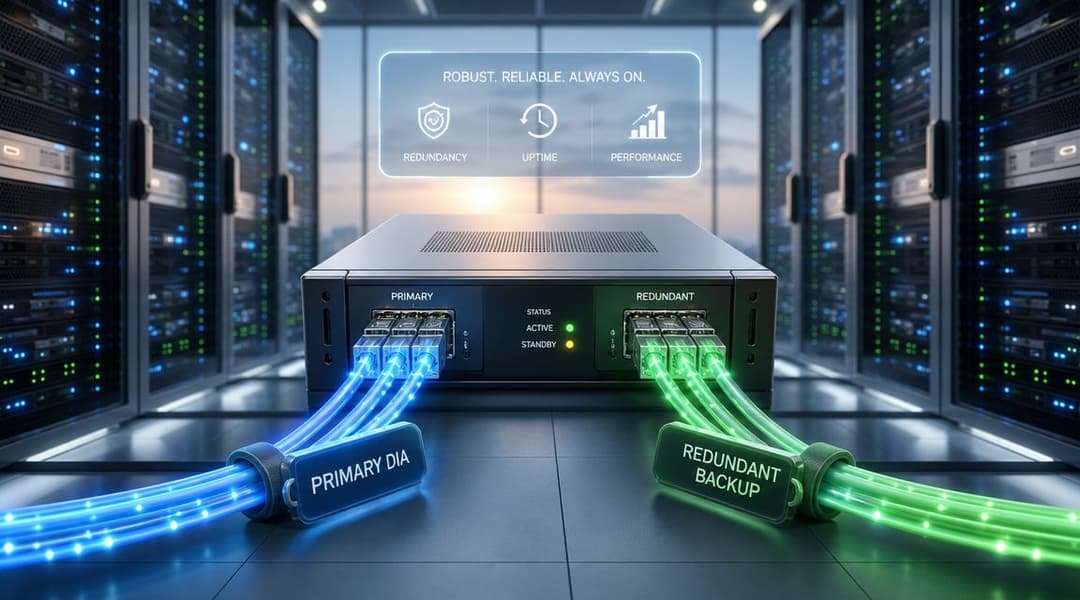
প্রাথমিক এবং ব্যাকআপ সঠিকভাবে সম্পন্ন করা
একটি সাধারণ আধুনিক ডিজাইন নীতিগতভাবে সহজ। যেসব সাইটে স্থিতিশীল, একক-ব্যবহারকারী পারফরম্যান্স প্রয়োজন সেগুলোর জন্য প্রাথমিক সংযোগ হিসেবে dedicated internet access ব্যবহার করুন। একটি সেকেন্ডারি সংযোগ যোগ করুন যা প্রাথমিক পথ ব্যর্থ হলেও প্রয়োজনীয় সার্ভিসগুলো চালু রাখতে পারে।
UK IT ম্যানেজাররা ক্রমবর্ধমানভাবে জিজ্ঞাসা করছেন যে কীভাবে DIA এই হাইব্রিড আর্কিটেকচারগুলির সাথে খাপ খায়। প্রশ্নটি কেবল DIA সর্বত্র থাকা উচিত কিনা তা নয়, বরং এটিকে গুরুত্বপূর্ণ সাইটগুলির জন্য সংরক্ষিত রাখা উচিত কিনা এবং আরও বিভক্ত কৌশলের অংশ হিসাবে অন্য কোথাও কম খরচের ব্রডব্যান্ড এবং 4G/5G ব্যাকআপের সাথে যুক্ত করা উচিত কিনা (হাইব্রিড কানেক্টিভিটি আর্কিটেকচার আলোচনা)।
এই ডিজাইনটি তখনই সবচেয়ে ভালো কাজ করে যখন ব্যাকআপ পাথটি সম্পূর্ণরূপে আলাদা থাকে। যদি উভয় পরিষেবাই একই পথ দিয়ে বিল্ডিংয়ে প্রবেশ করে এবং একই আপস্ট্রিম ত্রুটি ডোমেনের উপর নির্ভর করে, তবে আপনি হয়তো এমন একটি রিডানডেন্সির জন্য অর্থ প্রদান করছেন যা একটি সাধারণ ঘটনাতেই অদৃশ্য হয়ে যেতে পারে।
স্থিতিস্থাপকতার জন্য আসলে কী প্রয়োজন
একটি স্থিতিস্থাপক ডিজাইনে সাধারণত দুটির বেশি সার্কিট অন্তর্ভুক্ত থাকে। এর মধ্যে পলিসিও অন্তর্ভুক্ত থাকে।
এই ধরনের একটি চেকলিস্ট ব্যবহার করুন:
- ব্যবহারিক ক্ষেত্রে ভিন্ন ভিন্ন প্রদানকারী: এটি কোনো একটি ক্যারিয়ারের সমস্যার কারণে সবকিছু বন্ধ হয়ে যাওয়ার ঝুঁকি কমায়।
- সম্ভব হলে ভিন্ন ভিন্ন অ্যাক্সেস মিডিয়া: ফাইবার এবং ওয়্যারলেস ব্যাকআপ একটি সাধারণ সমাধান।
- ট্রাফিক অগ্রাধিকার: প্রথমে কোনটিকে সচল রাখতে হবে তা ঠিক করুন। পেমেন্ট, ভয়েস, ক্লিনিকাল অ্যাপস এবং ম্যানেজমেন্ট অ্যাক্সেস সাধারণত গেস্ট ট্রাফিকের চেয়ে বেশি অগ্রাধিকার পায়।
- ফায়ারওয়াল এবং রাউটিং নীতি: ফেইলওভার স্বয়ংক্রিয়, পরীক্ষিত এবং নথিবদ্ধ হতে হবে।
- কার্যকরী পরীক্ষা: পরীক্ষা করা হয়নি এমন একটি ব্যাকআপ লাইন কেবলই একটি আশাবাদী ডায়াগ্রাম মাত্র।
ভিত্তি দিয়ে নিরাপত্তা শুরু হয়
Dedicated internet access নিজে কোনো নিরাপত্তা পণ্য নয়, তবে এটি সিকিউরিটি টিমগুলোকে আরও নিয়ন্ত্রিত একটি স্টার্টিং পয়েন্ট দেয়। আপনি জানতে পারেন প্রাথমিক কানেকশন কোনটি, এটি কীভাবে হ্যান্ড অফ করা হচ্ছে এবং কী ধরণের পারফরম্যান্স আশা করা যায়। সেখান থেকে আপনি ফায়ারওয়াল, সেগমেন্টেশন, আইডেন্টিটি কন্ট্রোল এবং মনিটরিং যুক্ত করতে পারেন।
অনেক প্রতিষ্ঠানের জন্য, সঠিক মডেলটি সহজ ও স্পষ্ট। যেসব সাইটে ডাউনটাইম সবচেয়ে বেশি ক্ষতি করে সেখানে DIA স্থাপন করুন। ব্যাকআপ হিসেবে বিজনেস ব্রডব্যান্ড বা ওয়্যারলেস ব্যবহার করুন। তারপর স্পষ্ট ট্রাফিক পলিসি প্রয়োগ করুন যাতে কোনো কিছু ব্যর্থ হলে, ব্যবসাটি কেবল "অনলাইন" থাকার পরিবর্তে সচল থাকে।
আপনার শিল্প-নির্দিষ্ট সংগ্রহ চেকলিস্ট
ফাইবার কভারেজ প্রসারিত হওয়ার সাথে সাথে ডেডিকেটেড ইন্টারনেট অ্যাক্সেস আরও অনেক সংস্থার জন্য প্রাসঙ্গিক হয়ে উঠেছে। ২০২৪ সালে গিগাবিট-সক্ষম কভারেজ যুক্তরাজ্যের ৮৩% প্রাঙ্গনে পৌঁছানোর সাথে সাথে, এখন আরও বেশি ব্যবসায়িক প্রতিষ্ঠান DIA সার্কিট সংগ্রহ করতে পারে, এবং পরিষেবাটি একটি কুলুঙ্গি শহর-কেন্দ্রিক পণ্য থেকে একটি বিস্তৃত এন্টারপ্রাইজ ইউটিলিটিতে স্থানান্তরিত হয়েছে (যুক্তরাজ্যের গিগাবিট-সক্ষম কভারেজ এবং DIA বাজারের পরিবর্তন)।
সেই ব্যাপক প্রাপ্যতার মানে এই নয় যে প্রতিটি সেক্টরের একইভাবে কেনা উচিত। একটি হোটেল, একটি হাসপাতাল, একটি খুচরা বিক্রেতা এবং একটি মাল্টি-টেন্যান্ট আবাসিক অপারেটর সকলেই ডেডিকেটেড ইন্টারনেট অ্যাক্সেসের জন্য অনুরোধ করতে পারে এবং এখনও সরবরাহকারীদের কাছ থেকে খুব ভিন্ন উত্তরের প্রয়োজন হতে পারে।
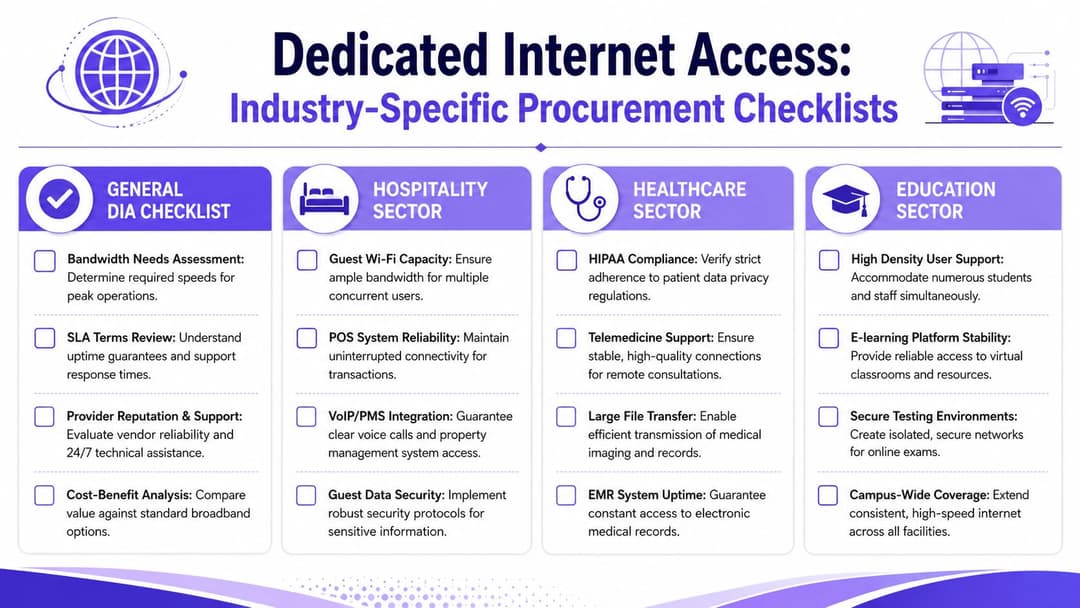
যেকোনো ক্রেতার জন্য সাধারণ প্রশ্নাবলী
মৌলিক বিষয়গুলো দিয়ে শুরু করুন:
- গুরুত্বপূর্ণ সিস্টেম: কানেকশন দুর্বল হলে কোন সিস্টেমগুলো ব্যবসাকে থমকে দেয়?
- শীর্ষ চাহিদা: গড় দিন নয়, বরং সবচেয়ে ব্যস্ততম ঘণ্টার চিত্র কেমন দেখায়?
- সহায়তা মডেল: সমস্যার দায় কার - আপনার দল, একটি ম্যানেজড প্রোভাইডার, নাকি সার্কিট সরবরাহকারী?
- হ্যান্ডওভার বিবরণ: আপনি কি এমন একটি ইথারনেট হ্যান্ডঅফ পাচ্ছেন যা আপনার ফায়ারওয়াল এবং স্যুইচিং পরিকল্পনার সাথে সামঞ্জস্যপূর্ণ?
- ব্যাকআপ ডিজাইন: প্রাথমিক সার্কিট ডাউন হয়ে গেলে কোন পরিষেবাটি প্রয়োজনীয় কাজগুলো সচল রাখবে?
যদি কোনও প্রদানকারী এগুলির পরিষ্কার উত্তর দিতে না পারে, তবে প্রস্তাবটি এখনও খুব অস্পষ্ট রয়েছে।
হসপিটালিটি চেকলিস্ট
হোটেল, বার, স্টেডিয়াম এবং ভেন্যুগুলোর সাধারণত ব্যবহারকারীর ঘনত্ব এবং অপারেশনাল ওভারওভার নিয়ে চিন্তা করতে হবে। গেস্ট ট্রাফিক এবং বিজনেস ট্রাফিক প্রায়শই একই আপস্ট্রিম ডিপেন্ডেন্সি শেয়ার করে, এমনকি যখন তারা পৃথক SSID-এ থাকে তখনও।
জিজ্ঞাসা করুন:
- গেস্ট কনকারেন্সি: ব্যস্ত রাত, সম্মেলন এবং ইভেন্টের ভিড়ের সময় ধারণক্ষমতা নির্ধারণে প্রোভাইডার আপনাকে কীভাবে সাহায্য করে?
- অপারেশনাল পৃথকীকরণ: পেমেন্ট সিস্টেম, PMS ট্রাফিক, স্টাফ অ্যাপ এবং VoIP-কে কীভাবে গেস্টদের চাহিদা থেকে সুরক্ষিত রাখা হবে?
- WiFi প্ল্যাটফর্মের সামঞ্জস্যতা: ডিজাইনটি কি পরিচয়-ভিত্তিক গেস্ট অ্যাক্সেস, রোমিং এবং বিভক্ত স্টাফ অ্যাক্সেস সমর্থন করতে পারে?
- সহায়তার সময়সীমা: সন্ধ্যা বা ছুটির দিনে কোনো ত্রুটি দেখা দিলে কে দায়িত্ব নেবে এবং কী এস্কেলেট করা হবে?
হেলথকেয়ার চেকলিস্ট
স্বাস্থ্যসেবা দলগুলোর এমন প্রশ্ন করা উচিত যা ক্লিনিকাল ঝুঁকি প্রতিফলিত করে, সাধারণ অফিসের ব্যবহার নয়।
এগুলোর ওপর ফোকাস করুন:
- অ্যাপ্লিকেশন সংবেদনশীলতা: কোন সিস্টেমগুলি স্থির লেটেন্সি বা আপস্ট্রিম পারফরম্যান্সের উপর নির্ভর করে?
- সেগমেন্টেশন সমর্থন: ক্লিনিকাল ডিভাইস, কর্মীদের অ্যাক্সেস, গেস্ট WiFi এবং অ্যাডমিন সিস্টেমগুলি কীভাবে আলাদা থাকবে?
- পরিবর্তন নিয়ন্ত্রণ: রক্ষণাবেক্ষণের সময়গুলি কীভাবে পরিচালনা করা হয় যাতে সেগুলি ক্লিনিকাল ক্রিয়াকলাপের সাথে সাংঘর্ষিক না হয়?
- ফলব্যাক অপারেশন: যদি প্রাথমিক সার্কিটটি ব্যর্থ হয়, তবে কোন পরিষেবাগুলি প্রথমে উপলব্ধ থাকবে?
স্বাস্থ্যসেবার ক্ষেত্রে, সংযোগ সম্পর্কিত ভুল প্রশ্নটি হলো - "এটি কত দ্রুত?" সঠিক প্রশ্নটি হলো - "কোনো সমস্যা দেখা দিলে তখনও কোন কাজটি চালু থাকে?"
আবাসিক এবং ছাত্রাবাস চেকলিস্ট
মাল্টি-টেন্যান্ট আবাসিক পরিবেশগুলো একটি ভিন্ন চ্যালেঞ্জ তৈরি করে। বাসিন্দারা বাড়ির মতো সহজ সরলতা আশা করেন, অন্যদিকে অপারেটরদের ন্যায্য ব্যবহার, সমর্থনযোগ্যতা এবং আইসোলেশন প্রয়োজন।
এর জন্য পরীক্ষা করুন:
- প্রতি-ইউনিট অভিজ্ঞতা: আপস্ট্রিম পরিষেবাটি কি একজন বাসিন্দা অন্যজনকে প্রভাবিত না করে ব্যস্ত সন্ধ্যার ব্যবহারকে সমর্থন করতে পারে?
- টেন্যান্ট আইসোলেশন: অ্যাপার্টমেন্ট, রুম বা ব্লকের মধ্যে কীভাবে ট্রাফিক আলাদা করা হয়?
- মুভ-ইন এবং মুভ-আউট ওয়ার্কফ্লো: কত দ্রুত অ্যাক্সেস সক্রিয়, প্রত্যাহার বা পুনরায় বরাদ্দ করা যেতে পারে?
- শেয়ার্ড স্পেস: সাম্প্রদায়িক এলাকা, কর্মীদের ক্রিয়াকলাপ, CCTV এবং বিল্ডিং সিস্টেমগুলি কি বাসিন্দাদের ট্রাফিকের সাথে প্রতিযোগিতা করবে?
খুচরা ও বিতরণকৃত এন্টারপ্রাইজ চেকলিস্ট
খুচরা বিক্রেতা এবং মাল্টি-সাইট অপারেটররা সাধারণত হেডলাইন ব্যান্ডউইথের চেয়ে সামঞ্জস্যপূর্ণ ব্রাঞ্চ অপারেশনের বিষয়ে বেশি যত্নশীল হন।
প্রদানকারীদের জিজ্ঞাসা করুন:
- লেনদেন সুরক্ষা: কার্ড সিস্টেম এবং স্টোরের কার্যক্রমকে কীভাবে অগ্রাধিকার দেওয়া হয়?
- ব্রাঞ্চ টেমপ্লেট: যুক্তিসঙ্গত ব্যতিক্রম সহ একই ডিজাইন কি অনেকগুলো সাইটে পুনরাবৃত্তি করা সম্ভব?
- ডিজিটাল নির্ভরতা: ফেইলওভারের সময় ক্লাউড ক্যাশ রেজিস্টার, সাইনেজ, টেলিফোনি এবং গেস্ট WiFi-এর কী হয়?
- স্থানীয় সহায়তা সীমাবদ্ধতা: যদি একটি সাইট ছোট হয় এবং সেখানে কোনো প্রযুক্তিগত কর্মী না থাকে, তবে কীভাবে ত্রুটি সনাক্তকরণ পরিচালনা করা হয়?
সবচেয়ে শক্তিশালী প্রকিউরমেন্ট প্রক্রিয়াটি সবচেয়ে দীর্ঘতম নয়। এটি এমন একটি প্রক্রিয়া যা কোনো জেনেরিক সার্কিট বিক্রি করার পরিবর্তে সরবরাহকারীকে আপনার বাস্তব পরিবেশ সম্পর্কে কথা বলতে বাধ্য করে।
DIA-এর মাধ্যমে আধুনিক WiFi অভিজ্ঞতা চালিত করা
একটি উচ্চমানের WiFi প্ল্যাটফর্ম কেবল তার পিছনের সংযোগের মতোই ভাল পারফর্ম করতে পারে।
এটি এমন ভেন্যুগুলোতে খুবই গুরুত্বপূর্ণ যেখানে ব্যবহারকারীরা অস্থিরতা সঙ্গে সঙ্গে বুঝতে পারেন। হোটেল, রিটেল সেন্টার, হেলথকেয়ার ক্যাম্পাস, স্টুডেন্ট অ্যাকোমোডেশন এবং বড় পাবলিক স্পেসগুলো মসৃণ অনবোর্ডিং, দ্রুত রোমিং, নির্ভরযোগ্য অ্যাপ অ্যাক্সেস এবং অতিথি ও কর্মীদের ট্রাফিকের মধ্যে স্পষ্ট পার্থক্য বজায় রাখতে একটি স্থিতিশীল আপস্ট্রিম সংযোগের উপর নির্ভর করে। WAN সংযোগ যদি অসামঞ্জস্যপূর্ণ হয়, তবে সাধারণত তারহীন বা WiFi অভিজ্ঞতার ওপরই প্রথম দোষ আসে।
কেন ইন্টারনেট আন্ডারলে এখনও গুরুত্বপূর্ণ
আধুনিক WiFi ডিজাইন এখন আর কেবল অ্যাক্সেস পয়েন্ট এবং কভারেজ ম্যাপের মধ্যে সীমাবদ্ধ নয়। এটি এখন আইডেন্টিটি, সেগমেন্টেশন এবং পলিসির বিষয়। অনবোর্ডিং এবং আইডেন্টিটি-ভিত্তিক অ্যাক্সেসের চারপাশে তৈরি প্ল্যাটফর্মগুলোর ক্লাউড সার্ভিস, অথেন্টিকেশন সিস্টেম এবং ম্যানেজমেন্ট টুলের জন্য একটি নির্ভরযোগ্য পথের প্রয়োজন হয়।
এই কারণেই ডেডিকেটেড ইন্টারনেট অ্যাক্সেস ঘনবসতিপূর্ণ বা ব্যবসা-গুরুত্বপূর্ণ পরিবেশে এত ভালোভাবে খাপ খায়। একটি সাইট যত বেশি ক্লাউড-ম্যানেজড নেটওয়ার্কিং, রিয়েল-টাইম অথেন্টিকেশন এবং স্থিতিশীল ব্যবহারকারীর অভিজ্ঞতার ওপর নির্ভর করে, একটি অনুমানযোগ্য ইন্টারনেট আন্ডারলে তত বেশি মূল্যবান হয়ে ওঠে।
যেসব টিম আরও বিস্তৃত স্ট্যাক মূল্যায়ন করছে, তাদের জন্য সিকিউর অ্যাক্সেস ম্যানেজমেন্টের জন্য enterprise WiFi solutions for secure access management সম্পর্কে Purple-এর ওভারভিউটি কীভাবে আইডেন্টিটি-ভিত্তিক ওয়্যারলেস অ্যাক্সেস ব্যবসায়িক পরিবেশে খাপ খায় সে সম্পর্কে দরকারী পটভূমি প্রদান করে।
বর্তমান নেটওয়ার্ক বিক্রেতাদের সাথে এটি যেখানে মানানসই হয়
ব্যবহারিক ক্ষেত্রে, এই ডিজাইন পদ্ধতিটি Meraki, Aruba, Ruckus, Mist, and UniFi এর মতো ভেন্ডর ইকোসিস্টেম জুড়ে সাধারণ। ওয়্যারলেস প্ল্যাটফর্ম, সুইচিং এবং ফায়ারওয়াল পরিবর্তিত হতে পারে, তবে নীতিটি একই থাকে। শক্তিশালী WiFi শক্তিশালী আপস্ট্রিম কানেক্টিভিটির উপর নির্ভর করে।
আপনি যখন কর্মী সিস্টেম, IoT এবং অপারেশনাল প্ল্যাটফর্মের পাশাপাশি গেস্ট অ্যাক্সেস পরিচালনা করছেন, তখন এটি আরও বেশি প্রযোজ্য হয়। আপনি যদি পাসওয়ার্ডহীন অনবোর্ডিং, বিভক্ত কর্মী অ্যাক্সেস, আরও নির্বিঘ্ন রিটার্ন ভিজিট বা নিয়ন্ত্রিত মাল্টি-ট্যানেন্ট অ্যাক্সেস চান, তবে সেই আর্কিটেকচারকে সচল রাখা ইন্টারনেট সংযোগটি অবহেলার বিষয় হতে পারে না। যখন বিল্ডিংটি ব্যস্ত থাকে তখনও এটির আচরণ ধারাবাহিকভাবে স্থিতিশীল হওয়া প্রয়োজন, কেবল শান্ত সকালে ইঞ্জিনিয়ারের পরীক্ষার সময়ের জন্য নয়।
আপনি যদি আপনার আপস্ট্রিম কানেক্টিভিটির পাশাপাশি গেস্ট, স্টাফ বা মাল্টি-টেন্যান্ট WiFi পর্যালোচনা করে থাকেন, তবে Purple একটি আইডেন্টিটি-ভিত্তিক নেটওয়ার্কিং প্ল্যাটফর্ম প্রদান করে যা hospitality, healthcare, retail, transport, events এবং residential পরিবেশে নিরাপদ অ্যাক্সেস পরিচালনা করতে Meraki, Aruba, Ruckus, Mist এবং UniFi-এর মতো ভেন্ডরদের সাথে কাজ করে।