
WatchGuard Firebox Integration with Purple WiFi: Setup and Configuration Guide
এই গাইডটি IT ম্যানেজার এবং নেটওয়ার্ক আর্কিটেক্টদের জন্য একটি ধাপে ধাপে ইন্টিগ্রেশন প্লেবুক যারা Purple-এর সাথে WatchGuard Firebox এবং Access Points স্থাপন করছেন। এটি Guest WiFi-এর জন্য এক্সটার্নাল Captive Portal রিডাইরেকশন, Staff WiFi-এর জন্য সুরক্ষিত 802.1X প্রমাণীকরণ (authentication), এবং ডাইনামিক VLAN স্টিয়ারিং সহ WatchGuard Private Pre-Shared Keys (PPSK) ব্যবহার করে মাল্টি-টেন্যান্ট সেগমেন্টেশন কভার করে - যা আপনাকে সমস্ত অ্যাক্সেস টিয়ার জুড়ে একটি একক, ইউনিফাইড আর্কিটেকচার প্রদান করে।
এই গাইডটি শুনুন
পডকাস্ট ট্রান্সক্রিপ্ট দেখুন
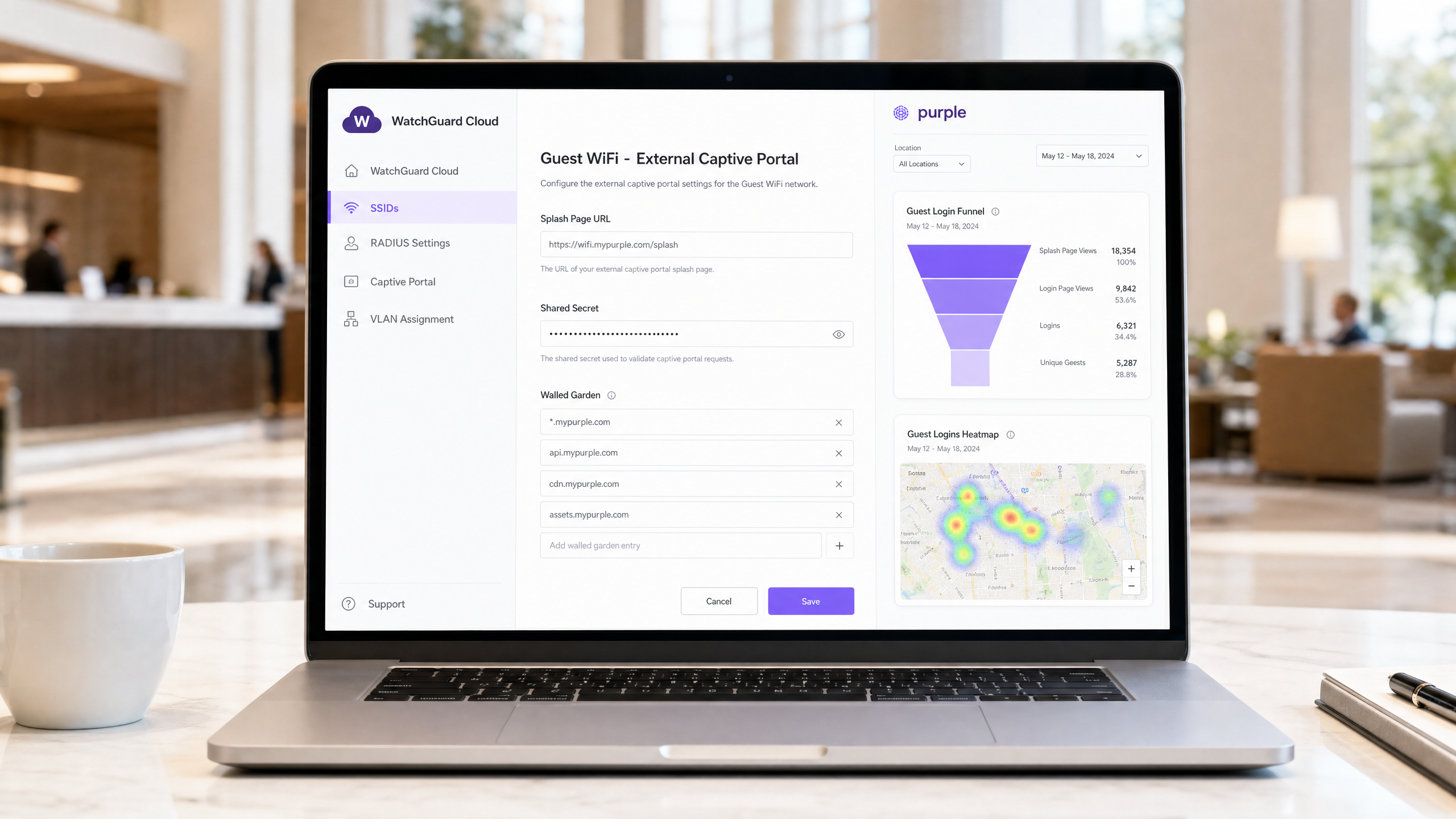
এক্সিকিউটিভ সামারি
জটিল ভেন্যু জুড়ে একটি সুরক্ষিত, স্কেলেবল ওয়্যারলেস অবকাঠামো স্থাপনের জন্য আপনার সিকিউরিটি গেটওয়ে এবং আইডেন্টিটি প্রোভাইডারের মধ্যে সুনির্দিষ্ট ইন্টিগ্রেশন প্রয়োজন। এই গাইডে Purple-এর সাথে WatchGuard Firebox এবং WatchGuard Access Points-এর ইন্টিগ্রেশনের বিস্তারিত বিবরণ দেওয়া হয়েছে, যা তিনটি ভিন্ন অ্যাক্সেস টিয়ার কভার করে: Guest WiFi Captive Portal রিডাইরেকশন, IEEE 802.1X ব্যবহার করে সুরক্ষিত Staff WiFi, এবং WatchGuard Private Pre-Shared Keys (PPSK)-এর মাধ্যমে মাল্টি-টেন্যান্ট WiFi সেগমেন্টেশন।
WatchGuard-এর ইউনিফাইড সিকিউরিটি প্ল্যাটফর্মের সাথে Purple-এর ক্লাউড ওভারলে একত্রিত করে, আপনি আইডেন্টিটি-ভিত্তিক অ্যাক্সেস কন্ট্রোল স্বয়ংক্রিয় করতে পারেন, গ্র্যানুলার সিকিউরিটি পলিসি প্রয়োগ করতে পারেন এবং স্কেলে ফার্স্ট-পার্টি ডেটা সংগ্রহ করতে পারেন। Purple ৮০,০০০+-এরও বেশি লাইভ ভেন্যু জুড়ে কাজ করে এবং ২০২৪ সালে ৪৪০ মিলিয়ন লগইন প্রসেস করেছে (Purple ইন্টারনাল ডেটা)। এই ইন্টিগ্রেশনটি ডিজাইনগতভাবে হার্ডওয়্যার-অ্যাগনস্টিক - Purple-এর সমর্থিত হার্ডওয়্যার তালিকায় Cisco Meraki, HPE Aruba, Ruckus, Juniper Mist, Ubiquiti UniFi, Cambium, Extreme এবং Fortinet-এর পাশাপাশি WatchGuard রয়েছে। এন্টারপ্রাইজ WiFi সিকিউরিটি স্ট্যান্ডার্ডের আরও বিস্তৃত ধারণার জন্য, আমাদের Enterprise WiFi Security: A Complete Guide for 2026 দেখুন।
টেকনিক্যাল আর্কিটেকচার
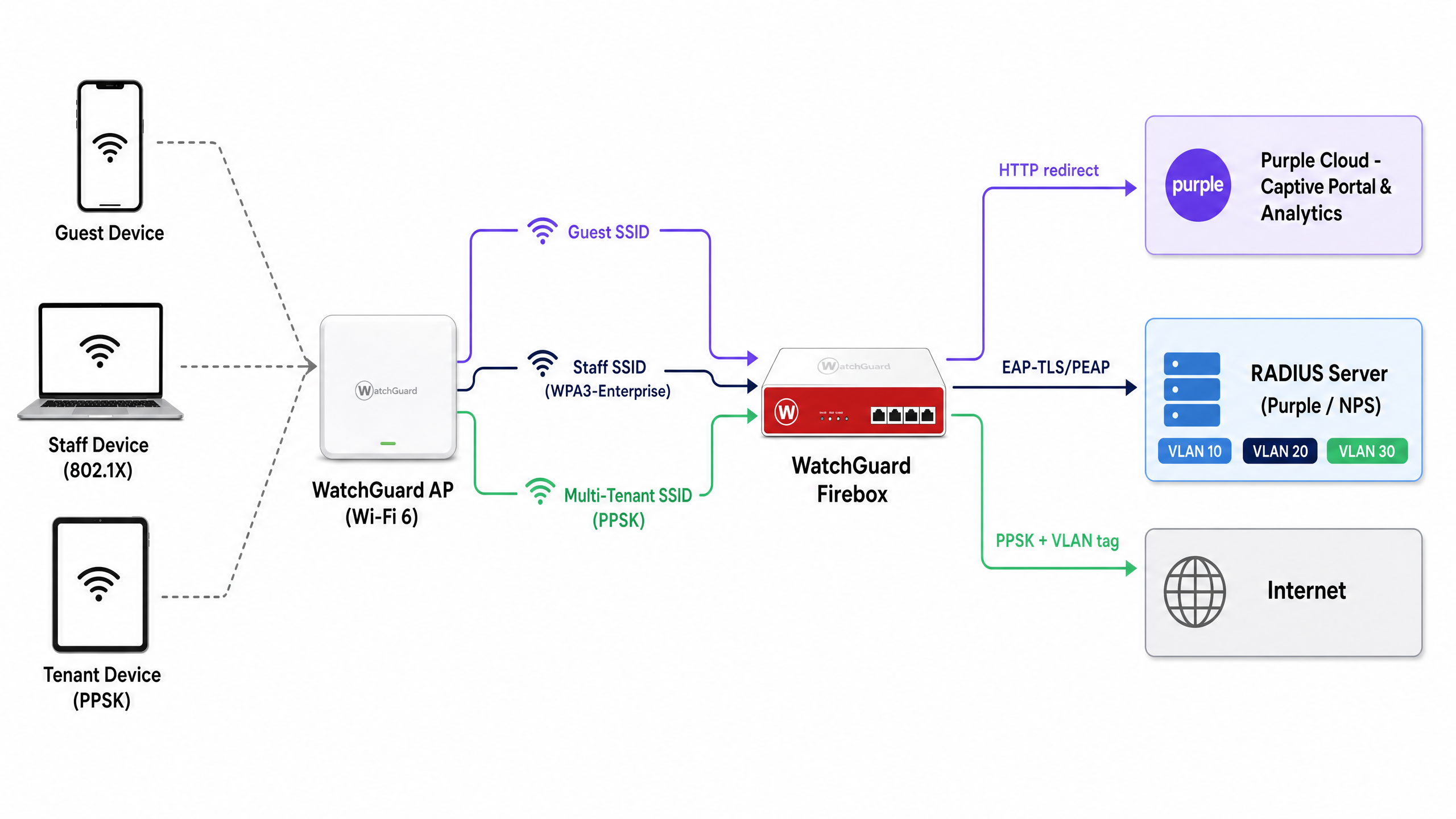
এই ইন্টিগ্রেশনটি দুটি স্ট্যান্ডার্ড মেকানিজম ব্যবহার করে WatchGuard হার্ডওয়্যারকে Purple-এর ক্লাউড সার্ভিসের সাথে সংযুক্ত করে: প্রমাণীকরণ (authentication) এবং অ্যাকাউন্টিংয়ের জন্য RADIUS (Remote Authentication Dial-In User Service), এবং Captive Portal ডেলিভারির জন্য HTTP রিডাইরেকশন। এই আর্কিটেকচারটি একটি একক ফিজিক্যাল অবকাঠামোতে তিনটি অ্যাক্সেস টিয়ার সমর্থন করে।
| অ্যাক্সেস টিয়ার | SSID টাইপ | প্রমাণীকরণ পদ্ধতি | Purple ভূমিকা |
|---|---|---|---|
| Guest WiFi | Open | এক্সটার্নাল Captive Portal + RADIUS অ্যাকাউন্টিং | স্প্ল্যাশ পেজ, ডেটা ক্যাপচার, অ্যানালিটিক্স |
| Staff WiFi | WPA3-Enterprise | 802.1X (EAP-TLS বা PEAP) | RADIUS সার্ভার, আইডেন্টিটি প্রোভাইডার প্রক্সি |
| মাল্টি-টেন্যান্ট WiFi | WPA2/WPA3 Personal + PPSK | RADIUS-এর মাধ্যমে যাচাইকৃত PPSK | কী ম্যানেজমেন্ট, ডাইনামিক VLAN অ্যাসাইনমেন্ট |
তিনটি টিয়ারই একই WatchGuard Access Point ফ্লিট জুড়ে একসাথে চলতে পারে। WatchGuard Wi-Fi 6 মডেলগুলো - AP130, AP230W, AP330, AP332CR, AP430CR এবং AP432 - ফার্মওয়্যার v2.6 থেকে পরবর্তী সংস্করণগুলোতে PPSK সমর্থন করে।
Guest WiFi Captive Portal রিডাইরেকশন কনফিগার করা
WatchGuard Captive Portal ইন্টিগ্রেশন অপ্রমাণিত HTTP অনুরোধগুলোকে Purple-এর হোস্ট করা স্প্ল্যাশ পেজে রিডাইরেক্ট করে। এটি ফার্স্ট-পার্টি ডেটা সংগ্রহ এবং পরিষেবার শর্তাবলী (terms of service) প্রয়োগ করার প্রাথমিক মেকানিজম।
ধাপ ১: RADIUS সার্ভার কনফিগারেশন
WatchGuard Cloud বা Firebox Policy Manager-এ, Purple-কে RADIUS প্রমাণীকরণ এবং অ্যাকাউন্টিং সার্ভার হিসেবে সংজ্ঞায়িত করুন।
- Primary RADIUS server: আপনার অঞ্চলের জন্য নির্ধারিত Purple RADIUS IP অ্যাড্রেস সেট করুন (এটি Purple পোর্টালে Settings > Hardware Integration-এর অধীনে পাওয়া যাবে)।
- Authentication port: 1812
- Accounting port: 1813
- Shared secret: Purple পোর্টালে দেওয়া ইউনিক সিক্রেটটি লিখুন।
- NAS ID:
%mফরম্যাট স্পেসিফায়ার ব্যবহার করে এটিকে Firebox বা AP-এর MAC অ্যাড্রেসে সেট করুন। এটি Purple-এর কাছে ভেন্যুটি সনাক্ত করে এবং সঠিক অ্যাকাউন্টে অ্যানালিটিক্স পাঠায়। - Accounting interval: নিয়মিত বিরতিতে সেশন ডেটা যাতে Purple-এর অ্যানালিটিক্স ড্যাশবোর্ডে পৌঁছায় তা নিশ্চিত করতে এটি ১০ মিনিটে সেট করুন।
ধাপ ২: SSID এবং Captive Portal সেটিংস
WatchGuard Cloud-এ, Configure > Devices > [Your AP] > Device Configuration > SSIDs-এ যান। Guest SSID তৈরি বা এডিট করুন।
- Security: Open (কোনো প্রি-অথেনটিকেশন পাসওয়ার্ড নেই)।
- Captive portal type: Third-Party Hosted Captive Portal with RADIUS Authentication নির্বাচন করুন।
- Splash Page URL: Purple স্প্ল্যাশ পেজের URL লিখুন (যেমন,
https://wifi.mypurple.com/splash)। এটি Purple > Analyze > Portals থেকে সংগ্রহ করুন। - Shared secret: একই Purple Analyze Portals পেজ থেকে পোর্টাল শেয়ার্ড সিক্রেটটি লিখুন। এই সিক্রেটটি HMAC-SHA1 ডাইজেস্ট তৈরি করে যা WatchGuard, Purple থেকে আসা প্রমাণীকরণ সফলতার রেসপন্স যাচাই করতে ব্যবহার করে।
ধাপ ৩: Walled Garden কনফিগারেশন
Walled Garden নির্ধারণ করে যে প্রমাণীকরণ সম্পন্ন হওয়ার আগে একটি ডিভাইস কোন ডোমেনগুলো অ্যাক্সেস করতে পারবে। এটি ছাড়া, ডিভাইসটি Purple স্প্ল্যাশ পেজ লোড করতে পারবে না। Websites that users can access before login-এ নিম্নলিখিত এন্ট্রিগুলো যোগ করুন:
*.mypurple.comapi.mypurple.comcdn.mypurple.comassets.mypurple.com
আপনি যদি Microsoft Entra ID, Okta, বা Google Workspace-এর মাধ্যমে সোশ্যাল বা ফেডারেটেড লগইন সক্ষম করেন, তবে প্রাসঙ্গিক আইডেন্টিটি প্রোভাইডার ডোমেনগুলো যোগ করুন (যেমন, login.microsoftonline.com, accounts.google.com)। শেয়ার্ড WiFi অবকাঠামোর আইনি এবং কমপ্লায়েন্স সংক্রান্ত বিষয়ের জন্য, আমাদের Legal and Compliance Requirements for Shared WiFi Infrastructure গাইডটি দেখুন।
কীভাবে HMAC প্রমাণীকরণ ফ্লো কাজ করে
এই ফ্লোটি বুঝতে পারলে আপনি দ্রুত ত্রুটিগুলো নির্ণয় (diagnose) করতে পারবেন।
- গেস্ট ডিভাইসটি ওপেন SSID-এর সাথে সংযুক্ত হয় এবং একটি HTTP অনুরোধ করে।
- WatchGuard AP অনুরোধটি ইন্টারসেপ্ট করে এবং ব্রাউজারটিকে Purple স্প্ল্যাশ পেজ URL-এ রিডাইরেক্ট করে, সাথে একটি
challengeপ্যারামিটার (একটি র্যান্ডম হেক্স স্ট্রিং) এবং ডিভাইসের MAC অ্যাড্রেস যুক্ত করে। - Purple স্প্ল্যাশ পেজটি প্রদর্শন করে। গেস্ট লগইন ফর্মটি পূরণ করে।
- Purple পোর্টাল শেয়ার্ড সিক্রেট এবং চ্যালেঞ্জ ভ্যালু ব্যবহার করে একটি HMAC-SHA1 ডাইজেস্ট তৈরি করে।
- Purple চ্যালেঞ্জ এবং ডাইজেস্ট যুক্ত করে ব্রাউজারটিকে আবার WatchGuard AP-এর লগইন URL-এ রিডাইরেক্ট করে।
- WatchGuard AP একই শেয়ার্ড সিক্রেট ব্যবহার করে ডাইজেস্টটি যাচাই করে। যদি এটি মিলে যায়, তবে AP ইন্টারনেট অ্যাক্সেস মঞ্জুর করে এবং Purple-এ একটি RADIUS Accounting Start প্যাকেট পাঠায়।
802.1X সহ সুরক্ষিত Staff WiFi
Staff WiFi-এর জন্য, আপনি Captive Portal-টিকে IEEE 802.1X দিয়ে প্রতিস্থাপন করবেন - যা পোর্ট-ভিত্তিক নেটওয়ার্ক অ্যাক্সেস নিয়ন্ত্রণের জন্য এন্টারপ্রাইজ স্ট্যান্ডার্ড। প্রত্যেক স্টাফ মেম্বার ইউনিক ক্রেডেনশিয়াল বা সার্টিফিকেটের মাধ্যমে প্রমাণীকরণ করেন, যাশেয়ার্ড-পাসওয়ার্ডের ঝুঁকি দূর করে।
In WatchGuard Cloud, configure the Staff SSID with WPA3 Enterprise security and point the Authentication Domain to Purple's RADIUS server. Purple acts as the RADIUS server and can proxy authentication requests to Microsoft Entra ID, Okta, or Google Workspace via SAML or LDAP.
For certificate-based authentication (EAP-TLS), deploy client certificates via your MDM to managed devices. For credential-based authentication (PEAP-MSCHAPv2), users authenticate with their directory credentials. Purple validates the request against the configured identity provider and returns a RADIUS Access-Accept or Access-Reject to the WatchGuard AP.
For a detailed walkthrough of 802.1X configuration across device types, see our guide on 802.1X authentication: securing network access on modern devices .
Important note on MAC randomisation: Modern iOS and Android devices randomise their MAC addresses by default. For 802.1X Staff WiFi, instruct staff to disable MAC randomisation for the Staff SSID. Randomised MACs cause inconsistent authentication logs and break MAC-based policy enforcement.
WatchGuard PPSK-এর সাথে Multi-Tenant WiFi
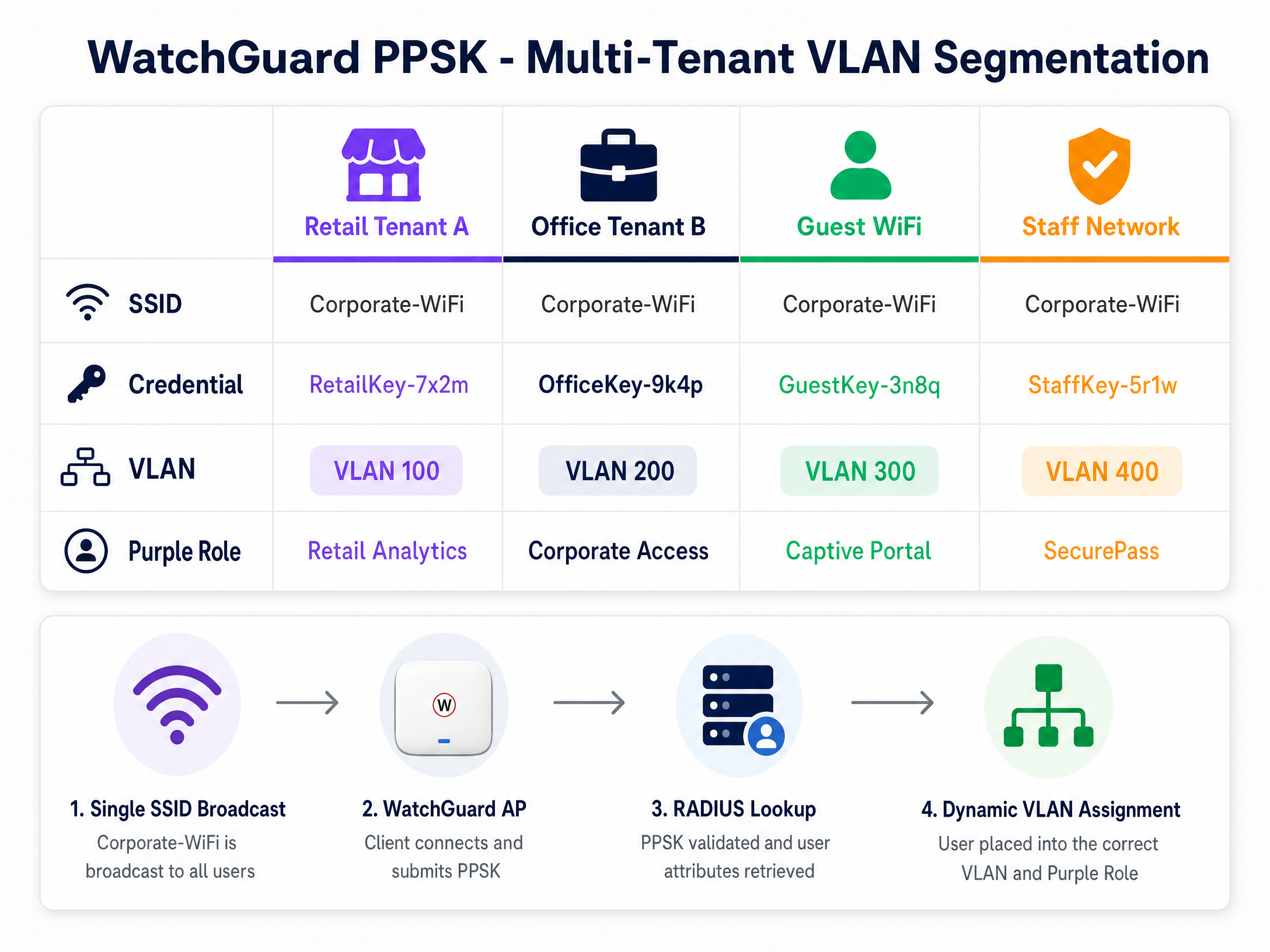
Broadcasting a separate SSID per tenant in a retail centre, coworking space, or Build-to-Rent (BTR) development causes co-channel interference and clutters the RF environment. WatchGuard PPSK (Private Pre-Shared Key) - introduced in AP firmware v2.6 - solves this by assigning a unique password to each user or tenant on a single SSID.
Step 1: SSID-তে PPSK সক্ষম করুন
In WatchGuard Cloud, edit the target SSID (e.g., Venue-WiFi).
- Security: WPA2 Personal বা WPA3 Personal।
- Authentication: Private Pre-Shared Key (PPSK) সক্ষম করুন।
- RADIUS server: Purple-এর RADIUS সার্ভারে পয়েন্ট করুন। Purple PPSK ক্রিডেনশিয়াল স্টোর পরিচালনা করে এবং অথেন্টিকেশনের সময় VLAN অ্যাট্রিবিউট ফেরত পাঠায়।
Step 2: Dynamic VLAN অ্যাসাইনমেন্ট কনফিগার করুন
To isolate tenant traffic, the WatchGuard AP assigns a specific VLAN based on the PPSK used.
- VLAN setting: Dynamic VLAN assigned by RADIUS নির্বাচন করুন।
- Unassigned clients fallback: একটি আইসোলেটেড কোয়ারেন্টাইন VLAN (যেমন, VLAN 999) নির্বাচন করুন যাতে RADIUS ভ্যালিডেশনে ব্যর্থ ডিভাইসগুলো কর্পোরেট নেটওয়ার্কে অ্যাক্সেস করতে না পারে।
Requirements for Dynamic VLANs on WatchGuard Access Points:
- AP firmware v2.2 or higher.
- NAT must be disabled on the SSID.
- Dynamic VLANs and Captive Portal cannot run on the same SSID simultaneously.
- The switch port connected to the AP must be configured as a trunk port carrying all relevant VLANs.
Step 3: VLAN স্টিয়ারিংয়ের জন্য RADIUS অ্যাট্রিবিউট
When a user connects using a PPSK, the WatchGuard AP sends a RADIUS Access-Request to Purple. Purple validates the key and returns an Access-Accept packet containing three IETF RADIUS attributes:
| RADIUS Attribute | Attribute Number | Value |
|---|---|---|
| Tunnel-Type | 64 | 13 (VLAN) |
| Tunnel-Medium-Type | 65 | 6 (802) |
| Tunnel-Private-Group-ID | 81 | VLAN ID (যেমন, "100") |
The WatchGuard AP reads attribute 81 and places the client on the corresponding VLAN. In Purple, you map each PPSK credential to a specific VLAN ID and role. This is the mechanism behind Identity-Based Networks - the credential determines the network segment, not the SSID.
বাস্তবায়নের সর্বোত্তম অনুশীলনসমূহ
These recommendations apply to hospitality , retail , healthcare , and transport deployments.
Session timeouts: নির্দিষ্ট সময় পর পর পুনরায় অথেন্টিকেশন করতে বাধ্য করার জন্য Purple এবং WatchGuard উভয় ক্ষেত্রেই সেশন টাইমআউট কনফিগার করুন। এটি অ্যানালিটিক্স সঠিক রাখে এবং নিষ্ক্রিয় সেশনগুলোকে ব্যান্ডউইথ ব্যবহার করা থেকে বিরত রাখে। RADIUS Interim-Update (Acct-Interim-Interval) ৬০০ সেকেন্ড (১০ মিনিট) সেট করুন।
Firmware management: PPSK সমর্থনের জন্য WatchGuard Access Point-গুলো যেন ফার্মওয়্যার v2.6 বা তার বেশি সংস্করণে চলে তা নিশ্চিত করুন। কভারেজ গ্যাপ এড়াতে অফ-পিক সময়ে ফার্মওয়্যার আপগ্রেড শিডিউল করতে WatchGuard Cloud ব্যবহার করুন।
PCI DSS compliance: কার্ড পেমেন্ট প্রসেস করা রিটেইল পরিবেশের জন্য, PPSK ব্যবহার করে একটি ডেডিকেটেড VLAN-এ (যেমন, VLAN 200) POS ডিভাইসগুলোকে আলাদা করুন। নিশ্চিত করুন যে Guest WiFi VLAN-এর সাথে POS VLAN-এর কোনো রুট নেই। এটি PCI DSS নেটওয়ার্ক সেগমেন্টেশনের প্রয়োজনীয়তাগুলোকে সমর্থন করে।
GDPR and data collection: Purple-এর Captive Portal সচেতন-পছন্দের অপ্ট-ইন ব্যবহার করে, যা নিশ্চিত করে যে ডেটা সংগ্রহ GDPR-এর প্রয়োজনীয়তা পূরণ করে। Purple হলো ISO 27001, GDPR, CCPA এবং Cyber Essentials সার্টিফাইড। ডেটা সংগ্রহ শুরু করার আগে আপনার স্প্ল্যাশ পেজে একটি স্পষ্ট গোপনীয়তা নোটিশ এবং পরিষেবার শর্তাবলীর লিঙ্ক অন্তর্ভুক্ত করা নিশ্চিত করুন।
সমস্যা সমাধান এবং ঝুঁকি হ্রাসকরণ
Captive portal fails to load: প্রথমে Walled Garden পরীক্ষা করতে হবে। ডিভাইসটি যদি DNS রিসলভ করতে না পারে বা প্রি-অথেন্টিকেশনে Purple-এর সার্ভারে পৌঁছাতে না পারে, তবে ব্রাউজারটি স্প্ল্যাশ পেজের পরিবর্তে একটি টাইমআউট ত্রুটি দেখাবে। যাচাই করুন যে সমস্ত Purple ডোমেন Walled Garden তালিকায় রয়েছে এবং WatchGuard DNS সেটিংস প্রি-অথ রিসোলিউশনের অনুমতি দেয়।
HMAC digest validation errors: WatchGuard লগে যদি HMAC ত্রুটিসহ অথেন্টিকেশন ব্যর্থতা দেখায়, তবে Captive Portal Shared Secret-টি WatchGuard এবং Purple-এর মধ্যে মিলছে না। এটি উভয় সিস্টেমে অভিন্ন হতে হবে। Purple-এ সিক্রেটটি পুনরায় জেনারেট করুন এবং WatchGuard Cloud-এ পুনরায় প্রবেশ করান।
VLAN steering fails: কোনো PPSK ব্যবহারকারী যদি ভুল VLAN থেকে IP পান, তবে Purple পোর্টালে RADIUS লগগুলো পরীক্ষা করুন। যাচাই করুন যে Purple তিনটি IETF RADIUS অ্যাট্রিবিউটই ফেরত পাঠাচ্ছে। নিশ্চিত করুন যে Tunnel-Private-Group-ID মানটি একটি স্ট্রিং হিসেবে ফরম্যাট করা হয়েছে এবং সুইচ ট্রাঙ্ক পোর্টে কনফিগার করা একটি VLAN ID-এর সাথে মিলছে।
PPSK and Captive Portal conflict: WatchGuard একই SSID-তে Dynamic VLAN এবং Captive Portal সমর্থন করে না। আপনার যদি উভয়টিরই প্রয়োজন হয়, তবে দুটি SSID ব্যবহার করুন: একটি গেস্ট Captive Portal-এর জন্য এবং অন্যটিPPSK multi-tenant access-এর জন্য e।
802.1X অথেন্টিকেশন ব্যর্থতা: AP এবং RADIUS সার্ভারের মধ্যে ট্রাফিক ক্যাপচার করতে WatchGuard AP ফার্মওয়্যার v2.5 এবং তার উচ্চতর সংস্করণে উপলব্ধ প্যাকেট ক্যাপচার টুলটি ব্যবহার করুন। রিপ্লাই মেসেজ অ্যাট্রিবিউটে RADIUS Access-Reject প্যাকেট এবং কারণের কোডটি (reason code) খুঁজুন।
ROI এবং ব্যবসায়িক প্রভাব
WatchGuard এবং Purple ইন্টিগ্রেশন একটি একক আর্কিটেকচারের মধ্যে নিরাপত্তা এবং অ্যানালিটিক্সকে একত্রিত করে। এই ইন্টিগ্রেশনটি ব্যবহার করে একটি ২০০-রুমের হোটেল পৃথক গেস্ট এবং স্টাফ গেটওয়ের প্রয়োজনীয়তা দূর করে, যা একটি মাল্টি-গেটওয়ে স্থাপনের তুলনায় হার্ডওয়্যার খরচ প্রায় ৩০% হ্রাস করে (Purple-এর অভ্যন্তরীণ ডেটা)। গেস্ট WiFi Captive Portal ফার্স্ট-পার্টি ডেটা সংগ্রহ করে - ইমেল ঠিকানা, ডেমোগ্রাফিক তথ্য এবং ভিজিটের ফ্রিকোয়েন্সি - যা Purple-এর Engage প্ল্যানের মাধ্যমে সরাসরি মার্কেটিং রাজস্ব বৃদ্ধি করে।
মাল্টি-টেন্যান্ট ভেন্যুগুলোর জন্য, PPSK একাধিক SSID পরিচালনার অপারেশনাল ওভারহেড দূর করে। একটি একক SSID-এ ১৫টি শপ ইউনিট পরিচালনা করা একটি রিটেল সেন্টার AP রেডিওর ব্যবহার হ্রাস করে এবং নেটওয়ার্ক অডিট সহজ করে। Purple-এর WiFi Analytics ভেন্যু অপারেটরদের ডওয়েল টাইম (dwell time), ফুটফল এবং বারবার ভিজিট করার ডেটা প্রদান করে - এই মেট্রিকগুলো ফাইন্যান্স টিমের কাছে অবকাঠামোগত বিনিয়োগের যৌক্তিকতা প্রমাণ করে।
Purple ৯৯.৯৯৯% আপটাইম বজায় রাখে (Purple-এর অভ্যন্তরীণ ডেটা), যা স্টেডিয়াম এবং কনফারেন্স সেন্টারের মতো উচ্চ-ঘনত্বের ভেন্যুগুলোতে পিক পিরিয়ডের সময়ও গেস্ট WiFi Captive Portal সচল থাকা নিশ্চিত করে।
মূল সংজ্ঞাসমূহ
PPSK (Private Pre-Shared Key)
A security feature that assigns a unique password to each user or device on a WPA2/WPA3 Personal SSID. Introduced in WatchGuard AP firmware v2.6.
Used in multi-tenant environments - retail centres, coworking spaces, BTR developments - to segment users without requiring 802.1X supplicant configuration on client devices.
Dynamic VLAN steering
The process of assigning a network device to a specific Virtual LAN based on RADIUS attributes (Tunnel-Type, Tunnel-Medium-Type, Tunnel-Private-Group-ID) returned during authentication.
The mechanism that isolates tenant, staff, and guest traffic on the same physical access point. Requires AP firmware v2.2 or higher on WatchGuard hardware.
Walled Garden
A list of IP addresses or domains that an unauthenticated user is permitted to access before completing captive portal authentication.
Required to allow guest devices to load the Purple splash page and complete federated logins (Microsoft Entra ID, Google Workspace) before full internet access is granted.
HMAC digest
A cryptographic hash (HMAC-SHA1) used to verify the integrity and authenticity of the authentication success message from the captive portal.
WatchGuard validates the HMAC digest using the Captive Portal Shared Secret. A mismatch between the secret in WatchGuard and Purple causes authentication failures.
RADIUS accounting
The component of the RADIUS protocol that tracks network usage, including session start, session duration, and data transfer volume.
Purple relies on RADIUS Accounting packets from the WatchGuard Firebox to populate the analytics dashboard and enforce session time limits. Operates on port 1813.
Captive portal
A web page that a device is redirected to before being granted access to a public network. WatchGuard intercepts HTTP requests and redirects to the configured external portal URL.
The primary mechanism for capturing first-party data and enforcing terms of service on Guest WiFi networks. Purple hosts the splash page and manages the data.
802.1X
An IEEE standard for port-based network access control. Requires each device to authenticate with unique credentials or a certificate before network access is granted.
The enterprise standard for securing Staff WiFi. Eliminates the shared-password risk of WPA2 Personal. Requires a RADIUS server (Purple) and a supplicant on the client device.
EAP-TLS (Extensible Authentication Protocol - Transport Layer Security)
A highly secure 802.1X authentication method requiring both a client certificate and a server certificate for mutual authentication.
Used in high-security environments where devices are managed by an MDM. Ensures only corporate-owned devices with valid certificates can connect to the Staff WiFi SSID.
NAS ID (Network Access Server Identifier)
A string sent in RADIUS packets that identifies the network device (AP or Firebox) making the authentication request.
Purple uses the NAS ID to identify which venue a RADIUS request originates from. Typically set to the AP MAC address using the %m format specifier in WatchGuard.
Identity-Based Networking
A network architecture where access policies, VLAN assignments, and security controls are determined by the user's identity rather than their physical port or SSID.
The combination of WatchGuard PPSK, Purple RADIUS, and dynamic VLAN steering delivers Identity-Based Networking - the credential determines the network segment automatically.
সমাধানকৃত উদাহরণসমূহ
A 200-room Premier Inn property needs to provide Guest WiFi for guests, secure Staff WiFi for front-of-house and back-office teams, and a separate network for IoT devices (smart TVs, door locks). They have WatchGuard AP330 access points managed via WatchGuard Cloud and a Firebox T85 gateway. How should they architect the three networks?
Deploy three SSIDs on the WatchGuard AP330 fleet. SSID 1: 'Premier-Guest' - open SSID with external captive portal redirection to Purple. Configure the Firebox T85 as the RADIUS client pointing to Purple's servers (port 1812/1813). Add Purple's Walled Garden domains. Guests authenticate via the Purple splash page using email, social login, or a room code. SSID 2: 'Premier-Staff' - WPA3-Enterprise SSID with 802.1X authentication. Point the authentication domain to Purple's RADIUS server, which proxies credentials to the property's Microsoft Entra ID tenant. Staff authenticate with their corporate credentials. SSID 3: 'Premier-IoT' - WPA2 Personal SSID with a static PSK, placed on a dedicated VLAN (e.g., VLAN 50) with firewall rules blocking access to the staff and guest VLANs. The Firebox T85 enforces inter-VLAN routing policies. All three SSIDs broadcast on the same AP hardware, reducing infrastructure cost.
A retail centre managing 12 shop units wants to provide each tenant with isolated WiFi access using a single SSID. The centre also needs to ensure that a compromised tenant credential does not expose other tenants' traffic. They are running WatchGuard AP230W access points on firmware v2.6.
Configure one SSID: 'Centre-Retail' with WPA2 Personal and PPSK enabled. In Purple, create 12 unique PPSK credentials, one per tenant. Map each credential to a dedicated VLAN (e.g., VLAN 101 for Tenant 1, VLAN 102 for Tenant 2, and so on). In WatchGuard Cloud, set the SSID VLAN to 'Dynamic VLAN assigned by RADIUS' with a fallback to a quarantine VLAN (VLAN 999). Configure the switch ports connected to the AP230W as trunk ports carrying VLANs 101-112 and 999. When a tenant device connects using their PPSK, the AP queries Purple RADIUS, receives the Tunnel-Private-Group-ID attribute, and places the device on the correct VLAN. A compromised credential for Tenant 3 only exposes VLAN 103 - all other tenants remain isolated.
অনুশীলনী প্রশ্নসমূহ
Q1. A hotel IT manager reports that guests connect to the WiFi but the Purple splash page never appears. The browser shows a connection timeout error. The WatchGuard Cloud configuration shows the correct Purple splash page URL and shared secret. What is the most likely cause and how do you resolve it?
ইঙ্গিত: Consider what must happen before the device is authenticated. What domains does the device need to reach to load the splash page?
মডেল উত্তর দেখুন
The Walled Garden is missing or incomplete. The WatchGuard Firebox is blocking the device's initial HTTP request to Purple's servers before authentication completes. Add the required Purple domains to the 'Websites that users can access before login' list: *.mypurple.com, api.mypurple.com, and cdn.mypurple.com. If guests are using social logins, also add the relevant identity provider domains (e.g., login.microsoftonline.com for Entra ID).
Q2. You are configuring PPSK-based VLAN steering for a coworking space with 8 members. RADIUS authentication succeeds (the WatchGuard logs show Access-Accept), but every member device receives an IP address from VLAN 1 (the default management VLAN) instead of their assigned tenant VLAN. How do you diagnose and resolve this?
ইঙ্গিত: Authentication succeeded, so the credential is valid. The issue is in the VLAN assignment step. What does WatchGuard need from the RADIUS server to assign a VLAN?
মডেল উত্তর দেখুন
The RADIUS Access-Accept packet from Purple is missing or incorrectly formatting the VLAN attributes. Capture the RADIUS traffic on the AP using the WatchGuard packet capture tool and inspect the Access-Accept packet. Verify that Purple is returning all three IETF attributes: Tunnel-Type (attribute 64, value 13), Tunnel-Medium-Type (attribute 65, value 6), and Tunnel-Private-Group-ID (attribute 81, set to the VLAN ID as a string, e.g. '101'). Also confirm that the switch port connected to the AP is configured as a trunk port carrying the relevant VLANs, and that the SSID VLAN setting in WatchGuard Cloud is set to 'Dynamic VLAN assigned by RADIUS' rather than a static VLAN ID.
Q3. A venue operator wants to run a Guest WiFi captive portal (Purple splash page) and a multi-tenant PPSK network for 6 retail units on the same WatchGuard AP330 access point. They plan to configure both features on a single SSID to simplify the RF environment. Is this possible? If not, what is the correct architecture?
ইঙ্গিত: Review the WatchGuard Dynamic VLAN requirements. Are there any feature conflicts?
মডেল উত্তর দেখুন
This is not possible on a single SSID. WatchGuard does not support Dynamic VLANs (required for PPSK) and Captive Portal on the same SSID simultaneously. The correct architecture uses two SSIDs: SSID 1 ('Venue-Guest') configured as an open SSID with external captive portal redirection to Purple for public guests. SSID 2 ('Venue-Retail') configured with WPA2 Personal, PPSK enabled, and Dynamic VLAN assignment for the 6 retail tenants. Both SSIDs broadcast from the same AP330 hardware, so the RF impact is limited to one additional SSID beacon. The switch port connected to the AP must be a trunk port carrying all relevant VLANs for both SSIDs.
এই সিরিজে পড়া চালিয়ে যান
CommScope Ruckus Integration with Purple WiFi: Setup and Configuration Guide
এই টেকনিক্যাল রেফারেন্স গাইডটি CommScope Ruckus আর্কিটেকচারের সাথে Purple WiFi ইন্টিগ্রেট করার জন্য একটি নির্ভরযোগ্য কনফিগারেশন প্লেবুক প্রদান করে। এটি Guest WiFi Captive Portal, 802.1X-এর মাধ্যমে Secure Staff WiFi এবং Ruckus Dynamic PSK ব্যবহার করে Multi-Tenant নেটওয়ার্ক আইসোলেশনের জন্য ধাপে ধাপে ডেপ্লয়মেন্টের বিস্তারিত বিবরণ দেয়।
Purple WiFi-এর সাথে Allied Telesis Access Points ইন্টিগ্রেশন
এই গাইডটি Purple WiFi-এর সাথে Allied Telesis TQ-Series access points ইন্টিগ্রেট করার জন্য একটি ব্যাপক কনফিগারেশন প্লেবুক প্রদান করে। এটি নিরাপদ মাল্টি-টেন্যান্ট ডেপ্লয়মেন্টের জন্য এক্সটার্নাল Captive Portal রিডাইরেকশন, 802.1X RADIUS অথেন্টিকেশন এবং প্রাইভেট প্রি-শেয়ার্ড কি (PPSK) ব্যবহার করে ডাইনামিক VLAN স্টিয়ারিং কভার করে।
Purple WiFi-এর সাথে Grandstream GWN Access Points-এর ইন্টিগ্রেশন
এই নির্ভরযোগ্য প্রযুক্তিগত রেফারেন্স গাইডটিতে Grandstream GWN access points-এর সাথে Purple-এর Guest WiFi এবং অ্যানালিটিক্স প্ল্যাটফর্ম কীভাবে ইন্টিগ্রেট করতে হয় তা বিস্তারিতভাবে আলোচনা করা হয়েছে। এতে Grandstream captive portal কনফিগারেশন, RADIUS AAA সেটিংস, walled garden সেটআপ, ডাইনামিক VLAN স্টিয়ারিং সহ সুরক্ষিত স্টাফ 802.1X অথেন্টিকেশন এবং মাল্টি-টেন্যান্ট PPSK সেগমেন্টেশন অন্তর্ভুক্ত রয়েছে - যা স্কেলে গেস্ট এবং স্টাফ WiFi স্থাপনকারী MSP এবং IT টিমগুলোর জন্য কার্যকর, ধাপে ধাপে নির্দেশিকা প্রদান করে।