
BSSID এবং চ্যানেল নির্বাচন অ্যালগরিদম বোঝা
এই প্রামাণিক প্রযুক্তিগত রেফারেন্স গাইডটি এন্টারপ্রাইজ ওয়্যারলেস স্থাপনার জন্য BSSID আর্কিটেকচার এবং ডাইনামিক চ্যানেল নির্বাচন অ্যালগরিদমকে সহজভাবে ব্যাখ্যা করে। এটি IT স্থপতি এবং ভেন্যু অপারেশন টিমের জন্য স্টিকি ক্লায়েন্টদের দূর করতে, সহ-চ্যানেল হস্তক্ষেপ প্রশমিত করতে এবং একটি স্থিতিস্থাপক RF ভিত্তি তৈরি করতে কার্যকরী বাস্তবায়ন কৌশল সরবরাহ করে। একটি স্থিতিশীল BSSID এবং চ্যানেল পরিকল্পনা Purple এর মতো প্ল্যাটফর্মের মাধ্যমে সঠিক অবস্থান বিশ্লেষণ এবং ব্যবসায়িক বুদ্ধিমত্তার জন্য একটি সরাসরি পূর্বশর্ত।
Video overview
এই গাইডটি শুনুন
পডকাস্ট ট্রান্সক্রিপ্ট দেখুন
আমাদের মূল সিরিজের অংশ: WiFi RF Engineering Guide →
BSSID & RF Channel Allocation Architect
Simulate enterprise BSSID scaling, beacon airtime consumption, co-channel interference (CCI), and dynamic channel assignment (DCA) efficiency across 2.4, 5, and 6 GHz spectrum.
RF Architecture Analysis & Roaming Recommendations
Roaming Assessment: Optimal roaming boundary. Triggers proactive 802.11k/v/r BSS transition candidate requests before voice or real-time sessions drop packets.
Set DCA interval to 4 hours or anchor on scheduled off-peak runs. Disable legacy 1/2/5.5/11 Mbps basic rates on 2.4 GHz; mandate 12 Mbps minimum on 5 GHz.
Configure ARM (Adaptive Radio Management) with multi-band ClientMatch. Enable 802.11v BSS Transition Management and suppress probes from sticky clients below -75 dBm.
Under Radio Settings, set Channel Width to 20 MHz in high-density areas, let Auto RF handle channel and power planning (include DFS channels where radar is rare), and prune SSIDs down to a maximum of 3.
Use Mist AI Radio Resource Management (RRM), which tunes channel and power from client-experience data, keep to 3 or fewer SSIDs per radio, and enable 802.11r fast BSS transition on the WLAN.
Eliminate BSSID Airtime Waste & Deploy Precise Venue Analytics
Purple integrates with your enterprise access points to turn stable RF architectures into real-time footfall intelligence, compliant captive portals, and location analytics without degrading airtime capacity.

এক্সিকিউটিভ সামারি
উচ্চ-ঘনত্বের স্টেডিয়াম থেকে শুরু করে বিশাল হাসপাতাল ক্যাম্পাস পর্যন্ত জটিল পরিবেশ পরিচালনা করার জন্য এন্টারপ্রাইজ IT লিডারদের কাছে এখন আর ওয়্যারলেস কভারেজ প্রাথমিক চ্যালেঞ্জ নয়। আধুনিক ওয়্যারলেস ডিপ্লয়মেন্টে, সমস্যাগুলো প্রধানত ঘটে রোমিং সীমানায়, যা মূলত দুর্বল BSSID ট্রানজিশন ম্যানেজমেন্ট এবং সাব-অপটিমাল চ্যানেল বরাদ্দের কারণে হয়ে থাকে।
এই টেকনিক্যাল রেফারেন্স গাইডটি বেসিক সার্ভিস সেট আইডেন্টিফায়ার (BSSID) এবং ডাইনামিক চ্যানেল সিলেকশন অ্যালগরিদমের মেকানিক্সের একটি ভেন্ডর-নিরপেক্ষ, গভীর বিশ্লেষণ প্রদান করে। ক্লায়েন্ট ডিভাইসগুলো কীভাবে BSSID ব্যাখ্যা করে এবং কীভাবে এন্টারপ্রাইজ কন্ট্রোলারগুলো RF স্পেকট্রাম পরিচালনা করে তা বোঝার মাধ্যমে, IT আর্কিটেক্টরা "স্টিকি ক্লায়েন্ট" সমস্যা দূর করতে পারেন, কো-চ্যানেল ইন্টারফেয়ারেন্স কমাতে পারেন এবং যেকোনো স্কেলের ভেন্যুতে নির্বিঘ্ন রোমিং নিশ্চিত করতে পারেন। তদ্ব্যতীত, একটি স্থিতিশীল RF ফাউন্ডেশন সরাসরি WiFi Analytics এর মাধ্যমে সঠিক লোকেশন ডেটা বের করার একটি পূর্বশর্ত, যা বিজনেস ইন্টেলিজেন্স এবং ROI-কে সরাসরি প্রভাবিত করে। আপনি একটি হোটেল চেইন, রিটেল এস্টেট, বা পাবলিক-সেক্টর সুবিধা পরিচালনা করুন না কেন, এই গাইডের নীতিগুলো সার্বজনীনভাবে প্রযোজ্য।
টেকনিক্যাল ডিপ-ডাইভ
BSSID বনাম SSID এর পার্থক্য
যখন একজন ব্যবহারকারী আপনার Guest WiFi নেটওয়ার্কের সাথে সংযোগ স্থাপন করেন, তখন তারা SSID - সার্ভিস সেট আইডেন্টিফায়ার দেখতে পান। এটি নেটওয়ার্ক দ্বারা ব্রডকাস্ট করা মানুষের পাঠযোগ্য লেবেল, যেমন "Hotel_Guest" বা "RetailWiFi"। SSID সম্পূর্ণ একটি লজিক্যাল আইডেন্টিফায়ার। প্রকৃত 802.1X বা ওয়্যারলেস অ্যাসোসিয়েশন ফিজিক্যাল লেয়ারে BSSID এর সাথে ঘটে।
BSSID (বেসিক সার্ভিস সেট আইডেন্টিফায়ার) হল সেই নির্দিষ্ট অ্যাক্সেস পয়েন্টের রেডিও ইন্টারফেসের MAC অ্যাড্রেস যা সেই SSID ব্রডকাস্ট করছে। একটি মাল্টি-AP পরিবেশে, একটি একক SSID ডজন ডজন বা শত শত ইউনিক BSSID দ্বারা ব্রডকাস্ট করা হয়। একটি ডুয়াল-রেডিও অ্যাক্সেস পয়েন্ট যা একটি SSID ব্রডকাস্ট করে তা দুটি পৃথক BSSID উপস্থাপন করবে - প্রতিটি রেডিও ব্যান্ডের জন্য একটি করে। একটি ট্রাই-রেডিও Wi-Fi 6E অ্যাক্সেস পয়েন্ট তিনটি উপস্থাপন করবে।
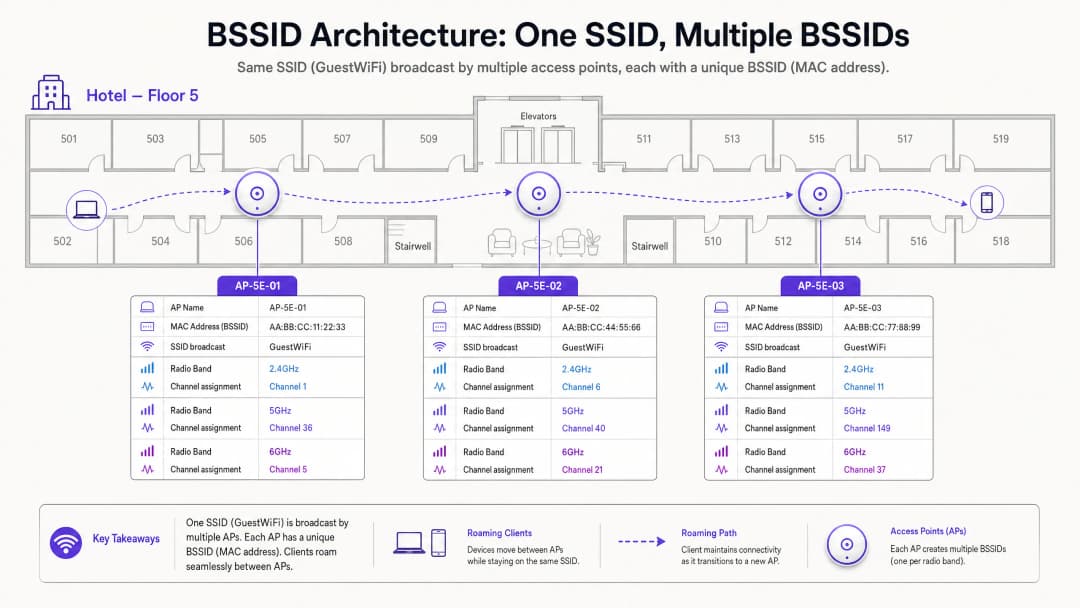
এই পার্থক্যের উল্লেখযোগ্য অপারেশনাল প্রভাব রয়েছে। আপনি যখন একটি রোমিং সংক্রান্ত অভিযোগ সমাধান করছেন, তখন আপনি SSID পরীক্ষা করছেন না - আপনি BSSID ট্রানজিশন পরীক্ষা করছেন। ক্লায়েন্ট-সাইড ডায়াগনস্টিক টুল যেমন Linux-এ wpa_cli বা macOS ওয়্যারলেস ডায়াগনস্টিকস ইউটিলিটি নির্দিষ্ট BSSID (MAC অ্যাড্রেস) প্রকাশ করবে যার সাথে একটি ডিভাইস সংযুক্ত রয়েছে, পাশাপাশি চ্যানেল এবং RSSI দেখাবে।
রোমিং মেকানিজম: প্রকৃতপক্ষে কে নিয়ন্ত্রণে আছে?
এটি এন্টারপ্রাইজ ওয়্যারলেস আর্কিটেকচারের সবচেয়ে ভুল বোঝাবুঝি দিক। 802.11 স্ট্যান্ডার্ড রোমিংয়ের সিদ্ধান্তটি সম্পূর্ণভাবে ক্লায়েন্ট ডিভাইসের উপর ছেড়ে দেয়। নেটওয়ার্ক অবকাঠামো কোনো ক্লায়েন্টকে রোমিং করতে বাধ্য করতে পারে না। এটি কেবল এমন পরিস্থিতিকে প্রভাবিত করতে পারে যা রোমিংয়ের সম্ভাবনাকে বাড়িয়ে বা কমিয়ে দেয়।
একটি ক্লায়েন্ট ডিভাইস তার বর্তমান BSSID-এর Received Signal Strength Indicator (RSSI) এবং Signal-to-Noise Ratio (SNR) পার্শ্ববর্তী BSSID-এর সাথে তুলনা করে মূল্যায়ন করে। যখন বর্তমান BSSID একটি ডিভাইস-নির্দিষ্ট থ্রেশহোল্ডের নিচে নেমে যায় - সাধারণত Apple iOS ডিভাইসের জন্য প্রায় -70 dBm এবং অনেক Android ডিভাইসের জন্য -75 dBm - তখন ক্লায়েন্টটি প্রোব রিকোয়েস্ট ব্রডকাস্ট করে একটি আরও ভাল BSSID-এর জন্য স্ক্যান শুরু করে। কাছাকাছি থাকা অ্যাক্সেস পয়েন্টগুলো প্রোব রেসপন্স দিয়ে প্রতিক্রিয়া জানায়। ক্লায়েন্ট এই প্রতিক্রিয়াগুলো মূল্যায়ন করে এবং নির্বাচিত BSSID-এর সাথে একটি 802.11 অথেনটিকেশন এবং রি-অ্যাসোসিয়েশন শুরু করে।
চ্যানেল প্ল্যানিং যদি দুর্বল হয়, তবে ক্লায়েন্ট সংলগ্ন-চ্যানেল ইন্টারফেয়ারেন্সের সম্মুখীন হতে পারে, যা পার্শ্ববর্তী BSSID-এর বিকন ফ্রেমগুলোকে নষ্ট করে দেয়। এটি "স্টিকি ক্লায়েন্ট" ফেনোমেনন-এর দিকে নিয়ে যায় - একটি ডিভাইস দুর্বল, দূরবর্তী BSSID-এর সাথে আটকে থাকে কারণ এটি শক্তিশালী, কাছাকাছি থাকা বিকল্পটি স্পষ্টভাবে শুনতে পায় না। এর ফলে থ্রুপুট কমে যায়, VoIP কল কেটে যায় এবং অ্যাপ্লিকেশন সেশনগুলো ব্যর্থ হয়।
চ্যানেল সিলেকশন: RF আর্কিটেকচারের ভিত্তি
২.৪ GHz এর সীমাবদ্ধতা
২.৪ GHz ব্যান্ডটি ২.৪০০ GHz থেকে ২.৪৮৩৫ GHz পর্যন্ত ৮৩.৫ MHz স্পেকট্রাম জুড়ে বিস্তৃত। প্রতিটি 802.11 চ্যানেল ২০ MHz চওড়া। চ্যানেলের কেন্দ্র ফ্রিকোয়েন্সিগুলোর মধ্যে ৫ MHz ব্যবধান থাকার কারণে, সংলগ্ন চ্যানেলগুলোর মধ্যে উল্লেখযোগ্য ওভারল্যাপ ঘটে। ২.৪ GHz ব্যান্ডে, কেবল চ্যানেল ১, ৬ এবং ১১ নন-ওভারল্যাপিং।
২.৪ GHz ব্যান্ডে ১, ৬ বা ১১ ছাড়া অন্য কোনো চ্যানেল ব্যবহার করলে তা অ্যাডজাসেন্ট-চ্যানেল ইন্টারফেয়ারেন্স (ACI) তৈরি করে। ACI স্পষ্টতই কো-চ্যানেল ইন্টারফেয়ারেন্স (CCI) এর চেয়ে খারাপ কারণ এটি ডেটা প্যাকেটগুলোকে সম্পূর্ণরূপে নষ্ট করে দেয়, যার ফলে পুনরায় ট্রান্সমিশনের প্রয়োজন হয়। অন্যদিকে, CCI ডিভাইসগুলোকে CSMA/CA-এর মাধ্যমে সহযোগিতামূলকভাবে এয়ারটাইম শেয়ার করতে বাধ্য করে, যা থ্রুপুট হ্রাস করে কিন্তু প্যাকেট নষ্ট করে না। নিয়মটি পরম: ২.৪ GHz ডেপ্লয়মেন্টে অবশ্যই কেবল ১, ৬ এবং ১১ চ্যানেল ব্যবহার করতে হবে।

আধুনিক এন্টারপ্রাইজ পরিবেশে কীভাবে ফ্রিকোয়েন্সি ব্যান্ডগুলো একে অপরের সাথে যোগাযোগ করে সে সম্পর্কে আরও বিস্তারিত জানতে, আমাদের গাইড WiFi Frequencies: A Guide to WiFi Frequencies in 2026 দেখুন।
৫ GHz এর সুযোগ এবং DFS সংক্রান্ত জটিলতা
৫ GHz ব্যান্ডটি উল্লেখযোগ্যভাবে বেশি স্পেকট্রাম অফার করে। ইউকে এবং ইইউ রেগুলেটরি ডোমেনে, UNII-1 (5.150-5.250 GHz), UNII-2A (5.250-5.350 GHz), UNII-2C (5.470-5.725 GHz), এবং UNII-3 (5.735-5.835 GHz) জুড়ে ১৯টি পর্যন্ত নন-ওভারল্যাপিং ২০ MHz চ্যানেল উপলব্ধ রয়েছে। যাইহোক, UNII-2A এবং UNII-2C চ্যানেলগুলো DFS (Dynamic Frequency Selection) রেঞ্জের মধ্যে পড়ে। এই চ্যানেলগুলো ওয়েদার রাডার, মিলিটারি রাডার এবং এয়ার ট্রাফিক কন্ট্রোল সিস্টেমের সাথে শেয়ার করা হয়। যদি কোনো অ্যাক্সেস পয়েন্ট একটি DFS চ্যানেলে রাডার পালস সনাক্ত করে, তবে এটিকে অবিলম্বে চ্যানেলটি খালি করতে হবে এবং ৩০ মিনিটের জন্য সেখানে নীরব থাকতে হবে। এটি ইউরোপে ETSI EN 301 893 এবং মার্কিন যুক্তরাষ্ট্রে FCC Part 15-এর অধীনে একটি নিয়ামক ম্যান্ডেট।
বিমানবন্দর, সামরিক স্থাপনা বা আবহাওয়া স্টেশনের কাছাকাছি থাকা ভেন্যুগুলোর জন্য - যা Hospitality এবং Transport ডেপ্লয়মেন্টে সাধারণ - DFS ঘটনাগুলো দিনে একাধিকবার ঘটতে পারে, যার ফলে অপ্রত্যাশিত AP চ্যানেল পরিবর্তন এবং ক্লায়েন্টদের সংযোগ বিচ্ছিন্ন হওয়ার মতো ঘটনা ঘটে।
Dynamic Channel Assignment (DCA)
আধুনিক এন্টারপ্রাইজ ওয়্যারলেস LAN কন্ট্রোলারগুলো Dynamic Channel Assignment (DCA) অ্যালগরিদমের মাধ্যমে চ্যানেল ম্যানেজমেন্ট পরিচালনা করে। এই অ্যালগরিদমগুলো প্রতিনিয়ত মূল্যায়ন করে:
| Metric | Description | Impact |
|---|---|---|
| চ্যানেল ব্যবহার | মাধ্যমটি ব্যস্ত থাকার সময়ের শতকরা হার | উচ্চ মাত্রার ব্যবহার চ্যানেল পরিবর্তনের কথা বিবেচনা করতে প্ররোচিত করে |
| নয়েজ ফ্লোর | নন-802.11 RF হস্তক্ষেপ (Bluetooth, মাইক্রোওয়েভ ইত্যাদি) | একটি উন্নত নয়েজ ফ্লোর কার্যকর SNR হ্রাস করে |
| প্রতিবেশীর AP RSSI | কো-চ্যানেল এবং সংলগ্ন-চ্যানেল AP-গুলোর সিগন্যাল শক্তি | উচ্চ ওভারল্যাপ চ্যানেল পুনঃভারসাম্যকরণকে সক্রিয় করে |
| DFS ঘটনা | বর্তমান চ্যানেলে রাডার সনাক্তকরণ | বাধ্যতামূলক তাৎক্ষণিক চ্যানেল পরিবর্তন |
যদিও একটি স্বাস্থ্যকর RF পরিবেশ বজায় রাখার জন্য DCA অপরিহার্য, অতিরিক্ত আক্রমণাত্মক অ্যালগরিদম সেটিংস নেটওয়ার্কে অস্থিরতা তৈরি করে। প্রতিবার একটি AP চ্যানেল পরিবর্তন করার সময়, সমস্ত সংযুক্ত ক্লায়েন্ট সাময়িকভাবে বিচ্ছিন্ন হয়ে যায় এবং তাদের আবার যুক্ত হতে হয়। একটি কনফারেন্স সেন্টারে কোনো কিনোট চলাকালীন, অথবা পিক ট্রেডিং আওয়ারে একটি Retail শপ ফ্লোরে এটি অপারেশনালভাবে গ্রহণযোগ্য নয়।
প্রস্তাবিত পদ্ধতি হলো একটি নির্ধারিত ভিত্তিতে চালানোর জন্য DCA কনফিগার করা - সাধারণত একটি ওভারনাইট রক্ষণাবেক্ষণ উইন্ডোর সময় - যার আনশিডিউলড পরিবর্তন ট্রিগার থ্রেশহোল্ড ৩০% বা তার বেশি হস্তক্ষেপের সম্মুখীন হয়। বাধ্যতামূলক DFS রাডার এভিয়েশন ইভেন্টগুলো এই শিডিউলিং শৃঙ্খলার একমাত্র ব্যতিক্রম।
আপনার নির্দিষ্ট সেটআপ নিয়ে কোনো প্রশ্ন আছে?
আমাদের টিম ৮০,০০০ ভেন্যুতে ভেন্যু অপারেটর, IT ম্যানেজার এবং নেটওয়ার্ক ইঞ্জিনিয়ারদের সাথে কাজ করে। একটি ২০ মিনিটের কল বুক করুন এবং আপনার মতো অন্যরা কীভাবে এর সমাধান করেছেন তা আমরা আপনাকে দেখাব।
Implementation Guide
নিচের ভেন্ডর-নিরপেক্ষ ইমপ্লিমেন্টেশন ধাপগুলো Hospitality, Retail, Healthcare, এবং পাবলিক-সেক্টর পরিবেশ জুড়ে এন্টারপ্রাইজ ডেপ্লয়মেন্টের জন্য প্রযোজ্য।
ধাপ ১ - লেগ্যাসি ডেটা রেট নিষ্ক্রিয় করুন। সমস্ত অ্যাক্সেস পয়েন্ট রেডিও প্রোফাইল থেকে 802.11b ডেটা রেট (১, ২, ৫.৫ এবং ১১ Mbps) সরিয়ে ফেলুন। এই লেগ্যাসি রেটগুলো অসম অনুপাতে এয়ারটাইম গ্রাস করে এবং স্টিকি ক্লায়েন্ট আচরণের একটি প্রাথমিক চালিকাশক্তি। এগুলো নিষ্ক্রিয় করা হলে, সর্বনিম্ন কার্যকর সংযোগের হার বৃদ্ধি পায়, যা ক্লায়েন্টদের সঠিক ফিজিক্যাল লোকেশনে তাদের রোমিং থ্রেশহোল্ডে পৌঁছাতে বাধ্য করে।
ধাপ ২ - AP-এর ট্রান্সমিট পাওয়ার কমান। সর্বোচ্চ ট্রান্সমিট পাওয়ারে (20 dBm) AP চালানো হলে বড় আকারের সেল তৈরি হয় এবং সঠিকভাবে BSSID রোমিং ব্যাহত হয়। 2.4 GHz ট্রান্সমিট পাওয়ার কমিয়ে 8-12 dBm এবং 5 GHz ট্রান্সমিট পাওয়ার কমিয়ে 12-17 dBm-এ আনুন, যা আপনার এনভায়রনমেন্টের সবচেয়ে দুর্বল ক্লায়েন্ট ডিভাইসের ট্রান্সমিট পাওয়ারের সাথে সামঞ্জস্য রেখে ক্যালিব্রেট করা উচিত।
ধাপ ৩ - চ্যানেলের প্রস্থ সীমিত করুন। হাই-ডেনসিটি এনভায়রনমেন্টে, 5 GHz চ্যানেলকে 20 MHz-এ সীমাবদ্ধ করুন। যদিও 40 MHz এবং 80 MHz চ্যানেল বন্ডিং তাত্ত্বিকভাবে একক-ডিভাইসের থ্রুপুট বাড়ায়, এটি ব্যবহারযোগ্য নন-ওভারল্যাপিং চ্যানেলের সংখ্যা হ্রাস করে এবং নয়েজ ফ্লোর বৃদ্ধি করে, যার ফলে ঘন স্থাপনাগুলোতে গুরুতর CCI দেখা দেয়।
ধাপ ৪ - DCA রক্ষণাবেক্ষণের সময়সূচী কনফিগার করুন। রাতের বেলা রক্ষণাবেক্ষণের সময়সূচীতে চালানোর জন্য আপনার কন্ট্রোলারের DCA অ্যালগরিদম সেট করুন। অনির্ধারিত ট্রিলারের জন্য ৩০% ইন্টারফারেন্স থ্রেশহোল্ড কনফিগার করুন। এটি কাজের সময়ে বিঘ্নকারী চ্যানেল পরিবর্তন প্রতিরোধ করার সাথে সাথে RF হাইজিন বজায় রাখে।
ধাপ ৫ - একটি DFS ফলব্যাক কৌশল পরিকল্পনা করুন। রাডার প্রক্সিমিটি রয়েছে এমন ভেন্যুর ক্ষেত্রে, মিশন-ক্রিটিক্যাল AP-এর জন্য DCA পুল থেকে DFS চ্যানেলগুলোকে বাদ দিন। প্রাথমিক চ্যানেল পরিকল্পনা হিসেবে UNII-1 (36, 40, 44, 48) এবং UNII-3 (149, 153, 157, 161, 165)-এর নন-DFS চ্যানেলগুলোর উপর নির্ভর করুন। আরও বিস্তৃত নেটওয়ার্ক অ্যাক্সেস কন্ট্রোল আধুনিকীকরণ সম্পর্কিত নির্দেশনার জন্য, La lista de verificación para migrar de NAC heredado a NAC nativo de la nube দেখুন।
ধাপ ৬ - ব্যান্ড স্টিয়ারিং সক্রিয় করুন। ডুয়াল-ব্যান্ড সক্ষম ক্লায়েন্টদের 5 GHz ব্যান্ডে পাঠাতে ব্যান্ড স্টিয়ারিং কনফিগার করুন, যা লেগাসি ডিভাইস এবং IoT যন্ত্রপাতির জন্য 2.4 GHz স্পেকট্রাম খালি করে দেয়। এন্টারপ্রাইজ এনভায়রনমেন্টে IoT এবং BLE সহাবস্থানের প্রেক্ষাপট জানতে, BLE Low Energy Explained for Enterprise দেখুন।
-
সর্বোত্তম অনুশীলনসমূহ
নিম্নলিখিত সর্বোত্তম অনুশীলনগুলো IEEE 802.11 স্ট্যান্ডার্ড, WiFi Alliance সার্টিফিকেশন প্রয়োজনীয়তা এবং ভেন্ডর-নিরপেক্ষ এন্টারপ্রাইজ ডিপ্লয়মেন্ট নির্দেশিকাগুলোর সাথে সামঞ্জস্যপূর্ণ।
সর্বনিম্ন RSSI থ্রেশহোল্ড: RSSI -80 dBm-এর নিচে থাকা ক্লায়েন্টদের অ্যাসোসিয়েশন প্রত্যাখ্যান করার জন্য অ্যাক্সেস পয়েন্ট কনফিগার করুন। এটি দুর্বল ক্লায়েন্টদের দূরের AP-এর সাথে যুক্ত হওয়া এবং কম ডেটা রেটে এয়ারটাইম ব্যবহার করা প্রতিরোধ করে। বেশিরভাগ এন্টারপ্রাইজ কন্ট্রোলার এটিকে "সর্বনিম্ন RSSI" বা "ক্লায়েন্ট এক্সক্লুশন" থ্রেশহোল্ড হিসেবে প্রকাশ করে।
802.11r ফাস্ট BSS ট্রানজিশন: ভয়েস বা রিয়েল-টাইম অ্যাপ্লিকেশন সমর্থনকারী সমস্ত SSID-এ 802.11r (ফাস্ট BSS ট্রানজিশন) সক্রিয় করুন। এটি রোমিং হ্যান্ডওভারের সময় ৫০-২০০ ms (স্ট্যান্ডার্ড রি-অ্যাসোসিয়েশন) থেকে কমিয়ে ৫০ ms-এর নিচে নিয়ে আসে, যা BSSID ট্রানজিশনের সময় VoIP কল ড্রপ হওয়া প্রতিরোধ করে।
802.11k এবং 802.11v নেবার রিপোর্টিং: ক্লায়েন্টদের প্রতিবেশী AP তালিকা এবং ট্রানজিশন সংক্রান্ত সুপারিশ প্রদান করতে 802.11k (রেডিও রিসোর্স ম্যানেজমেন্ট) এবং 802.11v (BSS ট্রানজিশন ম্যানেজমেন্ট) সক্রিয় করুন। যদিও ক্লায়েন্ট নিজেই চূড়ান্ত রোমিংয়ের সিদ্ধান্ত নেয়, এই প্রোটোকলগুলো দ্রুত এবং আরও সচেতন সিদ্ধান্ত নেওয়ার জন্য প্রয়োজনীয় তথ্য প্রদান করে।WPA3 এবং OWE: গেস্ট নেটওয়ার্কের জন্য, পাসওয়ার্ডের প্রয়োজন ছাড়াই প্রতি-সেশন এনক্রিপশন প্রদান করতে WPA3-SAE বা Opportunistic Wireless Encryption (OWE) স্থাপন করুন। এটি ট্রানজিটে থাকা গেস্ট ডেটার জন্য GDPR ডেটা সুরক্ষা বাধ্যবাধকতার সাথে সামঞ্জস্যপূর্ণ এবং কার্ডহোল্ডার ডেটা স্পর্শ করে এমন যেকোনো নেটওয়ার্ক সেগমেন্টের জন্য একটি PCI DSS প্রয়োজনীয়তা।
নিয়মিত RF অডিট: প্রতি ১২ মাসে বা ভেন্যুতে কোনো উল্লেখযোগ্য শারীরিক পরিবর্তনের পর (নতুন পার্টিশন, সরঞ্জাম ইনস্টলেশন, আসবাবপত্র পুনর্গঠন) একটি প্যাসিভ RF জরিপ পরিচালনা করুন। শারীরিক পরিবর্তনগুলি RF প্রচারকে পরিবর্তন করে এবং আপনার চ্যানেল পরিকল্পনাকে অকার্যকর করে তুলতে পারে।
-
সমস্যা সমাধান এবং ঝুঁকি প্রশমন
DFS ট্র্যাপ
বিমানবন্দর বা আবহাওয়া স্টেশনের কাছাকাছি হসপিটালিটি স্থাপনায়, DFS ইভেন্টগুলি একটি সাধারণ এবং কম মূল্যায়ন করা ঝুঁকি। যখন একটি AP একটি DFS চ্যানেলে রাডার সনাক্ত করে, তখন এটিকে অবিলম্বে চ্যানেলটি খালি করতে হবে। যদি ফলব্যাক চ্যানেলটি স্ট্যাটিকভাবে ইতিমধ্যে-ব্যস্ত ফ্রিকোয়েন্সিতে বরাদ্দ করা হয়, তবে AP সংলগ্ন AP জুড়ে CCI-এর একটি ক্যাসকেড ট্রিগার করবে।
প্রশমন: আপনার DCA কনফিগারেশনের মধ্যে নিরাপদ ফলব্যাক চ্যানেলগুলির একটি গতিশীল তালিকা বজায় রাখুন। হোটেল লবি, কনফারেন্স স্টেজ বা রিটেইল পয়েন্ট-অফ-সেল জোনের মতো মিশন-ক্রিটিক্যাল এলাকায় পরিষেবা প্রদানকারী AP-গুলিতে সম্পূর্ণভাবে DFS চ্যানেলগুলি বাদ দেওয়ার কথা বিবেচনা করুন।
হাই-পাওয়ার ট্র্যাপ
পাল্টা স্বজ্ঞাতভাবে, সর্বাধিক ট্রান্সমিট পাওয়ারে AP চালানো দুর্বল ওয়্যারলেস পারফরম্যান্সের অন্যতম সাধারণ কারণ। হাই-পাওয়ার APগুলি উল্লেখযোগ্য ওভারল্যাপ সহ বড় সেল তৈরি করে, যা CCI সৃষ্টি করে এবং ক্লায়েন্টদের নিকটতম AP-তে রোমিং করতে বাধা দেয়।
প্রশমন: Transmit Power Control (TPC) প্রয়োগ করুন এবং -67 dBm কনট্যুর লাইনে প্রায় ১৫ - ২০% ওভারল্যাপ করে এমন সেল তৈরি করতে AP পাওয়ার ক্যালিব্রেট করুন। এটি অতিরিক্ত হস্তক্ষেপ ছাড়াই নিরবচ্ছিন্ন কভারেজ প্রদান করে।
ওয়াইড চ্যানেল ট্র্যাপ
ঘন পরিবেশে, থ্রুপুট বেঞ্চমার্ক সর্বাধিক করার জন্য ভেন্ডরদের দ্বারা প্রায়শই ৮০ MHz বা ১৬০ MHz চ্যানেল কনফিগারেশনের সুপারিশ করা হয়। বাস্তবে, এগুলি ৫ GHz ব্যান্ডে উপলব্ধ নন-ওভারল্যাপিং চ্যানেলের সংখ্যা কমিয়ে ২ - ৩টিতে নিয়ে আসে, যা কয়েকটি AP-এর চেয়ে বেশি থাকা যেকোনো স্থাপনায় মারাত্মক CCI নিশ্চিত করে।
প্রশমন: উচ্চ-ঘনত্বের পরিবেশে চ্যানেলের প্রস্থ ২০ MHz-এ সীমাবদ্ধ করুন। AP-গুলির মধ্যে উল্লেখযোগ্য শারীরিক দূরত্ব সহ কম-ঘনত্বের এলাকার জন্য ৪০ MHz বা ৮০ MHz কনফিগারেশন সংরক্ষণ করুন।
-
ROI এবং ব্যবসায়িক প্রভাব
একটি সূক্ষ্মভাবে পরিকল্পিত RF পরিবেশের সমস্ত ধরণের ভেন্যু জুড়ে ব্যবসায়িক ফলাফলের উপর একটি সরাসরি এবং পরিমাপযোগ্য প্রভাব রয়েছে।
গেস্ট সন্তুষ্টি এবং রাজস্ব: হসপিটালিটি পরিবেশে, WiFi গুণমান ক্রমাগতভাবে গেস্ট সন্তুষ্টির জরিপে শীর্ষ তিনটি উপাদানের মধ্যে স্থান পায়। নিরবচ্ছিন্ন BSSID রোমিং ভিডিও কল ড্রপ হওয়া, অ্যাপ্লিকেশনের সময়সীমা শেষ হওয়া এবং স্ট্রিমিং বাধাগ্রস্ত হওয়া প্রতিরোধ করে। হোটেল অপারেটরদের জন্য, এটি সরাসরি রিভিউ স্কোর এবং বারবার বুকিংয়ের হারকে প্রভাবিত করে।Analytics Accuracy: নির্ভুল ফুটফল কাউন্ট, ডোয়েল টাইম মেট্রিক্স এবং জোন-লেভেল হিটম্যাপ তৈরি করতে Purple-এর WiFi Analytics প্ল্যাটফর্মটি ধারাবাহিক ক্লায়েন্ট BSSID অ্যাসোসিয়েশনের উপর নির্ভর করে। চ্যানেল ইন্টারফেয়ারেন্সের কারণে যদি ক্লায়েন্টরা ক্রমাগত সংযোগ বিচ্ছিন্ন করে, তবে মূল অ্যাসোসিয়েশন ডেটা খণ্ডিত এবং অবিশ্বাস্য হয়ে পড়ে। একটি স্থিতিশীল RF পরিবেশ কেবল একটি পারফরম্যান্সের প্রয়োজন নয় - এটি একটি ডেটা কোয়ালিটিরও প্রয়োজন।
Operational Efficiency: একটি সুসমন্বিত চ্যানেল প্ল্যান এবং রোমিং কনফিগারেশন "ধীরগতির WiFi" বা "কানেকশন কেটে যাচ্ছে" সংক্রান্ত হেল্পডেস্ক টিকিটের সংখ্যা উল্লেখযোগ্যভাবে হ্রাস করে। বড় ভেন্যু ডেপ্লয়মেন্টের ক্ষেত্রে, এটি টিয়ার-১ সাপোর্ট খরচ পরিমাপযোগ্যভাবে কমিয়ে দিতে পারে। অফিস-স্কেল ডেপ্লয়মেন্ট অপ্টিমাইজ করার নির্দেশনার জন্য, Office WiFi: Optimize Your Modern Office WiFi Network দেখুন।
Compliance Posture: সঠিক চ্যানেল ম্যানেজমেন্ট এবং এনক্রিপশন স্ট্যান্ডার্ড (WPA3, 802.1X) রিটেইল এবং হসপিটালিটি অপারেটরদের জন্য PCI DSS কমপ্লায়েন্স এবং গেস্ট WiFi-এর মাধ্যমে ব্যক্তিগত ডেটা প্রসেস করে এমন যেকোনো প্রতিষ্ঠানের জন্য GDPR কমপ্লায়েন্সকে সরাসরি সমর্থন করে। একটি ডকুমেন্টেড RF অডিট ট্রেইল ISO 27001 সার্টিফিকেশনের প্রয়োজনীয়তাকেও সমর্থন করে।
BSSID আর্কিটেকচার এবং চ্যানেল সিলেকশন স্ট্র্যাটেজির একটি ১০ মিনিটের কনসালট্যান্ট-শৈলীর ওয়াকথ্রু শুনতে উপরে দেওয়া এক্সিকিউটিভ ব্রিফিং পডকাস্টটি শুনুন।
মূল সংজ্ঞাসমূহ
BSSID (Basic Service Set Identifier)
একটি SSID ব্রডকাস্টকারী অ্যাক্সেস পয়েন্টের নির্দিষ্ট রেডিও ইন্টারফেসের MAC অ্যাড্রেস। একটি মাল্টি-AP ডেপ্লয়মেন্টে, প্রতিটি রেডিও একটি অনন্য BSSID প্রদর্শন করে, এমনকি যখন সমস্ত AP একই SSID ব্রডকাস্ট করে।
আইটি টিম রোমিং ব্যর্থতা ট্রাবলশুট করার সময়, ক্লায়েন্ট অ্যাসোসিয়েশন লগ বিশ্লেষণ করার সময়, বা WiFi অ্যানালিটিক্স ডেটা ব্যাখ্যা করার সময় BSSID-এর মুখোমুখি হয়। কোনো ক্লায়েন্টের BSSID অ্যাসোসিয়েশনের ইতিহাস কোনো ভেন্যুতে তার শারীরিক চলাচলের পথ প্রকাশ করে।
SSID (Service Set Identifier)
এন্ড-ইউজারদের কাছে ব্রডকাস্ট করা মানুষের পাঠযোগ্য নেটওয়ার্কের নাম (যেমন, 'Purple_Guest')। একটি এন্টারপ্রাইজ ডেপ্লয়মেন্টে একটি একক SSID সাধারণত শত শত অন্তর্নিহিত BSSID দ্বারা সমর্থিত হয়।
ব্যবহারকারীরা SSID-এর সাথে ইন্টারঅ্যাক্ট করেন; নেটওয়ার্ক প্রকৌশলীরা BSSID ট্রাবলশুট করেন। এই দুটিকে এক করে ফেলা রোমিং ভুল নির্ণয়ের সবচেয়ে সাধারণ উৎস।
Co-Channel Interference (CCI)
একই ফ্রিকোয়েন্সি চ্যানেলে কাজ করা দুই বা ততোধিক অ্যাক্সেস পয়েন্ট যখন একে অপরের ট্রান্সমিশন শুনতে পায় তখন যে ইন্টারফারেন্স তৈরি হয়। CCI মূলত AP-গুলোকে CSMA/CA-এর মাধ্যমে এয়ারটাইম শেয়ার করতে বাধ্য করে।
সেল সাইজ কমানোর (ট্রান্সমিট পাওয়ার কন্ট্রোল) মাধ্যমে CCI পরিচালনা করা সম্ভব। এটি আনুপাতিকভাবে থ্রুপুট হ্রাস করে কিন্তু প্যাকেট নষ্ট করে না।
Adjacent Channel Interference (ACI)
ওভারল্যাপ হওয়া কিন্তু ভিন্ন ফ্রিকোয়েন্সি চ্যানেলে AP-গুলো কাজ করার ফলে সৃষ্ট ইন্টারফারেন্স (যেমন, ২.৪ গিগাহার্জে ১ এবং ৩ নম্বর চ্যানেল)। ACI ডেটা ট্রান্সমিশন নষ্ট করে, যার ফলে পুনরায় ট্রান্সমিশন করার প্রয়োজন হয়।
ACI স্পষ্টতই CCI-এর চেয়েও খারাপ এবং কঠোর চ্যানেল প্ল্যানিংয়ের মাধ্যমে এটিকে অবশ্যই দূর করতে হবে। ২.৪ গিগাহার্জে ১, ৬, বা ১১ ছাড়া অন্য কোনো চ্যানেল ব্যবহার করলে ACI তৈরি হয়।
DFS (Dynamic Frequency Selection)
একটি নিয়ন্ত্রক প্রয়োজনীয়তা যা নির্দেশ করে যে WiFi সরঞ্জামগুলোকে অবশ্যই নির্দিষ্ট ৫ গিগাহার্জ চ্যানেলে রাডার সিস্টেম সনাক্ত করতে হবে এবং অবিলম্বে একটি নন-রাডার চ্যানেলে স্থানান্তরিত হতে হবে। এটি ইউরোপে ETSI EN 301 893 এবং মার্কিন যুক্তরাষ্ট্রে FCC Part 15 দ্বারা নিয়ন্ত্রিত হয়।
DFS ইভেন্টগুলো অনাকাঙ্ক্ষিত AP চ্যানেল পরিবর্তন এবং ক্লায়েন্ট ডিসকানেকশনের কারণ হয়। বিমানবন্দর, আবহাওয়া স্টেশন বা সামরিক ঘাঁটির কাছাকাছি থাকা ভেন্যুগুলো বিশেষভাবে এর শিকার হয়।
RSSI (Received Signal Strength Indicator)
একটি প্রাপ্ত রেডিও সিগন্যালের পাওয়ার লেভেলের পরিমাপ, যা সাধারণত নেতিবাচক dBm (যেমন, -৬৫ dBm) দ্বারা প্রকাশ করা হয়। উচ্চতর পরম মান (০-এর কাছাকাছি) শক্তিশালী সিগন্যাল নির্দেশ করে।
RSSI হলো প্রাথমিক মেট্রিক যা ক্লায়েন্ট ডিভাইসগুলো BSSID-এর গুণমান মূল্যায়ন করতে এবং রোমিংয়ের সিদ্ধান্ত নিতে ব্যবহার করে। একটি সাধারণ রোমিং থ্রেশহোল্ড হলো -৭০ dBm।
SNR (Signal-to-Noise Ratio)
প্রাপ্ত সিগন্যাল শক্তি এবং ব্যাকগ্রাউন্ড RF নয়েজ ফ্লোরের মধ্যে dB-এর পার্থক্য। একটি উচ্চতর SNR উচ্চ-মানের মডুলেশন স্কিম (যেমন, 1024-QAM) এবং আরও বেশি থ্রুপুট সক্ষম করে।
SNR সাধারণ RSSI-এর চেয়ে অনেক বেশি নির্ভরযোগ্য পারফরম্যান্স সূচক। উচ্চ শোরগোলের পরিবেশে (-৮০ dBm নয়েজ ফ্লোর) একটি শক্তিশালী সিগন্যাল (-৬০ dBm) মাত্র ২০ dB SNR তৈরি করে, যা থ্রুপুটকে উল্লেখযোগ্যভাবে সীমিত করে।
DCA (Dynamic Channel Assignment)
বর্তমান RF পরিস্থিতি (যার মধ্যে ইউটিলাইজেশন, নয়েজ ফ্লোর এবং পার্শ্ববর্তী ইন্টারফারেন্স অন্তর্ভুক্ত) এর উপর ভিত্তি করে অ্যাক্সেস পয়েন্টগুলোতে চ্যানেল বরাদ্দ এবং পর্যায়ক্রমে পুনরায় বরাদ্দ করার জন্য ওয়্যারলেস LAN কন্ট্রোলার দ্বারা ব্যবহৃত একটি স্বয়ংক্রিয় অ্যালগরিদম।
অপারেশনাল সময়ের মধ্যে অতিরিক্ত চ্যানেল পরিবর্তন রোধ করতে DCA টিউন করা আবশ্যক। অতিরিক্ত আক্রমণাত্মক DCA সেটিংস পুরো ডেপ্লয়মেন্ট জুড়ে ক্লায়েন্ট ডিসকানেকশনের কারণ হতে পারে।
Sticky Client
একটি ক্লায়েন্ট ডিভাইস যা কাছাকাছি থাকা আরও শক্তিশালী অ্যাক্সেস পয়েন্টে রোমিং করার পরিবর্তে একটি দূরবর্তী, দুর্বল BSSID-এর সাথে সংযোগ বজায় রাখে। সাধারণত অতিরিক্ত বড় AP সেল (উচ্চ ট্রান্সমিট পাওয়ার) বা লিগ্যাসি ডেটা রেট সক্রিয় রাখার কারণে এটি ঘটে।
এন্টারপ্রাইজ ভেন্যুগুলোতে দুর্বল WiFi পারফরম্যান্সের অভিযোগের সবচেয়ে সাধারণ কারণ হলো Sticky Client। এগুলো কম ডেটা রেটে অসম পরিমাণে এয়ারটাইম ব্যবহার করে, যা ওই চ্যানেলের সমস্ত ব্যবহারকারীর পারফরম্যান্স হ্রাস করে।
সমাধানকৃত উদাহরণসমূহ
একটি ৪০০-রুম বিশিষ্ট বিলাসবহুল হোটেলে কর্মীরা যখন লবি এবং কনফারেন্স সেন্টারের মধ্যে যাতায়াত করেন, তখন ড্রপড VoIP কলের ক্রমাগত অভিযোগ পাওয়া যাচ্ছে। নেটওয়ার্কটি ১৫০টি অ্যাক্সেস পয়েন্ট জুড়ে একটি একক SSID ব্যবহার করে, যা লিগ্যাসি ডেটা রেট সক্রিয় রেখে ২০ dBm ট্রান্সমিট পাওয়ারে চলছে।
পর্যায় ১ - রোগ নির্ণয়: ক্ষতিগ্রস্ত করিডোরে Wireshark ব্যবহার করে একটি প্যাকেট ক্যাপচার পরিচালনা করা হয়েছে। বিশ্লেষণে নিশ্চিত করা হয়েছে যে ডিভাইসগুলি লবি AP-এর BSSID ধরে রাখছিল যতক্ষণ না সিগন্যাল কমে -৮৫ dBm-এ পৌঁছায় - যা কনফারেন্স সেন্টার AP -৬২ dBm-এ উপলব্ধ হওয়ার বিন্দুর চেয়ে অনেক পরে। মূল কারণ: অতিরিক্ত আকারের সেল এবং লিগ্যাসি ডেটা রেট যা দূর থেকে কম রেটের অ্যাসোসিয়েশন সক্রিয় করে।
পর্যায় ২ - প্রতিকার: ১. সমস্ত AP রেডিও প্রোফাইল জুড়ে 802.11b লিগ্যাসি ডেটা রেট (১, ২, ৫.৫, ১১ Mbps) নিষ্ক্রিয় করা হয়েছে। ২. লবি এবং করিডোর AP-গুলিতে ২.৪ GHz ট্রান্সমিট পাওয়ার ২০ dBm থেকে কমিয়ে ১১ dBm করা হয়েছে। ৩. ৫ GHz ট্রান্সমিট পাওয়ার ২০ dBm থেকে কমিয়ে ১৫ dBm করা হয়েছে। ৪. স্টাফ SSID-এ 802.11r ফাস্ট BSS ট্রানজিশন সক্রিয় করা হয়েছে। ৫. ট্রানজিশন জোনে সংলগ্ন AP-গুলি নন-ওভারল্যাপিং চ্যানেলে (২.৪ GHz-এ ১ এবং ৬; ৫ GHz-এ ৩৬ এবং ৪০) রয়েছে তা যাচাই করা হয়েছে।
পর্যায় ৩ - বৈধতা: পরিবর্তন পরবর্তী সময়ে প্যাকেট ক্যাপচার পুনরায় চালানো হয়েছে। ডিভাইসগুলি এখন -৬৮ dBm-এ রোমিং করছে, যা VoIP মানের সীমার মধ্যে রয়েছে। ক্ষতিগ্রস্ত করিডোরে কল ড্রপের হার শূন্যে নেমে এসেছে।
একটি খুচরা চেইন ৪০টি রিটেল ইউনিট সহ একটি ঘন শপিং সেন্টার জুড়ে নতুন WiFi ৬ অ্যাক্সেস পয়েন্ট স্থাপন করেছে। শক্তিশালী সিগন্যাল শক্তির রিডিং থাকা সত্ত্বেও, গ্রাহকরা এবং কর্মীরা ব্যাপক লেটেন্সি এবং দুর্বল থ্রুপুটের অভিযোগ করছেন, বিশেষ করে ২.৪ GHz ব্যান্ডে।
পর্যায় ১ - রোগ নির্ণয়: একটি ডেডিকেটেড স্পেকট্রাম অ্যানালাইজার ব্যবহার করে RF স্পেকট্রাম বিশ্লেষণে ২.৪ GHz ব্যান্ড জুড়ে মারাত্মক সহ-চ্যানেল এবং সংলগ্ন চ্যানেল হস্তক্ষেপ প্রকাশ পেয়েছে। কন্ট্রোলার কনফিগারেশন তদন্তে দেখা গেছে যে DCA অ্যালগরিদম স্থাপনা জুড়ে ১, ৪, ৭ এবং ১১ চ্যানেলগুলি বরাদ্দ করেছিল - একটি চার-চ্যানেল পরিকল্পনা যা চ্যানেল ১ এবং ৪ এবং ৭ এবং ১১-এর মধ্যে সংলগ্ন চ্যানেল হস্তক্ষেপ তৈরি করে।
পর্যায় ২ - প্রতিকার: ১. ২.৪ GHz DCA প্রোফাইলটি কঠোরভাবে শুধুমাত্র ১, ৬ এবং ১১ চ্যানেল ব্যবহার করার জন্য পুনরায় কনফিগার করা হয়েছে। ২. ৫ GHz-সক্ষম ক্লায়েন্টদের (আনুমানিক ৮৫% ডিভাইস) ভিড়যুক্ত ২.৪ GHz স্পেকট্রাম থেকে দূরে সরিয়ে দিতে ব্যান্ড স্টিয়ারিং সক্রিয় করা হয়েছে। ৩. সেলের আকার সংকুচিত করতে এবং সংলগ্ন ইউনিটগুলির মধ্যে CCI কমাতে ২.৪ GHz ট্রান্সমিট পাওয়ার ১০ dBm-এ কমিয়ে আনা হয়েছে। ৪. এই ঘন স্থাপনা জুড়ে চ্যানেলের পুনঃব্যবহার সর্বাধিক করতে ৫ GHz চ্যানেলের প্রস্থ ২০ MHz-এ সীমাবদ্ধ করা হয়েছে।
পর্যায় ৩ - বৈধতা: পরিবর্তন পরবর্তী স্পেকট্রাম বিশ্লেষণে সংলগ্ন চ্যানেল হস্তক্ষেপ দূর হওয়ার বিষয়টি নিশ্চিত হয়েছে। গড় ২.৪ GHz লেটেন্সি ২৮০ ms থেকে কমে ১৮ ms হয়েছে। স্টাফ ডিভাইসের গড় থ্রুপুট ২ Mbps থেকে বৃদ্ধি পেয়ে ২৪ Mbps হয়েছে।
অনুশীলনী প্রশ্নসমূহ
Q1. আপনি একটি ৫০,০০০ আসনের স্টেডিয়ামে একটি হাই-ডেনসিটি WiFi নেটওয়ার্ক ডেপ্লয় করছেন। ভেন্ডরের প্রি-সেলস ইঞ্জিনিয়ার উচ্চ ভলিউমের কনকারেন্ট ব্যবহারকারীদের জন্য থিওরেটিক্যাল থ্রুপুট সর্বাধিক করতে ৫ GHz ব্যান্ডে ৮০ MHz চ্যানেল ব্যবহার করার পরামর্শ দিচ্ছেন। আপনি কি এই পরামর্শ গ্রহণ করবেন?
ইঙ্গিত: ৫ গিগাহার্জ ব্যান্ডে কতটি নন-ওভারল্যাপিং ৮০ মেগাহার্জ চ্যানেল উপলব্ধ রয়েছে এবং যখন শত শত AP কাছাকাছি শারীরিক দূরত্বে ডেপ্লয় করা হয় তখন তা কীভাবে কো-চ্যানেল ইন্টারফারেন্সকে প্রভাবিত করে তা বিবেচনা করুন।
মডেল উত্তর দেখুন
না। একটি হাই-ডেনসিটি পরিবেশে, ৮০ MHz চ্যানেল ব্যবহার করলে ৫ GHz ব্যান্ডে উপলব্ধ নন-ওভারল্যাপিং স্পেকট্রাম হ্রাস পেয়ে প্রায় ৫ - ৬টি চ্যানেলে নেমে আসে। একটি স্টেডিয়ামে শত শত AP থাকার কারণে, এটি গুরুতর কো-চ্যানেল ইন্টারফেয়ারেন্স নিশ্চিত করে কারণ ডজন ডজন AP একই চ্যানেলের জন্য প্রতিযোগিতা করে। সঠিক পদ্ধতি হলো চ্যানেল রিইউজ সর্বাধিক করতে ২০ MHz চ্যানেল উইডথ বাধ্যতামূলক করা। যদিও ব্যক্তিগত ডিভাইসের থ্রুপুট থিওরেটিক্যালভাবে কম হতে পারে, তবে সামগ্রিক নেটওয়ার্ক ক্ষমতা এবং প্রতি ব্যবহারকারীর অভিজ্ঞতা হ্রাসকৃত CCI এর কারণে উল্লেখযোগ্যভাবে উন্নত হবে।
Q2. আপনার হাসপাতালের আইটি টিম রিপোর্ট করেছে যে ল্যাপটপ এবং আধুনিক স্মার্টফোনের জন্য রোমিং সঠিকভাবে কাজ করে, তবে নার্সিং স্টাফদের ব্যবহৃত পুরানো VoIP কমিউনিকেশন ব্যাজগুলি করিডোর দিয়ে যাওয়ার সময় ডিসপ্লেতে শক্তিশালী সিগন্যাল স্ট্রেন্থ দেখানোর পরেও ক্রমাগত কল ড্রপ করে।
ইঙ্গিত: রোমিংয়ের সিদ্ধান্ত কে নেয়, তারা কোন মেট্রিক্স ব্যবহার করে এবং লেগাসি ডিভাইসের কোন নির্দিষ্ট বৈশিষ্ট্যগুলি আধুনিক ডিভাইসের তুলনায় দেরিতে রোম করার কারণ হতে পারে তা বিবেচনা করুন।
মডেল উত্তর দেখুন
সমস্যাটি হলো লেগাসি ডিভাইসের জন্য একটি ক্লাসিক 'স্টিকি ক্লায়েন্ট' সমস্যা। VoIP ব্যাজগুলি একটি দূরবর্তী BSSID ধরে রাখছে কারণ: (১) লেগাসি ডেটা রেট (১ - ১১ Mbps) সক্রিয় রয়েছে, যা ব্যাজটিকে অনেক দূরে খুব কম রেটে সংযোগ বজায় রাখতে দেয়; এবং (২) AP-এর ট্রান্সমিট পাওয়ার সম্ভবত বেশি, যা বড় সেল তৈরি করে এবং ব্যাজটি তখনও -৮০ dBm-এ সিগন্যাল 'শুনতে' পায়। এটি সমাধান করতে, সমস্ত AP প্রোফাইল জুড়ে লেগাসি 802.11b ডেটা রেট নিষ্ক্রিয় করুন এবং AP ট্রান্সমিট পাওয়ার কমিয়ে ১০ - ১২ dBm করুন। অতিরিক্তভাবে, VoIP প্যাকেট লসের থ্রেশহোল্ডের নিচে হ্যান্ডঅফ লেটেন্সি কমাতে স্টাফ SSID-এ 802.11r ফাস্ট BSS ট্রানজিশন সক্ষম করুন।
Q3. একটি আঞ্চলিক বিমানবন্দর থেকে ১.৫ মাইল দূরে অবস্থিত একটি হোটেলে প্রতিদিন বিকেলে ১৪:০০ থেকে ১৭:০০ টার মধ্যে র্যান্ডম, ব্যাপক AP চ্যানেল পরিবর্তন এবং ক্লায়েন্ট ডিসকানেকশন ঘটছে। এই ঘটনাগুলি পিক ব্যবহারের সাথে সম্পর্কিত নয়। এর সম্ভাব্য কারণ কী এবং আপনি এটি কীভাবে সমাধান করবেন?
ইঙ্গিত: ৫ GHz ব্যান্ডে কোন শেয়ার্ড স্পেকট্রাম বিদ্যমান এবং একটি বিমানবন্দরের কাছাকাছি বিকেলে কোন বাহ্যিক সিস্টেম সক্রিয় থাকতে পারে তা বিবেচনা করুন।
মডেল উত্তর দেখুন
AP গুলি নিশ্চিতভাবেই DFS (ডায়নামিক ফ্রিকোয়েন্সি সিলেকশন) চ্যানেলে কাজ করছে এবং কাছাকাছি বিমানবন্দরের অ্যাপ্রোচ রাডার সিস্টেম থেকে রাডার পালস সনাক্ত করছে, যা সাধারণত বিকেলের পিক অ্যারাইভাল পিরিয়ডে সক্রিয় থাকে। যখন রাডার সনাক্ত হয়, তখন ETSI EN 301 893 নিয়ম অনুযায়ী AP-কে অবিলম্বে চ্যানেলটি খালি করতে হবে। সমাধান হলো এই ভেন্যুর জন্য DCA চ্যানেল পুল থেকে সমস্ত DFS চ্যানেল (UNII-2A: ৫২ - ৬৪; UNII-2C: ১০০ - ১৪০) বাদ দেওয়া এবং একচেটিয়াভাবে নন-DFS চ্যানেল UNII-1 (৩৬, ৪০, ৪৪, ৪৮) এবং UNII-3 (১৪৯, ১৫৩, ১৫৭, ১৬১, ১৬৫) এর উপর নির্ভর করা। এটি রাডার-ট্রিগারড চ্যানেল পরিবর্তন সম্পূর্ণরূপে দূর করে।
প্রায়শই জিজ্ঞাসিত প্রশ্নাবলী
এন্টারপ্রাইজ WiFi-এ একটি SSID এবং একটি BSSID-এর মধ্যে মৌলিক পার্থক্য কী?
SSID (সার্ভিস সেট আইডেন্টিফায়ার) হলো মানুষের পাঠযোগ্য নেটওয়ার্ক নাম যা এন্ড ইউজারদের কাছে ব্রডকাস্ট করা হয়, যেমন Guest_WiFi। BSSID (বেসিক সার্ভিস সেট আইডেন্টিফায়ার) হলো সেই SSID ট্রান্সমিট করা একটি অ্যাক্সেস পয়েন্টের নির্দিষ্ট রেডিও ইন্টারফেসের ৪৮-বিট MAC অ্যাড্রেস। একাধিক AP এবং রেডিও সহ এন্টারপ্রাইজ ডিপ্লয়মেন্টে, সম্পূর্ণ ভেন্যুজুড়ে শত শত পৃথক BSSID দ্বারা একটি একক SSID সমর্থিত হয়।
কীভাবে একটি চ্যানেলে একাধিক SSID ব্রডকাস্ট করা BSSID বিকন ওভারহেড বাড়িয়ে দেয়?
একটি অ্যাক্সেস পয়েন্ট রেডিওতে ব্রডকাস্ট করা প্রতিটি SSID-এর জন্য নিজস্ব অনন্য ভার্চুয়াল BSSID প্রয়োজন হয় এবং এটি সাধারণত প্রতি সেকেন্ডে ১০ বার (প্রতি ১০২.৪ms অন্তর) সর্বনিম্ন বেসিক ডেটা রেটে (যেমন ১ Mbps বা ৬ Mbps) পর্যায়ক্রমিক ম্যানেজমেন্ট বিকন ফ্রেম ট্রান্সমিট করে। একই চ্যানেলে ৪টি বা তার বেশি SSID ব্রডকাস্ট করলে কোনো ক্লায়েন্ট ডেটা ট্রান্সমিট হওয়ার আগেই শুধুমাত্র বিকন ওভারহেডে মোট উপলব্ধ এয়ারটাইমের ১৫% থেকে ৩০% গ্রাস করতে পারে।
ডায়নামিক চ্যানেল অ্যাসাইনমেন্ট (DCA) এবং রেডিও রিসোর্স ম্যানেজমেন্ট (RRM) অ্যালগরিদম কীভাবে কাজ করে?
ডায়নামিক চ্যানেল অ্যাসাইনমেন্ট (DCA) অ্যালগরিদমগুলো ক্রমাগত RF মেট্রিক্স পর্যবেক্ষণ করে, যার মধ্যে রয়েছে কো-চ্যানেল ইন্টারফারেন্স (CCI), অ্যাডজাসেন্ট চ্যানেল ইন্টারফারেন্স (ACI), ফিজিক্যাল নয়েজ ফ্লোর, নন-WiFi চ্যানেল ইউটিলাইজেশন এবং রাডার সিগন্যাল (DFS)। অ্যালগরিদমটি পার্শ্ববর্তী অ্যাক্সেস পয়েন্টগুলোর সামগ্রিক নেটওয়ার্ক কস্ট মডেল করে এবং সামগ্রিক ইন্টারফারেন্স কমাতে ও চ্যানেল সেপারেশন সর্বাধিক করতে চ্যানেল রিঅ্যাসাইনমেন্টের সময় নির্ধারণ করে।
কেন অ্যাডজাসেন্ট চ্যানেল ইন্টারফারেন্স (ACI) কো-চ্যানেল ইন্টারফারেন্স (CCI) এর চেয়ে বেশি ক্ষতিকর?
কো-চ্যানেল ইন্টারফারেন্স (CCI)-এর অধীনে, অ্যাক্সেস পয়েন্ট এবং ক্লায়েন্টরা একই ফ্রিকোয়েন্সিতে কাজ করে এবং CSMA/CA ক্লিয়ার-চ্যানেল অ্যাসেসমেন্ট (CCA)-এ অংশ নেয়, ফলে তারা সহযোগিতামূলকভাবে এয়ারটাইম শেয়ার করে। অন্যদিকে অ্যাডজাসেন্ট চ্যানেল ইন্টারফারেন্স (ACI)-এর অধীনে, ওভারল্যাপিং চ্যানেল সাইডব্যান্ডগুলো CSMA/CA ব্যাকঅফ ট্রিগার না করেই প্যাকেট প্রিলেম্বল এবং পেলোড ডেটা নষ্ট করে দেয়, যার ফলে অসংগঠিত প্যাকেট কলিশন এবং প্রচুর ফ্রেম রিট্রান্সমিশন ঘটে।
কীভাবে BSSID স্ট্যাবিলিটি WiFi ফুটফল ট্র্যাকিং এবং ভেন্যু লোকেশন অ্যানালিটিক্সকে প্রভাবিত করে?
লোকেশন অ্যানালিটিক্স ইঞ্জিন, যেমন Purple, ক্লায়েন্ট প্রোব রিকোয়েস্ট এবং অ্যাসোসিয়েশন ইভেন্টগুলিকে ফিজিক্যাল BSSID কোঅর্ডিনেটের সাথে সম্পর্কযুক্ত করে ড্রয়েল টাইম, জোন ট্রানজিশন এবং ভিজিটর জার্নি গণনা করে। যদি ডায়নামিক চ্যানেল সিলেকশন বা পাওয়ার ম্যানেজমেন্টের কারণে অতিরিক্ত BSSID ফ্ল্যাপিং হয়, তবে ক্লায়েন্ট অ্যাসোসিয়েশন লগগুলি ক্ষয়প্রাপ্ত হয়, যা ভেন্যু অ্যানালিটিক্স মডেলগুলিতে স্পেশিয়াল জিটার তৈরি করে।
এই সিরিজে পড়া চালিয়ে যান
অপ্টিমাল চ্যানেল প্ল্যানিংয়ের জন্য RSSI এবং সিগন্যালের ক্ষমতা বোঝা
এই নির্দেশিকাটি অপ্টিমাল চ্যানেল প্ল্যানিংয়ের জন্য RSSI, সিগন্যাল-টু-নয়েজ রেশিও (SNR), এবং RF প্রোপাগেশন নীতিগুলির একটি বিস্তৃত প্রযুক্তিগত বিশ্লেষণ প্রদান করে। এটি IT ম্যানেজার, নেটওয়ার্ক আর্কিটেক্ট এবং ভেন্যু অপারেশন ডিরেক্টরদের কো-চ্যানেল এবং অ্যাডজাসেন্ট চ্যানেল ইন্টারফারেন্স হ্রাস করার, AP প্লেসমেন্ট অপ্টিমাইজ করার এবং হসপিটালিটি, রিটেইল এবং পাবলিক-সেক্টর পরিবেশে পরিমাপযোগ্য ব্যবসায়িক প্রভাবের জন্য অ্যানালিটিক্স ব্যবহার করার কার্যকর কৌশল প্রদান করে।
20MHz বনাম 40MHz বনাম 80MHz: আপনার কোন Channel Width ব্যবহার করা উচিত?
এই নির্দেশিকাটি হসপিটালিটি, রিটেইল, ইভেন্ট এবং পাবলিক-সেক্টর পরিবেশে এন্টারপ্রাইজ ডেপ্লয়মেন্ট জুড়ে সঠিক WiFi channel width - 20MHz, 40MHz, বা 80MHz - নির্বাচন করার বিষয়ে IT ম্যানেজার, নেটওয়ার্ক আর্কিটেক্ট এবং ভেন্যু অপারেশনস ডিরেক্টরদের জন্য একটি সুনির্দিষ্ট, ভেন্ডর-নিরপেক্ষ প্রযুক্তিগত রেফারেন্স প্রদান করে। এটি অন্তর্নিহিত IEEE 802.11 মেকানিক্স, বাস্তব-বিশ্বের ধারণক্ষমতার আপস এবং ধাপে ধাপে ডেপ্লয়মেন্ট নির্দেশিকা কভার করে যাতে দলগুলিকে এই কোয়ার্টারে সঠিক সিদ্ধান্ত নিতে সহায়তা করা যায়। ওয়্যারলেস LAN ডিজাইনে channel width নির্বাচন করা অন্যতম সবচেয়ে গুরুত্বপূর্ণ সিদ্ধান্ত, যা থ্রুপুট, ইন্টারফেয়ারেন্স, ক্লায়েন্ট ডেনসিটি সাপোর্ট এবং গেস্ট-ফেসিং পরিষেবাগুলির নির্ভরযোগ্যতাকে সরাসরি প্রভাবিত করে।
WiFi 6 বনাম WiFi 5: এটি কি চ্যানেল ইন্টারফেয়ারেন্সের সমাধান করে?
এই গাইডটি OFDMA এবং BSS Coloring-এর মাধ্যমে কীভাবে WiFi 6 (802.11ax) উচ্চ-ঘনত্বের এন্টারপ্রাইজ পরিবেশে চ্যানেল ইন্টারফেয়ারেন্সের সমাধান করে সে সম্পর্কে একটি প্রযুক্তিগত বিশ্লেষণ প্রদান করে। এটি IT ম্যানেজার, নেটওয়ার্ক আর্কিটেক্ট এবং CTO-দের কার্যকর ডেপ্লয়মেন্ট কৌশল, হসপিটালিটি ও হেলথকেয়ারের বাস্তব কেস স্টাডি এবং ওয়্যারলেস পারফরম্যান্স ব্যবসায়িকভাবে অত্যন্ত গুরুত্বপূর্ণ এমন ভেন্যুগুলোতে ইনফ্রাস্ট্রাকচার আপগ্রেডের ROI মূল্যায়নের জন্য একটি ফ্রেমওয়ার্ক প্রদান করে।
আপনার নির্দিষ্ট সেটআপ নিয়ে কোনো প্রশ্ন আছে?
আমাদের টিম ৮০,০০০ ভেন্যুতে ভেন্যু অপারেটর, IT ম্যানেজার এবং নেটওয়ার্ক ইঞ্জিনিয়ারদের সাথে কাজ করে। একটি ২০ মিনিটের কল বুক করুন এবং আপনার মতো অন্যরা কীভাবে এর সমাধান করেছেন তা আমরা আপনাকে দেখাব।