
BSSID आणि चॅनेल सिलेक्शन अल्गोरिदम समजून घेणे
हे अधिकृत तांत्रिक संदर्भ मार्गदर्शक एंटरप्राइझ वायरलेस डिप्लॉयमेंट्ससाठी BSSID आर्किटेक्चर आणि डायनॅमिक चॅनेल सिलेक्शन अल्गोरिदम स्पष्ट करते. हे IT आर्किटेक्ट्स आणि व्हेन्यू ऑपरेशन्स टीम्ससाठी स्टिकी क्लायंट्स दूर करण्यासाठी, को-चॅनेल इंटरफेरियन्स कमी करण्यासाठी आणि एक लवचिक RF फाउंडेशन तयार करण्यासाठी कृतीयोग्य अंमलबजावणी धोरणे प्रदान करते. Purple सारख्या प्लॅटफॉर्म्सद्वारे अचूक लोकेशन अॅनालिटिक्स आणि बिझनेस इंटेलिजन्ससाठी एक स्थिर BSSID आणि चॅनेल योजना ही थेट पूर्वअट आहे.
Video overview
हे मार्गदर्शक ऐका
पॉडकास्ट ट्रान्सक्रिप्ट पहा
आमच्या मुख्य मालिकेचा भाग: WiFi RF Engineering Guide →
BSSID & RF Channel Allocation Architect
Simulate enterprise BSSID scaling, beacon airtime consumption, co-channel interference (CCI), and dynamic channel assignment (DCA) efficiency across 2.4, 5, and 6 GHz spectrum.
RF Architecture Analysis & Roaming Recommendations
Roaming Assessment: Optimal roaming boundary. Triggers proactive 802.11k/v/r BSS transition candidate requests before voice or real-time sessions drop packets.
Set DCA interval to 4 hours or anchor on scheduled off-peak runs. Disable legacy 1/2/5.5/11 Mbps basic rates on 2.4 GHz; mandate 12 Mbps minimum on 5 GHz.
Configure ARM (Adaptive Radio Management) with multi-band ClientMatch. Enable 802.11v BSS Transition Management and suppress probes from sticky clients below -75 dBm.
Under Radio Settings, set Channel Width to 20 MHz in high-density areas, let Auto RF handle channel and power planning (include DFS channels where radar is rare), and prune SSIDs down to a maximum of 3.
Use Mist AI Radio Resource Management (RRM), which tunes channel and power from client-experience data, keep to 3 or fewer SSIDs per radio, and enable 802.11r fast BSS transition on the WLAN.
Eliminate BSSID Airtime Waste & Deploy Precise Venue Analytics
Purple integrates with your enterprise access points to turn stable RF architectures into real-time footfall intelligence, compliant captive portals, and location analytics without degrading airtime capacity.

कार्यकारी सारांश (Executive Summary)
उच्च - घनतेचे स्टेडियम्स ते विस्तीर्ण हॉस्पिटल कॅम्पसपर्यंतच्या गुंतागुंतीच्या वातावरणाचे व्यवस्थापन करणाऱ्या कॉर्पोरेट IT लीडर्ससाठी - केवळ वायरलेस कव्हरेज देणे हे आता मुख्य आव्हान राहिलेले नाही. आधुनिक वायरलेस उपयोजनांमध्ये, मुख्यत्वे रोमिंगच्या सीमांवर अपयश येते, ज्याचे मुख्य कारण म्हणजे खराब BSSID ट्रान्झिशन व्यवस्थापन आणि उप-अनुकूल चॅनेल वाटप होय.
हे तांत्रिक संदर्भ मार्गदर्शक बेसिक सर्व्हिस सेट आयडेंटिफायर्स (BSSID) आणि डायनॅमिक चॅनेल सिलेक्शन अल्गोरिदमच्या मेकॅनिक्सचे विक्रेता-तटस्थ (vendor-neutral) आणि सखोल विश्लेषण प्रदान करते. क्लायंट डिव्हाइसेस BSSIDs चा अर्थ कसा लावतात आणि कॉर्पोरेट कंट्रोलर्स RF स्पेक्ट्रमचे व्यवस्थापन कसे करतात हे समजून घेऊन, IT आर्किटेक्ट्स "sticky clients" ची समस्या दूर करू शकतात, को - चॅनेल इंटरफेरन्स कमी करू शकतात आणि कोणत्याही स्तरावर अखंड रोमिंग सुनिश्चित करू शकतात. शिवाय, WiFi Analytics द्वारे अचूक लोकेशन डेटा मिळवण्यासाठी एक स्थिर RF पाया असणे ही थेट पूर्वअट आहे, ज्याचा थेट परिणाम बिझनेस इंटेलिजन्स आणि ROI वर होतो. तुम्ही हॉटेल साखळी, रिटेल इस्टेट किंवा सार्वजनिक क्षेत्रातील सुविधेचे व्यवस्थापन करत असाल, तरीही या मार्गदर्शकातील तत्त्वे सार्वत्रिकपणे लागू आहेत.
तांत्रिक सखोल विश्लेषण
BSSID विरुद्ध SSID मधील फरक
जेव्हा एखादा युझर तुमच्या Guest WiFi नेटवर्कशी कनेक्ट होतो, तेव्हा त्याला SSID - सर्व्हिस सेट आयडेंटिफायर दिसतो. हे नेटवर्कद्वारे ब्रॉडकास्ट केलेले मानवाला वाचता येणारे लेबल आहे, जसे की "Hotel_Guest" किंवा "RetailWiFi". SSID हा पूर्णपणे एक लॉजिकल आयडेंटिफायर आहे. वास्तविक 802.11 असोसिएशन फिजिकल लेअरवर BSSID सह होते.
BSSID (Basic Service Set Identifier) हा तो विशिष्ट SSID ब्रॉडकास्ट करणाऱ्या ॲक्सेस पॉईंटच्या विशिष्ट रेडिओ इंटरफेसचा MAC ॲड्रेस असतो. मल्टी-AP वातावरणात, एकच SSID डझनभर किंवा शेकडो युनिक BSSIDs द्वारे ब्रॉडकास्ट केला जातो. SSID ब्रॉडकास्ट करणारा ड्युअल - रेडिओ ॲक्सेस पॉईंट दोन स्वतंत्र BSSIDs सादर करेल - प्रत्येक रेडिओ बँडसाठी एक. ट्राय - रेडिओ WiFi 6E ॲक्सेस पॉईंट तीन सादर करेल.
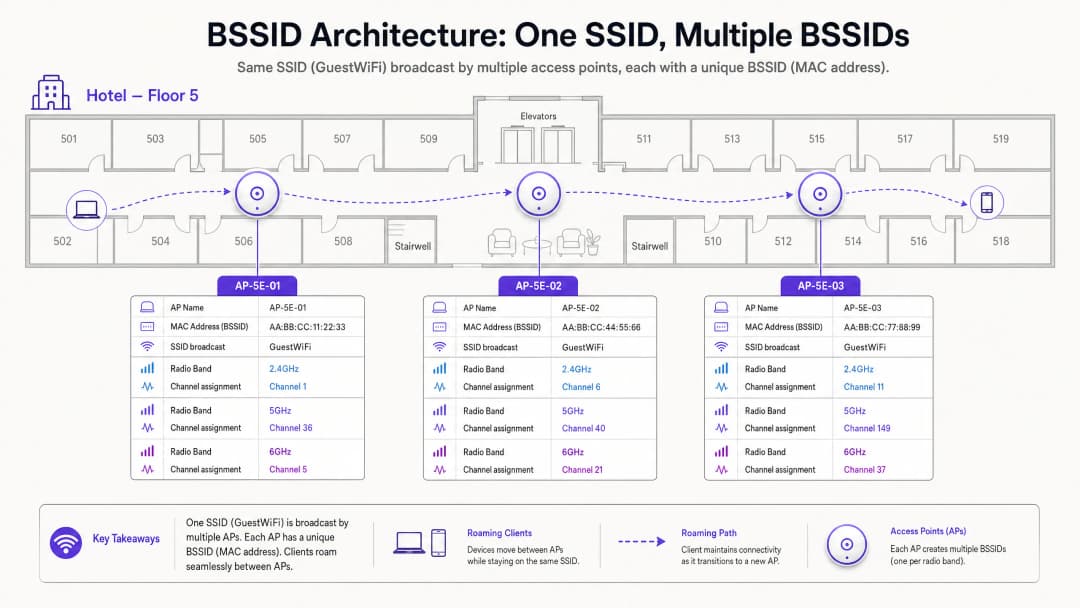
या फरकाचे महत्त्वपूर्ण ऑपरेशनल परिणाम आहेत. जेव्हा तुम्ही रोमिंगच्या तक्रारीचे निवारण करत असता, तेव्हा तुम्ही SSID चा तपास करत नसता - तर तुम्ही BSSID ट्रान्झिशनचा तपास करत असता. Linux वरील wpa_cli किंवा macOS वायरलेस डायग्नोस्टिक्स युटिलिटी सारखी क्लायंट-साइड डायग्नोस्टिक टूल्स हे डिव्हाइस कोणत्या विशिष्ट BSSID (MAC ॲड्रेस) शी संबंधित आहे, तसेच चॅनेल आणि RSSI दर्शवतील.
रोमिंग यंत्रणा: खरोखर नियंत्रण कोणाचे आहे?
एंटरप्राइज वायरलेस आर्किटेक्चरमधील हा सर्वात गैरसमज असलेला पैलू आहे. 802.11 मानक रोमिंगचा निर्णय पूर्णपणे क्लायंट डिव्हाइसवर सोडतो. नेटवर्क इन्फ्रास्ट्रक्चर क्लायंटला रोमिंग करण्यासाठी भाग पाडू शकत नाही. हे फक्त अशा परिस्थितींवर प्रभाव टाकू शकते ज्यामुळे रोमिंग होण्याची शक्यता कमी किंवा जास्त होते.
एक क्लायंट डिव्हाइस त्याच्या सध्याच्या BSSID च्या रिसिव्ह्ड सिग्नल स्ट्रेंथ इंडिकेटर (RSSI) आणि सिग्नल-टू-नॉईज रेशो (SNR) चे शेजारील BSSID सोबत मूल्यांकन करते. जेव्हा सध्याचा BSSID डिव्हाइस-विशिष्ट थ्रेशोल्डच्या खाली जातो - सामान्यतः Apple iOS डिव्हाइसेससाठी सुमारे -70 dBm आणि अनेक Android डिव्हाइसेससाठी -75 dBm - तेव्हा क्लायंट प्रोब विनंत्या ब्रॉडकास्ट करून अधिक चांगल्या BSSID साठी स्कॅन सुरू करतो. जवळचे ॲक्सेस पॉइंट्स प्रोब प्रतिसादांसह उत्तर देतात. क्लायंट या प्रतिसादांचे मूल्यांकन करतो आणि निवडलेल्या BSSID सह 802.11 ऑथेंटिकेशन आणि पुन्हा-असोसिएशन सुरू करतो.
जर चॅनेल प्लॅनिंग खराब असेल, तर क्लायंटला शेजारील-चॅनेल हस्तक्षेपाचा (adjacent-channel interference) सामना करावा लागू शकतो, ज्यामुळे शेजारील BSSID चे बीकन फ्रेम्स खराब होतात. यामुळे "स्टिकी क्लायंट" फेनोमेनन (sticky client phenomenon) उद्भवतो - एखादे डिव्हाइस कमकुवत, लांबच्या BSSID ला चिकटून राहते कारण त्याला अधिक मजबूत, जवळचा पर्याय स्पष्टपणे ऐकू येत नाही. याचा परिणाम डिग्रेड झालेला थ्रुपुट, ड्रॉप झालेले VoIP कॉल्स आणि अयशस्वी ॲप्लिकेशन सेशन्स यामध्ये होतो.
चॅनेल निवड: RF आर्किटेक्चरचा पाया
2.4 GHz च्या मर्यादा
2.4 GHz बँड हा 2.400 GHz ते 2.4835 GHz पर्यंतच्या 83.5 MHz स्पेक्ट्रमचा विस्तार आहे. प्रत्येक 802.11 चॅनेल 20 MHz रुंद आहे. चॅनेलच्या केंद्र फ्रिक्वेन्सीमधील 5 MHz च्या अंतरामुळे, शेजारील चॅनेलमध्ये मोठ्या प्रमाणात ओव्हरलॅपिंग होते. 2.4 GHz बँडमध्ये, केवळ चॅनेल्स 1, 6 आणि 11 हे नॉन-ओव्हरलॅपिंग आहेत.
2.4 GHz बँडमध्ये 1, 6 किंवा 11 व्यतिरिक्त इतर कोणतेही चॅनेल वापरल्यास शेजारील-चॅनेल हस्तक्षेप (ACI) निर्माण होतो. को-चॅनेल हस्तक्षेपापेक्षा (CCI) ACI स्पष्टपणे अधिक वाईट आहे कारण ते डेटा पॅकेट्स पूर्णपणे खराब करते, ज्यामुळे पुन्हा पाठवणे (retransmissions) आवश्यक होते. दुसरीकडे, CCI डिव्हाइसेसना CSMA/CA द्वारे एअरटाइम सहकार्याने शेअर करण्यास भाग पाडते, ज्यामुळे थ्रुपुट कमी होतो परंतु पॅकेट्स खराब होत नाहीत. हा नियम अत्यंत कडक आहे: 2.4 GHz डिप्लॉयमेंट्समध्ये फक्त चॅनेल्स 1, 6 आणि 11 वापरणे आवश्यक आहे.

आधुनिक एंटरप्राइज वातावरणात फ्रिक्वेन्सी बँड्स एकमेकांशी कसे संवाद साधतात याच्या सविस्तर समजून घेण्यासाठी, आमचे मार्गदर्शक पहा WiFi Frequencies: A Guide to WiFi Frequencies in 2026.
5 GHz च्या संधी आणि DFS च्या गुंतागुंती
5 GHz बँड लक्षणीयरीत्या अधिक स्पेक्ट्रम ऑफर करतो. UK आणि EU रेग्युलेटरी डोमेन्समध्ये, UNII-1 (5.150-5.250 GHz), UNII-2A (5.250-5.350 GHz), UNII-2C (5.470-5.725 GHz), आणि UNII-3 (5.735-5.835 GHz) मध्ये 19 पर्यंत नॉन-ओव्हरलॅपिंग 20 MHz चॅनेल्स उपलब्ध आहेत. तथापि, UNII-2A आणि UNII-2C चॅनेल्स DFS (Dynamic Frequency Selection) श्रेणीमध्ये येतात. हे चॅनेल्स हवामान रडार, लष्करी रडार आणि हवाई वाहतूक नियंत्रण प्रणालींसोबत सामायिक केले जातात. जर एखाद्या ॲक्सेस पॉइंटला DFS चॅनेलवर रडार पल्स आढळली, तर त्याने त्वरित ते चॅनेल रिकामे केले पाहिजे आणि ३० मिनिटांसाठी त्यावर शांत राहिले पाहिजे. युरोपमधील ETSI EN 301 893 आणि अमेरिकेतील FCC Part 15 अंतर्गत हा एक नियामक आदेश आहे.
विमानतळ, लष्करी तळ किंवा हवामान केंद्रांजवळील ठिकाणांसाठी - जे Hospitality आणि Transport उपयोजनांमध्ये सामान्य आहेत - DFS घटना दिवसातून अनेक वेळा घडू शकतात, ज्यामुळे अनपेक्षित AP चॅनेल बदल आणि क्लायंटचे कनेक्शन खंडित होऊ शकते.
Dynamic Channel Assignment (DCA)
आधुनिक एंटरप्राइझ वायरलेस LAN कंट्रोलर्स Dynamic Channel Assignment (DCA) अल्गोरिदमद्वारे चॅनेल व्यवस्थापन हाताळतात. हे अल्गोरिदम सतत खालील गोष्टींचे मूल्यमापन करतात:
| मेट्रिक | वर्णन | प्रभाव |
|---|---|---|
| चॅनेल वापर (Channel Utilisation) | माध्यम व्यस्त असलेल्या वेळेची टक्केवारी | जास्त वापरामुळे चॅनेल बदलण्याचा विचार सुरू होतो |
| नॉईज फ्लोर (Noise Floor) | नॉन-802.11 RF हस्तक्षेप (ब्लूटूथ, मायक्रोवेव्ह, इ.) | वाढलेला नॉईज फ्लोर प्रभावी SNR कमी करतो |
| शेजारील AP RSSI | सह-चॅनेल आणि लगतच्या-चॅनेल APs ची सिग्नल शक्ती | जास्त ओव्हरलॅपमुळे चॅनेल रिबॅलेंसिंग सुरू होते |
| DFS घटना | सध्याच्या चॅनेलवर रडारचा शोध | अनिवार्य त्वरित चॅनेल बदल |
तंदुरुस्त RF वातावरण राखण्यासाठी DCA आवश्यक असले, तरी अत्यंत आक्रमक अल्गोरिदम सेटिंग्ज नेटवर्कमध्ये अस्थिरता निर्माण करतात. प्रत्येक वेळी जेव्हा एखादा AP चॅनेल बदलतो, तेव्हा सर्व कनेक्ट केलेले क्लायंट तात्पुरते डिस्कनेक्ट होतात आणि त्यांनी पुन्हा कनेक्ट होणे आवश्यक असते. मुख्य भाषणादरम्यान कॉन्फरन्स सेंटरमध्ये किंवा पीक ट्रेडिंग तासांमध्ये Retail शॉप फ्लोअरवर, हे ऑपरेशनलदृष्ट्या अस्वीकार्य आहे.
शिफारस केलेला दृष्टीकोन असा आहे की DCA ला अनुसूचित आधारावर चालवण्यासाठी कॉन्फिगर करावे - सामान्यत: रात्रभर देखभाल विंडो दरम्यान - ३०% किंवा त्याहून अधिक हस्तक्षेपाच्या अनशेड्यूल बदल ट्रिगर थ्रेशोल्डसह. अनिवार्य DFS रडार टाळण्याच्या घटना या शेड्यूलिंग शिस्तीला एकमेव अपवाद आहेत.
तुमच्या विशिष्ट सेटअपबद्दल काही प्रश्न आहेत का?
आमची टीम ८०,००० हून अधिक वेन्यूजमधील वेन्यू ऑपरेटर्स, IT मॅनेजर्स आणि नेटवर्क इंजिनिअर्ससोबत काम करते. २० मिनिटांचा कॉल बुक करा आणि तुमच्यासारख्या इतरांनी ही समस्या कशी सोडवली हे आम्ही तुम्हाला दाखवू.
अंमलबजावणी मार्गदर्शक (Implementation Guide)
खालील वेंडर-तटस्थ अंमलबजावणीच्या पायऱ्या Hospitality, Retail, Healthcare आणि सार्वजनिक-क्षेत्रातील वातावरणातील एंटरप्राइझ उपयोजनांसाठी लागू आहेत.
पायरी १ - लेगसी डेटा दर अक्षम करा. सर्व ॲक्सेस पॉइंट रेडिओ प्रोफाइलमधून 802.11b डेटा दर (१, २, ५.५ आणि ११ Mbps) काढून टाका. हे लेगसी दर असमानतेने एअरटाइम वापरतात आणि स्टिकी क्लायंट वर्तनाचे मुख्य चालक आहेत. अक्षम केल्यावर, किमान प्रभावी कनेक्शन दर वाढतो, ज्यामुळे क्लायंटना योग्य भौतिक ठिकाणी त्यांच्या रोमिंग थ्रेशोल्डवर पोहोचण्यास भाग पाडले जाते.
पायरी २ - AP ट्रान्समिट पॉवर कमी करा. AP ला कमाल ट्रान्समिट पॉवरवर (20 dBm) चालवल्याने ओव्हरसाईज्ड सेल्स तयार होतात आणि योग्य BSSID रोमिंगमध्ये अडथळा येतो. 2.4 GHz ट्रान्समिट पॉवर 8-12 dBm पर्यंत आणि 5 GHz ट्रान्समिट पॉवर 12-17 dBm पर्यंत कमी करा, जी तुमच्या वातावरणातील सर्वात कमकुवत क्लायंट डिव्हाइसच्या ट्रान्समिट पॉवरशी जुळण्यासाठी कॅलिब्रेट केली जावी.
पायरी ३ - चॅनेलची रुंदी मर्यादित करा. हाय-डेन्सिटी वातावरणात, 5 GHz चॅनेल्सना 20 MHz पर्यंत मर्यादित करा. 40 MHz आणि 80 MHz चॅनेल बॉन्डिंग सैद्धांतिकदृष्ट्या सिंगल-डिव्हाइस थ्रूपुट वाढवत असले, तरी ते उपलब्ध नॉन-ओव्हरलॅपिंग चॅनेल्सची संख्या कमी करते आणि नॉईज फ्लोअर वाढवते, ज्यामुळे डेन्स डिप्लॉयमेंटमध्ये गंभीर CCI होतो.
पायरी ४ - DCA मेंटेनन्स विंडो कॉन्फिगर करा. तुमच्या कंट्रोलरचा DCA अल्गोरिदम रात्रीच्या मेंटेनन्स विंडो दरम्यान कार्यान्वित करण्यासाठी सेट करा. न ठरवलेल्या ट्रिगर्ससाठी ३०% इंटरफेरन्स थ्रेशोल्ड कॉन्फिगर करा. हे कामाच्या वेळेत अडथळा आणणारे चॅनेल बदल रोखून RF हायजीन राखते.
पायरी ५ - DFS फॉलबॅक धोरण आखा. जवळच रडार असल्याचे माहित असलेल्या ठिकाणांसाठी, मिशन-क्रिटिकल AP साठीच्या DCA पूल मधून DFS चॅनेल्स वगळा. प्राथमिक चॅनेल प्लॅन म्हणून UNII-1 (36, 40, 44, 48) आणि UNII-3 (149, 153, 157, 161, 165) मधील नॉन-DFS चॅनेल्सवर अवलंबून राहा. व्यापक नेटवर्क ऍक्सेस कंट्रोल मॉडर्नायझेशनच्या मार्गदर्शनासाठी, La lista de verificación para migrar de NAC heredado a NAC nativo de la nube पहा.
पायरी ६ - बँड स्टीयरिंग सक्षम करा. ड्युअल-बँड सक्षम क्लायंटना 5 GHz बँडकडे ढकलण्यासाठी बँड स्टीयरिंग कॉन्फिगर करा, ज्यामुळे लेगसी डिव्हाइसेस आणि IoT उपकरणांसाठी 2.4 GHz स्पेक्ट्रम मोकळा होईल. एंटरप्राइझ वातावरणात IoT आणि BLE च्या सहअस्तित्वाच्या संदर्भासाठी, BLE Low Energy Explained for Enterprise पहा.
सर्वोत्तम पद्धती
खालील सर्वोत्तम पद्धती IEEE 802.11 मानके, WiFi Alliance सर्टिफिकेशन आवश्यकता आणि व्हेंडर-न्यूट्रल एंटरप्राइझ डिप्लॉयमेंट मार्गदर्शक तत्त्वांशी सुसंगत आहेत.
किमान RSSI थ्रेशोल्ड: RSSI -80 dBm पेक्षा कमी असलेल्या क्लायंटचे असोसिएशन नाकारण्यासाठी ऍक्सेस पॉइंट्स कॉन्फिगर करा. हे कमकुवत क्लायंटना दूरच्या AP शी जोडण्यापासून आणि कमी डेटा दरांवर एअरटाइम वापरण्यापासून रोखते. बहुतेक एंटरप्राइझ कंट्रोलर्स हे "किमान RSSI" किंवा "क्लायंट एक्स्क्लूजन" थ्रेशोल्ड म्हणून व्यक्त करतात.
802.11r फास्ट BSS ट्रान्झिशन: व्हॉइस किंवा रिअल-टाइम ऍप्लिकेशन्सना सपोर्ट करणाऱ्या सर्व SSIDs वर 802.11r (फास्ट BSS ट्रान्झिशन) सक्षम करा. हे रोमिंग हँडऑफ वेळ 50 - 200 ms (प्रमाणित री-असोसिएशन) वरून 50 ms च्या खाली आणते, ज्यामुळे BSSID ट्रान्झिशन दरम्यान VoIP कॉल्स कट होणे टाळले जाते.
802.11k आणि 802.11v शेजारी रिपोर्टिंग: क्लायंटना शेजारील AP च्या याद्या आणि ट्रान्झिशन शिफारसी प्रदान करण्यासाठी 802.11k (रेडिओ रिसोर्स मॅनेजमेंट) आणि 802.11v (BSS ट्रान्झिशन मॅनेजमेंट) सक्षम करा. क्लायंट अजूनही रोमिंगचा अंतिम निर्णय स्वतःच घेत असला, तरी हे प्रोटोकॉल त्याला जलद आणि अधिक माहितीपूर्ण निवडी करण्यासाठी आवश्यक माहिती प्रदान करतात. WPA3 आणि OWE: अतिथी नेटवर्कसाठी, पासवर्डशिवाय प्रति-सत्र एन्क्रिप्शन प्रदान करण्यासाठी WPA3-SAE किंवा Opportunistic Wireless Encryption (OWE) तैनात करा. हे ट्रान्झिटमधील अतिथी डेटासाठी GDPR डेटा संरक्षण दायित्वांचे पालन करते आणि कार्डधारकाच्या डेटाला स्पर्श करणाऱ्या कोणत्याही नेटवर्क सेगमेंटसाठी PCI DSS ची आवश्यकता आहे.
नियमित RF ऑडिट: दर १२ महिन्यांनी किंवा ठिकाणामध्ये कोणतेही महत्त्वपूर्ण भौतिक बदल (नवीन पार्टिशन, उपकरणे बसवणे, फर्निचरची पुनर्रचना) झाल्यानंतर निष्क्रिय RF सर्वेक्षण करा. भौतिक बदलांमुळे RF प्रसार बदलतो आणि तुमची चॅनेल योजना अमान्य होऊ शकते.
-
ट्रबलशूटिंग आणि जोखीम कमी करणे
DFS ट्रॅप
विमानतळ किंवा हवामान केंद्रांजवळील हॉस्पिटॅलिटी उपयोजनांमध्ये, DFS इव्हेंट्स हा एक सामान्य आणि कमी लेखलेला धोका आहे. जेव्हा एखाद्या AP ला DFS चॅनेलवर रडार आढळतो, तेव्हा त्याने ताबडतोब चॅनेल रिकामे केले पाहिजे. जर फॉलबॅक चॅनेल आधीच गर्दी असलेल्या फ्रिक्वेन्सीला स्टॅटिकली नियुक्त केले असेल, तर AP लगतच्या AP मध्ये CCI ची मालिका सुरू करेल.
जोखीम कमी करणे: तुमच्या DCA कॉन्फिगरेशनमध्ये सुरक्षित फॉलबॅक चॅनेलची डायनॅमिक सूची राखा. हॉटेल लॉबी, कॉन्फरन्स स्टेज किंवा रिटेल पॉईंट-ऑफ-सेल झोन यासारख्या मिशन-क्रिटिकल भागात सेवा देणाऱ्या AP वर DFS चॅनेल पूर्णपणे वगळण्याचा विचार करा.
हाय-पॉवर ट्रॅप
विरुद्ध-प्रवृत्तीनुसार, कमाल ट्रान्समिट पॉवरवर AP चालवणे हे खराब वायरलेस कामगिरीचे सर्वात सामान्य कारणांपैकी एक आहे. हाय-पॉवर AP मुळे लक्षणीय ओव्हरलॅपसह मोठे सेल्स तयार होतात, ज्यामुळे CCI उद्भवते आणि क्लायंटला जवळच्या AP कडे रोमिंग करण्यापासून रोखते.
जोखीम कमी करणे: Transmit Power Control (TPC) लागू करा आणि -६७ dBm कॉन्टूर लाइनवर अंदाजे १५ - २०% ओव्हरलॅप होणारे सेल्स तयार करण्यासाठी AP पॉवर कॅलिब्रेट करा. हे जास्त हस्तक्षेपाशिवाय अखंड कव्हरेज प्रदान करते.
वाईड चॅनेल ट्रॅप
दाट वातावरणात, थ्रूपुट बेंचमार्क वाढवण्यासाठी विक्रेत्यांद्वारे अनेकदा ८० MHz किंवा १६० MHz चॅनेल कॉन्फिगरेशनची शिफारस केली जाते. प्रत्यक्षात, हे ५ GHz बँडमध्ये उपलब्ध असलेल्या नॉन-ओव्हरलॅपिंग चॅनेलची संख्या २ - ३ पर्यंत कमी करतात, ज्यामुळे काही मोजक्या AP पेक्षा जास्त असलेल्या कोणत्याही उपयोजनामध्ये गंभीर CCI ची खात्री मिळते.
जोखीम कमी करणे: उच्च-घनतेच्या वातावरणात चॅनेलची रुंदी २० MHz पर्यंत मर्यादित ठेवा. AP मध्ये लक्षणीय भौतिक अंतर असलेल्या कमी-घनतेच्या क्षेत्रांसाठी ४० MHz किंवा ८० MHz कॉन्फिगरेशन राखीव ठेवा.
-
ROI आणि व्यावसायिक प्रभाव
काळजीपूर्वक नियोजित RF वातावरणाचा सर्व प्रकारच्या ठिकाणांमधील व्यावसायिक परिणामांवर थेट आणि मोजता येणारा प्रभाव पडतो.
अतिथी समाधान आणि महसूल: हॉस्पिटॅलिटी वातावरणात, अतिथी समाधान सर्वेक्षणांमध्ये WiFi गुणवत्ता सातत्याने पहिल्या तीन घटकांमध्ये स्थान मिळवते. अखंड BSSID रोमिंगमुळे व्हिडिओ कॉल ड्रॉप होणे, ॲप्लिकेशन टाईमआऊट आणि स्ट्रीमिंगमधील व्यत्यय टाळता येतात. हॉटेल ऑपरेटरसाठी, याचा थेट परिणाम पुनरावलोकन गुण आणि पुनरावृत्ती बुकिंग दरांवर होतो.
Analytics Accuracy: अचूक फूटफॉल मोजणी, ड्वेल टाइम मेट्रिक्स आणि झोन-स्तरीय हीटमॅप्स व्युत्पन्न करण्यासाठी Purple चे WiFi Analytics प्लॅटफॉर्म सातत्यपूर्ण क्लायंट BSSID असोसिएशनवर अवलंबून असते. चॅनेलच्या हस्तक्षेपामुळे क्लायंटचे कनेक्शन वारंवार तुटत राहिल्यास, त्यामागील असोसिएशन डेटा विस्कळीत आणि अविश्वसनीय बनतो. एक स्थिर RF वातावरण ही केवळ कामगिरीची आवश्यकता नसून - ती एक डेटा गुणवत्तेची आवश्यकता आहे.
Operational Efficiency: एक चांगल्या प्रकारे समन्वित चॅनेल योजना आणि रोमिंग कॉन्फिगरेशन "मंद WiFi" किंवा "कनेक्शन वारंवार तुटते" यासारख्या हेल्पडेस्क तिकिटांचे प्रमाण लक्षणीयरीत्या कमी करते. मोठ्या ठिकाणांवरील उपयोजनांमध्ये, हे Tier-1 सपोर्ट खर्चात मोजण्यायोग्य घट दर्शवू शकते. ऑफिस-स्केल उपयोजन अनुकूल करण्याच्या मार्गदर्शनासाठी, Office WiFi: Optimize Your Modern Office WiFi Network पहा.
Compliance Posture: योग्य चॅनेल व्यवस्थापन आणि एन्क्रिप्शन मानके (WPA3, 802.1X) किरकोळ आणि आदरातिथ्य ऑपरेटर्ससाठी PCI DSS अनुपालनास आणि गेस्ट WiFi द्वारे वैयक्तिक डेटावर प्रक्रिया करणाऱ्या कोणत्याही संस्थेसाठी GDPR अनुपालनास थेट समर्थन देतात. एक दस्तऐवजीकरण केलेला RF ऑडिट ट्रेल ISO 27001 प्रमाणन आवश्यकतांना देखील समर्थन देतो.
BSSID आर्किटेक्चर आणि चॅनल निवड धोरणांच्या 10 मिनिटांच्या कन्सल्टंट-शैलीतील माहितीसाठी वरील एक्झिक्युटिव्ह ब्रीफिंग पॉडकास्ट ऐका.
महत्वाच्या व्याख्या
BSSID (Basic Service Set Identifier)
SSID ब्रॉडकास्ट करणाऱ्या ऍक्सेस पॉईंटवरील विशिष्ट रेडिओ इंटरफेसचा MAC ॲड्रेस. मल्टि-AP डिप्लोयमेंटमध्ये, सर्व APs समान SSID ब्रॉडकास्ट करत असले तरीही, प्रत्येक रेडिओ एक युनिक BSSID दर्शवतो.
रोमिंगमधील त्रुटींचे निवारण करताना, क्लायंट असोसिएशन लॉग्जचे विश्लेषण करताना किंवा WiFi विश्लेषणात्मक डेटाचे स्पष्टीकरण करताना IT टीम्सना BSSIDs चा सामना करावा लागतो. क्लायंटचा BSSID असोसिएशन इतिहास एखाद्या ठिकाणावरील त्याचा प्रत्यक्ष हालचालींचा मार्ग दर्शवतो.
SSID (Service Set Identifier)
अंतिम वापरकर्त्यांना ब्रॉडकास्ट केलेले मानवी-वाचनीय नेटवर्क नाव (उदा., 'Purple_Guest'). एंटरप्राइझ डिप्लोयमेंटमध्ये सहसा एकाच SSID ला शेकडो अंतर्गत BSSIDs द्वारे सपोर्ट केला जातो.
वापरकर्ते SSIDs शी संवाद साधतात; नेटवर्क इंजिनिअर्स BSSIDs मधील त्रुटींचे निवारण करतात. या दोन्ही गोष्टी एकत्र गोंधळात टाकणे हे रोमिंगमधील चुकीच्या निदानाचे सर्वात सामान्य कारण आहे.
Co-Channel Interference (CCI)
जेव्हा अगदी एकाच फ्रिक्वेन्सी चॅनेलवर काम करणारे दोन किंवा अधिक ऍक्सेस पॉईंट एकमेकांचे ट्रान्समिशन ऐकू शकतात तेव्हा होणारा हस्तक्षेप. CCI मुळे APs ला CSMA/CA द्वारे एअरटाइम शेअर करणे भाग पडते.
सेलचा आकार कमी करून (ट्रान्समिट पॉवर कंट्रोल) CCI व्यवस्थापित केले जाऊ शकते. हे थ्रूपुटचे प्रमाण कमी करते परंतु पॅकेट्स खराब करत नाही.
Adjacent Channel Interference (ACI)
जेव्हा APs ओव्हरलॅपिंग परंतु वेगवेगळ्या फ्रिक्वेन्सी चॅनेलवर काम करतात तेव्हा होणारा हस्तक्षेप (उदा. 2.4 GHz मधील चॅनेल 1 आणि 3). ACI मुळे डेटा ट्रान्समिशन खराब होते, ज्यामुळे ते पुन्हा ट्रान्समिट करावे लागते.
ACI हा CCI पेक्षा निश्चितपणे अधिक वाईट आहे आणि कठोर चॅनेल नियोजनाद्वारे तो काढून टाकला पाहिजे. 2.4 GHz मध्ये, 1, 6, किंवा 11 व्यतिरिक्त इतर कोणताही चॅनेल वापरल्यास ACI तयार होतो.
DFS (Dynamic Frequency Selection)
एक नियामक आवश्यकता ज्यामध्ये WiFi उपकरणांनी विशिष्ट 5 GHz चॅनेलवरील रडार सिस्टीम शोधणे आणि ताबडतोब नॉन-रडार चॅनेलवर शिफ्ट होणे आवश्यक आहे. युरोपमध्ये ETSI EN 301 893 आणि अमेरिकेत FCC Part 15 द्वारे हे नियंत्रित केले जाते.
DFS इव्हेंट्समुळे अनपेक्षित AP चॅनेल बदल आणि क्लायंटचे कनेक्शन खंडित होऊ शकते. विमानतळ, हवामान केंद्र किंवा लष्करी तळांच्या जवळील ठिकाणे यासाठी विशेषतः संवेदनशील असतात.
RSSI (Received Signal Strength Indicator)
प्राप्त झालेल्या रेडिओ सिग्नलच्या पॉवर लेव्हलचे मोजमाप, सामान्यतः निगेटिव्ह dBm मध्ये व्यक्त केले जाते (उदा., -65 dBm). जास्त निरपेक्ष व्हॅल्यू (0 च्या जवळ) मजबूत सिग्नल दर्शवतात.
RSSI हे प्राथमिक मेट्रिक आहे ज्याचा वापर क्लायंट डिव्हाइसेस BSSID ची गुणवत्ता मोजण्यासाठी आणि रोमिंगचे निर्णय घेण्यासाठी करतात. सामान्य रोमिंग थ्रेशोल्ड -70 dBm आहे.
SNR (Signal-to-Noise Ratio)
प्राप्त झालेली सिग्नल स्ट्रेंथ आणि बॅकग्राउंड RF नॉईज फ्लोअर यांच्यातील dB मधील फरक. उच्च SNR उच्च-ऑर्डर मॉड्यूलेशन स्कीम्स (उदा., 1024-QAM) आणि जास्त थ्रूपुट सक्षम करतो.
मूळ RSSI पेक्षा SNR हा अधिक विश्वासार्ह कार्यप्रदर्शन दर्शक आहे. जास्त गोंगाट असलेल्या वातावरणात (-80 dBm नॉईज फ्लोअर) मजबूत सिग्नल (-60 dBm) केवळ 20 dB SNR देतो, ज्यामुळे थ्रूपुट लक्षणीयरीत्या मर्यादित होतो.
DCA (Dynamic Channel Assignment)
सध्याच्या RF परिस्थितीनुसार (ज्यामध्ये युटिलायझेशन, नॉईज फ्लोअर आणि शेजारील हस्तक्षेप समाविष्ट आहे) ऍक्सेस पॉईंट्सना चॅनेल्स असाइन आणि वेळोवेळी पुन्हा असाइन करण्यासाठी वायरलेस LAN कंट्रोलर्सद्वारे वापरले जाणारे एक ऑटोमेटेड अल्गोरिदम.
ऑपरेशनल वेळेत चॅनेलमधील वारंवार होणारे बदल रोखण्यासाठी DCA ट्यून करणे आवश्यक आहे. अत्यंत आक्रमक DCA सेटिंग्समुळे संपूर्ण डिप्लोयमेंटमध्ये क्लायंटचे कनेक्शन्स खंडित होतात.
Sticky Client
एक क्लायंट डिव्हाइस जे जवळच्या, मजबूत ऍक्सेस पॉईंटवर रोमिंग करण्याऐवजी दूरच्या, कमकुवत BSSID शी असोसिएशन टिकवून ठेवते. सामान्यतः मोठ्या आकाराच्या AP सेल्स (उच्च ट्रान्समिट पॉवर) किंवा चालू असलेल्या लेगसी डेटा रेट्समुळे हे घडते.
एंटरप्राइझ ठिकाणांमध्ये खराब WiFi कार्यप्रदर्शनाच्या तक्रारींचे Sticky Clients हे सर्वात सामान्य कारण आहेत. ते कमी डेटा रेटवर विसंगत एअरटाइम वापरतात, ज्यामुळे चॅनेलवरील सर्व वापरकर्त्यांचे कार्यप्रदर्शन बिघडते.
सोडवलेली उदाहरणे
एका ४०० खोल्यांच्या लक्झरी हॉटेलमध्ये कर्मचारी लॉबी आणि कॉन्फरन्स सेंटर दरम्यान फिरत असताना ड्रॉप होणाऱ्या VoIP कॉल्सच्या वारंवार तक्रारी येत आहेत. हे नेटवर्क १५० अॅक्सेस पॉईंट्सवर एकच SSID वापरते, जे सर्व २० dBm ट्रान्समिट पॉवरवर चालत आहेत आणि ज्यांच्यावर लेगसी डेटा रेट्स सुरू आहेत.
टप्पा १ - निदान: प्रभावित कॉरिडॉरवर Wireshark वापरून पॅकेट कॅप्चर केले. विश्लेषणाने पुष्टी केली की डिव्हाइसेस लॉबी AP च्या BSSID ला सिग्नल -८५ dBm पर्यंत घसरेपर्यंत धरून ठेवत होते - जेथे कॉन्फरन्स सेंटर AP -६२ dBm वर उपलब्ध होते त्याच्या बरेच पुढे. मूळ कारण: ओव्हरसाईज्ड सेल्स आणि लेगसी डेटा रेट्स ज्यामुळे लांब अंतरावर कमी-रेट असोसिएशन सुरू होते.
टप्पा २ - उपाययोजना: १. सर्व AP रेडिओ प्रोफाईल्सवर ८०२.११b लेगसी डेटा रेट्स (१, २, ५.५, ११ Mbps) बंद केले. २. लॉबी आणि कॉरिडॉर AP वर २.४ GHz ट्रान्समिट पॉवर २० dBm वरून ११ dBm पर्यंत कमी केली. ३. ५ GHz ट्रान्समिट पॉवर २० dBm वरून १५ dBm पर्यंत कमी केली. ४. स्टाफ SSID वर ८०२.११r Fast BSS Transition सक्षम केले. ५. ट्रान्झिशन झोनमधील लगतचे AP नॉन-ओव्हरलॅपिंग चॅनेल्सवर (२.४ GHz मध्ये १ आणि ६; ५ GHz मध्ये ३६ आणि ४०) असल्याची खात्री केली.
टप्पा ३ - प्रमाणीकरण: बदलानंतर पॅकेट कॅप्चर पुन्हा चालवले. डिव्हाइसेस आता -६८ dBm वर रोमिंग करत होते, जे VoIP गुणवत्ता मर्यादेच्या आत आहे. प्रभावित कॉरिडॉरमध्ये कॉल ड्रॉप दर शून्यावर आला.
एका रिटेल चेनने ४० रिटेल युनिट्स असलेल्या दाट शॉपिंग सेंटरमध्ये नवीन WiFi ६ अॅक्सेस पॉईंट्स तैनात केले आहेत. मजबूत सिग्नल स्ट्रेंथ असूनही, ग्राहक आणि कर्मचारी मोठ्या प्रमाणावर लॅटन्सी आणि खराब थ्रूपुटची तक्रार करत आहेत, विशेषतः २.४ GHz बँडमध्ये.
टप्पा १ - निदान: डेडिकेटेड स्पेक्ट्रम अॅनालायझर वापरून RF स्पेक्ट्रम विश्लेषण केल्यावर २.४ GHz बँडमध्ये गंभीर को-चॅनेल आणि अॅडजसेन्ट चॅनेल इंटरफेरियन्स दिसून आला. कंट्रोलर कॉन्फिगरेशनच्या तपासणीत समोर आले की DCA अल्गोरिदमने संपूर्ण डिप्लॉयमेंटमध्ये १, ४, ७ आणि ११ हे चॅनेल्स दिले होते - ही चार-चॅनेल योजना चॅनेल १ आणि ४ दरम्यान, आणि ७ आणि ११ दरम्यान अॅडजसेन्ट चॅनेल इंटरफेरियन्स निर्माण करते.
टप्पा २ - उपाययोजना: १. केवळ १, ६ आणि ११ चॅनेल्सचा काटेकोरपणे वापर करण्यासाठी २.४ GHz DCA प्रोफाईल पुन्हा कॉन्फिगर केले. २. ५ GHz-सक्षम क्लायंट्सना (अंदाजे ८५% डिव्हाइसेस) गर्दीच्या २.४ GHz स्पेक्ट्रमपासून दूर नेण्यासाठी बँड स्टीअरिंग सक्षम केले. ३. सेलचे आकार कमी करण्यासाठी आणि शेजारील युनिट्समधील CCI कमी करण्यासाठी २.४ GHz ट्रान्समिट पॉवर १० dBm पर्यंत कमी केली. ४. या दाट डिप्लॉयमेंटमध्ये चॅनेलचा जास्तीत जास्त पुनरुपयोग करण्यासाठी ५ GHz चॅनेलची रुंदी २० MHz पर्यंत मर्यादित केली.
टप्पा ३ - प्रमाणीकरण: बदलानंतरच्या स्पेक्ट्रम विश्लेषणाने अॅडजसेन्ट चॅनेल इंटरफेरियन्स पूर्णपणे नाहीसा झाल्याची पुष्टी केली. सरासरी २.४ GHz लॅटन्सी २८० ms वरून १८ ms पर्यंत कमी झाली. स्टाफ डिव्हाइस थ्रूपुट सरासरी २ Mbps वरून २४ Mbps पर्यंत वाढले.
सराव प्रश्न
Q1. तुम्ही ५०,००० आसनक्षमता असलेल्या स्टेडियममध्ये हाय-डेन्सिटी WiFi नेटवर्क तैनात करत आहात. व्हेंडरचा प्री-सेल्स अभियंता समवर्ती वापरकर्त्यांच्या मोठ्या संख्येसाठी सैद्धांतिक थ्रुपुट जास्तीत जास्त करण्यासाठी 5 GHz बँडवर 80 MHz चॅनेल वापरण्याची शिफारस करतो. तुम्ही ही शिफारस स्वीकारता का?
टीप: 5 GHz बँडमध्ये किती नॉन-ओव्हरलॅपिंग 80 MHz चॅनेल्स उपलब्ध आहेत आणि शेकडो APs भौतिकदृष्ट्या जवळच्या अंतरावर तैनात केल्यावर त्याचा को-चॅनेल हस्तक्षेपावर कसा परिणाम होतो याचा विचार करा.
नमुना उत्तर पहा
नाही. हाय-डेन्सिटी वातावरणात, 80 MHz चॅनेल वापरल्याने 5 GHz बँडमध्ये उपलब्ध असणारा नॉन-ओव्हरलॅपिंग स्पेक्ट्रम अंदाजे ५ ते ६ चॅनेलपर्यंत कमी होतो. स्टेडियममध्ये शेकडो APs असताना, यामुळे गंभीर को-चॅनेल इंटरफेअरेन्स (co-channel interference) होणे निश्चित आहे कारण डझनभर APs एकाच चॅनेलसाठी स्पर्धा करतात. चॅनेलचा पुनर्वापर जास्तीत जास्त करण्यासाठी 20 MHz चॅनेल विड्थ्स वापरणे हाच योग्य मार्ग आहे. जरी वैयक्तिक डिव्हाइसचा थ्रुपुट सैद्धांतिकदृष्ट्या कमी असला, तरी कमी झालेल्या को-चॅनेल इंटरफेअरेन्समुळे एकूण नेटवर्क क्षमता आणि प्रति-वापरकर्ता अनुभव लक्षणीयरीत्या चांगला असेल.
Q2. तुमच्या हॉस्पिटलची IT टीम कळवते की लॅपटॉप आणि आधुनिक स्मार्टफोनसाठी रोमिंग योग्यरित्या कार्य करते, परंतु नर्सिंग स्टाफने घातलेले जुने VoIP कम्युनिकेशन बॅजेस कॉरिडोअरमधून फिरताना त्यांच्या डिस्प्लेवर मजबूत सिग्नल स्ट्रेंथ दाखवत असूनही सतत कॉल्स ड्रॉप करतात.
टीप: रोमिंगचा निर्णय कोण घेते, ते कोणते मेट्रिक्स वापरतात आणि जुन्या डिव्हाइसेसची अशी कोणती विशिष्ट वैशिष्ट्ये आहेत ज्यामुळे ते आधुनिक डिव्हाइसेसच्या तुलनेत उशिरा रोम होतात याचा विचार करा.
नमुना उत्तर पहा
ही समस्या जुन्या उपकरणांसाठी विशिष्ट असलेली 'sticky client' ची क्लासिक समस्या आहे. VoIP बॅजेस दूरच्या BSSID ला धरून ठेवतात कारण: (१) लेगसी डेटा रेट्स (1-11 Mbps) सक्षम आहेत, ज्यामुळे बॅजला खूप कमी रेट्सवर लांब अंतरावरून कनेक्शन राखता येते; आणि (२) AP चा ट्रान्समिट पॉवर कदाचित जास्त आहे, ज्यामुळे मोठे सेल्स तयार होतात जे बॅज अजूनही -80 dBm वर 'ऐकू' शकतात. हे दुरुस्त करण्यासाठी, सर्व AP प्रोफाइल्सवर लेगसी 802.11b डेटा रेट्स निष्क्रिय करा आणि AP ट्रान्समिट पॉवर 10-12 dBm पर्यंत कमी करा. याव्यतिरिक्त, VoIP पॅकेट गमावण्याच्या थ्रेशोल्डच्या खाली हँडऑफ लेटन्सी कमी करण्यासाठी स्टाफ SSID वर 802.11r Fast BSS Transition सक्षम करा.
Q3. प्रादेशिक विमानतळापासून १.५ मैलावर असलेले एक हॉटेल दररोज दुपारी १४:०० ते १७:०० च्या दरम्यान यादृच्छिक, मोठ्या प्रमाणावर AP चॅनेल बदल आणि क्लायंट डिस्कनेक्शनचा सामना करत आहे. या घटनांचा पीक वापराशी संबंध नाही. याचे संभाव्य कारण काय आहे आणि तुम्ही याचे निवारण कसे कराल?
टीप: 5 GHz बँडमध्ये कोणता सामायिक स्पेक्ट्रम अस्तित्वात आहे आणि विमानतळाजवळ दुपारच्या वेळी कोणती बाह्य यंत्रणा सक्रिय असू शकते याचा विचार करा.
नमुना उत्तर पहा
APs नक्कीच DFS (Dynamic Frequency Selection) चॅनेल्सवर कार्यरत आहेत आणि जवळच्या विमानतळाच्या ॲप्रोच रडार सिस्टीममधून रडार पल्स शोधत आहेत, जे सामान्यत: दुपारच्या पीक अरायव्हल कालावधीत सक्रिय असतात. जेव्हा रडार शोधला जातो, तेव्हा AP ने ETSI EN 301 893 नियमांनुसार त्वरित चॅनेल रिकामे केले पाहिजे. यावर उपाय म्हणजे या ठिकाणासाठी DCA चॅनेल पूलधून सर्व DFS चॅनेल्स (UNII-2A: 52-64; UNII-2C: 100-140) वगळणे आणि केवळ UNII-1 (36, 40, 44, 48) आणि UNII-3 (149, 153, 157, 161, 165) या नॉन-DFS चॅनेल्सवर अवलंबून राहणे. यामुळे रडारमुळे होणारे चॅनेल बदल पूर्णपणे बंद होतात.
वारंवार विचारले जाणारे प्रश्न
एंटरप्राइझ WiFi मध्ये SSID आणि BSSID मधील मूलभूत फरक काय आहे?
SSID (सर्व्हिस सेट आयडेंटिफायर) हे अंतिम वापरकर्त्यांना ब्रॉडकास्ट केलेले आणि वाचता येणारे नेटवर्क नाव आहे, जसे की Guest_WiFi. BSSID (बेसिक सर्व्हिस सेट आयडेंटिफायर) हे तो SSID ट्रान्समिट करणाऱ्या ॲक्सेस पॉइंटवरील विशिष्ट रेडिओ इंटरफेसचा ४८-बिट MAC ॲड्रेस असतो. एकाधिक APs आणि रेडिओ असलेल्या एंटरप्राइझ डिप्लॉयमेंटमध्ये, संपूर्ण भौतिक ठिकाणी शेकडो वेगवेगळ्या BSSID द्वारे एकच SSID समर्थित असतो.
एकाधिक SSID ब्रॉडकास्ट केल्याने चॅनेलवरील BSSID बीकन ओव्हरहेड कसा वाढतो?
ॲक्सेस पॉइंट रेडिओवर ब्रॉडकास्ट होणाऱ्या प्रत्येक SSID ला स्वतःचा अनन्य व्हर्च्युअल BSSID आवश्यक असतो आणि तो सर्वात कमी मूलभूत डेटा दरावर (जसे की 1 Mbps किंवा 6 Mbps) साधारणपणे सेकंदाला १० वेळा (दर १०२.४ ms ला) नियतकालिक व्यवस्थापन बीकन फ्रेम्स ट्रान्समिट करतो. एकाच चॅनेलवर ४ किंवा अधिक SSID ब्रॉडकास्ट केल्यास, कोणताही क्लायंट डेटा ट्रान्समिट होण्यापूर्वीच एकूण उपलब्ध एअरटाइमपैकी १५% ते ३०% वेळ केवळ बीकन ओव्हरहेडमध्ये खर्च होऊ शकतो.
डायनॅमिक चॅनेल असाइनमेंट (DCA) आणि रेडिओ रिसोर्स मॅनेजमेंट (RRM) अल्गोरिदम कसे काम करतात?
डायनॅमिक चॅनेल असाइनमेंट (DCA) अल्गोरिदम सतत RF मेट्रिक्सचे निरीक्षण करतात, ज्यामध्ये को-चॅनेल इंटरफेरन्स (CCI), ॲडजसंट चॅनेल इंटरफेरन्स (ACI), फिजिकल नॉइज फ्लोअर, नॉन-WiFi चॅनेल वापर आणि रडार सिग्नल (DFS) यांचा समावेश होतो. हे अल्गोरिदम शेजारील ॲक्सेस पॉइंट्समधील जागतिक नेटवर्क खर्चाचे मॉडेल तयार करतात आणि एकूण हस्तक्षेप कमी करण्यासाठी व चॅनेलचे जास्तीत जास्त विलगीकरण करण्यासाठी चॅनेलच्या पुनर्नियोजनाचे वेळापत्रक ठरवतात.
को-चॅनेल इंटरफेरन्स (CCI) पेक्षा ॲडजसंट चॅनेल इंटरफेरन्स (ACI) अधिक नुकसानकारक का आहे?
को-चॅनेल इंटरफेरन्स (CCI) अंतर्गत, ॲक्सेस पॉइंट्स आणि क्लायंट एकाच फ्रीक्वेंसीवर काम करतात आणि हवेत सहकार्याने वेळ शेअर करत CSMA/CA क्लिअर-चॅनेल असेसमेंट (CCA) मध्ये भाग घेतात. याउलट, ॲडजसंट चॅनेल इंटरफेरन्स (ACI) अंतर्गत, ओव्हरलॅपिंग चॅनेल साइडबँड्स CSMA/CA बॅकऑफ ट्रिगर न करता पॅकेट प्रीअँबल्स आणि पेलोड डेटा खराब करतात, ज्यामुळे असंघटित पॅकेट कोलिजन्स होतात आणि मोठ्या प्रमाणात फ्रेम रिट्रान्समिशन्स करावे लागतात.
BSSID च्या स्थिरतेचा WiFi फूटफॉल ट्रॅकिंग आणि वेन्यू लोकेशन ॲनालिटिक्सवर कसा परिणाम होतो?
Purple सारखे लोकेशन ॲनालिटिक्स इंजिन, ड्वेल टाईम (थांबण्याचा वेळ), झोन ट्रान्झिशन आणि अभ्यागत प्रवासाची गणना करण्यासाठी क्लायंट प्रोब विनंत्या आणि असोसिएशन इव्हेंट्सचा प्रत्यक्ष BSSID कोऑर्डिनेट्सशी परस्परसंबंध जोडतात. जर डायनॅमिक चॅनेल सिलेक्शन किंवा पॉवर मॅनेजमेंटमुळे जास्त प्रमाणात BSSID फ्लॅपिंग झाले, तर क्लायंट असोसिएशन लॉग्स खराब होतात, ज्यामुळे वेन्यू ॲनालिटिक्स मॉडेल्समध्ये स्पेशिअल जिटर (spatial jitter) निर्माण होतो.
या मालिकेमध्ये पुढे वाचा
उत्कृष्ट चॅनेल प्लॅनिंगसाठी RSSI आणि सिग्नल स्ट्रेंथ समजून घेणे
हे मार्गदर्शक उत्कृष्ट चॅनेल प्लॅनिंगसाठी RSSI, सिग्नल - टू - नॉईज रेशो (SNR) आणि RF प्रोपॅगेशन सिद्धांतांचा सखोल तांत्रिक अभ्यास प्रदान करते. हे IT मॅनेजर्स, नेटवर्क आर्किटेक्ट्स आणि व्हेन्यू ऑपरेशन्स डायरेक्टर्सना को - चॅनेल आणि ॲडजेसेंट चॅनेल इंटरफेरन्स कमी करण्यासाठी, AP प्लेसमेंट सुधारण्यासाठी आणि हॉस्पिटॅलिटी, रिटेल आणि सार्वजनिक क्षेत्रातील वातावरणात मोजता येण्याजोग्या व्यावसायिक प्रभावासाठी ॲनालिटिक्सचा लाभ घेण्यासाठी कृतीयोग्य धोरणे प्रदान करते.
20MHz vs 40MHz vs 80MHz: आपण कोणती Channel Width वापरली पाहिजे?
ही मार्गदर्शिका हॉस्पिटॅलिटी, रिटेल, इव्हेंट्स आणि सार्वजनिक क्षेत्रातील वातावरणात एंटरप्राइझ डिप्लॉयमेंटमध्ये योग्य WiFi channel width - 20MHz, 40MHz, किंवा 80MHz - निवडण्यासाठी IT व्यवस्थापक, नेटवर्क आर्किटेक्ट्स आणि व्हेन्यू ऑपरेशन्स डायरेक्टर्ससाठी एक निश्चित, विक्रेता-तटस्थ तांत्रिक संदर्भ प्रदान करते. यामध्ये अंतर्निहित IEEE 802.11 मेकॅनिक्स, रिअल-वर्ल्ड कॅपेसिटी ट्रेड-ऑफ आणि स्टेप बाय स्टेप डिप्लॉयमेंट मार्गदर्शनाचा समावेश आहे जेणेकरून टीम्सना या तिमाहीत योग्य निर्णय घेण्यास मदत होईल. channel width निवडणे हा कोणत्याही वायरलेस LAN डिझाइनमधील सर्वोच्च-लाभकारक निर्णयांपैकी एक आहे, ज्याचा थेट परिणाम थ्रुपुट, इंटरफेरियन्स, क्लायंट डेन्सिटी सपोर्ट आणि अतिथी-अनुकूल सेवांच्या विश्वासार्हतेवर होतो.
WiFi 6 विरुद्ध WiFi 5: हे चॅनेल इंटरफेरन्स सोडवते का?
हे मार्गदर्शक WiFi 6 (802.11ax) हे OFDMA आणि BSS Coloring द्वारे हाय-डेन्सिटी एंटरप्राइझ वातावरणात चॅनेल इंटरफेरन्सचे निवारण कसे करते याचे तांत्रिक सखोल विश्लेषण प्रदान करते. हे IT व्यवस्थापक, network architects, आणि CTOs ना व्यावहारिक अंमलबजावणी धोरणे, हॉस्पिटॅलिटी आणि हेल्थकेअरमधील वास्तविक केस स्टडीज आणि ज्या ठिकाणी वायरलेस कामगिरी व्यवसायासाठी अत्यंत महत्त्वाची आहे अशा ठिकाणी इन्फ्रास्ट्रक्चर अपग्रेडच्या ROI चे मूल्यमापन करण्यासाठी एक फ्रेमवर्क प्रदान करते.
तुमच्या विशिष्ट सेटअपबद्दल काही प्रश्न आहेत का?
आमची टीम ८०,००० हून अधिक वेन्यूजमधील वेन्यू ऑपरेटर्स, IT मॅनेजर्स आणि नेटवर्क इंजिनिअर्ससोबत काम करते. २० मिनिटांचा कॉल बुक करा आणि तुमच्यासारख्या इतरांनी ही समस्या कशी सोडवली हे आम्ही तुम्हाला दाखवू.