
Understanding BSSID and Channel Selection Algorithms
This authoritative technical reference guide demystifies BSSID architecture and dynamic channel selection algorithms for enterprise wireless deployments. It provides actionable implementation strategies for IT architects and venue operations teams to eliminate sticky clients, mitigate co-channel interference, and build a resilient RF foundation. A stable BSSID and channel plan is also a direct prerequisite for accurate location analytics and business intelligence through platforms like Purple.
Video overview
Listen to this guide
View podcast transcript
Part of our core series: WiFi RF Engineering Guide →
BSSID & RF Channel Allocation Architect
Simulate enterprise BSSID scaling, beacon airtime consumption, co-channel interference (CCI), and dynamic channel assignment (DCA) efficiency across 2.4, 5, and 6 GHz spectrum.
RF Architecture Analysis & Roaming Recommendations
Roaming Assessment: Optimal roaming boundary. Triggers proactive 802.11k/v/r BSS transition candidate requests before voice or real-time sessions drop packets.
Set DCA interval to 4 hours or anchor on scheduled off-peak runs. Disable legacy 1/2/5.5/11 Mbps basic rates on 2.4 GHz; mandate 12 Mbps minimum on 5 GHz.
Configure ARM (Adaptive Radio Management) with multi-band ClientMatch. Enable 802.11v BSS Transition Management and suppress probes from sticky clients below -75 dBm.
Under Radio Settings, set Channel Width to 20 MHz in high-density areas, let Auto RF handle channel and power planning (include DFS channels where radar is rare), and prune SSIDs down to a maximum of 3.
Use Mist AI Radio Resource Management (RRM), which tunes channel and power from client-experience data, keep to 3 or fewer SSIDs per radio, and enable 802.11r fast BSS transition on the WLAN.
Eliminate BSSID Airtime Waste & Deploy Precise Venue Analytics
Purple integrates with your enterprise access points to turn stable RF architectures into real-time footfall intelligence, compliant captive portals, and location analytics without degrading airtime capacity.

Executive Summary
For enterprise IT leaders managing complex environments - from high-density stadiums to vast hospital campuses - raw wireless coverage is no longer the primary challenge. In modern wireless deployments, failures predominantly occur at roaming boundaries, primarily driven by poor BSSID transition management and sub-optimal channel allocation.
This technical reference guide provides a vendor-neutral, deep-dive analysis of the mechanics of Basic Service Set Identifiers (BSSID) and dynamic channel selection algorithms. By understanding how client devices interpret BSSIDs and how enterprise controllers manage the RF spectrum, IT architects can eliminate "sticky clients", reduce co-channel interference, and ensure seamless roaming at any venue scale. Furthermore, a stable RF foundation is a direct prerequisite for extracting accurate location data through WiFi Analytics, directly impacting business intelligence and ROI. Whether you manage a hotel chain, retail estate, or public-sector facility, the principles in this guide are universally applicable.
Technical Deep-Dive
BSSID vs SSID Differences
When a user connects to your Guest WiFi network, they see the SSID - Service Set Identifier. This is the human-readable label broadcast by the network, such as "Hotel_Guest" or "RetailWiFi". The SSID is entirely a logical identifier. The actual 802.11 association occurs at the physical layer with the BSSID.
BSSID (Basic Service Set Identifier) is the MAC address of the specific radio interface of the access point broadcasting that SSID. In a multi-AP environment, a single SSID is broadcast by dozens or hundreds of unique BSSIDs. A dual-radio access point broadcasting an SSID will present two distinct BSSIDs - one for each radio band. A tri-radio Wi-Fi 6E access point will present three.
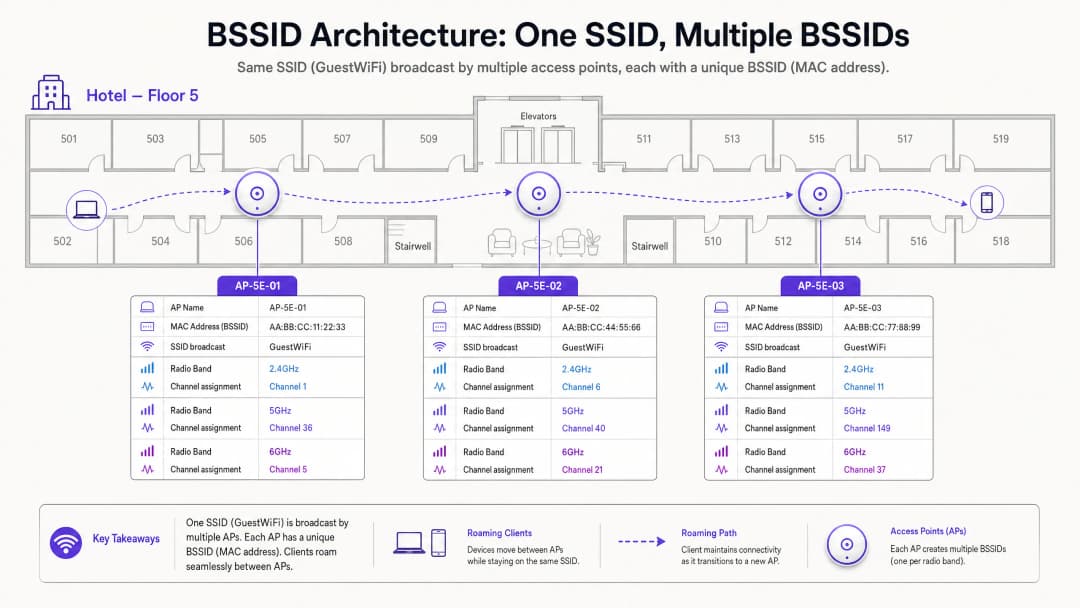
This distinction has significant operational implications. When you are troubleshooting a roaming complaint, you are not investigating the SSID - you are investigating BSSID transitions. Client-side diagnostic tools such as wpa_cli on Linux or the macOS Wireless Diagnostics utility will reveal the specific BSSID (MAC address) that a device is associated with, along with the channel and RSSI.
Roaming Mechanisms: Who is Really in Control?
This is the most misunderstood aspect of enterprise wireless architecture. The 802.11 standard leaves the roaming decision entirely up to the client device. The network infrastructure cannot force a client to roam. It can only influence the conditions that make roaming more or less likely.
A client device evaluates its current BSSID's Received Signal Strength Indicator (RSSI) and Signal-to-Noise Ratio (SNR) against neighboring BSSIDs. When the current BSSID drops below a device-specific threshold - typically around -70 dBm for Apple iOS devices and -75 dBm for many Android devices - the client initiates a scan for a better BSSID by broadcasting probe requests. Nearby access points respond with probe responses. The client evaluates these responses and initiates an 802.11 authentication and re-association with the selected BSSID.
If channel planning is poor, the client may experience adjacent-channel interference, which corrupts the beacon frames of neighboring BSSIDs. This leads to the "sticky client" phenomenon - a device clings to a weak, distant BSSID because it cannot clearly hear the stronger, closer alternative. The result is degraded throughput, dropped VoIP calls, and failed application sessions.
Channel Selection: The RF Architecture Foundation
2.4 GHz Limitations
The 2.4 GHz band spans 83.5 MHz of spectrum from 2.400 GHz to 2.4835 GHz. Each 802.11 channel is 20 MHz wide. Due to the 5 MHz spacing between channel center frequencies, significant overlap occurs between adjacent channels. In the 2.4 GHz band, only channels 1, 6, and 11 are non-overlapping.
Using any channel other than 1, 6, or 11 in the 2.4 GHz band creates adjacent-channel interference (ACI). ACI is demonstrably worse than co-channel interference (CCI) because it completely corrupts data packets, necessitating retransmissions. CCI, on the other hand, forces devices to share airtime cooperatively via CSMA/CA, which reduces throughput but does not corrupt packets. The rule is absolute: 2.4 GHz deployments must only use channels 1, 6, and 11.

For a broader understanding of how frequency bands interact in modern enterprise environments, see our guide WiFi Frequencies: A Guide to WiFi Frequencies in 2026.
5 GHz Opportunities and DFS Complications
The 5 GHz band offers significantly more spectrum. In the US, up to 25 non-overlapping 20 MHz channels are available across UNII-1 (5.150-5.250 GHz), UNII-2A (5.250-5.350 GHz), UNII-2C (5.470-5.725 GHz), and UNII-3 (5.725-5.850 GHz).
However, UNII-2A and UNII-2C channels fall within the DFS (Dynamic Frequency Selection) range. These channels are shared with weather radar, military radar, and air traffic control systems. If an access point detects a radar pulse on a DFS channel, it must immediately vacate the channel and remain silent on it for 30 minutes. This is a regulatory mandate under ETSI EN 301 893 in Europe and FCC Part 15 in the US.
For venues near airports, military installations, or weather stations - which are common in Hospitality and Transport deployments - DFS events can occur multiple times a day, leading to unexpected AP channel changes and client disconnections.
Dynamic Channel Assignment (DCA)
Modern enterprise wireless LAN controllers address channel management through Dynamic Channel Assignment (DCA) algorithms. These algorithms continuously evaluate:
| Metric | Description | Impact |
|---|---|---|
| Channel Utilization | Percentage of time the medium is busy | High utilization triggers consideration of a channel change |
| Noise Floor | Non-802.11 RF interference (Bluetooth, microwaves, etc.) | An elevated noise floor reduces effective SNR |
| Neighbor AP RSSI | Signal strength of co-channel and adjacent-channel APs | High overlap triggers channel rebalancing |
| DFS Event | Radar detection on the current channel | Mandatory immediate channel change |
While DCA is essential for maintaining a healthy RF environment, overly aggressive algorithm settings introduce network instability. Every time an AP changes channel, all connected clients are temporarily disconnected and must re-associate. In a conference center during a keynote, or on a Retail sales floor during peak business hours, this is operationally unacceptable.
Recommended approach is to configure DCA to run on a scheduled basis - typically during an overnight maintenance window - with an unscheduled change trigger threshold of 30% or higher interference. Mandatory DFS radar evasion events are the sole exception to this scheduling discipline.
Got questions about your specific setup?
Our team works with venue operators, IT managers, and network engineers across 80,000 venues. Book a 20-minute call and we will show you how others like you solved it.
Implementation Guide
The following vendor-neutral implementation steps are applicable to enterprise deployments across Hospitality, Retail, Healthcare, and public-sector environments.
Step 1 - Disable legacy data rates. Remove 802.11b data rates (1, 2, 5.5, and 11 Mbps) from all access point radio profiles. These legacy rates consume disproportionate airtime and are a primary driver of sticky client behavior. When disabled, the minimum effective connection rate increases, forcing clients to reach their roaming threshold at the correct physical location. Step 2 - Reduce AP transmit power. Running APs at maximum transmit power (20 dBm) creates oversized cells and inhibits proper BSSID roaming. Reduce 2.4 GHz transmit power to 8-12 dBm and 5 GHz transmit power to 12-17 dBm, which should be calibrated to match the transmit power of the weakest client device in your environment.
Step 3 - Limit channel width. In high-density environments, restrict 5 GHz channels to 20 MHz. While 40 MHz and 80 MHz channel bonding increases theoretical single-device throughput, it reduces the number of available non-overlapping channels and raises the noise floor, leading to severe CCI in dense deployments.
Step 4 - Configure the DCA maintenance window. Set your controller's DCA algorithm to execute during an overnight maintenance window. Configure a 30% interference threshold for unscheduled triggers. This maintains RF hygiene while preventing disruptive channel changes during operational hours.
Step 5 - Plan a DFS fallback strategy. For venues with known radar proximity, exclude DFS channels from the DCA pool for mission-critical APs. Rely on non-DFS channels in UNII-1 (36, 40, 44, 48) and UNII-3 (149, 153, 157, 161, 165) as the primary channel plan. For guidance on broader network access control modernization, see La lista de verificación para migrar de NAC heredado a NAC nativo de la nube.
Step 6 - Enable band steering. Configure band steering to push dual-band capable clients to the 5 GHz band, freeing up the 2.4 GHz spectrum for legacy devices and IoT equipment. For context on IoT and BLE co-existence in enterprise environments, see BLE Low Energy Explained for Enterprise.
-
Best Practices
The following best practices are aligned with IEEE 802.11 standards, WiFi Alliance certification requirements, and vendor-neutral enterprise deployment guidelines.
Minimum RSSI Threshold: Configure access points to reject associations from clients with an RSSI below -80 dBm. This prevents weak clients from associating with distant APs and consuming airtime at low data rates. Most enterprise controllers express this as a "minimum RSSI" or "client exclusion" threshold.
802.11r Fast BSS Transition: Enable 802.11r (Fast BSS Transition) on all SSIDs supporting voice or real-time applications. This reduces roaming handoff time from 50-200 ms (standard re-association) to under 50 ms, preventing dropped VoIP calls during BSSID transitions.
802.11k and 802.11v Neighbor Reporting: Enable 802.11k (Radio Resource Management) and 802.11v (BSS Transition Management) to provide clients with neighbor AP lists and transition recommendations. Although the client still makes the final roaming decision, these protocols provide it with the necessary information to make faster, more informed choices.
WPA3 and OWE: For guest networks, deploy WPA3-SAE or Opportunistic Wireless Encryption (OWE) to provide per-session encryption without requiring a password. This aligns with CCPA/CPRA data protection obligations for guest data in transit and is a PCI DSS requirement for any network segment touching cardholder data.
Regular RF Audits: Conduct a passive RF survey every 12 months or after any significant physical changes to the venue (new partitions, equipment installation, furniture rearrangement). Physical changes alter RF propagation and can invalidate your channel plan.
Troubleshooting and Risk Mitigation
The DFS Trap
In hospitality deployments near airports or weather stations, DFS events are a common and underestimated risk. When an AP detects radar on a DFS channel, it must immediately vacate the channel. If the fallback channel is statically assigned to an already-congested frequency, the AP will trigger a cascade of CCI across adjacent APs.
Mitigation: Maintain a dynamic list of safe fallback channels within your DCA configuration. Consider excluding DFS channels entirely on APs serving mission-critical areas such as hotel lobbies, conference stages, or retail point-of-sale zones.
The High-Power Trap
Counter-intuitively, running APs at maximum transmit power is one of the most common causes of poor wireless performance. High-power APs create large cells with significant overlap, causing CCI and preventing clients from roaming to the nearest AP.
Mitigation: Implement Transmit Power Control (TPC) and calibrate AP power to create cells that overlap by approximately 15-20% at the -67 dBm contour line. This provides seamless coverage without excessive interference.
The Wide Channel Trap
In dense environments, 80 MHz or 160 MHz channel configurations are often recommended by vendors to maximize throughput benchmarks. In reality, these reduce the number of available non-overlapping channels in the 5 GHz band to 2-3, guaranteeing severe CCI in any deployment with more than a handful of APs.
Mitigation: Restrict channel width to 20 MHz in high-density environments. Reserve 40 MHz or 80 MHz configurations for low-density areas with significant physical separation between APs.
ROI and Business Impact
A meticulously planned RF environment has a direct and measurable impact on business outcomes across all venue types.
Guest Satisfaction and Revenue: In hospitality environments, WiFi quality consistently ranks among the top three factors in guest satisfaction surveys. Seamless BSSID roaming prevents dropped video calls, application timeouts, and streaming interruptions. For hotel operators, this directly impacts review scores and repeat booking rates.
Analytics Accuracy: Purple's WiFi Analytics platform relies on consistent client BSSID association to generate accurate footfall counts, dwell time metrics, and zone-level heatmaps. If clients constantly drop connections due to channel interference, the underlying association data becomes fragmented and unreliable. A stable RF environment is not just a performance requirement - it is a data quality requirement.
Operational Efficiency: A well-coordinated channel plan and roaming configuration significantly reduce the volume of helpdesk tickets related to "slow WiFi" or "keeps disconnecting." In large venue deployments, this can represent a measurable reduction in Tier-1 support costs. For guidance on optimizing office-scale deployments, see Office WiFi: Optimize Your Modern Office WiFi Network.
Compliance Posture: Proper channel management and encryption standards (WPA3, 802.1X) directly support PCI DSS compliance for retail and hospitality operators, and CCPA/CPRA compliance for any organization processing personal data via guest WiFi. A documented RF audit trail also supports ISO 27001 certification requirements.
Listen to the executive briefing podcast above for a 10-minute consultant-style walkthrough of BSSID architecture and channel selection strategies.
Key Definitions
BSSID (Basic Service Set Identifier)
The MAC address of the specific radio interface on an access point broadcasting an SSID. In a multi-AP deployment, each radio presents a unique BSSID, even when all APs broadcast the same SSID.
IT teams encounter BSSIDs when troubleshooting roaming failures, analyzing client association logs, or interpreting WiFi analytics data. A client's BSSID association history reveals its physical movement path through a venue.
SSID (Service Set Identifier)
The human-readable network name broadcasted to end users (e.g., 'Purple_Guest'). A single SSID is typically supported by hundreds of underlying BSSIDs in an enterprise deployment.
Users interact with SSIDs; network engineers troubleshoot BSSIDs. Conflating the two is the most common source of roaming misdiagnosis.
Co-Channel Interference (CCI)
Interference caused when two or more access points operating on the exact same frequency channel can hear each other's transmissions. CCI forces APs to share airtime via CSMA/CA.
CCI is manageable through cell size reduction (transmit power control). It degrades throughput proportionally but does not corrupt packets.
Adjacent Channel Interference (ACI)
Interference caused when APs operate on overlapping but different frequency channels (e.g., channels 1 and 3 in 2.4 GHz). ACI corrupts data transmissions, requiring retransmissions.
ACI is categorically worse than CCI and must be eliminated through strict channel planning. In 2.4 GHz, using any channel other than 1, 6, or 11 creates ACI.
DFS (Dynamic Frequency Selection)
A regulatory requirement mandating that WiFi equipment detect radar systems on certain 5 GHz channels and immediately vacate to a non-radar channel. Governed by ETSI EN 301 893 in Europe and FCC Part 15 in the US.
DFS events cause unpredictable AP channel changes and client disconnections. Venues near airports, weather stations, or military installations are particularly susceptible.
RSSI (Received Signal Strength Indicator)
A measurement of the power level of a received radio signal, typically expressed in negative dBm (e.g., -65 dBm). Higher absolute values (closer to 0) indicate stronger signals.
RSSI is the primary metric client devices use to evaluate BSSID quality and trigger roaming decisions. A common roaming threshold is -70 dBm.
SNR (Signal-to-Noise Ratio)
The difference in dB between the received signal strength and the background RF noise floor. A higher SNR enables higher-order modulation schemes (e.g., 1024-QAM) and greater throughput.
SNR is a more reliable performance indicator than raw RSSI. A strong signal (-60 dBm) in a high-noise environment (-80 dBm noise floor) yields only 20 dB SNR, which limits throughput significantly.
DCA (Dynamic Channel Assignment)
An automated algorithm used by wireless LAN controllers to assign and periodically reassign channels to access points based on current RF conditions, including utilization, noise floor, and neighbor interference.
DCA must be tuned to prevent excessive channel changes during operational hours. Overly aggressive DCA settings cause client disconnections across the entire deployment.
Sticky Client
A client device that maintains association with a distant, weak BSSID rather than roaming to a closer, stronger access point. Typically caused by oversized AP cells (high transmit power) or enabled legacy data rates.
Sticky clients are the most common cause of poor WiFi performance complaints in enterprise venues. They consume disproportionate airtime at low data rates, degrading performance for all users on the channel.
Worked Examples
A 400-room luxury hotel is experiencing persistent complaints of dropped VoIP calls when staff move between the lobby and the conference center. The network uses a single SSID across 150 access points, all running at 20 dBm transmit power with legacy data rates enabled.
Phase 1 - Diagnosis: Conducted a packet capture using Wireshark on the affected corridor. Analysis confirmed devices were holding onto the lobby AP's BSSID until signal degraded to -85 dBm - well past the point where the conference center AP was available at -62 dBm. Root cause: oversized cells and legacy data rates enabling low-rate associations at distance.
Phase 2 - Remediation:
- Disabled 802.11b legacy data rates (1, 2, 5.5, 11 Mbps) across all AP radio profiles.
- Reduced 2.4 GHz transmit power from 20 dBm to 11 dBm on lobby and corridor APs.
- Reduced 5 GHz transmit power from 20 dBm to 15 dBm.
- Enabled 802.11r Fast BSS Transition on the staff SSID.
- Verified adjacent APs in the transition zone were on non-overlapping channels (1 and 6 in 2.4 GHz; 36 and 40 in 5 GHz).
Phase 3 - Validation: Re-ran packet capture post-change. Devices now roamed at -68 dBm, well within the VoIP quality threshold. Call drop rate reduced to zero in the affected corridor.
A retail chain has deployed new Wi-Fi 6 access points across a dense shopping center with 40 retail units. Despite strong signal strength readings, customers and staff report massive latency and poor throughput, particularly in the 2.4 GHz band.
Phase 1 - Diagnosis: RF spectrum analysis using a dedicated spectrum analyzer revealed severe co-channel and adjacent channel interference across the 2.4 GHz band. Investigation of the controller configuration revealed the DCA algorithm had assigned channels 1, 4, 7, and 11 across the deployment - a four-channel plan that introduces adjacent channel interference between channels 1 and 4, and between 7 and 11.
Phase 2 - Remediation:
- Reconfigured the 2.4 GHz DCA profile to strictly use channels 1, 6, and 11 only.
- Enabled Band Steering to push 5 GHz-capable clients (estimated 85% of devices) away from the congested 2.4 GHz spectrum.
- Reduced 2.4 GHz transmit power to 10 dBm to shrink cell sizes and reduce CCI between adjacent units.
- Restricted 5 GHz channel width to 20 MHz to maximize channel reuse across the dense deployment.
Phase 3 - Validation: Post-change spectrum analysis confirmed elimination of adjacent channel interference. Average 2.4 GHz latency reduced from 280 ms to 18 ms. Staff device throughput increased from 2 Mbps to 24 Mbps average.
Practice Questions
Q1. You are deploying a high-density WiFi network in a 50,000-seat stadium. The vendor's pre-sales engineer recommends using 80 MHz channels on the 5 GHz band to maximize theoretical throughput for the high volume of concurrent users. Do you accept this recommendation?
Hint: Consider how many non-overlapping 80 MHz channels are available in the 5 GHz band, and how that impacts co-channel interference when hundreds of APs are deployed in close physical proximity.
View model answer
No. In a high-density environment, using 80 MHz channels reduces the available non-overlapping spectrum to approximately 5 - 6 channels in the 5 GHz band. With hundreds of APs in a stadium, this guarantees severe co-channel interference as dozens of APs compete for the same channels. The correct approach is to mandate 20 MHz channel widths to maximize channel reuse. While individual device throughput is theoretically lower, the aggregate network capacity and per-user experience will be significantly better due to reduced CCI.
Q2. Your hospital IT team reports that roaming works correctly for laptops and modern smartphones, but older VoIP communication badges worn by nursing staff constantly drop calls when moving down corridors, despite showing strong signal strength on their display.
Hint: Consider who makes the roaming decision, what metrics they use, and what specific characteristics of legacy devices might cause them to roam later than modern devices.
View model answer
The issue is a classic "sticky client" problem specific to legacy devices. The VoIP badges are holding onto a distant BSSID because: (1) legacy data rates (1 - 11 Mbps) are enabled, allowing the badge to maintain a connection at very low rates over a long distance; and (2) AP transmit power is likely high, creating large cells that the badge can still "hear" at -80 dBm. To fix this, disable legacy 802.11b data rates across all AP profiles and reduce AP transmit power to 10 - 12 dBm. Additionally, enable 802.11r Fast BSS Transition on the staff SSID to reduce the handoff latency below the VoIP packet loss threshold.
Q3. A hotel located 1.5 miles from a regional airport is experiencing random, widespread AP channel changes and client disconnections every afternoon between 2:00 PM and 5:00 PM. The events are not correlated with peak usage. What is the likely cause and how do you resolve it?
Hint: Consider what shared spectrum exists in the 5 GHz band and what external systems might be active in the afternoon near an airport.
View model answer
The APs are almost certainly operating on DFS (Dynamic Frequency Selection) channels and are detecting radar pulses from the nearby airport's approach radar systems, which are typically active during afternoon peak arrival periods. When radar is detected, the AP must immediately vacate the channel under FCC regulations. The solution is to exclude all DFS channels (UNII-2A: 52-64; UNII-2C: 100-140) from the DCA channel pool for this venue, relying exclusively on UNII-1 (36, 40, 44, 48) and UNII-3 (149, 153, 157, 161, 165) non-DFS channels. This eliminates radar-triggered channel changes entirely.
Frequently asked questions
What is the fundamental difference between an SSID and a BSSID in enterprise WiFi?
An SSID (Service Set Identifier) is the human-readable network name broadcast to end users, such as Guest_WiFi. A BSSID (Basic Service Set Identifier) is the 48-bit MAC address of the specific radio interface on an access point transmitting that SSID. In enterprise deployments with multiple APs and radios, a single SSID is supported by hundreds of distinct BSSIDs across the physical venue.
How does broadcasting multiple SSIDs increase BSSID beacon overhead on a channel?
Each SSID broadcast on an access point radio requires its own unique virtual BSSID and transmits periodic management beacon frames, typically 10 times per second (every 102.4ms) at the lowest basic data rate (such as 1 Mbps or 6 Mbps). Broadcasting 4 or more SSIDs on the same channel can consume 15% to 30% of total available airtime purely in beacon overhead before any client data is transmitted.
How do dynamic channel assignment (DCA) and Radio Resource Management (RRM) algorithms work?
Dynamic Channel Assignment (DCA) algorithms continuously monitor RF metrics, including co-channel interference (CCI), adjacent channel interference (ACI), physical noise floor, non-WiFi channel utilization, and radar signals (DFS). The algorithm models global network cost across neighboring access points and schedules channel reassignments to minimize overall interference and maximize channel separation.
Why is adjacent channel interference (ACI) more damaging than co-channel interference (CCI)?
Under co-channel interference (CCI), access points and clients operate on the same frequency and participate in CSMA/CA clear-channel assessment (CCA), sharing airtime cooperatively. Under adjacent channel interference (ACI), overlapping channel sidebands corrupt packet preambles and payload data without triggering CSMA/CA backoff, causing uncoordinated packet collisions and heavy frame retransmissions.
How does BSSID stability impact WiFi foot traffic tracking and venue location analytics?
Location analytics engines, such as Purple, correlate client probe requests and association events with physical BSSID coordinates to calculate dwell time, zone transitions, and visitor journeys. If dynamic channel selection or power management causes excessive BSSID flapping, client association logs degrade, introducing spatial jitter into venue analytics models.
Continue reading in this series
Understanding RSSI and Signal Strength for Optimal Channel Planning
This guide provides a comprehensive technical deep-dive into RSSI, Signal-to-Noise Ratio (SNR), and RF propagation principles for optimal channel planning. It equips IT managers, network architects, and venue operations directors with actionable strategies to mitigate Co-Channel and Adjacent Channel Interference, optimize AP placement, and leverage analytics for measurable business impact across hospitality, retail, and public-sector environments.
20MHz vs 40MHz vs 80MHz: Which Channel Width Should You Use?
This guide provides a definitive, vendor-neutral technical reference for IT managers, network architects, and venue operations directors on selecting the correct WiFi channel width - 20MHz, 40MHz, or 80MHz - across enterprise deployments in hospitality, retail, events, and public-sector environments. It covers the underlying IEEE 802.11 mechanics, real-world capacity trade-offs, and step-by-step deployment guidance to help teams make the right call this quarter. Understanding channel width selection is one of the highest-leverage decisions in any wireless LAN design, directly impacting throughput, interference, client density support, and the reliability of guest-facing services.
WiFi 6 vs WiFi 5: Does it Solve Channel Interference?
This guide provides a technical deep dive into how WiFi 6 (802.11ax) addresses channel interference in high-density enterprise environments through OFDMA and BSS Coloring. It equips IT managers, network architects, and CTOs with actionable deployment strategies, real-world case studies from hospitality and healthcare, and a framework for evaluating the ROI of infrastructure upgrades in venues where wireless performance is business-critical.
Got questions about your specific setup?
Our team works with venue operators, IT managers, and network engineers across 80,000 venues. Book a 20-minute call and we will show you how others like you solved it.